COMPUTER-FREE 4x6 PRINTS
HiTi 640PS -- Home
Drugstore Reloaded
 By MIKE PASINI
Editor
The Imaging Resource Digital Photography Newsletter
Review Date: June 2003
When it comes to sequels featuring impossible acrobatics, great hacking and spectacular special effects, the HiTi 640PS does not take a back seat to The Matrix Reloaded.
|
C O N T E N T S |
In our recent review of the 630PS, we suggested it eliminated the need for a computer to enjoy digital photography. And cut the costs of a 4x6 dye-sub print to just 40 cents a print. But we were disappointed the built-in card reader only read CompactFlash and SmartMedia cards.
NEW & IMPROVED | Back to Contents
Just you wait, Hi-Touch Imaging (http://www.imaging-resource.com/cgi-bin/nl/pl.cgi?hti) told us at the time. And we didn't have to wait long. The just-released 640PS updates the 630PS's card reader to handle CompactFlash, SmartMedia, Secure Digital, Memory Stick, MultiMedia Card and IBM's MicroDrives. The space-age design has been updated from the "air-conditioner" look of the 630PS to a gun-metal blue with a huggably curvey design that's just 6mm wider.
The new card reader is one reason the price has increased to $299.99, but you also get a bump in speed and resolution. Hi-Touch says the 640PS takes 75 seconds to print where the 630PS took 100. And the 630PS's 300-dpi resolution (among the highest in a consumer dye-sub anyway) has been increased to 403. Hi-Touch claims 403 dpi is equivalent to a 6400-dpi inkjet.
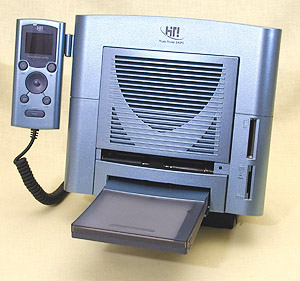 |
| The HiTi 640PS |
While the processor on the 640PS is the same as that on the 630PS, the 640PS increases flash memory (for firmware) from 512K to 1-MB and DRAM from 512K to 1-MB.
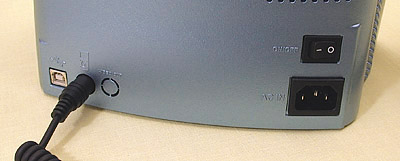 |
| The Base USB port (white), controller, power cable, power switch |
One of the slickest things about this new printer, though, is the price drop it brings to its predecessor. You can now grab a 630PS for just $189.99. Hi-Touch told us they plan to continue to manufacture the 630PS "for the foreseeable future."
And you don't have to worry about media, since the two printers use exactly the same paper and film cassette. Think of the 640PS as the deluxe version of the 630PS, rather than as its replacement.
WISH LIST | Back to Contents
This greatly pares down the wish list, but there's still one thing we'd really like to see Hi-Touch put in the box. A Macintosh driver. Or two -- one for OS 9 and one for OS X.
Hi-Touch planned to outsource the project, they told us when we reviewed the 630PS. And they've made some progress, we're pleased to note, releasing beta OS X drivers (version 10.2 required) for the 640 line and the 630PS (but not the 630PL). You can download them at http://www.hitouchimaging.com/download_utilities.asp?lid=480 after signing in.
We noted one glitch during the installation on our OS X system. When we selected our hard disk as the destination, the installer said it couldn't write to it. We used the Go Back button to return one screen and then the Continue button to try it again and all was well.
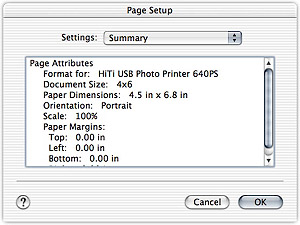 |
| Print Settings Summary Nothing fancy (yet) |
Hi-Touch told us not to expect more than simple printing from the beta drivers. But simple printing was just fine with us.
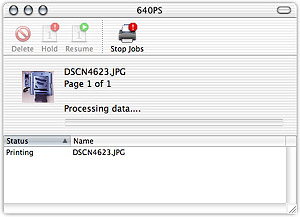 |
| In Action on the Mac |
All we had to do, after installing the driver, was plug the USB cable into our Mac and we could print to the 640PS. The printer recognized it was tethered to a computer, the computer knew it was out there and once we set the resolution of our image to fit the 4x6 page size, we were in business.
ABOUT HI-TOUCH | Back to Contents
Hi-Touch Imaging Technologies (http://www.hitouchimaging.com) was established in Feb. 2001 in Taiwan. With 350 employees, their focus is in hardware ASIC design, moving mechanisms, firmware/driver/application development and color science. Every one of those talents is evident in the 640PS.
Since the introduction of the 630PS, we've seen HiTi printers showing up all over the place from our local photo dealer to major online retailers. Hi-Touch clearly knows how to play the distribution game, too.
SYSTEM REQUIREMENTS | Back to Contents
If you do attach the 640PS to an optional computer <g>, it connects to a USB port (and supports USB 1.1). Drivers are provided for Windows 98/ME/2000/XP.
You'll need 64-MB RAM, 150-MB hard disk space and a Pentium PC to run HiTi's PhotoDesiree image editing software, included on the CD, which enhances and modifies images and can adjust individual color preferences for all prints.
FEATURES | Back to Contents
Available from camera dealers, the 640PS has a small footprint, an upright printer with two media slots and a detachable but cabled controller with a color LCD. Cut sheet paper, perforated to 4x6 size, is fed into the straight-through paper path from a small, 25-sheet cassette. A power cable and USB cable round out the package.
 |
| The Controller |
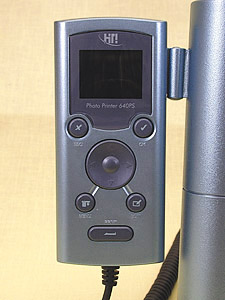
The controller's job is to tell the built-in processor what you want to do. It can print an index print of everything on your card (in several formats), ID photos, stickers and every image on the card unattended. And it even provides access to some minor image editing capabilities.
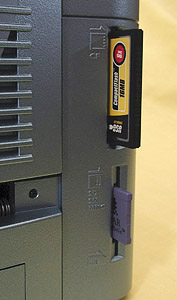
The two media slots accommodate CompactFlash, SmartMedia, Secure Digital, Memory Stick, MultiMedia Card and IBM MicroDrives.
 |
| New Card Reader |
The printer is Digital Print Order Format compatible, so if you tag images for printing in your DPOF-capable camera, the 640PS will know what to do with them.
Printed documentation is a little sparse but we found the PDF included on the CD to be everything we needed and the Web site (http://www.hitouchimaging.com) very helpful as well.
The sample print kit that ships with the printer includes eight sheets of photo paper, one sheet of 4x4 sticker paper, one sheet of 4/2/4 sticker paper and one ribbon cartridge good for all 10 prints.
THE DYE SUB DIFFERENCE | Back to Contents
Dye sub printing is continuous tone printing (think real prints), not screen printing (as on an inkjet). It uses a heating element to heat dye impregnated in a ribbon to over 350 degrees, at which point it turns into a gas and migrates into the surface of the specially coated photo paper. Temperature controls how much dye transfers at any point on the paper.
In addition to yellow, cyan and magenta dyes, the ribbon contains a clear coating. Hi-Touch's Magic Coating Technology protects the dyes from UV light and waterproofs them, sealing the dyes into the paper.
The paper is sold in kits that include 50 sheets of 4x6 paper and a new ribbon for $19.95. Kits, available either directly from the company or through your camera dealer, include dye-cut sticker paper for all the various sizes supported by the print driver as well as combinations of them (http://www.hitouchimaging.com/consumable.asp?lid=350).
With no messy inks, dye sub printing is very clean. Once in a while, you'll want to clean paper dust off the feed transport rollers inside the printer, but that's it. A $9.99 cleaning kit is available to do that (http://www.hitishop.com/accessory1.html). Otherwise, this is as clean and simple -- and beautiful -- as photo printing gets.
TWO MODES | Back to Contents
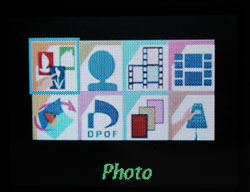
If you don't attach a USB cable to the printer's USB port (or your computer is off), the 640PS operates in standalone mode. The LCD on the controller displays a color menu of icons.
But if the printer senses a computer at the other end of the USB cable, it will display "PC Mode" on its LCD and behave like any other USB printer.
WHAT THE CONTROLLER DOES | Back to Contents
The six-button controller with a 1.6-inch color LCD provides a computer-free interface to the printer's functions.
The Main Page displays a set of eight icons. On the top row are Photo, ID Photo, Index and Sticker. Along the bottom are Quick Photo, DPOF, Print All and Setup. A four-arrowed toggle button navigates the options and an OK button confirms your choice.
 |  | |
| The Main Menu | Printer Menu |
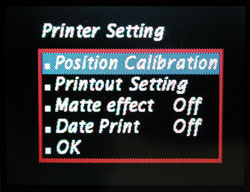
Setup has a few new wrinkles:
- A Printout Setting option to make persistent changes to the brightness, contrast and color cast in the printer. After you correct a representative image from your storage card (see the Editing Options illustration below), the changes are saved in the printer, making it possible to calibrate the device to your environment.
- A Matte Effect option to simulate a matte rather than glossy finish;
- A Date Print option to overlay the date the image was captured on the print
Select Photo to scroll through the thumbnails of the JPEG images on your storage card one at a time. When you see one you want to print, press OK. Use the Up or Down arrow key to set the number of copies to print and press OK again. Continue through the card. When you've finished, press Print to batch print the set.
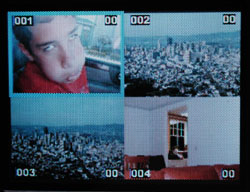 | 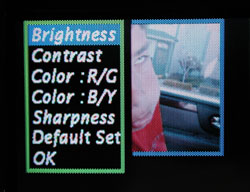 | |
| Thumbnails | Editing Options |
While previewing your images, you can press the Edit button. Functions available include Move, Rotate (not really necessary), Resize and Copies.
You can also Enhance the image, changing its Brightness, Contrast, Color R/G (hue shift from red to green) and Color B/Y (blue/yellow hue shift).
ID Photo is a pair of special ID photo formats that use matching die-cut photo paper. You can print 12 one-inch ID photos or 9 two-inch ID photos on a 4x6 sheet. An Index print can be formatted into 6x5 8x7 or 5x4 columns/rows, providing a handy contact sheet of your card contents. There are also two Sticker formats, 4x4 and 4/2/4.
Quick Photo simplifies printing a single image. Just select the photo and press OK to send it to the printer.
Press Print after selecting DPOF to confirm and print the DPOF order.
Similarly, press Print after selecting Print All to confirm and start printing.
PUTTING IT TO WORK | Back to Contents
True confession. We just unplugged the 630PS, plugged in the 640PS, installed its drivers (despite XP's help) and went right to work. Our original enthusiasm (http://www.imaging-resource.com/PRINT/HT630PS/HT6.HTM) for the HiTi concept was confirmed.
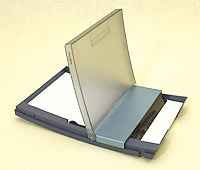 |
| The Cassette Holds about 25 sheets |
This is just a fun way to get prints. Pop your card into the printer and Print All. They get through the printer without paper jams, stacking on top of the cassette, so you don't have to attend the operation. Get a sandwich, have an Odwalla, twist off a top, read the latest Imaging Resource newsletter and when you come back you'll have nicer prints faster than any drugstore can deliver.
Without, we repeat, turning on a computer.
Which, as we thought about it, has another advantage. We happened to have a couple of guests recently who brought their digicam to shoot the sights here. After pointing out the on/off switch on the back of the printer, we invited Carolyn to print whatever she liked.
All she had to do was insert her SD card into the reader, navigate the menus and get prints. No need to move her images onto our computer first and print from some application she may not have used before.
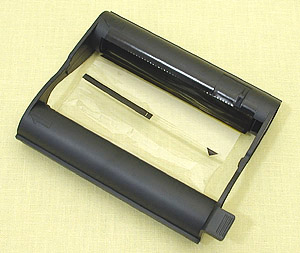 |
| The Ribbon |
And she had a ball. She observed (astutely) that the icons for the card reader would be clearer if embossed on the side of the printer, showing the correct orientation. And she managed to load a new cartridge with no trouble. When she printed a digitally zoomed image of the famed sea lions lounging at Pier 39, she even ventured to use the onboard sharpening to enhance the image.
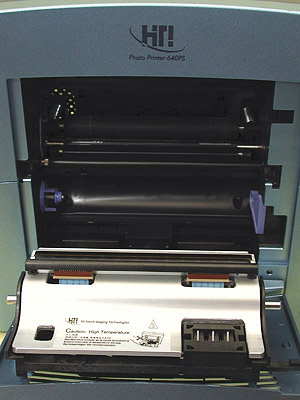 |
| Inside the Beast Carolyn had no trouble changing the ribbon |
If you have guests every now and then, this makes a great treat. At home print processing. It was harder to explain how to make coffee.
CONCLUSION | Back to Contents
There's nothing flimsy about these printers -- or the company, for that matter. We really like what they're doing. And at these prices, they're making the quality of dye-sub printing irresistible.
Inkjets are marvelous multipurpose printers. They don't dent your wallet until you start buying glossy paper (much of which gets trimmed away) and ink cartridges. They also require rather frequent use to avoid head clogging. And if you buy third party supplies you may void the manufacturer's warranty.
But two other disadvantages to inkjet printing discourage its use. Color matching is unreliable (just try changing paper brands some time) and the process is messy.
Dye sub printing locks you into one supplier for the ribbons and paper (which only comes in one size), but when that supplier is making 40 cent 4x6 prints achievable, who cares? The quality is repeatable and reliable. And the output is clean. It's not the closest thing to drugstore prints, it surpasses them.
And best of all, with either the 630PS or its deluxe sequel the 640PS, you don't have to turn on the computer to get prints.