Canon PowerShot A50Canon's "Digital ELPHs" goes megapixel plus - great picture quality, superb portability!<<Executive Overview :(Previous) | (Next): Viewfinder>> Page 3:DesignReview First Posted: 7/10/1999 |
Design
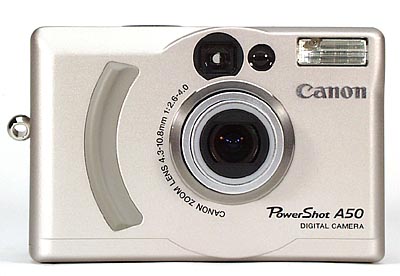
At only 4.1 x 2.7 x 1.5 inches (103 x 68 x 37.3 mm) and 9.2 ounces (260g) without
the battery pack or 11.2 ounces (344g) with it, the PowerShot A50 is one of
the most compact cameras we've tested to date. It has a rugged all-metal (aluminum)
case, as well as a metal carrying-strap attachment, and a metal tripod socket.
Overall, the design conveys a feeling of solidity and quality. 
 One nice touch we particularly appreciated
was the automatic lens cover that slides shut over the telescoping zoom lens
when it retracts into the camera body as the A50 is shut down: No lost lens
caps, and no smudged/scratched lenses! (The photo at right shows the camera
front with the lens cover in place. The whole design is both very appealing,
and very conducive to just dropping in your pocket to bring along anywhere.
The compact flash card compartment is accessible from the side of the A50, meaning
you can get to it even while the camera is mounted on a tripod. As is common
though, the battery compartment opens from the bottom, requiring the camera
to be removed from a tripod when the battery needs changing. (See the later
section on power, for a description of the optional power adapter.)
One nice touch we particularly appreciated
was the automatic lens cover that slides shut over the telescoping zoom lens
when it retracts into the camera body as the A50 is shut down: No lost lens
caps, and no smudged/scratched lenses! (The photo at right shows the camera
front with the lens cover in place. The whole design is both very appealing,
and very conducive to just dropping in your pocket to bring along anywhere.
The compact flash card compartment is accessible from the side of the A50, meaning
you can get to it even while the camera is mounted on a tripod. As is common
though, the battery compartment opens from the bottom, requiring the camera
to be removed from a tripod when the battery needs changing. (See the later
section on power, for a description of the optional power adapter.)
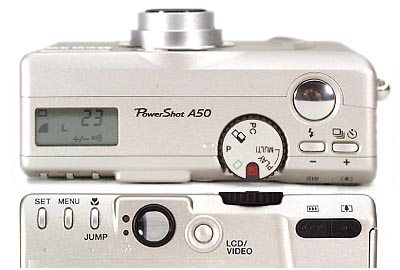
Control layout is fairly conventional, with most operating controls accessible
to the right hand, although a two-handed approach is needed to navigate the
LCD menu system. As we'll describe in greater depth later, the PowerShot A50
makes fairly extensive use of LCD menus for setting camera operating characteristics:
We'd found ourselves wishing for a little more control from the top-panel LCD
readout, without having to burrow into the LCD menus.
Despite its small size, we found the PowerShot A50 easy to operate, thanks
in part to the excellent ergonomics of the little raised pushbuttons Canon uses:
They're very easy to actuate, with a positive breakaway "click" action
when pressed. While we could operate the camera fairly easily with one hand,
its small size and fairly high density (weight to volume ratio) left us more
comfortable with a two-handed grip. Overall, we have a few minor quibbles about
the user-interface design, but found the overall design to be tremendously appealing:
This is a digital camera that even the non-gadget-freak members of your family
will appreciate!
Reader Comments! --> Visit our discussion forum for the Canon PowerShot A50!


Follow Imaging Resource: