Pentax *ist-DPentax's first d-SLR is a winner, with good color, low noise, and excellent "hand feel," all in a compact body.<<Executive Overview :(Previous) | (Next): Viewfinder>> Page 3:DesignReview First Posted: 03/30/2004 |
Design
Looking a great deal like a traditional Pentax 35mm SLR, the *ist D's 35mm styling should appeal to film enthusiasts who haven't made the switch to digital yet, or Pentax devotees who've been waiting for a digital SLR compatible with their Pentax lenses. Claimed by Pentax to be one of the smallest digital SLRs out on the market, the *ist D does indeed have a very compact body, which is also quite light weight. The *ist D features a stainless steel chassis for hidden strength, but has plastic outer body panels that keep the weight down to just 19.4 ounces (550 grams) without batteries, memory card or lens. Weight for shooting will change of course, with batteries and a lens, but the *ist D is still surprisingly light weight. (Weight with batteries and card is 24.7 ounces, or 701 grams.) The camera's compact case measures 5.1 x 3.7 x 2.4 inches (129 x 95 x 60 millimeters), which is a comfortable size for shooting and travel. A neck strap comes with the camera so you can throw it over a shoulder or keep it securely around your neck, but a small camera case is always a good idea for increased protection when traveling. The *ist D features a Pentax K lens mount, which hosts a wide range of Pentax lenses (another plus for Pentax devotees), and a 6.31-megapixel (6.1 effective) CCD that produces high resolution images with good color.
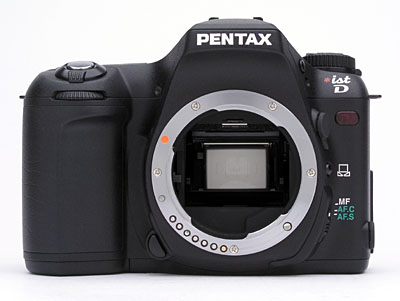
The front of the camera features the standard Pentax K lens mount with AF coupling. A lock button on the lower right side of the lens (when looking from the rear) unlocks the lens from the mount so that it can be turned and removed. On the left side of the lens are the self-timer LED, X-sync flash terminal, Manual White Balance button, and Focus mode switch. At the top of the large hand grip is the Tv dial (Pentax's term), which adjusts a variety of settings in conjunction with other camera controls, or the LCD menu system.

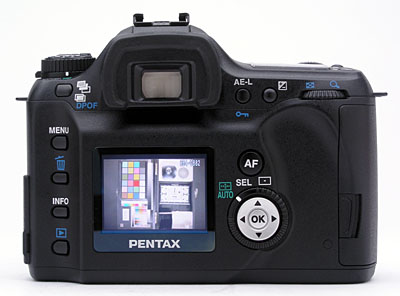
The hand grip side of the camera is populated by one of the neck strap eyelets, and the memory card compartment door. The hinged compartment door opens from the camera's rear panel with a spring-loaded locking latch, and swings out to reveal the memory card slot and small, black card eject button.
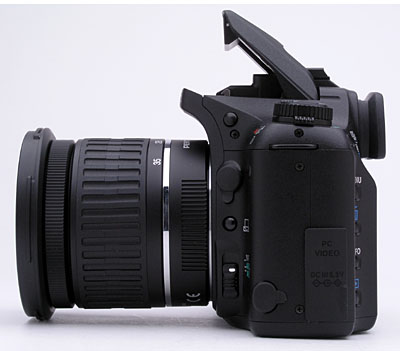
On the opposite side of the camera are the second neck strap eyelet, cable release socket, and PC/Video and DC In jacks. Both of the connector compartments are covered by flexible, rubbery flaps, which remain tethered to the camera. Also visible on this side of the camera is the pop-up flash release button, on the side of the flash compartment.

The top of the camera features the pop-up flash compartment, external flash hot shoe, and a small status display panel. To the left of the flash compartment is the Mode dial, which controls the camera's exposure mode and accesses a few exposure settings as well. On the right side are the Power switch, Shutter button, Green, Drive Mode, and Flash Mode buttons. A series of icons lines the bottom of the status display panel, indicating the available white balance modes. Also on top is a diopter adjustment slider for the optical viewfinder.
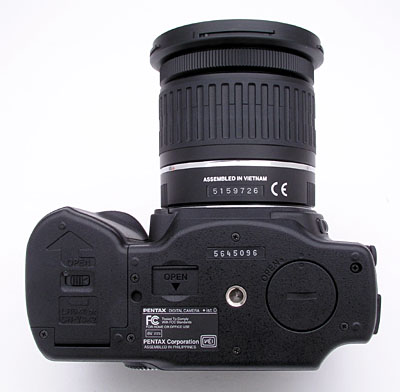
The *ist D's flat bottom panel holds the battery compartment, backup battery chamber, metal tripod mount, and a terminal for connecting an accessory battery grip. The battery compartment has a sliding switch that locks it into place, and is just far enough away from the tripod mount to allow quick battery changes while working on a tripod. The battery grip terminal has a sliding cover for protection, and lets you connect the battery handgrip unit, which is helpful for shooting vertically. The circular backup battery compartment cover has a slit for inserting a coin or flat head screwdriver tip for opening, and protects the backup CR2016 lithium battery.
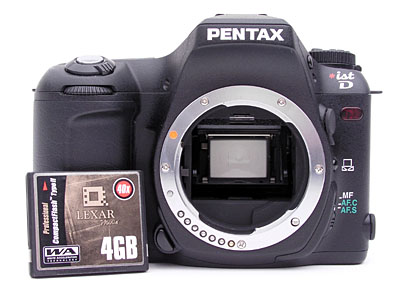
It's hard to get an idea of the scale of a camera from images of it shot in
isolation, so I shot the photo above, showing the *ist D with a CompactFlash
card in the frame as a size reference. - You can see from this image that
the *ist D is indeed very compact.
Reader Comments! --> Visit our discussion forum for the Pentax *ist-D!


Follow Imaging Resource: