Pentax K-7 Operation
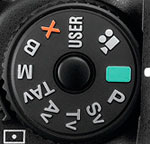 Like the K20D before it, operation of the Pentax K-7 digital SLR is fairly straightforward, but it's so packed with features and tuned with the experienced photographer in mind, you'll do better with the Pentax K-7 if you take time to read the manual and learn every little feature and function. The large Mode dial on top of the camera controls the main operating modes, and tells the story of the Pentax K-7's uniqueness. It has the usual Pentax prosumer SLR options for Green (Auto), Program, Sensitivity priority, Shutter priority, Aperture priority, Shutter and Aperture priority, Manual, Bulb, X-sync (flash) and User, but now includes a Movie setting. See the Modes & Menus tab for details on the various exposure modes.
Several of the Pentax K-7's control buttons perform multiple functions, which saves space and time. The e-dials for example, control a variety of settings when turned in combination with a press of a button, and the arrow keys of the Four-way arrow pad access shortcuts to common camera settings as well. The Pentax K-7's LCD menu system is straightforward, with four main menus accessible via a tabbed interface at the top of the screen. Considering the multi-functional controls and variety of menu options, it will probably take most users a little time with the manual to really get the gist of things, but operation becomes intuitive after that.
Top Panel Status Display
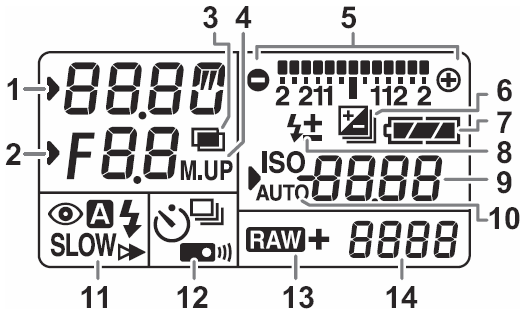
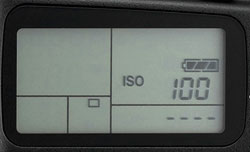 The Pentax K-7's monochrome LCD status display appears on the camera's top deck just behind the shutter button. There is a backlight, which is automatically activated whenever the K-7 performs exposure metering. (It can be turned-off in a Custom menu.) The LCD panel displays the Shutter Speed, Aperture, ISO, exposure mode, battery status, EV compensation, drive mode, and the estimated number of images available, varying depending on mode and buttons active.
See the complete list below (illustration courtesy of Pentax).
1 |
Shutter Speed
|
8 |
Flash Exposure Compensation
|
|
2
|
Aperture
|
9
|
ISO Sensitivity
|
|
3
|
Multiple Exposure
|
EV Compensation Value
|
|
|
4
|
Mirror Lock-up
|
10
|
ISO/ISO Auto Indicator
|
|
5
|
EV Bar
|
11
|
Flash Mode
|
|
Electronic Level
|
12
|
Drive Mode
|
|
|
6
|
EV Compensation Indicator
|
13
|
File Format
|
|
Exposure Bracketing Indicator
|
14
|
Remaining Image Storage Capacity
|
|
|
7
|
Battery Level Indicator
|
USB Mode
|
Main LCD
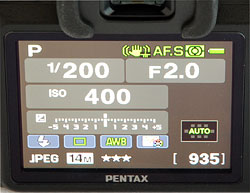 The Pentax K-7's main TFT color LCD monitor is used for status display, accessing menus, image review as well as image preview in Live View mode. This gorgeous LCD is the high resolution type found on other high-end cameras recently, with approximately 921,000 dots (640x480 RGB pixels), and also features a wide viewing angle. The LCD's brightness can be adjusted in 15 steps, and color can be adjusted in 15 steps on a 2-dimensional Green/Magenta vs Blue/Amber color grid for a total of 225 combinations. You can adjust the color while viewing a captured image in the background, useful for matching your computer monitor. You can also adjust the display color scheme, choosing from six presets, and set the text size, selecting between "Standard" and "Large" fonts.
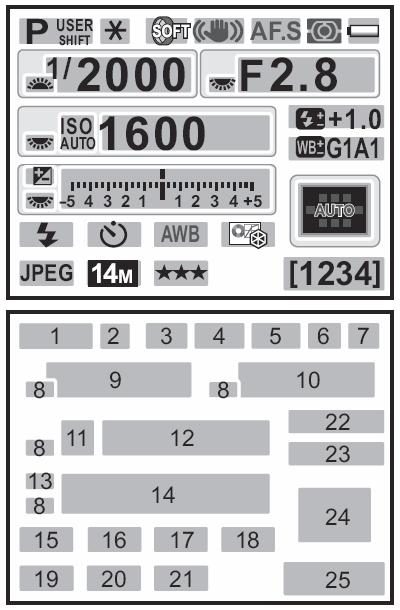
Status Display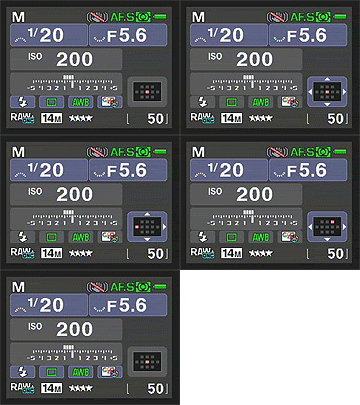 When you turn on the Pentax K-7, or change exposure modes, the main LCD displays a status screen by default, showing the current record mode settings. The display updates in real-time while adjustments are made. Both the Status and Control Panel displays automatically flip between landscape and portrait mode displays depending on the orientation of the camera. The Status display can be disabled in Record Menu 3.
See the illustration (courtesy of Pentax) and table below for detailed information:
1 |
Exposure Mode
|
14 |
EV Bar
|
|
2
|
AE Lock
|
15 |
Flash Mode
|
|
3
|
Interval Shooting / Multiple Exposure / Extended Bracketing / Digital Filter / HDR Capture
|
16 |
Drive Mode
|
|
4
|
Shake Reduction / Horizon Correction
|
17 |
White Balance
|
|
5
|
Focus Mode
|
18 |
Custom Image
|
|
6
|
Metering Mode
|
19
|
File Format
|
|
7
|
Battery Level
|
20
|
JPEG Recorded Pixels
|
8 |
E-dial Guide (front or rear)
|
21 |
JPEG Quality
|
9 |
Shutter Speed
|
22 |
Flash Exposure Compensation
|
10 |
Aperture
|
23 |
Adjust White Balance
|
11 |
ISO / ISO Auto
|
24 |
AF Point
|
12 |
Sensitivity
|
25 |
Remaining Image Storage Capacity
|
13 |
EV Compensation / Exposure Bracketing
|
16 |
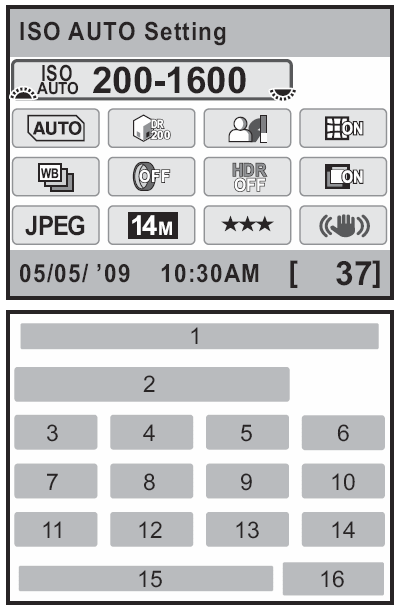
Control Panel Display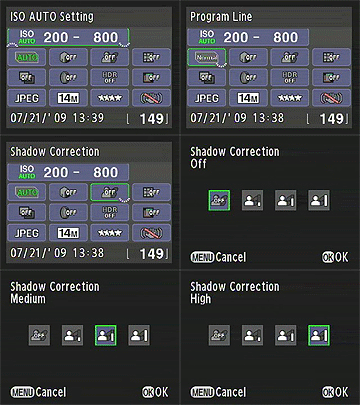 When the INFO button is pressed, the Status screen changes to a Control Panel display, allowing direct access to both commonly adjusted settings and some less commonly adjusted settings without the use of the menu system. The Control Panel display with disappear automatically after 30 seconds of non-use, reverting back to the Status display above (if enabled), or a blank screen.
See the illustration below (courtesy of Pentax) for detailed callouts of the settings available in the Control Panel display.
1 |
Function Name
|
9
|
HDR Capture
|
|
2
|
Sensitivity
|
10
|
Lateral Chromatic Aberration Correction
|
|
3
|
Program Line
|
11
|
File Format
|
|
4
|
Highlight Correction
|
12
|
JPEG Recorded Pixels
|
|
5
|
Shadow Correction
|
13
|
JPEG Quality
|
|
6
|
Distortion Correction
|
14
|
Shake Reduction
|
|
7
|
Extended Bracketing
|
15
|
Date and Time
|
8 |
Digital Filter
|
16
|
Remaining Image Storage Capacity
|
Playback Mode Displays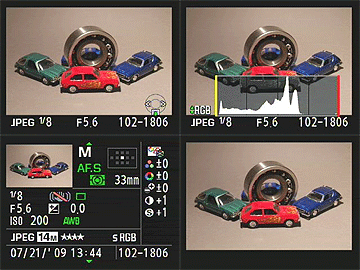 In Playback mode, the default image display shows the most recently captured image, with a modest information overlay present. Pressing the Info button once pulls up the Pentax K-7's histogram view. Pressing the up or down arrow switches between a luminance histogram and an RGB+Luminance histogram set. Any overexposed areas in the frame also blink, if the option is selected in the Playback menu. Pressing the Info button again brings up a detailed information display, which decreases the image to a thumbnail on the screen. All of the same information is reported here as in the detailed display in record mode, listed above. A third press of the Info button brings the image back fullscreen, with no information.
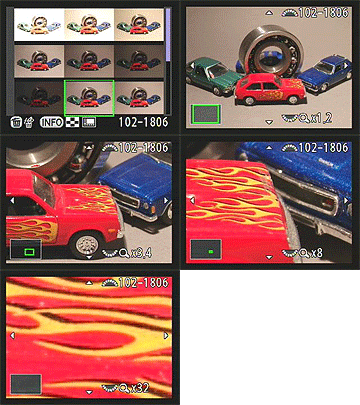 Turning the e-dial in this mode controls the index display and image enlargement options. The index display can show 4, 9, 16, 36, or 81 thumbnail images at a time on-screen (the default is 9), while the enlargement feature magnifies images as much as 32x. There are also display-by-folder and display-by-shooting-date (calender) options. A handy "Compare Images" mode lets you display two images side-by-side, which can be enlarged to 32x as well.
While in playback mode, you can of course manipulate captured images. Options available are rotation, applying digital filters, resizing, cropping, and RAW development. You can even join multiple images together into a sort of index print, using a number of templates including Thumbnail, Square, Random, and Bubble. There is also a slideshow mode available.
 Fujifilm GFX 50S Review
 Fujifilm X-T3 Review
 Olympus E-M5 III Review


Follow Imaging Resource