A PIONEER UPDATED
Paint Shop Pro -- Image Cowboy
 By MIKE PASINI
Editor
The Imaging Resource Digital Photography Newsletter
As we worked with Paint Shop Pro, we couldn't help but recall Space Cowboys, the 2000 film whose tagline was "Boys will be boys."
|
C O N T E N T S |
Frank Corvin, a software engineer played by director Clint Eastwood, is dragged out of retirement to rescue a failing satellite, which just happens to be loaded with Soviet warheads. He's a little ticked when he discovers his heroic gesture will save his former boss's butt, so he rounds up his old test pilot buddies. They'd all wanted to be astronauts, the first, but the old boss passed over them in favor of a monkey. Frank finds Jerry O'Neill (Donald Sutherland) designing roller coasters, Tank Sullivan (James Garner) preaching and Hawk Hawkins (Tommy Lee Jones) giving biplane rides. In the end, they all get their ride into space and, like cowboys, save the world.
PSP is no spring chicken either, dating back to those heady days when wrestling with color images could bring powerful desktop systems to their knees. It got the job done then and it does now, just like those competent space cowboys in the movie.
Of course, PSP is no Tom Cruise. And, yes, there's at least one fatal diagnosis. Still, you want to root for the old bugger and if you don't shed a tear by the end of this review, why, you just ain't paying attention, pardner.
A PIONEER | Back to Contents
It seems like test pilots were breaking the sound barrier and scraping the ceiling of our atmosphere when PSP.EXE was the flagship product of Jasc Software (http://www.jasc.com) in 1991. It was among the first image editing programs available and ran on surprisingly modest systems.
PSP was the brainchild of a commercial airline pilot with a background in computer science who began developing graphic utilities and posting them on computer bulletin boards. Before the Internet, there were bulletin boards. You'd use your modem to dial into the bulletin board modem and log in to read messages and download files. The guy who ran the bulletin board was called the sysop. We were the pseudo sysop for the longest running bulletin board devoted to the DEC Rainbow, in fact.
Over the years, Jasc has continued to develop PSP in retail versions at modest prices and minimal (if no longer modest) hardware requirements with public beta testing. The company claims PSP's evolution has been the result of feedback from its 40 million customers.
We've been testing PSP 8 (version 8.1), available for Windows at $84 download or $94 boxed. A suite of Jasc products -- including PSP 8 and Paint Shop Photo Album, the company's asset manager, plus Paint Shop Xtras and Jasc AnimationShop for GIFs -- is also available for just $119 boxed, a smart buy. Free trial versions are also available.
SYSTEM REQUIREMENTS | Back to Contents
PSP runs on Windows 98/NT4/2000/ME/XP with 128-MB RAM and 400-MB free disk space. You only need a Pentium-class processor with 16-bit color display adapter and a monitor that can display 800x600 pixels. The Help system requires Internet Explorer 5 or later and the Macromedia Flash Player.
The recommended configuration, however, is a 1.0-Ghz Pentium with Windows XP, 256-MB RAM and a 32-bit color display with a 1024x768 monitor.
INSTALLATION | Back to Contents
We've installed several versions and updates over the course of our prolonged testing under Windows XP.
While installations went smoothly, the update to 8.1 required that we uninstall 8. There is a patch that can be run on 8 to update it to 8.1, but Jasc sent us the full install CD. Not a complaint, just be aware of your options.
ABOUT EIGHT | Back to Contents
PSP 8 is a complete rewrite of the product, establishing a platform the company said "will allow us to continue offering you the most exciting new features available in digital photography software."
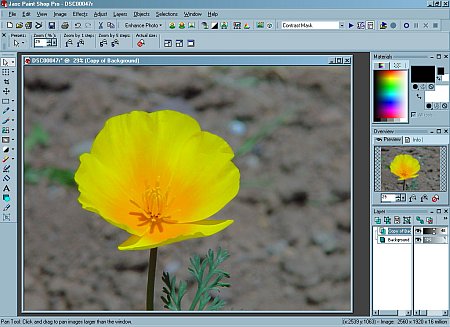 |
| The Main Screen Version 8 sports a redesigned user interface |
The user interface, with configurable workspaces, has been redesigned, superbly integrating tutorials and reference materials. Notably Jasc offers free unlimited tech support and not just online. You can actually talk to a human being at the other end of an 800 number. And the product does include a nice 438-page printed manual that repeats text where you need it, rather than suggest you flip somewhere else to find it.
Version 8 also provides new photo enhancement tools and warping brushes, advanced image composition options, new filters and special effects, more accessible illustration and text tools, plus a variety of options for sharing your images.
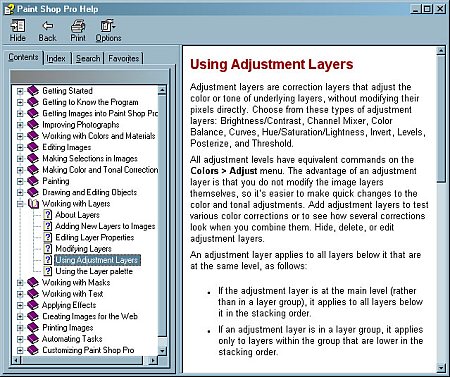 |
| Help Is Nicely Integrated ... |
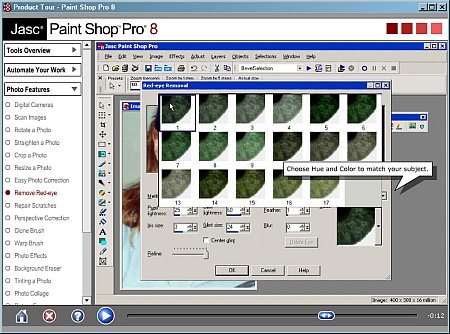 |
| ... And Comprehensive With Movies for some topics |
We're great fans of scripting and Version 8 includes a new scripting engine based on the Python language. You don't need to learn how to write scripts, either, because PSP can record what you do for playback later.
INTERFACE | Back to Contents
We like simple interfaces that run deep. We complained, for example, that Adobe Photoshop Album's interface was cluttered. Well, PSP has a clutter all it's own. The clutter of a space shuttle dashboard, perhaps, because this clutter runs deep.
Below the standard title bar is the standard menu bar with File Edit View and Help options. The menu bar expands to include Image, Effects, Adjust, Layers, Objects, Selections and Window when you open an image.
File is an interesting case study. It has some intriguing commands: Workspace (load, save or delete them), Import (from scanner, camera or TWAIN but also brushes and screen captures, oddly), Script (to run, edit and record) and a command to launch batch processes. But it exhibits the jumbled organization of the old way of doing things. We wish Recent Files was up with Open rather than Workspace (a less frequently tapped option). We're not really thrilled about how these commands are organized with an image open, either. Save is jumbled with Workspace, Delete and Send (for emailing).
Under the menu bar is a row (or three) reserved for tool bars. There are several you can choose to display or hide from the View menu. Browser, Effects, Photo, Script, Standard, Status, Tools and Web toolbars are available.
There are so many toolbars, though, that they span more than one row and even slip down to the bottom and side of the screen. At first, we found that annoying, but since you can put them anywhere (they switch orientation when you dock them from top/bottom to a side), we were charmed.
If the toolbars are confusing, the palettes are even more so. Brush Variance, Histogram, Layers, Learning Center, Materials, Overview, Script Output, Tool Options are all palettes. They can be anywhere, of course.
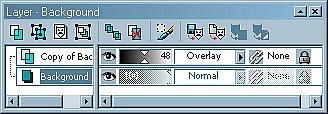 |
| The Layers Palette |
But they aren't easily resized. The Layer palette, for example, is so handy for dealing with tonal and color correction, we almost always have it handy. In Photoshop it can be resized to fit in a corner of our screen. In PSP it takes up a lot of real estate. Yes, you can drag the bottom left corner to make the palette any shape you like, but that crops much of the information away, as if the palette were hidden to begin with.
To sum up, there's hardly any component of the interface you can't customize. But the lack of a display architecture (think how iLife extends the same model through several different applications) is not design. It's disorienting.
PHOTO TOOLS | Back to Contents
When we describe a technique in our beginner and advanced columns, we discuss the steps generically so no matter which image editing software you use, you can figure out how to get the effect. We test the procedures using Photoshop and PSP, in fact. We know if it can be done, those two will do it.
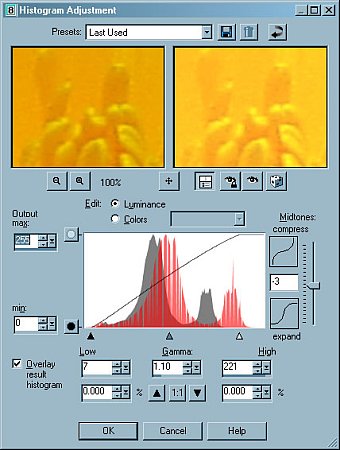
So, yes, we were able to build a contrast mask using layers in PSP just as we do in Photoshop, manipulating the mask with a Gaussian Blur filter and Opacity setting. And we can use the Histogram Adjustment to color correct each channel, as we've previously described. And, yes, there is a Curves command to convert color negatives the way we like to do it. The old bugger can really fly.
 |
| The Elaborate Histogram Dialog |
In fact, some dialog boxes display more options and controls than their Photoshop equivalents. The Histogram Adjustment provides a great deal more than you need, in fact, although the Help button is a real blessing. Where Photoshop provides a simple popup menu to pick the channel or a composite, PSP uses a radio button to select Luminance (Composite) or Color (the Red, Green or Blue channel).
This is more than a matter of style. When you fiddle with the Composite, you are dealing with luminance. But that's all a histogram shows, really. When you change the luminance in a single channel, you affect the color balance. But that's still just altering luminance. There's a certain pretension in bifurcating the histogram. And we find that off-putting.
On the other hand, PSP makes an effort to wrap into its sophistication the simple usefulness for which Elements is famous. The Photo toolbar's drop-down menu includes One Step Photo Fix, a series of individual fixes and Red-eye Removal. The individual fixes (which One Step steps through automatically) include Automatic Color Balance, Automatic Contrast Enhancement, Clarify, Automatic Saturation Enhancement, Edge Preserving Smooth and Sharpen.
Also included in the Photo toolbar are buttons to correct distortion (barrel, fisheye and pincushion), a color correction group (Fade Correction, Black and White Points and Manual Color Correction), a pairing of Histogram Adjustment with HSL adjustment and a final group of JPEG Artifact Removal and Unsharp Mask. The distortion tools are fabulous additions.
One aggravation we never overcame was the default preview magnification in the dialog boxes. These typically show a before and after panel but they default to 100 percent, which is helpful for some corrections (like noise removal) but inappropriate for others (like Fade Correction) which need a view of the whole image. There are buttons to zoom out but it takes a lot of clicks and quickly becomes a nuisance. You can maximize the window, but all we wanted was a fit-to-size option. Can't teach an old dog new tricks, apparently.
RED-EYE REMOVAL | Back to Contents
It isn't possible to cover such a multi-faceted tool comprehensively, but we can demonstrate how it behaves with an example. And none finer, we think, than red-eye removal.
We've already revealed our preferred method of attacking red eye. The problem is artificial illumination of the back of the eye, so the solution is simply to desaturate it. Build a brush that does just that, size it and one click (per eye) solves the problem.
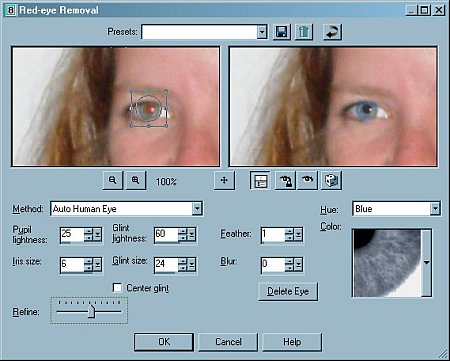
At the other end of the spectrum you have PSP's red-eye removal with no fewer than 37 controls. These are grouped into Presets, which you can load or delete or reset; the Preview we love (but this time the enlargement is handy); Proofing buttons; a Method pull-down menu (Auto Human Eye, Auto Animal Eye, Freehand Pupil Outline, Point-to-Point Pupil Outline); a set of numeric values (pupil lightness, iris size, glint lightness, glint size, feather and blur) with a center glint checkbox and a Refine slider; a Hue setting and a separate Color setting; a Delete eye button (which actually deletes the new eye PSP intends to paint); and OK, Cancel and Help buttons.
 |
| The More Elaborate Red-Eye Dialog |
You start by picking a Method (auto methods use circles or ellipses and the others allow you to manually select the area to be worked on), then you select a hue (aqua, blue, brown, green, gray, violet) and a color (about 22 variations of the hue). You can Refine an Auto selection (but we weren't too thrilled with this) and change the size of the iris (the colored part) as well as the glint. In short, you build a new eye.
We're big glint fans. Our own method preserves any existing glint. We're not big fans of fake glints or changing the iris size (which depends on the available light). But we're not going to debate the subject either. The real point of red-eye removal is to make unnoticeable an unnatural artifact of small camera flash photography. That's why so many alternative approaches work. They all avoid drawing attention to the image editing. We're not sure we can say that about PSP's approach. It's not so much eliminating red-eye as making colored contact lenses.
But PSP can do it our way, too. We clicked on the brush tool, set the Blend mode to Saturation and set the size to cover the pupil (not the iris) and clicked once in each eye. Presto, no red-eye. Naturally.
IN CONTEXT | Back to Contents
The great argument for PSP is that it saves you money on hardware and software to do the very same things more expensive software running on fancier hardware does. There's a great deal of truth to that.
But like the controls of the space shuttle in Space Cowboys, if you're new to this stuff, PSP isn't an easy way to learn. We recommend Adobe Elements, primarily for its excellent reference material about image editing (not Elements). PSP can do more out of the box, but Elements can easily be enhanced to match it in the things you need to do to your photos.
PSP offers simple one-step photo fixes, don't misunderstand, but you're not reading this because you want to know which buttons to click. You'll learn more about image editing with Elements than PSP. And if you aren't anxious to learn more, programs like Kodak EasyShare and Adobe Photo Album have enough one-click corrections to satisfy you while offering a way to manage your collection.
 |
| Scripting Revealed You can edit the captured Python script |
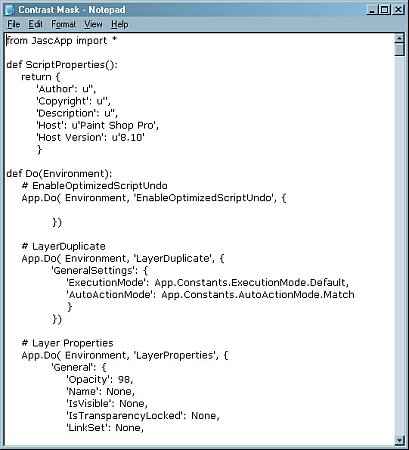
The scripting left us a little underwowwed. We were delighted it was recordable, but we weren't impressed with what it recorded. As we built a contrast mask, we recorded a number of missteps that were all played back. Rather than recording the final value for, say, opacity, the recording engine recorded every opacity setting we tried.
Much of the new interface seemed inspired by Photoshop 7. The Tool Options palette, the docking palettes, tool flyout menus, preset tool or filter settings and saved workspace configurations (Dynamic Personalization), for example. You end up building your own aircraft dashboard.
Finally, while PSP can read and save Raw file formats, it does not support 16-bit channels. Even with a digicam that only produces 8-bit files (24-bit color), 16-bit channels are useful, as we've demonstrated in our Optipix reviews. But as digicams evolve toward a universal Raw format (which Adobe has begun championing), an 8-bit image editor will be a liability. It's one of those things that's a lot more important than it may at first seem.
CONCLUSION | Back to Contents
So where does PSP fit into the image editing software landscape?
Sort of where Clint Eastwood's Frank Corvin fits into Space Cowboys. He's good, real good, but not too modern (despite the user interface face lift). He can still get the job done, even if it's the old fashioned way. And he doesn't have to worry about getting the girl -- he's already been married for years (to 40 million users).
So if you're looking for Mr. Right, it probably isn't going to be PSP. Something a little friendlier, maybe. But if you've been married to the guy all these years, hey, you knew a good thing when you saw it. Unfortunately, he won't be much help if you start shooting images with 16-bit channels.
