
The Imaging Resource
Quick Review
Canon CP-100 Card Photo Printer
Review Date: August 2002
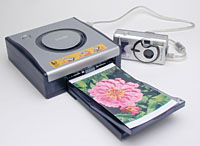 |
Canon CP-100 Card Photo Printer Canon creates a nifty little photo printer that spools out sharp 4x6 prints right from your Canon camera (no computer needed, but only Canon cameras are supported)! |
Manufacturer Overview
Given their strengths in both the printer and digital camera markets, its probably no surprise that Canon would seek to combine the two. Recently, they've been doing exactly that, developing technology to directly connect their digicams with several of their printers. The appeal of this approach is that it eliminates the hassle of having to fire up the computer and one or more software programs, just to run off a few prints of your digicam photos. Most of Canon's printer efforts are in the inkjet arena, but they do have a couple of small units based on dye-sublimation technology. The advantages of the dye-sub models are very compact size, suitability for very intermittent use (inkjet printers really like to be used regularly, to keep the ink nozzles clear), excellent portability, and more water- and scratch-resistant prints. In this review, we'll take a look at the CP-100, Canon's latest "card photo printer," designed to connect directly to any of Canon's current crop of digicams.
High Points
- Dye-sublimation thermal transfer print process, with clear, protective overcoat.
- 256 gradations of color (Yellow, Cyan, Magenta).
- 300 x 300 dpi.
- 5.8 x 3.9 inches (148 x 100 millimeters) maximum printable area.
- Print speeds as fast as 40 seconds (80 seconds for 4x6 prints).
- Prints directly from current-model Canon digital cameras via a Canon Direct Interface cable.
- (Does not connect to a computer, and only recent-model Canon digicams are supported though.)
- Standard and Multiple (Index) print modes, with bordered and borderless options.
- Maximum print run of 18 photos without reloading consumables. (36 prints on a single ribbon, max of 18 sheets of paper in the printer's paper tray.)
- Packaged with AC adapter, interface cable, starter five-print color ink cartridge, and starter postcard paper kit.
- Current (August, 2002) "street" price of about $250.
- Print cost of about $0.55 per 4x6 print, based on August 2002 "street" media prices.
Design
One of the unfortunate facts about the current state of digital photography is that vastly more photos are taken than are ever printed. Around our own house, my wife Marti refers to the digicams as "the digital black hole" (photos go in, but never come back out). This is particularly embarrassing, as I'm supposed to be some kind of a digicam guru - Someone who you'd expect would have digicams and photos woven into the very fabric of his daily life. In some ways, I may be worse off than the average digicam user, specifically because I'm so saturated with digital photo technology: After 12 (14?) hours of testing and writing about digicams and printers, the last thing I want to do at night is to sit down at the computer for another hour or two to print out all the vacation pictures I snapped on our last trip. (I've often commented that the business of Imaging Resource has spoiled a perfectly nice hobby for me.)
Even if they're not as over-saturated with digital photography as I am though, I suspect a lot of people find it tedious to crank up the computer (and possibly two or three different software applications) run off a batch of 4x6 prints. - For many of us, it was actually a lot easier just dropping the roll of film at the corner camera or drug store. Statistics do seem to indicate that, while digicam users take enormously more photos than film-based photo buffs, they print enormously fewer of them.
In response to this trend, there's been a move afoot lately by several printer and camera manufacturers to let users go directly from their camera to a printer, cutting out the computer as the "middleman." For their part, Canon has done this by supporting direct connections between some of their cameras and their most recent inkjet printer models. More to the point for this particular review, they've also developed a pair of tiny, portable photo printers that use dye-sublimation technology, and that can be driven by most of their current camera lineup.
By way of (very) brief background, dye-sub printers work by evaporating precisely controlled amounts of colored dyes from a carrier ribbon onto the print paper. The key difference between dye-sub printing and inkjet technology is that the dots laid down by a dye-sub printer are continuous-tone, meaning that they can have varying levels of density. While some inkjet printers can deposit slightly different sizes of dots, inkjet technology in general builds up tonal gradations by "dithering" fixed-size dots of color across larger areas. (That is, the printer generates an average density across an area of the paper by depositing more or fewer dots of ink. Thus, a 2400 dpi inkjet printer may only equate to a 400 dpi dye-sub printer, because the inkjet has to build up tonal gradations by spreading its 2400 dpi dots across a larger area.)
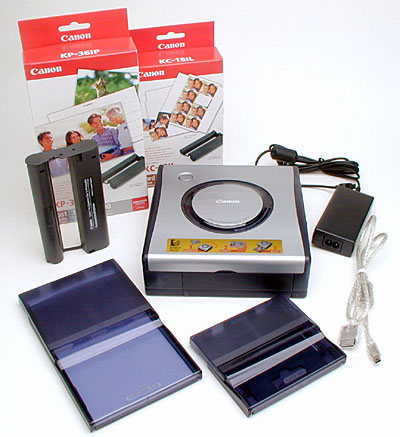
Canon's latest Card Photo Printer is the CP-100, a unit capable of churning out up to 36 roughly 4x6 prints per load of consumables. About the size of a thick novel, the Canon CP-100 Card Photo Printer is one of the smallest dye-sublimation printers on the market. (The smallest I've seen is Canon's CP-10 printer, whose tiny dimensions limits the size of its prints somewhat.) Measuring 6.8 x 7.0 x 2.4 inches (172 x 178 x 60 millimeters), the CP-100 accommodates a larger range of paper sizes than the CP-10, with a maximum printable area of 5.8 x 3.9 inches for postcard-sized prints. Because of its small size and dual power options of AC adaptor or (optional) battery pack, you can literally take it just about anywhere. (There's even a car battery adapter accessory.) It's a great travel accessory, as you could set it up in a hotel room, state room, or even in the great outdoors. The CP-100's semi-transparent, bluish-charcoal plastic body has a thin metal top, and smooth contours. Weighing in at 34.9 ounces (990 grams) without ink cartridge or paper cassette, the CP-100 does have a little heft to it, but is certainly portable enough to pack along on a trip. The CP-100 connects directly to most current Canon digital cameras via one of the Direct Interface cables included with the printer. From there, printing is a snap, just set the print options in the camera, send them to the printer, and voila! Perfect snapshots in seconds.
It's important to note that the CP-100 only works with certain Canon cameras: There's no provision for any sort of computer connection, nor can you use it with cameras made by any other company. Per Canon's PowerShot website, supported Canon camera models include the PowerShot G2; the S40, S30, S330, S300, S200, S110; the A40, A20, A10, A200 and A100.
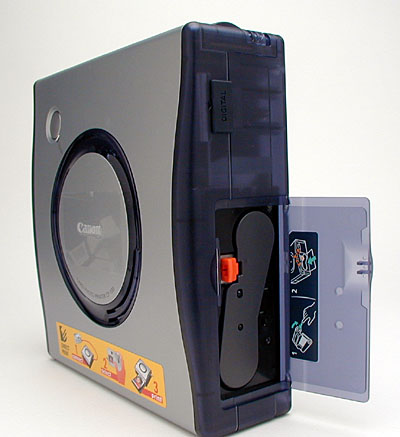
The "ink" (actually dye-carrying film) cartridge slides into the right side of the printer (as viewed from the front), with a small, orange Eject button to release the cartridge. A hinged, plastic door snaps shut once the cartridge is inserted. Next to the ink cartridge compartment is the Digital input jack, covered by a flexible plastic flap.
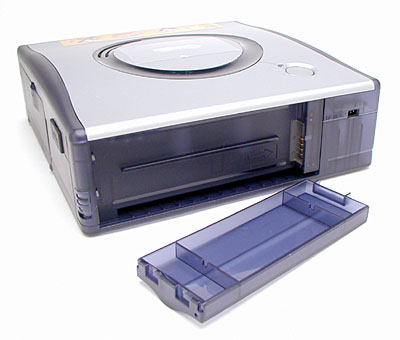
The back side of the printer features the battery compartment, which is also where the optional car battery adapter attaches. A small latch button on the left corner releases the cover from the compartment. Beneath the battery compartment is a small slot, which the paper moves in and out of during the printing process. (The finished print pops out into the small tray on the front side.) The DC-In connector jack is also on the back panel, in the top right corner.
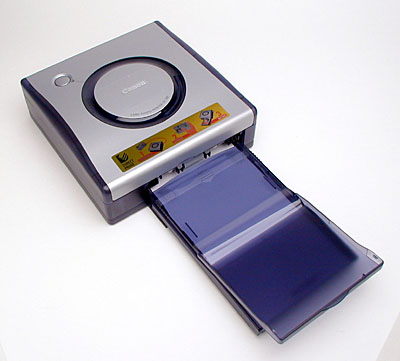
The paper cassette loads directly into the front of the CP-100, and finished prints are ejected to stack on top of the cassette. The CP-100's cassette accepts18 sheets at a time, while ink cartridges come in 18 or 36 print sizes. (Paper packs come in 18 or 36 sheets, with an accompanying color ink cartridge.)
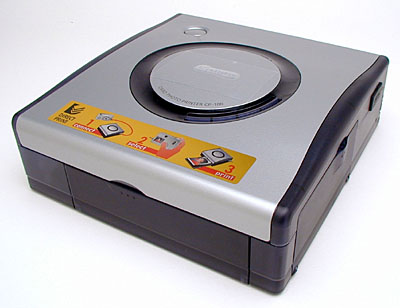
A dark silver, metal top crowns the CP-100, contributing to a sleek overall appearance. A power button with LED lamp and cooling fan vent are the only features on top of the printer.
The bottom of the CP-100 is smooth and flat, with just four little rubbery feet to protect surfaces.
Operation and User Interface
The CP-100 connects directly to most Canon digital cameras, allowing you to control the printer from the camera itself. Once the camera is connected, and the paper cassette and ink cartridge are loaded, you can print either by accessing the camera's DPOF print settings menu, or by printing images one at a time directly from the camera's playback mode. You can print either individual photo prints, multiple copies of an image on small stickers, or an index print showing all the photos currently in your camera. You can also choose either bordered or borderless prints, and whether or not to show the date and time each photo was captured as an overlay on the prints. Setup is super-easy: It literally took me less than five minutes to hook up the printer, set up a print, and pull out the first printed image. (One note though: Make sure that you have the printer on a fairly clean surface while printing, as any pet hair, dust, etc. that gets onto the paper during the printing process will prevent the clear protective overcoat from sticking in that spot.)
One issue with the whole "print right from the camera" concept is that the relatively sparse set of controls on the camera make it difficult to implement a user interface with the level of polish and sophistication (not to mention features) that's possible in a software program running on a PC. That said, I think Canon did an excellent job with the user interface for the CP-100 when being controlled from one of their cameras. The screenshots below are from the PowerShot S330.
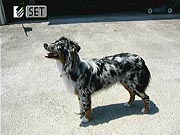
When you connect the printer to the camera, the camera's playback screen indicates the camera's presence with a little icon in the upper left-hand corner of its LCD screen, as shown above.
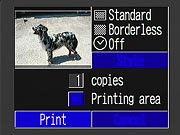
As suggested by the icon, pressing the camera's "Set" button takes you to a screen that lets you set options and print quantity for the currently-displayed photo. You can choose bordered or borderless prints, and also whether or not to include a time stamp on each photo, showing when it was shot.
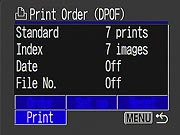
Printing a camera full of photos one at a time would be tedious, so the CP100 also makes use of DPOF (Digital Print Order Format) information stored on the camera's memory card. This lets you use the camera's Print Order menu to set up a complete print order in advance, including varying quantities of each photo you want printed. When the printer is connected to the camera, an extra "Print" option is added to the camera's main Print Order screen, as shown above. Selecting Print causes the entire print order to be sent to the printer without further manual intervention.
Output
The CP-100 prints via a four-pass, thermal dye-sublimation process, laying down yellow, magenta, and cyan before layering a clear protective coating over the final image. Images are output at 300 x 300 dpi resolution. This may sound low, compared to the 1200-2400 dpi of many inkjet printers, but keep in mind that each of these 300 dpi print pixels is full-color, continuous-tone, so there's no "dithering" involved. The result is very sharp prints, easily the equal of standard photographic 4x6 photos of the sort you'd get from your film camera. The CP-100 can print one image to a page, as many as eight small images to a sheet of stickers, or up to 36 tiny thumbnails on a single "index" page. The maximum printable area with borders is 4.8 x 3.6 inches (121.9 x 91.4 millimeters), and without borders is 5.8 x 3.9 inches (148 x 100 millimeters) for Standard (one-image) prints. Paper sizes include Postcard, "L-size" (4.7 x 3.5 inches), and Credit Card size (3.4 x 2.1 inches). In addition to the standard photo paper, Canon offers label paper stock in the Credit Card size, for printing either full sized labels or eight tiny individual stickers. (Great for kids.) Print speeds range from 81 seconds for a Standard Postcard-sized print without borders, to 40 seconds for a Multiple Credit Card-sized print. (I timed a Postcard-sized borderless print, and it came in at exactly 80 seconds, so Canon's times look to be right on the money.)
The Standard Postcard-sized paper has micro-perforations at either end, to facilitate borderless printing. When you select the borderless option, the printer will enlarge the image to "bleed" over the edges of the sheet slightly. (You can adjust the cropping top and bottom slightly through the camera's user interface.) After printing the image, both ends of the sheet snap off to leave you with a print that's borderless on all four sides.
Print quality from the CP-100 is very good. (!) Colors seemed very accurate and true, saturation levels were very appropriate, and I didn't see any significant weakness in any part of the color spectrum. As noted above, the photos are very sharp as well, easily the equal of standard 4x6 drugstore prints. While I didn't do any formal comparisons, the tonal range of the prints looks very good, too. Blacks are very dark (although perhaps not quite as dark as standard photo prints, or prints from the best inkjet printers), and highlight detail is superb. You can pretty well count on the printer faithfully reproducing anything that your camera is capable of capturing in the first place.
One advantage over most inkjet prints is that the CP-100's output is very water resistant. Since there aren't any water-soluble inks involved (and a protective overcoat as well), you don't have to worry about an idle drop of water spoiling your photos. I actually put a print under running water, soaking both sides for a minute or so, just to see what the effect would be. The result was practically nil. The water seemed to soak into the back side of the print a little bit, but I couldn't see any effect from this on the image itself. There was a little visible swelling along the edges of the print and along the perforations, where it appeared that the water could actually attack the fibers of the paper base, but even this completely disappeared once the print had dried again. These are some of the most water-resistant prints I've seen, in any medium.
The CP-100's prints are also remarkably scratch-resistant, again doubtless due to the protective overcoat. To be sure, I could damage the print surface with a sharp object (an Xacto(tm) blade), but even heavy scratching with a fingernail had virtually no effect.
The one area I don't have any information on is light fastness. This used to be a major concern for inkjet prints, but manufacturers have made great strides in this area recently. As a result, many current inkjet printers have official fade-life ratings of around 25 years. Dye-sub prints have traditionally outlasted those from inkjet printers, but I don't have any information on how long the CP-100's prints can be expected to last. Taking general dye-sub technology into account, I'd guess they're pretty good in this respect, but I have no specific information on the subject whatsoever.
Print Cost
Of course, it wouldn't matter how good the CP-100's prints were if the media cost was too high. Happily, this doesn't seem to be the case. Checking the internet as I write this (early August, 2002), I find that the KP-36IP Postcard-sized ink/paper set runs about $20 from various resellers. This equates to a cost of about $0.56 per 4x6 print. Most online photo services run about $0.49 per 4x6 print, although some go as low as $0.25. Likewise, in-store photo kiosks here in the Atlanta area seem to run in the $0.50 range for prints of this size. Comparing to inkjet printing is a bit more difficult, given the range of printers out there, and the range of costs they represent. Looking back over the ink usage figures I found in my own inkjet printer tests, plugging in costs for 4x6 cut sheets of premium (high gloss) photo paper, and doing a little extrapolation, I come up with an average cost of about $0.45-0.50 per 4x6 inkjet print. So print cost with the CP-100 ranges from slightly more expensive than the majority of digital printing options, to a fair bit more expensive than a few. Balance that against excellent print quality, excellent durability, and great ease of use. Overall, the CP-100 comes out looking pretty darn good.
In the Box
Included in the box are the following items:
- Canon CP-100 Card Photo Printer.
- Two paper cassettes (one for Postcard size and one for Credit Card size).
- Two Direct Interface cables (different connectors for differing Canon camera input jacks).
- AC adapter.
- Five sheets of Postcard paper with a five-print color ink cartridge.
- Cleaning cartridge.
- Instruction manual and registration kit.
Conclusion
Though the CP-100 is slightly larger and heavier than the earlier CP-10 model, its roughly 4x6 inch print area and optional battery pack make it much more versatile. You can take this printer just about anywhere - land, boat, car, plane, etc. - and print great looking images in a snap. I can think of dozens of uses for it, from printing out snapshots at birthday parties to making fun photo stickers for the kids. Prints have excellent color and quality, to the extent that they'd fool most people into thinking that they were conventional photo prints. My only regret with the product is that it's only compatible with Canon digicams. (Understandable though, given that the camera needs specific firmware support to recognize and talk to the printer.) It would be nice if this level of printing ease were available for more brands of digicams. If you own (or are considering buying) a Canon digicam though, the CP-100 deserves serious consideration for your printing needs. Very nice! (I think Marti wants one. ;-)