Olympus C-7000 Wide ZoomSeven megapixels, 5x zoom, great pictures, a ton of features, and great build quality - A real winner!<<Executive Overview :(Previous) | (Next): Viewfinder>> Page 3:DesignReview First Posted: 11/26/04 |
Design
 The latest introduction in
Olympus' Camedia C-Series, the C-7000 Zoom's outward appearance is thinner and
more compact than previous "C" models. Small and rectangular, with
only a few small protrusions, the C-7000 Zoom is a little more pocket-friendly
than its predecessors. Measuring 4.0 x 2.3 x 1.7 inches (102 x 59 x 43 millimeters),
the C-7000 Zoom should fit into larger shirt pockets, and will definitely find
room in most purses and larger coat pockets. The C-7000 Zoom weighs in at nine
ounces (255 grams) with the card and battery
installed, features a body design that combines structural plastic and metal
decorative panels. A thin wrist strap comes with the camera, providing a little
extra security in case the camera should slip out of your hands while shooting.
The latest introduction in
Olympus' Camedia C-Series, the C-7000 Zoom's outward appearance is thinner and
more compact than previous "C" models. Small and rectangular, with
only a few small protrusions, the C-7000 Zoom is a little more pocket-friendly
than its predecessors. Measuring 4.0 x 2.3 x 1.7 inches (102 x 59 x 43 millimeters),
the C-7000 Zoom should fit into larger shirt pockets, and will definitely find
room in most purses and larger coat pockets. The C-7000 Zoom weighs in at nine
ounces (255 grams) with the card and battery
installed, features a body design that combines structural plastic and metal
decorative panels. A thin wrist strap comes with the camera, providing a little
extra security in case the camera should slip out of your hands while shooting.

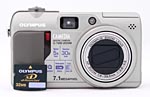
From the front of the camera, the edge of the zoom lever (upper left corner) is visible, as well as the lip of the flash compartment, microphone, AF illuminator, viewfinder window, self-timer alert light, and IR receiver (for the optional wireless remote control). The telescoping lens extends just over seven-eighths of an inch beyond the front of the camera body when powered on in any capture mode. The lens is protected by a shutter-like lens cover that automatically slides open when the lens extends, and likewise closes as the lens retracts. A small, rubbery hand grip provides reasonable real estate for your fingers to grab onto when holding the camera, and the rubbery textured covering helps give a more secure grip and a more friendly "feel" to the hand.
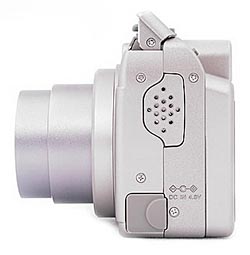
The right side of the camera features the USB / AV out shared jack, which is protected by a flexible, rubbery flap that remains tethered to the camera. Also on this side of the camera is the eyelet for attaching the wrist strap.

On the opposite side of the camera are the playback speaker and DC In jack. A rubbery flap protects the connector terminal from dust, and remains attached to the camera when opened.

The top of the camera holds the Zoom Lever, Shutter button (surrounded by the Zoom Lever), Power button, and pop-up flash compartment.

The majority of the camera's control buttons are on the rear panel, along with the 2.0-inch LCD monitor and optical viewfinder eyepiece. The Five-way navigation pad serves multiple functions, and is located next to the lower right corner of the display. An OK/Menu button is at its center. Adjacent to the top right corner of the LCD monitor are the AE Lock / Custom / Rotate and Quick View buttons. Angled down from the top panel on the right side are the AE / AF / Erase, Self-Timer / Remote / DPOF, and Flash / Protect buttons. A large Mode dial in the top right corner controls the camera's operating mode. Olympus seems to have rethought the mode dial with its latest models; this one is recessed and easy to use, yet isn't easily turned accidentally in a pocket or bag. Over on the top left side of the panel, also angled down from the top of the camera, is the Flash Release button. The optical viewfinder eyepiece sits almost dead center, and its view zooms in and out with the lens. A pair of LED lamps next to the eyepiece report the camera's status. An LED lamp in the lower right corner lights whenever the camera accesses the memory card. This serves as a warning not to open the battery/xD card access door until all activity has stopped.

The bottom of the camera holds the shared battery and memory card compartment and a plastic screw-mount tripod socket, which is too close to the battery compartment for quick battery changes when mounted on a tripod. (This is something I always pay attention to, given the extensive amount of studio shooting I do with each camera.) The tripod socket is also off-center from the lens, making panorama shots with foreground objects more difficult.
Reader Comments! --> Visit our discussion forum for the Olympus C-7000 Wide Zoom!


Follow Imaging Resource: