


Overview
Nikon Coolpix S7c Overview
by Mike Pasini
Hands-on Preview: 12/08/2006
Full Review: 03/15/2007
The Nikon Coolpix S7c is a WiFi capable digital camera that can wirelessly upload images to the new Coolpix Connect service, launched alongside the camera. Featuring a sleek two-tone body, the Nikon S7c includes an IEEE 802.11b/g chipset with which to upload its seven megapixel images. The Coolpix S7c has plenty of other attractions on top of this standout feature, as well. There's a prism-folded Nikkor ED-branded 3x optical zoom lens, a whopping 3.0 inch LCD display, 15 beginner-friendly scene modes, plus a few clever technologies besides. Apical Ltd.'s "D-Lighting" is an exposure correction technology, and is combined with a face-priority AF function based on tech from Identix, an in-camera red-eye fix function -- the three working together at a press of the One-Touch Portrait button to capture the best possible portrait image. Nikon's Best Shot Selector mode which automatically chooses the sharpest from a series of images is also included, along with an AE-Best Shot Selector mode that chooses the best-exposed image from a series.
The Nikon S7c also offers what the company calls "Electronic Vibration Reduction" -- which should not be mistaken for true hardware image stabilization, where either lens elements, or the image sensor are moved based on sensors that detect camera shake. The Nikon Coolpix S7c does have a gyro sensor to detect the amount of camera shake, but the correction is made in software by compensating with blur removal after the exposure, plus increased sensitivity, faster shutter speeds, tweaks to sharpening, etc. The Nikon S7c saves images on Secure Digital cards, or in 14MB of internal memory. The Nikon Coolpix S7c includes USB, and video output technology, and comes bundled with both a camera cradle, and Nikon's PictureProject software. Other features include a built-in flash strobe, movie recording at VGA resolution with sound, a macro mode that focuses to 1.6 inches, and seven white balance modes including a custom hold. The Nikon Coolpix S7c ships in the USA from September 2006 priced at $350.
Nikon Coolpix S7c User Report

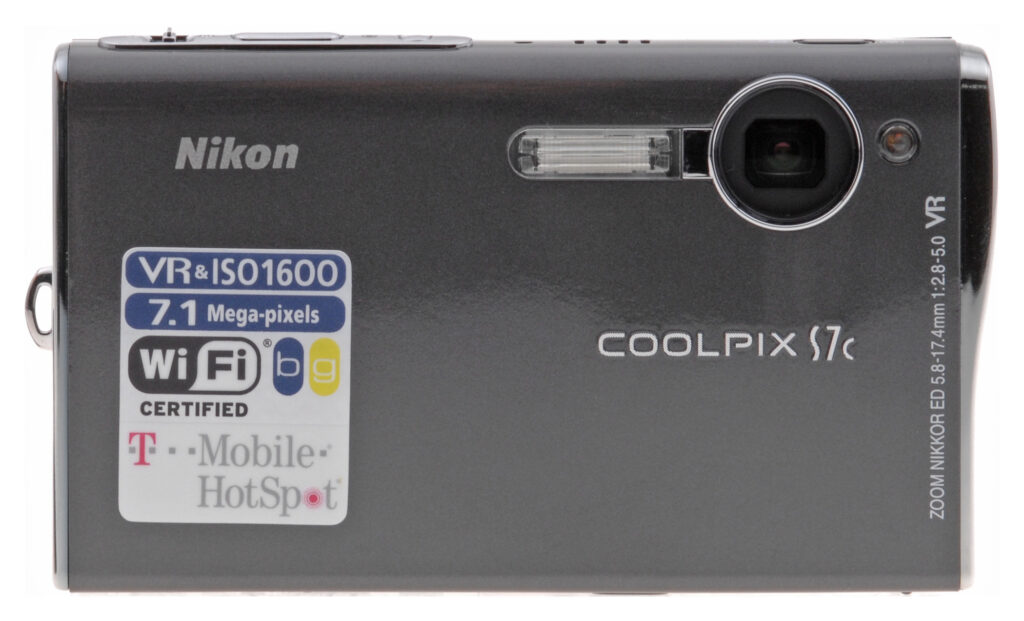
Front. Small lens with the flash adjacent.
Intro. Hot on the heels of its S6, Nikon announced the Coolpix S7c. The new model has more resolution at 7.1 megapixels and a Hi ISO shooting mode for available light photography. But even more exciting, the Nikon Coolpix S7c can email images wirelessly through Nikon's new Coolpix Connect server. And you can do it from any T-Mobile HotSpot with a complimentary one-year subscription, too.
The Nikon S7c retains the stylish wave design of its predecessors the S6 and S5 and the same control layout and features. Its small lens makes it more suitable to family rooms than landscapes, but there's a lot of smarts built into the camera to maximize its every asset.

Back. Huge 3.0 inch LCD and just a few buttons.
Design. The Nikon Coolpix S7c is, like its predecessor the S6, a docking digicam. With a 3.0-inch LCD, it isn't a subcompact, but its trim profile doesn't have room for a USB port or AC connection. Instead, it relies on what Nikon calls a Multiconnector port on the bottom of the camera.
You can drop the Nikon S7c into the included Cool Station or you can pop it on a Kodak EasyShare printer dock using the included dock insert. Without the Cool Station, though, the Nikon S7c isn't going to last long. That's how you charge its battery. The Kodak printer dock can run a slide show and print pictures but not charge the battery.

Top. The controls on the narrow top are necessarily small but function very well.
The Nikon Coolpix S7c does have another option for transmitting and printing photos, though. It has built-in Wireless G, the fast sibling to Wireless B (which, unlike some siblings, it is compatible with).
The Nikon S7c itself is an attractive camera with a metallic gun metal gray (almost black) paint job and chrome highlights dressing up Nikon's Wave design. The back panel is three-quarters covered by the large LCD, but what's left provides a thumb grip, just four buttons and a clever navigator that doesn't just function four ways, but spins too.

Battery/Card Compartment. An elegantly hinged door opens to reveal the SD card (black) nestled against the lithium ion battery (white). The ImageLink/Dock connector is just to the left, and the tripod socket is just left of that.
I was less impressed by the business end of the Coolpix S7c with the flash as close to the lens as it could possible get. Nikon does provide an in-camera red eye fix -- and the Coolpix S7c needs it. But firing the flash that close to the lens flattens anything it illuminates. And with the lens so close to the corner, it's also easy to get your finger in the shot.
The top of the camera has a chrome bar on the right side that holds the tiny Power button, the elongated Shutter button and a very small zoom control. These are the three most important controls on any camera, but on the Nikon S7c they're also the smallest controls.

Dock. The S7c charges in the dock and can do USB transfers and setup through it, too.
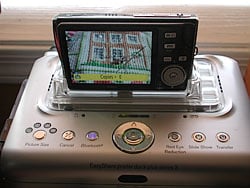
ImageLink. The S7c is quite at home on the Kodak printer dock plus series 3 thanks to the included clear plastic insert; but it needs to return to the Coolstation to charge.
The Power button isn't quite as bad as it seems at first. Press it down until you feel it click (try using a finger nail instead of your fingertip) and forget it. Happily, the Nikon Coolpix S7c shuts down much more quickly than the S6 did. The shutter button is placed exactly where your forefinger falls and you can feel the zoom lever just at the beginning of the first joint in your finger. So you just slide back a little off the Shutter to zoom. It looks impossible, but it works fine.
My hands seemed to fit the profile of the Nikon S7c perfectly. You might prefer to grasp the right side of the camera from the top and bottom, pressing the Shutter with the top finger. But I prefer to squeeze the back with my thumb and the front with my index finger, leaving my forefinger free to move from the Shutter button to the Zoom control. To steady the Nikon Coolpix S7c, I hold the left side by squeezing the top with my forefinger and the bottom with my thumb and curling my index finger along the S-curved side of the camera.

Controls. Nikon likes the four button approach: Record/Playback, Mode, Menu and Erase. The rotary multiselector is a nice touch.
The four buttons on the back are well spaced. Playback is on top, Mode just under it, Menu under that with Trash to Menu's right. I found myself pressing Mode and Menu most of the time. But then I used my thumb to twirl the Nikon S7c controller to select one or another option, pressing it in to confirm my selection. That works very nicely.
Display/Viewfinder. There's no optical viewfinder on the Nikon Coolpix S7c (like the S5 and S6 before it), but you get a huge 3.0 inch LCD with 230,000 pixels to see your pictures. I was even able to see the screen in direct sunlight. Sweet.
Performance. Preliminary performance figures show the Coolpix S7c above average in most categories. Power on could be faster than 2.1 seconds, but you can't disable the Welcome screen. Still, it wasn't so slow that I missed shots. And shutdown speed is much improved over the S6, fortunately.

LCD. The big circle with large icons mirrors the rotary multiselector. The yellow highlight indicates the option selected (confirmed by pressing the OK button in the middle of the multiselector). Here the Wireless connection is selected.
The more important shutter lag numbers -- with autofocus and prefocused (my habit) -- are very snappy. No problems there.
A 3x zoom is a little disappointing these days, even with 4x digital zoom. But it's no worse than its predecessors. It's a small piece of glass, but it's Nikon's Extra-low Dispersion glass providing good sharpness and contrast, minimizing chromatic aberration. But the Nikon Coolpix S7c is more a camera for intimate settings like the front room or dining room than for great scenics. Take a look at the images in my zoom range series to see what I mean.
The Nikon Coolpix S7c offers 11 straight Scene modes including Party/Indoor, Beach/Snow, Sunset, Dusk/Dawn, Night Landscape, Close Up, Museum, Fireworks Show, Copy, Backlight, and Panorama Assist. I'm always glad to see common tricks grouped together like Beach/Snow and Dusk/Dawn, minimizing the number of Scenes (to the dismay of Nikon's Marketing department, no doubt). But I was disappointed by Museum mode, where Best Shot Selector shutter speeds were so slow (1/2 sec) that a tripod -- prohibited in museums -- is required.
But the Nikon Coolpix S7c goes further than mere Scene modes, offering four Scene Assist modes, which help you compose Portrait, Landscape, Sports, and Night Portrait images. These special Scene modes have icons of their own in the Mode menu. Just press the Menu button in any Scene Assist mode to see the options. Landscape, for example, offers Landscape (focusing at infinity), Scenic View (which provides a horizon line in yellow), Architecture (overlays a framing grid), Group Right (to frame a person to the right of a landmark, setting focus and exposure for the portrait), and Group Left (same thing for someone on the left). Slide the Zoom lever to the Telephoto position to get a Help screen explaining each option.
And new on the Record menu is Hi ISO mode. Forget the flash (and red-eye with it), just select Hi ISO and shoot in near darkness. Results were noisy and often blurry, but we were shooting where we could barely see. More on that below.
The One-Touch Portrait button on the top panel of the Nikon S7c automatically activates Face Priority AF (which detects and locks focus on faces), Advanced Red-Eye Reduction, and D-Lighting. You can also adjust the effect from Normal to Brighter or Software by pressing the Menu button in Portrait mode.
The Nikon Coolpix S7c's Movie mode provides six options: TV movie (640x480, 30 fps), Small size (320x240, 30 fps), Small size (320x240, 15 fps), Pictmotion (320x240, 15 fps), Smaller size (160x120, 15 fps), and Time-lapse movie (640x480, 30 fps). All modes but Time-lapse record sound, but only up to 2x digital zoom is available. Options in Movie mode can lock focus during the segment or continually focus, and you set electronic (not optical) Vibration Reduction on, too, to stabilize the image.
Pictmotion creates a slide show of the last 10 images with transitions, random pan and zoom effects, and music, if you use a memory card. It's a Mode option in the Nikon Coolpix S7c's Playback mode, taking nearly a minute to compose the show, only 20 of which it can store on a card. After it plays, you have the option of changing the settings or saving it to the card. Nikon recommends you cup your hand behind the speaker to improve the sound -- and it works!
It's a neat stunt in the Amaze Your Friends category, but only the Windows version of Picture Project can copy the Pictmotion shows or upload your own MP3 tune to the Coolpix S7c for use in Pictmotion shows. And, because the original images are required for playback, they are protected when you save a Pictmotion movie -- but they are not unprotected when you delete the show.



Zoom Range. Wide angle (top), full optical (middle) and 4x digital zoom (bottom).
The Shooting Menu also offers a Voice Recording option that displays how much time is available on your storage medium. Just press the Shutter button to start or stop recording. During recording, you can press the OK button to pause and any of the arrows to mark the recording in the index, making it easy to find an important segment later. The Nikon Coolpix S7c records in WAV format, readable by QuickTime. Unfortunately, the lens cover remains open in Voice Recording mode, so best to stand the camera up normally with the microphone on the top panel.
WiFi setup can be daunting and the Nikon S7c does make you do a little research for all but its T-Mobile connection, which already has a profile stored in the camera. For other connections (other than unprotected wireless routers), you'll have to create a profile using the included software with the S7c tethered to your computer via the USB cable (and the dock).
Once you know the answers to the questions the setup routine asks, it's a quick process. You can even assign a printer profile to the Nikon Coolpix S7c so it can send the computer an image to print. And you can point to any directory on your hard disk as the destination for your file transfers.
I only had one little problem with the setup. You have to change the Nikon Coolpix S7c's USB mode to PTP to get it to talk to the setup program. If it remains in Mass Storage mode, it's no sale. See below for more on our WiFi experience with the S7c.
Nikon claims the 3.7 volt lithium ion battery can power 200 shots based on the CIPA standard. That's a bit less than other 3.78 volt batteries, explained by the drain of the larger 3.0 inch LCD.

The Multiselector's Secret. The arrow keys actually sit on its rim, not the rotating dial. With the OK button, it's really a three-element control.
The LCD menu system is displayed in very large type and big icons whenever you call it up with the Menu button or the Mode button. Navigation using the rotary multi-selector is a bit tricky, though, until you discover the secret. Take a look at our shot of the control buttons to see what that is. The rotating part of the multi-selector does not click. Instead, to click an arrow key, you have to slide onto the outer ring, which does click but doesn't rotate. Rather than simply pressing down, I got in the habit of pressing inward from the outer ring.
Installing the software required uninstalling the older versions I had from previous reviews, but the installer handled that, too.
Shooting. I really enjoyed shooting with the Nikon Coolpix S7c (which nearly delayed this review). It's slim enough to fit in any pocket and that brought its scary moments. On a Sunday outing, I actually lost it.
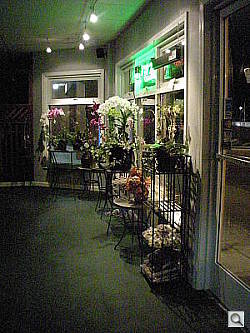
Night Landscape. 1/39 sec. at ISO 1,600.
I'd started out with the Nikon S7c tucked in a fanny pack, removing it to take a few shots (using the wrist strap) and putting it away when I wasn't going to shoot for a while. But entering one store, I thought it would be quicker to put it in my pants pocket, so I did. Leaving the store, though, I couldn't find it. It's so light I didn't notice it in my pants.
I'm not afraid of a little noise in my images -- if I can get an available light shot. And you can see plenty of noise in the Nikon S7c's Hi ISO images. The best place to fix this, if it bothers you, is in software where you can see the tradeoff between detail and noise, making an intelligent decision about how much noise to eliminate. If you're just making small prints, it may not be worth the effort.
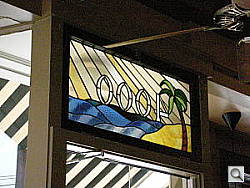
Hi ISO. Just ISO 1271 for this interior shot.
Actual ISO settings used by Hi ISO varied with the shot. On the shot of the fan and stained glass, it's 1271. But other indoor shots required the full 1,600. Shutter speeds were kept to handheld limits (around 1/40 second) in Hi ISO.


Tradeoffs. Though I like shooting High ISO to get handheld shots in very low light, here's a graphic illustration of what I'm trading off in terms of detail and sharpness as I raise the ISO. The top image is ISO 50, then 400, 800, and 1,600. For such a small camera, the Nikon S7c actually does very well here, though the bottom two images would only be useful at 4x6 or smaller.
But ISO 1,600 is available as an ISO option in the shooting menu. You can turn on electronic Vibration Reduction and shoot at even slower shutter speeds. My doll test used 1/7 second at ISO 1,600. While the image looks a little dull, it's pretty accurate color in that dark corner of the garage.
How far, I wondered, can you push the Nikon Coolpix S7c? One night, I snuck out the back door of the bunker and took some shots in normal streetlighting using Night Landscape mode. That uses shutter speeds as slow as one second with electronic Vibration Reduction hard at work to reduce blurring (as it reports after you snap the shot). ISO is 1,600 and the images are noisy (and even a bit more than blurred), but they have a ghostly effect all their own. Armed with a tripod or a sturdy support of some kind, you can have some fun with this.
Don't get the idea that shooting high ISO shots with the Nikon S7c is just as natural as ISO 100, because it's not. ISO 800 images can only be used at 4x6 print sizes, and 1,600 images are even questionable at that, but if you really need to get the shot and don't have a tripod handy, it's worth a try.

WiFi Emailing. After connecting to Coolpix Connect and selecting images, you set the size (top), select recipients (middle), and confirm the send (bottom).
My WiFi experience was a blast, too. I liked what the S6 could do, but the S7c surpasses it thanks to Coolpix Connect, a new Nikon service.
The free service acts as an invisible middleman that stores images sent to it (for a limited time) and passes them along via email to any number of recipients who can view thumbnails in the email and optionally download the full resolution image if they wish. You decide how full the full resolution image is when you upload the images.
To use the service, you how to have entered your email address and a handle either on the camera directly or, more sanely, with the wireless setup software (which lets you use your keyboard). Coolpix Connect needs that to identify the sender. You also have to enter recipient email addresses, of course, which are stored on the camera. Do all that on your computer.
There's no need to configure either Coolpix Connect or wireless access to it through T-Mobile. Those profiles are built into the camera. The T-Mobile account is billed as a one-year free trial, but Nikon warns that the arrangement with T-Mobile expires Sept. 30, 2008.
So how do you use it? Very easy.
My first attempt was at Starbucks, which has T-Mobile access nearly everywhere here. While I was waiting for my espresso, I went into Wireless Transfer mode. When it found the T-Mobile HotSpot, I told it to use Coolpix Connect, it let me select images to email, the size to send, and the addresses to send them to (you click a box next to each address to include it in the email). There's no option to add a message (fortunately). The S7c sends the images to Coolpix Connect and tells you when the transfer is complete. Recipients get an email announcing you've sent them photos with thumbnails of the selection in the body of the email. And all as fast as it takes to make an espresso.
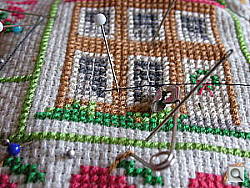
Coolpix Macro. Legendary macro fun.
You don't have to go to Starbucks, though, or use T-Mobile to tap into Coolpix Connect. My second attempt was at home where the S7c found my home network. I told it to use Coolpix Connect, it let me select images, the size, and the recipients, and then emailed them to Coolpix Connect. And you don't have to be home, either. Any public hotspot works.
Emailing a picture from anywhere is a lot of fun. It's why cellphones have cameras. But with the S7c, it's a printable image.
Appraisal. The three big advances of the Nikon Coolpix S7c are worthwhile ones. Getting 7.1 megapixels over 6 megapixels isn't a big deal, but getting Hi ISO and Coolpix Connect certainly are. And, somehow, it's available for just $300. At that price is just plain silly to complain about anything else.
Basic Features
- 7.1-megapixel CCD delivering image resolution as high as 3,072 x 2,304 pixels
- 3x Nikkor ED zoom lens (equivalent to a 35-105mm lens on a 35mm camera)
- Max 4x digital zoom
- 3.0-inch color LCD monitor
- Automatic exposure control
- Built-in flash with five modes
- 14MB internal memory
- SD/MMC memory card storage (no card included)
- USB 2.0 computer connection
- Custom rechargeable LiIon battery and charger included
- Software CD with Nikon PictureProject, reference manual, and a wireless camera setup utility for Mac and PC
Special Features
- WiFi capability for wireless connection to computers and printers
- Vibration Reduction optical image stabilization for steady shots at telephoto focal lengths
- 15 preset Scene modes, four with framing assist options
- Hi ISO mode
- Movie recording mode (with sound), plus Time-lapse and Stop-motion movie modes
- Continuous, Multi-shot 16, and Interval capture modes
- Best Shot Selector mode
- Shutter speeds from 1/500 to two seconds
- Maximum aperture from f2.8 to f5.0, depending on zoom position
- Five color modes
- Two Self-timer modes for delayed shutter release
- Macro (close-up) lens adjustment
- Spot, Center-Weighted, and Matrix metering modes
- Adjustable AF area
- Auto ISO setting or 50, 100, 200, 400, 800, and 1,600 ISO equivalents
- White balance (color) adjustment with seven options, including a manual setting
- DPOF (Digital Print Order Format) and PictBridge printing compatibility
- CoolStation camera dock included
In the Box
The Nikon Coolpix S7c ships with the following items in the box:
- Nikon Coolpix S7c digicam
- Cool-Station MV-15 cradle
- Dock Insert PV-11
- Strap
- USB Cable UC-E10
- Audio Video Cable EG-E5000
- AC Adapter EH-64
- Rechargeable Li-ion Battery EN-EL8
- Instruction manuals, Coolpix Connect User Guide, plus registration materials
- PictureProject 1.7 and Wireless Setup Utility 2.0 CD-ROMs
Recommended Accessories
- Large capacity SD/MMC memory card. These days, a 512MB or 1GB card is a good tradeoff between cost and capacity.
- Small camera case for outdoor and in-bag protection
- Wireless Printer Adapter (PD-10) to turn any PictBridge printer into a wireless printer
- Battery Charger MH-62
Conclusion
| Pro: | Con: |
|---|---|
|
|
Small digicams are not famous for their image quality. The Nikon Coolpix S7c starts from that premise but taps into some smart electronics to compensate for the compromises. As a result, the Coolpix S7c is as attractive for its image quality as it is for its styling. And if that doesn't sell you, its extended WiFi support will.
Cabling a camera to your computer or even just removing a card to insert into a reader are things of the past with the S7c. Nikon has extended the convenience of wireless data transfer for copying, printing and now emailing beyond the world of PictureProject to T-Mobile HotSpots.
And while you're sipping a latte and WiFi-ing your images, your S7c will attract some attention, too, with its smooth wave design. With no buttons or levers protruding from it, it's easily slipped into a pocket so it's with you when you want to take a picture. And when you light up that 3.0-inch LCD with your images, it's even more attractive. Especially when you ask it to throw an impromptu Pictmotion presentation together.
Between capture and playback, the S7c provides a lot of picture-taking intelligence. The ED glass makes the most of the S7c's small lens. The Feature System provides Nikon exclusives like face detection auto focusing, in-camera red-eye removal, and D-Lighting. The Scene modes are easily accessed, especially Portrait, which has its own button. Everything else is fun to find with the new rotary multi-selector. In short, it's a smart choice -- and therefore a Dave's Pick.
Design
Nikon Coolpix S7c Design
The Nikon Coolpix S7c digital camera is small and sleek, with a shiny graphite-colored body that's both fashionable and understated. The camera's thin profile stays thin because the lens never extends from the camera body, keeping it very pocket friendly and less prone to lens damage. Measuring about 3.9 x 2.4 x 0.8 inches (101 x 60 x 21 millimeters) at its widest points, and weighing 4.9 ounces (140 grams) without the battery or memory card installed, the Coolpix S7c makes a great travel companion. A wrist strap accompanies the camera to keep it secure while shooting. The 3x zoom lens is protected by an automatic sliding lens cover that slips out of the way inside the front panel when the camera is powered on. Due to the camera's size, there isn't much in the way of a handgrip, though there is a tiny thumbrest on the rear panel.

The Coolpix S7c's front panel is quite smooth and free of protrusions, and features the 3x optical zoom lens, flash, and a tiny self-timer / AF assist lamp.

On the right side of the camera (as viewed from the rear) is the wrist strap attachment eyelet.

The left side of the Coolpix S7c appears featureless, but behind the shiny silver panel is the WiFi antenna. Below the WiFi logo is a small LED lamp that lights whenever the camera is connected to a WiFi network.

The camera's top panel includes a handful of controls. Stretching from left to right are the One Touch Portrait / D-Lighting button, speaker grill (four small holes), microphone (one small hole), Power button, Shutter button, and tiny Zoom lever.

A large, 3.0-inch color LCD monitor dominates the Coolpix S7c's rear panel, leaving room only on the right side for the remaining camera controls. From the top, control buttons are the Shooting / Playback, Mode, Menu, and Delete buttons. Below these are the Rotary Multi-selector, which is surrounded by a thin four-way rocker button. To navigate through menu options, you can use the up, down, left, and right buttons, or you can turn the rotary portion of the control. In addition to navigational purposes, the arrow keys also access flash, self-timer, and macro options. An OK button at the center of the control confirms menu selections, but also accesses the Vibration Reduction mode or initiates image transfer to a printer or computer.

The Coolpix S7c's bottom panel is quite flat and features the plastic threaded tripod mount alongside the Multi-connector jack and shared memory card / battery compartment. Unfortunately, the compartment's proximity to the tripod mount won't allow quick battery or memory card changes while shooting on a tripod. The compartment door slides outward before opening to reveal the battery and memory card slots, and a small, spring-loaded lock keeps the battery from falling out when the compartment is open. The Multi-connector jack hosts the AC adapter or the CoolStation camera dock that accompanies the camera.
Nikon Coolpix S7c External Controls

One Touch Portrait / D-Lighting Button: Located on the far left side
of the camera's top panel, this button enables framing assistance for portraits
in Shooting mode. When pressed, it automatically enables Portrait scene mode,
Face-Priority AF mode, and the Advanced Red-Eye Reduction flash mode. You can
cancel these settings by pressing the button a second time.
In Playback mode, pressing this button enables the D-Lighting feature, which automatically brightens backlit subjects and adjusts the contrast.

Power Button: The first in a series of buttons on the right
side of the top panel, this button powers the camera on and off. When on, a
small green LED right of the button glows.

Shutter Button: Right of the Power button, this button sets focus and
exposure when pressed halfway, and triggers the shutter when fully pressed.
In Playback mode, while the information display is present, pressing this button
lets you record a short audio clip to accompany the displayed image.

Zoom Lever: Located on the very far right side of the Coolpix
S7c's top panel, this tiny lever controls the optical and digital zoom in any
Record mode. In Playback mode, the telephoto side enables digital enlargement
of captured images, while the wide angle side accesses the index display modes.
In a settings menu, pressing the lever toward the telephoto side displays a
help page to explain the currently-selected menu option.

Shooting / Playback Button: Adjacent to the top right corner of the
LCD monitor, this button switches the camera between Playback and Shooting modes.

Mode Button: Below the Shooting / Playback button, this button
displays a virtual mode dial on the LCD monitor when pressed. Turning the Rotary
Multi-selector on the rear panel selects the main camera mode, offering Shooting,
Hi ISO, Scene, Voice Recording, Movie, Setup, and Wireless LAN modes. (Pressing
down on the OK button selects the mode.)

Menu Button: Below and left of the Mode button, this button
displays the settings menu (or dismisses it) in any camera mode.

Delete Button: Directly right of the Menu button, this button lets you
erase images from the internal memory or memory card (unless write-protected).

Rotary Multi-selector: Positioned in the bottom right corner
of the rear panel, this combination rocker button and rotary dial accesses a
range of camera settings. In Record mode, the up arrow cycles through the available
flash modes, while the down arrow accesses Macro mode. The left arrow enables
the Self-timer mode. In any settings menu, the arrow keys navigate through menu
options, or you can turn the rotary dial for the same effect. When making adjustments,
the rotary dial also serves as a selection tool. Pressing the OK button enables
the Vibration Reduction mode, which attempts to reduce camera blurring from
minor movement.
In Playback mode, both the rotary dial and the arrow keys cycle through captured images on the memory card. If an image has been enlarged, all four arrows or the rotary dial pan around the view. Pressing down on the OK button initiates image transfer mode when the camera is connected to a computer, either wirelessly or via the CoolStation camera dock.
Operation
Nikon Coolpix S7c Operation
Given the camera's minimal controls and automatic exposure control, the Nikon Coolpix S7c's operation is quite straightforward. Geared toward hi-tech novices with its WiFi capabilities and automatic exposure, the camera leaves minimal decision making up to the shooter. The Shooting / Playback button on the rear panel quickly sets the main operating mode, while the Mode button below it lets you select between the available recording modes. Some basic settings, such as flash, macro mode, and a unique portrait assistance option are available via external controls, but the remaining camera features are accessed through the LCD menu. For straight point-and-shoot snapshots, most users can start shooting right out of the box. But to get to know the camera's more advanced features, including its wireless LAN options, plan to spend an hour or so with the manual in hand.
Record Mode Display In record
mode, the Coolpix S7c's LCD monitor displays the subject with a modest information
overlay, indicating the shooting mode, focus area, memory type (internal or
card), resolution, and number of available images at the current resolution
and quality setting. The bulk of this display disappears after a few seconds.
A half-press of the Shutter button returns the information and also displays
the AF status, red if the camera has trouble focusing and green if focus is
set. Through the Setup menu, you can also opt to hide the information display,
or to enable a framing grid.
In record
mode, the Coolpix S7c's LCD monitor displays the subject with a modest information
overlay, indicating the shooting mode, focus area, memory type (internal or
card), resolution, and number of available images at the current resolution
and quality setting. The bulk of this display disappears after a few seconds.
A half-press of the Shutter button returns the information and also displays
the AF status, red if the camera has trouble focusing and green if focus is
set. Through the Setup menu, you can also opt to hide the information display,
or to enable a framing grid.
Playback Mode Display In Playback
mode, the default image display shows the most recently captured image, with
a limited information display reporting the date and time of capture, image
number, memory type, series number, resolution, and a small icon detailing how
to record an audio clip to accompany the file (pressing the Shutter button).
Pressing the wide-angle side of the zoom lever enables the index display mode,
and repeated presses on the wide angle side cycle through four, nine, 16, or
25-image displays. Pressing the telephoto side of the zoom lever will bring
the currently-selected image up full-screen. Pressing the telephoto side of
the zoom lever when viewing an image full-size on the LCD screen will zoom in
on the image, up to 10x. There's an option to save the enlarged portion as a
crop as well.
In Playback
mode, the default image display shows the most recently captured image, with
a limited information display reporting the date and time of capture, image
number, memory type, series number, resolution, and a small icon detailing how
to record an audio clip to accompany the file (pressing the Shutter button).
Pressing the wide-angle side of the zoom lever enables the index display mode,
and repeated presses on the wide angle side cycle through four, nine, 16, or
25-image displays. Pressing the telephoto side of the zoom lever will bring
the currently-selected image up full-screen. Pressing the telephoto side of
the zoom lever when viewing an image full-size on the LCD screen will zoom in
on the image, up to 10x. There's an option to save the enlarged portion as a
crop as well.
Nikon Coolpix S7c Modes and Menus
Shooting Mode: Accessed via the Shooting / Playback button on the camera's rear panel, this mode lets you record still or moving images. The Mode button offers the following options:
 Shooting Mode: This mode records still images, with the
exposure under automatic control. The user can adjust other camera settings,
however, such as flash mode, macro, color, resolution, etc.
Shooting Mode: This mode records still images, with the
exposure under automatic control. The user can adjust other camera settings,
however, such as flash mode, macro, color, resolution, etc.- Hi Sensitivity Mode: This mode increases the ISO for faster shutter speeds in low lighting.
- Scene Mode: In this mode, you can choose between Portrait, Landscape, Sports, Night Portrait, Party / Indoor, Beach / Snow, Sunset, Dusk / Dawn, Night Landscape, Close-up, Museum, Fireworks Show, Copy, Back Light, and Panorama Assist preset scene options. The first four modes (Portrait, Landscape, Sports, and Night Portrait) feature Assist options, which display framing guidelines to help with specific situations.
- Voice Recording: In this mode, you can record audio files for as long as the memory card or internal memory has available space. The available time is displayed on the LCD menu.
- Movie Mode: Here, you can record moving images with sound, for as long as the memory space is available.
- Setup Mode: This mode displays the main camera settings menu.
- Wireless LAN Mode: This mode enables the camera's WiFi connection option, which lets you wirelessly transmit images to a WiFi network device, such as a computer or printer.
 Shooting Mode: This mode records still images, with the
exposure under automatic control. The user can adjust other camera settings,
however, such as flash mode, macro, color, resolution, etc.
Shooting Mode: This mode records still images, with the
exposure under automatic control. The user can adjust other camera settings,
however, such as flash mode, macro, color, resolution, etc.Playback Mode: Also accessed via the Shooting / Playback button, this mode lets you review captured movies and images, and playback audio files.
Shooting Menu: Available in Shooting mode by pressing the Menu button, the following options are available:
- Image Mode: Sets the image size and quality settings. Choices are
High 3,072 (3,072 x 2,304), Normal 3,072 (3,072 x 2,304), Normal 2,592 (2,592
x 1,944), Normal 2,048 (2,048 x 1,536), PC Screen 1,024 (1,024 x 768), and
TV Screen 640 ( 640 x 480).
- White Balance: Adjusts the overall color balance of the image, to suit the light source. Options are Auto, Preset (manual option), Daylight, Incandescent, Fluorescent, Cloudy, and Flash.
- Exp. +/-: Adjusts the overall exposure from -2 to +2 EV, in 1/3 EV increments.
- Continuous: Accesses Single, Continuous, Multi-shot 16, and Interval Timer shooting modes. Continuous shoots a series of images at about 1.4 frames per second. Multi-shot 16 mode captures 16 thumbnail-size shots at about 1.6 frames per second, and arranges them as a single image. Interval Timer shooting sets the camera to automatically capture images at user-set intervals, like time-lapse photography.
- BSS (Best Shot Selector): When this mode is enabled, the camera will
automatically select and save the sharpest image from a series of 10. Alternatively,
you can select the Exposure BSS option, which will automatically save the
best image based on Highlight, Shadow, or Histogram readings.
- Sensitivity: Sets the camera's ISO equivalent to 50, 100, 200, 400,
800, or 1,600, or to Auto (50 to 800).
- Color Options: Offers Standard, Vivid, Black & White, Sepia, and Cyanotype color modes.
- AF Area Mode: Sets the AF area mode to Center or Manual. In Center mode, the camera's AF system bases the focus on the center of the frame. The Manual option lets you manually set the AF point using the Multicontroller.
- Electronic VR: Enables the Electronic Vibration Reduction mode, choices are Auto or Off. If set to Auto, the camera will automatically apply VR when the OK button is pressed outside of a menu in Shooting mode.
 Image Mode: Sets the image size and quality settings. Choices are
High 3,072 (3,072 x 2,304), Normal 3,072 (3,072 x 2,304), Normal 2,592 (2,592
x 1,944), Normal 2,048 (2,048 x 1,536), PC Screen 1,024 (1,024 x 768), and
TV Screen 640 ( 640 x 480).
Image Mode: Sets the image size and quality settings. Choices are
High 3,072 (3,072 x 2,304), Normal 3,072 (3,072 x 2,304), Normal 2,592 (2,592
x 1,944), Normal 2,048 (2,048 x 1,536), PC Screen 1,024 (1,024 x 768), and
TV Screen 640 ( 640 x 480). Sensitivity: Sets the camera's ISO equivalent to 50, 100, 200, 400,
800, or 1,600, or to Auto (50 to 800).
Sensitivity: Sets the camera's ISO equivalent to 50, 100, 200, 400,
800, or 1,600, or to Auto (50 to 800).
Movie Menu: The following options are available in Movie mode by pressing the Menu button:
- Movie Options: Sets the movie size and recording style. Options are TV Movie 640 (640 x 480, 30fps), Small Size 320* (320 x 240, 30fps), Small Size 320 (320 x 240, 15 fps), Pictmotion 320 (320 x 240, 15fps), Smaller Size 160 (160 x 120, 15fps), Time-Lapse Movie (640 x 480, 30fps), and Stop-motion Movie. Pictmotion movies are for use with Pictmotion software, which allows slide-show-style movies with custom transitions. Time-Lapse Movie captures as many as 1,800 still images and combines them into a 60-second movie file. Stop-motion movie takes a series of 640 x 480 frames for playback at 15 frames per second.
- AF Mode: Sets the AF mode to Single AF or Full-time AF. Full-time AF means that the camera is constantly adjusting focus, while Single AF mode only adjusts focus with the first press of the Shutter button.
- Electronic VR: Enables the Electronic Vibration Reduction
mode, choices are Auto or Off. If set to Auto, the camera will automatically
apply VR when the OK button is pressed outside of a menu in Shooting mode.
Playback Menu:
- Print Set: Allows you to create digital print orders for
printing on a DPOF or PictBridge device.
- Slide Show: Automatically plays back captured images on the memory card or internal memory. You can set the frame interval and designate whether the show loops.
- Delete: Allows you to erase all images or selected images from the memory card or internal memory.
- Protect: Write-protects the current image (or removes protection), preventing it from being deleted or manipulated in any way except with card formatting.
- Transfer Marking: Marks the current image for transferring to a computer
once connected. You can opt to mark all images or select images.
- Rotate Image: Rotates the current image in 90-degree increments clockwise
or counterclockwise.
- Small Pic: Creates a smaller copy of the current image. Choices are 640 x 480, 320 x 240, and 160 x 120.
- Copy: Copies files between the internal memory and memory card.
 Print Set: Allows you to create digital print orders for
printing on a DPOF or PictBridge device.
Print Set: Allows you to create digital print orders for
printing on a DPOF or PictBridge device. Rotate Image: Rotates the current image in 90-degree increments clockwise
or counterclockwise.
Rotate Image: Rotates the current image in 90-degree increments clockwise
or counterclockwise.Setup Mode: This mode allows you to change a variety of camera settings, and is accessible through each of the camera menus.
- Menus: Sets how menu screens are displayed, as a text list or as icons.
- Quick Startup: Lets you disable the welcome screen and startup sound for faster startup.
- Welcome Screen: Lets you choose the welcome screen that appears when the camera is powered on. Choices are Nikon, Animation, or Select an Image (to set one of your images for welcome display).
- Date: Sets the camera's internal clock and calendar. You can also set the time zone for home and travel destinations.
- Monitor Settings: Controls the information and image displays on the LCD monitor for Playback and Shooting modes. Options are Show Info, Auto Info (information displayed only five seconds), Hide Info, and Framing Grid.
- Date Imprint: Lets you imprint the image capture date and time over the image. Options are Off, Date, Date and Time, and Date Counter (number of days between shooting date and selected date, such as a child's birthday).
- AF Assist: Sets the AF Assist light to Auto or Off. If set to Auto, the light automatically illuminates in dark shooting conditions to help the camera focus.
- Sound Settings: Accesses the camera's Button, Shutter, and Startup sound options.
- Record Orientation: If enabled, this option records the image with the camera orientation, so that vertically-framed images are automatically rotated in image playback.
- Auto Off: Sets the period of inactivity before the camera will shut itself off. Options are 30 seconds or 1, 5, or 30 minutes. Regardless of the option selected, the monitor will remain on for three minutes when menus are displayed, and 30 minutes during a Loop slide show.
- Format Memory / Format Card: This option formats either the internal memory or any inserted memory card, erasing all files (even protected ones).
- Language: Sets the menu language to one of 20, with English as the default.
- Interface: Sets the USB, Video, and Auto Transfer interface options. USB choices are Computer or Printer, Video choices are NTSC and PAL, and Auto Transfer lets you mark all images for transfer.
- Reset All: Resets all camera settings to their defaults.
- Firmware Version: Displays the camera's current firmware version.
Optics
Nikon Coolpix S7c Optics
Lens
Zoom
Pretty good results with the 3x optical zoom, though with some blurring
in the sides and corners of the frame.
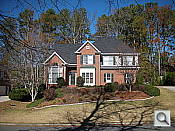
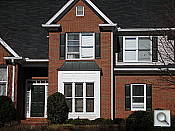
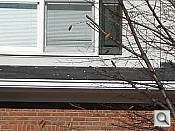
The Nikon Coolpix S7c's 3x optical zoom covers the equivalent of a 35-105mm range, which is about average among other digital cameras in its class. Overall results were pretty good at wide angle, though with some noticeable blurring in the corners and sides of the frame and a very small amount of coma distortion. The camera's 4x digital zoom held onto a fair amount of fine detail, though overall results were blurred with higher noise and lower resolution, as you might expect from digital enlargement.
Macro
A tiny macro area with excellent detail and resolution. Flash is a little
uneven, but still useable.


Nikon digital cameras have always performed well in macro mode, and the Coolpix S7c upholds the brand's stellar reputation. The Coolpix S7c captured a very small minimum area of 1.12 x 0.84 inches (29 x 21 millimeters). Detail and resolution were both excellent, and there's barely any softening in the corners of the frame here. (Most cameras have some softening in the corners in macro mode, so the S7c actually performs very well.) Though the flash exposure is a little uneven, results are still useable, depending on the application.
Distortion
High barrel and pincushion distortion.
| Barrel distortion at 35mm is 1.16% |
 |
| Pincushion at 105mm is less than 0.75% |
 |
This is the tendency for the lens to bend straight lines outward (like a barrel -- usually at wide angle) or inward (like a pincushion -- usually at telephoto). The Coolpix S7c's 1.16% barrel distortion at wide angle is much higher than average among the cameras we've tested. At the telephoto end, the S7c's 0.75% pincushion distortion is also much higher than average.
Chromatic aberration
Moderate, minimal effect on images at edges.


Chromatic aberration is moderate at the wide angle lens position, showing about 10+ pixels of dull coloration on either side of the target lines. However, the effect is exacerbated by some blurring in the corners of the frame. At telephoto, the distortion is much lower, with very dull pixels. (This distortion is visible as a very slight colored fringe around the objects at the edges of the field of view on the resolution target.)
Corner Sharpness
Strong blurring in the corners of the frame at wide angle, and a moderate
amount at telephoto as well.

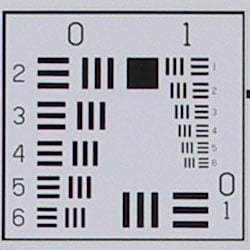


The Nikon Coolpix S7c produced very soft corners in a few shots, particularly at full wide angle. At telephoto, moderate blurring was also visible in the corners, with the strongest effect in the lower right corner.
Viewfinder
Coverage
Excellent accuracy with the LCD monitor.

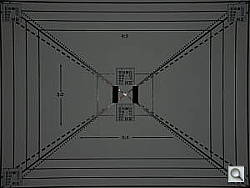
The Nikon Coolpix S7c's LCD monitor produced very good results here, showing about 104% accuracy at wide angle, and about 98% at telephoto.
The images above were taken from our standardized test shots. For a collection of more pictorial photos, see our Nikon Coolpix S7c Photo Gallery .
Exposure
Nikon Coolpix S7c Exposure
Color
Saturation & Hue Accuracy
Pretty accurate color overall, though some oversaturation in strong reds
and blues. Generally good hue accuracy as well.
 |
| In the diagram above, the squares show the original color, and the circles show the color that the camera captured. More saturated colors are located towards the periphery of the graph. Hue changes as you travel around the center. Thus, hue-accurate, highly saturated colors appear as lines radiating from the center. |
Most consumer digital cameras produce color that's more highly saturated (more intense) than found in the original subjects. This is simply because most people like their color a bit brighter than life. The Nikon Coolpix S7c oversaturates the strong red tones, and certain blues, somewhat, but results are still within acceptable limits. Where oversaturation is most problematic is on Caucasian skin tones, as it's very easy for these "memory colors" to be seen as too bright, too pink, too yellow, etc. Here, the Coolpix S7c performed well, and produced good-looking skin tones, if slightly pinkish in some cases.
The other important part of color rendition is hue accuracy. Hue
is "what color" the color is. The Coolpix S7c performed well overall,
though overall color appeared slightly dark outdoors, with good results
in a range of lighting situations.



Sensor
Exposure and White Balance
Indoors, incandescent lighting
Good color with the Manual white balance setting, less positive exposure
compensation required than usual.



Color balance indoors under incandescent lighting was reddish with the Auto white balance setting, and warm and yellowish with the Incandescent setting. Results were more accurate with the Manual option, however. The Nikon Coolpix S7c required less than the average amount of positive exposure compensation here, at +0.7 EV. Overall color with the Manual white balance setting looks pretty accurate, though the blue flowers are just a hint dark with some purple tints. (Many digital cameras have trouble here.) Our test lighting for this shot is a mixture of 60 and 100 watt household incandescent bulbs, a pretty yellow light source, but a very common one in typical home settings here in the U.S.
Outdoors, daylight
Nearly accurate color outdoors, though a hint dark. Good overall
exposure, with less positive exposure compensation required, though high
contrast.

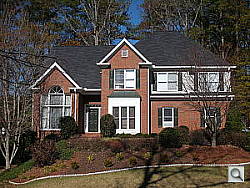
Outdoors, the Nikon Coolpix S7c produced very high contrast under harsh lighting, with limited shadow detail. That said, the Coolpix S7c did typically require less positive exposure compensation than average. Overall color is a tad dark outdoors, but still fairly accurate, without any strong color casts.
See full set of test images with explanations
See thumbnails of all test and gallery images
Resolution
High resolution, 1,300-1,400 lines of strong detail.


Our laboratory resolution chart revealed distinct line patterns down to about 1,400 lines per picture height horizontally, and to about 1,300 vertically. Extinction at around 1,800 lines. Use these numbers to compare with other cameras of similar resolution, or use them to see just what higher resolution can mean in terms of potential detail.
See full set of test images with explanations
See thumbnails of all test and gallery images
Sharpness & Detail
Reasonably sharp images overall, though moderate edge-enhancement on
high-contrast subjects. Some noise suppression limits detail in the shadows
as well.


The Nikon Coolpix S7c captures sharp images overall, though high-contrast subjects such as the crop above left show some moderate edge enhancement. (Edge enhancement creates the illusion of sharpness by enhancing colors and tones right at the edge of a rapid transition in color or tone.)
Noise-suppression systems in digital cameras tend to flatten-out detail in areas of subtle contrast. The effects can often be seen in shots of human hair, where the individual strands are lost and an almost "watercolor" look appears. The crop above right shows this effect in the darker shadows, as well as in some of the more moderate shadow areas, where the detail appears blurred.
ISO & Noise Performance
Low to moderate noise at the lower sensitivity settings, but high noise
with strong blurring and bright pixels at the higher options.




Noise levels are low to moderate at the Nikon Coolpix S7c's lower sensitivity settings, though some minor blurring of detail is visible as low as ISO 100. At ISO 400, noise is quite high, with bright pixels that alter the overall color and strong blurring in the details.
Extremes: Sunlit and low light tests
High resolution with strong overall detail, though high contrast limits
shadow detail. Limited low-light performance, though capable of capturing
bright images under average city street lighting.


Sunlight:
Because digital cameras are more like slide film than negative film (in that they tend to have a more limited tonal range), we test them in the harshest situations to see how they handle scenes with bright highlights and dark shadows, as well as what kind of sensitivity they have in low light. The shot above is designed to mimic the very harsh, contrasty effect of direct noonday sunlight, a very tough challenge for most digital cameras. (You can read details of this test here.)
The Nikon Coolpix S7c produced high contrast under the harsh lighting of
the test above, with limited shadow detail. Highlights are just on the verge
of blowing out on the white shirt at +0.3 EV, but become much too washed
out at the +0.7 EV setting. (In "real life" though, be sure to
use fill flash in situations like the one shown above; it's better to shoot
in the shade when possible.)
| 1 fc 11 lux |
1/2 fc 5.5 lux |
1/4 fc 2.7 lux |
1/8 fc 1.3 lux |
1/16 fc 0.67 lux |
|
|---|---|---|---|---|---|
| ISO 50 |
 1 sec f2.8 |
 1 sec f2.8 |
 1 sec f2.8 |
 1 sec f2.8 |
 1 sec f2.8 |
| ISO 100 |
 1 sec f2.8 |
 1 sec f2.8 |
 1 sec f2.8 |
 1 sec f2.8 |
 1 sec f2.8 |
| ISO 200 |
 1 sec f2.8 |
 1 sec f2.8 |
 1 sec f2.8 |
 1 sec f2.8 |
 1 sec f2.8 |
| ISO 400 |
 0.7 sec f2.8 |
 1 sec f2.8 |
 1 sec f2.8 |
 1 sec f2.8 |
 1 sec f2.8 |
| ISO 800 |
 0.3 sec f2.8 |
 0.6 sec f2.8 |
 1 sec f2.8 |
 1 sec f2.8 |
 1 sec f2.8 |
| ISO 1600 |
 1/8 sec f2.8 |
 1/4 sec f2.8 |
 0.5 sec f2.8 |
 1 sec f2.8 |
 1 sec f2.8 |
Low light:
The Nikon Coolpix S7c captured bright images down to the 1/16 foot-candle
light level (about 1/16 as bright as average city street lighting at night),
though only at the ISO 1,600 setting. At the normal ISOs (50 and 100), images
were still dim at the one foot-candle light level, about equivalent to city
street lighting at night). So, you'd need at least ISO 200 to capture bright
images under those conditions. Overall color looks good with the Auto white
balance. The camera's autofocus system was able to focus on the subject
only down to just above the 1/2 foot-candle light level with its AF assist
light turned off, so you'll need to employ the AF assist lamp for darker
conditions. Keep in mind that the longer shutter times necessary here absolutely
demand the use of a tripod or other camera support to get sharp photos.
(A useful trick is to just prop the camera on a convenient surface, and
use its self-timer to release the shutter. This avoids any jiggling from
your finger pressing the shutter button, and can work quite well when you
don't have a tripod handy.)
NOTE: This low light test is conducted with a stationary subject, and the camera mounted on a sturdy tripod. Most digital cameras will fail miserably when faced with a moving subject in dim lighting. (For example, a child's ballet recital or a holiday pageant in a gymnasium.) For such applications, you may have better luck with a digital SLR camera, but even there, you'll likely need to set the focus manually. For information and reviews on digital SLRs, refer to our SLR review index page.
Flash
Coverage and Range
Slightly dim exposures at the default exposure setting; the camera required
less than average exposure compensation for flash exposures. Moderate flash
range.


Flash coverage was slightly uneven at wide angle with falloff in the corners and at the edges of the frame. At telephoto, some falloff is still present, though the exposure is much darker. Indoors, under incandescent background lighting, the Coolpix S7c's flash underexposed our subject slightly at its default setting, requiring a +0.3 EV exposure compensation adjustment to get bright results. (Some readers may prefer the brighter +0.7 EV shot, but I think the image is just a hair too bright.) The camera's Slow-Sync flash mode required no positive compensation whatsoever, and resulted in better overall coverage. However, the longer shutter speed also results in a stronger orange cast from the background lighting.
| Flash Range: Wide Angle | |||||
|---|---|---|---|---|---|
| 6 ft | 7 ft | 8 ft | 9 ft | 10 ft | 11 ft |
 1/60 sec f2.8 ISO 100 |
 1/60 sec f2.8 ISO 100 |
 1/60 sec f2.8 ISO 100 |
 1/60 sec f2.8 ISO 100 |
 1/60 sec f2.8 ISO 100 |
 1/60 sec f2.8 ISO 100 |
| 12 ft | 13 ft | 14 ft | 15 ft | 16 ft | |
 1/60 sec f2.8 ISO 100 |
 1/60 sec f2.8 ISO 100 |
 1/60 sec f2.8 ISO 100 |
 1/60 sec f2.8 ISO 100 |
 1/60 sec f2.8 ISO 100 |
|
| Flash Range: Telephoto | |||||
|---|---|---|---|---|---|
| 6 ft | 7 ft | 8 ft | 9 ft | 10 ft | 11 ft |
 1/120 sec f5.0 ISO 100 |
 1/120 sec f5.0 ISO 100 |
 1/120 sec f5.0 ISO 100 |
 1/120 sec f5.0 ISO 100 |
 1/120 sec f5.0 ISO 100 |
 1/120 sec f5.0 ISO 100 |
| 12 ft | 13 ft | 14 ft | 15 ft | 16 ft | |
 1/120 sec f5.0 ISO 100 |
 1/120 sec f5.0 ISO 100 |
 1/120 sec f5.0 ISO 100 |
 1/120 sec f5.0 ISO 100 |
 1/120 sec f5.0 ISO 100 |
|
With the lens at wide angle, the Coolpix S7c's flash was bright and powerful to about 11-12 feet with the ISO at 100. At telephoto however, results were much dimmer, with the best intensity to about seven feet.
| Manufacturer-Specified Flash Range | |
|---|---|
| Wide Angle | Telephoto |
 24.5 feet |
 13.0 feet |
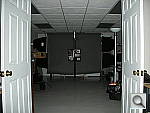
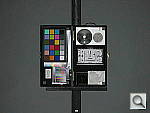
Our standard test method for flash range uses a fixed setting of ISO 100, to provide a fair basis of comparison between cameras. We've now also begun shooting two shots using the manufacturer-specified camera settings, at the range the company claims for the camera, to assess the validity of the specific claims. In the shots above, the Coolpix S7c seems to perform close to what Nikon says it will, though the wide angle shot appears a bit dim.
Output Quality
Print Quality
Good print quality, good color, good 8x10 inch prints. ISO 400 images are soft but usable at 8x10, ISO 1,600 shots are marginal even at 4x6.
Testing hundreds of digital cameras, we've found that you can only tell just so much about a camera's image quality by viewing its images on-screen. Ultimately, there's no substitute for printing a lot of images and examining them closely. For this reason, we now routinely print sample images from the cameras we test on our Canon i9900 studio printer, and on the Canon iP5200 here in the office. (See the Canon i9900 review for details on that model.)
The Nikon Coolpix S7c had enough resolution to make good looking 11x14 inch prints from ISO 50 and 100 images. At 13x19, its prints were softer, but probably fine for wall or table display. At high ISO, image noise levels are held in check up to ISO 200, but ISO 400 gets rougher, only moderately acceptable at 8x10. ISO 800 shots are usable at 4x6, but ISO 1,600 shots are best avoided altogether, as they're mottled and faded even at 4x6.
Color is good overall, but gradually fades as ISO increases.
The images above were taken from our standardized test shots. For a collection of more pictorial photos, see our Nikon Coolpix S7c Photo Gallery .
Not sure which camera to buy? Let your eyes be the ultimate judge! Visit our Comparometer(tm) to compare images from the Nikon Coolpix S7c with those from other cameras you may be considering. The proof is in the pictures, so let your own eyes decide which you like best!
Performance
Nikon Coolpix S7c Performance
Timing and Performance
Good to just average speed for a consumer camera, with slow continuous modes.
| Startup/Shutdown | ||
|---|---|---|
| Power on |
2.1 seconds | Time it takes for LCD to turn on and lens to deploy. |
| Shutdown |
1.5 seconds | How long it takes to retract lens and stow in your pocket. |
| Buffer clearing time |
2 seconds |
Worst case buffer clearing time. This is the delay after a set of shots before you can remove the card. Some cameras won't retract their lenses and shut down until the buffer is cleared. |
| Mode switching | ||
| Play to Record, |
1.0 seconds | Time until first shot is captured |
| Record to play |
4.1 seconds | Time to display a large/fine file immediately after capture |
| Display |
0.9 second | Time to display a large/fine file already on the memory card. |
| Shutter response (Lag Time): | ||
| Full Autofocus Wide |
0.37 second | Time from fully pressing shutter button to image capture, zoom lens at wide angle position. |
| Full Autofocus Tele |
0.49 second | Time from fully pressing shutter button to image capture, zoom lens at telephoto position. |
| Continuous Autofocus |
0.61 second | Typically no advantage to Continuous AF mode, and we have no way of reliably measuring performance with moving ones. |
| Manual Focus |
0.59 second | Usually a bit faster than AF. In the case of the H5, brings telephoto shutter lag times down to the same level as wide angle ones. |
| Prefocused |
0.012 second | Time to capture, after half-pressing and holding shutter button. |
| Cycle time (shot to shot) | ||
|
Single Shot mode
Large Fine JPEG |
2.36 seconds | Time per shot, averaged over 20 shots. |
| Single Shot mode |
2.00 seconds | Time per shot, averaged over 20 shots. |
| Early shutter |
No; Yes with flash | Some cameras refuse to snap another shot if you release and press the shutter too quickly in Single Shot mode, making "No" the preferred answer. |
| Continuous mode |
1.15 second (0.87 frames per second); 2 seconds to clear |
Time per shot, averaged over buffer length or 20 shots, whichever came first. |
| Continuous mode |
0.92 second (1.09 frames per second); 2 seconds to clear |
Time per shot, averaged over buffer length or 20 shots, whichever came first. |
| Flash recycling |
4 seconds | Flash at maximum output. |
| Download speed | ||
| Windows Computer, USB 2.0 |
328 KBytes/sec | Typical Values: |
| *Note: Buffer clearing times measured with a Kingston Ultimate 133x SD memory card. Slower cards will produce correspondingly slower clearing times. Slow cards may also limit length of bursts in continuous mode. |
||
The Nikon Coolpix S7c's performance is just average to pretty good overall, as its normal cycle times and continuous mode speeds are lacking. Start-up time is on the slower side at 2.1 seconds, but shutter lag at wide angle and telephoto zoom settings is quite good. "Prefocus" times (half-pressing and holding down the shutter button before the final exposure) are blazingly fast, with a shutter delay of only 0.012 second. Shot-to-shot cycle times are a little slow, at about 2.36 seconds for large/fine JPEGs, but the camera captures frames continuously at this rate. Continuous-mode speed is on the slower side, at only 0.87 frame/second, for large/fine JPEGs, though the camera does capture continuously at this rate. The flash is quite fast to recycle, however, at four seconds after a full-power shot. Connected to a computer, download speeds are very slow, and you might consider a card reader for quicker transfers. Bottom line, the Nikon Coolpix S7c is fairly responsive for normal shooting, though it's shutter lag and continuous speeds may not the best for fast action. Overall, though the Coolpix S7c is good for general snapshots.
Battery and Storage Capacity
Battery
Moderate battery life with the LiIon rechargeable battery pack.
| Operating Mode | Number of Shots |
|---|---|
LiIon Rechargeable Battery |
200
|
The Nikon Coolpix S7c uses a custom rechargeable LiIon battery pack for power, and a charger is included with the camera. With its modest runtime, I strongly recommend picking up a spare battery and keeping it freshly charged and on-hand for extended outings.
The table above shows the number of shots the camera is capable of (on a fully-charged rechargeable battery), based on CIPA battery-life and/or manufacturer standard test conditions.
(Interested readers can find an English translation of the CIPA DC-002 standards document here. (180K PDF document))
Storage
The Nikon Coolpix S7c accepts SD/MMC cards, though no card is included;
14MB RAM is built into the camera.
| Image Capacity with 14MB Internal Memory |
Fine | Normal | |
|---|---|---|---|
|
3,072 x 2,304
|
Images
|
4
|
8
|
|
File Size
|
3.7MB
|
1.9MB
|
|
|
2,592 x 1,944
|
Images
|
-
|
11
|
|
File Size
|
-
|
1.4MB
|
|
|
2,048 x 1,536
|
Images
|
-
|
17
|
|
File Size
|
-
|
864KB
|
|
|
1,024 x 768
|
Images
|
-
|
59
|
|
File Size
|
-
|
254KB
|
|
|
640 x 480
|
Images
|
-
|
112
|
|
File Size
|
-
|
136KB
|
|
We strongly recommend buying a large capacity SD/MMC memory card at least a 512 MB card, preferably a 1 GB one, to give yourself extra space for extended outings. (Check the shopping link above, cards are really cheap these days, so no reason to skimp.)