Nikon D70The Nikon D70 is an "entry-level" SLR loaded with features at a sub-$1,000 price.<<Operation & User Interface :(Previous) | (Next): Image Storage & Interface>> Page 11:Camera Modes & MenusReview First Posted: 04/14/2004 |
Camera Menus
The D70 has a very extensive menu system, but it's cleanly organized as a set of tabbed screens, as on the D100 before it. There are four menus on the D70: Playback, Shooting, CSM (Custom Settings Menu) and Set Up. All menu entries are selected via the 4-way Arrow Pad. The menus themselves are chosen via a "tabbed" interface, with icons on the left of the screen corresponding to the four menus. All screens can be reached whether the camera is in playback or record mode. Apart from specific functional changes from the D100, the D70's menu system uses a slightly larger, smoother font and a new color scheme for enhanced readability. There's also a very nice "help" function that provides plain-English descriptions of the various Custom Settings Menu (CSM) options.
In the section below, rather than reproduce every menu screen in the main body of the review, I've shown screenshots for only the top level of each menu, with clickable links in the descriptive text leading to the individual screens.
Playback Menu
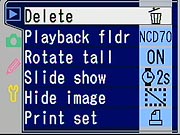
| Playback Menu Options | |||
| Top-Level Selection |
Second-Level | Third-Level | Notes |
| Delete | - Selected |
- Select image from thumbnail
display (view) |
Select one or multiple images, then
execute with "Enter" button.
Delete All doesn't affect images that have been "protected" via the WB/help/protect button |
| Playback Folder | - Current - All (view) |
"All" will also display DCF-compliant image from other manufacturers that may be on the same card. | |
| Rotate Tall | - Yes - No (view) |
Images captured in "portrait" orientation are rotated onscreen to display in their original orientation. (The camera can even tell whether you had the grip side up or down.) | |
| Slide Show | - Start - Frame Interval (view) |
- Select frame interval, 2-10 seconds (view) |
|
| Hide Image | - Select image from thumbnail display (view) |
Hiding an image also protects it from deletion with the "delete all" command. | |
| Print Set | - Select/set - Deselect all? (view) |
- Select image from thumbnail display,
if select/set is chosen (view) |
|
Shooting Menu
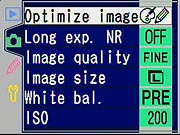
| Shooting Menu Options | |||
| Top-Level Selection |
Second-Level | Third-Level | Notes |
| Optimize Image | - Normal
|
(For Custom option only)
- Done (accept settings)
|
Direct print affects sharpening
and image rendering.
Portrait and Landscape make subtle, specific color and tonal-rendering adjustments. Custom tone compensation option enables curve loaded from computer Ia and IIIa color modes are both sRGB< but IIIa has higher saturation. NOTE - you must select "Done" for custom settings to be registered. |
| Long exp. NR | - Off - On (view) |
Only affects exposures longer than
1 second.
(I found little need for this, the basic exposures are very clean.) |
|
| Image Quality | - NEF (Raw) - JPEG Fine - JPEG Normal - JPEG Basic - NEF + JPEG Basic (view) |
Note that only option for NEF + JPEG is for Basic (lowest) JPEG quality. | |
| Image Size | - L (3008x2008) - M (2240x1488) - S (1504x1000) (view) |
||
| White bal. | - Auto - Incandescent - Fluorescent - Dir. sunlight - Flash - Cloudy - Shade - PRE Preset (view) |
(Preset option only)
- Measure |
All options let you fine-tune white balance
+/- 3 units.
Manual option (PRE) is nice, in that it gives you the choice of setting directly or using a previously-shot photo on the card. |
| ISO | - 200 - 250 - 320 - 400 - 500 - 640 - 800 - 1000 - 1250 - 1600 (view) |
||
Custom Settings Menu (CSM)
When you first turn it on, the D70 displays only the "Simple" Custom Settings Menu (CSM) options, which are the first nine options listed below. You can enable the "Detailed" CSM via an option on the setup menu. The configurability offered by the CSM is another advantage the D70 offers over its primary competitor, the Canon Digital Rebel. A nice addition to the D70 relative to previous Nikon d-SLRs is the new "help" function, which provides a more detailed/plain English description of each CSM option. For those interested, I've provided links below to view each of the help screens. Also, for menu items, I've highlighted the default option with boldface type.
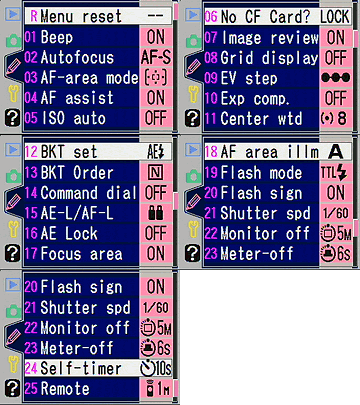
| Custom Settings Menu Options | |||
| Top-Level Selection |
Second-Level | Third-Level | Notes |
| -- Menu Reset | (help) |
Resets the CSM options to their
default values.
(NOTE that the reset that's accomplished by pressing and holding down BKT and meter-pattern buttons for 2 seconds does not reset the CSM settings.) |
|
| 01 Beep | - On - Off (no view) (help) |
Beep sounds for focus confirmation, remote release, or self-timer countdown. | |
| 02 Autofocus | - AF-S - AF-C (view) (help) |
Single or continuous autofocus. (As with other d-SLRs though, AF operates only when shutter button is half-pressed, regardless of this setting.) | |
| 03 AF-area mode | - Single area - Dynamic area - Closest subjct (view) (help) |
Single and Dynamic area let you select the primary
AF point. Closest subject lets the camera choose whichever area has the
closest subject detail.
Single is the default for P, S, A, M and Macro modes. Closest subject is the default for the Scene modes other than Macro. |
|
| 04 AF assist | - On - Off (no view) (help) |
Enable or disable the AF-assist light. Light
only comes on if it's needed.
If SB-800 or SB-600 is attached, camera will use the strobe's AF assist illuminator. |
|
| 05 ISO Auto | - Off - On (no view) (help) |
ON: -- Done P,A, DVP mode (no view) |
Boosts ISO automatically if aperture and/or
shutter speed selection wouldn't provide sufficient light for a good exposure.
If enabled, the P, A, DVP mode option lets you specify the shutter speed below which the camera will begin boosting the ISO value in Program, Auto, and the Scene modes. Options range from 1/125 to 30 seconds. |
| 06 No CF Card? | - Release lock - Enable release (view) (help) |
Prevents shutter release if there's no CF card in the camera. (Helps avoid shooting a pile of photos without "film" in the camera.) | |
| 07 Image review | - On - Off (no view) (help) |
Enables or disables the immediate review of an image on the LCD screen after each shot. | |
| 08 Grid display | - Off - On (no view) (help) |
Enables or disables alignment grid in viewfinder. | |
| 09 EV step | - 1/3 step - 1/2 step (view) (help) |
Sets step size (in EV units) for aperture, shutter,
and exposure compensation adjustment.
(NOTE, ISO steps are always 1/3 EV.) |
|
| 10 Exp comp. | - Off - On (no view) (help) |
Determines whether +/- button is needed to adjust exposure compensation. When "on", you can adjust EV at any time with just the command dial. | |
| 11 Center wtd | - 6 mm - 8 mm - 10 mm - 12 mm (view) (help) |
Selects the area in the center of the frame that's given the greatest weight in center-weighted metering mode. | |
| 12 BKT set | - AE & flash - AE only - Flash only - WB bracketing (view) (help) |
The D70's auto bracketing feature can control either normal (ambient) exposure, flash exposure, both, or white balance variation. | |
| 13 BKT Order | - MTR>Under>Over - Under>MTR>Over (view) (help) |
In auto bracketing mode, you can change the order in which the camera shoots the bracket. | |
| 14 Command dial | - No - Yes (no view) (help) |
This option reverses the roles of the Main and Sub Command dials in all control modes. | |
| 15 AE-L/AF-L | - AE/AF Lock - AE Lock only - AF Lock only - AE Lock hold - AF-ON (view) (help) |
Controls the function of the AE/AF lock button.
Most modes release the lock after the shutter is tripped, but "AE Lock hold" holds the AE setting until the button is pressed again. AF-ON causes the camera to autofocus when the AE/AF button is pressed. |
|
| 16 AE Lock | - AE-L button - + Release bttn (view) (help) |
The first option locks AE with the AE-L/AF-L button only, the second also permits AE lock with a half-press of the shutter button. | |
| 17 Focus area | - No Wrap - Wrap (view) (help) |
When selecting AF points, commanding the selection to move past the edge of the frame causes it to "wrap" around to the other side. | |
| 18 AF area illm | - Auto - Off - On (>view) (help) |
Controls the (too) subtle backlighting of the active AF point when the AF system actuates. In Auto mode, the backlight doesn't activate when you're shooting a bright subject. | |
| 19 Flash mode | - TTL - Manual - Commander mode (view) (help) |
Manual - (set power) Commander mode: |
Sets flash mode. Manual option leads to screen to set power level, from Full down to 1/16. Commander mode leads to screen to select mode for remote flash. Manual mode there leads to a screen to set power level for remote flash, from Full down to 1/128. |
| 20 Flash sign | - On - Off (no view) (help) |
When enabled, a flash indicator (lightning bolt) will flash in the viewfinder when flash is recommended. | |
| 21 Shutter spd | - 1/60 sec - 1/30 sec - 1/15 sec - 1/8 sec - 1/4 sec - 1/2 sec - 1 sec - 2 sec - 4 sec - 8 sec - 15 sec - 30 sec (view) (help) |
Sets the slowest shutter speed that the camera will use in P and A exposure modes when the flash is enabled. | |
| 22 Monitor off | - 10 sec - 20 sec - 1 min - 5 min - 10 min (view) (help) |
Delay after which rear-panel LCD switches off if no activity. | |
| 23 Meter-off | - 4 sec - 6 sec - 8 sec - 16 sec - 30 min (view) (help) |
Length of time the meter displays the exposure setting after it's been activated. (By either a shutter half-press or a press of the AE-L/AF-L button.) Unless the AE-Lock hold option is selected, the meter will continuously update as the scene or camera settings change. | |
| 24 Self-timer | - 2 sec - 5 sec - 10 sec - 20 sec (view) (help) |
Duration of self-timer delay. | |
| 25 Remote | - 1 min - 5 min - 10 min - 15 min (view) (help) |
Sets the length of time the camera will wait for a signal from the remote control before reverting to single-shot or continuous mode, whichever was last in effect. | |
Setup Menu
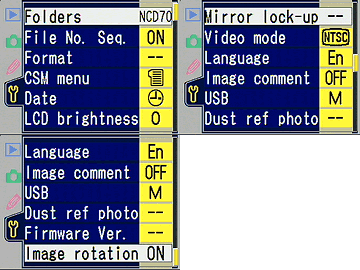
| Custom Settings Menu Options | |||
| Top-Level Selection |
Second-Level | Third-Level | Notes |
| Folders | - Select folder |
(Select
folder)
(New) |
Select which folder will be used for both image storage and playback. |
| File No. Seq | - Off - On - Reset (view) |
If on, camera will remember and continue file number sequence from one card to the next, and across erase/format operations. | |
| Format | - No - Yes (view) |
Erases all files on card, including any images hidden or "protected" | |
| CSM Menu | - Simple - Detailed (view) |
The camera defaults to showing only the "Simple" Custom Settings Menu, consisting of just the first 9 out of 26 total menu screens. Selecting "Detailed" here enables display of the full CSM. | |
| Date | - On - Off (view) |
||
| LCD Brightness | -2 to +2 (view) |
The camera displays a gray scale on its LCD as an aid to setting the LCD brightness. | |
| Mirror lock-up | - Yes - No (no view) |
For sensor cleaning, locks mirror up and shutter
open. Turn off camera to reset. AC adapter not required.
NOTE: Don't confuse this with a mirror lockup mode that locks the mirror pre-exposure, to minimize camera shake from mirror bounce. (The D70 doesn't have that feature.) |
|
| Video mode | - NTSC - PAL (view) |
Selects video timing for US/Japan or European compatibility. | |
| Language | - Chinese - German - English - Spanish - French - Korean - Italian - Japanese - Dutch - Swedish (view) |
What? No Urdu?
;-) |
|
| Image comment | - Done - Input comment - Attach comment (view) |
(Input comment) | Embeds an alphanumeric character string in the
EXIF header of captured images.
Comments are visible in Picture Project or Nikon Capture 4, versions 4.1 and later. |
| USB | - Mass storage - PTP (view) |
Chooses protocol for USB port. Mass Storage tends to transfer faster, PTP links to automatic camera-download software on Mac OS 10 and Windows XP. | |
| Dust ref photo | - Yes - No (no view) |
Capture a special "Dust Reference" image that can be used with Nikon Capture 4 to automatically touch-out the images of dust specks on the sensor. | |
| Firmware Ver. | (no view) | Displays current camera firmware version. | |
| Image rotation | - Automatic - Off (view) |
The D70 has an orientation sensor that records the position of the camera in the file headers, allowing the images to display in their correct orientation on the camera's LCD or in Nikon's software. This option disables this, useful if you're going to be using in an orientation (straight up or straight down) that would result in incorrect orientation data being recorded. | |
Reader Comments! --> Visit our discussion forum for the Nikon D70!


Follow Imaging Resource: