Nikon D70The Nikon D70 is an "entry-level" SLR loaded with features at a sub-$1,000 price.<<Executive Overview :(Previous) | (Next): Viewfinder>> Page 4:DesignReview First Posted: 04/14/2004 |
Design
Taking design cues from both the D100 and D2H, the Nikon D70 is simpler in appearance and smaller size than either. It is nonetheless quite attractive, built of a black polycarbonate body with red, silver, and gray accents. Anyone familiar with Nikon's film or digital cameras will appreciate the similarity of most controls on the D70. The body's plastic body shell and smaller size are responsible for its low weight of 21 ounces, or 595 grams stripped of battery, lens, body cap, and monitor cover. With the battery installed, it weighs in at 28.3 ounces (683 grams), while fully loaded with the battery, a memory card, and the 18-70mm lens shipped with the "bundle," it weighs 39 ounces (1106 grams).
The D70 feels great to hold. The grip and much of the body has a soft rubbery texture and the front grip itself is excellent. The sculpted CF door on the back serves as a great thumb hold, working well against the sharp angle on the front grip to provide a secure one-handed hold. With the 18-70mm lens attached, balance is superb. The handgrip is also long, allowing room for most users' pinkies to rest comfortably with room to spare. The index finger finds the shutter and power switch naturally, but the sub-command dial is a little low for my tastes. All that room I talked about for the pinkie is taken away as the index finger searches for the dial. I suppose the middle finger could stand in for the index finger when controlling the command dial, but that would significantly weaken your grip on the camera in the process.
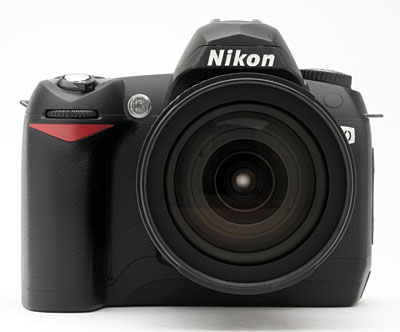
The metal F-style lens mount is the D70's prominent feature, and certainly its most valuable, offering compatibility with a massive array of quality Nikkor lenses. A D-shaped button just left of the lens serves to release the lens lock. (All directions are noted as if reader were holding the camera face out.) Below this a switch facing off to the left chooses between AF and Manual focus modes. Above the lens release button is the flash pop-up button. Down and to the right is the Depth of Field Preview button. The AF assist light is above that, mounted almost flush with the camera's tumble-home taper. The Sub-command dial is also visible from here, right above the D70's triangular red accent.

The right side of the camera has only the neck strap eyelet and a few screws to speak of. Despite its jutting angle, the eyelet does not jab into your hand at all.
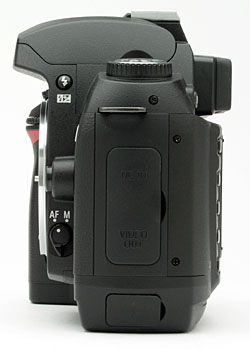
The left side of the D70 has the other neckstrap eyelet and a rubber door covering DC in and Video Out ports. A separate rubber door covers the USB port; having this down low allows for fewer snags when uploading photos, as it keeps the cable close to whatever surface you have the camera resting on. Here you also get a better look at the AF/Manual focus selector switch and the Flash pop-up button.
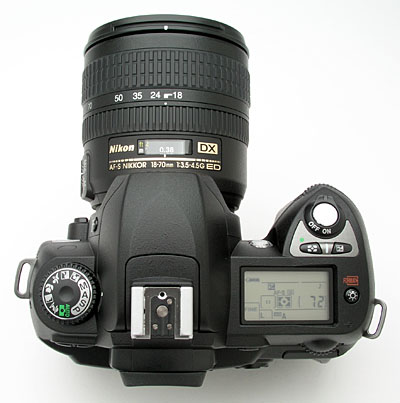
On top we see the pop-up flash and hot shoe, both in-line with the lens. To the right of the flash gear is the Status LCD. Most of what's available through the viewfinder is available here, plus a few extras. Many features can be set here via button/dial combinations without having to enter the main menu, an excellent benefit as you become more familiar with the camera. Here we also have the shutter button, surrounded by the power switch. The Metering mode button is just behind that, and next to it is the exposure compensation button. The screen illumination button is just right of the status LCD. Both the Screen illumination button and the Metering mode button can be used in combination with the Continuous mode and Bracket buttons to either Format the CF card or Reset the device's settings to default when held down simultaneously for more than two seconds. (To finalize the Reset, you have to release and press these buttons a second time.) Left of the flash is the mode dial, which can be turned in any direction, without limit.
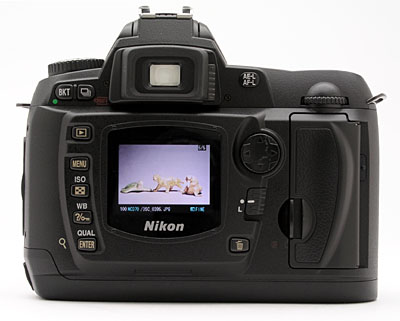
From the back we see a slightly more attractive arrangement of components, when compared to the D100. I found these to be just slightly more consumer friendly in appearance, whereas they're still mostly in the same places for pros who would choose the D70 as a secondary or tertiary camera. Eyeglass wearers will appreciate the reasonable standoff of the viewfinder, as well as its rubber bumper. A sliding diopter correction control is nestled to the right of the viewfinder. Just left of center is the 1.8 inch LCD that comes with a protective plastic cover to prevent scratches to the LCD (I find this a little annoying since my breath too often fogs the cover on the inside, and I cannot wipe it without removing the cover, so I end up keeping the cover in the bag). Upper left of the LCD is the Bracket button, which works in conjunction with the Main command dial on the right. The Continuous capture mode button is just right of the Bracket button. Down the left side of the screen are the Playback button, Menu button, ISO/Thumbnail button, White Balance/Protect/Help button, and Image Quality/Size/Enter/Zoom button. These last three buttons have integrated functions that on the D100 appear on the Mode dial. Their presence here adds a little unnecessary complexity, but it also keeps truer to Nikon's Shot Priority philosophy. With items like ISO on the Mode dial, one couldn't just press the shutter button to enter capture mode, a major hindrance that I noted in my review of the D100.
Above right of the screen is the Auto Exposure/Auto Focus Lock button. Below that is the Multi selector navigator, then the focus point lock switch and the delete button. Finally, there's the CF door, which releases with a sideways press on the latch. Inside is a big button that releases the card with ease.
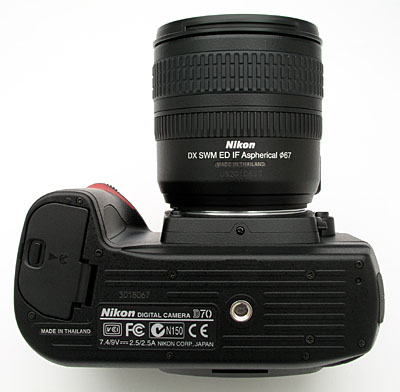
The bottom panel has slightly raised ribs traversing it, to provide better friction when mounted on a tripod head. Otherwise, it's very flat, making for nice, level mounting on tripods. The metal tripod mount is aligned with the optical axis of the lens. (This will somewhat simplify parallax control on shots to be stitched into panoramas, but note that you'll still need to offset the axis of rotation slightly forward, to position it under the optical center of whatever lens you're using.) The battery compartment is on the right side of the body. A thumbnail-activated lock releases the battery door, and the battery falls free.- Note that there is no sub-latch to keep the battery in place in case the door opens accidentally. Opposite the battery compartment on the left side (when viewed from the back) is a very small rubber Reset button to be used as a last resort, when the camera cannot be reset by other means.
Reader Comments! --> Visit our discussion forum for the Nikon D70!


Follow Imaging Resource: