|
Original Review Date: May, 1998 |

  |
|
True "Megapixel" resolution (1152x864) |
|
|
Excellent color | |
|
|
2x Wide-angle zoom lens (29-58mm) | |
|
|
LCD and optical viewfinder | |
|
|
Removable storage | |
|
Kodak has long been a leader in digital imaging, having created some of the very first all-digital cameras as long ago as 1991. At the time of this writing (January, 1998), their DC210 topped the broadest line of point and shoot digital cameras in the market, with nearly a million "real" pixels on the CCD, truly impressive picture quality, excellent optics, and a form factor more closely resembling conventional point and shoot cameras than did earlier Kodak "brick" models, such as the DC50 and DC120.
With deep roots in conventional photography, Kodak seems to have a clear sense that what people want to do with digital cameras is take pictures. (Why should this be a surprise?) In support of this, they were the first to produce a "megapixel" camera (the DC120) for under $1,000, and have raised the standard for image quality even higher in the 210, presently (2/1/98) selling for $899. With the 210, they have achieved a quality level that reasonably matches conventional point and shoot cameras, at least up to the 4x6 inch print size most common in consumer photofinishing. Specific innovations relative to their earlier designs are a higher-resolution CCD sensor, TV/video output, built-in infrared communications, and "finished file format" processing in the camera. We�ll discuss all these features in greater detail below.
If most of your conventional photography involves printing at 4x6 inches, you should be comfortable with the image quality of the DC210. (You�ll almost certainly see at least some difference between conventional prints and "photo-quality" prints of DC210 images, but the 210�s output holds up surprisingly well.) Officially rated by Kodak for photo-quality output up to 5x7, we found that even full-page 8x11 (~A4) images hold together suprisingly well. The slightly wider-angle-than-normal zoom range of the 210 also suits it well to indoor or other use in cramped quarters. (Real estate agents have taken to it in droves, thanks to its ability to show more of a room, when shooting through a doorway.)
Overall, the Kodak DC210�s features and included software make it well-suited for both home and business uses: Both groups will benefit from its ease of use and excellent picture quality.
First Impressions
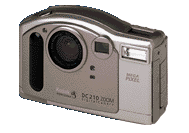
At first glance, the DC210
could easily be mistaken for a conventional film-based point and shoot camera.
While this is a significant departure from Kodak�s earlier bricklike designs, it
has been very well received by users, who seem to prefer digital cameras that
look and act more like the conventional film cameras they�re used to. With its
four AA-cell batteries installed, the camera weighs in at a fairly hefty 15.2
ounces, but we didn�t find the weight any limitation at all in normal usage.
More to the point, the relatively compact style of the 210 (5.15"wide x
1.87"deep, by 3.2"high, or 131 x 47.4 x 82 mm) allows it to slip into a
(relatively roomy) jacket or coat-pocket, something we couldn�t do with the
earlier DC120. This makes it much easier to carry about, meaning you�ll be less
likely to miss shots because the camera is home in a drawer.
Viewfinder
There�s been a debate in the
marketplace for some time now, over how best to handle the viewfinder function
for digital cameras: LCD panels provide a "real-time" and generally accurate
view of what the sensor is actually seeing, while optical viewfinders don�t wash
out in bright sunlight or gobble battery power. Increasingly, higher-end cameras
are including both, allowing the user to choose either, depending on the
particulars of the shooting situation. Following this trend, the DC210 has both
an optical viewfinder and 1.8-inch LCD panel, which may be turned on when the
camera is in capture mode, to "preview" images before they're captured. The LCD
panel automatically turns on when the camera is in "macro" mode, although you
have the option of manually turning it off as well. At other times, the LCD is
used for reviewing previously-captured photos, or for setting camera status.
Like all current-technology LCDs though, the view panel in the DC210 is
power-hungry: Either get some good-quality rechargeable batteries (see the
Imaging Resource discussion on batteries for details), or limit your LCD
usage!
While we liked the ergonomics of the DC210 very well overall, we feel
compelled to make at least one minor negative comment: We found it virtually
impossible to avoid smudging the LCD panel with our noses while using the
optical viewfinder. If you tend to use your left eye to look through the
viewfinder with, have a (much) shorter nose, or bone-dry skin, this may not be
an issue for you. For the rest of us, using the optical finder means either
carrying along a soft LCD-wiper cloth, or putting up with distracting smudges on
the LCD surface.
Optics
The DC210 sports a 2x fixed-focus zoom
lens, with a focal length range equivalent to 29 to 58mm on a 35mm film camera.
Its focus ranges from 19 inches (0.5 m) to infinity at the wide angle setting,
or 39 inches (1 m) to infinity at the telephoto end, augmented by a fixed-focus
(8 inch) close-up mode. The range of focal lengths available from the lens
deserves some mention, as it is slightly different from most other digital
cameras on the market today. Overall, the DC-210's lens tends much more toward
the wide-angle end of the range than is commonplace: 29 mm is a fair bit wider
than the wide-angle end of most digital point and shoots' zooms, and the 58 mm
setting is only slightly longer than what is traditionally considered a "normal"
lens. While this range of focal lengths won't find fans among wildlife
photographers, it is eminently practical for many more common uses. The greater
wide-angle coverage in particular is excellent for real estate work and indoor
shooting, and also makes the camera very well suited for use in creating
panoramas or "virtual reality" scenes. (See the separate Imaging Resource
coverage on panoramas and image stitching applications for more information.) In
a departure from many of Kodak's earlier cameras, the DC-210's lens does not
have threads on it to allow attachment of auxiliary lenses or filters.
Exposure
The camera's equivalent ISO speed is
quoted at 140, and available lens apertures run from f4.0-f13.5 at the
wide-angle end of the zoom, to f4.7 to f16 at the telephoto end. Exposure times
run from 1/2 to 1/362 second. Following Kodak tradition, the DC210 provides a
welcome +/- 2f-stop exposure override capability, easily accessible via the
back-panel buttons adjacent to the LCD screen. This does much to improve the
usefulness of the camera, allowing the operator to adjust the exposure to
compensate for backlighting, or light subjects against dark backgrounds. A
10-second self-timer feature lets the photographer get in the picture with the
subjects.
IMPORTANT NOTE: As CCD quality has improved, long exposure times have become practical for inexpensive digital cameras. Kodak has taken advantage of this with the 1/2 second maximum exposure time on the DC-210. Other cameras with similar slow-shutter capability already on the market have in some cases been criticized for poor autofocus performance in low light situations. We suspect that much of the problem stems from users trying to hand-hold the cameras during very long exposures. An experienced pro might be able to hold a camera steady for an eighth of a second of so, but nobody is going to get sharp pictures hand-holding a camera for a half-second exposure! Take our advice, and use a tripod when the light is dim! Above all, don't blame Kodak for fuzzy exposures in low light: They should be hailed for expanding the range of situations in which digital cameras can effectively be used. (Flame off...)
Flash
The built-in flash has an effective
range of 1.6 to 9.8 feet ( 0.5 to 3.0 m) at the wide-angle end of the lens
range, and 3.2 to 8.8 feet (1.0 - 2.7 m) at the telephoto end. Its five
operating modes include auto, auto with red-eye reduction, fill (in which the
flash always fires, regardless of the overall scene brightness), fill with
red-eye reduction, and off. In our testing, the flash performed well within its
specified range, and was also able to throttle-down effectively for macro work.
(This last has been a rarity for most point & shoot cameras in the past, as
they tended to badly wash-out close-up shots when the flash was used.)
Operation and User Interface
The DC210
improves significantly on the earlier DC120�s user interface. A dial on the back
of the camera selects among four different operating modes: Capture mode lets
you take pictures, review mode lets you look at and selectively delete
previously-captured images, and connect mode lets you transfer pictures via
either the serial cable or infrared interface. Finally, preferences mode lets
you set a variety of camera operating parameters, including image quality
(compression level), resolution, JPEG or FlashPix file format, NTSC or PAL video
output compatibility.
In capture mode, the camera is controlled by three top-mounted pushbuttons (plus the shutter button), a zoom toggle-switch on the back, and four of the five buttons on the back. This may sound like a lot of buttons, but we found the control layout and operation to be very logical. Of the three top-mounted buttons, one selects flash operating mode, one toggles macro mode on or off, and the third arms or disables the 10-second self-timer function. A top-facing LCD readout shows camera status, including compression setting, resolution mode, pictures remaining, battery condition, flash mode, and whether or not a memory card is present in the camera. On the back panel, the zoom control toggle fits right under your right thumb, and the +/- 2 f-stop exposure adjustment can be made by using the buttons normally used to control the display in review mode. As mentioned earlier, the LCD can be turned on for a live "preview" by pressing the blue "ok" button on the back panel.
In review mode, the back-panel buttons work in conjunction with on-screen icons to control picture viewing. The DC210's review screen uses a unique "filmstrip" metaphor to facilitate rapid access to and handling of images stored on the memory card. A full description would take more verbiage than either we or our readers are likely to have time for here, but suffice to say we found the interface very effective, once we got used to it, rapidly scrolling back and forth between images, deleting those we chose to, or zooming in on them for closer inspection. This last capability deserves special mention, as we found it particularly helpful. Normally, the current image displays at a reduced size on the LCD panel to allow room for the scrolling "filmstrip" and the control icons. Pushing the blue "ok" button zooms it up to fill the full screen, but even at full display size, you're obviously still not going to be able to see every one of the million pixels in the image. No problem: A special zoom mode enlarges the image pixels to match those of the display itself. The LCD panel then becomes a moveable window looking into the larger picture as a whole. This lets you scroll around the full image, seeing *exactly* what the camera recorded.
To download images from the camera via the serial port, you must turn the camera on and put it into "connect" mode. In this mode, all on-camera controls other than the power and mode-select switches are disabled, and the camera is placed under the full control of the host PC. As with many current-generation digital cameras, the DC210 can be completely controlled from the PC via the serial port, but we have to say that the standard RS-232 serial connection is beginning to badly show its age, now that digital cameras like the DC210 are producing 300-400K files in their highest-quality modes: While you can control the camera from the computer, the length of time it takes to transfer a high-resolution image over a pokey serial cable means it isn't too practical to do so.
The "preferences" mode on the DC210 deserves special mention: This is a very capable device, with many options that can be set or changed. This could easily be an intimidating process, given the number of options involved. The 210 makes excellent use of its LCD display though, turning it into a "soft" control panel, with a scrolling cursor and separate display screens for each option. The result is a camera that's very easy to configure and use, despite its flexibility.
Image Storage and Interface
The DC210 has no
"hardwired" memory, relying instead on removable "Kodak Picture Cards," which
are tiny (1 3/8 x 1 5/8 inch) (35 x 41 mm) flash memory cards conforming to the
CompactFlash (CF) standard. A 4-megabyte (MB) Picture Card ships with the
camera, and additional cards ranging in size from 2 MB to 30 MB (!) can readily
be purchased on the open market. A standard PC Card adapter lets you read images
directly from the Picture Cards into computers equipped with PCMCIA slots or PC
card readers. Depending on the image size and quality setting chosen, a 4 MB
card will store anywhere from 13-60 pictures. We�ve found removable storage a
very nice camera feature, as it allows longer sojourns away from the computer.
Given the current low cost of memory, we heartily recommend a second memory card
as an accessory for digital cameras that support removable storage.
There are a variety of ways you can interface the DC210 to the outside world: Like most digital cameras, it has a serial port allowing it to connect to either Windows or Mac machines with a simple serial cable. (Mac users will need to purchase the optional $24.95 Mac interface kit.) Given the size of the DC210's images though, serial transfer can be tedious, even at the 115 Kbaud maximum transfer rate. (We clocked transfer times for typical files of roughly 100 seconds on our Pentium 133MHz PC, and about 57 seconds on the faster serial port of our 90 MHz PowerMac.) Fortunately, the included software supports bulk-downloads of multiple images at once, so you can let it download a full batch of images while you do something else.
As mentioned earlier, the DC210 also contains an infrared (IR) communications port, supporting the IrDA 1.0 specification. Business travelers with IrDA-equipped laptops might find the IR interface convenient, but few desktop or home machines support it. Also, laptop users are likely to have PC-card slots available (see below), making the IrDA capability redundant.
If your computer has either a PC Card (also called PCMCIA) slot, or a PC Card reader, you'll really appreciate the "Finished File Format" feature of the DC210: Files are stored on the Picture Cards in the final format needed by your computer. This means that when you plug a Picture Card (in the optional PC Card adapter) into your computer, you can immediately read, view, or copy the images on it either from the computer's desktop, or directly from within your favorite image-handling software. This is a welcome departure from Kodak's previous use of proprietary file formats for removable camera storage: A many-minute serial-cable transfer takes literally seconds with the Picture Card plugged directly into your computer! Given the very large file sizes the DC210 can produce, we strongly recommend purchasing the optional PC-card adapter, and equipping your computer with a PC Card reader if it doesn't already have one.
Video Out
The DC210 can also display on-board
images directly on TV monitors, supporting both American (NTSC) and European
(PAL) signal formats. This makes the camera a very useful presentation tool,
particularly when equipped with a higher-capacity storage card. Given the
"finished file" format capability of the DC210, you can even modify images on
the computer, adding titles and callouts to images, and then upload them back to
a card for later display through the camera.
Don't think the video-out capability is restricted to business uses though! -- A slide show of a business trip can do a lot to help reconnect the harried business traveler to his or her family upon their return. Even better, "real time" slide shows of family get-togethers can be great fun as well. Overall, you may find yourself getting more use out of the TV output than you initially thought...
Power
Power for the DC210 is provided by 4
internal AA batteries, or by an optional AC adapter that can significantly
extend battery life if you're doing a lot of downloads via the serial port. As
we mentioned earlier, LCD panels on digital cameras can really "eat" batteries,
and the DC210's is no exception. If you plan to use the LCD very much, we highly
recommend the optional rechargeable battery/charger accessory kit. Our original
information from Kodak was that the DC210 was NOT compatible with high-capacity
Lithium batteries, but it now appears that this is incorrect: Lithiums
apparently work quite well in the 210 and its successor the 210Plus. (The very
high power drain of some cameras can cause Lithium cells to overheat
dangerously, but the 210 apparently does not have this problem.) Overall though,
we strongly recommend rechargeable NiMH batteries for all digital camera
usage.
Included Software
Good software can be key to
getting the most out of your digital camera investment, and Kodak has been
generous in this department with the DC210. At the core of their software
offering, Kodak's own Picture Easy 2.0 package provides a rich resource for
managing and using your pictures, combining camera interface, simple image
correction, "picture postcard" email, photo-quality output via the internet and
Kodak's Picture Network, and storage management into a single application. The
PhotoDeluxe application from Adobe provides greater image-editing capabilities,
while Adobe's excellent PageMill program is an easy way to create your own 'web
pages using images from the DC210. Finally, interface to other software packages
is provided through both a Windows 95 "Mounter" program, and a standard TWAIN
acquire module. The Mac interface package provides PhotoDeluxe for the Mac, and
Photoshop plugin "acquire" modules. Although we usually ended up using the PC
card adapter to dump an entire cardful of images at once, we liked the idea of
the "Mounter" utility very much: This software package "mounts" the camera on
your Windows95 desktop, where it appears as just another disk volume. Once so
mounted, your can move files back and forth (albeit slowly) using Windows
Explorer, or open them directly in any image-editing program that understands
the file format (JPEG or FlashPix) you're using.
Test Results
In every Imaging Resource product
review, we encourage you to let your own eyes be the judge of how well the
devices performed: Explore the links at the bottom of this page, to see how well
the DC210 performed, and how its images compare to other cameras you may be
considering buying. You're also welcome to download the images (for personal use
only) to see how they look when output on your own printer.
The DC210 takes consistently high quality images, with excellent resolution, and some of the best color we've seen to date in a digital camera. On a minor negative note though, we found the viewfinder slightly inaccurate in our testing: The area shown by the viewfinder is shifted to the upper left-hand corner of the image actually captured. Roughly 10% of the final image captured was not visible in both the horizontal and vertical directions. Viewfinder misalignment of this sort is fairly common with both digital and conventional point & shoot cameras, and is easy to adjust for in typical shooting. Once we were accustomed to the slight shift in the viewfinder, we had little trouble framing our images, simply aiming slightly up and to the right of where we wanted the center of our shot to be.
On a more positive note, we found that the LCD display provided an extremely accurate representation of the final image file. (If you read some of the other Imaging Resource reviews, you'll learn that 100% accuracy of this sort is rare, even in LCD viewfinders.)
Using the "WG-18" ISO test standard, the DC210's visual resolution measured a very good 500-550 line pairs/picture height in both horizontal and vertical directions. (See the separate discussion on image resolution for an explanation of this new international standard for resolution measurement.) This performance clearly reflects the capabilities of the "megapixel" sensor used in the DC210. (A reader has commented that he found the DC210 to show soft focus for distant objects, which our normal testing would not reveal. We hope to investigate this shortly, and will update this review once actual infinity-focus results are in hand. 5/2/98) (Later: We never got a DC210 back in to test, but the optics on the DC220 appear identical. Focus at infinity does indeed appear soft. For a reference image, check the "far field" house image on the DC220 Pictures Page.)
In real picture-taking situations, the camera revealed great detail in all situations, and provided superior color rendition under a wide variety of lighting conditions. (Look at the colors of the flowers in both the outdoor and indoor/no flash portrait shots to see this, as well as the very natural skin tones both on the live model and in the "musicians" reference image.) Kodak has always been identified with good color rendition, in both the analog and digital realms. We felt that their earlier digital camera models (notably the DC40 and DC50) went a little too far in the area of color saturation though, frequently producing ruddy flesh tones. The DC210 however, is absolutely superlative in its color management: Bright colors look really bright, while pastels and flesh tones appear soft and natural. Overall, an exceptional accomplishment!
You can get a good idea of the DC210's detail-rendering capability in a real application by looking at the standard house image. Very fine detail is evident, and JPEG compression artifacts are practically invisible.
The camera's macro function is also very good. Although it doesn't reach the "microscopic" levels of some devices on the market, it will be more than adequate for any normal close-up requirement, providing excellent detail and a full-frame coverage of roughly 5.66 x 4.24 inches (14.4 x 10.8 cm). (The small brooch in the "macro" test shot is about 1.05 inches (27 mm) wide.) Although the combination of fixed focus with "live" LCD preview in the macro mode worked quite well, we would have preferred some ability to focus the lens for different subject distances.
Update: DC210 Plus
The original DC210 was replaced in early Fall,
1998 by the DC210Plus. Primary differences are better power management, slightly
faster power-up and inter-shot times, an upgrade of included CF memory to 8 MB,
and a dark gray case. We're told that the optics and image processing is
otherwise idetntical to those of the original.
See for Yourself!
Take a look at the test images from the DC210, or jump to the Comparometer(tm) page to compare its
reference images to those from other digital cameras.
Conclusion
The Kodak DC210 is an excellent
all-around digital camera, with high ("megapixel") resolution, superb color and
tonal rendition, and great ease-of-use. It would be at home anywhere high
resolution and good image quality are needed.
Reader Sample Images!
Do
you have a DC210 camera? If you'll post an album of your samples on one of the
photo-sharing services and email us at [email protected], we'll list the album
here for others to see!
For More Info: Visit the Kodak web page for the DC210 - They also have an excellent "guided tour" of the DC210 that gives you a good idea of how it works, and what the user interface is like.


Follow Imaging Resource: