Canon PowerShot G3The third generation of Canon's popular G model retains last year's 4 megapixel CCD, but brings a 4X zoom lens and a host of other improvements.<<Operation & User Interface :(Previous) | (Next): Image Storage & Interface>> Page 9:Camera Modes & MenusReview First Posted: 9/16/2002 |
Camera Modes and Menus
The G3 has a single Mode dial on the top panel, which controls the exposure mode. A second Power lever controls whether the camera is in Record or Playback mode. Within Record mode, the Mode dial sets the exposure mode to either Movie, Stitch-Assist, Night Scene, Landscape, Portrait, Auto, Program AE, Shutter Priority, Aperture Priority, Manual, or Custom (C1 & C2).
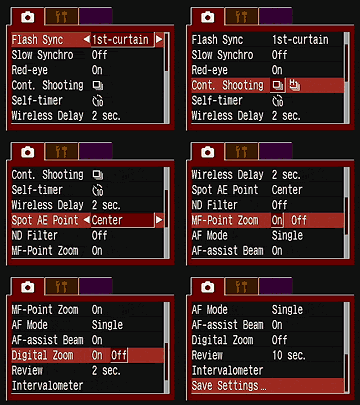 Record
Menu (Red): With the exception of the Auto exposure mode and most of the
Image Zone exposure functions, the Record menu provides virtually identical
options for all exposure modes. These menus are accessed by depressing the Menu
button once while in a Shooting mode. Following are the available settings:
Record
Menu (Red): With the exception of the Auto exposure mode and most of the
Image Zone exposure functions, the Record menu provides virtually identical
options for all exposure modes. These menus are accessed by depressing the Menu
button once while in a Shooting mode. Following are the available settings:
- Flash Sync: Syncs the flash with the first or second curtain. (That is, when the shutter first opens, or just before it closes. Second-curtain sync is needed when shooting flash photos of moving objects in conjunction with long shutter speeds, in order to make the "motion trails" of the subjects follow the subjects, rather than appearing to stretch in front of them.)
- Slow Synchro: Turns Slow Synchro flash mode on or off.
- Flash Adjust: Places flash adjustment under Auto or Manual control.
- Red-Eye Reduction: Activates the camera's Red-Eye Reduction flash mode, which reduces the occurrence of Red-Eye in portraits.
- Continuous Shooting: Specifies whether normal Continuous Shooting or High Speed Continuous Shooting modes are available via the Drive setting. (High Speed mode gives faster frame rates, but with fewer shots possible in each sequence.)
- Self-Timer: Sets the duration of the self-timer countdown to two or 10 seconds.
- Wireless Delay: Sets the duration of the self-timer when used with the remote control. Times are zero, two, or 10 seconds. (The zero second delay is new on the G3, and highly welcome!)
- Spot AE Point: Establishes where the Spot metering system bases its exposure on, either from the center of the frame or from one of the available autofocus area points.
- ND Filter: Turns the ND filter on or off. If on, the ND filter cuts the incoming light by a factor of eight (three f-stops). The ND filter is handy for closeup flash work, or for enabling wider apertures or longer shutter times under bright shooting conditions.
- MF Point Zoom: Determines whether or not the focusing point is magnified in the LCD display when manual focus is adjusted. (Note that the MF point follows any AF point you may have selected with the FlexiZone feature.)
- AF Mode: Determines when the autofocus mechanism operates. Single autofocus sets focus whenever the Shutter button is pressed halfway. Continuous autofocus adjusts the focus continuously, any time the camera is in a record mode.
- AF Assist Beam: Turns the AF assist lamp on or off.
- Digital Zoom: Turns digital zoom on or off.
- Review: Establishes the Quick Review time duration, with options ranging from 2 to 10 seconds, in one-second increments. You can also disable the Review function.
- Intervalometer: Activates Interval shooting mode, letting you capture a series of images at specific intervals. Intervals can range from 1 to 60 minutes, with a maximum of100 shots in a series.
- Save Settings: Saves the currently selected menu settings for subsequent recall in the C1 or C 2 camera modes.
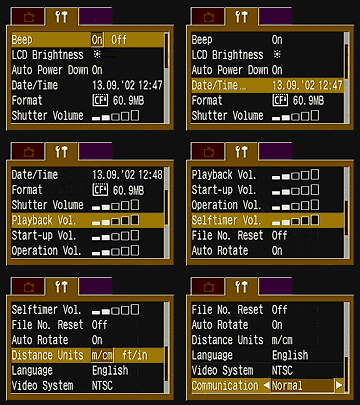 Setup
Menu (Yellow): The Setup menu provides universal camera control options
that remain the same in both Shooting and Replay modes, with the exception of
shutter and speaker volume (see below). This menu is accessed by depressing
the Menu button once and then scrolling to the right with the Omni Controller
rocker. Following are the available settings:
Setup
Menu (Yellow): The Setup menu provides universal camera control options
that remain the same in both Shooting and Replay modes, with the exception of
shutter and speaker volume (see below). This menu is accessed by depressing
the Menu button once and then scrolling to the right with the Omni Controller
rocker. Following are the available settings:
- Beep: Turns the camera's Beep sound On or Off.
- LCD Brightness: Adjusts the brightness level of the LCD monitor to Normal (small sun) or Bright (large sun).
- Auto Power Down: Activates or deactivates the camera's automatic shutoff feature.
- Date / Time: Sets the camera's internal clock and calendar.
- Format: Formats the CompactFlash card, deleting all images saved on the card (even write-protected ones).
- Shutter Volume (Shooting): Adjusts the volume of the shutter sound when an image is recorded. Volume options, which are selected by pressing the Left and Right Arrow keys, are on a scale of one to five, and Off.
- Playback Volume (Replay): Adjusts the playback volume for movie files, from one to five, or Off.
- Start-up Volume (Record): Adjusts the volume of the start-up sounds.
- Operation Volume: Adjusts the volume of the overall operating sounds.
- Self-Timer Volume: Adjusts the volume of the self-timer beep.
- File Number Reset: Resets file numbering with each new card. (The default is to continue the numbering sequence across multiple cards, to prevent accidental overwriting of image files when they're copied to a computer.)
- Distance Units: Sets the focus measurement to read out in either meters or feet.
- Language: Changes the G3's menu language to one of 12 language options.
- Video System: Sets the video output signal to NTSC or PAL.
- Communication: Sets the USB communication to PTP or Normal. (PTP is a feature used with Windows XP and Mac OS X to automate picture file transfer.)
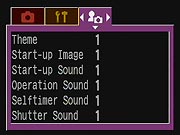 My
Camera Menu (Purple): The third menu available in any Record mode, this
lets you customize the camera's start-up screen, sounds, etc. Each setting offers
three choices already programmed into the camera (Canon screen, scenic view,
or bird image), but you can also load your own images and sounds. (I guess some
folks may find this amusing, but I really don't understand Canon's expending
the engineering resources to put this sort of thing in a camera for the serious
amateur. I mean, do any of the G3's prospective buyers really care about having
their cameras play a different startup sound or tune?)
My
Camera Menu (Purple): The third menu available in any Record mode, this
lets you customize the camera's start-up screen, sounds, etc. Each setting offers
three choices already programmed into the camera (Canon screen, scenic view,
or bird image), but you can also load your own images and sounds. (I guess some
folks may find this amusing, but I really don't understand Canon's expending
the engineering resources to put this sort of thing in a camera for the serious
amateur. I mean, do any of the G3's prospective buyers really care about having
their cameras play a different startup sound or tune?)
- Theme: Selects the theme for each My Camera setting item, adjusting all of the following.
- Start-Up Screen: Selects which image appears at camera start-up.
- Start-Up Sound: Sets the sound that plays at camera start-up.
- Operation Sound: Specifies the noises played when the Four-Way Arrow pad is pressed, or any button other than the Shutter button.
- Self-Timer Sound: Sets the noise for the Self-Timer beep.
- Shutter Sound: Sets the shutter noise.
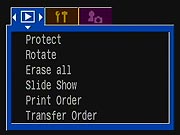 Play
Menu (Blue): This menu is only available in the Replay mode. It allows you
to scroll through captured images; erase, protect, and rotate them; or set them
up in a slide show or for printing on a DPOF compatible device. The Play menu
offers the following selections:
Play
Menu (Blue): This menu is only available in the Replay mode. It allows you
to scroll through captured images; erase, protect, and rotate them; or set them
up in a slide show or for printing on a DPOF compatible device. The Play menu
offers the following selections:
- Protect: Write protects the currently displayed image from accidental deletion, except by card formatting.
- Rotate: Rotates captured images 90 to 270 degrees clockwise.
- Erase All: Erases all images from the CompactFlash card.
- Slide Show: Automatically plays images in a slide show format. You can choose to include all images on the card or one of three Program selections. You can also set the Play Time (amount of time between images) from 3 to 30 seconds or Manual; and turn the Repeat function on or off
- Print Order: Sets up images for printing on a DPOF compatible device. Options include Standard or Index prints, the number of copies, Date Stamp On or Off, and File Number On or Off.
- Transfer Order: Selects images to be transferred with email software,
when the camera is connected to a computer.


Follow Imaging Resource: