  Polaroid, PDC-3000 Digital Camera Million-pixel resolution and "Image Quality Assurance" for accurate color |
 |
|
Super-high resolution at 1600x1200 |
|
|
Polaroid "Image Quality Architecture" | |
|
|
Exceptional image quality | |
|
|
"Digital Negative" concept for archive, workflow | |
|
|
High-Speed SCSI interface | |
|
|
Available "Studio Kit" for pro strobe use |
Long a household word in film-based photography, Polaroid has staked out a unique space in the digital marketplace, offering exceptional image quality, and special capabilities to support studio photography. In 1996, Polaroid released the PDC-2000 and established a new image-quality benchmark, at a retail price ($2,495) that fell squarely between digital point & shoots and the much more expensive high-end portable digital cameras. While the price was much higher than conventional point & shoots, the PDC-2000 in fact opened up a whole range of applications to digital photography that simply hadn't been possible before. Polaroid soon discovered that many of their units were finding use in studio-based product photography, and with remarkable agility for a corporation of their size, responded with a "studio kit" facilitating us with studio strobes, and giving the photographer more control over camera operation.
The current PDC-3000 continues and extends this focus, with excellent camera control capabilities from the host computer. It also includes a number of Polaroid innovations affecting image quality and the usability of images for multiple purposes ("repurposing"). In the review below, we'll spend a fair amount of time discussing Polaroid's unique "Image Quality Architecture" (IQA) and their concept of the "Polaroid Digital Negative" (PDN), because we believe they offer significant value to users who fit the particular niche the PDC-3000 was designed for.
Overview
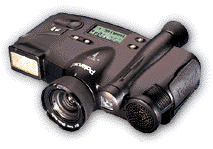
The first thing that stands out about the PDC-3000 is its unusual design: The
overall appearance is that of something from a Buck Rogers set, with jet-black,
rounded contours, and interesting bulges everywhere. Its cast-metal body gives
it a very solid feel, and its weight of 2 pounds (0.9kg) including batteries
puts it at the top end of the range of point & shoots we've tested. The
weight and broad form factor though, contribute to a very stable shooting platform:
We believe most users will find it easier to hold steady for available-light
shots than they would a camera with a more conventional form factor.
The camera sports a 1 million pixel CCD image sensor, using patented "pastel" color filtration to allow higher resolution for luminance ("brightness") information. With an optical viewfinder and no LCD panel, the user interface of the PDC-3000 is simpler than units having sophisticated selection menus presented via the LCD. Overall, while more sophisticated than the earlier PDC-2000, we found the PDC-3000 as easy to use as any lower-end point & shoot.
The PDC-3000's SCSI computer interface deserves special mention: While requiring
a higher level of integration with the host computer system, the very high transfer
rate of the SCSI interface makes it truly practical to use the computer's CRT
as a viewfinder during tethered operation. For studio users, the exact framing
this provides is a decided plus.
Design
As noted above, the industrial design of the PDC-3000 immediately separates
it from the pack of more conventional digital point & shoots. Its case has
the wide aspect ratio of a set of binoculars, rather than the boxy shape of
a conventional camera. Overall dimensions are 7.9x6.3x2.2 inches (20.1x16.0x5.6
cm), and weight with batteries is a hefty 2 pounds (0.9kg). Given these dimensions,
this clearly is not a camera to tuck in your shirt pocket. On the other hand,
we found the size and heft very welcome when handholding the camera for longer
exposures, and felt that the wide, two-handed grip it provides makes for a more
stable picture-taking platform.
Viewfinder
The viewfinder on the PDC-3000 is optical, consisting of a small "telescope"
mounted slightly above and to the left of the main lens. The outer frame of
the viewfinder displays the area captured by the wide-angle lens shipped with
the camera, while an inner rectangle marks the field of view of the optional
short telephoto.
The viewfinder of the original PDC-2000 was one of its weakest elements, and this appears to be one area that's been improved on the PDC-3000. The PDC-3000 viewfinder is much clearer and more accurate than that on the earlier model. The PDC-3000's viewfinder also has a very high "eyepoint," making it easy for eyeglass wearers to use. ("Eyepoint" refers to the maximum distance between the back element of the viewfinder optics and the user's eyeball: A higher eyepoint means your eye can be further from the camera body and still see the full viewfinder frame, a particularly important feature if you wear glasses.) The field of view through the viewfinder was also almost completely insensitive to lateral eye position. This is a problem with some low-end point & shoots, where the field of view changes radically as you move your eye from side to side.
Our first test sample of the PDC-3000 showed a slight but noticeable rotation of the viewfinder field of view relative to the captured image. Although the effect was slight, and easily compensated for, an embarassed Polaroid assured us this was not customary, and immediately shipped a replacement without the problem.
Optics
The PDC-3000 is unusual among digital point & shoots, in that it offers
interchangeable lenses. The camera ships with a 38mm-equivalent unit as standard
equipment, and an optional 60mm-equivalent version is also available. The lenses
attach via threaded mounts: an alignment mark facilitates rapid changing by
assuring that the threads match. The all-glass lenses themselves appear to be
as solidly constructed as the rest of the camera, and at f2.8, they are fairly
fast by point & shoot standards.
The PDC-3000 autofocus system takes advantage of ultrasonic-ranging technology Polaroid first pioneered in their SX-70 instant camera many years ago. This system works by emitting a "chirp" of ultrasonic sound waves (you'll hear it as a slight click before the shutter trips), and then measuring how long it takes for them to bounce off the subject and return to the camera. This method has the advantage that it can work in complete darkness, and also isn't fooled by unusual subject content. (Venetian blinds and other objects with strong horizontal patterns can cause problems for some autofocus systems.) On the downside, if there's a piece of glass between you and the subject, the PDC-3000's autofocus system will "see" and focus on the glass, rather than your subject. If you need to shoot through a window, you can turn off the autofocus system by pressing the "AF" button on the camera's top panel, setting the focus to infinity.
In our tests, we found the PDC-3000's autofocus both accurate and very sensitive: The camera displays the distance to the subject on the top-panel readout, and responds to movements of as little as an inch or two.
A full-manual focusing option is available when the camera is tethered to a host computer: With the autofocus disabled, a slider on the computer screen adjusts the focus directly, and the results can be monitored in the on-screen preview window. This would be ideal for studio situations in which you may want to deliberately focus on a background object, rather than one closer to the lens that the autofocus would respond to first.
Exposure
Polaroid gives the equivalent ISO film speed of the PDC-3000 as 100, although
the camera actual adjusts its effective sensitivity across a range from ISO
25 to ISO 100, depending on lighting conditions. Shutter speed ranges from 1/25th
to 1/500th of a second, and lens aperture from f2.8 to f11. Overall, this corresponds
to an illumination range of EV 12.5 to EV 21, extending to EV 23 when taking
the self-adjusting ISO-equivalent light sensitivity into account. (The point
of the adjustable ISO speed isn't to allow accurate exposure under extremely
bright conditions, but rather to reduce sensor noise to the lowest level possible.
When operating in tethered mode, the operator can also choose a lower ISO rating
to permit the use of larger lens openings than would otherwise be possible.)
Like any auto-exposure system, that of the PDC-3000 is subject to being "fooled" by unusual lighting , such as strong backlighting. In standalone mode, you can compensate for backlit conditions by pressing a button next to the shutter trigger on the top panel. This appears to adjust the exposure upward by about one f-stop, but the exact amount isn't specified in the camera's manual.
As with most autoexposure cameras, shutter speed and lens aperture are linked in the PDC-3000: At low shutter speeds, the lens remains wide open, progressively stopping down as the shutter speed is increased. While you can override the automatic exposure under software control, the relationship of f-stop to shutter speed is fixed unless the flash is enabled. With the flash on, you can select any f-stop smaller than the one the camera would select under full automatic control, based on the shutter speed chosen. (On the plus side, since the shutter isn't located at the focal plane, the strobe can sync at any available shutter speed.) While still not as flexible as a full-manual 35mm SLR, this certainly represents a significant advance over the level of control available with lower-end digital point and shoots.
The built-in flash on the PDC-3000 is quite powerful, with a working range of up to 15 feet (4.6 meters). It has three operating modes: Off, Auto, and always on or "Fill." For use in a studio setting, Polaroid sells an optional "Studio Kit," which includes a clever strobe trigger that simply over the on-camera flash head. Blocking all light from the on-camera strobe, it turns control over to a studio system, permitting any sort of sophisticated lighting you might desire. Some in the press have criticized this accessory as an "afterthought," but we commend Polaroid for quickly finding a simple, effective solution to user needs.
White Balance
The PDC-3000 provides two levels of white balance correction. The first occurs
within the camera itself, through preset choices for daylight, incandescent,
and fluorescent lighting. These affect the image capture itself, and provide
a very strong correction where needed. (The incandescent setting has the effect
of a very deep blue filter, completely neutralizing the color cast from common
household incandescent bulbs.)
Once the image is captured, a secondary color cast-removal correction can be made when the image file is processed through Polaroid's IQA software. Several options are provided for this second cast correction, to handle widely varying subject matter. These options differ in how they select pixels to contribute to the white balance computation: "Pastel World" uses only lightly-colored pixels to compute the cast removal; "Gray World" computes the required cast removal based on all the pixels of the image; and "Bright World" uses only the brighter pixels to calculate the necessary cast adjustment.
The IQA software also allows you to create a custom gray balance for a given shooting situation, and then apply it to all shots taken with that setup. This is accomplished by shooting a picture of a neutral gray card, balancing the color, and then loading the resulting setting into the software. This is all accomplished fairly automatically, and Polaroid even includes a standard gray card for you in their optional "Studio Kit."
In our own testing, we used the gray card to set a white balance for all our shots, and then used the appropriate IQA cast-removal setting to further tweak the results. The bottom line was excellent, natural color, and excellent handling of subtle tonal gradations.
Operation and User Interface
Accessing common camera functions through the PDC-3000's user interface is particularly
straightforward, since there's a nice one button/one function relationship for
the most frequently used adjustments: Autofocus, white balance, flash mode,
and backlight compensation are all controlled by single pushbuttons, each dedicated
to a single function. The status of each of these settings is always displayed
in the top-panel LCD readout whenever the camera is turned on. Time, date, shots
taken, and battery condition are also available in the same readout, as well
as either the current image label (more on this in a moment) or a display of
used/available memory capacity.
Less common camera functions are accessed by pressing the "mode" button on the camera's top panel. This toggles the alphanumeric portion of the LCD readout to display a range of choices, including "compress," "index," "sound," "cf card," "distance," "storage," and "display."
"Compress" lets you choose from four image-compression options, including none, 2:1 lossless, 5:1 lossy (JPEG), and 10:1 lossy. "Index" allows you to scroll through the images in the camera, changing individual image labels or selectively deleting the image files. "Sound" turns the camera alert sounds on or off. "CF Card" provides several functions relating to the CompactFlash storage card, including erasing all pictures, or formatting a brand new card. "Distance" lets you select either feet or meters as the units in which the camera will display subject distances measured by the autofocus system. "Storage" takes you to a mode in which you can toggle between a thermometer-bar display of storage capacity, a numeric indication of the number of megabytes of storage remaining, or a numeric estimate of the number of additional pictures that can be stored at the current compression setting. Finally, "display" allows you to choose whether the camera displays used/available memory, current compression setting, or the current "label" while taking pictures.
The "label" function is probably most useful in a studio environment where the camera is tethered to a computer. The PDC-3000 saves 10 characters of alphanumeric information with each captured image. This label can be set using the on-camera readout and pushbuttons, or directly from the computer keyboard when running in tethered mode. The current label is automatically attached to any image captured: All images will bear the same label until it is changed. When the camera is tethered, changing the label is as simple as typing a new character string on the keyboard, a fast, simple operation. Entering a whole new label with the on-camera controls can be a tedious process though, as each character must be set individually, and you can only select letters and numbers by scrolling through the full character set. Still, we can see a use for the function in non-tethered mode, particularly if you set up your labels so that most of the time you were changing a single digit. (For instance, "Widget1," "Widget2," etc.)
Image Storage and Interface
The PDC-3000 stores images on removable CompactFlash memory cards, and ships
with a 20 megabyte Polaroid-branded card as standard equipment. As usual, image
capacity depends on the compression setting, and ranges from 20 images in uncompressed
mode (remember, the camera is storing raw CCD data, not the final interpolated
image) to 200 images in 10:1 lossy compression mode. Most users will probably
use the 2:1 lossless compression mode most of the time (since there's no loss
of image quality associated with its use), in which case the furnished 20 megabyte
card will hold 40 images.
You can import images from the PDC-3000 into your computer using two different means: If your computer is equipped with a PC-card reader, you can remove the CompactFlash card from the camera, slip it into the (included) PC-card adapter, and plug it directly into your computer. Alternatively, you can connect the camera to the end of a SCSI chain and import images using that high-speed connection. (For those unfamiliar with the SCSI standard, it's a high-speed connection commonly used to attach disk or tape drives to computers. While a little finicky about cable lengths and configuration, data moves across SCSI connections at megabytes per second, rather than the kilobytes per second of the more common serial connection.)
Images are stored in the camera in proprietary formats, meaning you need to use the Polaroid IQA software to convert them for use with other programs. The inconvenience of needing to convert the files to a different format for use is balanced by a range of benefits including more-compact image storage, higher image quality, and the ability to custom-tailor the images for a range of output devices. (See our following discussion of the PDC-3000's included software.)
Power
The PDC-3000 operates either from a set of 4 AA rechargeable NiCd batteries,
or an AC power adapter. (Both of which are included with the camera itself.)
The camera falls into the middle range of power consumption for digital point
& shoots, saving battery energy because it doesn't include a power-hungry
LCD screen, but expending energy on its autofocus system and powerful built-in
flash. All told, a fully charged set of NiCds should be sufficient to acquire
a cardfull of images (40), some with flash, and then download them to a host
via SCSI. A note though: You'll almost certainly want to use the AC adapter
when downloading via the SCSI connection, as SCSI interface electronics are
fairly power-hungry.
Included Software
The software Polaroid ships with the PDC-3000 has a single function: Extract
the absolute maximum possible quality from the camera's captured images, and
ensure that this quality carries through all the way to the final output. As
such, no image-manipulation or "project" based packages are included,
as is common with lower-end camera products.
The furnished software, all Polaroid-written, comes as both a standalone application, and either a Photoshop plug-in for Macs, or a TWAIN acquire module for Windows systems. Its basic operation is fairly simple, and typical of many camera acquisition programs: Groups of raw camera files can be viewed as thumbnails, whether located in the camera (attached to a SCSI connection), or in a directory on the host computer's hard disk. Selected images can be opened and viewed, or saved to disk in any of several available formats. As noted earlier, the software also allows the camera to be controlled directly from the host computer when operating in "tethered" mode. This mode allows greater exposure flexibility than when the camera is used standalone.
In their manuals and marketing literature, Polaroid places particular emphasis on their Image Quality Architecture ("IQA"), implemented in the PDC-3000 and its accompanying software. IQA is a significant enough technology that we feel it worthy of special mention here.
IQA grew out of Polaroid's research into how people assess image quality: Literally thousands of tests were performed using carefully-characterized images and a range of test subjects, to correlate objective image characteristics (color fidelity and saturation, resolution and sharpness, image noise, etc.) with people's subjective perception of the "quality" of each image. This research allowed Polaroid to focus their engineering efforts in the PDC-3000 on exactly those areas that most contributed to perceived quality in the final images. The result is an all-encompassing architecture for managing image quality, from the moment of capture all the way to the final printed image. While all digital camera manufacturers strive for good-looking images on-screen, Polaroid has gone several steps further, by including output-device profiles for a variety of popular printers as well. These profiles address not only color characteristics, but tonal balance, dynamic range (maximum black-to-white ratio), and printer-specific image-sharpening parameters.
The Polaroid Digital Negative(tm)
This is all well and good, but most users won't want to tweak their images
to fit a specific printer, losing their original image in the process: Some
provision must be made for "repurposing" the images for different
output devices or display screens. Polaroid recognized this, and developed the
concept of the "Polaroid Digital Negative(tm)" ("PDN").
The analogy between the PDN file format and a conventional film negative is quite apt. PDN files are designed to capture all of the original information obtained from the CCD sensor, and store it in a compact form for later interpretation. Using the 2:1 lossless compression format, PDN files can encode all of the original sensor information from the PDC-3000's CCD in only a half-megabyte of space. This is particularly impressive, when you consider that the IQA software is capable of interpolating this information up to create a 1600x1200 pixel, 5.6 MB file with excellent detail! Polaroid's vision is that these PDN files are what will be archived for long-term storage (just like film negatives), and that particular expressions of them will be created for specific uses over time (just like paper prints in the world of conventional photos). Through it all, the original PDN file remains unaltered: Each individual "print" from it will be adapted to specific output requirements, including image size/resolution, output device color space, image sharpening parameters, etc.
This approach is very different from that espoused by most digital camera manufacturers, and bears some further discussion. It has the disadvantage from a workflow standpoint that it introduces another step in the production process, requiring processing to convert the original PDN to a file usable in other programs. The fact that the Polaroid software supports batch processing of images mitigates the inconvenience of this somewhat, and the process of opening a PDN file is fairly rapid as well (5-15 seconds, depending on final resolution and processor speed). Nonetheless, there is that added step. On the other hand, the PDN files are very conservative of storage space, and the same image can be adjusted for use in different media without compromising the integrity of the original PDN. Overall, the scheme fits well into a professional graphics environment, where the investment in workflow would be amply repaid by the optimal image quality for a variety of output options.
Interpolation: It's a Good Thing
Polaroid's interpolation technology used in the PDC-3000 is also unique. Prior
to our encounter with the original PDC-2000, we had been of the opinion that
interpolation was a "bad thing," an effort by manufacturers to artificially
increase their camera's resolution specs. (Interpolation refers to the practice
of inserting "extra" pixels in between those captured by the sensor
itself. The color and brightness values for these interpolated pixels are computed
mathematically from the values of the original sensor pixels.)
The PDC-2000 changed our minds about interpolation, thanks to the very real increase in resolution we saw between the "high res" and "super high res" image sizes. As it turns out, Polaroid again took a somewhat different approach than most others in the industry, with salutary results: Rather than trying to make their color filters perfectly selective, letting through only the color they were supposed to, Polaroid chose to implement "pastel" filters on the PDC-2000 and PDC-3000 sensors. Instead of deep red, green, and blue filters, those on the PDC cameras' sensors are lighter shades of those primaries, because they pass significant amounts of white light along with their preferred color.
Without special processing, "leaky" color filters of this sort would produce very flat, washed-out images. (In fact, poor color filtration is a common problem on low-end digital cameras.) While the pastel filters require more processing to extract accurate color information, they bring strong benefits in the area of resolution. Because they allow fairly large amounts of light to pass through all colors, the raw sensor information carries more luminance data, meaning that the Polaroid cameras can distinguish the edges of objects and fine detail much better than cameras of similar pixel count, using conventional color filtration. This patented filtration system (now licensed by at least one other major camera manufacturer) contributes significantly to the PDC-3000s superior resolution.
One last point on the PDC-3000's software and final image sizes, and we'll move on to our actual test results: At the highest resolution of 1600x1200, the PDC-3000 images are somewhat "soft" compared to those from other very high-resolution devices. (One author compared them to the slightly soft appearance of PhotoCD images in the same resolution range.) Some have viewed this softness as a limitation, finding the sharper edges of other high-res cameras more appealing to the eye. While this falls somewhat into the realm of personal preference, there's an important point to note relative to using the camera's images in printed output: A common rule of thumb suggests that you should allow a block 2x2 camera pixels for each halftone dot in the printed output. That is, if you intend to print with a 150-line halftone screen, plan on having at least 300 dpi of resolution in your original image. In the case of images with abrupt pixel boundaries, this is a good rule to go by. In our own experience with images from the PDC-2000 (and by extension those from the PDC-3000), we found that the lack of hard pixel edges let us relax this rule considerably, in some cases going to a ratio as low as 1.25:1 between camera pixels and halftone screen ruling. The bottom line? Images from the PDC-3000 can be printed and look good at much larger sizes than the conventional 2:1 pixels/dots ratio would suggest.
Test Results
As with all Imaging Resource camera tests, we encourage you to let your own
eyes be the judge of how well the devices performed: Explore the links at the
bottom of this page, to see how well the PDC-3000 performed, and how its images
compare to other cameras you may be considering buying.
Special note: Some browsers may have trouble displaying the "super high quality" (1600x1200) images from the PDC-3000. If you experience difficulty viewing the large images, you can either give your browser more memory space (if you're using a Mac), or download the image first to your hard drive. If you continue to have difficulty, contact us at [email protected] for assistance copying the images via ftp protocol.
These files have been JPEG compressed
The PDC-3000 outputs very large files in an uncompressed TIFF format. In order
to present these images on the web, we had to convert them to the JPEG format,
which is a "lossy" compression. We have been very conservative in
our use of compression, choosing a setting of 8 in Photoshop 4.0 to save the
images for the website. By actual measurement, no pixel has a value different
from that of the original image of more than 6 brightness units, and most differences
are 2 units or less. Nonetheless, there will be some loss of objective image
quality relative to the originals, even if not visible to the eye. While we
don't believe these differences will be visible in the images, we are compelled
to point out the processing of the images so our readers can accurately assess
the capabilities of this camera. (If you would like copies of the uncompressed
images, please email us at [email protected], and we can make the originals available to you by special arrangement.)
While the upper end of the digital point & shoot field has made major strides in catching up to the PDC-3000 in overall image quality, the test results seem to show that Polaroid still holds a slight edge.
The PDC-3000s resolution measures-out at somewhere around 650-700 line pairs per picture height in both vertical and horizontal directions, although the rectangular sensor pixels give rise to greater aliasing in the vertical dimension. (Interestingly, the diagonal lines on the WG-18 test target show the highest resolution, with individual lines discernible well beyond 700 lp/ph.) The "natural" images of the house and musicians really show the PDC-3000's resolution to best advantage: Note in particular the exceptionally fine detail captured in the leaves and twigs of the background trees in the house image.
Viewfinder accuracy on the PDC-3000 was about in the middle of the pack of cameras we've tested to date: In both wide-angle and telephoto modes, captured images were shifted slightly down, and the wide-angle mode was also offset slightly to the right. Both modes captured a slightly larger area than indicated by the viewfinder reticle, the tele mode somewhat more so. By contrast, we found the "electronic viewfinder" function available when operating in tethered mode to be quite precise. (Surprisingly, this is not a given: We've found that many cameras crop their "live" viewfinder slightly relative to the final picture. The PDC-3000 doesn't have this problem, making it much more suited to critical studio work than many other units.)
Color accuracy and tonal range on the PDC-3000 were both exceptional. One of the most impressive characteristics of the PDC-3000 was its ability to accurately preserve subtle gradations across the full tonal range. Look in particular at the pastel blocks of the Kodak Q-60 color target in the "Davebox" shot: The PDC-3000 is the only camera we've tested to date (early April, 1998) that accurately preserved the delicate pastels of row "B" of this target.
The model shots reinforced our impression of the camera's ability to preserve subtle shadings in the highlights. Unfortunately, there's a minor tradeoff involved, in that the camera seems to never fully utilize the upper range of the available tonal scale: The as-captured images generally have a slightly flat appearance, due to the lack of any pure whites. We found this could be easily corrected with a "levels" adjustment in Photoshop, but it would be nice if the otherwise exceptional color and tonal management capabilities of the IQA system could be tweaked to produce cleaner highlights without additional intervention.
Macro shooting with the PDC-3000 is best accomplished with the optional "tele" (60mm equivalent) lens and the optional close-up filter set. We took our macro shots with this configuration, and stacked all 3 close-up filters for a total correction of +7 diopters. The net result was a 4.5 inch working distance from the subject to the front lens element, and a coverage area of 2.75 x 2.06 inches (6.99 x 5.23 cm) Despite all the glass loaded on the front of the main lens, the resulting macro shots showed excellent detail.
See for Yourself!
Take a look at the test images from the PDC-3000,
or jump to the Comparometer(tm)
page to compare its reference images to those from other digital cameras.
Conclusion
The PDC-3000 is an ideal camera for those needing maximum exposure control in
a studio setting, or simply wanting the greatest possible image quality in a
portable camera. Its high image quality and unique IQA processing to specifically
tailor the images to various output devices and media make it particularly suited
for desktop-publishing applications.
Reader Sample Images!
Do you have a PDC-3000 camera? If you'll post an album of your samples
on one of the photo-sharing services and email us at [email protected],
we'll list the album here for others to see!
For More Info:
View the data sheet for the PDC-3000
View the test images from the PDC-3000


Follow Imaging Resource: