Canon PowerShot Pro1New level of sophistication takes over the top spot in the PowerShot line.<<Image Storage & Interface :(Previous) | (Next): Test Results & Conclusion>> Page 11:Video, Power, SoftwareReview First Posted: 05/14/2004 |
Video Out
 The
Pro1 has a video-out port with a choice of NTSC timing format, for US and Japanese
model televisions, or PAL timing format for European televisions, which are
selectable through the Play menu. The video output can be used for reviewing
previously recorded images or running slide shows from the camera. It also shows
all three LCD menu screens in both playback and capture modes, as well as the
preview display from the LCD viewfinder. Combined with the very flexible controls
of the wireless remote transmitter, the live video output display opens up interesting
possibilities for portrait photography, such as using a video monitor as a remote
viewfinder.
The
Pro1 has a video-out port with a choice of NTSC timing format, for US and Japanese
model televisions, or PAL timing format for European televisions, which are
selectable through the Play menu. The video output can be used for reviewing
previously recorded images or running slide shows from the camera. It also shows
all three LCD menu screens in both playback and capture modes, as well as the
preview display from the LCD viewfinder. Combined with the very flexible controls
of the wireless remote transmitter, the live video output display opens up interesting
possibilities for portrait photography, such as using a video monitor as a remote
viewfinder.
The output cable is a true A/V cable, as it fans out into two RCA jacks, one for video, and one for audio. Plugged into any video monitor (or TV with direct video and audio inputs), the audio capabilities of the Pro1, combined with the wireless remote control, should make it an effective portable presentation device.
Power
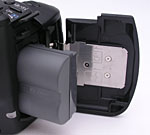 The
Pro1 is powered by an internal BP-511A rechargeable lithium-ion battery pack,
a LiIon design that packs quite a bit more power than its predecessor, a full
1390 mAh compared to the BP-511's 1100 mAh. The camera ships with one battery
pack, as well as a charger module with flip out prongs to plug directly into
a wall or strip socket. Unlike the G-series, the Pro1 does not include an AC
adapter. This is sold separately, as is a car AC adapter that plugs into any
automobile cigarette lighter. A CR2016 lithium battery keeps the Pro1's internal
clock going, and fits into a small compartment within the battery chamber.
The
Pro1 is powered by an internal BP-511A rechargeable lithium-ion battery pack,
a LiIon design that packs quite a bit more power than its predecessor, a full
1390 mAh compared to the BP-511's 1100 mAh. The camera ships with one battery
pack, as well as a charger module with flip out prongs to plug directly into
a wall or strip socket. Unlike the G-series, the Pro1 does not include an AC
adapter. This is sold separately, as is a car AC adapter that plugs into any
automobile cigarette lighter. A CR2016 lithium battery keeps the Pro1's internal
clock going, and fits into a small compartment within the battery chamber.
Because the Pro1 relies on its LCD display for viewing and selecting some of its settings, it can be somewhat of a drain on the power supply. Fortunately, the camera has an automatic three-minute shutdown mode to help conserve battery power, and you can further reduce power consumption by setting a shorter timeout on the LCD monitor, as well as by keeping the autofocus mechanism in Single rather than Continuous mode.
That said, the Pro1 offers really excellent battery life. I wasn't able to test its power drain explicitly, because I didn't have an adapter to fit its proprietary power connector. I did time how long it took the camera to run down in its worst-case power drain mode (capture mode, with the rear-panel LCD turned on, and the camera kept fully "awake" by half-pressing the shutter button periodically), and the result was a very impressive 191 minutes. (3 hours, 11 minutes.) This is almost exactly the same run time as the Sony DSC-F828, and easily beats the rest of the 8-megapixel competition.
I really like Canon's BP-511 batteries. While I generally prefer nonproprietary batteries (allowing many third-party solutions), the BP-511s hold a lot of charge, and the new BP-511A holds even more, turning in some impressive run times, both in testing and in use.
Still, as always, I strongly recommend buying a second battery to have as a spare. (Murphy's law dictates that the battery in your camera will always run out just as the most interesting photos present themselves. Carry a spare and don't miss out!) Fortunately, there are now some third-party battery packs available to fit the Pro1, so it should be easier to find spare batteries in the marketplace.
Included Software
The Canon PowerShot Pro1 comes with a software CD containing the latest versions of Canon's digital software, which provides a wealth of utilities. Compatible with Windows and Macintosh operating systems, the software package allows you to download images from the camera, process RAW data files, stitch together images shot in Stitch-Assist mode, set up images for printing, and operate the camera remotely from the computer. Also included is a second software CD loaded with ArcSoft Camera Suite 2.1, also for both PC and Macintosh formats. The suite includes PhotoStudio, for editing images, and VideoImpression, for editing movie files.
Not Included: "Brainware"
Every manufacturer includes some level of needed software with their cameras,
but what's missing is the knowledge and experience to know what to do with it.
For lack of a better term, I've called this "Brainware." There's a
lot involved between snapping the shutter, and watching a beautiful, professional-quality
print spool off your printer, and there's sadly very little guidance as to how
to get from point A to point B.
Fortunately, Uwe Steinmueller of OutbackPhoto.com has come up with an excellent series of e-books that detail every step of the process, show actual examples of files moving through the workflow, and the final results. If you want to get the absolute best prints possible from your digital files, you owe it to yourself to purchase one of the Outback Photo Digital Workflow books.
In the Box
Included in the box with the PowerShot Pro1 are the following items:
- Lens cap.
- Lens hood.
- Filter adapter.
- Neck strap.
- Remote control.
- Battery charger.
- BP-511A rechargeable lithium-ion battery pack.
- 64MB CompactFlash Type I memory card.
- USB cable.
- AV cable.
- Software CDs.
- User Guide and registration kit.


Follow Imaging Resource: