Canon PowerShot S10Canon packs 2 megapixels and a 2x optical zoom into the smallest digicam yet!<<Camera Modes & Menus :(Previous) | (Next): Video, Power, Software>> Page 10:Image Storage & InterfaceReview First Posted: 12/5/1999 |
Image Storage and Interface
 The
S10 utilizes CompactFlash as its image storage medium, which should never be removed
from the camera while in use. An 8MB card comes with the camera, but Canon-branded
cards are available to 15MB, 30MB and 48MB.
The
S10 utilizes CompactFlash as its image storage medium, which should never be removed
from the camera while in use. An 8MB card comes with the camera, but Canon-branded
cards are available to 15MB, 30MB and 48MB.
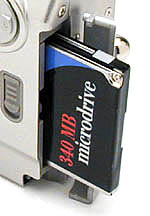
The S10 is one of the few digital cameras currently (November, 1999) on the market that accepts "Type II" CompactFlash cards. These thicker cards allow for higher storage capacities, and even rotating-media storage like the incredible IBM MicroDrive. - The MicroDrive provides 340 or 170 megabytes (two models) of storage in the just slightly-thicker-than-normal Type II CompactFlash package. With digicams like the S10 making ever-larger files, the availability of truly large-capacity storage devices for them is becoming increasingly important. In the case of the S10, it's highest-quality images occupy about 2 megabytes. With the standard 8 MB CompactFlash card included, you can only store 4 maximum-quality images per card. With a 340 megabyte MicroDrive, the count goes up to 236! - Enough to keep even the most rabid shooter busy for the day! We heartily applaud Canon for supporting the Type II standard, and encourage other manufacturers to do so as well.
The S10 organizes images into storage folders, assigned numbers from 100 to 998. Within each folder, images are numbered from 0001 to 9900, with each folder containing up to 100 files. Note that images shot in Stitch Assist mode are always kept in the same folders, possibly resulting in some folders having 101 or more files.
You can protect individual images on the CompactFlash card through the Play menu (in Playback mode). This prevents accidental erasure of images. If you want to erase images, the Play Menu offers both Single Erase and Erase All options. The standard 8MB card provided with the S10 holds between 4 and 61 images, depending on the combination of image resolution and quality selected.
| Resolution/Quality vs Image Capacity |
|
|
|
|||
|
|
Compression |
|
Compression |
|
Compression |
|
| Super Fine Quality |
|
|
|
|
|
|
| Fine Quality |
|
|
|
|
|
|
| Normal Quality |
|
|
|
|
|
|


Follow Imaging Resource: