


Overview
Sony DSC-T30 Overview
Sony's Cyber-shot T-series of digital cameras have proven popular in the market thanks to their slim, compact bodies and ease of use while still allowing a fair degree of control over photos. The Sony Cyber-shot DSC-T30 builds on that heritage, as an update to the existing DSC-T9 model. The T9 was the first Sony camera to feature an image-stabilized lens branded with the famous Carl Zeiss name, and the T30 shares that same lens. The T30 couples this with a new 7.2 effective megapixel CCD imager, with a higher maximum ISO sensitivity of 1000. There's also a larger 3.0" LCD display versus the 2.5" type in the six-megapixel T9, and a new NP-FR1 InfoLithium battery that should offer almost double the battery life of that camera (420 shots instead of 240).
The Carl Zeiss Vario-Tessar stabilized lens has a 35mm effective focal length range of 38 - 114mm. Other features include shutter speeds from 30 to 1/1000 second, a choice of Multi-pattern, Center-weighted, or Spot metering, five white balance presets, 10 scene modes, USB and video connectivity, and both Memory Stick Duo / Pro Duo storage coupled with 58MB of built-in memory. Most other differences from the T9 are likely related to the changes noted above. The body is slightly larger (2-5mm in each direction) to accomodate the larger LCD and battery, and while the weight without battery / media is identical to the T9, the ready-to-shoot weight is 10 grams more thanks to the new battery. Shutter lag with AF / AE is just slightly longer, rated at 0.28 of a second, and the burst speed and depth are also downgraded just slightly to 5 shots at 1.1 frames per second, while the regular shot-to-shot interval is now 1.4 seconds - changes that are down to the higher resolution imager. As well as increasing the size of the body somewhat, the controls have also been revamped, and the sliding lens cover now doesn't extend the entire way across the front of the camera. Finally, the bundled software has been changed to Sony's Cyber-shot Viewer 1.0.
Sony T30 User Report
by Dave Etchells
The Sony Cyber-shot DSC-T30 is now the eighth in the T-series (though not all from this line made it to the US market), with similar overall specs to its predecessors. The camera's thin profile is clean and understated, with smooth panels and very few protrusions, and its mostly metal body is has just a few chrome trim elements to add a little flair. The Sony T30 has a lens design that zooms internally, thereby eliminating any lens protrusion on the front panel, improving its pocketability. The lens cover slides vertically with a soft but firm "snick," a very nice feel to it, similar to the original T1, but missing from some more recent T-series models. I found myself wanting to open it by using the chrome accent strip as a finger-hold, but that didn't work too well. Simply pressing on the top edge of the cover worked much better once I got used to it. Likewise, pressing up on the bottom edge of the cover worked for closing the cover, but felt a little unnatural to me.
With the cover open, there's a slight lip to the right side of the camera body, providing a slight finger-grip, but that never seemed to be enough for me to feel comfortably secure holding the camera. Part of the problem is that the slick plastic covering the LCD extends across the entire back panel, providing little or no purchase for your thumb when you're gripping the camera: I very strongly recommend attaching the wrist strap to the camera's eyelet and using it regularly.
LCD Performance
I'm always a bit leery of LCD-only cameras, as the LCDs tend to wash out in bright sunlight, and in dim light, the refresh rate of the monitor often means that the viewfinder runs out of light way before the camera does when snapping pictures. Taking the Sony T30 for a spin outside on a sunny afternoon showed its LCD to perform very well in bright lighting, even with viewed in direct sunlight. Indoors under dim lighting or outdoors at night, the LCD's performance isn't quite as impressive, but is way more than adequate for most shooting conditions typical consumers will be likely to encounter. Fiddling around in the studio with the camera, I found I could (just barely) use the LCD viewfinder at a brightness level of 1/8 foot-candle, which was also about the limit at which the camera could get a good exposure at ISO 800 or so. This is pretty darn dark: Typical city street-lighting produces a light level of about one foot-candle, so the T30 will produce usable photos in much darker situations than that, and the LCD viewfinder will pretty much be usable for framing anything the camera will be able to take a picture of. All in all, a much better than average LCD viewfinder, and the huge 3.0" display is great for passing the camera around to share photos with friends and family. (I've often joked that the next step will be LCD screens that wrap around the camera body, it seems that the T30's is getting pretty close to that point.)
Another consideration with an LCD as large as the T30's though, is its susceptibility to cracking or being scratched if you carry it in your pocket. (As its size and shape practically beg you to do.) We don't have any way of measuring how sturdy or scratch-resistant these things are, but really, really recommend a small hard case for the camera if you're going to carry it about much. I can speak from painful experience of what happens when a camera in your pants pocket comes in contact with the corner of a table or chair. A bump that doesn't feel like much of anything to you could mean sudden death for your camera. Really large LCDs as found on the T30 only exacerbate the problem.
| Sony DSC-T30 ISO 400 Shots | |
|---|---|
| ISO 400 by Night | ISO 400 by Day |
 |
 |
 |
 |
| Rather noisy for a 2006-vintage camera | Very clean under daylight conditions |
High ISO modes
The Sony T30 joins a number of other 2006 model-year cameras in providing options for very high ISO (light sensitivity) settings, as high as ISO 1000. Given these high settings, we expected to see evidence of some sort of breakthrough in noise reduction, but were disappointed in those expectations. Under bright lighting, the noise levels at ISO 800 and 1000 were indeed somewhat lower than we'd normally expect, but not that much lower. After the sun went down though, image noise really increased dramatically, to the point that even ISO 400 images showed a lot of image noise in the shadow regions. The photo above shows a crop from an ISO 400 shot, taken under normal outdoor city lighting conditions, probably about 1 foot-candle of illumination. This shot was hand-held, as part of my playing with the T30's image stabilization feature (see below), so some of the softness may not be the fault of the camera. The noise though is all its doing. In looking at this crop, it's important to keep in mind that this is a 7 megapixel digital camera, and you're looking at it 1:1 on your computer screen. When printed, the noise isn't nearly as bad as what you're seeing above. Still though, this is a level of noise that looks more like that from cameras from a couple of years ago, not one claiming special high-ISO capability. (In fairness to Sony though, I highly applaud the great improvements in subject detail we're seeing in the T30 over past models. They seem to have dialed-down the noise suppression processing on the T30, with the result that the camera does a much better job of retaining subtle subject detail when shot under better lighting. This is a very welcome improvement, addressing one of the few criticisms we've had of Sony cameras in recent history.)
Responsiveness
Digital cameras are happily getting faster and more responsive across the board, an area Sony has done well in for some years now. The DSC-T30 felt very responsive when I was shooting with it, I rarely felt that I was missing a critical moment because the camera was too slow. My habit of "prefocusing" the camera by half-pressing and holding down the shutter button before critical shots definitely helped with this (the T30 is positively blazing in that mode), but even when I was just punching the shutter button when I wanted to grab a shot, the T30 delivered the goods more times than not. Even in flash mode, where the shutter response is delayed slightly by the preliminary metering flash, the T30 felt more responsive than most cameras I handle.
Super SteadyShot Image Stabilization
Arguably the biggest feature of the Sony T30 is its Super SteadyShot optical image stabilization. There are relatively few really small cameras that offer image stabilization (several models from Panasonic, the SD 700IS from Canon, and the now-defunct Konica Minolta X1), the T30 is the first such from Sony, who's actually been a leader in image stabilization through the years in their camcorder line. I'm a huge fan of IS, it's just so useful when you're faced with less-than-bright lighting. There's old rule of thumb in photography that the longest shutter time you reliably hand-hold is 1 divided by the effective focal length. That is, for a 100mm equivalent focal length (about what the T30's lens is at full telephoto), you shouldn't expect to get sharp photos at shutter speeds any slower than 1/100 second. At the wide angle end, the limit would be about 1/40th. A lot of pros can hand-hold at slower speeds than these, and I used to be able to when I was younger, but these days I have a hard time even achieving the levels suggested by the rule of thumb.
For most casual shooters, image stabilization greatly extends the range of lighting conditions over which they can successfully hand-hold their cameras, permitting shutter speeds anywhere from four to eight times slower than the guidelines suggest. This means that they should be able to get by with shutter speeds in the range of 1/15 - 1/25 second at telephoto focal lengths, a pretty dramatic improvement. Image Stabilization won't save every blurred photo (and of course, won't do anything at all about subject movement), but it'll certainly save a lot of them.
| Super SteadyShot In action | |
|---|---|
| With | Without |
 |
 |
 |
 |
| An 0.8 second (!) exposure, with Super SteadyShot enabled. | Another 0.8 second exposure, but without Super SteadyShot |
The shot above shows the effect of Super SteadyShot in action. The subject was my cat, sitting on my lap, frozen in a meditative state. (In any event, he wasn't the least bit interested in what I was doing with the camera, such notice being beneath his dignity.) I "cheated" a fair bit on this shot by bracing my elbows against the arms of the chair I was sitting in, but even so, the 0.8 second exposure was so long that it was absolutely impossible to get a sharp image, regardless of how much I held my breath, tried to just "squeeze" off the shot, etc. With Super SteadyShot enabled, it still wasn't trivial, but I got more non-blurred shots than I did blurry ones. Pretty amazing!
Movie Mode The Sony T30 also sports a very capable movie mode, able to record 640x480 video at 30 frames/second. This makes for beautifully rich, detailed video imagery, but note that you need to use PRO-type Memory Stick media to support the very high data rates this kind of video generates. Non-PRO Memory Sticks will restrict you to the slower 16.6 frame/second movie rate. I did encounter an audio artifact with the T30's video in some circumstances, that sounded like the camera was picking up the mechanical noise from either the autofocus or image stabilization mechanism. The video clip above shows this pretty clearly, but I wasn't able to determine what caused it, to be able to reproduce it reliably. Some clips had it, most didn't.
Battery Life
The Sony DSC-T30's battery life was also very good, with a full battery indicating over three hours (190 minutes) of run time in capture mode, and 4.8 hours in playback. I always buy a second battery right along with any digital camera's I've ever purchased, but then I have something of an obsession about not running out of battery power. If you plan on any extended journeys away from a power outlet, I'd definitely advise picking up an extra battery for the T30, but if you're just using it around town and for short events, you likely won't need one. As just alluded to above the T30 also uses Sony's InfoLITHIUM battery system, which means that the camera can tell you exactly how much run time the battery is good for, in whatever mode you're currently operating it in. Sony has dropped this feature from some of their lower-end cameras (a shame), but retained it on the T30. It's one of my favorite camera features, as it completely avoids nasty surprises when your camera batteries fail at the worst possible moment. (They still may, of course, but at least you'll know that you're running short well ahead of time.)
All in all, the Sony T30 was a very enjoyable camera to use, and its image quality was very good as well. I really wish it felt a little more secure to hold onto, but in most every other way, it's absolutely first rate and a lot of fun besides.
Basic Features
- 7.2-megapixel CCD.
- 3.0-inch color LCD monitor.
- Carl Zeiss Vario Tessar 3x zoom lens, equivalent to 38-114mm on a 35mm camera.
- Maximum aperture of f/3.5 - f/4.3, depending on lens zoom position.
- As much as 6x Precision Digital Zoom, and as much as 14x Smart Zoom.
- Full Auto and Program exposure modes.
- Shutter speeds from 1/1,000 to one second.
- Built-in flash with four modes.
- 58MB internal memory.
- Memory Stick Duo and Memory Stick PRO Duo image storage (no card included).
- Power supplied by NP-FR1 InfoLITHIUM battery (supplied) or AC adapter.
- Pixela Image Mixer and Picture Package software, plus USB drivers included for both Windows and Mac platforms.
Special Features
- Super SteadyShot optical image stabilization
- Movie mode with MPEG VX Movie option for continuous 30 fps recording at 640 x 480 pixel resolution. (Requires Memory Stick PRO Duo.)
- High Sensitivity, Twilight, Twilight Portrait, Soft Snap, Landscape, High-Speed Shutter, Beach, Snow, Fireworks preset Scene modes.
- Two- or 10-second Self-Timer for delayed shutter release.
- Picture Effects menu with Sepia and Black and white effects, plus Natural and Rich color options.
- Macro (close-up) lens setting.
- White balance (color) adjustment with six modes.
- Burst, Multi Burst, and Auto Exposure Bracketing record modes.
- Multi-Pattern, Center-Weighted, and Spot metering modes.
- Variable light sensitivity with ISO equivalents from 80 to 1,000, and an Auto setting.
- Five-area Multi-Point auto focus with Spot and Center AF modes, as well as manual focus zones, and an AF illuminator.
- Single and Monitoring AF modes.
- Automatic Noise Reduction for longer exposures.
- DPOF (Digital Print Order Format) and PictBridge compatible.
In the Box
The Sony DSC-T30 ships with the following items:
- Wrist strap.
- USB / AV / DC-in multiconnector cable.
- NP-FR1 Info-Lithium battery pack and charger.
- Software CD.
- Instruction manual and registration card.
Recommended Accessories
- Large capacity Memory Stick Duo.
- Additional NP-FR1 battery pack.
- Small camera case.
Conclusions:
| Pro: | Con: |
|---|---|
|
|
The DSC-T30 continues a Sony tradition of high quality in the subcompact category, packing more features into a smaller space than most anything else out there, but this time with the added bonus of optical image stabilization. Like those of other recent T-series models, we found the lens on the Sony T30 to be of higher than average quality for a subcompact camera, and image quality was quite good as a result. The 7-megapixel CCD delivers plenty of resolution for large prints, and the smattering of scene modes makes it easy to bring back good-looking photos from what would otherwise be difficult shooting conditions. The biggest news of course, is the T30's Super SteadyShot image stabilization, which we found to be very effective. This will let you get crisp shots even when faced with hand-holding the camera under surprisingly dim lighting (assuming of course, that your subject is stationary as well). Of course, a tripod is always recommended when things get really dark, but we were very pleasantly surprised to see just how dark it could get, while we were still snapping sharp photos. On the other side of the coin though, we found the Sony T30's higher ISO modes rather noisy when shooting after dark, diminishing their usefulness. All in all though, we found the Sony DSC-T30 a delight to use, and its Super SteadyShot image stabilization made a huge difference in our ability to hand-hold long exposures. Bottom line, this would be a great camera to take along on a vacation: Super compact, able to handle a wide range of conditions, and able to save a lot of shots from what would otherwise be fatal camera-shake blur. An easy Dave's Pick as one of the more worthy digital cameras on the market, but I'd really like to see lower high-ISO image noise after dark.
Design
Sony T30 Design
 Ultra-thin and compact, the Sony DSC-T30 features the slim dimensions and large LCD panel distinctive of the T-series, this time stretching the LCD to a full 3.0" diagonal dimension. Because the camera has a internal lens, the front panel remains smooth at all times, and very pocket friendly. Measuring 3.75 x 2.25 x 0.94 inches (95 x 56.5 x 23.3 millimeters), the DSC-T30 will fit easily into most shirt pockets and even tiny evening bags. Though it sports an almost all-metal body, the Sony T30 is still light weight, at just 5.8 ounces (165 grams) with batteries and memory card.

The front of the Sony DSC-T30 is nearly flat, with the exception of the sliding lens cover and a small finger grip that doubles as a wrist strap attachment. The lens cover slides downward to reveal the lens and power on the camera. Because the lens design is all-internal, it doesn't telescope outward when the camera is powered on. Instead, the lens lines up vertically inside like a periscope, using a mirror to reflect the view. This also makes the camera quick on the draw, as you don't have to wait on the lens to telescope into position before you can shoot. Next to the lens are the flash and self-timer / AF illuminator lamp.

The right side of the Sony DSC-T30 features the shared Memory Stick Duo and battery compartment, covered by a sliding, hinged door.

The opposite side of the camera is featureless.

The Sony T30's top panel features only the Steady Shot, Shutter, and Power buttons, lined up in the right corner. There's also a small microphone to the left of these. The power button illuminates green when the camera's power is on.

The remaining few camera controls are on the back panel, along with the very large, 3.0-inch LCD monitor. A zoom control is in the top right corner. The Five-way Navigator is next to the lower right corner of the LCD monitor, surrounded by the Menu, Display, Resolution / Erase, and Slide Show buttons.

The Sony DSC-T30 has a flat bottom panel, which holds the multi-connector jack, tripod screw mount, and speaker. Because of the T30's side memory card and battery compartment access, you can easily swap out cards and batteries without removing the camera from a tripod.
Sony T30 External Controls

Lens Cover: Dominating the camera's front panel, this sliding cover moves downward to uncover the lens, simultaneously power-on the camera.

Steady Shot Button: The right-most button on the camera's top panel, this button enables the camera's anti-blur mode when pressed.

Shutter Button: Located on the far right side of the top panel and flanked by the Steady Shot and Power buttons, this button sets focus and exposure when halfway pressed, and fires the shutter when fully pressed. Half-pressing the Shutter button also causes the camera to display the shutter speed and aperture setting its exposure system has chosen for the current scene. Even though you can't control the shutter speed or aperture manually, being able to see what the camera has selected can be a useful guide for experienced photographers to judge depth of field or anticipate motion blur.

Power Button: To the left of the Shutter button, this button turns the camera on and off.

Zoom Rocker Button: Located in the top right corner of the back panel, this rocker switch controls the optical and digital zoom in any record mode.
In Playback mode, this button controls the digital enlargement of captured images and accesses the index display mode as well as a detailed information display. (The "T" side zooms in, the "W" side zooms out. Zooming out from the normal-sized single image view brings up an index display of tiny "thumbnail" images.)

Mode Switch: Angled down at the rear of the top panel, this sliding switch offers the following options:
- Playback: Replays captured still images and movie files, with options for image management and printing.
- Record: Places the camera in still Record mode, with a handful of preset scenes and Auto and Program AE modes available.
- Movie: Records moving images with sound, for as long as the memory card has space. (Provided you're using a Memory Stick PRO Duo. Ordinary Memory Stick Duos will limit recording time at the highest quality/frame rate setting.)

Menu Button: Located next to the top left corner of the Five-way navigator, this button displays or dismisses the settings menu in any Record mode or in Playback mode.

Display/LCD Button: To the right of the Menu button, this button controls the LCD monitor's display mode. In both Record and Playback modes, the button cycles through the image and information displays.

Five-way Navigator: The largest control in the lower right corner of the rear panel, this rocker button features four arrows and a center "OK" button. The arrow keys navigate through any settings menu, and the OK button confirms menu selections.
In Automatic Record mode, the up arrow controls flash mode, cycling through Auto, Forced, Slow-Sync and Suppressed (off) modes. The down arrow activates the Self-Timer option, with choices of either 2 or 10 seconds, while the right arrow controls the Macro mode. The left arrow calls up a quick review of the most recently-captured image.
In Playback mode, the left and right keys scroll through captured images on the memory card. When an image has been enlarged, all four arrow keys move around within the enlarged view.

Image Size / Erase Button: Below left of the Five-way navigator, this button activates the Image Size setting in any Record mode. In any still image mode, resolution options of 3,072 x 2,304; 3,072 (3:2); 2,592 x 1,944; 2,048 x 1,536; 1,632 x 1,224; 640 x 480; and 1,920 x 1,080 (16:9) pixels are available. Movie mode options include 640 x 480 (Standard), 640 x 480 (Fine), and 160 x 120 pixels. (The 640 x 480 Fine option is only available when using the Memory Stick PRO Duo media format.)
In Playback mode, this button calls up the single-image erase menu, letting you delete the currently displayed image. Pressing this button in Index display mode gives you the options of selecting multiple files to delete, or of deleting all files in the current folder on the memory card.

Slide Show Button: In the very low right corner of the rear panel, this button enables the camera's automated slide show. You can control slide show variables such as music and interval through the Playback menu.
Operation
Sony T30 Operation
The Sony DSC-T30's user interface is straightforward and easy to navigate, following the theme Sony established for their Cyber-shot line several years back. The Sony T30 has only a few external controls, as most of the exposure options are accessed through the LCD menu system. The camera's Five-way navigator ring and button serve multiple functions, and you can quickly change from playback to still capture to movie mode via the Mode switch angled back from the top panel. The arrow directions of the Five-way navigator scroll through menu selections, and the OK button in the center of the pad confirms any changes. In shooting mode, the four arrow directions of the navigator each have a separate function assigned to them, indicated by engraved icons on the navigator ring. There's an external button for directly accessing the image-size setting or for deleting images in playback mode, and another button triggers a slide show in playback mode. A display button cycles through options for information display on the LCD screen. Special Scene modes (Beach, Fireworks, Night Portrait, etc) are accessed via the first entry on the camera's capture-mode menu system. The menu system is so simple and intuitive I think even novice users will be able to become completely familiar with it in an hour or less.
 Record Mode Display: The DSC-T30's LCD monitor optionally reports a fair amount of camera information in Record mode, including the battery level and approximate operating time left (a feature unique to Sony digicams, thanks to their "InfoLITHIUM" battery technology), image resolution and quality, exposure mode, flash mode, autofocus mode, and other basic settings. A set of focus brackets in the center of the frame highlight when the shutter is half-pressed to indicate what portions of the subject are in focus. A half-press of the Shutter button also adds the shutter speed and aperture settings to the bottom of the display: Even though you can't change them directly, we always like seeing the values the camera has chosen, so we can know whether to expect motion blur, what the depth of field is likely to be, etc. The Display button cycles through a range of display modes, enabling a histogram, as well as eliminating the information overlay almost (but not quite) entirely.
 Playback Mode Display: In Playback mode, the LCD monitor reports basic information such as the image resolution, battery level and time, folder number, image series number, file name, and the date and time the image was captured. Pressing the Display button enables an expanded information display with basic exposure information and a small histogram. You can also cancel the information display entirely, by pressing the Display button a third time. Pressing the wide-angle side of the zoom control brings up a nine-image thumbnail display of previously-captured images, handy for times when you want to scroll through the images quickly. Pressing the telephoto side of the zoom control reverses the process, and continued pressing smoothly zooms in on the currently-displayed image, to a maximum 5x magnification. When zoomed, the arrow keys scroll the enlarged view around the image as a whole.
Sony T30 Modes and Menus
Record Mode: In this mode, the camera captures standard still images, controlling aperture and shutter speed. Pressing the Menu button displays the Record settings menu, with options varying depending on the exposure mode selected:
 Camera: Offers Auto, Program, Beach, Fireworks, High Sensitivity, High Speed Shutter, Landscape, Snow, Soft Snap, Twilight, and Twilight Portrait exposure modes. The mode selected dictates which of the following options are available. Program mode offers all of the following, most of the other choices offer less. Auto mode provides access only to the Mode and Setup menu options.
- Color: Offers Black and White, Sepia, Natural, Vivid, and Normal color mode options.
- Exposure Compensation: Increases or decreases exposure from -2 to +2 exposure equivalents (EV) in one-third step increments.
- Focus: Changes the focus area to Multi AF, Spot AF, or Center AF, or selects from a range of fixed focus settings (0.5, 1.0, 3.0, or 7.0 meters, or Infinity).
- Metering: Sets the metering mode to Multi-Pattern (default), Center-Weighted, or Spot.
- White Balance: Sets the color balance to Auto, or adjusts for Daylight, Cloudy, Fluorescent, Incandescent, or Flash light sources.
- ISO: Sets the camera's sensitivity to Auto, or to 80, 100, 200, 400, 800, or 1,000 ISO equivalents.
- Picture Quality: Sets the JPEG compression level to Fine or Standard.
- Mode: Changes the recording mode to Normal, Burst, Exposure Bracketing, or Multi Burst modes.
- Bracket Step: (Only available if Exposure Bracketing is selected above.) Sets the level of exposure variation for Auto Exposure Bracketing shots. Step sizes include 1.0, 0.7, or 0.3 EV.
- Interval: (Only available in Multi Burst mode.) Specifies the shutter interval for Multi Burst mode. Options are 1/7.5, 1/15, or 1/30.
- Flash Level: (Only available when the flash is enabled.) Sets the flash intensity to Normal, Low, or High.
- Contrast: Controls the level of contrast in images, with options for High, Normal, and Low.
- Sharpness: Adjusts the in-camera sharpening. Options are High, Normal, and Low.
- Setup: Accesses the main setup menu.
 Camera: Offers Auto, Program, Beach, Fireworks, High Sensitivity, High Speed Shutter, Landscape, Snow, Soft Snap, Twilight, and Twilight Portrait exposure modes. The mode selected dictates which of the following options are available. Program mode offers all of the following, most of the other choices offer less. Auto mode provides access only to the Mode and Setup menu options.
 ISO: Sets the camera's sensitivity to Auto, or to 80, 100, 200, 400, 800, or 1,000 ISO equivalents.
Playback Mode: This mode lets you review captured images on the memory card, erase them, protect them, set them up for printing, etc. When playing back movie files, you can also opt for "frame-by-frame" playback, which plays back the movie file slowly, several frames at a time. Pressing the Menu button displays the following options:
- Folder: Selects the folder of images to be played back.
- Protect: Write-protects the current image, or removes protection.
- DPOF: Marks the current image for printing on a DPOF device, or removes the print mark.
- Print: Allows printing to PictBridge printers.
- Slide: Enables a slide show of all images captured on the Memory Stick Duo. You can control the interval between each image, the range of images to be played back, music, and whether or not the slide show repeats.
- Resize: Resizes the current image to one of the available resolution sizes.
- Rotate: Rotates the current image 90 degrees clockwise or counterclockwise.
- Divide: Divides movie files into segments, providing a very basic editing tool you can use to "trim" your movies to just the portion you want to keep. (Only available when the current image being viewed is a movie.)
- Setup: Accesses the camera's setup menu.
- Trimming: Lets you crop an image and save it separately. (Only available when you're zoomed in on an image, still photos only.)
 Folder: Selects the folder of images to be played back.
 Rotate: Rotates the current image 90 degrees clockwise or counterclockwise.
Movie Mode: Records short movie clips with sound, for as long as the Memory Stick has available space. The LCD menu system offers the following options. (No screenshots shown, as these are just subsets of the options for still photo mode.):
- Color: Offers Black and White, Sepia, Natural, Vivid, and Normal color mode options.
- Exposure Compensation: Increases or decreases exposure from -2 to +2 exposure equivalents (EV) in one-third step increments.
- Focus: Changes the focus area to Multi AF, Spot AF, or Center AF, or selects from a range of fixed focus settings (0.5, 1.0, 3.0, or 7.0 meters, or Infinity).
- Metering: Sets the metering mode to Multi-Pattern (default), Center-Weighted, or Spot.
- White Balance: Adjusts the color balance for Auto, Daylight, Cloudy, Fluorescent, or Incandescent light sources.
- Setup: Accesses the main setup menu.
Set-Up Mode: The following four-page Set-Up menu is available in Playback, Record, and Movie modes, as an extension of the LCD menu:
- Camera 1:
- AF Mode: Sets the autofocus to Single or Monitor (continuous) modes.
- Digital Zoom: Enables Smart Zoom or Precision Digital Zoom, or turns digital zoom off entirely.
- Function Guide: Enables the built-in Function Guide, which provides help information for various camera functions.
- Red-Eye Reduction: Enables the Red-Eye Reduction flash (which will fire with all flash modes), or turns it off.
- AF Illuminator: Puts the AF Illuminator into Auto mode, or simply turns it off.
- Auto Review: Activates the Auto Review function, which automatically displays the most recently captured image post-capture.
 AF Mode: Sets the autofocus to Single or Monitor (continuous) modes.
- Camera 2:
- Steady Shot: Puts the Steady Shot option into Shooting or Continuous modes. Shooting mode means that pressing the Steady Shot button enables the anti-blur function, while Continuous mode activates Steady Shot at all times.
- Internal Memory Tool (This menu option only appears when no Memory Stick is inserted in the camera.):
- Format: Formats the internal memory, erasing all files.
 Steady Shot: Puts the Steady Shot option into Shooting or Continuous modes. Shooting mode means that pressing the Steady Shot button enables the anti-blur function, while Continuous mode activates Steady Shot at all times.
- Memory Stick Tool (This menu option only appears when a Memory Stick is inserted in the camera.)
- Format: Formats the Memory Stick Duo, erasing all files (even protected ones).
- Create Rec. Folder: Creates a new folder for recording images.
- Change Rec. Folder: Changes the folder that images are recorded to.
- Copy: Copies files from the internal memory to a memory card.
- Setup 1
- Download Music: Downloads music to use as a background for slide show playback. (Used in conjunction with the Music Transfer software application, shipped with the camera on the software CD. Versions of Music Transfer are included for both Mac and Windows platforms.)
- Format Music: Erases all music files.
- LCD Backlight: Controls the LCD backlight feature, setting it to Normal or Bright.
- Beep: Controls the camera's beep sound, setting it to Shutter, On, or Off.
- Language: Changes the camera's menu language, English is default.
- Initialize: Resets all camera settings to their defaults.
- Setup 2
- File Number: Sets file numbering to Series or Reset. The Series option continues numbering files from one memory card to the next, while Reset starts over with each new memory card.
- USB Connect: Places the USB connection into PictBridge, PTP, Mass Storage, or Auto modes.
- Video Out: Specifies the camera's Video Out signal timing for either NTSC or PAL standards.
- Clock Set: Sets the camera's internal clock.
 Format: Formats the Memory Stick Duo, erasing all files (even protected ones).
 Download Music: Downloads music to use as a background for slide show playback. (Used in conjunction with the Music Transfer software application, shipped with the camera on the software CD. Versions of Music Transfer are included for both Mac and Windows platforms.)
 File Number: Sets file numbering to Series or Reset. The Series option continues numbering files from one memory card to the next, while Reset starts over with each new memory card.
Optics
Sony T30 Optics
Like other members of the T-series, the Sony T30 uses "folded optics" to tuck a zoom lens entirely inside the camera body. This means there's no fragile telescoping lens mechanism extending beyond the front of the camera to get knocked or bumped, and also means that the camera starts up faster than average, because it doesn't have to wait for its lens to deploy. The downside of folded lenses is that we've generally found them to be more prone to producing softness in the corners of the frame than conventional designs. In the case of the Sony T30 though the folded lens design seems to deliver sharper than average results: There's some softness in the extreme corners, but it disappears pretty quickly as you move towards the center of the frame.
Numerically, the Sony T30's lens is a 3x zoom lens, equivalent to 38-114mm on a 35mm camera. That's a range from a modest wide angle to a moderate telephoto, slightly biased toward the telephoto end relative to the 35-105mm equivalent lenses that seem to be the standard for most digital cameras. The T30's lens has a maximum aperture that ranges from f/3.5 to f/4.3 depending on the zoom position. This is about average, slightly better than average at the telephoto end, where many cameras drop to f/5.6 or higher. (Smaller f-numbers mean larger apertures on the lenses, and better light-gathering ability.)
Arguably the biggest news with the Sony T30's optics though, is the incorporation of Sony's Super SteadyShot optical image stabilization technology. This counteracts camera shake at slow shutter speeds, greatly improving your ability to get crisp photos under dim lighting. Image stabilization is a technology that consumers have been a little slow to appreciate, as it does add to the price of a camera. Once you've experienced it though, you'll never want to own a camera without it. The difference when shooting under typical indoor and after-dark conditions is really dramatic. It's hard for us to objectively measure the effectiveness of different optical image stabilization approaches, but for what it's worth, Sony's Super SteadyShot system seemed to work very well indeed in our shooting with the T30. (See the photo of the cat in the User's Report (first page of this review) for a pretty dramatic example - A usable hand-held shot at 0.8 seconds!)
Lens
Zoom
A typical 3x optical zoom range, with good performance.


The Sony DSC-T30 zooms over the equivalent of a 38-114mm range, typical among its class. Details are fairly sharp at wide angle, though with some noticeable blurring in the trees, as well as slight blurring in the corners of the frame. The 2x digital zoom takes it out to 6x total, though Sony's Precision Digital Zoom technology does a slightly better than average job of holding onto fine detail. (Sony's "Smart" digital zoom limits digital zoom magnification to just that which can be achieved by simply cropping the central image pixels from the sensor, to display at the currently chosen image size. It thus varies from zero digital zoom at the maximum 7 megapixel resolution, to a total (optical plus digital) of 14x at VGA resolution.)
Macro
A small macro area with very good detail and resolution. Flash exposes fairly well, but flash illumination is uneven up close.


The Sony DSC-T30's macro setting performs pretty well, capturing a minimum area of 3.02 x 2.27 inches (77 x 58 millimeters). Detail and resolution are both very good, and there's very little softening in the corners from the lens. (Most cameras have some softening in the corners in macro mode, the Sony T30 has less than most.) The flash throttles down pretty well, but its light doesn't reach the left corners of the frame, and coverage is very uneven. (Plan on using external lighting for your closest macro shots with the DSC-T30.)
Distortion
Moderate barrel distortion, though very high pincushion.
This is the tendency for the lens to bend straight lines outward (like a barrel--usually at wide angle) or inward (like a pincushion--usually at telephoto). The Sony Cyber-shot DSC-T30's 0.8% barrel distortion at wide angle is average among the cameras I've tested, although I personally feel that this level is too high. At the telephoto end, the T30's 0.5% pincushion is much higher than average.
| Barrel distortion at 38mm is 0.8% |
 |
| Pincushion at 114mm is 0.5% |
 |
Chromatic Aberration
Low to moderate, small effect on images at edges.


Chromatic aberration was low to moderate at wide angle, with the strongest effect in the upper left-hand corner of the image. At telephoto focal lengths, it was almost non-existent, with only a trace amount in the lower left-hand corner. In both cases, the distortion decreases very rapidly as you move away from the extreme corners towards the center of the image, and so affects only a small portion of the total image area. (This distortion is visible as a very slight colored fringe around the objects at the edges of the field of view on the resolution target.)
Corner Sharpness
Some softening in the left and right corners of the frame, strongest effect in the upper right corner at wide angle.
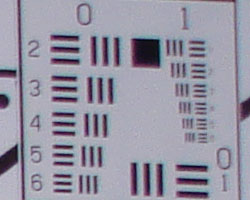
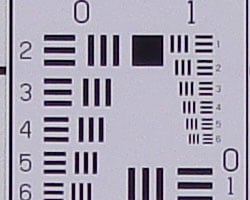
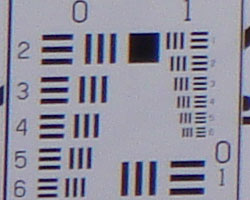
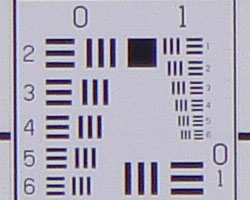
The Sony DSC-T30 produced slightly soft corners in a few shots, though overall results were quite good, the softness being confined to the extreme corners, and extending only a short distance into the frame. The most visible effect was in the upper right corner at wide angle, and in the lower left corner at telephoto.
Viewfinder
Coverage
An accurate LCD monitor.


The DSC-T30's LCD monitor was pretty accurate, showing almost exactly 100% of the final frame area, at both wide and telephoto lens settings.
The images above were taken from our standardized test shots. For a collection of more pictorial photos, see our Sony Cyber-shot DSC-T30 Photo Gallery .
Exposure
Sony T30 Exposure & Imaging
The Sony DSC-T30 is basically a point-and-shoot camera, which means that it has almost entirely automatic exposure control, although the user can dial in an exposure compensation adjustment to help the camera deal with subjects that are relatively light or dark overall. Other user controls include ISO (light sensitivity) and white balance, as well as contrast, saturation, and sharpness settings. Hmm... Maybe "point-and-shoot" is a bit too limiting a description? There's certainly a good assortment of controls for advanced users to twiddle with on the T30, the main limitation being that you have no direct control over either aperture or shutter speed. For real neophytes, a fully automatic mode can be set via the record menu, that removes most of the just-mentioned options, making the camera more truly a point-and-shoot model.
While the Sony T30 doesn't let you control exposure directly, it does give you a nice handful of "Scene" modes to help you get good-looking pictures under what would otherwise be challenging conditions. The Scene modes preset a number of camera exposure parameters to those needed for a variety of specific subject types. Scene options include Beach, Fireworks, High Sensitivity, High Speed Shutter, Landscape, Snow, Soft Snap, Twilight, and Twilight Portrait exposure modes.
When it comes time to print your photos, the Sony T30 does an excellent job, packing sufficient detail into its images to make good-looking 13x19 inch prints, about the largest consumer inkjet printers can produce. We did find that its images at ISO 400 showed more image noise than average, but they made acceptable-looking 5x7 inch prints.
Here's what we found in the T30's test images:
Color
Saturation & Hue Accuracy
Good overall color, though a slight tendency toward a warm cast. Some oversaturation in the strong reds and blues.
 |
| In the diagram above, the squares show the original color, and the circles show the color that the camera captured. More saturated colors are located towards the periphery of the graph. Hue changes as you travel around the center. Thus, hue-accurate, highly saturated colors appear as lines radiating from the center. |
Most consumer digital cameras produce color that's more highly saturated (more intense) than found in the original subjects. This is simply because most people like their color a bit brighter than life. The Sony DSC-T30 oversaturates the strong blue tones quite a lot, red tones somewhat less so. Most consumers like bright, vibrant color, so we suspect many will find the T30's color very appealing. Where oversaturation is most problematic is on Caucasian skin tones, as it's very easy for these "memory colors" to be seen as too bright, too pink, too yellow, etc. The DSC-T30 did render skin tones a little on the warm side in most cases, but again, many consumers will likely prefer "healthier" looking skin.
The other important part of color rendition is hue accuracy. Hue is "what color" the color is. Most digital cameras we test push cyan tones towards pure blue, to produce better-looking sky colors. The T30 did this quite a bit more than most, but in our shots taken outdoors, the sky colors never looked unnatural. All in all, very bright color, especially blues, but color that we think most consumers will find very appealing.


Sensor
Exposure and White Balance
Indoors, incandescent lighting
Moderate warm cast with both Auto and Incandescent white balance settings. Average exposure compensation required.


Color balance indoors under incandescent lighting was quite warm with both the Auto and Incandescent white balance modes, though the Incandescent setting resulted in the least strongest cast. That said, the impact of the warm color balance was much more evident on-screen than it was in prints made on the Canon i9900 printer here in our studio. Prints were a little yellowish, but the result was more an impression of the warmth of the original lighting than a defect in the color of the image. I found the best exposure with a +1.0 EV exposure compensation adjustment, about average for this shot, though the white highlights are a bit bright. (The image at +0.7 EV was just too dim overall.) Colors are somewhat dark and yellow here, making the blue flowers very dark and purplish. (A very common outcome for this shot.) Our test lighting for this shot is a mixture of 60 and 100 watt household incandescent bulb, a pretty yellow light source, but a very common one in typical home settings here in the US.
Outdoors, daylight
Slightly warm overall color balance, though very bright colors. About average exposure accuracy.


Outdoor shots generally showed accurate exposure but with a tendency to blow out highlights under harsh lighting. (The photos do as a result have a lot of "snap," that many consumers will find appealing. Shadow detail was somewhat limited, but nothing that would raise an alarm for a consumer digital camera. Exposure accuracy overall was about average, the camera requiring the normal amount of exposure compensation we're accustomed to seeing with consumer digicams on these shots.
See full set of test images with explanations
See thumbnails of all test and gallery images
Resolution
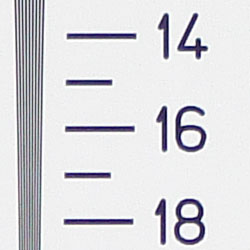
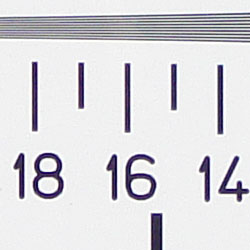
High resolution, 1,400 lines of strong detail.
Our laboratory resolution chart revealed sharp, distinct line patterns down to about 1,400 lines per picture height, with extinction at around 2,000. Use these numbers to compare with other cameras of similar resolution, or use them to see just what higher resolution can mean in terms of potential detail. Beware that while you might be able to make out what looks like distinct lines at numbers higher than those we've mentioned here, the camera is just doing its best to continue interpreting the lines. If you zoom in and follow them from the wider portions, you'll see the lines converge and reappear several times, so the lines you see at 1,800 and higher are really only artifacts generated by the camera's imaging system.
See full set of test images with explanations
See thumbnails of all test and gallery images
Sharpness & Detail
Fairly sharp images, slight oversharpening but relatively little blurring of detail from noise suppression.


Overall, the Sony DSC-T30's images are quite sharp, with moderate edge enhancement on the camera's part. (Edge enhancement creates the illusion of sharpness by enhancing colors and tones right at the edge of a rapid transition in color or tone.)
Noise-suppression systems in digital cameras tend to flatten-out detail in areas of subtle contrast. The effects can often be seen in shots of human hair, where the individual strands are lost and an almost "watercolor" look appears. The crop at far right shows this in the darkest areas of Marti's hair, which do show limited detail. That said, there are a few individual strands still visible in the darker midtones.
ISO & Noise Performance
Low to moderate noise at the normal sensitivity settings, very high noise that blurs detail at the higher settings.






The Sony DSC-T30's lower ISO settings performed quite well, producing low to moderate noise without noticeable blurring of fine detail. Starting at ISO 400, noise becomes much more evident, and the noise suppression processing begins to blur fine detail more. The 800 and 1,000 ISO settings result in very blurry images, with a bright, strong noise pattern that's very noticeable. (When printed, the ISO 800 and 1000 shots look grainy and rough even at print sizes as small as 4x6 inches, although they'd likely be acceptable to most consumers at that size.)
Extremes: Sunlit and low light tests
Very high resolution with good overall detail, though high contrast and limited shadow detail. Limited low-light capabilities, but entirely acceptable images under average city street lighting.


Sunlight:
Because digital cameras are more like slide film than negative film (in that they tend to have a more limited tonal range), we test them in the harshest situations to see how they handle scenes with bright highlights and dark shadows, as well as what kind of sensitivity they have in low light. The shot above is designed to mimic the very harsh, contrasty effect of direct noonday sunlight, a very tough challenge for most digital cameras. (You can read details of this test here.)
The Sony Cyber-shot DSC-T30 produced high contrast in response to the deliberately harsh lighting in the test above, with hot highlights the result. Detail was slightly limited in the highlights and shadows (more so in the shadows), though still pretty good overall. I found the best exposure with a +1.0 EV exposure compensation adjustment, even though the highlights really are quite blown, as the exposure at +0.7 EV left Marti's face and the colors in the flowers much too dark. (In "real life" though, be sure to use fill flash in situations like the one shown above; it's better to shoot in the shade when possible.)
| 1 fc 11 lux |
1/2 fc 5.5 lux |
1/4 fc 2.7 lux |
1/8 fc 1.3 lux |
1/16 fc 0.67 lux |
|
| ISO 80 |
 1 sec f3.5 |
 1 sec f3.5 |
 1 sec f3.5 |
 1 sec f3.5 |
 1 sec f3.5 |
| ISO 100 |
 1 sec f3.5 |
 1 sec f3.5 |
 1 sec f3.5 |
 1 sec f3.5 |
 1 sec f3.5 |
| ISO 200 |
 1/1 sec f3.5 |
 1 sec f3.5 |
 1 sec f3.5 |
 1 sec f3.5 |
 1 sec f3.5 |
| ISO 400 |
 1/2 sec f3.5 |
 1/1 sec f3.5 |
 1 sec f3.5 |
 1 sec f3.5 |
 1 sec f3.5 |
| ISO 800 |
 1/5 sec f3.5 |
 1/2 sec f3.5 |
 1 sec f3.5 |
 1 sec f3.5 |
 1 sec f3.5 |
| ISO 1000 |
 1/6 sec f3.5 |
 1/3 sec f3.5 |
 1/1 sec f3.5 |
 1 sec f3.5 |
 1 sec f3.5 |
| ISO 1000 |
 1/6 sec f3.5 |
 1/4 sec f3.5 |
 1/4 sec f3.5 |
 1/4 sec f3.5 |
 1/4 sec f3.5 |
| ISO 125 |
 1.3 sec f3.5 |
 2 sec f3.5 |
 2 sec f3.5 |
 2 sec f3.5 |
 2 sec f3.5 |
Low light:
The Sony DSC-T30's maximum two-second exposure time (one second in all but night modes) limited its low-light shooting capabilities somewhat, though the camera was able to capture bright images under average city street lighting quite easily. At the higher ISO settings (800 and 1,000), the camera captured bright images to about 1/2 foot-candle, about half as bright as average city street lighting at night, but with very high image noise. The camera's autofocus system worked down to a little below the 1/4 foot-candle light level, even without the AF assist light, a very good performance. Do keep in mind, that the longer shutter times demand the use of a tripod or other camera support to get sharp photos. (A useful trick is to just prop the camera on a convenient surface, and use its self-timer to release the shutter. This avoids any jiggling from your finger pressing the shutter button, and can work quite well when you don't have a tripod handy.) That said, we found the T30's Super SteadyShot image stabilization to be very effective, as we were in some cases able to get acceptable shots hand-holding the camera at exposure times of a half-second or more. (!)
Flash
Coverage and Range
Pretty good coverage and overall range, though our studio shots required an intensity boost to produce proper exposure.


Flash coverage was a little uneven at wide angle, with falloff in the corners, and just slightly uneven even at telephoto. In the Indoor test, the DSC-T30's flash underexposed our subject at its default setting, and required the High Intensity adjustment in both normal and Slow-Sync flash modes. (This isn't unusual, most cameras we test need an exposure boost with this subject.) The normal flash mode resulted in a slight orange cast, but the longer shutter time associated with the Slow-Sync mode produced a much stronger cast (though more even exposure).
| 8 ft | 9 ft | 10 ft | 11 ft | 12 ft | 13 ft | 14 ft |
 1/50 sec f4.3 ISO 100 |
 1/50 sec f4.3 ISO 100 |
 1/50 sec f4.3 ISO 100 |
 1/50 sec f4.3 ISO 100 |
 1/50 sec f4.3 ISO 100 |
 1/50 sec f4.3 ISO 100 |
 1/50 sec f4.3 ISO 100 |
The T30's flash was brightest at 8 feet, decreasing steadily in intensity from there on out. It would probably be usable to about 10 feet, but noticeably decreases in intensity after that point, becoming quite dim at 14 feet.
Output Quality
Print Quality
Excellent print quality, great color, very usable 13x19 inch prints. ISO 400 images are noisy at 8x10, acceptable at 5x7, best at 4x6. ISO 800 and 1000 shots are noisy and soft even at 4x6 inches.
Testing hundreds of digital cameras, we've found that you can only tell just so much about a camera's image quality by viewing its images on-screen. Ultimately, there's no substitute for printing a lot of images and examining them closely. For this reason, we now routinely print sample images from the cameras we test on our Canon i9900 studio printer, and on the Canon iP5000 here in the office. (See the Canon i9900 review for details on that model.)
The Sony DSC-T30's 7 megapixel sensor and sharp 3x optical zoom lens produces crisp, clear images that look good even when printed as large as 13x19 inches. Prints 8x10 inches in size are tack-sharp and crisp looking, even with significant cropping. As usual, it's the high-ISO shots that present the real print-quality challenge, and here the T30 stumbled somewhat. Although the camera offers options for ISO 800 and 1000, even ISO 400 shots looked quite noisy. Daylight shots at ISO 400 looked pretty decent when printed as large as 8x10 inches, but shots taken after dark showed a lot of very visible noise in dark areas, even when printed as small as 4x6 inches.
The ISO 800 and 1000 options were very much a mixed blessing. Under reasonably bright lighting, the noise levels are such that most consumers would probably find 4x6 inch (perhaps even 5x7 inch) prints noisy but acceptable. This might make these very high ISO settings useful for freezing fast action in daylight conditions. (Sports shots, for instance.) When the sun goes down though, things take a turn for the worse: Under low-light conditions (including indoor shots under the incandescent lighting so common here in the US), noise gets dramatically worse, to the point that we really don't consider the ISO 800 and 1000 sensitivity options usable for shooting under these conditions. - Which unfortunately is exactly when many people would most want to use them.
In terms of color, the Sony T30's images printed up bright and beautiful on the i9900. Blues definitely are very saturated, but we didn't find it objectionable on any of the shots we took. Caucasian skin tones came out slightly yellowish on a couple of shots, but that could have been a result of how the camera's white balance system responded to the lighting for those scenes. All in all, we think most consumers would find the T30's color very appealing.
The images above were taken from our standardized test shots. For a collection of more pictorial photos, see our Sony Cyber-shot DSC-T30 Photo Gallery .
Not sure which camera to buy? Let your eyes be the ultimate judge! Visit our Comparometer(tm) to compare images from the Sony Cyber-shot DSC-T30 with those from other cameras you may be considering. The proof is in the pictures, so let your own eyes decide which you like best!
Performance
Sony T30 Performance
Compact digital cameras often trade off performance and responsiveness in an attempt to wring a few extra minutes of life out of their tiny batteries. The Sony T30 was a refreshing exception to this trend, offering very nimble performance as well as surprisingly good battery life. Shutter lag was particularly impressive, but shot to shot speeds were quite good as well. The only timing parameter that seemed at all sluggish was its continuous-mode speed, at just over one frame per second, for up to five frames in sequence. All in all, an impressive performer for such a compact model! Here are the results of our performance measurements:
Timing and Performance
Sony DSC-T30 Timing
Very good speed for a consumer camera, especially a subcompact.
Startup/Shutdown |
||
Power on to first shot |
2.0 seconds |
Time it takes for LCD to turn on and lens to deploy. (No lens to deploy on the T30, so you might expect it to be even faster than this, but two seconds is still quite fast.) |
Shutdown |
~0 second |
How long it takes to retract lens and stow in your pocket. Effectively instant on the T30 because there's no lens to retract. |
Buffer clearing time |
9 seconds (Large/Fine JPEG 5 shots in continuous mode) |
Worst case buffer clearing time. -- This is the delay after a set of shots before you can remove the card. Some cameras won't retract their lenses and shut down until the buffer is cleared. |
Mode switching |
||
Play to Record, first shot |
1.1 seconds |
Time until first shot is captured |
Record to play |
1.3 seconds |
Time to display a large/fine file immediately after capture |
Display recorded image |
0.4 second |
Time to display a large/fine file already on the memory card. |
Shutter response (Lag Time): |
||
Full Autofocus Wide |
0.37 second |
Time from fully pressing shutter button to image capture, zoom lens at wide angle position. |
Full Autofocus Tele |
0.49 second |
Time from fully pressing shutter button to image capture, zoom lens at telephoto position. |
Prefocused |
0.012 second |
Time to capture, after half-pressing and holding shutter button. |
Continuous AF |
0.41 second |
This mode usually shows no speed increase with our static subject; we have no way to measure performance with moving subjects |
Manual focus |
0.35 second |
For most cameras, shutter lag is less in manual focus than autofocus, but usually not as fast as when the camera is "prefocused" |
Cycle time (shot to shot) |
||
Single Shot mode Large Fine JPEG |
1.44 seconds |
Time per shot, averaged over 20 shots |
Single Shot mode 640x480 JPEG |
1.33 seconds |
Time per shot, averaged over 20 shots |
Early shutter penalty? |
No |
Some cameras snap won't another shot if you release and press the shutter too quickly in Single Shot mode, making "No" the preferred answer |
Continuous mode Large Fine JPEG |
0.92 second (1.09 frames per second); 5 frames total; 9.1 seconds to clear |
Time per shot, averaged over buffer length or 20 shots, whichever came first |
Continuous mode 640x480 JPEG |
0.78 second (1.29 frames per second); 5 frames total; 4.8 seconds to clear |
Time per shot, averaged over buffer length or 20 shots, whichever came first |
Flash recycling |
7.16 seconds |
Flash at maximum output |
Download speed |
||
Windows Computer, USB 2.0 |
6,394 KBytes/sec |
Typical Values: Less than 600=USB 1.1; 600-770=USB 2.0 Low; 771-4000=USB 2.0 High |
The DSC-T30 is an excellent performer, starting up quickly at 2.0 second. Shutter lag at wide angle and telephoto are both very good, and "prefocusing" the camera by half-pressing and holding down the shutter button before the final exposure results in a blazingly fast shutter response time of only 0.012 second. Shot to shot cycle times are also good, at about 1.44 seconds for large/fine JPEGs, and it captures shots continuously without having to wait on the memory card to catch up. (We tested with a Memory Stick PRO Duo card, non-PRO models may result in a delay after a few shots have been captured.) Continuous-mode speed is a little less than stellar though, at just over one frame per second, for up to five shots in succession. However, the camera's Multi Shot 16 mode makes up for this with as high as a 30 frame per second rate for up to 16 320 x 240 resolution images. The flash takes about seven seconds to recharge after a full-power shot, also a little slow (albeit typical for subcompact cameras). Connected to a computer, download speeds are among the very fastest in the market, at 5,394 KBytes per second. Bottom line, the DSC-T30 is quite responsive and suitable for a wide range of situations, though it's normal continuous shooting mode would be a little slow for sporting events.
Battery and Storage Capacity
Battery
Good battery life.
| Battery Type | Number of Shots |
| Custom LiIon Rechargeable | 420 |
The Sony Cyber-shot DSC-T30 uses a custom rechargeable LiIon battery for power, and both a battery and charger are included in the box with the camera.
The table above shows Sony's rating for the number of shots the camera is capable of on a fully-charged battery, based on CIPA battery-life standard test conditions, a very good performance for a subcompact camera model. Though run time is very good for an LCD-only camera, I always recommend picking up a second battery and keeping it freshly charged if you plan on extended outings longer outings.
Storage
No card is included with the Sony Cyber-shot DSC-T30, although it accepts Memory Stick Duo cards; 58MB RAM is built into the camera.
|
Image Capacity with 58MB Internal Memory |
Fine | Normal | |
| 3,072 x 2,304 | Images | 16 | 33 |
| File Size | 3.6 MB | 1.8 MB | |
| 2,592 x 1,944 | Images | 23 | 43 |
| File Size | 2.6 MB | 1.4 MB | |
| 2,048 x 1,536 | Images | 37 | 66 |
| File Size | 1.6 MB | 924 KB | |
| 1,632 x 1,224 | Images | 59 | 111 |
| File Size | 1.0 MB | 548 KB | |
| 640 x 480 | Images | 356 | 892 |
| File Size | 171 KB | 68 KB | |
I strongly recommend buying at least a 512MB card, preferably a 1GB one, to give yourself extra space for extended outings.