Quick Review
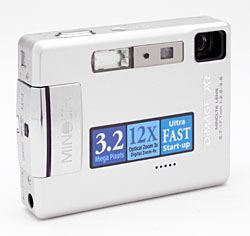
Minolta DiMAGE Xt Digital Camera
 |
Camera QuickLook | |
Review
Date |
06/02/03 | |
|
User Level |
|
|
|
Product Uses |
|
|
|
Digicam Design |
|
|
|
Picture Quality |
Very Good, 3.2-megapixel CCD | |
|
Print Sizes |
4x6 to 11x14 inches | |
|
Availability |
June, 2003 | |
| Suggested Retail
Price |
$399 | |
|
||||||||||
Minolta really turned heads nearly two years ago now, when they first introduced the diminutive DiMAGE X, a two megapixel camera in the form of a square block of metal, just barely over three-quarters of an inch thick. The DiMAGE X's clever "folded" optical system not only enabled the super-thin design, but made for rapid startup times, since there was no need to wait for the lens assembly to telescope out when the camera was turned on.
This year, Minolta has introduced the second update to the popular "X" line, taking last year's 3 megapixel "Xt" upgrade, keeping all that model's features, yet shrinking the overall package another modest but noticeable increment, and adding a host of user-interface improvements. Based on my tests, I'd say that they've also once again further improved the camera's color handling. The net result is an even more appealing version of one of my favorite subcompact camera models. Read on for all the details, but if you're looking for a super-portable, stylishly different camera, the DiMAGE Xt deserves a close look.
Differences from the DiMAGE Xi
For those of you who've read my review of the DiMAGE Xi, much of this one will look familiar - The basic functions are the same, so much of the descriptive text here is just a copy/paste from the earlier version. There are quite a few changes in the user interface though, so you may want to read the sections of this review dealing with controls and menus closely, even if you're already familiar with the Xi. And of course all the test photos, analysis, and conclusions are new, as are the freshly-measured parameters in the Picky Details section.
The table below presents a quick summary of features that I found to be new or enhanced in the Xt. - This may save some of you from having to slog through the whole review to find what's new:
| Feature | DiMAGE Xi | DiMAGE Xt |
| Minimum Focus Distance | 9.8 in (25 cm) | 5.9 in (15 cm) |
| Digital Zoom | 2x, 4x | 1.1 - 4.0x, in 0.1x steps |
| Metering | Multisegment | Multisegment or Spot |
| Maximum Shutter Time | 2 seconds | 4 seconds |
| Movie Mode Resolution | 320x240 | 320x240 or 160x120 |
| Maximum Playback Zoom | 4x | 6x |
| Buffer memory | 8 shot, only active in continuous mode | 8 shot, active in all still-capture modes |
| User interface (I) | Separate "OK" button | "OK" button integrated into zoom toggle lever (more convenient) |
| User interface (II) | - | Numerous user interface extensions and improvements. |
Camera Overview
With its unique, vertical lens design, Minolta's DiMAGE Xt, like the DiMAGE Xt and X before it, has a tiny, extraordinarily thin all-metal body. The new model is slightly shorter, ever so slightly wider, and slightly thicker than its predecessor, measuring a mere 3.6 x 0.92 x 2.6 inches (92.2 x 23.4 x 67 millimeters) and weighing just 5.0 ounces (143 grams) including the battery and SD memory card, the DiMAGE Xt is one of the smallest multi-megapixel digicams on the market. With the extremely compact design, there's no excuse for leaving it behind, as the camera can tag along in even the smallest shirt pocket, or be quickly tucked into an evening bag or pants pocket. The unique "folded" optical design means that there's no wait for a lens to telescope out of the body when the camera is powered up, resulting in very fast startup and shutdown times. The sleek design includes a built-in lens cover which conveniently slides out of the way whenever the camera is powered on, eliminating any concern over misplacing a lens cap. An all-metal case is rugged and solid-feeling, and should withstand the wear and tear of daily use better than most cameras. The 3x zoom lens, combined with the full automatic exposure control makes the camera suitable for most common shooting conditions. The 3.2-megapixel CCD produces high resolution images for printing, as well as lower resolution images better suited for email.
The DiMAGE Xt has a 3x, 5.7-17.1mm lens, the equivalent of a 37-111mm lens on a 35mm camera. The autofocus covers a range from 5.9 inches (15 cm) to infinity. There's no separate macro mode, but the 5.9 inch close-focusing combined with a telephoto lens setting produces very good macro performance. Depending on the lens zoom position, the maximum aperture ranges from f/2.8 to f/3.6. In addition to the optical zoom, the DiMAGE Xt offers a 1.1 - 4.0x digital zoom, in increments of 0.1x. (Although I always remind readers that digital zoom decreases the overall image quality because it simply enlarges the central pixels of the CCD's image.) You can choose between the real-image optical viewfinder or the 1.5-inch, color TFT LCD monitor to compose images, although as usual, the LCD monitor provides the most accurate framing. (The optical viewfinder is unusually "tight", showing only 75% of the final frame area.) In playback mode, images can be enlarged up to 6x, as an aid to checking critical focus and framing.
Exposure is automatically controlled at all times, with only a few exposure options available. An On/Off button on top of the camera powers the camera on, and a Mode switch lets you select between Record and Playback modes. Thanks to the all-internal lens design, there's no need to wait for the lens to extend before you can shoot, so startup times are very short. (A bit under three seconds.) Most exposure options are controlled through the LCD's on-screen menu system, which offers very straightforward navigation. That said, you can control flash mode, exposure compensation, and the lens zoom externally, via buttons and controls on the camera's rear panel. Shutter speeds range from 1/1,000 to four seconds, though the chosen value is not reported to the user. (The maximum shutter time is twice that of the earlier DiMAGE Xi, making for much better low-light capability.) The right and left arrow keys on the camera's back panel control the Exposure Compensation, adjusting it from -2 to +2 exposure equivalents (EV) in one-third step increments. Sensitivity is adjustable to values of 50, 100, 200, or 400, with an Auto setting as well,that varies the ISO between 10 and 160, depending on the current light level. White Balance is adjustable through the settings menu, with options for Auto, Daylight, Cloudy, Incandescent, and Fluorescent light sources. The DiMAGE Xt's built-in flash operates in Auto, Red-Eye Reduction, Forced, Suppressed, or Slow Sync modes.
In addition to the basic exposure options, the DiMAGE Xt also offers a few extra shooting modes, controlled through the settings menu. In Movie exposure mode, the camera captures either 320 x 240-pixel or 160 x 240-pixel resolution moving images with sound, with duration limited only by the size of the memory card. (The included 16MB SD card should hold approximately 41 seconds worth of movies at the highest resolution, larger cards will store proportionately more.) A Self-Timer mode provides a 10-second delay between the time the Shutter button is pressed and when the camera actually takes the picture, allowing you to get into your own shots. For shooting fast action subjects, the DiMAGE Xt's Continuous Shooting mode captures a rapid series of images when you hold down the Shutter button, much like a motor drive on a traditional 35mm camera. Provided that there's enough space remaining on the memory card, the camera can capture up to 8 large/fine images, or over a hundred small/economy mode ones before having to pause to write the image data to the memory card. Details like image size and shutter speed can affect the shooting interval, but it averages approximately 1.3 frames per second. Finally, Audio Recording mode lets you record sound clips as long as 180 minutes (without an image), although the maximum recording time may also be limited by the amount of available memory card space. (A 16 MB memory card can hold about 30 minutes of audio.) The DiMAGE Xt also features a Voice Memo option, for recording short sound clips to accompany recorded images.
The DiMAGE Xt stores its images on an SD memory card, and a 16MB card accompanies the camera. (The camera also works with the slightly less expensive MMC cards.) Connection to a host computer for image download is via USB. The DiMAGE Xt is a "storage-class" device, which means that it doesn't require any separate driver software for Windows 2000 and XP, or for Mac OS 8.6 and later. (Download speed is also quite good, I clocked it at 548 KBytes/second on my Sony VAIO computer, running Windows XP.) The camera utilizes an NP-200 rechargeable lithium-ion battery for power, one of which is included with the camera, along with the necessary battery charger. While the DiMAGE Xt's battery life is better than most subcompact cameras, I still highly recommend picking up an additional battery pack and keeping it freshly charged. The optional AC adapter is also useful for preserving battery power when reviewing and downloading images, or when viewing images and movies on a television, via the supplied A/V cable.
Basic Features
- 3.2-megapixel CCD.
- Real-image optical viewfinder.
- 1.5-inch color TFT LCD monitor.
- Glass, 3x, 5.7-17.1mm lens, equivalent to a 37-111mm lens on a 35mm camera.
- 1.1-4.0x digital zoom, in 0.1x increments.
- Automatic exposure control.
- Shutter speeds from 1/1,000 to four seconds.
- Maximum aperture f/2.8 to f/3.6, depending on lens zoom position.
- Built-in flash.
- SD/MMC memory card storage, 16MB card included.
- Images saved as JPEG or uncompressed TIFF files.
- Power supplied by one NP-200 rechargeable lithium-ion battery or optional AC adapter.
- DiMAGE software and USB drivers included for both Windows and Mac platforms.
Special Features
- Movie mode with sound.
- Continuous Shooting mode.
- 10-second Self-Timer for delayed shutter release.
- Voice Memo mode for recording captions.
- White balance (color) adjustment with five modes.
- Adjustable ISO.
- Both multisegment and spot metering.
- DPOF (Digital Print Order Format) compatibility.
- Video cable for connection to a television set.
- USB cable for connection to a computer (driver software included).
Recommendation
The DiMAGE Xt is very small and compact. Its full automatic exposure control suits standard point-and-shoot operations, although the user does have a few options for brightening or darkening the image, or adjusting the color balance. The 3.2-megapixel CCD delivers good quality images, with enough resolution to make sharp 8x10 prints, and a low resolution option for email purposes. The DiMAGE Xt's tiny size and rugged case design make it a natural for "anywhere/anytime" photography. With its point-and-shoot appeal and ease of use, the DiMAGE Xt is perfect for novice users who simply want to take good pictures without getting too involved in the technicalities. Even sophisticated users will appreciate its exceptional portability and good picture-taking capabilities though. It'd thus do well as a "second camera" for enthusiasts, too.
Design
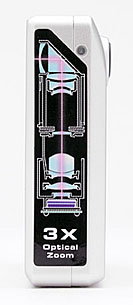
Like the DiMAGE X before it, the DiMAGE Xt has an amazingly thin, tiny case. Its sleek rectangular body shape and lack of protrusions make the DiMAGE Xt one of the most portable cameras on the market. Measuring just 3.6 x 0.92 x 2.6 inches (92.2 x 23.4 x 67 millimeters), the DiMAGE Xt fits just about anywhere, including the smallest of shirt pockets. Matching its diminutive size, the DiMAGE Xt is also very light weight at just 5.0 ounces (143 grams) including the battery and SD memory card. The secret to the DiMAGE Xt's compact design is its internally-mounted lens, which stretches vertically up the side of the camera rather than protruding from the camera's front. An internal prism reflects light from the subject down into the lens itself, almost like a periscope. The internal lens mounting means that there's no wait for the lens barrel to extend when you power up the camera, making startup times very quick. (Only about two seconds from power on to the first shot captured.)
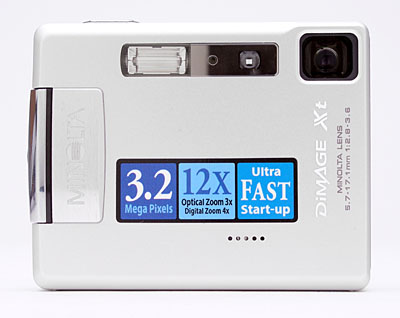
The front of the camera holds the lens window, flash, optical viewfinder window, and self-timer lamp. A shutter-like, retractable lens cover protects the lens window whenever the camera is powered off, sliding quickly out of the way when the camera is turned on. Where the front of the DiMAGE Xi was very flat, the DiMAGE Xt has a little bulge on its right side (viewed from the front of the camera), that provides welcome purchase for your fingers. You can also see the horizontal row of five tiny holes, marking the location of the Xt's microphone. This was located on the top panel of the Xi, a change that makes sense, I think, providing better sound pickup from subjects in front of the camera.
The design of the DiMAGE Xt almost dictates a one-handed grip, something that took me a little getting used to. I realized that I almost always hold a camera with both hands, for a more stable shooting platform, minimizing camera shake. With the DiMAGE Xt, when I steadied the camera with my left hand, I initially often found myself putting a finger over the lens opening. Not a big deal, as I quickly got used to just using a couple of fingers on the bottom left corner of the camera, but something to watch for when you first start shooting with it.
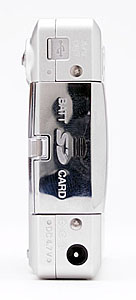
On the right side of the camera (as viewed from the rear) is the combined SD memory card and battery slot, as well as the DC In power jack and a wrist strap attachment eyelet. A sliding door protects the battery/card compartment, with a few ridges on it to make it easier to open. Beneath the compartment door, the battery and SD card fit side-by-side. I thank Minolta for providing side access to both the battery and memory card slots, meaning you don't need to dismount from a tripod to change out either one. (Although I frankly doubt the DiMAGE Xt will be used on a tripod very often.) The combined A/V Out and USB jack has been moved to the right side of the camera on the Xt (it was on the left side of the Xi), protected by a little sliding door.
The opposite side of the camera is featureless, with no connectors or controls on it at all. This view of the camera shows the decal that illustrates the clever lens design Minolta is so justifiably proud of. Be reassured though, that the label can be easily removed after purchase, to result in a very sleek, elegant case design.
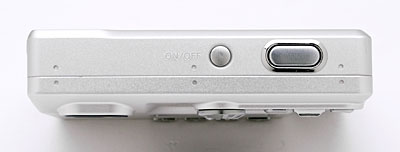
The DiMAGE Xt's top panel is sleek and smooth, with only a minor protrusion from the Shutter button. The power button is also located here, slightly recessed to prevent accidental actuation when the camera is slid in and out of pockets.
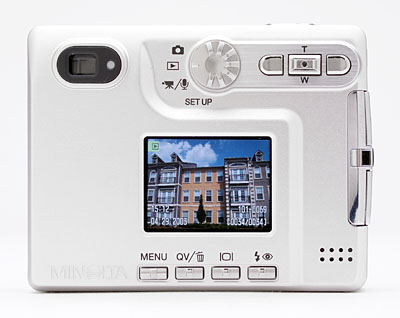
The remaining camera controls are on the back panel, along with the optical viewfinder eyepiece and 1.5-inch color LCD monitor. A single LED lamp next to the optical viewfinder reports the camera's status, such as when focus is set, when the flash is charged, etc. To the right of the viewfinder eyepiece is a small mode dial, with positions for still image recording, playback, movie/audio recording and setup. (This control replaces a two-position slide switch on the Xi, making for a more intuitive user interface.) To the right of the mode dial are three multi-function buttons, which access different settings in Playback and Record modes, also serving as navigation arrows in the menu system (the rocker button in the center serves for up and down menu navigation). The center button of this set of three controls the zoom lens in record mode and image zoom in playback mode. It also serves as the "OK" button in the menu system, when pressed straight down. Arranged under the LCD monitor are the Menu, QuickView/Erase, Display, and Flash buttons. A small speaker in the lower right corner plays back recorded sounds.
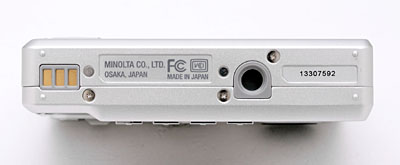
The bottom panel of the DiMAGE Xt reveals only the plastic, threaded tripod mount, slightly off center from the lens, and a set of three contacts that can charge the battery when the camera is parked either in the provided charger (there's a slot in the charger body that neatly fits the camera case) or in its optional accessory dock.
The DiMAGE Xt's user interface is very straightforward, as the camera employs automatic exposure at all times. While zoom setting, flash mode, and exposure compensation can be adjusted via the rear-panel controls, all the other features and functions are controlled through the LCD menu system. In both capture and playback modes, the camera's menu system is divided into three pages, delineated by subject tabs at the top of the screen. The Mode switch lets you quickly switch between Playback and Record modes. Considering the camera's automatic exposure control and limited user options, most users should be able to become familiar with the camera's operation in 30 minutes to an hour. (And experienced users may not even need to crack the manual.)
Record-Mode Display
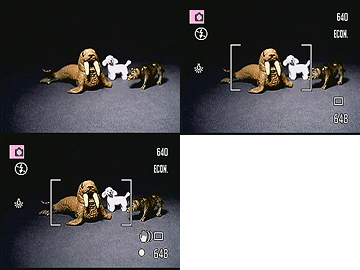 In
record mode, the LCD monitor displays the subject with a minor amount of overlaid
information, indicating flash, white balance, ISO setting, the current size/quality
setting, and number of images that can be stored on the remaining memory card
space at the current size/quality. Pressing the Display button beneath the LCD
once removes the information overlay, pressing it again turns the LCD off entirely,
and pressing it a third time restores the default display. When you half-press
the shutter button, a small dot appears in the lower right-hand corner of the
LCD indicating whether the camera is focused (white dot) or not (red dot), and
a "shaking hand" symbol appears above the focus dot if the shutter
speed is slow enough that you'll need to be careful not to jiggle the camera
during the exposure.
In
record mode, the LCD monitor displays the subject with a minor amount of overlaid
information, indicating flash, white balance, ISO setting, the current size/quality
setting, and number of images that can be stored on the remaining memory card
space at the current size/quality. Pressing the Display button beneath the LCD
once removes the information overlay, pressing it again turns the LCD off entirely,
and pressing it a third time restores the default display. When you half-press
the shutter button, a small dot appears in the lower right-hand corner of the
LCD indicating whether the camera is focused (white dot) or not (red dot), and
a "shaking hand" symbol appears above the focus dot if the shutter
speed is slow enough that you'll need to be careful not to jiggle the camera
during the exposure.
Playback-Mode Display
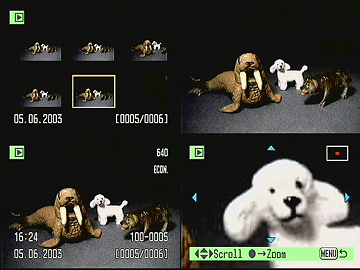 In
playback mode, pressing the default image display shows the most recently captured
image, with an information overlay showing the resolution and quality setting
used, the date and time of capture, the file number, and the sequence number
of the image among those currently stored in the memory card. Pressing the Display
button once dismisses the information overlay, and pressing it a third time
shows a set of six thumbnails. With an image displayed full-screen, pressing
the zoom control in the "T" direction zooms in on the image in steps
of 0.2x, up to a maximum magnification of 6x. At any magnification level, pressing
the "OK" button (pressing the center of the T/W lever) switches you
to scrolling operation, in which the left/right buttons and the T/W control
let you scroll around the magnified image. Pressing the center of the T/W lever
again returns you to zoom operation. The screenshot above right shows all the
available display options in playback mode.
In
playback mode, pressing the default image display shows the most recently captured
image, with an information overlay showing the resolution and quality setting
used, the date and time of capture, the file number, and the sequence number
of the image among those currently stored in the memory card. Pressing the Display
button once dismisses the information overlay, and pressing it a third time
shows a set of six thumbnails. With an image displayed full-screen, pressing
the zoom control in the "T" direction zooms in on the image in steps
of 0.2x, up to a maximum magnification of 6x. At any magnification level, pressing
the "OK" button (pressing the center of the T/W lever) switches you
to scrolling operation, in which the left/right buttons and the T/W control
let you scroll around the magnified image. Pressing the center of the T/W lever
again returns you to zoom operation. The screenshot above right shows all the
available display options in playback mode.
External Controls

Power Button: Unobtrusively located near the center of the camera's top panel, this slightly recessed button turns the camera on and off.

Shutter Button: Directly to the right of the Power button, this button sets focus and exposure when pressed halfway, and fires the shutter when fully pressed.
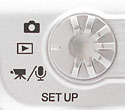
Mode Dial: Just behind and below the power button, at the top of the camera's rear panel, this control sets the Xt's main operating mode. Options include still capture, playback, movie/audio capture, and setup.
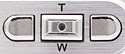
Right and Left Arrow Keys: Located in the top right corner of the back panel, these buttons control exposure compensation while in Record mode. In any settings menu, these buttons navigate through menu choices. In playback mode, these buttons scroll forward or back through previously captured images. When in scrolling mode during zoomed playback (see the following entry for more info), these buttons move your view right or left in the enlarged playback image.
Zoom Toggle Button (Up and Down Arrow Key): Centered between the Right and Left Arrow keys, this control adjusts the optical and digital zoom in any record mode. It also serves as the up/down control when navigating LCD menu choices. This button also serves as the "OK" button for confirming menu selections.
In Record mode, pressing and holding this button for a few seconds switches the camera from area autofocus (the default) to spot autofocus or back again.
In Playback mode, this button lets you zoom in on an image, as much as 6x. Once you've zoomed in on an image, pressing the center of this button switches to scrolling operation, after which up/down actuation moves your view up and down in the enlarged image. Pressing the center of the button again returns you to control of the playback zoom level.

Menu Button: The first in a series of four buttons arranged along the bottom of the rear-panel LCD display, this button calls up the settings menu in both Record and Playback modes.

QuickView / Erase Button: To the right of the Menu button, this button lets you immediately review the most recently captured image, without having to switch the camera to playback mode. Pressing the button a second time brings up a dialog box asking if you want to delete that image. While in QuickView mode, you can scroll back and forth through the images on the memory card, zooming in on them if you wish. Pressing the Menu button returns you to capture mode though, rather than calling up either the playback or record menu screens. Half-pressing the shutter button also cancels the QuickView mode, returning you to capture mode.
In Playback mode, this button lets you delete the displayed image.

Display Button: Next in line to the right of the QuickView/Erase button, this button controls the LCD display. In Record mode, pressing this button once disables the information overlay. A second press cancels the image display altogether and shuts off the LCD monitor (great for saving battery power), while a third press recalls both the information and image displays.
In Playback mode, pressing the Display button displays or dismisses the same information display as in record mode. A third press switches to a 2x3 display of thumbnail images for rapidly reviewing photos in the camera.

Flash Button: The left most of the set of controls under the LCD screen, this button cycles through the available flash modes in still image Record mode. Options include Auto, Red-Eye Reduction, Forced, Suppressed, and Slow Sync.
Camera Modes and Menus
Still-Image Record Mode: In normal Record mode, the camera can capture still images. The Record menu is displayed by pressing the Menu button, and the following options are available:
-
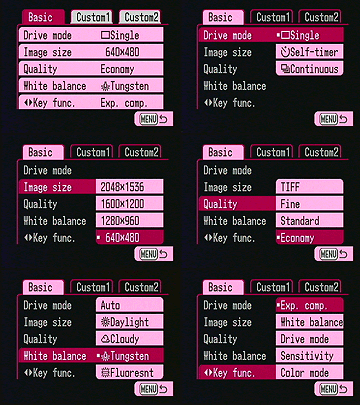 Basic
Basic
- Drive Mode: Sets drive mode to Single, Self-Timer, or Continuous.
- Image Size: Adjusts the image resolution to 2,048 x 1,536; 1,600 x 1,200; 1,280 x 960; or 640 x 480 pixels.
- Quality level: Sets the image compression level to TIFF (an uncompressed file format), Fine, Standard, or Economy (JPEG file formats).
- White Balance: Adjusts the overall color balance of the scene. Options include Auto, Daylight, Cloudy, Tungsten, and Fluorescent.
- Key Func: This menu item lets you change the function controlled
by the left/right keys on the camera's rear panel. Options include exposure
compensation (the default), white balance, drive mode, ISO sensitivity,
and color mode.
-
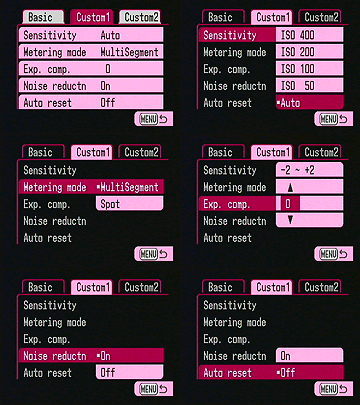 Custom1
- Sensitivity: Lets you set the camera's ISO sensitivity to Auto (the default), 50, 100, 200, or 400.
- Metering Mode: Select between MultiSegment (the default) or Spot exposure metering.
- Exp.Comp: Set the exposure compensation from -2 to +2 EV units.
- Noise Reductn: Enable or disable the camera's automatic noise-reduction system, which takes effect during longer exposures.
- Auto Reset: Resets most of the camera's settings to their default
values whenever the camera is turned off.
-
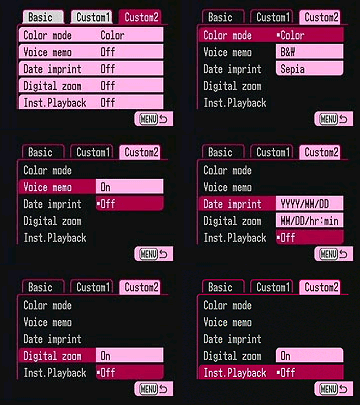 Custom2
- Color Mode: Sets the camera's color mode to color (the default), black and white, or sepia.
- Voice Memo: Enables the recording of an audio track up to 15 seconds long after the capture of each image. (Default is off.)
- Date Imprint: Enables the imprinting of the current date or date and time in small white characters, in the lower right-hand corner of each image. Off by default, options include YYYY/MM/DD, or MM/DD/hr:min.
- Digital Zoom: Enables or disables (the default0 the digital zoom function.
- Inst. Playback: Off by default when turned on, causes the camera
to display each image on the LCD for two seconds after it's captured.
Playback Mode: This mode allows you to review captured images on the memory card, erase them, protect them, set them up for printing, etc. Pressing the Menu button displays the following options:
-
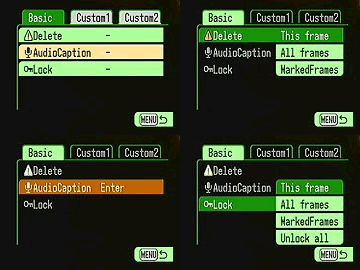 Basic
Basic
- Delete: Erases the current frame, all frames, or marked frames from the memory card.
- Audio Caption: Allows you to record a short sound clip to accompany a previously recorded image.
- Lock: Write-protects specific images or all images, preventing
them from being manipulated or erased (except via card formatting). An
option also exists to Unlock images.
-
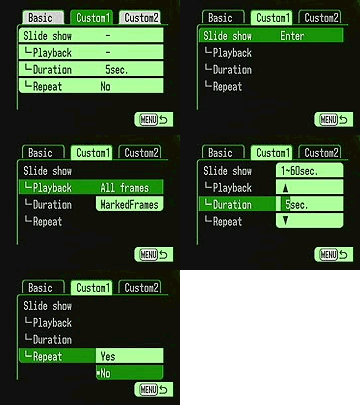 Custom
1
Custom
1
- Slide Show: Initiates a "slide show" of images stored on the Xt's memory card.
- Playback: Determines which images will be displayed in the slide show. Options are all frames or marked frames.
- Duration: Sets the length of time each image is displayed in the slide show. Times range from 1 to 60 seconds per image, with 5 seconds being the default.
- Repeat: Determines whether the slide show repeats after cycling
through all images on the card or not. (Default is to not repeat.)
-
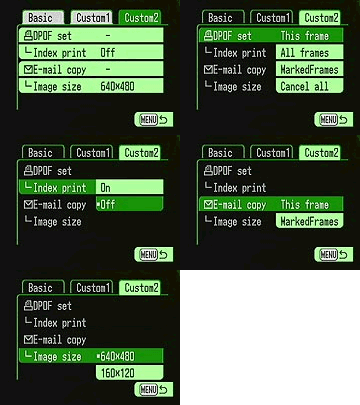 Custom
2
Custom
2
- DPOF Set: Sets images for printing on an output device supporting the Digital Print Order Format (DPOF) standard. Options are to mark the current frame, all frames, marked frames, or to cancel the print orders for all images.
- Index Print: Sets up a DPOF order for an index print showing all images on the memory card.
- E-mail Copy: Makes a smaller copy of images for convenient emailing of them. The original images aren't changed, a smaller copy is made. Options are to make a copy of the current image only, or of all marked images.
- Image Size: Sets the size for making email copies. Options are
640x480 (VGA) or 160x120 (QVGA).
Movie/Audio Mode: This mode allows you to record either movies (with sound) or audio-only files. Pressing the menu button displays the following options.
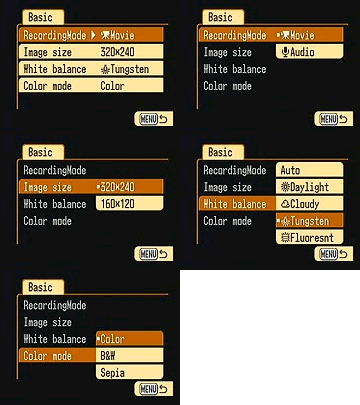 Basic
Basic
- Recording Mode: Selects either Movie (the default) or Audio recording modes.
- Image Size: Selects the size of images recorded in movie files. Options are 320x240 (the default) or 160x120.
- White Balance: Adjusts the overall color balance of the scene. Options include Auto, Daylight, Cloudy, Tungsten, and Fluorescent.
- Color Mode: Sets the camera's color mode to color (the default),
black and white, or sepia.
Setup Mode: This mode lets you adjust various camera options and settings. Pressing the Menu button displays the following options:
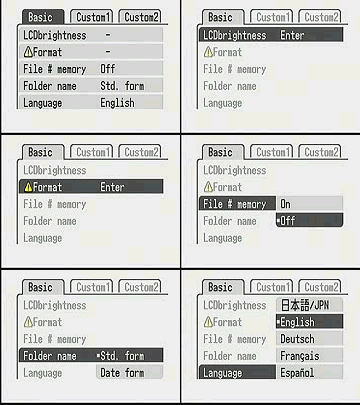 Basic
Basic
- LCD Brightness: Adjusts the brightness of the LCD display.
- Format: Formats the SD card, erasing all files, including protected ones.
- File # Memory: Specifies whether file numbering starts over with new folders, or continues regardless of folder or memory card.
- Folder Name: You can have the camera name the folders it stores its images in on the memory card using either the camera's standard scheme, or by Date. (The latter being a handy way to keep track of photos you've shot over a period of time.)
- Language: Changes the menu language to English, Japanese, German,
French, or Spanish.
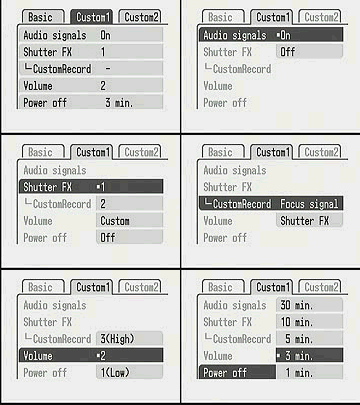 Custom
1
Custom
1
- Audio Signals: Optionally disable the beep sounds that occur whenever a button is pressed.
- Shutter FX: You can select your choice of two standard shutter sounds, or a custom sound, which you can record.
- Custom Record: Lets you record your own custom sounds for the focus signal and shutter release. (Pretty amusing, I made my test unit say the word "click" whenever the shutter fired.)
- Volume: Sets the volume of the camera's audio signals and shutter FX sounds. Playback of recorded audio is not affected.
- Power Off: Sets the camera to automatically shut off after 1,
3, 5, 10, or 30 minutes of inactivity.
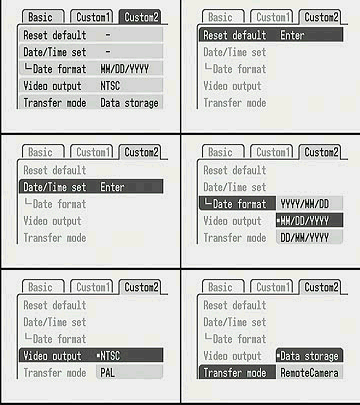 Custom
2
Custom
2
- Reset Default: Resets most settings to their default values.
- Date/Time Set: Self explanatory - Sets the date and time.
- Date Format: Choose between three different date formats used for monitor displays and date imprinting. Options are YYYY/MM/DD, MM/DD/YYYY, and DD/MM/YYYY.
- Video Output: Choose between NTSC or PAL video timing for the video output.
- Transfer Mode: Through its USB interface, the DiMAGE Xt can appear
as either a data storage device or a remote camera. (The remote camera
option allows the Xt to be used as a USB-connected webcam.)
In the Box
Packaged with the DiMAGE Xt are the following items:
- Wrist strap.
- A/V cable.
- USB cable.
- 16MB SD memory card.
- NP-200 lithium-ion battery pack.
- Battery charger.
- DiMAGE software CD.
- Operating manual and registration card.
- Large capacity SD memory card.
- Additional NP-200 lithium-ion battery pack.
- AC adapter.
- Small camera case.
Recommended Software: Rescue your images!
Just as important as an extra memory card is a tool to rescue your images
when one of your cards fails at some point in the future. I get a lot of email
from readers who've lost photos due to a corrupted memory card. Memory card
corruption can happen with any card type and any camera manufacturer, nobody's
immune. A surprising number of "lost" images can be recovered with
an inexpensive, easy to use piece of software though. Given the amount of
email I've gotten on the topic, I now include this paragraph in all my digicam
reviews. The program you need is called PhotoRescue, by DataRescue SA. Read
our review of it if you'd like, but download the program now,
so you'll have it. It doesn't cost a penny until you need it, and even then
it's only $29, with a money back guarantee. So download PhotoRescue for
Windows or PhotoRescue for
Mac while you're thinking of it. (While you're at it, download the
PDF manual and quickstart
guide as well.) Stash the file in a safe place and it'll be there when you
need it. Trust me, needing this is not a matter of if, but when...
PhotoRescue is about the best and easiest tool for recovering digital
photos I've seen. (Disclosure: IR gets a small commission from sales of
the product, but I'd highly recommend the program even if we didn't.)
OK, now back to our regularly scheduled review...
Sample Pictures
See the full
set of my sample pictures and detailed
analysis here. The thumbnails below show a subset of my test images.
Click on a thumbnail to see the full-size photo.

|

|

|
| |
|
|
|
|
|
|
| |
|
|
|
|
|
|
| |
|
|



"Gallery" Photos
For those readers interested in a set of less "standardized" photos
from the P10, here are some thumbnails of more random shots snapped with it.
Click on one any of the thumbnails below for a larger view. Click on the larger
view again to see the original image from the camera. (Photos in this gallery
were shot by Gibbs Frazeur or Stephanie Boozer. Thanks Gibbs and Stephanie!)
NOTE: that these are big files, so be aware that (a) they'll take a while to download, and (b) they'll chew up a pretty good chunk of bandwidth on us. (Read the "support this site" blurb at the top the carrier pages, and think about it while you're waiting for the images to download.
NOTE TOO: Some browsers have difficult with very wide images, and distort them a lot when they display them. (I don't know about others, but IE 5.0 on the Mac definitely does this. If the full-sized images appear to be stretched horizontally, you may need to just download them to your hard drive and view them in an imaging application, or possibly try another browser.)

884.9 KB Shutter: 1.5 Aperture: F3 Exposure EV: 2.5 ISO Speed: 100 |

1,055.4 KB Shutter: 1/ 3 Aperture: F3 Exposure EV: 4.7 ISO Speed: 400 |
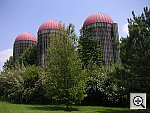
981.7 KB Shutter: 1/ 750 Aperture: F2.8 Exposure EV: 12.5 ISO Speed: 50 |

921.4 KB Shutter: 1/ 90 Aperture: F2.8 Exposure EV: 9.4 ISO Speed: 50 |
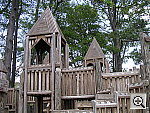
1,101.8 KB Shutter: 1/ 350 Aperture: F2.8 Exposure EV: 11.4 ISO Speed: 50 |

1,102.2 KB Shutter: 1/ 500 Aperture: F2.8 Exposure EV: 11.9 ISO Speed: 50 |

1,008.2 KB Shutter: 1/ 500 Aperture: F2.8 Exposure EV: 11.9 ISO Speed: 50 |
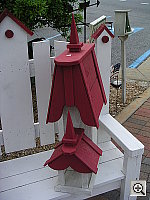
983.4 KB Shutter: 1/ 750 Aperture: F2.9 Exposure EV: 12.6 ISO Speed: 50 |
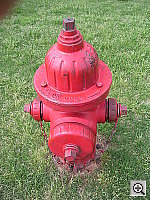
1,119.0 KB Shutter: 1/ 180 Aperture: F2.8 Exposure EV: 10.4 ISO Speed: 50 |
Specifications
See the specifications sheet here.
Picky Details
Information on shooting speed, battery life, etc. can be found here.
- Minolta DiMAGE Xt user reviews on PriceGrabber.com
- Minolta DiMAGE Xt user reviews on PC PhotoREVIEW
Test Results
As was the case with the DiMAGE Xt before it, I was pleasantly surprised
by the quality of the images from the DiMAGE Xt. See
the DiMAGE Xt's sample pictures page for the full results of my testing,
but meanwhile, here's a summary of my findings:
- Color: Color from the DiMAGE Xt was generally very good. Colors were
accurate and properly saturated in all my test subjects, and the camera did
a better than average job with even very dim incandescent lighting indoors.
The white balance system left slight color casts in the images shot under
incandescent lighting, but for the most part much better than most cameras
I test under that light source. Color outdoors was very good as well, although
I noticed a slight tendency toward excessive warmth in Caucasian skin tones.
- The color bias was fairly slight though, generally within the range of what
I'd consider acceptable.
- Exposure: Like the DiMAGE X and Xi before it, the DiMAGE Xt did pretty
well in the exposure department. It's a little prone to losing highlight detail
in contrasty scenes under sunlit conditions, but not more than I'm accustomed
to seeing in many other digicams. As with the Xi before it, the biggest surprise
I found was how well it did under even fairly dim indoor shooting conditions,
where it could produce sharp, well-exposed images even under rather inadequate
living-room lighting. I did find though, that it needed a fair bit of positive
exposure compensation in interior shots, but that could largely be a consequence
of the large expanses of white walls in most of my indoor shots. The flash
also did a very good job of filling in the shadows without blowing out the
rest of the images, and the slow-sync exposure mode produced a very appealing
balance between room lighting and the onboard flash. Very nice.
- Resolution/Sharpness: Like most subcompact cameras, the DiMAGE Xt's
were just a little soft when compared with the best full-sized three-megapixel
digicams. It does show a fair bit of softness in the corners of the frame
though, and there's some chromatic aberration present in the corners as well,
more of both than I like to see.
- Closeups: The Xt captured a surprisingly tiny macro area, at 2.1
x 1.6 inches (40 x 53 millimeters). Resolution was very high, with strong
detail in the coins and brooch. The dollar bill was a bit soft, likely due
to the very shallow depth of field in macro shots like this one: The camera
obviously focused on the surface of the brooch, where you can see very crisp
detail. As is often the case in digicam macro shots, the corners were softer
here, with the softness extending down the entire left and right sides of
the frame. Color was pretty good, but the Xt's flash had trouble throttling
down for the macro area, blowing out the image on the right side of the frame.
Plan on using external illumination for the closest shots, but overall, the
Xt is an excellent macro performer.
- Night Shots: Minolta boosted the maximum exposure time of the Xt
to four seconds, which helps a good deal with low-light exposures. As a result,
the Xt did quite well all the way down to the 1/16 foot-candle (0.67 lux)
limit of my low-light test. An automatic noise-reduction feature keeps image
noise under control, even with fairly long exposures at high ISO. On the downside
though, the Xt had some trouble focusing at the darkest light levels, producing
soft focus at light levels below 1/2 foot-candle, and it lacks a manual focus
option to overcome this. (Either a manual focus option, an AF-assist illuminator
or both would be quite welcome.) Still, 1/2 foot-candle is about half the
brightness of a typical city street scene at night, so for most purposes,
the Xt will do fine under available light.
- Viewfinder Accuracy: One of my biggest gripes with the DiMAGE Xi
persists in the Xt: Its optical viewfinder is very tight, showing approximately
75 percent frame accuracy at wide angle, and about 74 percent at telephoto.
The LCD monitor proved much more accurate, though actually just slightly loose,
showing slightly more than 100 percent of the final image area. Given that
I like LCD monitors to be as close to 100 percent accuracy as possible, the
Xt's LCD monitor performed pretty well here, but I'd *really* like to see
a more accurate optical viewfinder.
- Optical Distortion: Optical distortion on the Xt is higher than average at the wide-angle end, where I measured approximately 1.0 percent barrel distortion. The telephoto end fared only a little better, as I measured a 0.5 percent pincushion distortion. (Typical cameras I test show about 0.8% barrel distortion at wide angle (still way too much, IMHO), and 0.3 percent or less pincushion at telephoto.) There's some fairly noticeable softening in the corners (particularly on the left side of the image), coupled with some chromatic aberration, more of both than I like to see. As excellent a camera as the Xt is, there were obviously some tradeoffs that had to be made in the lens, with sacrifices made in resolution and distortion in the corners of the frame.
- Battery Life: Like most subcompact digicams, the DiMAGE Xt's battery life is a bit limited, although it seems to be slightly improved relative to that of the Xi model. In its worst-case power drain mode (record mode with the LCD enabled), battery life is only about 72 minutes, extending to about 117 minutes in playback mode. The real plus though, is that the camera takes almost no power in capture mode when the LCD is turned off. - It's a shame that the optical viewfinder isn't more accurate, as that'd make it more feasible to shoot with the LCD off, greatly extending battery life. As always, despite the excellent performance with the LCD turned off, I still strongly advise purchasing a second battery when you buy the camera.
I've been a fan of Minolta's "X" line of subcompact cameras since the original version was first introduced nearly two years ago. Ultra-compact digicams often seem to involve a lot of compromises and tradeoffs, but the DiMAGE Xt takes great photos under a wide range of conditions, offers a decent range of exposure control (exposure compensation and white balance adjustments), and has a surprisingly long battery life when the LCD is left off. You do give up a little image sharpness relative to the best full-sized three megapixel cameras, and I'd really like to see a more accurate viewfinder, but there's plenty of resolution here to make sharp 8x10 prints. Its compact size, solid feature set, and rugged all-metal case make the DiMAGE Xt a great "take anywhere" camera, appealing to non-techies as well as enthusiasts. For the novice user, it's very easy to use and takes nice pictures. For more advanced users (taking myself as an example), it makes a great "second camera", something that you'd just toss in your pocket without thinking. Another personal confession: As much as I rant about "cameras in drawers not taking pictures", that's exactly where my digicams live much of the time. With the DiMAGE Xt though, I at least have a fighting chance of having the camera along with me wherever I go. Bottom line, it's not going to be the ultimate camera for Ansel Adams types, but if you want to have no excuse for not having your camera long with you, the DiMAGE X makes a great companion. -- The DiMAGE Xt easily qualifies as a "Dave's Pick." (A personal confession: I actually own a DiMAGE Xi, and its interesting to see how family members react to it. Whenever there's a trip or outing in the offing, it's a race between my two teenage sons to see who can get first dibs on the Xi. Although we have a *load* of other cameras in the house at any given time, the Xi is invariably the one they gravitate toward. It takes good-looking pictures, and is just so cool, they can't resist bringing it along.)Free Photo Lessons 
Simple pro lighting and use tips let you snap stunning photos. Check out our free Photo School area!Purchase from our preferred reseller to support this site.
- Optical Distortion: Optical distortion on the Xt is higher than average at the wide-angle end, where I measured approximately 1.0 percent barrel distortion. The telephoto end fared only a little better, as I measured a 0.5 percent pincushion distortion. (Typical cameras I test show about 0.8% barrel distortion at wide angle (still way too much, IMHO), and 0.3 percent or less pincushion at telephoto.) There's some fairly noticeable softening in the corners (particularly on the left side of the image), coupled with some chromatic aberration, more of both than I like to see. As excellent a camera as the Xt is, there were obviously some tradeoffs that had to be made in the lens, with sacrifices made in resolution and distortion in the corners of the frame.


Follow Imaging Resource: