The Imaging Resource
Quick Review
Minolta DiMAGE Z1 Digital Camera
 |
Camera QuickLook | |
|
Review Date |
|
|
|
Update Date |
|
|
|
User Level |
|
|
|
Product Uses |
|
|
|
Digicam Design |
|
|
|
Picture Quality |
Very Good, 3.2-megapixel CCD | |
|
Print Sizes |
4x6 to 8x10 inches | |
|
Availability |
Now | |
| Suggested Retail
Price |
$399 |
|
|
||||||||||
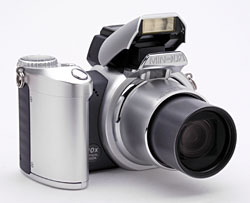
The Minolta DiMAGE Z1 digital camera is the latest in a long line of Minolta digital cameras featuring uncommon innovation, aggressive pricing, and superior optics. The new Minolta Z1 is their first long-zoom digital camera aimed squarely at the consumer market. The line of Minolta DiMAGE digital cameras based on the original DiMAGE 7 boast a 7x zoom lens and five megapixel sensors, but are really designed and priced to appeal to the most sophisticated digital camera users. In contrast, the new 3.2 megapixel DiMAGE Z1 has a full 10x optical zoom lens, but with ease of use, feature set, and retail price squarely aimed at the bulk of "point & shoot" users. At the same time though, the Z1 provides optional advanced exposure modes, including full-manual operation, that will appeal to more advanced users. Long-zoom cameras are fast becoming a popular category, and the new DiMAGE Z1 looks to be a worthy competitor. Read on for all the details!
Camera Overview
Looking much like a shrunk-down version of a 35mm "big
lens" SLR, Minolta's DiMAGE Z1 offers the benefit of full 10x optical zoom
and full manual exposure control in a fairly compact, very user-friendly package.
Measuring a mere 4.3 x 3.05 x 3.15 inches (110 x 78 x 80 millimeters) and weighing
15.0 ounces (424 grams) with the battery and SD memory card, the DiMAGE Z1 is
quite compact for such a long-zoom camera, but still a bit too chunky for a
shirt pocket. It should fit into larger coat pockets, purses, and backpacks
without trouble though. A neck/shoulder strap comes with the Z1, for more secure
portability. Covered in silver and charcoal-gray plastic body panels, the Z1's
body is built around the large lens barrel. A substantial handgrip provides
a solid hold, but the rest of the camera is fairly compact. A plastic lens cap
protects the telescoping lens, but tethers to the camera body to prevent it
from being accidentally lost. The Z1 features a 3.2-megapixel CCD, which produces
high resolution images for making sharp prints as large as 8x10 inches, as well
as lower resolution images better suited for email distribution. With its range
of exposure options, 10x optical zoom, and high resolution CCD, the Z1 is a
versatile and capable performer.
The DiMAGE Z1 is equipped with an impressive 10x, 5.8-58mm lens, the equivalent of a 38-380mm lens on a 35mm camera. This represents a range from a moderate wide-angle to a pretty substantial telephoto. Maximum aperture ranges from f/2.8 to f/3.5, depending on the lens zoom setting. Focus ranges from 1.6 feet (0.5 meters) to infinity in normal mode, with a macro setting ranging from 3.9 to 47.2 inches (10 to 120 centimeters). There's also a Super Macro setting, which gets as close as 1.6 inches (4 centimeters) for really impressive closeups. Though the DiMAGE Z1 normally judges focus from a large area in the center of the frame, a Spot AF mode is also available, which determines focus from one of three possible spot-AF hotspots, arranged across the middle of the frame. To activate Spot-AF mode, press and hold down the center button of the arrow pad in any non-movie capture mode. Once Spot-AF mode is selected, you can use the left and right buttons of the arrow pad to select the specific spot area you want to use.
The Z1 offers a manual focus setting, as well as a Full-time AF mode which continuously adjusts focus whether the shutter button is pressed or not. (This may be helpful in tracking moving subjects, but doesn't reduce shutter lag with stationary subjects.) In addition to the optical zoom, the DiMAGE Z1 offers as much as 4x digital zoom. (I always remind readers though, that digital zoom inevitably decreases the overall image quality because it simply enlarges the central pixels of the CCD's image.) For composing images, the DiMAGE Z1 offers a 1.5-inch LCD monitor, as well as a smaller, electronic optical viewfinder LCD display. The Mode switch on the camera's rear panel determines which display is active, and the full information and image displays are available on both (including the LCD menu).
The Z1 is quite unusual though, in that it actually uses the same LCD screen for both eyelevel and rear-panel displays. When the eyelevel viewfinder is enabled, an internal mirror/shutter mechanism simply blocks the rear-panel viewing port and directs the LCD's image to the eyepiece. I'm not sure of the rationale behind this, but it's possible that the mirror/shutter arrangement costs less than would a second, tiny LCD screen to handle the eyepiece independently.
When it comes to exposure, the DiMAGE Z1 offers a wide range of options, controlled by the Exposure Mode dial on top of the camera. Main exposure modes include Auto, Program AE, Aperture Priority, Shutter Priority, and Manual modes, with five preset Scene modes and a Movie mode available as well. In Auto mode, the camera handles everything, leaving only the zoom, drive mode, etc., for the user to worry about. Program AE mode keeps the camera in charge of aperture and shutter speed, but allows the user to adjust all other exposure settings. Aperture and Shutter Priority modes provide partial manual control, letting the user adjust one variable while the camera selects the other. Finally, in Manual mode, the user has complete control over the exposure. Aperture settings range from f/2.8 to f/8, with the actual maximum and minimum values depending on the lens zoom position. Shutter speeds range from 1/1,000 to 15 seconds in Manual and Shutter Priority modes, with a Bulb setting permitting exposures as long as 30 seconds. (Maximum exposure time in Program AE and Aperture Priority modes is four seconds, and two seconds in Auto and Digital Subject Program modes.) For longer exposures, the Z1 features a Noise Reduction setting (optionally activated through the Setup menu), which uses dark-frame subtraction to reduced image noise resulting from longer exposure times. The five Digital Subject Program modes include Night Portrait, Sunset, Landscape, Sports Action, and Portrait modes, for shooting in common, yet sometimes challenging, situations.
By default, the Z1 employs a Multi-Segment metering system, which reads multiple areas throughout the frame to determine the exposure. Through the Record menu, however, you can opt for Spot or Center-Weighted metering modes. The right and left arrow keys on the camera's back panel control the Exposure Compensation, adjusting it from -2 to +2 exposure equivalents (EV) in one-third step increments. (Options on the Record menu let you set the arrow buttons to control other exposure options instead of Exposure Compensation.) Light sensitivity is adjustable to ISO values of 50, 100, 200, or 400, with an Auto setting as well. White Balance is also adjustable through the settings menu, with options for Auto, Daylight, Cloudy, Incandescent, and Fluorescent light sources, as well as a Custom setting for manually adjusting the color balance with a white card. The Record menu also offers Sharpness and Contrast adjustments, as well as a Color setting with Natural, Vivid, Black and White and Sepia color options. The DiMAGE Z1 features a built-in, pop-up flash, which operates in Auto, Red-Eye Reduction, Fill-Flash, Suppressed, or Slow-Sync modes. An adjustment in the Record menu lets you control the intensity of the flash, from -2 to +2 EV. You can also attach a more powerful flash unit, via the external flash hot shoe on the camera's top panel. The flash connection is proprietary to Minolta accessories, including the Maxxum Flash 2500, 3600HS, and 5600HS units, but an adapter unit is available (albeit nearly impossible to find at retail).
In Movie exposure mode, the camera captures 640 x 480, 320 x 240, or 160 x 120-pixel resolution moving images with sound, with the recording time per segment varying as a function of the image size and frame rate you've chosen. (Minimum recording time is about 30 seconds at 640x480, 30 frames/second, but at all lesser combinations of image size and frame rate, recording time seems to be limited only by memory card space.) You have an option for Standard or Night movie modes, and can set the frame rate to either 15 or 30 frames per second. In movie mode, you can zoom digitally at the 320x240 and 160x120 image sizes (but not at the 640x480 size), but the lens itself can't be zoomed while recording, to prevent noise from the lens motor from affecting the sound track. The camera's Self-Timer mode provides a 10-second delay between the time the Shutter button is pressed and the time that the camera actually takes the picture, allowing you to get into your own shots. For shooting fast action subjects, the DiMAGE Z1's Standard and Ultra High Speed (UHS) Continuous Advance modes capture a rapid series of images while you hold down the Shutter button, much like a motor drive on a traditional 35mm camera. UHS mode captures approximately 10 frames at the 1,280 x 960 resolution in about a second, while Standard mode captures frames at about 1.5 frames per second. The actual frame rate and number of images in a series will depend on the resolution setting, subject matter, and the amount of available memory space. Also available is an Auto Exposure Bracketing mode, which captures three consecutive frames at different exposure settings, varying by 0.3, 0.5, or 1.0 EV steps.
The DiMAGE Z1 stores its images on SD memory cards, and a 16MB card accompanies the camera. (The camera also works with the slightly less expensive MMC cards.) I highly recommend picking up a larger capacity card right away, so you don't miss any important shots. (A 64 MB card represents a good tradeoff between capacity and cost.) Connection to a host computer for image download is via USB. The DiMAGE Z1 is a "storage-class" device, which means that it doesn't require any separate driver software for Windows 2000 and XP, or for Mac OS 8.6 and later. The camera utilizes four AA-type batteries for power, and a set of single-use alkaline batteries accompanies the camera. As always, I recommend picking up at least two sets of high-capacity rechargeable NiMH batteries and a good charger, and keeping a set freshly charged at all times. Click here to read my "battery shootout" page to see which batteries currently on the market are best, or here for my review of the Maha C-204F charger, my longtime favorite. The optional AC adapter is also useful for preserving battery power when reviewing and downloading images, or when viewing images and movies on a television, via the supplied A/V cable.
Basic Features
- 3.2-megapixel CCD.
- Electronic optical viewfinder (EVF).
- 1.5-inch color TFT LCD monitor with anti-reflection coating.
- 10x, 5.8-58mm lens, equivalent to a 38-380mm lens on a 35mm camera.
- 4x digital zoom.
- Automatic, Program AE,Aperture Priority, Shutter Priority, and Manual exposure modes, plus five preset Digital Subject Program modes.
- Shutter speeds from 1/1,000 to 15 seconds, with a Bulb setting for exposures as long as 30 seconds.
- Maximum aperture f/2.8 to f/3.5, depending on lens zoom position.
- Built-in flash with five modes.
- External flash hot shoe for Minolta accessory flash units.
- SD/MMC memory card storage, 16MB card included.
- Images saved as JPEG files.
- Power supplied by four AA-type batteries or optional AC adapter.
- DiMAGE software, ArcSoft VideoImpression, and USB drivers included for both Windows and Mac platforms.
Special Features
- Movie and Night Movie modes with sound recording.
- Standard and Ultra High Speed Continuous Advance shooting modes.
- Auto Exposure Bracketing.
- 10-second Self-Timer for delayed shutter release.
- Voice Memo mode for recording captions.
- White balance (color) adjustment with seven modes, including a manual setting.
- Adjustable ISO with four sensitivity settings and an Auto mode.
- Noise reduction setting for long exposures.
- Multi-Segment, Center-Weighted, and Spot metering options.
- Spot and Full-time AF modes.
- Color, Sharpness, and Contrast adjustments.
- USB Direct-Print capability.
- A/V cable for connection to a television set.
- USB cable for connection to a computer (driver software included).
Recommendation
With its 10x optical zoom lens, full range of exposure
control, and fairly compact size, the DiMAGE Z1 is a full-featured yet surprisingly
affordable long-zoom digicam. Though the camera features full manual exposure
control, its simplified user interface and available automatic modes make it
approachable for less-experienced novices who want to gradually learn more about
digital photography. A 3.2-megapixel CCD delivers good quality images, with
enough resolution to make sharp 8x10 prints, with low resolution option available
for email and other electronic uses. The Z1 is compact enough for travel, especially
for a long-zoom model, and has enough exposure features to handle just about
any situation. The Z1 would make a great choice for anyone looking for a long-zoom
digicam with ample features, but at an affordable price.
Design
Minolta's DiMAGE brand name carries with it a tradition of quality and technological
innovation, covering an array of digital cameras designed to suit a wide range
of experience levels and price points. The newest addition to the pack is Minolta's
DiMAGE Z1. The Z1 offers a strong feature set, pared down only moderately from
those of Minolta's higher-end models like the new A1, but still offering a full
range of exposure control, and a long-ratio 10x zoom lens, with an easy to learn
user interface, all at an affordable price. Shaped like a miniaturized 35mm
SLR, the Z1's body is made up mostly of the lens, and a tall, stylized hand
grip. The two-toned, plastic body is sleek and sophisticated, and sports only
a few external controls. Measuring 4.3 x 3.05 x 3.15 inches (110 x 78 x 80 millimeters),
the DiMAGE Z1 is just a little too bulky for shirt pockets, but should slip
into larger coat pockets and purses without trouble. The camera's plastic body
helps keep the weight down, despite the large 10x zoom lens, at 15.0 ounces
(424 grams) with the batteries and SD memory card.
A neck strap accompanies the camera for easy toting, but I'd recommend picking
up a small camera case to protect the matte-silver finish of the plastic body
panels when traveling.
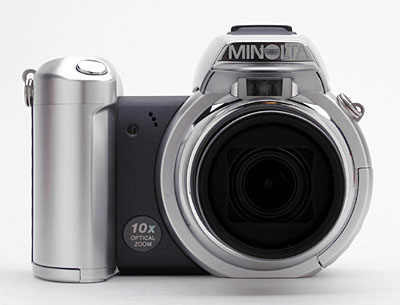
The front of the Z1 is dominated by the large lens and handgrip. When powered on, the lens extends just under an inch from the camera front. A plastic lens cap clamps onto the lens for protection, and tethers to the camera body with a small strap. A set of filter threads around the inside lip of the lens barrel on the body of the camera accommodate Minolta's accessory lenses via an accessory adapter. Minolta's optional accessory lenses extend both the camera's wide angle and telephoto capabilities. Also on the front panel are the flash sensor (just below the pop-up flash compartment), microphone, and Self-Timer LED lamp. A substantial handgrip provides a firm hold on the camera, with plenty of room for your fingers to curve around the grip. While it offers plenty to grab onto, the handgrip is also small enough to be comfortable for users with smaller hands.
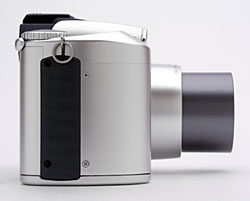
The right side of the Z1 (as viewed from the rear) is blank apart from a black decorative plastic strip and one of the neck strap attachment eyelets.
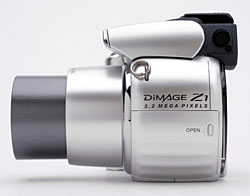
The opposite side of the camera is curved to echo the shape of the lens barrel, and features the second neck strap eyelet, just above the memory card compartment. A sliding door protects the memory compartment, sliding forward to reveal the SD memory card slot. The camera's USB connector terminal is also located inside this compartment. Also visible on this side of the camera is the diopter adjustment dial for the viewfinder eyepiece.
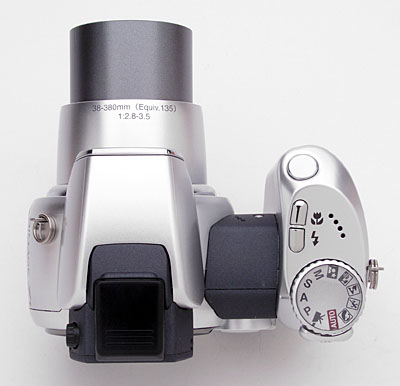
On the DiMAGE Z1's top panel is the pop-up flash compartment and external flash hot shoe, as well as the Shutter, Macro, and Flash buttons. The pop-up flash does not have a release mechanism. Instead, you simply pull up the flash from both sides (which automatically places the flash into Auto mode). A four-hole speaker grille and the camera's Exposure Mode dial are also located on top of the camera.
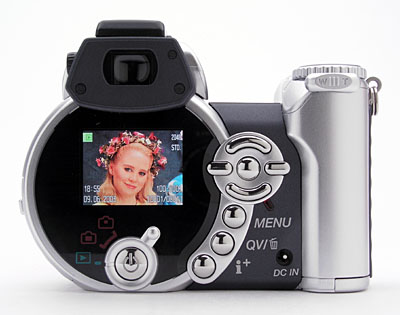
The remaining camera controls are on the rear panel, along with the electronic optical viewfinder (EVF) and 1.5-inch color LCD monitor. Curving around the right side of the LCD monitor are the Four-Way Arrow pad and Menu, Quick View/Erase, and Information buttons. The Power button and Mode dial are just beneath the LCD monitor. Tucked in the lower right corner of the rear panel is the camera's DC In connector jack. At the very top of the right side is the Zoom lever.
I mentioned the unusual design of the Z1's EVF, that uses the same LCD screen as for the rear-panel display. Despite its odd design, the scheme seems to work pretty well, as the EVF is bright and has pretty good resolution. My one complaint about it is that the eyepiece optics have a rather low eyepoint, which means that eyeglass wearers will find themselves pressing the viewfinder eyepiece tightly against the lenses of their glasses, in order to see the full frame. The EVF does have a dioptric adjustment knob with a fairly wide range of adjustment though, so you may be able to use the EVF without your eyeglasses on. (I'm quite nearsighted, at 20:200, and the dioptric control could almost compensate for my uncorrected vision.)
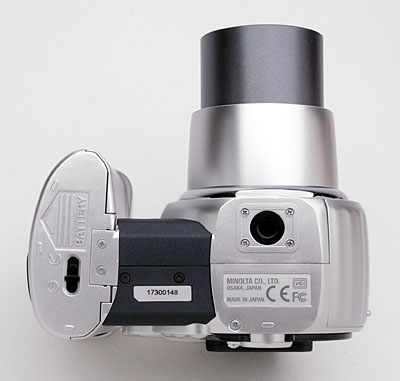
The Z1's bottom panel is fairly flat, with a plastic threaded tripod mount under the lens (a good position for people interested in panoramic photography), and the battery compartment at the base of the handgrip. The tripod mount is just far enough away from the battery compartment to allow quick battery changes while working on a tripod. I always appreciate this, given the amount of studio work I do, and am glad that the battery and memory card slots are both accessible while working on a tripod. A sliding switch locks and unlocks the battery compartment door, to prevent it from accidentally flying open while shooting.
Camera Operation
With only a handful of external camera controls and a well-organized LCD menu
system, the DiMAGE Z1's user interface is straightforward and easy to grasp.
The Mode dial on the rear panel controls the camera's main operating mode (as
well as whether the LCD display's image is routed to the rear panel or the EVF
eyepiece), while the Exposure Mode dial sets the level of exposure control.
Though only a few exposure options can be controlled externally, the Z1's efficiently
laid out LCD menu system is easy to understand and relatively quick to navigate.
Each menu is divided up into pages with tabs at the top of the screen, so you
can quickly scan each page without scrolling through a long list of options.
Given the camera's straightforward setup and user-friendly design, most users
should be able to operate the camera right out of the box, referring to the
manual only for more complex operations.
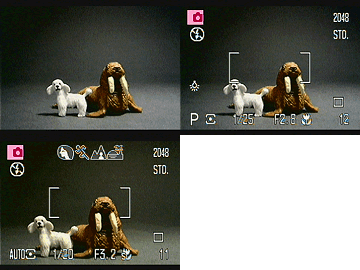 Record-Mode
Viewfinder Display: In record mode, you can choose to display an information
overlay on the LCD screen, or dismiss it for an unobstructed view of your subject.
Information shown includes camera mode, exposure mode, flash status, exposure
compensation (if a compensation adjustment has been made), white balance setting
(if something other than "Auto" is selected), image size and quality
setting, drive mode (single, continuous, movie, etc), and number of shots remaining
on the memory card. If the information overlay is enabled, aperture and shutter
speed are reported when the Shutter button is halfway pressed. In Auto mode,
a set of icons appears across the top of the screen, to indicate that automatic
scene mode selection is active.
Record-Mode
Viewfinder Display: In record mode, you can choose to display an information
overlay on the LCD screen, or dismiss it for an unobstructed view of your subject.
Information shown includes camera mode, exposure mode, flash status, exposure
compensation (if a compensation adjustment has been made), white balance setting
(if something other than "Auto" is selected), image size and quality
setting, drive mode (single, continuous, movie, etc), and number of shots remaining
on the memory card. If the information overlay is enabled, aperture and shutter
speed are reported when the Shutter button is halfway pressed. In Auto mode,
a set of icons appears across the top of the screen, to indicate that automatic
scene mode selection is active.
 Playback-Mode
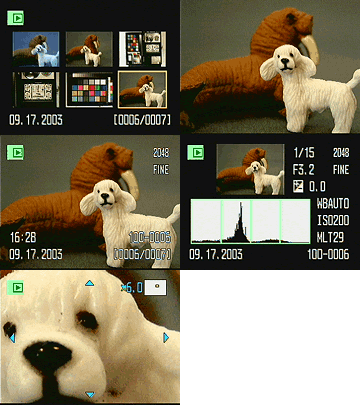
Viewfinder Display: In playback mode, the Information button cycles between
the image display only, the image with a limited information display, and an
index display of the images on the memory card. Image information includes the
file number, image number in the captured series, date and time, and the file
size and quality settings. Pressing the up-arrow key on the Four-Way arrow pad
calls up a histogram display showing the distribution of brightness values in
the image, along with detailed exposure information. You can also zoom in up
to 6x to check fine details, focus and framing, and can scroll the enlarged
viewing window around the full image using the camera's arrow keys.
Playback-Mode
Viewfinder Display: In playback mode, the Information button cycles between
the image display only, the image with a limited information display, and an
index display of the images on the memory card. Image information includes the
file number, image number in the captured series, date and time, and the file
size and quality settings. Pressing the up-arrow key on the Four-Way arrow pad
calls up a histogram display showing the distribution of brightness values in
the image, along with detailed exposure information. You can also zoom in up
to 6x to check fine details, focus and framing, and can scroll the enlarged
viewing window around the full image using the camera's arrow keys.
External Controls

Shutter Button: Angled down slightly on the camera's top panel, this button
sets focus and exposure when pressed halfway, and fires the shutter when fully
pressed.

Macro Button: Behind the Shutter button on the top panel, this
button controls the macro focus mode, cycling between normal AF, Macro, and
Super Macro modes.

Flash Button: Following the Macro button, this button cycles through the
available flash modes in any Record mode. Options include Auto, Red-Eye Reduction,
Fill Flash, Suppressed, and Slow-Sync.
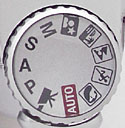
Exposure Mode Dial: Sitting atop the back edge of the handgrip,
this ribbed dial controls the camera's exposure mode with the following options:
-
 Auto:
Puts the camera in charge of all the exposure variables, including aperture
and shutter speed. The user controls only flash mode, zoom, macro mode,
and file size and quality settings.
Auto:
Puts the camera in charge of all the exposure variables, including aperture
and shutter speed. The user controls only flash mode, zoom, macro mode,
and file size and quality settings.  Movie:
Indicated on the Exposure Mode dial by a black film camera icon, this mode
records moving images with sound.
Movie:
Indicated on the Exposure Mode dial by a black film camera icon, this mode
records moving images with sound. Program
AE (P): This mode puts the camera in control of aperture and shutter
speed, the user retaining control over all other exposure variables.
Program
AE (P): This mode puts the camera in control of aperture and shutter
speed, the user retaining control over all other exposure variables. Aperture
Priority (A): Here, the user controls the aperture setting, while
the camera selects the best corresponding shutter speed.
Aperture
Priority (A): Here, the user controls the aperture setting, while
the camera selects the best corresponding shutter speed. Shutter
Priority (S): The opposite of Aperture Priority mode, this mode lets
the user choose the shutter speed setting while the camera selects the lens
aperture.
Shutter
Priority (S): The opposite of Aperture Priority mode, this mode lets
the user choose the shutter speed setting while the camera selects the lens
aperture. Manual
(M): This mode provides complete user control over the exposure.
Manual
(M): This mode provides complete user control over the exposure. Night
Portrait: Marked on the Exposure Mode dial with an icon of a person
with a star above them, this mode sets up the camera for capturing portraits
in low-lit situations. Because the camera is using a slower shutter speed
here, a tripod is recommended for the best results.
Night
Portrait: Marked on the Exposure Mode dial with an icon of a person
with a star above them, this mode sets up the camera for capturing portraits
in low-lit situations. Because the camera is using a slower shutter speed
here, a tripod is recommended for the best results. Sunset:
Indicated by a beach scene with a setting sun on the Exposure Mode dial, this
mode adjusts the white balance system to preserve the the warm colors of a
sunset without compensating for them. It also biases the exposure system to
produce a slight underexposure, to prevent the sky colors from being washed
out.
Sunset:
Indicated by a beach scene with a setting sun on the Exposure Mode dial, this
mode adjusts the white balance system to preserve the the warm colors of a
sunset without compensating for them. It also biases the exposure system to
produce a slight underexposure, to prevent the sky colors from being washed
out. Landscape:
This mode is indicated by an icon of a pair of mountains with a person in
front on the Exposure Mode dial. Here, the camera uses a smaller lens aperture,
so that both the background and foreground will be in sharp focus.
Landscape:
This mode is indicated by an icon of a pair of mountains with a person in
front on the Exposure Mode dial. Here, the camera uses a smaller lens aperture,
so that both the background and foreground will be in sharp focus. Sports
Action: Marked on the Exposure Mode dial by an icon of a running
person, this mode uses faster shutter speeds to "freeze" fast-paced
action.
Sports
Action: Marked on the Exposure Mode dial by an icon of a running
person, this mode uses faster shutter speeds to "freeze" fast-paced
action. Portrait:
An icon of a woman's head indicates this mode on the Exposure Mode dial. In
Portrait mode, the camera employs a larger lens aperture setting, which decreases
the depth of field. This produces a sharply focused image of the subject,
in front of a slightly blurred background.
Portrait:
An icon of a woman's head indicates this mode on the Exposure Mode dial. In
Portrait mode, the camera employs a larger lens aperture setting, which decreases
the depth of field. This produces a sharply focused image of the subject,
in front of a slightly blurred background.

Zoom Control: Crowning the top right corner of the rear panel,
just beneath the Exposure Mode dial, this two-way rocker button controls the
optical and digital zoom in Record mode. In Playback mode, this button controls
the playback zoom setting, digitally enlarging the image as much as 6x.
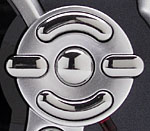
Four-Way Arrow Pad and OK Button: Roughly centered on the camera's rear
panel, this set of five buttons serves as the camera's main navigational tool.
The four exterior buttons navigate through settings menus, moving the selection
up, down, left, or right. The center button acts as the "OK" button,
to confirm any changes. In Manual exposure mode, the right and left keys adjust
the aperture setting, while the up and down keys change the shutter speed.
In Aperture and Shutter Priority modes, the up and down keys adjust the available
exposure variable, while the right and left keys adjust Exposure Compensation.
In Program AE mode, the right and left keys adjust the Exposure Compensation
as well. In Manual Focus mode, the up/down arrow keys adjust the focal distance
of the lens.
In Playback mode, the right and left arrow keys scroll through captured images. The up arrow key calls up or dismisses a display screen showing a histogram of brightness values within the image, as well as detailed exposure information. When an image has been enlarged, all four keys pan the view.

Menu Button: Directly below the down arrow key and the first in a series
curving around the LCD monitor, this button calls up the settings menu in
both Record and Playback modes.

QuickView / Erase: Below the Menu button, this button activates
the QuickView image display in Record mode, which allows you to check the
most recently captured image.
In Playback mode, this button displays the Single Image Erase menu, which lets you erase the currently displayed image.

Display (i+) Button: The final button in the series curving around the
LCD monitor, this button controls the LCD display. In Record mode, pressing
this button toggles the image information display on and off.
In Playback mode, pressing the Display button displays or dismisses a limited information display. A third press switches to an index display of thumbnail images for rapidly reviewing photos in the camera, while a fourth press returns to the normal display.
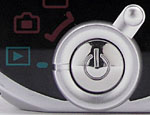
Power Button: Located in the center of the Mode dial beneath the LCD monitor,
this button turns the camera on and off.
Mode Dial: Encircling the Power button on the rear panel, this dial sets the camera's operating mode and viewfinder display location. Options are Record EVF, Record LCD, and Playback.

Diopter Adjustment Control: Tucked on the side of the viewfinder
eyepiece, this tiny, notched dial adjusts the viewfinder display to accommodate
near- or farsighted users.
Camera Modes and Menus
Record Mode: In Record mode, the camera can capture still images, with a range of options available through the settings menu. The Exposure Mode dial sets the exposure control mode, while the LCD menu provides the following exposure options (some options are not available in all modes):
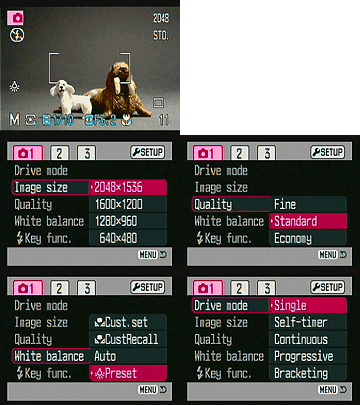 Record 1
- Drive Mode: Sets drive mode to Single, Self-Timer, Continuous, Progressive, or Bracketing.
- Image Size: Adjusts the image resolution to 2,048 x 1,536; 1,600 x 1,200; 1,280 x 960; or 640 x 480 pixels. In Movie mode, resolution options are 640 x 480; 320 x 240; and 160 x 120 pixels.
- Quality: Specifies the JPEG compression level for still images. Options are Fine, Standard, or Economy.
- Frame Rate: (Movie mode only.) Sets the movie recording frame rate to 15 or 30 frames per second.
- Audio: (Movie mode only.) Turns audio recording on or off.
- White Balance: Adjusts the overall color balance of the scene. Options include Auto, Preset (Daylight, Cloudy, Incandescent, and Fluorescent), Custom Set (manual adjustment), and Custom Recall.
- Key Function: Assigns a function to the Right and Left Arrow keys. Options are Exposure Compensation (default), Flash Mode, Drive Mode, White Balance, Focus Mode, and Color Mode.
- Movie Mode: (Movie mode only.) Sets the movie recording mode
to either Standard or Night Movie. (Night Movie mode uses slower shutter
speeds to cope with dim lighting conditions, but as a result will produce
blurred images of quickly moving objects.)
 Record
2
Record
2
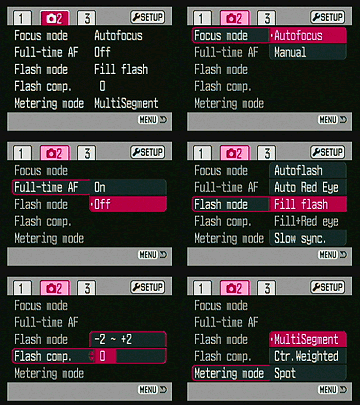
- Focus Mode: Selects either Auto or Manual focus control.
- Full time AF: Turns the Full time AF option on or off. If on, the camera adjusts focus continuously whenever the camera is in a capture mode.
- Flash Mode: Sets the flash mode to Auto, Red-Eye Reduction, Fill, Fill with Red-Eye Reduction, or Slow Sync modes.
- Flash Compensation: Adjusts flash power from -2 to +2 exposure equivalents (EV).
- Metering Mode: Designates how the camera meters the exposure.
Options are Multi-Segment and Spot.
 Custom
2
Custom
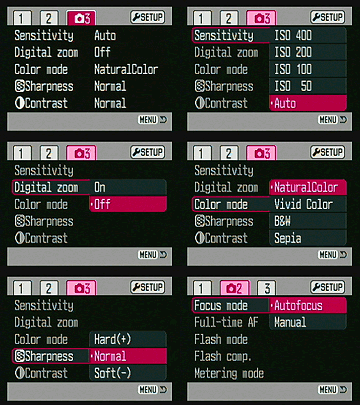
2- Sensitivity: Sets the camera's sensitivity to Auto, or to 50,100, 200, or 400 ISO equivalents.
- Digital Zoom: Turns the 4x digital zoom on and off. (Digital zoom only engages after the lens has been zoomed all the way to its max telephoto.)
- Color Mode: Chooses whether the camera records images in Natural Color, Vivid (highly saturated) Color, Black and White, or Sepia tones.
- Sharpness: Adjusts the in-camera image sharpening. Options are Normal, Hard, and Soft.
- Contrast: Controls the level of image contrast, with choices
of Normal, High, and Low.
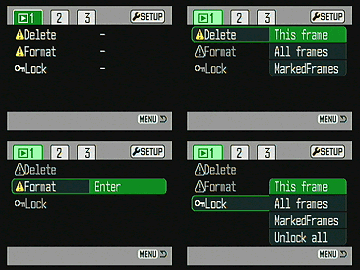
Playback Mode: This mode allows you to review captured images on the memory card, erase them, protect them, set them up for printing, etc. Pressing the Menu button displays the following options:
-
 Playback
1
Playback
1
- Delete: Erases the current frame, all frames, or marked frames from the memory card.
- Format: Formats the SD/MMC memory card.
- Lock: Write-protects specific images or all images, preventing
them from being manipulated or erased (except via card formatting).
An option also exists to Unlock images.
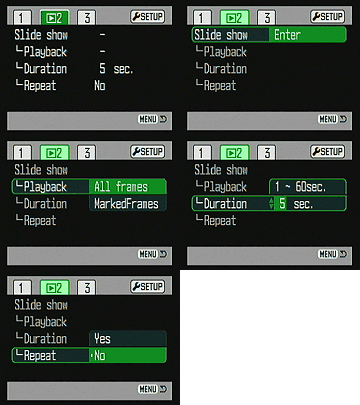 Playback
2
Playback
2
- Slide Show: Enables an automated slide show of all the images saved on the memory card.
- Slide Show Playback: Specifies which images are played back in the slide show, either All Frames or Marked Frames. (The Marked Frames option lets you "mark" frames for playback.)
- Slide Show Duration: Determines the interval length between images, from one to 60 seconds.
- Slide Show Repeat: Sets whether the slide show repeats after
the last image or not.
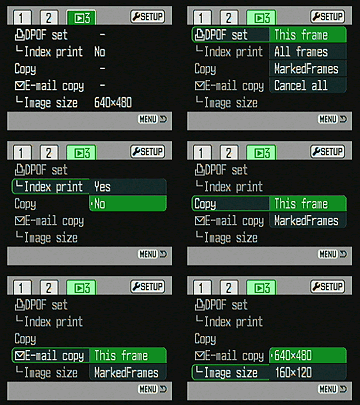 Playback
3
Playback
3 - DPOF Set: Allows you to set up images for subsequent printing on a DPOF (Digital Print Order Format)-compliant output device. You can select individual images, or mark all images on the card for printing. You can also cancel print settings.
- Index Print: Turns the Index Print function on or off. If on, a DPOF printer will print an index page of all images on the memory card.
- Copy: Makes a copy of the currently-displayed image, or marked frames on the card.
- Email Copy: Makes a low-resolution copy of the selected image. You can make copies of either the current image alone, or of multiple images you've marked separately. Email copy images are stored in a separate "EM" folder on the memory card. (This is a fairly rare and very handy option, although I somewhat prefer Sony's implementation of it, in which the camera will can be set to automatically make email-sized copies of all images as they're captured.)
- Email Copy Image Size: Sets the Email Copy size to 640 x 480
or 160 x 120 pixels.
Setup Mode: The following Setup menu options are accessible through both the Record and Playback menu screens, as a separate tab on the far right:
-
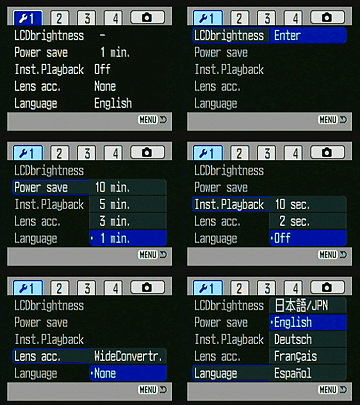 Setup
1
Setup
1
- LCD Brightness: Adjusts the brightness of the LCD display.
- Power Save: Sets the camera to shut itself off after 1, 3, 5, or 10 minutes of inactivity.
- Instant Playback: Turns the Instant Playback function on or off, which displays an image immediately post-capture. If enabled, the review time can be set to two or 10 seconds.
- Lens Accessory: Specifies whether a lens accessory is in use.
- Language: Changes the menu language to Spanish, French, German,
French, English, or Japanese.
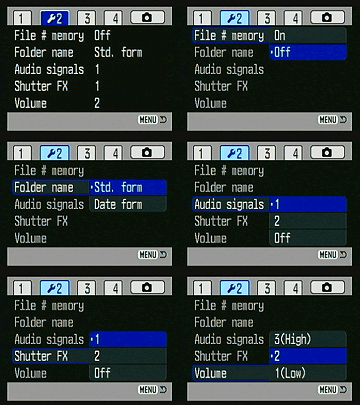 Setup
2
Setup
2 - File # Memory: Specifies whether file numbering starts over when a card is reformatted, or a new card is inserted, or whether the numbering continues sequentially regardless of card status.
- Folder Name: You can have the camera name the folders it stores its images in on the memory card using either the camera's standard scheme, or by Date. (The latter being a handy way to keep track of photos you've shot over a period of time.)
- Audio Signals: Turns the camera's beep sounds on or off. You can select between a beep sound or a click sound.
- Shutter FX: Specifies the sound the shutter makes when the Shutter button is pressed, or disables the shutter sound.
- Volume: Sets the playback volume to 1 (low), 2, or 3 (high).
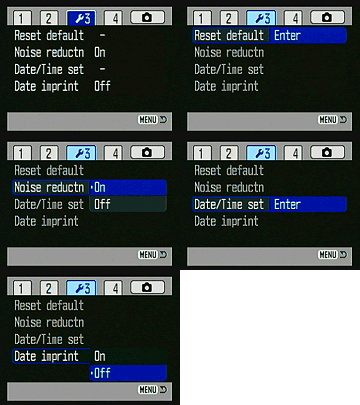 Setup
3
Setup
3 - Reset Default: Resets all camera settings to their defaults.
- Noise Reduction: Turns Noise Reduction on or off. If on, Noise Reduction is automatically enabled at slower shutter speeds.
- Date Time Set: Sets the camera's internal calendar and clock.
- Date Imprint: Turns the date imprint function on or off, overlaying
the date on captured images when enabled.
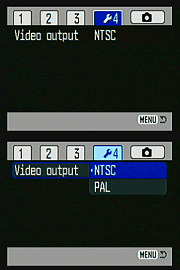 Setup
4
Setup
4
- Video Output: Selects the video signal timing as either NTSC
or PAL.
- Video Output: Selects the video signal timing as either NTSC
or PAL.
In the Box
Packaged with the DiMAGE Z1 are the following items:
- Neck strap.
- Lens cap with strap.
- Accessory shoe cap.
- AV cable.
- USB cable.
- 16MB SD memory card.
- Four single-use AA alkaline batteries.
- DiMAGE software CD-ROM.
- Operating manual and registration card.
- Large capacity SD memory card.
- Two sets of rechargeable AA batteries and battery charger.
- AC adapter.
- Small camera case.
Recommended Software: Rescue your images!
Just as important as an extra memory card is a tool to rescue your images when
one of your cards fails at some point in the future. I get a lot of email from
readers who've lost photos due to a corrupted memory card. Memory card corruption
can happen with any card type and any camera manufacturer, nobody's immune.
A surprising number of "lost" images can be recovered with an inexpensive,
easy to use piece of software though. Given the amount of email I've gotten
on the topic, I now include this paragraph in all my digicam reviews. The program
you need is called PhotoRescue, by DataRescue SA. Read our review
of it if you'd like, but download the program now, so you'll have it.
It doesn't cost a penny until you need it, and even then it's only $29, with
a money back guarantee. So download PhotoRescue
for Windows or PhotoRescue
for Mac while you're thinking of it. (While you're at it, download the
PDF manual and quickstart
guide as well.) Stash the file in a safe place and it'll be there when you need
it. Trust me, needing this is not a matter of if, but when... PhotoRescue
is about the best and easiest tool for recovering digital photos I've seen.
(Disclosure: IR gets a small commission from sales of the product, but I'd highly
recommend the program even if we didn't.) OK, now back to our regularly
scheduled review...
About Batteries
I've gotten so many emails about power issues for digicams, that I now insert
a standard notice in my reviews of AA-powered cameras: Don't even *think*
about using alkaline AA batteries in a digicam! Despite their being packed
in the box with many cameras, they simply don't have the juice to handle typical
digicam demands. Spend the $35-40 or so it takes to get a set (or two) of high-capacity
NiMH rechargeable batteries and a good charger! The few dollars up front will
save you literally hundreds of dollars in the long run, not to mention the hassle
of wimpy batteries running out in the middle of the action. Buy two sets of
batteries too, so one can always be in the charger, ready to go, and so have
two sets available for longer excursions. Check out my Battery
Shootout page for the latest in actual, measured performance of various
AA batteries. - Read my review
of the Maha C-204F charger, to learn why it's my longtime favorite.
Picky Details
Information on shooting speed, battery life, etc. can be found here.
Specifications
See the specifications sheet here.
- Minolta
DiMAGE Z1 user reviews on PriceGrabber.com
- Minolta
DiMAGE Z1 user reviews on PC PhotoREVIEW
Sample Pictures
See our sample pictures and detailed analysis here.
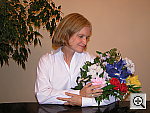
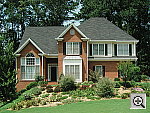
The thumbnails below show a subset of our test images. Click on a thumbnail
to see the full-size photo.

|
|

|
| |
|
|
|
|
|
|
| |
|
|
|
|
|
|
| |
|
|

Test Results
In keeping with my standard test policy, the comments given here
summarize only my key findings. For a full commentary
on each of the test images, see the DiMAGE Z1's "pictures" page.
As with all Imaging Resource product tests, I encourage you to let your own eyes be the judge of how well the camera performed. Explore the images on the pictures page, to see how the DiMAGE Z1's images compare to other cameras you may be considering.
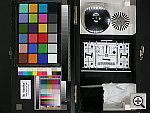
- Color: The Z1 produced very good color throughout my testing,
with accurate hue and good saturation. Its images ranged from perfectly saturated
to just slightly undersaturated, but on the whole were very good. Skin tones
were very good as well, appearing very natural relative to the original subjects.
White balance was quite good as well, handling the very difficult household
incandescent lighting of the Indoor Portrait test well, although I generally
found slight color casts in most pictures. (I'd give it an 8 on a scale of
10.) Overall, "very good" in the color department. but a slight
undersaturation. Skin tones were very good to excellent, neither over- or
undersaturated. It even did a very good job with the tough blue flowers of
the outdoor portrait, with only hints of purple in them, faithfully representing
the original subject very well. White balance performance is very good, with
all of the relevant white balance settings (auto, incandescent and manual)
producing very good results in the difficult indoor portrait test. A really
excellent performance overall.
- Exposure: The Z1's metering system performed well, requiring
average amounts of positive compensation for the various high-key subjects
in my test suite. The deliberately harsh lighting of the Outdoor Portrait
test resulted in very high contrast, a very common behavior among the consumer-level
cameras I test. The Z1's contrast-adjust option helped a fair bit in this
regard (especially in the closeup outdoor portrait shot), but I found that
it introduced a pronounced yellow cast in the full-length outdoor portrait.
I didn't have time to experiment more with the contrast-adjust option, so
don't know whether the yellow cast was a fluke or a common occurrence. Regardless,
I'd personally rather deal with a slight color cast than lose critical highlight
detail, so am overall glad that it's there. Dynamic range (the range of dark
to light values the camera can capture faithfully) is a little limited, even
with the low contrast option enabled, but on the whole it's about average
among cameras in the Z1's class.
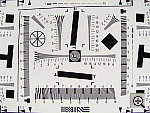
- Resolution/Sharpness: The Z1's 3.2-megapixel CCD and Minolta-designed
lens performed well on the "laboratory" resolution test chart relative
to other 3-megapixel models. It started showing artifacts in the test patterns
at resolutions as low as 600 lines per picture height, in both horizontal
and vertical directions, but I found "strong detail" out to 1,050
lines. "Extinction" of the target patterns occurred around 1,200
lines.
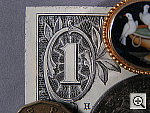
- Closeups: The Z1 performed very well in the macro category,
capturing a minimum area of only 1.65 x 1.24 inches (42 x 31 millimeters).
Resolution was high, with good detail in the dollar bill in my target, as
well as in the fibers of the gray background. The coins and brooch were soft
due to the very short shooting distance, although detail was still fairly
good in these areas as well. Some softness was noticeable in the two left
corners of the frame, although the soft coin and brooch make it difficult
to evaluate image sharpness on the right side. (Corner softness is quite common
in ultra-macro shots with consumer digicams, due to the optical phenomena
of curvature of field.) Color balance is slightly cool, and overall exposure
is a little dark, but the Z1 has excellent macro capability overall. The Z1's
flash was blocked in the lower portion of the frame by the camera, so external
lighting may be preferable for the closest macro shooting.
- Night Shots: The DiMAGE Z1 offers a full manual exposure
mode, plus a maximum shutter time of 30 seconds (with the Bulb setting). Thus,
the camera performed quite well on this test. It produced clear, bright, usable
images down to the 1/16 foot-candle (0.67 lux) limit of my test, with pretty
good color at all four ISO settings. Color balance was sometimes a bit warm,
but still good overall. The Z1's Noise Reduction system did an excellent job
of suppressing excess image noise. Even at ISO 400, the noise level is really
pretty low. Also, I'm usually no fan of EVFs in general, as they tend to be
useless for low light shooting - By contrast though, the EVF on the Z1 was
quite usable down to very low light levels. (About as dark as I'd be comfortable
walking around in.) The AF system indicates focus lock as low as 1/2 foot-candle
(about half the brightness of a typical city night scene, or an exposure of
4 seconds at f/2.8 and ISO 100), but judging from the photos, it actually
seemed to focus a good bit darker than that. Overall, a very nice job.
- Viewfinder Accuracy: The Z1's electronic "optical"
viewfinder (EVF) was just a little tight, but still pretty accurate, showing
93 percent frame accuracy at wide angle, and about 95 percent accuracy at
telephoto. Although the LCD monitor shows the same view, just on a larger
screen, it proved slightly more accurate at the wide angle setting, showing
about 98 percent frame accuracy. However, at telephoto, the top of the frame
was cut off in the eyelevel finder, so I couldn't measure it accurately with
my usual process. Given that I like LCD monitors to be as close to 100 percent
accuracy as possible, the Z1's LCD monitor does a very good job in that respect,
although you'll have to watch critical framing at the telephoto end of the
range.
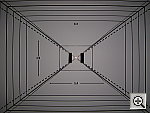
- Optical Distortion: Optical distortion on the Z1 was slightly
higher than average at the wide-angle end, where I measured approximately
0.9 percent barrel distortion. (The average is about 0.8 percent, still too
high IMHO.) The telephoto end fared much better, as I found only two pixels
of barrel distortion, about 0.1 percent. Chromatic aberration was fairly low,
showing only faint coloration on either side of the target lines in the corners.
(This distortion is visible as a very slight colored fringe around the objects
at the edges of the field of view on the resolution target.) There was also
only a little softness in the corners of a few shots, most notably along the
left side of the frame. All in all, the Z1's lens did very well in my tests,
particularly for such a long-ratio zoom.
- Shutter lag and cycle time: The Z1 was a surprisingly speedy camera in my tests, particularly for a long-zoom model. Full-autofocus shutter lag ranged from 0.77 seconds at wide angle to 0.48 seconds at telephoto (unusual, in that most cameras I test are faster at wide angle than telephoto), and prefocus shutter lag was a blazing 0.09 seconds. Cycle times were quite good as well, at 1.4 seconds for the fine-quality JPEGs, for up to five frames. - Overall, this would be an excellent camera for photographing sports and other fast action.
- Battery Life: The DiMAGE Z1 showed excellent battery life, with a worst-case projected run time of over three and a half hours, on a set of 1600 mAh NiMH cells. (The best cells currently available have true capacities as high as 2000 mAh, so you could conceivably expect run times of well over four hours. This puts the Z1 at or near the top of the heap, in terms of battery life. (I still strongly recommend buying a couple of sets of high-capacity rechargeable batteries and a good charger though. See my Battery Shootout page for the current rankings of NiMH AA batteries, or my review of the Maha C-204F charger to see why it's my longtime favorite.)
Based on my testing, I can confidently say that the Minolta DiMAGE Z1 is one of the best bargains on the market for a long-zoom digicam. I was quite impressed though, with the way the Z1 combined a novice-friendly design with a surprising array of advanced features to satisfy more expert users. The price point, battery life, and shutter lag/cycle time performance are also impressive. Minolta has a great track record for high-quality lenses on their digicams, and the Z1's lens is no exception, turning in a better than average performance for a long-zoom model, with good sharpness and low chromatic aberration. The Z1's color was also very good, hue-accurate and appropriately saturated, although I'd like to see it just a slight bit brighter. Contrast is a little high, but a low-contrast option helps greatly on that score. All in all, it's hard to find much to fault about the Z1, apart from the somewhat "Buck Rogers"-styled case, which I don't personally care for. Highly recommended, and definitely a "Dave's Pick."Free Photo Lessons 
Simple pro lighting and use tips let you snap stunning photos. Check out our free Photo School area!Related Links
More Information on this camera from Megapixel.net:
Konica Minolta DiMAGE Z1, Konica Minolta Digital Cameras, Digital Cameras
- Shutter lag and cycle time: The Z1 was a surprisingly speedy camera in my tests, particularly for a long-zoom model. Full-autofocus shutter lag ranged from 0.77 seconds at wide angle to 0.48 seconds at telephoto (unusual, in that most cameras I test are faster at wide angle than telephoto), and prefocus shutter lag was a blazing 0.09 seconds. Cycle times were quite good as well, at 1.4 seconds for the fine-quality JPEGs, for up to five frames. - Overall, this would be an excellent camera for photographing sports and other fast action.


Follow Imaging Resource: