
Overview
---
Special update: The Ricoh Theta S was named Most Unique Camera in our 2015 Camera of the Year awards!
---

Ricoh's 360-degree panoramic pocket camera now enters its third iteration, and with it come some solid improvements across the board to both image quality and resolution, as well as video capture and what you can do with your creations post-capture.
Initially unveiled back in 2013 as a concept device, the Ricoh Theta was officially announced later that year, sporting a much slimmer, sleeker design with small bulbous lenses on either side. The camera quickly and easily captured full 360-degree still images using the device's dual ultra-wide lens design, and automatically stitched these spherical images together.
Updated again last year, the Theta M15 added full 360-degree video, though these videos could only be captured in short clips with a very low frame rate. Also added was an SDK to allow software developers to make apps that tied-in with the Theta's video and still capabilities.
Now, the updated Ricoh Theta S brings significant hardware improvements and an even closer integration with services from tech giant Google. Like its predecessors -- and unlike some rivals -- the Theta S is capable of capturing imagery that as near as makes no difference covers a full 360-by-360 degree sphere. (There's still a small area at the very bottom of the sphere where the view is blocked by the Theta S' own body, but this is dealt with for you reasonably seamlessly.)
So what's new? A key change is a switch to even brighter lenses, each of which boasts a whopping 190-degree field of view, allowing them to see behind themselves slightly to provide for stitching to create a single image or video. The new lenses each have an f/2.0 aperture, noticeably brighter than the f/3.5 aperture of the earlier Theta models.
 The Ricoh Theta S' lenses are optically folded to keep the camera's thickness to a minimum. In this top-down diagram, the lenses are shown in dark blue at top and bottom. The copper-colored square at center consists of two prisms, each of which folds the light 90 degrees towards the sensor which corresponds to that lens. The sensor assemblies are at left and right of the image.
As well as the brighter lenses, Ricoh has also switched to new image sensors that are both larger and much higher resolution than in earlier models. The sensors don't actually sit in between the lenses, incidentally: Through clever use of a dual prism, Ricoh folds the optical path for each lens in opposite directions, feeding light to sensors which sit on either side of the lenses.
Information on the size of the sensors in the original Theta cameras isn't publicly available, but we do know that each of the two sensors had a resolution of five megapixels. That's now been boosted to 12 megapixels per sensor in the Theta S.
While that provides a total resolution of 24 megapixels before stitching, the final output resolution is rather lower at 14.5 megapixels (or 5,376 x 2,688 pixels). That's still far in excess of the 6.4-megapixel output provided in the earlier cameras, though.
Another change is to be found in the Theta S' image pipeline, and it should allow the camera to yield better image quality in low light. (The brighter lenses and larger sensors will also help here, but they'll be offset somewhat by the higher sensor resolution.)
Previously, images would be stitched and then have noise reduction applied, but in the Theta S there is noise reduction performed on the raw image data, then it is converted to 8-bit and a second round of noise reduction performed, and then finally the cleaned-up imagery is stitched to create the resulting spherical panorama.

As well as the improvement in lenses and image sensors, the Ricoh Theta S also sports significant upgrades in the video department. Full HD (1,920 x 1,080 pixel) video was a new feature in the M15, but due to a short clip length of just three minutes and a low capture rate of 15 frames per second, it was likely overlooked by many users.
This is a clip of a 360-degree panoramic video shot in New York with the brand-new #Ricoh Theta S for our review. #theta360 - Spherical Image - RICOH THETA |
The Ricoh Theta S' is now a much more capable video shooter. The full scene is recorded at Full HD resolution for as long as 25 minutes at 30 fps, and you can then pan around to view in any direction.
|
Still, some certainly used it to good advantage once YouTube added support for 3D videos, and now they'll be able to get even more utility from the feature. The video recording time has been increased more than eight-fold to 25 minutes, and the frame rate doubled to 30 fps, an accomplishment which apparently required significant work on getting heat out of the camera.
With that said, the clip length varies depending on the ambient temperature . If the air temperature climbs to 104°F / 40°C, Ricoh's press materials suggest that the clip length could still drop to three minutes to avoid overheating which might damage the camera. It's also important to note that while the videos are shot at Full HD resolution, the result is a 360-by-180 degree image with extreme distortion, and to obtain a watchable video you'll typically want to view only a portion of that video at any one time.
The previous video was hosted on Ricoh's own Theta360.com service, which has a very short clip length limit. This is the same clip as above but in its entirety, and hosted on YouTube. There's one notable difference between the two services, though -- while Theta360.com allows viewers to zoom in and out of the video, YouTube has a fixed viewport size.
Want to see the original file, straight out of the camera and complete with the distortion required to save a spherical panorama in a flat image? You can download it here for use in Ricoh's software.
|
This can be achieved on YouTube and in Ricoh's free software automatically, allowing the user to pan around and focus their attention on whichever subject grabs their interest, but the result will be at a much lower resolution. And we can't tell you precisely what that resolution would be, since it will vary depending on your zoom level.
Ricoh's app allows you to zoom in and out as well as panning the clip while you're watching it, but Google uses a fixed (and unspecified) zoom level on YouTube, only giving the viewer control over panning direction.
Incidentally, if you'd like to try Ricoh's app for yourself, you can download it here for Windows, Mac OS, Android and iPhone devices. We're also including links throughout this review to the original JPEG and MPEG-4 files straight out of the camera, so you can play with them to your heart's content.
This is a 360-degree panoramic image shot in New York with the brand-new #Ricoh Theta S for our review. #theta360 - Spherical Image - RICOH THETA |
Of course, the Theta 360 can shoot spherical panoramic stills, as well. One very nice touch is that these can be automatically rotated to correct your horizon. For this particular shot, the camera was actually held upside down by IR publisher Dave Etchells' leg.
Want to see the original file, straight out of the camera and complete with the distortion required to save a spherical panorama in a flat image? You can download it here for use in Ricoh's software.
|
There are a couple of very nice touches in Ricoh's bundled software, incidentally. For one thing, since the Ricoh Theta S includes a 6-axis accelerometer and compass, you can orient the camera in any direction and it will right-correct the horizon automatically, both for stills and video.
If you look at the original, heavily-distorted JPEG or MPEG-4 file, you'll see the actual angle at which your creation was shot, but once it's played back as a pannable still or video, the correction is applied for you at the same time.
And that's doubly useful because it also means it really doesn't matter terribly much what angle the camera is at. Want it on its side, so as to present the smallest possible frontal area when helmet-mounted? You can do that, and likewise it works just fine to hang the camera upside down from its tripod mount, useful if you want to shoot from beneath a quadcopter or something along those lines. (In fact, Ricoh is offering a small tripod-mountable strap attachment in a variety of colors as a Theta accessory.)
Another nice feature of the bundled software is a "Home Position" button that restores your view to the default orientation and zoom level. Particularly with videos, it can be a bit easy to lose track of your orientation as you pan and zoom to look at the subjects which interest you, so it's nice to have a one-click control that returns you to a straight and level view.
This is a 360-degree panoramic image shot in New York with the brand-new #Ricoh Theta S for our upcoming hands-on preview. #theta360 - Spherical Image - RICOH THETA |
No question about it: With a total resolution of 14 megapixels for its panoramas, the Ricoh Theta S captures vastly more detail than did its predecessors, which output at just six megapixels.
Want to see the original file, straight out of the camera and complete with the distortion required to save a spherical panorama in a flat image? You can download it here for use in Ricoh's software.
|
While the Theta S is neither waterproof nor otherwise as rugged as a GoPro, another accessory allows it to be used in rainy or dusty environments or even underwater, as well. It looks a bit like a chunky test tube with a removable cap and tripod mount at one end, and allows spherical stills and video to be shot at depths of up to 12 feet. We're not sure if the video recording time would be affected -- after all, placing the camera inside a sealed plastic tube is going to make it harder for heat to dissipate -- but even so this is a pretty nifty accessory, and one we'd imagine more than a few Theta S owners will want to pick up.

You may be wondering how, precisely, you'd shoot underwater in a sealed tube, and for a moment so were we. After all, the Theta S is ordinarily controlled by a smartphone via Wi-Fi, since the camera itself lacks a viewfinder. That's obviously not going to work underwater -- the signal will be absorbed and blocked, just as it would if you cover your smartphone's antenna with your hand. (We humans are mostly water, too!)
And with the Theta S inside a sealed tube, you can't reach it to press its shutter button, either. (Ordinarily, this would allow you to shoot without first connecting to your smartphone, but that's only going to work without the housing.) So how can you shoot stills and video underwater? Well, the answer's surprisingly simple. There's an interval timer function which will trip the shutter on your behalf, and since you're shooting a full 360-by-360 degree sphere which automatically corrects for the horizon, you don't even need to worry about framing. Hence no control or connection to the camera is actually needed: Just set the interval timer running or start movie capture, then put the camera in the tube and you're set to go!

As with the previous models, the aforementioned smartphone connectivity is pretty crucial to the Ricoh Theta S' shooting experience when it's not in its housing. Using the iOS or Android companion apps, users can operate the Theta S remotely, view a live view feed, change settings and transfer stitched images and video to their device. (Interestingly, the stitching is done in-camera, rather than on your smart device. Also, it's worth noting that while still imagery transfers immediately after it is stitched, videos aren't transferred until you request this be done, since they can take up quite a bit of storage space and need a little bit of time to transfer.)
Ricoh notes that Wi-Fi transfers with the Theta S are much faster than in earlier models. The transfer speed has quadrupled from a claimed 2Mbps to 8Mbps, however with the increase in resolution, that actually translates to somewhere around a 30% improvement in how long it takes to transfer each image.
This is a 360-degree panoramic image shot in New York with the brand-new #Ricoh Theta S for our upcoming hands-on preview. #theta360 - Spherical Image - RICOH THETA |
Want to see the original file, straight out of the camera and complete with the distortion required to save a spherical panorama in a flat image? You can download it here for use in Ricoh's software.
|
Using the smartphone, the social sharing options of the Theta S videos and stills has been expanded beyond Ricoh's own Theta360.com site. You can now send videos to YouTube's dedicated 360-degree video channel, which lets you watch streaming 360 video with full directional interactivity. The apps also give you Twitter and Facebook links for quick sharing.
And last year, Ricoh teamed up with Google to add Theta support for user-submited 360-degree panoramas into Google Maps, but now the Theta S takes it a step further. The new companion smartphone app is based on the Open Spherical Camera interface from Google. Now Ricoh Theta S images are supported by Google's brand new standalone Street View app for Android and iOS devices, allowing you to export your spherical imagery straight to Google Maps!
Want to see the original file, straight out of the camera and complete with the distortion required to save a spherical panorama in a flat image? You can download it here for use in Ricoh's software.
|
The obvious question here is whether this means that Google Maps could suddenly become inundated with imagery that's not safe for work, and the answer to that is no. Although Google tells us that it won't be censoring users' self-uploaded content -- hiding faces and license plates, for example, as it does with its own imagery -- it will be requiring submissions to be approved.
This process will be partially automatic, but with a level of human intervention for edge cases. The automatic algorithms will approve imagery deemed safe automatically, and reject that which is deemed inappropriate for Google Maps. Imagery which falls somewhere in between will be checked by a human, and then approved manually. Once users have built a reputation for uploading significant amounts of safe content, they'll be given a longer leash and their images will be approved more quickly.
Want to see the original file, straight out of the camera and complete with the distortion required to save a spherical panorama in a flat image? You can download it here for use in Ricoh's software.
|
The Ricoh Theta S isn't alone in being supported by this updated version of Google Maps -- you'll still be able to upload panoramic imagery shot with other devices, including the Photo Sphere functionality provided by Google's own Android camera app -- but there's no question that its one-click-and-you're-done interface will make the Theta S about the easiest way to get your images into Google Maps. And in the process, the DIY Google Maps functionality will give businesses yet another reason to consider the Theta. Imagine being able to add Street View imagery for your company's retail stores with a minimum of fuss, for example.
And the Theta S now also supports streaming of content, although there are some provisos in this area. Unlike some devices which allow live streaming via Wi-Fi, the Theta S streams via either USB or HDMI, so you'll need a physical tether to the device from which you'll be uploading your stream. And at launch, at least, the HDMI tether won't provide a stitched image as would USB: Instead, you'll be able to stream two non-interactive fisheye images (one per lens) via HDMI. This may change at a later date, however.
 |
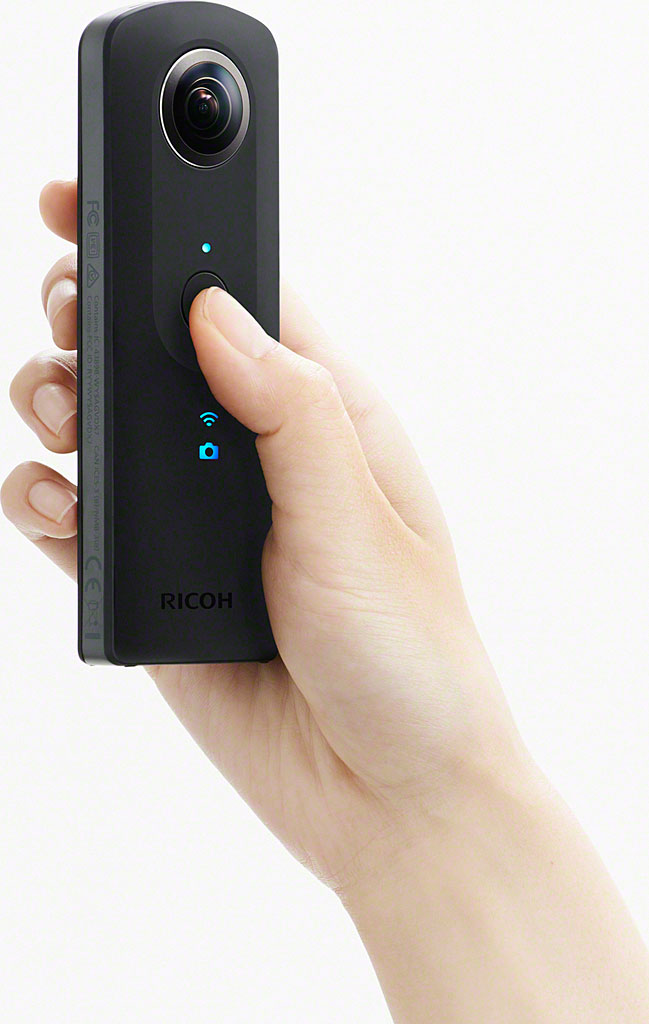
The Ricoh Theta S' controls have been tweaked slightly, and a column of indicator lamps (some of which are illuminated above) has been added to its front panel, making it more user-friendly when used without your phone. There's no display for a live view, obviously, but it's not really necessary when everything in sight will be captured.
|
Physically, the new Ricoh Theta S looks very similar to its predecessors. Overall, it's slightly thicker than the previous models, giving a little extra room for the two brighter lenses, a slightly larger (both in size and capacity) built-in lithium-ion battery pack, and larger heat sinks on the image sensors. There are also several new controls and indications, giving the Theta S a simpler interface that works better when you're not paired to your phone. Physical controls include a dedicated power button, Wi-Fi button and mode selection button. There are also indicators on the front of the camera to show whether it is in still or video mode, Wi-Fi tethered or still connecting, whether it is currently recording, and if you're running out of memory.

As in the past, there is no way to upgrade the memory of the Theta S, as it lacks a card slot. However, the built-in memory has been doubled from 4 to 8GB, a change which is very welcome considering its much higher resolution and the greater video frame rate / clip length, all of which will put much greater demands on that storage. All connectivity is still on the bottom of the camera: A USB port, HDMI port, and a standard tripod socket.

Field Test Part I
Field Test Part II
Home-brewed Street View for the masses with Ricoh's overhauled spherical panorama shooter
By Mike Tomkins | Posted: 10/11/2015
Over the last 15 years and change, a whole lot of cameras have passed through my hands for review here at Imaging Resource, but almost all of them have shared the same basic feature-set. A lens, a sensor, a display and perhaps a viewfinder of some sort, as well as a battery compartment from which to draw power and a flash card slot on which to store your creations. And controls, often a whole bunch of them. (Or if not, a touch-screen user interface.)
The Ricoh Theta S is very, very different. In fact, it's probably one of the most unusual cameras we've ever received for review, and that's one of the things which made me really want to get my hands on it as soon as it landed in the office.
A perfect shooting opportunity, right as the Theta S landed on my desk
And as it happened, I had a great shooting opportunity lined up -- a whirlwind trip to California. Originally it was scheduled to attend a screening of Godfrey Reggio's Naqoyqatsi -- a part of my favorite film trilogy, and a masterpiece in my mind -- complete with live accompaniment by composer Philip Glass and his ensemble.
Stitching quality with the Ricoh Theta 360 is very good; even scenes with lots of moving subjects render pretty cleanly. However, you'll occasionally notice errors for nearby objects in the plane between the lenses, such as my wife's arm / bracelet here. - Spherical Image - RICOH THETA |
Stitching quality with the Ricoh Theta 360 is very good; even scenes with lots of moving subjects render pretty cleanly. However, you'll occasionally notice errors for nearby objects in the plane between the lenses, such as my wife's arm / bracelet here. Click to download the original file in the gallery |
Sadly, the concert had been canceled on just a week's notice, and the flights couldn't be changed. But that left my wife and I with a full day in California, a rental car, and nowhere we had to be. And, by the skin of our teeth, we also had the Ricoh Theta S -- it landed on my desk just a couple of hours before it was time to leave for the airport.
Time to prep on the drive to the airport
We had a long drive to Nashville ahead of us -- flights were much cheaper from there when we'd booked the trip a month or two ahead of time -- but my wife was sharing driving duty, and so it gave me plenty of time to ensure the Theta S' battery was topped off, the storage cleared out, and that I was at least somewhat familiar with the camera.
I did manage to leave the tiny manual on my desk, though. (Whoops!) Fortunately, pairing was a pretty simple process, and the camera itself was quite straightforward in its operation.
A quick flight to Dallas Fort Worth, and then I'd be on my way to California to give the Ricoh Theta S a real-world test. First job: Remember not to stare fixedly at my phone while taking each photo! - Spherical Image - RICOH THETA |
A quick flight to Dallas Fort Worth, and then I'd be on my way to California to give the Ricoh Theta S a real-world test. First job: Remember not to stare fixedly at my phone while taking each photo! Click to download the original file in the gallery |
A camera unlike any you've ever used before
Doubly so when you consider what an unusual camera this is. Instead of one lens and sensor, the Ricoh Theta S has two of each. And they're extraordinarily wide lenses, too, with a 190-degree field of view, capable of seeing just a little behind themselves in all directions. Placed back to back with optical path-folding prisms in between to help keep the body thickness to a minimum, they can see -- and allow for stitching -- in a complete 360-degree sphere around the camera.
And where most cameras have a display and/or viewfinder, the Theta S has neither. Instead, if you want to see how you're framing you have to pair the camera to an Android or iOS smartphone or tablet, and then use the device's screen to show a live view feed.
An impressively slim, sleek body
Nor is there even a battery compartment or flash card slot in the Ricoh Theta S. Both power source and storage medium are built-in and not user-replaceable. That doubtless had its advantages in terms of minimizing the size and weight of the camera, but it also means that you're limited to the power and storage on hand. (And that's why the very first thing I did was to ensure both battery and storage were primed and ready to go.) Run either out, and you have to charge up or offload your content before any more shooting can be done.
Most of the time, you'll shoot with the Theta S using Wi-Fi from your smartphone. In some situations, though, Wi-Fi isn't possible, such as when on the ground in a commercial aircraft. Here, the various body controls let you get a shot, but shooting blind. - Spherical Image - RICOH THETA |
Most of the time, you'll shoot with the Theta S using Wi-Fi from your smartphone. In some situations, though, Wi-Fi isn't possible, such as when on the ground in a commercial aircraft. Here, the various body controls let you get a shot, but shooting blind. Click to download the original file in the gallery |
And with its relatively trim form -- a must to keep the camera itself from intruding into its own photos -- the Ricoh Theta S doesn't provide a whole lot of real estate on which to place external controls. (Nor would they be of terribly much use when there's no display, and most interaction takes place remotely.) Hence, there are only four buttons on the entire body: Power, shutter, still / video mode, and Wi-Fi.
A nice grippy finish, but it marks up quite easily
The first thing I noticed when I took the Ricoh Theta S out of the box was its external finish. In photos, it looks like smooth, hard plastic, but in person you realize that it's actually coated with a soft, grippy rubberized layer. That makes it much more secure in hand than I was expecting, although like other products that I've seen with a similar finish, it also shows marks quite easily. And also in common with those other products, what look like permanent marks are actually erased by simply wiping the camera body with a soft, clean and lint-free cloth and then letting it air-dry.
The neoprene case is a very welcome inclusion
A potentially bigger concern is the lenses. Since they're fisheyes, they protrude a good several millimeters on either side of the camera body. Thankfully, there's a well-padded and tightly-fitting neoprene case in the product bundle. Even though this is a very pocket-friendly camera, I used that case religiously, and I'd suggest doing the same to avoid scratching the lens coatings.
The Theta S' compact, lightweight body makes it a snip to get 360-degree panoramas almost anywhere. The chances of a regular passenger shooting a usable, multi-shot pano with a standard camera inside a cramped, moving aircraft are pretty much zip. - Spherical Image - RICOH THETA |
The Theta S' compact, lightweight body makes it a snip to get 360-degree panoramas almost anywhere. The chances of a regular passenger shooting a usable, multi-shot pano with a standard camera inside a cramped, moving aircraft are pretty much zip. Click to download the original file in the gallery |
In that case, though, I was perfectly confident that the Theta S wouldn't come to any harm, and indeed that's been the case throughout this review.
Few controls, but with good feel
The few controls on the Ricoh Theta S' body all have good button feel, and all fall nicely underneath my thumb when shooting right-handed. The camera itself also fits either hand very nicely. The easiest way to hold it is with the shutter button under your thumb and the Theta S' body nestled in the ball of your hand, the pad under your thumb helping to stop it from moving.
And for your right hand at least, the side-mounted power, Wi-Fi and mode buttons are also quite easy to locate by touch, even though they're very small. (That's not true if shooting left-handed, but it's easy enough to just switch hands or turn the camera around after powering it on. Save for the power button and indicator lamps, the front and back are basically symmetrical.)
First job on arrival in San Jose: Get some food. Fortunately, I'm a one-time Hong Kong'er, and SJC has some great HK-style "cha chaan teng" restaurants. The choice of dinner was almost as easy as shooting this photo! - Spherical Image - RICOH THETA |
First job on arrival in San Jose: Get some food. Fortunately, I'm a one-time Hong Kong'er, and SJC has some great HK-style "cha chaan teng" restaurants. The choice of dinner was almost as easy as shooting this photo! Click to download the original file in the gallery |
A very different shooting experience
Shooting an image with the Ricoh Theta S is a very different experience compared to any other camera you've ever used, and it definitely takes some getting used to. There's no need to worry about "framing", per se, because you're actually capturing every direction at once.
Although with that said, it does still pay to put the most important part of your subject front and center in view of what, for want of a better description, I'll refer to as the "primary" lens. (That is, the lens that's on the opposite side of the camera from the physical shutter button.) The reason for that is because the center of that lens' viewpoint is considered the "home" position for panoramas by Ricoh's software, and it's also the default orientation from which your images will be shown when first opened.
But be that as it may, even if you don't place the primary subject in front of that lens, the viewer can easily pan and zoom around the image to look at anything they wish. Hence shooting is less about framing, and more about relative subject positions -- what's visible, and what's obscured behind another object.
The next morning began with a trip to nearby Mountain View for breakfast in a Hong Kong-style bakery. Lots of tasty treats, and the staff (like myself) were all ex-Hong Kong'ers too. - Spherical Image - RICOH THETA |
The next morning began with a trip to nearby Mountain View for breakfast in a Hong Kong-style bakery. Lots of tasty treats, and the staff (like myself) were all ex-Hong Kong'ers too. Click to download the original file in the gallery |
Two ways of looking at the live view feed
If you're shooting via Wi-Fi, you can figure that out by looking at the live view feed, either panning around it yourself if you're in full-screen viewing mode, or looking at the full 360-degree view as a single rectangular preview by default. I wasn't a fan of that, myself -- the heavy distortion lends it a very distracting (and frankly, rather trippy) feel which made it difficult to pay attention to my subjects.
If you're shooting without a smart device connected to the camera -- which will be true anywhere that Wi-Fi is forbidden, such as during takeoff and landing on an aircraft -- then you just have to guess as to what portions of your subjects will be visible.
Up is always up (or at least, it can be)
Another interesting difference when shooting with the Ricoh Theta S as compared to most cameras is that you don't have to worry about horizons. At least, not if you're using the company's own software. The reason is that images and movies are automatically leveled so that up is always up, no matter the camera position.
Of course, for an Android fan like myself, no trip to Mountain View would be complete without a visit to the Googleplex. Choosing how to frame a panoramic shot like this is tough: I didn't want to get booted off-campus, so stuck with a tiny folding tripod. - Spherical Image - RICOH THETA |
Of course, for an Android fan like myself, no trip to Mountain View would be complete without a visit to the Googleplex. Choosing how to frame a panoramic shot like this is tough: I didn't want to get booted off-campus, so stuck with a tiny folding tripod. Click to download the original file in the gallery |
And where this gets really interesting is that for videos, the leveling is applied not just from the start of the clip, but throughout. That is to say that if you tilt the camera during the clip, the viewer won't see that rotation. From their perspective, the video will remain at least approximately level the whole time. (It's not perfect, by any means, and I did see some wobbling by at least a few degrees either side of true in my videos, but at no point could I get the viewpoint turned significantly on its side.)
The leveling is performed post-capture
The leveling is not achieved at capture time, though, but rather when images and movies are rendered for display. That likely saves Ricoh on processing, saving some battery life and improving performance, but also means that if you're viewing in a third-party app which doesn't understand the orientation information, your images or movies won't be shown as level.
Ricoh's software can also level your content for other apps
You can fix this by first running images through Ricoh's desktop software and using the "write with top/bottom correction" function, which will output a level-corrected image suitable for third-party software that doesn't automatically correct horizons.
Although the Rule of Thirds and its ilk may not apply to the Ricoh Theta S, you can still play with framing. Here, a donut hole's-eye view of the field of 'droids. - Spherical Image - RICOH THETA |
Although the Rule of Thirds and its ilk may not apply to the Ricoh Theta S, you can still play with framing. Here, a donut hole's-eye view of the field of 'droids. Click to download the original file in the gallery |
And the same is true of movies, although here the conversion is in fact performed immediately that you first attempt to open the movie in Ricoh's Theta desktop app. Even the desktop app itself can't play back the movie until conversion is complete, and the reason for this is that movies are captured as two side-by-side fisheye images. The mobile app can play movies back without first converting them, however.
Leveling can't be disabled
This leveling function, incidentally, can't be disabled or user-adjusted. That's probably fine most of the time and for most purposes, but some scenes can be perceived as being tilted when they're not -- or you could just want a tilt for artistic effect -- so it'd be nice if the software let users override or tune the level correction before writing its converted imagery. That's not currently an option, though.
The Theta S is definitely a camera for the selfie generation
One aspect of the Ricoh Theta S which I must admit that I found a little disconcerting initially is that with a full 360-by-360 degree capture, you're always in your photos unless you can't actually see the camera while the shutter is being tripped. I'm used to being behind the lens rather than in front of it, and I'm not a big selfie fan, so I tended to feel a bit self-conscious when shooting with the Theta S.
Gigantic hand, tiny bridge: You've really got to think about perspective if you want attractive shots with the Ricoh Theta S. And which way you're pointing the camera, too; the shutter button faces away from the primary lens. - Spherical Image - RICOH THETA |
Gigantic hand, tiny bridge: You've really got to think about perspective if you want attractive shots with the Ricoh Theta S. And which way you're pointing the camera, too; the shutter button faces away from the primary lens. Click to download the original file in the gallery |
If you're a life-of-the-party type, the selfie aspect will probably be more appealing to you than it is to me. (Although even I found that for family snapshots, having myself and my family in the picture did make my creations feel more personal, and take me back to the moment more than did the more typical smartphone photo or selfie. So in that respect, I guess I can see the appeal.)
Getting yourself out of the picture takes a little thought
But if like me you prefer to get yourself out of the image, that means you'll need either a tripod or a convenient flat surface. Both of these options require some trust in your fellow man not to steal your camera while you're hiding around the corner. And for the flat surface approach, it needs to be a relatively small surface -- the top of a level fencepost, say -- unless you want it to dominate the photo. Put the Ricoh Theta S in the middle of a tennis court for a shot and half your picture will be the ground, which probably isn't the thrilling subject you want to remember.
If you use a tripod, you'll want one that's a good compromise between stability and a narrow-enough profile that it doesn't dominate the bottom of your image. You'll also want something nearby to hide yourself behind, unless you fancy shooting multiple identical exposures, moving between shots and then Photoshopping yourself out post-capture. (And making sure that if you have a shadow that it, too, can be easily Photoshopped out of the scene.)
In my mind, the more interesting subjects tended to be the ones that would lend themselves to a really wide-angle view in the first place. Zooming in to analyze the fine detail is perhaps not the point of the Theta S, even if it has much higher resolution. - Spherical Image - RICOH THETA |
In my mind, the more interesting subjects tended to be the ones that would lend themselves to a really wide-angle view in the first place. Zooming in to analyze the fine detail is perhaps not the point of the Theta S, even if it has much higher resolution. Click to download the original file in the gallery |
With that said, for previous versions of the Theta, a third-party app is available which automates this process, capturing and combining multiple shots and saving you the Photoshop work. The app itself, like many for the earlier Theta models, seems to be available only in Japanese, so I couldn't test it myself. Hopefully equivalents will be forthcoming with support for the Theta S (if it's not already compatible, that is), and I'm equally hopeful that they'll eventually be available for English-language speakers.
Far better stitching than with multi-shot techniques
Returning to my previous thought, it's at the base of the camera where the Ricoh Theta S does seem to be rather understandably a little prone to stitching errors. It can't see past its own body, after all, and it seems that Ricoh's approach to this probably is simply to stitch the resulting hole at the base of the panorama back closed. Occasionally, I also saw a little weirdness at the very top of photos, but that was less frequent and much less noticeable.
Honestly, I wasn't really concerned with either of these -- after all, it's easy enough to take account of when choosing your framing. However, it's worth noting that when you're shooting hand-held, the stitching error at the base of every image does give the impression that you're holding onto a sliver of thin air, perhaps with a finger or two having partially vanished for good measure.
The built-in leveling function isn't always perfect -- here it's off by almost a degree -- but it at least gets you in the ballpark no matter how you hold the camera. That's a pretty cool trick! - Spherical Image - RICOH THETA |
The built-in leveling function isn't always perfect -- here it's off by almost a degree -- but it at least gets you in the ballpark no matter how you hold the camera. That's a pretty cool trick! Click to download the original file in the gallery |
Gigantic Hand Syndrome is a feature of handheld Theta shots
A bigger issue (pun definitely intended) is what my wife and I quickly dubbed Gigantic Hand Syndrome. Unless you're holding the camera really close to your face -- which is hardly going to yield the most flattering of portraits -- your photos will suffer from the presence of one really large hand holding onto the camera, should you look downwards.
How big, precisely, will depend on the relative distance to your face. (Or faces, if there are several of you in the shot.) All you can do to minimize the effect is to hold the camera closer to yourself, so that there's not such a significant apparent difference in size between your hand and the rest of you. After a while, you just get used to it as a fact of life in your spherical panoramas, unless you have time to set up a shot that's not handheld.
Much better image quality than previous Theta models
With all of this said, in good ambient light I'm really very impressed with the imagery I got out of the Theta S. It was image quality concerns which had kept me away from its predecessors: Both earlier models had less sophisticated, dimmer lenses and smaller, noisier sensors. And as a consequence of that, their image quality was modest, especially in less-than-ideal lighting conditions.
Well behind schedule but having plenty of fun, we continued up the Pacific Coast Highway to Point Reyes, arriving right at sunset. The views were spectacular. Having an interesting sky really helps bring a Ricoh Theta S shot to life! - Spherical Image - RICOH THETA |
Well behind schedule but having plenty of fun, we continued up the Pacific Coast Highway to Point Reyes, arriving right at sunset. The views were spectacular. Having an interesting sky really helps bring a Ricoh Theta S shot to life! Click to download the original file in the gallery |
But if shot in good light, there is a lot of detail in the Ricoh Theta S' photos, and even in low light I got a fairly good proportion of usable hand-held images. I did, however, notice the occasional low-light photo that was sharp and detailed in most directions, but which appeared motion-blurred in just one direction. I'm not sure why that would be, as shots with even slower shutter speeds rendered sharply throughout, and higher sensitivities were available if the camera deemed a faster shutter speed necessary.
It wasn't a frequent problem, though, and the nice thing with having a large smartphone screen on which to review your images was that I could easily tell if there was a problem and reshoot immediately.
Dynamic range can be a significant issue
Dynamic range is a much bigger challenge for the Ricoh Theta S than it would be for a regular camera. Unless you're shooting in the middle of the day or it's overcast, it's likely that the sky will be very bright in some directions, and dimmer in others. Doubly so if your shot includes both indoor and outdoor subjects. For a more traditional camera, that's not a problem because you're not capturing every direction at once, but for the Theta S that's exactly what you're doing.
Situations with extreme dynamic range can prove challenging to the Ricoh Theta S, because it has to use the same exposure for both lenses. That's especially problematic for videos, since there's no DR compensation function for these. (Not that it would've been able to handle the extreme dynamic range in this sample, even for a still image.) Click to download the original file |
And both lenses in the Theta have to use the exact same exposure, with no way to bias one towards a faster exposure to save highlights, and the other towards a longer exposure for the shadows, blending to soften the transition between the two. Not that there would be much scope to blend between the shots anyway, with an overlap of only ten degrees between lenses, which is doubtless why Ricoh didn't include this capability.
There is a dynamic range compensation function which can help improve matters, but it only has a relatively modest effect. It also can't be used in concert with noise reduction. For some reason, these two functions are an either/or proposition.
For more variant scene brightness, your best bet will be to shoot tripod-mounted or with the camera completely stationary, grabbing a range of shots at different exposure levels which you can then merge in post-processing to create an HDR image. I'd really like to see a more robust HDR function included in the camera by default, though, because that's quite a bit of work.
By the time we'd hiked up to Point Reyes lighthouse, we'd lost the last of the setting sun. Still, it was an incomparably scenic area, and the drive alone made it worth the visit. Anything else was just icing on the cake! - Spherical Image - RICOH THETA |
By the time we'd hiked up to Point Reyes lighthouse, we'd lost the last of the setting sun. Still, it was an incomparably scenic area, and the drive alone made it worth the visit. Anything else was just icing on the cake! Click to download the original file in the gallery |
Exposure can be controlled manually
So long as you're shooting from your smartphone, manual exposure control is available and presents a handy alternative to using the exposure compensation function to get the look you're after. Note that as a fixed-aperture, fixed-focus camera, the only exposure variables you'll be adjusting are shutter speed, sensitivity and white balance, however. (You can also opt for shutter or ISO priority and let the camera meter the exposure, but bias it with exposure compensation.)
Surprisingly, there's no self-timer
One feature which surprised me by its absence was a self-timer function. Sure, you can trip the shutter remotely, but if it's a selfie you're after, invariably you either look like you're looking at your phone, or like you're consciously trying not to do so as you trip the shutter.
This seems like it should be a very easy addition to the Theta app, and it's one I'd like to see happen. Make it so, Ricoh!
The Ricoh Theta S can create time-lapse videos. This 14-second clip plays back at five frames per second, but was captured at one frame every eight seconds for a 40x fast-motion effect. The camera was set to use auto exposure and dynamic range compensation. Zooming out a bit gives a more interesting, higher-quality result, but on YouTube, the zoom level is fixed, yielding a very low-quality look.
Click to download the original file |
The interval timer is fun, but has its limits
Another option accessed from the UI on the phone is the interval timer function. This captures still images, but you can merge them on your phone after downloading to create time-lapse movies. A separate app called Theta+ is used to perform the merge, and the same app also contains a few image editing tools.
(Most are generic filters and crops, but a few let you change the projection of the image, with the most interesting being the fairly well-known Little Planet effect.)
The interval timer immediately struck me as a fun way of making longer pannable movies documenting your journey from place to place, but there are a few features which limit its utility. One is a minimum interval of a rather lengthy eight seconds. What this means is that your videos will either have to play back very fast indeed, or they have a jerky, stop-motion quality to them which isn't going to suit every clip.
As well as auto exposure, you can also set the Theta S to use shutter or ISO priority, or fully manual exposure. This time-lapse, shot with the interval timer function, includes 200 frames in manual mode, so that the exposure level doesn't change during capture. It plays back at 7 frames per second, for a 56x fast-motion effect. Click to download the original file |
You can reduce the interval to five seconds if you drop the capture resolution to 2,048 x 1,024 pixels from the default 5,376 x 2,688 pixels, but doing so is going to degrade quality significantly. (And if you're rendering to video, quality is already going to be only modest, since the 1,920 x 1,080 pixel feed has to fit in a full 360-degree field of view.) And that big drop in quality will only net you a three second savings per frame -- significant, but not enough to make the capture what I'd term fast.
Start and stop longer clips manually
Another, lesser complaint is a maximum clip length of just 200 frames, likely due to the relatively limited storage space and battery life. This one isn't affected by the image resolution, either. You can circumvent it by just not specifying a number of frames, and both starting and stopping capture manually, but it'd be nice if you could just specify a greater number of frames in the first place.
The Theta S is using electronic shutters (plural, because there are two sensors) anyway, so other than the number of write cycles for the storage and charge cycles for the battery, there's nothing we're really going to wear out by shooting longer time-lapses.
The lighthouse itself is still just a speck in the distance to the Ricoh Theta S' fisheye lenses. A plaque nearby stated that the trail down to the base of the lighthouse was equivalent to a 30-storey building. - Spherical Image - RICOH THETA |
The lighthouse itself is still just a speck in the distance to the Ricoh Theta S' fisheye lenses. A plaque nearby stated that the trail down to the base of the lighthouse was equivalent to a 30-storey building. Click to download the original file in the gallery |
Oh, and one more quirk: Even if you specify the number of frames you'll be shooting, the Theta app doesn't tell you how many frames (or how much time) are remaining on your phone, so you're stuck wondering how long you have left to shoot unless you paid attention yourself at the start of a capture session.
Setting up your time-lapse video render is a bit clumsy
The user interface for assembling the video in-camera also leaves something to be desired, but there's no equivalent desktop app. (You could, however, create a video on the desktop instead, but here if you want a level video you'll first need to manually -- and separately -- use the aforementioned "write with top/bottom correction" function on every frame.)
My issues with the in-camera app are twofold: First, the frame selection is a bit tedious. Your first selection must be made from extremely small thumbnails, each of which shows only a small cropped portion of the overall field of view. And this initial selection includes all photos on the camera, with no way to filter out similar-looking images from earlier shoots, change sorting, view file names, or anything else of the sort.
Some shots -- not many -- curiously showed a little blurring on just one axis. In this particular image, pan down the cross-street left and right to see what I mean, and note that it's sharp in other directions. - Spherical Image - RICOH THETA |
Some shots -- not many -- curiously showed a little blurring on just one axis. In this particular image, pan down the cross-street left and right to see what I mean, and note that it's sharp in other directions. Click to download the original file in the gallery |
Then on the next screen, you get larger previews with a date and time display, each of which can be opened and panned to confirm its contents, but you can't add frames to the list at this point, and nor can you immediately delete or reorder frames. Instead, you have to enter a frame editing mode to rearrange or remove frames, and this leaves you back in the situation of being unable to check the full preview. (Nor is there a frame count shown at any point).
And finally, for many frames (even though they were all shot at eight-second intervals), the same time and date was shown. This seemed to happen part-way through longer bursts, so I'm guessing it's some kind of overflow bug where the correct time and date are no longer shown for images in the time-lapse, but it makes removing specific frames a bit tedious.)
The output module for time-lapse videos is simplistic
Then when it comes to rendering, you're shown a preview clip with duration bar and a frame-rate slider, but no actual frame rate is shown. Instead, there are just tortoise and hare symbols at either end of the bar, and you have to either select your frame rate from the preview (which keeps pausing on first playback as it's being assembled), or figure it out backwards by the clip length and your memory of the frame count.
Long exposures with the Ricoh Theta S are a lot of fun. This particular shot was 30 seconds on a cool, breezy and moonlit Point Reyes, during which time my wife and I huddled under beach towels for warmth. - Spherical Image - RICOH THETA |
Long exposures with the Ricoh Theta S are a lot of fun. This particular shot was 30 seconds on a cool, breezy and moonlit Point Reyes, during which time my wife and I huddled under beach towels for warmth. Click to download the original file in the gallery |
With all of that said, once you're done, the video encodes fairly quickly, and the result is quite watchable so long as your subject is well-suited to the capture interval and playback frame rate you've chosen. I personally found motion above about 20-30mph simply too fast for the capture interval, with the scene changing too much between frames to convey motion, but slower subjects like bikes and so forth would probably be fine.
And the longer intervals -- up to a maximum of 60 minutes with a one-second step size -- would be good for slower changes like tides, weather and so forth. (Although I'd imagine you'll want the camera on a charger for longer interval timer sessions, which is going to complicate camera placement since the USB port is just a few millimeters from the tripod socket.)
Long exposures (and a little light painting, too!)
Speaking of the tripod, I was really glad I'd brought one with me on the trip, because I ended up using it quite a lot. One of my favorite shots of all, though, was a long-exposure capture with the camera just sitting on a piece of driftwood.
Spot the light painting fan: Another 30-second exposure was long enough for me to vanish completely as I waved my smartphone's flashlight around to sketch the word "Cali" in the sky... - Spherical Image - RICOH THETA |
Spot the light painting fan: Another 30-second exposure was long enough for me to vanish completely as I waved my smartphone's flashlight around to sketch the word "Cali" in the sky... Click to download the original file in the gallery |
My wife and I had spent some time at the beach after sundown, watching the last rays of sunset disappear as I fiddled with tripod-mounted long-exposures. After a while, it started to get too cold to sit around and my wife had headed back to the car for some warmth. That gave me the idea to shoot a long exposure where I kept moving the whole time, making it seem that there was nobody on the beach. To make the scene seem emptier and more natural, I broke down my tripod and set the Theta S on the driftwood on which we'd both been sitting.
And then, after a few practice shots which worked nicely, I had the idea to try some light painting as well. All I had on me was the phone from which I was controlling the Theta, so I switched on its flashlight and used it to "write" in the sky during a 60-second exposure, the maximum possible with the Theta S. As it turned out, the flashlight was very visible, and I probably just about had time to light-paint the whole word California, but I went with the short-and-sweet "Cali".
For a 60-second exposure from a small-sensor camera, even at base ISO, it's a fairly impressive result, showing a good bit of detail in the night sky. What looks to be blazing sunshine in the distance is actually the moon having just risen, and way out where I was on Point Reyes, the only light source other than moon, stars and my phone was the pinprick of a distant lighthouse. Again, I see a little of the softness in a couple of directions that also marred some of my handheld night shots, but it's only really noticeable when zoomed in a bit.
Straight out of the camera, video shot with the Ricoh Theta S includes side-by-side fisheye views of your subject. This plays as a pannable 360-degree spherical video in the smartphone app for iOS and Android, but must be converted before sharing to YouTube or viewing in the desktop app. Click to download the original file |
Pannable movies are very soft, but a whole lot of fun
Movies shot with the Theta S are much softer, though. That's partly down to the fact that even at the maximum Full HD resolution, 1,920 x 1,080 pixels is not a lot to wrap around a full 360-degree circle. (If you think about it, that's only around five pixels per degree.)
And that's exacerbated by the fact that the original out-of-camera video isn't even a full 1,920 x 1,080 pixels. Instead, it's recorded as two side-by-side fisheye spheres, each of which has a diameter of around 920 pixels. This is then converted the first time it's played in the Ricoh Theta app, and stretched to fit the full 1,920 x 1,080 pixel frame.
So yes, there are no two ways around this: Video from the Ricoh Theta S is pretty soft, especially if you zoom in a little. However, it's also very interesting in that it lets the viewer choose their own focal point, and so interact with the video in a way they've quite likely never experienced before. When you're choosing what interests you specifically, watching video is very different to when you've having your attention guided, and chances are you'll end up replaying the clip over and over finding new things to look at, even if it's a bit soft.
After conversion, video shot with the Ricoh Theta S is warped to fit a 1,920 x 1,080 pixel frame This plays as a pannable 360-degree spherical video in the desktop app for Windows and Mac OS platforms, and once uploaded to YouTube. Click to download the original file |
Onboard mics are quite prone to wind noise
Something that I found more problematic was wind noise. The Theta S lacks any wind noise filtering functionality or external microphone jacks, and its top-mounted onboard mics seemed quite prone to noise when there was a bit of a breeze. For videos shot from a moving subject (a bike, car or something along those lines), you'll likely want to record audio with another device and then edit your videos to replace the stock audio. (Or failing that, strip the stock audio and leave the video silent or add music.)
Existing Theta owners will need to upgrade their desktop apps
One last thing: Note that if you are downloading the original movie clips from our server, you'll want to make sure you're using the latest version of Ricoh's Theta for Windows or Mac apps. If you have an earlier version installed, it likely won't support video from the Theta S properly. (Using earlier versions on Windows, I found that still images displayed fine, but videos showed as two side-by-side fisheye images.)
The Theta S-compatible version was only made public on October 9th, 2015, so unless you've downloaded since then, get the most recent version here.
Daytime sample video shot at San Francisco's Golden Gate Bridge with the Ricoh Theta S. If you don't want yourself to be too noticeable in your videos, the best idea is to hold the camera high above your head, as I did here. Click to download the original file |
Update Google Street View with your own imagery
Search giant Google has done a pretty amazing job with the Street View function on its Google Maps service, but be that as it may, even in first-world countries some areas seldom if ever see updated Street View imagery. If you want to correct that imbalance -- or perhaps to add Street View shots of your business or other private properties -- now you can, though.
All you need is the latest Google Street View app for your Android or iOS device, and you can link to your Ricoh Theta S, shoot an image and then share it with Google. (No content is uploaded from the Street View app until you choose to share it.)
Once uploaded to Google's servers, the shot will be processed automatically to determine whether the content is appropriate, with manual intervention from Google staffers, if necessary. Once it has been approved -- a process which will become faster once you've earned a reputation for submitting quality content -- your new additions will go online faster.
Nighttime sample video shot with the Ricoh Theta S. Click to download the original file |
And in a nice touch, Street View even picks up your current location from the GPS in your phone, using this information to geotag the panorama with its capture location. There's no interval timer function, though, so you do have to manually capture each image you want to share. You can't drive down the road shooting images and sharing them automatically as Google's own Street View cars do -- at least, not yet.
You could very likely code your own app to capture and share automatically, though
Herein lies the beauty in the open nature of the Ricoh Theta S, though. Both an application programming interface and software development kit are available. I'm not certain if the API and SDK for Google Street View yet allow developers to submit content, but given that the ability for the general public to do so is now there, I can't believe it will be too much longer before third-party apps can add imagery, if they can't already do so.
Doubtless a talented programmer could automate the process, and even take it a step further than a simple interval timer. Imagine, for example, shooting new images automatically after a certain preset distance has been traveled from the last shot, then each panorama being shared to Google Street View automatically via cell service immediately upon capture, and deleted from the camera and smart device as soon as confirmation of reception is received. Hey-presto, you have your very own instant, third-party Google Street View car!
The Ricoh Theta S can shoot some very nice, sharp images under typical city street lighting. It makes a much more capable low-light, handheld shooter than did its predecessors. - Spherical Image - RICOH THETA |
The Ricoh Theta S can shoot some very nice, sharp images under typical city street lighting. It makes a much more capable low-light, handheld shooter than did its predecessors. Click to download the original file in the gallery |
Of course, you'd still be subject to battery life limits, as I noted previously when discussing the interval timer, but if you had gone as far as writing custom software it's not that much further to fabricate a custom tripod mount that also allows USB attachment.
We made our own Imaging Resource Street View car to prove the concept
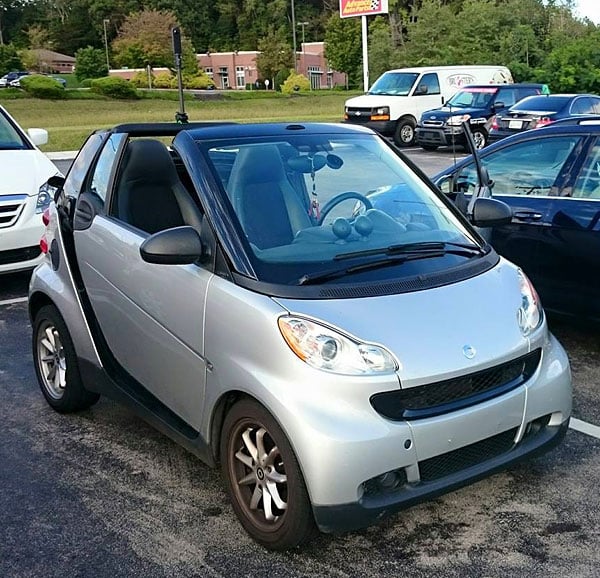
Imaging Resource founder and publisher Dave Etchells actually has a pretty impressive 3D printer, but we didn't go quite so far as to fabricate a custom tripod mount for our test. (Let us know if you do!) What I did do, though, was to mount the camera to the roll bar of my Smart car, using one of the mounts in a rather elderly 1980s-vintage Cullman Touring tripod set which I bought for just such a purpose many years ago.
The results, I have to say, were pretty impressive within the battery life limits of camera. If you want to add street view imagery for your business -- or perhaps for your country that's not yet on the Google Street View radar -- this could be a very affordable way to create imagery that meets (or quite possibly bests) Google's own content.
Rain or shine, you can shoot content for Street View
And even a little light rain needn't be a reason to stop. The camera itself isn't weather-sealed, but a case shaped like an inverted test tube is available, and actually waterproof to a claimed one meter. Coat the outside of that case with Rain-Ex or similar (after testing to be sure it doesn't cloud the plastic), and hey presto: You have an all-weather vehicular-mounted, 360-degree panoramic camera rig with a pipeline straight to Google's servers and all the potential publicity they can provide.
And that's not the half of it. With the Theta's self-righting capability, you could fly it underneath a drone, or maybe mount it on your windsurfer for a user-controlled real-world POV like no other.
Removable storage and battery would be nice to have
Is the Ricoh Theta S perfect? No. I definitely found myself wishing for more storage, but not because I often ran out of space. It was more because with a MicroSD card slot in my phone, I could've transferred photos a lot quicker than via Wi-Fi.
Behind bars: I couldn't resist a snapshot of this dimly-lit temple, closed up and locked away for the night behind a security gate. - Spherical Image - RICOH THETA |
Behind bars: I couldn't resist a snapshot of this dimly-lit temple, closed up and locked away for the night behind a security gate. Click to download the original file in the gallery |
And battery life also runs out fairly quickly if you're shooting lots of videos or using interval shooting. Performance and transfer speed are also a bit of a bottleneck; you do spend a while waiting for images to synthesize and transfer, and movies can take a long time indeed if you're transmitting them via Wi-Fi. (Not that much less time than it took to shoot them, honestly.)
USB transfer is swift, but file names differ
USB transfer is much faster, but curiously the filenames differ for USB-transferred and Wi-Fi transferred content, making it easy to create duplicates on your various devices without realizing. (Wi-Fi transferred files have date and time info appended into the filename on transfer, for some reason.)
And so my Field Test reaches its end with one last shot at dinner in Nashville, on my way home. I've had a lot of fun shooting with the Ricoh Theta S! Hopefully you've enjoyed my review just as much... - Spherical Image - RICOH THETA |
And so my Field Test reaches its end with one last shot at dinner in Nashville, on my way home. I've had a lot of fun shooting with the Ricoh Theta S! Hopefully you've enjoyed my review just as much... Click to download the original file in the gallery |
Conclusion
by Mike Tomkins
No question about it, our review of the Ricoh Theta S has been very different indeed -- as befits a camera so unique as this one.
Usually, we pair the analytical with the subjective in our reviews, poring over every fine detail in the lab before we head out into the real world with an idea of where the camera's strengths and weaknesses might lie before we start shooting. With the Ricoh Theta S, we simply couldn't do that.
This is a camera for the real world, not the lab
The Theta S' unique twin-lensed design and complete 360-degree spherical panoramic coverage might have yielded an interesting behind-the-scenes look at our testing process, but it certainly wouldn't have provided meaningful results about the camera itself. And so rather than try to run it through our standard tests, I did something for this review that I've not done in quite a long time: Focus solely on my real-world experiences without concern for the minutiae of lab test figures.
You'll want to rethink everything you know about photography
And what an interesting time I've had shooting with this camera. The Ricoh Theta S is certainly not for everybody; there's no two ways around that. It takes a whole new thought process to use this camera, especially if you don't want to be present in your own photos. But what it can do, it does superbly, and at a pretty reasonable price of $350 to boot.
A bit more expensive, but for very good reason
I must admit, when it was first announced I did have some concerns about the fact that it was more expensive than its predecessor, but having had the chance to use the Theta S quite extensively now, those concerns have evaporated. No question about it: You're getting a much more well-rounded camera (no pun intended) than you did with the Theta M15, and the price difference is only a relatively modest $50, or 17%.
Well behind schedule but having plenty of fun, we continued up the Pacific Coast Highway to Point Reyes, arriving right at sunset. The views were spectacular. Having an interesting sky really helps bring a Ricoh Theta S shot to life! - Spherical Image - RICOH THETA |
And when you stop to think about it, buying one Theta S is much the same as buying two of any other camera. What would you get at half this cost in a standalone camera? Not anything terribly compelling, I don't think, and yet by pairing those two cameras into a single chassis, Ricoh has given us a very interesting product indeed.
Great still-image quality; video less so, but still acceptable
Image quality, especially in low light, is leaps and bounds ahead of its predecessor. And where the Theta m15's video capture was very limited indeed, it's much more capable in this newer model. Yes, unless you're viewing at very wide angle, the Theta S' video will still seem relatively soft and low-resolution, but the ability to pan and zoom to choose your own subject during playback makes it fairly easy to overlook that fact.
Selfies that put you right back in the moment
But for my money, this camera is at its best as a truly unique still shooter for the selfie set. It puts you back in the moment weeks, months or even years later, setting a scene and letting you reimagine yourself at the center of it all over again. And it does so with very impressive image quality for next to no work.
Suffer with multi-shot panoramas no more!
Shoot with the Theta S, and chances are that you'll never again want to go back to the effort of creating a multi-shot spherical panorama without stitching artifacts. Yes, you can still get better results with a multi-shot setup and a lot of work (both in the field and in post processing), but we do mean a lot of work. With the Theta S, it's just a matter of positioning the camera and tapping the shutter button: End of story.
Long exposures with the Ricoh Theta S are a lot of fun. This particular shot was 30 seconds on a cool, breezy and moonlit Point Reyes, during which time my wife and I huddled under beach towels for warmth. - Spherical Image - RICOH THETA |
A clear Dave's Pick and a must-have for pano fans
If you have a need for 360-degree panoramic imagery, the Ricoh Theta S is a no-brainer. Get one now; you won't regret it. A definite Dave's Pick, it's in a class of its own for 360-degree panorama fans!
Pros
- Significantly better image quality than its predecessors
- High ISO performance is sufficient for handheld shots under city street lights
- Long-exposure image quality is good, albeit limited to 60 seconds
- Unlike with multi-shot techniques, moving subjects present no problems
- No autofocus lag due to fixed-focus design
- Generous clip length and frame rate compared to its predecessor
- Allows the viewer to pan and zoom to choose their own subject
- Fixed-focus design means your subjects are always in focus
- Comfortable ergonomics
- Quality build
- Reasonably intuitive controls and indications
- Automatically levels your stills and movies, even during capture
- Photos and movies like nothing your smartphone or other standalone cameras can give you
- Viewing your spherical panos puts you right back in the moment in a way that flat photos just can't do
- Images are easily shared on social media, and tend to get lots of attention for their unique nature
- Impressively compact fisheye lenses allow a very slim body even when placed back-to-back with beam-folding prisms in between
Cons
- Dynamic range can be an issue, since both cameras must use identical exposure
- Nearby objects within a few feet in the plane between the two lenses can show stitching errors
- Handheld shots suffer from Gigantic Hand Syndrome ;)
- Takes several seconds to synthesize each image
- Transfers also take several seconds per image, and movies can take almost as long to transfer as to shoot
- Video resolution is quite limited, especially if the viewer zooms in much
- Onboard microphones are prone to wind noise
- No screen on the camera itself
- Both battery and memory are not user-replaceable
- Long shot delay on interval timer makes the feature less useful
- Somewhat limited creative possibilities due to fixed focus, fixed aperture design
- It's tricky to get yourself (and your gear) out of the shot
- No flash means no way to throw more light on your subjects
- Protruding lenses could be easy to scratch or mar unless you use the provided soft case near-religiously