


Overview

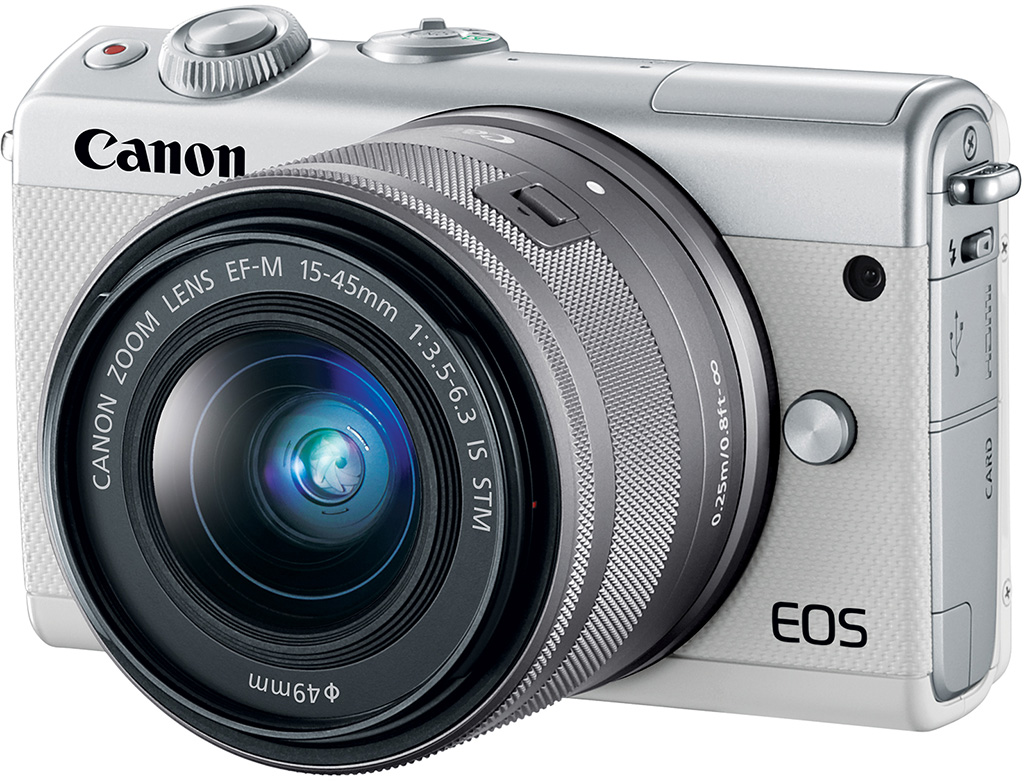
For photographers who want to step up from a smartphone or compact point and shoot camera, Canon hopes that the new EOS M100 will fit the bill. The M100 replaces the roughly two-year-old M10 in Canon's mirrorless EOS lineup. The M100 is the new "entry-level" model and offers the versatility of an interchangeable lens camera without the large size of a DSLR and without eliminating the user-friendliness that you find in your smartphone.
There are many new features in the M100 compared to the M10, so let's dig into the new Canon EOS M100 and see what it offers.
Canon M100 Key Features and Specifications
- Compact interchangeable lens camera
- Touchscreen-centric interface
- Creative Assist function
- 24.2-megapixel APS-C CMOS sensor
- Native ISO range of 100 to 25,600
- DIGIC 7 image processor
- Dual Pixel CMOS AF
- Continuous shooting at 6.1fps (One-Shot AF)
- Full HD video recording at up to 60 frames per second
- Built-in Wi-Fi, NFC and Bluetooth
The EOS M100 is a compact ILC with a touchscreen user interface
The M100 looks quite similar to the M10, but there are a few differences to point out. The M100 has a gripped surface across its front, replacing the smooth plastic surface of the EOS M10. On the rear of the M100, we find the same tilting 3-inch touchscreen with 1.04 million dots of resolution, but the M100 now includes a dedicated wireless button on the rear of the camera.
The M100 does not include an electronic viewfinder nor a hot shoe to attach an optional one (or an external flash). The M100 does have a built-in flash, however, and its guide number is 16.4 feet (5 meters) at ISO 100 with a maximum flash sync of 1/200s.
Alongside the similar appearance, the M100 is the same size as the M10 in terms of dimensions and weight. The M100 has dimensions of 4.3 x 2.6 x 1.4 inches (108.2 x 67.1 x 35.1 millimeters) and weighs 10.7 ounces (302 grams) with the battery and memory card inserted. We found that the M10 was a fairly sturdy-feeling, comfortable camera for its price point and the M100 looks to continue in that tradition.
User Interface and Creative Assist functionality

The 3-inch touchscreen on the EOS M100 is an important part of the camera's design and overall philosophy. The user interface is new and touch-based, which while not necessarily ideal for all situations, is likely a great way to ease a new photographer into a more advanced camera than their smartphone. The user interface is not just touch-based, but it is also customizable. You can toggle on and off different menu items to simplify or cater the user experience to your own knowledge level and preferences.
The simplified and revamped user interface also comes with Canon's Creative Assist functionality. With Creative Assist, you can select certain looks, such as capturing motion or blurring a background or brightening your image, without necessarily having the technical knowledge to change shooting settings manually. You select your desired look and then the camera adjusts settings as needed, letting you know what is happening. Canon hopes that the function will not only allow beginner photographers to capture their desired shots more easily, but also help them learn how the camera operates such that they can perform more settings on their own as they built their photographic skills. Further, you can save customized Creative Assist settings. In total, Creative Assist allows the user to select from blurred-sharp, dark-light, low-high contrast, neutral-vivid saturation, blue-amber color tone, magenta-green color tone and monochrome image parameters.
The M100 gains a new sensor, going from 18MP to 24MP
The M100 may share the same entry-level status as its predecessor, but it does not share the same image sensor. Whereas the M10 had an 18-megapixel APS-C sensor, the M100 gets the same 24.2-megapixel APS-C CMOS sensor found in the M5 and M6 cameras. This sensor records 14-bit RAW files and includes self-cleaning capabilities.
The new sensor packs not only more megapixels, but it also has a wider native ISO range, going from 100 to 25,600. The M10, on the other hand, had a native ISO which topped out at 12,800, although it could be expanded to ISO 25,600.

Dual Pixel CMOS AF: EOS M100 shares the same AF system as the M5 & M6
With Dual Pixel CMOS AF, the M100 shares the same autofocus system as the M5 and M6. While the M10 used Hybrid CMOS AF II autofocus, both the M100 and the M10 offer 49 user-selectable autofocus points. The Dual Pixel CMOS AF is rated to work from -1 to 18 EV, and the M100 includes a built-in AF assist LED lamp for focusing in dim conditions.
Autofocus modes on the M100 include single-point AF, zone AF, automatic selection and Face+Tracking AF. The camera offers One-Shot AF and Servo AF modes as well. You can use the touchscreen to move the autofocus point when working with compatible modes, like single-point and group AF.
Canon's Dual Pixel CMOS AF technology has impressed us in the M5 and M6 cameras, so we expect more of the same from the M100, although we will need to use the camera in the real world to verify performance.
As an entry-level mirrorless camera, you do have to temper your expectations for the camera's speed to some extent. With that said, the M100 includes Canon's latest DIGIC 7 processor and, according to Canon, this leads to improved shooting speeds over its predecessor despite having more megapixels. The M100 can capture images with Servo AF at up to 4 frames per second and with One-Shot AF at just over 6 fps, per Canon's specifications. Canon says that the maximum burst for continuous highest-quality JPEG images is 89, and for RAW the buffer is 21 frames. We will have to test the camera in the lab to verify these numbers, of course.
The M100 includes numerous creative shooting modes and advanced filters, such as HDR shooting, a self-portrait mode and more. Further, the M100 also offers in-camera RAW processing.
The M100 includes the following Picture Style options: Auto, Standard, Portrait, Landscape, Fine Detail, Neutral, Faithful, Monochrome, Smooth Skin, Self Portrait and three user-defined settings. Creative filters include: Grainy B/W, Soft focus, Fish-eye effect, Art bold effect, Water painting effect, Toy camera effect and Miniature effect.

Metering modes available on the M100 include evaluative, partial, spot metering and center-weighted average. The metering system is rated for EV 1-20 for stills and 2-20 for recording video. Exposure control is available in Program, Shutter-priority (Tv), Aperture-priority (Av) and full Manual modes. The M100's shutter speed ranges from 30 seconds to 1/4000s, although bulb mode is also available, which was not the case with the EOS M10.
Video: M100 offers up to 1080/60p, but still no 4K
The ease of use for still image capture carries over to video on the M100, as the camera allows for single button video recording via the dedicated movie record button as well as a dedicated video mode. For users who want control, the M100 offers that as well, allowing for manual video recording as is found on both the M5 and M6 mirrorless cameras.

Full HD (1920 x 1080) video is recorded at up to 60 frames per second, twice as fast as the top Full HD recording speed on the M10, with stereo audio. Although like the M5 and M6, the M100 does not offer 4K video recording. Considering its price point, that would be a particularly noteworthy inclusion, so it is not surprising to see it omitted.
The M100 has 3-axis image stabilization built-in and also has a time-lapse movie mode. Additional movie features include a Hybrid Auto recording mode that lets you extract still frames from video recordings. Maximum video recording time with the EOS M100 is 29 minutes and 59 seconds and maximum quality 1080p video at 60p is recorded at a 35 Mbps bit rate. The M100 does not offer a headphone jack nor an external microphone input.
The EOS M100 relies upon SD media (UHS-I compatible) and includes Micro HDMI and Mini-B USB ports on its left side. The camera uses an LP-E 12 lithium-ion battery, like its predecessor, but offers improved battery life. The M100 is CIPA-rated for 295 shots (or 410 in Eco Mode) or up 125 minutes of movie recording time (CIPA testing for video topped-out at approximately 80 minutes). This is 40 more shots in regular mode than the M10 and around twice the movie recording time.

With built-in Wi-Fi, NFC and Bluetooth, the M100 has been designed to allow for easy connectivity and sharing of your images and videos. When connected to a compatible smartphone using Canon's Camera Connect App (available on Android and iOS), you can remotely transfer and capture images. You can also get GPS information via your phone and use a separate Bluetooth remote to trigger image capture.
The Canon EOS M100 versus the Canon EOS M10
- Image sensor: The M100 uses a 24.2-megapixel APS-C image sensor. This is over six more megapixels than the sensor found in the EOS M10. In addition to offering more megapixels, the M100's sensor has a wider native ISO range of 100-25,600 versus 100-12,800.
- Autofocus: Dual Pixel CMOS AF has impressed us in the EOS M5 and M6 and the M100 uses the same autofocus system. This is a more advanced 49-point system than that found in the EOS M10.
- Processor: With Canon's latest DIGIC 7 image processor, the M100 is more powerful than the DIGIC 6-equipped M10. The M10 topped out at just over 4 frames per second, while the M100 is said to shoot at 6 frames per second (with One Shot AF).
- User Interface: The M100 has a new, revamped user interface and Canon's Creative Assist functionality, meaning it should be a more user-friendly camera.
- Video: With Full HD video at up to 60 frames per second, the M100 is a more capable video camera than the M10, which had 1920x1080/30p video. Further, the M100 shares its video functionality with the EOS M5 and M6 cameras.
- Connectivity: The EOS M100 has built-in Wi-Fi, Bluetooth and NFC. The M10 had only Wi-Fi.

Canon M100 Pricing and Availability
The M100 will be available starting in October in black and white colorways. The camera will be sold in a kit with the EF-M 15-45mm f/3.5-6.3 IS STM lens for just under US$600, the same price the M10 launched at in November 2015. A second kit with the same 15-45mm lens plus an EF-M 55-200mm f/4.5-6.3 IS STM lens will also be available for around US$950. For lens options beyond the EF-M lineup, there is the $200 EOS EF-M Mount Adapter available for using Canon DSLR lenses with the EOS M100.
Performance
Timing and Performance
Good overall performance for an entry-level mirrorless camera.
| Startup/Play to Record | ||
|---|---|---|
| Power on |
~1.5 seconds
|
Time it takes to turn on and capture a shot. |
|
Play to Record, |
~1.2 seconds
|
Time until first shot is captured. |
Powering on and taking a shot was close to average for a mirrorless camera, taking about 1.5 seconds. Switching from Play to Record and taking a shot was a bit faster, at about 1.2 seconds. Both measurements were about a second faster than its predecessor, the M10.
| Shutter Response (Lag Time) | ||
|---|---|---|
|
Full Autofocus |
0.107 second
|
Time from fully pressing shutter button to image capture. |
|
Full Autofocus |
0.454 second
|
Time to capture while forcing flash to fire. Preflash metering pulses from flash often slow shutter response. |
|
Manual Focus |
0.105 second
|
For most cameras, shutter lag is less in manual focus than autofocus, but usually not as fast as when the camera is "prefocused". |
|
Prefocused |
0.067 second
|
Time to capture, after half-pressing and holding shutter button. |
In terms of the Canon M100's ability to determine that it's properly focused when shooting the same target multiple times using the EF-M 15-45mm f/3.5-5.6 IS STM kit lens, its single-shot full autofocus shutter response was quite fast a mirrorless camera. We measured only 0.107 second for full AF shutter lag using single-point (center) AF, compared to 0.345 second for the M10 with the same lens. Enabling the built-in flash added considerable delay for pre-flash metering, though, resulting in a capture lag of 0.454 second, but the M10 took considerably longer at 0.804 second.
Shutter lag with manual focus was 0.105 second, not much faster than full AF lag but still faster than the M10's 0.155 second. "Prefocusing" the camera by half-pressing and holding down the shutter button before the final exposure resulted in a lag time of 0.067 second, about average for a mirrorless camera but also faster than the M10's 0.088 second.
To minimize the effect of different lens' focusing speed, we test AF-active shutter lag with the lens already set to the correct focal distance.
| Cycle Time (shot to shot) | ||
|---|---|---|
|
Single Shot mode |
0.59 second
|
Time per shot, averaged over a few frames. |
|
Single Shot mode |
0.63 second
|
Time per shot, averaged over a few frames. |
|
Early shutter |
No
|
Some cameras don't snap another shot if you release and press the shutter too quickly in Single Shot mode, making "No" the preferred answer. |
|
Continuous High |
0.16 second
(6.13 fps); 91 frames total; 3.8 seconds to clear* |
Time per shot, averaged over 91 shot buffer capacity, then slowed to an average of 0.18s or 5.5 fps when buffer was full. |
| Continuous High |
0.16 second
(6.12 fps); 19 frames total; 8.6 seconds to clear* |
Time per shot, averaged over 19 shot buffer capacity, then slowed to an average of 0.48s or 2.1 fps when buffer was full. |
|
Continuous High |
0.16 second
(6.11 fps); 17 frames total; 11.4 seconds to clear* |
Time per shot, averaged over 17 shot buffer capacity, then slowed to an average of 0.62s or 1.6 fps when buffer was full with a lot of variation. |
| Flash recycling |
4.6 seconds
|
Flash at maximum output. |
|
*Note: Buffer clearing times measured with a 64GB Lexar Pro 2000x UHS-II SDXC card. Slower cards will produce correspondingly slower clearing times. Slow cards may also limit length of bursts in continuous mode. ISO sensitivity and noise reduction settings can also affect cycle times and burst mode performance.
|
||
Single-shot cycle times were good, taking about 0.6 second for best quality Large/Fine JPEGs and RAW+ L/F JPEG files. The M10 took between 0.7 and 0.87 second. (Note that we no longer test single-shot mode with just RAW files, as the results are usually somewhere in between JPEG and RAW+JPEG modes.)
Full-resolution continuous high burst mode speed was good for an entry-level model at 6.1 frames per second no matter the file type, meeting Canon's specification, though keep in mind that's with AF locked at the first frame. (The M10 topped out at about 4.5 frames per second.) Canon says up to 4.0 fps is possible using the M100's continuous servo AF mode, however we can't test that in the lab.
Buffer depth for best quality JPEGs was excellent at 91 frames, slightly better than Canon's 89 frame spec. Also note that the buffer-full rate was almost as fast at 5.5 frames per second, meaning you can shoot at 5.5 fps until you run out of memory with a fast card. When shooting RAW files, buffer depth dropped to 19 RAW frames and 17 RAW+JPEG frames, and buffer-full rates were about 2.1 and 1.6 fps respectively. The M10 managed over 80 JPEG frames in a burst, however RAW and RAW+JPEG buffer depths were very shallow at only 6 and 5 frames respectively, even though the M10's burst rate was lower and files smaller.
Buffer clearing times were pretty good with our fast Lexar Pro UHS-II card considering the class, resolution and buffer depths, ranging from 3.8 seconds after 91 best quality JPEGs to 11.4 seconds after a max-length burst of RAW+L/F JPEG frames. (Note that the M100 is not UHS-II compliant, but we've found that our Lexar Pro 2000x UHS-II SDXC card is about as fast in UHS-I mode as the fastest UHS-I cards on the market so we didn't test the M100 with our usual SanDisk Extreme Pro UHS-I card.) Be aware that you cannot view just-shot images and you can't change most settings while the buffer is clearing.
The Canon M100's built-in flash took an average of 4.6 seconds to recharge after a full-power discharge, which is slower than the M10's 3.1 seconds.
Bottom line, the Canon EOS M100 generally offers good speed for an entry-level mirrorless camera, and performance is much improved over its predecessor, the M10, in most respects.
Battery
Battery Life
Below average battery life for mirrorless camera.
| Operating Mode | Number of Shots |
|---|---|
|
Still Capture
LCD Monitor (CIPA Standard) |
295
|
The Canon M100 uses a custom LP-E12 rechargeable lithium-ion battery for power, and ships with a dedicated battery charger. Its CIPA-rated battery life of 295 shots per charge is improved over the M10's 255 shot rating, but still below average for a mirrorless camera and much lower than typical DSLRs. The M100 does however have an "Eco Mode" which boosts that figure to 410 shots by dimming the display when not being used. Still, we recommend you pick up a spare battery and keep it freshly charged and on-hand.
The table above shows the number of shots the Canon M100 is capable of (on a fully-charged rechargeable battery), based on CIPA battery-life and/or manufacturer standard test conditions.
(Interested readers can find an English translation of the CIPA DC-002 standards document here. (180K PDF document))
Field Test Part I
Field Test Part II
Canon's new entry-level mirrorless camera has many nice features

Following up on the Canon EOS M10, the new entry-level M100 mirrorless camera is a solid addition to the EOS M lineup for Canon. The touchscreen-centric M100 does not include a lot of physical controls, but it is affordable, compact and can capture nice images. It is equipped with Canon's excellent Dual Pixel CMOS AF and their latest DIGIC 7 image processor. Let's take a closer look at how the Canon EOS M100 does during real-world shooting.
- Compact interchangeable lens mirrorless camera
- 24.2-megapixel APS-C CMOS sensor
- Native ISO range of 100 to 25,600
- Dual Pixel CMOS AF
- 3-inch tilting touchscreen
- DIGIC 7 image processor
- Up to 6 frames per second continuous shooting
- Full HD video at up to 60 frames per second
- Built-in Wi-Fi, NFC and Bluetooth
- Available for around $500
The M100 looks a lot like the M10 it's replacing. One immediately apparent difference when using the camera is that the M100 has a gripped surface across the front, whereas the M10 had a smooth plastic surface. While the grip does help a bit, the M100 remains difficult to firmly hold. The camera would be much easier to hold with a small front grip.
Like its predecessor, the entry-level M100 has been designed to be a touchscreen-centric camera. The 3-inch tilting touchscreen dominates the rear of the camera and in lieu of many physical controls, you will be spending a lot of time interacting with the display. The M100 does have a single command dial and a directional pad, but there are only a handful of buttons on the body itself.
The display tilts 180 degrees upward, and the mechanism feels quite sturdy. The touchscreen aspect works well and accurately registers touches. I found the display to be quite hard to see in bright light, however, which is unfortunate as the camera has no electronic viewfinder nor a hot shoe to attach an optional one.
Essentially every aspect of the M100's operation is touchscreen-compatible. While some on-screen buttons can be difficult to press, most menus have been optimized for touch. The Q menu works well, providing access to common settings along the left, right and bottom of the display. These settings include autofocus area, autofocus drive, image quality, video quality, drive mode, self-timer, white balance, picture style, metering, lighting optimizer and aspect ratio.
Overall, the M100 looks and feels like an entry-level mirrorless camera. The lack of a viewfinder is disappointing but consistent with the competition. The lack of a hot shoe does limit the flexibility of the M100 quite a bit, although it has a built-in flash. If you want more physical controls, you'll need to step up higher in the EOS-M lineup, but for someone wanting a compact camera with a large sensor and interchangeable lens versatility and doesn't mind a lot of touchscreen reliance, the Canon M100 offers pretty good handling.
With its 24.2-megapixel APS-C CMOS sensor, the M100 captures good-quality images. The camera has a native ISO range of 100 to 25,600, which bests its predecessor (the M10 topped out at ISO 12,800). The M100's sensor is the same as is found in the more expensive Canon EOS M5 and M6 cameras and has six more megapixels than the M10's sensor.
The M100 captures images with very pleasing colors. I've long been a fan of Canon colors; they are never in your face. The M5 and M6 delivered images with pretty good hue accuracy, and the M100 continues the trend, which should be no surprise given that it has the same imaging pipeline. In the image below, I find the reds particularly pleasing. Red is a very difficult color, and the M100 nailed it.

As was the case with the Canon EOS M5 and M6 cameras, the in-camera noise reduction processing can be a bit heavy-handed with the EOS M100, in my opinion. The camera actually performs pretty well at high ISO, delivering images with low amounts of visible noise, but this comes at the expense of fine detail. When looking at the image and the close-up crop below (ignore the tripod leg mistakenly placed in the frame) we can see some noise reduction artifacts. Overall, high ISO performance is good, but the M100 at default settings can be a bit aggressive with its image processing for JPEGs.

 |
| Canon EF-M 15-45mm f/3.5-6.3 IS STM: 17mm (27mm eq.), f/7.1, 1/60s, ISO 6400. 100% crop of the above image. Click for full-size image. Click here for RAW image. You can see that the noise reduction is a bit heavy-handed, but it does do a good job of reducing visible noise while retaining some decent detail in the image. |
It is not just noise reduction which can be excessive with the M100, but also sharpening at low ISOs. In the crop below, we see some issues with the pine needles cutting diagonally across the frame. The M100 excessively sharpens these fine edges, which looks good when viewing the image on a screen or medium-sized print, but is problematic when making a large print. You're likely better off processing RAW files yourself and fine-tuning your sharpening.

 |
| Canon EF-M 15-45mm f/3.5-6.3 IS STM: 18mm (29mm eq.), f/7.1, 0.8s, ISO 100. 100% crop of the above image. Click for full-size image. Click here for RAW image. There is quite a bit of aliasing along fine edges thanks to the camera's excessive sharpening with default settings. The sensor itself does not deliver very sharp images and the EF-M lenses are not great, so the camera has to compensate quite a bit via processing. |
With that said, the M100 does what an entry-level user typically wants, it delivers sharp images at low ISO and images with low amounts of visible noise at high ISOs. Yes, this comes at the expense of pixel-level image quality, but that is not an issue that would concern most M100 owners.
On the topic of editing RAW files from the M100, there is quite a bit of flexibility with respect to shadows and highlights adjustments. As you can tell in the image below, which has been processed to taste in Adobe Camera RAW, it's possible to bring back a fair bit of highlight and shadow detail.


With that said, in the following image, I performed +100 shadow adjustments and added one stop of exposure (in addition to -28 highlights adjustment) and while the image looks okay zoomed out, if you zoom into 100%, we see that there are a lot of issues with noise when you increase exposure in RAW files captured by the M100. This is an issue common with Canon cameras as their sensors are typically ISO variant. This means that you are better off increasing ISO at the time of capture and nailing your exposure rather than trying to fix the exposure during post-processing. You face a noise penalty when increasing exposure. ISO invariant sensors don't punish you in the same way.


 |
| Canon EF-M 15-45mm f/3.5-6.3 IS STM: 16mm (26mm eq.), f/8, 1/500s, ISO 100. 100% crop of the above image. Processed in Adobe Camera Raw using +100 Shadow, -28 Highlight, +1 EV exposure. Click for full-size image. Click here for RAW image. As you can see, there is a lot of visible noise introduced with the shadow adjustments and the exposure boost, even though the original image was captured at ISO 100. |
Overall, the M100 captures fine-looking images with good color, pretty good detail, and the camera handles well across a wide ISO range. In-camera processing and RAW file flexibility are the clear downsides to the M100's 24-megapixel APS-C sensor, but it's unfair to expect more from an entry-level camera and most users will be pleased with the M100's image quality. In Field Test Part II, I'll take a closer look at in-camera shooting options, including the built-in HDR mode.
Like its image sensor, the autofocus system in the M100 is the same as that found in the Canon EOS M5 and M6 cameras. The M100 has Canon's Dual Pixel CMOS AF, which uses on-sensor phase-detect AF for fast autofocus speed. As was the case with the EOS M5 and M6, the M100 delivers quick, reliable autofocus in a wide variety of situations. Its only real shortcomings are with respect to subject tracking, which is okay but cannot handle fast subjects, and low-light autofocus, a situation in which the M100 is fairly inconsistent with its ability to reliably acquire focus. In the vast majority of shooting scenarios, however, the M100 performed well. In most cases, the focus is very quick.
A strength of the M100 is how easy it is to use the touchscreen to move the autofocus point around and also that the Dual Pixel CMOS AF system covers a good portion of the image area. The autofocus system covers all but the extreme edges of the image area; this works really well when trying to focus on something near the edge of the frame as you don't need to use any sort of focus and recompose technique.


While the touchscreen works well in most cases, the M100's reliance on the screen can be a problem when you are wearing gloves, as I do for a good portion of the time here in Maine. If you live in a cold climate, you will have to get used to chilly hands if you want to use the M100. This is true in a lot of ways when using the M100, but it is particularly frustrating when not using a fully automatic autofocus mode. Now, the good news is that there is a special touchscreen mode buried within the settings, "sensitive" touchscreen operation. When using special gloves with "touchscreen-friendly" fingertips, this mode does make a difference. It remains imperfect with registering taps, but it does work and is a very nice addition.
Overall, the M100 delivers good autofocus performance in many scenarios. It's not well-equipped for low-light or fast action photography, but in most scenarios, the Dual Pixel CMOS AF works well.
The EOS M100 has a DIGIC 7 image processor, which helps provide good overall performance despite its entry-level mirrorless camera category. Not only is the M100 faster than the M10, but it's quite good given its price.
The M100 can capture images at just over 6 frames per second with One-Shot AF and around 4 fps with Servo AF. This is not super speedy, but it's pretty quick for this camera class. The buffer depth is just shy of 100 frames when shooting JPEG images and just under 20 frames when shooting RAW images. Of course, individual experiences can vary depending on your SD card speed.
During my time with the M100, it was mostly quick although it did, on rare occasions, feel a bit sluggish during playback and when processing multiple RAW images at once. It's worth noting again that the M100 does not allow you to perform image playback or adjust settings while the camera's buffer is clearing, which can be frustrating. The buffer clearing times are fairly quick, but it can be an annoyance. The menus are generally snappy and the camera performs quite well. An area of weakness, however, is its battery life. The M100's battery is rated for 295 shots, this is below average for a mirrorless camera. You will definitely want a spare battery if you plan on any full-day shooting.

Canon EOS M100 Field Test Part I Summary
Generally good first impressions, but the M100 does have a few weaknesses
What I like:
- Touchscreen works well in most cases
- Compact and easy to use
- Pretty good image quality
- Quick Dual Pixel CMOS AF
- Solid performance
- Good value
What I dislike:
- Camera is a bit too reliant on the touchscreen
- Aggressive in-camera sharpening and noise reduction
- Sensor is not ISO invariant
In the majority of situations, the Canon EOS M100 has thus far been an impressive camera. It is pretty quick, it's very compact, and the camera makes it easy to capture nice images. It is not the most flexible camera, but it isn't meant to be given its entry-level design and very affordable price point. For general use, it's a great camera, especially for someone looking to get his or her first interchangeable lens camera.

In Field Test Part II, I will look at additional shooting modes, video performance and more before I wrap up the Canon EOS M100 Field Test. Stay tuned to Imaging Resource for more on the Canon EOS M100 mirrorless camera.
Field Test Part III
The M100 delivers impressive video for an entry-level camera

Recap of Field Test Part I
In my first M100 Field Test, I focused on the camera body itself, the image sensor and image quality, autofocus and performance. I was impressed by the M100 and found it offered a good amount of versatility in a compact form factor.
In this second Field Test, the focus will be on video and other features. I will also discuss the shooting experience more generally before wrapping up my Field Test and giving an overall view on the camera's performance in real-world shooting.
Video
The M100 follows suit with many recent Canon cameras in that its resolution tops out at Full HD. The camera can record 1920 x 1080 video at up to 60 progressive frames per second, which is competitive with other EOS M cameras, but the lack of 4K recording continues with this model. With that said, the M100 is an affordable camera, so 4K inclusion would be somewhat surprising, irrespective of Canon's previous cameras.
Videos are recorded as .MP4 files (MPEG-4 AVC/H.264 encoding with AAC-LC stereo audio) with a maximum duration of 29 minutes and 59 seconds, and a maximum file size of 4GB. Resolution and framerate options include Full HD (1920 x 1080) at 60 (59.94), 50, 30 (29.97), 25, or 24 (23.98) fps; HD (1280 x 720) at 60 or 50 fps; and VGA (640 x 480) at 30 or 25 fps.
Full HD 60p Video 1920 x 1080 at 60p with Fine Detail Picture Control using Canon EF-M 15-45mm f/3.5-6.3 IS STM kit lens. Download Original (89.6 MB .MP4 File) |
There is also a time-lapse movie mode which captures stills at preset intervals and combines them into a Full HD 30p (or 25p for PAL) time-lapse video in-camera. You can choose from 3 Scene types (for moving subjects, slowly changing subjects or slowly changing scenes) which pre-selects the number of shots and interval which you can tweak, or you can select Custom and set the number of frames from 30 to 900 and interval from 2 to 30 seconds. You can also select whether exposure is fixed at the first frame or varies with each shot, and whether to review each image or not, to monitor progress or save battery life.
Time-lapse Video 1920 x 1080 at 30p Time-lapse Movie mode, Scene 2 option (150 shots at 5 second intervals) with Canon EF-M 15-45mm f/3.5-6.3 IS STM kit lens. Download Original (15.2 MB .MP4 File) |
The M100 has 3-axis digital image stabilization for videos, which works quite well. In the video below, I was steadying the camera a bit, but to be able to move the camera while shooting at 200mm (more like 400mm when considering the combined APS-C and digital IS crop factors) and not have terribly shaky video is impressive.
Image Stabilization Video 1920 x 1080 at 30p recorded with Canon EF-M 55-200mm f/4.5-6.3 IS STM lens at 200mm with digital image stabilization enabled. Download Original (68 MB .MP4 File) |
Speaking of the crop, the camera does crop in from the sides and top when recording video, so you won't have the full width of the camera sensor for video recording, provided you are using the impressive digital image stabilization. If you turn image stabilization off, the width of the frame is the same for video as it is for stills, as you can see in the comparison below.
 |
|
As you can see, enabling digital image stabilization does crop the video frame in from the sides, which makes sense. It's nice that you can record full-width video without the digital stabilization enabled for times when you want the greater field of view.
|
The M100 offers full manual video recording in addition to auto, which is great for a camera at this price point. Further, its autofocus performance proved pretty impressive during my testing, provided you have good light. If you are shooting in low light, focus can be rather sluggish. However it doesn't hunt very often once focus is locked in thanks to its Dual Pixel AF, which is very nice.
When looking at how the EOS M100 performs across different ISO settings, we see that the video quality varies quite a lot throughout the native ISO range of 100 to 6400. With that said, even at ISO 100, the video quality is not spectacular. The Full HD video is a bit soft, although the colors are quite pleasing, particularly in the Fine Detail Picture Style, which is my personal favorite with Canon cameras due to the good color reproduction and nice tone curve.
In the video below, I took the M100 through its entire ISO range in a scene with some highlight detail and shadow detail plus some very rich colors to see how the camera performed. At ISO 100 through 1600, the colors are quite nice. At ISO 3200 and 6400, the colors get a bit washed out. Noise becomes noticeable around ISO 800 and the contrast decreases, and as you increase the ISO further, the overall image becomes a bit flat. Very fine details become noticeably softer at ISO 800 and above. If you can shoot at ISO 400 or below, I highly recommend that you do.
ISO Test Video Compilation 1920 x 1080 at 24p recorded at different ISOs (ISO setting is labelled for each segment) with Fine Detail Picture Control using EF-M 55-200mm f/4.5-6.3 IS STM. Download Original Compilation (35.6 MB .MP4 File) |
Overall
Overall, the EOS M100 is a decent video camera. Being able to set manual exposure settings is very nice but the M100 also does well with automatic settings across a wide variety of lighting conditions. It can shoot high ISO video with decent quality, but the Full HD video really shines at low ISOs. While I wish Canon would incorporate 4K recording into more of their cameras, I'm not holding my breath and I certainly wouldn't have expected the M100 to break the mold in their current EOS M lineup.
Full HD 24p Video 1920 x 1080 at 24p with automatic settings using Canon EF-M 15-45mm f/3.5-6.3 IS STM kit lens. Download Original (49.3 MB .MP4 File) |
Shooting Experience
I spent a lot of time discussing the M100's autofocus and performance in my first Field Test, so I don't want to retread too much territory. With that said, I want to reiterate how good the camera is at allowing you to simply capture nice-looking images without any fuss. If you want to leave the camera on an automatic or semi-automatic setting and fire away, that's fine and the camera will work well. I will suggest switching the Picture Style to Fine Detail, or at the very least avoiding "Auto," because you will get much better color reproduction if you stay away from "Auto" Picture Style.
Metering
The Canon EOS M100 offers evaluative, partial, spot and center-weighted average metering modes. Unfortunately, the spot metering mode is not tied to the active autofocus point but is rather is locked to the center of the frame. The exposure metering itself does quite well in many different lighting conditions, although its low-light performance comes up a bit short, particularly with respect to white balance.

As you can see, when metering an image in low light outdoors, the camera tends to deliver slightly dark, bluish images. This can be dealt with by using exposure compensation and a manual white balance, although that takes experience to correctly handle in the camera. It's easier to simply shoot RAW and fix the white balance after the fact.
Wireless Shooting
With its dedicated wireless communication button on the rear of the M100, you can easily connect the camera to your smartphone via Bluetooth and Wi-Fi. The on-screen instructions are easy to follow and the process is pretty straightforward. Once connected, you can remotely control the camera and transfer images from the M100 to your smartphone, making it a quick and easy way to share your photos with friends and family.
One aspect that is particularly neat is that you can determine which images are viewable to the smartphone. Suppose you wanted to share only images captured on a specific day with someone else on their phone, it's a breeze.
The app also offers remote control shooting, which works pretty well and offers similar functionality as is found on other similar Canon cameras. You can use your smartphone to move the autofocus point around the frame, change some camera settings including drive mode and autofocus mode. The video feed quality is pretty good and the connection proved stable during my testing.
Overall, while you cannot control every aspect of the camera, including the shooting mode, which is an unfortunate omission, the remote control shooting and overall connectivity features work well and should serve many users quite well.

Field Test Part II Summary
Compact entry-level camera delivers pretty good video features and performance
What I like:
- Good video quality at low ISO
- Supports fully manual video recording
- Easy to use wireless shooting modes
What I dislike:
- No 4K video
- Metering, while good, falters in low light
- Remote control shooting doesn't have many features
The Canon EOS M100 is an entry-level camera and as we saw in the first Field Test, it performs well as a compact stills camera. I looked at video performance in this second Field Test and the M100 performed well here too. The M100 may top out at Full HD resolutions, but the video quality is good and the camera is very easy to use with its dedicated video shooting mode and movie record button.

Overall, the Canon EOS M100 is an easy camera to pick up and use and it offers a comfortable compact form factor. It lacks many physical controls, but it doesn't lack good image and video quality and delivers good overall value. If you're new to the EOS M system or simply want to upgrade from an older entry-level model, the M100 is a great option.