


Overview
Canon G12 Review
Review by Mike Pasini and Zig Weidelich
Overview by Mike Tomkins
Review Posted: 11/17/2010
Canon's PowerShot G12 digital camera is the company's latest flagship fixed-lens camera, and a direct successor to last year's PowerShot G11 model. The Canon G12 retains the same ten megapixel CCD sensor resolution as its predecessor, coupled to the same DIGIC 4 image processor that featured in both the G10 and G11. The pairing of sensor and processor has now been giving branding, described as the "HS System," with the initials standing for "High Sensitivity."
The Canon PowerShot G12 retains the same 5x optical zoom lens from the PowerShot G10 and G11, which offers 35mm-equivalent focal lengths ranging from a useful 28mm wide-angle to a 140mm telephoto. And as with its predecessor, the Canon G12 includes true optical image stabilization to help combat blur from camera shake.
Also like its predecessor, the PowerShot G12 has a 2.8-inch tilt/swivel LCD display, with 461,000 dot resolution. Other features retained from the G11 include a high-definition HDMI video output connector with Consumer Electronics Control (HDMI-CEC) compatibility, and the ability to save still images not only as compressed JPEGs, but also as Raw files.
So what's new? There's a new control dial on the front of the camera body, mirroring those on Canon's EOS-series DSLRs, and support for an optional FA-DC58B lens filter adapter which extends along with the lens itself, accepting Canon 58mm-threaded filters. The top-panel ISO dial is also finer-grained, allowing adjustment in 1/3 stop increments, and there's also a new user-configurable Auto ISO function. Another addition is tracking autofocus capability.
The addition of an electronic level function will allow photographers to assure themselves of even horizons. The PowerShot G12 also offers a variety of new aspect ratios, including 4:3 (native), 3:2, 16:9, 1:1, and 4:5.
A Smart Auto function automatically selects the appropriate scene mode from among 28 types, depending on subject matter. The Canon G12 is also now certified as Eye-Fi Connected, meaning it provides access to certain management features of the popular WiFi-capable SD cards in-camera.
The Canon PowerShot G12 further adds a new high-definition 720p movie mode, with stereo sound recording -- a significant update from the G11's standard-def, VGA video with monaural audio. A miniature effect function is available during video shooting in the Canon G12, something we've seen in several of Olympus' digital camera models -- and early indications are that, as in those cameras, this will have an effect on framerate.
There's also a new high dynamic range (HDR) shooting mode, which captures three successive photos with varied exposure, and then combines them in-camera to produce a single image with increased dynamic range. Since the function relies on multiple source images, it's only of use for relatively static scenes. It further requires use of a tripod, and hence can't be used handheld, because the Canon PowerShot G12 can't microalign the source images before merging.
Availability for the Canon PowerShot G12 in the US market began early October 2010. List pricing is set at around US$500, the same as that of its predecessor.
Canon PowerShot G12
User Report
by Mike Pasini
When I last looked at Canon's G Series PowerShot, things were a lot simpler. The G10's competition was Panasonic's LX3 and Nikon's P6000.
This time around, it's the Panasonic LX5 and the Nikon P7000 fighting it out with the Canon G12 as each company's flagship digicam. But there's a lot more competition for your camera dollar. Even from Canon, whose much more compact S95 may make you wonder which model is the flagship PowerShot.
And beyond that, there are the mirrorless cameras from Sony, Panasonic, Olympus, and Samsung that are more compact than a dSLR if larger than a digicam, but offer better image quality than a digicam.

Mouse over to extend lens.
The real debate this year isn't Canon, Nikon or Panasonic. It's more a question of how small you want the box to be and how large you need the sensor to be.
On those counts, the Canon G12 would seem to be disadvantaged with a big body and a small sensor. The S95, like the LX5, has a very desirable small body but a small sensor, and the mirrorless cameras are bigger both in form and sensor.
Look and Feel. So size is an issue. And if you're looking for a very small camera with excellent quality and full features, you might just fall in love with the S95. The Canon G12 is going to look too big to you and feel as heavy as a brick in your bag.
I've complained about the G-series size before. And I take the S95 as Canon's excellent answer to my complaint.
But I have to go a little further this time. I compared the Canon G12 to an Olympus E-PL1 and guess which camera was bigger and heavier? The Micro Four Thirds mirrorless E-PL1.
Neither of these cameras is pocketable. I did carry the Canon G12 in my jacket pocket most of the time, but it really pulled the jacket down on that side. It's much more suited to a small camera bag or purse. Or you can just use the included shoulder strap.
I used a wrist strap rather than the Canon G12's included shoulder strap. Riding public transportation, I prefer not to draw attention.
Compared to the G11, the Canon G12 is nearly identical, but Canon has made a couple of nice physical improvements:
- A control dial has been added to the front panel just below the Shutter button. Canon calls it the front dial to distinguish it from the control dial on the four-way navigator.
- A small thumb grip has been added to the back panel
- The speaker grill has also been redesigned
- ISO stops in one-third increments
The Canon G12's grip is the same as the G11's and quite adequate. It's the one thing really missing from the S95.

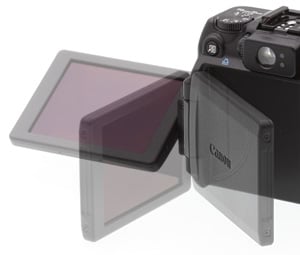
Also retained is the articulating LCD. This makes it easy to see what you're shooting when holding the Canon G12 above your head or below your waist. But it can also be used for self-portraits because it can face forward, too. You can fold it back against the body like any other digicam for ordinary use and protect it by facing it into the body when you're traveling with it.
There's also an optical viewfinder. Some people insist on it. But they are always (very) inaccurate; in this case, it only shows 78% of the scene at wide-angle, and 79% at telephoto in our tests. The Canon G12's viewfinder image is also very small. A dioptric adjustment sits next to it. But the LCD, on the other hand, is accurate and easily seen in bright sunlight.
The Canon G-Series has always been expandable with a range of accessories including a 1.4x teleconverter lens and 58mm filter adapter. A release button on the front frees the Canon G12's bayonet-mount knurled ring for the adapter that accommodates lenses or filters. For some odd reason, Canon also sells different color rings so you can personalize the camera if you've got nothing else on your mind. The Canon RAK-DC2 Ring Accessory Kit ($27 list) includes three rings, black with a gold accent, black with a blue accent, and silver with what looks like a white accent.
The G Series has also been known for its fast lens and the Canon G12 uses the same glass as the G10 and G11, a 5x 28-140mm f2.8-4.5 zoom. It's extended both by a 4x digital zoom and a hybrid image stabilization system that uses both an angular sensor and an accelerometer to suppress both the blur caused by the angle of the camera and the "shift blur" that happens when the camera moves parallel to a subject.
The angular sensor turns out to be pretty handy. In fact, there's a menu option to calibrate level for the Canon G12. You put the camera on a flat, level surface and calibrate it. Then you can press the Display button in Record mode to display an electronic level to help you level the camera.
I found myself bumping over the 5x optical zoom limit into digital zoom quite a bit, but I've been shooting with 20x zooms lately.
While the Canon G12's manual seems to discourage Eye-Fi use ("This product is not guaranteed to support Eye-Fi card functions," it says), I used an Eye-Fi Pro X2 with it with no problems. And there is even some firmware support for Eye-Fi wireless SD cards.
Controls. As you move up the camera quality chain, you find more and more options have a physical control rather than a menu item. That's a welcome thing in my mind because your fingers can remember where things are, leaving your brain free to focus on shooting.

But it can be unnerving.
I was taking a few practice shots in the car one rainy day and the difference between the outdoor light and the inside light was so dramatic that the dashboard was just too dark.
The simple solution was to overexpose the interior by kicking the Canon G12's EV up a bit. I looked through the menu system but couldn't find EV. I thought it was because of the mode I was shooting in, but I was already in Program. I confess I had to give up, shooting in Manual mode before the light changed.
Okay, so I wasn't familiar with the Canon G12. But later I gave it another shot. I was framing a basketball hoop from below with the blue sky above. The sky again was too bright for the scene, so I wanted to use EV to underexpose the scene.
Knowing EV wasn't in the menu system, I gave the obscure buttons a shot. The asterisk button, the user-defined button. Nothing.
"Maybe you should read the manual," my observant friend suggested.
Actually, the solution was a lot simpler than that. There is an EV dial on the Canon G12's top panel. I don't know how it eluded my search but it was in plain sight. That's why this is a confession.
To save you my embarrassment, let's tour the Canon G12's controls.

Smart Shuffle. In Playback mode, use the arrow keys to select which of the smaller images to show in the center next.
On the front of the Canon G12, the new front dial is conveniently positioned just below the Shutter button. The auto-focus assist/self-timer lamp is just to the upper left of the lens ring. Above it to the right is the viewfinder. And right of that is the flash. It's not a popup flash and it is very close to the lens, promising red-eye. Below and to the right of the bayonet lens ring is the Ring Release button, allowing you to replace the Canon G12's ring with an adapter for either a teleconverter or 58mm filters.
The bottom panel has the Memory Card/Battery compartment protected by a nice, large cover that is easy to open and close. At its hinge is a metal tripod socket about the middle of the panel but not centered under the Canon G12's lens.
On the left side panel where the LCD is hinged, you'll find the speaker grill. And on the opposite side, you'll find the HDMI port, Remote Terminal, A/V port all under a plastic cover with a sharp snap to it.
On the Canon G12's top panel, Canon has loaded the important shooting controls. At the far right are the Shutter button and Zoom lever. The Shutter button is as small as Shutter buttons go (and thankfully not chrome) but worked fine. Zoom was smooth and slow enough to compose with precision.
Behind them is the small Power button with a green LED in the center to indicate status. It's nearly flush to the Canon G12's top panel so you can't easily feel for it, but it's easy enough to find and use once you know where it is.
To the left of them is the ISO Speed dial with the slightly smaller Mode dial on top of it. An orange LED just left of the dials indicates which ISO and which Mode is active. ISO can be set in one-third stops.
On top of the optical viewfinder hump is a hot shoe with five electrical contacts. On either side of the hump and a bit forward are two microphones.
On the left side of the top panel is the EV dial set slightly back so it's easy to dial in a different EV setting.
The back panel holds the Canon G12's 2.8-inch LCD with 461,000 pixels. Above it is the optical viewfinder with two status LEDs on the right and a dioptric adjustment on the left. To the left of the viewfinder is the Short Cut/Direct Print button. To the right about an equal distance from the viewfinder is the Playback button.
In the top right corner is the AE Lock/FE Lock asterisk button. Further down and just to the right of the Canon G12's LCD is the four-way navigator ringed by the Control dial and with a Function/Set button at its center. It's surrounded by four other buttons: the AF Frame Selector/Erase and Light Metering/Jump buttons on top with the Display and Menu buttons below.
The arrow positions on the four-way navigator lead double lives, of course. The Up arrow handles Manual Focus, the Right arrow Flash modes, the Down arrow Self-Timer modes and the Left arrow Macro mode.

Slide Show Options. Simple options, nice transitions, but with HDMI output a little fancier show (with music) would have been appreciated.
When I found the Canon G12's controls, I thought they were a bit stiff and a bit sharply knurled. Slightly unpleasant to actually use, that is. And therefore a disappointment in an otherwise nicely appointed camera. They really aren't up to dSLR standards.
You can register different functions to the Front dial, the Control dial, and the Shortcut button. In Manual mode, for example, the Front dial can set the shutter speed while the Control dial can set the aperture. In Aperture Priority, the Canon G12's Front dial controls the aperture and in Shutter Priority, it controls the shutter speed. A menu option lets you change all that to suit your preference.
A menu option lets you assign any of several functions to the Shortcut key. Those include Unassigned, i-Contrast, White Balance, Custom White Balance 1, Custom White Balance 2, My Colors, Bracketing, Drive Mode, Flash Exposure Compensation/Output, ND Filter, Aspect Ratio, Raw or JPEG, Image Size/Compression, Movie Quality, Servo AF, Red-Eye Correction, AF Lock, Digital Teleconverter, and Display Off.

Lens. The Canon G12's 6.1mm to 30.5mm (28mm to 140mm equivalent), is a 5x optical zoom lens. Focusing ranges from 2.0 inches to infinity at wide-angle and 12 inches to infinity at telephoto. Macro at wide-angle focuses between 0.4 inch and 1.6 feet. At telephoto, Macro focuses from 12 inches to 1.6 feet. You can manually focus the lens from 0.4 inch to infinity.
Corner softness is almost low through the focal length range. Chromatic aberration, more noticeable at wide-angle, is well controlled for a small camera. Barrel distortion is slightly higher than average at wide-angle, noticeably distorting straight lines. But that's not unusual for a 28mm equivalent lens.
Modes. The Canon G12 offers a wide range of shooting modes if nothing quite as ambitious as Casio and Sony have cooked up.

Manual. Front dial controls shutter speed and the Control dial handles the aperture.
No G Series PowerShot is worthy of the name, of course, without full Manual control. Aperture and Shutter Priority are not far behind. And I was glad to see the Canon G12 actually offered some aperture options, ranging from f/2.8 to f/8.0 at wide-angle and f/4.5 to f/8.0 at telephoto. Shutter speeds ranged from 15 seconds to 1/4,000 second.
Program mode is pretty tame on any Canon and so it was with the G12. Program Shift is activated by pressing the AE Lock button in the upper right corner of the Canon G12 and turning the rear Control dial. A graphical representation of the available apertures over the available shutter speeds appears onscreen, sliding left and right as you turn the dial.
Auto mode is actually a Smart Auto. The Canon G12 can recognize several shooting situations, optimizing settings for them while detecting and focusing on faces. Canon doesn't document what situations the G12 can recognize but Macro and Portrait were two.
Low Light uses a small image size of 1,824 x 1,368 pixels with a higher ISO to capture natural light images while minimizing the effects of camera shake and subject blur.

Quick Shot. Everything on one screen.
Quick Shot mode continuously adjusts focus and exposure while turning the LCD into a control panel with rows of settings you can scroll through, using the Front dial to change them quickly. To compose the shot, you use the optical viewfinder. Settings include Shutter Speed, EV, White Balance, My Colors, Histogram, Self-Timer, Aperture, Flash EV, AE Lock, FE Lock, Aspect Ratio, ISO Speed, Flash Mode, i-Contrast, Image Type, Image Quality, Image Size, Drive Mode, Camera Orientation, Image Stabilizer, Recordable Shots, Battery Charge, Red-Eye Correction, Date, Eye-Fi transmission. Anything else can be accessed by pressing the Menu button.
Scene modes on the Canon G12 include Portrait, Landscape, Kids & Pets, Sports, Smart Shutter, Super Vivid, Poster Effect, Color Accent, Color Swap, High Dynamic Range (HDR), Nostalgic, Fisheye Effect, Miniature Effect, Beach, Underwater, Foliage, Snow, Fireworks, and Stitch Assist.
Of those I found HDR particularly interesting when used in low light. It takes three shots and composites them in the camera. In most situations where you'd need it, you'll have to use a tripod with HDR. And Fisheye was a lot of fun, too.

HD movie. 720p24 H.264 format with stereo sound. Optical zoom not supported, but digital zoom is. (Click to download 16.9MB MOV file.)
Movie mode options include 1,280 x 720 at 24 frames per second with 640 x 480 and 320 x 240 both at 30 frames per second. Standard, Miniature Effect, Color Accent, and Color Swap effects are available in Movie mode.
Menu System. The Canon G12's menu system will be familiar to any PowerShot owner with only minor variations reflecting the model's advanced capabilities.

Function Menu. Here the i-Contrast dynamic range correction options are displayed.
If what you need can't be found on a button (or dial), press the Function button in the middle of the Canon G12's four-way navigator. If you need more general behavioral modification, use the Menu button.
The Canon G12's Function button uses a totem pole of icons on the left with options appearing across the bottom. The Menu button uses a tabbed set of options that are easily navigated, although to switch tabs you have to go all the way to the beginning or end of each list of options before the tab option is active again.
My Menu can accommodate up to five frequently used menu options. And you can change their order, too. Very handy.
Storage & Battery. The Canon G12 supports SD/SDHC Memory Cards, SDXC Memory Cards, Eye-Fi Cards, MultiMediaCard, MMC Plus Cards, and HC MMC Plus Cards.

At the highest quality setting and a 4:3 aspect ratio, you can store about 1,471 images on a 4GB card, according to Canon. You can record up to 25 min., 8 seconds of 1,280 x 720 HD video on that same 4GB card. Clip sizes are restricted to 4GB in HD and one hour for 4:3 formats. SD Speed Class 4 or higher memory cards are recommended.
The rather bulky lithium-ion Canon battery (NB-7L) is rated for 7.4 volts and 1,050 mAh, providing 370 shots with the Canon G12's monitor on, or a playback time of seven hours, according to Canon, which used CIPA measurement standards.
The battery cover has a slot you can fit over an arrow printed on the battery to indicate it's charged. A depleted battery can be indicated by turning the cover around so the arrow is covered. Clever and very helpful if you use more than one battery.
The Canon G12's battery charger has a convenient folding plug design. And an AC adapter is available.
I found battery life to be extensive, rarely charging the battery between shoots.
DIGIC 4 Image Processor. Using algorithms developed by Canon, the DIGIC image processor facilitates the high-speed processing of tasks like reducing false colors or moire patterns and canceling noise during long exposures. It also reduces noise for high-speed image capture and provides higher resolution signal output to the Canon G12's LCD.
DIGIC 4 is even faster than its predecessors. It incorporates noise reduction technology and Scene Detection technology, along with improved video functionality, Face Detection technology and Motion Detection technology.
Shooting with the Canon G12


Zoom Range. 28mm to 140mm to 4x digital zoom.
It seemed to me I couldn't take a bad shot with the Canon G12. I particularly liked how well it held shadow and highlight detail with a smooth distribution of midtones, not to mention natural color. Even reds held up well, to my surprise.
And the range of the lens from macro to wide-angle at 28mm was encouraging. I was a bit worried about exceeding optical telephoto but I let it fly after I saw the first results. There was pretty good detail (exceeding what I could see with my eyes) and the color held up well, too.
So I took the Canon G12 everywhere with me for a couple of weeks.
Vehicles. I shot a number of vehicles for some reason, all of them instructive.
The dark interior shots on a rainy day really show off the tonal range of the Canon G12's captures. The seat shot has a very shallow depth of field, but I was actually interested in the seat back, not the raindrops. At 1/32 second I really didn't have much room to negotiate a smaller aperture unless I kicked up the ISO.
The dark dashboard shot was taken in Manual mode because I was still hunting around for the EV control. At least there was a Manual mode there so I could get the shot. But again, what I saw in the car was that lovely gradation of tone and it's there in the shot, too.
The red of the Rumbolino looks pretty good, too. Compare to the metallic red of the flower vase in bright afternoon sunlight, which was also well captured.
The Toyota pickup was a study in fall colors, let's say. I was glad the Canon G12 didn't bump up the ISO despite the overcast sky just as it kept it to ISO 80 on the rainy day. The Canon G12 has an option in Auto ISO to limit how high the ISO is allowed to go, but also to slow or accelerate its rate of change, which leans the bias toward slower shutter speeds and wider apertures to keep the ISO low, or else allows it to change more quickly. Settings are Slow, Standard, and Fast.


Fisheye. When you need a little more room on the bus.
Effects. The first shot of the bus was really just a setup for the Fisheye effect shot that follows it. It's a fun effect that still gives you a full frame, unlike a real fisheye lens.
The white JFK rose shows how well highlight detail is captured. There's just the very slightest red blooming on the edges of the largest petals where they meet the dark green background. You really have to pixel-peep to see it.
For some reason it's more fun shooting monochrome than desaturating a color image at the computer. The Canon G12 lets you shoot black and white (and even sepia), showing you the effect as you compose with the LCD. It's right on the Function menu, too.
I shot my logs on Twin Peaks in both color and black and white. Somehow the black and white shot always looks more interesting. And the Canon G12 held onto the highlights very nicely, even though the wood has been bleached by the sun for months.
The shot of the parking lot shows the Miniature effect, which defocuses the top and bottom of the image to make the subject appear toy-like.
Low Light. The dolls in near darkness show what the Canon G12 can do in low light using HDR, Low Light mode, and a range of ISO settings in Program. HDR was the first shot (it seems to always record as ISO 800), not very successful, because as I mentioned HDR mode requires a tripod.
Color is pretty consistent from ISO 400 to ISO 2,500. ISO 400 at 1/4 second suffers camera motion blur, despite Canon's optical image stabilization, which was on for all of these shots. At ISO 2,500, detail is still sharp on the small doll, although not the best we've seen. Still, none of the other shots were as sharp.
Dynamic Range. I took a series of shots of a fire hydrant in the rain to test i-Contrast, Canon's dynamic range optimization. Settings were Off, Auto, 200 percent, and 400 percent. I was particularly concerned in this series with holding highlight detail without using EV to underexpose.

First, I'll point out that the red blooming we saw just a hint of on the rose is a little more evident here at the edges of the hydrant.
Second, I'll point out that it's hard to attribute any real difference to any of these even with the bright sticker on the top of the hydrant as our highlight test. They're all well exposed with very good color (that red curb is very natural) and excellent detail.
More revealing of dynamic range are all the shots taken together. I shot with i-Contrast set to Auto for the most part and none of the images show blown-out highlights.
The row of logs on Twin Peaks is a good example. The bleached logs still have detail and you can see rocks in the dark shadows they cast. That's really a pretty good job with that scene.
Unfortunately, there isn't an Exif tag to reveal the i-Contrast setting. But fortunately, you can change the i-Contrast setting in Playback. You can select between Auto, Low, Medium, or High.
There is a second set of i-Contrast images of a fig tree at the bottom of the gallery that I did label with the setting. The first (DR0) has i-Contrast turned off. The second (DRA) is Auto, the third (DR1) is 100 percent, and the last (DR2) is 200 percent. That's the full range.
I think it's a good idea to set it on Auto and enjoy the feature.
Street Shooting. Even though the Canon G12 isn't a compact digicam, it's a lot smaller than even a small dSLR, and even more compact than most mirrorless cameras. So when the World Series came to San Francisco, I put the Canon G12 in my pocket for a walk around the stadium before Game One.

It was already crowded hours before the game so having a small camera was a decided advantage. And having a large battery capacity was another advantage I appreciated. In that sense it was a lot like having a dSLR rather than a little camera with a thin wafer of a battery. I left the camera on, protecting the lens as I navigated the crowd.
Because it's a 28mm-equivalent wide-angle, I zoomed all the way back and composed my shots casually, sometimes just taking a flying leap of faith by pointing the camera in the general direction of the subject.
This was another situation where having dials and buttons beat the pants off navigating menus. If I needed to adjust exposure, the EV dial was right there, no fooling around with the LCD. That made a big difference.
So did the Front dial when I slipped into Aperture Priority mode to isolate a statue against the busy background. In this case, I was looking at the LCD to compose the image anyway, but the Front dial made it easy to find the widest aperture.
Some things are just impossible to judge on an LCD. The shot through the fence looked as if the players beyond the fence were sharp, but that isn't the case. Having taken that shot more than once, I knew it required manual focus, but street shooting wasn't going to provide the opportunity. It was really a point-and-shoot event.
Still, the overall effect of the 40 shots I took around the stadium was just what I was looking for. Though misfits and discards individually, they were, like the Giants themselves, winners as a group.
Hiking. Another ticket the Canon G12 filled was as a hiking companion. I took a few hikes with the Canon G12 (in fact, I rarely left the house without it).

One hike along Glen Canyon has always been a challenge photographically. The scenes are dramatic but the pictures tend to be rather bland. But with the Canon G12 I was able to capture the hillside in the Fall light framed by the evergreens along the road. Hard to believe that's in the middle of San Francisco, but there you go.
My usual hike up Twin Peaks for the zoom series of shots was on a particularly brilliant and clear day.
At the full telephoto focal length, I took a shot straight down Market St. You can just about make out the time on the Ferry Building (it may help to know it was 12:37). That's not something you can see with the naked eye.
The shot of the Golden Gate Bridge used digital zoom but you can see how well it held detail by examining the thin vertical cables holding up the roadway.
As the zoom series shows, the Canon G12 has a sufficient reach at 20x with digital zoom, although the 5x optical zoom is a little short for distant landscapes. Digital zoom held up very well, though, in both color and detail, so I didn't hesitate to use it.
Aspect Ratios. But the Canon G12 really shined at wide-angle with 16:9 aspect ratio. I shot mostly 4:3 aspect ratio to the largest file sizes, but I preferred 16:9. The Canon G12 also offers 3:2 and even 1:1 aspect ratios. There's a nice macro shot at 1:1 in the gallery.

But the wide-angle shots of the roadway trailing off into the sky on Twin Peaks are dramatic. As is the row of logs and the staircase. They draw you into the shot. And that's partly the wide-angle lens and partly the aspect ratio. On the Canon G12, you get both to play with.
HDR. The last two shots in the gallery were both taken with the HDR Scene mode. In HDR, the Canon G12 takes three shots at different exposures (I heard different shutter speeds for my still life images), compositing them in the camera.
At 1/4 second (more or less, considering there are three shots), camera blur becomes a problem. And the two HDR shots certainly show that. But I had such great results using Sony's Handheld Twilight mode under the same circumstances, I had to try it. Sony clearly wins this round, thanks to their micro-alignment feature, something the Canon G12 lacks. So as I've said, a tripod is necessary.
Before I packed up the Canon G12, I popped it on a tripod and took a series of garden furniture shots. I thought the shadows and bleached wood would profit from multiple exposures and, with the color options, clearly show the alternate renderings.


Which chair would you sit in?
Raw. The Canon G12, like its predecessors, can store Raw captures and even Raw+JPEG captures. There are two in the gallery. Both are high-contrast images of a plant in bright sunlight.
While it took a second to write the Raw data to the card, performance wasn't as sluggish as it is with some digicams that capture Raw data. It really wasn't suitable for quick action or continuous release, however.
It's worth downloading one of the Raw images to see how much range they have. You'll need Lightroom 3.3 or Camera Raw 6.3 to handle them, at least among Adobe products.
GPS. One final confession. All the gallery images were shot with an Eye-Fi X2 Pro card, which put GPS data into the Exif header based on the router the images passed through on their way to the hard disk. Since this isn't at all accurate, I've simply used Phil Harvey's ExifTool to remove the GPS data.
See the test results summary, along with pro/con and our conclusion below. For more detailed test results, see the Optics, Exposure and Performance tabs.
Canon G12 Lens Quality


Sharpness: The wide-angle end of the Canon PowerShot G12's zoom shows
moderate blurring in the corners of the frame compared to what we see at center,
with the strongest instance in the lower left corner. However, blurring didn't
extend very far into the frame. At telephoto, performance is a little better,
with only very slight softening in the corners. Good results overall.


Geometric Distortion: There is higher than average barrel distortion
at wide-angle (0.9%), and almost no perceptible pincushion distortion (less
than one pixel) at telephoto. Pretty good results overall.
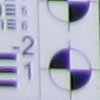

Chromatic Aberration: Chromatic aberration at wide-angle is moderate
in terms of pixel count, though pixels are fairly bright. The effect extends
deep into the frame, though width and intensity decrease. Telephoto, however,
shows much less distortion, with faint red and blue pixels just visible.


Macro: The Canon PowerShot G12's Macro mode captures a sharp image with
strong detail, though with visible softening in the corners that extends far
into the frame (a common limitation among consumer digital cameras in macro
mode). Chromatic aberration is also visible. Minimum coverage area is 1.22 x
0.92 inches (31 x 23mm), which is quite good. The camera focuses so closely
that the flash is blocked almost entirely by the lens.
Canon G12 Viewfinder Accuracy


Viewfinder Accuracy: The Canon PowerShot G12's optical viewfinder showed about 78% coverage at wide-angle, and about 79% coverage at telephoto, a very poor performance, though no surprise for a non-TTL optical viewfinder. The LCD monitor showed about 100% coverage accuracy at wide-angle and at telephoto, which is excellent.
Canon G12 Image Quality

Color: The Canon PowerShot G12 produced good saturation overall, though
strong reds, greens, browns and blues showed mild to moderate oversaturation.
Bright yellows, aqua and cyan were actually a little muted. Hue performance
showed some shifts in color, such as cyan toward blue, red toward orange, and
yellow toward green. Lighter skin tones were close to accurate, though slightly
cool, while darker skin tones showed a warmer, yellowish cast.


Incandescent: Manual white balance handled our incandescent lighting
best overall, despite a slight cool cast. The Auto setting also turned out well,
though it was just a bit magenta. Incandescent mode resulted in a strong magenta
cast.


Resolution: Our laboratory resolution chart revealed sharp, distinct
line patterns down to about 1,500 lines per picture height horizontally, and
to about 1,400 vertically. Extinction of the pattern occurred at around 2,200
lines per picture height.


Flash: Our manufacturer-specified testing (shown at right) showed bright results at wide-angle at the rated 23 feet, despite having to move the camera out of the main lab. (The white doorway, panels and ceiling often fool cameras into underexposing the flash target, but not the G12.) The G12 did however boost ISO to 400 to achieve these results. The telephoto test came out well exposed at the rated 13 feet, with an ISO increase to 320.
Auto flash produced bright results in our indoor portrait scene, thanks to an automatic ISO boost to 250. The slower shutter speed of 1/25 second selected by the camera could result in mild blurring from subject movement, though.

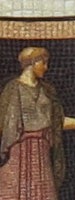


ISO: Noise and Detail: Detail is quite good at ISO 80 up to about 200,
though smudging becomes more evident at ISO 400. Yellow and purple chroma (color)
noise begins to appear in darker areas at ISO 800, and worsens as sensitivity
increases. Stronger noise reduction at the higher ISOs decreases detail as well.
However, overall results are still better than average. See Printed results
below for more on how this affects prints.
 Printed: ISO 80 and 100 shots look good at 16 x 20 inches, if just a bit soft in our red leaf swatch.
ISO 200 images have good detail at 13 x 19 inches, with only minor luminance noise in the shadows.
ISO 400 shots are good at 11 x 14, again showing only minor grain in the shadows.
ISO 800 images are good at 8 x 10, and 11 x 14s may be usable in less critical applications.
ISO 1,600 shots look better at 5 x 7, with the only exception being the loss of all contrast in our target red swatch.
ISO 3,200 shots are quite good at 4 x 6.
Overall, a very good performance from the Canon G12. Dark areas deepen slightly as we move up the ISO ladder and down in print size, but color and apparent exposure look pretty consistent. It's also a little better image quality than we saw in the Canon S95.
Canon G12 Performance
Shutter Lag: Full autofocus shutter lag is slower than average at wide-angle, at 0.66 second, though about average at 0.75 second at full telephoto. Prefocus shutter lag is 0.076 second, not the fastest out there, but still pretty quick.
Cycle Time: Cycle time is slower than average, capturing a large/fine JPEG frame every 2.4 seconds in single-shot mode. Continuous mode captures JPEG frames at 1.97 frames per second, just a little sluggish for its class. RAW+JPEG continuous mode is slower, at 0.96 frames per second.
Flash Recycle: The Canon PowerShot G12's flash recycles in about 4.1 seconds after a full-power discharge, about average.
Low Light AF: The G12's AF system was able to focus down to the 1/16 foot-candle light level without AF assist enabled, and the camera was able to focus in complete darkness with the AF assist lamp enabled.
USB Transfer Speed: Connected to a computer or printer with USB 2.0, the Canon PowerShot G12's download speeds are moderately fast. We measured 6,433 KBytes/sec.
In the Box
Shipped with the retail version of the Canon G12 are:
- PowerShot G12
- Lithium Battery Pack NB-7L
- Battery Charger CB-2LZ
- Neck Strap NS-DC9
- AV Cable AVC-DC400ST
- USB Interface Cable IFC-400PCU
- Digital Camera Solution CD-ROM
Canon G12 Conclusion
| Pro: | Con: |
|---|---|
|
|

The PowerShot G12 manages to improve on the G11 without taking any backward steps. It represents more a refinement than a revision, but that only reflects what a solid camera the G11 was.
Despite that, the G12 is getting squeezed on one side by its own slimmer and nearly-as-capable PowerShot 95 stablemate. And on the other side, it's getting pushed by a handful of small mirrorless cameras that aren't quite as small, but pack larger sensors. It's simply a different landscape in 2010.
I found myself picking up the Canon G12 rather than the Olympus E-PL1 next to it simply because it was slightly smaller and its image quality was always pleasing. I might just have easily picked up an S95 or a Panasonic LX5 if one of those had been sitting on the table, though.
What used to be the top of the mountain, the flagship among digicams, is now something of a compromise. A pleasant compromise, I hasten to add, but not the slam dunk of years past.
On the other hand, compromise is an art, and Canon has delivered such an artful one that it easily merits a Dave's Pick. For the best image quality across the ISO range, the trophy clearly goes to the Canon G12. It's the best G-series PowerShot I've had my hands on.
Optics
Canon PowerShot G12 Optics
Lens
Zoom
A fairly wide, 5x optical zoom lens with very good performance.


The Canon PowerShot G12's lens remains the same as the G11's, covering the equivalent of a 28-140mm zoom on a 35mm camera with a maximum aperture range of f/2.8-4.5. The 5x optical zoom ratio is more than most consumer digital cameras offer, though not as much as the Nikon P7000's 28-200mm range. Results are quite good at wide-angle, with minimal blurring and coma distortion, though some minor to moderate chromatic aberration can be seen in the corners and edges, as well as some flare around the brighter areas of the scene. Results at full telephoto are also very good with strong detail across the frame and only small amounts of corner softness and chromatic aberration. The Canon G12's digital zoom does a pretty good job of maintaining fine detail despite the typical blurring and loss of resolution associated with digital zoom.
Macro
A very small macro area, with excellent detail and resolution in the center. Flash is mostly blocked by lens.
The Canon PowerShot G12's macro setting captured a smaller than average area of 1.22 x 0.92 inches (31 x 23 millimeters). Detail and resolution were both very good, though there's some softening in the corners that extends pretty far into the frame, as well as some moderate chromatic aberration. (Most cameras have some softening in the corners in macro mode.) The Canon G12's flash didn't work well at closest distance, as it was almost entirely blocked by the lens which resulted in a very dark, unevenly lit image. Plan on using external lighting for the closest macro shots with the G12.
Distortion
Slightly higher than average barrel distortion at wide-angle, almost no distortion at telephoto.
| JPEG: Barrel distortion at 28mm eq. is 0.9% |
 |
| JPEG: Distortion at 140mm eq. is negligible |
 |
JPEG: The Canon G12's 0.9% barrel distortion at wide-angle is slightly higher than average and is noticeable in some shots. At the telephoto end, the G12's distortion is negligible, less than one pixel's worth. This is the tendency for the lens to bend straight lines outward (like a barrel -- usually at wide-angle) or inward (like a pincushion -- usually at telephoto).
Raw: When converting RAW files using dcraw (which doesn't apply any distortion correction), barrel distortion at wide-angle and telephoto looks to be the same as the JPEGs, so the G12 is not correcting for lens distortion in its JPEGs (unlike the S95).
Chromatic Aberration and Corner Softness
C.A. is moderately high at wide-angle, and mild at telephoto. Mild to moderate blurring in the corners of the frame at wide-angle at maximum aperture, but good corner sharpness at telephoto.
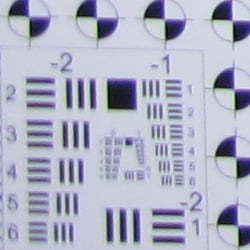


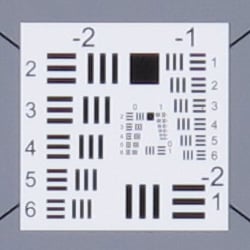
Chromatic Aberration. Chromatic aberration is moderately high at wide-angle. The color fringing is bright and extends fairly deep into the frame, but the width and intensity of the fringes reduce as you move toward the center. At telephoto, chromatic aberration is much lower and therefore less noticeable. As mentioned previously, dcraw doesn't fully support the G12's files yet (it doesn't interpolate color correctly), and other converters tend to apply some correction automatically, so it's difficult to tell if the Canon G12 is applying some correction for C.A. in its JPEGs. We suspect not, given JPEG levels. Chromatic aberration is a type of distortion visible as a slight colored fringe around the objects at the edges of the field of view on the resolution target.
Corner Softness. The Canon G12's lens produced mild to moderate corner softness at full wide-angle. Blurring was stronger in the left corners with the bottom left being the softest, but softness didn't extend very far into the frame. The right corners were sharp, as was the center. All four corners at full telephoto were only slightly soft. The center was fairly sharp, though as is often the case, contrast is a touch lower than at wide-angle. Overall results are pretty good, especially considering that these shots were taken at maximum aperture. That's because corner sharpness generally improves as the lens is stopped down to smaller apertures.
Here are the same corners at f/5.6, showing less blurring and C.A. compared to wide-open, especially at wide-angle:


Viewfinder
Coverage
Very poor accuracy from the optical viewfinder, but excellent accuracy from the LCD monitor.
The Canon PowerShot G12's optical viewfinder showed about 78% coverage at wide-angle, and 79% coverage at full telephoto. The poor accuracy is no surprise for a non-TTL optical viewfinder, though. The LCD monitor had excellent accuracy, showing essentially 100% coverage at both wide-angle and full telephoto.
The images above were taken from our standardized test shots. For a collection of more pictorial photos, see our Canon PowerShot G12 Photo Gallery .
Exposure
Canon PowerShot G12 Image Quality
Color
Saturation & Hue Accuracy
Good saturation levels, with very good hue accuracy overall.
|
| In the diagram above, the squares show the original color, and the circles show the color that the camera captured. More saturated colors are located towards the periphery of the graph. Hue changes as you travel around the center. Thus, hue-accurate, highly saturated colors appear as lines radiating from the center. |
Saturation. The Canon G12 produced good saturation levels, with mild to moderate oversaturation in reds, greens, browns and blues. Some colors such as bright yellow, aqua and cyan were actually undersaturated by a small amount. Overall, the Canon G12's images appeared to fairly vibrant color that wasn't too vivid, and you can always adjust saturation to your liking. Most consumer digital cameras produce color that's more highly saturated (more intense) than found in the original subjects. This is simply because most people like their color a bit brighter than life.
Skin tones. Here, when using Auto white balance, the Canon G12 also did well, producing natural-looking Caucasian skin tones, though just slightly on the cool side, while darker skin tones showed a warmer, yellowish cast. Where oversaturation is most problematic is on Caucasian skin tones, as it's very easy for these "memory colors" to be seen as too bright, too pink, too yellow, etc.
Hue. The Canon PowerShot G12 produced a few color shifts relative to the correct mathematical translation of colors in its subjects, most visibly pushing cyan towards blue (we think for better-looking skies), red toward orange, and yellow toward green. Hue is "what color" the
color is.


Sensor
Exposure and White Balance
Indoors, incandescent lighting
Good color with both Auto and Manual white balance settings. Slightly better than average exposure accuracy.
Color balance indoors under incandescent lighting had a very slight magenta cast with the Auto white balance setting, but was actually quite accurate. The Canon G12 did much better here than the majority of digital cameras we test. The Incandescent white balance option resulted in a fairly strong magenta cast. The Manual setting produced reasonably accurate color, though a touch cool. The PowerShot G12's exposure system handled this lighting well, producing good results with no exposure compensation. (The average for this shot is + 0.3 EV.) Our test lighting for this shot is a mixture of 60 and 100 watt household incandescent bulbs, a pretty yellow light source, but a very common one in typical home settings here in the U.S.
Outdoors, daylight
Good overall performance outdoors, though high contrast and hot highlights. Good color as well.
The Canon PowerShot G12 performed reasonably well under harsh outdoor lighting, though default contrast was quite high. About average exposure compensation (+0.7 EV) was needed to keep the model's facial skin tones bright, resulting in some blown highlights in her shirt and flowers. Overall exposure was pretty good in the outdoor far-field house shot at the default exposure, though some highlights were clipped there as well. Color outdoors is good with the Auto white balance setting, with slightly cool skin tones in the portrait shot. Though contrast is high, the shadows hold onto a fair amount of detail. Fortunately, there's a contrast adjustment to help tame the highlights a bit, though it works better at bringing out shadows.
See full set of test images with explanations
See thumbnails of all test and gallery images
Resolution
High resolution, 1,400 to 1,500 lines of strong detail from in-camera JPEGs; about 1,700 from RAW files.


Our laboratory resolution chart revealed sharp, distinct line patterns down to about 1,500 lines per picture height in the horizontal direction, and about 1,400 lines per picture height in the vertical direction. (Some might argue for over 1,800 lines, but artifacts such as moire begin to appear at much lower resolutions.) Extinction of the pattern occurred between 2,200 and 2,400 lines. Adobe Camera RAW was able to extract more resolution with fewer artifacts from the G12's .CR2 RAW files, about 1,700 lines, and complete extinction of the pattern was extended to between 2,600 and 2,700 lines. Use these numbers to compare with other cameras of similar resolution, or use them to see just what higher resolution can mean in terms of potential detail.
See full set of test images with explanations
See thumbnails of all test and gallery images
Sharpness & Detail
Sharp, detailed images overall, with only minor edge-enhancement on high-contrast subjects. Noise suppression limits definition in low contrast areas, though better than average results here.


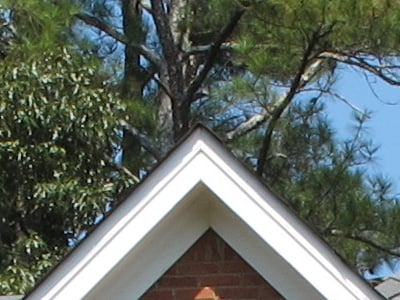
Sharpness. The Canon PowerShot G12 captures very good detail and fairly sharp JPEG images at default settings. Only slight enhancement artifacts are visible on high-contrast subjects such as the crop above left. Edge enhancement creates the illusion of sharpness by enhancing colors and tones right at the edge of a rapid transition in color or tone.
Detail. The crop above right shows moderate levels of noise suppression, as the low contrast areas of hair show less distinct detail. However, many individual strands remain fairly well defined, so performance here is actually better than average for a compact digicam. Noise-suppression systems in digital cameras tend to flatten-out detail in areas of subtle contrast. The effects can often be seen in shots of human hair, where the individual strands are lost and an almost "watercolor" look appears.
RAW vs In-Camera JPEGs
As noted above, the Canon G12 produces fairly sharp, detailed in-camera JPEGs. More detail is often available from RAW files, but the amount of noise present in images from these small sensors means noise reduction must be fairly sophisticated to extract additional detail without making noise an issue. In the image below, processing from RAW using Canon's bundled software brought no real improvement in visible detail, though Adobe Camera RAW did better at the expense of more visible noise. Take a look below, to see what we mean:
|
G12FARI0080 (ISO 80)
|
||
 |
||
In the table above, mousing over a link at the bottom will load the corresponding crop in the area above, and clicking twice will open the full resolution image.
The image on the left is an in-camera Fine JPEG taken with default settings. The image in the center is a RAW file processed using Canon's included Digital Photo Professional software, using default settings. The image on the right is the same RAW file processed in Adobe Camera RAW, then sharpened in Photoshop using strong but tight Unsharp Mask (USM) of 500% with radius of 0.3 pixels. As you can see, Canon's Digital Photo Professional software wasn't really able to extract more detail than the in-camera JPEG, and it shows a few more sharpening artifacts. The ACR converted .CR2 does reveal more detail, but also shows more noise. The G12's JPEG engine is doing a pretty good job trading off detail versus noise, but for full control over detail, noise and sharpening (as well as contrast and saturation), shoot RAW and use a good RAW converter.
ISO & Noise Performance
Low noise at the normal sensitivity settings, with pretty good results up to ISO 400. Strong noise and loss of detail at higher settings, however.
 |
 |
 |
| ISO 80 | ISO 100 | ISO 200 |
 |
 |
 |
ISO 400 | ISO 800 |
ISO 1,600
|
 |
ISO 3,200 |
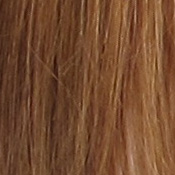
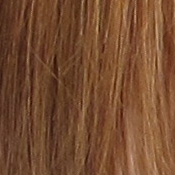
The Canon G12's high ISO noise performance is very similar to that of the G11's, though it seems to do a bit better at retaining fine detail at higher ISOs. The Canon PowerShot G12 produced low to moderate noise at the lower sensitivity settings, but the effects of noise reduction such as smudging and loss of fine detail can already be seen even at the lowest ISO. Fine detail holds pretty strong up to ISO 200, though. At ISO 400, noise is still reasonable and a lot of fine detail remains intact, but additional smudging is evident. Noise grain isn't really more apparent as you move to ISO 800, but stronger noise reduction results in additional detail loss. Yellow and purple blotches (chroma noise) begin to appear in darker tones and hair at ISO 800, and worsen as ISO goes up. At ISOs 1,600 and 3,200, artifacts from noise reduction and increased chroma noise dominate, blurring out most fine detail. Still, overall handling of detail versus noise is better than the typical compact camera. On-screen crops like this tell you only part of the story with a camera, though: To see how these images held up when printing at various sizes, read the Output Quality section below.
Extremes: Sunlit and low light tests
High resolution with strong detail, though somewhat high default contrast limits dynamic range. Good low-light performance, capable of getting bright images in near darkness.


Sunlight. The Canon PowerShot G12 performed reasonably well under the deliberately harsh lighting in the test above, but with washed-out highlights and some deep shadows. Despite some noise suppression in the shadow areas, detail is still good in the shadows. At +0.3 EV exposure compensation, the face, background and some shadow areas are a little dark, so we preferred the +0.7 EV exposure, though it resulted in some blown highlights in her shirt and flowers. Some may prefer the +1.0 EV setting as the model's face is brighter, but we felt it had too many clipped highlights. The PowerShot G12 offers five contrast levels settings, but as mentioned previously they work better lightening shadows than reducing clipped highlights, so be sure to adjust your exposure accordingly. Also consider using fill flash in situations like the one shown above; and it's better to shoot in the shade when possible.
| Dynamic Range Correction Examples | |||
 |
 |
 |
 |
| DR Off +0.7 EV |
DR Auto +0.7 EV |
DR 200% +0.7 EV |
DR 400% +0.7 EV |
As part of the G12's Intelligent Contrast (i-Contrast) feature, the camera has "Dynamic Range Correction" to tame highlights, and "Shadow Correct" to bring out more shadow detail. A separate "High Dynamic Range" mode takes three shots at different exposures and combines them in-camera, but does not micro-align them like some other cameras, so a tripod is required.
Above are examples of our "Sunlit" Portrait scene shot with the G12's i-Contrast Dynamic Range Correction feature. These shots were taken with +0.7 EV compensation because the default exposure was a little dim with few blown highlights. As you can see, higher DR Correction settings have better highlight retention than lower ones. The DR Auto setting did a pretty good job, with similar but not identical results compared to DR 200%. Note that Dynamic Range Correction boosts ISO, so more noise can be visible with it enabled. (DR Auto used ISO 125, ISO DR 200% used ISO 160 and DR 400% used ISO 320 for these shots. ISO was set to Auto, and the DR Off case used ISO 80. )
| Face Detection Examples | ||
 |
 |
 |
| Aperture Priority 0 EV |
Auto 0 EV |
Portrait 0 EV |
The table above shows results with the default exposure using Aperture Priority AE, as well as Smart Auto and Portrait scene modes. As you can see, the G12's face detection in both Smart Auto and Portrait modes improved exposure automatically compared to the default exposure in Aperture Priority mode. We much preferred the Smart Auto image, as the camera also applied some Intelligent Contrast resulting in far fewer blown highlights, though Portrait mode seemed to turn down the sharpening for a softer effect. Both modes boosted ISO from 80 to 320.
Because digital cameras are more like slide film than negative film (in that they tend to have a more limited tonal range), we test them in the harshest situations to see how they handle scenes with bright highlights and dark shadows, as well as what kind of sensitivity they have in low light. The shot above is designed to mimic the very harsh, contrasty effect of direct noonday sunlight, a very tough challenge for most digital cameras. (You can read details of this test here.)
| Low Light (One Foot-Candle) | ||
 |
 |
 |
| ISO 80 3.2 sec, f2.8 |
ISO 100 2.5 sec, f2.8 |
ISO 200 1.3 sec, f2.8 |
 |
 |
 |
ISO 400 0.6 sec, f2.8 |
ISO 800 0.3 sec, f2.8 |
ISO 1,600 1/6 sec, f2.8 |
 |
 |
 |
ISO 3,200 1/13 sec, f2.8 |
Auto mode ISO 1,600 1/11 sec, f2.8 |
Low Light mode ISO 3,200 1/30 sec, f2.8 |
Low light. The Canon PowerShot G12 did very well in our low-light tests, capturing bright, usable images at sensitivities as low as ISO 80. Given that the G12 is capable of shutter speeds as slow as 15 seconds, the camera should have no problems capturing usable images at much lower light levels than the one foot-candle level we tested at. Noise is very well controlled to ISO 800, and color balance looks good if slightly cool with the Auto white balance setting. The Canon G12's Low Light mode (as indicated by the candle icon on the mode dial) reduces resolution to 2.5-megapixels by pixel-binning, producing lower noise and allowing higher ISOs up to 12,800. The camera's AF system was able to focus unassisted down to the 1/16 foot-candle light level and in complete darkness with the AF assist lamp, keeping up well with its exposure system.
How bright is this? The one foot-candle light level that this test begins at roughly corresponds to the brightness of typical city street-lighting at night. Cameras performing well at that level should be able to snap good-looking photos of street-lit scenes.
NOTE: This low light test is conducted with a stationary subject, and the camera mounted on a sturdy tripod. Most digital cameras will fail miserably when faced with a moving subject in dim lighting. (For example, a child's ballet recital or a holiday pageant in a gymnasium.) For such applications, you may have better luck with a digital SLR camera, but even there, you'll likely need to set the focus manually. For information and reviews on digital SLRs, refer to our SLR review index page.
Flash
Coverage and Range
Good flash power for its size, with uneven coverage at wide-angle. Good exposure from Auto flash mode in our indoor portrait test shot.


Coverage and Exposure. Flash coverage was uneven at wide-angle, with more uniform (albeit very dim) results at full telephoto. The G12's Auto flash mode did a good job with our indoor flash portrait test, resulting in a bright image at ISO 250 (automatically selected). The G12 used a fairly slow shutter speed of 1/25 second however, which could lead to some issues with subject motion blur.
| Flash Range: Wide Angle | |||||
|---|---|---|---|---|---|
| 6 ft | 7 ft | 8 ft | 9 ft | 10 ft | 11 ft |
 1/60 sec f2.8 ISO 100 |
 1/60 sec f2.8 ISO 100 |
 1/60 sec f2.8 ISO 100 |
 1/60 sec f2.8 ISO 100 |
 1/60 sec f2.8 ISO 100 |
 1/60 sec f2.8 ISO 100 |
| 12 ft | 13 ft | 14 ft | 15 ft | 16 ft | |
 1/60 sec f2.8 ISO 100 |
 1/60 sec f2.8 ISO 100 |
 1/60 sec f2.8 ISO 100 |
 1/60 sec f2.8 ISO 100 |
 1/60 sec f2.8 ISO 100 |
|
| Flash Range: Telephoto | |||||
|---|---|---|---|---|---|
| 6 ft | 7 ft | 8 ft | 9 ft | 10 ft | 11 ft |
 1/60 sec f4.5 ISO 100 |
 1/60 sec f4.5 ISO 100 |
 1/60 sec f4.5 ISO 100 |
 1/60 sec f4.5 ISO 100 |
 1/60 sec f4.5 ISO 100 |
 1/60 sec f4.5 ISO 100 |
| 12 ft | 13 ft | 14 ft | 15 ft | 16 ft | |
 1/60 sec f4.5 ISO 100 |
 1/60 sec f4.5 ISO 100 |
 1/60 sec f4.5 ISO 100 |
 1/60 sec f4.5 ISO 100 |
 1/60 sec f4.5 ISO 100 |
|
ISO 100 Range. At wide-angle and ISO 100, flash shots were bright to about 13 feet, decreasing in brightness from that point on. At the telephoto end, flash shots started out bright at 6 feet, but brightness began to fall off after 7 feet.
| Manufacturer-Specified Flash Range | |
|---|---|
| Wide Angle | Telephoto |
|
23 feet Auto ISO 400 |
13 feet Auto ISO 320 |
Manufacturer Specified Flash Test. Canon rates the PowerShot G12's flash range at 7 meters / 23 feet at wide-angle and 4 meters / 13 feet at telephoto, when using Auto ISO. In the shots above, the PowerShot G12's flash performs to Canon's specifications, producing bright images at both wide-angle and full telephoto, though the camera boosted ISO to 400 and 320 respectively.
Our standard test method for flash range uses a fixed setting of ISO 100, to provide a fair basis of comparison between cameras. We now also shoot two shots using the manufacturer-specified camera settings, at the range the company claims for the camera, to assess the validity of the specific claims.
Output Quality
Print Quality
Good print quality, good color, sharp 16 x 20-inch prints. ISO 400 images are good at 11 x 14, ISO 800 shots are good at 8x10, and even ISO 3,200 shots are good at 4 x 6.

ISO 80 and 100 shots look good at 16 x 20 inches, if just a bit soft in our red leaf swatch.
ISO 200 images have good detail at 13 x 19 inches, with only minor luminance noise in the shadows.
ISO 400 shots are good at 11 x 14, again showing only minor grain in the shadows.
ISO 800 images are good at 8 x 10, and 11 x 14s may be usable in less critical applications.
ISO 1,600 shots look better at 5 x 7, with the only exception being the loss of all contrast in our target red swatch.
ISO 3,200 shots are quite good at 4 x 6.
Overall, a very good performance from the Canon G12. Dark areas deepen slightly as we move up the ISO ladder and down in print size, but color and apparent exposure look pretty consistent. It's also a little better image quality than we saw in the Canon S95.
Testing hundreds of digital cameras, we've found that you can only tell just so much about a camera's image quality by viewing its images on-screen. Ultimately, there's no substitute for printing a lot of images and examining them closely. For this reason, we now routinely print sample images from the cameras we test on our Canon Pro9000 Mark II studio printer, and on the Canon Pixma MP610 here in the office. (See the Canon Pixma Pro9000 Mark II review for details on that model.)
The images above were taken from our standardized test shots. For a collection of more pictorial photos, see our Canon PowerShot G12 Photo Gallery .
Not sure which camera to buy? Let your eyes be the ultimate judge! Visit our Comparometer(tm) to compare images from the Canon PowerShot G12 with those from other cameras you may be considering. The proof is in the pictures, so let your own eyes decide which you like best!
Performance
Canon PowerShot G12 Performance
Timing and Performance
Slow to average speed for a premium enthusiast's model.
| Startup/Shutdown |
||
| Power on |
2.7 seconds
|
Time it takes for LCD to turn on and lens to deploy and capture a picture. |
| Shutdown |
1.6 seconds
|
How long it takes to retract lens. |
| Buffer clearing time |
2 seconds
(after 20 L/F JPEGs)* 2 seconds (after 20 RAW + JPEG files)* |
Worst case buffer clearing time. -- This is the delay after a set of shots before you can remove the card. Some cameras won't retract their lenses and shut down until the buffer is cleared. |
|
*Note: Buffer clearing times measured with a SanDisk Extreme III 8GB SDHC memory card. Slower cards will produce correspondingly slower clearing times.
|
||
About average startup and shutdown times here (a bit slower than the G11, though). Pretty fast buffer clearing with a fast card, though burst rates are slow enough that a fast card can keep up.
| Shutter Response (Lag Time) | ||
|---|---|---|
| Full Autofocus Wide |
0.656 second
|
Time from fully pressing shutter button to image capture, zoom lens at wide angle position. |
| Full Autofocus Tele |
0.754 second
|
Time from fully pressing shutter button to image capture, zoom lens at telephoto position. |
|
Full Autofocus
Flash enabled |
0.984 second
|
Time to capture while forcing flash to fire, zoom lens at wide angle position.
|
| Prefocused |
0.076 second
|
Time to capture, after half-pressing and holding shutter button. |
Full autofocus shutter response in the default AF mode is slower than average at wide-angle, at 0.66 second. Full AF shutter lag is about average at full telephoto, at 0.75 second. Enabling the flash increases lag quite a bit to 0.98s, due to the preflash metering involved. "Prefocusing" the camera by half-pressing and holding down the shutter button before the final exposure results in a lag time of 0.076 second, which while fast, isn't quite as fast as some. Performance is similar to the G11, just a touch slower.
| Cycle Time (shot to shot) | ||
|---|---|---|
| Single Shot mode Large Fine JPEG |
2.40 seconds
1 second to clear |
Time per shot, averaged over 20 shots. |
| Single Shot mode |
2.70 seconds
2 seconds to clear |
Time per shot, averaged over 20 shots. |
| Early shutter |
No
|
Some cameras don't snap another shot if you release and press the shutter too quickly in Single Shot mode, making "No" the preferred answer. |
| Continuous mode |
0.51 second (1.97 frames per second);
20+ frames total; 2 seconds to clear |
Time per shot, averaged over buffer length or 20 shots, whichever came first. |
| Continuous mode |
1.04 second (0.96 frames per second);
20+ frames total; 2 seconds to clear |
Time per shot, averaged over buffer length or 20 shots, whichever came first. |
| Flash recycling |
4.1 seconds
|
Flash at maximum output. |
| *Note: Buffer clearing times measured with a SanDisk Extreme III 8GB SDHC memory card. Slower cards will produce correspondingly slower clearing times. Slow cards may also limit length of bursts in continuous mode. ISO sensitivity also affects cycle times and burst mode performance, with higher ISOs generally increasing cycle times and reducing burst performance. |
||
Shot-to-shot cycle times are slower than average, at 2.4 seconds for large/fine JPEGs. RAW + JPEG cycle-time was a bit slower, at 2.7 seconds per frame. These results are comparable to the G11's numbers (2.29 and 2.88 seconds respectively).
The PowerShot G12's continuous shooting modes were faster than the G11's (almost twice as fast for JPEGs), but still somewhat sluggish for its class. The G12 captures large/fine JPEGs at 1.97 frames per second (vs 1.11 fps for the G11) , though the camera seemed to be able to capture frames continuously at this rate. The burst rate dropped to 0.96 frames per second when capturing RAW + JPEG files (vs 0.79 fps for the G11), but again with apparently no buffer limit. The flash took 4.1 seconds to recharge after a full-power shot, which is about average and a little better than the G11's 4.5 seconds.
| Download Speed | ||
|---|---|---|
| Windows Computer, USB 2.0 |
6,433 KBytes/sec
|
Typical Values: |
Connected to a computer or printer with USB 2.0, download speeds were moderately fast.
Bottom line, the Canon PowerShot G12's timing performance was generally slow to average for its class. Startup and shutdown times were about average, autofocus speeds and shutter lag were slower than average, as were full resolution continuous modes. Buffer depths and buffer clearing were however quite good, but not really a surprise given the slow burst rate and 10-megapixel files.
Battery and Storage Capacity
Battery
Excellent battery life for a lithium-ion design.
| Operating Mode | Number of Shots |
|---|---|
|
Lithium-ion Rechargeable Battery,
Optical Viewfinder (CIPA standard) |
1,000
|
|
Lithium-ion Rechargeable Battery,
LCD Monitor (CIPA standard) |
370
|
The Canon PowerShot G12 uses a custom rechargeable lithium-ion battery for power, and ships with a charger. Battery life is excellent (just slightly lower than the G11's 390 shot rating when using the LCD), though we still recommend you pick up a spare battery and keep it freshly charged and on-hand for extended outings.
The table above shows the number of shots the camera is capable of (on a fully-charged rechargeable battery as appropriate), based on CIPA battery-life and/or manufacturer standard test conditions.
(Interested readers can find an English translation of the CIPA DC-002 standards document here. (180K PDF document))
Storage
The Canon PowerShot G12 accepts MMC/SD/SDHC/SDXC memory cards, and does not include any built-in memory or a starter card. Canon recommends using a card with Speed Class 4 or faster for capturing movies.
|
Image Capacity with
1GB Memory Card |
Fine | Normal | RAW | RAW + JPEG |
|
|---|---|---|---|---|---|
|
3,648 x 2,736 |
Images (Avg Size) |
367
2.8 MB |
754
1.4 MB |
67
15.3 MB |
56
18.1 MB |
|
Approx.
Comp. |
11:1
|
22:1
|
1:1
|
-
|
|
|
2,816 x 2,112 |
Images (Avg Size) |
580
1.8 MB |
1,160
863 KB |
-
|
-
|
|
Approx.
Comp. |
10:1
|
20:1
|
-
|
-
|
|
|
1,600 x 1,200 |
Images (Avg Size) |
1,588
645 KB |
3,017
339 KB |
-
|
-
|
|
Approx.
Comp. |
9:1
|
17:1
|
-
|
-
|
|
|
640 x 480 |
Images (Avg Size) |
5,029
204 KB |
7,543
136 KB |
-
|
-
|
|
Approx.
Comp. |
5:1
|
7:1
|
-
|
-
|
|
We strongly recommend buying a large capacity SDHC memory card at least a 4GB card, preferably an 8GB or larger one, to give yourself extra space for extended outings, RAW files or video. (Check the shopping link above, cards are really cheap these days, so no reason to skimp.)