


Overview
Canon PowerShot S95 Overview
Review by Shawn Barnett and Zig Weidelich
Overview by Mike Tomkins
Review Date: 10/01/2010
In August 2009, Canon announced its PowerShot S90 -- an important digital camera for the company, because it marked a significant change in strategy. After many years spent chasing megapixels at the expense of outright image quality, the pocket-friendly PowerShot S90 took a step back in terms of on-paper specifications, and a step forward in terms of image quality. A year later, the PowerShot S95 replaces that camera, and fans of its predecessor will be pleased to note that the S95's sensor size and resolution is unchanged, yielding ten effective megapixels from a 1/1.7-inch CCD sensor with a primary color filter.
The most significant change in the Canon PowerShot S95 is its addition of a high definition 720p (1,280 x 720 pixel) movie mode, with stereo sound. This compares very favorably to the standard-definition VGA and QVGA movie modes of the S90, even if the new HD mode uses a slightly lower frame rate of 24 frames-per-second. The Canon S95's movies are still saved using H.264 compression, in a .MOV container.
The body of the Canon S95 is quite similar to that of its predecessor, although it's a fraction of a millimeter less tall and deep, and a few grams heavier. The front panel has some added texture, but otherwise you'd be hard put to tell the cameras apart without seeing the model number.
That's not to say there aren't any visible hardware changes, though. The Canon PowerShot S95 now sports a mini HDMI connector, allowing it to be plugged into newer high-definition displays. It also adds support for the latest higher-capacity variant of the Secure Digital card standard, dubbed SDXC.
A new High Dynamic Range (HDR) scene mode is also offered, where the camera combines three sequential images at various exposures to improve dynamic range, though it requires the use of a tripod. One other change of note is that Canon has added some extra aspect ratio settings to the S95, such as 3:2, 1:1, and 4:5, catering for a greater variety of print formats without the need to crop images post-capture.
Other specifications are largely unchanged from the previous PowerShot S90. These include a stabilized 3.8x optical zoom lens with an uncommonly bright f/2.0 aperture at its useful 28mm wide angle, falling to an f/4.9 aperture at its moderate 105mm telephoto position, a reasonably high resolution 460,000 dot 3.0-inch LCD panel, five-mode flash, ISO sensitivities from 80 to 3,200 equivalents at full resolution, and full manual exposure capability. Power comes courtesy of an NB-6L lithium-ion rechargeable.
The Canon PowerShot S95 started shipping in the USA from late-August 2010, priced at around US$400 -- some $30 cheaper than its predecessor.
Canon PowerShot S95 User Report
by Shawn Barnett

Fresh off reviewing the Panasonic LX5, I'm impressed by the similarities between it and the Canon PowerShot S95. Both have a 3.8x, f/2.0, image-stabilized lens, a 3-inch LCD, a 10-megapixel sensor, a pop-up flash, a zoom toggle surrounding the shutter button, and more dials than the average pocket digital camera. Of course, there are differences as well. The Canon S95's focal length ranges from 28-105mm, while the LX5's covers a wider 24-90mm. The S95's LCD is a 4:3 aspect ratio, while the LX5's is 3:2. The Canon S95 is also smaller and has no hot shoe, while it does have a unique reprogrammable front Control Ring. They are both aimed at the premium pocket market, and also differ only slightly from their predecessors. For its part, the Canon S95 is improved in some important ways.
Look and feel. Canon did a great job making the S95 compact, yet with a bright lens and larger sensor than the average digital camera. Dressed all in black, the boldest element of the Canon S95 is the bright white Canon logo, embossed just as it is on the company's digital SLRs. Everything else appears military-grade, designed for stealth, perfect for street photography. Even the S95 logo the font around the lens barrel are a dark gray, unlike the S90's bright white. Other than that, little has changed on the front of the S95, except that the microphone hole has been replaced with microphone holes at the lower left and right of the lens to accommodate the Canon S95's stereo audio recording with the new 720p HD movie mode.

The Canon S95's lens flange does protrude more than the company's other pocket cameras, but that's understandable, and in this case, useful. The knurled ring surrounding the lens is the multi-purpose Control Ring, which you can reprogram by pressing the Ring Function button next to the Power button. These two buttons, incidentally, are now put in their right positions, with the power button beside the shutter button, where we've been trained to expect it. With the S90, I very often hit the Ring Function button when I'd intended to power off the camera.
The Canon S95 has no grip, but the texture of the camera is a little rougher to improve the grip. It's not a significant improvement, though, so if it's difficult for you to hold, consider an aftermarket stick-on grip. More on this, and how it affects the overall use of the camera, later.
In the upper left corner of the top, you see the cutout for the flash. Unlike the LX5, the Canon S95's flash comes up under motorized power, and is deployed when the camera decides to, either because the light is too low, or because you've set the camera to Forced Flash mode. One of my minor disappointments with the S90 was its strap loop on the right side of the camera. I wanted the option of hanging the rather prestigious camera from a neckstrap in the horizontal position, as you can do with the LX5, rather than down sideways like a coach whistle (and nearly every other pocket digital camera). I wasn't alone, apparently, because the Canon S95 now has two lanyard loop holes in the upper left and right of the camera. Finding a neck strap that'll work with two loops but also be small and light is not easy. Canon offers the Leather Neck Strap PSN-100, but there are no images of said strap on the Internet, so I can't be sure whether it has two lashing points or one. Gordy's Camera Straps can accommodate this need, through the use of strings and rings, and OpTech has their Mini QD Loops that work with their quick-release straps. A single wrist strap is included with the Canon S95, a big, flat, soft, shoelace design.
I found the Canon S95's Mode dial to be quite stiff, not at all prone to changing when you don't want it to, as the Panasonic LX5's mode dial is wont to do. It's even a bit too stiff, but I'm not going to complain, as too often dials are too loose. I'm disappointed to see the Movie mode dedicated to the Mode dial, though, as I prefer the option of starting video recording at any time via a Record button. On some cameras, you can set the Shortcut button to start Movie recording, but not on the Canon S95, despite this buttons many options.
Finally, the zoom toggle is still flush with the top panel of the Canon S95, but it's easy to access with the soft pad of your finger. I like it, but it's still too slow to start the lens zooming in either direction. The good news is that it's a little faster to start than the LX5, and the zoom moves more quickly; it's also a little louder than the whisper-quiet LX5, making a slight, but inoffensive buzz as it zooms.

With a 3.0-inch diagonal and 460,000-dot resolution, the Canon S95's LCD is really gorgeous to behold, using up most of the space on the back of the camera. As with the S90, the Canon S95's LCD is gorgeous, almost to a fault. Often I've been stunned by the vibrant color on the LCD, only to be a little disappointed when I saw the same image on my computer screen. The LCD does seem to work very well in sunlight. There's some reflection, so if you have trouble with glare, it's there, but it's not bad at all. Go on an alpine trip and you might be disappointed, but here in Georgia on a bright sunny day, the Canon S95's LCD is great for framing and reviewing images.
The S90's basic cluster of controls is repeated on the Canon S95, but they've slid it down a millimeter or two, and they also removed the bulge beneath the Mode dial that used to serve as a thumb grip. At least it was supposed to serve as a thumb grip. I think it drove some thumbs--including mine--downward, where they inadvertently spun the rear Control Dial. In my S90 review, this was my chief complaint about the camera, because I couldn't use the camera for very long before the exposure was changed accidentally when I touched this very loose dial. The new Control Dial, by the way, is a little stiffer, more like the dial on the Olympus E-P1, which I've used without issue for more than a year. It's the two previous changes that made the bigger difference, though, and my experience has been much better.

Lens. The most compelling feature of the Canon S95 is the good quality, fast lens. The f/2 designation means that the S95 can gather twice as much light at wide-angle as a camera whose widest aperture is f/2.8 at wide-angle, because it's a whole stop difference between the two. That means you can use a faster shutter speed in low light than you would with most digital cameras, which is better for indoor and night photos. Most people who will take an interest in the Canon S95 will already know that, but it bears mentioning for those who might wonder what's so great about a camera like the S95. Compared to the Panasonic LX5, the speed of the S95's lens is reduced quite a bit when you zoom to 105mm, reducing to f/4.9, while the LX5 only goes down to f/3.3 at the 90mm equivalent setting. The Canon S95's 28-105mm is quite good for most close range photography, but the LX5's 24-90mm range pulls in a lot more space for landscapes if that's important to you. Be sure to zoom in, though, when shooting pictures of people, as both lenses will distort features and body shapes. Both zoom ranges are better than the average digital camera, at least at the wide-angle end, but some users might like a longer telephoto range. Both companies make great 12x zoom cameras for those kinds of shooters.
Sensor and processor. Canon, Panasonic, and others have backed off on the megapixel race in favor of a 10-megapixel CCD sensor that's better in low light, which was a good decision, given how soft many of the 14-megapixel sensors have been in 2010 model year cameras. Canon's now calling the combination of this new sensor and their DIGIC 4 processor the Canon HS System. In the Canon S95, ISO can be set from 80 to 3,200, and a special reduced resolution Low light mode allows you to set an ISO ranging from 320 to 3,200, plus 4,000, 5,000, 6,400, 8,000, 10,000 and 12,800.
Storage and battery. Memory card options include SD, SDHC, and now SDXC. Also supported are MMC, MMCplus, and HC MMCplus cards. The PowerShot S95 draws power from a proprietary NB-6L lithium-ion battery pack. Battery life is a little lower than average, at approximately 200 shots, down from the S90's 220 shots.
Canon PowerShot S95 Field Test
by Shawn Barnett
Here again we have another camera that we who work at Imaging-Resource.com can't help but consider for our own purposes. I try to have a camera with me wherever I go, and when I'm not willing to tote an SLR, I usually choose a pocket camera. Lately, though, I've found the new SLD cameras do a little better overall, and don't take up so much space that they're a huge burden. You can't usually fit them in a pocket, but they're still easy to endure on a strap or even just handheld. That's the kind of camera that the Canon S95 and Panasonic LX5 are competing with, in addition to each other.

The Panasonic Lumix LX5 is noticeably larger than the Canon S95. I've already been over the rest of the major similarities and differences between the two, but I'll note that the S95 slips into a pocket easier and has fewer protrusions to snag on pockets. Because two of the three dials are "soft" dials, it doesn't matter whether they turn in a pocket, while the LX5's dials and sliding switches tend to change in a pocket with annoying regularity. The Mode dial on the Canon S95, for its part, stays right in place when in a pocket. Hang it on a strap, and its less of a problem.
The Canon S95 does pretty well in low light, as did the S90, and a particular strength of Canon pocket cameras, Auto White Balance, gives the S95 an edge over the Panasonic LX5.
 |
 |
| S90 Controls | S95 Controls |
| The controls have come down and the former thumb grip has been shortened to almost nothing, making your thumb less likely to spin that dial accidentally. | |
What's fixed. While the Canon S95's flash still pops up into your left index finger when it deploys, and the S95 lacks anything resembling a grip, Canon's changes to the rear control cluster and thumb-grip made such a difference that I'm really enjoying my time with the camera. It's not making me angry most of the time, and I'm able to get a higher percentage of shots than I did with the S90. The S90 was not a good experience, primarily because the rear Control Dial was constantly changing either the exposure compensation or the shutter speed or aperture without my permission. Since I don't have an S90, I can't be sure that the detents in the rear Control Dial are a little more firm, but I can say that this one is still fairly loose. As I mentioned, it's more like the Olympus E-P1, which I consider quite good, than the S90, which felt broken by comparison.

Aftermarket grip. My grip didn't look as nice as Richard Franiec's S95 Grip, so I'll include a picture of his instead (there was no time to request a sample, but this shot comes from the http://www.kleptography.com/rf/ page, where you can place an order for this and other accessories). Click on the link or the image for more information. (Check out Don Ellis's images after you place your order on the main site; pretty impressive stuff.)
I added a small grip to the Canon S95 using Super Sculpey modeling clay, which bakes into a hard, sandable, paintable solid. Because I don't get to keep the Canon S95, I attached the homemade grip with a 3M Command strip. I'm not necessarily endorsing that you make your own grip in this case, because whatever adhesive you use might not stick well enough, and you could drop your camera, but I made this one in lieu of buying a much nicer looking grip from Richard Franiec, just as a proof of concept. I made mine a little thicker than his to see if I could make the finger grip inside, for the balls of the fingers, which I did, but they don't really work the same on this scale. Regardless, all you need is a little more confidence with a front grip, and your thumb raises up on the back, away from the loose Control Dial, as another reviewer pointed out. Without it, you want to move your thumb down to better oppose the fingers on the front in a tighter pinch. Either way, I've had a better experience, but with the grip, the problems I had with the S90 are a distant memory, and I whip the Canon S95 around with more confidence. Oh, and the regular-strength Command strips come off cleanly every time.
But you don't have to get out the craft supplies to make the Canon S95 yours: Canon has given you at least two easy ways to make the S95 work the way you'd like. The Shortcut button and at least the front Control Ring are quite customizable.
Custom White Balance. Cameras often come to me with unusual settings from the Lab. I accidentally pressed the Shortcut button when I was first playing with the Canon S95 and was annoyed when it automatically set the Custom White Balance. I went straight to the Set Shortcut button Menu item and set the button to "Not assigned." Despite having 20 options, I couldn't find one I'd want to use, especially since Record start is missing from the list. It wasn't five minutes later when I went back to the Menu item and turned Custom White Balance back on. It's actually incredibly handy for today's constantly changing light sources. With so many types of fluorescent lights in my house alone, Auto White Balance systems are quite challenged. But if I encounter a light source the Canon S95 isn't handling right, I just find a scene with some white in it and press the Shortcut button. That takes a reading, momentarily blanking out the screen, and sets the White balance to Custom. So long as there's something neutral in the scene toward the center of the frame, the setting is nearly always right. Setting it back to Auto takes a few more steps, pressing the Function/Set button navigating to the White balance control, and choosing AWB with the right arrow.
The Shortcut button can also be programmed as "Not Assigned, Face Select, i-Contrast, ISO Speed, White Balance, My Colors, Bracketing, Drive Mode, Light Metering, Aspect Ratio, Select RAW or JPEG, Image size and Compression, Movie Quality, Servo AF, Red-eye Correction, AF Lock, AE Lock, Digital Tele-converter, and Display off." Your favorite may differ from mine, so it's good that there are so many possibilities.


Range. The Canon S95's f/2.0-4.9 lens has a good wide to tele zoom, ranging from 28-105mm, or 3.8x.
Step zoom. One of the options for the front Control Ring is Zoom, which brings up a focal length rule onscreen, covering five common focal lengths: 28, 35, 50, 85, and 105mm equivalent. I like that there are fewer than are on the Panasonic LX5; but strangely the camera hesitates like a nervous kid playing musical chairs, not sure whether to move on to the next position, even when I've already clicked to the next stop. It wastes time, unfortunately, but it's not a deal breaker. It's nice to have the presets available when I need them, and I can still zoom to a random focal length with the regular zoom toggle around the power button, so you can have quick access to both features without having to commit to either.
Other options for the Control Ring include Standard (which changes according to the exposure mode), ISO Speed, Exposure Compensation/Shutter speed, Manual Focus, White Balance, i-Contrast, Aspect Ratio, and Custom, where you can set what you want for both the Control Ring and Control Dial. Frustratingly, though, EV Compensation remains the standard choice for at least one of the controls in Program mode; never is "EV Off" an option. That's all I'd like, is a checkbox that disables either the rear Control Dial or else both dials, for the person who doesn't want to be bothered with either. Thankfully, as I've mentioned, my experience has been considerably better, so I'll let it go. Just be aware that if you accidentally turn either of these dials, you might adjust something you didn't intend, so be sure to check your status icons often.
Stabilization. Canon's new Hybrid IS works pretty well, and while I haven't had the surreal experience I had with the LX5 of watching the image lock in space while the camera moved, I've been able to take handheld shots in some pretty low light. Hybrid IS is new technology from Canon that compensates for both shift blur and angular or tilting camera motion (point your camera at the sky then the earth to understand what I mean by tilting). I call the S95's IS a success. It works so well that I don't even think about it.
Bracketing. I was also pleased to find bracketing in the Canon S95. Just hit the EV button on the Four-way navigator to bring up the EV scale, then press the Display button to switch to AEB mode. From there, just turn the dial or use the left and right arrows to expand the options. My favorite part is from there it's automatic: just frame your image and press the shutter button and the Canon S95 will capture your three images and get ready for the next shot. You don't have to remember what shot you're on or even press the shutter three separate times while trying to maintain the framing.
HDR. I have to admit, I really started having fun with the Canon S95 when I got out the tripod and started playing with the HDR Scene mode. I'm not really a fan of the overblown use of HDR that's rampant in the photo world, but I've also too often been in places that defied capture thanks to bright skies and deep shadows. I happened to try it on a day when the sky was filled with fast moving, mostly dark clouds, with the Sun peeking through now and then. The sky was interesting, but it wasn't possible to properly expose the scenery while maintaining the texture and shape of the clouds, even though they were darker.
Because it's a Scene mode, you're offered no control over the span of exposures captured in HDR mode, nor how they are combined. The Canon S95 takes three shots and combines them in-camera, taking about two seconds to capture the images, and four to combine them. Unlike Sony's HDR and low light modes, the Canon S95 does not microalign each image, and it won't intelligently delete objects that have moved between exposures. So you need a tripod at least, and it's preferable to have a static scene.


I tried several subjects, and enjoyed the results enough that I also added a few color options. The basic My Colors menu is disabled in HDR mode, but pressing the Display button while in Record mode brings up an abbreviated list of color options: Sepia, Black and White, Super Vivid, and Poster Effect. With this particular target, the rebuilt Woodstock Train Station, these effects added a nice touch. It's another thing I don't normally do, but since I've taken this shot probably 50 times, it was a nice change of pace.
More importantly, the HDR mode brought out the clouds much better than even a RAW image could do. The HDR mode controls just about everything else, including white balance.

Menus. Menus are mostly Canon's standard design, and thankfully Canon has returned to the far better Function menu, rather than the slot-machine style that they had on some of last year's high-end PowerShots.
Each tab in the main Menu has more items than can fit on the screen, and you can either scroll up and down with the arrows or use the Control Dial. If you use the arrows, the menu wraps to the top when you reach the bottom of the list; if you use the Dial, it stops. Silly. To move to the next tab, you have to either scroll to the top to highlight the tab, or use a little-known PowerShot trick and use the zoom toggle, which jumps from tab to tab regardless where you are in the menu.
Low light. I didn't get as much low light shooting in as I did with the LX5; just the luck of the draw in terms of family events and such. But where I did shoot it, the Canon S95 did quite well. There's some noise even in low ISO images, especially in the shadows, which is strange for a Canon product. When I printed the images in question up to 11x14, though, I didn't see the noise. It was mostly luminance noise, and it just blends in.
Many indoor shots are a tad soft, thanks to noise suppression, but again they make good prints, so it's hard to complain about that.



I wandered in to get some shots of my daughter sleeping in her crib. With just the light on from the bathroom some 20 feet away--not direct light either, light you could fall asleep in, she looks like she's in daylight at ISO 3,200 with a 1-second exposure, braced against the top rail of the crib. At least onscreen and in our thumbnails. But zoomed in it's pretty mottled. I found better quality at ISO 2,000, with fewer yellow blotches. The Low light mode, indicated by a candle on the Mode dial, didn't even come close to what ISO 400 did, and it was a 2.5 megapixel mess of dark blotches at ISO 12,800. Clearly that mode is meant for more light than this, and even then it's fairly soft detail compared to what I remember 2-megapixel cameras putting out. I prefer to shoot at full resolution with some kind of help from a tripod or other brace to get a better shot. Incidentally, 1 second was the limit in Program mode, but I could have done 15 seconds in Shutter speed mode.
Shots I took in restaurants were certainly usable, but still mostly had soft detail thanks to the low shutter speed of 1/20 second. The camera held the image steady, thanks to Hybrid IS, but very often my subjects moved.
Timing. Autofocus takes a little longer than the Panasonic LX5, about twice as long, at 0.641 second at wide-angle. That's a little slower than average for most pocket digicams, but telephoto is 0.617 second, which is average. Prefocused shutter lag is 0.096 second. Cycle time is pretty slow, taking 2.58 seconds per shot, averaged over 20 shots. In RAW mode, it's 2.88 seconds. In Continuous mode, the Canon S95 turns out 1.87 frames per second, which is pretty good, certainly better than the S90, which didn't quite manage one fps. Continuous RAW, though, dips back down, at 0.98 frames per second. Flash recycles in 6 seconds, a little slower than average, but not badly.
Movies. Movie mode is improved, now with 720p HD resolution, but unfortunately you cannot zoom optically while shooting a movie, and autofocus is locked. Given the zoom motor noise, it's understandable that you'd not be able to zoom, but still unfortunate. There are three "effects" modes available when recording movies, including Miniature Effect, Color Accent, and Color Swap.


Interface. One aspect I didn't like about using the Canon S90 was that it didn't update the auto exposure information until you half-press the shutter button. For example, if I was in Aperture priority mode adjusting aperture, I didn't see a preview of what shutter speed the camera was going to choose until after I pressed the shutter button. It's only then that you find out that the camera might have to set a shutter speed that's outside the camera's ability, in which case the maximum or minimum shutter speed is shown in red. So essentially you don't know whether you've exceeded the available shutter speed or aperture until you half-press the shutter. I checked the Canon G12 and an older PowerShot A720, and they do the same thing.
Relative resolution. In the crops below, the Canon looks like it starts out on top and stays just ahead most of the way. However, what you're not seeing in this first set of crops is the very difficult red swatch in our Still Life target, which on the S95 starts out quite blurry at ISO 80, yet the LX5 handles it quite well. See the two crops below.
Canon S95 vs Panasonic LX5
| ISO |
Canon S95 ISO series
|
Panasonic LX5 ISO series
|
| 8 0 |
 |
 |
| 1 0 0 |
 |
 |
| 2 0 0 |
 |
 |
| 4 0 0 |
 |
 |
| 8 0 0 |
 |
 |
| 1 6 0 0 |
 |
 |
| 3 2 0 0 |
 |
 |
| 6 4 0 0 |
 |
|
| 1 2 8 0 0 |
 |
The Canon S95 is slightly sharper with more detail than the LX5, and holds together with fewer artifacts, even at ISO 3,200. They're both doing very well, though. ISO 6,400 and 12,800 are both supported on both cameras, but we didn't test it on the Canon S95. Neither is that great, though the ISO 6,400 image from the LX5 produces a usable 4x6-inch print.
I need only show the two crops from the red swatch at ISO 80 to give you an idea of how the Canon S95 handles this very difficult test of noise suppression compared to the Panasonic LX5. You can expect detail in reds to blur before other colors in the Canon S95. I suppose the only positive effect is that it'll soften and de-emphasize reflections in photographs of hot red cars.
| ISO |
Canon S95
|
Panasonic LX5
|
| 8 0 |
 |
 |
Canon S95 vs Canon S90
| ISO |
Canon S95 ISO series
|
Canon S90 ISO series
|
| 8 0 |
|
 |
| 1 0 0 |
|
 |
| 2 0 0 |
|
 |
| 4 0 0 |
|
 |
| 8 0 0 |
|
 |
| 1 6 0 0 |
|
 |
| 3 2 0 0 |
|
 |
There's a slight improvement in detail retention as ISO of the Canon S95 rises compared to the S90, and even at the lowest ISO 80 setting. That is a welcome sight.
 Printed Tests: Printed results from the Canon S95 are very good, showcasing the quality lens and light-taming sensor.
ISO 80/100 shots look good printed at 13 x 19 inches, with good detail and only minor softening in our red swatch.
ISO 200 images print very nice at 11 x 14.
ISO 400 images have good detail at 11 x 14, but are slightly soft and more luminance noise appears in the shadows. This goes away when printed at 8 x 10 inches.
ISO 800 images are a bit too soft in some areas and grainy in others at 8 x 10, while 5 x 7s look good here.
ISO 1,600 is surprisingly usable at 8 x 10, though dark colors get darker, and shadows deepen. Sharpness improves a bit at 5 x 7.
ISO 3,200 shots are darker overall than any of the preceding shots, and are a little soft at 5 x 7. They're better at 4 x 6 and quite usable.
Like the LX3, the Canon S95's print test is a pretty nice and even descent down the print size slope. It would be even better printing from RAW with careful processing, so bear that in mind.
For more on our test results from the Canon S95, please see our test results pages for Optics, Exposure, and Performance.
In the Box
The retail package contains the following items:
- Canon PowerShot S95
- Lithium-ion battery NB-6L
- Charger CB-2LY
- AV cable
- USB cable
- Wrist strap
- Operating Instructions
- CD-ROM with Canon image software and Digital Photo Professional for processing RAW images
Recommended Accessories
- Large capacity SDHC memory card. These days, 4GB is a good tradeoff between cost and capacity, but if you plan to capture many movie clips, 8GB Class 4 should be a minimum
- Medium camera case
Canon PowerShot S95 Conclusion
| Pro: | Con: |
|---|---|
|
|

Though we ultimately couldn't ignore the quality of the Canon S90 despite its flaws last year, I'm happy to report that the Canon S95 is improved in just the right ways to eliminate many of the nuisances that made many of us veer off the S90. Swapping the Power and Ring Function buttons was an obvious and necessary fix, as was clearing room for the thumb on the back of the S95 to minimize accidental activation of that very loose control. It doesn't really bug me too much that the flash pops up into my finger, because I don't use the flash much on cameras that are good in low light, but it's good that readers be forewarned.
I'm extremely fond of the small form factor and rock-like feel and finish to the Canon S95. It is solid, has good heft, and looks like it means business. It's tough not to like all of those aspects. Switching back to a lower-resolution LCD, like the one on the Canon SD1300, really shows why it's good to spend a little more on a small pocket digital camera if you can. The S95's LCD is high-res and gorgeous, easy to use indoors and out. It's so good, it's almost bad because your images look just a touch better on the camera.
Most of the rest of the Canon S95 is unchanged, with the same lens, same basic sensor, but an enhanced image-stabilization system. Some have been critical that it's not much of an upgrade, but after using the S95 for a bit, I think it's an improvement. Image quality is also slightly improved, and when the resolution doesn't change, that's a good improvement to have.
Overall, the Canon PowerShot S95 has placed itself at the top of my shortlist for my next pocket camera. I'm still torn between the S95 and the Panasonic LX5, with its wider-angle lens, but the S95 has more of what you want a pocket camera for, in a size that's not so tough to pocket. Either way, the Canon S95 is a Dave's Pick.
Optics
Canon PowerShot S95 Optics
Lens
Zoom
A fairly wide, 3.8x optical zoom lens with very good performance.


The Canon PowerShot S95's lens remains the same as the S90's, covering the equivalent of a 28-105mm zoom on a 35mm camera with a maximum aperture range of f/2.0-4.9 and a fairly typical zoom ratio of about 3.8x. Details are pretty good across the frame at full wide-angle, with only minor blurring and coma distortion in the corners, though mild to moderate levels of chromatic aberration are visible in the corners and edges. Results at full telephoto are very good with strong detail across the frame and only small amounts of corner softness and chromatic aberration. The Canon S95's digital zoom does a pretty good job of maintaining fine detail despite the typical blurring and loss of resolution associated with digital zoom. (Note the above digital zoom shot was taken at approximately 2.3x, not the maximum 4x supported.)
Macro
A slightly larger than average macro area, with excellent detail and resolution. Flash had some difficulty throttling down, and is partially blocked by lens.


The Canon PowerShot S95's macro setting captured a slightly larger than average area of 2.50 x 1.88 inches (64 x 48 millimeters). Detail and resolution were both very good, though there's some softening in the corners from field curvature of the lens. (Most cameras have some softening in the corners in macro mode. What we can see here is a bit better than average.) The Canon S95's flash had some difficulty throttling down at this distance, causing overexposure where the flash wasn't blocked by the lens. The overexposure plus the shadow from the lens resulted in a very unevenly lit image. Plan on using external lighting for the closest macro shots with the S95.
Distortion
Lower than average barrel distortion at wide-angle in JPEGs; very high at wide-angle in RAW files. Low distortion at telephoto.
| JPEG: Barrel distortion at 28mm eq. is 0.5% |
 |
| JPEG: Barrel distortion at 105mm eq. is less than 0.2% |
 |
JPEG: The Canon S95's 0.5% barrel distortion at wide-angle is actually fairly low compared to the average digital camera, especially considering its wide 28mm equivalent focal length (see below for the explanation). The distortion is however still noticeable in some shots. At the telephoto end, the S95's less than 0.2% barrel distortion is a little unusual as we'd normally expect to see pincushion distortion at telephoto. The amount is quite low at around 0.2%, and is only slightly noticeable in some images. This is the tendency for the lens to bend straight lines outward (like a barrel -- usually at wide angle) or inward (like a pincushion -- usually at telephoto).
| Raw: Barrel distortion at 28mm eq. is 3.5% |
 |
| Raw: Barrel distortion at 105mm eq. is less than 0.2% |
 |
Raw: When converting RAW files using dcraw (which doesn't apply any distortion correction), barrel distortion at wide-angle is much higher, at about 3.5%. Distortion at full telephoto is about the same as the in-camera JPEG, so no correction was performed by the camera at the telephoto end. Note that dcraw doesn't fully support the Canon S95's files at the time of writing (late September 2010), so we haven't included links to full resolution versions here. Canon's bundled Digital Photo Professional software automatically corrects for geometric distortion, producing results very similar to in-camera JPEGs.
Chromatic Aberration and Corner Softness
C.A. is moderate at wide-angle, and mild at telephoto. Mild to moderate blurring in the corners of the frame at wide-angle at maximum aperture, but good corner sharpness at telephoto.
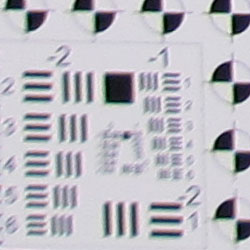
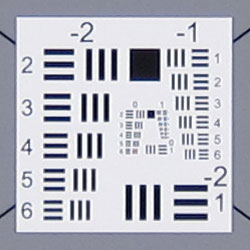
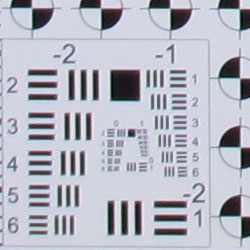
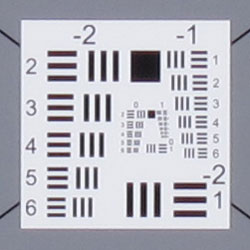
Chromatic Aberration. Chromatic aberration is moderate and slightly bright at wide-angle. The color fringing doesn't extend very far into the frame, though. At telephoto, chromatic aberration is lower and therefore less noticeable. As mentioned previously, dcraw doesn't fully support the S95's files yet (it doesn't interpolate color correctly), and other converters tend to apply some correction automatically, so it's difficult to tell if the Canon S95 is applying some correction for C.A. in its JPEGs. Chromatic aberration is a type of distortion visible as a slight colored fringe around the objects at the edges of the field of view on the resolution target.
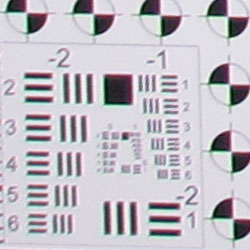
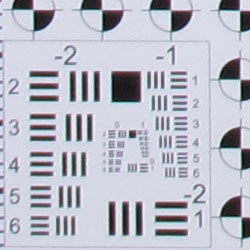
Corner Softness. The Canon S95's lens produced mild to moderate corner softness at full wide-angle. Blurring was stronger in the left corners with the bottom left being the softest, but softness didn't extend very far into the frame. The right corners weren't as soft, and the center was quite sharp. All four corners at full telephoto were pretty sharp. Again, the center was sharp, though contrast is a touch lower than at wide-angle. Overall results are pretty good, especially considering that these shots were taken at maximum aperture, which is relatively fast at wide-angle (f/2.0). That's because corner sharpness generally improves as the lens is stopped down to smaller apertures.
Here are the same wide-angle corners at f/5.6, showing less blurring but about the same amount of C.A. compared to wide-open:
Viewfinder
Coverage
Excellent accuracy from the LCD monitor.


The Canon PowerShot S95's LCD monitor showed just over 100% coverage accuracy at wide-angle, and 100% at telephoto. Excellent results here.
The images above were taken from our standardized test shots. For a collection of more pictorial photos, see our Canon PowerShot S95 Photo Gallery .
Exposure
Canon PowerShot S95 Image Quality
Color
Saturation & Hue Accuracy
Very good overall color and hue accuracy, with moderate oversaturation of some colors.
 |
| In the diagram above, the squares show the original color, and the circles show the color that the camera captured. More saturated colors are located towards the periphery of the graph. Hue changes as you travel around the center. Thus, hue-accurate, highly saturated colors appear as lines radiating from the center. |
Saturation. The Canon S95 produced good saturation overall, with minor to moderate oversaturation in reds, greens, browns and blues. Some colors such as bright yellow, aqua and cyan were actually undersaturated by a small amount. Overall, the Canon S95's images appeared to have natural looking color that wasn't too vivid, and you can always adjust saturation to your liking. Most consumer digital cameras produce color that's more highly saturated (more intense) than found in the original subjects. This is simply because most people like their color a bit brighter than life.
Skin tones. Here, when using Auto white balance, the Canon S95 also did well, producing natural-looking skin tones, though just slightly on the pink side. Where oversaturation is most problematic is on Caucasian skin tones, as it's very easy for these "memory colors" to be seen as too bright, too pink, too yellow, etc.
Hue. The Canon PowerShot S95 produced a few color shifts relative to the correct mathematical translation of colors in its subjects, most visibly pushing cyan towards blue (for better-looking skies), red toward orange, and yellow toward green. Mean "delta-C" color error after correcting for saturation was excellent at only 4.03; much better than average. Hue is "what color" the
color is.


Sensor
Exposure and White Balance
Indoors, incandescent lighting
Good color with both Auto and Manual white balance settings. Slightly better than average exposure accuracy.


Color balance indoors under incandescent lighting had a very slight magenta cast with the Auto white balance setting, but was actually quite accurate. The Canon S95 did much better here than the majority of digital cameras we test. The Incandescent white balance option resulted in a fairly strong reddish cast. The Manual setting produced reasonably accurate color, though a touch cool with very slight green bias. The Powershot S95's exposure system handled this lighting well, producing good results with with no exposure compensation. (The average for this shot is + 0.3 EV.) Our test lighting for this shot is a mixture of 60 and 100 watt household incandescent bulbs, a pretty yellow light source, but a very common one in typical home settings here in the U.S.
Outdoors, daylight
Good overall performance outdoors, though high contrast and hot highlights. Good color as well.
The Canon PowerShot S95 performed reasonably well under harsh outdoor lighting, though default contrast was quite high. About average exposure compensation (+0.7 EV) was needed to keep the model's facial skin tones bright, resulting in some blown highlights in her shirt and flowers. Overall exposure was pretty good in the outdoor far-field house shot at the default exposure, though some highlights were clipped there as well. Color outdoors is good with the Auto white balance setting, with somewhat pink skin tones in the portrait shot. Though contrast is high, the shadows hold onto a fair amount of detail. Fortunately, there's a contrast adjustment to help tame the highlights a bit, though it works better at bringing out shadows.
See full set of test images with explanations
See thumbnails of all test and gallery images
Resolution
High resolution, 1,400 to 1,500 lines of strong detail from in-camera JPEGs.
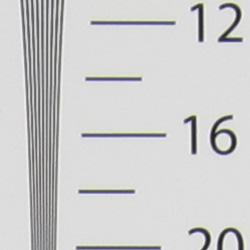
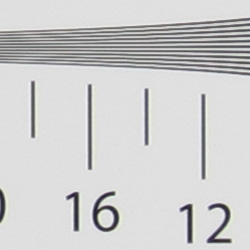
Our laboratory resolution chart revealed sharp, distinct line patterns down to about 1,500 lines per picture height in the horizontal direction, and about 1,400 lines per picture height in the vertical direction. (Some might argue for over 1,800 lines, but artifacts such as moire begin to appear at much lower resolutions.) Extinction of the pattern occurred between 2,200 and 2,400 lines. Adobe Camera RAW does not support the Canon S95's .CR2 files at the time of writing (late September 2010), so we can't tell if additional resolution is available from RAW files, though we suspect there is. Use these numbers to compare with other cameras of similar resolution, or use them to see just what higher resolution can mean in terms of potential detail.
See full set of test images with explanations
See thumbnails of all test and gallery images
Sharpness & Detail
Sharp, detailed images overall, with only minor edge-enhancement on high-contrast subjects. Noise suppression limits definition in low contrast areas, though better than average results here.
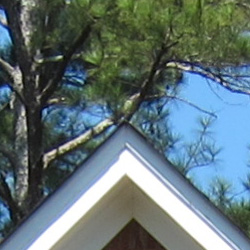
Sharpness. The Canon PowerShot S95 captures very good detail and fairly sharp JPEG images at default settings. Only slight enhancement artifacts are visible on high-contrast subjects such as the crop above left. Edge enhancement creates the illusion of sharpness by enhancing colors and tones right at the edge of a rapid transition in color or tone.
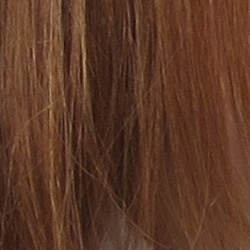
Detail. The crop above right shows moderate levels of noise suppression, as the low contrast areas of hair show less distinct detail. However, many individual strands remain fairly well defined, so performance here is actually better than average for a compact digicam. Noise-suppression systems in digital cameras tend to flatten-out detail in areas of subtle contrast. The effects can often be seen in shots of human hair, where the individual strands are lost and an almost "watercolor" look appears.
RAW vs In-Camera JPEGs
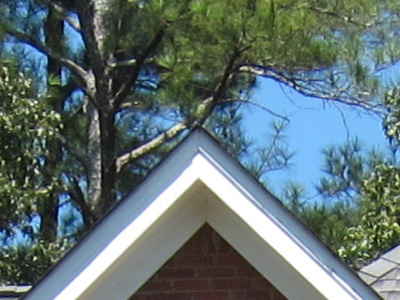
As noted above, the Canon S95 produces fairly sharp, detailed in-camera JPEGs. Normally, more detail is available from RAW files, but the amount of noise present in images from these small sensors means noise reduction must be fairly sophisticated to extract more detail. In the image below, processing from RAW using Canon's bundled software brought no real improvement in visible detail. Take a look below, to see what we mean:
|
PS95FARI0080 (ISO 80)
|
||
 |
||
In the table above, mousing over a link at the bottom will load the corresponding crop in the area above, and clicking twice will open the full resolution image.
The image on the left is an in-camera Fine JPEG taken with default settings. The image in the center is a RAW file processed using Canon's included Digital Photo Professional software, using default settings. The image on the right is also the same RAW file processed in DPP, but stronger unsharp masking was applied with strength set to 8, fineness set to 7, and threshold set to 1. As you can see, Canon's Digital Photo Professional software wasn't really able to extract more detail than the in-camera JPEG, which means the camera's JPEG engine is doing an excellent job. As mentioned previously, Adobe Camera RAW does not yet support S95 .CR2 files at the time of writing (late September, 2010).
ISO & Noise Performance
Low noise at the normal sensitivity settings, with pretty good results up to ISO 400. Strong noise and loss of detail at higher settings, however.
 |
 |
 |
| ISO 80 | ISO 100 | ISO 200 |
 |
 |
 |
ISO 400 | ISO 800 |
ISO 1,600
|
 |
 |
 |
ISO 3,200 | ISO 6,400 (2.5MP) | ISO 12,800 (2.5MP) |
The Canon S95's high ISO noise performance is very similar to that of the S90's. (That's no surprise, since they likely use the same sensor and both use DIGIC 4 processors.) The PowerShot S95 produced low to moderate noise at the lower sensitivity settings, though the effects of noise reduction such as smudging and loss of fine detail can already be seen even at the lowest ISO if you look carefully. Fine detail holds pretty strong up to ISO 200, though. At ISO 400, noise is still quite good and a lot of fine detail remains intact, but additional smudging is evident. Noise grain isn't really more apparent as you move to ISO 800, but stronger noise reduction results in additional detail loss. Yellow and purple blotches (chroma noise) begin to be noticeable in darker tones and hair at ISO 400, and worsen as ISO goes up. At ISOs 1,600 and 3,200, artifacts from noise reduction and increased chroma noise dominate, blurring out most fine detail. As one would expect from a small sensor, ISOs 6,400 and 12,800 are so noisy that only 2.5-megpixel images are offered. Still, overall handling of detail versus noise is better than the typical compact camera, and detail at higher ISOs seems to be slightly improved over the S90. To see how these images held up to printing at various sizes, read the Output Quality section below
Extremes: Sunlit and low light tests
High resolution with strong detail, though somewhat high default contrast limits dynamic range. Good low-light performance, capable of getting bright images in near darkness.


Sunlight. The Canon PowerShot S95 performed reasonably well under the deliberately harsh lighting in the test above, but with washed-out highlights and some deep shadows. Despite some noise suppression in the shadow areas, detail is still good in the shadows. At +0.3 EV exposure compensation, the face, background and some shadow areas are a little dark, so we preferred the +0.7 EV exposure, though it resulted in some blown highlights in her shirt and flowers. Some may prefer the +1.0 EV setting as the model's face is brighter, but we felt it had too many clipped highlights. The PowerShot S95 offers five contrast levels settings, but as mentioned previously they work better lightening shadows than reducing clipped highlights, so be sure to adjust your exposure accordingly. Also consider using fill flash in situations like the one shown above; and it's better to shoot in the shade when possible.
| Dynamic Range Correction Examples | ||
 |
 |
 |
| DR Auto 0 EV |
DR 200% 0 EV |
DR 400% 0 EV |
As part of the S95's Intelligent Contrast (i-Contrast) feature, the camera has "Dynamic Range Correction" to tame highlights, and "Shadow Correct" to bring out more shadow detail. A separate "High Dynamic Range" mode takes three shots at different exposures and combines them in-camera, but does not micro-align them like some other cameras, so a tripod is required.
Above are examples of our "Sunlit" Portrait scene shot with the S95's three available i-Contrast Dynamic Range Correction settings. The resulting images are a little dim at default exposure (in hindsight, it would have been better to shoot these at +0.7 or +1.0 EV compensation), but you can see that DR 400% has better detail in the highlights than the DR 200% setting. The results with DR Auto is somewhere between. Note that Dynamic Range Correction boosts ISO, so a more noise is visible with it enabled. (DR Auto above used ISO 289, DR 200% used ISO 160 and DR 400% used ISO 320.)
| Face Detection Examples | ||
 |
 |
 |
| Aperture Priority 0 EV |
Smart Auto 0 EV |
Portrait 0 EV |
The table above shows results with the default exposure using Aperture Priority AE, as well as Smart Auto and Portrait scene modes. As you can see, the S95's face detection in both Smart Auto and Portrait modes improved exposure automatically compared to the default exposure in Aperture Priority mode. We much preferred the Smart Auto image, as the camera also applied some Intelligent Contrast resulting in far fewer blown highlights, and used a lower ISO than Portrait mode (ISO 320 vs 400).
Because digital cameras are more like slide film than negative film (in that they tend to have a more limited tonal range), we test them in the harshest situations to see how they handle scenes with bright highlights and dark shadows, as well as what kind of sensitivity they have in low light. The shot above is designed to mimic the very harsh, contrasty effect of direct noonday sunlight, a very tough challenge for most digital cameras. (You can read details of this test here.)
| Low Light (One Foot-Candle) | ||
 |
 |
 |
| ISO 80 1.6 sec, f2.0 |
ISO 100 1.3 sec, f2.0 |
ISO 200 0.6 sec, f2.0 |
 |
 |
 |
ISO 400 0.3 sec, f2.0 |
ISO 800 1/6 sec, f2.0 |
ISO 1,600 1/13 sec, f2.0 |
 |
 |
 |
ISO 3,200 1/25 sec, f2.0 |
Smart Auto ISO 1,532 1/20 sec, f2.0 |
Low Light mode ISO 3,200 1/28 sec, f2.0 |
 |
 |
 |
| Low Light mode ISO 6,400 1/56 sec, f2.0 |
Low Light mode ISO 12,800 1/64 sec, f2.8 |
Low Light Auto mode ISO 3,200 1/55 sec, f2.0 |
Low light. The Canon PowerShot S95 did very well in our low-light tests, capturing bright, usable images at sensitivities as low as ISO 80. Given that the S95 is capable of shutter speeds as slow as 15 seconds, the camera should have no problems capturing usable images at much lower light levels than the one foot-candle level we tested at. Noise is very well controlled to ISO 400, and color balance looks good if slightly cool with the Auto white balance setting. The Canon S95's Low Light mode (as indicated by the candle icon on the mode dial) reduces resolution to 2.5-megapixels by pixel-binning, producing lower noise and allowing higher ISOs up to 12,800. The camera's AF system was able to focus unassisted below the 1/16 foot-candle light level and in complete darkness with the AF assist lamp, keeping up well with its exposure system.
How bright is this? The one foot-candle light level that this test begins at roughly corresponds to the brightness of typical city street-lighting at night. Cameras performing well at that level should be able to snap good-looking photos of street-lit scenes.
NOTE: This low light test is conducted with a stationary subject, and the camera mounted on a sturdy tripod. Most digital cameras will fail miserably when faced with a moving subject in dim lighting. (For example, a child's ballet recital or a holiday pageant in a gymnasium.) For such applications, you may have better luck with a digital SLR camera, but even there, you'll likely need to set the focus manually. For information and reviews on digital SLRs, refer to our SLR review index page.
Flash
Coverage and Range
A moderately powerful flash for its size, with uneven coverage at wide-angle. Good exposure from Auto flash mode in our indoor portrait test shot.


Coverage and Exposure. Flash coverage was uneven at wide-angle, with more uniform (albeit very dim) results at full telephoto. Coverage at wide-angle seems to have improved slightly over the S90. The S95's Auto flash mode did a good job with our indoor flash portrait test, resulting in a bright image at ISO 250 (automatically selected). The S95 used a fairly slow shutter speed of 1/25 second however, which could lead to some issues with subject motion blur.
| Flash Range: Wide Angle | |||||
|---|---|---|---|---|---|
| 6 ft | 7 ft | 8 ft | 9 ft | 10 ft | 11 ft |
 1/60 sec f2.0 ISO 100 |
 1/60 sec f2.0 ISO 100 |
 1/60 sec f2.0 ISO 100 |
 1/60 sec f2.0 ISO 100 |
 1/60 sec f2.0 ISO 100 |
 1/60 sec f2.0 ISO 100 |
| 12 ft | 13 ft | 14 ft | 15 ft | 16 ft | |
 1/60 sec f2.0 ISO 100 |
 1/60 sec f2.0 ISO 100 |
 1/60 sec f2.0 ISO 100 |
 1/60 sec f2.0 ISO 100 |
 1/60 sec f2.0 ISO 100 |
|
| Flash Range: Telephoto | |||||
|---|---|---|---|---|---|
| 6 ft | 7 ft | 8 ft | 9 ft | 10 ft | 11 ft |
 1/60 sec f4.9 ISO 100 |
 1/60 sec f4.9 ISO 100 |
 1/60 sec f4.9 ISO 100 |
 1/60 sec f4.9 ISO 100 |
 1/60 sec f4.9 ISO 100 |
 1/60 sec f4.9 ISO 100 |
| 12 ft | 13 ft | 14 ft | 15 ft | 16 ft | |
 1/60 sec f4.9 ISO 100 |
 1/60 sec f4.9 ISO 100 |
 1/60 sec f4.9 ISO 100 |
 1/60 sec f4.9 ISO 100 |
 1/60 sec f4.9 ISO 100 |
|
ISO 100 Range. At wide-angle and ISO 100, flash shots were bright to about 12 feet, decreasing in brightness from that point on. At telephoto, flash shots started out dim at 6 feet, and got dimmer from there.
| Manufacturer-Specified Flash Range | |
|---|---|
| Wide Angle | Telephoto |
 21.0 feet Auto ISO 400 |
 9.8 feet Auto ISO 640 |
Manufacturer Specified Flash Test. Canon rates the PowerShot S95's flash range at 6.5 meters / 21 feet at wide-angle and 3 meters / 9.8 feet at telephoto, when using Auto ISO. In the shots above, the PowerShot S95's flash performs to Canon's specifications, producing bright images at both wide-angle and full telephoto, though the camera boosted ISO to 400 and 640 respectively.
Our standard test method for flash range uses a fixed setting of ISO 100, to provide a fair basis of comparison between cameras. We now also shoot two shots using the manufacturer-specified camera settings, at the range the company claims for the camera, to assess the validity of the specific claims.
Output Quality
Print Quality
Printed results from the Canon S95 are very good, showcasing the quality lens and light-taming sensor.
 ISO 80/100 shots look good printed at 13 x 19 inches, with good detail and only minor softening in our red swatch.
ISO 200 images print very nice at 11 x 14.
ISO 400 images have good detail at 11 x 14, but are slightly soft and more luminance noise appears in the shadows. This goes away when printed at 8 x 10 inches.
ISO 800 images are a bit too soft in some areas and grainy in others at 8 x 10, while 5 x 7s look good here.
ISO 1,600 is surprisingly usable at 8 x 10, though dark colors get darker, and shadows deepen. Sharpness improves a bit at 5 x 7.
ISO 3,200 shots are darker overall than any of the preceding shots, and are a little soft at 5 x 7. They're better at 4 x 6 and quite usable.
Like the LX3, the Canon S95's print test is a pretty nice and even descent down the print size slope. It would be even better printing from RAW with careful processing, so bear that in mind.
Testing hundreds of digital cameras, we've found that you can only tell just so much about a camera's image quality by viewing its images on-screen. Ultimately, there's no substitute for printing a lot of images and examining them closely. For this reason, we now routinely print sample images from the cameras we test on our Canon Pro9000 Mark II studio printer, and on the Canon Pixma MP610 here in the office. (See the Canon Pixma Pro9000 Mark II review for details on that model.)
The images above were taken from our standardized test shots. For a collection of more pictorial photos, see our Canon PowerShot S95 Photo Gallery .
Not sure which camera to buy? Let your eyes be the ultimate judge! Visit our Comparometer(tm) to compare images from the Canon PowerShot S95 with those from other cameras you may be considering. The proof is in the pictures, so let your own eyes decide which you like best!
Performance
Canon PowerShot S95 Performance
Timing and Performance
Slow to average speed for a consumer camera.
| Startup/Shutdown |
||
| Power on |
2.2 seconds
|
Time it takes for LCD to turn on and lens to deploy and capture a picture. |
| Shutdown |
1.5 seconds
|
How long it takes to retract lens. |
| Buffer clearing time |
2 seconds
(after 20 RAW files)* 1 second (after 20 L/F JPEGs)* |
Worst case buffer clearing time. -- This is the delay after a set of shots before you can remove the card. Some cameras won't retract their lenses and shut down until the buffer is cleared. |
| *Note: Buffer clearing times measured with a SanDisk Extreme III 8GB SDHC memory card. Slower cards will produce correspondingly slower clearing times. | ||
Average startup and shutdown times here, very similar to the S90. Buffer clearing is faster than average, though burst rates are slow enough that a fast card can keep up.
| Shutter Response (Lag Time) | ||
|---|---|---|
| Full Autofocus Wide |
0.641 second
|
Time from fully pressing shutter button to image capture, zoom lens at wide angle position. |
| Full Autofocus Tele |
0.617 second
|
Time from fully pressing shutter button to image capture, zoom lens at telephoto position. |
|
Full Autofocus
Flash enabled |
0.900 second
|
Time to capture while forcing flash to fire, zoom lens at wide angle position.
|
| Prefocused |
0.096 second
|
Time to capture, after half-pressing and holding shutter button. |
Full autofocus shutter response in the default AF mode is slower than average at wide-angle, at 0.64 second. Full AF shutter lag is about average at full telephoto, at 0.62 second. Surprisingly, these results are about 50% slower than its predecessor, the S90. Enabling the flash increases lag quite a bit to 0.90s, due to the preflash metering involved. "Prefocusing" the camera by half-pressing and holding down the shutter button before the final exposure results in a lag time of 0.096 second, which while fast, isn't quite as fast as some.
| Cycle Time (shot to shot) | ||
|---|---|---|
| Single Shot mode Large Fine JPEG |
2.58 seconds
|
Time per shot, averaged over 20 shots. |
| Single Shot mode |
2.88 seconds
|
Time per shot, averaged over 20 shots. |
| Early shutter |
No
|
Some cameras don't snap another shot if you release and press the shutter too quickly in Single Shot mode, making "No" the preferred answer. |
| Continuous mode |
0.53 second (1.87 frames per second);
20+ frames total; 1 second to clear |
Time per shot, averaged over buffer length or 20 shots, whichever came first. |
| Continuous mode |
1.02 second (0.98 frames per second);
20+ frames total; 2 seconds to clear |
Time per shot, averaged over buffer length or 20 shots, whichever came first. |
| Flash recycling |
6.0 seconds
|
Flash at maximum output. |
| *Note: Buffer clearing times measured with a SanDisk Extreme III 8GB SDHC memory card. Slower cards will produce correspondingly slower clearing times. Slow cards may also limit length of bursts in continuous mode. ISO sensitivity also affects cycle times and burst mode performance, with higher ISOs generally increasing cycle times and reducing burst performance. |
||
Shot-to-shot cycle times are slower than average, at 2.58 seconds for large/fine JPEGs. RAW cycle-time was a bit slower, at 2.88 seconds per frame. These results are comparable to the S90's numbers (2.43 and 2.96 seconds respectively).
The PowerShot S95's continuous shooting modes were faster than the S90's (almost twice as fast for JPEGs), but still somewhat sluggish for its class. The S95 captures large/fine JPEGs at 1.87 frames per second (vs 0.94 fps for the S90) , though the camera seemed to be able to capture frames continuously at this rate. The burst rate dropped to 0.98 frames per second when capturing RAW files (vs 0.70 fps for the S90), but again with apparently no buffer limit. The flash took 6.0 seconds to recharge after a full-power shot, which is slower than average, but improves on the S90's 6.8 seconds.
| Download Speed | ||
|---|---|---|
| Windows Computer, USB 2.0 |
4,346 KBytes/sec
|
Typical Values: |
Connected to a computer or printer with USB 2.0, download speeds were moderately fast.
Bottom line, the Canon PowerShot S95's timing performance isn't its strong suit. Startup and shutdown times were about average, autofocus speeds and shutter lag were slower than average, as were full resolution continuous modes. Buffer depths and buffer clearing were however quite good, but not really a surprise given the slow burst rate and 10-megapixel files.
Battery and Storage Capacity
Battery
Below average battery life for a lithium-ion design.
| Operating Mode | Number of Shots |
|---|---|
|
Lithium-ion Rechargeable Battery,
(CIPA standard) |
200
|
The Canon PowerShot S95 uses a custom rechargeable lithium-ion battery for power, and ships with a charger. Battery life is pretty short (and slightly worse than the S90's 220 shot rating), so we recommend you pick up a spare battery and keep it freshly charged and on-hand for extended outings.
The table above shows the number of shots the camera is capable of (on a fully-charged rechargeable battery as appropriate), based on CIPA battery-life and/or manufacturer standard test conditions.
(Interested readers can find an English translation of the CIPA DC-002 standards document here. (180K PDF document))
Storage
The Canon PowerShot S95 accepts MMC/SD/SDHC/SDXC memory cards, and does not include any built-in memory or a starter card. Canon recommends using a card with Speed Class 4 or faster for capturing movies.
|
Image Capacity with
1GB Memory Card |
Fine | Normal | RAW | RAW + LF JPEG |
|
|---|---|---|---|---|---|
|
3,648 x 2,736 |
Images (Avg Size) |
367
2.8 MB |
754
1.4 MB |
67
15.3 MB |
56
18.1 MB |
|
Approx.
Comp. |
11:1
|
22:1
|
1:1
|
-
|
|
|
2,816 x 2,112 |
Images (Avg Size) |
580
1.8 MB |
1,160
863 KB |
-
|
-
|
|
Approx.
Comp. |
10:1
|
20:1
|
-
|
-
|
|
|
1,600 x 1,200 |
Images (Avg Size) |
1,588
645 KB |
3,017
339 KB |
-
|
-
|
|
Approx.
Comp. |
9:1
|
17:1
|
-
|
-
|
|
|
640 x 480 |
Images (Avg Size) |
5,029
204 KB |
7,543
136 KB |
-
|
-
|
|
Approx.
Comp. |
5:1
|
7:1
|
-
|
-
|
|
We strongly recommend buying a large capacity SDHC memory card at least a 4GB card, preferably an 8GB or larger one, to give yourself extra space for extended outings, RAW files or video. (Check the shopping link above, cards are really cheap these days, so no reason to skimp.)