


Overview
Fujifilm FinePix F50fd Overview
by Alex Burack
Review Date: 03/20/08
Fujifilm's FinePix F50fd is likely to come across vastly different to general consumers versus industry insiders. Those immersed in the industry might question the jump in resolution up to 12 megapixels, viewing the F50fd as essentially a digression for Fujifilm, while general shooters could look to the camera's massive resolution, upgraded face detection, dual image stabilization, 2.7-inch LCD screen, and expansive sensitivity range and think this camera's got it all. Ultimately, there's a bit of truth to both.
The Fujifilm F50fd arrives almost a year after the release of the F31fd. The face detection system offers some nice modifications, which include the addition of white balance and red eye correction, slide show and cropping functionality, and an increase in the number of detectable faces.
The F50fd also marks the arrival of image stabilization to this portion of the line. Fujifilm calls it Dual Image Stabilization since it is composed of both mechanical sensor-shift image stabilization and high-sensitivity "digital" stabilization. The first method moves the sensor to correct for camera movement, and the second boosts the ISO to allow faster shutter speeds and freeze motion. Both elements work in tandem, with the camera determining how much of each to use for a given shot.
Along with its primary upgrades, the Fujifilm F50fd has a 2.7-inch, 230,000 pixel LCD screen, with a new Micro thumbnail view in playback mode. There's also a crop function in playback that works with the face detection system to isolate faces in the frame and create dedicated portraits. A blog mode resizes images to a Web-friendly 640 x 480 pixels, which can then be sent out to other IrSimple devices within range. Introduced in September 2007, the F50fd is now selling for just over US$200.
Fujifilm FinePix F50fd User Report
by Alex Burack
Fujifilm's F-series is grounded in solid performance and strong image quality at the 6-megapixel level (lots of detail, low noise at high ISO, responsive operation speeds, and impressive battery life). The foundation was set with the FinePix F10, expanded on with the F31fd, and the high-resolution FinePix F50fd ushers in a new era. Now the question arises: can Fujifilm leverage the strengths of its Super CCD design to overcome the strain 12 megapixels puts on a small chip? (Hint: The Fujifilm F50fd actually uses one of the largest sensors we've seen in a small point and shoot digital camera: 1/1.6-inch.)
The Fujifilm F50fd is a mélange of the market's trendiest features. Adding dual image stabilization is primary, because it paves the way for the camera's other enticing features, namely Face Detection 2.0, Portrait Enhancer, and Natural Light modes, to do their jobs effectively. These settings all seem to relate to two core objectives: capturing striking portraits and achieving better results in low light. Professional photographers buy expensive equipment and spend lots of time twiddling dials to achieve good results in these situations. Fuji does a good job of simplifying these tasks, while including an intuitive selection of options for point-and-shooters to play around with.
 Design. The looker of the family, Fuji's F50fd plays more to style-seekers than previous models in its line. Though not quite as chic as some offerings in Canon or Sony's more-aestheticized arsenals, the FinePix F50fd has a smooth, flowing design with rounded corners and a polished sheen that's much easier on the eyes than its boxy predecessors. It spans a modest 3.6 x 2.3 x 0.9 inches, slightly broader than the slimmest point-and-shoots, but its flat surfaces help it to fit easily into most pockets. The F50fd is thinner and narrower than Fujifilm's FinePix F40fd and F31fd, but stands slightly taller than both.
The Fuji F50fd's large LCD dominates much of the rear panel, relegating the majority of its controls to a narrow strip of real estate along the rightmost portion of the back face, and a small section on the top.
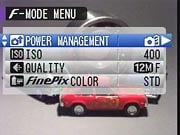
F-Menu. For frequently accessed menu items.
Typical of Fuji cameras, settings and options are housed in two menu locations: the F-menu, and the Menu. If you're unaccustomed to this layout, it might seem unnecessarily confusing, but in time you'll grow used to it. After a few days testing the camera, I began to appreciate the separate F-menu because its options are limited, so there's no scrolling; any setting that's in there is visible when the menu opens. Some of the shooting options included and excluded do make me wonder, though. For instance, Power Management and Color Mode options are two of the four settings listed in that menu. I would have much preferred to see White Balance and Metering in there.
I held the FinePix F50fd with both one and two hands during shooting, finding the speed-bump-like flare on the front, and the small mode dial on the back were the only real elements to support my handle on the camera. The combination of its slick exterior and lack of a handgrip made taking advantage the wrist strap a wise decision.
 Consistent with the majority of fashionably-aware point-and-shoots these days, the Fujifilm F50fd lacks an optical viewfinder, instead supplying an large LCD for both composition and playback. The expansive 2.7-inch screen is framed by a protruding panel whose darker color helps images pop onscreen. The 230,000-pixel screen was sufficient to check focus and image details after capture. I was disappointed with the angle of view, however. The screen has a good lateral range -- which is great for showing images to a group huddled around the camera -- but falls off almost immediately when tilted vertically. Looking up or down at the LCD, the display appears washed out and slightly solarized, making it tough to capture those over-the-crowd shots at a show or event.
On the LCD of the Fujifilm F50fd, a purple streak would occasionally run down the live view display when a bright light source was in front and overhead. It was not constant, and the streaks didn't show up in the captured image (even when viewed on the LCD right after capture), but were worthy of note.
Lens. The Fujifilm FinePix F50fd is led by a relatively standard 3x optical zoom lens that telescopes out when powered on, retreating back behind an automatic cover when shut down. The zoom spans a 35-105mm equivalent focal range. It's quite common, but it limits the wide end -- you'll need to be in a pretty large space to squeeze ten people into a group portrait.
 Rotating a small ring around the shutter release adjusts the zoom. It's a sensitive control that moves pretty quickly, stopping at roughly eight individual points within its focal range. Optically, however, the lens is quite slow. With an f/2.8 max aperture that drops to f/5.1 at full telephoto, it seems Fujifilm's fashionably-late arrival to the image stabilization game is just in time.
For a few camera generations now, Fujifilm has ignored mechanical image stabilization, opting instead to concentrate its efforts on high ISO performance. With the Fuji F50fd, we see the combination of the two for the first time in an F-series FinePix point-and-shoot. The Fujifilm F50fd's 12-megapixel Super CCD HR sits on a shifting platform that moves to correct for camera shake. It can be set to work continuously or to engage only when you press the shutter release. The other component of the camera's dual image stabilization system is referred to as High sensitivity, and basically functions like many other digital image stabilization settings, boosting the ISO to use faster shutter speeds and freeze motion. The idea here is that the camera utilizes both collectively, intelligently discerning how much of each is needed for the best results given the subject and shot. In use, while walking around at night, I found the dual stabilization system effective, and necessary, since there is no true grip on the camera.
Shooting the Fujifilm F50fd with one hand at full telephoto, I was able to get tack-sharp images at 1/20 second, and occasionally at 1/15 second. As with any camera, the addition of "true" (non-digital) image stabilization is almost impossible to overstate. It's important to remember, however, that in low light, even dual IS won't "pause" moving subjects effectively.
Modes. Eight icons are arrayed around the Fujifilm F50fd's upright mode dial.
The lone red icon marks the camera's Auto mode, which locks out most exposure settings (with the exception of three selectable Auto ISO settings, denoted by top sensitivity).
A "Manual" mode is included, but it functions like a Program setting with a few overrides; users cannot manually set exposure. More control is granted in the camera's semi-automatic Aperture- and Shutter-Priority mode, but they're really to shape the visual effect of the image (depth-of-field and motion), more than to control exposure.


Hedging your bets: If you're unsure of what will give you the best exposure, you can always try Natural Light & Flash mode, which will take a quick shot without, and one with flash, and you can pick the best later.
The Fuji F50fd isn't really about manual control anyway. Fujifilm instead makes an effort to create automatic modes that capture portraits and low-light shots the way an experienced photographer would. The most successful of these are the camera's Portrait Enhancer and Natural Light & with Flash modes, along with its overarching Face Detection 2.0 system.
Fujifilm's Natural Light & with Flash mode has been around for a few generations, and is one of the most practical settings on any point-and-shoot camera. The decision whether to shoot with flash or boost the ISO is often a tough one for novices or experienced photographers both. In this mode the camera quickly snaps two successive images, one without flash, and one with, and displays them both side-to-side, letting you evaluate them and decide which you prefer. How logical!
A new addition to the line, the F50fd's Portrait Enhancer mode leverages the camera's Face Detection system and applies "Double Noise Reduction" to faces the camera detects in the frame. The effect is basically a smoothing of detail that helps remove some noise and blemishes, and makes the face (and skin) look softer. It's actually a pretty successful quick fix on the fly.
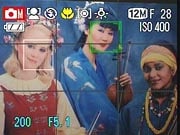
Face Detection 2.0. Fujifilm's new system detects tilted faces as well.
Speaking of faces, this FinePix model touts an improved Face Detection system. Face Detection 2.0, as the name implies, expands on Fuji's efforts to orient image exposure and focus around recognized faces in the frame. FD 2.0's more refined effort covers up to 10 people in the frame, and is more sensitive to faces in profile and extreme tilts (270-degrees around). Fuji also added white balance correction based on facial tonalities and red eye removal (during the shot or playback) to optimize the presentation of the people in the image.
In my experiments with the feature, the camera effectively discerned 10 individual faces in a frame, and showed a visible improvement in recognizing skewed or cropped faces (tiled or in profile). It doesn't scan the frame; the brackets jump to the face closest to the lens or the center of the frame. A green square is superimposed over the primary subject, while other detected faces are bracketed in white. You can influence which face is the priority by tilting and slightly adjusting the angle of your wrist.
Face Detection 2.0 worked well on faces in profile, and didn't stumble when subjects' eyes were closed. However, there was some difficulty when people got too close to the camera. I don't mean against-the-lens close, but just slightly in front of the minimum focusing distance -- this spells trouble for those arms-extended self-portraits.
Playback mode also benefits from Face Detection 2.0. Pressing the face detection button once during image review brackets recognized faces; pressing the button a second time will zoom in on the primary face and allow users to inspect details or crop the image into an isolated portrait. Continuing to press the face detection button in group portraits will scroll though close ups of other detected faces in the picture. The feature can also be used in slideshow form, transiting between the various recorded faces. It may very well be one of the cheesiest features I'm comfortable appreciating in a public forum; but at some point, the family-photographer, socialite, or partygoer in you will appreciate it too.

Two additional, slightly-gimmicky features are integrated into the Fujifilm F50fd's Playback Mode for your viewing and publishing pleasures. A newly added Micro Thumbnail View displays up to 100 minute thumbnails on the LCD at once. When you scroll through the images, the highlighted frame is enlarges slightly, helping to see the individual image more clearly. When a Web-worthy shot is spotted that you want to upload, you can select the "Trimming for Blog" setting under the F-Menu and crop the images to an email- or Web-friendly file size (640 x 480). Images can then be transmitted directly to another IrSimple-enabled device. In all, it's nice to see the progression of face detection move beyond the shot -- when we can organize collections of images by specific faces, I'll truly be wowed.
 Storage and battery. The Fuji F50fd is fitted with a 3.7v lithium-ion cell that's rated to get 230 shots on a charge, according to CIPA standards. The F50fd's endurance pales in comparison to previous models in the line, some of which attained well over double that on a charge, but it is about average. The F50fd's battery held up sufficiently in use, but it would be wise to take an extra cell on longer outings, particularly if viewing a lot of slide shows.
25MB of internal memory is nestled into the Fujifilm F50fd, which holds about five 12-megapixel JPEGs (Fine). This may help you in a pinch, should the card run full and the perfect moment arises, but with a native 12-megapizel file size, a reasonably-sized card (I'd say 1GB minimum) is a necessity. Fortunately, the F50fd carries a dual memory card slot that conveniently accepts both SD and xD media.
Shooting. My experiences handling the Fuji F50fd were mostly positive. The large LCD and clean layout made it easy to locate necessary controls and compose and capture an image. I didn't particularly take to the slick exterior's lack of a handgrip or any sort of texture or rubber to help handling. The slight accent on the front of the frame was just enough to support my hand (or finger). I found it often required both hands to really stabilize it; and even at that, it would have been nice to have something more than the mode dial on the back to provide support.
In terms of speed, the Fujifilm F50fd took its time performing many critical operations. Taking 2.8 seconds to start-up and snap an image, there was some waiting right from the start. Shot-to-shot speeds were also sluggish, hesitating for 3.07 seconds between shots (JPEG Large/Fine), though full-autofocus shutter lag leaned more toward average at wide-angle (0.60 seconds) and slightly slower at telephoto (0.63 seconds).
The Fuji FinePix F50fd is quick on the draw, however, when pre-focused -- meaning when the focus is already locked in with a half-press on the shutter prior to taking the image. So, even with some serious speed limitations, a little preparation can quell fears of missing that critical shot. These speeds may not be a problem, however, for most posed portrait shots, which the camera seems particularly oriented to.
The Fujifilm F50fd's leisurely continuous mode offers little improvement. It carries on at only about 0.34 frames per second (fps) for over 20 consecutive JPEGs (Large/Fine), which is quite slow by today's standards. There is a high-speed mode that can capture 12 frames at almost five frames per second (4.87 to be exact), but it operates at a reduced resolution of only three megapixels. The good news is that three megapixels at low ISO are more than enough to make a 4x6-inch print.
Upgrading to a larger 2.7-inch LCD screen, the Fujifilm F50fd struts a more contemporary look than preceding models in Fujifilm's FinePix line. Its massive display does come at a cost, however, cutting battery endurance in half.
I found the LCD performed well outdoors in bright daylight so long as it wasn't in direct sunlight. It washed out and lost contrast when the harsh sun was directly overhead, but that's pretty typical of most LCDs. Indoors, the screen is bright, with good contrast, but colors are a bit understated compared to the actual captured tones.
Image Quality. The Fujifilm F50fd comes from a line of strong performers. Following the FinePix F10, and moving through the F31fd, I had high hopes for the F50fd from the start. With the camera in-hand, I took to the fleetingly-sunny streets of Boston and ran the camera through a test spin.
With 12 million pixels coating its 1/1.6-inch Super CCD HR sensor, the FinePix F50fd has plenty of real estate on its sensor when compared to 1/2.5 sensors found in most digicams. Still, it struggled a bit to cleanly render fine details (refer to hair crops on the Exposure tab in the ISO & Noise Performance section). Blurring was evident near the corners of the frame, and chromatic aberration became increasingly apparent at wide-angle.
The hefty resolution -- as is often the case -- seems to come with its share of tradeoffs. Noise suppression is visible throughout most of the sensitivity range and sacrifices some of the detail the camera is capable of producing. I found the Fujifilm F50fd handled noise acceptably at its lower sensitivities, but at ISO 400, noise was pronounced. As the sensitivity is pushed to ISO 800, noise levels take a significant leap; by ISO 1,600 images look sandpaper-like, with details severely blurred.

Stumbling upon the waterway near South Boston, snapping a few sample shots affirmed the accuracy of the Fuji F50's color reproduction. Saturation levels were neutral, but came across as slightly underwhelming. This might disappoint shooters who prefer the more embellished look typical of many consumer cameras; however, post-processors will likely appreciate the camera's representational rendering, allowing images to be tweaked away from their "real" tones and more toward personal liking.

Looking down at the snowy dock, we can get a feel for the camera's tonal range and its ability to hold detail in both the shadows and highlights -- here it's really just the former. In the dock shot, the shadows are open, with visible information, and the transitions out of them are pretty smooth. The highlights, however, are completely blown out, taking on an almost charged glow. In a host of other images we shot with the F50fd, we found that preserving the highlights comes with limited shadow information.
Appraisal. The Fujifilm F50fd's hike in resolution yields sharp images with lots of detail, but it does come at a cost. Unlike previous models in the line, noise permeates images shot at ISO 400 and gets significantly worse as the ISO is pushed to 800 and beyond. Captured images also show evidence of noise suppression and slight edge enhancement throughout the most of the sensitivity range.
Colors rendered by the Fujifilm F50fd are realistic, with accurate hues and saturation levels. This true-to-life reproduction may not be as appealing to some as the more embellished look of most compact cameras. However, the precise tones do offer an almost ideal starting point for post-processing.
Optically, distortion and chromatic aberration are more apparent when zoomed out. The camera performs best at the telephoto end of its range, which is nice for a camera geared toward portraiture. Ultimately, with its incorporation of Face Detection, Portrait Enhancement, and dual image stabilization, point-and-shooters looking to snap scores of people pictures will be pleased with the results.
Basic Features
- 12 megapixel Super CCD HR sensor
- 3x optical zoom lens (35-105mm 35mm equivalent)
- 8.2x digital zoom
- 2.7-inch LCD with 230,000 pixels
- ISO Sensitivity from 100 to 6,400 (reduced res.)
- Shutter speeds from 8 to 1/2,000
- Max Aperture f/2.8 at wide-angle, f/5.1 at telephoto
- USB 2.0 Hi-Speed
- Powered by 3.7v lithium-ion battery
Special Features
- Face Detection 2.0 sets the focus, exposure, and white balance for up to 10 faces
- Accepts SDHC/SD/xD Memory cards
- Zoom Up and Crop settings allow detected faces to become portraits in playback mode
- Dual image stabilization (CCD-shift, high sensitivity)
- Face-oriented slide show (face detection system will detect and zoom in during playback)
- Micro thumbnail view displays up to 100 images at a time; thumbnail images are enlarged when scrolled over
- IrSimple
- Blog mode (auto resize; can transmit directly to other IrSimple-enabled device)
In The Box
The Fujifilm F50fd ships with the following items in the box:
- Fujifilm FinePix F50fd camera body
- Battery Charger BC-50
- Lithium-ion battery NP-50
- A/V cable
- USB cable
- F50fd user manual
- Wrist strap
- FinePix viewer CD-ROM
Recommended Accessories
- Large capacity SD or xD memory card, (you'll need it for the 12-megapixel files)
- Additional Lithium-ion NP-50 battery
- Underwater Housing (WP-FXF50)
Conclusion
| Pro: | Con: |
|---|---|
|
|
After resisting the temptation to chase megapixels for a number of camera generations, Fujifilm finally caved. With a jump up to 12 megapixels and the addition of mechanical image stabilization, some might feel the F50fd is a conventional move toward a more mainstream model. However, the F50fd's design and creative feature set do more than pad the marketing campaign.
Yes, the jump in resolution does come at a cost, despite the larger sensor, sacrificing noise performance and detail to an extent. However, its features -- Face Detection 2.0, dual image stabilization, and multiple available light modes -- work to neutralize some of the impact, and effectively achieve the camera's two primary objectives: producing better low-light images and portraits.
Though there is blurring due to noise suppression in even ISO 100 shots, most people won't notice it unless they're making prints at 11x14 or larger. Those who print 4x6s won't notice any image quality degradation until ISO 1,600, so here's an instance where high resolution actually does overcome most noise issues.
Ultimately, the FinePix F50fd will appeal to previous FinePix owners as well as general point-and-shooters who snap lots of people pictures. We're a little concerned about flash power and range, but if you keep your flash shots wide, and keep your subjects close, the Fujifilm F50fd will do just fine. Here's another case where a larger sensor and higher megapixels work to meet the average point-and-shooter's needs, making the Fujifilm FinePix F50fd a Dave's Pick.
Optics
Fujifilm FinePix F50fd Optics
Lens
Zoom
A typical 3x optical zoom with good performance. Digital zoom performance
is also pretty good.
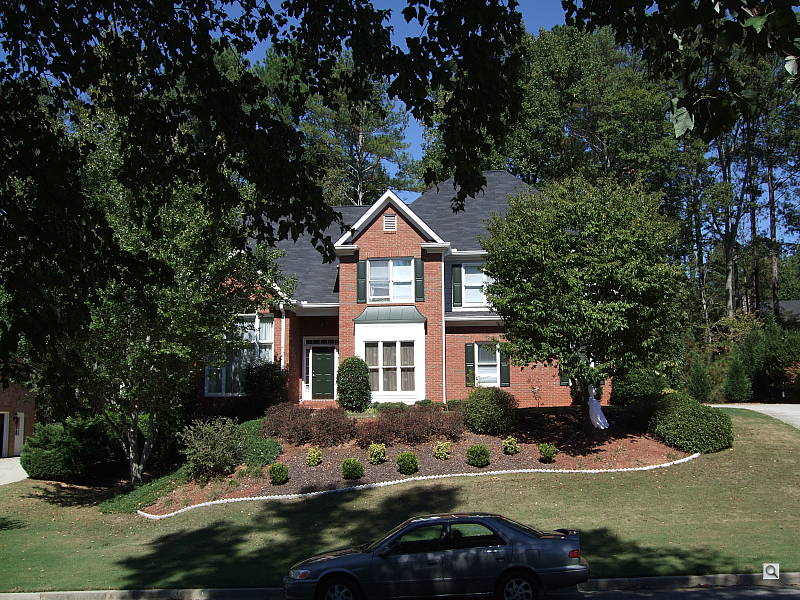
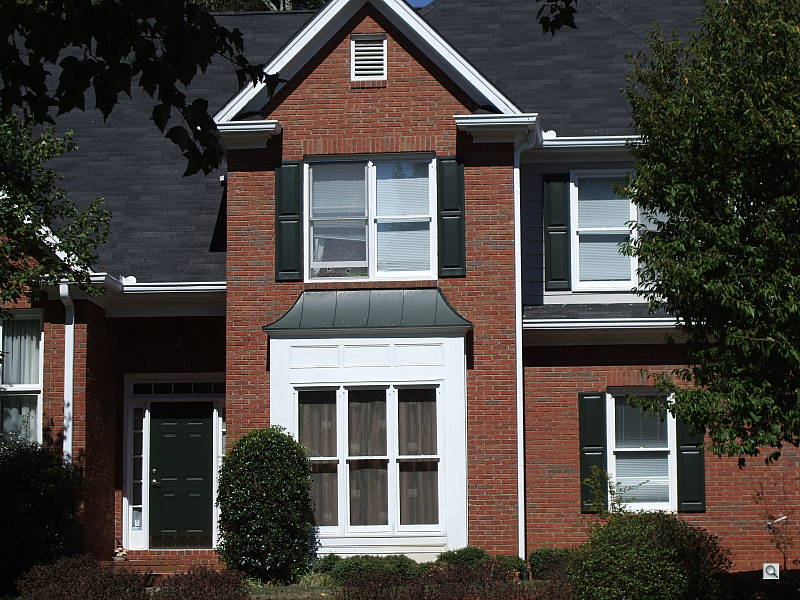
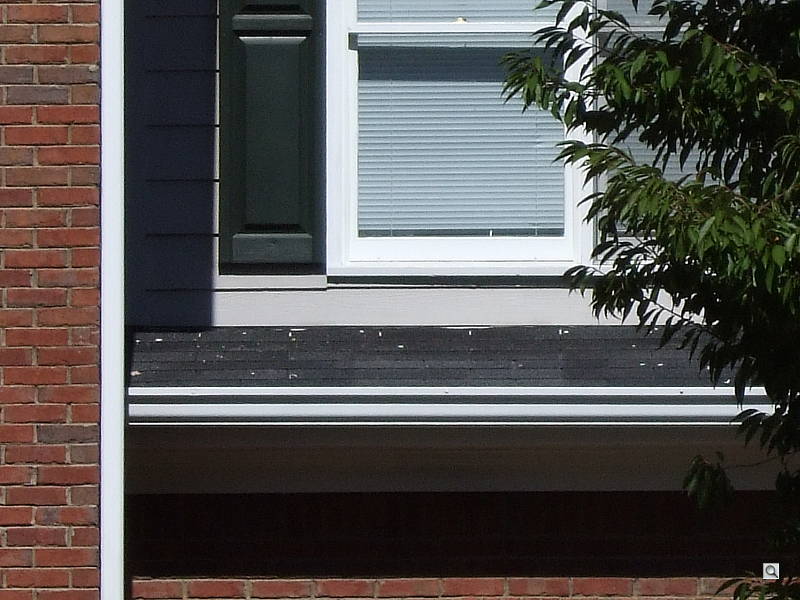
The Fujifilm FinePix F50fd's optical zoom covers the equivalent of 35-105mm, about average among consumer digital cameras these days. Details are reasonably sharp at full wide angle, with only minor softening in the corners. At telephoto corners get a little softer. Fine detail is a little fuzzy at both wide angle and telephoto, partly from some image noise artifacts. The camera's 8.2x digital zoom actually does a pretty good job of holding onto detail. Though resolution and definition are definitely compromised, the camera still captures a lot of detail in the bricks and leaves.
Macro
Minimum area is on the larger side of average, but good detail and resolution.
Flash is partially blocked by the lens, creating uneven exposure.
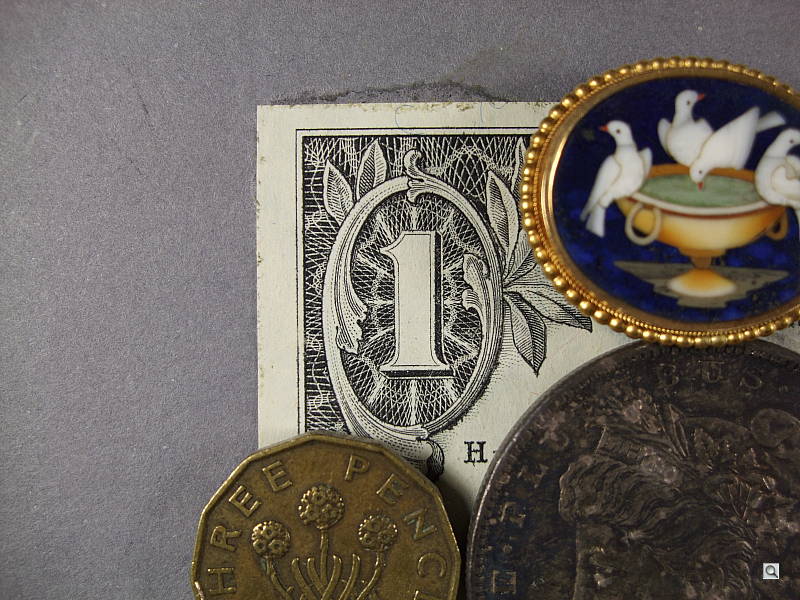
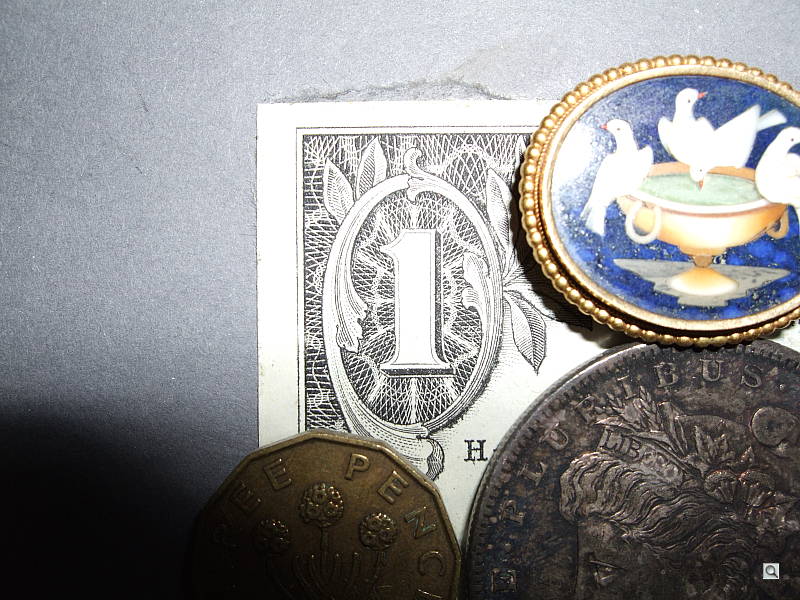
The Fujifilm FinePix F50fd's macro setting performed well, capturing a minimum area of 2.54 x 1.91 inches (65 x 49 millimeters). Detail and resolution were both good, though there's a moderate amount of softening in the corners from the lens. (Most cameras have some softening in the corners in macro mode.) The F50fd's flash was blocked in the lower left corner by the camera's lens, resulting in a very uneven exposure with dark shadows and bright highlights.
Distortion
Fairly low barrel distortion at wide angle, virtually no distortion at
telephoto.
| Barrel distortion at 35mm is 0.5% |
 |
| Pincushion at 105mm is less than a pixel, if any. |
 |
The Fujifilm FinePix F50fd's 0.5% barrel distortion at wide angle is actually much lower than average, and not very noticeable in the camera's images. At the telephoto end, we couldn't find a pixel of distortion on either side of the target lines. Distortion is the tendency for the lens to bend straight lines outward (like a barrel -- usually at wide angle) or inward (like a pincushion -- usually at telephoto).
Chromatic aberration
Fairly low at telephoto, though quite high and bright at wide angle.




Chromatic aberration is high at wide angle, showing about 18 or so pixels of very bright coloration on either side of the target lines. However, at telephoto, the effect is less noticeable at around 10 pixels, since pixels are less bright. In the upper right corner, some corner softness smudges detail, making chromatic aberration appear stronger. Chromatic aberration is visible as a slight colored fringe around the objects at the edges of the field of view on the resolution target.
Corner Sharpness
Moderately strong blurring in the corners of the frame at wide angle
and telephoto.
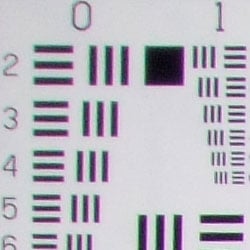
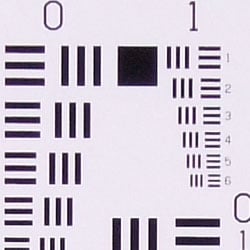
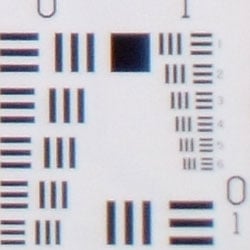
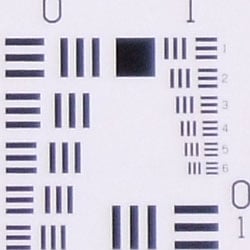
The Fujifilm FinePix F50fd produced soft corners of the frame at full wide angle and telephoto. At full wide angle, blurring was strongest in the upper left corner, but less severe in the lower corners. Considering the high resolution of the F50fd, this is a pretty good performance, as you're not likely to notice this level of softness in all but the largest prints.
Viewfinder
Coverage
Very good accuracy from the LCD monitor.
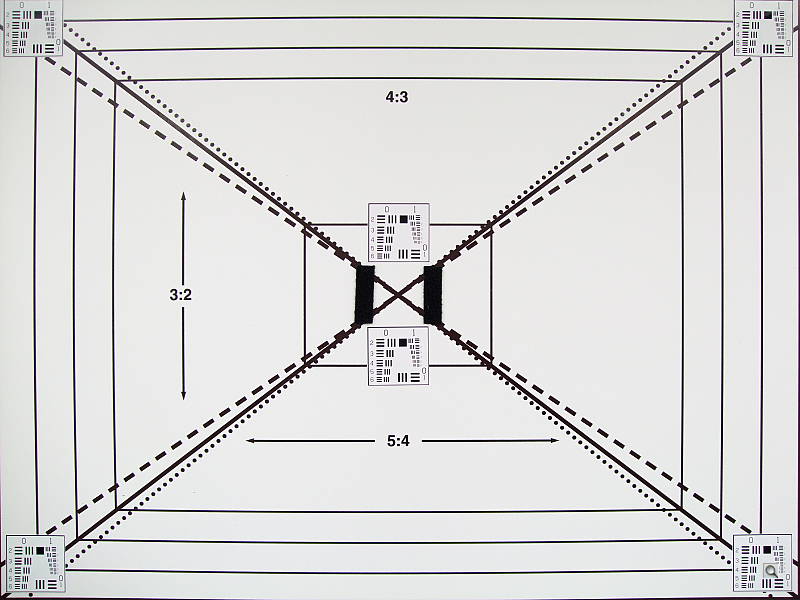
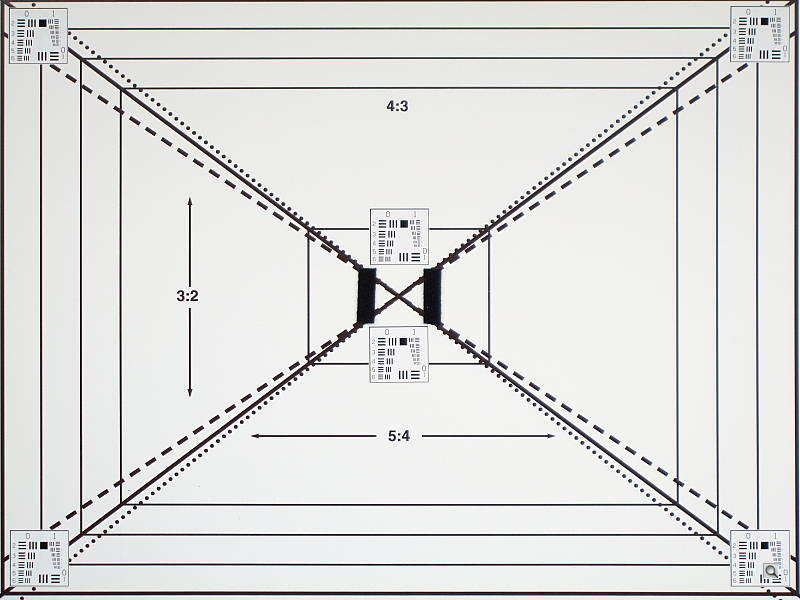
The Fujifilm FinePix F50fd's LCD monitor showed about 103% coverage accuracy at wide angle, and about 100% at telephoto. Excellent performance here.
The images above were taken from our standardized test shots. For a collection of more pictorial photos, see our Fujifilm FinePix F50fd Photo Gallery .
Exposure
Fujifilm FinePix F50fd Exposure
Color
Saturation & Hue Accuracy
Pretty good overall color and hue accuracy, with good overall saturation.
 |
| In the diagram above, the squares show the original color, and the circles show the color that the camera captured. More saturated colors are located towards the periphery of the graph. Hue changes as you travel around the center. Thus, hue-accurate, highly saturated colors appear as lines radiating from the center. |
Saturation. The Fujifilm FinePix F50fd just barely pushes bright reds and blues, and hits greens nearly dead-on accurate. Bright yellows are actually a little undersaturated. Though color saturation is probably more true here, it may disappoint some consumers who like more vivid color. I particularly noticed this in the outdoor shots. Most consumer digital cameras produce color that's more highly saturated (more intense) than found in the original subjects. This is simply because most people like their color a bit brighter than life.
Skin tones. According to the diagram, skin tones are nearly exactly right. Depending on the light source, I felt skin tones needed just a tad more warmth. Still, results are quite good. Where oversaturation is most problematic is on Caucasian skin tones, as it's very easy for these "memory colors" to be seen as too bright, too pink, too yellow, etc.
Hue. The Fujifilm FinePix F50fd produced nearly accurate hue, just
barely pushing cyan toward blue and red toward orange. Hue is "what
color" the color is.

Sensor
Exposure and White Balance
Indoors, incandescent lighting
Warm color with the Auto and Incandescent white balance options,
though good results with the Manual setting. Higher than average positive
exposure compensation required.



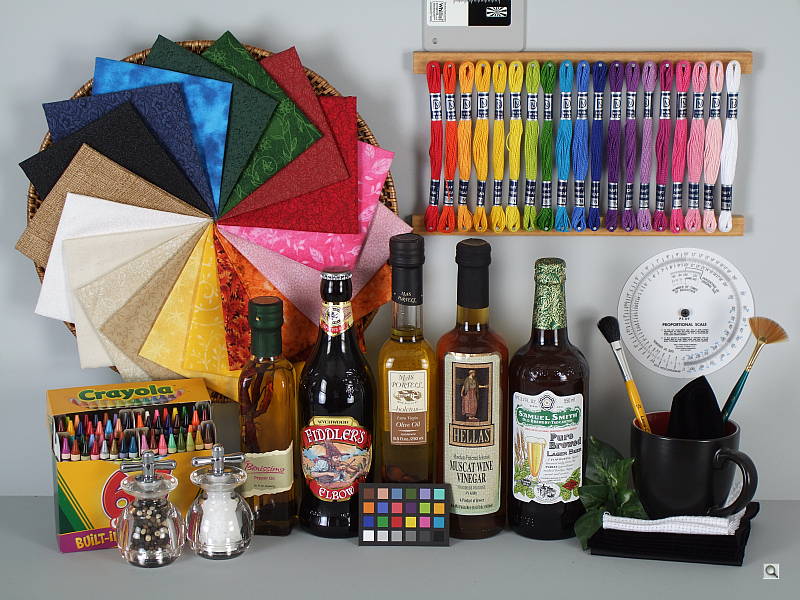
Color balance indoors under incandescent lighting was slightly warm in both Auto and Incandescent white balance modes, while the Manual setting produced much more accurate results. The FinePix F50fd required a +1.3 EV exposure compensation boost to get a good exposure, higher than average for this shot. Overall color with the Manual white balance setting is quite good, though the blue flowers are a little dark and purplish. (Many digital cameras reproduce these flowers with a dark, purplish tint, so the F50fd struggled a bit here.) Our test lighting for this shot is a mixture of 60 and 100 watt household incandescent bulbs, a pretty yellow light source, but a very common one in typical home settings here in the U.S.
Outdoors, daylight
High contrast, but still good overall exposure. Though technically correct, color appears a little flat and undersaturated.
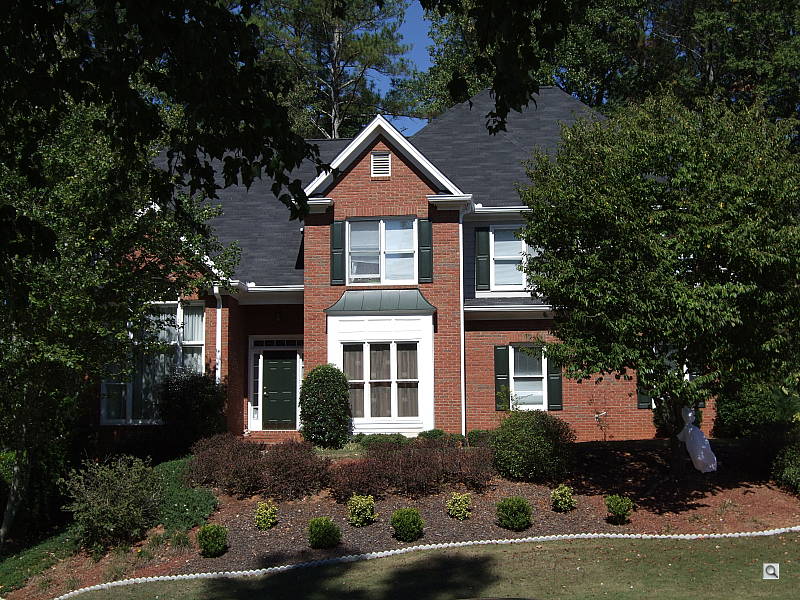
Outdoors, the Fujifilm FinePix F50fd performed well, though contrast is high. Shadows are quite deep, and highlights are bright, with detail lost in both. Though the shirt is almost completely blown out in the +0.7 EV portrait shot, this is as close as it gets to good skin tones without excessive highlights taking over the face. On the outdoor house shot, color saturation is technically correct, but appears insufficient to my eye. The high contrast subject also tricked the camera into producing a slightly darker overall exposure. Still, the camera handled this tough lighting fairly well.
See full set of test images with explanations
See thumbnails of all test and gallery images
Resolution
Very high resolution, 1,800 lines of strong detail.
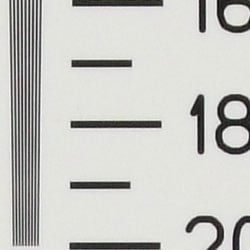
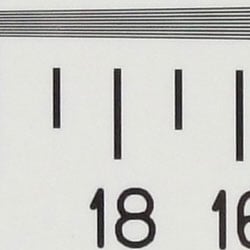
Our laboratory resolution chart revealed sharp, distinct line patterns down to about 1,800 lines per picture height in both directions. You could argue for some row-jumping color artifacts further out, but they're very difficult to discern and so negligible. Extinction didn't occur, as lines were still distinguishable at 2,000. This is a very impressive result for a slim pocket digital camera. Use these numbers to compare with other cameras of similar resolution, or use them to see just what higher resolution can mean in terms of potential detail.
See full set of test images with explanations
See thumbnails of all test and gallery images
Sharpness & Detail
Reasonably sharp images overall, though softer definition in the finer
details. Visible noise suppression and slight edge enhancement.


Sharpness. The Fujifilm FinePix F50fd captures good detail with pretty good overall sharpness, though definition in the finer details is a little soft. Slight enhancement artifacts are visible on high-contrast subjects such as the crop above left. Edge enhancement creates the illusion of sharpness by enhancing colors and tones right at the edge of a rapid transition in color or tone.
Detail. The crop above right shows moderately high noise suppression, with darker areas of Marti's hair showing smudged detail and less definition in individual strands. Though the F50fd is very good at capturing high contrast detail, here's where you can see the tradeoff at higher pixel counts, thanks to smaller and smaller pixels on this 12-megapixel sensor. Noise-suppression systems in digital cameras tend to flatten-out detail in areas of subtle contrast. The effects can often be seen in shots of human hair, where the individual strands are lost and an almost "watercolor" look appears.
ISO & Noise Performance
Moderate noise at the normal sensitivity settings, though a big jump
in noise with strong blurring at the higher settings.
 |
 |
 |
| ISO 100 | ISO 200 | ISO 400 |
 |
 |
 |
ISO 800 | ISO 1,600 | ISO 3,200 |
 |
ISO 6,400 |
Noise levels and efforts to suppress noise are visible at the Fujifilm FinePix F50fd's lower sensitivity settings, with much higher noise at ISO 400 and up. At ISOs 800 and 1,600, noise and noise suppression greatly interfere with detail definition. At the highest settings of 3,200 and 6,400, the camera limits resolution in an attempt to reduce the effects of increased noise, but results are still very blurry and really unusable for this subject.
Extremes: Sunlit and low light tests
High resolution with pretty good overall detail, but high contrast and
limited shadow detail. Fair low-light performance, capable of capturing
bright images in near darkness, though only at the highest sensitivity settings.


Sunlight:
The Fujifilm FinePix F50fd produced high contrast under the deliberately
harsh lighting in the test above, with washed-out highlights and very deep
shadows. Shadow detail is limited, with smudged detail from noise suppression
and noise pixels as well. The camera required about average compensation
to get proper exposure of skin tones, at +0.7 EV, but unfortunately blows
the detail in the shirt. Be sure to use fill flash in situations like the
one shown above; it's better to shoot in the shade when possible.
Because digital cameras are more like slide film than negative film (in that they tend to have a more limited tonal range), we test them in the harshest situations to see how they handle scenes with bright highlights and dark shadows, as well as what kind of sensitivity they have in low light. The shot above is designed to mimic the very harsh, contrasty effect of direct noonday sunlight, a very tough challenge for most digital cameras. (You can read details of this test here.)
| 1 fc 11 lux |
1/2 fc 5.5 lux |
1/4 fc 2.7 lux |
1/8 fc 1.3 lux |
1/16 fc 0.67 lux |
|
|---|---|---|---|---|---|
| ISO 100 |
 1 sec f2.8 |
 1 sec f2.8 |
 1 sec f2.8 |
 1 sec f2.8 |
 1 sec f2.8 |
| ISO 200 |
 1 sec f2.8 |
 1 sec f2.8 |
 1 sec f2.8 |
 1 sec f2.8 |
 1 sec f2.8 |
| ISO 400 |
 1 sec f4.0 |
 1 sec f2.8 |
 1 sec f2.8 |
 1 sec f2.8 |
 1 sec f2.8 |
| ISO 800 |
 1/4 sec f2.8 |
 1 sec f4.0 |
 1 sec f2.8 |
 1 sec f2.8 |
 1 sec f2.8 |
| ISO 1600 |
 1/4 sec f4.0 |
 0.5 sec f4.0 |
 1 sec f4.0 |
 1 sec f2.8 |
 1 sec f2.8 |
| ISO 3200 |
 1/4 sec f5.6 |
 0.5 sec f5.6 |
 0.5 sec f4.0 |
 1 sec f4.0 |
 1 sec f2.8 |
| ISO 6400 |
 1/4 sec f8.0 |
 0.5 sec f8.0 |
 0.5 sec f5.6 |
 1 sec f5.6 |
 1 sec f4.5 |
| Night Scene (ISO 100) |
 2 sec f2.8 |
 4 sec f2.8 |
 8 sec f2.8 |
 8 sec f2.8 |
 8 sec f2.8 |
Low light. The Fujifilm FinePix F50fd reasonably well for a pocket camera on the low-light test, though it required a large boost in sensitivity to capture bright images at the lowest light levels. At ISO 100, the target was still a little dim at one foot-candle (about the equivalent of average city street lighting at night). However, shooting with the camera's Night mode, which employs ISO 100, results were better, with usable images down to about 1/4 foot-candle. Noise is high, and noise suppression affects detail as well. Color balance was pretty good with the Auto white balance setting. The camera's autofocus system worked well, as it was able to focus on the subject down to the darkest light level unassisted. Keep in mind that the longer shutter times used here necessitate a tripod to prevent blurring from camera movement. (A useful trick is to just prop the camera on a convenient surface, and use its self-timer to release the shutter. This avoids any jiggling from your finger pressing the shutter button, and can work quite well when you don't have a tripod handy.)
How bright is this? The one foot-candle light level that this test begins at roughly corresponds to the brightness of typical city street-lighting at night. Cameras performing well at that level should be able to snap good-looking photos of street-lit scenes.
NOTE: This low light test is conducted with a stationary subject, and the camera mounted on a sturdy tripod. Most digital cameras will fail miserably when faced with a moving subject in dim lighting. (For example, a child's ballet recital or a holiday pageant in a gymnasium.) For such applications, you may have better luck with a digital SLR camera, but even there, you'll likely need to set the focus manually. For information and reviews on digital SLRs, refer to our SLR review index page.
Flash
Coverage and Range
A slightly weak flash, with limited range. Our standard shots were dim
even with the maximum positive exposure compensation applied.
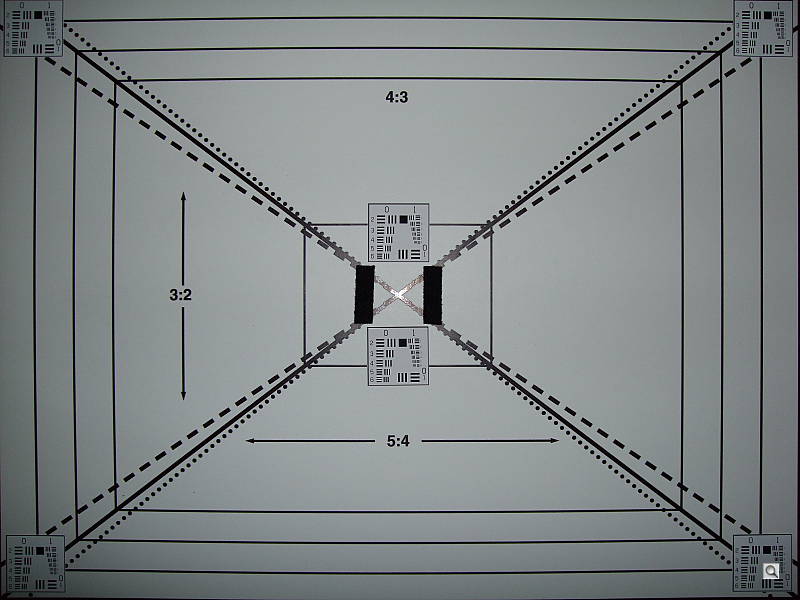
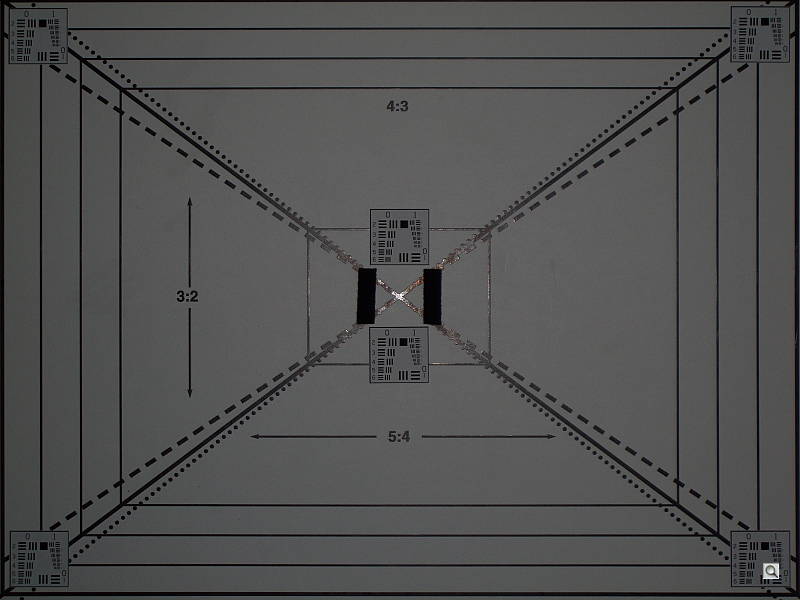


Coverage. Flash coverage was uneven at wide angle, but much better than average. At full telephoto, the target was a bit dim. In the Indoor test, the FinePix F50fd's flash underexposed our subject just a little at its default setting, but because the FinePix F50fd doesn't have flash exposure compensation, even +2.0 EV images are underexposed. The camera's Slow-Sync flash mode produced more even results, though the exposure was just as dim, and the background lighting created an orange cast.
| Flash Range: Wide Angle | |||||
|---|---|---|---|---|---|
| 6 ft | 7 ft | 8 ft | 9 ft | 10 ft | 11 ft |
 1/60 sec f2.8 ISO 100 |
 1/60 sec f2.8 ISO 100 |
 1/60 sec f2.8 ISO 100 |
 1/60 sec f2.8 ISO 100 |
 1/60 sec f2.8 ISO 100 |
 1/60 sec f2.8 ISO 100 |
| 12 ft | 13 ft | 14 ft | 15 ft | 16 ft | |
 1/60 sec f2.8 ISO 100 |
 1/60 sec f2.8 ISO 100 |
 1/60 sec f2.8 ISO 100 |
 1/60 sec f2.8 ISO 100 |
 1/60 sec f2.8 ISO 100 |
|
| Flash Range: Telephoto | |||||
|---|---|---|---|---|---|
| 6 ft | 7 ft | 8 ft | 9 ft | 10 ft | 11 ft |
 1/100 sec f5.1 ISO 100 |
 1/100 sec f5.1 ISO 100 |
 1/100 sec f5.1 ISO 100 |
 1/100 sec f5.1 ISO 100 |
 1/100 sec f5.1 ISO 100 |
 1/100 sec f5.1 ISO 100 |
| 12 ft | 13 ft | 14 ft | 15 ft | 16 ft | |
 1/100 sec f5.1 ISO 100 |
 1/100 sec f5.1 ISO 100 |
 1/100 sec f5.1 ISO 100 |
 1/100 sec f5.1 ISO 100 |
 1/100 sec f5.1 ISO 100 |
|
ISO 100 Range. At wide angle, flash shots at ISO 100 remained fairly bright only out to a distance of about 7 feet, decreasing in brightness from that point on. At full telephoto and ISO 100, even the target at 6 feet was quite dim. While flash is usually dim in pocket cameras, this is a particularly poor performance, raising a question about the suitability of the F50fd for indoor flash photography.
| Manufacturer-Specified Flash Range | |
|---|---|
| Wide Angle | Telephoto |
 14.4 feet Auto ISO 400 |
 7.9 feet Auto ISO 400 |
Manufacturer Specified Flash Test. In the wide angle shot above, the FinePix F50fd performs almost as Fujifilm says it will, producing a slightly dim, but usable exposure at the rated distance with its ISO set to Auto (which selected ISO 400). At telephoto, the image is again slightly dim though still usable, and the camera again boosted ISO to 400 to compensate. Our standard test method for flash range uses a fixed setting of ISO 100, to provide a fair basis of comparison between cameras. We also shoot two shots using the manufacturer-specified camera settings, at the range the company claims for the camera, to assess the validity of the specific claims.
Output Quality
Print Quality
Great print quality, good color, sharp 13x19-inch prints. ISO 400 images are usable at 11x14, ISO 800 shots are still good at 8x10.
 The Fujifilm F50fd had enough resolution to make good looking 13x19-inch prints at ISO 100. 16x20-inch prints were usable, but chroma noise shows up in shadows, and dark areas look a little washed out. ISO 200 shots are better than expected at 13x19, with good color and detail. ISO 400 shots are quite good at 11x14, with a little noise in the shadows. At 8x10 ISO 400 looks great, quite sharp. ISO 800 images still look pretty good at 8x10, with good detail in brighter areas, yet still some noise in the shadows. That improves at 5x7. ISO 1,600 shots would probably still be acceptable to most at 5x7, though dark areas are plagued by noise that looks a little like static on a television. It's a little better at 4x6. ISO 3,200 shots are decent at 4x6, but a little smudgy. So long as you were prepared for the tradeoffs, I think most would be happy with the results. ISO 6,400 shots are a little too stippled at 4x6 to be called a photograph. Still, it's not bad for such a small camera.
Indoors in incandescent light, the performance changes a bit at lower ISOs, thanks to the 12-megapixel sensor. Still, you can get a good 11x14 at ISO 100, though with some detail smoothing in the hair. This increases as you move up through the ISO settings. ISO 200 is still good at 11x14, and ISO 400 works better at 8x10. ISO 800 is better at 5x7, but ISO 1,600 images have plugged shadows and hair takes on a helmet-like look. Above that and images are essentially smudgy representations of the subject.
Overall, it's a very good performance from the Fujifilm F50fd, quite a surprise from such a small pocket camera with a 12-megapixel sensor.
Testing hundreds of digital cameras, we've found that you can only tell just so much about a camera's image quality by viewing its images on-screen. Ultimately, there's no substitute for printing a lot of images and examining them closely. For this reason, we now routinely print sample images from the cameras we test on our Canon i9900 studio printer, and on the Canon iP5200 here in the office. (See the Canon i9900 review for details on that model.)
The images above were taken from our standardized test shots. For a collection of more pictorial photos, see our Fujifilm FinePix F50fd Photo Gallery .
Not sure which camera to buy? Let your eyes be the ultimate judge! Visit our Comparometer(tm) to compare images from the Fujifilm FinePix F50fd with those from other cameras you may be considering. The proof is in the pictures, so let your own eyes decide which you like best!
Performance
Fujifilm FinePix F50fd Performance
Timing and Performance
The Fuji F50fd's performance is a mixed bag, ranging from quite slow to slightly above average for a consumer digicam.
| Startup/Shutdown |
||
|
Power on |
2.8 seconds
|
Time it takes for LCD to turn on and lens to deploy. |
|
Shutdown |
1.6 seconds
|
How long it takes to retract lens. |
|
Buffer clearing time |
4 seconds
(3 seconds buffer clearing after LF JPEG) |
Worst case buffer clearing time. -- This is the delay after a set of shots before you can remove the card. Some cameras won't retract their lenses and shut down until the buffer is cleared. |
Start-up time is a little sluggish, at 2.8 seconds. Shut-down is on the slow side too.
| Mode switching | ||
|---|---|---|
|
Play to Record, |
0.9 second
|
Time until first shot is captured. |
|
Record to play |
0.9 second
|
Time to display a large/fine file immediately after capture. |
|
Display |
1.9 second
|
Time to display a large/fine file already on the memory card. |
Mode switching is pretty fast.
| Shutter response (Lag Time) | ||
|---|---|---|
|
Full Autofocus Wide |
0.60 second
|
Time from fully pressing shutter button to image capture, zoom lens at wide angle position. |
|
Full Autofocus Tele |
0.63 second
|
Time from fully pressing shutter button to image capture, zoom lens at telephoto position. |
|
Prefocused |
0.021 second
|
Time to capture, after half-pressing and holding shutter button. |
|
Continuous AF
|
0.64 second
|
This mode usually shows no speed increase with our static subject; we have no way to measure performance with moving subjects.
|
Shutter response is about average at wide angle with 0.60 second lag, and slightly above average at telephoto with 0.63 second lag. Prefocus shutter lag is a very snappy 0.021 second ("prefocusing" means half-pressing and holding down the shutter button before the final exposure).
| Cycle time (shot to shot) | ||
|---|---|---|
|
Single Shot mode
Large Fine JPEG |
3.07 seconds
|
Time per shot, averaged over 20 shots. |
|
Single Shot mode |
3.22 seconds
|
Time per shot, averaged over 20 shots. |
|
Early shutter |
Yes
|
Some cameras don't snap another shot if you release and press the shutter too quickly in Single Shot mode, making "No" the preferred answer. |
|
"Long-period" |
2.95 seconds (0.34 frames per second);
20 frames total; 3 seconds to clear |
Time per shot, averaged over buffer length or 20 shots, whichever came first. |
|
"TOP-12"
Continuous mode 3MP JPEG |
0.21 second (4.87 frames per second);
12 frames total; 4 seconds to clear |
The F50fd has special high speed modes where it records reduced-resolution images at almost five frames per second. "TOP-12" saves the first 12 frames of a burst, while "FINAL-12" saves the last 12.
|
|
"Long-period" |
3.14 seconds (0.32 frames per second);
20 frames total; 3 seconds to clear |
Time per shot, averaged over buffer length or 20 shots, whichever came first. |
|
Flash recycling |
7.5 seconds
|
Flash at maximum output. |
| *Note: Buffer clearing times measured with a Kingston Ultimate 133x SD memory card. Slower cards will produce correspondingly slower clearing times. Slow cards may also limit length of bursts in continuous mode. ISO sensitivity also affects cycle times and burst mode performance, with higher ISOs generally increasing cycle times and reducing burst performance. |
||
Shot-to-shot cycle times are quite slow, at about 3.07 seconds for large/fine JPEGs, though the camera appears to capture shots continuously in single-shot mode without having to stop and clear the buffer. "Long-period" continuous mode is also very slow, at only 0.34 frames-per-second for >20 large/fine JPEG frames. The Fuji F50fd has some higher-speed continuous modes though. "TOP-3" and "FINAL-3" modes save the first or last three full-resolution frames in a burst, at a claimed 2 frames per second (sorry, we didn't test those modes). Special 3-megapixel high speed modes ("TOP-12" and "FINAL-12") allow capture of up to 12 frames per second at 4.87 frames per second, which is better than most consumer digital SLRs. At the lowest resolution setting, speeds go back to a slow 0.32 frames per second in "Long-period" continuous mode. The flash takes 7.5 seconds to recharge after a full-power shot, which is a little surprising considering how underpowered it is.
| Download speed | ||
|---|---|---|
| Windows Computer, USB 2.0 |
1,484 KBytes/sec | Typical Values: |
Connected to a computer or printer with USB 2.0, download speeds are fast enough to avoid a separate card reader.
Bottom line, the FinePix F50fd won't be quick enough to keep up with fast moving subjects (at least not at full resolution), and it won't be great for indoor flash shots, but should handle most average outdoor photo opportunities well, such as posed portraits and landscapes.
Battery and Storage Capacity
Battery
About average battery life for a lithium-ion design.
| Operating Mode | Number of Shots |
|---|---|
|
Lithium-ion Rechargeable Battery,
(CIPA standard) |
230
|
The Fujifilm FinePix F50fd uses a custom rechargeable lithium-ion battery for power, and ships with a charger. Although battery life is about average for the camera's size, we recommend you pick up a spare battery and keep it freshly charged and on-hand for extended outings.
The table above shows the number of shots the camera is capable of (on either a fresh set of disposable batteries or a fully-charged rechargeable battery as appropriate), based on CIPA battery-life and/or manufacturer standard test conditions.
(Interested readers can find an English translation of the CIPA DC-002 standards document here. (180K PDF document))
Storage
The Fujifilm FinePix F50fd accepts SDHC/SD/MMC memory cards and xD-PictureCards as well, and includes about 25MB of internal memory.
| Image Capacity with 25MB Internal Memory |
Fine | Normal | |
|---|---|---|---|
| 4,000
x 3,000 |
Images |
5 |
8 |
| File Size |
4.7 MB |
2.9 MB |
|
| 2,848
x 2,136 |
Images |
16 |
- |
| File Size |
1.5 MB |
- |
|
| 2,048
x 1,536 |
Images |
31 |
- |
| File Size |
785 KB |
- |
|
| 1,600
x 1,200 |
Images |
40 |
- |
| File Size |
625 KB |
- |
|
| 640
x 480 |
Images |
195 |
- |
| File Size |
128 KB |
- |
|
We strongly recommend buying a large capacity SDHC or SD memory card at least a 1GB card, preferably a 4GB SD card, to give yourself extra space for extended outings and video. (Check the shopping link above, cards are really cheap these days, so no reason to skimp.)