


Overview
Fujifilm FinePix A500 Overview
I've said it before, but I'll say it again -- the best place to see how far digital cameras have come in just a few short years is not with the latest top-of-the-line cutting edge products, it's in the low-end budget camera category. That's right, if you want to see the biggest surprises in digital photography, check out what less than $200 will buy you these days. In the case of Fujifilm's cameras, it's the 5.1-megapixel, 3x optical FinePix A500 which retails for a suggested list price of $179 but can be found for as low as $119 at some online retail sites. The A500, which takes standard AA batteries, also has a 1.8-inch LCD screen, selectable light sensitivity of up to ISO 400, four scene modes, and 12MB of internal memory. Better yet for consumers, the A500 is from Fujifilm, a name they can trust to produce images with great color and sharp detail.Even with all the advances in bargain basement digital cameras in recent years, there are still drawbacks to a camera this inexpensive. (They had to leave something out didn't they?) Whether cost-cutting measures that affect the Fuji A500's performance will bother you depends on how much experience you've had with digital photography so far. If you've spent any time with slightly more sophisticated models, you might be inclined to throw this bare-bones Fujifilm model back. But if it's your first time with a digital camera and you don't want to make a huge investment, the Fuji A500 could be the right catch.
Fuji A500 User Report
Cost-Cutting Design
Though it's made primarily of polycarbonate, the Fuji A500 does a good job of trying to convince you that it's metal. The camera's tapered rectangular body has a sleek metallic finish that mimics stainless steel on the handgrip and a ring surrounding the retractable 3x zoom lens. The 3.7 x 2.4 x 1.1-inch (93 x 60 x 27.5mm) body is almost entirely plastic though, weighing in at just 6.56 ounces (186 grams) with the battery and xD-Picture Card. Though it feels solidly built, some cost-cutting design choices on the Fuji A500 are questionable.

Ports
For one, instead of covering the Video Out, USB, and DC In sockets with a plastic flap as on just about every other camera on the market, Fuji leaves them exposed on the left side of the camera, which makes them susceptible to lint, crumbs and whatever debris might be floating around inside a bag or carrying case. Consequently, a small case for this camera is a must.
While its boxy design is pretty generic, the Fuji A500 is easy to hold and will feel familiar to a first-time digital camera user since it resembles most point-and-shoot film cameras on the market. Controls are well-placed, but not particularly touch-sensitive, so basic tasks such as turning the camera on and off, or switching to the playback mode, takes some significant pressure on the buttons. I was also thrown off by the placement of the zoom rocker between the left and right toggle switches, which also turn on the camera's Macro mode and flash. I kept accidentally pressing the left and right buttons -- instead of the up and down zoom rocker in the middle -- which would turn the Macro on, or switch the flash preset modes. A little bit annoying if you're not used to this configuration, though anyone buying the Fuji A500 will have plenty of time to get used to it.
Ho-Hum Screen

LCD
Only a year ago, a 1.8-inch LCD would seem pretty exciting on a camera this cheap, but I was less than thrilled with the Fuji A500's ho-hum screen. At just 77,000 pixels of resolution, the live preview was slightly dark and fuzzy, making it difficult to tell whether an image had the right exposure or sharp focus. Using the screen outdoors was a nightmare. In standard sunlight conditions, I had a hard time making out what I was taking a picture of on the LCD.
Thankfully, the Fuji A500 has an adequate optical viewfinder that helps compose pictures in sunlight. Generally speaking, I'm a proponent of LCDs over optical viewfinders, but this was the first camera I've tested in awhile where I relied on the optical viewfinder almost exclusively outdoors. One nice feature of the optical viewfinder on the Fuji A500 is that it includes hash marks to tell you which portion of an image will be cropped out when taking a picture at a range of 1-2 meters (3.3 to 6.6 feet).
Speed Trials
Along with cost-cutting in the design, another area where you're going to feel the pinch of buying such a low-priced camera is in the Fuji A500's sluggish all-around performance. The camera powers on in a respectable 2.8 seconds and shuts down with lens fully retracting in a fairly quick 1.6 seconds. Getting to first shot is also not a problem, with our tests showing the camera taking just 0.4 seconds to take its first picture. Displaying that first image, though, is where the Fuji A500 starts to get bogged down. We timed the camera at 4.6 seconds to show a large/fine image file immediately after capture. Shutter lag when taking a picture at the wide angle of the autofocus was 0.72 seconds which is slow for a camera in this class. At the telephoto end, the FinePix A500 took 0.61 seconds to capture an image. Things improve dramatically when you pre-focus the camera, however, with the Fuji A500 capturing an image at a rather quick 0.012 seconds after half-pressing and then holding down the shutter button.
Shot to shot, though, is where the camera struggled the most, taking one Large/Fine-size JPEG image every 2.24 seconds with the buffer clearing between each shot. Strangely, the camera was even slower when shooting in smaller, 640x480 image-size mode, averaging 2.33 seconds per shot. Unless you're a leisurely picture-taker -- and I'm definitely not -- shooting with the Fuji A500 can be a frustrating experience. I kept seeing great candids and interesting moments when I took this camera out one sunny afternoon in New York City, only to miss them when the A500 couldn't keep up with my eye. Even worse, there's no continuous mode on the camera, making the Fuji A500 strictly for portraits and landscapes at best.
Pictures Better Than Expected
Image quality in average daylight conditions was better than expected on the Fuji A500 which is probably due to the decent 5.1-megapixel Super CCD HR imaging sensor that Fuji has put in the camera. The Fuji A500 also has a better than average Fujinon 3x (38-114mm in 35mm equivalent) zoom lens offering automatic apertures of f/3.3 - f/5.5. Rich color, which has been Fujifilm's forte since the film days, is in evidence here with images showing nice vibrancy and balanced skin tones.
Though the Fuji A500 wasn't always on target with its exposures and had a tendency to blow out whites -- particularly in shots of skies -- the camera produced pictures with pretty good dynamic range. Images had some blurriness in the corners and purple fringing on tree branches and railings in high contrast situations, but overall chromatic aberration was low, especially when shooting at ISO 100.
When cranking the light sensitivity to ISO 400, however, noise and digital artifacts increased, which was disappointing, but not unusual for a camera in this class. With some competing models taking away manual control of ISO -- such as Nikon's L-Series digital cameras -- it's nice to see that Fuji is still offering it even though results are a mixed bag. My suggestion would to keep the camera's flash on in low-light situations. While its throw is modest at 2 to 10 feet (60cm to 3.1 meters) it's perfectly adequate for most low-light situations. The Fuji A500's five flash settings -- which include Auto, Red-eye reduction, Forced Flash, Suppressed Flash, Slow Synchro, and Red-eye Reduction + Slow Synchro -- should also give you enough options to cover most conditions.
Along with Auto, there are just four basic shooting modes on the Fuji A500 but they're the ones most people are likely to use -- Night, Sport, Landscape and Portrait. In all modes, you can adjust the ISO light sensitivity rating between 100 and 400. In the "Manual" mode, you get some additional control including the ability to change Exposure Compensation between 2 to +2 EV in 0.3 EV steps; and the option to choose between seven White Balance pre-sets. This camera isn't, obviously, directed at someone who will be making a lot of manual adjustments, but it's nice to be offered some creative choices.
Navigation on the Fuji A500 is utilitarian, and switching between modes is an easy but slow process on the camera's basic menu system. Since buttons on the A500 are sparse, most of the camera's functions are buried in menus. Movie mode is very basic on the A500, offering video clips without sound at either 320 x 240 pixels or 160 x 120 pixels at a herky-jerky 10 frames per second. This camera definitely requires patience. If you're someone in a hurry to take a lot of pictures and video clips using a lot of different modes and adjustments, I'd suggest you try a different model.
The Fuji A500 uses two AA-type batteries for power, either alkaline or NiMH, and an optional AC adapter is available. A set of single-use AA alkaline batteries comes with the camera, but I strongly recommend purchasing a couple of sets of high-capacity NiMH batteries and a good charger, and keeping a spare set of batteries charged at all times. With AA alkalines, the Fuji A500 can capture only about 100 images. With NiMH rechargeables, it can capture approximately 400 pictures.
The Bottom Line
As far as bargain basement digital cameras go, the Fuji A500 is not a bad choice if you can overlook its sluggish performance and bare bones design and feature set. If you've had any experience with a more sophisticated digital camera, however, I'd say pass on this model -- it's limitations will definitely cause you some frustration. However, if you're a first-time digital camera user and want to put your foot in the water for a very low price, the Fuji A500 is about as good as any camera in this category when it comes to taking quality pictures in standard daylight conditions.
Basic Features
- 5.1-megapixel Super CCD HR delivering images as large as 2,592 x 1,944 pixels.
- Real-image optical viewfinder.
- 1.8-inch color LCD monitor.
- Fujinon 3x, 38-114mm (35mm equivalent) lens.
- 5.2x digital zoom.
- Auto and Manual (EV and White Balance only), plus Portrait, Landscape, Sports, and Night Scene modes.
- White Balance with seven settings.
- Maximum aperture of f/3.3 to f/8.5, depending on lens zoom position.
- Shutter speeds from 1/1,500 to two seconds, depending on exposure mode.
- Built-in flash with six modes.
- Auto ISO equivalent to 100 to 400.
- TTL 64-zones Multi metering.
- Macro (close-up) lens setting.
- xD-Picture Card storage (No card included. 12MB internal memory).
- Power supplied by two AA-type batteries or optional AC adapter.
- Interface software and USB drivers included for Windows and Macintosh computers.
Special Features
- Movie mode (without sound).
- PictBridge support.
- DPOF (Digital Print Order Format) compatibility.
- Exif Print to record optimized print settings.
- Two- or 10-second Self-Timer for delayed shutter release.
In the Box
- Fujifilm FinePix A500 digital camera.
- Two single-use, AA-type alkaline batteries.
- Wrist strap.
- USB cable.
- AV cable.
- Software CD-ROM.
- Instruction manual and registration card.
Recommended Accessories
- Larger capacity xD memory card. (I recommend 128MB as a bare minimum, 256MB would be preferable.)
- xD-Picture Card USB Drive (DPC-UD), a compact USB card reader.
- Two sets (four) NiMH rechargeable batteries and charger.
- Soft camera case.
Conclusion
| Pro: | Con: |
|---|---|
|
|
If price and basic image quality are your only concerns, the Fujifilm FinePix A500 might be right for you. At less than $200 list, and even lower for its "street" price, the A500 offers seemingly good bang for the buck with a solid 5.1-megapixel Super CCD HR image sensor, a 3x optical zoom, some basic scene modes, and the image quality and rich color Fujifilm is know for. Despite the progress that's been made at the lower end of digital photography, you do give up quite a bit in overall performance with this inexpensive snapshooter. For one, the camera is very sluggish to use. In particular, the glacial shot to shot performance on the Fuji A500 can be frustrating and since it has no Continuous mode, there are not many options for speeding it up. Pre-focusing your shots does help a bit, but if you're someone who likes to take candid shots on the fly -- like I do -- using the Fuji A500 may teach you an unwanted lesson in patience. For standard family portraits and landscapes, you'll likely have a better experience.
Other cost cutting measures such as leaving the I/O ports on the camera uncovered and unprotected is a questionable choice. The Fuji A500's 1.8-inch LCD is lacking as well, offering just 77,000 pixels of resolution and poor sunlight performance, making it difficult to see the live preview on the screen. This was the first time in quite awhile that I was happy Fujifilm decided to keep the tiny optical viewfinder on A500, even though its coverage was limited.
In terms of image quality, however, the Fuji A500 produced pictures with rich color and good sharpness which should appeal to most consumers. Despite a somewhat heavy overall color saturation, skin tones were rendered fairly accurately with good tonal balance. If this is your first digital camera, you might be delighted with the results. However, if you've tried other current entry-level models, you'll quickly notice that the Fuji A500 lags behind in its overall picture-taking performance which is why we cannot make it a Dave's Pick.
Design
Fuji A500 Design
 The Fuji A500's chassis measures 3.7 x 2.4 x 1.1 inches (93 x 60 x 27.5mm) and weights just 6.56 ounces (186 grams) when loaded with an xD-Picture Card and two AA batteries, making this camera as easy to hold as it is to carry. Though it's not the most slick-looking snapshooter on the market -- especially from the back -- the Fuji A500's trim rectangular design will be familiar to anyone who's used a point-and-shoot camera. While it's made largely of polycarbonate, the Fuji A500 has a sleek metallic finish that mimics chrome on the handgrip and on a ring surrounding the retractable 3x zoom lens.

The Fuji A500's front panel is dominated by the telescoping lens, which retracts completely flush. The lens extends 5/8 inch when the camera is powered on in a Recording mode but remains retracted when powered on in Playback mode. A shutter-like lens cover automatically opens when the lens protrudes, eliminating the need for a lens cap. Also on the front panel are the flash, optical viewfinder window, microphone and the self-timer lamp. A thin, vertical metallic finger grip is reinforced by a small thumb grip on the back panel.

On the right side of the Fuji A500 (as viewed from the rear) is the wrist strap mount.

In a row on the opposite side of the Fuji A500 are the Video Out socket, the mini-B USB socket, and the DC In socket. All of the sockets are uncovered, a questionable cost-cutting design choice.

The FinePix A500's top panel is flat with low-profile buttons for the Power and Shutter release.

The back panel is the business end of the Fuji A500. Along the top are the optical viewfinder, the Playback button and a rocker panel inherited from the A350, with click buttons on either side. The left click button toggles Macro mode and the right button steps through the Flash modes. The 1.8-inch LCD monitor dominates the left corner, flanked by the Menu/OK button and the Display/Back button. The flat thumb grip -- emphasized by a series of bumps -- and a slightly raised vertical ridge are tactile clues for gripping the Fuji A500.

On the bottom panel of the FinePix A500 are the plastic tripod mount and the battery/memory card compartment. The tripod mount is off center and adjacent to the compartment latch hinge, making it impossible to swap batteries when the Fuji A500 is mounted to a tripod. An xD-Picture Card is easily clicked into place and ejected by simply pressing down slightly to release the hidden catch. Two AA batteries are likewise easy to load, with a clearly visible legend to remind you which end is up.
Fuji A500 External Controls

Shutter Button: Located on the far right of the Fuji A500's top panel, this button sets focus and exposure when halfway pressed, and fires the shutter when fully pressed.

Power Button: Just left of the Shutter button, this button turns the Fuji A500 on and off.

Menu/OK Button: Directly below the On / Play button, this button displays the settings menu in any camera mode, and acts as the "OK" to confirm menu selections.

Disp/Back Button: Located on the bottom right of LCD monitor, this button controls the LCD monitor display, and activates the framing grid. It also disables the LCD monitor, so you can save battery power by framing images with the optical viewfinder. In Playback mode, this button also controls the information overlay and enables a nine-image index display mode.

Zoom Rocker Button: Tucked between two arrow keys in the upper right corner of the Fuji A500's rear panel, this two-way rocker button controls the optical and digital zoom. In any settings menu, this button navigates up and down through menu selections. In Playback mode, this button controls the Playback Zoom feature, which enlarges captured images.
Right and Left Arrow Keys (see image above): Flanking the Zoom rocker button in the top right corner of the rear panel, these arrow keys navigate through captured images in Playback mode, as well as through menu selections in any settings menu. When an image has been enlarged, these keys switch modes to allow moving around within the view.
In Record mode, the left arrow accesses the Macro shooting mode, and the right arrow key cycles through the available flash modes.
Operation
Fuji A500 Operation
With full automatic exposure control and only two manual adjustments available, the Fuji FinePix A500's user interface is straightforward and quick to grasp. There's no Mode switch this model, so all adjustments are made via the menu system. The menu is simple, but a bit slow and clumsy to navigate. With the camera turned on, a single push of the Menu/OK button brings up the four-option menu, which is fairly limited and quick to navigate using the combination of arrow and zoom rocker buttons. In Manual shooting mode, two additional menus are available to set EV and White Balance, though you still don't have access to aperture or shutter speed. All camera controls other than basic Flash and Macro mode selections are accessed through the LCD menu system, so you should have no trouble shooting with the Fuji A500 right out of the box.
Record-Mode Display
 The Fuji A500's LCD monitor reports very basic information in Record mode, including the shooting mode, resolution setting, number of available images, and a central autofocus target. It also reports the Flash mode, Macro mode and the Self-timer when activated. When necessary, warnings are displayed for battery level, auto focus and camera shake. Pressing the Display button enables an alignment grid, which divides the image area into thirds vertically and horizontally, for better framing of linear subjects. A second press eliminates the grid and all info, and a third press disables the Fuji A500's LCD monitor entirely.
Playback-Mode Display
 In Playback mode, the Fuji A500's main LCD display shows the file number and capture date for a few seconds. Pressing the Display button pulls up the nine-image index display. Using the Zoom rocker button, you can enlarge captured images as much as 4.1x, depending on the quality of image captured (4.1x for 5M and 3:2, 3.2x for 3M, and 2.5x for 2M).
Fuji A500 Modes and Menus
Still Record Mode: This mode allows the Fuji A500 to capture still images. Exposure is automatically controlled, although a "Manual" option in the settings menu increases the menu selections to include Exposure Compensation and White Balance. Pressing the Menu button displays the following options:
 Shooting Mode: Puts the camera into Auto, Manual, Portrait, Landscape, Sport, Night, or Movie modes.
- Quality: Sets the image resolution and quality to 5M(F) (2,592 x 1,944 pixels), 5M(N) (2,592 x 1,944 pixels), 3:2 (2,592 x 1,728 pixels), 3M (2,048 x 1,536 pixels), 2M (1,600 x 1,200 pixels), or 0.3M (640 x 480 pixels). Also shows approximately how many frames can be captured at each resolution with the installed card's remaining space.
- Self-Timer: Activates either the 2-second or 10-second Self-Timer, or disables the mode.
- Set-Up/LCD Brightness: Adjusts the LCD brightness, and offers a variety of Setup menu options.
 Image Display: Turns the post-image capture review screen on or off.
- Beep: Enables the camera's beep sounds, with options for Low, High, or Off.
- Frame Number: Sets the camera to number each successive image continuously from memory card to memory card, or to reset numbering with each new memory card.
- LCD: Turns the LCD monitor on or off. If on, the LCD monitor automatically comes on whenever the camera is set to the Still Image Record position. If off, you must enable the display via the Display button.
 Digital Zoom: Turns the 5.2x Digital Zoom on or off
- Auto Power Off: Turns the power save option on or off. If on, you have the choice of a two- or five-minute delay before the camera automatically shuts off due to inactivity.
- LCD Power Save: When turned on, darkens the LCD monitor when camera is not used.
- Format: Formats the xD-Picture Card, erasing all files (even protected ones).
 Date/Time: Sets the camera's internal clock and calendar.
- Time Difference: This option lets you set the time for another time zone. For example, when traveling, you can specify the time at home and for where you are, and the time difference is applied to captured images.
- Language: Sets the menu language to one of seven languages.
- USB Mode: Sets the USB mode to DSC or PictBridge. PictBridge mode allows connection to a printer, while DSC is for connecting directly to a computer.
 Video System: Assigns the video signal as PAL or NTSC.
- Discharge: Discharges rechargeable batteries fully, so that they can be recharged from the base level. (Do not use with alkaline batteries, as this will eliminate the charge entirely.)
- Reset: Resets all camera settings to their defaults.
 ISO: Lets you choose between ISO 100, 200, 400, and AUTO
- Exposure Compensation: (Manual mode only) Adjusts the overall exposure from -2.0 to +2.0 exposure equivalents (EV) in one-third-step increments.
- White Balance: (Manual mode only) Sets the white balance to Auto, Outdoors, Shade, Daylight Fluorescent, Warm White Fluorescent, Cool White Fluorescent, or Incandescent.
Playback Menu: Here, you can review captured images and movies, as well as manage files and set up images for printing. Pressing the Menu button displays the following options:
 Erase: Deletes the current frame, or all frames on the memory card.
- DPOF: Marks/unmarks frames for printing on DPOF devices, with an option to include a date and time overlay.
- Protect: Write-protects the displayed image, preventing it from being accidentally erased or manipulated (except via card formatting). Also removes protection, and offers options to protect or unprotect all images on the card.
- Option: Adjusts LCD brightness and launches the Setup menu.
 Playback: Enables an automated slide show of all the captured images on the memory card, with options for transition styles.
- Copy: Copies images from internal to external memory or vice versa.
- Trimming: Lets you crop an image and save it separately as a 3M, 2M, or VGA file, depending on the size of the crop.
Optics
Fuji A500 Optics
Lens
Zoom
Good performance from the A500's 3x optical zoom lens.


The Fujifilm FinePix A500's 3x optical zoom range is equivalent to a 38-114mm zoom on a 35mm camera, fairly typical for its class. Though a little soft at wide angle, with some noticeable coma distortion in the trees, the A500's lens performs well. The 5.2x digital zoom takes it out to 15.6x total, albeit with the loss of quality that you might expect from digital zoom.
Macro
A slightly large macro area, but good detail and high resolution. Flash performs fairly well but is a little uneven.


The Fujifilm FinePix A500's macro setting performs well, capturing a slightly large minimum area of 3.31 x 2.48 inches (84 x 63 millimeters). Detail is strong and resolution high, with only a moderate amount of softening in the corners from the lens. (Most cameras have some softening in the corners in macro mode.) The flash throttles down well, although its coverage is a little uneven.
Distortion
Lower than average barrel distortion at wide angle, practically no distortion at telephoto.
This is the tendency for the lens to bend straight lines outward (like a barrel--usually at wide angle) or inward (like a pincushion--usually at telephoto). The Fujifilm FinePix A500's 0.6% barrel distortion at wide angle is somewhat lower than average among digital cameras I've tested, though still fairly noticeable. At the telephoto end, we couldn't find a full pixel of either barrel or pincushion distortion.
| Barrel distortion at 38mm is 0.6% |
 |
| Distortion at 114mm is virtually nonexistent. |
 |
Chromatic aberration
Moderate, small effect on images at edges.
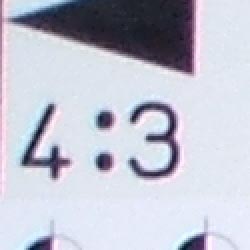
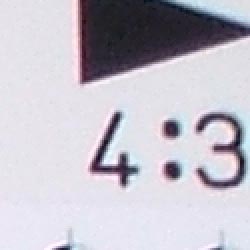
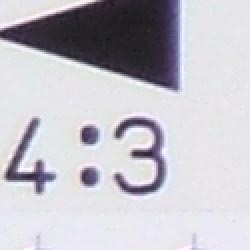
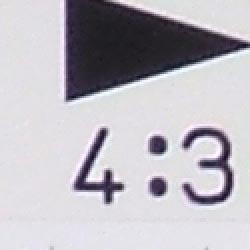
Chromatic aberration is moderate at wide angle, showing about 5-6 pixels of moderately bright coloration on either side of the target lines, but the effect doesn't extend very far into the frame, and decreases to very low levels at telephoto focal lengths. (This distortion is visible as a very slight colored fringe around the objects at the edges of the field of view on the resolution target.)
Corner Sharpness
Some softening in the left corners of the frame, with the strongest effect at telephoto. Better than average overall.
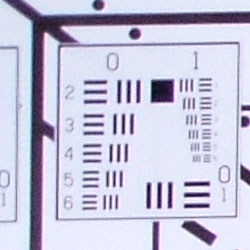
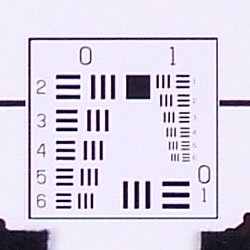
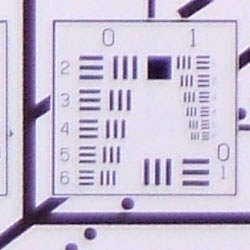
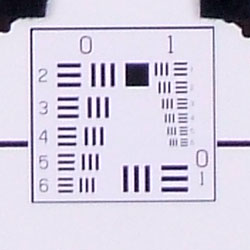
The Fujifilm FinePix A500 produced soft corners in the left corners of a few shots, though the effect wasn't terribly strong, and didn't extend very far into the frame. The strongest blurring occurred in the lower left corner of the frame at full telephoto. Sharpness uniformity across the entire frame was better than average, particularly for among entry-level cameras.
Viewfinder
Coverage
A rather tight optical viewfinder. LCD monitor is pretty accurate.


The Fujifilm FinePix A500's optical viewfinder was quite tight, showing only about 80% frame accuracy at wide angle and about 82% at telephoto. However, the LCD monitor proved much more accurate, delivering almost 100% frame accuracy
The images above were taken from our standardized test shots. For a collection of more pictorial photos, see our Fujifilm FinePix A500 Photo Gallery .
Exposure
Fuji A500 Exposure
Color
Saturation & Hue Accuracy
Slight oversaturation in strong reds and blues, plus a tendency toward slightly warm overall color. Still, generally good results overall.
 |
| In the diagram above, the squares show the original color, and the circles show the color that the camera captured. More saturated colors are located towards the periphery of the graph. Hue changes as you travel around the center. Thus, hue-accurate, highly saturated colors appear as lines radiating from the center. |
The other important part of color rendition is hue accuracy. Hue is "what color" the color is. Like most digicams, the A500 shifts cyan colors toward blue, to produce better-looking sky colors, but it slightly shifts a greater range of blues and purples than do most cameras we test. That said, overall hue accuracy is better than average.


Sensor
Exposure and White Balance
Indoors, incandescent lighting
Warm casts with both Auto and Incandescent white balance settings. Less exposure compensation required than usual.


Color balance indoors under incandescent lighting was pretty reddish in Auto white balance mode, while the Incandescent setting resulted in a more yellow color balance that looked a bit more pleasing overall. The Fujifilm FinePix A500 only required a +0.7 EV exposure compensation boost in the Incandescent white balance setting, though the Auto setting required a +1.0 EV boost. (The highlights on Marti's shirt are a bit bright, but overall exposure looks good.) Overall color is a little dark and yellow here, making the blue flowers very dark and purplish. (A very common outcome for this shot.) Our test lighting for this shot is a mixture of 60 and 100 watt household incandescent bulb, a pretty yellow light source, but a very common one in typical home settings here in the US.
Outdoors, daylight
Slightly warm overall color, though still pleasing. Contrast is a little high, but exposure accuracy is about average.


Outdoor shots generally showed pretty accurate exposure, though with a tendency toward hot highlights. Although contrast was a bit high, the shadows still held onto a fair amount of detail. Overall exposure accuracy was about average, though in some cases the camera required less positive exposure compensation than normal. Overall color was generally good, though a hint warm.
See full set of test images with explanations
See thumbnails of all test and gallery images
Resolution
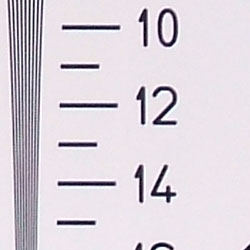
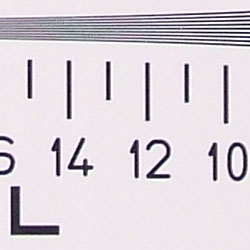
High resolution, 1,150 lines of strong detail.
Our laboratory resolution chart revealed sharp, distinct line patterns down to about 1,150 lines per picture height, with extinction at around 1,600. Use these numbers to compare with other cameras of similar resolution, or use them to see just what higher resolution can mean in terms of potential detail. Beware that while you might be able to make out what looks like distinct lines at numbers higher than those we've mentioned here, the camera is just doing its best to continue interpreting the lines. If you zoom in and follow them from the wider portions, you'll see the lines converge and reappear several times, so the lines you see at 1,500 and higher are really only artifacts generated by the camera's imaging system.
See full set of test images with explanations
See thumbnails of all test and gallery images
Sharpness & Detail
Fairly sharp images overall, though some oversharpening from the camera in high contrast subjects.


The Fujifilm FinePix A500's images are reasonably sharp overall, though finer details such as the tree leaves and pine needles as seen above are slightly soft. This could in part be cause by the slightly heavy-handed edge enhancement on the camera's part in high contrast areas, such as along the edges of the house trim above and in the branches against the sky. (Edge enhancement creates the illusion of sharpness by enhancing colors and tones right at the edge of a rapid transition in color or tone.)
Noise-suppression systems in digital cameras tend to flatten-out detail in areas of subtle contrast. The effects can often be seen in shots of human hair, where the individual strands are lost and an almost "watercolor" look appears. The crop of Marti's hair above shows slight noise suppression in the shadows, but detail is still quite strong in the individual strands of hair, and the effect of noise suppression is minimal at the lowest ISO setting.
ISO & Noise Performance
Moderate noise at the normal sensitivity settings, higher noise that blurs detail at the highest setting.



The Fujifilm FinePix A500's 100 and 200 ISO settings produced low to moderate noise, with only moderate blurring of detail in the low-contrast areas. At ISO 400, the noise level is higher, and the anti-noise processing blurs fine detail quite a bit.
Extremes: Sunlit and low light tests
High resolution with good overall detail, though high contrast loses highlight detail. Average low-light performance, capable of capturing bright images under average city street lighting and slightly darker conditions.


Sunlight:
Because digital cameras are more like slide film than negative film (in that they tend to have a more limited tonal range), we test them in the harshest situations to see how they handle scenes with bright highlights and dark shadows, as well as what kind of sensitivity they have in low light. The shot above is designed to mimic the very harsh, contrasty effect of direct noonday sunlight, a very tough challenge for most digital cameras. (You can read details of this test here.)
The Fujifilm FinePix A500 had just a little trouble with the deliberately harsh lighting in the test above, producing high contrast with hot highlights and deep shadows. That said, the shadow areas do hold onto a fair amount of detail. Exposure looked best at +0.7 EV, which is slightly less than average, as skin tones and overall exposure became much to hot at +1.0 EV. (In "real life" though, be sure to use fill flash in situations like the one shown above; it's better to shoot in the shade when possible.)
| 1 fc 11 lux |
1/2 fc 5.5 lux |
1/4 fc 2.7 lux |
1/8 fc 1.3 lux |
1/16 fc 0.67 lux |
|
| ISO 100 |
 1.2 sec f3.3 |
 2 sec f3.3 |
 2 sec f3.3 |
 2 sec f3.3 |
 2 sec f3.3 |
| ISO 200 |
 1/1 sec f3.3 |
 1 sec f3.3 |
 2 sec f3.3 |
 2 sec f3.3 |
 2 sec f3.3 |
| ISO 400 |
 1/3 sec f3.3 |
 1/1 sec f3.3 |
 1.4 sec f3.3 |
 2 sec f3.3 |
 2 sec f3.3 |
Low light:
The Fujifilm FinePix A500 performed fairly well in low-lighting, but was only able to produce bright exposures down to about 1/2 foot-candle at ISO 100. At ISO 400, images were bright to about 1/4 foot-candle, which is about 1/4 as bright as average city street lighting at night. Color balance was slightly reddish with the Auto white balance setting. The camera's autofocus system worked down to just under the 1/4 foot-candle light level unassisted. Keep in mind that the longer shutter times demand the use of a tripod or other camera support to get sharp photos. (A useful trick is to just prop the camera on a convenient surface, and use its self-timer to release the shutter. This avoids any jiggling from your finger pressing the shutter button, and can work quite well when you don't have a tripod handy.)
Flash
Coverage and Range
A limited flash range and a tendency toward underexposure. The camera's exposure compensation adjustment has no effect on flash exposures.


Flash coverage was slightly uneven at wide angle, as well as at telephoto. In the Indoor test, the flash on the A500 underexposed our subject at its default setting, and the camera's exposure compensation adjustment had no effect on the overall brightness of the exposure. The dim exposure also has a moderately strong pink cast. The camera's Slow-Sync flash mode produced slightly brighter and more even results, though here again, the exposure compensation adjustment had very little effect on the exposure. The shot above was taken at +1.3 EV, with very little difference from the default exposure.
| Flash Range: Wide Angle | ||||
| 6 ft | 7 ft | 8 ft | 9 ft | 10 ft |
 1/30 sec f3.3 ISO 100 |
 1/30 sec f3.3 ISO 100 |
 1/30 sec f3.3 ISO 100 |
 1/30 sec f3.3 ISO 100 |
 1/30 sec f3.3 ISO 100 |
| 11 ft | 12 ft | 13 ft | 14 ft | 15 ft |
 1/30 sec f3.3 ISO 100 |
 1/30 sec f3.3 ISO 100 |
 1/30 sec f3.3 ISO 100 |
 1/30 sec f3.3 ISO 100 |
 1/30 sec f3.3 ISO 100 |
| Flash Range: Telephoto | ||||
| 6 ft | 7 ft | 8 ft | 9 ft | 10 ft |
 1/30 sec f5.5 ISO 100 |
 1/30 sec f5.5 ISO 100 |
 1/30 sec f5.5 ISO 100 |
 1/30 sec f5.5 ISO 100 |
 1/30 sec f5.5 ISO 100 |
| 11 ft | 12 ft | 13 ft | 14 ft | 15 ft |
 1/30 sec f5.5 ISO 100 |
 1/30 sec f5.5 ISO 100 |
 1/30 sec f5.5 ISO 100 |
 1/30 sec f5.5 ISO 100 |
 1/30 sec f5.5 ISO 100 |
At distances out to about 9 feet, the A500 produced good flash exposures with its lens at the widest angle setting. At telephoto though, the flash was a little dim, even at the 6 foot distance of our closest test.
| Manufacturer-Specified Flash Range | |
| Wide Angle | Telephoto |
 10.2 feet Auto ISO (ISO unknown) |
 6.5 feet Auto ISO (ISO unknown) |
Our standard test method for flash range uses a fixed setting of ISO 100, to provide a fair basis of comparison between cameras. We've now also begun shooting two shots using the manufacturer-specified camera settings, at the range the company claims for the camera, to assess the validity of the specific claims. In the shots above, the Fuji A500 underexposed slightly at the officially rated distances, despite a modest ISO boost of unknown magnitude. Somewhat disappointing flash performance, even for a compact camera model
Output Quality
Print Quality
Good print quality, great color, sharp 8x10 inch prints. ISO 400 images are very soft at 8x10, acceptable at 5x7, great at 4x6.
Testing hundreds of digital cameras, we've found that you can only tell just so much about a camera's image quality by viewing its images on-screen. Ultimately, there's no substitute for printing a lot of images and examining them closely. For this reason, we now routinely print sample images from the cameras we test on our Canon i9900 studio printer, and on the Canon iP5000 here in the office. (See the Canon i9900 review for details on that model.)
In the case of the Fujifilm A500, we found that it had enough resolution to make very crisp 8x10 inch prints, but 11x14 prints looked a little soft. At ISO 400, noise is surprisingly low, even at 8x10 inches, but detail suffers markedly, with 8x10s looking quite soft. The same ISO 400 images printed at 5x7 inches look pretty good though, and they're fine by any standard as 4x6 inch snapshots.
Color from the Fuji A500 was quite appealing. While the laboratory results showed neutrally-saturated greens, we found foliage colors in our images to be very bright and vibrant. Excellent color overall. (Apart from the camera's difficulty in dealing with incandescent lighting.)
The images above were taken from our standardized test shots. For a collection of more pictorial photos, see our Fujifilm FinePix A500 Photo Gallery .
Not sure which camera to buy? Let your eyes be the ultimate judge! Visit our Comparometer(tm) to compare images from the Fujifilm FinePix A500 with those from other cameras you may be considering. The proof is in the pictures, so let your own eyes decide which you like best!
Performance
Fuji A500 Performance
Timing and Performance
Fujifilm FinePix A500 Timing
Good to slightly slow speed for a consumer camera.
Startup/Shutdown |
||
Power on to first shot |
2.8 seconds |
Time it takes for LCD to turn on and lens to deploy |
Shutdown |
1.6 seconds |
How long it takes to retract lens |
Buffer clearing time |
2 seconds |
Worst case buffer clearing time. -- This is the delay after a set of shots before you can remove the card. Some cameras won't retract their lenses and shut down until the buffer is cleared. |
Mode switching |
||
Play to Record, first shot |
0.4 seconds |
Time until first shot is captured |
Record to play |
4.6 seconds |
Time to display a large/fine file immediately after capture |
Display recorded image |
1.5 second |
Time to display a large/fine file already on the memory card. |
Shutter response (Lag Time): |
||
Full Autofocus Wide |
0.72 second |
Time from fully pressing shutter button to image capture, zoom lens at wide angle position. |
Full Autofocus Tele |
0.61 second |
Time from fully pressing shutter button to image capture, zoom lens at telephoto position. |
Prefocused |
0.012 second |
Time to capture, after half-pressing and holding shutter button. |
Cycle time (shot to shot) |
||
Single Shot mode Large Fine JPEG |
2.24 seconds |
Time per shot, averaged over 20 shots. Buffer clears between shots. |
Single Shot mode 640x480 JPEG |
2.33 seconds |
Time per shot, averaged over 20 shots. Buffer clears between shots. |
Early shutter penalty? |
No |
Some cameras refuse to snap another shot if you release and press the shutter too quickly in Single Shot mode, making "No" the preferred answer |
Flash recycling |
7 seconds |
Flash at maximum output |
Download speed |
||
Windows Computer, USB 2.0 |
656 KBytes/sec |
Typical Values: Less than 600=USB 1.1; 600-770=USB 2.0 Low; 771-4000=USB 2.0 High |
The Fujifilm FinePix A500's performance ranges from pretty good to about average, depending on task at hand. Startup time is a little sluggish, but shutter lag is better than average at both wide angle and telephoto lens settings. "Prefocusing" the camera by half-pressing and holding down the shutter button before the final exposure results in a very speedy 0.012 second delay, among the fastest on the market. Shot to shot cycle times are slightly longer than average, at about 2.24 seconds for large/fine JPEGs, for 20 or so shots. (There doesn't appear to be any buffer memory-imposed limit.) The flash takes about seven seconds to recharge after a full-power shot, slightly longer than average, particularly considering its anemic output. Connected to a computer, download speeds aren't bad (you probably won't feel a need for an external card reader), but are slower than those of many current cameras. Bottom line, while the A500 isn't suited for action photography, it should handle average landscape and portrait shots just fine.
Battery and Storage Capacity
Battery
Poor battery life with average alkaline cells, much better with rechargeable NiMH batteries.
| Test Conditions | Number of Shots |
| AA Alkaline Batteries | 100 |
| AA NiMH Rechargeable Batteries | 400 |
The Fujifilm FinePix A500 uses two AA-type batteries for power, and a set of ordinary alkaline cells are included with the camera. The table above shows the number of shots the camera is capable of, based on CIPA battery-life and/or manufacturer standard test conditions. Given the short runtime with the alkaline cells, and only moderate runtime with NiMH cells, we strongly recommend that you purchase a couple of sets of high-capacity NiMH rechargeable batteries and a good-quality charger, as they'll save you many times their cost over the life of the camera.
(Interested readers can find an English translation of the CIPA DC-002 standards document here. (180K PDF document))
Storage
No card is included with the Fujifilm FinePix A500, although it accepts xD-Picture cards; approximately 12 MB RAM is built into the camera.
|
Image Capacity with 12MB Internal Memory |
Fine | Normal | |
| 2,592 x 1,944 | Images | 4 | 9 |
| File Size | 2.5 MB | 1.3 MB | |
| 2,048 x 1,536 | Images | - | 15 |
| File Size | - | 796 KB | |
| 1,600 x 1,200 | Images | - | 19 |
| File Size | - | 626 KB | |
| 640 x 480 | Images | - | 93 |
| File Size | - | 123 KB | |
We strongly recommend buying at least a 128MB card, preferably a 256MB one, to give yourself extra space for extended outings.