
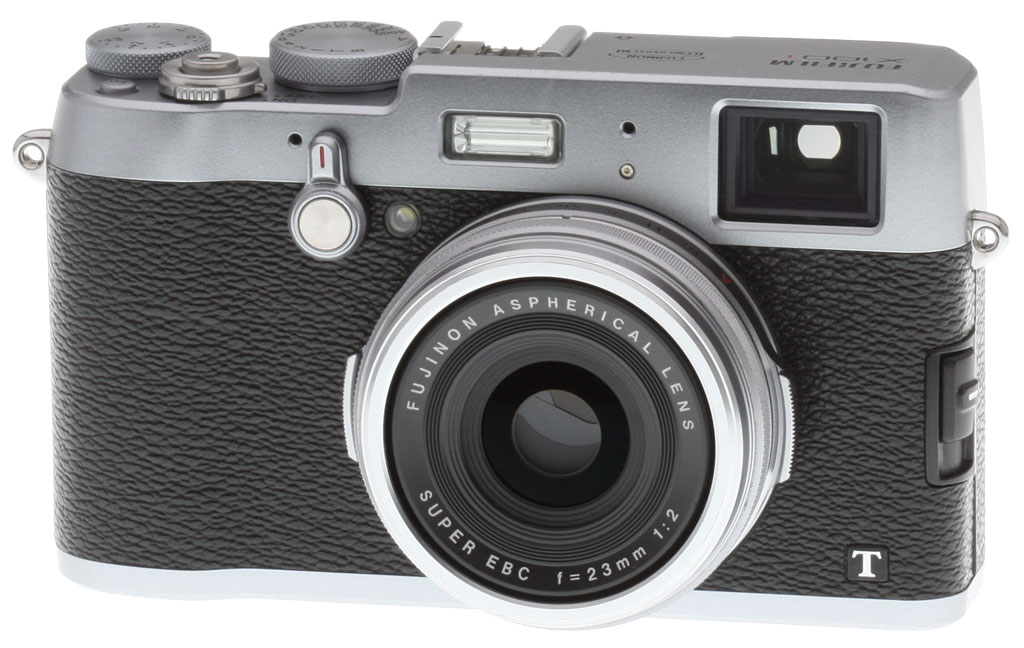


Overview
From the Firmware Files: Just bought an X100T of your very own, or planning to do so soon? If so, you'll want to check to be sure that your firmware is up to date. There have been a couple of significant firmware updates since the Fuji X100T launched, the most recent of them (as of May 2017) taking place in September 2015.
Want your whistle wetted with some of the new features you may find after upgrading? You can expect to gain access to improved flash function with mechanical and electronic shutter mechanisms combined, better focus peaking and focus frame alignment in the viewfinder, and support for Windows 10, among other changes..
You'll find the full change log described in past Firmware Friday roundups, which you can find most easily by researching past Fuji X100T stories on Imaging Resource here. And be sure to watch our Firmware Friday series in future to keep up to date with all the latest firmware news!
---
Update:
The successor to the X100T has been revealed as the Fuji X100F. It not only boosts resolution to 24 megapixels, but vastly improves autofocus and adds other new features and performance upgrades as well, all for the same list price. See our Fuji X100F coverage for details!
---

In early 2013, Fujifilm introduced the X100S, a bright-lensed camera nicely aimed at the street photography niche, and a followup to the earlier Fuji X100. Although we appreciated its image quality and a reduction in lens flare exhibited by the earlier camera, we had some reservations due to some quirks, predominantly related to its autofocus, controls and body design.
Now, the followup Fuji X100T aims to take the best of its predecessors, answer our main criticisms of their design, and bring them up to date with some worthwhile tweaks to the viewfinder, display and connectivity.
What hasn't changed since the X100S is the imaging pipeline, which we commended in the earlier camera. The Fuji X100T shares the same 16.3-megapixel X-Trans CMOS II image sensor, the same EXR Processor II image processor, and the same bright 35mm-equivalent f/2.0 prime lens that together makes this a great little candid street shooter.
And given that the pipeline is unchanged, unsurprisingly neither is the X100T's burst performance of about six frames per second. You can also still extend reach of its prime lens in either direction with optional 0.8x wide and 1.4x tele converters.
So what has changed? First and foremost, it's the Fujifilm X100T's body design. A number of controls have been reworked to answer concerns we raised in our X100S review. The X100T now offers support for third-step aperture control on the ring surrounding the lens barrel, and has a true rear dial instead of a control that looks like a dial, but is actually a clickable rocker.

Fuji has also removed the awkwardly-positioned, easily-bumped dial that encircled the four-way controller, and standardized on 45-degree diamond knurling for the three exposure controls (aperture, shutter speed and exposure compensation). These changes together make for a scant 5g reduction in weight, and around a 1mm reduction in thickness, neither of which is enough to be noticeable in the real world. There's also a new accessory grip that should make the camera easier to carry without fear of an accidental drop.

But that's far from all. Fujifilm has also gifted the X100T with in-camera Wi-Fi connectivity -- including remote control and live view capability -- and honed the viewfinder with higher accuracy plus a clever new electronic rangefinder function. There's also a larger, significantly higher-resolution LCD monitor, a super-speedy electronic shutter function, more internal memory, and a more up-to-date Micro HDMI connector in place of the Mini HDMI connector which relatively few cameras use these days.

And there are plenty of changes in firmware, too. The maximum ISO sensitivity has been raised to ISO 51,200 equivalent, and three Auto ISO modes let you define various sensitivity limits for quick recall. Fujifilm has also added a new interval timer function that lets you track changes in your subject over longer periods with a minimum of fuss. And as in the Fuji X30, there's also a new Classic Chrome film simulation.

The Fuji X100T has kept much of what we loved about its predecessors, while bringing the design right up to date in the connectivity and display departments, and answering some of our main ergonomic concerns.
One thing that hasn't changed is the pricetag. Available since mid-November 2014 in black or silver-bodied variants, the Fuji X100T is priced at US$1,300, meaning you get a fair bit more camera for the exact same list price as before.
Place your order with a trusted Imaging Resource affiliate now:
- Fuji X100T Silver, ~US$1,299: ADORAMA | AMAZON | B&H
- Fuji X100T Black, ~US$1,299: ADORAMA | AMAZON | B&H
In the Box
The Fuji X100T retail box includes (may vary by region):
- Fujifilm X100T digital camera
- NP-95 Lithium-ion battery pack
- BC-65N Battery charger
- Shoulder strap
- Lens cap
- Metal strap clip
- Protective cover
- Clip attaching tool
- USB cable
- Owner's Manual (Basic Operations)
Recommended Accessories
- Large capacity SDHC/SDXC memory card. Speed Class 10 or faster is required for Full HD moving recording.
- Extra NP-95 battery pack (~US$30)
- Camera case
Comparison Shopping?
The premium compact camera market has heated up to the point you'll surely need our new camera comparison tool to help keep all the specs sorted out! Clicking on any of the following will take you there, where you can see features, specs, pros and cons listed for virtually any pair of cameras you'd like to compare. Here are a few obvious choices to compare to the Fuji X100T to get you started:
Fuji X100T vs Fuji X100S |
Fuji X100T vs Nikon Coolpix A |
Fuji X100T vs Panasonic LX100 |
Fuji X100T vs Ricoh GR |
Fuji X100T vs Sony RX1R |
Image Quality
Typically in this comparison, we compare the primary camera to a select set of similar or competing models, as well as its predecessor, if applicable. In the case of the Fujifilm X100T, the imaging pipeline of the camera is identical to that of the previous model, the X100S. The cameras share the same 16.3-megapixel X-Trans CMOS II image sensor, the same EXR Processor II image processor, and the same bright 35mm-equivalent f/2.0 prime lens. As you can see below from the X100T vs X100S side-by-side comparisons, the image quality is practically identical between the two models, which is why we didn't conduct a full multi-model comparison in this case. If you want to see how the X100T, or X100S, stack up to their main competitors, head over to our Fujifilm X100S Image Quality Comparison or compare the X100T to any of our previous tested cameras in our Comparometer.
NOTE: These images are best quality JPEGs straight out of the camera, at default settings including noise reduction and using the camera's actual base ISO (not extended ISO settings). For those interested in working with the RAW files involved: click these links to visit each camera's respective sample image thumbnail page: Fujifilm X100T and Fujifilm X100S -- links to the RAW files appear beneath those for the JPEG images, wherever we have them.
Fujifilm X100T vs Fujifilm X100S at Base ISO


Fujifilm X100T vs Fujifilm X100S at ISO 1600


Fujifilm X100T vs Fujifilm X100S at ISO 3200


Fujifilm X100T vs. Fujifilm X100S - High Contrast Crops


Field Test
Field Test Part II
Old school - updated
By Eamon Hickey | Posted: 01/15/2015
[A note on sample images in this report: Several of these example JPEG images were created from original RAW files using the Fujifilm X100T’s in-camera RAW development feature, which lets you apply film simulations and other camera settings to a RAW image on your SD card, then save a JPEG of the result. More on this in the Images section of part 2 of this report.]
Within an hour or two of unpacking my first digital camera way back in 1996 (a Nikon Coolpix 100 demo unit), I was already dreaming about a compact fixed-lens digital camera for enthusiast photographers with real, direct exposure and focus controls. Sadly, a combination of bad luck and laziness had prevented me from shooting with any Fujifilm X-series models before now, so I jumped at the opportunity to try out the new X100T and see if my almost two-decade longing could be satisfied.
 |
| 1/500s / f/2 / ISO 800 / 35mm eq. / [original] |
Classic street shooting: The Fujifilm X100T is the perfect companion for a street parade in NYC. |
Design & Handling
As I unboxed the Fujifilm X100T, I had a few immediate impressions. It is indeed a great-looking camera. It’s just a tad bigger than I was hoping, but it’s also lighter than I expected, a good thing in a camera that I intended to use as a carry-everywhere quality snapshooter. The camera body itself, as well as the control dials and buttons, generally have a high quality feel, but I was disappointed in the somewhat flimsy, light feel of the rear command dial, which is too easy to turn.
Over the next 10 days I carried the Fujifilm X100T with me on most of my daily travels, and its weight and bulk were basically unnoticeable, whether I was using the strap to carry it around my neck or stuffing it into a coat pocket. Its easy portability meant that I had the X100T with me when I found myself amidst a gang of unruly mutts and their tennis balls at the Washington Square Park dog run, and I took the opportunity to try some impromptu portraits from a dog’s-eye view. It was equally easy to carry the camera with me to the annual Macy’s Thanksgiving Day Parade, where I used it for shots of the floats and the giant balloons, as well as some “hail Mary” style pictures of my fellow spectators. I was able to compose those over-the-head shots using the rear LCD even though it doesn’t tilt, but this is the one major design choice on the X100T that I would quibble with. A tilting screen is extremely useful and would have given me more keepers, especially at the dog run.
 |
| 1/250s / f/5.6 / ISO 400 / 35mm eq. / [edited • original] |
Well-dressed would-be ball thief bides his time at Washington Square Park dog run. This image has been brightened in post-processing. |
The Thanksgiving Parade was my first outing with the Fujifilm X100T, and I was immediately comfortable with the camera’s feel in my hands and general control layout. The one exception is that my large-ish fingers had a little trouble using the lens aperture ring, which is scrunched up very close to the camera body and tricky to grasp, at least for me. This was a minor frustration every time I used the camera. Still, on the basic issue of whether the Fujifilm X100T can serve as an essentially effortless carry-anywhere camera, my answer is a strong yes.
Controls
As we mentioned above, several controls have been redesigned on the Fujifilm X100T compared to the X100S, but one thing that is pretty much unchanged is the old-school analog dial/aperture ring exposure control system that many fans of the X-series cameras love. As I noted in my review of the Nikon Df earlier this year, I cut my photographic teeth on these kinds of controls, and I’m completely comfortable with them. But experience has persuaded me that the push-button/multi-command dial systems that supplanted them in the 1990s — and which are the norm on most other advanced cameras nowadays — really do let you (or at least me) shoot more efficiently. I love old cameras and their designs — and there’s nothing wrong with choosing love over efficiency — but my love is not blind.
Using the Fujifilm X100T on all my different outings didn’t change my opinion on modern vs. old-school controls, especially given my modest struggles with its aperture ring. That one issue aside, I found the camera’s shutter speed and exposure compensation dials to be well placed and easily adjustable without being loose . And the addition of third-EV click stops on the aperture ring is obviously a welcome update. I used it on a landscape shot in Central Park where I was shooting in manual exposure mode and trying to balance handheld shutter speeds, depth-of-field, and a desire to use a low ISO. It turned out that f/4.5 was the f-stop setting I needed, and it was available with a simple click of the lens ring.
As I said, I think the feel of the rear command dial is loose and flimsy, but in fairness I’ll add that I never accidentally changed a setting because of it. (I’d be on guard for this, however, when pulling the camera in and out of coat pockets). Whether this dial is better than the toggle lever on the X100S is open to debate, I think. With one important exception, I found the other buttons and the four-way controller on the Fujifilm X100T to be acceptably well-placed, if just a bit cramped, and they all have a nice feel. I’m sure the four-way controller would be hard to activate accidentally, so that should count as an improvement over the X100S. We already noted that the functions of 7 buttons on the X100T are now customizable, and this does indeed make it easy to set the camera up to your own personal preferences.
The one exception I mentioned is the Fujifilm X100T’s AEL/AFL button, which I had set up to activate autofocus for the technique widely known as “back button” autofocus. I just couldn’t locate it easily by feel, even after shooting several hundred pictures on many different days. This was a significant drawback for me because I rely very heavily on the back button AF method, and I missed some shots because of it. This would, of course, matter much less to someone who doesn’t use the back button technique.
| Fuji X100T: Exploring those classic Fuji film simulation modes |
 |
| 1/100s / f/4 / ISO 800 / 35mm eq. / [original] |
| Developed from RAW in camera using the "Velvia" film simulation. |
 |
| 1/500s / f/2 / ISO 800 / 35mm eq. / [original] |
Awaiting the next giant balloon at the Macy's Thanksgiving Day Parade. Developed from RAW in camera using the "PRO Neg. Std" film simulation mode. |
 |
| 1/125s / f/4.5 / ISO 200 / 35mm eq. / [original] |
Hazy winter sky over The Pond at Central Park. Developed from RAW in camera using "Velvia" film simulation and "soft" highlight tone. |
Viewfinder
The hybrid optical/electronic viewfinder of Fujifilm’s X100 models is probably their most distinguishing feature, and tons of ink has been spilled describing it. Accordingly, I’ll limit most of my comments to what’s new in the X100T’s viewfinder setup, but this was my first chance to use the hybrid system, so I’ll sprinkle in my thoughts on it.
Like lots of other photographers, I really liked having the flexibility to use optical or electronic viewing on the Fujifilm X100T — it’s a very big benefit. The optical finder (OVF) was perfect one sunny afternoon when I wanted to make an image of strongly backlit pedestrians walking on Church St., the kind of super high contrast scene that can render an electronic viewfinder almost useless. Using the OVF let me see the scene much better, and in this particular street composition I didn’t need perfect framing accuracy. As we noted above, there are also refinements to the information display in the OVF, which I found to be clean and easy to read.
| Fuji X100T: OVF + EVF |
 |
| 1/400s / f/8 / ISO 200 / 35mm eq. / [original] |
| OVF: The optical viewfinder was better for composing this shot of shadows on Church St. |
 |
| 1/80s / f/2.8 / ISO 400 / 35mm eq. / [original] |
EVF: The EVF gave me a bright, precise view of this scene. Shot with the "Classic Chrome" film simulation. |
A few days before, I used the electronic viewfinder (EVF) of the Fujifilm X100T on a different street scene, a nighttime shot of a guy sitting outside a pizza joint. It gave me a bright view of this dark scene with 100% accurate framing, making the shot easy. I used the EVF many times on other outings, both indoors and out, and it’s top-notch — among the sharpest and easiest to view that I’ve used. On the same sunny afternoon that I used the OVF to shoot the pedestrian shadows, I also tested the X100T’s new Natural Live View mode on the EVF. It did noticeably improve the usability of the EVF in outdoor and high contrast situations — I would probably leave it activated most of the time.
On several outings I played with the Fujifilm X100T’s new “Electronic Rangefinder” window that can be activated in the lower right corner of the OVF. Again, this is remarkably clever technology that will probably please many photographers who like rangefinder cameras, but I didn’t fall in love with it. It works very nicely, but it blocks about 15% of the view, and its location in the lower right corner was hard for me to get used to. But most importantly, I’m sure I can use the back-button AF technique to focus faster and easier in nearly all situations where manual focus has advantages. In short, I admired the smarts behind the Electronic Rangefinder window, but I don’t think I’d use it very much.
 |
| 1/27s / f/4 / ISO 3200 / 35mm eq. / [original] |
Moving on up: ISO 3200 is no problem for the Fuji X100T. |
In part 2 of this shooter’s report, I’ll take a look at the Fujifilm X100T’s performance, lens and Wi-Fi features, among other things.
Field Test Part III
View from a lens. One lens.
By Eamon Hickey | Posted: 01/28/2015
[A note on sample images in this report: Several of these example JPEG images were created from original RAW files using the Fujifilm X100T’s in-camera RAW development feature, which lets you apply film simulations and other camera settings to a RAW image on your SD card, then save a JPEG of the result. More on this below.]
Performance
I found the Fujifilm X100T to be a fairly good performer overall, with a couple of modest exceptions. Once I had it on and activated, it responded essentially instantly to any control inputs, but it was sometimes just a bit slow to wake from sleep. It’s a small issue, and in my outings with the X100T I didn’t miss any shots because of it, but I think if I owned one, this might rear up and bite me every now and then.
[Editor’s note: We measured the Fuji X100T’s power-on to first shot time at about 1.9 seconds, the same as the X100S. Both cameras however have a High Performance mode that reduces startup time to about one second, at the cost of increased battery drain.]
As I mentioned in part 1 of this report, my first time out with the Fujifilm X100T was to shoot the Thanksgiving Day parade, and my next two shoots after that were also outdoors during daylight. I shot most of my images on these walks using the camera’s Single AF (AF-S) autofocus setting, and it worked very well for me, focusing quickly and decisively. On one walk, I suddenly noticed a construction crew just as they were fastening cables to a crane hook, and I was able to focus and shoot in a second or less; the camera’s AF system was easily quick enough for this kind of street shooting. On later outings, I tried the X100T’s AF system on nighttime subjects in the East Village neighborhood, and here again the camera focused well on the high-contrast subjects I was shooting using the AF-S mode. With some later indoor shots in restaurants, the X100T’s AF-S system was somewhat slower but still worked reasonably well, focusing accurately in about a second or a little less.
 |
| 1/100s / f/4 / ISO 400 / 35mm eq. / [original] |
Classic street shooting part II: The Fujifilm X100T with its fast single AF, 35mm focal length and classic film simulation modes make it a pleasure to have for shots like this. |
When I tried the Continuous AF (AF-C) setting on the Fujifilm X100T, I found it much less reliable, especially in anything other than bright outdoor light. Indoors in the restaurants, and also in some nighttime sidewalk shooting I tried to do, the AF-C system, which is supposed to be able to follow moving subjects, did a lot of hunting back and forth and never acquired focus. After several outings with the X100T, I felt very confident about its AF-S setting, but I wouldn’t expect great results with this camera trying to follow-focus moving subjects in AF-C, especially in low light.
I was never slowed down by shot-to-shot time with the Fujifilm X100T, and the burst rate is easily fast enough to make autoexposure bracketing a breeze. As a quick and dirty way to ensure I get a good exposure of every subject I photograph, I sometimes like to set my cameras to bracket every shot I take. I used this method with the X100T when I took a walk in Battery Park at the southern tip of Manhattan and made a picture of a New York City police boat against a bright afternoon sky. The camera fired off 3 shots in under a second, and the +2/3rd stop exposure turned out to be the best. However, on that same walk, also shooting rapid sequences of bracketed exposures in RAW+JPEG (Fine) mode, I several times ran into the buffer limit of the X100T, which was about 6 or 7 frames with my settings. I didn’t try to time the buffer clearing rate because my SD card wasn’t the fastest, but the somewhat skimpy RAW buffer size might trip me up occasionally if I owned this camera.
[Editor’s note: In the lab, we confirmed the X100T’s top burst speed was about 6 frames per second. Buffer depth when shooting RAW or RAW+JPEG files was 7 frames, and 16 frames when shooting best quality JPEGs. Buffer clearing was pretty fast with a 95MB/s UHS-I card, at 3 seconds after a burst of 16 best quality JPEGs, 5 seconds after 7 RAW files and 7 seconds after 7 RAW+JPEG files.]
 |
| 1/1400s / f/5.6 / ISO 200 / +0.7 EV/ 35mm eq. / [original] |
Bracketing in Brooklyn: New York Harbor on a hazy winter day. Autoexposure bracketing helped me get a better exposure. |
Lens
In recent years I’ve become more and more attracted to the idea of reducing my camera gear to the bare essentials, and that’s a big part of the appeal of a fixed-lens camera. I haven’t quite reached the point where I want to limit myself to only one field-of-view (although two might be enough). But if I had to choose just one lens, I might very well pick a 35mm equivalent focal length like the 23mm f/2 optic on the Fujifilm X100T. To my mind, Fujifilm has done an excellent job judging how to balance important qualities of this lens — field-of-view, size, and maximum aperture, especially.

For me, the f/2 maximum aperture of the Fujifilm X100T’s lens was especially welcome. I used it in a venerable, very dark Greenwich Village eatery called the Olive Tree Cafe when I got a shot of a group of four friends at another table. The ability to open up to f/2 helped me keep my shutter speed up (1/75) and my ISO at 6400 — a high setting, but a lot better than the ISO 12,800 I would have had to use with a maximum aperture of f/2.8, which is typical of nearly all other compact wide-angle lenses.
 |
| 1/75s / f/2 / ISO 6400 / -0.7 EV / 35mm eq. / [original] |
Low light is no problem for the X100T: Four friends at f/2 and ISO 6400 in the very dim Olive Tree Cafe. Developed from RAW in camera, using the "Pro Neg Hi" film simulation. |
If I have one quibble with the Fujifilm X100T’s lens, it would be that it’s almost too small. It’s so compact and extends so little from the camera body that I had a hard time holding the camera without accidentally brushing the lens focus ring. When I had the manual focus magnification assist function activated, these little movements would constantly trigger the MF assist magnification and the EVF or LCD image would zoom into a small section of the scene. This was annoying when I was trying to frame my shot, rather than trying to fine-tune my focus. I ended up deactivating the MF assist feature because of this. To be fair, my hands are larger than average, and other, less ham-handed photographers might not have this issue.
Another important plus for the lens on the Fujifilm X100T is that it can focus quite close in macro mode, as we noted above. This came in handy when I wanted to get a photo of a colorful fallen leaf on the street outside my apartment, which I ended up shooting from only about 6-8 inches away.
 |
| 1/100s / f/5 / ISO 640 / 35mm eq. / [original] |
Close-up: Macro mode on a fallen leaf. Developed from RAW in camera, using the"Velvia" film simulation. |
I’ll talk more about my images from the Fujifilm X100T below, but in terms of qualities specific to the lens, check out our analysis of it from our optics review of the X100S. My test shots confirmed those lab findings, showing few if any noticeable flaws other than a little geometric distortion, and a bit of light falloff at the widest f-stops. I shot almost 300 images at apertures from f/2 to f/4, and I’d say that the bokeh, or out-of-focus blur, is perhaps not the creamiest I've ever seen but is still very pleasing.
Images & Video*
Check out the Image Quality section of this review for our in-depth analysis of Fujfilm X100T images (coming soon). For my part, I’ll say that ever since I reviewed my first Fujifilm digital SLR 14 years ago, I’ve been very impressed with the company’s color judgment as expressed in the JPEGs their cameras produce at default settings. Speaking very generally, I’d call it a saturated look that manages to still seem natural. Most of my shooting days with the X100T were overcast, with resulting muted colors, so I can’t say I’ve developed a complete sense of its color characteristics, but I haven’t seen anything that makes me think it won’t be as good as its predecessors.
But that brings me to a feature that I enjoyed on the Fujifilm X100T — its film simulation modes. In particular, I like the fact that you can develop a RAW file in-camera using any of the film simulation modes and the camera will save a JPEG to your SD card with that setting applied. With many of my RAW images, I used in-camera RAW developing to make a range of JPEG versions of the shot with several different film simulations. It’s fun to play with, and most of the film simulations themselves are very well-judged to my eye — the Pro Negative simulations, especially, remind me of the lower-contrast, lower-saturation, skin-tone-optimized wedding films that were long one of the “secrets” of pro portrait photographers. I also think the black-and-white simulations looked very good. I used the standard B&W simulation on a shot I took of a passenger stepping out of a subway train, and I’m pleased with the default tonality and contrast of the resulting conversion — these qualities usually need substantial adjustments when manually converting from color to B&W
| Fuji X100T: Film simulation modes |
 |
| 1/110s / f/4.5 / ISO 3200 / 35mm eq. / [original] |
| Stepping out of the 6 train. Developed from RAW in camera using the "Monochrome" film simulation. |
 |
| 1/70s / f/4 / ISO 200 / 35mm eq. / [original] |
Developed from RAW in camera, using the "Pro Neg Hi" film simulation for lower contrast. |
That said, I don’t love all the film simulations, although it’s important to remember that this is a very subjective topic. The Velvia setting doesn’t look very accurate to my eye (too saturated and contrasty). And in my test shots at least, the relatively new “classic chrome” simulation sometimes looks very nice, but it doesn’t resemble any slide film I remember, certainly not any recent version of Kodachrome, which some people seem to think was the family of emulsions that Fujifilm was aiming to replicate.
[Editor's Note: Update, 7/21/2015: We've now had the opportunity to shoot a sample video with the X100T.]
The video quality itself, like still image quality, isn't all the that different from the X100S. Video quality for the most part is decent, but it still suffers from the noticeable moiré and aliasing artifacts. Also, the lack of image stabilization, while not much of an issue for stills given the X100T's bright f/2.0 lens, it's much more crucial for pleasing, smooth video without a tripod. You can see the Full HD sample video below shot in 60p mode and using continuous AF.
Fujifilm X100T Sample Video 1,920 x 1,080, H.264, Progressive, 60 fps, C-AF Download Original (249.4MB MOV) |
Wi-Fi
As we noted above, the Fujifilm X100T has several different Wi-Fi functions, and I ran through three of them in a test scenario one day using my iPhone 5 and the Fujifilm Camera Remote app. What interested me the most are the features for transferring images to my phone for web sharing or texting to friends and family these are the functions I would use often. The Camera Remote app provides two methods for this. The first is called the “Receive” mode, and it lets you transfer single images from the camera to your phone (or tablet) from the playback mode of your camera. I had no trouble establishing a Wi-Fi connection and the transfer works fine, but in use this function would end up requiring a lot of re-establishing the network connection via the iPhone’s settings menu whenever you took a new photo that you wanted to transfer. It’s more of a hassle than I’d like. (On a video from Fujifilm Australia that I watched, it looks like it’s a little more straightforward with an Android device.)
I’d be more likely to use the second image transfer mode — “Browse Camera” — where you browse the Fujfilm X100T’s SD card from your phone. This lets you select multiple images for a single transfer. My habit would be to do this once or twice a day after I had accumulated some worthwhile images, thereby getting all my transfers done with only one round of establishing a connection.
I also did a little testing of Camera Remote’s remote camera control feature. Not only can you trigger the Fujifilm X100T from your phone in this mode, but you can also change many of the camera’s shooting settings and even do touch focus using your phone’s display as a viewfinder. The whole system is fairly responsive, and it’s pretty good remote control functionality overall. I doubt the X100T would be my choice for the kinds of studio setups where this type of remote control could be really useful, but still, it works well if you need it.
 |
| 1/420s / f/5.6 / ISO 200 / 35mm eq. / [original] |
One World Trade Center building shot from Fulton St. |
Wrapping up
All in all, I had fun shooting with the Fujifilm X100T. It’s very portable, has good controls for advanced photography, takes great pictures, and performs very well overall. I love the hybrid optical/electronic viewfinder, the lens, and the X100T’s good looks and quality feel.
All that said, I can’t say I fell in love with the whole camera. The accumulation of several small but consistent annoyances takes a bit of the bloom off the rose for me — most importantly, my modest problems with accessing the aperture ring, accidentally turning the focus ring, and finding the button for back-button AF by feel. Those are all pretty personal experiences, though, and I’m sure many other photographers wouldn’t have had the same issues. And in the end, even with those caveats stated, I could be very happy shooting with the Fujifilm X100T for a great deal of the general street, travel, and social photography that I do.
Technical Info
by Mike Tomkins

Same sensor and processor...
At the heart of the Fujifilm X100T are the exact same 16.3-megapixel X-Trans CMOS II image sensor and EXR Processor II image processor as in 2013's Fuji X100S.
...but greater sensitivity
The Fuji X100T retains its predecessor's sensitivity range of ISO 200 to 6400 equivalents, but this can now be expanded a little further at the upper range. The expanded range now runs from ISO 100 to 51,200 equivalents, where the X100S topped out at ISO 25,600 equivalent. And you now get a choice of three Auto ISO positions, allowing you to define variant limits for each, and then quickly recall the Auto ISO mode whose limits match your current needs at any given moment. Handy!
Performance is similar, but burst depth varies
Although the sensor and processor combo not surprisingly derive the same performance of about six frames per second (with an available 3fps rate if you don't need full-speed shooting), JPEG burst depth is said to have fallen somewhat.
Fuji rates the X100T as good for 25 JPEG frames at full speed, down from 31 frames in the earlier camera. However, at the lower speed, you should now be able to manage to shoot until card space or battery power run out, where in the past there was a buffer limit of 44 JPEG frames.
We ran some quick tests in the lab to try to confirm Fuji's buffer numbers, but got results very similar to the X100S: 16 best quality JPEGs, 7 RAW and 7 RAW+JPEG frames before the camera slowed down. The 16 JPEG buffer matches our X100S results (and dropping quality down from Fine to Normal made no difference), however RAW and RAW+JPEG buffer depths fell by one frame. The X100T's top burst speed was however a touch faster in the lab, at just over 6.0 frames per second versus 5.7 for the X100S. Buffer clearing was also a little faster when shooting RAW and RAW+JPEG files with the same UHS-I card, at 5 and 7 seconds versus 8 and 11 seconds respectively, but keep in mind buffers were a bit shallower. Both cameras took only 3 seconds to clear after 16 JPEGs.
X100T autofocus and shutter lag performance was essentially the same as the X100S, within a few percent. Refer to our Fuji X100S Performance page for details.
Exposure control tweaks
There are some very worthwhile tweaks to exposure control in the Fuji X100T. Although the overall mechanical shutter speed range of 1/4,000 to 30 seconds plus a 60-minute bulb mode is unchanged, as is the aperture range of f/2.0 to f/16.0, the latter can now be addressed directly in 1/3-step increments from the aperture ring around the lens barrel.
The exposure compensation range available from the top-deck dial is also wider, ranging a full 3EV either side of the metered exposure, instead of the X100S' +/-2EV range. And, exposure compensation can now be set in Manual exposure mode.
Finally, spot metering can now be coupled with autofocus, such that the metering location follows the active autofocus point.

More control changes
There are other control changes, too. One of our least-favored controls on the X100S was the easily-bumped dial which encircled the four-way controller, and that's thankfully gone. Taking over from it in the Fuji X100T is a true, rolling rear dial that replaces the dial-like interface element which fell under your thumb on the X100S. That control wasn't actually a dial, even if it looked like one, but rather a left/right rocker that doubled as a button. The new, true dial should be more intuitive.
And since replacing that control would've removed a button, another has been added -- a dedicated Delete button. The Drive button of the X100S, meanwhile, has been repurposed as both a Function and Wi-Fi button. Otherwise, the controls are similar, although the locations have been reshuffled somewhat.
Note, though, that the four-way controller buttons are no longer screen-printed with their Record mode function. These are among a total of seven buttons which can be customized to your own personal tastes. You can also now customize the Q menu, surfacing more options that you want quick access to.

Get a grip!
Although there's been a fair bit of change to the body, the Fuji X100T accepts the same optional leather case as did its predecessor. There's also a new accessory grip, though, which we're presuming will be specific to this camera. It attaches to the base, and should make for a more comfortable, secure handhold. It also adds a tripod mount directly beneath the optical center of the lens, and allows battery and flash-card changes without removing the grip itself.
Get your photos on your phone
And yes, we did mention Wi-Fi above. That's another brand-new feature for the Fuji X100T, and one which makes it more relevant in the smartphone age. Now, without extra accessories -- other than your Android or iOS phone itself, of course -- you can both share images almost instantly with friends and family on social networks, and control the camera remotely, complete with a live view feed to make sure everything's just as you want it when you trip the shutter. You can also geotag photos via Wi-Fi, although this relies on your phone's GPS receiver and so will likely lessen its battery life.
A refined finder...
There have been several changes made to the unusual hybrid optical / electronic viewfinder of the Fuji X100T. It's still based around a reverse galilean optical finder with bright frame display and a high-resolution 2,360k-dot, 0.48-inch LCD panel, but now provides a more accurate 92% coverage in optical viewfinder mode, up from 90% in the earlier camera. And we've confirmed optical viewfinder coverage has indeed improved to 92% (see our optical viewfinder coverage test images below).
 |
 |
X100T OVF coverage = ~92%
|
X100S OVF coverage = ~90%
|

The really big change in optical viewfinder mode, though, is that the camera can now insert a small electronic viewfinder "window" in the bottom right of the image, shielding just this section of the OVF view from incoming light. This allows the camera to provide an electronic preview of the point of focus, while surrounding it with a sharp, lag-free optical view of your subject. The best of both worlds, in other words. And although we have no spec for this, parallax correction is also said to be better, allowing for more accurate framing using the optical finder with closer subjects.
In electronic viewfinder mode, meanwhile, lag is said to have been reduced, and a new Natural Live View shooting display added. This allows you to preview your subject without effects like film simulations or a preview of exposure levels, helpful when trying to frame a hard-to-see subject in low light. And the electronic viewfinder brightness can now be adjusted automatically, as well, saving you the trouble of tweaking it manually as ambient light levels change.
Electronic viewfinder dynamic range has also been improved, making it less likely that subjects will be reduced to solid white, clipped blobs devoid of detail.
...and a much better LCD monitor
When we reviewed the X100S last year, we felt its LCD monitor to be something of an afterthought, compared to the oh-so-clever hybrid finder. Well, we're glad to say that's no longer the case. The Fuji X100T now sports a somewhat larger and much higher-resolution display, which is great news -- especially if you like "chimping", or sharing images with friends and family right after capture as you all huddle around the camera's screen.
The new display still isn't the largest or highest-res around, but at a 3.0-inch diagonal and 1,040k-dot resolution, it's definitely a much better choice than the earlier camera's 2.8-inch, 460k-dot panel.
Finally, face detection
Although the X100S sported a cool Hybrid autofocus system that combined both contrast-detection and phase-detection from dedicated focus pixels on the image sensor -- a technology first developed by Fujifilm and since imitated by many rivals -- we still had a couple of concerns with the system in that camera. Firstly, we found it rather slow and inaccurate in low light, and secondly we were surprised by the omission of face detection capability, something which has been available for years, even on entry-level cameras.
Well, with the X100T, Fujifilm has now added face detection capability that will help locate subjects within the image frame, then ensure the point of focus is placed where it typically should be, right on the face of the dominant subject.
Also new to the X100T is a multi-target auto area autofocus mode that can recognize a subject spanning multiple focus points, then use those points together when determining focus.

Super-speedy electronic shutter
In most respects, other than the aforementioned increase to the camera's upper expanded sensitivity limit, the Fujifilm X100T's exposure system is similar to that of its predecessor. Exposure modes include Program, Aperture-priority, Shutter-priority and Manual, and they're set intuitively by either dialing in a variable with the camera's physical controls, or setting that variable to the Auto position.
So, for example, if you set the Aperture ring around the lens to 'A', but set the shutter speed to 1/2,000 second, you're shooting in Shutter-priority. You can also set the shutter speed dial to the T or B positions for Time or Bulb shooting, respectively, and dial in exposure compensation using a dedicated dial with a +/- 3EV range. And of course, as a camera aimed at the knowledgeable photographer, there are no consumer-friendly niceties like scene modes here.
There's one rather cool change, though. As well as the standard shutter speed range of 1/4,000 to 30 seconds plus bulb, the Fuji X100T now provides an electronic shutter function. This will take you all the way out to a staggering 1/32,000 second, helping to freeze the action with really fast-moving subjects.

Creative options
Probably the handiest new creative feature of the Fuji X100T is its new interval timer function. You can control the interval, number of shots, and start time.
There's also a new Classic Chrome film simulation, a function first seen in the Fuji X30, and said to offer "muted tones and deep color reproduction".
More versatile movie capture
Although the upper resolution limit of Full HD (1,920 x 1,080 pixel; 1080p), built-in stereo microphone, and standard 2.5mm microphone jack (rather smaller than the 3.5mm found on most cameras, but adapters are readily available) are all unchanged, there are a couple of tweaks to the Fuji X100T's movie mode. First of all, you can now also record at HD (1,280 x 720 pixel; 720p) resolution. You can also opt for frame rates of 50, 25, or 24 frames per second, as well as the 60p and 30p rates of the earlier camera. And unusually, you can now shoot movies while framing using the optical viewfinder, not just the electronic viewfinder.

Connectivity and storage
Like its predecessor, the Fujifilm X100T includes USB 2.0 High Speed data and HDMI high-definition video connectivity, but the latter now uses the more-common (on cameras, anyway) micro (Type-D) connector, rather than the earlier camera's mini (Type-C) connector. And the micro USB port is now compatible with Fuji's RR-90 Remote Release. The Fuji X100T now also gets a 2.5mm jack that serves double duty as an external stereo microphone input and a wired shutter release input. (The X100S also supported an external mic, but it needed to connect to the USB multi port via a proprietary adapter.)
Storage is also tweaked a little, with the earlier camera's Secure Digital card slot (compatible with SDHC, SDXC, and UHS-I cards) retained, but the internal memory boosted from 24MB to 55MB -- enough for a few shots if you leave your card at home by mistake. (It happens to the best of us!)

Power
The Fuji X100T still uses the same NP-95 lithium-ion battery pack as its predecessor, and has the same rated battery life of 330 frames to CIPA testing standards. The number of shots per charge can be increased up to 700 when OVF Power Save mode is enabled, however it's not clear if that's an improvement over the X100S, as it too has that mode.
The X100T's battery can now also be charged in-camera via USB, however a dedicated BC-65N battery charger is still included in the bundle.
Conclusion
| Pros: | Cons: |
|---|---|
Additional Pros & Cons for X100T compared to X100S |
|
|
|
While the X100S was a vastly superior camera to the original X100, the new Fujifilm X100T brings a host of refinements and subtle improvements rather than drastic changes to Fuji's cool, compact rangefinder-style camera, making the new model all the more functional. For starters, Fujifilm, it seems, took the philosophy of "if it ain't broke, don't fix it" regarding the imaging pipeline of the X100T. Keeping the same 16.3-megapixel X-Trans CMOS II image sensor and EXR Processor II image processor, as well as the same 35mm-equivalent f/2 prime lens, the X100T's resulting image quality is practically identical to its predecessor-- and that's not a bad thing. The image quality from the Fuji X100T is very good, with excellent dynamic range, accurate color and fantastic high ISO performance for its class.
Video quality wasn't the X100S' strong suit, though, and the same can be said for the X100T. Video image quality is not terrible, but like its predecessor and other X-Trans-based cameras we've seen, there are artifacts and other moiré-like issues visible in various finely-detailed areas and objects in X100T videos. Also, the lack of image stabilization, while not as big a deal for photos -- especially with the nice f/2.0 lens -- really makes it tough to get smooth handheld video.
Autofocus also remains largely unchanged, with a similar hybrid AF system comprised of both contrast-detection and on-sensor phase-detect pixels -- though the X100T does gain face detection and multi-area AF, which the X100S lacked. For the most part, the AF system is quick and snappy as long as you're in good to fair lighting, but in low-light situations, just as we found with the X100S, focus performance struggles. The Fuji X100T's AF continues to feel sluggish and a bit inaccurate in low-light, unfortunately.
In other performance measures, the X100T gets mostly high marks, with decent shot-to-shot speeds and a burst rate of just over 6fps (a bit faster than the 5.7fps we tested with the X100S). However burst depth when shooting RAW or RAW+JPEG files actually fell slightly, from 8 to 7 frames in our lab tests. Although Fujifilm claims the X100T's JPEG buffer depth has also been reduced (from 31 to 25), we found both models slowed down after 16 Fine JPEG frames in the lab. (Note, though, that our lab target was designed to be difficult to compress, so you should get deeper JPEG buffers with more typical subjects.)
Perhaps the most notable changes, despite first glance, are actually to the exterior design, and in particular, the rear panel of the camera. While exterior styling remains largely unchanged, with its metal body construction and, sadly, still rather slippery textured covering, controls get a subtle but welcomed refresh. Gone is the flimsy, easily mis-pressed multi-directional scroll wheel/button in favor of a simpler and customizable 4-way button cluster. Also, the rear thumb control dial up on the top edge has been swapped for a fully rotating dial rather than the awkward rocker button, which is a great improvement. This dial can still be depressed, functioning as a button, just like in the X100S. Users also get more tick marks on the exposure compensation dial (+/-3EV) and the ability to adjust aperture in 1/3-stops via the lens aperture ring.
Overall, the Fuji X100T is a lot like the earlier X100S. It's not light-years ahead and vastly improved over the earlier model, but it does offer a handful of physical and cosmetic improvements, especially in terms of better controls, a larger LCD and improved EVF/OVF (with a cool pop-up picture-in-picture-style EVF when using the OVF). The performance and image quality characteristics are basically the same, which if you like the X100S, you'll be pleased with the "T" model. That said, if you're already an X100S owner, the X100T might not provide much of an incentive to upgrade. However, if you still have an original X100, or are just now looking to jump into the Fujifilm X-series, the X100T is a great option, capable of producing stunning images. And thanks to its cool, timeless design and compact size, you can carry the Fuji X100T with you practically anywhere...and look good doing so.
Despite the lack of major changes and improvements, the Fuji X100T is an excellent camera with both great image quality, good performance, and a cool, compact design, and most definitely deserves a Dave's Pick.
Follow Imaging-Resource.com on Twitter!