


Overview
Kodak EasyShare C875 Overview
by Dan Havlik
Hands-on Preview: 1/05/2007
Updated: 4/24/2007
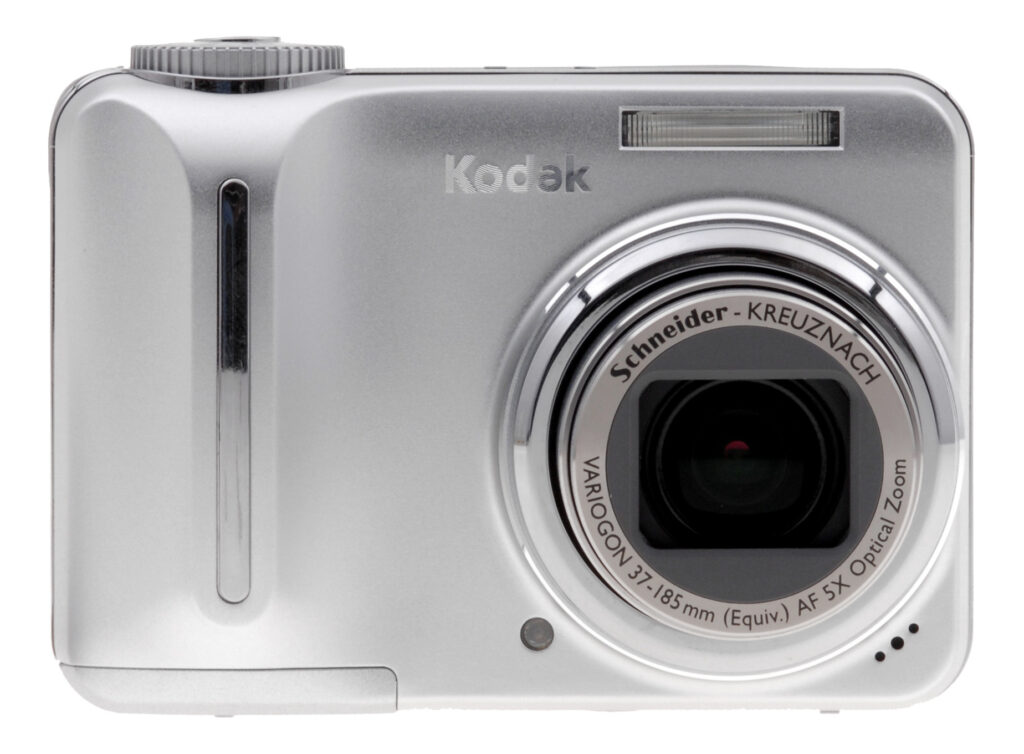
Given its reputation for making some of the easiest digital cameras around, a new compact model from Kodak is always a good chance to evaluate what kind of entry-level cameras are being marketed to soccer moms and dads these days. With the new Kodak EasyShare C875, that would mean a small but solidly built, 8-megapixel digital camera with an impressive 5x optical zoom and 21 scene modes including an incredibly easy-to-use Panorama setting which has been appearing on most of Kodak's recent consumer models. The Kodak C875's 5x zoom is equivalent to a 37 - 185mm lens in 35mm format.
Other features packed into this sub-$300 silver model include a new smart scene function which automatically picks the best scene mode depending on the shooting circumstances. This is a great idea for any user who has clumsily fumbled with a digital camera's multiple scene modes only to find out that all their fumbling has caused them to miss the shot. The Kodak C875 also sports a large 2.5-inch LCD (but with only 115,000 pixels of resolution); a VGA-quality movie mode that lets you uses the camera's 5x optical zoom while filming; Kodak Perfect Touch technology for enhancing images after they're captured; and a manual "PASM" mode that lets more adventurous users select ISO levels, shutter speed, and apertures just like the pros do.
Kodak EasyShare C875 User Report
Cute and Comfortable. Though it's not the most stylish compact camera on the market, there's something cute and comfortable about the all-silver Kodak EasyShare C875. Made largely of polycarbonate, the Kodak C875 has metal accents and buttons to give it a more luxurious feel. With dimensions of 3.6 x 2.5 x 1.4 inches (91 x 63 x 37mm) and weighing in at 7.87 ounces (223 grams) with the two AA batteries and SD memory card installed, the camera is light, but it still has enough heft and balance to help you keep it steady when shooting at the 5x end of the zoom. And you'll need that extra weight and balance since there's no image stabilization -- optical or digital -- on this model.
Buttons and dials on the Kodak C875 are large enough for even big fingers to press and clearly labeled in plain English so beginning users won't need a glossary to decipher their meaning. (I still love the fact that Kodak simply labels the trash button with the word "delete" and the playback button as "review.")

Easy Does It. Unlike some competing models, the Kodak EasyShare C875's buttons and controls are clearly labeled and large enough for even big fingers to operate.
My only major gripe with the Kodak C875's controls is that the zoom rocker is so tiny. If they had made it just a little wider, toggling between the full zoom and wide setting would not require you to take your thumb off the rocker, making the process smoother. I also did not like that the Kodak C875's Automatic and PASM (Program, Aperture, Shutter Speed, and Manual) modes are separated by the "Off" setting on the mode dial. If you want to switch between auto and manual and don't turn the dial fast enough you will accidentally shut the camera down, which can be a real pain if you're in a hurry, and a real battery waster. On the other hand, I liked the Kodak C875's mini metal joystick on the back. It was great for easy scrolling through menus and adjusting settings. You can also use the joystick for reviewing images, a plus since they speed by fairly quickly in review mode.
In another recent camera review, I complained about manufacturers getting rid of paper versions of their advanced manuals in favor of placing the manual on an enclosed CD as a pdf file. Well, Kodak goes one step further by listing a web address in the C875's basic user's guide where consumers can find an "extended user's guide" for the camera. Since the C875 support site they listed appeared to be down when I tried to access it, I had to visit the online Kodak EasyShare Center and then choose my camera from a pull down menu, and then download a pdf of the full manual. Talk about inconvenient!
So-So Screen. Though the Kodak C875 has a large 2.5-inch LCD screen on back, resolution is only at 115,000 pixels which produces mediocre playback of images and so-so live preview. There also isn't an easy way to adjust screen brightness on the camera, and the LCD had a tendency to wash out in bright outdoor light turning a lot of my mid-afternoon shots into "Hail Marys." Like an increasing number of compact digital cameras these days, there is no optical viewfinder on the Kodak C875.
The menu system on the Kodak C875 -- like it's well labeled buttons and controls -- is very easy to read and navigate, perfect for the beginning users that this camera will attract. The camera's joystick -- while quite small -- provides a good way to wheel around the camera's basic settings and make simple adjustments. I also liked that if users are confused about some of the camera's settings, all they need to do is hit the "I" button on the back to call up additional info.


ISO range. We were more than a little impressed with the Kodak C875's high ISO performance. Though it smooshes out detail like most others, the resulting files print very well, maintaining good color. At 8x10, ISO 800 images look just fine, without the dithering and chroma noise we see on most other digicams. Look close, and it looks like a painting, but it looks very good from just a few inches away. Above you see an ISO series that shows how detail of the background tile gets erased by anti-noise processing, but again, the printed images don't reveal most of this detail anyway.
Pokey Performer. The Kodak C875 is a relatively pokey performer, powering on and extending its lens fully in about three seconds while showing shutter lag of 0.34 second at the wide-angle lens setting, according to our tests. If you pre-focus by half-pressing the shutter, the lag will decrease to a much more manageable 0.11 second, which is perfectly fine for basic snapshots of friends, family, and vacation photos.
Shot to shot, the Kodak C875 was average for a camera in its class, taking about 2.8 seconds per shot over 20 shots, according to our tests. The camera's 5x zoom is also quite slow and noisy, which becomes even more evident in movie mode where the whir of the optical zoom can be clearly heard during playback. Though the Kodak C875 has a sports mode, I certainly wouldn't recommend this camera for anything too intense, though it might work at a kid's soccer game.
Flying Colors. Image quality in daylight was very good for an entry-level compact model. While the Kodak C875 boasts an 8MP imaging sensor, there's so much hype about megapixels in digital cameras these days, it's nice to see one that actually takes advantage of all that resolution. The Kodak C875's 8MP sensor and all-glass 5x Schneider-Kreuznach optical zoom lens produced great color and fine detail in images I shot in bright afternoon light.
I often take pictures of a converted warehouse in my neighborhood that allows graffiti artists to decorate the exterior with colorful designs. This warehouse -- known as 5 Pointz -- is a good acid test on how digital cameras interpret dense information. I'm happy to report that the Kodak 875 passed with flying colors. In several shots I took at 5 Pointz I could clearly make out the cracked flecks of peeling paint in my pictures. Sharpness was pretty solid edge-to-edge as well; a good performance for a consumer lens. These images also printed out very nicely on my Canon i9900 at home, maintaining the rich detail and color I saw on screen.
Mixed in low light. When shooting indoors, and during an overcast day outdoors, however, the Kodak C875 did not fare quite as well. Noise levels were pretty well controlled when shooting at 400 and above on the Kodak C875. When I zoom in onscreen on a computer it looks pretty bad, but the prints up to 8x10 are remarkably good. Where the camera really struggled though was in its flash performance which was seriously underpowered. Many shots I took indoors and outdoors under dull lighting were barely illuminated by the C875's flash, with plenty of vignetting.
Overall, the camera had difficulty producing any decent indoor shots for me on a recent rainy afternoon here in New York City. Try as I did to adjust lamps and overhead lights and fiddle with the camera's flash, many of my shots of a pair of cats and assorted still life objects were flat, muddy, and often blurry. The Kodak C875 is definitely a camera much more suited to fair weather.
A Real Scene Stealer. I generally enjoyed the smart scene function on the Kodak C875 which automatically picks the best scene mode depending on the shooting circumstances. While I personally love all the scene modes that are offered on compact digital cameras these days, I often wonder if anyone besides me actually uses them. The idea behind the smart scene mode is you don't have to make the decision to use them -- the camera literally decides for you. Just turn the mode dial to the basic "On" position and the camera picks the best scene mode for your surroundings once you press the shutter button half-way.
While the concept is great, I found the scene choices somewhat curious. For instance, in several afternoon shots I took of rows of apartment buildings, the Kodak C875 kept selecting the Beach scene mode, influenced, most likely, by the bright sun that was hitting the windows of the buildings. In another instance the camera wisely chose the Backlight scene mode which saved a shot from becoming too much of a silhouette. While it's not perfect -- and it would be nice to integrate the automatic Face Detection that is appearing on some competing models -- I like the idea of harnessing the digital camera's brain to make split-second adjustments that otherwise would be missed by the user. (Now if I could just figure out how to turn Smart Scene mode off.)

Scene Selection. The smart scene function on the Kodak C875 had a few quirks such as selecting the Beach mode for this shot of an apartment building, though it produced generally good images.
Speaking of scene modes, I continue to enjoy Kodak's Panorama mode which is the easiest method I've tried for making a gloriously wide panoramic shot. First chose the direction you want to pan -- either Left to Right or Right to Left -- and take your first picture. The LCD will then display an overlay of the first picture allowing you to compose the second picture so it matches up. Complete this process through up to three shots, press OK and the pictures will be automatically stitched together in-camera as one massive panoramic shot. Great fun if you're on vacation at a scenic place like the Grand Canyon.
Another extra worth noting is Kodak Perfect Touch technology, carried over from Kodak film. The technology is a basic brightness adjustment that's made in your images after you capture them. My results using the feature were mixed, with Kodak Perfect Touch doing a decent job of adjusting exposure on images in need of minor tweaking in the shadows, but it overexposed pictures that had high contrast, especially those shot at ISO 400 and above.
The Kodak C875 takes AA batteries, but I recommend using either Lithium AA batteries or NiMH rechargeables over basic alkalines with this model. The Kodak C875 tore through several pair of Duracells I bought at a local drug store, even though I had taken less than 100 shots. In the online manual to the C875, Kodak notes that it does not "recommend or support alkaline batteries." It's easy to see why.

Good Zoom. While there isn't any image stabilization on the Kodak C875, the camera's 5x optical zoom was effective in getting sharp zoomed shots in good lighting conditions.
The Bottom Line. With the EasyShare C875, Kodak's reputation for making decent-quality, entry-level cameras remains unsullied. While anyone who has had any experience with digital cameras should look elsewhere (the C875's low-light issues will be too frustrating for anyone above total beginners), for someone who wants to get their feet wet in digital photography, the Kodak C875 is a pretty good choice at a relatively low price. Add in the fact that this camera works with Kodak's excellent EasyShare printer docks and the choice becomes even clearer. Image quality in daylight from the camera's 8MP sensor and 5x optical zoom lens were excellent and perfectly suited for basic snapshooting purposes. Its high ISO performance was remarkable. Though detail look smooshed out at ISO 800, the resulting prints are quite good at 8x10.
Extras like the smart scene mode function and the easy to use Panorama mode should also be appealing to novices, though advanced users will likely cringe at the C875's low light issues and pokey all-around performance.
In the Box
The retail package contains the following items:
- Kodak EasyShare C875 digital camera
- Wrist strap
- Getting started guide with software
- Kodak Oxy-Alkaline AA battery
- Cables for USB and video
- Insert for optional Kodak EasyShare docks
Recommended Accessories
- Large capacity SD/MMC memory card, 1GB to 2GB preferable
- Soft camera case
- Additional NiMH rechargeable batteries or Lithium AA batteries
Conclusion
| Pro: | Con: |
|---|---|
|
|
The Kodak EasyShare C875 is the kind of camera I would only recommend to beginners. While it does offer advanced manual control in the PASM settings, this is really a model designed for people who don't want to think too much about how to take pictures, and just take them. The Kodak C875's smart scene mode function is a great concept that produced nice if sometimes curious choices, with the camera often picking unexpected scene modes that, for the most part, helped capture better images.
During the day in good sunlight, the Kodak C875's 8 megapixel imaging sensor and 5x optical zoom lens produced very good quality images with robust color, fine detail, and good sharpness all the way to the corners. In more challenging lighting conditions however, such as when shooting indoors or under overcast skies, the Kodak C875 struggled with an underpowered flash. It surprised us with its good high ISO performance, though.
The Kodak C875 was also a bit slow to operate, which might frustrate anyone who's used a faster model. If you're a beginning photographer, though, you might be happy with this easy-to-use camera and its generally good quality images.
Design
Kodak C875 Design
Just about small enough to squeeze into most pants pockets, the Kodak C875 measures 3.6 x 2.5 x 1.4 inches and has a solid, well balanced overall feel. With card and batteries, the camera weighs just 8.4 ounces and has a functional design with a solid grip that makes it easy to "one-hand." Nice metal accents on the camera give it slightly higher-end look, though with a 1970s sensibility.

The telescoping lens takes up the right side of the camera's front panel, surrounded by a steel ring and a thick, plastic lip. When the Kodak C875 is powered on, the lens extends outward, and retracts when the camera is turned off. An automatic, shutter-like lens cover slides out of the way when the camera is powered on, and automatically closes to cover the lens when the camera is switched off. Also on the front panel are the flash, AF assist / self-timer lamp, and microphone. A solid handgrip provides a good hold, compliments of the camera's battery compartment, making it easy to shoot with one hand.

On the right side of the Kodak C875 (as viewed from the rear) is the SD/MMC memory card compartment, beneath a hinged, plastic door. Opening the door reveals the actual card slot, as well as the USB/AV Out shared connector jack. The DC input is just below the card slot. Directly above the compartment is a metal eyelet for attaching the wrist strap.

The opposite side of the Kodak C875 is featureless.

On the Kodak C875's top panel are the camera's speaker, Drive button, Flash button, Power/Mode dial, and the Shutter button.

The rest of the Kodak C875's controls are on the rear panel, along with the 2.5-inch LCD monitor. A series of raised bumps serves as a thumb rest on the right side, reinforcing the front handgrip. In the top right corner are the zoom buttons, which control both optical and digital zoom in Record and Playback modes. Lining the right side of the LCD monitor are the Delete, Information/Display, Menu, and Review buttons. The joystick in the middle right of the rear panel navigates through menu settings, and confirms selections when the stick is pressed in. The Share button is on the bottom right of the camera back.

On the bottom panel of the Kodak C875 are a tripod mount, dock jack, and battery compartment. The plastic, threaded tripod mount is just off-center from the lens and too close to the battery compartment for quick battery changes while working with a tripod. The battery compartment features a locking, hinged door, which slides forward to open. The dock connection jack connects the camera directly to the EasyShare dock for quick image downloading.
Kodak C875 External Controls

Power/Mode Dial: On the right side of the Kodak C875's top panel, this notched dial places the camera into Favorites, Custom, PASM, Auto, Scene or Movie modes.
Shutter Button (see image above): In the center of the Power/Mode dial, this button sets focus and exposure when halfway pressed, and fires the shutter when fully pressed. In Playback mode, pressing this button returns the camera to the selected Record mode.

Flash Button: To the left of the Power/Mode dial, this button cycles through the Auto, Red-Eye Reduction, and Off flash modes.

Drive Button: Directly left of the Flash button, this button cycles through the Kodak C875's First Burst, Last Burst, and the two-and 10-second Self-Timer drive settings, before returning to the normal single-shot mode. There is an option here to take two pictures with the 10 second timer turned on, great if someone blinked during the first exposure.

Zoom Lever: Tucked in the upper right corner of the Kodak C875's rear panel, this lever controls the optical and digital zoom in any record mode. In Playback mode, the lever controls the amount of digital enlargement applied to captured images, to a maximum of 8x. Pressing the W of the Zoom Lever while in playback mode will give you an index of your pictures, Pressing T will bring you back to your previous screen.

Share Button: Located between the optical viewfinder and speaker, this button lets you tag images for printing, emailing, or as a favorite image. (A heart icon appears on "favorite" images.) Pressing this button automatically displays the Share menu with the following options:
- Print: Designates the number of copies of the current image to be printed.
- E-Mail: E-mails a low-resolution copy of the image to a recipient, based on a saved address book.
- Favorite: Marks the current image as a "favorite."
- Print All: Prints one copy of each image on the memory card or internal memory.
- Cancel Prints: Cancels a print order.

Delete Button: Adjacent to the top right corner of the LCD monitor, this button calls up the Delete menu in Review mode. You can delete individual images or all images on the card. There's also an option to cancel.

Information/Display Button: Below the Delete button, this button controls the information and image displays on the LCD monitor.

Menu Button: Next to the lower right corner of the LCD monitor, this button displays the settings menu in Record modes. In Playback mode it give you the picture viewing menu.

Review Button: Directly below the Kodak C875's Menu button, this button activates Playback mode when pressed in any record mode. Once in Playback mode, pressing the button again, or the Shutter button, returns to the Record display.

Joystick: Located in the right portion of the rear panel, the joystick navigates through menu options in any settings menu. Pressing the joystick in confirms menu selections. Moving the joystick up or down or left and right in Smart Scene mode lets you select what scene you want. In PASM mode, moving the joystick left and right selects among available options, including Mode, Aperture, Shutter speed, EV compensation, ISO, and focus method. Moving it up and down allows you to select either P, A, S, or M modes.
In Playback mode, the joystick scrolls through captured images, when moved left and right. For captured movie files, pressing the joystick down begins or pauses playback. During movie playback, moving he joystick up and down adjusts the playback volume. Pressing the joystick right once during moving playback will play the movie at 2X speed, press again for 4X speed. Pressing the Joystick left will reverse the movie with the same 2X or 4X speed options.
Operation
Kodak C875 Operation
Though its imaging chops might not be equal to some of its competitors, the one thing Kodak has consistently done right is to make its cameras simple to use. The Kodak C875 is certainly no exception, offering a clean menu interface with clear descriptions of its functions in plain English. While long-time digital camera users might take symbols like the playback and trash icons for granted, first time users will likely be unfamiliar with them and Kodak does a good job of simply spelling out all of this camera's main features. All of which makes it even more befuddling why accessing the camera's new Kodak Perfect Touch technology is more difficult than it should be. Since it's a new feature, I'm willing to chalk this one up to a case of first-time bugs.
Record-Mode Display The Kodak C875's LCD display shows the center autofocus area along with currently-selected options for image size/quality, macro and flash mode, the number of images of the current size and quality that can be stored in the remaining space on the memory card. Half-pressing the Shutter button displays the chosen aperture and shutter speed settings. Pressing the Kodak C875's Information button once in a record mode cancels the information display, while a second press displays a grid screen overlay. A third press shows a live histogram and a fourth press brings you back to a normal display.
Playback-Mode Display In Playback mode, you can use the Kodak C875's Zoom lever to zoom in or out on an image, with a maximum enlargement of 8x. A thumbnail display of the images on the card is also available called Multi Up, available through the camera's Playback menu. The Display button offers a more detailed information display, reporting the set exposure variables for the current image. The normal Playback display reports the image number, and any shared settings information. You can also disable the information overlay entirely.
Kodak C875 Modes and Menus

Favorites Mode: An album icon with a heart on its cover indicates this mode on the Power/Mode switch on top of the camera. In this mode, any images that have been designated as "favorites" are displayed. (Favorites are selected in the EasyShare software. Once selected, they are shrunk to a size suitable for making 4x6 prints, and downloaded back to the camera's internal memory. This lets you carry a larger number of your favorite photos on the camera, without using up a lot of memory card space.)

Custom Settings Mode: An icon of the letter "C" indicates this mode on the Mode dial. In this mode you can lock in your favorite settings and they will stay there.

PASM Mode: This mode contains the Program, Aperture Priority, Shutter Priority and Manual shooting modes. Once this mode is selected you can use the joystick to select which of these modes you want to use. These modes allow more shooting options with control over shutter speeds, apertures and more. In Program mode you can set exposure compensation, ISO and focus settings. In Aperture Priority mode you can set the aperture, exposure compensation, ISO and the focus settings. In Shutter Priority mode you can set the shutter speed, exposure compensation, ISO and focus settings. In Manual mode you can set aperture, shutter speed, ISO and focus settings.

OFF: Turns the camera off.

Smart Scene Mode: Marked with a green camera icon and the word "ON," this mode selects what it thinks to be the best of its scene modes to use. Exposure is automatically controlled, but a small selection of user options is available through the Record menu.

Scene Mode: The letters "SCN" indicate this mode on the Mode dial, which offers 21 preset shooting modes. Available "scenes" are Portrait, Panorama Left-Right, Panorama Right-Left, Sport, Landscape, Close-Up, Night Portrait, Night Landscape, Snow, Beach, Text, Fireworks, Flower, Manner/Museum, Self -Portrait, Party, Children, Backlight, Panning Shot, Candle light and Sunset.

Movie Mode: The last mode on the Kodak C875's Mode dial, Movie mode is indicated by a movie camera icon. In this mode, you can record 640 x 480 or 320 x 240-pixel resolution movies with sound, at 30 frames per second.
Playback Mode: Accessed by pressing the Review button, this mode lets you review captured images and movies, as well as manage files.
Record Menu: The following menu items appear whenever the Menu button is pressed in any still Record mode. However, not all menu options are available in all modes.
 Exposure Bracketing: Enables the auto exposure bracketing mode, with EV step sizes of either +/- 0.3, 0.7, or 1.0 EV units.
- Picture Size: Sets the resolution for still images. Choices are 8.0 MP (3,264 x 2,448), 7.1MP 3:2 (3,264 x 2,176 pixels), 5 MP (2,560 x 1,920 pixels), 3.1 MP (2,048 x 1,536 pixels), or 1.1 MP (1,200x 900 pixels).
- White Balance: Sets the color balance to Auto, Daylight, Tungsten, Fluorescent or Open shade settings.
- Exposure Metering: Designates the camera's metering mode as Multi-Pattern, Center-Weighted, or Center-Spot.
- Focus Zone: Controls where the camera's AF system determines focus from. Choices are Multi-Zone and Center-Zone.
- AF Control: Sets the autofocus to Continuous or Single modes.
- Color Mode: Allows you to record images in High, Natural or Low Color, Black and White or Sepia tones.
- Sharpness: Controls the in-camera sharpening, with options of High, Normal, or Low.
- Reset to Default: Resets camera to all default settings.
- Set Album: The Kodak C875 lets you set up albums through its interface software on a computer. If albums have been set up and downloaded to the camera, you can associate both images and movies with an album as they are recorded.
- Image Storage: Dictates where images are stored, either in the 32MB internal memory or SD card. If Auto is selected, the camera automatically stores images to a memory card if one is present.
- Setup Menu: Displays the following Setup options:
- Return: Returns to the previous menu display.
- Camera Sounds: Lets you select a sound theme for basic camera operations, or set specific sounds for each type of camera noise.
- Sound Volume: Sets the volume to Low, Medium, or High, or turns sound off.
- LCD Brightness: Lets you choose High Power bright setting or Power Save darker setting.
- Auto Power Off: Sets the period of inactivity that must pass before the camera shuts itself off. Choices are 1, 3, 5, or 10 minutes.
- Date & Time: Sets the camera's internal clock and calendar.
- Video Out: Specifies PAL or NTSC as the Video Out signal.
- Orientation Sensor: Controls the camera's orientation sensor, which detects when the camera is held vertically. Vertical-format images captured when the Orientation Sensor is enabled are rotated to their correct orientation on-screen when they're played back.)
- Red-eye Preflash: If enabled, this option automatically corrects Red-eye, regardless of the flash mode setting.
- Date Stamp: Turns the date stamp function on or off, which records the date over the image. You can choose from a selection of date formats as well.
- Video Date Display: Like the Date Stamp option above, imprints the date and time on video files, with a choice of display formats.
- Blur Warning: If activated, this feature indicates on the LCD display if the exposure will require the use of a tripod to prevent blurring.
- Language: Sets the menu language to one of twenty one languages.
- Format: Formats the SD memory card or internal memory.
- About: Displays the camera's firmware information.
- Video Size: (Movie mode only.) Sets the video resolution to 640 x 480 or 320 x 240 pixels.
- Set Album (Video): (Movie mode only.) Sets the names of your video albums.
- AF Control (Video): (Movie mode only.) Sets autofocus to Continuous AF or Single AF.
- Image Storage: Dictates where images are stored, either in the 32MB internal memory or SD card. If Auto is selected, the camera automatically stores images to a memory card if one is present.
 Exposure Bracketing: Enables the auto exposure bracketing mode, with EV step sizes of either +/- 0.3, 0.7, or 1.0 EV units.
 AF Control: Sets the autofocus to Continuous or Single modes.
 Image Storage: Dictates where images are stored, either in the 32MB internal memory or SD card. If Auto is selected, the camera automatically stores images to a memory card if one is present.
 Return: Returns to the previous menu display.
 Date & Time: Sets the camera's internal clock and calendar.
 Video Date Display: Like the Date Stamp option above, imprints the date and time on video files, with a choice of display formats.
Playback Menu:
- Select All: Marks all pictures for a certain action, including printing.
- View By: Allows viewing by All, Date, or Album.
- Album: Adds images to an image album, created on a computer with the camera's interface software.
- Perfect Touch Tech.: The picture is copied then enhanced for brightness in shadow areas to bring out detail. The original picture is saved or you can choose to replace the original picture. Pictures can only be enhanced once. Kodak Perfect Touch technology can only be used with pictures, not video.
- Crop: This function lets you crop a portion of an image and save it as a separate file.
- Slide Show: Enables a slide show of captured images, with user-adjustable intervals between images.
- Multi-Up: Enables a index display of images on the memory card or stored in the internal memory.
- Copy: Copies files from the internal memory to the SD card, or the reverse.
- Protect: Write-protects the displayed image, preventing it from being accidentally erased or manipulated (except via memory or card formatting). Also removes protection.
- Image Storage: Selects between the internal memory or the SD card for image storage.
- Setup Menu: Displays the same settings as under the Record menu.
 Select All: Marks all pictures for a certain action, including printing.
Optics
Kodak C875 Optics
Lens
Zoom
A nice 5x optical zoom range, with very good performance. Digital zoom
is also well done.


The Kodak EasyShare C875's 5x optical zoom lens covers the equivalent of a 37-185mm range, which is quite generous among consumer digital cameras. Results at wide angle were good, with minimal coma distortion and blurring in the corners. The 5x digital zoom performed surprisingly well, though the image size is limited to 1,024 x 768 pixels, which helps reduce the loss of detail and resolution here.
Macro
A slightly large macro area, though with excellent detail and high resolution.
Flash exposure was very uneven up close.


The Kodak EasyShare C875's macro setting performed well, though it captured a slightly large minimum area of 3.50 x 2.63 inches (89 x 67 millimeters). Detail and resolution were both excellent, however, with only a small amount of softening in the corners from the lens. (Most cameras have some softening in the corners in macro mode.) The flash produced a very uneven exposure here, partially blocked by the lens with a strong overexposure in the top of the frame. Plan on using external lighting for your closest macro shots with the C875.
Distortion
High barrel distortion, and moderately high pincushion as well.
| Barrel distortion at 37mm is 0.9% |
 |
| Pincushion at 185mm is 0.3% |
 |
This is the tendency for the lens to bend straight lines outward (like a barrel -- usually at wide angle) or inward (like a pincushion -- usually at telephoto). The Kodak EasyShare C875's 0.9% barrel distortion at wide angle is slightly higher average among the cameras we've tested, and noticeable in its images. At the telephoto end, the C875's pincushion distortion was also on the high side, at 0.3%.
Chromatic aberration
Moderate though somewhat bright at wide angle, noticeable in a few shots.


Chromatic aberration is low pixel-wise at wide angle, showing about 3-4 pixels of coloration on either side of the target lines, though the pixels themselves are quite bright. At telephoto, the pixel count is higher (about 6-7 pixels), but the effect is not as bright. (This distortion is visible as a very slight colored fringe around the objects at the edges of the field of view on the resolution target.)
Corner Sharpness
Some softening in the corners of the frame at wide angle, with the strongest effect at telephoto.


The Kodak EasyShare C875 produced slightly soft corners in a few shots, with the most noticeable effect at full telephoto. At wide angle, corners were only slightly soft compared to the center of the frame, and mainly on the right side. At telephoto however, stronger blurring appeared in all four corners.
Viewfinder
Coverage
Very good accuracy with the LCD monitor.


The Kodak EasyShare C875's LCD monitor produced good results here, with about 100% accuracy at both zoom settings. Good results overall.
The images above were taken from our standardized test shots. For a collection of more pictorial photos, see our Kodak EasyShare C875 Photo Gallery .
Exposure
Kodak C875 Exposure
Color
Saturation & Hue Accuracy
Pretty good overall color, though some shifts in hue accuracy in blues
and reds. Some oversaturation of strong reds and blues as well.
 |
| In the diagram above, the squares show the original color, and the circles show the color that the camera captured. More saturated colors are located towards the periphery of the graph. Hue changes as you travel around the center. Thus, hue-accurate, highly saturated colors appear as lines radiating from the center. |
Most consumer digital cameras produce color that's more highly saturated (more intense) than found in the original subjects. This is simply because most people like their color a bit brighter than life. The Kodak EasyShare C875 oversaturates the strong red and blue tones a fair amount, but most consumers should still find results to be pleasing.
Where oversaturation is most problematic is on Caucasian skin tones, as it's very easy for these "memory colors" to be seen as too bright, too pink, too yellow, etc. Here, the C875 did tend toward a slightly pinkish cast, but the effect isn't overly strong.
The other important part of color rendition is hue accuracy. Hue is "what color" the color is. The C875 did push cyan toward blue and blue toward purple, but overall results are still pretty good. The camera also pushed reds into orange slightly, but results are pleasing overall.


Sensor
Exposure and White Balance
Indoors, incandescent lighting
Nearly accurate color with the Incandescent white balance setting,
though a hint yellow. Less positive exposure compensation required than
usual.


Color balance indoors under incandescent lighting was quite pink with the Auto white balance settings, but the Incandescent option produced more accurate results (despite a slight yellow-green cast). The Kodak EasyShare C875 required much less than the average amount of positive exposure compensation here, at +0.3 EV. Even here, the highlights are a little hot in some areas. Despite the slight yellow cast, overall color is pretty good, though the blue flowers in the bouquet have strong purple tints. (Many digital cameras have trouble with this blue.) Our test lighting for this shot is a mixture of 60 and 100 watt household incandescent bulbs, a pretty yellow light source, but a very common one in typical home settings here in the U.S.
Outdoors, daylight
Good overall color, though slightly washed out. Pretty good exposure
accuracy as well, despite slightly high contrast.


Outdoors, the Kodak EasyShare C875 produced pretty good color overall, though results are maybe just a hint on the warm side. The C875 handled the bright sunlight fairly well, though with high contrast and a slightly bright exposure on the outdoor wide shot. The C875 required less than the average amount of positive exposure compensation outdoors.
See full set of test images with explanations
See thumbnails of all test and gallery images
Resolution
High resolution, 1,400 lines of strong detail.
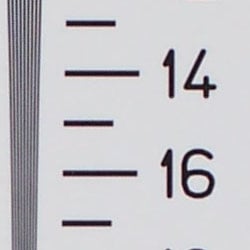

Our laboratory resolution chart revealed sharp, distinct line patterns down to about 1,400 lines per picture height, with extinction at around 1,900. Use these numbers to compare with other cameras of similar resolution, or use them to see just what higher resolution can mean in terms of potential detail.
See full set of test images with explanations
See thumbnails of all test and gallery images
Sharpness & Detail
Reasonably sharp images overall, though noticeable edge enhancement on high-contrast subjects. Noise suppression limits detail in the shadows.


The Kodak EasyShare C875 captures fairly sharp images overall, though edge enhancement artifacts are noticeable on high-contrast subjects such as the crop above left. Edge enhancement creates the illusion of sharpness by enhancing colors and tones right at the edge of a rapid transition in color or tone.
Noise-suppression systems in digital cameras tend to flatten-out detail in areas of subtle contrast. The effects can often be seen in shots of human hair, where the individual strands are lost and an almost "watercolor" look appears. The crop above right shows this, with darker areas of Marti's hair showing only limited detail.
ISO & Noise Performance
Though noise isn't visible except at the highest ISO, strong anti-noise processing is evident, blurring detail.




Noise levels are moderate at the Kodak EasyShare C875's lower sensitivity settings. At ISOs 400 and 800, noise suppression is hard at work. Printed results are impressive, however. (See Output Quality below for more)
Extremes: Sunlit and low light tests
High resolution with strong overall detail, but high contrast and limited
shadow detail. Fair low-light performance, capable of capturing bright images
under average city street lighting and slightly darker conditions.


Sunlight:
Because digital cameras are more like slide film than negative film (in that they tend to have a more limited tonal range), we test them in the harshest situations to see how they handle scenes with bright highlights and dark shadows, as well as what kind of sensitivity they have in low light. The shot above is designed to mimic the very harsh, contrasty effect of direct noonday sunlight, a very tough challenge for most digital cameras. (You can read details of this test here.)
The Kodak EasyShare C875 produced high contrast under the harsh lighting
of the test above, with deep shadows that show limited detail. Noise and
the camera's noise suppression both contribute to the loss of detail there.
Though some areas look a little dark at +0.3 EV, I preferred it to the image
at +0.7 EV, which had too many blown highlights for my preference. (In "real
life" though, be sure to use fill flash in situations like the one
shown above; it's better to shoot in the shade when possible.)
| 1 fc 11 lux |
1/2 fc 5.5 lux |
1/4 fc 2.7 lux |
1/8 fc 1.3 lux |
1/16 fc 0.67 lux |
|
|---|---|---|---|---|---|
| ISO 64 |
 5 sec f2.8 |
 6 sec f2.8 |
 6 sec f2.8 |
 8 sec f2.8 |
 8 sec f2.8 |
| ISO 100 |
 3.2 sec f2.8 |
 4 sec f2.8 |
 4 sec f2.8 |
 5 sec f2.8 |
 6 sec f2.8 |
| ISO 200 |
 1.6 sec f2.8 |
 2 sec f2.8 |
 2 sec f2.8 |
 2.5 sec f2.8 |
 3.2 sec f2.8 |
| ISO 400 |
 0.8 sec f2.8 |
 1 sec f2.8 |
 1 sec f2.8 |
 1.3 sec f2.8 |
 1.6 sec f2.8 |
| ISO 800 |
 0.4 sec f2.8 |
 0.5 sec f2.8 |
 0.5 sec f2.8 |
 0.6 sec f2.8 |
 0.8 sec f2.8 |
Low light:
The Kodak EasyShare C875 captured bright images only down to the 1/2 foot-candle light level (about 1/2 as bright as average city street lighting at night) at its highest sensitivity settings. Overall color is pretty good, and the camera's autofocus system was able to focus on the subject down to the 1/2 foot-candle light level unassisted (which works well with its exposure capabilities here). Do keep in mind though, that the longer shutter times necessary here absolutely demand the use of a tripod or other camera support to get sharp photos. (A useful trick is to just prop the camera on a convenient surface, and use its self-timer to release the shutter. This avoids any jiggling from your finger pressing the shutter button, and can work quite well when you don't have a tripod handy.)
NOTE: This low light test is conducted with a stationary subject, and the camera mounted on a sturdy tripod. Most digital cameras will fail miserably when faced with a moving subject in dim lighting. (For example, a child's ballet recital or a holiday pageant in a gymnasium.) For such applications, you may have better luck with a digital SLR camera, but even there, you'll likely need to set the focus manually. For information and reviews on digital SLRs, refer to our SLR review index page.
Flash
Coverage and Range
Slightly dim exposures at the default exposure setting; the camera required
more than average exposure compensation for flash exposures. Moderate range.


Flash coverage was uneven at wide angle, but more uniform (though dim) at telephoto. Indoors, under incandescent background lighting, the Kodak C875's flash underexposed our subject slightly at its default setting, requiring a +2.0 EV exposure compensation adjustment to get bright results. The camera's Night Portrait mode produced similar results, though with a slightly brighter and more even exposure. The background incandescent lighting results in an orange cast in both shots, though overall color is still pretty good.
| Flash Range: Wide Angle | |||||
|---|---|---|---|---|---|
| 6 ft | 7 ft | 8 ft | 9 ft | 10 ft | 11 ft |
 1/60 sec f2.8 ISO 100 |
 1/60 sec f2.8 ISO 100 |
 1/60 sec f2.8 ISO 100 |
 1/60 sec f2.8 ISO 100 |
 1/60 sec f2.8 ISO 100 |
 1/80 sec f3.2 ISO 100 |
| 12 ft | 13 ft | 14 ft | 15 ft | 16 ft | |
 1/60 sec f2.8 ISO 100 |
 1/60 sec f2.8 ISO 100 |
 1/60 sec f2.8 ISO 100 |
 1/60 sec f2.8 ISO 100 |
 1/60 sec f2.8 ISO 100 |
|
| Flash Range: Telephoto | |||||
|---|---|---|---|---|---|
| 6 ft | 7 ft | 8 ft | 9 ft | 10 ft | 11 ft |
 1/200 sec f4.4 ISO 100 |
 1/200 sec f4.4 ISO 100 |
 1/200 sec f4.4 ISO 100 |
 1/200 sec f4.4 ISO 100 |
 1/200 sec f4.4 ISO 100 |
 1/200 sec f4.4 ISO 100 |
| 12 ft | 13 ft | 14 ft | 15 ft | 16 ft | |
 1/200 sec f4.4 ISO 100 |
 1/200 sec f4.4 ISO 100 |
 1/200 sec f4.4 ISO 100 |
 1/200 sec f4.4 ISO 100 |
 1/200 sec f4.4 ISO 100 |
|
The Kodak EasyShare C875's flash was bright with reasonable power, with strong intensity at wide angle all the way to 10 feet or so at ISO 100. At telephoto, images were somewhat dim at 6 feet.
| Manufacturer-Specified Flash Range | |
|---|---|
| Wide Angle | Telephoto |
 13.5 feet ISO 200 |
 8.5 feet ISO 200 |
Our standard test method for flash range uses a fixed setting of ISO 100, to provide a fair basis of comparison between cameras. We've now also begun shooting two shots using the manufacturer-specified camera settings, at the range the company claims for the camera, to assess the validity of the specific claims. In the shots above, the C875 performs close to Kodak's expectations, though the telephoto shot is just a hair dim.
Output Quality
Print Quality
Good print quality, great color, good 13x19 inch prints. ISO 800 images are soft but usable at 8x10!
Testing hundreds of digital cameras, we've found that you can only tell just so much about a camera's image quality by viewing its images on-screen. Ultimately, there's no substitute for printing a lot of images and examining them closely. For this reason, we now routinely print sample images from the cameras we test on our Canon i9900 studio printer, and on the Canon iP5200 here in the office. (See the Canon i9900 review for details on that model.)
The Kodak EasyShare C875 performed remarkably well, from high ISO to low. At ISO 64, it could easily produce 13x19 inch prints. Most remarkable was that at ISO 800 it could still produce excellent 8x10 inch prints with terrific color. That's rare. If you look closely, you can see some smudging, but from just a few inches away, you cease to notice. That performance makes the C875 quite a bargain.
The images above were taken from our standardized test shots. For a collection of more pictorial photos, see our Kodak EasyShare C875 Photo Gallery .
Not sure which camera to buy? Let your eyes be the ultimate judge! Visit our Comparometer(tm) to compare images from the Kodak EasyShare C875 with those from other cameras you may be considering. The proof is in the pictures, so let your own eyes decide which you like best!
Performance
Kodak C875 Performance
Timing and Performance
Somewhat slow for a consumer camera.
| Startup/Shutdown | ||
|---|---|---|
| Power on |
5.7 seconds (2.8 seconds when using internal memory) |
Time it takes for LCD to turn on and lens to deploy. |
| Shutdown |
2.7 seconds | How long it takes to retract lens and stow in your pocket. |
| Buffer clearing time |
28 seconds (19 seconds buffer clearing in LF JPEG) |
Worst case buffer clearing time. This is the delay after a set of shots before you can remove the card. Some cameras won't retract their lenses and shut down until the buffer is cleared. |
| Mode switching | ||
| Play to Record, |
1.7 seconds | Time until first shot is captured |
| Record to play |
1.2 seconds | Time to display a large/fine file immediately after capture |
| Display |
0.6 second | Time to display a large/fine file already on the memory card. |
| Shutter response (Lag Time): | ||
| Full Autofocus Wide |
0.34 second | Time from fully pressing shutter button to image capture, zoom lens at wide angle position. |
| Full Autofocus Tele |
1.43 second | Time from fully pressing shutter button to image capture, zoom lens at telephoto position. |
| Continuous Autofocus |
0.405 second | Typically no advantage to Continuous AF mode, and we have no way of reliably measuring performance with moving ones. |
| Manual Focus |
0.25 second | Usually a bit faster than AF. In the case of the H5, brings telephoto shutter lag times down to the same level as wide angle ones. |
| Prefocused |
0.109 second | Time to capture, after half-pressing and holding shutter button. |
| Cycle time (shot to shot) | ||
|
Single Shot mode
Large Fine JPEG |
2.77 seconds | Time per shot, averaged over 20 shots. |
| Single Shot mode |
3.18 seconds | Time per shot, averaged over 20 shots. |
| Early shutter |
YES | Some cameras snap another shot if you release and press the shutter too quickly in Single Shot mode, making "No" the preferred answer |
| Continuous mode |
0.52 second (1.94 frames per second); 5 frames total; 28 seconds to clear |
Time per shot, averaged over buffer length or 20 shots, whichever came first. |
| Continuous mode |
0.52 second (1.94 frames per second); 5 frames total; 20 seconds to clear |
Time per shot, averaged over buffer length or 20 shots, whichever came first. |
| Flash recycling |
10.5 seconds | Flash at maximum output. |
| Download speed | ||
| Windows Computer, USB 2.0 |
258 KBytes/sec | Typical Values: |
| *Note: Buffer clearing times measured with a Kingston Ultimate 133x SD memory card. Slower cards will produce correspondingly slower clearing times. Slow cards may also limit length of bursts in continuous mode. |
||
Overall, the Kodak EasyShare C875's performance is fairly slow, with its best time in shutter lag at full wide angle (about 0.34 second). It takes almost two seconds to change from record to playback modes, and shot-to-shot cycle times are quite slow at both large and small JPEG sizes. Continuous-mode speed is about average, however, at just under two frames/second, for up to five shots in succession. The flash is quite slow to recycle at 10.5 seconds after a full-power shot. Connected to a computer, download speeds are exceptionally slow, so you'll probably want to check out a separate card reader. Bottom line, the C875 is responsive enough for some family photo opportunities, but overall performance is on the sluggish side.
Battery and Storage Capacity
Battery
Extremely short battery life with standard AA alkaline cells, but better
life with NiMH rechargeables or a CRV3 pack.
| Operating Mode | Number of Shots |
|---|---|
| CRV3 battery | 400-500 |
| AA lithium batteries |
250-350 |
| AA NiMH rechargeable cells |
200-300 |
| AA Ni-Mn cells |
60-100 |
| AA alkaline cells |
not recommended |
The Kodak EasyShare C875 uses two AA batteries for power, and a pair of Ni-Mn batteries is included with the camera. Though runtimes are increased with the NiMH batteries or a CRV3 battery over alkalines, I strongly recommend picking up a spare set and keeping them freshly charged and on-hand for extended outings. (See our battery shootout page for information on actual measured capacities of various NiMH brands and capacity markings.)
The table above shows the number of shots the camera is capable of (on either a fresh set of disposable batteries or a fully-charged rechargeable battery as appropriate), based on CIPA battery-life and/or manufacturer standard test conditions.
(Interested readers can find an English translation of the CIPA DC-002 standards document here. (180K PDF document))
Storage
The Kodak EasyShare C875 accepts SD/MMC memory cards, though no card
is included; 28MB RAM is built into the camera.
| Image Capacity with 28MB Internal Memory |
Fine | |
|---|---|---|
|
3,264 x 2,448
|
Images
|
11
|
|
File Size
|
2.6 MB
|
|
|
2,560 x 1,920
|
Images
|
17
|
|
File Size
|
1.6 MB
|
|
|
2,048 x 1,536
|
Images
|
26
|
|
File Size
|
1.1 MB
|
|
|
1,200 x 900
|
Images
|
63
|
|
File Size
|
446 KB
|
|
We strongly recommend buying a large capacity SD/MMC memory card at least a 1GB card, preferably a 2GB one, to give yourself extra space for extended outings. (Check the shopping link above, cards are really cheap these days, so no reason to skimp.)