
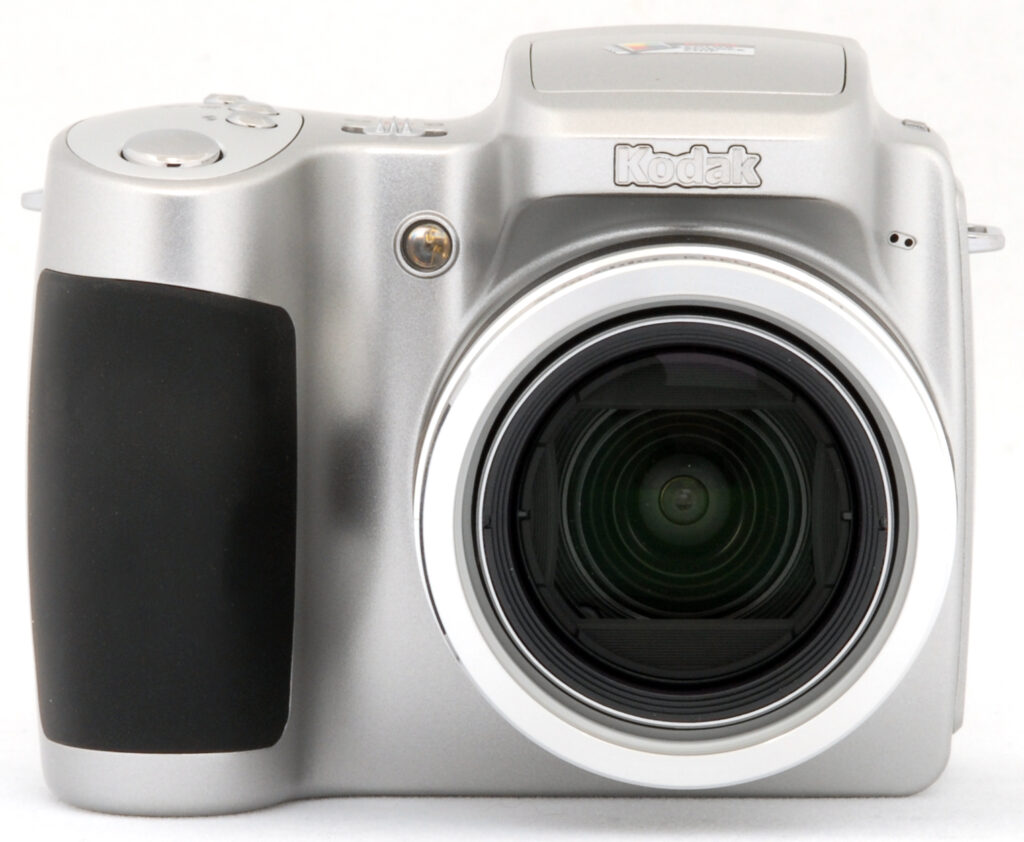


Overview
Kodak Z650 Overview
by Mike Pasini
Review Posted: 06/14/2006
The Kodak EasyShare Z650 Zoom updates the previous Z740 with a 6.1 megapixel sensor, a two-inch LCD, live histogram and three more Scene modes. It features the same 10x optical zoom lens in a mini-SLR form factor with that provides a full range of exposure modes and EasyShare simplicity. The only thing missing from this $349.95 package is image stabilization.
The utility of the 10x Schneider-Kreuznach Variogon zoom lens is enhanced by the inclusion full Manual mode with both Aperture and Shutter Priority options whose options are easily manipulated with the small joystick on the back panel. Auto mode is complemented by Program and 17 Scene modes. Scene modes include Children, Party, Beach, Flower, Fireworks, Snow, Backlight, Close Up, Night Portrait, Landscape, Night Landscape, Museum/Manner, Text, Self Portrait, Portrait, Sport, and Night.Shutter speeds range from eight seconds to 1/1,000 sec. with Auto ISO spanning 80-160 and selectable ISO offering 80, 100, 200, 400 and 800. Flash range extends to 16 feet at wide angle with Auto, Red-eye Reduction, Fill and Off modes.
Movie mode, which writes QuickTime MPEG-4, is restricted to only 11 fps at 640x480 or 20 fps at 320x240, suggesting this is really a still camera. As such, it includes 32-MB internal memory with an SD card slot for more storage. Let's take a closer look at what you can do with the Z650.
Kodak Z650 User Report
A recent Kodak EasyShare Gallery direct mail brochure highlighted the Z650 with the following copy. "Men love things that go zoom. That's why we've picked out the Z650 as the perfect 'for him' camera." The 10x zoom, the quality of the lens and the 6.1-Mp sensor are all cited to support that characterization.
Unfortunately, the Z650 isn't perfect. And while the 10x zoom does rank as a long zoom, the lack of image stabilization makes it less useful than other long zooms. What the Z650 offers is the full PASM exposure set (Program, Aperture, Shutter, and Manual), rather unusual at this price, and EasyShare simplicity. Just don't think of it as a long zoom unless you're in very bright daylight.
Packaged in that cute mini-SLR style may make it a guy thing, but getting prints by just docking the Z650 has long been appreciated by both sexes.
The mini-SLR style digicam is a breed apart. It's really not pocketable, but it's lightweight enough to take along any time. You'll have to sling over your neck or shoulder or dangle it from your wrist unless you're wearing a jacket, and that isn't bad, because you want it out to take pictures. This camera was designed for people who want to take pictures. It can capture the kind of pictures you can't bring home with a pocketable point-and-shoot.
The lens tells you that right away. It's a serious piece of extra low dispersion glass with a 10x zoom range. Kodak includes a lens hood with a cap, too. But the exposure modes confirm it, offering the full PASM range along with more Scene modes than anyone could possibly remember. Even more to the point, the small joystick makes it a snap to actually use the exposure options (something that can be difficult with most control layouts) and the live histogram is indispensable in wielding them intelligently.


Design. The camera is actually more attractive in person than it appears in photographs (which often stare at it straight on, its least flattering angle). Weighing about 10 oz. (287 grams) without batteries, it's surprisingly light.
In the hand, it has a comfortable feel, enhanced by the rubberized grip formed around the battery compartment. The grip extends far enough out that your fingers easily wrap around it without cramming up against the camera body. Your index finger sits comfortably by the Shutter button while the next two fingers hold the grip and your pinky supports the bottom of the camera. That leaves your thumb to manipulate the Zoom lever or the joystick. It's a very natural setup that takes no time to learn.


Unfortunately, Kodak has scattered the control buttons all over the camera, which makes it difficult to remember where they are and find them when you need them.
On the same top panel as the Shutter button are the Flash mode button, Macro button and Self-Timer button -- options usually found on a four-way navigator. The Z650's equivalent is actually the exposure mode switch with the joystick at the center.
The Power switch, which selects between Favorites and Camera mode, is a bit too stiff for our taste. An Info button and the EVF/LCD switch sit above the LCD. The Delete, Menu and Review buttons sit under the Mode switch. And the Share button floats above it.
Display/Viewfinder. A long zoom requires an electronic viewfinder to display a bright enough image to compose your shot. But EVFs are notoriously low-resolution, so you usually have the option to switch to the LCD. The Z650 provides an EVF/LCD switch for that very reason.
I didn't find the EVF to be a problem on the Z650, even if I find it hard to praise. I'm used to composing on the LCD and prefer it, but in bright sunlight, the EVF is a welcome alternative. Still, it's not a great view of your subject, rasterized at low resolution and high contrast with oversaturated colors. When possible, I preferred the LCD.

Shooting. The Z650 shooting experience (once you've got it powered on, anyway) is generally a pleasure. Light enough in the hand to use single-handedly, there aren't many subjects that escape its recording versatility. Nor do many escape the reach of its long zoom.
I was also happy to see the internal flash has a little pop. Sixteen feet may not sound like a lot, but it's almost double that of many point-and-shoot digicams. There's nothing as advanced as a hot shoe or synch connector, so that's a very welcome capability. And happily the flash recycles pretty quickly at just six seconds.
The star of the shooting experience has to be the joystick, though. It's one thing to offer full manual exposure and another thing to make it easy to select different apertures and shutter speeds. The joysticks makes it second nature, cycling through the available options in any mode with a left or right nudge and shifting to a different setting with just an up or down nudge. Add the live histogram to get a second opinion on your exposure settings and you're in heaven.

And that's probably what I most liked about the Z650 -- I never got the feeling the camera was boxing me in to its way of shooting the scene. Take that touchy situation of shooting public works inside a museum. The rules are generally no flash and no tripod, enough to discourage anyone but particularly someone with just an Auto mode on a point-and-shoot. With the Z650, you could simply select the Museum Scene mode. Or, you could slip into Shutter Priority, set the shutter speed to 1/60 (or bravely try 1/30), kick the ISO up to 800, turn off the flash and get the shot.
I shot with Ni-MH AAs and never depleted them in any one session. Since the camera only needs two, you can easily pack a spare set with you. The included lithium AA set is not rechargeable.

While Kodak ships the Z650 with a lithium battery, it isn't rechargeable. You can use a pair of Ni-MH rechargeables and live happily ever after.
I suppose Kodak scrimped on Movie mode so photographers would take this digicam more seriously, but it's another disappointment on the Z650. At 640x480, you can only capture 11 fps. To get a smoother 20 fps, you have to reduce the resolution to a puny 320x240. One of the reasons to buy a digicam over a dSLR is to get Movie mode. You don't really have it on the Z650.
Summary. I liked a lot about the Z650 from its looks, handling and exposure controls to its EasyShare heritage and compatibility. But it's hard to be enthusiastic about a camera whose power switch is hard to move, whose popup flash won't stay shut and whose long zoom isn't stabilized. The Z650 has SLR pretensions but it skimps on some basic digicam features.
Basic Features
- 6.1-megapixel CCD delivering images as large as 2,832 x 2,128 pixels
- Electronic optical viewfinder
- 2.0-inch color LCD monitor
- 10x, 38-380mm (35mm equivalent) lens
- Maximum aperture of f/2.8 to f/3.7, depending on lens zoom position
- 5x digital zoom
- Auto, Program, Aperture Priority, Shutter Priority, and Manual exposure modes, plus 17 preset Scene modes
- White Balance with five settings
- Shutter speeds from 1/1,700 to eight seconds, depending on exposure mode
- Built-in pop-up flash with four modes
- 32MB internal memory
- SD/MMC card storage (optional, card not included)
- Power supplied by one Kodak EasyShare NiMH rechargeable battery pack, one CRV3 battery, two AA type batteries, or optional AC adapter
- Kodak EasyShare software included for both Windows and Mac platforms
Special Features
- Movie mode (with sound but no zoom)
- Burst photography mode
- Black and White and Sepia color modes, as well as three color settings
- Adjustable ISO from 80 to 800, with an Auto setting
- Two and 10-second Self-Timer with two shot setting for delayed shutter release
- Image sharpness adjustment
- Three AF area modes, plus Single and Continuous AF modes
- Macro (close-up) lens setting
- Accessory lens thread (55mm)
- Lens shade
- DPOF (Digital Print Order Format) compatibility
- USB cable for connection to a computer (driver software included)
In the Box
In the box are the following items:
- Kodak EasyShare Z650 digital camera
- Kodak lithium digital camera battery, CRV3 or equivalent
- Carrying strap
- Lens cap with strap
- Lens hood/adapter
- USB cable
- A/V cable
- Custom camera insert for optional camera and printer docks
- Software CD-ROM with EasyShare software
- Operating manual and registration card
Recommended Accessories
- Large capacity SD/MMC memory card. (I'd recommend 256MB as a bare minimum.)
- Pair of high-capacity rechargeable batteries
- Small camera case
Conclusion
| Pro: | Con: |
|---|---|
|
|
The Kodak EasyShare Z650 brings the renowned EasyShare simplicity and ease of use to the long zoom format, balancing the full complement of exposure modes with 17 Scene modes. The 6.1-megapixel CCD captures high resolution images that make sharp 11x14 prints. The Kodak Z650's color should appeal to most consumers too, as it's very bright and vibrant (a good bit more so than the original subjects), yet it doesn't oversaturate delicate skin tones. With its full range of exposure options, the Z740 would be a great choice for novices who want to grow their skills, while experienced users will immediately appreciate the more advanced features it has to offer. On the down side, the Power switch and popping flash are annoying and the lack of image stabilization makes the 10x zoom less useful under any but the best conditions. More puzzling, Movie mode delivers a lot less than we've come to expect from Kodak. Still, at this price, it's a camera everyone in the family can enjoy on any occasion. And later, EasyShare printing and sharing will extend the pleasure to even more folks.
Design
Kodak Z650 Design
 Compact and reasonably small in size, considering the 10x optical zoom lens, the Kodak EasyShare Z650 measures 3.8 x 3.1 x 2.9 inches (98 x 77 x 73 millimeters), small enough to fit into coat pockets and purses. The Kodak Z650 is lightweight as well, at just 11.4 ounces (324 grams) with battery and memory card. A neck strap comes with the camera, but I'd recommend a soft carrying case for travel.

The telescoping lens takes up the right side of the camera's front panel, surrounded by a thick, plastic lip complete with filter threads for accessory lenses or the included lens shade. The lens extends outward when the camera is powered on, and likewise retracts when the camera is turned off. A plastic, removable lens cap protects the lens when not in use, and tethers to the camera body to prevent it from being accidentally lost. Also on the front panel are the light sensor, microphone and AF assist/self-timer lamp. A fairly substantial handgrip provides a good hold.

On the right side of the camera (as viewed from the rear) is the SD/MMC memory card compartment, beneath a hinged, plastic door. Opening the door reveals the actual card slot, as well as the USB/AV Out shared connector jack. Directly above the compartment is one of the eyelets for attaching the neck strap.

The opposite side of the camera features the DC In jack (without a protective cover), and the other neck strap attachment eyelet.

On the camera's top panel are the pop-up flash compartment and release switch, Power/Mode switch, Drive button, Focus button, Flash button, and the Shutter button. The camera's speaker is also on the top panel, just behind the Power/Mode switch.

The rest of the camera controls are on the rear panel, along with the electronic viewfinder (EVF) and 2.0-inch LCD monitor. An indented thumb rest on the right side cups your thumb as you hold the camera, reinforcing the front handgrip. The Zoom lever is positioned right where your thumb will rest, making for easy adjustment of the optical and digital zoom. The Information and EVF/LCD buttons are just above the LCD monitor, with the Share button adjacent to the monitor's top right corner. A large Mode dial is below the Share button, with a joystick-like multi-controller button in its center. The joystick navigates through menu settings, and confirms selections when pressed. You use the joystick to change exposure options like aperture and shutter speed in the manual modes. Directly below are the Delete, Menu, and Review control buttons.

On the bottom panel of the Kodak Z650 are the tripod socket, dock connector, and battery compartment. The metal, threaded tripod socket is just off-center (but centered to the lens) and too close to the battery compartment for quick battery changes while working with most tripods. The battery compartment features a locking, hinged door, which slides to the side to open. The dock connection jack connects the camera directly to the EasyShare dock for quick image downloading.
Kodak Z650 External Controls

Flash Release Switch: Located next to the flash compartment on the left side of the top panel, this switch releases the pop-up flash from its compartment.

Power/Mode Switch: On the right side of the flash compartment, this sliding switch powers the camera on and pops up the flash. Sliding it to the right puts the camera into Record mode, while sliding the switch to the left puts it in Favorites mode.

Shutter Button: Located on the camera's top panel, this button sets focus and exposure when halfway pressed, and fires the shutter when fully pressed. In Playback mode, pressing this button returns the camera to the selected Record mode.

Flash Button: Just behind the Shutter button on the top panel, this button cycles through the Auto, Fill, Red-Eye Reduction, and Off flash modes.

Close-Up/Landscape Button: Next in line behind the Flash button, this button controls the camera's focus mode, cycling between Normal AF, Macro, and Landscape focus settings.

Self-Timer/Burst Button: The final button in the series on the top panel, this button cycles through the First Burst, Last Burst, and Self-Timer drive settings.

Zoom Lever: Tucked in the upper right corner of the camera's rear panel, this lever controls the optical and digital zoom in any record mode. In Playback mode, the lever controls the amount of digital enlargement applied to captured images, to a maximum of 8x.

Information Button: Above the top left corner of the LCD monitor, this button controls the information display on the EVF and LCD monitors.

EVF/LCD Button: Directly above the top right corner of the LCD monitor, this button switches the image and information display between the EVF and LCD monitors.

Share Button: Located to the right of the LCD monitor, this button lets you tag images for printing, emailing, or as a favorite image. A heart icon appears on "favorite" images. Pressing this button automatically displays the Share menu with the following options:
- Print: Sets the number of copies of the current image to be printed.
- E-Mail: E-mails a low-resolution copy of the image to a recipient, based on a saved address book.
- Favorite: Marks the current image as a "favorite."
- Print All: Prints one copy of each image on the memory card or internal memory.
- Cancel Prints: Cancels a print order.

Mode Dial: Dominating the lower right portion of the rear panel, this large disc is dialed until it clicks into the desired exposure mode. A small finger grip protudes from the empty side of the disc. The following camera modes are available:
- Video: Records moving images with sound, for as long as the memory card has available space.
- PASM Mode: Provides access to the Program, Aperture Priority, Shutter Priority, and Manual exposure modes.
- Scene Mode: Offers 15 preset shooting modes, including Children, Party, Beach, Flower, Fireworks, Snow, Backlight, Close-up, Night Portrait, Landscape, Night Landscape, Manner/Museum, Text, Self-Portrait.
- Auto: Best for most average shooting conditions, this mode places the camera under automatic exposure control, with limited user options available through the Record menu.
- Sport: Sets up the camera for recording fast-paced action shots.
- Portrait: This mode captures a sharply-focused subject in front of a slightly-blurred background, so that the emphasis is on the person.
- Night: In this mode, the camera uses a slower shutter speed to capture more ambient light in darker shooting conditions.
Joystick Multi-Controller (see image above): Located in the center of the Mode dial, this joystick-like controller navigates through menu options. When pressed, it confirms menu selections. In PASM mode, moving the controller left and right selects different options for adjustment on the LCD monitor. Once selected, you can then use the up/down motion to adjust the mode, aperture, shutter speed, exposure compensation, and ISO settings.
In Playback mode, moving the controller left or right scrolls through captured images. Pressing the button down plays back movie files. During movie playback, moving the controller up and down adjusts the playback volume.

Delete: Below the Mode dial and adjacent to the lower right corner of the LCD monitor, this button calls up the Delete menu in Review mode. You can delete individual images or all images on the card. There's also an option to cancel.

Menu Button: To the right of the Delete button, this button displays the settings menu in Playback or Record modes.

Review Button: Directly to the right of the Menu button, this button activates the image review mode when pressed in any Record mode. Once in Review mode, pressing the button again, or the Shutter button, returns to the Record display.
Operation
Kodak Z650 Operation
Like other Kodak's EasyShare digicams, the Z650 has a very user-friendly interface. The full range of available exposure control options gives users a lot of flexibility, while the camera's automatic systems do an excellent job of capturing good-looking photos. The LCD menu system is short and simple to navigate, and the plain-English descriptions of menu items are a welcome change from the too-common cryptic icons on so many other cameras. A Mode dial changes camera modes quickly, and a plain-English description of each flashes briefly on the LCD screen to make operation straightforward for even rank beginners. Given the simple interface and limited controls, you should be able to snap images right away, with hardly a glance at the manual. More advanced functions shouldn't take more than a half an hour or so to master.
Record-Mode Display Depending on the exposure mode, the Kodak Z650's LCD display shows the center autofocus area along with currently-selected options for image size/quality, macro and flash mode, the number of images of the current size and quality that can be stored in the remaining space on the memory card. In Program, Aperture Priority, Shutter Priority, and Manual modes, the LCD display also includes shooting mode, aperture, shutter, ISO, flash exposure compensation, and exposure compensation settings. A live histogram is also displayed in Record mode for evaluating exposure. Pressing the Information button once in a record mode cancels the information display, while a second press brings it back. The same display is available in the EVF, and you can switch between the two viewfinders simply by pressing the EVF/LCD button.
Review-Mode Display In Review (playback) mode, you can use the Kodak Z650's Zoom lever to zoom in or out on an image, with a maximum enlargement of 8x. A thumbnail display of the images (called "Multi-Up") is also available, through the camera's Review menu. The Info button offers a more detailed information display, reporting the set exposure variables for the current image. The normal Review display reports the image number, and any shared settings information.
Kodak Z650 Modes and Menus

Favorites Mode: An album icon with a heart on its cover indicates this mode on the Power/Mode switch on top of the camera. In this mode, any images that have been designated as "favorites" are displayed after the camera has synched with the computer.

Video Mode: The first mode on the Mode dial, Movie mode is indicated by a movie camera icon. In this mode, you can record 640 x 480 or 320 x 240-pixel resolution movies with sound, at 11 or 20 frames per second.

PASM Mode: Marked on the Mode dial as "PASM," this mode provides access to the Program, Aperture Priority, Shutter Priority, and Manual exposure modes.

Scene Mode: The letters "SCN" indicate this mode on the Mode dial, which offers 17 preset shooting modes. Available "scenes" are Children, Party, Beach, Flower, Fireworks, Snow, Backlight, Close-up, Night Portrait, Landscape, Night Landscape, Manner/Museum, Text, Self-Portrait.

Auto Mode: Marked with a camera icon and the word "Auto," this mode is best for most average shooting conditions. Exposure is automatically controlled, but a small selection of user options is available through the Record menu.

Sports Mode: This mode is indicated by a figure in action on the Mode dial. Here, the camera employs a faster shutter speed to "freeze" moving subjects.

Portrait Mode: The traditional portrait symbol (a woman's head) marks this mode on the Mode dial. The camera uses a larger aperture setting to capture a sharp subject in front of a blurred background.

Night Mode: A person and star icon on the Mode dial indicates this mode, which uses slower shutter speeds for darker settings. A tripod is definitely recommended.
Playback Mode: Accessed by pressing the Review button, this mode lets you review captured images and movies, as well as manage files.
Record Menu: The following menu items appear whenever the Menu button is pressed in any Record mode. However, not all menu options are available in all modes.
 Picture Size: Sets the resolution for still images. Choices are 6.0 MP (2,832 x 2,128 pixels), 5.3 MP 3:2 (2,832 x 1,888 pixels), 4.0 MP (2,304 x 1,728 pixels), 3.1 MP (2,048 x 1,536 pixels), or 1.7 MP (1,496 x 1,122 pixels).
- Video Size: (Movie mode only.) Sets the video resolution to 640 x 480 or 320 x 240 pixels.
- White Balance: Sets the color balance to Auto, Daylight, Tungsten, Fluorescent, or Open Shade settings.
- Exposure Metering: Sets the camera's metering mode as Multi-Pattern, Center-Weighted, or Center-Spot.
- Focus Zone: Controls where the camera's AF system determines focus from. Choices are Multi-Zone and Center-Zone.
 Picture Size: Sets the resolution for still images. Choices are 6.0 MP (2,832 x 2,128 pixels), 5.3 MP 3:2 (2,832 x 1,888 pixels), 4.0 MP (2,304 x 1,728 pixels), 3.1 MP (2,048 x 1,536 pixels), or 1.7 MP (1,496 x 1,122 pixels).
- AF Control: Sets the autofocus to Continuous or Single mode.
- Color Mode: Allows you to record images in High, Natural, or Low Color, or in Black and White or Sepia tones.
- Sharpness: Controls the in-camera sharpening, with options of High, Normal, or Low.
- Reset to Default: Resets all camera settings to their defaults.
- Set Album (Still): The Kodak Z650 lets you set up albums through its interface software on a computer. If albums have been set up and downloaded to the camera, you can associate images with an album as they are recorded.
- Image Storage: Dictates where images are stored, either in the 32MB internal memory or SD card. If Auto is selected, the camera automatically stores images to a memory card if one is present.
 AF Control: Sets the autofocus to Continuous or Single mode.
- Setup Menu: Displays the following Setup options:
- Return: Returns to the previous menu display.
- Quickview: Turns Quickview on or off. Quickview automatically displays the most recently captured image, with options to delete or Share.
- Adv. Digital Zoom: Controls how digital zoom is accessed. The Continuous setting allows you to seamlessly zoom from the optical zoom range into the digital range. "Pause" tells the camera to pause between ranges. "None" disables digital zoom altogether.
- Print Warning: If activated, this feature turns the zoom slider red if the zoom is too much to render an acceptable 4x6-inch print.
- Sound Themes: Designates the camera's operating sounds. Choices are Shutter Only, Default, Classical, Jazz, and Sci-Fi. (All sounds are disabled in the camera's Manner scene mode.)
- Sound Volume: Sets the volume to Low, Medium, or High, or turns sound off.
 Return: Returns to the previous menu display.
- Mode Description: If enabled, displays a description of each camera mode on the LCD monitor when first accessed.
- Auto Power Off: Sets the period of inactivity that must pass before the camera shuts itself off. Choices are 1, 3, 5, or 10 minutes.
- Date & Time: Sets the camera's internal clock and calendar.
- Video Out: Specifies PAL or NTSC as the Video Out signal.
- Orientation Sensor: Controls the camera's orientation sensor, which detects when the camera is held vertically. Vertical-format images captured when the Orientation Sensor is enabled are rotated to their correct orientation on-screen when they're played back.)
- Red Eye Preflash: Toggles the preflash on or off.
 Mode Description: If enabled, displays a description of each camera mode on the LCD monitor when first accessed.
- Date Stamp: Turns the date stamp function on or off, which records the date over the image. You can choose from a selection of date formats as well.
- Video Date Display: Like the Date Stamp option above, imprints the date and time on video files, with a choice of display formats.
- Language: Sets the menu language to one of nine languages.
- Format: Formats the SD memory card or internal memory.
- About: Displays the camera's firmware information.
 Date Stamp: Turns the date stamp function on or off, which records the date over the image. You can choose from a selection of date formats as well.
Playback Menu:
- Album: Adds images to an image album, created on a computer with the camera's interface software.
- Crop: Using the Zoom Lever to enlarge or reduce a cropping area and the joystick to position it on an image, this option lets you crop the active image.
- Slide Show: Enables a slide show of captured images, with user-adjustable intervals between images.
- Multi-Up: Enables a index display of images on the memory card or stored in the internal memory.
- Copy: Copies files from the internal memory to the SD card, or the reverse.
- Protect: Write-protects the displayed image, preventing it from being accidentally erased or manipulated (except via memory or card formatting). Also removes protection.
- Image Storage: Selects between the internal memory or the SD card for image storage.
- Setup Menu: Displays the same settings as under the Record menu.
 Album: Adds images to an image album, created on a computer with the camera's interface software.
Optics
Kodak Z650 Optics
Lens
Zoom
A 10x optical zoom range, with good performance.


The EasyShare Z650 zooms over the equivalent of a 38-380mm range, a little spare on the wide-angle end, but plenty long at full telephoto. The 5x digital zoom takes it out to 50x total, albeit with the loss of quality that digital zoom creates.
Macro
A small macro area with good detail and high resolution. Flash can't see over the long zoom, though, so plan on using external flash for macro shots.


The EasyShare Z650's macro setting performs well, capturing a small minimum area of 1.76 x 1.32 inches (45 x 34 millimeters). Detail is strong and resolution high, with only a moderate amount of softening in the corners from the lens. (Most cameras have some softening in the corners in macro mode.) The flash casts a shadow of the zoom lens at close focus, however: Plan on using external lighting for your closest macro shots with the Z650.
Distortion
Lower than average barrel distortion at wide angle, no distortion at all at telephoto.
Distortion is the tendency for the lens to bend straight lines outward (like a barrel--usually at wide angle) or inward (like a pincushion--usually at telephoto). The Z650's 0.57% barrel distortion at wide angle is lower than average. At the telephoto end, the Z650 shows no measurable distortion at all. All in all, much lower distortion than we're accustomed to seeing in digital camera lenses, particularly long-zoom models.
| Barrel distortion at 38mm is 0.57% |
 |
| Distortion at 380mm is 0.00% |
 |
Chromatic aberration
Moderate to high chromatic aberration.


The Kodak Z650's chromatic aberration is moderate at wide angle and high at telephoto focal lengths, showing about 6-8 bright pixels of coloration. (This distortion is visible as a colored fringe around the objects at the edges of the field of view on the resolution target.)
Corner Sharpness
Better than average corner sharpness. Lower right corner was soft at telephoto, but rapidly improved away from the extreme edges.


Corner sharpness with the Kodak Z650 was generally pretty good. At telephoto focal lengths, the lower right corner of our test sample became rather soft, but the softness didn't extend too far into the image. Other corners looked better, and all corners were quite sharp at wide angle.
Viewfinder
Coverage
Electronic viewfinder and LCD monitor (which it replicates) are both very accurate.


The Z650's EVF and LCD both showed essentially 100% frame accuracy.
The images above were taken from our standardized test shots. For a collection of more pictorial photos, see our Kodak EasyShare Z650 Photo Gallery .
Exposure
Kodak Z650 Exposure
Color
Saturation & Hue Accuracy
Slightly oversaturated color (especially reds and blues), very typical of consumer digital cameras. Generally good hue accuracy.
 |
| In the diagram above, the squares show the original color, and the circles show the color that the camera captured. More saturated colors are located towards the periphery of the graph. Hue changes as you travel around the center. Thus, hue-accurate, highly saturated colors appear as lines radiating from the center. |
Most consumer digital cameras produce color that's more highly saturated (more intense) than found in the original subjects. This is simply because most people like their color a bit brighter than life. The EasyShare Z650 follows this trend throughout the spectrum, though it tends to emphasize strong red and blue tones more than other colors. Where oversaturation is most problematic is on Caucasian skin tones, as it's very easy for these "memory colors" to be seen as too bright, too pink, too yellow, etc. The Z650 did render skin tones a bit on the pink side in most cases, but our sense is that most consumers would find the Z650's snappy color very appealing.
The other important part of color rendition is hue accuracy. Hue is "what color" the color is. Here, the EasyShare Z650 did quite well. Like most digital cameras, it shifts cyan colors toward blue, to produce better-looking sky colors, but the rest of the hues were rendered quite accurately.


Our random "Gallery" shots showed very pleasing color across a wide variety of subjects. (See our EasyShare Z650 Photo Gallery for more shots taken with the camera.)
Sensor
Exposure and White Balance
Indoors, incandescent lighting
Moderate warm cast with Auto white balance, a bit cool with Incandescent white balance. Less exposure compensation required than usual.


Color balance indoors with Auto white balance was a little warm warm and under Incandescent white balance was a little cool. Both results were within what we'd consider to be acceptable limits though. The EasyShare Z650 required a +0.7 EV exposure compensation boost to get a good exposure, less than most cameras need on this shot. Our test lighting for this shot is a mixture of 60 and 100 watt household incandescent bulb, a pretty yellow light source, but a very common one in typical home settings here in the U.S.
Outdoors, daylight
Good color balance, very bright colors. Better than average exposure accuracy.


Outdoor shots generally showed accurate exposure with slightly blown out highlights. Shadow detail also tended to fall apart, but nothing that would raise an alarm for a consumer digicam. Sunlit shots showed high contrast and oversaturation while overcast scenes managed a more accurate portrayal. Exposure accuracy overall was better than average, the camera requiring less exposure compensation than we're accustomed to seeing with consumer digicams.
See full set of test images with explanations
See thumbnails of all test and gallery images
Resolution
Moderate resolution for a 6-megapixel, 1,200 - 1,250 lines of strong detail.
Our laboratory resolution chart revealed sharp, distinct line patterns down to about 1,250 lines per picture height horizontally, 1,200 vertically, with extinction at around 1,500. (The camera did produce slight color artifacts at lower line frequencies though, visible in the full-sized res target shots.) This is a good performance, but not quite up to those of the best 6-megapixel cameras on the market. Still, most users will find the Z650's images more than sharp enough for prints 8x10 inches in size or larger. Use these numbers to compare with other cameras of similar resolution, or use them to see just what higher resolution can mean in terms of potential detail. Beware that while you might be able to make out what looks like distinct lines at numbers higher than those we've mentioned here, the camera is just doing its best to continue interpreting the lines. If you zoom in and follow them from the wider portions, you'll see the lines converge and reappear several times, so the lines you see at 1,500 and higher are really only artifacts generated by the camera's imaging system.


See full set of test images with explanations
See thumbnails of all test and gallery images
Sharpness & Detail
Fairly sharp images, with relatively little loss of detail to noise suppression at low ISO settings.


The EasyShare Z650's images are reasonably sharp, with only a little over-sharpening or edge enhancement on the camera's part. (Edge enhancement creates the illusion of sharpness by enhancing colors and tones right at the edge of a rapid transition in color or tone.) Performance isn't quite up to that of the sharpest 6-megapixel cameras we've tested, but it's not bad.
ISO & Noise Performance
Moderate noise at the normal sensitivity settings, more noise and some loss of detail at the higher settings, but overall quite good.


The EasyShare Z650 can automatically set sensitivity between ISO 80 and 160 equivalents or you can manually set it to 80, 100, 200, 400 or 800. At ISO 100, the EasyShare Z650 produced moderate noise, with relatively little blurring of detail in the dark areas. As the ISO setting increases, so does the noise level and the amount of blurring that results, but noise levels and blurring are both surprisingly limited even at ISO 400. The camera's ISO 800 option is only available at a reduced resolution setting. (Our apologies, the above shot wasn't captured at ISO 800.)
Extremes: Sunlit and low light tests
High resolution with good overall detail, though high contrast limits both highlight and shadow detail. Pretty good low-light performance, capable of capturing bright images under average city street lighting and somewhat darker conditions.


Sunlight:
Because digital cameras are more like slide film than negative film (in that they tend to have a more limited tonal range), we test them in the harshest situations to see how they handle scenes with bright highlights and dark shadows, as well as what kind of sensitivity they have in low light. The shot above is designed to mimic the very harsh, contrasty effect of direct noonday sunlight, a very tough challenge for most digital cameras. (You can read details of this test here.)
The Kodak Z650 had some trouble with the deliberately harsh lighting in the test above, producing very high contrast with washed-out highlights and deep shadows. It at least did not wash out the highlights when exposure compensation was set to zero adjustment. (In "real life" though, be sure to use fill flash in situations like the one shown above; it's better to shoot in the shade when possible.)
| 1 fc 11 lux |
1/2 fc 5.5 lux |
1/4 fc 2.7 lux |
1/8 fc 1.3 lux |
1/16 fc 0.67 lux |
|
| ISO 80 |
 3.2 sec f2.8 |
 6 sec f2.8 |
 8 sec f2.8 |
 8 sec f2.8 |
 8 sec f2.8 |
| ISO 100 |
 2.5 sec f2.8 |
 5 sec f2.8 |
 8 sec f2.8 |
 8 sec f2.8 |
 8 sec f2.8 |
| ISO 200 |
 1.3 sec f2.8 |
 2.5 sec f2.8 |
 5 sec f2.8 |
 8 sec f2.8 |
 8 sec f2.8 |
| ISO 400 |
 1/1 sec f2.8 |
 1.3 sec f2.8 |
 2.5 sec f2.8 |
 5 sec f2.8 |
 8 sec f2.8 |
Low light:
Our low light testing of the Kodak Z650 revealed generally good performance, more than adequate for most consumers. At ISO 400, it produced bright images at the lowest light levels in our test. The AF assist light worked well, achieving focus even in the darkest shots (note the sharp text in the test images). There was one wrinkle though: We couldn't find any way to turn the AF assist light off. This won't normally be a concern, but for those times when you'd like to be stealthy in your after-dark picture-taking, the Z650's AF assist light will give you away.
NOTE: This low light test is conducted with a stationary subject, and the camera mounted on a sturdy tripod. Most digital cameras will fail miserably when faced with a moving subject in dim lighting. (For example, a child's ballet recital or a holiday pageant in a gymnasium.) For such applications, you may have better luck with a digital SLR camera, but even there, you'll likely need to set the focus manually. For information and reviews on digital SLRs, refer to our SLR review index page.
Flash
Coverage and Range
The Z650's small flash reaches a surprising 16 feet at wide angle, produces a slight blue cast in combination with typical incandescent room lighting. Our standard shots required more exposure compensation than average.

Flash coverage was a bit uneven at wide angle but very good at telephoto. In the Indoor test, the flash on the Z650 underexposed our subject at its default setting, requiring a +1.3 EV exposure compensation adjustment to get reasonably bright results.
| 8 ft | 9 ft | 10 ft | 11 ft | 12 ft | 13 ft | 14 ft |
 1/100 sec f3.2 ISO 100 |
 1/100 sec f3.2 ISO 100 |
 1/100 sec f3.2 ISO 100 |
 1/125 sec f3.2 ISO 100 |
 1/125 sec f3.2 ISO 100 |
 1/125 sec f3.2 ISO 100 |
 1/160 sec f3.2 ISO 100 |
But there's plenty of punch in this little flash to cover the room. It produced bright images to the 14-foot limit of our test, reflecting the 16-foot range Kodak lists in the specs with a guide number of 10.6 at ISO 100.
Output Quality
Print Quality
Good print quality, vibrant color, very usable 11x14 inch prints. ISO 400 images are soft and a bit noisy at 8x10, good under daylight-balanced lighting at 5x7, under incandescent lighting at 4x6.
Testing hundreds of digital cameras, we've found that you can only tell just so much about a camera's image quality by viewing its images on-screen. Ultimately, there's no substitute for printing a lot of images and examining them closely. For this reason, we now routinely print sample images from the cameras we test on our Canon i9900 studio printer, and on the Canon iP5200 here in the office. (See the Canon i9900 review for details on that model.)
With the Kodak EasyShare Z650, we found that it had enough resolution to make very crisp 8x10 inch prints. At 11x14, its prints were a bit softer looking, but more than adequate for wall or table display. At high ISO, its images became softer and noisier-looking. Under daylight-balanced lighting, some users might consider ISO 400 shots acceptable even at 8x10 inch print sizes, but to our standards, they're really only usable at 5x7 inches. As is often the case, incandescent lighting results in higher levels of image noise, making ISO 400 shots captured indoors usable only for 4x6 inch prints.
Color-wise, the Kodak Z650's images were crisp and vibrant when printed on the i9900, with brilliant color. Users who prefer more subdued, technically accurate color saturation levels may find the Z650's images a little too bright, but most consumers should find the Z650's bright, snappy images very appealing.
The images above were taken from our standardized test shots. For a collection of more pictorial photos, see our Kodak EasyShare Z650 Photo Gallery .
Not sure which camera to buy? Let your eyes be the ultimate judge! Visit our Comparometer(tm) to compare images from the Kodak EasyShare Z650 with those from other cameras you may be considering. The proof is in the pictures, so let your own eyes decide which you like best!
Performance
Kodak Z650 Performance
Timing and Performance
EasyShare Z650 Timing
Good to average speed for a long-zoom consumer camera.
Startup/Shutdown |
||
Power on to first shot |
3.5 seconds |
Time it takes for LCD to turn on and lens to deploy. |
Shutdown |
3.4 seconds |
How long it takes to retract lens and stow in your pocket. |
Buffer clearing time |
35 seconds (Four Large/Fine JPEG shots, continuous mode) |
Worst case buffer clearing time.* This is the delay after a set of shots before you can remove the card. Some cameras won't retract their lenses and shut down until the buffer is cleared. |
Mode switching |
||
Play to Record, first shot |
1.1 seconds |
Time until first shot is captured |
Record to play |
2.5 seconds |
Time to display a large/fine file immediately after capture |
Display recorded image |
1.0 second |
Time to display a large/fine file already on the memory card. |
Shutter response (Lag Time): |
||
Full Autofocus Wide |
0.61 second |
Time from fully pressing shutter button to image capture, zoom lens at wide angle position. |
Full Autofocus Tele |
1.37 second |
Time from fully pressing shutter button to image capture, zoom lens at telephoto position. |
Prefocused |
0.08 second |
Time to capture, after half-pressing and holding shutter button. |
Cycle time (shot to shot) |
||
Single Shot mode Large Fine JPEG |
2.61 seconds |
Time per shot (four shot maximum) |
Single Shot mode 640x480 JPEG |
2.14 seconds |
Time per shot (four shot maximum) |
Early shutter penalty? |
Yes |
Some cameras won't snap another shot if you release and press the shutter too quickly in Single Shot mode, making "No" the preferred answer. |
Continuous mode Large Fine JPEG |
0.57 second (1.76 frames per second); Four shots; ~35 seconds to clear* |
Time per shot, averaged over buffer length or 20 shots, whichever came first |
Continuous mode 640x480 JPEG |
0.57 second (1.76 frames per second); Four shots; ~30 seconds to clear* |
Time per shot, averaged over buffer length or 20 shots, whichever came first |
Flash recycling |
6 seconds |
Flash at maximum output |
Download speed |
||
Windows Computer, USB 2.0 |
626 KBytes/sec |
Typical Values: Less than 600=USB 1.1; 600-770=USB 2.0 Low; 771-4000=USB 2.0 High |
*Note: Buffer clearing times measured with a Kingston Ultimate 133x SD memory card. Slower cards will produce correspondingly slower clearing times. Slow cards may also limit length of bursts in continuous mode. |
||
The Kodak Z650's performance ranges from the slow side of average to very good for a long zoom, depending on what you're trying to do. Start up falls in the average range. Shutter response when the lens is set to its wide angle position is better than average, but at maximum telephoto, it's decidedly slow. If you "prefocus" the camera by half-pressing and holding down the shutter button before the final exposure, it's very fast, with a shutter delay of only 0.08 second. Shot-to-shot cycle times are average, at 2.61 seconds for large/fine JPEGs. Continuous-mode speed is average, at 1.76 frames/second, for up to four shots in succession before the buffer has to written to the card. The most notable slow point for the Z650 though, comes when it's writing images to its memory card: It can take 30+ seconds to completely clear the four-shot buffer, even with a fast memory card. The flash takes about six seconds to recharge after a full-power shot, about average in terms of time, but better than average when you take the power level of the Z650's flash into account. Connected to a computer, download speeds are fast enough that you probably won't feel a need for a separate card reader, but nonetheless aren't as fast as many cameras currently on the market. The convenience of using an EasyShare camera or printer dock greatly outweighs the file-download speed hit, though. Bottom line, while not a first choice for sports or other fast-paced action, the Kodak Z650 is responsive enough (particular at wide angle lens settings) to handle most family photo opportunities. If you need quick shutter response at long telephoto focal lengths though, the Z650 could be frustrating.
Battery and Storage Capacity
Battery
Short battery life with the LCD on, very good when LCD is switched off.
| Battery Type | Battery Life |
| CRV3 Lithium (1 cell) | 348 - 391 shots |
| AA Lithium (2 cells) | 248 - 348 shots |
| AA NiMH (2 cells) (2300 mAh capacity) |
236 - 265 shots |
The Kodak Z650 uses two AA batteries for power. The table above shows the number of shots it can take with either Lithium or NiMH batteries, based on the CIPA battery-life standard. A CIPA rating of 236 - 265 shots on 2300 mAh NiMH cells (with the LCD display enabled) is pretty good, but as always we strongly recommend that you purchase a couple of sets of high-capacity NiMH rechargeable batteries and a good-quality charger, as they'll save you many times their cost over the life of the camera.
(Interested readers can find an English translation of the CIPA DC-002 standards document here. (180K PDF document))
Storage
The EasyShare Z650 has 32MB of internal storage, a good digital wallet to store Favorite images in. Expanded, working storage is provided by an SD memory card slot, but no card is included.
|
Image Capacity with 28-MB SD Memory Card |
Fine | |
| 2,832 x 2,128 | Images | 14 |
| File Size | 1.9MB | |
| 2,304 x 1,728 | Images | 21 |
| File Size | 1.3MB | |
| 2,048 x 1,536 | Images | 26 |
| File Size | 1.0MB | |
| 1,496 x 1,122 | Images | 46 |
| File Size | 615K | |
We strongly recommend buying at least a 128MB card, preferably a 256MB one, to give yourself extra space for extended outings.
Not sure which camera to buy? Let your eyes be the ultimate judge! Visit our Comparometer(tm) to compare images from the Kodak EasyShare Z650 with those from other cameras you may be considering. The proof is in the pictures, so let your own eyes decide which you like best!