


Overview

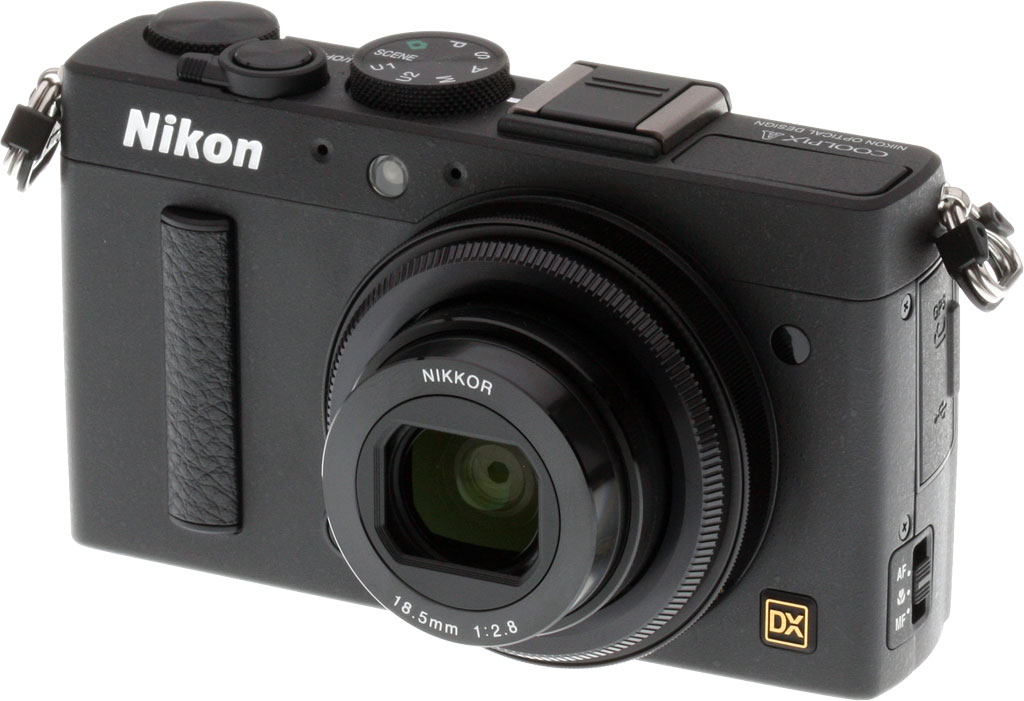
With the Coolpix A, Nikon breaks new ground for its fixed-lens camera line. For the first time ever, a DX-format image sensor appears in a Coolpix-branded body. The result is a camera presenting a very interesting proposition for the street photographer looking for large-sensor image quality, but not wanting the bulk of an SLR.
Rivals. Although the Coolpix A marks a totally new approach for Nikon, it enters a market niche that now has several established competitors. Optics manufacturer Sigma got the ball rolling back in 2006 when it launched the original DP1, a camera that eventually reached the market in 2008. German camera legend Leica joined the party with its X1 in 2009, and Fuji with its X100 in 2011. All three have since launched follow-ups. Sigma actually has no less than three large-sensor, fixed-lens models in its current line, differing mainly in their choice of lens. And since the Nikon's debut, Ricoh has also launched a strong contender.
And there are other entries that, in their way, demand comparison as well. Sony's RX1 is one example, although it sports a sensor far larger even than that in the Coolpix A, and a pricetag to match. Canon, meanwhile, takes a different route with its PowerShot G1 X, which offers up a large -- but narrower aspect -- image sensor coupled to a zoom lens. That's something all its rivals lack, increasing consumer appeal, but also adding significantly to its bulk.
Of all these, the nearest competitors to the Nikon Coolpix A are the Fujifilm X100S, Leica X2, Sigma DP1 Merrill, and the Ricoh GR. Nikon comes second to the Ricoh in terms of size, and those two cameras lead by quite some margin, as well. Nikon's contender is the third-most affordable in terms of list pricing, bested by the Ricoh GR and Sigma DP1 Merrill.
| Camera | Sensor Type |
Lens (equiv.) |
Dimensions (w/o projections) |
Cubic Volume |
Weight (loaded) |
List Price |
| Fujifilm X100S | 16.3MP X-Trans CMOS |
35mm f/2.0 |
5.0 x 2.9 x 2.1 in. (127 x 74 x 54 mm) |
31.0 in3 (507 cc) |
15.7 oz (445 g) |
US$1,300 |
| Leica X2 | 16.2MP CMOS |
36mm f/2.8 |
4.9 x 2.7 x 2.0 in. (124 x 69 x 52 mm) |
26.9 in3 (441 cc) |
12.2 oz (345 g) |
US$2,000 |
| Nikon Coolpix A | 16.2MP CMOS |
28mm f/2.8 |
4.4 x 2.6 x 1.6 in. (111 x 64 x 40 mm) |
17.6 in3 (288 cc) |
10.5 oz (298 g) |
US$1,100 |
| Ricoh GR | 16.2MP CMOS |
28mm f/2.8 |
4.6 x 2.4 x 1.4 in. (117 x 61 x 35 mm) |
15.1 in3 (248 cc) |
8.6 oz (243 g) |
US$800 |
| Sigma DP1 Merrill | 14.8MP* Foveon |
28mm f/2.8 |
4.8 x 2.6 x 2.5 in. (122 x 67 x 64 mm) |
31.8 in3 (521 cc) |
13.8 oz (391 g) |
US$1,000 |
| * Note: Sigma's Foveon sensor has resolving power similar to a 20-25 megapixel conventional CMOS. | ||||||
Of the competition, Ricoh's GR -- announced shortly after the Coolpix A -- is without question its nearest rival. The lens specification is very similar, and the sensor design is likely very closely related. On paper the Ricoh is noticeably smaller, but in-hand that size difference isn't terribly noticeable. In terms of weight, however, the scales certainly tip in Ricoh's favor -- and while neither camera is terribly heavy, that's certainly something you may well wish for after a long day's shooting. Ricoh also wins for its impact on your bank statement.
Nikon wins for including a true twin-dial design, though, even if they're both on the rear of the camera. (You could even consider it to be triple-dial, if you count the focus ring around the lens barrel.) Ricoh, by contrast, offers what we'd consider to be one and a half dials, with the rear "dial" actually being a clickable rocker switch.
Sigma's camera, meanwhile, is similar to the Nikon in terms of optical specification, but in other areas there are important differences. Most notably, it features a higher-resolution sensor with full-color at every pixel location, but trades off on ISO sensitivity to achieve this. It also lacks a built-in flash strobe.

Leica's X2 is, as you might expect for that brand, vastly more expensive, and its lens is rather tighter. It also has a narrower sensitivity range, and a more basic LCD panel. Its sensor is closer to that used by Nikon, though, and it does include a popup flash. We should note that of this group, the Leica is the only one where we cannot say with certainty whether or not it includes a low-pass filter.
Fujifilm's X100s is probably the furthest-differentiated from the Nikon Coolpix A. Its lens is not only tighter, but also brighter than that used by Nikon, and it's accompanied by a rangefinder-style viewfinder, where its rivals must rely on external optical finders. It also has an X-Trans II image sensor that uses a unique color filter array aimed at reducing moiré without an optical low-pass filter.
On paper, then, it's clearly the Ricoh that is Nikon's closest competitor. It's smaller, lighter, and more affordable. But as we've said many times, paper seldom tells the whole story -- the acid test is how a camera handles in the real world, and how its image quality compares. We've been fortunate to shoot both cameras side by side, and so while there will certainly be a significant measure of personal preference as to which is better for you, we'll nonetheless aim to answer that question.
Walkaround. The Coolpix A sports a body not much larger than that of a Nikon 1-series camera, if you don't count the lens. Factor a similar optic into the equation, and it's actually a little smaller, despite offering more than triple the sensor area. It also weighs just a couple of grams less than does the Nikon J3 with 10mm f/2.8 lens. All of which is great news, if you're looking for an unobtrusive street camera, and you're willing to sacrifice interchangeable-lens versatility to achieve that goal.

Seen from the front, the Nikon Coolpix A has a clean, businesslike design, with no unnecessary flair or affectations. It won't draw undue attention -- unless a fellow photographer catches that little gold DX badge, anyway -- letting you get your shots without your subject becoming self-conscious at the sight of a mammoth DSLR rig. A slim bar with leatherette trim attached to the camera serves as a grip. Coupled with a small protrusion for your thumb on the rear, this gives your fingers a little more purchase on the otherwise-smooth body.
There are just two controls on the front of the Nikon A: one of the camera's two Function buttons, nestled in the bottom right quadrant of the lens (as seen from the rear), and a focus ring encircling the lens barrel. Jumping up from the Function 1 button, you arrive at an autofocus assist lamp flanked by two small holes that are the left and right ports for the stereo microphone. Slide across to the other side of the lens, and you find a small, dark, circular window for the infrared remote receiver.
The lens itself extends to about double its original length when the camera is switched on, and includes a small, sliding lens barrier that retracts automatically as the lens is extended.

The top deck is absolutely packed with controls and features, much as you'd expect from a camera aimed at enthusiasts. From left to right, there's a popup flash strobe, a standard ISO hot shoe with Nikon's intelligent contacts and a locking pin hole, a Mode dial, Shutter button encircled by a Power lever, and finally, a control dial. Directly behind the Power lever is a small, green lamp that makes clear when the camera is powered on.

Enthusiasts will welcome the presence of two User modes on the Mode dial, for quick recall of settings. The popup flash strobe has rather limited articulation though, raising only a very short distance above the top deck of the camera.

The flash strobe is released with a mechanical switch that sits directly behind the strobe itself, at the leftmost end of a slight bevel lining the top of the rear panel. Two small indicator lamps for the autofocus and flash subsystems sit in the middle of the camera on the same beveled area, right behind the Mode dial.
A column of four buttons line the left of the three-inch LCD panel. From top to bottom, these are the Exposure Compensation / Aperture button (which acts as a Lock button in Playback mode), the ISO / Function 2 button, a Zoom In button (Playback mode only; there's no digital zoom since this is an enthusiast camera), and a Help / Zoom Out / Index button.
Top to bottom on the right side of the LCD, the Playback and Menu buttons nestle inside the thumb grip, above a second control ring with central OK button. Beneath this are Nikon's configurable i-button, and a dedicated Delete button.

There's only one other physical control on the Coolpix A, and it's to be found on the left end of the camera body. A small three-position slider selects the camera's focus mode. Above this is a hinged door, beneath which you can find both a combined GPS / wired remote control terminal, and a USB 2.0 High Speed port. At the very top is a lug with D-ring for the shoulder strap.
On the opposite side of the Coolpix A, the sole connection is a Type-C Mini HDMI port, located beneath another hinged, plastic door. This sits directly beneath the other strap lug with D-ring. If you plan to shoot much video, you'll likely want to remove these D-rings and rely instead on a wrist strap, to prevent handling noise from impacting your videos with every slight motion. One last detail on this side is a small cutout, plugged with a rubber flap at the base of the right-hand side of the Coolpix A's body.
The reason for this becomes clear when you flip the Coolpix A over: it's a cutout to allow access for a dummy battery cable, used to supply mains power to the camera body. Alongside the battery in a compartment on the base of the camera is a Secure Digital card slot. The only other features of note on the camera's base are a metal tripod socket (sadly not on the central axis of the lens), and a five-hole grille for the monaural speaker.
Nikon Coolpix A Review -- Field Test
by Mike Tomkins

I had fun shooting with the Nikon Coolpix A. The prime lens made me look at subjects differently.
Since it was launched last March, I've been pretty intrigued by the Nikon Coolpix A, so I was glad to get my hands on the box and satisfy that curiosity. My shooting style typically favors zoom lenses, but over the last year or two I've picked up several primes, and have been working on learning a new style of shooting.
I can certainly see the attraction of shooting with a prime. Fixed focal-length lenses typically offer better image quality, unlike zooms where image quality is more of a compromise. And with no zoom to quickly tweak my framing, I find myself paying closer attention to my subjects, and the opportunities they offer for an attractive composition.
Head to head. I've also been pretty interested in the Ricoh GR, a model announced shortly after the Coolpix A which offers a similar feature set at an even more affordable pricetag -- and I was lucky to get to shoot side-by-side with both cameras. (You'll find a selection of similar shots in our galleries, shot at the same time on the same day, which should help in determining which model you feel offers more pleasing real-world results.)
First thoughts. On taking the Nikon Coolpix A out of the box, my immediate impression was that it was rather less comfortable in-hand than was the Ricoh GR. Both cameras have almost identical thickness at the handgrip, but the Nikon offers only a shallow plastic trim piece to provide purchase for my fingertips. The Ricoh, by contrast, has a slimmer body that lets my fingers wrap around the grip. The Nikon is more tiring to hold, and I wouldn't want to carry it for an extended period without a wrist strap or the included neck strap.
 |
The Coolpix A's wide-angle prime lens forces you to think carefully about your framing, but it's quite good as a street shooter. Here, I'd have liked to have cropped in a bit tighter, but standing in the middle of a busy road wasn't really an option, so I had to make do. Of course, I could always crop later. |
Build quality definitely swings in favor of the Nikon, though. Although the Ricoh, too, is made from magnesium alloy, its body feels like plastic. We put that down to a combination of the surface finish -- it doesn't feel as cool to the touch -- coupled with its lighter weight. It also feels just slightly creaky. By contrast, the cool, metal body of the Nikon gives it a reassuring heft, and there's not even the slightest hint of flex or creak. The Coolpix A feels a step above the Ricoh GR -- and well it should, given its higher price.

Exposures were for the most part pretty accurate.
Ergonomics. I also found that I preferred Nikon's control layout to that of the Ricoh. For one thing, it offers a true twin-dial interface. The Ricoh GR looks like a twin-dial camera, but what at first appears to be a dial on the rear is actually a clickable rocker switch. It's a shame that neither of the Nikon A's dials are on the front of the body, but they're well-positioned for a flick of the thumb, and I preferred them to the dial-and-a-half of the Ricoh.
The button size and spacing was also more generous on the Nikon, and the Power toggle was easier to find and flick without looking at the camera than was the small, slightly indented button of the Ricoh. (And I never accidentally switched the Coolpix A on, although it's certainly possible -- if not likely -- should you throw the camera unprotected into a bag with other items.)
The Nikon's control layout does dictate a two-handed shooting style, though. More functions on the Ricoh can be operated single-handed, although some of them -- especially exposure compensation -- can be a tad difficult to reach because they're so close to the edge of the body. Personally, I don't have a problem with that, because I tend to shoot two-handed anyway. It lets me better-brace the camera and keep it steady, and I find I can get away with slower shutter speeds than for single-handed shooting. If you favor a single-handed grip, though, you may prefer Ricoh's layout.
I also find the two-handed control style of the Nikon better for another reason. Holding down the ISO button while spinning the Command dial feels more intuitive than pressing the Ricoh's Adjustment lever, perhaps rocking the lever left or right to access the ISO option, then rolling the front Up/Down dial. Sure, the Ricoh lets you access more options in this manner, but Nikon's control style feels more intuitive.

I did find myself wishing that the Command dial had a stronger detent, though. It's very easy to turn by mistake, and that often lead me to enable Flexible Program (or if you prefer, Program Shift) by mistake in Program mode, while in other modes I'd accidentally adjust the shutter speed or aperture. It's also a little disconcerting that the Command dial adjusts either variable, depending on operating mode. I'd prefer that one dial always change the shutter speed, and the other the aperture.

Vignetting was sometimes quite noticeable, but it's easily corrected in Lightroom, Aperture, and many other photographer-friendly imaging apps.
I was also a big fan of the ring around the Nikon's lens barrel. It's a much better way of adjusting manual focus than the button-based approach of the Ricoh. Even though it's a fly-by-wire control, you feel more connected to the adjustment being made. (And you can actually feel the focus drive mechanism making each adjustment -- it's subtle, but resonates through the camera body -- so the lack of intentional feedback from the free-spinning, stepless design really didn't bother me much.)
I wasn't so thrilled with the location of two controls, though. The focus mode switch on the side of the body is in approximately the same place you'd typically find it on an SLR body. On a slim compact camera body though, you don't typically find controls on the sides, and I often found myself digging through the menus trying to adjust the focus mode, completely forgetting the physical switch. Likewise, I tended to forget the Fn1 button on the front of the body, pressing it accidentally more often than I did so on purpose. If you have shorter fingers, that would be less of a problem.
Screen. Outdoors, it initially seemed that Nikon's screen was the better, with the Ricoh GR being very dim. It turned out, though, that the Ricoh's auto setting simply doesn't ramp brightness up enough. I set the brightness on both cameras to their respective maxima, and although the screen on Coolpix A wasn't bad -- it was reasonably viewable in bright ambient light, but needed me to shade it with my hand in direct sunlight -- it was bettered by that of the Ricoh. Nikon's screen wasn't quite as bright, looked more washed-out at maximum brightness, and had less rich color that didn't so accurately reflect what was in my photos.

Color was bold without being cartoonish, and I thought reflected my subjects fairly accurately.
User interface. But Nikon's screen won in another way. Its user interface both felt more modern, and was also much easier to read -- especially under sunlight. That's because it uses much larger, bolder fonts, and doesn't try to fit quite so many menu options on each page. It makes for a much more comfortable experience.
The Coolpix A's options also tended to be easier to use, at the expense of a little versatility. Ricoh, for example, lets you set any order for exposure bracketing, and with a step size that can vary between shots. With the Nikon, you have a selection of fixed step sizes and a fixed bracketing order, but the result is a bracketing mode that is much simpler to understand, and quicker to configure.
In one respect, Nikon's exposure bracketing was more versatile, though. The Ricoh GR captures all three bracketed exposures with a single press of the shutter button. By contrast, Nikon defaults to shooting one frame at a time, although you can combine burst mode with exposure bracketing to mirror the Ricoh's behavior. But enough of the interface: how did it shoot?
Autofocus. The Nikon Coolpix A's autofocus system seemed noticeably, consistently faster for me under a wide range of lighting conditions than that of the Ricoh. That's not to say it was terribly fast, because it wasn't -- many SLRs and mirrorless cameras offer better AF performance. I'd say as a street shooter with a pretty wide lens, the Coolpix A's AF system is fast enough, though. You're not likely to be shooting sports with a camera like this, and it was reasonably capable of handling my hyperactive four year old running around the house.
 |
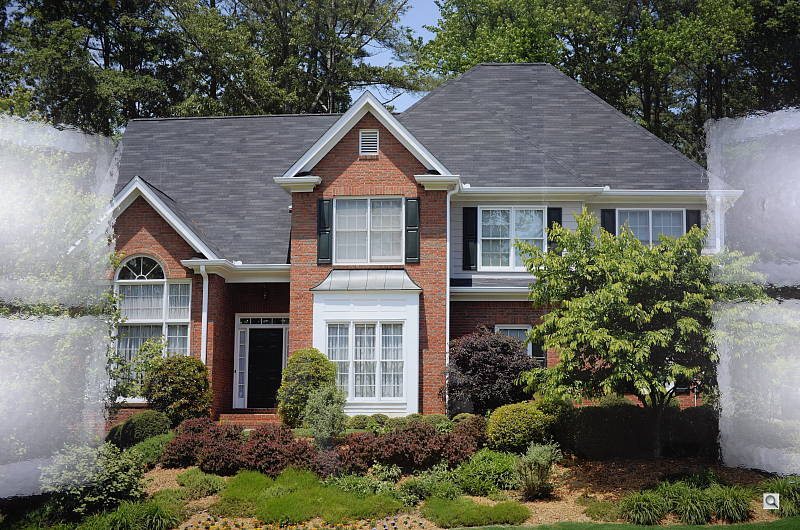
Noise levels were good at up to ISO 3,200, and the noise suppression didn't get too carried away either. Here, at ISO 2,500, there's still plenty of fine detail in the brick building at left, and relatively little signs of smudging or blotchiness. ISO 6,400 was as high as I was typically willing to go. |
Performance. The Nikon A's modest burst shooting performance is another reason you're not likely to be using it for sports, but again it's probably sufficient for street shooting and keeping up with the kids. And the unlimited JPEG buffer -- if your flash card is fast enough, anyway -- is a definite bonus for the latter. Even in Raw+JPEG mode, there's sufficient buffer depth for a full two seconds and change of burst shooting.

Another detail-rich capture. There's some subtle false color in the railroad crossing sign, though.
Flash. The Coolpix A's built-in flash strobe, while not terribly powerful, is just a little bit more so than that of the Ricoh. Its mechanism doesn't raise it quite as high as that of the Ricoh GR, but nonetheless it didn't seem terribly prone to more than mild, easily-corrected red-eye. And of course, you've got a proper hot shoe with connectivity for Nikon's intelligent strobes, although I didn't have access to one during my review. Importantly, the shoe does have a locking pin. I'd imagine you'll want to stay with a smaller strobe, though, or the pairing with such a relatively small and light camera body could prove rather ungainly.
Strange defaults. One feature of the Nikon Coolpix A to watch out for relates to its default settings. The camera has an Auto ISO function, which like those of Nikon's interchangeable-lens cameras simply overrides your manually-configured setting when the camera's metering thinks your chosen exposure will not be bright enough. However, although the function exists it is disabled by default. Even on an enthusiast camera that seems rather silly to me. If the option was enabled by default, you might end up with a noisier image than you'd like, but it would probably still be usable. With it disabled, though, by the time you realize there's a problem you've likely already lost a shot to blur from the slow shutter speed.

Because it's been a little while since I've shot a Nikon, I missed that setting before going out for an afternoon's shooting. I only realized once I got home and noticed all my shots were at base ISO, including a few that while probably still usable were just subtly blurred. I've gotten accustomed to the option being available and default on most cameras, but mea culpa -- I should've caught this. But that doesn't make it a smart design: The shooter who's new to Nikon can hardly be expected to catch something straight away when it is layered three levels deep in the menu, and could take a dozen or more clicks to get to.

Metering. The metering system, for the most part, seemed pretty accurate. For the majority of my shots, the default exposure was near enough right, and for those that required a touch of exposure compensation, it was largely subject-induced. Noise levels were good, and so was the balance between noise reduction and image detail. I was happy to shoot up to ISO 3,200 regularly, and ISO 6,400 at a pinch. Beyond that was, for me, as last resort.

Dynamic range is superb, especially from raw. Here, you can see that there's plenty of detail both in the highlights, and in areas of deep shadow.
Image quality. I personally found the Nikon's color more pleasing than that from the Ricoh. Colors were bold without being cartoonish, and white balance typically hit the nail on the head. The GR, by contrast, tended to be somewhat cold. Vignetting was definitely quite noticeable in more than a few of my shots, though, something that surprised me a little given the fixed focal length lens, and the fact that this is an enthusiast camera. Perhaps Nikon expects enthusiasts who are worried about such things to shoot raw and have vignetting corrected automatically on the desktop, but I would've expected to see in-camera lens correction available.
As I did recently with the Pentax K-5 IIs, I had concerns about moiré with the Coolpix A, thanks to its lack of an optical low-pass filter. Though it did show up in the lab and in a few of my shots, it wasn't terribly prominent in any of them. That's quite likely just dumb luck, though. I didn't go out of my way to try and provoke moiré, nor to avoid it, and simply shot like I normally would. Take enough shots and eventually I'd likely have hit the perfect subject with the right frequency to induce moiré. If you're an enthusiast and willing to make that tradeoff for slightly better image sharpness, that's fine, but it's important to be aware of the tradeoff, and the fact that you're likely gaining very little over a camera with a weak low-pass filter anyway.
Video. I must admit that I didn't find the Coolpix A terribly exciting for video, but that was down mostly to its wide, prime lens. It offers good video quality, with Full HD (1,920 x 1,080) shooting at 30 frames per second, as well as a choice of 25 or 24 fps, and a lower-res 720p (1,280 x 720) mode, along with optional stereo audio. You can also adjust exposure compensation during capture, although turning the dial to make an adjustment causes noise and shake that disrupt the video.
Video from the Nikon Coolpix A is of fairly good quality, but prone to moiré and false color effects. Here, these are particularly noticeable in the surface of the water, which has a subtle rainbow flicker. The lack of a zoom also feels more limiting than for stills, and the lack of stabilization will demand a tripod or a very steady grip. (You can see a handheld sample without panning here.) YouTube clips recompressed by Google; click to download originals of panning video and static video. |
There are a few things that make Coolpix A video less fun, though. For still photography, the lens makes sense, but for video the lack of a zoom feels very limiting, and the only way to focus attention on a particular subject is to walk towards it. The lack of stabilization means that video shot while walking will be unattractive and shaky, unless you're using some kind of external stabilization device such as a Steadycam. And it's quite a challenge to capture interesting, attractive video with such a wide lens, having to essentially remain stationary.
Nor is it possible to focus during video capture, either automatically or manually. And honestly, you could very easily miss that the camera even offers movie capture. There are no separate movie controls, no Movie mode on the Mode dial, and there's really no indication at all externally that video capture is possible. To enable movie shooting, you have to change the release mode to Movie in the menu system.
I should also note that more so than stills, movies from the Nikon A seemed prone to moiré and false color. All things considered, I found the Coolpix A's movie capture capability of little utility, and I doubt the average Coolpix A owner will shoot video with it much. But then, it's not really the kind of camera I'd expect to use for video in the first place, so that's not really a huge knock against it.
Power. Battery life of the Nikon Coolpix A was only modest. I didn't run out in a typical afternoon's shooting, but I switched the camera off most of the time between groups of shots, and battery life did get low for me a fair few times. For day trips or longer, you'll want to have a couple of batteries handy.

Nikon Coolpix A Review -- Technical Info
by Mike Tomkins

Sensor. At the heart of the Nikon A is a sensor like that in no other Coolpix. Actually, it's more akin to that used in some of the company's digital SLRs. It's a DX-format -- also known as APS-C -- chip with an effective resolution of 16.2 megapixels, and a total resolution of 16.93 megapixels.
Those figures may seem familiar: they're exactly the same as those of the sensor in the Nikon D7000 and D5100, as well as Pentax's K-5, K-5 II, and K-5 IIs, suggesting that the Coolpix A's chip is closely related. And that's good news, because it's a sensor that's been widely praised for its image quality. For its part, Nikon says that the micro lenses have been designed exclusively for the Coolpix A, to optimize edge-to-edge performance with the built-in lens.
There's no optical low pass filter to maximize per-pixel detail, something also true of several of the Coolpix A's nearest competitors. As we've seen with past cameras that forgo the antialiasing filter, though, we did find the Coolpix A prone to moiré and false color.
Sensitivity. By default, the Nikon Coolpix A offers a sensitivity range of ISO 100 to 6,400 equivalents. For Program, Priority, or Manual shooting only, the upper limit can be relaxed, providing access to Hi 0.3 (ISO 8,000), Hi 0.7 (ISO 10,000), Hi 1 (ISO 12,800), and Hi 2 (ISO 25,600) equivalents. There's also an Auto ISO function which will override your selection, but note that it's not the default.
Performance. Nikon rates the Coolpix A as capable of shooting full-resolution images at a rate of up to four frames per second, and this matched nicely with the 4.1 fps we found in testing. Burst depth is essentially unlimited for JPEG shooting, while raw shooters will find a depth of around 17 frames. If you shoot Raw+JPEG, you'll still manage around ten frames in a burst.

Lens. Along with its sensor, the other defining characteristic of the Nikon Coolpix A is its lens. It's a Nikkor-branded, 18.5mm f/2.8 optic, with a field of view approximately equivalent to that of a 28mm lens on a 35mm camera body. The optical formula includes seven elements in five groups, and an electronically-controlled, seven-bladed aperture.
The lens' design doesn't include any form of image stabilization, but as noted previously, it does feature a built-in, automatically-retracting lens barrier similar to those found on many compact point-and-shoot cameras. The lens extends to around double its folded length when powered on, and includes a fly-by-wire dial around its barrel for manual focusing.
Lens accessories. The lens barrel is also encircled by a removable bezel, beneath which you can mount an optional UR-E24 adapter ring. With this in place, you can attach standard 46mm threaded filters in front of the Coolpix A's lens. The optional lens ring comes bundled with an HN-CP18 lens hood, and Nikon notes that this is crafted from metal. Not only does it shade the lens to prevent flare; it also provides some protection for the extended lens itself when mounted. Pricing for lens ring and hood together is around US$130.

Focusing. The Coolpix A -- unlike the company's 1-series mirrorless cameras -- relies solely on contrast detection autofocus, with no on-chip phase detection pixels, and nowhere in the optical path to place a phase detection sensor. Nikon claims the camera still offers "quick" autofocus performance, but our in-house testing found it to be a bit sluggish compared to most modern compact cameras.
The Nikon Coolpix A offers wide, normal, and spot AF areas, and includes focus lock, face detection and tracking functions. The focus range varies from around 20 inches (50cm) to infinity by default, and when set to Macro mode with a switch on the left of the camera body, can be reduced to as close as four inches (10cm).
You can, of course, focus manually, and there's a physical focus ring on the lens barrel for this purpose.

Viewfinder. Like almost all of its nearest rivals, the Coolpix A lacks any form of built-in viewfinder, and instead relies on an optional accessory viewfinder that mounts in the flash hot shoe. The Nikon DF-CP1 optical viewfinder includes focusing guidelines with about 90% frame coverage. It carries a hefty pricetag of around US$450, which adds almost 41% to the cost of the camera alone.
Display. Given that pricetag, we'd imagine many Nikon Coolpix A owners will instead rely solely on the monitor to frame and review images. It's based around a 3.0-inch TFT LCD panel, and is manufacturer-rated for 100% coverage horizontally and vertically, both for record and playback modes. The display has a five-step brightness adjustment, and a fairly high resolution of 921K dots. That's approximately 640 x 480 pixels, with each pixel made up of adjacent red, green, and blue dots.

Shutter. The Coolpix A offers shutter speeds ranging from 1/2,000 to 30 seconds, plus bulb, and uses both a mechanical and CMOS electronic shutter.
Metering. Exposures are determined with matrix, center-weighted, or spot metering from the main image sensor. Exposure compensation is available within a +/-5EV range in 1/3EV steps for still images. Movies have a narrower range of +/-2EV. Three frame exposure bracketing is possible, with a step size of 0.3 to 2.0 EV between frames.

Exposure. As well as Automatic and Scene modes, the Nikon Coolpix A offers the usual enthusiast-friendly selection of Program, Aperture-priority, Shutter-priority, and Manual exposure control. There are also two User modes, which can be configured for a particular shooting situation and then instantly recalled at a later time, as needed.
Scene modes include Beach/Snow, Blossom, Candlelight, Child, Close-up, Dusk/Dawn, Food, High Key, Landscape, Low Key, Autumn Colors, Night Landscape, Night Portrait, Party/Indoor, Pet Portrait, Portrait, Silhouette, Sports, and Sunset.
Creative. Options in record mode include the typical features you'd expect, such as Active D-Lighting and picture controls. In Playback mode, options include D-Lighting, Red-eye reduction, Trim, Monochrome, Filter effects, Color balance, Image overlay, NEF (RAW) processing, Resize, Quick Retouch, Straighten, Fisheye, Color outline, Color sketch, Perspective control, Miniature effect, Selective color, and Side-by-side comparison.

Flash. Nikon has included both a built-in popup flash strobe and a standard ISO 518 hot shoe in the Coolpix A. The built-in strobe has a guide number of 21 feet (6m) under automatic control, or 22 feet under manual control at full power (ISO 100, 73.4°F / 23°C). Working range is up to 37 feet (11.5m) with automatic ISO sensitivity. Flash exposure compensation is available, set separately from exposure compensation. X-sync for the internal strobe is possible at all shutter speeds.
The hot shoe includes Nikon's proprietary contacts for intelligent strobes, and is compatible with the Speedlight SB700, SB900, or SB910. It doesn't, however, directly support Nikon's Creative Lighting System. No X-sync speed is stated by Nikon for external flash, and we didn't have access to a Speedlight strobe during our review.

Level gauge. The Nikon Coolpix A includes a single-axis electronic level which indicates left-to-right tilt on the LCD display. It lags motion more than most -- there's a good half-second lag between moving the camera and seeing the display update -- but nonetheless it's very helpful in ensuring your horizons are level.
Video. As well as stills, the Nikon A can, of course, capture high-definition video. Movies are saved in a .MOV container with H.264 / MPEG-4 AVC compression, and include stereo audio. There are two resolution choices: either Full HD (1,920 x 1080 pixels, aka 1080p), or HD (1,280 x 720 pixels, aka 720p). Both offer three progressive-scan frame rate options: 30, 25, or 24 frames per second.

Connectivity. Nikon includes both USB 2.0 High Speed data and Type-C Mini HDMI high-definition video output connectivity in the Coolpix A. There's also an accessory terminal for either a GPS receiver or wired remote release cable, and as noted previously, an ML-L3 infrared remote control is also supported.
The Coolpix A also supports Nikon's WU-1a wireless mobile adapter, which provides a 49-foot range, and is able to transfer to or provide for remote control from Android and iOS devices with a free Wireless Mobile Utility app.
Storage. Images can be stored either as JPEG files, or as 14-bit uncompressed .NEF raw files. Movies are saved in a .MOV container with H.264 / MPEG-4 AVC compression, and include stereo audio.
Images and movies are stored on Secure Digital cards, including the higher-capacity SDHC and SDXC types. No mention is made of the higher-speed UHS-I cards, so we're not certain if the camera takes advantage of the extra speed these cards offer.

Power. The Nikon A draws its power from an EN-EL20 proprietary, rechargeable lithium-ion battery pack. According to Nikon, the Coolpix A is capable of approximately 230 shots on a charge, to CIPA testing standards and with 50% flash usage. We don't have a specific test for this, but it gels well with our experience in the real world.
The Coolpix A can also operate on mains power via an EH-5b AC adapter with EP-5C power connector, both sold as optional extras.

Price and availability. The Nikon Coolpix A went on sale in the US market in March 2013. Suggested retail pricing is set at approximately US$1,100, and two body colors are available: either black or silver.
The DF-CP1 optical viewfinder accessory carries a suggested retail price of US$450, while the UR-E24 Adapter Ring and HN-CP18 Lens Hood sell together for a suggested retail price of US$130. These accessories, too, shipped from March 2013.
Nikon Coolpix A Review -- Image Quality Comparison
Below are crops comparing the Nikon Coolpix A with the Ricoh GR, Nikon D7100, Olympus OM-D E-M5, Sigma DP1M and Sony RX1.
NOTE: These images are best quality JPEGs straight out of the camera, at default settings including noise reduction. All cameras in this comparison were shot with our very sharp reference lenses.
Nikon Coolpix A versus Ricoh GR at ISO 100
 |
 |
 |
 |
 |
 |
Nikon Coolpix A at ISO 100 |
Ricoh GR at ISO 100 |
In the first two sets of crops, the images look very similar, but the Ricoh does better with fine detail in the mosaic crop while the Coolpix A does better with the red fabric. Strangely, the Ricoh seems to have trouble with the red fabric; the leaf pattern is barely visible. |
|
Nikon Coolpix A versus Nikon D7100 at ISO 100
|
 |
|
 |
|
 |
Nikon Coolpix A at ISO 100 |
Nikon D7100 at ISO 100 |
Although both of these cameras feature an APS-C sized sensor, the Coolpix A is no match for the 24-megapixel D7100, which also doesn't have an optical low-pass filter. The red fabrics and mosaic images are the most telling, with the D7100 producing more fine detail. |
|
Nikon Coolpix A versus Olympus OM-D E-M5 at Base ISO
|
 |
|
 |
|
 |
Nikon Coolpix A at ISO 100 |
Olympus OM-D E-M5 at ISO 200 |
This is a bit of a mixed comparison, as the Coolpix A does better with the bottle crops (the Olympus appears to suffer from some noise reduction artifacts in the shadows) and the red fabric. On the other hand, the OM-D does much better with detail in the mosaic and the pink fabric. |
|
Nikon Coolpix A versus Sigma DP1M at ISO 100
|
 |
|
 |
|
 |
|
Nikon Coolpix A at ISO 100
|
Sigma DP1M at ISO 100
|
|
The Sigma DP1 Merrill was born for low ISO performance, and it shows here, with the DP1M besting the Coolpix A handily. The fine detail in all three crops from the Sigma trounces the Nikon. |
|
Nikon Coolpix A versus Sony RX1 at ISO 100
|
 |
|
 |
|
 |
|
Nikon Coolpix A at ISO 100
|
Sony RX1 at ISO 100
|
|
The similarly-sized yet full-framed RX1 is showing its chops here, easily beating the Coolpix A and its APS-C sensor. The 24-megapixel RX1 does particularly great with fine detail in the mosaic and the pink fabric. |
|
Most digital SLRs and CSCs will produce an excellent ISO 100 shot, so we like to push them and see what they can do compared to other cameras at ISO 1,600, 3,200, and 6,400. Recent advances in sensor technology have made ISO 1,600 look a lot more like ISO 100, but there are still cameras whose quality starts to fall apart at this setting. We also choose 1,600 because we like to be able to shoot at least at this level when indoors and at night.
Nikon Coolpix A versus Ricoh GR at ISO 1600
 |
 |
 |
 |
 |
 |
Nikon Coolpix A at ISO 1600 |
Ricoh GR at ISO 1600 |
If you look at only the first two comparisons, the Coolpix A and the Ricoh GR are pretty similar, although the vote goes to the GR for cleaner noise in the first shot and a bit more detail in the mosaic. In the fabric crop, it's another story. The GR struggles to produce almost any detail. |
|
Nikon Coolpix A versus Nikon D7100 at ISO 1600
|
 |
|
 |
|
 |
Nikon Coolpix A at ISO 1600 |
Nikon D7100 at ISO 1600 |
The results of this comparison are pretty impressive, with the Coolpix A holding its own compared to the increased megapixels from the D7100. The default noise reduction on the Coolpix A seems to do a slightly better job in the shadows in the bottle crop. Other than perhaps slight differences in contrast and exposure, the mosaic and fabric crops look very similar. |
|
Nikon Coolpix A versus Olympus OM-D E-M5 at ISO 1600
|
 |
|
 |
|
 |
Nikon Coolpix A at ISO 1600 |
Olympus OM-D E-M5 at ISO 1600 |
At ISO 1600, the Olympus bottle crops look less grainy than the Coolpix A, but noise reduction is noticeable. Overall it seems the E-M5 also does better in the mosaic, although the noise reduction seems to have an effect in the black tile area. In the fabric crop, the Nikon beats the Olympus, producing much better detail in the red fabric. |
|
Nikon Coolpix A versus Sigma DP1M at ISO 1600
|
 |
|
 |
|
 |
Nikon Coolpix A at ISO 1600 |
Sigma DP1M at ISO 1600 |
Poor Sigma. This comparison doesn't even seem fair, as the Nikon handily out-resolves and out-colors the DP1M. The Foveon sensor in the Sigma can't handle high ISOs, and as such, color accuracy suffers noticeably. |
|
Nikon Coolpix A versus Sony RX1 at ISO 1600
|
 |
|
 |
|
 |
Nikon Coolpix A at ISO 1600 |
Sony RX1 at ISO 1600 |
The RX1 does better than the Coolpix A at ISO 1600, producing much cleaner, less noisy images, as well as producing more fine detail in the mosaic image. |
|
These days, ISO 3,200 is a very viable shooting option for most good cameras, so let's take a look at some comparisons there.
Nikon Coolpix A versus Ricoh GR at ISO 3200
 |
 |
 |
 |
 |
 |
Nikon Coolpix A at ISO 3200 |
Ricoh GR at ISO 3200 |
Like we saw at ISO 1600, the first two crop comparisons are quite similar, now with just a bit more chroma noise in the shadows from the Nikon. In the fabric crop, the Coolpix A wins hands down, producing some semblance of leaf pattern in the red fabric while the Ricoh barely produces any. |
|
Nikon Coolpix A versus Nikon D7100 at ISO 3200
|
 |
|
 |
|
 |
Nikon Coolpix A at ISO 3200 |
Nikon D7100 at ISO 3200 |
Like we saw before, these two cameras are comparing quite similarly at moderate to high ISOs, and it's the same story here at ISO 3200. The bottle crop from the D7100 looks more noisy but the level of detail from the mosaic and the fabric crops look very similar to each other. |
|
Nikon Coolpix A versus Olympus OM-D E-M5 at ISO 3200
|
 |
|
 |
|
 |
Nikon Coolpix A at ISO 3200 |
Olympus OM-D E-M5 at ISO 3200 |
At ISO 3200, it's a bit of a mixed bag, as the Coolpix A looks a bit noisier in the shadows of the bottle crop, but it does much better with the fabric. The Olympus meanwhile produces better fine detail in the mosaic and the text of the label on the bottle is sharper. |
|
Nikon Coolpix A versus Sigma DP1M at ISO 3200
|
 |
|
 |
|
 |
Nikon Coolpix A at ISO 3200 |
Sigma DP1M at ISO 3200 |
Ouch. The Nikon wins hands down compared to the Sigma, which produces very grainy, almost desaturated pink-colored photos at ISO 3200 (although there's still detail in some of the mosaic area and the text on the bottle is more contrasty). |
|
Nikon Coolpix A versus Sony RX1 at ISO 3200
|
 |
|
 |
|
 |
Nikon Coolpix A at ISO 3200 |
Sony RX1 at ISO 3200 |
The RX1 wins in this comparison by producing much cleaner photos and finer details. The mosaic and fabric area look much crisper and more defined in the crops from the RX1. |
|
Detail: Nikon Coolpix A versus Ricoh GR, Nikon D7100, Olympus OM-D E-M5, Sigma DP1M and Sony RX1.
 |
 |
 |
 |
 |
 |
|
 |
 |
 |
 |
 |
 |
|
 |
 |
 |
 |
 |
 |
|
| Nikon A ISO 100 ISO 3,200 ISO 6,400 |
Ricoh GR ISO 100 ISO 3,200 ISO 6,400 |
Nikon D7100 ISO 100 ISO 3,200 ISO 6,400 |
Olympus E-M5 ISO 200 ISO 3,200 ISO 6,400 |
Sigma DP1M ISO 100 ISO 3,200 ISO 6,400 |
Sony RX1 ISO 100 ISO 3,200 ISO 6,400 |
|
| Detail comparison. When it comes to high-contrast detail, at low ISO, the Sigma DP1M is king, with the Olympus E-M5 a close second. The Coolpix A performs admirably, and compares very similarly to the Ricoh GR. The D7100 also looks very similar to the Coolpix A at ISO 100. As the ISO rises, the Olympus and Sony RX1 appear the most consistent and overall best-looking. ISO 3200 and 6400 from the Coolpix A look very similar, and overall it does a great job, particularly with the small red text at the top. | ||||||
Nikon Coolpix A Review -- Print Quality
Excellent 24 x 36 inch prints at ISO 100/200; very good 11 x 14 at ISO 3200 and a nice 5 x 7 at ISO 12,800.
 ISO 100/200 prints look terrific at 24 x 36 inches with nice detail and rich colors across the spectrum. 30 x 40 inch sizes are quite suitable for wall display prints.
ISO 400 also prints quite nicely at 24 x 36 inches.
ISO 800 images are very crisp at 16 x 20, which is a fairly large size for this ISO, retaining excellent color throughout.
ISO 1,600 makes a really good 13 x 19 inch print, with 16 x 20s here acceptable for less critical applications where a bit of film-esque noise is ok.
ISO 3,200 prints a nice 11 x 14, with only minor noise apparent in some shadowy areas.
ISO 6,400 shots look good at 8 x 10 inches. It is here that we should note just how good our target red swatch still looks, as it generally gives most cameras fits by this high an ISO.
ISO 12,800 produces a very nice 5 x 7 inch print for such a high ISO.
ISO 25,600 yields a usable 4 x 6 for some instances and is not terrible, but is not quite up to what we can deem as "good".
The Nikon Coolpix A does a wonderful job in the print quality department, and that's probably enough said. But if you are interested in just how good this fixed lens compact camera really is, it should be noted that it rivals its APS-C DSLR cousins across virtually the entire range in the sizes it is capable of, and it prints the same size at ISO 12,800 as the highly touted Sony RX1, which is more than twice the price. Add in the fact that the Coolpix A renders the trickiest part of our test target just about as well as any camera sold for under $3000 and you get a lot more of the picture.
Testing hundreds of digital cameras, we've found that you can only tell just so much about a camera's image quality by viewing its images on-screen. Ultimately, there's no substitute for printing a lot of images and examining them closely. For this reason, we now routinely print sample images from the cameras we test on our Canon Pro9000 Mark II studio printer, and on the Pixma MP610 here in the office. (See the Canon Pixma Pro9000 Mark II review for details on that model.)
In the Box
- Nikon Coolpix A camera
- BS-1 accessory shoe cover
- EN-EL20 rechargeable lithium-ion battery pack
- MH-27 battery charger
- AN-CP24 neck strap
- UC-E16 USB cable
- Nikon ViewNX 2 software CD-ROM
- User Manual
- Warranty card
Recommended Accessories
- Extra battery pack, perhaps two for extended outings
- Large capacity, high-speed SDHC/SDXC memory card. 8-16GB or larger makes sense if you plan on shooting lots of HD video. Look for a speed grade of at least Class 6 for video capture.
- EP-5C power connector and EH-5b AC adapter (if you plan on much studio shooting)
- DF-CP1 optical viewfinder
- ML-L3 wireless or MC-DC2 wired remote release
- GP-1 GPS unit
- WU-1a wireless mobile adapter
- Camera case
Nikon Coolpix A Review -- Conclusion
| Pro: | Con: |
|---|---|
|
|
Other companies -- key among them being Sigma -- may have invented the large sensor, fixed prime lens camera category, but the Nikon Coolpix A represents its first really mainstream effort. Like its main rivals, it is clearly not the camera for everybody, but for prime lens lovers who are willing to trade away lens interchangeability for a smaller body, the Coolpix A is exciting indeed. It offers clear advantages over those which preceded it in terms of size and weight, while matching the most affordable of its predecessors on price.
It also offers top notch image quality, although with the potential for moiré, false color, and aliasing artifacts thanks to its lack of an optical low-pass filter. (That's something we've been having to say about a lot of enthusiast cameras lately.) If you keep that fact in mind, and if you are willing to put up with reshoots or perhaps extensive editing to reduce the impact of these artifacts, though, it offers great image quality with only relatively easily-corrected defects such as its significant vignetting. And man, what an effort in terms of dynamic range and noise levels! Throw in a touch of unsharp masking to bring out the detail in its images, and it really sings.
Does the Nikon Coolpix A have its flaws? Yes, but so do most cameras. Key among these, it could stand a more comfortable grip design, faster autofocus and burst performance, and a more powerful internal flash strobe. Its too-easily-bumped Command dial could also use a design rethink. Does the Nikon Coolpix A do what it set out to, though, by providing excellent image quality in a compact package? Definitely.
Courtesy of its fixed, prime lens, the Nikon Coolpix A is a camera that really makes you think about your photos -- and in the process, how you can make them better. If you're not already a prime shooter, you'll be challenged by it, and you'll likely find yourself growing as a photographer courtesy of that experience. If you can live within its limitations, it's a great photographic tool. With the reservation that it's definitely not the everyman's camera, the Nikon Coolpix A clearly merits a place on our hallowed Dave's Pick list.
Follow Imaging-Resource.com on Twitter!
Optics
Lens Test Results
Fixed 18.5mm lens
Very good far-field performance from the Nikkor 18.5mm f/2.8 fixed lens.

The Nikon Coolpix A is equipped with a fixed Nikkor 18.5mm f/2.8 lens, with a 35mm-equivalent focal length of about 28mm. Construction consists of 7 elements in 5 groups, with a 7-bladed diaphragm providing an aperture range of f/2.8 to f/22.
Sharpness and contrast are very good at f/8 across the frame, and chromatic aberration isn't an issue (see below for more on that). Performance in the corners looks to be very good (but a little difficult to evaluate in this image), with just a hint of softening and very little coma distortion. Corner shading ("vignetting") is noticeable, but is fairly gradual so it's not too objectionable. See below for comments on macro, geometric distortion, performance wide open, chromatic aberration, etc.
The Nikon Coolpix A does not offer digital zoom, which is a bit odd for a fixed wide-angle lens camera, though you can usually do better by cropping and resizing as needed in post.
Macro
A larger-than-average minimum coverage area, with excellent detail. Flash exposure is uneven and overexposed in the center.


The Nikon Coolpix A captures a fairly large minimum area measuring 5.06 x 3.35 inches (129 x 85 millimeters) in Macro mode. Detail is excellent over most of the frame at f/8, though corners are quite soft. (Most lenses have some softening in the corners at macro distances.) Flash coverage is not very even, overexposing the center while leaving the bottom and right corners quite dim, so plan on using external lighting for macro shots at closest distance.
Geometric Distortion
Low geometric distortion.
| Barrel distortion is ~0.2 percent |
 |
The Nikon Coolpix A's lens produces only about 0.2 percent of complex barrel distortion, which is quite low, especially for a wide-angle lens. Uncorrected RAW files exhibit the same low distortion, which is a pleasant surprise. This is the tendency for the lens to bend straight lines outward (like a barrel -- usually at wide-angle) or inward (like a pincushion -- usually at telephoto).
Chromatic Aberration and Corner Sharpness
Low levels of C.A. (the camera suppresses it). The lens produces soft corners when wide open.
|
Aperture: f/2.8
|
|
 |
 |
| f/2.8: Upper left C.A.: Low Softness: Very soft |
f/2.8: Center C.A.: Very low Softness: Very sharp |
|
Aperture: f/5.6
|
|
 |
 |
| f/5.6: Upper left C.A.: Low Softness: Sharp |
f/5.6: Center C.A.: Very low Softness: Very sharp |
|
Aperture: f/8
|
|
 |
 |
| f/8: Upper left C.A.: Low Softness: Sharp |
f/8: Center C.A.: Very low Softness: Very sharp |
Chromatic Aberration. Chromatic aberration in the corners of in-camera JPEGs is low when wide open, exacerbated somewhat by softening, while the center of the image shows almost no CA. Stopping-down to f/5.6 or f/8 reduces the number of colored pixels, but they are more distinct. Still, C.A. is quite low in JPEGs.
Corner Softness. Wide open at f/2.8, the Coolpix A's lens exhibits strong blurring in the upper corners, though lower ones are sharper. The blurring doesn't extend too far into the frame, though, and the center is quite sharp. When stopped down to f/5.6 or f/8, all four corners exhibit good sharpness; almost as sharp as the center.
Corner Shading. The Nikon A's lens shows significant corner shading ("vignetting"), even when stopped-down to f/8, though it's fairly gradual as distance is increased from the center. Oddly, the Coolpix A does not offer any shading correction.
Lens Corrections
The only lens correction the Nikon Coolpix A seems to apply is chromatic aberration suppression, as geometric distortion and corner shading appear to be the same in uncorrected RAW files.
Chromatic Aberration Suppression
| Camera JPEG | Uncorrected RAW |
 |
 |
| f/8: Upper right C.A.: Very low |
f/8: Upper right C.A.: Moderately low |
As you can see, lateral chromatic aberration is noticeably higher and brighter with in uncorrected RAW files, however it's still fairly low.
Overall, a very good lens when stopped down from maximum aperture. It's quite impressive that the Coolpix A is only suppressing chromatic aberration (as Nikon does in all its current DSLRs), and doesn't need to apply any distortion correction, though some (optional) corner shading correction would have been a nice feature.
Nikon Coolpix A Viewfinder Accuracy
Viewfinder Test Results
Coverage
Excellent accuracy from the LCD monitor.

The Nikon Coolpix A's LCD monitor shows essentially 100% coverage in record mode. This is excellent performance, though not a surprise given its image is derived from the imaging sensor.
The images above were taken from our standardized test shots. For a collection of more pictorial photos, see our Nikon Coolpix A Photo Gallery .
Exposure
Color
Saturation & Hue Accuracy
Good saturation levels and average hue accuracy.
 |
||
|
ISO Sensitivity
|
||
| In the diagram above, the squares show the original color, and the circles show the color that the camera captured. More saturated colors are located toward the periphery of the graph. Hue changes as you travel around the center. Thus, hue-accurate, highly saturated colors appear as lines radiating from the center. Mouse over the links to compare ISOs. | ||
Skin tones. The Nikon Coolpix A's Caucasian skin tones look just about right when using manual white balance in simulated daylight, with a subtle pink cast. A very good job here. Where oversaturation is most problematic is on Caucasian skin tones, as it's very easy for these "memory colors" to be seen as too bright, too pink, too yellow, etc.
Hue. The Nikon Coolpix A does shift cyan toward blue, red toward orange, and light green toward yellow, but shifts are relatively minor. (The cyan to blue shift is very common among the digital cameras we test; we think it's a deliberate choice by camera engineers to produce better-looking sky colors.) With an average "delta-C" color error at base ISO of 4.92 after correction for saturation, overall hue accuracy is about average, and actually improves slightly as ISO rises. Hue is "what color" the
color is.
Saturation Adjustment
The Nikon Coolpix A has a total of seven saturation levels available, three above and three below the default saturation, plus an Auto setting. This covers a pretty wide range of saturation levels, about as wide a range as you're likely to find photographically relevant, apart from special effects that are arguably better achieved in software. The fine steps between settings mean it's easy to program the camera to just the level of saturation you prefer. Saturation also doesn't impact contrast, which is ideal but not always the case.
| Saturation Adjustment Examples | ||||
 |
 |
 |
 |
 |
| -3 | -1 | 0 | +1 | +3 |
The table above shows results with several saturation settings, see the Thumbnails index page for more (look for the files named Coolpix AOUTBSATx.JPG). Click on any thumbnail above to see the full-sized image.


Sensor
Exposure and White Balance
Indoors, incandescent lighting
Good color with the Manual white balance setting, but warm results with Auto and Incandescent. About average positive exposure compensation required.


Indoors, under normal incandescent lighting, color balance is too warm and reddish-orange with the Auto white balance setting. The Incandescent setting is also too warm, this time with a yellowish cast. The Manual setting by far produced the most accurate results, perhaps just a hint cool. The Nikon Coolpix A required an average amount of positive exposure compensation here, at +0.3 EV. Our test lighting for this shot is a mixture of 60 and 100 watt household incandescent bulbs, a pretty yellow light source, but a very common one in typical home settings here in the U.S.
Outdoors, daylight
Very good handling of exposure and color, though default contrast is a bit high.
The Nikon Coolpix A handled tough outdoor lighting under harsh sunlight pretty well, producing good overall color and exposure. We preferred Manual white balance for our "Sunlit" Portrait shot, as Auto produced skin tones that were a little too warm and yellow. +0.3 EV exposure compensation was required to keep the mannequin's face reasonably bright, which is a bit less than the average of +0.7 EV required for this scene, although +0.5 EV would have likely been ideal given the somewhat high contrast. The far-field shot is just slightly underexposed at 0 EV, so there are some dark shadows but almost no highlights were blown. Color looks good as well, just a touch on cool side.
See full set of test images with explanations
See thumbnails of all test and gallery images
Resolution
Very high resolution, ~2,200 to 2,300 lines of strong detail from JPEGs, a little higher from ACR processed RAW files.


Our laboratory resolution chart revealed sharp, distinct line patterns down to about 2,200 lines per picture height in the horizontal direction, and to about 2,300 lines in the vertical direction. Complete extinction of the pattern didn't occur before the 4,000 line limit of our chart in both directions. We were able to do a little better with NEF files processed through Adobe Camera Raw, with the horizontal direction resolving slightly higher at about 2,300 lines per pixel height. As usual, color moiré is more evident in the converted RAW files, though camera JPEGs show some significant color moiré as well, which is no surprise given the lack of an OLPF. Use these numbers to compare with other cameras of similar resolution, or use them to see just what higher resolution can mean in terms of potential detail.
See full set of test images with explanations
See thumbnails of all test and gallery images
Sharpness & Detail
Very good detail for the pixel count, though images are a touch softer than expected at default settings. Minimal noise suppression visible at base ISO.


Sharpness. The Nikon Coolpix A produces images with very good detail, though default sharpening is a bit conservative (with perhaps some anti-aliasing processing being applied), resulting in images that are a touch soft despite the lack of an OLPF (Optical Low Pass Filter). Only minor edge enhancement artifacts are visible on high-contrast subjects such as the small halos around the branches and pine cones in the crop above left. Edge enhancement creates the illusion of sharpness by enhancing colors and tones right at the edge of a rapid transition in color or tone.
Detail. The crop above right shows only minimal detail loss due to noise suppression, as the darker areas of the model's hair show fairly good detail. Individual strands are still distinguishable even in the lighter shadows, though they begin to merge as shadows deepen, and in places where the tone and color of adjacent strands is very close. Still, very good results here. Noise-suppression systems in digital cameras tend to flatten-out detail in areas of subtle contrast. The effects can often be seen in shots of human hair, where the individual strands are lost and an almost "watercolor" look appears.
Raw vs In-Camera JPEGs
As noted above, the Nikon Coolpix A delivers JPEGs with great detail for the resolution right out of the box, though images are a touch softer than expected. Improved detail and sharpness can often be obtained from carefully processing RAW files, without additional sharpening artifacts. Take a look below, to see what we mean:


In the table above, mousing over a link at the bottom will load the corresponding crop in the area above. Examples include in-camera Fine JPEG, a NEF RAW file processed through Nikon's ViewNX 2 software using default settings, and the same RAW file processed with Adobe Camera Raw 7.4, then sharpened in Photoshop. We found that fairly light sharpening of 200% unsharp mask with a radius of 0.3 pixels really made details pop in the Nikon Coolpix A's NEF files.
As you can see, results from a RAW file converted with Nikon's ViewNX 2 software are very similar to the in-camera JPEG (perhaps just a touch softer), and the software wasn't really able to extract more detail. Adobe Camera Raw was able to produce a much crisper image with finer detail, but as expected it also shows slightly higher noise levels as well as some chromatic aberration that the camera suppresses in its JPEGs. Bottom line: When coupled with a good converter, the Nikon Coolpix A rewards RAW shooters with great detail and sharpness.
ISO & Noise Performance
Great high ISO performance for a camera of this size.
| High ISO Noise Reduction = Normal (Default) | ||
 |
 |
 |
| ISO 100 | ISO 200 | ISO 400 |
 |
 |
 |
| ISO 800 | ISO 1,600 | ISO 3,200 |
 |
 |
 |
| ISO 6,400 | ISO 12,800 | ISO 25,600 |
The Nikon A's images are very clean at ISO 100 through 400, with just a touch of luminance noise becoming visible at ISO 800. Detail is still very good at ISO 1,600, with a tight film-like noise "grain" and very little fine detail lost to noise reduction, though chroma noise is more visible in the shadows. At ISO 3,200, luma noise is coarser and chroma noise more visible, but detail is still quite strong. ISO 6,400 is of course noisier, but still pretty good for such a high ISO. ISO 12,800 and ISO 25,600 in particular show a lot of chroma noise, in the form of yellow and purple blotches, as well as much stronger luminance noise. Saturation also drops slightly as ISO increases. Still, amazing high ISO performance for a camera its size.
Of course, the impact of noise and detail loss are highly dependent on the size the photos are printed at, and pixel-peeping on-screen has surprisingly little relationship to how the images look when printed: See the Print Quality section below for recommended maximum print sizes at each ISO.
To insure that the hair detail we use for making critical judgements about camera noise processing and detail rendering is in sharp focus at the relatively wide aperture we're shooting at, the focus target at the center of the scene is on a movable stand. This lets us compensate for front- or back-focus by different camera bodies, even those that lack micro-focus adjustments. This does mean, though, that the focus target itself may appear soft or slightly out of focus for bodies that front- or back-focused with the reference lens. We know this; if you click to view the full-size image for one of these shots and notice that the focus target is fuzzy, you don't need to email and tell us. :-) The focus target position will have been adjusted to insure that the rest of the scene is focused properly.
Extremes: Sunlit, dynamic range, and low light tests
Very good detail in both highlights and shadows. Very good low-light performance, capable of capturing bright images in near darkness.


Sunlight:
The Nikon Coolpix A handled the deliberately harsh lighting very well in the above test. Default contrast is a little high, however highlight and shadow detail are still very good. The +0.3 EV exposure did the best job here overall, as the mannequin's face was too dim at 0 EV (default exposure) and we thought a few too many highlights were lost at +0.7 EV. (+0.5 EV would have probably been ideal, as the eyes are still a bit dim at +0.3 EV.) Only a few highlights were blown in the mannequin's shirt and bright flowers at +0.3 EV, while very good detail was preserved in the shadows with lower than average noise. The camera's contrast adjustment also did a good job of decreasing overall contrast without also affecting color saturation. (See below.) Still, be sure to use fill flash in situations like the one shown above; it's better to shoot in the shade when possible.
Because digital cameras are more like slide film than negative film (in that they tend to have a more limited tonal range), we test them in the harshest situations to see how they handle scenes with bright highlights and dark shadows, as well as what kind of sensitivity they have in low light. The shot above is designed to mimic the very harsh, contrasty effect of direct noonday sunlight, a very tough challenge for most digital cameras. (You can read details of this test here.)
Dynamic Range Analysis
A key parameter in a digital camera is its Dynamic Range, the range of brightness that can be faithfully recorded. At the upper end of the tonal scale, dynamic range is dictated by the point at which the RGB data "saturates" at values of 255, 255, 255. At the lower end of the tonal scale, dynamic range is determined by the point at which there ceases to be any useful difference between adjacent tonal steps. Note the use of the qualifier "useful" in there: While it's tempting to evaluate dynamic range as the maximum number of tonal steps that can be discerned at all, that measure of dynamic range has very little relevance to real-world photography. What we care about as photographers is how much detail we can pull out of the shadows before image noise becomes too objectionable. This, of course, is a very subjective matter, and will vary with the application and even the subject matter in question. (Noise will be much more visible in subjects with large areas of flat tints and subtle shading than it would in subjects with strong, highly contrasting surface texture.)
What makes most sense then, is to specify useful dynamic range in terms of the point at which image noise reaches some agreed-upon threshold. To this end, Imatest computes a number of different dynamic range measurements, based on a variety of image noise thresholds. The noise thresholds are specified in terms of f-stops of equivalent luminance variation in the final image file, and dynamic range is computed for noise thresholds of 1.0 (low image quality), 0.5 (medium image quality), 0.25 (medium-high image quality) and 0.1 (high image quality). For most photographers and most applications, the noise thresholds of 0.5 and 0.25 f-stops are probably the most relevant to the production of acceptable-quality finished images, but many noise-sensitive shooters will insist on the 0.1 f-stop limit for their most critical work.
JPEG. The graph at right (click for a larger version) was generated using Imatest's dynamic range analysis for an in-camera Nikon Coolpix A JPEG file with a nominally-exposed density step target (Stouffer 4110). At the base ISO of 100 (the optimal ISO), with Active D-Lighting set to Off and default Contrast setting, the graph shows 10.9 f-stops of total dynamic range, with 9.61 f-stops at the "High" Quality level. The curve at highlight end rolls-off gradually, however the shadow end is a little disjointed and non-linear, which can lead to some posterization in very deep shadows. The Coolpix A's score at the highest quality level is however exceptional for an APS-C camera. For example, the well regarded Nikon D7000 scored 7.97 f-stops. Note though that this measurement has a margin of error of about 1/3 f-stop, so differences of less than 0.33 can be ignored.
RAW. The graph at right is from the same Stouffer 4110 stepchart image captured as a raw (.NEF) file, processed with Adobe Camera Raw using the Auto setting and tweaking from there. As can be seen, the score at the highest quality level increased almost a full stop from 9.61 to 10.6 f-stops, while total dynamic range increased substantially from 10.9 to 12.7 f-stops. Again, these results are remarkable, besting the D7000's 10.1 f-stops at the highest quality level. It's worth noting here is that ACR's default noise reduction settings reduced overall noise somewhat (see the plot in the lower left-hand corner) relative to the levels in the in-camera JPEG, which would tend to boost the dynamic range numbers for the higher quality thresholds.
Contrast Adjustment
We really like it when a camera gives us the ability to adjust contrast and saturation to our liking. It's even better when those adjustments cover a useful range, in steps small enough to allow for precise tweaks. Just as with its saturation adjustment, the Nikon Coolpix A's contrast setting offers seven levels, plus an Auto setting.
| Minimum Contrast | |
 |
 |
| Contrast set to lowest, +0.3 EV |
Contrast set to lowest, 0 EV |
At its lowest contrast setting, the Coolpix A did a very good job of preserving highlight detail and bringing out shadow detail. Highlight retention was improved, but the contrast setting had a larger impact on opening up the shadows. The lower contrast setting opened-up shadows in our far-field shot as well, without making the image too flat looking. Overall, very good results here.
| Contrast Adjustment Examples | ||||
|
 |
 |
 |
 |
| -3 | -1 | 0 | +1 | +3 |
The series of shots above shows results with several different contrast adjustment settings, showing the minimum step size around the default, as well as both extremes. While you can see the extremes, it's hard to really evaluate contrast on small thumbnails like these, click on any thumbnail to go to the full-size image.
Nikon's contrast adjustment is that it has very little effect on saturation. Contrast and saturation are actually fairly closely coupled, it's a good trick to be able to vary one with out the other changing as well. As usual, Nikon did a very good job here.
Active D-Lighting
Active D-Lighting attempts to preserve detail in both highlights and shadows in high-contrast situations, while maintaining moderate levels of contrast. The series of shots below show the effect of the various Active D-Lighting settings available on the Nikon Coolpix A on our high-contrast "Sunlit" Portrait scene. Note that Active D-Lighting is different from the touch-up menu's D-Lighting, as it is performed during image capture instead of after. (It does affect only JPEG images though, Nikon very properly doesn't apply tonal adjustments like this to RAW file data. NEF files, however, are tagged so that Nikon software can automatically apply the effect when converted.)
|
"Sunlit" Portrait Active D-Lighting (+0.3 EV)
|
|
 |
ADL Settings: Auto (Default) Off Low Normal High Extra High |
 |
|
Mouse over the links to see how the various levels of Active D-Lighting affects our "Sunlit" Portrait shot at +0.3 EV exposure. Click on a link to get to the full-res image. (Active D-Lighting's effect can be a little subtle in shots like those above, so we decided to use a mouse-over to better show how each setting compares to Off.)
As you can see from the thumbnails and histograms, Active D-Lighting simultaneously boosts both shadows and midtones while reducing exposure of highlights, yielding better overall exposures compared to the Off setting, It's nice that Nikon provides control over the strength of this effect, making it easier to deal with high-contrast subjects in harsh lighting.
| Face Detection | |||
 |
 |
 |
|
|
Aperture-priority with matrix metering 0 EV |
Aperture-priority + Face-priority AF 0 EV |
Full Auto mode 0 EV |
|
Here, we can see the effect of the Coolpix A's Face-priority AF and full Auto mode which selected Portrait Scene mode. As you can see, just enabling Face-priority AF made quite a difference, detecting and exposing for the face versus default Matrix metering mode in Aperture-priority. Full Auto mode did even better, selecting a larger aperture of f/4.5 for better subject isolation and applying some Active D-Lighting to reduce overall contrast. Excellent results here.
| 1 fc 11 lux |
1/2 fc 5.5 lux |
1/4 fc 2.7 lux |
1/8 fc 1.3 lux |
1/16 fc 0.67 lux |
1/16fc No NR |
|
|---|---|---|---|---|---|---|
| ISO 100 |
 2 s f2.8 |
 4 s f2.8 |
 8 s f2.8 |
 15 s f2.8 |
 30 s f2.8 |
 30 s f2.8 |
| ISO 200 |
 1 s f2.8 |
 2 s f2.8 |
 4 s f2.8 |
 8 s f2.8 |
 15 s f2.8 |
 15 s f2.8 |
| ISO 400 |
 0.5 s f2.8 |
 1 s f2.8 |
 2 s f2.8 |
 4 s f2.8 |
 8 s f2.8 |
 8 s f2.8 |
| ISO 800 |
 1/4 s f2.8 |
 0.5 s f2.8 |
 1 s f2.8 |
 2 s f2.8 |
 4 s f2.8 |
 4 s f2.8 |
| ISO 1600 |
 1/8 s f2.8 |
 1/4 s f2.8 |
 0.5 s f2.8 |
 1 s f2.8 |
 2 s f2.8 |
 2 s f2.8 |
| ISO 3200 |
 1/15 s f2.8 |
 1/8 s f2.8 |
 1/4 s f2.8 |
 0.5 s f2.8 |
 1 s f2.8 |
 1 s f2.8 |
| ISO 6400 |
 1/30 s f2.8 |
 1/15 s f2.8 |
 1/8 s f2.8 |
 1/4 s f2.8 |
 0.5 s f2.8 |
 0.5 s f2.8 |
| ISO 12800 |
 1/60 s f2.8 |
 1/30 s f2.8 |
 1/15 s f2.8 |
 1/8 s f2.8 |
 1/4 s f2.8 |
 1/4 s f2.8 |
| ISO 25600 |
 1/125 s f2.8 |
 1/60 s f2.8 |
 1/30 s f2.8 |
 1/15 s f2.8 |
 1/8 s f2.8 |
 1/8 s f2.8 |
Low Light. The Nikon Coolpix A performed well on the low-light test, capturing usable images at the lowest light level (1/16 foot-candle) even at the lowest sensitivity setting (ISO 100). As you'd expect, noise increases as ISO goes up and light levels go down, but remains well controlled and fine-grained to ISOs as high as 3,200. We did not detect any significant issues with hot pixels. Some minor banding (pattern noise) could be seen at ISOs 12,800 and 25,600, as well as some heat blooming emanating from the bottom edge for longer exposures, but that's not unusual at such high ISOs.
Color balance was cool with the Auto white balance setting at the 1-foot candle level, though there's a strong shift towards magenta at lower light levels.
The Nikon Coolpix A was able to autofocus down to just below the 1/8 foot-candle level in our tests which is quite good for contrast-detect AF (thanks to its relatively fast f/2.8 lens), and in complete darkness with its AF assist lamp enabled. Keep in mind that the longer shutter speeds here demand the use of a tripod to prevent any blurring from camera movement. (A useful trick is to just prop the camera on a convenient surface, and use its self-timer to release the shutter. This avoids any jiggling from your finger pressing the shutter button, and can work quite well when you don't have a tripod handy.)
How bright is this? The one foot-candle light level that this test begins at roughly corresponds to the brightness of typical city street-lighting at night. Cameras performing well at that level should be able to snap good-looking photos of street-lit scenes.
NOTE: This low light test is conducted with a stationary subject, and the camera mounted on a sturdy tripod. Most digital cameras will fail miserably when faced with a moving subject in dim lighting. (For example, a child's ballet recital or a holiday pageant in a gymnasium.) The Nikon Coolpix A uses contrast-detect autofocus, as is found in most point & shoot cameras, so its low-light focusing ability is less than that of some SLRs with phase-detect systems. That said, though, the larger, more sensitive pixels of the Coolpix A's sensor do better under dim lighting than do the tiny pixels of most point & shoots, (A useful trick is to just prop the camera on a convenient surface, and use its self-timer to release the shutter. This avoids any jiggling from your finger pressing the shutter button, and can work quite well when you don't have a tripod handy.)
Output Quality
Print Quality
Excellent 24 x 36 inch prints at ISO 100/200; very good 11 x 14 at ISO 3200 and a nice 5 x 7 at ISO 12,800.
 ISO 100/200 prints look terrific at 24 x 36 inches with nice detail and rich colors across the spectrum. 30 x 40 inch sizes are quite suitable for wall display prints.
ISO 400 also prints quite nicely at 24 x 36 inches.
ISO 800 images are very crisp at 16 x 20, which is a fairly large size for this ISO, retaining excellent color throughout.
ISO 1,600 makes a really good 13 x 19 inch print, with 16 x 20s here acceptable for less critical applications where a bit of film-esque noise is okay.
ISO 3,200 prints a nice 11 x 14, with only minor noise apparent in some shadowy areas.
ISO 6,400 shots look good at 8 x 10 inches. It is here that we should note just how good our target red swatch still looks, as it generally gives most cameras fits by this high an ISO.
ISO 12,800 produces a very nice 5 x 7 inch print for such a high ISO.
ISO 25,600 yields a usable 4 x 6 for some instances and is not terrible, but is not quite up to what we can deem as "good."
The Nikon Coolpix A does a wonderful job in the print quality department, and that's probably enough said. But if you are interested in just how good this fixed lens compact camera really is, it should be noted that it rivals its APS-C DSLR cousins across virtually the entire range in the sizes it is capable of, and it prints the same size at ISO 12,800 as the highly touted Sony RX1, which is more than twice the price. Add in the fact that the Coolpix A renders the trickiest part of our test target just about as well as any camera sold for under $3000 and you get a lot more of the picture.
Testing hundreds of digital cameras, we've found that you can only tell just so much about a camera's image quality by viewing its images on-screen. Ultimately, there's no substitute for printing a lot of images and examining them closely. For this reason, we now routinely print sample images from the cameras we test on our Canon Pro9000 Mark II studio printer, and on the Canon Pixma MP610 here in the office. (See the Canon Pixma Pro9000 Mark II review for details on that model.)
The images above were taken from our standardized test shots. For a collection of more pictorial photos, see our Nikon Coolpix A Photo Gallery .
Not sure which camera to buy? Let your eyes be the ultimate judge! Visit our Comparometer(tm) to compare images from the Nikon Coolpix A with those from other cameras you may be considering. The proof is in the pictures, so let your own eyes decide which you like best!
Performance
Timing and Performance
Fair performance overall.
| Startup/Shutdown |
||
| Power on |
~1.9 seconds
|
Time it takes to turn on and capture a shot. |
| Shutdown |
~1.0 second
|
How long it takes camera to turn off before you can remove the memory card. |
|
Buffer clearing time
|
2 seconds after 20 Large/Fine JPEGs*
|
Worst case buffer clearing time. -- This is the delay after a set of shots before you can remove the card.
|
|
8 seconds after 17 RAW files*
|
||
|
10 seconds after 10 RAW+ LF JPEG files*
|
||
|
*Note: Buffer clearing times measured with a SanDisk Extreme Pro 95MB/sec UHS-1 SDHC card. Slower cards will produce correspondingly slower clearing times. Slow cards may also limit length of bursts in continuous mode. ISO sensitivity and noise reduction settings can also affect cycle times and burst mode performance.
|
||
Startup time is a bit on the slow side. Buffer clearing times are good with fast 95MB/s UHS-1 compliant card.
| Mode Switching | ||
|---|---|---|
| Play to Record, |
~1.0 second
|
Time until first shot is captured. |
| Record to Play |
~1.2 seconds
|
Time to display a large/fine JPEG file immediately after capture. |
| Display |
~0.6 second
|
Time to display a large/fine JPEG file already on the memory card. |
Mode switching times are fairly good.
| Shutter Response (Lag Time) | ||
|---|---|---|
|
Full Autofocus,
Single-area AF mode |
0.582 second
|
Time from fully pressing shutter button to image capture, with the lens already at the proper focal distance setting.
|
|
Full Autofocus,
Multi-area AF mode |
0.577 second
|
Time from fully pressing shutter button to image capture, with the lens already at the proper focal distance setting.
|
|
Full Autofocus,
Single-area AF mode Auto Flash Enabled |
0.667 second
|
Time from fully pressing shutter button to image capture, with the lens already at the proper focal distance setting, Auto flash enabled. |
|
Continuous AF |
0.566 second
|
This mode usually shows no speed increase with our static subject; we have no way to measure performance with moving subjects. |
|
Manual Focus |
0.235 second
|
For most cameras, shutter lag is less in manual focus than autofocus, but usually not as fast as when the camera is "prefocused". |
|
Prefocused |
0.065 second
|
Time to capture, after half-pressing and holding shutter button. |
The Nikon Coolpix A's autofocus and shutter lag times are a little sluggish compared to most compacts these days. Full autofocus shutter lag is about 0.58 second in both Single-area (center) and Multi-area AF modes. With the flash enabled, the Coolpix A's full AF shutter lag increases to about 0.67s to account for the preflash metering. Continuous AF mode is slightly faster than single AF, at 0.57 second. When manually focused, the Nikon Coolpix A's shutter lag drops to 0.235 second and when prefocused, shutter lag is a quick 0.065 second which is competitive to DSLRs but slower than most compacts.
| Cycle Time (shot to shot) | ||
|---|---|---|
| Single Shot mode |
0.96 second
|
Time per shot, averaged over 20 shots, 1 second to clear.* |
|
Single Shot mode |
0.96 second
|
Time per shot, averaged over 20 shots, 1 second to clear.* |
|
Single Shot mode
RAW + LF JPEG |
1.04 seconds
|
Time per shot, averaged over 20 shots, 2 seconds o clear.* |
| Early shutter |
No
|
Some cameras don't snap another shot if you release and press the shutter too quickly in Single Shot mode, making "No" the preferred answer. |
|
Continuous Mode |
0.25 second (4.07 frames per second);
20+ frames total; 2 seconds to clear* |
Time per shot, averaged over 20 shots with no signs of slowing. |
| Continuous Mode |
0.25 second (4.07 frames per second);
17 frames total; 8 seconds to clear* |
Time per shot, averaged over buffer length of 17 frames, then slows to an average of about 0.63s or 01.58 fps when buffer is full. |
|
Continuous Mode |
0.25 second (4.05 frames per second);
10 frames total; 10 seconds to clear* |
Time per shot, averaged over buffer length of 10 frames, then slows to 0.94s or 1.06 fps when buffer is full with a lot of variation between frames. |
| Flash Recycling |
5.2 seconds
|
Flash at maximum output. |
|
*Note: Buffer clearing times measured with a SanDisk Extreme Pro 95 MB/sec UHS-1 SDHC card. Slower cards will produce correspondingly slower clearing times. Slow cards may also limit length of bursts in continuous mode. ISO sensitivity and noise reduction settings can also affect cycle times and burst mode performance.
|
||
Single-shot cycle times are about average for a compact camera at just under one second for JPEGs or RAW files, and just over a second for RAW+JPEG, but that's quite a bit slower than most DSLRs.
In Continuous mode, the Coolpix A captures frames at about 4.1 frames per second no matter the file type, which is a little below average these days.
Buffer depth for Large/Fine JPEGs is excellent at over 20 frames in our test. When shooting RAW frames, buffer depth drops to 17 frames, which is still very good. With RAW+L/F JPEGs, buffer depth drops to 10 frames, which is fair. Buffer clearing is however quite fast with our fast UHS-1 compliant SDHC card.
The built-in flash takes 5.2 seconds on average to recycle after a full discharge.
| Download Speed | ||
|---|---|---|
| Windows Computer, USB 2.0 |
7,171 KBytes/sec
|
Typical Values: |
Download speeds are pretty fast, quick enough that you likely won't feel the need for a separate card reader, even with large memory cards. (Note that this test was performed with a SanDisk Pro 95MB/sec UHS-1 card: Slower cards would likely show slower transfer times.)
Bottom line, we'd characterize the Nikon Coolpix A's performance as fair. Most compacts (and DSLRs) are faster at just about everything, but the Nikon A isn't the slowest either. Startup is a bit sluggish, autofocus is slower than most point and shoots, and burst speeds are mediocre, however prefocused shutter lag and buffer clearing are pretty fast.
Battery
Battery Life
Somewhat short battery life.
| Operating Mode | Battery Life |
|---|---|
|
Still Capture,
(CIPA standard) |
230 shots
|
The Nikon Coolpix A uses a custom rechargeable EN-EL20 lithium-ion battery pack for power, and comes with a battery charger. The battery is rated for 230 shots per charge using the CIPA standard, which includes 50% flash shots with the built-in flash. We strongly recommend getting a second battery for your Coolpix A if you plan any extended outings.
The table above shows the number of shots the camera is capable of (on a fully-charged rechargeable battery), based on CIPA battery-life and/or manufacturer standard test conditions.
(Interested readers can find an English translation of the CIPA DC-002 standards document here. (180K PDF document))
Flash
Nikon Coolpix A Flash
Flash Test Results
Coverage and Range
Short flash range with narrow coverage. Our standard shots required an average amount of exposure compensation.


Coverage and Exposure. Flash coverage was rather uneven with very dark corners and edges, though much of the corner darkening is caused by the lens itself. For our Indoor Portrait scene test, the Nikon Coolpix A's flash required +0.7 EV exposure compensation adjustment to produce bright results in normal Auto flash mode with a 1/60 second shutter speed, which is about average for the cameras we've tested. The camera's Slow-Sync flash mode at 1/13 second produced fairly bright results with +0.3 EV compensation, though with a strong pinkish-orange cast from the ambient lighting.
| Flash Range | |||||
|---|---|---|---|---|---|
| 6 ft | 7 ft | 8 ft | 9 ft | 10 ft | 11 ft |
 1/60 sec f2.8 ISO 200 |
 1/60 sec f2.8 ISO 200 |
 1/60 sec f2.8 ISO 200 |
 1/60 sec f2.8 ISO 200 |
 1/60 sec f2.8 ISO 200 |
 1/60 sec f2.8 ISO 200 |
| 12 ft | 13 ft | 14 ft | 15 ft | 16 ft | |
 1/60 sec f2.8 ISO 200 |
 1/60 sec f2.8 ISO 200 |
 1/60 sec f2.8 ISO 200 |
 1/60 sec f2.8 ISO 200 |
 1/60 sec f2.8 ISO 200 |
|
ISO 200 Range. With the lens set at maximum aperture, Nikon Coolpix A's flash exposures started out bright at 6 feet in the center of the target, but brightness gradually dropped off from there. We'll call the usable range at ISO 200 at about 10 feet.
| Manufacturer-Specified Flash Range |
|---|
 10.6 feet ISO 200 |
Manufacturer Specified Flash Test. The Nikon Coolpix A's flash guide number is 6 m / 21 ft in Auto mode at ISO 100. That translates to about 10.6 feet at ISO 200 and f/2.8, the maximum aperture of the lens. In the shot above, the Coolpix A appears to underperform slightly relative to Nikon's specification, producing a slightly dim exposure at the rated distance. The flash target is underexposed compared to the ideal exposure by only about 1/10 f-stop. Our standard test method for flash range uses a fixed setting of ISO 200, to provide a fair basis of comparison between cameras. We've now also begun shooting two shots using the manufacturer-specified camera settings, at the range the company claims for the camera, to assess the validity of the specific claims.
Pricing and availability
The Nikon Coolpix A went on sale in the US market in March 2013. Suggested retail pricing is set at approximately US$1,100, and two body colors are available: either black or silver.