


Overview
Overview by William Brawley, Field Tests by Jason Schneider, and Conclusion by Mike Tomkins
Posted 03/13/2014

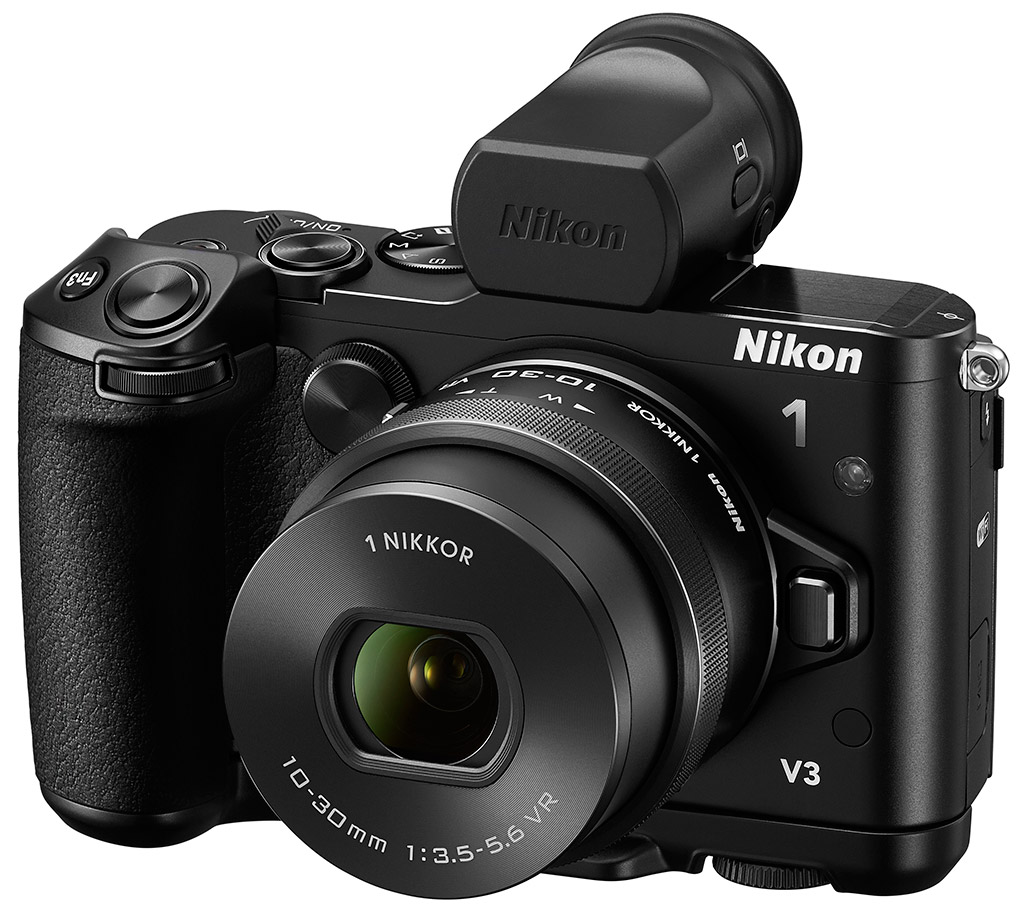
Nikon continues to advance and improve its 1-Series mirrorless camera lineup with a new flagship model, the Nikon 1 V3. Back in 2012, the leap from the V1 to the V2 saw a radical change in the design of this camera, with the V2 opting for a more enthusiast-oriented design that included a larger, more protruding EVF and fuller, contoured handgrip -- a design more reminiscent of a DSLR than a small, pocketable mirrorless camera. With the V3, Nikon has taken an interesting modular approach with the camera, giving users the option to strip it down to a more svelte, V1-like size and shape (or Nikon J1-like, perhaps) for easier portability, while also letting photographers add on an EVF and larger grip for a more traditional shooting experience and easier handling with larger lenses.
However, the interior of the new V3 has undergone some big changes as well. Complete with a new 18.4MP CX-format (1-inch-type) CMOS sensor that lacks an optical low-pass filter -- a first for a Nikon 1 camera -- and a new EXPEED 4A image processor, the Nikon V3 should offer a big boost not only in performance but image quality as well. According to Nikon performance specs, the V3, in fact, has some impressive performance capabilities that perhaps give even the mighty DSLR a run for its money, especially in terms of AF speed and performance.

Nikon is aiming this camera not only at enthusiasts and high-end amateur DSLR shooters, but also professional photographers looking for a small backup camera. In fact, in one anecdote from Nikon, they've found that many DSLR users, particularly shooters of long telephoto lenses, are using the V-series cameras almost like digital teleconverters.

For instance, they'll be out shooting with a large lens on a tripod with their FX or DX format DSLR, but want a bit more reach out of their lens. So, they'll simply pop on a V-series camera for an increased crop factor (2.7x crop factor). With the new Nikon V3, this scenario looks all the more enticing with its increased performance, especially in burst shooting, plus improvements in focusing and image quality.
Speed
One of the big features of the Nikon V3 is speed. Thanks to the new sensor and processor combo, the V3 offers up some seriously impressive specs with regards to continuous shooting speed. Nikon states that the V3 can shoot at a blazingly-fast 20 frames per second with full-time autofocus, even when shooting in raw format (or 60 fps with focus locked). Sports and wildlife shooters should take note, as well as any other photographers looking to capture fast moving subjects. Whether you're photographing your kid's soccer game, a motorsports event or a fast-running animal, the V3 should be able to handle it, not only with enough speed to get the right moment, but to keep it in focus as well.
It's not just the new processor that gives the V3 a boost in performance; Nikon's hybrid autofocus system received the upgrade treatment as well, allowing it to keep up with the camera's massive 20 fps speed. The updated AF system now has a total of 105 phase-detection points on the image sensor with nearly 100% frame coverage, plus 171 contrast-detection areas. By way of contrast, the Nikon V2 featured only 73 phase-detection AF points and 135 contrast-detection AF areas.
Like prior Nikon 1 V-series models, the Nikon V3 has a dual-shutter design. By default it uses a focal-plane mechanical shutter that's limited to 1/4,000s, but if you enable the electronic shutter, you can achieve shutter speeds up to 1/16,000s! Similar to DSLRs, the V3 allows shutter speeds down to 30 seconds, as well as a Bulb mode. Flash x-sync is at 1/250 second using the mechanical shutter.

Image Quality
The Nikon 1 series cameras in the past have gotten a bit of bum rap in terms of image quality. Even in our tests with competing cameras, these cameras have never really won any awards in the image quality department. Nikon is aiming to change that with the V3. Thanks to its new sensor and processor, the V3 promises better color reproduction and increased detail. The ISO sensitivity range also gets a boost on the high end, now going all the way to ISO 12,800 with an additional four-frame multi-shot noise reduction option at ISO 6,400 and 12,800.
As we mentioned above, the V3 does away with the traditional optical low-pass filter overlying the imaging sensor, which should allow it to produce sharper, more finely detailed photos. However, as we've seen with other cameras such as the Nikon D800E -- the first mainstream DSLR to offer an OLPF-free sensor -- the removal of this low-pass filter increases the chance of moiré and other aliasing artifacts.
Camera manufacturers, Nikon included, are getting more savvy with their image processing algorithms, though. Modern hardware and software can go some way to reduce the effects of moiré and other such artifacts that are more prevalent in cameras without a low-pass filter. In a recent interview with a Nikon executive at the CP+ tradeshow in Japan, they specifically mentioned that the EXPEED 4-class processor -- which features inside the Nikon V3 -- has improved moiré reduction capabilities compared to earlier revisions.

Video Recording
One of the other big upgrades to the V3 is a significant improvement to video recording. The Nikon V3 is now capable of shooting 60 frames-per-second video at Full HD (1,920 x 1,080 pixel; 1080p) resolution, like we've seen on other EXPEED 4-based cameras. Plus, fans of slow-motion video will enjoy HD (1,280 x 720 pixel; 720p) video at up to 120fps, while the framerate gets a massive jump when shooting at lower resolutions -- we're talking 1,200fps at 416x144 resolution!
The V3 also features other video niceties like full-time autofocus with smooth focus pulling for a more professional, cinematic look, and easy touch-to-focus abilities with the new tilting touchscreen. (More on the display in a moment).
The V3 also has a new Movie e-VR image stabilization system, which works similar to video editing software to subtly crop around the edges of the frame for a more stabilized image. However, unlike with software where you'd typically lose image resolution, you still keep the full 1,920 x 1,080 pixel resolution. And since the 1-series doesn't skip lines or columns when reading the sensor for video -- it reads 100% of the pixels within the 16:9 window and resamples to 1,920 x 1,080 after readout -- we expect e-VR to be very smooth.
Additionally, thanks to the extra processing horsepower of the EXPEED 4A processor, the V3 is capable of simultaneous video recording and full-resolution still image capture without interrupting the video recording process. And, although not strictly a video recording mode, fans of timelapse video will be happy to hear that Nikon has brought over the built-in interval timer from their high-end DSLRs to the V3 for easier timelapse shooting without the need for extra equipment.

Design
As mentioned, the Nikon V3 has unique styling with a modular design that allows photographers to customize the camera to fit their needs and usage. The base model appears more reminiscent of the original V1, with a simpler, rectangular shape and no large, protruding built-in EVF. But even without the accessory grip, the V3 still maintains a handful of manual controls, including Program, Aperture-priority, Shutter-priority and Manual modes on the Mode dial, front and rear control dials for settings like aperture and shutter speed, and two customizable function buttons. The rear thumb dial in the top right corner also functions as a pushable button.
The Nikon V3 body itself is very solidly built with an all-metal magnesium construction -- it's certainly not your run-of-the-mill point-and-shoot camera. The camera feels very high quality with comfortable ergonomics, with or without the grip, and the buttons and dials feel nice. In the slimmed-down configuration without the extra attachments, the V3 is ready to function as an everyday, go anywhere camera with a small form-factor, making it easy to slip into a bag or large pocket. Combined with the new collapsible 10-30mm VR kit lens, full manual exposure controls and a built-in pop-up flash, the V3 is quite the svelte little camera with plenty of bells and whistles.


However, for those photographers who want a more traditional DSLR shooting experience with a viewfinder, need the extra grip and balance when using larger lenses (such as full-size Nikon DSLR lenses with the 1-series adapter), or simply have larger hands and want a bit beefier camera, Nikon offer an electronic viewfinder and handgrip, either separately or as part of a kit.
The additional grip and EVF are both very solid feeling, and the grip feels excellent in the hand. The fully-kitted version of the V3 definitely feels like a mini-DSLR, which follows along very nicely with Nikon's intended user base for this camera. Seasoned pros and enthusiast DSLR shooters will feel right at home with this souped-up kit.

The EVF features a similar rounded-eyecup design like those of Nikon's D800 and D4 DSLRs, and houses a high-resolution 2,359k-dot LCD screen. The new three-inch 1,037k-dot touchscreen LCD has a tilting design (170 degrees upwards or 87 degrees downwards) for easier shooting at low or high angles. Photographers can use the touchscreen for touch-to-focus in both stills and video recording, and as a trigger for the shutter button -- just tap where you want to focus and the V3 will snap a photo.
Adding on the handgrip attachment not only improves the ergonomics of the camera, but also provides a third customizable function button, its own shutter release button and an additional sub-command dial. Sadly, it does not add any battery capacity.
Connectivity
In another first for a Nikon 1-series camera, the new V3 features built-in Wi-Fi for easy sharing and remote shooting capabilities using a connected smart device, whether iOS or Android. The Nikon V3 also supports an optional ML-L3 infrared remote control, while wired connectivity includes USB 2.0 and Type-D Micro HDMI high-definition video output.
Besides being used for the included EVF attachment, the Nikon 1 Accessory Shoe on the top of the camera can also be used for Nikon 1 external flashes and the Nikon ME-1 external microphone via the AS-N1000 Multi Accessory Port Adapter.
Battery and Storage
Images and movies are stored on MicroSD, MicroSDHC or MicroSDXC cards, rather than the full-sized SD cards used by most cameras. Both 12-bit compressed .NEF raw and JPEG file formats are provided for stills, and movies are encoded using H.264/MPEG-4 AVC and stored in .MOV format.
The Nikon V3 derives its power from an EN-EL20a rechargeable lithium-ion battery which is CIPA-rated for 310 shots on a charge. An MH-29 battery charger is included in the product bundle, and an optional EH-5b AC Adapter and EP-5C Power Supply Connector are also available.
Place your order with a trusted Imaging Resource affiliate now:
In the Box
In the US market, the Nikon V3 retail box ships with the following items:
- Nikon 1 V3 camera body
- Nikon 1 Nikkor VR 10-30mm f/3.5-5.6 zoom lens
- BF-N1000 body cap
- Front and rear lens caps
- EN-EL20a lithium-ion rechargeable battery pack
- MH-29 external battery charger
- GR-N1010 camera grip
- DF-N1000 electronic viewfinder
- AN-N1000 neck strap
- UC-E20 Micro USB cable
- BS-N4000 multi accessory port cover
- ViewNX 2 / Short Movie Creator software CD
- Reference manual CD
- User's manual
- Warranty card
Recommended Accessories
- Extra EN-EL20a lithium-ion rechargeable battery pack or two for extended outings
- Large capacity MicroSDHC / MicroSDXC memory card. Given the high resolution and large file sizes of the Nikon V3, 32GB is a good tradeoff between cost and capacity. If you plan to capture high-definition movie clips, shoot image bursts, or shoot in raw format, Nikon recommends you look for cards with markings indicating Class 6 or higher. (Smaller numbers are slower cards.)
- More lenses! ;-)
- ME-1 stereo microphone if you plan on shooting a lot of movies
- External flash strobe (the SB-N5 or SB-N7 pair nicely in terms of size)
- GP-N100 GPS unit (if you want to geotag your photos)
- ML-L3 wireless remote control (for remote release if you don't have a compatible Android or iOS phone with Wi-Fi)
- Medium-sized camera bag (or a small one if you're only planning on using one or two lenses).
Ready to Order? Support this site by purchasing through a trusted Imaging Resource affiliate now:
(No added cost to you, a big help to us)
Optics
In the U.S., the Nikon V3 ships with the new 1 Nikkor 10-30mm f/3.5-5.6 VR PD-Zoom lens. Below are test results using this kit lens (lab shots on other pages of these test results were taken with the 1 Nikkor 18.5mm f/1.8 prime lens).
Kit Lens Test Results
Zoom
A typical 3x zoom range, with decent performance for a compact kit lens.


As mentioned above, the Nikon V3 is offered with the newer, more compact 1 Nikkor 10-30mm f/3.5-5.6 VR PD-Zoom kit lens, possessing a typical optical zoom range of 3x. The 35mm equivalent focal range is about 27-81mm, because of the V3's 2.7x "crop factor".
Sharpness and contrast appear good at 10mm and f/5.6 across most of the frame, but there's some mild to moderate blurring visible in extreme corners. Sharpness at full telephoto at f/5.6 is good in the center, but some corners and edges appear soft. (Stopping down helps in the corners, but you'll start to run into softness across the frame due to diffraction at smaller apertures.) Chromatic aberration is negligible, as the Nikon V3 suppresses it.
Please note that it's difficult to evaluate corner performance in shots with depth like these (these two shots are meant mainly to convey zoom ratio), so see below for our lab tests.
Macro
A small macro area (for a CSC kit lens), with good performance in the center. Flash throttled down well.


The Nikon V3's macro performance will of course depend entirely on the lens in use. With the 10-30mm VR PD-Zoom kit lens set to 30mm, the Nikon V3 captures a small (for a non-macro CSC lens) minimum area measuring just 2.09 x 1.39 inches (53 x 35 millimeters). Details are good but a little soft in the center at f/8 (one should really avoid smaller apertures like f/8 on a hi-res 1"-type sensor), though corners are quite soft. (Most lenses have some softening in the corners at macro distances.) There is also some very noticeable pincushion distortion as well. The Nikon V3's flash throttled down well, producing a decent, just slightly underexposed exposure with fairly even coverage.
Geometric Distortion
Higher than average distortion at wide angle and telephoto from the 10-30mm kit lens.
| Barrel distortion at 10mm is ~1.0% |
 |
| Pincushion distortion at 30mm is ~0.7% |
 |
The 1 Nikkor 10-30mm PD-Zoom VR lens produces about one percent barrel distortion at wide angle, which is above average and quite noticeable. At the telephoto end, there's about 0.7% pincushion distortion, also higher than average and noticeable. While these numbers are higher than average, keep in mind compact lenses often produce much higher distortion but are usually corrected during the camera's JPEG processing and during RAW conversion. And the V3 does offer optional automatic distortion correction. See below. Geometric Distortion is the tendency for the lens to bend straight lines outward (like a barrel -- usually at wide-angle) or inward (like a pincushion -- usually at telephoto).
Distortion Correction
The Nikon V3's optional distortion correction.
| Pincushion distortion at 10mm is negligible |
 |
| Barrel distortion at 30mm is ~0.2% |
 |
With distortion correction enabled, barrel distortion at wide angle was just slightly overcorrected to a tiny amount of pincushion distortion. At the telephoto end, distortion correction overcorrected pincushion to about 0.2% barrel distortion, still quite low. Be aware that there is a slight crop caused by the correction at wide angle.
Chromatic Aberration and Corner Sharpness
Very low to moderately low chromatic aberration in JPEGs. Mild to strong softening in the corners when wide open.
| Aperture: maximum | |
 |
 |
| 10mm @ f/3.5: Upper left C.A.: Moderately low Softness: Very soft |
10mm @ f/3.5: Center C.A.: Very low Softness: Sharp |
 |
 |
| 30mm @ f/5.6: lower left C.A.: Low Softness: Soft |
30mm @ f/5.6: Center C.A.: Very low Softness: Sharp |
Chromatic Aberration. Lateral chromatic aberration in the corners with the Nikon V3's 10-30mm kit lens is moderately low at wide angle and low at telephoto. See below for uncorrected RAW files.
Corner Softness. Wide-open at full wide angle, all four corners are softer than the center but the left-hand-side corners show more blurring than the right, indicating our copy is slightly de-centered. On the right side, softness is limited to extreme corners, and the center of the image is quite sharp, but some softness extends about a quarter the way into the frame from the left. At full telephoto, the bottom left corner is soft with softness again extending a fair bit into the frame, but the bottom right corner is a bit sharper and the top two are fairly sharp, while the center is sharp.
Shading. Vignetting or corner shading is fairly low at both wide angle and telephoto.
| Aperture: f/8 | |
 |
 |
| 10mm @ f/8: Upper left C.A.: Moderately low Softness: Slightly soft |
10mm @ f/8: Center C.A.: Very low Softness: Sharp |
 |
 |
| 30mm @ f/8: lower left C.A.: Low Softness: Moderately soft |
30mm @ f/8: Center C.A.: Very low Softness: Sharp |
F8. Stopped-down to f/8, corner performance does improve especially at wide angle, however there is a slight decrease in sharpness at the center, due to diffraction.
Lateral Chromatic Aberration Suppression
The Nikon V3 automatically suppresses C.A. in JPEGs.
| In-camera JPEG | ACR converted RAW |
 |
 |
| 10mm @ f/4: Upper right | 10mm @ f/4: Upper right |
 |
 |
| 30mm @ f/5.6: Upper right | 30mm @ f/5.6: Upper right |
Like most Nikon DSLRs, the V3 automatically suppresses lateral chromatic aberration in JPEGs. As you can see from the Adobe Camera Raw crops above (right) without correction applied, the lens actually produces relatively low to moderate amounts of C.A., and the camera's processor does a good job suppressing it in JPEGs (left).
Nikon V3 Viewfinder
Viewfinder Test Results
Coverage
Excellent coverage from the LCD monitor.

In record mode, the Nikon V3's LCD monitor provided essentially 100% coverage (with distortion correction disabled), which is excellent.
The images above were taken from our standardized test shots. For a collection of more pictorial photos, see our Nikon V3 Photo Gallery .
Exposure
Color
Saturation & Hue Accuracy
Realistic saturation, with average hue accuracy.
 |
|||
|
ISO Sensitivity
|
|||
| 12800 | |||
| In the diagram above, the squares show the original color, and the circles show the color that the camera captured. More saturated colors are located toward the periphery of the graph. Hue changes as you travel around the center. Thus, hue-accurate, highly saturated colors appear as lines radiating from the center. Mouse over the links above to compare ISOs, and click to view a larger version. | |||


Saturation. The Nikon V3 doesn't oversaturate colors quite as much as most cameras, producing a mean saturation level of 108.1% (8.1% oversaturated) at base ISO in our tests, which remains fairly constant all the way to ISO 12,800. The V3 tends to push dark blues quite a bit and some greens moderately, but most other colors are only pushed slightly, or are slightly undersaturated. That means color is a little more realistic than most cameras, but some may find them a tad drab. You can always tweak saturation to your liking or select a different Picture Control option. Most consumer digital cameras produce color that's more highly saturated (more intense) than found in the original subjects. This is simply because most people like their color a bit brighter than life.
Skin tones. Here, the Nikon V3 produced Caucasian skin tones that looked a bit too warm and orange when manual white balance was used. Auto white balance was a bit better, but still a touch warm. Where oversaturation is most problematic is on Caucasian skin tones, as it's very easy for these "memory colors" to be seen as too bright, too pink, too yellow, etc.
Hue. The Nikon V3 showed a few color shifts relative to the mathematically precise translation of colors in its subjects, but its overall color accuracy is about average. Reds were shifted toward orange, cyan was shifted toward blue, and there were slight shifts in some oranges, light greens and purples, but most shifts were relatively minor. (The cyan to blue shift is quite small, and very common among the digital cameras we test; we think it's a deliberate choice by camera engineers to produce better-looking sky colors.) With an average "delta-C" color error of 5.16 at base ISO after correction for saturation, overall hue accuracy is about average, and remains fairly stable across the ISO range. Hue is "what color" the color is.


Sensor
Exposure and White Balance
Indoors, incandescent lighting
Warm results with Auto and Incandescent white balance, though good color with Manual white balance setting. No exposure compensation required.


Indoors, under normal incandescent lighting, color balance is warm and reddish with the Auto white balance setting. The Incandescent setting is also too warm, with a slightly more yellow tint. The Manual white balance setting produced the most accurate results, if just a touch cool. The V3 required no exposure compensation for this shot, which is better than average. (The average needed among cameras we've tested for this shot is about +0.3 EV.) Our test lighting for this shot is a mixture of 60 and 100 watt household incandescent bulbs, a pretty yellow light source, but a very common one in typical home settings here in the U.S.
Outdoors, daylight
Realistic color with good exposure outdoors.
The Nikon V3 handled tough outdoor lighting under harsh sunlight well in terms of color and exposure, though dynamic range isn't impressive. We find skin tones a little too warm in our "Sunlit" Portrait shot with Manual white balance, preferring the Auto white balance results here, though Auto is still a bit warm. The +0.3 EV exposure compensation required to keep the mannequin's face reasonably bright is slightly less than the +0.7 EV average for this scene, so exposure accuracy is better than average here. However, a moderate amount of highlights are clipped in the mannequin's shirt and flowers, and there are very dark shadows as well. Color is good in our far-field shot, just a touch cool. Default exposure is excellent with very few clipped highlights (just specular highlights), though there are some deep shadows that are quite noisy and plugged. (Apologies for using f/8 for our OUTB and FAR shots, as that led to some additional softening due to diffraction on a high-res 1"-type sensor like the V3's. An aperture of f/4 or f/5.6 would have been sharper.)
See full set of test images with explanations
See thumbnails of all test and gallery images
Resolution
Very high resolution with ~2,600 to ~2,700 lines of strong detail.


Our laboratory resolution chart revealed sharp, distinct line patterns down to about 2,700 lines per picture height in the horizontal direction, and to about 2,600 lines per picture height in the vertical direction in JPEGs. Complete extinction didn't occur until around 3,200 lines in both directions. Adobe Camera Raw 8.6 wasn't really able to extract more high-contrast resolution than the camera JPEG, but complete extinction was extended to the limit of our chart (4,000 lines), though it produced more noticeable color moiré and aliasing artifacts. Use these numbers to compare with other cameras of similar resolution, or use them to see just what higher resolution can mean in terms of potential detail.
See full set of test images with explanations
See thumbnails of all test and gallery images
Sharpness & Detail
Slightly soft images at default settings, even though edge-enhancement can be seen on high-contrast subjects. Fairly strong noise suppression at base ISO.


Sharpness. The Nikon V3 produced slightly soft images in our tests, even with a sharp prime lens (shots above taken with a 1 Nikkor 18.5mm f/1.8 at f/4). Some edge enhancement artifacts are visible around high-contrast subjects such as the halos around the lines and text in the crop above left, but images could use some stronger but "tighter" sharpening of fine detail. Edge enhancement creates the illusion of sharpness by enhancing color and tonal differences right at the edge of a rapid transition in color or tone.
Detail. The crop above right is a little mushy, showing fairly strong noise suppression and light sharpening that minimizes noise, but blurs out many individual strands of hair. Noise-suppression systems in digital cameras tend to flatten-out detail in areas of subtle contrast. The effects can often be seen in shots of human hair, where the individual strands are lost and an almost "watercolor" look appears.
RAW vs In-Camera JPEGs
As noted above, the Nikon V3 produces slightly soft images at default settings. More detail and crisper images can be obtained from carefully processing RAW files, though. See below:
|
Base ISO (160)
|
|
 |
 |
 |
 |
 |
 |
|
Camera JPEG, defaults
|
RAW via Adobe Camera Raw
|
In the table above, we compare an in-camera JPEG taken at base ISO using default noise reduction and sharpening (on the left) to a matching RAW file converted with Adobe Camera Raw 8.6 using default noise reduction with strong but tight unsharp masking applied in Photoshop (in this case 300% USM with a radius of 0.3 pixels and a threshold of 0).
As you can see, the RAW conversion using Adobe Camera Raw produces results with a lot more detail and crispness, but it also reveals a lot more noise (at default ACR NR settings), which is perhaps one reason the camera JPEGs are on the soft side (the camera is applying copious amounts of noise reduction combined with light sharpening of fine detail). You can of course always increase noise reduction during conversion, but be aware that smaller sensors like the V3's produce quite a bit of noise already at moderately low ISOs, so be prepared to apply some additional noise reduction to obtain clean-looking images at 100% magnification.
ISO & Noise Performance
Images area bit soft even at base ISO here, however fairly good detail to up to ISO 800.
| High ISO Noise Reduction = On (default) | ||
 |
 |
 |
| ISO 160 | ISO 200 | ISO 400 |
 |
 |
 |
| ISO 800 | ISO 1,600 | ISO 3,200 |
 |
 |
|
| ISO 6,400 | ISO 12,800 | |
ISOs 160 and 200 are very similar, but as mentioned before, are a little soft due to aggressive default noise reduction and light sharpening. ISO 400 shows good detail, but stronger noise and noise reduction are already taking an additional toll. ISO 800 is noticeably softer, though some fine detail is still left. ISO 1600 is softer still, but not too bad. Image quality degrades more rapidly at ISO 3200 and above, with mushier details, stronger luma noise as well as some blotchy purple and yellow chroma noise. Overall, though, an improvement over the V2 and fairly competitive with other cameras using a 1"-type sensor, but perhaps somewhat disappointing performance from a camera with the V3's price tag. Shooting in RAW mode and processing yourself is definitely preferred for maximum image quality.
Of course, the impact of noise and detail loss are highly dependent on the size the photos are printed at, and pixel-peeping on-screen has surprisingly little relationship to how the images look when printed: See the Print Quality section below for recommended maximum print sizes at each ISO.
A note about focus for this shot: To insure that the hair detail we use for making critical judgements about camera noise processing and detail rendering is in sharp focus at the relatively wide aperture we're shooting at, the focus target at the center of the scene is on a movable stand. This lets us compensate for front- or back-focus by different camera bodies, even those that lack micro-focus adjustments. This does mean, though, that the focus target itself may appear soft or slightly out of focus for bodies that front- or back-focused with the reference lens. If you click to view the full-size image for one of these shots and notice that the focus target is fuzzy, you don't need to email and tell us about it; we already know it. :-) The focus target position will simply have been adjusted to insure that the rest of the scene is focused properly.
Extremes: Sunlit, dynamic range, and low light tests
Somewhat high default contrast. Dynamic range isn't as good as most DSLRs and some other CSCs. Good low-light performance, capable of capturing bright images in near darkness.


Sunlight:
The Nikon V3 struggled a bit with the deliberately harsh lighting in the above test, but perhaps not as much as you might expect from such a small sensor. The +0.3 EV exposure did the best job here, as the mannequin's face is a bit too dim at 0 EV, and too many highlights were blown at +0.7 EV. Default contrast is a little high, and quite a few highlights were lost in the shirt and flowers when exposure was adjusted for the mannequin's face. There are some very deep shadows as well, that are noisy compared to cameras with larger sensors. Note that these shots were captured with the Nikon V3's Active D-Lighting control set to "Off." See below for how Active D-Lighting and contrast settings help with highlights and shadows.
Because digital cameras are more like slide film than negative film (in that they tend to have a more limited tonal range), we test them in the harshest situations to see how they handle scenes with bright highlights and dark shadows, as well as what kind of sensitivity they have in low light. The shot above is designed to mimic the very harsh, contrasty effect of direct noonday sunlight, a very tough challenge for most digital cameras. (You can read details of this test here. In actual shooting conditions, be sure to use fill flash in situations like the one shown here; it's better to shoot in open shade whenever possible.)


Face Detection.
Here, we can see the effects of the Nikon V3's Face Priority AF mode versus just Aperture Priority mode. As you can see from the shots above, Face Priority AF resulted in a brighter image without applying any manual exposure compensation with the camera selecting a slower shutter speed of 1/40s versus 1/50s. Full Auto selected Portrait scene mode with a much larger aperture of f/1.8 for better subject isolation and a fast shutter speed of 1/800s to avoid subject motion blur, and it also enabled Active D-Lighting for a more balanced exposure.
Active D-Lighting
Active D-Lighting attempts to preserve detail in both highlights and shadows in high-contrast situations, while maintaining moderate levels of contrast. The shots below show the effect of the Active D-Lighting setting available on the Nikon V3 on our high-contrast "Sunlit" Portrait scene. Unlike recent Nikon DSLRs, the V3 offers just On and Off settings for Active D-Lighting. Also note that Active D-Lighting is different from the Playback menu's D-Lighting option, as it is performed during image capture instead of after. (It does affect only JPEG images though, Nikon very properly doesn't apply tonal adjustments like this to RAW file data. NEF files, however, are tagged so that Nikon software can automatically apply the effect when converted.)
|
"Sunlit" Portrait Active D-Lighting (0 EV)
|
|
 |
ADL Settings: Off On (Default) |
 |
|
Mouse over the links to see how Active D-Lighting affects our "Sunlit" Portrait shot at default exposure. Click on a link to get to the full-res image.
As you can see, shadows and darker midtones have been boosted with Active D-Lighting enabled, and highlights have been toned down as well, however the overall effect is fairly subtle.
| Far-field Active D-Lighting (0 EV) | |
 |
|
Here are the results with our Far-field shot. Mouse over the links to compare the effect.
We see somewhat different results here with Active D-Lighting enabled. Shadows are brighter, however highlights have also been boosted this time, likely because very few were clipped to begin with.
| Far-field HDR | |
|
|
|
HDR.
The Nikon V3 also offers a 2-shot in-camera HDR mode which combines highlights from an underxposed shot to shadows from an overexposed shot taken in quick succession. Mouse over the links to compare the effect.
As you can see it worked fairly well here, but because two shots are combined, be aware that ghosting and/or double images can occur if there is any fast movement within the frame during capture of the two images.
Dynamic Range Analysis (RAW mode)
While we once performed our own dynamic range measurements based on in-camera JPEGs as well as converted RAW images (when the camera was supported by Adobe Camera Raw), we've switched to using DxO Labs' results from their DxOMark website. As technology advanced, the dynamic range of modern high-end cameras in some cases exceeded the range of the Stouffer T4110 density scale that we used for our own measurements. DxO's approach based on RAW data before demosaicing is also more revealing, because it measures the fundamental dynamic range of the sensor, irrespective of whatever processing is applied to JPEGs, or to RAW data by off-the-shelf conversion software.
In the following, we use DxO's "Print" dynamic range results, which are scaled based on camera resolution. As the name suggests, this scaling corresponds to the situation in which you print at a given size, regardless of how many megapixels the camera might have. (In other words, if you've decided to make a 13x19 inch print, that's the size you're printing, whether the camera's resolution is 16 or 300 megapixels.) For the technically-minded, you can find a discussion of the reasoning behind this here on the DxOMark website. Also note that DxO Labs uses a signal-to-noise (SNR) threshold of 1 when defining the lower boundary of acceptable luminance noise in their dynamic range measurements, which corresponds to the "Low Quality" threshold of the Imatest software we used to use for this measurement.

Here, we compare the Nikon V3's dynamic range to its predecessor, the V2, as well as to the Sony RX100 III, another camera that uses a 1"-type sensor (though with a fixed lens). You can always compare other models on DxOMark.com.
As you can see from the above graph (click for a larger image), the V3's dynamic range (in red) actually tested slightly worse than the V2's at low ISOs, starting out at about 10.7 EV versus the V2's 10.8 at the lowest ISO. There's up to about 0.5 EV less dynamic range between base ISO and 400 which may just be noticeable in real-world images, but at ISO 800 and higher, the two cameras perform identically in terms of dynamic range.
The Sony RX100 Mark III's dynamic range is on the other hand significantly better than the Nikon's at low to moderate ISOs, with up to a ~1.8 EV advantage at low ISOs (12.27 vs 10.43). At the intermediate ISO of about 800, the two cameras perform essentially the same in terms of dynamic range, but the Sony pulls way from the Nikon again at higher ISOs.
Overall, underwhelming dynamic range test results from the Nikon V3, as even some 1/1.7" models exhibit better dynamic range at lower ISOs. Click here to visit the DxOMark page for the Nikon V3 for more of their test results and additional comparisons.
| 1 fc 11 lux |
1/16 fc 0.67 lux |
1/16fc No NR |
|
|---|---|---|---|
| ISO 160 |
 1.3 s, f2.8 |
 20 s, f2.8 |
 20 s, f2.8 |
| ISO 3200 |
 1/15 s, f2.8 |
 1 s, f2.8 |
 1 s, f2.8 |
| ISO 12800 |
 1/60 s, f2.8 |
 1/4 s, f2.8 |
 1/4 s, f2.8 |
Low Light. The Nikon V3 performed fairly well here, able to capture usable images down to the 1/16 foot-candle light level (about 1/16 as bright as average city street lighting at night), at even its lowest ISO setting.
Color balance with Auto white balance is just slightly cool at higher light levels, but takes on a strong magenta cast as light level drop. Noise is low at ISO 160, fairly low and well-controlled at ISO 3200, but quite high at ISO 12,800, as you'd expect. We did not detect any significant issues with banding (pattern noise), heat blooming or hot pixels.
The camera's hybrid autofocus system was able to focus on the subject to just below the 1/8 foot-candle light level unassisted with the 10-30mm kit lens at f/3.5, which is very good for its class. The Nikon V3 was able to autofocus in complete darkness with the AF assist enabled.
(Keep in mind that the longer shutter speeds here demand the use of a tripod to prevent any blurring from camera movement. A useful trick is to just prop the camera on a convenient surface, and use its self-timer to release the shutter. This avoids any jiggling from your finger pressing the shutter button, and can work quite well when you don't have a tripod handy.)
How bright is this? The one foot-candle light level that this test begins at roughly corresponds to the brightness of typical city street-lighting at night. Cameras performing well at that level should be able to snap good-looking photos of street-lit scenes.
NOTE: This low light test is conducted with a stationary subject, and the camera mounted on a sturdy tripod. Most digital cameras will fail miserably when faced with a moving subject in dim lighting. (For example, a child's ballet recital or a holiday pageant in a gymnasium.) Compact system cameras like the Nikon V3 do much better than point & shoots, but you still shouldn't expect a quick autofocus lock with moving subjects.
Flash Test Results
Coverage and Range
A fairly weak flash with uneven coverage. More than average exposure compensation needed.


Coverage. Flash coverage was rather narrow at wide angle (10mm) as you can see from the dark corners in the top image above. Narrow coverage at wide angle isn't unusual, though, and some of the corner darkening may be from the lens itself. We no longer test flash coverage at telephoto, as it is invariably better, making wide angle the worst case scenario.
Exposure. For our Indoor Portrait scene test, the Nikon V3's flash produced a bright image with +1.0 EV, a little more than the average +0.7 EV compensation needed for this shot. The camera's Slow-Sync flash mode also produced bright results at +0.3 EV, but resulted in a strong pinkish-orange cast from the ambient room lighting due to the slower 1/8s shutter speed.
| Manufacturer-Specified Flash Range |
|---|
 5.9 feet ISO 160 |
Manufacturer Specified Flash Test. The Nikon V3's flash Guide Number (GN) is 5 meters or 16 feet in auto flash mode at ISO 100, which translates to a range of only about 5.9 feet at f/3.5 and ISO 160. The target in our flash shot above was underexposed at those settings, indicating Nikon's rating for the V3's flash power is perhaps optimistic.
Output Quality
Print Quality
Good 24 x 36 inch prints at ISO 160/200; a nice 11 x 14 at ISO 1600; a good 4 x 6 at ISO 6400.
 ISO 160 and 200 images are good at 24 x 36 inches, showing reasonably good detail and accurate color reproduction. Wall display prints are possible at 30 x 40 inches.
ISO 400 shots look good at 20 x 30 inches. 24 x 36's here introduce a marginal amount of noise in flatter areas, but are certainly usable for less critical applications or wall display purposes.
ISO 800 prints are good at 13 x 19 inches. There is just a mild trace of noise in flatter areas, but it has a nice enough "film-like" appearance that it does not significantly degrade the print. 16 x 20 inch prints are still usable for wall display.
ISO 1600 results are not bad at 13 x 19, but don't quite pass our "good" standard. 11 x 14's tighten up nicely here and retain good color and fairly low noise, although there is a typical loss of contrast in our target red swatch.
ISO 3200 yields a good 8 x 10 inch print. Most all detail is lost in the red swatch at this point, and there is visible noise in flatter areas of our target, but still a good print.
ISO 6400 prints warrant a reduction in size to 4 x 6 inches, as there's too little detail and too much noise in larger prints to call good here.
ISO 12,800 does not yield a good printed image and is best avoided.
The Nikon V3 is a clear step up from its predecessors in overall image quality, and its print quality results are encouraging. With its 1"-type sensor, a good 8 x 10 at ISO 3200 is a really good result, and on par with the popular Sony RX100 III with a similar type sensor. After that, print quality falls off quickly, but that's typical of virtually all sensors smaller than Four Thirds size. All in all, a good showing in the print quality department for the V3 given its sensor size.
Testing hundreds of digital cameras, we've found that you can only tell just so much about a camera's image quality by viewing its images on-screen. Ultimately, there's no substitute for printing a lot of images and examining them closely. For this reason, we now routinely print sample images from the cameras we test on our Canon Pro9000 Mark II studio printer, and on the Pixma MP610 here in the office. (See the Canon Pixma Pro9000 Mark II review for details on that model.)
The images above were taken from our standardized test shots. For a collection of more pictorial photos, see our Nikon V3 Photo Gallery .
Not sure which camera to buy? Let your eyes be the ultimate judge! Visit our Comparometer(tm) to compare images from the Nikon V3 with those from other cameras you may be considering. The proof is in the pictures, so let your own eyes decide which you like best!
Performance
Timing and Performance
Generally excellent performance for a compact system camera, though startup time is a bit sluggish and buffer clearing can be lengthy.
|
Startup/Play to Record/Buffer Clearing
|
||
|
Power on |
~2.0 seconds
|
Time it takes to turn on and capture a shot. |
|
Play to Record, |
~0.6 second
|
Time until first shot is captured. |
|
Buffer clearing time
|
12 seconds after 40 large/fine JPEGs*
|
Worst case buffer clearing time. -- This is the delay after a set of shots before you can remove the card. |
|
20 seconds after 40 RAW files*
|
||
|
46 seconds after 40 RAW+ LF JPEG files*
|
||
|
*Note: Buffer clearing times measured with a SanDisk Extreme Pro UHS-I 95MB/s microSDHC card. Slower cards will produce correspondingly slower clearing times. Slow cards may also limit length of bursts in continuous mode. ISO sensitivity and noise reduction settings can also affect cycle times and burst mode performance.
|
||
Startup time was a bit sluggish for a compact system camera, though switching from Play to Record mode and taking a shot was quick. Buffer clearing time depends on the quality and number of shots, and on the speed of the memory card. With a fast, 95MB/s UHS-I microSDHC card, the Nikon V3's buffer clearing times were fairly quick for JPEGs, but slow for RAW files, though buffers were quite deep.
| Shutter Response (Lag Time) | ||
|---|---|---|
|
Full Autofocus, |
0.073 second
|
Time from fully pressing shutter button to image capture, with the lens already at the proper focal distance setting. (All timing performed with the new Nikon 1 10-30mm kit lens at medium focal length.) |
|
Full Autofocus, |
0.120 second
|
Time from fully pressing shutter button to image capture, with the lens already at the proper focal distance setting. |
|
Full Autofocus, |
0.336 second
|
Time from fully pressing shutter button to image capture, with the lens already at the proper focal distance setting. Built-in flash enabled. |
|
Manual Focus |
0.049 second
|
For most cameras, shutter lag is less in manual focus than autofocus, but usually not as fast as when the camera is "prefocused". |
|
Prefocused |
0.047 second
|
Time to capture, after half-pressing and holding shutter button. |
The Nikon V3's full-autofocus shutter lag in single-point AF mode (center AF position) was incredibly fast, at only 0.072 second with the 10-30mm kit lens. That's faster than most professional DSLRs we've tested! In auto-area AF mode, lag increased to 0.120 second, though that's still very fast for a CSC and faster than most DSLRs. Enabling the flash added some delay for preflash metering, however lag was still quite good at 0.336 second. When manually focused, the V3's lag time was 0.049 second, also very fast. The Nikon V3's prefocused lag time of 0.047 second was quite fast as well, faster than most DSLRs and CSCs, though many point & shoots are still faster in this regard.
Overall, Nikon 1's hybrid AF system offers outstanding AF speeds and the V3's iteration has set yet another benchmark for CSCs and DSLRs alike with slightly faster AF and shutter lag compared to the V2.
To minimize the effect of different lens' focusing speed, we test AF-active shutter lag with the lens already set to the correct focal distance.
| Cycle Time (shot to shot) | ||
|---|---|---|
|
Single Shot mode |
< 0.3 second
|
Time per shot, averaged over 110 shots, 14 seconds to clear.* |
|
Single Shot mode |
< 0.3 second
|
Time per shot, averaged over 70 shots, 22 seconds to clear.* |
|
Single Shot mode |
< 0.3 second
|
Time per shot, averaged over 48 shots, 44 seconds to clear.* |
|
Early shutter |
No
|
Some cameras don't snap another shot if you release and press the shutter too quickly in Single Shot mode, making "No" the preferred answer. |
|
Continuous 60fps mode |
0.02 second (60.0 frames per second);
40 frames total; 12 seconds to clear* |
Time per shot, averaged over buffer depth of 40 shots. |
|
Continuous 60fps mode |
0.02 second (60.0 frames per second);
40 frames total; 20 seconds to clear* |
Time per shot, averaged over buffer depth of 40 shots. |
|
Continuous 60fps mode |
0.02 second (58.7 frames per second);
40 frames total; 46 seconds to clear* |
Time per shot, averaged over buffer depth of 40 shots. |
|
Continuous 20fps mode |
0.05 second (20.0 frames per second);
40 frames total; 12 seconds to clear* |
Time per shot, averaged over buffer depth of 40 shots. |
|
Continuous 20fps mode |
0.05 second (20.0 frames per second);
40 frames total; 20 seconds to clear* |
Time per shot, averaged over buffer depth of 40 shots. |
|
Continuous 20fps mode |
0.05 second (20.1 frames per second);
40 frames total; 46 seconds to clear* |
Time per shot, averaged over buffer depth of 40 shots. |
|
Flash Recycling |
1.9 seconds
|
Flash at maximum output. |
|
*Note: Buffer clearing times measured with a SanDisk Extreme Pro UHS-I 95MB/s microSDHC card. Slower cards will produce correspondingly slower clearing times. Slow cards may also limit length of bursts in continuous mode. ISO sensitivity and noise reduction settings can also affect cycle times and burst mode performance.
|
||
Single-shot cycle times were very fast at under 0.3 second no matter the file type, which is much faster than average for a CSC and an improvement over the V2.
The Nikon V3 offers full-resolution continuous mode speeds up to 60 fps when using the electronic shutter with AF locked, and up to 20 fps with continuous AF. We tested a number of continuous modes, and the V3 met expectations in each of them, delivering up to approximately 60 full-resolution frames per second with any file type -- outstanding!
Buffer depths were very good at 40 frames for any file type, though keep in mind that's less than a one-second burst at highest speed. Buffer clearing times ranged from a reasonable 12 seconds after a 40-frame burst of JPEGs, to a lengthy 46 seconds after a 40-frame burst of RAW+JPEG files. Be sure to use the fastest card you can if buffer clearing time after long bursts is important to you, as we measured 111 seconds after a 40-frame burst of RAW+JPEG files with a run-of-the-mill 30MB/s card.
The built-in flash recycled after full-power discharges in an average of 1.9 seconds, which is fast.
Bottom line, the Nikon V3's overall performance was generally outstanding. Autofocus speeds, cycle times and burst speeds were all exceptional. The only sluggish performance results we got were startup time and lengthy buffer clearing with RAW files, though the later is mostly due to generous buffer depths. Again, the Nikon 1 system truly raises the bar for CSCs in most performance metrics.
Battery
Battery Life
Below average battery life for a CSC.
| Operating Mode | Number of Shots |
|---|---|
|
Still Capture,
(CIPA standard, LCD Monitor) |
310
|
The Nikon V3 uses a custom EN-EL20a rechargeable lithium-ion battery pack for power, and comes with both a single battery and dedicated charger. The rated 310 shots per charge is somewhat below average for a compact system camera, so we strongly recommend getting a second battery for your V3 if you plan any extended outings.
The table above shows the number of shots the camera is capable of (on a fully-charged rechargeable battery), based on CIPA battery-life and/or manufacturer standard test conditions.
(Interested readers can find an English translation of the CIPA DC-002 standards document here. (180K PDF document))
Image Quality
Below are crops comparing the Nikon V3 with the Nikon V2, Canon G1X II, Olympus E-PL7, Panasonic GM1 and Sony RX100 III. We chose to include a variety of sensor sizes in this comparison to show what you could expect as ISO rises, as all models listed here are in roughly the same general price bracket.
NOTE: These images are best quality JPEGs straight out of the camera, at default settings including noise reduction and using the actual base ISO (not extended ISO settings). Your own results with RAW conversions may of course vary somewhat. All interchangeable lens cameras in this comparison were shot with our very sharp reference lenses except for the Nikon V2, as we did not currently have a 1-series prime lens in our test lab, so note that the quality will be slightly lower given that it was shot with a kit lens and not a reference prime.
Nikon V3 versus Nikon V2 at Base ISO
 |
 |
 |
 |
 |
 |
Nikon V3 at ISO 160 |
Nikon V2 at ISO 160 |
The new Nikon V3 displays a noticeable improvement in image quality over the previous model, especially in the bottle and mosaic crops with cleaner images and more fine detail. As noted above though, the V2 was shot with a kit lens and we didn't yet have a reference prime for this series. The only area of concern for the V3 is the fabric swatches, which look better on the V2. However, there could be slight focus variation contributing to the difference. |
|
Nikon V3 versus Canon SL1 at Base ISO
|
 |
|
 |
|
 |
Nikon V3 at ISO 160 |
Canon SL1 at ISO 100 |
The V3 fares quite well against the larger, APS-C-sensored Canon SL1 here at base ISO. V3 images are clean and sharp, with some aspects such at the bottle labeling appearing actually sharper than that from the Canon. The Canon, on the other hand, does a little better with the fabric swatches, especially the pink fabric. |
|
Nikon V3 versus Olympus E-PL7 at Base ISO
|
 |
|
 |
|
 |
Nikon V3 at ISO 160 |
Olympus E-PL7 at ISO 200 |
While the level of fine detail and clean noise is very similar between the V3 and E-PL7 in the bottle crops, the E-PL7 trumps the V3 in fine detail in other areas, especially in the mosaic and pink fabric. |
|
Nikon V3 versus Panasonic GM1 at Base ISO
|
 |
|
 |
|
 |
Nikon V3 at ISO 160 |
Panasonic GM1 at ISO 200 |
Similar to the E-PL7 comparison above, the GM1 also features a larger Micro Four Thirds sensor, and the fine detail between it and the V3 is very similar in the bottle crop area. The GM1 has the edge in fine detail in the mosaic crop, but it's a closer comparison here than between the E-PL7. The GM1 gets the nod with the detail performance in the fabrics. |
|
Nikon V3 versus Sony RX100 III at Base ISO
|
../sony-rx100-iii/ZRXC3
 |
|
 |
|
 |
Nikon V3 at ISO 160 |
Sony RX100 III at ISO 125 |
Battle of the latest 1-inch sensors! Both cameras do very well with detail at base ISO, though fine detail in the mosaic looks ever-so-slightly better from the Sony. The Sony also handles the fabrics better than the Nikon. |
|
Most digital SLRs and CSCs will produce an excellent ISO 100 shot, so we like to push them and see what they can do compared to other cameras at ISO 1600, 3200, and 6400. Recent advances in sensor technology have made ISO 1600 look a lot more like ISO 100, but there are still cameras whose quality starts to fall apart at this setting. We also choose 1600 because we like to be able to shoot at least at this level when indoors and at night.
Nikon V3 versus Nikon V2 at ISO 1600
 |
 |
 |
 |
 |
 |
Nikon V3 at ISO 1600 |
Nikon V2 at ISO 1600 |
Like the V3 vs. V2 base ISO comparison, the new model has superior image quality to its predecessor in most areas. Noise at ISO 1600 is quite similar, though fine detail in both the bottle and mosaic tile pattern is better in the new V3. Both cameras struggle, though, with the fabric swatches here. |
|
Nikon V3 versus Canon SL1 at ISO 1600
|
 |
|
 |
|
 |
Nikon V3 at ISO 1600 |
Canon SL1 at ISO 1600 |
While the base ISO comparison of these cameras looked very similar in their level of detail, here at ISO 1600 the difference is more apparent, and in the favor of the Canon SL1. While shadow noise looks less evident and finer-grained on the V3, the fine detail in areas like the mosaic is sharper and more visible on the SL1. Both cameras struggle with the fabric swatches, but the Canon has the edge over the V3 here as well. |
|
Nikon V3 versus Olympus E-PL7 at ISO 1600
|
 |
|
 |
|
 |
Nikon V3 at ISO 1600 |
Olympus E-PL7 at ISO 1600 |
| While noise reduction processing is more visible in the shadow areas on the E-PL7 as compared to the V3, the new Olympus bests the Nikon V3 in all areas with this ISO 1600 comparison. The E-PL7 displays sharper, crisper fine detail in all three crops, and while the fabric patterns are difficult for both cameras, the E-PL7 does a better job at producing some semblance of the leaf patterns. |
|
Nikon V3 versus Panasonic GM1 at ISO 1600
|
 |
|
 |
|
 |
Nikon V3 at ISO 1600 |
Panasonic GM1 at ISO 1600 |
Yet again a similar comparison here with the GM1 as with the E-PL7: the larger sensor helps the GM1 capture more fine detail at ISO 1600. The NR processing on the GM1 is also a little strong, but does a great job at reducing noise and the appearance of grain as compared to the V3. |
|
Nikon V3 versus Sony RX100 III at ISO 1600
|
 |
|
 |
|
 |
Nikon V3 at ISO 1600 |
Sony RX100 III at ISO 1600 |
At ISO 1600, the Sony RX100 III does a nicer job at fine detail in some areas like the black part of the mosaic tile pattern and with the fabric swatches. However, the noise reduction processing appears more aggressive in the shadow areas and on smoother surfaces, like the bottle crop at the top, whereas the V3's noise looks more "natural" and pleasing to the eye. |
|
Today's ISO 3200 is yesterday's ISO 1600 (well, almost), so below are the same crops at ISO 3200.
Nikon V3 versus Nikon V2 at ISO 3200
 |
 |
 |
 |
 |
 |
Nikon V3 at ISO 3200 |
Nikon V2 at ISO 3200 |
High ISO performance still appears to be a tough nut to crack for the Nikon V-series cameras. While there is an improvement in some areas over the V2 -- smooth surfaces and fine text as well as ever-so-slightly better dark tile detail in the mosaic -- there is not a large overall improvement in high ISO image quality in the V3. |
|
Nikon V3 versus Canon SL1 at ISO 3200
|
 |
|
 |
|
 |
Nikon V3 at ISO 3200 |
Canon SL1 at ISO 3200 |
At ISO 3200, the Canon displays that the larger APS-C sensor can handle higher ISOs better than the V3 and its 1-inch sensor. While there's visible noise in images from both cameras, the Canon SL1 is able to resolve more fine detail in the mosaic and the pink fabric. Both struggle significantly with the red fabric. |
|
Nikon V3 versus Olympus E-PL7 at ISO 3200
|
 |
|
 |
|
 |
Nikon V3 at ISO 3200 |
Olympus E-PL7 at ISO 3200 |
The larger Micro Four Thirds sensor of the E-PL7 shows its power over the V3 here at ISO 3200 with less noise (though NR is enabled at the default level) and fine detail is much better, especially in the mosaic. Both cameras struggle with the red and pink fabric, though the Olympus does a noticeably better attempt at it. |
|
Nikon V3 versus Panasonic GM1 at ISO 3200
|
 |
|
 |
|
 |
Nikon V3 at ISO 3200 |
Panasonic GM1 at ISO 3200 |
Like the E-PL7, the GM1 here trumps the V3 in all areas at ISO 3200 with less noise and better fine detail. Again, like many other cameras, the GM1 also struggles with the red fabric, though it does a noticeably better job at the pink fabric than the V3. |
|
Nikon V3 versus Sony RX100 III at ISO 3200
|
 |
|
 |
|
 |
Nikon V3 at ISO 3200 |
Sony RX100 III at ISO 3200 |
It's a pretty tough call here at ISO 3200 between the V3 and RX100 III. Noise levels look more or less the same, but fine detail in the mosaic crop is slightly better from the Sony, while both struggle with detail in the red fabric. |
|
Detail: Nikon V3 versus the Nikon V2, Canon G1X II, Olympus E-PL7, Panasonic GM1 and Sony RX100 III.
 |
 |
 |
 |
 |
 |
 |
 |
 |
 |
 |
 |
 |
 |
 |
 |
 |
 |
| Nikon
V3 ISO 160 ISO 3,200 ISO 6,400 |
Nikon V2 ISO 100 ISO 3,200 ISO 6,400 |
Canon SL1 ISO 100 ISO 3,200 ISO 6,400 |
Olympus E-PL7 ISO 200 ISO 3,200 ISO 6,400 |
Panasonic GM1 ISO 200 ISO 3,200 ISO 6,400 |
Sony RX100 III ISO 125 ISO 3,200 ISO 6,400 |
| Detail comparison. High-contrast detail is also important, pushing the camera in different ways, so we like to look at it, too. Compared to the predecessor, the Nikon V3 is noticeably sharper at very high ISO detail in high contrast areas. However, compared to larger sensor cameras, it's obvious that the V3 is at a disadvantage. Even compared to the Sony RX100 III with its 1-inch sensor, the V3 lags behind at both ISO 3200 and 6400 for very finely-detailed areas, such as the thin red lettering or thin lines inside the black lettering. | |||||
Nikon V3 Print Quality
Overview: Good 24 x 36 inch prints at ISO 160/200; a nice 11 x 14 at ISO 1600; a good 4 x 6 at ISO 6400.
 ISO 160/200 images are good at 24 x 36 inches, showing reasonably good detail and accurate color reproduction. Wall display prints are possible at 30 x 40 inches.
ISO 400 shots look good at 20 x 30 inches. 24 x 36's here introduce a marginal amount of noise in flatter areas, but are certainly usable for less critical applications or wall display purposes.
ISO 800 prints are good at 13 x 19 inches. There is just a mild trace of noise in flatter areas, but it has a nice enough "film-like" appearance that it does not significantly degrade the print. 16 x 20 inch prints are still usable for wall display.
ISO 1600 results are not bad at 13 x 19, but don't quite pass our "good" standard. 11 x 14's tighten up nicely here and retain good color and fairly low noise, although there is a typical loss of contrast in our target red swatch.
ISO 3200 yields a good 8 x 10 inch print. Most all contrast detail is lost in the red swatch at this point, and there is minimal noise in flatter areas of our target, but still a good print.
ISO 6400 prints warrant a reduction in size to 4 x 6 inches, as there's too little detail and too much noise in larger prints to call good here.
ISO 12,800 does not yield a good printed image and is best avoided.
Summary: The Nikon V3 is a clear step up from its predecessors in overall image quality, and the print quality results are encouraging. With its 1" type sensor, a good 8 x 10 at ISO 3200 is a really good result, and on par with the popular Sony RX100 III with a similar type sensor. After that, results fall off quickly, but that's typical of virtually all sensors smaller than Four Thirds size. All in all, a good showing in the print quality department for the V3 given its sensor size.
Follow Imaging-Resource.com on Twitter!
Field Test
Field Test Part II
At last, a Nikon 1 squarely aimed at serious enthusiasts!
By Jason Schneider | Posted: 07/21/2014

The Nikon V3 represents the third generation of Nikon 1-series mirrorless compact system cameras, all based on the 13.2 x 8.8mm, 3:2 aspect ratio CX format, which yields a 2.7x focal length crop. The fact that CX-format CMOS sensors are smaller than their APS-C or Micro Four Thirds rivals has enabled Nikon to deliver an enticing series of beautifully-designed, compact interchangeable-lens cameras with fetchingly petite lenses.
While previous Nikon 1-series cameras such as the Nikon V2 attracted a substantial, broad-spectrum audience, really serious shooters and pros demurred, gravitating toward larger-format compact system cameras offered by Canon, Fujifilm, Olympus, Panasonic, Samsung and Sony. Now, Nikon has decided to take the bull by the horns and give serious shooters a Nikon 1-series camera more worthy of their techno-lust and picture-taking needs. The result is the Nikon 1 V3, which I believe could well become the first Nikon 1-series model to gain a cult following.
While the V3 is relatively larger than Nikon's 1 J- and S-series cameras, it's the smallest model in the 1 V-series to date, and it's drop dead gorgeous. The V3's signature rounded-end styling pays homage to classic compact rangefinder cameras of the past. The subtle retro look is enhanced by the traditional top placement of the main Mode dial and Shutter release, and the inclusion of a milled Sub-Command dial on the front. It’s reasonably light, at just 14.4 ounces with standard 10-30mm short zoom, but it feels very solid, extremely well balanced and comfortable to hold with the standard built-in mini-grip.

Of course it’s what’s inside that counts, and that’s where Nikon has really done its homework. Its CMOS sensor is a slightly higher-resolution 18.4-megapixel type, up from 14.2-megapixel in the V2, but more importantly it's coupled to an upgraded EXPEED 4A Image Processor. The latter helps to deliver notably improved overall speed and responsiveness, and better high ISO performance compared to other rivals at this sensor size, with sensitivities up to ISO 12,800 equivalent on offer. There's also Movie e-VR Stabilization for smooth, shake-free video capture, Full HD video recording at 60 frames per second (or 120 fps slo-mo at 720p!), and a full-res 20 fps burst rate for 40 frames with full-time AF.

For the record, the V3 has a cool new 3.0-inch, 1,037-dot tilting, touch-screen LCD, built-in Wi-Fi connectivity, and an upgraded Hybrid AF system employing an array of 105 phase-detection and 171 contrast-detection autofocus points designed to provide fast, precise AF performance for stills and video over a wide variety of lighting conditions and subject contrast ranges.
Note: The standard Nikon 1 V3 kit includes an electronic viewfinder accessory and a second larger grip with a third function button that were not available at the time of my Field Tests. Hence, I was unable to evaluate these.
Operationally one of the coolest features of this camera is the big, high-resoultion touch screen. It can perform virtually any function by touch if you want, but the V3 also gives you the option of turning off the touch feature, and operating the camera in a more traditional way by pressing buttons or using the function controls. The double-hinged LCD swings out from the camera body, and can then be aimed upwards for low-angle viewing, or tilted down when shooting overhead. That’s when being able to touch it to focus on any subject and then take the picture becomes a real plus. The viewing image is bright, high-contrast, and detailed with vibrant, accurate color, but like most LCDs it can be difficult to see in brilliant sunshine, which is why the electronic viewfinder is an important accessory. (And why I'm saddened that I couldn't test it.)

When the LCD’s touch capability is turned on, you can touch soft buttons on the display to adjust settings. For example, tapping the ISO sensitivity indication at the bottom of the screen pulls up a touch menu from which you can adjust the sensitivity. Another tap can then move the autofocus area and take a picture, all in one go. Press the Feature button on the back near the lower right-hand corner of the screen, and another display appears on the LCD that lets you set the autofocus mode, metering pattern, color reproduction palette, white balance and ISO sensitivity directly by touch.

And if you don't want to take a picture at the same time as selecting a focus area, it's easy to change that. A cute little icon at screen left shows a forefinger pointing to the monitor, and this allows you to select the focus area without taking a picture, start AF tracking, or simply disable the touch-to-focus function altogether. There's also an on-off control for the touch-screen setting in the Setup menu.
The rest of the control systems are equally straightforward and intuitive. The large overhanging main mode dial has the usual Program, Aperture-priority, Shutter-priority and Manual settings, plus a green Auto mode. This puts the camera on autopilot and also enables you to touch activate the Live Image Control setting, which lets you set and control Active D-Lighting, Background Softening, Motion Control, and Brightness Control, either by touch or by turning the Multi-selector dial on the back of the camera or the Sub-command dial on the front.
The remaining settings on the main mode dial are Creative Mode for selecting special effects; Advanced Movie Mode for choosing an exposure mode, adjusting shutter speed or aperture, and recording movies in slow or fast motion, etc.; Motion Snapshot Mode, which records a 1.6 sec video plus a still image; and Best Moment Capture Mode that lets you scroll through pick the best picture from a 40-shot sequence held in temporary storage or let the camera pick the best shot by going to Smart Photo Selector.
The Wi-Fi menu is very simple and straightforward, providing a “connect” button that works when you turn on the receiving/sending device, and a choice of two Wi-Fi connection types (Pushbutton WPS and Pin-entry WPS), plus a Reset settings option.

A four-way toggle switch inboard of the Multi-Selector dial provides direct access to autofocus mode, drive/self-timer modes, exposure compensation, and flash modes. You can also lock in the AF and exposure settings while you recompose by holding in the AE-L/AF-L button right next to the Main command dial. And you can call up specifically assigned functions by pressing in the Fn1 button (which I assigned to metering mode) or Fn2 button (which I assigned to ISO settings). And if you're looking at our photos of the camera wondering which is the Fn2 button, it's actually the Main command dial itself -- a clever use of the limited space available on such a compact body!

Noise is minimal and very film-like at lower sensitivities. (1/125 sec. @ f/3.8, ISO 560)
Pressing the Menu button opens a vertical array of six menus, which you select and navigate using the four-way toggle control. The choices are Playback Shooting, Movies, Image processing, Setup, and Wi-Fi. Some interesting options include the ability to edit movies in-camera, and combine four-second movies to create an edited movie -- albeit one with a fixed four-second clip length. There are also tools for Auto Distortion Control and High ISO Noise Reduction, which I turned on. And movie fans can adjust Microphone Sensitivity or enable Wind Noise Reduction in the Movie Sound Options menu.
There's even a Silent Photography function that replaces the mechanical shutter with an electronic one, reducing noise. And when Nikon says Silent Photography they aren’t kidding! The shutter release is so silent you’re never quite sure you took the shot until you display it on the LCD.
I found that a little disconcerting, and turned this feature back off, which is the default. The regular shutter release is sufficiently quiet for all but the stealthiest purposes -- so long as you turn off the AF confirmation beep. (Unless you actually need complete silence, you'll do better with a mechanical shutter anyway, as it won't be prone to image distortions from rolling shutter effect.)
In general, I am very impressed with the comprehensive yet intuitive control layout of the V3. I must commend Nikon for creating a dual touch-plus-conventional control system that has convinced this touch-control skeptic that it can provide worthwhile advantages and conveniences over a touch-free design.
When it comes to shooting pictures, the Nikon V3 is a joy to use. While the results won't blow a professional DSLR out of the water, they'll certainly give competitive compact system cameras with similar sensor size a run for the money. In terms of sharpness, detail, and saturated, accurate color, images shot at low sensitivities in the 160-400 range are excellent for a 1-inch sensor camera. Image quality is barely diminished at ISO 400 and even at ISO 800, noise is fairly film-like, allowing a reasonable 13 x 19-inch print size. By ISO 1600, there's a noticeable degradation, but for prints up to 11 x 14, results are still reasonably clean and crisp.

Some noise is certainly noticeable at 1:1 in this ISO 1600 image, but there's still plenty of detail, too. (1/200 sec. @ f/1.2, ISO 1600)
At ISO 3200 and 6400, there's quite a bit more noise and finer details are lost to noise reduction, but the V3 does noticeably better than previous Nikon 1-series cameras. I think it compares favorably with the performance of competitive compact system cameras with APS-C and Micro Four Thirds sensors, considering its size advantage. Image quality isn't comparable, no, but with a smaller camera you're more likely to have it with you in the first place, and any image beats the one from the camera you left at home.
ISO 12,800 is only really a useful setting to have in an extreme pinch. All things considered the images retain reasonable detail and color saturation, but don't expect to print your images if you crank the sensitivity up this far -- use this resolution for low-res, on-screen viewing and you'll probably be satisfied.
Another area in which the EXPEED 4A sensor gives the V3 a leg up is in autofocus speed and responsiveness. The camera focuses with alacrity and precision about 98% of the time even with challenging subjects in low light, and only the combination of low light and very low contrast will slow it down, cause it to hunt or fail to attain focus. For example, when shooting video in very low light at an outdoors 4th of July concert, I shot perfect videos of the band on stage,. (And with surprisingly good audio quality, too, given the distance and the fact I was using the built-in stereo mic.) But when I tried to pan through the crowd, I lost focus repeatedly. The phase-detection autofocus sensors were not sensitive enough, and the contrast-detection system wasn't up to the task.
This was, of course, a very challenging environment and I am not sure a high-end DSLR would have acquitted itself much better. Interestingly, shooting still images in the same environment was less problematic and the V3 did surprisingly well, especially when fitted with the excellent 32mm f/1.2 Nikon 1 lens. This enabled me to capture a spectacular fireworks sequence, as well as some compelling portraits of people in light so low I could hardly see them with my naked eyes! On the whole, this is an ultra-fast, ultra-responsive camera that’s great for capturing grab shots of action subjects like kids and sports. The fact that it can shoot amazing bursts at 20 frames per second with full-time AF puts it in the top tier of its class, and ahead of many DSLRs for covering extreme action.
 |
The Nikon V3 shoots bursts of images with autofocus at astounding speed, beyond what's possible even with professional DSLRs. You might think that's helpful only for sports shooters, but even pets and kids move quickly, and the fast burst shooting can prove very helpful when your reflexes aren't up the task. (Animation above cropped from a series of shots with the Nikon V3, then downsampled.) |
Indeed, the only real snags I experienced when shooting with the V3 were a few times when the camera failed to achieve focus when shooting close-up portraits in reasonably good light, and when trying to capture panoramic images. I noticed that the only times the camera unexpectedly failed to achieve focus were when I selected the AF-A mode and/or the Auto-area AF modes. As soon as I switched to single autofocus and single-point AF, the camera focused like a charm.

As for the occasional Easy Panorama problem, the excellent 137-page Nikon V3 instruction manual clearly states that if your panning action is too slow, too fast or too jerky, you may not be able to successfully record panoramic images. They’re right, and after practicing a bit, my panorama shooting percentage rose to nearly 100%.
Another cool option in the Creative menus is Auto HDR, which combines three images taken at different exposures to achieve a wider dynamic range that encompasses brighter highlights and deeper shadows. Regrettably there is no way of setting the exposure intervals, but this setting did yield satisfying results with subjects having high contrast. It’s worth noting that none of these creative mode settings works in raw or raw+JPEG capture modes. You have to set the camera for JPEG capture, and I invariably chose JPEG Fine.
I also found the V3’s auto-exposure system to be commendably reliable and accurate, yielding nearly perfect exposure about 95% of the time in Matrix mode without user intervention. (That gels nicely with our lab testing, which found exposure metering better than average, with only flash metering being troublesome.)
Depending on the subject, center-weighted or spot readings might be preferable, and it’s very easy to set the exposure compensation, either directly or by using the touch screen. Once you set a positive or negative value (up to three stops in 1/3-stop intervals), the setting remains in effect and is read out on the LCD until you change it. Incidentally, the motor drive function provides settings up to 60 fps (albeit only for about half a second without full-time AF), and down to 6 fps for 50 frames, a flexible high-performance system.

It is impossible to provide a complete picture of the Nikon 1 V3’s real world performance without mentioning the lenses, which are pretty decent, although the kit lens is a bit soft in the corners. The Nikon 1 10-30mm f/3.5-5.6 VR extends only 1.1 inches from the body in collapsed position and moves out about another 3/4 inch or so to shooting position when you turn the camera on. It has a clever built-in lens shield and actually zooms electronically via an internal micro-motor when you turn the wide textured zoom ring. It covers a 35mm-equivalent focal length range of 27-81mm, and its performance is extremely good at all focal lengths, delivering crisp, detailed images across the entire image field if you just stop down to f/5.6. I noticed no significant vignetting or color fringing in real-world use.

The Nikon 1 30-110mm f/3.8-5.6 VR lens (81-297mm equivalent) is an excellent tele-zoom complement to the 10-30mm, and it extend only 2.5 inches from the body and weighs 6.2 ounces. At its maximum focal length of 110mm it extend another two more inches or so on a telescoping double barrel, but it balances extremely well on the V3 at all times and delivers outstanding image quality throughout its aperture and focal-length range.
You have to press a little button before turning the wide, textured zoom ring clockwise to bring the lens into shooting position, and there’s a notification on the LCD so you don’t try to take picture with the lens collapsed. It's a mild inconvenience, and the action of the zoom ring is not as silky smooth as it could be because of the complex multi-cam mechanical construction. These are small points, though, in view of its excellent imaging performance.
By far the most interesting lens I was able to use with the Nikon V3 is the 1 Nikkor 32mm f/1.2, a super-speedy lens providing an 86.4mm equivalent “portrait telephoto” focal length. This nine-element, seven-group lens has a street price just under $900, but it really transforms the V3's images, with spectacular bokeh at its widest apertures and top-tier imaging performance. You do have to watch out, though, because when the aperture is wide-open, you've potentially got razor-thin depth of field.
This premium lens features a floating element design, a Silent Wave AF motor, Nano Crystal Coating for superior light transmission and reduced flare, a smooth operating manual focus ring with manual/AF override, and a metallic lens barrel. Yes it’s great for shooting professional looking portraits where the subject “pops” off the background, but it's also a surprisingly good general purpose low light lens that can shoot sharp pictures wide open -- a truly great lens that singlehandedly takes the Nikon 1 system -- and especially the V3 -- to another level.
 |
Note: Reduced contrast in this image is due to it being shot through a store window. I liked the colors and patterns, though, and couldn't bring myself not to include it. A touch of Photoshop's Auto Contrast control brings it right back to life. |
I’ll report on the Nikon FT-1 mount adapter in Part II of my Field Test. This handy accessory lets you mount 65 different Nikon F-mount lenses on the V3, and I greatly enjoyed testing it out. More performance details on the Nikon 1 V3 and its impressive performance can also be found in the second and final installment of my Field Test. As noted above, though, I sadly wasn't able to get my hands on its accessory finder or portrait grip, so couldn't test the complete system.
Field Test Part III
Of lenses, accessories and and SLR-slaying performance!
By Jason Schneider | Posted: 08/05/2014
In the first part of my Field Test, I presented an overall picture of the Nikon 1 V3, the most technically advanced camera in the Nikon 1 series. It's the first model in the attractively compact system camera line that I believe is clearly targeted at serious shooters and professionals. In the second and final installment, I'll take a closer look at some of the elements that define its unique character, and which help it pair nicely with the extensive Nikon DSLR system, thereby extending its range and capabilities.
Focus on lenses

This portrait was shot with the 1 NIKKOR VR 10-30mm f/3.5-5.6 PD-ZOOM lens at telephoto.
(1/320 sec. @ ISO 400, 75mm equiv., f/5.6)
The standard short zoom in the Nikon 1 V3 kit is the Nikkor VR 10-30mm f/3.4-5.6 PD-Zoom, which has a 27-81mm equivalent focal length range. I found image quality to be excellent over its entire focal length range, and it sharpens up nicely even in the corners if you stop down to f/5.6. It has Nikon's VR image stabilization built in, and also features a Power-Drive mechanism, which quickly and quietly controls zoom by simply turning the textured zoom ring
This fly-by-wire system provides smoother zooming than a manual control would, and lets you vary the zoom speed depending on how far you turn the zoom ring, which is especially useful when shooting video. When you turn the camera off, the lens collapses automatically and a built-in lens barrier closes, so a lens cap isn't needed. In its collapsed position it extends a mere 1.1 inches from the camera body, making for an attractively compact and portable package.
The Nikkor VR 30-110mm f/3.8-5.6 lens delivers a very useful 81 to 297mm-equivalent range. It's the perfect complement to the 10-30mm short zoom, and again, I found performance over its entire focal length range quite impressive. It's a manual zoom lens and it's quite compact, extending only 2.4 inches from the body in collapsed position.
However, to get it into shooting position you have to press a button while turning the wide, textured zoom ring to extend the lens to shooting position. If you don't, you'll get a warning on the LCD and the camera will not fire. This can be annoying if you're trying to get off a quick shot, but I settled on a simple solution -- always turn the lens to operating position as soon as I mounted it. It's a small price to pay for a high quality long range zoom that's ultra-compact when retracted, and which can focus down to 3.3 feet at all focal lengths.

This image was shot with the 1 NIKKOR VR 30-110mm f/3.8-5.6 lens near wide-angle.
(1/640 sec. @ ISO 160, 138mm equiv., f/4.2)
I already covered the Nikkor 32mm f/1.2 prime lens (86.4mm equivalent) extensively in Part I of my Field Test, but to reiterate, the performance and bokeh of this ultra-high-speed medium telephoto are truly awesome. At a skosh under $900, it's expensive -- but I think it's also one of the best reasons for acquiring a Nikon V3 in the first place!
The Nikon FT1 adapter
Another good reason to buy the V3 is the solid, straightforward, and brilliant Nikon FT1 mount adapter, which currently retails for around US$220-240.
The FT1 adapter allows you to use a large number of Nikkor lenses directly on Nikon 1-series cameras, including the V3. As of this writing, a total of 78 AF-S, AF and PC-E Nikkor lenses are compatible, as well as four AF-S teleconverters. With an AF-S lens mounted, you'll get a lot of functionality, although there are still some caveats. With other supported Nikon F-mount lenses, functionality is much more limited.
This ingenious device simply acts as a spacer and electronic pass-thru for F-mount optics, providing the correct flange back distance while letting camera body and lens communicate. An array of 12 gold contacts mate with those in the camera and mounted lens, and there are no optical elements in the adapter itself. That means there's no compromise on the image quality of the lens.
Nikon's VR image stabilization will function when a VR-equipped lens is used. With AF-S lenses, autofocus is possible in single-servo mode only, and the autofocus area is fixed at the central point. When using CPU lenses, program, priority and manual exposure modes can be used, but only aperture-priority and manual modes can be used with non-CPU lenses. With other lens types, you must focus and adjust exposure manually.

Shooting in Motion Snapshot mode -- which records short video clips -- is also only possible with AF-S lenses, and the Smart Photo Selector function can't be used at all. And of course, the effective focal length of any mounted lens will be multiplied by a factor of 2.7X, due to the fact that 1-series cameras use a sensor much smaller than 35mm film or even the APS-C sensors in most DSLRs.
Despite these limitations, the ability to use Nikon F-mount lenses is, I think, a major advantage. It allows Nikon DSLR shooters to integrate the V3 into their overall Nikon system, and although wide-angle possibilities are very limited, you'll be shooting with the sweet spot at the center of your DSLR lenses.

As I discovered for myself, the FT1 adapter works extremely well. The Nikon V3 supports it straight out of the box, but the adapter's firmware must be updated to version 1.20 for autofocus support with this body.
Testing the FT1 adapter on the V3

The 2.7x focal length crop means you only use the center of each lens. Here, the AF-S DX Zoom Nikkor 18-135mm f/3.5-5.6G IF-ED lens at 105mm is equivalent to a much stronger 284mm tele.
(1/1,000 sec. @ ISO 1600, 284mm equiv., f/5.6)
During my review, I had access to one Nikon F-mount lens for use with the FT1 adapter: the AF-S DX Zoom Nikkor 18-135mm f/3.5-5.6G IF-ED, a 7.5x zoom that provides an impressive 49 to 365mm-equivalent range on the V3. Although a consumer zoom that was introduced alongside the D80 back in mid-2006, it's uncommonly sharp for the class across most of the zoom range, especially if stopped down a little.
Mounting the FT1 and the 18-135mm Nikkor took only a few seconds. Despite the size of the lens it's quite light, and the whole rig was surprisingly handy and well balanced. The ability to shoot with almost full functionality -- aside from the aforementioned autofocus mode limitations -- including stabilization and all exposure modes is gratifying and quite liberating.
The performance of this combination was even better than I would have expected. In part this may have been due to the fact that the CX sensor is capturing only the central portion of the F-mount lens's imaging circle, which is typically the area that delivers the highest resolution and contrast. However, I was also very impressed with the performance of the vibration reduction, and several handheld images I shot of architectural details at the maximum telephoto setting were extremely sharp, showing crisp contrast and excellent detail.
Of course, having what is in effect a super-zoom would also be a great choice for such subjects as sports and wildlife, but unfortunately I did not have the opportunity to shoot any more active subjects during my time with the FT1 adapter. Still, I would heartily recommend the FT1 to any Nikon 1 shooter, especially a V3 owner who also owns a Nikon DSLR system, or who's upgraded from one and kept their lenses.
The elusive EVF
Perhaps my biggest disappointment in reviewing the Nikon 1 V3 has nothing whatever to do with the camera's performance, features, or capability, but to the unavailability of one of its most important accessories. Now officially part of the standard kit, the Nikon DF-N1000 Electronic Viewfinder is also sold separately for around US$330, if you picked your V3 up without one before it joined the bundle, or bought overseas without the viewfinder.

While the Nikon V3's built-in, 3.0-inch 1,037k-dot touchscreen LCD is much better than average -- as I mentioned in Part I of my Field Test -- there is no doubt that the electronic viewfinder would have been more flexible, and easier to see in bright sunlight. Shooting with it would likely have helped add a modicum of stability in handholding the camera, too, and thereby improved low-light shooting. There is simply no substitute for holding a camera up to your eye and against your face rather instead of out in front of you and that's just one reason most DSLR shooters prefer eye-level viewing.
For the record, the DF-N1000 has a 16mm eye-point, provides diopter adjustments from -3 to +1, has a brightness control, and slides into the accessory shoe, where it mates with electronic contacts in a port on the back of the camera. It has an integrated eye sensor that automatically transfers the image to where you are viewing, measures 1.3 x 1.3 x1.6 inchers, and weighs only 0.9 ounces.

Assuming that this EVF performs on a par with competitive designs featuring similar specs, and has an acceptably-fast refresh rate, I'd consider it an absolutely essential accessory for the V3. Regardless of the kit configuration you go for in markets where it's an optional item, I wouldn't leave the store without it.
Sadly, this accessory wasn't available to me during my review, so I can't provide any hands-on commentary. Internet scuttlebutt has it that somebody in the engineering or supply chain got the mounting shoe dimensions slightly wrong, resulting in a too-tight fit in the accessory shoe. I rather doubt that's the reason for its inavailability, as Nikon Japan had already found and disclosed the issue, which was restricted to a small serial number range, within just days of the Nikon V3 first going on sale. Whatever the actual story, I'm sure that it -- and the EVF itself -- will emerge in the fullness of time. Rest assured that the accessory is probably well worth waiting for.
Swift performance
Before I wrap up, there are a couple of other things which deserve mention. Firstly is the V3's ability to shoot bursts up of photos at up to an incredible 60 frames per second -- albeit without fulltime autofocus at speeds faster than 20 fps.

What would 60 frames per second look like? This animation, slowed down to 1/30th actual speed, gives you an idea. (20 frames or 1/3 second, cropped from full-size images and downsampled.)
I did shoot a few 60 fps sequences, each around a second in length, and I can confirm that this feature really works. The images were uniformly sharp and crisp. However, the subjects I was able to find on short notice -- for example, people walking down the street -- really didn't do justice to this feature. If you buy the Nikon V3 and have a friend who plays golf or tennis, I highly recommend that you offer to do an analysis of their swing. You've got to practice to get the timing right, but it will be worth it. The results will be breathtaking once you get the hang of it.
I also tried shooting video clips at the V3's 120 frames-per-second slow-motion speed. The camera performed flawlessly, but again, the subjects I could find during my time with the Nikon V3 weren't an inspiration. This, too, will be a great feature if you shoot golf, tennis, baseball swings, or anything else where the action is too fast to take in at full speed.
Wide-open shooting
One feature I wasn't so fond of was the Nikon V3's Program auto exposure curve. This forces use of an open aperture basically all of the time, unless there is no ISO sensitivity low enough or shutter speed high enough to shoot wide-open. Likely, this is due in part to the smaller-than-average image sensor, and Nikon's desire to keep noise to a minimum.
The problems with this approach are twofold, though: The best optical performance of most lenses is reached when they're stopped down a little, and by shooting wide-open all the time, you have a very shallow zone of focus. For portraits and the like that can be very attractive, so long as you get focus in precisely the right place, but for many subjects (and especially when shooting with a very bright lens like the 32mm f/1.2) shooting wide-open isn't really what you want.
You can use the Flexible Program (aka Program Shift) function to get around this, but it has a rather quirky design. Since the aperture is typically fully-open to start off with, turning the dial right (which would bias towards a larger aperture) does nothing. However, the camera remembers how far you've turned the dial in that direction, and then has to be turned that far to the left before the "adjustment" is forgotten.
The net result is that unless you turn the dial to the left first of all, it can seem that the Flexible Program function isn't actually doing anything except to add an asterisk next to the Program mode icon on the LCD monitor. Shoot only with the V3, and you'll get used to this quickly enough, but if you switch back and forth between different cameras it can be a bit maddening.
You can, of course, just turn the camera to Aperture-priority mode, but a better solution to all of this would be for Nikon to update the V3's firmware, tweaking the program curve to aim for the lens' aperture sweet spot rather than for a wide-open aperture. We live in hope!
The Nikon V3, like all 1-series cameras, offers full-sensor readout for video capture. (Many competing cameras skip lines of pixels to reduce the amount of data they must process, which reduces image quality.) The result is clean, relatively artifact-free video. It also offers high-speed rates of 120 fps at HD resolution, and up to 1,200 fps at greatly reduced resolution. Apologies for the shakiness in this video, but while shooting the incoming bullet train and managing our bags, we stumbled just slightly. Download the original 1080p 60 fps video, straight out of the camera |
Final thoughts
From my time with the camera, I have to say that the Nikon V3 is the most serious and competent 1-series camera to date. Personally, I'd go a step further: For me, it's the first Nikon compact system camera that can go head-to-head with any of its competitors. The sensor might be smaller than those of most compact system cameras, and ISO sensitivity / noise performance or dynamic range might not be the equal of larger-sensored cameras, but the Nikon V3's speed and size nevertheless make it a very compelling package. If you haven't found past Nikon 1-series cameras appealing, I think it's high time you gave them a second look.
Conclusion
| Pro: | Con: |
|---|---|
|
|
Nikon's 1-series camera line has long divided photographers. Some tell us that you love them -- especially those of you in more size-conscious Asian and European markets -- and you gravitate towards the 1-series for these cameras; compact body size and great performance. Others of you are put off by their smaller-than-average sensor size, though, concerned by the 1-series cameras' lesser potential for available-light shooting, and their higher noise levels when compared side-by-side with APS-C or full-frame cameras.
Image quality is probably of greater concern for more experienced photographers, and so its in its flagship 1-series cameras where Nikon has faced its biggest marketing challenge. Great performance can do only so much to persuade enthusiasts and pros to consider the 1-system; Nikon has really needed to up its game in the image quality department as well. It has definitely done that with the Nikon V3.
Bearing its sensor size in mind -- it's the same size as that used by the popular Sony RX100 compact camera line, as well as the Samsung NX Mini and the recently-launched Canon G7X -- we think the Nikon V3 can definitely hold its own now, especially if you're willing to shoot in raw mode to extract the best results. Shooting at defaults settings in JPEG mode still yields somewhat soft results, though, and that's compounded by a Program exposure mode that seems to emphasize a wide-open aperture over all other variables -- even if stopping down would probably have given better results. Shooting in priority mode is definitely advisable with this camera.
The comparison to larger-sensored cameras still doesn't play as favorably for the V3, unfortunately, but that's not really surprising -- Nikon is subject to the same rules of physics as are its rivals, after all. And this little camera certainly shows clear advantages over its APS-C and full-frame rivals in the size and performance departments, so it's really a matter of what's most important to you as the photographer: A camera providing the maximum possible image quality, or a camera that gets the shot others would've missed by dint of being left on a shelf at home, or unable to keep up with the action. Considered that way, there's quite an argument to be made for the Nikon V3.
At the end of the day, though, this still strikes us as a niche camera, albeit one that's noticeably better than its predecessors in experienced hands. If you're a sports shooter who needs really fast shooting and autofocus, you should definitely consider the Nikon V3. And if you want a small camera without having to skimp on features, it could also prove a smart buy. What it isn't is a mass-market camera: Price and complexity will keep it out of the hands of consumers, while many enthusiasts and pros will still find it hard to resist the image quality of a larger sensor.
While we don't think it quite merits a Dave's Pick, we do feel the Nikon V3 is a camera worthy of careful consideration. Think back over your photo shoots, and ask yourself how many times you've been without your DSLR or mirrorless camera when you needed them most, or found yourself cursing their inability to keep up. If the answer is "too often", perhaps its time to consider whether image quality should really the be-all and end-all for you, or whether it's just one part of a much bigger puzzle. If the answer is the latter, it may be time to revisit the Nikon 1-series, and compared to its siblings, the Nikon V3 has much to recommend it.
Place your order with a trusted Imaging Resource affiliate to help keep our reviews coming!
Follow Imaging-Resource.com on Twitter!
Pros
- Very compact for an interchangeable-lens camera
- Generous kit includes lens, high-res electronic viewfinder and accessory grip
- Good image quality for the sensor size
- Amazing burst performance
- Lightning-fast autofocus
- Intuitive touch-screen makes focusing a snap
Cons
- Smaller sensor than most rivals limits possibilities for available-light shooting
- Program mode opts for wide-open aperture most of the time
- Limited dynamic range
- Noisy shadows
- Below-average battery life
- Pricey when considering its image quality