
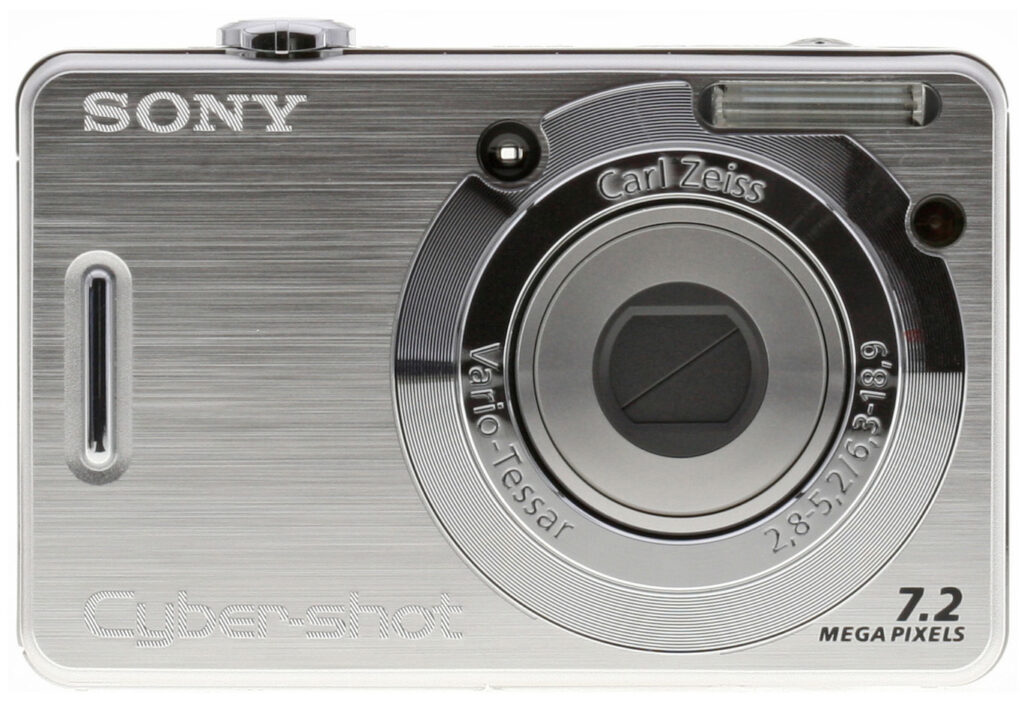


Overview
Sony DSC-W55 Overview
by Rob Murray
Review Date: 4/11/07
The 7.2 megapixel Sony DSC-W55 features a 3x optical zoom lens with Carl Zeiss Vario-Tessar branding, 2.5" 115,000 pixel LCD display, optical viewfinder, and a maximum sensitivity of ISO 1,000 equivalent. Auto and Programmed Auto exposure modes are offered, as well as seven scene modes (Twilight, Twilight Portrait, Landscape, Beach, Snow, High Sensitivity, Soft Snap).
Other Sony W55 features include 2x "Precision" (interpolating) digital zoom, up to 14x "Smart zoom" (which simply crops to achieve the zoom effect, resulting in lower resolution images, but no softening due to interpolation), three metering modes (multi-pattern, center-weighted or spot), +/- 2.0EV exposure compensation and a 2 or 10 second self-timer. The DSC-W55 captures movies in MPEG1 format with audio at resolutions up to 640x480 pixels, at a rate of up to 30 frames per second.
Like other Sony models, the W55 uses Memory Stick Duo memory cards and comes with a fairly generous 56MB of internal memory available for image storage. Sony DSC-W55 interfaces include USB 2.0 (high-speed), A/V (NTSC or PAL), and DC input via a dummy battery that's included with the optional AC adapter. Power is provided to the Sony W55 via a Sony NP-BG1 Li-Ion rechargeable battery.
The Sony W55 is offered in a variety of colors including Caribbean blue, pale pink, elegant black and sleek silver and appeared in US stores in mid-February 2007, carrying a list price of US$200.
Sony DSC-W55 User Report
by Rob Murray
This is another new offering from Sony with even more megapixels than its predecessor, the DSC-W50. Staying with the compact Cyber-shot theme, this camera gives you fully automatic exposure as well as enough options to let you get creative. With 7.2 megapixels tucked into its small frame, a large, clear 2.5 inch color LCD monitor and useful creative controls, you may find yourself carrying this little camera around a lot. Sony gets you started with 56 megabytes of internal storage, so you can shoot as soon as you get the battery charged, but we strongly recommend purchasing a large-size memory card right along with the camera. The Sony W55 has a 3x optical zoom lens with an equivalent range of 38-114mm on a 35mm camera. If you like shooting close-ups, the macro mode focuses down to an exceptional two centimeters, although we found that it produced rather soft corners in its images when shooting that close.
The Sony DSC-W55 also has an extended range ISO with settings from 100-1000. These higher settings will allow you to capture pictures in dimmer light without using flash, but as with all cameras, the higher settings will be noisier than the lower settings. Even so, it is nice to have the option of these higher settings if needed, and Sony appears to have made considerable progress against image noise, compared to the earlier W50. (We really questioned the usefulness of the high ISO options on the W50, but on the W55, image quality is good enough that I could see people actually making use of them, at least for 4x6 inch prints. Oddly though, the improvement in the W55's high-ISO shots is much more apparent in prints than on-screen.) The Sony W55 also has an extremely bright orange focus-assist light that helps it achieve focus in low light situations. Its somewhat short maximum shutter times limit low-light performance a little bit, but it should do just find under typical urban outdoor lighting at night, and the AF-assist light is a real help for focusing indoors.

The first thing you notice about the Sony W55 is the large LCD monitor on the back panel, it's bright, works well outdoors and gives you all the information you would want to see. You can turn off the information on the LCD if you would rather not see it or want to use the optical finder.
 I don't think you'll use the optical finder much, as the Sony W55's LCD is pretty good, and a good bit more accurate as well. (Its inaccurate optical viewfinder is one of the major strikes against it, in my mind.) A "mode wheel" control is located in a good place for easy access. The shutter button is surrounded by the lens zoom ring so it is easy to recompose your shots by zooming in or out, and then quickly snap the shot. Another nice feature is that, when the mode dial is changed, a large simulated mode dial is displayed on the LCD monitor telling you what mode you are in and what you should use it for. I found that a nice touch.
The Sony W55 did pretty well in the performance department, with a moderately fast startup time of 1.7 seconds. Shutter lag (the delay between pressing the shutter button and the camera taking the picture) is lower than that of most cameras on the market, with a range of 0.32 - 0.55 second, a real help when it comes to capturing just the moment in time you're looking for. The auto-focus area is shown by brackets on the LCD screen, or if you want to adjust focus manually, you can set it to several different distances through the menu system. You'll be shooting this camera a lot so I recommend a larger memory stick as a must-have item.

Like its other W-series siblings, the Sony W55 sports an impressive list of accessories, including a couple of different accessory lenses, an external slave flash and ring light, and even an underwater case. The underwater case is shown above, a nice accessory not only for true underwater shooting, but also comforting if you plan a canoe or kayaking trip, or a day water skiing or at the beach. That's the underwater case (Sony calls it a "Sportspack") above, see the table further down this page for a full list of accessories.
The Sony DSC-W55 has a quality feel to it; neither too bulky nor too small for average-sized hands, and the weight is just right. It slips in and out of pockets easily, so there's no impediment to bringing it along wherever you go. A beginner will find they can start shooting right away in the Automatic or Program modes, while the more advanced user will find the Creative modes interesting to use; permitting shots in more challenging conditions.


Color handling: Outdoor shots in daylight were bright and vibrant-looking, without seeming artificial or over-colored. Indoors though, the camera's white balance system left too much color in the images when shooting under incandescent lighting.
I liked the photos the W55 captured quite a bit, they were bright and snappy-looking, yet the colors still managed to look realistic, and never felt artificial to me. The one thing I disliked about it was that its photos indoors under incandescent lighting were a bit on the yellow or red side, depending on the white balance option selected. They didn't look as strongly tinted when I printed them as they did on-screen, but I'd still have preferred a bit less coloration in some of my indoor shots. (Note that I'm not asking for a completely neutral color balance under incandescents here: I think some coloration is a good thing, as it preserves the warmth of the original scene. I'd just like a bit less than the W55 left in its images. - You might find them perfectly acceptable though.)
All in all, the Sony W55 struck me as a pretty nice little camera. It seems well-built, is easy to use, yet offers enough special modes and options to handle the bulk of shooting situations most consumers are likely to encounter. I really enjoyed playing with it, and found myself shooting a lot more pictures with it than another camera (here to remain nameless) that I brought along on the same photo expedition. It really packs a lot into a small package, and I think most consumer-level users would be very happy with it.
Basic Features
- 7.2 -megapixel CCD.
- 3x zoom lens (equivalent to a 38-114mm lens on a 35mm camera).
- Variable digital Smart Zoom (up to 14x at VGA resolution), or 2x Precision Digital zoom.
- Real-image optical viewfinder.
- 2.5-inch color LCD monitor.
- Automatic and Program exposure modes.
- Built-in flash with five modes and an intensity adjustment.
- 56MB internal memory.
- Sony Memory Stick Duo slot (no card included).
- USB 2.0 computer connection.
- Power from one rechargeable LiIon battery pack, charger included.
- Software for Mac and PC.
Special Features
- High Sensitivity, Twilight, Twilight Portrait, Snow, Beach, Landscape, and Soft Snap modes.
- Movie recording mode (with sound).
- Multi-Burst slow motion mode and Burst continuous shooting mode.
- Email (VGA resolution) mode.
- Shutter speeds from 1/2,000 to 1/8 sec in Auto mode; 1/2,000 to one second in Program mode, and 1/2,000 to two seconds in Twilight mode.
- Aperture range from f/2.8 to f/13, depending on zoom position.
- Creative Color Mode menu (Normal, Rich, Natural, Sepia, and B&W).
- Image Sharpness and Contrast adjustments.
- Self-timer for delayed shutter release.
- Macro (close-up) lens setting.
- Spot, Center-Weighted, and Multi-Metering modes.
- Multi and Center AF modes, plus manual focus (5 distance presets).
- Auto ISO setting or 100, 200, 400, 800, and 1,000 ISO equivalents
- White balance (color) adjustment with six options.
- DPOF (Digital Print Order Format) and PictBridge printing compatibility.
In the Box
Included with the Sony DSC-W55 digital camera are the following items:
- Wrist strap.
- Rechargeable battery pack with charger.
- Combined USB/AV cable.
- Software CD containing Sony Cyber-shot software and USB drivers.
- Quick-guide manuals and registration information.
Recommended Accessories
- Extra battery pack.
- Large capacity Memory Stick Duo or Memory Stick PRO Duo.
- Carrying case.
You don't normally think of accessory items like add-on lenses or an external flash with compact digital camera models, but Sony's compact "W" series is a bit of an exception in this area. Here's a complete list of Sony accessories for the DSC-W55, complete with shopping links for them:
|
Conclusion
| Pro: | Con: |
|---|---|
|
|
This new Sony DSC-W55 offers a few improved specs over its predecessor, the DSC-W50 model. Most notable are the 7.2 megapixel CCD, more internal memory and its faster top shutter speeds. It still retains the 3x optical zoom and large 2.5-inch LCD display of the previous model. The extra megapixels will be appreciated if you need to crop your pictures or make bigger enlargements. More important changes come in areas you can't see on a spec sheet, particularly high-ISO (high light-sensitivity) image noise. The previous W50 model sported the same top-end ISO 800 and 1,000 settings, but its images were so noisy and blurry at those levels that they were essentially unusable. On-screen, it's a toss-up between the two cameras' high-ISO shots, but when printed, images from the W55 look much better (at least to my eye). Like others in Sony's W-series line, the DSC-W55 is very sleek and easy to pocket so there is no excuse not to take it with you, most any time your stepping out. The Sony W50 offers full automatic exposure control for easy shooting or seven preprogrammed scene modes to help you get the shot under more difficult conditions. It's relatively quick to turn on and has a low shutter lag time in daylight shooting, as well as decent shot to shot speeds. Long a hallmark of Sony cameras, the Sony DSC-W55 offers a very capable movie mode, as well as a long battery life. Most unusual for a compact camera in this size and price range though, is the extensive list of accessories available for it from Sony. There are filters, accessory wide angle and telephoto lenses, a slave flash, an underwater case and even a macro ring light for close-ups. This was the first Sony camera I'd used, but I was able to navigate the menus easily and was ready to shoot in just a few minutes. Particularly for a camera that you can carry in most any pocket, the Sony DSC-W55 boasts a lot of features, and the controls are laid out well. Offering good sharpness and color, a strong feature set, and available in four colors (black, pink, silver, or blue), all at an attractive price, the Sony DSC-W55 has a lot going for it. If it only did a bit better job under incandescent lighting, it'd be a shoo-in for a Dave's Pick, but as it stands, it's a (very) near miss.
Design
Sony DSC-W55 Design
Sony's Cyber-shot DSC-W55 is the next generation in the Cyber-shot lineup now with 7.2 megapixels in the same thin, compact body as its predecessor the DSC-W50. (See our review of the Sony DSC-W50 for details on the W55's predecessor.) Retained on this new model is the large 2.5 inch color LCD monitor and 3x zoom lens.
As with the DSC-W50 camera, operation is very straightforward. Even without a manual and never having used a Sony camera before, I was up and shooting in no time. This handy little camera will have no problem fitting into a pocket or purse. Its retractable lens makes for a very smooth, sleek camera and the built in lens shutter will keep it from getting dirty. Its body is about as wide as a typical business card, and about a quarter inch taller, top to bottom. Measuring just 3.50 x 2.20 x 0.90 inches (89 x 57 x 23 millimeters) and weighing 5.1 ounces (147 grams) with the batteries and a memory card installed.

The Sony DSC-W55 is quite small, but easy to hold, due to the raised bumps on the back where your thumb goes, and the raised lip on the front. The 3x, 6.3-18.9mm zoom lens (equivalent to a 38-114mm zoom on a 35mm camera) is just left of center (when viewed from the back, while holding the camera). The low light focus-assist lamp just to the right of the lens is a bright orange, and will help the camera focus in low light conditions. This lamp also flashes when using the self-timer mode, speeding up just prior to the shot being taken. Located at the top right of the camera front is the flash and next to that is the small optical viewfinder window.

The right side of the camera (as viewed from the rear) has only the eyelet for attaching the wrist strap. The previous Sony W50 had a more obtrusive eyelet and the previous DC power terminal has been deleted. An (optional) AC adapter can still be used on the W55 though, via a dummy battery attachment that ships with the adapter.

The camera's left side is smooth and featureless.

The camera's top panel includes the Shutter button surrounded by the Zoom lever. To the left of the shutter button is the small Power button, surrounded by a green LED that lights when the camera is powered on. Also on the top panel is a raised grill covering the tiny microphone, on the far left side.
Looking at the Sony DSC-W55 from the back, you can see that the controls are laid out in a logical order and that the back is dominated by the large 2.5 inch color LCD monitor. You can see that it also has an optical viewfinder as well, something you'll appreciate when trying to shoot under strong sunlight, when the LCD screen washes out. There are two LED lamps next to the optical viewfinder that blink to report the status of various functions. The LCD monitor also gives you a good display of information like battery charge, exposure settings and even shutter speed and aperture settings. Even wearing glasses, I was able to use the optical viewfinder in my testing without any problem, but the view through it is rather small, and there's no diopter adjustment to correct for less than perfect eyesight. The mode dial resides in the upper right corner, with the Display and Menu buttons below it. Below the menu button is the Five-way Arrow pad, with small arrows pointing in four directions (Up, Down, Left, and Right) and a set button in the middle. Each serves multiple functions, navigating onscreen menus, scrolling between captured images in Playback mode, or activating different camera functions (Flash, Exposure Compensation, Self-Timer, and Macro). Below this is the Resolution / Erase button. Finally, three tiny holes above the top left corner of the LCD monitor reveal the camera's speaker.

The W55's flat bottom holds the threaded (metal) tripod screw mount and the shared Memory Stick/battery compartment. Depending on the type of tripod used, you may or may not be able to change the battery or memory stick while the camera is mounted on a tripod. Also on the bottom is a connector that accepts the W55's combined USB-A/V cable.
Sony DSC-W55 External Controls

Power Button: Located left of the Shutter button on the camera's top panel, this button turns the camera on and off. A green LED surrounds the button, and lights when the camera is powered on.

Zoom Lever: Surrounding the Shutter button on top of the camera, this lever controls optical zoom and, when enabled via the Setup menu, Sony's Smart Zoom or Precision Zoom options.
In Playback mode, this button controls the digital enlargement of a captured image, which can go as high as 5x. (Very handy for checking focus or the expressions on people's faces in group shots.) Also in Playback mode, the wide-angle end of the button activates the Index Display mode, which displays nine thumbnail images on the screen at one time, making for faster browsing through your captured images.
Shutter Button (see image above): Surrounded by the Zoom lever, this button sets focus and exposure when halfway pressed, and fires the shutter when fully pressed.

Playback Button: To the right of the optical viewfinder eyepiece on the rear panel, this button enables the camera's Playback mode when pressed. A second press returns the camera to Record mode (as does a half-press of the Shutter button).

Mode Dial : Crowning the top right corner of the rear panel, this ribbed dial sets the camera's operating mode, offering Auto, Program, Movie, Snow, Beach, Landscape, Twilight, Twilight portrait, Soft snap, and High sensitivity modes.

Display Button: Below the Mode dial, this button controls the LCD display, cycling through the image with information display, the image with information and live histogram display, the image with limited information display, and no image display at all (in all Record modes).
In Playback mode, it cycles through a similar series, but does not disable the LCD display.
Another handy feature is that you can brighten or darken the LCD screen by pressing and holding the Display button in either Record or Playback mode.

Menu Button: Just beneath the Display button, this button activates the settings menu in any camera mode. The Menu button also turns off the menu display, as does half-pressing the shutter button.

Five-Way Arrow Pad: Located in the lower right corner of the rear panel, this control features four arrow buttons, each pointing in a different direction (up, down, left, and right), and a Set or OK button in the middle (Sony describes it in the manual by its shape: a dot). In all settings menus, these arrow keys navigate through menu options. Pressing the center of the button confirms selections.
In any record mode (except Movie and Twilight modes), the Up button controls the Flash mode, cycling through Auto, Forced, Slow-Sync, and Suppressed modes. (Available options vary depending on the mode you're in.) The Right arrow turns the Macro (close-up) mode on and off, and the Left arrow accesses the Exposure Compensation menu. The Down arrow accesses the Self-Timer modes (two- and 10-second options).
In Playback mode, the Right and Left arrows scroll through captured images. When Playback zoom is enabled, all four arrows scroll around within the enlarged view, while pressing the center button returns to the normal, 1x display.

Image Resolution / Erase Button: Lower left of the Five-way Arrow pad, this button displays the available resolutions in any record mode. Choices are 7m(3,072 x 2,304), 3:2(3,072 x 2,048), 5m(2,592 x 1,944), 3m(2,048 x 1,536), 2m(1,632 x 1,224), VGA(640 x 480), 16:9(1,920 x 1,080). Movie resolutions are 640 x 480, and 160 x 112 pixels.
In Playback mode, this button lets you erase the currently displayed image.
Operation
Sony DSC-W55 Operation
Operating the Sony DSC-W55 is very straightforward, as the camera controls the basic exposure at all times. The Mode dial on the rear panel controls the main operating modes, with options for Auto, Program, High Sensitivity, Twilight, Twilight portrait, Snow, Beach, Landscape, Soft Snap, and Movie modes. In all image capture modes, the DSC-W55 provides an onscreen LCD menu (activated by the Menu button), with a variety of options for adjusting image quality or adding special effects. The four arrows of the Five-way arrow pad are used to scroll through menu options, while the button in the center of the pad functions as the OK button to confirm selections. Outside of the menu, the arrow pad adjusts flash, exposure compensation, macro, and self-timer modes. A separate Image Resolution button calls up the available resolution settings, removing this item from the main menu system, thereby making it much quicker to access when needed. The Zoom control surrounding the Shutter button adjusts both optical and digital zoom (when the latter is activated through the Setup menu).
The Sony W55 incorporates two nice user-interface touches that we liked quite a bit. If the LCD is on in capture mode, rotating the Mode Dial causes a "virtual dial" to appear along the right edge of the LCD display. An optional function guide can also be enabled through the Setup menu, which displays concise help text on the LCD for camera functions selected via the Mode Dial. The combination of virtual dial and plain-English explanations of camera modes made for a very friendly user interface. Overall, we were impressed by Sony's judicious use of space, especially with the large number of external controls provided, the larger than average LCD, and the relatively short learning curve the W55's user interface entails.
Record-Mode Display
 In record mode, the LCD monitor displays the subject with a fair amount of overlaid information, indicating approximate battery life remaining (graphically), flash mode, focus mode (macro or normal), autofocus mode setting, any currently-selected exposure compensation setting, ISO setting, the current size/quality setting, and number of images that can be stored on the remaining Memory Stick space at the current size/quality. Half-pressing the Shutter button causes the camera to display the shutter speed and aperture setting it has chosen for the current lighting conditions. Pressing the Display button beside the LCD once adds a small "live" histogram display to the information, pressing it again removes the information overlay, and pressing it a third time turns the LCD off entirely. Pressing it a fourth time restores the default display. If you press and hold the Display button down you can cycle between the normal and bright LCD settings. This is much quicker than changing the screen brightness via the menu screen.
Playback-Mode Display
 In Playback mode, the default image display shows the most recently captured image, with a modest information overlay present. Pressing the Display button once adds the exposure information and a small histogram to the overlay, pressing it again removes the information overlay entirely, and pressing it a third time returns to the default display. Pressing the wide-angle side of the zoom lever takes you to a display showing images on the Memory Stick in groups of nine small thumbnails. (You can navigate a yellow outline cursor over these thumbnails by using the four arrow keys. Pressing the telephoto side of the zoom lever will bring the currently-selected image up full-screen.) Pressing the telephoto side of the zoom lever when viewing an image full-size on the LCD screen will zoom in on the image, in 17 variable-sized increments up to a maximum magnification of 5x.
Sony DSC-W55 Modes and Menus
Scene Modes: Marked on the Mode dial with corresponding black icons, these modes are for capturing images in specific situations. Seven "scenes" are available, including High Sensitivity, Twilight, Twilight Portrait, Snow, Beach, Landscape, and Soft Snap. The High Sensitivity mode increases the ISO setting automatically, so you can shoot without the flash in dim conditions. (Albeit at the cost of much-increased image noise.) Both Twilight modes capture images in low light, although the Twilight Portrait mode automatically enables the Red-Eye Reduction flash mode, combining it with a slower shutter speed to let ambient lighting brighten the background as well. Because the camera employs a slower shutter speed in both Twilight modes, a tripod is highly recommended to prevent blurring from camera movement. Snow and Beach modes optimize the camera for bright situations and boost exposure to compensate for the overall brightness that would normally cause the camera to underexpose. Landscape mode sets the focus at infinity and uses a smaller lens aperture to capture sharp details both near and far away. Soft Snap mode enhances skin colors while keeping a soft focus and wide aperture to help de-emphasize background objects.
Program Mode: This mode is marked on the Mode dial with a black "P." In this mode, the camera selects shutter speed and aperture, while you control all other exposure variables.
Automatic Mode: Indicated on the Mode dial with a green camera icon, this mode puts the camera in control over the exposure and everything except Macro, Image Size and Quality, Zoom, Flash, and the Self-Timer.
Movie Mode: A filmstrip icon marks this mode on the Mode dial. In Movie mode, you can record moving images and sound, for as long as the Memory Stick or internal memory has space. Resolution and quality choices are 640 x 480, or 160 x 112 pixels, with Fine (30 frames per second) and Standard (16.6 frames per second) options in 640 x 480 mode. (160 x 112 pixel "video mail" movies are captured at 8.3 frames per second.) While recording, a timer appears in the LCD monitor to let you know how many minutes and / or seconds are remaining on the Memory Stick, and how long you've been recording, so you'll have some idea of how much time you have left. Recording in 640 x 480 Fine mode is only available with a Memory Stick Pro Duo card.
The W55 offers a Multi Burst mode separate from the movie mode and selected in the menu in Auto, Program, and Scene modes, which captures an extremely rapid 16-frame burst of images, at a selectable rate of 7.5, 15, or 30 frames per second. Multi Burst shots are played back as a slow-motion animation on the camera, but appear as a single large file with 16 sub-images in it when viewed on a computer. (This would be a fun way to catch someone crossing a finish line during a race, or to analyze golf and tennis swings.) A Burst mode is also available, and captures a rapid series of images for as long as the Shutter button is held down. Frame rates and the maximum number of images depends on the image quality and resolution settings, as well as the amount of available memory space.
Playback Mode: Playback mode is accessed by pressing the Playback button on the rear panel. In this mode, you can scroll through captured images, delete them, write-protect them, and set them up for printing on PictBridge-compatible printers. You can also copy, resize, and rotate images.
Record Menu: Available in all three Record modes by pressing the Menu button, the Record menu offers the following options (some options are not available in all modes):
 Color Mode: Offers Normal, Rich, Natural, Sepia, and Black & White color modes.
- Focus: Sets focus control to Multi AF or Center AF, or one of five preset focus distances (0.5, 1.0, 3.0, and 7.0 meters, and Infinity).
- Metering Mode: Chooses between Multi-Metering, Center-Weighted, and Spot modes. Spot metering reads the exposure from the very center of the frame (identified by a cross hair target on the monitor). Spot metering is handy for backlit subjects, or any time the subject and background exhibit very high contrast. Center-Weighted also reads from the center of the frame, but from a larger area than Spot. Multi-Metering mode reads the entire frame to determine exposure.
- White Balance: Adjusts the overall color balance of the image, to suit the light source. Options are Auto, Daylight, Cloudy, Fluorescent, Incandescent, and Flash.
- ISO: Adjusts the camera's light sensitivity. Options are Auto, or 100, 200, 400, 800, and 1,000 ISO equivalents. (See our notes on the Exposure tab of this review: The ISO 800 and 1000 settings have high noise levels and poor subject detail.)
- P.Quality: Sets compression between Standard and Fine.
 Mode: Sets capture mode, Normal (single), Burst, and Multi-burst.
- Interval: When in Multi-burst mode (grayed out otherwise), sets the capture interval between 1/7.5, 1/15, and 1/30.
- Flash level: When the flash is enabled (grayed out otherwise), sets flash power to plus, normal, and minus settings.
- Contrast: Alters the level of contrast in images with plus, normal, and minus settings.
- Sharpness: Controls the overall image sharpness and softness with plus, normal, and minus settings.
- Setup: Accesses the camera's Setup menu.
Playback Menu:
 Folder: Selects the folder for playing back images.
- Protect: Write-protects the current image (or removes protection), preventing it from being deleted or manipulated in any way except with card formatting.
- DPOF: Marks the current image for printing on a DPOF (Digital Print Order Format) device. Also removes the print mark.
- Print: Prints images on a PictBridge-compatible printer. Options are: All in This Folder, DPOF Images, Select (select multiple images), or This Image.
- Slide: Plays back images in an automatic slide show. You can set the time interval and whether or not the sequence of images repeats.
- Resize: Resizes the image to 3,072 x 2,304; 2,592 x 1,944; 2,048 x 1,536; 1,632 x 1,224; or 640 x 480 pixels. (When an image is resized, the original image is left in place, and a new copy is made at the selected size.)
- Rotate: Rotates the image 90 degrees clockwise or counterclockwise.
- Divide: Allows you to trim material from the beginning or end of a recorded movie, or to extract an interesting bit of action from the middle of a longer clip.
- Trimming: Lets you crop an image and save it as a separate file from the original.
- Setup: Accesses the camera's Setup menu.
Setup Mode: This mode allows you to change a variety of camera settings, and is accessible through each of the camera menus by scrolling to the Setup icon and pressing the right arrow button.
Camera:
 AF Mode: Sets the focus mode to Single, or Monitor. (Monitor is Sony's term for continuous autofocus.)
- Digital Zoom: Switches between the up to 14x Smart Zoom and Precision zoom, or turns digital enlargement off. (Smart Zoom values will depend on the resolution selected, 14x is the max at VGA resolution.)
- Function Guide: Turns the Function Guide on or off. If enabled, the guide displays text about camera functions when they are accessed.
- Red Eye Reduction: Enables or disables the Red Eye Reduction flash mode, affecting both Auto and Forced flash modes.
- AF Illuminator: Turns the AF Assist light on or off. If on, the light automatically illuminates in dark shooting conditions.
- Auto Review: Immediately plays captured image onscreen for two seconds.
Internal Memory Tool (only available when no Memory Stick is present):
- Format: Formats the internal memory, erasing all files (even protected ones).
Memory Stick Tool (only available when Memory Stick is present):
 Format: Formats the Memory Stick, erasing all files (even protected ones).
- Create REC Folder: Creates a new folder for recording images.
- Change REC Folder: Changes the folder that images are recorded to.
- Copy: Copies images from the internal memory to a Memory Stick.
Setup 1:
 LCD Backlight:Controls the brightness of the LCD display, with options of Bright or Normal. This can also be cycled between normal and bright during picture taking by holding the "disp" button down.
- Beep: Controls the camera's beep sounds, turning them on or off. A Shutter option enables only the shutter beep noise.
- Language: Selects among Italian, French, Spanish, Chinese, Japanese, or English for the menu language.
- Initialize: Resets the camera to its default settings.
Setup 2:
 File Number: Chooses between Series (continuing the shot number in the file name indefinitely) or Reset, which resets the frame number by folder and when the card is changed or formatted.
- USB Connect: Sets the USB connection type to PictBridge, PTP, Mass Storage, or Auto.
- Video Out: Sets the timing of the video output signal to either NTSC or PAL.
- Clock Set: Sets the camera's internal clock and calendar.
Optics
Sony DSC-W55 Optics
Lens
Zoom
A typical 3x optical zoom range, with good performance.


The Sony Cyber-shot DSC-W55 zooms over the equivalent of a 38-114mm range, which is fairly typical for its class. Overall performance is quite good, with good detail and sharpness at wide angle. The 2x Precision Digital zoom takes it out to 6x total. As you'd expect, detail suffers with the digital zoom, but to our eyes, not quite as much as with some cameras.
Macro
A very small macro area, but severe blurring in the corners. The flash had trouble throttling down, and produced an uneven exposure.


The Sony Cyber-shot DSC-W55's macro setting captures a very tiny minimum area of only 0.97 x 0.72 inches (24.5 x 18.4 millimeters). While the macro area is quite small though, details are somewhat soft throughout the frame, with crisp definition only in the very center of the frame. Most cameras have some softening in the corners in macro mode (evidence of the optical characteristic "curvature of field"), but the W55's blurring extends quite far into the frame. Shooting at the minimum macro focal distance, the flash also had a hard time throttling down, and couldn't cover the frame evenly. (Plan on using external lighting for any macro shots with the DSC-W55.)
Distortion
Slightly lower than average barrel distortion, but high pincushion.
| Barrel distortion at 38mm is 0.6% |
 |
| Pincushion at 114mm is 0.5% |
 |
This is the tendency for the lens to bend straight lines outward (like a barrel--usually at wide angle) or inward (like a pincushion--usually at telephoto). The Sony DSC-W55's 0.6% barrel distortion at wide angle is a little less than average among the cameras we've tested, though still fairly noticeable in its images. At the telephoto end, the W55's 0.5% pincushion is higher than average.
Chromatic aberration
Moderate, small effect on images at edges.


Chromatic aberration is moderate at wide angle, showing about 5-6 pixels of fairly bright coloration on either side of the target lines, but decreases to very low levels at telephoto focal lengths, and in no case extends very far into the frame. - The chromatic aberration on the W55's lens was similar to what we saw with the W50. (This distortion is visible as a very slight colored fringe around the objects at the edges of the field of view on the resolution target.)
Corner Sharpness
Some softening in the corners of the frame at wide angle and telephoto. Better than average overall sharpness though.


The Sony DSC-W55 produced slightly soft corners in a few wide angle shots and telephoto shots.
Viewfinder
Coverage
Optical viewfinder tight and skewed toward the top of the frame. Good accuracy from the LCD monitor.


The DSC-W55's optical viewfinder was quite tight, showing only about 80% of the final frame area at both wide angle and telephoto lens settings. However, the LCD monitor showed about 101% accuracy at wide angle and 99% at telephoto.
The images above were taken from our standardized test shots. For a collection of more pictorial photos, see our Sony Cyber-shot DSC-W55 Photo Gallery .
Exposure
Sony DSC-W55 Exposure
Color
Saturation & Hue Accuracy
Slight oversaturation in red and blue tones, and somewhat warm, dark color overall.
 |
| In the diagram above, the squares show the original color, and the circles show the color that the camera captured. More saturated colors are located towards the periphery of the graph. Hue changes as you travel around the center. Thus, hue-accurate, highly saturated colors appear as lines radiating from the center. |
The other important part of color rendition is hue accuracy. Hue is "what color" the color is. Like most digicams, the W55 shifts cyan colors toward blue (a very common tactic, apparently aimed at producing better-looking sky colors) and blue-greens toward cyan. Overall color accuracy was very good though, easily in the top 10% of cameras we've tested.


Sensor
Exposure and White Balance
Indoors, incandescent lighting
Warm casts with both Auto and Incandescent white balance settings. More exposure compensation required than usual.


Color balance indoors under incandescent lighting was a bit warm and reddish in Auto white balance mode, while the Incandescent setting resulted in a more yellow color balance that we judged as the more pleasing of the two. (But still more highly colored than we'd prefer.) The Sony DSC-W55 required a +1.3 EV exposure compensation boost to get a good exposure, which is higher than average for this shot. Overall color is a bit dark and yellow here, making the blue flowers very dark and purplish. (A very common outcome for this shot.) Our test lighting for this shot is a mixture of 60 and 100 watt household incandescent bulb, a rather yellow light source, but a very common one in typical home settings here in the US.
Outdoors, daylight
Slightly warm color outdoors. Better than average exposure accuracy.


Outdoors, the Sony DSC-W55 showed noticeably better than average exposure accuracy, although it tended to blow-out strong highlights. Strong highlights also tended to produce slight underexposures, as in the house shot above, with a limited midtone range, but exposure accuracy was still better than average when compared to many other consumer digital cameras. Color balance was typically a little warm overall.
See full set of test images with explanations
See thumbnails of all test and gallery images
Resolution
High resolution, 1,400 ~ 1,450 lines of strong detail.


Our laboratory resolution chart revealed sharp, distinct line patterns down to about 1,450 lines per picture height horizontally, and about 1,400 vertically, with extinction at around 1,800. Actual resolved detail was better than with the Sony W50, but the W55's images seemed less crisp with the default sharpening setting. Use these numbers to compare with other cameras of similar resolution, or use them to see just what higher resolution can mean in terms of potential detail. Beware that while you might be able to make out what looks like distinct lines at numbers higher than those we've mentioned here, the camera is just doing its best to continue interpreting the lines. If you zoom in and follow them from the wider portions, you'll see the lines converge and reappear several times, so the lines you see at 1,800 and higher are really only artifacts generated by the camera's imaging system.
See full set of test images with explanations
See thumbnails of all test and gallery images
Sharpness & Detail
Fairly sharp images, with some blurring of detail from noise suppression.


The Sony DSC-W55's images tend to have a slightly soft look when printed large, though high contrast detail like the fine branches against the sky above is well-preserved, with little or no evidence of oversharpening. (Edge enhancement creates the illusion of sharpness by enhancing colors and tones right at the edge of a rapid transition in color or tone.)
Noise-suppression systems in digital cameras tend to flatten-out detail in areas of subtle contrast. The effects can often be seen in shots of human hair, where the individual strands are lost and an almost "watercolor" look appears. The crop above right shows this somewhat, with darker areas of Marti's hair showing only limited detail, even though some individual strands are visible where they pass over a significantly lighter darker background. Overall though, the Sony W55 shows less loss of detail from noise reduction than average at low ISOs, but more at high ISOs.
ISO & Noise Performance
Low to moderate noise at the normal sensitivity settings, very high noise and heavy blurring at the higher settings.


The Sony DSC-W55's lower ISO settings produced low to moderate noise, with little impact on detail. (As just noted, better than average in this respect.) As the ISO setting increases though, so do the noise level and the amount of blurring that results. Shots at ISO 400 are a bit soft but still usable, while shots at ISO 800 and 1000 have so much noise and blurring that they're practically useless for printing. (Even at a print size of 4x6 inches, ISO 1000 shots are soft and muddy-looking.)
Extremes: Sunlit and low light tests
High resolution with good overall detail, though limited shadow detail and high contrast. A slight tendency towards warm casts. Fair low-light performance, capable of capturing bright images under average city street lighting.


Sunlight:
Because digital cameras are more like slide film than negative film (in that they tend to have a more limited tonal range), we test them in the harshest situations to see how they handle scenes with bright highlights and dark shadows, as well as what kind of sensitivity they have in low light. The shot above is designed to mimic the very harsh, contrasty effect of direct noonday sunlight, a very tough challenge for most digital cameras. (You can read details of this test here.)
The Sony Cyber-shot DSC-W55 produced high contrast under the deliberately harsh lighting in the test above, with deep shadows and dark midtones. Detail was limited in the deep shadows as well, with some noise suppression blurring any remaining details. The W55 required less positive exposure compensation than average, however, at only +0.7 EV. You could easily argue for the "correct" exposure here to be +0.3 EV, as there are fewer blown highlights. That shot does leave Marti's skin tones rather dark, so most consumers are more likely to prefer the +0.7 EV example. (In "real life" though, be sure to use fill flash in situations like the one shown above; it's better to shoot in the shade when possible.) Overall color was a bit warm, which darkened the blue flowers and green foliage significantly.
| 1 fc 11 lux |
1/2 fc 5.5 lux |
1/4 fc 2.7 lux |
1/8 fc 1.3 lux |
1/16 fc 0.67 lux |
|
|---|---|---|---|---|---|
| ISO 100 |
 1 sec f2.8 |
 1 sec f2.8 |
 1 sec f2.8 |
 1 sec f2.8 |
 1 sec f2.8 |
| Twilight Scene (ISO 100) |
 1.6 sec f2.8 |
 2 sec f2.8 |
 2 sec f2.8 |
 2 sec f2.8 |
 2 sec f2.8 |
| ISO 200 |
 0.8 sec f2.8 |
 1 sec f2.8 |
 1 sec f2.8 |
 1 sec f2.8 |
 1 sec f2.8 |
| ISO 400 |
 0.4 sec f2.8 |
 0.6 sec f2.8 |
 1 sec f2.8 |
 1 sec f2.8 |
 1 sec f2.8 |
| ISO 800 |
 1/5 sec f2.8 |
 0.3 sec f2.8 |
 0.6 sec f2.8 |
 1 sec f2.8 |
 1 sec f2.8 |
| ISO 1000 |
 1/6 sec f2.8 |
 1/4 sec f2.8 |
 0.5 sec f2.8 |
 1 sec f2.8 |
 1 sec f2.8 |
Low light:
The Sony DSC-W55 had somewhat limited low-light shooting capabilities, with a maximum exposure time of two seconds (only available in Twilight Scene mode) and that only at its lowest ISO setting of 100. However, the camera is sensitive enough for shooting under average city street-lighting at night, about one foot-candle. (The leftmost column of images in the table above.) Overall color was pretty good with the Auto white balance setting (just slightly pink), and the camera's autofocus system was able to focus on the subject down to the 1/4 foot-candle light level unassisted (about 1/4 as bright as typical street lighting). With the AF assist lamp enabled, the camera focused accurately down to the lowest light level we test at.
Flash
Coverage and Range
A limited flash range, even at the maximum intensity setting.


Flash coverage was somewhat uneven at wide angle, better but still slightly uneven at telephoto. In the Indoor test, the flash on the underexposed our subject at its default setting, requiring a High Intensity boost to get reasonably bright results. Even here, the exposure slightly dim. The camera's Slow-Sync flash mode produced slightly brighter and more even results, though with a stronger pinkish-orange cast from the room lighting. It too required the High Intensity flash setting for bright results.
| Flash Range: Wide Angle | |||||
|---|---|---|---|---|---|
| 6 ft | 7 ft | 8 ft | 9 ft | 10 ft | 11 ft |
 1/40 sec f2.8 ISO 100 |
 1/40 sec f2.8 ISO 100 |
 1/40 sec f2.8 ISO 100 |
 1/40 sec f2.8 ISO 100 |
 1/40 sec f2.8 ISO 100 |
 1/40 sec f2.8 ISO 100 |
| 12 ft | 13 ft | 14 ft | 15 ft | 16 ft | |
 1/40 sec f2.8 ISO 100 |
 1/40 sec f2.8 ISO 100 |
 1/40 sec f2.8 ISO 100 |
 1/40 sec f2.8 ISO 100 |
 1/40 sec f2.8 ISO 100 |
|
| Flash Range: Telephoto | |||||
|---|---|---|---|---|---|
| 6 ft | 7 ft | 8 ft | 9 ft | 10 ft | 11 ft |
 1/50 sec f5.2 ISO 100 |
 1/50 sec f5.2 ISO 100 |
 1/50 sec f5.2 ISO 100 |
 1/50 sec f5.2 ISO 100 |
 1/50 sec f5.2 ISO 100 |
 1/50 sec f5.2 ISO 100 |
| 12 ft | 13 ft | 14 ft | 15 ft | 16 ft | |
 1/50 sec f5.2 ISO 100 |
 1/50 sec f5.2 ISO 100 |
 1/50 sec f5.2 ISO 100 |
 1/50 sec f5.2 ISO 100 |
 1/50 sec f5.2 ISO 100 |
|
At wide angle, shots at ISO 100 are bright out to a distance of about 10 feet, decreasing in brightness from that point on. At full telephoto and ISO 100, even the 6-foot shot is a little dim, and the images darken from there. An unimpressive flash range, at least at ISO 100.
| Manufacturer-Specified Flash Range | |
| Wide Angle | Telephoto |
 12.8 feet ISO 320 |
 6.7 feet ISO 320 |
Our standard test method for flash range uses a fixed setting of ISO 100, to provide a fair basis of comparison between cameras. We've now also begun shooting two shots using the manufacturer-specified camera settings, at the range the company claims for the camera, to assess the validity of the specific claims. In the shots above, the Sony W55 exposed properly at the officially rated distances, but only by boosting the ISO a fair bit, which increases image noise.
Output Quality
Print Quality
Good print quality, great color, crisp prints at 8x10 inches, acceptable ones at 11x14. ISO 400 images are a little noisy-looking at 8x10 inches, but likely acceptable for most users. Higher ISOs are usable but noisy at 5x7 inches.
Testing hundreds of digital cameras, we've found that you can only tell just so much about a camera's image quality by viewing its images on-screen. Ultimately, there's no substitute for printing a lot of images and examining them closely. For this reason, we now routinely print sample images from the cameras we test on our Canon i9900 studio printer, and on the Canon iP5000 here in the office. (See the Canon i9900 review for details on that model.)
The Sony DSC-W55 produced sharp prints at 8x10 inches, and somewhat softer but still quite acceptable ones at 11x14. As always though, the real test of print size came at the higher ISO settings. Here, the W55's ISO 400 images were a little soft and noisy when printed at 8x10 inches, but most consumers would likely find them acceptable, especially for wall display. The highest ISO settings of 800 and 1000 were quite noisy and soft, but we suspect many users would find them acceptable for use in 5x7 or smaller prints. (ISO 1000 noise is still visible in 4x6 inch prints, and colors are somewhat subdued, but most consumers would probably still find them acceptable.
Color-wise, the Sony W55 did pretty well, with bright but natural-looking color and good-looking skin tones, although we felt that many of its shots had more of a warm cast than we'd prefer.
The images above were taken from our standardized test shots. For a collection of more pictorial photos, see our Sony Cyber-shot DSC-W55 Photo Gallery .
Not sure which camera to buy? Let your eyes be the ultimate judge! Visit our Comparometer(tm) to compare images from the Sony Cyber-shot DSC-W55 with those from other cameras you may be considering. The proof is in the pictures, so let your own eyes decide which you like best!
Performance
Sony DSC-W55 Performance
Timing and Performance
Good to average speed for a consumer camera.
Startup/Shutdown |
||
Power on to first shot |
1.7 seconds |
Time it takes for LCD to turn on and lens to deploy |
Shutdown |
1.2 seconds |
How long it takes to retract lens |
Buffer clearing time |
3 seconds (Four large/fine shots) |
Worst case buffer clearing time. -- This is the delay after a set of shots before you can remove the card. Some cameras won't retract their lenses and shut down until the buffer is cleared. |
Mode switching |
||
Play to Record, first shot |
0.2 seconds |
Time until first shot is captured |
Record to play |
2.2 seconds |
Time to display a large/fine file immediately after capture |
Display recorded image |
0.3 second |
Time to display a large/fine file already on the memory card. |
Shutter response (Lag Time): |
||
Full Autofocus Wide |
0.32 second |
Time from fully pressing shutter button to image capture, zoom lens at wide angle position. |
Full Autofocus Tele |
0.55 second |
Time from fully pressing shutter button to image capture, zoom lens at telephoto position. |
Prefocused |
0.012 second |
Time to capture, after half-pressing and holding shutter button. |
Continuous AF |
0.32 second |
This mode usually shows no speed increase with our static subject; we have no way to reliably measure performance with moving subjects |
Manual focus |
0.21 second |
For most cameras, shutter lag is less in manual focus than autofocus, but usually not as fast as when the camera is "prefocused" |
Cycle time (shot to shot) |
||
Single Shot mode Large Fine JPEG |
1.43 seconds |
Time per shot, averaged over 20 shots |
Single Shot mode 640x480 JPEG |
1.30 seconds |
Time per shot, averaged over 20 shots |
Early shutter penalty? |
No, in single shot mode Yes, in burst mode |
Some cameras won't snap another shot if you release and press the shutter too quickly in Single Shot mode, making "No" the preferred answer |
Continuous mode Large Fine JPEG |
0.92 second (1.09 frames per second); 4 frames total; 3 seconds to clear |
Time per shot, averaged over 4-shot buffer depth. |
Continuous mode 640x480 JPEG |
0.78 second (1.28 frames per second); buffer clears between shots |
Time per shot, averaged over 20 shots. |
Flash recycling |
4.8 seconds |
Flash at maximum output |
Download speed |
||
Windows Computer, USB 2.0 |
5,167 KBytes/sec |
Typical Values: Less than 600=USB 1.1; 600-770=USB 2.0 Low; More than 770=USB 2.0 High |
The DSC-W55's performance ranges from quite fast to just average here, depending on the task at hand. It starts up fairly quickly, and has a very fast shutter response when the lens is set to wide angle, dropping to merely fast at telephoto. If you "prefocus" the camera by half-pressing and holding down the shutter button before the final exposure, it's blazingly fast, with a shutter delay of only 0.012 second, currently among the fastest on the market. Shot to shot cycle times are good, at about 1.43 seconds for large/fine JPEGs, and it can capture 20 shots or more this quickly without having to slow down and wait for the memory card to catch up. Where the W55 slows down a little is in its Continuous-mode, which we clocked at a bit over one frame/second, for up to four shots in succession for large/fine JPEGs. The flash takes about five seconds to recharge after a full-power shot, also on the slow side, and the W55's flash is fairly limited in its power and range. Download speeds are extremely fast. Bottom line, the W55 is quite responsive for day to day shooting, despite its slightly slow Continuous mode. It should do quite well for average family and travel photography needs.
Battery and Storage Capacity
Battery
Pretty good battery life.
| Operating Mode | Number of Shots |
|
Li-Ion rechargeable battery LCD On |
380 shots |
|
Li-Ion rechargeable battery LCD Off |
490 shots |
The Sony Cyber-shot DSC-W55 uses a custom rechargeable LiIon battery for power. The table above shows the number of shots the camera is capable of, based on CIPA battery-life and/or manufacturer standard test conditions. Though battery life is pretty good, I still recommend picking up a separate battery and keeping it freshly charged and on-hand for extended outings.
(Interested readers can find an English translation of the CIPA DC-002 standards document here. (180K PDF document))
Storage
No card is included with the Sony Cyber-shot DSC-W55, although it accepts Memory Stick Duo memory cards; approximately 56MB RAM is built into the camera.
|
Image Capacity with 56MB Internal Memory |
Fine | Normal | |
|
3,072 x 2,304
|
Images
|
16 | 33 |
|
File Size
|
3.6 MB | 1.8 MB | |
|
2,592 x 1,944
|
Images
|
23 | 43 |
|
File Size
|
2.6 MB | 1.4 MB | |
|
2,048 x 1,536
|
Images
|
37 | 66 |
|
File Size
|
1.6 MB | 906 KB | |
|
1,632 x 1,224
|
Images
|
59 | 111 |
|
File Size
|
1.0 MB | 537 KB | |
|
640 x 480
|
Images
|
358 | 894 |
|
File Size
|
168 KB | 67 KB | |
Despite the relatively generous amount of memory built into the Sony W55, we strongly recommend buying a large capacity Memory Stick PRO Duo, at least a 512MB card, preferably a 1GB one, to give yourself plenty of space for extended outings and movie recording.