


Overview
by Shawn Barnett
and Stephanie Boozer
Previewed on: 06/05/2006
Reviewed on: 09/05/2006
Sony, one of the first to come out with digital camera prototypes back when they were just an idea, has finally thrown its hat into the ring with the big boys. Their first SLR is from a collaboration with Konica Minolta that leverages on that company's 26-year-old MAXXUM/DYNAX line. Though Konica Minolta this year pulled out of cameras altogether, the collaboration continued with Sony taking over the Alpha name (a name used exclusively in Japan) and the lens and accessory lineup. The first camera in the Alpha line is the DSLR-A100, a 10.2 megapixel, three frame per second SLR based on the Konica Minolta MAXXUM 5D.
The new camera holds a lot more promise than its predecessor, but brings with it the benefit of the established Alpha system. We had the opportunity to look at a pre-release version of the camera, and ran it through some preliminary tests. We have a user report and our usual thorough coverage of design and function, as well as timing and detail down to the menus.
Sony A100 User Report
by Shawn Barnett
At first it was a little odd seeing the Sony logo across the front of a camera I immediately perceived as a Konica Minolta Maxxum 5D. It brought to mind Honda's first SUV, the Honda Passport, which I kept seeing as the then established Isuzu Rodeo. Honda had added Honda-like design accents, and probably modified the ride and sound characteristics, but to all automobile aficionados--Isuzu and Honda fans alike--the Passport was an Isuzu Rodeo with a Honda badge. It's not that there was anything wrong with the Honda Passport--nor the Isuzu Rodeo underneath--it just didn't feel like a Honda. I'm afraid many will get a similar impression from the the new Sony DSLR-A100 and miss out on a fine camera.
Since Sony had already announced their intention to partner with Konica Minolta on future SLRs, the resulting Alpha A100 is a little different, but camera buffs like myself will be expecting this to be more than a mere re-badge of a Konica Minolta camera.
After a few days of use I'm happy to say that my initial impression of borrowed design has melted away. The Sony Alpha A100 is Sony's first SLR, backed up by years of Minolta experience and Sony's reputation for design excellence. By naming it the Alpha--the name used for Minolta Maxxum cameras in Japan for years--Sony has signaled that they're not at all concerned about their new camera's association with the Konica Minolta line. Nor should they be.
Right up front, we should also get the names straight. Alpha is the name of the line, much as Canon has EOS and Minolta had Maxxum. The Sony A100 is a camera in the Alpha line. We will be referring to this camera primarily as the A100.
What's missing
I should make it clear that the A100 draws nothing from recent high-end Sony offerings like the F828 or R1, save perhaps for the nice metallic dials on the top deck. The lack of that "Sony stamp" is probably what makes it look so un-Sony.
Sony fans looking for their next camera will have to toss out what they expect from high-end Sony digicams, including the LCD menu interface, external flash compatibility, and special night modes. The main menu is essentially the same as Konica Minolta's design, meaning anyone owning any Konica Minolta digital camera from the past four years will feel right at home; a fact Sony executives will not likely complain about. Sony flash owners will have to invest in a new Sony Alpha model with the proprietary KM hot shoe. Late model Konica Minolta flashes should work as well, though that remains to be seen. And there is no infrared night mode, nor the incredibly accurate laser-based AF assist that was on the F717 and F828.
Upset expectations
Many expected Sony to be the second company to come out with an SLR that had full-time live LCD preview capability, a move telegraphed with the introduction of the Sony DSC-R1. Instead the DSLR-A100 leverages Konica Minolta's body-based anti-shake technology, which Sony calls Super SteadyShot. Though that's the same name Sony uses on all its stabilized digital cameras, Konica Minolta's system is not optical, but sensor-based: they move the image sensor in response to camera movement, rather than an element in the lens. This makes two major aspects of the Alpha system body-based: the AF engine and the anti-shake mechanism. It also means that all lenses that can be attached to an Alpha camera can benefit from image stabilization, whereas most others require the purchase of a special lens.
Benefits
Now that the talk of expectations and first impressions is over, I can get into what makes the Sony A100 unique. First, its APS-C sized, 10.2 megapixel CCD sensor is the least expensive on the market. From our first experience, it's a pretty nice sensor, likely related, if not identical to the CCD in the Nikon D200.
That sensor is mounted, as I mentioned, on an improved anti-shake mechanism for from 2 to 3.5 stops of additional exposure "help" as you try to shoot in low light, countering every detected twitch. According to Sony materials, that means if you were shooting a 250mm lens, you'd normally be required to use a shutter speed of 1/250 to prevent motion blur. In theory, Super SteadyShot could keep the camera stable enough to get the same shot at 1/20 second. I can't vouch for that statistic, but I have captured some pretty impressive images in situations where I'd normally lose them to motion blur. I also find that the five bars in the viewfinder that indicate how much anti-shake latitude I have left help tell me just how shaky I can be. With a little concentration, I can bring those bars back down from three or four to one or two, where I'm better assured a stable shot.
With wider lenses, I've been able to get some impressive handheld shots at as low as 1/8 second at ISO 400. Now you're entering shots-of-the-baby-sleeping territory, where a good deal of Sony's target market for the A100 lives.

Sony has addressed another problem with SLR cameras that until now only Olympus had even tried to solve: Dust. Their new system includes a special indium tin oxide coating on the outermost glass, which resists static build up, and the system shakes this glass to remove the dust altogether. No one guarantees that you'll never get dust on your sensor, but these measures certainly make it less likely. Whether this shaking is done by the anti-shake system is not mentioned.
There's a new processor onboard the Sony A100, which Sony calls the Bionz processor (pronounced like "beyonds"--if that were a word). This is supposed to help enable a feature we haven't been able to see yet: Sony's hardware-based Dynamic Range Optimizer (DRO). We've tested our pre-release sample with our standard dynamic range target, and haven't seen its effect. It could be that it's disabled on our units, so we'll have more when we do the full review. It's supposed to adjust an image's dynamic range to match the scene and rescue images that would otherwise be poorly exposed.
In addition to helping with sharpness and noise reduction, Bionz (honestly, I'd have preferred Beeonz; it doesn't look as nifty, but it at least follows a basic rule of pronunciation) also enables the potential of unlimited JPEG capture. In our testing, a very fast card was required, but it rings true even at three frames per second at the highest resolution, lowest compression.
Controls and feel

True to Sony heritage, the new DSLR-A100 looks and feels excellent. Though the body is largely the same as the Konica Minolta 5D, the trim and accents are sufficient to make a difference. While the 5D embraced hard edges, the A100 is smooth and nicely contoured. Overall the body has a black spatter-painted stipple, except the front grip area which has a durable synthetic rubber grip. The Konica Minolta finger grip design is carried over, offering a ridge to separate the middle finger from the ring finger for perfect alignment every time.
That grip is backed up by the wave we saw on the back of the Maxxum 5D, which offers an excellent purchase for your thumb. My thumb tends to ride up a bit into the area where KM put three buttons; but Sony has eliminated one of the buttons and left an open space right between the EV compensation and AE Lock buttons where my thumb can rest and do no harm. Right there, on the highest lip of that thumb riser, is an LED that reports card write status with a red flash right where I need it.
Back here also is a large 2.5 inch LCD with 230,000 pixels. Tap the shutter release and the status display lights up. It's similar to the KM status screen, with the additional accent of an orange glow across, emanating from behind a horizontal central band. Sony has used this glow in early promotional materials, appearing as an orange ring, just like the corona around the Sun during a total solar eclipse. This orange ring surrounds the company's new line of lenses, and appears in the function menus (but not the old Konica Minolta-inspired menus), and the orange color appears on many of the accessories and camera bags. (This accent color brings to mind the old Nikonos V underwater cameras, discontinued back in 2001.)
Getting back to the status display, it's offered in lieu of a separate status LCD, which has worked well for Olympus and Konica Minolta, both keeping the bill of materials down and making for a simpler interface. Rotate the camera, and the display rotates too, both left and right. It does not go upside down for obvious reasons.

Even better, when you bring the camera up to your eye to take a shot, the LCD turns off. Two sensors beneath the viewfinder pick up my eye's proximity and take action. I like that. It keeps my glasses glare free. What could be better? How about if the Sony A100 started to focus once it knew I was looking? Those two sensors do that too. Pretty smart.
Where I don't like it is when I'm not shooting. I tend to carry an SLR in my right hand. As the camera passes my leg while I walk, the AF system comes to life, adjusting focus with each stride. That can't be good for battery life. Likewise, when I hold the camera close to my body, the AF fires up. This would affect anyone carrying the Sony A100 with a camera strap. The good news is that I can turn off Eye-Start AF. The bad news is that I miss it when I do.
Reinforced

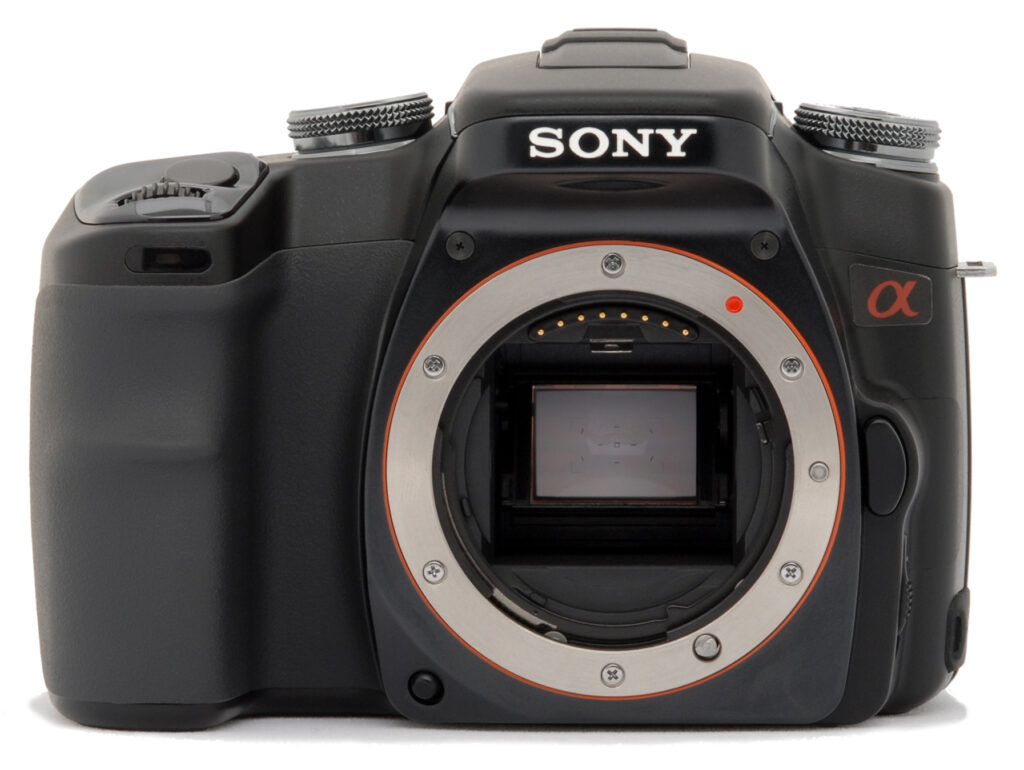
No one suggested that the KM 5D's original mount system was weak, but Sony's made a modification to the body that could indicate that the 5D might not have been ready to handle the larger pro lenses in the system. They've glommed a metal plate to the front of the body, held in place by screws. The Sony logo is stamped into this plate, giving the overall package a greater look of solidity, and stiffening the body.
Flash without pop


Just like the built-in flash on the Maxxum 5D, the Sony A100's flash doesn't pop up, either manually or automatically. You have to lift it. And unlike on the Maxxum 5D, there's no clearly indicated tab to assist in lifting the flash. You just have to know to grab the two metallic front rails and pull up. A very small flash swings into place. It seems about as powerful as most built-in SLR flashes, which is to say not very powerful at all. Still, it meets my expectations, handling most close range shots well.
Flash exposure compensation is included, accessible via the Function button/dial combination on the left of the top deck. You can easily and graphically adjust the EV setting against the Flash EV because when you flip up the flash, both scales appear on the status display (though only the main EV can be adjusted until you go back to the function dial to adjust the flash compensation). Seems like a handy system.
It takes getting used to, but the Function dial system works fairly well for accessing commonly used settings. Just a press on the Function button brings up the display for the item currently selected on the dial. Turn the dial to change available functions. Metering mode, flash settings, AF settings, ISO settings, white balance, dynamic range, and color modes are changed on this dial, with a surprisingly straightforward and attractive interface.
The rest of the controls are typically well made. The four buttons down the left of the LCD are tight and responsive, as are all the others on the A100, including the depth-of-field preview button on the front. The only exception is the navigation dial, which appears to be eight-way rather than the traditional four-way. I'm hoping it's just because it's an early model, but frequently the wrong input is received by my presses, and the camera goes in an entirely different direction than I intended. It's just too sensitive. When scrolling within a zoomed image, it does appear to be able to move diagonally, so an eight-way controller it must be. The center button, incidentally, is marked AF, and it serves as both an AF lock button and an OK button for making final menu selections.
Shooting
In use, I found the Sony A100 quite nice. The Eye Start AF, despite it's obvious foibles, made me feel like the camera was as into photography as I was. It seemed always ready to do my bidding, and followed focus as I moved the camera around a scene, maintaining focus all the way. That's a good experience. It handled inanimate objects very well, and helped getting shots of sitting children. But teach them to walk and it's all over. The A100 could not keep up where other cameras I've used can often track focus and stay on a swift toddler. I saw nothing like that in my early testing. In Continuous AF, it made some effort, but very stepwise; nothing like smooth motion. I'll have to test it more when the shipping version arrives.
 |
| Heavy Beauty: Expected in late September 2006, the 35mm f/1.4G is fine to hold and use. The top ring is a hard, grippy rubber used for focusing, and that riser on the left is the guard for the Focus Hold button, for when you want the AF system to leave it just as you see it. |
I had the opportunity to test the Sony A100 with more than one lens. While my experience with the kit lens, a plastic-bodied 18-70mm f/3.5-5.6, was a good one, the camera completely changed personality when I affixed the heavy and very sweet 35mm f/1.4 G. The camera was faster and quieter, and could do more in low light. I'm a prime lens fan, so I had fun with this $1,400 masterpiece. It felt and looked more like a gun barrel or a grenade than a lens, and gave the A100 a sharp eye and an all-business feel. I was so lost in shooting pictures of dandelions on my lawn with this lens that while I was lying on my side to take multiple manual focus shots, some guy stopped his truck to see if I had passed out. Talk about getting into the joy of photography.
Later I shot with the 70-300mm f/4.5-5.6 zoom lens and was pretty impressed with what that could do as well. Where I was really surprised was with the performance of the 18-200mm f/3.5-6.3 vacation lens. I got some shots in the middle of the range that really blew my mind. I didn't push it like we'll do when we test it on SLRgear.com, mostly because this is a pre-release camera, but I think I'd strongly consider a lens like this on an Alpha, where I don't think I would on other systems. That's based on a very quick look, however, so watch for the full review for more.
Finally, Sony has three Carl Zeiss optics planned for the Alpha system, two of which are expected to ship along with that 35mm f/1.4G in late September, just in time for Photokina. They are the 135mm f/1.8CZ and the 85mm f/1.4CZ, list priced at $1,399 and $1,299 each. Just a month later, just in time for the Holiday shopping season, the 16-80 f/3.5-4.5CZ will ship.

This lens is significant not only because of its Carl Zeiss moniker, but because it is roughly equivalent to the lens on the Sony DSC-R1: a 24-120mm equivalent that Sony has touted as an ideal combination. It is significant in that it bests most other offerings at any price in terms of wide angle. Price will be $699.
Limitations
There are bound to be limitations in an under-$1,000 camera, of course; but they are surprisingly few. First is the noise the camera makes. Not image noise, but audible noise. While I think they do an impressive job keeping the noise of the body-mounted AF motor in check, it can still make quite a racket if it's having trouble finding focus. When just looking through your camera can make a noise loud enough to turn all eyes on you, you might get some nice portraits (with often rude or quizzical expressions) but candid shots are out of the question. When you fire the shutter, you can hear the Super SteadyShot rattling around a bit too. I think this is mostly heard by the photographer, but it's another noise to contend with.
Though it's not obnoxiously loud, the shutter release sound is like sloshing a rake into a tubful of water. It's not a sound I associate with a precision tool. Some will like it, others will not. I do not, but it would not keep me from choosing the A100.
I do like that you don't have to fiddle with a flippy rubber door to connect the USB cable, but there's something I don't like about having to open the CF card door to make this common connection. The door just doesn't seem like it's made for a lot of wear, though I'd say it's the only piece of the A100 that seems a little weak.
I'd also wanted to shoot some test shots with my studio lighting, but right before getting the kids all dressed up, I realized that my infrared transmitter wouldn't work on the Alpha's proprietary hot shoe, and there was no x-sync to use either. This was really only a problem for me in particular, one that anyone interested in buying an A100 could easily overcome with the purchase of some relatively inexpensive cables and connectors that will become available as early as September of this year (I'm also guessing that they should be available under the Konica-Minolta brand already).
Shots from our test camera were pretty noisy at high ISO, and the camera took an aggressive move against that noise that is typical of Sony cameras. The resulting images have smooshed details and a watercolor appearance at ISO 800 and 1,600. That behavior can likely be dealt with by adjusting sharpness settings, and certainly by shooting RAW. We'll have to see how it looks when we get the full production sample. Still, most cameras don't do that well at high ISO, so it's nothing new. The Sony A100's images at low ISO are stunning.
Not just a camera
Sony's Alpha announcement isn't just about the A100, nor just a few special lenses. It's about Sony's new SLR camera system. Sony needed a bit of luck this year, and it appears it came in the form of Konica Minolta's giving up consumer photography altogether. They've inherited a system that goes back 26 years to the dawn of the first Maxxum cameras, and the new DSLR-A100 will work with all of those lenses, and many of those accessories. They have a clear map of lenses and accessories that they'll be rolling out this year, including those special Carl Zeiss optics, something Konica Minolta probably wouldn't have done.

One can only imagine that while Konica Minolta saw digital photography as too expensive to compete, the number two digital camera maker to the World now sees the existing A-mount system as a huge, affordable opportunity to hit the ground running and zip past Pentax and Olympus to take on Nikon and Canon from a more stable, better-established platform. That had been their intention all along, but now they won't have to compete with their former partner for customers.
Analysis
There are a few inherent problems in the 26 year old system they inherit, most obviously the body-based AF system that's a little slower and louder than the competition's electronically-controlled, much quieter systems; but where Konica Minolta likely couldn't, Sony might be able to make the necessary changes with their engineering might and significant capital if they choose. After all, Nikon made the transition from body-based to electronic lens-based AF control while maintaining backward compatibility; surely Sony can handle it.
The stakes are high, and Canon and Nikon must be taking it seriously. This is the company that virtually owns the video imaging market, not to mention much of the content produced in movies and television around the world. In terms of cash flow, Nikon takes a distant third position behind the two mammoths of Sony and Canon. Add Matsushita (Panasonic), who just announced their digital SLR with Leica optics, and the battle's about to get very interesting.
But not yet.
Sony will make a lot of headway with the A100, but this mustn't be the only shot fired. The A100 is a good start, taking on the ever-popular Digital Rebel XT directly with more bullet points and higher resolution, but they must have a pro or semi-pro solution in the wings. Will it be a mod of the Maxxum 7D, or an all-Sony concoction that takes on the Canon 30D and Nikon D100 with sophisticated Sony design wizardry? Arguably in terms of resolution the A100 does make a play in that direction, but other semi-pro features are missing, as it that Sony mystique.


If they do come out with a semi-pro version, it needs to be an all-Sony design, in my opinion, because though I've changed my view after a few days of experience, first impressions take place at the camera counter and in the browser window, and what looks like a re-badged camera could sell fewer units. I'm amused with myself that I don't see it that way anymore, but I think many will.
I recommend resisting the impression that this is a re-badged Konica Minolta camera, especially if that carries a negative connotation for you. I liked both Konica Minolta digital SLRs for their build and utility, but their output wasn't as good as it could have been; certainly nowhere near as good as we're seeing from the A100 in pre-release form. Everything about the A100 seems improved: fit and finish, speed, resolution, and usability. With 19 lenses coming available (five at launch) in 2006, and 34 accessories coming by November, it's clear that Sony is serious about the Alpha camera system.
Look at the Sony DSLR-A100 as the first product of Sony's collaboration with Konica Minolta. Now that Sony has most of the relevant Konica Minolta folks onboard, there's no telling what direction the line will take. If the A100 is any indication, we stand to get some excellent cameras out of the deal, both from Sony and the competition as they join the battle.
Highlights
- 10.2-megapixel CCD delivering resolutions as high as 3,872 x 2,592 pixels.
- Digital SLR design for a true optical viewfinder.
- 2.5-inch TFT color LCD monitor for image and menu review.
- Interchangeable bayonet lens mount.
- Auto and Manual focus options, with adjustable nine-point AF area, and Single and Continuous AF modes.
- Auto, Program AE (with Program Shift), Aperture Priority, Shutter Priority, and Manual shooting modes.
- Portrait, Landscape, Macro, Sports, Sunset, and Night Portrait exposure modes.
- Shutter speeds from 1/4,000 to 30 seconds, with a Bulb setting for manual control of long exposures.
- 14-segment honeycomb pattern metering, Center-Weighted, and Spot metering options, with AE Lock function.
- Adjustable ISO from 100 to 1,600 equivalents, with an Auto setting.
- Built-in, pop-up flash with four main operating modes and a Slow-Sync function.
- External, proprietary flash hot-shoe for Sony accessory flash units.
- Built-in support for wireless TTL flash exposure with certain Sony flashes.
- Contrast, saturation, and sharpness adjustments.
- Adjustable White Balance setting with a manual option and full range of Kelvin temperature settings.
- Color modes include Natural (sRGB), Portrait (sRGB), Landscape (sRGB), Sunset (sRGB), Night View (sRGB), Black & White (sRGB), and Adobe RGB.
- RAW and JPEG file formats.
- Images saved on CompactFlash Type I or II memory cards, Microdrive compatible.
- "Storage-Class" USB 2.0 High-Speed interface.
- USB 2.0 High-Speed cable and interface software for connecting to a computer and downloading images.
- NTSC or PAL selectable video output signal, with cable included.
- Power supplied by a single high-capacity lithium-ion battery pack or separate AC adapter (available as an accessory).
- Optional wired remote control accessories.
- DPOF (Digital Print Order Format), Exif 2.2 and PictBridge compliant.
Recommended Accessories
- Camera case
- Additional battery
- AC adapter
- External flash
- BIG Compact Flash memory card (512MB to 2GB or larger recommended)
Conclusion
| Pro: | Con: |
|---|---|
|
|
The strength of Sony's initial foray into the DSLR market is testimony to the wisdom shown by Sony's management in partnering with Konica-Minolta and eventually taking over their DSLR operations. By any measure, the Sony A100 delivers strong functionality and represents an excellent value for the money. The sensor-based anti-shake system Sony inherited from Minolta is very capable, and has the usual sensor-based advantage of making all your lenses into image-stabilized ones. We think that the impact of anti-shake is generally underappreciated by the public: It can make a huge difference in the number of usable photos you come home with, and should be a key contributing factor in the selection of a camera/lens system to buy into. Having this capability built into the Sony A100's body is a fantastic user benefit. We were very impressed with other characteristics of the Sony A100 as well, including its excellent fit and finish, high resolution, good color rendition, very good battery life, and very responsive handling. The only weak points we found were its somewhat high noise levels at ISO 800 and 1600, and a tendency toward exposure variability, particularly when wide-area AF was combined with multi-segment metering. Read the full review for a deeper discussion of this: We suspect that novice photographers won't notice the fairly minor variations we observed, and more experienced users are likely to avoid the problem altogether by manually selecting their AF points. It is clearly a characteristic of the camera's exposure system though, so we feel obligated to point it out to our readers. At the end of the day though, the Sony DSLR-A100 proved to be a competent picture-taking tool, and one that offers really excellent value for the money. It's clear that Canon and Nikon have a new, strong competitor in the DSLR market: Bad news for them, but great news for the consumer!
Design
Sony A100 Design
 Designed for amateur or professional photographers (and really anyone interested in a digital SLR), Sony's A100 offers exceptional exposure control and a solid build reminiscent of a high-end, compact 35mm SLR. The body accommodates a handy assortment of control buttons, switches, and dials, which becomes fairly intuitive to operate after. When shooting, your attention is directed primarily to the back panel and sometimes to the top, but not to either side as is the case with many prosumer digital cameras. The A100 features a 10.2-megapixel CCD and a bayonet lens mount. A Sony 18-70mm f/3.5 lens accompanied our evaluation unit, and will presumably be included as the "kit" lens.
The A100's all-black and compact body measures 5.2 x 5.6 x 3.7 inches (132 x 142 x 94 millimeters) with the 18-70mm lens, and weighs 30.8 ounces (874 grams; 1.92 pounds) with the lens, battery, and memory card. The A100 isn't small enough to fit a pocket or purse, but is light enough to carry on vacation. You'll want a camera bag for better protection and portability, but the positions of the eyelets for the included neck strap at least let the camera hang level with the standard lens.

The camera's front panel has the bayonet lens mount, lens release button, Depth of Field Preview button, Self-Timer lamp, and the front of the pop-up flash compartment. Also visible from the front of the camera are the Shutter button and Front Control dial, located at the top of the hand grip. An indentation near the top of the hand grip comfortably cradles your middle finger as it curls around the grip.

The right side of the camera holds the CompactFlash memory card slot, covered by a hinged plastic door. The A100 accommodates Type I or II CF memory cards, including Microdrives. The camera also comes with a Memory Stick Pro Duo to CF adapter to keep the A100 compatible with existing Sony memory technology. Nestled inside the compartment door is the shared-use A/V Out / USB 2.0 jack for direct connection to a computer or television set. At the very top of the right panel is one of the two neck strap attachment eyelets.

The left side of the camera has a DC IN jack at the very bottom and the Manual / Auto focus switch just below the lens release button housing (on the Konica Minolta 5D, this was the wired Remote jack, which has been moved to the rear where the DC IN jack used to be). At the top is the other neck strap attachment eyelet.

The top panel accommodates the manually-activated pop-up flash compartment and external flash hot shoe; the latter is protected by a sliding plastic cover that is completely removable from the camera body. The hot shoe employs a proprietary electrode setup and mounting bracket for Konica Minolta and Sony accessory flash units, which isn't compatible with generic hot-shoe flashes, nor with Sony's older hot shoe flash units for the F828 and R1, like the HVL-F32X. The pop-up flash has two slight rails on either side that allow you to raise it into its upright position (it does not automatically pop up). In addition, there are a number of controls that access various camera functions, including the Function button and dial, Exposure Mode Dial, Drive Mode button, front Control dial, and Shutter Release button.

The remaining controls are on the camera's rear panel, along with the optical viewfinder and LCD monitor. The A100's optical viewfinder is surrounded by a flexible, removable arch, and features two sensors below it that detect when your eye is brought up to the viewfinder. (You can enable these sensors through the Custom menu to automatically detect your eye in front of the viewfinder and disable the information display on the LCD monitor, cutting out any distracting glare; it also begins the autofocus process before you press the shutter halfway.) A diopter adjustment dial on the right side of the eyepiece adjusts the view for eyeglass wearers. Controls on the left side of the rear panel include the Power switch, and the Menu, Display, Delete, and Playback buttons. On the other side of the LCD monitor are the four-way Controller with a Spot-AF button / OK button at its center, the wired remote jack, and the Anti-Shake switch. On top and to the right of the optical viewfinder are the Exposure Compensation button (Zoom Out) and the AE lock button (Zoom In), which also enables Slow Sync flash mode.

The camera's bottom panel is fairly flat, with a grooved grip pad surrounding the metal tripod mount. Also on the bottom panel is the camera's battery compartment, which features a locking, hinged door, oriented quite differently from the KM 5D. As a result, depending on your tripod, the battery compartment may not be far enough from the metal tripod mount to allow quick battery changes when mounted on a tripod.
Worth noting are the absence of the focal plane indicator and a flash sync terminal.
Operation
Operation & User Interface
The Sony A100's user interface may appear slightly daunting at first, but spend a little time with the camera and you'll find the controls intuitive and well-placed. The A100's external dials and buttons access essentially all of the main camera settings, reserving the LCD menu system for less commonly-used functions. The front Control dial with the Exposure Compensation button functioning as a shift key quickly accesses shutter speed and aperture settings, in addition to a wide range of functions when used with other control buttons. Most of the camera adjustments are made by rotating a dial, pressing a button, and turning one of the control dials. External mechanical controls like these are much faster to use than navigating the LCD menu. With a little practice, the experienced photographer can develop a muscle-memory map of the camera and actuate some controls by feel alone.
As in all d-SLRs, the LCD monitor doesn't act as a viewfinder but does offer a control panel of sorts, showing you the main camera settings and presenting adjustment screens for some of the control buttons. You can disable the LCD display entirely using the Display button, or activate the full or basic information readouts. You can also see the main exposure settings through the viewfinder. See the Viewfinder sub-tab in the navigation bar above for a full description of the Viewfinder and rear-panel LCD displays.
While you can quickly feel comfortable using the camera, getting to know everything it can do can take a little time, given the large number of custom settings and setup options. However, once you get the hang of it, the control layout and overall feel of the camera are quite natural. Right out of the box, you could probably snap a few images with just a cursory look at the manual, but plan on investing more time to get better acquainted with all of the camera's controls and settings.
Control Enumeration

Depth of Field Preview Button: Tucked away on the right bottom corner of the lens mount, this button stops down the lens to the selected aperture, so you can get an idea of the depth of field when looking through the viewfinder.

Lens Release Button: On the left side of the lens mount, this button unlocks the lens so that it can be removed from the camera.

Focus Mode Switch: Mounted in the bottom left corner of the left panel, this sliding switch controls the main focus mode:
- AF: The AF system operates only when the Shutter button is halfway pressed.
- Manual Focus: Disables the autofocus system, so that you can manually adjust focus via the lens ring.

Front Control Dial: This ridged wheel sits just in front of the Shutter button on top of the handgrip, conveniently under your index finger. All of the most commonly used camera settings are adjusted by using this wheel in conjunction with one of the function dials or control buttons on the camera. It also controls aperture and shutter speed in Aperture Priority and Shutter Priority exposure modes and shutter speed in Manual mode (press and hold the AV button on the camera's back while turning the Front Control Dial to change the aperture value).

Shutter Button: Just behind the Front Control Dial, this button sets exposure and focus (in autofocus mode) when half-pressed, and trips the shutter when fully pressed.

Drive Mode Button: Directly behind the Shutter button on the top panel, this button accesses the camera's drive settings, which include Single Frame Advance, Continuous Advance, the 10 and Two-second Self-timer modes, Single and Continuous Exposure Bracketing modes, and White Balance Bracketing.

Exposure Mode Dial: Resting on the right side of the pop-up flash compartment, this textured dial controls the camera's exposure mode. Choices include Auto, Program AE, Aperture Priority, Shutter Priority, Manual, Night Portrait, Sunset, Sports, Macro, Landscape, and Portrait modes.

Function Dial and Button: This control combination is located on the far right side of the camera's top panel, and controls a range of settings. Turning the dial selects the available function, and pressing the Fn button displays the options for that setting on the LCD monitor. Dial choices are:
 Color/DEC: Adjusts the overall saturation, sharpness, and contrast for each of the available color modes, which include Standard, Vivid, Portrait, Landscape, Sunset, Night View, Black & White, and Adobe RGB settings.
- D-Range Optimizer: Enables the camera's dynamic range optimization tool. Choices here are Off, Standard, or Advanced.
- White Balance: Sets the camera's white balance mode to Auto, Daylight, Shade, Cloudy, Tungsten, Fluorescent, or Flash presets, each with a fine tuning adjustment range. Also available are a range of Kelvin temperature settings and a manual adjustment.
- ISO: Accesses the camera's sensitivity settings. Choices are Auto, or 100, 200, 400, 800, 1,600, Lo 80, and Hi 200 equivalents.
- Focus: Lets the user adjust the camera's focus mode and area selection. Under Area Selection, options are Wide, Spot, or Focus Area Selection (manual). Under AF mode, options are Single-shot, Direct Manual Focus, Automatic, and Continuous.
- Flash Mode: Adjusts the camera's built-in flash mode to Auto, Fill, Rear Sync, or Wireless, and also provides an intensity adjustment.
- Metering Mode: The final position on the dial, this option lets you adjust the camera's metering method. Choices are Multi-Segment, Center-Weighted, and Spot.
 Color/DEC: Adjusts the overall saturation, sharpness, and contrast for each of the available color modes, which include Standard, Vivid, Portrait, Landscape, Sunset, Night View, Black & White, and Adobe RGB settings.
 Focus: Lets the user adjust the camera's focus mode and area selection. Under Area Selection, options are Wide, Spot, or Focus Area Selection (manual). Under AF mode, options are Single-shot, Direct Manual Focus, Automatic, and Continuous.

Power Switch: Located in the top left corner of the rear panel, this sliding switch turns the camera on or off.

Menu Button: The top button in a series lining the left side of the LCD monitor, this button calls up the menu system. Pressing it a second time returns to the LCD's Status display.

Display Button: Directly below the Menu button, this button controls the LCD information display in Record and Playback modes. Though the LCD monitor does not provide any image preview, it does report the camera's exposure settings. Pressing this button cycles between the full information display, basic display, and no display (disables the LCD entirely). In Playback mode, this button cycles between an information overlay, no information, and the index display.

Delete Button: Right below the Display button, in Playback mode, the Delete button prompts the camera to ask if you want to delete a displayed image.

Playback Button: The final button in the series on the left side of the LCD monitor, this button accesses the camera's Playback mode, so that you can review any captured images. Once in Playback mode, a second press of the Playback button returns to Record mode. (You can also press the Shutter button.)

Diopter Control Dial: Practically hidden on the top right side of the optical viewfinder, this tiny dial adjusts the viewfinder display to accommodate eyeglass wearers.

Exposure Compensation Button: Just right of the viewfinder eyepiece on the rear panel, this button shifts the control dial to set exposure compensation in Auto, P, A, and S exposure modes or any Scene mode. In Playback mode, it zooms out from an enlarged view.

AE Lock Button: To the right of the Exposure Compensation button, this button locks the exposure. When using the flash in Program, Aperture Priority, or Full Auto exposure modes, this button accesses the Slow-Sync flash function. Pressing and holding the button locks the exposure, and the flash output is based on the locked reading. In Playback mode, this button enlarges captured images.

Multi-controller and Spot AF / OK Button: Right of the LCD monitor, this rocker control steps through selections within the LCD menu system and interacts with various status messages or requests for confirmation that appear on the LCD screen. You navigate the menus by pressing one of the four arrows around the control's periphery, and confirm selections by pressing the Spot AF / OK button in the center of the control. When selecting an AF area, the rocker actually moves in eight directions, giving you more flexibility in moving the AF point. In Playback mode, the right and left arrows scroll through captured images on the memory card, while the up arrow activates a histogram display and the down arrow rotates the image 90 degrees counterclockwise, clockwise, then back to the original orientation with each press. In Record mode, when the AF Area mode is set to Wide, pressing and holding the center of the control switches the camera to Spot autofocus mode as long as it's held down.

Super SteadyShot Switch: In the lower right corner of the rear panel, this switch turns the camera's image stabilization system on and off.

Battery Compartment Latch: Located in the battery compartment door on the bottom of the camera, this latch unlocks and opens the battery compartment cover.
Optics
Sony A100 Optics
The Sony A100 features a bayonet lens mount, which accommodates a range of Sony and Konica Minolta lenses. The A100 comes with a Sony 18-70mm f/3.5 kit lens. A small button on the front of the camera releases the lens from its mount, so it can be turned and removed. The A100's CCD is smaller than a 35mm frame, so the angle of view at any given focal length will not be the same as on a 35mm camera. To find the approximate 35mm equivalent focal length, multiply the focal length of the lens by 1.5. (Thus, a 100mm lens will provide about the same view as a 150mm lens on a 35mm camera.)
The A100 provides both manual and automatic focus control modes, set by the Focus Mode switch on the left side of the camera. You can select between Auto and Manual focus modes. But the Function dial and button provide access to additional Auto Focus Area and Auto Focus Mode options.
Auto Focus Area has three options: Wide Focus Area, Spot AF Area, and Focus Area Selection. The default option is a nine-point Wide Focus area, indicated by an array of dashes inset within four widely-spaced brackets in the viewfinder image. You can override the chosen AF mode by pressing the Spot AF / OK button in the center of the Multi-controller, which defaults to the more accurate center AF point (the latter indicated by a target box in the center of the viewfinder). Wide Area AF bases its focus on the most prominent subject detail in the portion of the image that falls within the AF brackets. Spot Focus bases its focus on the very center of the frame, where the square target resides. The Focus Area Selection lets you manually set the main AF point by using the Multi-controller to highlight one of the nine AF points. The active AF area is briefly illuminated in the viewfinder. Once you've set the AF area, sliding the switch to the Focus Area Lock position locks the AF point.
Auto Focus Mode offers four options: Single Shot AF, Automatic AF, Continuous AF, and Direct Manual Focus. Single Shot AF is a general purpose autofocusing mode that sets focus when you half press the Shutter button. Automatic AF automatically switches between single and continuous AF depending on the subject's motion. Continuous AF is designed for subjects in motion, continuously focusing on the subject even when the Shutter button is half-pressed. Direct Manual Focus operates like Automatic AF, but after focus is automatically found, it can be adjusted manually. The focus signal in the viewfinder tells you when you can manually adjust focus.
Sony A100 AF Assist
The Sony A100 uses its built-in flash head as a very bright AF-assist light for better focusing in dim lighting. This has the advantage that the light from the flash is very bright, but the downside is that you can only get AF assist when the flash head is raised. This is a real limitation for available-light photography, as the camera can expose at light levels below those it can focus at. (Although its low-light focusing ability is much better than average.) If the camera is fixed on a tripod, you can work around this limitation, but it's somewhat awkward: With the flash head up, half-press the shutter button to make the camera focus. Then switch the focus mode to manual focus, being careful not to touch the focus ring on the lens. Stow the flash head, and then take your picture. (But don't forget to switch back to AF mode for the rest of your shooting!)
Sony A100 Anti-Shake
The A100 also employs Sony's Super SteadyShot anti-shake technology, which uses a highly sensitive angular rotation sensor and Smooth Impact Drive Mechanism (SIDM) to move the CCD assembly itself to counteract camera movement, rather than the more common approach of moving an optical element inside the lens. This body-based anti-shake approach is based on technology Sony acquired from Konica Minolta, but Sony claims that a more powerful processor in the A100 increases the system's effectiveness beyond that of similar systems in previous Konica Minolta SLR models. (Theoretically, a faster CPU could let the system respond to and compensate for higher-frequency vibrations.)
Sony claims that the Super SteadyShot anti-shake system in the A100 provides a 2 to 3.5 stop reduction in the blurring produced by camera shake. Translating that into real-world shutter speeds, a two-stop improvement means that a shutter speed of 1/30 second would give you the same resistance to blur from camera shake that a speed of 1/120 would without anti-shake. A 3.5 stop improvement would mean you could shoot as slow as 1/11 second and get the same results (blur-wise) as when shooting at 1/120 second unaided. Even the lower end of the specified range of effectiveness means a pretty significant improvement in one's ability to hand-hold long exposures.
When Super SteadyShot is activated, the SteadyShot scale on the right side of the viewfinder display indicates the degree of stabilization. A downside to Sony's body-based SteadyShot approach is that while you can see the results of stabilization on competing lens-based designs, you have only this scale to tell you how the A100's SteadyShot mechanism is doing. SteadyShot minimizes the effect of blurring caused by slight camera movement, which is more noticeable at long focal lengths.
We don't have a quantitative way of measuring anti-shake performance, but the system on the Sony A100 seemed to be pretty effective. In the past, we've generally found that body-based anti-shake systems were more effective at compensating for lower-frequency, larger-amplitude camera shake than were lens-based systems, but less effective with higher-frequency vibration. Body-based systems have also generally seemed to be more effective with shorter focal length lenses than long telephotos, perhaps because body-based sensors may be less sensitive to angular movement than lens-based sensors are to the corresponding linear motion out along the lens barrel. Finally, lens-based anti-shake systems do have a practical advantage in that they also stabilize the view in the optical viewfinder, while sensor-based ones do not. We'll report more on our experience with the A100's anti-shake and make some quantitative comparisons with the performance of some other systems soon, hopefully in the near future. There's no question, though, that even with telephoto lenses, the A100's Super SteadyShot anti-shake system produces a dramatic improvement in the sharpness of handheld photos at slow shutter speeds.
Anti-Dust Too?
In an interesting wrinkle, Sony also appears to be using the same actuators used in the anti-shake system to deliberately vibrate the sensor at startup and shut down to dislodge dust particles that may have landed on its surface. This is reminiscent of the hypersonic dust-removal system pioneered by Olympus and also recently adopted by Canon, but at this point we don't know whether the vibrational frequencies used by the two systems are similar or not, nor how the effectiveness of the two compare.
Sony A100 Optical Test Results
Below are the results of our optical tests on the Sony A100. We used the 18-70mm kit lens as the benchmark, since most people will buy and use the camera in this configuration.
Lens
Zoom
Good performance from the 18-70mm kit lens.


The Sony Alpha A100 features a bayonet lens mount (the old Minolta mount) to accommodate a wide range of lenses, and comes bundled with an 18-70mm lens. Detail is good at full wide angle, with good definition throughout the frame, though with slightly soft corners. There's also a small amount of coma distortion in the top corners. Results are also very good at full telephoto, though again, with slight softening in the corners of the frame.
Macro
An average size macro area with the kit lens, though good detail and
resolution. Flash performs well also.


The Sony Alpha A100's macro performance will of course vary with the lens in use. With the 18-70mm kit lens attached, the A100 captured a minimum area of 3.12 x 2.09 inches (79 x 53 millimeters), which is about average, more than adequate for photographing typical small objects for eBay, etc. If you're really into super macro shots, you may want to either add some front-element closeup lenses, or buy a dedicated macro lens. Detail is strong and resolution high, though details are a bit soft throughout the frame. The flash throttled down very well, with fairly even coverage, though the shot is slightly underexposed overall.
Distortion
Slightly higher than average barrel distortion, but very low pincushion.
This is the tendency for the lens to bend straight lines outward (like a barrel--usually at wide angle) or inward (like a pincushion--usually at telephoto). The Alpha A100 kit lens' 0.9% barrel distortion at wide angle is a little higher than I personally like to see, and is slightly higher than average among the cameras we've tested. At the telephoto end, the A100's 0.03% pincushion is very low, and translates to about one pixel's worth of distortion.
| Barrel distortion at 18mm is 0.9% |
 |
| Pincushion at 70mm is 0.03% |
 |
Chromatic aberration
Moderately high at 18mm, extends a ways into the frame. Very little aberration at 70mm.


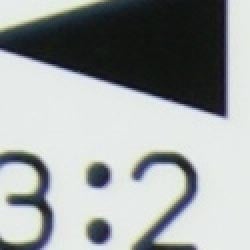

Chromatic aberration is moderately high at full wide angle on the 18-70mm kit lens, showing about 6-7 pixels of bright coloration on either side of the target lines, with the effect . However, at full telephoto, pixels are fewer and much less bright. (This distortion is visible as a very slight colored fringe around the objects at the edges of the field of view on the resolution target.)
Corner Sharpness
Slight softening in the corners of the frame with the kit lens, though not too strong. More noticeable at telephoto.

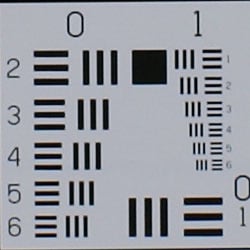


The Sony Alpha A100's 18-70mm kit lens produced slightly soft corners in a few shots, with the strongest effect at full telephoto. While the telephoto example above from the lower left-hand corner of our test unit looks pretty soft, that was by far the worst corner, and even there the effect didn't extend too far into the frame. Other corners were much better, overall lens performance was quite good in this area.
Viewfinder
Coverage
Good accuracy from the optical viewfinder.


The Alpha A100's optical viewfinder showed about 97% frame accuracy at wide angle, and about 95% at telephoto (the difference most likely due to were we decided to set the edges of the frame, given the barrel distortion at wide angle. Good results, equal to or slightly better than most consumer DSLRs on the market. (Although we'd personally like to see true 100% viewfinders on all SLRs.)
The images above were taken from our standardized test shots. For a collection of more pictorial photos, see our Sony Alpha DSLR-A100 Photo Gallery .
Exposure
Sony A100 Exposure
The Sony A100 offers excellent exposure control, with fairly fine-grained adjustment of image attributes like sharpness, contrast, and color saturation, as well as extensive White Balance offerings. The Exposure Mode dial on the top panel selects the main shooting mode, offering Manual, Shutter Priority, Aperture Priority, Program AE (Program Shift), Full Auto, and six Scene settings.
Exposure Modes
In straight Auto mode, the camera controls everything about the exposure, except for flash, zoom, and focus. Program AE mode keeps the camera in charge of the exposure,while you have control over all other exposure options. While in Program AE mode, you can rotate the control dial with or without holding the Exposure Compensation button to scroll through a range of equivalent exposure settings. Thus, you can bias your exposure toward a faster shutter speed or greater depth of field as circumstances dictate. Aperture Priority mode lets you select the lens aperture setting, while the camera selects the most appropriate corresponding shutter speed. In Shutter Priority mode, the user selects the shutter speed, from 1/4,000 to 30 seconds, while the camera chooses the best corresponding aperture setting. Switching to Manual mode gives you control over both shutter speed and aperture, with a Bulb setting available for longer exposures. Exposure time in Bulb mode is determined by how long you hold down the Shutter button. There doesn't appear to be any limit to the duration of Bulb exposures, but it appears that the dark-frame subtraction will only compensate for exposures up to 30 seconds long. (I strongly recommend use of the optional wired remote in Bulb mode, as the pressure of your finger on the Shutter button is bound to jiggle the camera somewhat, blurring the image.)
Scene Modes & DOF Preview
The six Scene modes include Portrait, Landscape, Macro, Sports Action, Sunset, and Night Portrait. Each optimizes the camera's exposure, white balance, and image processing systems for the particular program.
Portrait biases toward wider apertures to defocus the background while capturing warm, soft skin tones. Sports Action maximizes shutter speeds with Continuous Autofocus and Continuous Advance Drive modes. Landscape produces sharp, colorful shots of outdoor scenery. Sunset handles the rich warm palettes of sunsets. The Macro setting boosts color in smaller subjects, and Night Portrait balances ambient light with the flash.
A Depth of Field Preview button on the front of the camera lets you view a scene through the viewfinder with the aperture stopped down, previewing the depth of field before actually capturing the image.
Metering Modes
The Sony A100 offers three metering modes: Multi-segment, Center-Weighted, and Spot. The default metering mode takes readings throughout the image to determine exposure. Center-Weighted gives precedence to the center of the image while reading the whole frame. Spot metering options are also available via the Metering Mode dial on the rear panel. Spot metering, useful for high-contrast subjects, bases the exposure reading on the very center of the image, letting you set the exposure based on a small portion of your subject. You can also lock an exposure reading by pressing the AE Lock button on the back panel. Halfway pressing the Shutter button also locks exposure and focus, but only in autofocus mode.
ISO Range, Noise Reduction, and Exposure Compensation
The A100's light sensitivity can be set to ISO equivalents of 100, 200, 400, 800, or 1,600, or it can be left in Auto mode for the camera to adjust as it sees fit. Two special options called Lo 80 and Hi 200 offer special tone curves for low-key and high-key subjects at ISOs of 80 and 200 respectively. A Noise Reduction option is available for longer exposures and higher ISO settings, and greatly reduces the amount of image noise that would otherwise result. Exposure compensation is adjustable from -2 to +2 exposure equivalents (EV) in one-third-step increments by turning the Control dial while pressing the Exposure Compensation button, which displays the scale and setting on the LCD monitor. An Auto Exposure Bracketing option can snap three shots in rapid succession if you hold down the shutter, varying the exposure between each in steps of 0.3 or 0.7 EV units. You can also bracket the exposures using the flash. The A100's Drive mode dial offers Auto Exposure Bracketing for either Single Advance or Continuous Advance drive settings.
White Balance Options
The A100 offers convenient control over white balance, color rendition, and tonal range. You adjust white balance by first turning the Function dial to the WB setting, and selecting either Auto, Preset, Color Temperature, or Custom. Auto lets the camera choose the white balance itself. Preset lets you set the white balance to a specific light source. Options include Daylight, Shade, Cloudy, Tungsten, Fluorescent, and Flash. Within the preset modes, you can also fine tune the white balance by pressing the up and down arrow keys. Custom allows you to calibrate the camera to a specific lighting situation by pointing to a white or neutral object. Color Temperature lets you select a specific color temperature in degrees Kelvin.
Digital Effects
The Digital Effects Control (DEC on the Function dial), offers control over image contrast, saturation, and sharpness in five steps from -2 to +2 arbitrary units. The Color Mode option of the Digital Effects Control, available in P, A, S, and M exposure modes, sRGB color space options of Standard (faithful color reproduction), Vivid (increased contrast and sharpness), Portrait (optimized skin tones), Landscape (optimized daytime outdoor scenery), Sunset (optimized landscapes at dusk or dawn), Night view (optimized for nighttime scenery without flash), Black & White (monochrome), and Adobe RGB.
Drive Modes
The A100's Drive Mode button on the top panel accesses a range of shooting modes, including Single Frame Advance, Continuous Advance, 10-second and Two-second Self-timer modes, Continuous Advance Bracketing, Single Frame Bracketing, and White Balance Bracketing. The first two bracketing modes access the camera's Auto Exposure Bracketing system. In Continuous Advance mode, the A100 captures a rapid series of images, with a maximum frame rate of three frames per second. Actual frame rates will vary, depending on the image size and quality settings, as will the total number of images in the series, due to the amount of memory card space. White Balance Bracketing lets you capture a series of images as well, though with bracketed white balance values.
The two Self-Timer modes lock the mirror up, then fire the shutter a short delay after the Shutter button is pressed. The shorter, two-second delay is very handy when you need to prop the camera on something to take a photo in dim lighting, and don't want the pressure of your finger on the shutter button to jiggle the camera. The 10-second delay is long enough that you can run around to get into the photo yourself. An LED lamp on the front of the A100 blinks and the camera beeps as the 10-second Self-Timer is counting down, the blink and beeps becoming faster in the last few seconds.
The images above were taken from our standardized test shots. For a collection of more pictorial photos, see our Sony Alpha DSLR-A100 Photo Gallery .
Not sure which camera to buy? Let your eyes be the ultimate judge! Visit our Comparometer(tm) to compare images from the Sony Alpha DSLR-A100 with those from other cameras you may be considering. The proof is in the pictures, so let your own eyes decide which you like best!
Performance
Sony A100 Performance
The Sony DSLR-A100 is a very responsive camera to shoot with. Startup is only average, but AF speed and shot to shot times are very good. The camera also has a nice, large buffer memory, and clears shots to a fast CF card very quickly. A solid performer overall.
Timing and Performance
Sony Alpha A100 Timing
Good performance, very responsive.
|
Startup/Shutdown
|
||
|
Power on
to first shot |
1.1 seconds
|
Time it takes for LCD to turn on and capture the first picture
|
|
Shutdown
|
0.2 seconds
|
Time to shut down, if buffer is empty
|
|
Buffer clearing time*
|
20 seconds,
RAW files (14 seconds buffer clearing in LF JPEG) |
Worst case buffer clearing time.* -- This is the delay after a set of shots before you can remove the card. Some cameras won't retract their lenses and shut down until the buffer is cleared.
|
|
Mode switching
|
||
|
Play to Record,
first shot |
0.2 seconds
|
Time until first shot is captured
|
|
Record to play
|
1.1 seconds
|
Time to display a large/fine file immediately after capture
|
|
Display
recorded image |
0.1 second
|
Time to display a large/fine file already on the memory card.
|
|
Shutter response (Lag Time):
|
||
|
Full Autofocus
|
0.31 second
|
Time from fully pressing shutter button to image capture, zoom lens at wide angle position.
|
|
Prefocused
|
0.116 second
|
Time to capture, after half-pressing and holding shutter button.
|
|
Manual focus
|
0.301 second
|
For most cameras, shutter lag is less in manual focus than autofocus, but usually not as fast as when the camera is "prefocused"
|
|
Cycle time (shot to shot)
|
||
|
Single Shot mode
RAW |
0.65 second;
8 frames total; 18 seconds to clear* |
Time per shot, averaged over 8 shot buffer capacity
|
|
Single Shot mode
Large Fine JPEG |
0.58 seconds
|
Time per shot, averaged over 21 shot buffer capacity
|
|
Single Shot mode
640x480 JPEG |
0.58 seconds
|
Time per shot, averaged over 20 shots
|
|
Early shutter
penalty? |
No
|
Some cameras refuse to snap another shot if you release and press the shutter too quickly in Single Shot mode, making "No" the preferred answer.
|
|
Continuous mode
Large Fine JPEG |
0.35 second
(2.85 frames/second); 24 frames total; 16 seconds to clear* |
Time per shot, averaged over 20 shots
|
|
Continuous mode
RAW |
0.35 second
(2.85 frames/second); 8 frames total; 20 seconds to clear |
Time per shot, averaged over buffer length of 8 shots
|
|
Continuous mode
RAW+ JPEG |
0.35 second
(2.85 frames /second); 3 frames total; 11 seconds to clear |
Time per shot, averaged over buffer length of 3 shots
|
|
Flash recycling
|
5 seconds
|
Flash at maximum output
|
|
Download speed
|
||
|
Windows Computer, USB 2.0
|
4452 KBytes/sec
|
Typical Values:
Less than 600=USB 1.1; 600-770=USB 2.0 Low; 771-4000=USB 2.0 High |
|
*Note: Buffer clearing times measured with a Kingston Ultimate 100x CF memory card. Slower cards will produce correspondingly slower clearing times. Slow cards may also limit length of bursts in continuous mode.
|
||
Startup and Shutter Lag
The Alpha A100's performance is quite good overall, beginning with a quick startup time of 1.1 seconds. Shutter response is quite good as well, at 0.31 second with the kit lens at full wide angle. "Prefocusing" the camera by half-pressing and holding down the shutter button before the final exposure also results in a good time, at 0.116 second. We were a little surprised though, to see the shutter lag in manual focus mode as long as 0.3 second: We'd have expected it to be closer to the prefocused time.
Shot to Shot Cycle Times
Shot to shot cycle times are very good, at about 0.58 second per frame for up to 21 large/fine JPEGs in succession, and RAW mode is also quite good at 0.65 second for eight consecutive frames. (Sony claims unlimited sequence lengths for large/fine JPEGs, but we found that a standard noise target with extreme high-frequency content reduced the buffer capacity to as little as 14 frames, even with very fast memory cards. On more typical subjects, you should easily be able to get 20+ shots in a series before having to wait for the memory card to catch up.)
Continuous Mode Performance
The A100 performs well in Continuous-mode, capturing about 2.85 frames/second, for up to eight full resolution shots in succession. (Even in RAW+JPEG mode, the Continuous rate is the same, though only for three consecutive frames.) The flash takes about five seconds to recharge after a full-power shot, about average for a DSLR.
Download Speed
Download speeds are impressively fast, meaning you won't need a separate card reader to speed things along. While not as fast as some higher-end DSLRs we've tested, the Sony A100 is more than capable of handling most action shots, and should do a great job of capturing pictures of wiggly children. Bottom line, the A100 is well-suited for a wide range of photographic needs.
Battery and Storage Capacity
Battery
Good battery life.
| Operating Mode | Number of Shots |
| LiIon rechargeable battery (CIPA standard conditions) |
750
|
The Sony DSLR-A100 uses a custom rechargeable LiIon battery for power. The table above shows maximum number of shots based on the CIPA battery-life standard. The rated 750 shots per charge is quite good, about typical for a consumer DSLR. Do keep in mind though, that time spent viewing images on the camera's LCD screen uses up battery power. If you plan extended outings, we still recommend purchasing a second battery along with the camera.
(Interested readers can find an English translation of the CIPA DC-002 standards document here. (180K PDF document))
Storage
As is usually the case with DSLRs, no card is included with the Sony Alpha A100, although it accepts CompactFlash cards.
The Sony A100 uses CompactFlash Type I or Type II memory cards, the Hitachi Microdrive, or Memory Stick Duo cards (via the included CF adapter) for image storage. The camera ships without a memory card, so you'll want to purchase one at the same time. The CompactFlash slot is on the right side of the camera, covered by a hinged plastic door that slides opens easily and snaps shut crisply. The card inserts with the connector edge going in first, and the rear of the card facing the back of the camera. A small button beside the slot ejects the card by popping it up slightly, letting you pull the card the rest of the way out.
Although individual CompactFlash cards cannot be write-protected or locked against erasure or manipulation, the A100 lets you lock individual images or groups of images through the Playback menu. Once protected, images cannot be erased or manipulated in any way, except through card formatting. The Playback menu also lets you delete images shown in the LCD display, change the number of images in the Index display, create a custom slide show, and set images up for printing on DPOF compliant printers.
Three image resolution settings are available: 3,872 x 2,592 pixels (Large); 2,896 x 1,936 (Medium); and 1,920 x 1,280 (Small). Files may be saved in Fine or Standard JPEG compression levels, as well as a compact RAW format. (By its nature, the RAW format only saves the full-resolution image size.) The A100 also allows you to simultaneously save images in both RAW and JPEG formats, allowing you to have the convenience of JPEG files but the security of a RAW copy of your images should you desire the maximum quality later.
The table below summarizes the compression ratios and number of images that can be stored on a 256MB memory card (a common size that should probably be considered a minimum for use with the camera), with each Resolution / Quality (JPEG Compression) combination.
|
Image Capacity with 256MB Memory Card |
Fine | Normal | RAW | |
| 3,872 x 2,592 | Images | 61 | 95 | 16 |
| File Size | 4.2 MB | 2.7 MB | 15.6 MB | |
| Compression | 7:1 | 11:1 | 0.94:1 | |
| 2,896 x 1,936 | Images | 105 | 161 | - |
| File Size | 2.4 MB | 1.6 MB | - | |
| Compression | 7:1 | 11:1 | - | |
| 1,920 x 1,280 | Images | 219 | 319 | - |
| File Size | 1.2 MB | 803 KB | - | |
| Compression | 6:1 | 9:1 | - | |
We strongly recommend buying at least a 256MB card, preferably a 512MB or 1GB one, given the large file sizes, to give yourself extra space for extended outings.
Imaging
Sony A100 Imaging Characteristics
Image and file quality are the ultimate bottom line for digital cameras, and Sony generally did a good job with the A100 in this area. Resolution is very good, and the camera's image-sharpening manages to deliver crisp detail with few signs of over-processing. The resulting images take further, careful sharpening in Photoshop well, and fine details are rendered nicely. Noise-reduction processing at high ISO settings is nicely restrained, but a downside of this is that noise levels at ISO 800 and 1,600 are higher than we'd like to see. Most users are still likely to be satisfied with ISO 1,600 shots printed at 8x10 inches for display on a wall or table, but the limit for closer scrutiny is probably just 5x7 inches. Color is pleasant and slightly brighter than real live (the sort of color most consumers prefer), although its rendering of greens is closer to nature than that of many competing models. This increased accuracy may lead some consumers to judge the colors as being slightly dull, but it's actually a more accurate rendering than most cameras deliver. (It's axiomatic in digital cameras that beauty is truly in the eye of the beholder: Absolute accuracy is probably less important than how the images look to you.)
Resolution and Detail
Resolution
Very high resolution, 1,600 lines of strong detail.
Our laboratory resolution chart revealed sharp, distinct line patterns down to about 1,600 lines per picture height, with extinction occurring well past 2,000. Use these numbers to compare with other cameras of similar resolution, or use them to see just what higher resolution can mean in terms of potential detail. Beware that while you might be able to make out what looks like distinct lines at numbers higher than those we've mentioned here, the camera is just doing its best to continue interpreting the lines. If you zoom in and follow them from the wider portions, you'll see the lines converge and reappear several times, so the lines you see at 1,800 and higher are really only artifacts generated by the camera's imaging system.


See full set of test images with explanations
See thumbnails of all test and gallery images
Sharpness & Detail
Sharp images with excellent detail definition.


The Sony Alpha A100's images are clear and sharp, the in-camera sharpening doing a good job of sharpening fine detail without leaving behind any nasty artifacts. As a result, images look good straight from the camera, and also take further sharpening in imaging software very well. (Edge enhancement creates the illusion of sharpness by enhancing colors and tones right at the edge of a rapid transition in color or tone. When a camera applies too much sharpening, the result can be "halos" of lighter areas around dark objects and vice versa.)
Noise-suppression systems in digital cameras tend to flatten-out detail in areas of subtle contrast. The effects can often be seen in shots of human hair, where the individual strands are lost and an almost "watercolor" look appears. In the crop above right, Marti's hair is well defined in the brighter shadows, and though some noise suppression is visible as shadows deepen, the overall effect is noticeably better than what most cameras achieve.
Color
Saturation & Hue Accuracy
Very good color overall, though a tendency toward darker blues. Generally good saturation and hue accuracy.
 |
| In the diagram above, the squares show the original color, and the circles show the color that the camera captured. More saturated colors are located towards the periphery of the graph. Hue changes as you travel around the center. Thus, hue-accurate, highly saturated colors appear as lines radiating from the center. |
Most consumer digital cameras produce color that's more highly saturated (more intense) than found in the original subjects. This is simply because most people like their color a bit brighter than life. The Sony Alpha A100 does oversaturate the stronger red and blue tones slightly, but leaves the other colors pretty much alone. Its greens in particular are more accurate than those of many digital cameras, but some consumers may see them as a little dull looking as a result. Where oversaturation is most problematic is on Caucasian skin tones, as it's very easy for these "memory colors" to be seen as too bright, too pink, too yellow, etc. Here, the A100 did quite well, producing natural-looking skin tones.
The other important part of color rendition is hue accuracy. Hue is "what color" the color is. The A100 did push cyan toward blue, and red toward orange a bit, but overall accuracy was still quite good. (The blue to cyan shift is very common among the digital cameras we test, we think it's a deliberate choice by camera engineers to produce better-looking sky colors.)


Sensor
Exposure and White Balance
Indoors, incandescent lighting
Good results with the Manual and 2,700 Kelvin white balance settings, best overall color with Manual. About average positive exposure compensation required.


The Sony A100's Auto white balance setting resulted in a very strong warm color cast indoors under incandescent lighting, and the Incandescent setting produced a bit of a warm cast as well. The Manual white balance produced the most pleasing overall color, though the 2,700 Kelvin setting wasn't too far off the mark either. The camera required a +1.0 EV exposure compensation boost for a bright exposure (about average for this shot) with all white balance settings. Overall color looks good, though slightly dark, making the blue flowers slightly dark and purplish. (A very common outcome for this shot, the A100 did better than most cameras here.) Our test lighting for this shot is a mixture of 60 and 100 watt household incandescent bulb, a pretty yellow light source, but a very common one in typical home settings here in the US.
Outdoors, daylight
Good looking color and saturation, conservative exposure system tended to underexpose a little. Some exposure variation in high-contrast shots when in auto-area AF mode and Multipoint Metering (see Exposure Variations section below). When exposure was boosted back up, there was a slight tendency to blow out strong highlights.


The Sony Alpha A100 performed well outdoors, although its exposure system has a slight bias toward underexposure that is perhaps better suited to pros (who want to preserve highlights at all costs and manipulate the images after the fact to get the midtone and shadow details to where they'd like them) than to amateurs. In my fairly extensive shooting with the camera, I found I was routinely dialing in 0.3 to 0.7 EV of positive exposure compensation, as the camera's exposure system seemed to always be exposing for the strongest highlights in the scene. As noted, this is a good approach to take, as it reduces the risk of losing important highlight detail. It's a different approach than most amateurs are accustomed to though, so the average amateur shooter will likely find themselves making slight exposure boosts on a fairly routine basis.
By the same token though, more advanced users are likely to find themselves perfectly happy with the A100's default exposure, shooting in RAW mode and working on the files afterward in a photo editing program.
White balance outdoors was typically very good when using the Auto setting, and colors were very natural. The A100 doesn't seem to oversaturate colors as much as most consumer DSLRs do, which could be either a plus or a minus, depending on your personal preference. It "likes" strong reds and deep blues, but most other colors are rendered very close to their real-world values. This is a positive characteristic, but some users may find the colors slightly dull when compared to those from other consumer DSLRs.
See full set of test images with explanations
See thumbnails of all test and gallery images
ISO & Noise Performance
Very low noise at the lower ISO settings, but high levels at 800 and 1,600 equivalents. Stronger blurring of detail at the higher settings as well.



The Sony Alpha A100's lower ISO settings produced low noise, with relatively little blurring in the darker areas. (The softness in the ISO 100 shot above is almost certainly the result of very slight subject movement during the 1/6 second exposure.) At the higher ISOs of 800 and 1,600, noise is much more pronounced and blurring due to noise suppression is much stronger, particularly at ISO 1,600. The prominent noise pixels at 1,600 also alter the overall color balance, and the exposure appears darker as well.
Extremes: Sunlit and low light tests
Very high resolution and strong detail. High contrast with the normal exposure, but the low-contrast setting helps a fair bit. "Hi200" ISO mode also helps hold strong highlights, but at the cost of an odd tone curve and poor skin tones. Excellent low-light performance, capable of capturing bright images under average city street lighting and much darker conditions.
 |
 |
| A crop of a shot with auto white balance, +0.7 EV exposure compensation, and the default contrast setting. The A100's response here is pretty typical, the strongest highlights are blown out, while shadows and lower midtones are dark. | Here's the same shot with the A100's contrast adjustment set to its lowest value. The result is much better (even Marti seems happier about it ;-), highlight preservation is much better, and Marti's skin tones are much more natural. Many cameras have low-contrast options, but the A100's does better than most, dropping contrast without losing color saturation. |
Sunlight:
Because digital cameras are more like slide film than negative film (in that they tend to have a more limited tonal range), we test them in the harshest situations to see how they handle scenes with bright highlights and dark shadows, as well as what kind of sensitivity they have in low light. The shot above is designed to mimic the very harsh, contrasty effect of direct noonday sunlight, a very tough challenge for most digital cameras. (You can read details of this test here.)
The Sony Alpha A100 performed pretty well under the deliberately harsh lighting of this test, though contrast was a little high at its default setting. The camera's contrast adjustment did a better than average job of handling the harsh lighting though: At its lowest setting, it did an excellent job of preserving highlight detail and natural-looking skin tones.
The Sony A100 also has a "Hi200" option on its ISO menu though. The manual explains that Hi200 is meant to "keep the image from becoming overexposed", apparently by flattening the tone curve in the highlight area. We also wondered whether the A100's Dynamic Range Optimization system would help with subjects like this. We tried both on this subject, with the results shown below:


From the above example, we can see that the Hi200 ISO mode does indeed help hold onto highlight detail, but the resulting tone curve produced very flat-looking skin tones. Hi200 mode seems to be just what the manual presents it as: A special-purpose mode for high-key subjects, not really suited to a scene with a broad tonal range.
Dynamic Range Optimization didn't have as strong an effect as we expected to see on this subject, but it did contribute quite a bit in a slightly different way than we anticipated. For whatever reason, when we shot at +0.7 or +1.0 EV in D-R+ mode, the highlights were as or more blown out as they were with DRO off, but we found we could take advantage of DRO's shadow-brightening effect and use less exposure compensation. This helped hold highlight detail, and at least some of the shadows were more open than previously, despite the reduced exposure.
| 1 fc 11 lux |
1/2 fc 5.5 lux |
1/4 fc 2.7 lux |
1/8 fc 1.3 lux |
1/16 fc 0.67 lux |
1/16fc No NR |
|
|---|---|---|---|---|---|---|
| ISO 100 |
 2 sec f5.0 |
 6 sec f5.0 |
 15 sec f5.0 |
 30 sec f5.0 |
 30 sec f5.0 |
 30 sec f5.0 |
| ISO 200 |
 1 sec f5.0 |
 2.5 sec f5.0 |
 8 sec f5.0 |
 15 sec f5.0 |
 30 sec f5.0 |
 30 sec f5.0 |
| ISO 400 |
 0.5 sec f5.0 |
 1.3 sec f5.0 |
 4 sec f5.0 |
 8 sec f5.0 |
 15 sec f5.0 |
 15 sec f5.0 |
| ISO 800 |
 1/4 sec f5.0 |
 0.6 sec f5.0 |
 2 sec f5.0 |
 4 sec f5.0 |
 8 sec f5.0 |
 8 sec f5.0 |
| ISO 1600 |
 1/8 sec f5.0 |
 0.3 sec f5.0 |
 1 sec f5.0 |
 2 sec f5.0 |
 4 sec f5.0 |
 4 sec f5.0 |
Low light:
The Sony Alpha A100 performed very well in low lighting, capturing bright images all the way down to the darkest light levels we test at, at all ISO settings except 100. (There, images were bright to 1/8 foot-candle, about 1/8 as bright as average city street lighting at night.) Though slightly warm, overall color looked pretty good with the Auto white balance setting. Very long exposures (e.g., 15-30 seconds) are unusually clean, with very few "hot" pixels, even when noise reduction is turned off. The noise-suppression system generally works well, it does leave behind some black specs where noisy pixels had become fully saturated, and we noticed some banding or posterization in areas of subtle tonal gradation when the noise-suppression was active. The camera's autofocus system worked very well, able to focus on the subject down to the darkest light levels we test at, even with its AF-assist light turned off.
Keep in mind here though, that shutter times this long absolutely demand the use of a tripod for the best results, and that any movement while the AF system is trying to focus will result in focus failure.
Output Quality
Print Quality
Good print quality, accurate color, excellent 13x19 inch prints. Images are sharp at 8x10 inches to ISO 800, ISO 1600 shots are soft at that size though, and noise is more visible.
Testing hundreds of digital cameras, we've found that you can only tell just so much about a camera's image quality by viewing its images on-screen. Ultimately, there's no substitute for printing a lot of images and examining them closely. For this reason, we now routinely print sample images from the cameras we test on our Canon i9900 studio printer, and on the Canon iP5000 here in the office. (See the Canon i9900 review for details on that model.)
PictBridge Printing
When its USB interface is set to PTP mode, the Sony A100 supports direct printing (no computer required) to PictBridge compatible photo printers. The extent of PictBridge support varies greatly between cameras, and the Sony A100's support is more robust than many. Provided that it's connected to a printer that offers an equivalent level of support and control, you can select batch printing or an index print, paper size, layout (bordered or borderless prints), print quality, and date and filename imprint options directly from the camera's menu system. (Very slick.) Printing via PictBridge to our Canon i9900 studio printer though, we found it to be rather slow in formatting and preparing the data to send to the printer. (It took 3 minutes and 50 seconds to print a 4x6 photo at best quality.)
Output Quality
The Sony A100 certainly has plenty of resolution to make great-looking enlargements straight from the camera: 13x19 inch prints were quite sharp, and with a little unsharp masking in Photoshop, were in the "tack sharp" range. As always, the biggest challenge was at high ISO, and there the A100 faltered a little. Noise and softening from the anti-noise processing are well-balanced, but there's more of both than we'd like to see at the highest ISOs. Shots at ISO 800 look fine up to 8x10 inches, but ISO 1600 images are softer, and the image noise produced color shifts in some shots. (The very challenging incandescent lighting in our Indoor Portrait test was a particular problem for the A100, which produced very soft images and muddy color under that light source.) Even at ISO 1600, many users will be satisfied with 8x10 inch prints for display on wall or table, and 5x7 inch prints are likely to be just fine, but the slight flattening of colors at ISO 1600 will be visible at any size.
Color-wise, the Sony A100 did pretty well, in that its photos were generally hue-accurate and appropriately saturated. How you feel about that may depend on your personal preferences for color. Many consumers tend to prefer color that's brighter and more saturated than real life, so that's the way many digital cameras render it. The Sony Alpha A100 does boost strong reds and blues somewhat, but its overall color saturation is quite accurate.
Viewfinder
Sony A100 Viewfinder
The Sony A100 features a digital SLR design, so the optical viewfinder offers a true, through-the-lens (TTL) display. A dioptric adjustment dial accommodates eyeglass wearers, letting them adjust the viewfinder optics. The viewfinder eyepiece has a reasonably high eyepoint (specified at 20mm, 16mm with the dioptric adjustment set to -1 diopter), but eyeglass wearers are still likely to need to press their lenses against the rubber bezel to be able to see the entire frame. Like those of many sub-frame DSLRs, the viewfinder image of the A100 is on the small side, with a magnification factor of only 0.83x for a 50mm lens and -1 diopter of dioptric correction.
While the Sony A100's viewfinder uses a pentamirror design, the viewfinder image is noticeably brighter than those of many competing DSLR models.

The Sony A100's extensive information display features a series of focus and exposure target marks in the center of the view that highlight briefly when the AF system is activated. Camera information appears beneath the image area in a small strip, and reports all of the major camera settings, such as shutter speed, aperture, flash mode, EV compensation, etc. At the far right side of the strip is the Anti-Shake scale, indicating the degree of stabilization whenever Anti-Shake mode is activated. The information readout in the viewfinder activates whenever you half-press the Shutter button, and remains active for a few seconds afterward.
A pair of horizontal infrared sensors just below the viewfinder detects your eye as it approaches the viewfinder, and deactivates the LCD information display if you have the auto-display option enabled. Through the Record menu, you can also set these sensors to enable the autofocus whenever your eye is in range of the eyepiece.
Sony A100 Viewfinder Accuracy
Coverage
Good accuracy from the optical viewfinder.


The Alpha A100's optical viewfinder showed about 97% frame accuracy at wide angle, and about 95% at telephoto (the difference most likely due to where we decided to set the edges of the frame, given the barrel distortion at wide angle. Good results, equal to or slightly better than most consumer DSLRs on the market. (Although we'd personally like to see true 100% viewfinders on all SLRs, not just high-end Pro models.)
Sony A100 Record Mode Displays
The Sony A100's rear-panel, 2.5-inch, TFT color LCD monitor is for image review, status display, and menu display. As is the case with the majority of DSLRs, the LCD cannot be used as a live viewfinder. The large color LCD is put to good use to display various camera settings. We do have somewhat mixed feelings about using the rear panel LCD for setting readouts. While it provides a much larger area than the more typical small black/white data readouts, it necessarily also consumes more power. While the Sony A100's battery life is quite good, it'd arguably be even better if it didn't require the main LCD screen to be lit so much of the time. That said though, we do really like the wealth of camera information that the A100 makes available on its rear screen.
Sony A100 LCD Display Screens |
|
|---|---|
 |
 |
 |
 |
1 - Exposure Mode |
9 - Battery Condition |
In any capture mode, pressing the Display button on the rear panel reports camera settings in the LCD display. As shown above, you can choose between full or basic display modes, which essentially control how detailed the camera information is, and how large the text and icons are. A third press of the Display button disables the information readout entirely. By default the LCD reports the full status information screen whenever the camera is powered on or a control is activated. As mentioned above, the Auto Display option of the Custom menu disables the LCD display whenever your eye is detected by the sensors beneath the optical viewfinder. If this function is set to Manual, you must press the Display button to disable the display.
Sony A100 Playback Mode Displays
 In Playback mode, the LCD monitor's default mode shows the most recently captured image, with a limited information overlay reporting the resolution and quality, date and time, folder, file number, frame number, and the total number of images.
 Pressing the up arrow key on the Multi-controller enables a histogram display, which also shows expanded exposure information for the image. Just above the histogram is a luminance warning display, which alternately flashes any under and over-exposed areas in the frame. (This function can sometimes be more helpful than the histogram, in that you can directly see what parts of the image are too dark or light.) Pressing the down arrow in this mode also rotates the display, first counter-clockwise, then clockwise, then back to normal.
 You can zoom in on captured images in Playback mode, by pressing the AE Lock button with the magnifying-glass icon adjacent to the right side of the optical viewfinder. When zoomed in, the rear control dial changes the zoom amount, and pressing the center button of the multi-controller toggles between the magnified view and a full-frame view with the current magnified area outlined in red. (The Exposure Compensation button zooms back out.)
 Playback mode also supports, with the press of the Display button, Image Only display and IndexPlayback. Index Playback relies on the controller to highlight an image from a set of four, nine or sixteen whose basic data is displayed on the bottom line of the LCD monitor. A press of the Display button displays that image full screen.
Flash
Sony A100 Flash
 The Sony A100 features a built-in, swing-up flash, which operates in either Auto, Fill-Flash, Rear Flash sync, or Wireless modes. (I call it a swing-up flash because it doesn't pop up automatically when needed, and also doesn't manually pop up at the press of a button under spring pressure, which would be more convenient when you're in a hurry.) To release the flash from its compartment, pull on the two silver rails on either side and toward the front of the casing to lift up the flash head. Close it again by pushing the flash head back down. The Flash mode is changed through the Flash setting on the Function dial. In Auto flash mode, the camera automatically determines when to fire the flash, based on the existing lighting. In Fill-Flash mode, the flash fires with every exposure, regardless of lighting conditions. The Rear Flash Sync mode fires the flash at the end of the shutter time, rather than the beginning. If you have moving objects in a relatively brightly lit environment, this will produce a sharp image of your subject, with a "motion trail" following behind it. The flash is in the Off position when it's closed. The Wireless mode lets the camera work with wireless remote flash units, with four channels available through the settings menu, so different camera/flash setups working in the same area won't interfere with each other. A Red-Eye Reduction option is available through the settings menu.
In Program AE, Full Auto, and Aperture Priority exposure modes, pressing and holding the AE Lock button activates a Slow-Sync mode setting, which balances the flash exposure with the ambient lighting. The exposure is based on the ambient light, and the flash power is based on the aperture setting. Results with indoor and outdoor shots that include light fixtures can be dramatic and pleasing.
The A100 offers two methods of flash metering. Its default mode is called ADI, which stands for Advanced Distance Integration. In this mode, it bases its flash exposure on the lens aperture and distance feedback from the autofocus system, as well as on the light reflected back from a pre-flash. By determining how far away the target subject is, the camera knows how much flash power is required to illuminate it, and is less likely to be fooled by subjects that are unusually light or dark overall. Alternatively, the Pre-Flash TTL (through the lens) method bases the exposure determination solely on a small metering flash before the main exposure. Used in conjunction with the spot autofocus option mentioned earlier, the ADI flash metering should be more accurate with small subjects against a different colored background than the pre-flash method.
The A100 also has a top-mounted hot shoe for attaching an external flash unit. The shoe design and contact arrangement are set up for Sony's own dedicated flash units, but I imagine that compatible models are available from the major third-party flash manufacturers (Sunpak et. al.).
There is no external flash sync terminal (the so-called "PC" style connector) for third-party flash units.
Sony A100 Remote, Wireless Flash
 Part of the technology Sony inherited from Konica Minolta was a sophisticated wireless remote flash system, whereby a flash unit on the A100 can control several remote flashes. We didn't get to experiment with this in our studio, but did spend some time playing with it on the press tour Sony put on for the A100 rollout. We were impressed with its capability, the ability to control off-camera strobes from your shooting position is a very powerful creative tool. (NOTE though, that the Sony A100 requires a separate on-camera strobe unit to control the remote units: The camera's built-in flash has no remote control abilities.) We were shooting action on a stage in a fairly large room though, and found that the strobes off at the sides of the stage area sometimes had a hard time seeing the command and trigger pulses from our camera-mounted unit. We're not sure whether this is a limitation of the flash system, or whether it was simply a matter of taking more care in setup to give the flash units a clear line-of-sight to each other. (On our "someday" list of articles to write is a comparison of wireless flash systems by Canon, Nikon, and Sony. It would be very interesting to set them up in a controlled environment, and see just how well each triggers under identical conditions.) The shot at right gives some idea of what can be accomplished with off-camera flash, using the Sony wireless strobe system. (Sure beats the standard ghastly on-camera flash angle, doesn't it?)
Sony A100 Flash Test Results
Flash
Coverage and Range
A bright flash with good coverage up close, but a fair bit of falloff at maximum wide angle. Our standard shots required about average positive exposure compensation.


Flash coverage was a bit uneven at the maximum 18mm wide angle lens setting, but much more uniform at telephoto. In the Indoor test, the A100's flash underexposed our subject somewhat at its default setting, requiring a +1.0 EV exposure compensation adjustment (though this appears just a tad bright). The camera's Slow-Sync flash mode produced a more balanced exposure at +1.3 EV, though with a stronger orange cast from the background incandescent lighting. Most cameras we test require a +1.0 EV flash exposure adjustment on this shot, so the A100's performance here is pretty typical.
| Flash Range: Wide Angle | ||||
| 6 ft | 7 ft | 8 ft | 9 ft | 10 ft |
 1/60 sec f3.5 ISO 100 |
 1/60 sec f3.5 ISO 100 |
 1/60 sec f3.5 ISO 100 |
 1/60 sec f3.5 ISO 100 |
 1/60 sec f3.5 ISO 100 |
| 11 ft | 12 ft | 13 ft | 14 ft | 15 ft |
 1/60 sec f3.5 ISO 100 |
 1/60 sec f3.5 ISO 100 |
 1/60 sec f3.5 ISO 100 |
 1/60 sec f3.5 ISO 100 |
 1/60 sec f3.5 ISO 100 |
| Flash Range: Telephoto | ||||
| 6 ft | 7 ft | 8 ft | 9 ft | 10 ft |
 1/125 sec f5.6 ISO 100 |
 1/125 sec f5.6 ISO 100 |
 1/125 sec f5.6 ISO 100 |
 1/125 sec f5.6 ISO 100 |
 1/125 sec f5.6 ISO 100 |
| 11 ft | 12 ft | 13 ft | 14 ft | 15 ft |
 1/125 sec f5.6 ISO 100 |
 1/125 sec f5.6 ISO 100 |
 1/125 sec f5.6 ISO 100 |
 1/125 sec f5.6 ISO 100 |
 1/125 sec f5.6 ISO 100 |
The A100's flash remained bright, with good coverage throughout the test range. Exposures were also good with the optional wireless flash, which produced a much more balanced exposure. Range with the kit lens was about 11 feet at wide angle, but only 7-8 feet at maximum telephoto.
| Manufacturer-Specified Flash Range |
| (Wide Angle) |
 11.1 feet ISO 100 |
Our standard test method for flash range uses a fixed setting of ISO 100, to provide a fair basis of comparison between cameras. We also capture two shots using the manufacturer-specified camera settings, at the range the company claims for the camera, to assess the validity of their claims. In the shot above, the Sony A100 seems to perform exactly as the spec sheet says: The flash guide number is listed as 12 meters at ISO 100. With the kit lens at wide angle and maximum aperture of f/3.5, this corresponds to 12/3.5 = 3.42 meters = 11.2 feet.
Imatest Results
Sony A100 Imatest(tm) Results
Analysis by Dave EtchellsWe've been using Norman Koren's excellent "Imatest" analysis program for a little while now, for quantitative, thoroughly objective analysis of digicam test images. I highly commend it to our technically-oriented readers, as it's far and away the best, most comprehensive analysis program I've found to date.
My comments below are just brief observations of what I see in the Imatest results. A full discussion of all the data Imatest produces is really beyond the scope of this review: Visit the Imatest web site for a full discussion of what the program measures, how it performs its computations, and how to interpret its output.
Here's some of the results produced by Imatest for the Sony DSLR-A100:
Color Accuracy
The Sony A100 showed good color accuracy overall, and held reds in check better than most cameras we test with the MacBeth target. It does get a bit carried away with strong blues, but we didn't experience this as a problem with our standard test subjects, nor in the random "gallery" shots we took with the camera. Hue accuracy is very good, just slightly off the best we've seen. The primary color shifts that users would notice would be a shift of reds towards orange, and the very typical shift of cyans towards pure blues. (This is a very common tactic among cameras we've tested, we think aimed at producing more appealing sky colors.) Oranges are also shifted towards yellows, and yellows slightly towards yellow-greens, but these shifts are relatively minor.
Average saturation was 109.2% (oversaturated by 9.2%, largely in the blues, but somewhat in the reds as well), average "delta-E" color error was 5.72.
Most consumer cameras have artificially bright color, as that's what the average consumer demands. Apart from its boost in the blues, the A100 eschews the over-bright consumer color of much of its competition. This may lead some of the consumers (at which it's aimed) to think of its color as a little anemic, but that's only in comparison to competing models that are overly bright. The good news is that it's easy to simply boost the A100's saturation via a menu option if you decide you'd like your color a bit brighter-looking. Bottom line, very accurate color for a consumer SLR, with an option to add a little punch if your personal tastes demand it.
Color Analysis
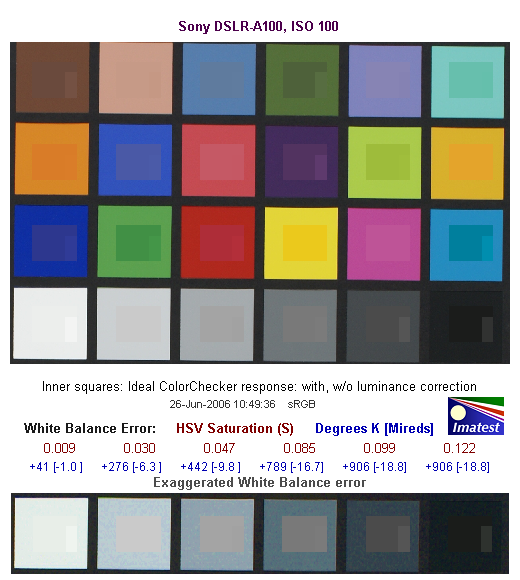
This image shows how the Sony A100 actually rendered the colors of the MacBeth chart, compared to a numerically ideal treatment. In each color swatch, the outer perimeter shows the color as actually captured by the camera, the inner square shows the color after correcting for the luminance of the photographed chart (as determined by a 2nd-order curve fit to the values of the gray swatches), and the small rectangle inside the inner square shows what the color should actually be, based on perfect rendering in the sRGB color space.
What's interesting in the results for the A100 is how close so many of the luminance-corrected colors are to the ideal values. - In fact, about the only really obvious differences are cases in which the original (non luminance-corrected) colors were in fact very close to the originals.
Gray Patch Tone and Noise Analysis

There's a lot in this particular graph, a lot more than we have room to go into here. Bottom line, the Sony Alpha A100's noise levels are low at low ISO, with a noise spectrum that spreads some of the noise energy into higher frequencies (finer grain), but that still maintains an overall weight favoring a coarser grain structure. In comparing these graphs with those from other competing cameras, I've found that the Noise Spectrum graph at lower right is the most important. Cameras that manage to shift their noise spectrum to higher frequencies have much finer-grained noise structures, making their noise less visually objectionable. In the graph above, this would show up as a noise spectrum curve that remained higher on the right side, representing higher noise frequencies.

Here's the same set of noise data at ISO 1600. Here, the Noise Spectrum graph is shifted a bit more toward the left-hand, lower-frequency side than it was at ISO 100, further coarsening the "grain" of the image noise patterns. Once again, not bad, but not a standout among competing dSLR models.

This chart compares the Sony A100's noise performance over a range of ISOs against those of other cameras. While I continue to show noise plots of this sort because readers ask for them, I each time point out that the noise magnitude is only a small part of the story, the grain pattern being much more important. In the case of the Sony A100, the magnitude of its image noise stays pretty competitive with other cameras on the market, but climbs noticeably at ISO 800 and above. Combined with the somewhat coarse noise structure mentioned earlier, the A100's noise structure at high ISO settings will be more distracting than that of most of its competitors. A good enough performer, but not a camera that you'd buy primarily for its high-ISO prowess.
Dynamic Range Analysis
A key parameter in a digital camera is its Dynamic Range, the range of brightness that can be faithfully recorded. At the upper end of the tonal scale, dynamic range is dictated by the point at which the RGB data "saturates" at values of 255, 255, 255. At the lower end of the tonal scale, dynamic range is determined by the point at which there ceases to be any useful difference between adjacent tonal steps. Note the use of the qualifier "useful" in there: While it's tempting to evaluate dynamic range as the maximum number of tonal steps that can be discerned at all, that measure of dynamic range has very little relevance to real-world photography. What we care about as photographers is how much detail we can pull out of the shadows before image noise becomes too objectionable. This, of course, is a very subjective matter, and will vary with the application and even the subject matter in question. (Noise will be much more visible in subjects with large areas of flat tints and subtle shading than it would in subjects with strong, highly contrasting surface texture.)
What makes most sense then, is to specify useful dynamic range in terms of the point at which image noise reaches some agreed-upon threshold. To this end, Imatest computes a number of different dynamic range measurements, based on a variety of image noise thresholds. The noise thresholds are specified in terms of f-stops of equivalent luminance variation in the final image file, and dynamic range is computed for noise thresholds of 1.0 (low image quality), 0.5 (medium image quality), 0.25 (medium-high image quality) and 0.1 (high image quality). For most photographers and most applications, the noise thresholds of 0.5 and 0.25 f-stops are probably the most relevant to the production of acceptable-quality finished images, but many noise-sensitive shooters will insist on the 0.1 f-stop limit for their most critical work.
The image below shows the test results from Imatest for an in-camera JPEG file from the Sony A100 with a nominally-exposed density step target (Stouffer 4110), with the A100's contrast setting at its default position.
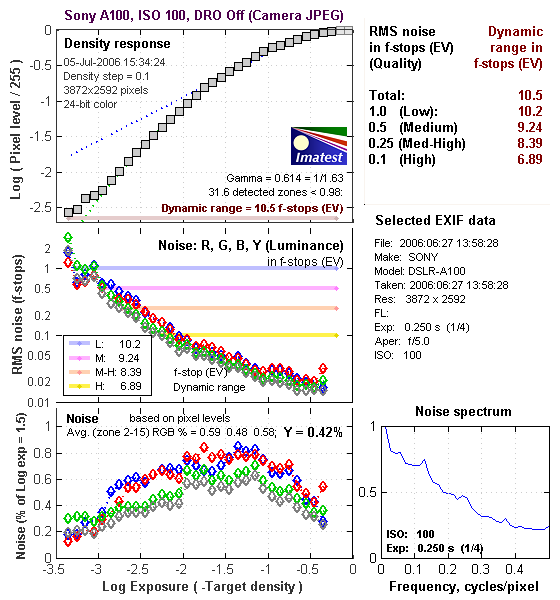
These numbers are on the low side of average for in-camera JPEGs, but the dynamic range number at "high" quality itself (6.89) isn't the most important thing to look at here. A dynamic range of 6.89 f-stops at high image quality is within a half a stop of most of the A100's competition, not enough difference to be a significant issue. (Yes, a half a stop more dynamic range would be nice, but that's not the main thing that affects what a photographer will perceive as the A100's dynamic range here.)
More significant than the absolute dynamic range is the relative abruptness with which the density curve (the curve in the top left of the figure above) ends in the highlight area, and particularly so in the shadows. The ideal shape for a tone curve is more of an "S" shape, with a longer tail in both the highlights and shadows. A long tail at both ends of the curve means that the camera approaches pure black and pure white gradually as the subject passes outside its tonal range. While this doesn't necessarily preserve more data in an absolute sense, it will provide smoother gradations in highlights and shadows, and in particular will preserve more shape in objects having highly saturated colors. I haven't written about this characteristic of camera tone curves much yet, but I'm finding that a gentle slope in the highlight range (the right side of the density curve) translates into a much more "three dimensional" appearance to its photos.
In the case of the A100, the extreme highlight end of its density curve is relatively flat, but it gets steeper a relatively short way down the tone curve. In shooting with the camera, I felt that its images tended to be somewhat contrasty, to the extent that I often found myself losing highlight detail if I boosted the exposure enough to get decent midtones under even moderately harsh lighting. This seems to be reflected in the steepness of the A100's density curve in the quarter-tones: If you set the camera's exposure so the highlights in an image are just blown out, by the time you get to the midtone levels in your subject, the output values will be pushed down pretty far into the shadow range. (In other words, midtones become 3/4 tones pretty quickly.)
These effects can be a little hard to interpret directly from the density curves: Given the contrasty "look" of the camera, I was expecting to see an even steeper highlight curve from the dynamic range test than we actually did. on the other hand though, its almost linear behavior at the shadow end of the scale does indeed correlate well with the somewhat limited detail in the deep shadows of its photos.
What about Adobe Camera Raw (ACR) though?

Using its automatic settings (which in my experience have generally worked best for dynamic range tests like this), ACR managed to fairly dramatically increase the A100's dynamic range, in terms of the number of steps that could be resolved for a given noise level (one of the larger increases in dynamic range we've seen to date with ACR), but at the cost of an even steeper tone curve in the highlight region.
You'll note that in the above, we didn't use Sony's Dynamic Range Optimization function: This is because that feature only operates in auto exposure mode with multi-segment metering enabled, and we have to shoot the dynamic range target in manual mode to insure that we get a wide enough (and entirely uniform) exposure bracket.
To get some perspective, here's a summary of the Sony DSLR-A100's dynamic range performance, and how it compares to other digital SLRs that we also have Imatest dynamic range data for. (Results are arranged in order of decreasing dynamic range at the "High" quality level.):
| Dynamic Range (in f-stops) vs Image Quality (At camera's minimum ISO) |
||||
| Model | 1.0 (Low) |
0.5 (Medium) |
0.25 (Med-High) |
0.1 (High) |
| Fujifilm S3 Pro (Adobe Camera Raw 2) |
12.1 | 11.7 | 10.7 | 9.0 |
| Sony A100 (Adobe Camera Raw 3.4) |
11.3 | 10.5 | 9.69 | 8.16 |
| Canon EOS-1Ds Mark II (Adobe Camera Raw 3) |
11.2 | 10.3 | 9.4 | 8.14 |
| Fujifilm S3 Pro | -- | 9.9 | 9.4 | 7.94 |
| Canon EOS-5D (Adobe Camera Raw 3) |
11.0 | 10.4 | 9.21 | 7.83 |
| Canon EOS-5D (Camera JPEG) |
10.2 | 9.68 | 8.82 | 7.65 |
| Nikon D200 (Adobe Camera Raw 3) |
10.6 | 9.65 | 8.96 | 7.61 |
| Nikon D50 | 10.7 | 9.93 | 8.70 | 7.36 |
| Canon EOS 20D | 10.3 | 9.66 | 8.85 | 7.29 |
| Canon Digital Rebel XT | 10.3 | 9.51 | 8.61 | 7.11 |
| Nikon D200 (Camera JPEG) |
-- | 9.07 | 8.36 | 7.11 |
| Olympus EVOLT | 10.8 | 9.26 | 8.48 | 7.07 |
| Canon EOS-1Ds Mark II (Camera JPEG) |
10.3 | 9.38 | 8.6 | 7.04 |
| Canon Digital Rebel | 10.1 | 9.11 | 8.47 | 6.97 |
| Pentax *istDs | 10.2 | 10 | 8.87 | 6.9 |
| Sony A100 (Camera JPEG) |
10.2 | 9.24 | 8.39 | 6.89 |
| Nikon D2x | -- | 8.93 | 7.75 | 6.43 |
| Nikon D70S | 9.84 | 8.69 | 7.46 | 5.85 |
| Nikon D70 | 9.81 | 8.76 | 7.58 | 5.84 |
The results shown in the table are interesting. One of the first things that struck me when I initially looked at test data for a wide range of d-SLRs, was that here again, purely analytical measurements don't necessarily correlate all that well with actual photographic experience. There's no question that the Fuji S3 Pro deserves its place atop the list, as its unique "SR" technology does indeed deliver a very obvious improvement in tonal range in the highlight portion of the tonal scale. I was surprised to see the analytical results place the Olympus EVOLT as highly as they did, given that our sense of that camera's images was that they were in fact noisier than those of many other d-SLRs that we looked at. In the other direction, I was quite surprised to see the Nikon D2x place as low on the listings as it did, given that we found that camera's shadow detail to be little short of amazing.
One thing that's going on here though, is that we tested each camera at its lowest ISO setting, which should produce best-case noise levels. This is in fact what many photographers will be most interested in, but it does perhaps place the Nikons at a disadvantage, as their lowest ISO setting is 200, as compared to the ISO 100 settings available on most other models.
Two things do really stand out there though: First, that the A100 places relatively low on the list for from-camera JPEGs. The other obvious point though, is that its dynamic range increases dramatically in the hands of a good RAW converter. We don't have the wherewithal to experiment with a lot of different RAW converters on the cameras we test, but it seems that the A100 may hold a lot of promise as a camera for the RAW shooter. (The results with Adobe Camera Raw suggest that a well-tuned RAW converter would take care of a lot of the contrastiness that bothered me in shooting with it, making it into a really fine photographic tool.)
As I always say though, at the end of the day, I think you have to take the figures here with a grain of salt, and look at actual images with your own eyes to see what you make of each camera's tonal range and noise levels. We'll continue performing these dynamic range tests on the digital SLRs that we review, but (just as with the laboratory resolution target results), we suggest that you not rely on them exclusively for making your purchase decisions.
Resolution Chart Test Results

The chart above shows consolidated results from spatial frequency response measurements in both the horizontal and vertical axes. The "MTF 50" numbers tend to correlate best with visual perceptions of sharpness, so those are what I focus on here. The uncorrected resolution figures are 1945 line widths per picture height in the horizontal direction (corresponding to the vertically-oriented edge), and 1877 along the vertical axis (corresponding to the horizontally-oriented edge), for a combined average of 1911 LW/PH. Correcting to a "standardized" sharpening with a one-pixel radius increases this number a modest amount, to an average of 2005 LW/PH, an excellent level for a ~10 megapixel camera.
For the real techno-geeks, the two plots below show the actual edge response of the Sony A100, for horizontal and vertical edges. Here, we can see that the camera's default sharpening does produce a slight bump in the edge profiles, in both vertical and horizontal directions. This will make its images straight from the camera look a little crisper to the eye, although it does introduce relatively slight "halo" artifacts around sharp edges. From past experience and from closely inspecting the A100's test images, we can say that the size (both height and extent) of the bump with the A100's default sharpening setting is just about ideal. The images are crisped-up very nicely, but little or no fine detail is lost to the sharpening process.
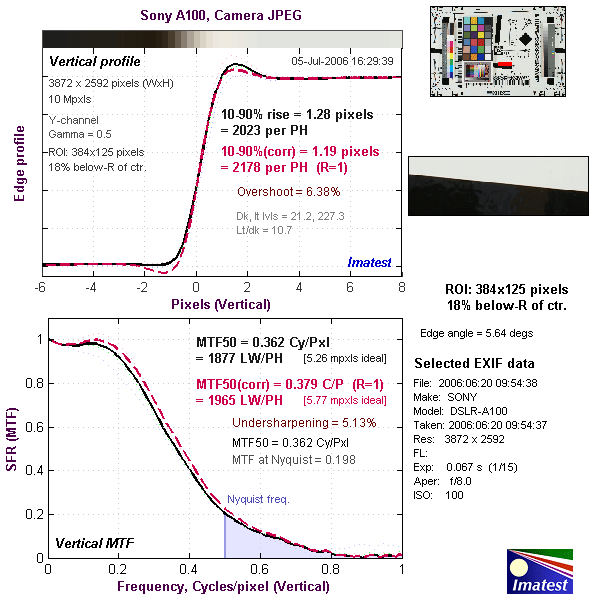

Menus
Camera Modes
Capture Mode: When powered on, the camera is automatically placed into Record mode. The Exposure Mode dial on top of the camera sets the main shooting mode, with the following options:

Manual: Provides complete user control over the exposure, including both aperture and shutter speed settings. A Bulb shutter setting also becomes available in this mode, allowing variable length exposures for as long as you hold down the shutter button.
Shutter Priority: Allows the user to set the shutter speed, from 1/4,000 to 30 seconds, while the camera selects the most appropriate aperture setting.
Aperture Priority: The opposite of Shutter Priority, this mode puts the user in control of the aperture setting while the camera selects the best shutter speed. (The aperture range varies with the lens in use.)
Program AE (Program Shift): This mode places the camera in control over both aperture and shutter speed, while the user has access to all other menu functions. Turning the Control dial with or without shifting the Exposure Compensation button cycles through a range of equivalent exposure settings, enabling the Program Shift mode.
Full Auto: This mode places the camera entirely in control of the exposure, though the user can adjust the exposure compensation and determine the flash mode.
Portrait: Optimizes camera settings to reproduce warm, soft skin tones against a slightly blurred background.
Landscape: Optimizes settings to produce sharp, colorful landscapes.
Macro: This mode is for close-up pictures of small objects, enhancing color in flowers, etc.
Sports Action: Favors faster shutter speeds to capture moving subjects.
Sunset: Optimizes settings to capture rich, warm sunsets.
Night Portrait: Balances the foreground subject illuminate by flash with the ambient light of the background.


Playback Mode: The Playback button on the rear panel accesses Playback mode, where you can review captured images. The left and right arrow keys scroll through the images on the card, and the up arrow displays a histogram and information display and the down arrow rotates the image. You can enlarge captured images or display them in an index format for quick viewing.
Camera Menus
Pressing the Menu button provides access to the camera's full menu system. The following options are available in most camera modes as menu tabs at the top of the display:- Record 1:
- Image Size: Sets the pixel dimensions of captured still images. Choices are 3,872 x 2,592 pixels (Large); 2,896 x 1,936 (Medium); and 1,920 x 1,280 (Small).
- Quality: Specifies the compression level of still images. Options are RAW, RAW & JPEG, Fine, and Standard. RAW captures the data directly from the CCD, and losslessly compresses it. RAW & JPEG simultaneously records both a separate RAW and JPEG version of each image as it is captured. (Note though, that RAW + JPEG mode is quite slow, as after capturing three shots, the camera apparently has to wait for each shot to write to the memory card before it can capture the next one.)
- Instant Playback: Enables an instant review of the most recently captured image, or disables it. Display times include 10, five, or two seconds.
- Noise Reduction: Turns the Noise Reduction function on or off.
- Eye-Start AF: If set to "on," this option automatically enables the autofocus whenever the camera senses your eye at the viewfinder.
- Record 2:
- Red-Eye Reduction: Turns the Red-Eye Reduction pre-flash on or off.
- Flash Control: Selects the flash metering method. Options are ADI Flash, which uses distance information from the autofocus system together with a pre-flash to determine flash exposure, or Pre-flash TTL, which uses only the preliminary metering flash to gauge exposure before the shutter opens.
- Flash Default: Sets the default flash mode to Auto flash or Fill flash.
- Bracket Order: Sets the order of bracketed exposures, placing the default exposure either first or in the middle of the series.
- Record Mode Reset: Resets the record mode settings to their defaults.
- Playback 1:
- Delete: Lets you delete the current photo, all photos in a folder or on the card, or only marked photos.
- Format: Formats the CompactFlash card, erasing all files (even protected ones). There is an option to cancel, in case you select "Format" accidentally.
- Protect: Marks the current image for write-protection, or removes protection.
- Index Format: Lets you choose between four-, nine-, or 16-image thumbnail image displays.
- Playback 2:
- Slide Show: Initiates a slide show of photos on the memory card.
- DPOF Set: Sets up photos for DPOF (Digital Print Order Format) printing on a compatible standalone printer. This selection lets you choose whether to print the current photo, all photos, or only marked photos.
- Date Imprint: Chooses whether or not to print the date on all photos in your DPOF order.
- Index Print: Chooses whether or not to include an index print of all photos in your DPOF order.
- Cancel Print: Deletes all print orders on the card, or in the current folder.
 Image Size: Sets the pixel dimensions of captured still images. Choices are 3,872 x 2,592 pixels (Large); 2,896 x 1,936 (Medium); and 1,920 x 1,280 (Small).
 Red-Eye Reduction: Turns the Red-Eye Reduction pre-flash on or off.
 Delete: Lets you delete the current photo, all photos in a folder or on the card, or only marked photos.
 Slide Show: Initiates a slide show of photos on the memory card.
Custom Menu Options
The following menu options are available in any exposure mode, and are accessed through the Custom tab at the top of any menu screen.
- Custom 1:
- Priority Setup: Sets the priority of the Shutter button as AF or Release. The AF option will not release the shutter unless focus is set, while the Release setting trips the shutter even if AF is not established.
- Focus-Hold Button Setup: Sets the function of a lens' Focus Hold button. Options are Focus Hold (locks the lens) and Depth of Field Preview (previews the depth of field in the viewfinder).
- AEL Button Setup: Through this option, you can set the operation of the AE Lock button to AE Hold (hold the button down to lock exposure, exposure lock is released when you let go of the button), AE Toggle (press and release to lock exposure), Spot AE Hold, or Spot AE Toggle.
- Control Dial Set: Sets whether the control dial changes shutter speed or aperture when using Program shift.
- Exposure Compensation Setup: Sets whether the main Exposure Compensation dial adjusts the ambient exposure only, or the ambient exposure and the flash (if flash is in use).
- AF Illuminator: Enables the flash as an AF illuminator, for use in very dark shooting conditions.
- Custom 2:
- Shutter Lock (no card): If enabled, this lock prevents the shutter from opening when a card is not inserted in the camera.
- Shutter Lock (no lens):If enabled, this lock prevents the shutter from opening when a lens is not attached to the camera (protecting the CCD from dust).
- AF Area Setup: Sets the length of time that the AF area is illuminated in the viewfinder display to either 0.3 or 0.6 seconds.
- Monitor Display Setup: Sets whether the viewfinder eye sensors are active. If active, the viewfinder display only enables when your eye is in the viewfinder.
- Recording Display Setup: Sets whether the camera automatically rotates the LCD display in Recording mode (Auto Rotate option), or displays it horizontally.
- Playback Display Setup: Sets whether the camera automatically rotates vertically-shot images in Playback mode (Auto Rotate option), or displays them horizontally
 Priority Setup: Sets the priority of the Shutter button as AF or Release. The AF option will not release the shutter unless focus is set, while the Release setting trips the shutter even if AF is not established.
 Shutter Lock (no card): If enabled, this lock prevents the shutter from opening when a card is not inserted in the camera.
Setup Menu Options
Like the Custom menu, the following menu options are available in any exposure mode,and are accessed through the Setup tab at the top of any menu screen.
- Setup 1:
- LCD Brightness: Adjusts the brightness of the LCD display to one of five levels.
- Transfer Mode: Sets the data transfer mode to Mass Storage or PTP (for PictBridge connection to compatible printers, or to Windows XP and Mac operating system utilities for digital cameras).
- Video Output: Select either NTSC or PAL timing for the video output signal.
- Audio Signals: Activates an audio confirmation of the AF system when the Shutter button is halfway pressed.
- Language: Sets the language for menu screens (English, French, Spanish, Italian, Japanese, and Chinese).
- Date and Time Setup: Sets the camera's internal clock and calendar.
- Setup 2:
- File# Memory: Chooses whether or not to number images sequentially across memory cards. If set to "yes," the A100 will remember the last number used to name a file, even if a different card is inserted.
- Reset: Resets the File number
- Folder Name: Selects the folder naming scheme as either Standard or Date format. Date format integrates the current date into the folder name, to help keep track of images on your computer later.
- Select Folder: As an aid to organizing large numbers of photos, the camera lets you set up separate folders on the memory card. If you have more than one folder defined, this menu selection lets you choose which you want to use to save photos in.
- New Folder: Creates a new folder to save photos on the memory card, with a name of your choosing.
- Setup 3:
- LCD Backlight: Specifies the period of time before the LCD backlight turns off to conserve power. Times are 5, 10, 30, or 60 seconds.
- Auto Power Save: Sets idle delay before the camera shuts itself off to conserve power. Options are 1, 3, 5, 10, or 30 minutes.
- Menu Section Memory:Sets the camera to remember which menu section was last opened,automatically returning to that section when the Menu button is pressed.
- Delete Confirmation: Turns the delete confirmation screen on or off.
- Clean CCD:Sets up the camera for cleaning the CCD, raising the mirror and opening the shutter for clear access. A confirmation screen appears to confirm the action. (Once opened, turn the camera off to close the shutter again.)
- Reset Default: Resets all menu choices to their factory default values. (Very handy forgetting back to "square one" after making a number of settings changes.)
 LCD Brightness: Adjusts the brightness of the LCD display to one of five levels.
 File# Memory: Chooses whether or not to number images sequentially across memory cards. If set to "yes," the A100 will remember the last number used to name a file, even if a different card is inserted.
 LCD Backlight: Specifies the period of time before the LCD backlight turns off to conserve power. Times are 5, 10, 30, or 60 seconds.
Dro
Sony A100 Dynamic Range Optimization
One of the Sony A100's unique features is what Sony has chosen to call Dynamic Range Optimization (DRO for short). In discussing this, it's important to note that the DRO feature doesn't actually increase the camera's dynamic range, as that's fundamentally determined by the sensor and signal amplification electronics. It was thus no surprise that in our experimenting with the feature, the actual dynamic range of the camera remained the same, regardless of the DRO setting in use. What DRO actually does is to brighten the shadow areas of some images while still preserving highlight detail, thus making better use of the dynamic range that's actually available. If this description seems to belittle DRO's effect, make no mistake: Under the appropriate circumstances, it can have a very significant impact on your pictures.
DRO Operating Modes
The A100's Dynamic Range Optimization system has three settings, with different effects on the pictures. They are:
- Off: The camera operates normally, with no DRO processing performed.
- D-R: This is the "normal" setting for DRO, and the default operating mode for the camera. In this mode, the A100's processor evaluates the contrast and brightness of each image, and adjusts the tone curve used to map the raw sensor data to the final brightness values in the JPEG images. Sony says that this is more than a simple gamma-value adjustment, and we have no reason to believe otherwise. We'll discuss below when and how this adjustment seems to affect the images.
- D-R+: DRO "plus" mode performs the same analysis on the image as in normal D-R mode, but adds a further level of intelligence by adjusting the brightness of the image locally. Shadow areas are made brighter, highlights are held back a bit. (The shadow adjustments are much more evident, adjustments to highlight regions were very subtle in our tests.)
Of the three modes, we found the results in D-R+ by far the most dramatic and interesting, although we occasionally felt it went a little too far, and would have liked having an ability to dial down its effects somewhat. Standard D-R mode is much more subtle, and in many cases, we didn't like its effects as well. It did a good job with backlit subjects, but at the considerably expense of highlight detail, if there were any highlights present in the scene. It might be good for snapshooters who are more interested in midtone detail than highlights (a pretty fair description of the average American photo consumer, we're afraid), but more experienced shooters will probably want to avoid it.
While we weren't enthusiastic about standard D-R mode, D-R+ mode definitely seemed worthwhile. It sometimes got a little carried away with its corrections, but overall did an impressive job. If there were just a way to dial back its effects slightly, we'd be inclined to leave the camera in D-R+ mode all the time; but alas, no such control is offered. While this sort of automatic image adjustment has appeared previously in cameras from HP and Nikon, it has in the past always added quite a bit of processing time to each shot, so is of somewhat limited usefulness. On the A100, even D-R+ seems to add only about 0.7 second of processing per image, and its results on challenging subjects are more than worth this minor delay.
DRO Examples
We at first found it a little difficult to predict just when DRO would take effect on an image, as we captured a number of shots that had significant highlight or shadow areas but which DRO seemed to largely ignore. After quite a bit of experimentation, we concluded that DRO takes effect only when there are substantial areas of both strong highlight and deep shadow present in the image. DRO pretty much ignores shots that have lots of shadow with only small areas of strong highlight or vice versa. After a little thought, we realized that this is probably just what you'd want DRO to do: If an image has a lot of shadow but very little blown-out highlight area, the camera very rightly assumes that if you wanted a brighter image, you'd just boost the overall exposure. Likewise for high-key images with lots of highlight area but few shadows. Here again though, we often wished that we had a way of more directly telling DRO what we wanted it to do: Some shots we took had few blown highlights, but deep shadows that the camera could have brightened for us if, we'd only had some way of communicating that desire.
| Typical DRO Example | ||
| DRO Off | D-R | D-R+ |
 |
 |
 |
| The shot without DRO held detail in the highlights, but the deep shadows were totally plugged up. | In normal D-R mode, everything is a bit brighter, including the highlights. The shadows under the overhanging roof are nicely handled, but the foliage is still quite dark. | In D-R+ mode, the dark foliage is considerably brightened, as is the medium-dark in the background. At the same time the highlights are held well in check. There are however some artifacts to be found. |
The shots above show just the sort of image where DRO most applies, with significant areas of both strong highlight and deep shadow. The thumbnails above show the full image area; with DRO off, in the D-R mode, and in D-R+ mode. Here the normal D-R mode shows only a slight effect, but it's nonetheless quite evident in the shadows under the overhanging roof. The effect of D-R+ is quite evident in the shrubs in the foreground, and a lot of the darker foliage in the background, while the highlights are relatively undisturbed. Let's look at the highlights and shadows separately.
| DRO in Highlights | ||
| DRO Off | D-R | D-R+ |
 |
 |
 |
| The shot without DRO held pretty good detail in the strong highlights of the pillars. | In normal D-R mode, the boost needed to brighten the shadows blew out the highlights. (Although if you play with the image in Photoshop, it turns out there's still detail to be found there.)+ | In D-R+ mode, highlights are slightly brighter, but detail is still very well preserved. |
Here we see the effects of DRO on the strong highlights in the image above, and the reason why we don't like normal D-R mode that much: Where the original had at least some detail in the highlights, the D-R option pretty much blows it out. (Interestingly though, the detail is actually still there, as some work in Photoshop can bring it back.) If the intent is for this to be a set-it-and-forget-it function though, to our minds it loses too much detail in highlights. On the other hand, it does a very nice job with backlit subjects, something that consumers are arguably more concerned about than subtle highlights. We personally would disable normal D-R mode unless we were dealing with a backlit shot, but for point & shoot users it's probably a benefit overall.
D-R+ mode, on the other hand, does a very nice job with the highlights, holding every bit of detail as was present in the original exposure. Let's take a look at shadows next...
| DRO in Shadows (and Transitions) | ||
| DRO Off | D-R | D-R+ |
 |
 |
 |
 |
 |
 |
| The deep shadows of the non-DRO version were very dark indeed, with little or no detail visible. (Although there was plenty there that could be brought out in Photoshop.) | In normal D-R mode, the lighter shadows (similar to a typical backlit situation) are lightened nicely, and the deep shadows and the quarter-tones (in the shrubs at the bottom of the crop) are both brightened slightly. The deep shadows here could stand more brightening though. | In D-R+ mode,the darkest shadows are brought up quite a bit, without over-brightening the lower midtones or highlights. There's a very visible artifact along the sharp highlight/shadow boundary, though. The effect on lighter shadows is about the same as in D-R mode. |
The shadows are where DRO mode has its greatest effect, and its action there is quite impressive. Depending on your tastes though, it might be a bit too much of a good thing. The darkest foliage areas become quite light, taking on almost a hazy or ghostly look. Perhaps more problematic is the umbra that appears around bright objects, making the image look almost like a cut-out casting a shadow on a 2-D background. This is a case though, where it's important to remember that we're pixel-peeping a 10.2 megapixel image: The dark umbra that's so evident on-screen in the crop above right is all but invisible in even an 8x10 inch (roughly A4 size) print of this image.
Times When DRO Doesn't Apply
As noted earlier, there were some times when we'd expected to see DRO have a greater effect than it actually did. After some puzzling, we established that these situations were ones in which not enough of the image area was covered by both deep shadow and strong highlight. The example below shows a case illustrative of this:
| DRO in Shadows (and Transitions) | |
| DRO Off | D-R+ |
 |
 |
 |
 |
| Here's a shot with both highlights and very deep shadows, where one might expect to see DRO take a hand. | In actuality though, even D-R+ does nothing with this shot. The reason appears to be that there's not enough strong highlight area in the scene. |
In the shot above, there's both strong highlight and deep shadows, but DRO doesn't do anything. Why? After a little head-scratching and a number of shots with similar characteristics, we realized that DRO's analysis avoids making changes in scenes that lack relatively large areas of strong highlights.
Bottom line, Sony's Dynamic Range Optimization seems like a very worthwhile feature, but one that you need to understand to make the best use of. As noted, we weren't crazy about the default D-R mode, but recognize that it would help the typical consumer's snapshots quite a bit, particularly with the backlit subjects that seem to be so common in vacation photos. For the more sophisticated user, judicious use of both the D-R and D-R+ modes can bring a lot of benefits, but it can take a bit to get accustomed to their operation. Hopefully the above discussion and examples will save you some of the learning curve that we went up with them.
Limitations of Dynamic Range Optimization
DRO can be a pretty handy photographic tool, but it flat-out isn't available under a number of common operating conditions:
- Any metering mode except Multi-Segment metering (?!)
- In RAW or RAW+JPEG mode
- In Manual exposure mode
- D-R+ mode is only available at ISOs of 400 and below
- DRO is not available when converting from RAW using Sony's furnished software.
The low-ISO limitation on D-R+ mode makes sense: Since it's boosting the shadow areas so much, it'd reveal too much image noise at ISO 800 or 1,600. The other limitations seem a little strange. It's apparently using the multi-segment metering information to guide its operation, but you'd think that information would remain available to the processor even in other exposure modes. (Don't center-weighted or spot metering just use the same exposure sensor, simply placing different weights on the exposure data?) The metering-type limitation was particularly vexing, because we often wanted to use center-weighted metering to avoid the exposure variations discussed below.
And what about RAW+JPEG mode? It makes sense that DRO wouldn't apply to the RAW images, they're supposed to contain only data straight from the sensor, but why not let DRO apply to the JPEGs? You could argue that this would be the best of both worlds, letting the camera's tricky processing do what it would with the JPEG, but retaining the original sensor data as an unperturbed "digital negative."
As noted earlier, besides these limitations, I also sometimes found myself wishing I could either increase or decrease the strength of the effect in DRO Plus mode. With some subjects (the "Sunlit Portrait" test shots of Marti, for instance), I would have preferred it to have a stronger effect. In other situations (the shot of the plantation house above, I would have liked slightly less of an effect. Why not give the user the options from -2 to +2 for D-R+ mode's application, as with contrast and saturation? I'd suggest that the default setting should be a bit less than the current Plus level, but give people a couple of notches above and below that level to experiment with.
On the whole, Sony's Dynamic Range Optimization looks like a significant innovation in digital exposure control (at least in its Plus form), but I'd like the user to have a bit more control over its application. It'll be interesting to see what the second generation of DRO looks like, it's certainly off to a promising start.
Exposurevariations
Exposure Variations
We don't normally go into this much detail on exposure accuracy for the cameras we test, but in the case of the Sony A100, we found a few situations where the exposure varied in ways we didn't expect. We first noticed it when Luke was checking the exposure for our Multi Target shot. After shooting an exposure bracket, he checked the images on the computer, then went back to the camera to shoot a resolution series at the proper exposure (EV boost) setting. To his surprise, this second group of images were underexposed compared to what he saw when bracketing.
After some experimenting, we consistently found two different kinds of exposure variation in the A100, one sort that reproduced the issues Luke encountered, another that didn't seem to correlate with anything in particular, but that was also somewhat less significant in its impact. The worst-case variations we saw were on the order of 0.5 EV. Try as we might though, we never found the ~2 EV jumps in exposure that at least one other reviewer reported. (And we've now seen and tested four separate A100 bodies.)
"Type I Variations"
The variations that Luke encountered were associated with a very specific camera setup, namely the combination of Wide-Area Autofocus and Multi-Segment metering. When we switched to center-weighted or spot metering, or manually selected an AF point, these variations largely disappeared. We refer to these as "Type I" variations, since they were the first we encountered. What appeared to be happening was that the AF system would select a primary subject, and the focus would be locked on that single point, but the other potential AF zone candidates were still contributing to the exposure determination, via a weighted average that could change significantly from one shot to the next as the AF system dithered between selecting one or the other AF point. This is pure supposition, but is about the only plausible mechanism we could come up with for such non-deterministic exposure behavior. It would also explain why these variations went away when the metering mode was changed or when the AF point was manually selected. The shots below show an example of this sort of exposure issue.
| Sony A100 "Type I" Exposure Variation Example | |
 |
 |
| 1/30s, f/5.6 (Camera reports brightness=6.5) |
1/20s, f/5.6 (Camera reports brightness=6.0) |
The shots above illustrate the issue we encountered with the combination of wide-area AF and multi-segment metering. They're two of a group of nine shots captured within seconds of each other, under studio lighting (HMIs in softboxes), with the camera locked down on a very solid camera stand. (So the lighting and the framing of the subject were absolutely identical between shots.) Of the nine shots, the camera exposed two of them at 1/20s and f/5.6, and the other seven at 1/30s and f/5.6. When we switched to center-weighted metering, the exposure on this subject became absolutely rock-steady.
From our experimentation, it appears that our Multi target might represent something of a worst-case subject for triggering Type I exposure variations, as it has lots of contrasting elements under or near AF points. Switching to a less-contrasty target produced smaller Type I variations, generally 1/4 EV or less.
For many casual users, an exposure variation of +/- 1/4 EV (a total worst-case range of 1/2 EV) may not be that big an issue (many Happy Snappers would never notice it), but for people who really care about exposure, it would clearly be an issue. In our own work it was particularly vexing, as exposure levels in our comparison photos are very critical.
"Type II" Variations
While the Type I variations described above are only encountered when multi-segment metering is combined with wide-area AF, we also found variations that were more random, in that they didn't appear to correlate with any subject content, metering, or AF mode. In a couple of instances, we found exposure differences of a third of an EV or more with the camera locked down on a tripod and just pointed at the backdrop of the "Sunlit Portrait" test shot. (And yes, we did check that the lighting wasn't varying; both by monitoring it with a Sekonic L-508 light meter and by shooting the same subject with another DSLR, which produced perfectly consistent exposures.)
This really played havoc with some of our shooting, as we in some cases had to shoot exposure brackets three or four times over to get one series that actually stepped linearly through all the exposure values. The series below shows a typical example of what we encountered:
| Non-uniform exposure bracket (Multi-segment metering, single AF point) |
||||
 |
 |
 |
 |
 |
| 0 EV 1/125 sec f6.3 |
+0.3 EV 1/125 sec f6.3 Step = 0 |
+0.7 EV 1/100 sec f6.3 Step = 0.3 |
+1.0 EV 1/80 sec f5.6 Step = 0.7 |
+1.3 EV 1/60 sec f5.6 Step = 0.3 |
In the series above, there's no difference in the aperture and shutter speed reported in the file header between the first and second shots, even though the second one is clearly brighter. There's a normal 0.3 EV step between the second and the third, but then the aperture and shutter speed both change between the third and the fourth, producing an 0.7 EV jump. Finally, between the fourth and fifth images, the exposure once again increases by the proper 0.3 EV amount.
The series above was shot using multi-segment metering, but with a single AF point selected, centered over Marti's hair on the left side of her head as seen in the images. (This is also why this series is framed a little differently: I wanted to have an AF point right on Marti's hair as that's the most reliably deterministic focus point for this shot, and I didn't want to perturb the camera at all to reframe after locking focus, to avoid introducing any variables that could possibly contribute to exposure variation.) The roughly 0.3 EV variation seen here is fairly typical of the results we saw in this particular pattern of camera behavior.
After a while of being completely perplexed by these Type II variations, we began to see some patterns that suggested that the fault might lie with the lenses we were using (the standard 18-70mm kit lens). We discovered that if we shot a given exposure series several times over, by the last series the exposures settled down a great deal. In fact, any sort of significant repetitive series of exposures seemed to figuratively clear the camera's sinuses, with exposure becoming more uniform following a period of rapid activity. Also, while we don't have the recorded statistics to confirm it, it seemed that both production-level camera/lens systems we were working with during this time were starting to show more reliable exposure characteristics as we continued to operate them.
We haven't had an opportunity to use the cameras in question with any Sony lenses other than the two "kit" lenses that shipped with our production samples, but the behavior outlined above suggests that sticky diaphragms in both lenses might have something to do with the variations we were experiencing. We also seemed to see slightly more variations with one of the kit lenses on both production-level bodies than with the other lens on either. Our theory is that frequent cycling of the lens iris during an exposure series would temporarily loosen it up and help it operate more consistently. And over time, as large numbers of exposure cycles accumulated, the apertures operated more freely, and the problem diminished. This is pure speculation at this point, as we'd have to have samples of several different lens types to conclusively demonstrate that the lenses were at fault, but the good news is that Type II exposure variations seem to be diminishing as we've continued to use the cameras.
The bottom line
Having now seen these exposure issues in a prototype camera, a near-production sample, and two full-production versions of the A100, it does appear that there's a genuine issue with exposure accuracy when using multi-segment metering and wide-area AF together to photograph subjects with high local contrast. (The scenario for our so-called Type I exposure variations.) But the very length of the problem description speaks to the narrowness of its impact. If you're a casual photographer primarily interested in family snapshots, it's quite possible that you'd never notice this issue. On the other hand, if you're a more experienced shooter who (like us) prefers to choose the AF point rather than letting the camera pick it for you, you also might never see it. (In fact, if you don't commonly shoot exposure brackets of your subjects, you might never be aware that it's happening at all.)
Basically, for the Type I exposure problem to appear, the subject apparently needs to be fairly flat (coplanar) so the AF system may be a little undecided about which AF point to pick, and there also need to be elements with very different brightness values near the AF point the camera ends up using. If there is a single strongly dominant subject (such that the AF system's algorithm settles on a single AF point very easily), or if there aren't any very strongly contrasting elements near the AF point selected, the exposure can be quite consistent. Likewise, if you manually pick an AF point (as noted, this is manner of shooting we personally prefer 90% of the time), or if you use center-weighted metering, the problem never appears.
This is by no means to dismiss the issue as trivial though: Accurate, repeatable exposure is fundamental to photography, and a thousand-dollar DSLR should at the very least be able to expose consistently and accurately, regardless of the AF or exposure mode selected.
The second type of exposure variation (that isn't correlated with metering or AF pattern) is more likely to be seen by the average user, as it can apparently crop up in any shots you're taking, and regardless of AF or metering mode. Its effect was generally more subtle though: We could see it when scanning quickly through captured images on the camera's LCD, but even when viewing images side by side on a computer monitor, it was surprisingly difficult to pick out. To be able to reliably pick out which image was brighter or darker, we often had to overlay them in Photoshop and switch quickly between them. - So that's pretty subtle indeed, and likely to be a complete non-issue for the average user. There's also some (slight) evidence that the Type II exposure problem diminishes with use, as the lens iris gets "broken in," for lack of a better word.
So at the end of the day, the Sony A100 is subject to some variability in its exposure metering, but it's of a magnitude that many users may not notice. One type of exposure variation seems to be inherent in the design of the A100's AF and metering systems, but is easily circumvented by using either center-weighted or spot metering, or by manually selecting an AF point. (It's also possible that this variability could be fixed at some point in the future via a firmware update.) A second type of exposure variation may be linked to lens operation, but is much more subtle in its effect, and it seems to diminish somewhat over time.
Ultimately, you'll have to decide for yourself what you think of the A100's exposure variations: For many users, we think they'll be a complete non-issue, for others they could be nothing less than deal-breakers. Hopefully the information we've assembled here will help you decide which camp you fall into.