



Overview
Sony A500
Hands-on Preview
Earlier this year, Sony introduced three SLRs that were really minor upgrades to their predecessors, which were announced in 2008. In late August 2009, Sony is announcing two digital SLR cameras with more advanced features, aimed at enthusiast photographers.
The Sony A500 and A550 are very similar, so both Hands-on Previews will seem quite familiar. Indeed, the only major differences between the two cameras are that the A500 has a slightly lower resolution sensor, a lower resolution LCD, a slower maximum frame rate, smaller buffer depth, a longer battery life, and weighs just 0.07 ounces (two grams) less.
Both offer some features that are unique in the market, and both include improvements in sensor and processor design that Sony says will deliver better high-ISO image quality. One unique feature is Auto HDR, where the camera captures two images and merges them into one High Dynamic Range image.
Both also have articulating display screens and Live View mode. Sony's Live View mode is also unusual, because it uses a secondary sensor inside the pentamirror that doesn't interfere with the A500's autofocus system, unlike other digital SLR designs. However, because it's hard to confirm focus on Sony's usual Live View mode, they've now added a Manual Focus Check mode that raises the mirror and exposes the imaging sensor, allowing you to check and adjust focus at will in a more traditional live-view style.
The Sony Alpha DSLR-A500 will be available from October 2009, priced at US$750 body-only or US$850 inclusive of an 18-55mm kit lens.
Look and feel. Compared to this year's earlier cameras, the A230, A330, and A380, the Sony A500 is bigger, thicker, and heavier. While the A380 weighs 17.2 ounces (489g) the A500 weighs in at 1 pound 5.1 ounces (597g). That's not bad as most SLRs go, but that plus its thicker body does make it feel a little chunky.
While the A550 is a duo-tone design, the Sony A500 has a two-texture body, where the top deck and rear surfaces are painted with a semi-gloss black, and the front surfaces are black rubber. The shiny black strip on the front of the grip is not a touch sensor, as was on previous Alpha cameras, but is just an accent that conceals the infrared sensor.

The Sony A500's grip is a little odd. It's a little slim left to right, and not really deep enough. This impression is increased by the unusual thickness of the body front to back. We really didn't find it very comfortable for long hand-holding. Here you see the switch for Live View, in the same location as past models. New to the A500-series is the MF Check LV button, which puts the camera in Live View mode from the main imaging sensor, rather than the secondary sensor.
Dynamic Range, Drive mode, and ISO settings can also be adjusted on the top deck. Note the sloped area between the top and back, making operation a little easier from more angles.

The back view is similar to the A350, except that the four buttons that lined the left side of the LCD are now moved to the upper left and lower right of the Sony A500's back. The Super SteadyShot switch is no longer present, that mode relegated to a menu item.
A rubber thumbpad adds grip to the rear of the camera, and the Function (Fn) button is handy for quick settings changes.


The Sony A500's tilting LCD mechanism is gifted with a little more angular mobility than we've seen in other Alphas, now able to tilt a full 90 degrees downward, especially helpful when shooting overhead, or when shooting on a tripod in vertical mode. A small sensor on the lower right of the Sony A500's LCD can be set to dim or brighten the LCD's backlight automatically when needed.
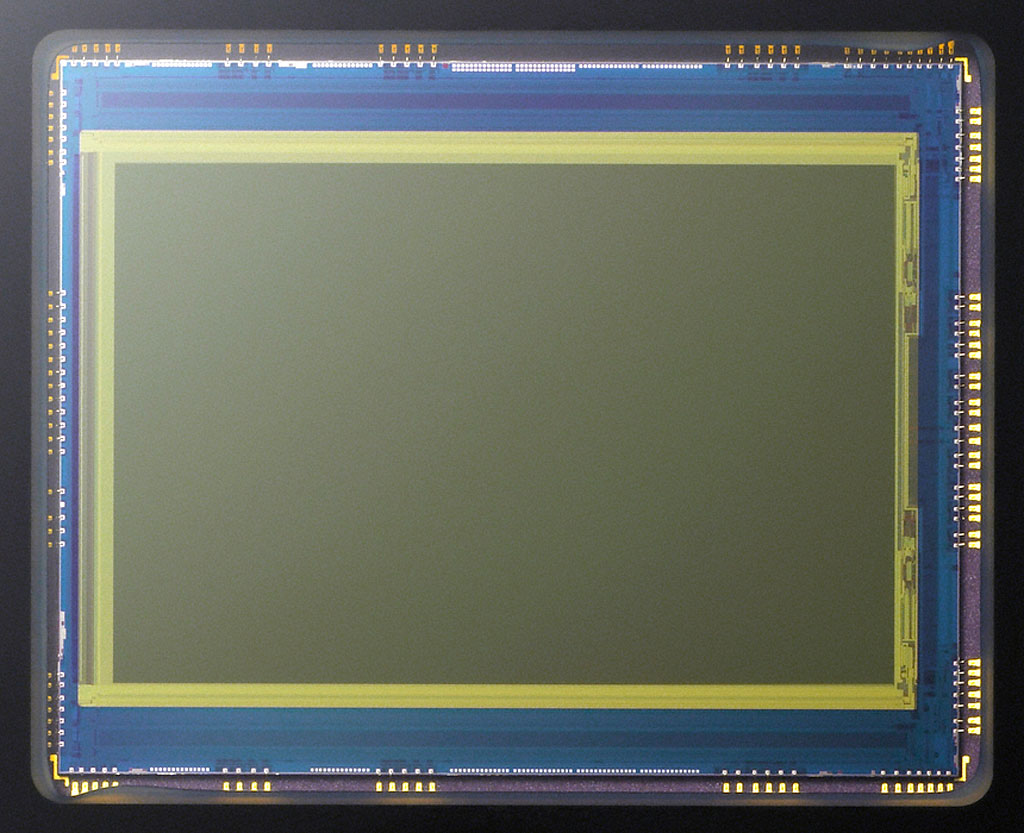
Image Sensor. At the heart of the Sony A500 is an Exmor CMOS image sensor with dimensions of 23.5 x 15.6mm, roughly equivalent to a frame of APS-C film. The Sony A500's sensor has an effective resolution of 12.3 megapixels, and yields 3:2 aspect ratio images with dimensions of up to 4,272 x 2,848 pixels. As well as two lower-resolution 3:2 modes of 3,104 x 2,072 and 2,128 x 1,416 pixels, the Sony A500 offers three modes which crop the sensor's output to a 16:9 aspect ratio, suitable for viewing on wide-screen HDTVs. The Sony A500's 16:9 image modes are 4,272 x 2,400, 3,104 x 1,744, and 2,188 x 1,192 pixels respectively.

The imager is mounted on a movable platter, allowing for Sony's SteadyShot INSIDE image stabilization with all compatible lenses. The system is said to offer 2.5 to 4 stops of correction, improved from 2.5 to 3.5 stops in past models. The sensor shift mechanism is also used to shake dust from the sensor, as part of Sony's Anti-Dust system which also includes a charge protection coating on the low-pass filter.
Working together. Both the Exmor image sensor and BIONZ image processor in the Sony A500 are said to feature new designs. The Sony A500 uses a combination of on-sensor noise reduction at each photocell location, plus a two-step noise reduction procedure which operates both before and after analog-to-digital conversion, processing chrominance and luminance noise separately. The result is an unusually wide sensitivity range for a camera at this price point, ranging from a minimum of ISO 200 to 12,800 equivalents in 1 EV steps, with settings from ISO 200 to 1,600 available under automatic control.
High ISO noise reduction is applied at sensitivities of ISO 1,600 or above, with normal or high strength options available. Long exposure noise reduction is also available at shutter speeds longer than one second, and can be disabled at the photographer's option.
Autofocus. The Sony Alpha A500 offers a nine-point TTL phase detection autofocusing system, and includes an AF-assist lamp to help with focusing in low-light conditions. Thanks to a secondary image sensor in the A500's prism assembly, Sony is able to allow use of the phase detection AF system while displaying a live view image on the camera's LCD display. Dubbed Quick AF Live View mode by Sony, this is reminiscent of a system that was used in Olympus' EVOLT E-330 digital SLR, but with the addition of some current technologies.

For example, in Quick AF Live View mode, the Sony A500 is able to offer face detection when focusing with the phase-detection sensor. When a face is detected, the camera can automatically select the correct AF point, and adjust exposure, white balance, flash output and other variables to ensure that your subject's face is correctly rendered. The extra information from the face detection system also allows an improved AF tracking function. The Sony A550's face detection system also allows a Smile Shutter function, which can automatically trigger the camera's shutter immediately when your subject smiles. Animation courtesy of Sony Electronics.
Manual Focus Check. Alternatively, the Sony Alpha A500's Live View can function in Manual Focus Check live view mode, accessed via a dedicated button on the camera's top panel. When activated, the camera displays a full-frame view of the scene on the LCD display, using information streamed from the main image sensor, and with the signal boosted if necessary to see the subject in poor lighting. Pressing the Enlarge button then cycles through 7x or 14x magnified views, useful for confirming accuracy of or adjusting manual focus. Grid lines can also be overlaid on the display to help in precise alignment of the scene. As the name implies, autofocusing isn't possible in this mode.
Modes. The Sony A500 includes Auto, Program, Aperture- and Shutter-priority, and Manual shooting modes plus a selection of scene modes that help beginners get the results they desire with a minimum of effort. Scene modes on offer include Portrait, Landscape, Macro, Sports, Sunset, and Night Portrait / Night View. Available shutter speeds from the A500's electronically controlled, vertical travel focal plane shutter range from 1/4,000 to 30 seconds, plus a bulb mode, and flash sync is available at 1/160 second.
Metering. The Sony A500 uses a 40-segment honeycomb patterned SPC sensor to determine exposures in all modes except for Quick AF Live View mode, where the secondary image sensor can be used to provide for more accurate 1,200-zone evaluative metering.
Metering modes available in the Sony A500 include Multi-segment, Center-weighted, and Spot. 2.0 EV of exposure compensation is available in 1/3 EV steps, and the A500 also allows for three-shot bracketed exposures in 0.3 or 0.7 EV steps. White balance modes include Auto, six presets (Daylight, Shade, Cloudy, Incandescent, Fluorescent, or Flash), and manual white balance -- including the ability to specify a color temperature. Three-frame white balance bracketing is also available, with two strength levels possible.

Menus. Sony's excellent main menu system remains largely the same, but the Sony A500's Function menu gets a much-needed revamp. Rather than a few large boxes that cover the entire screen, simple icons line the screen left and right. By default, the Help Guide Display is active. As you roll over each function item with the controller, a brief explanation of the highlighted item fades into view. You press the center button to make your selection, and you're taken to a submenu where the same basic help menu helps you understand the meaning of each item in plain text. When you're sufficiently versed on the controls (or sufficiently annoyed with the Help Guide Display) you can turn it off in Settings menu 1.
Flash. The Sony A500's built-in popup flash has a guide number of 12 meters at ISO 100, and 18mm coverage. Flash modes include Auto, Fill, Slow-sync and Rear-sync, and 2.0 EV of flash exposure compensation is available in 0.3 EV steps. An intelligent hot shoe is compatible with Sony's HVL-F36AM, HVL-F42AM, HVL-F56AM and HVL-F58-AM strobes, and high-speed sync / wireless flash are available with these units. Flash metering modes include ADI (Advanced Distance Integration) and Pre-flash TTL, and the internal flash has a recycle time of four seconds.
Auto HDR. One of the most surprising functions available on the Sony A500 is its Auto HDR mode. High Dynamic Range photos are created by combining two shots of varying exposure, allowing a greater dynamic range than can be captured in a single exposure.

The interactive animation above shows how the Sony A500's Auto HDR works. Just click on the link to open the animation, then work the controls. Animation courtesy of Sony Electronics USA.
Sony isn't the first to include in-camera HDR capability in a digital SLR: It was included in Pentax's K-7, a camera we've just reviewed. Pentax's implementation needs not only a relatively static subject, but also requires the camera to be placed on a tripod as the camera can't micro-align the three shots required to assemble a high dynamic range image. It's also rather slow, taking around 12 seconds of processing to create a single HDR image. Sony's HDR mode can micro-align the source images in-camera, which will result in a little cropping of the final image but means handheld HDR shooting is possible. The Sony A500 is also significantly faster, requiring only two seconds of processing per HDR image. As with Pentax's HDR mode, the Sony A500 can only save HDR images as JPEG files, and doesn't save the separate source images used to create the final HDR shot. Sony's HDR mode captures two shots with anywhere from 1 to 3 EV between the exposures, set in 0.5 EV increments.
DRO. The Sony A500 also includes Sony's optional D-Range Optimizer function, which works from a single shot and hence isn't limited to static subjects. A function of Sony's BIONZ processor, D-Range Optimizer can function automatically or in one of five manual strength levels, and adjusts the tone curve to avoid blown highlights and blocked shadows.
Creative Styles. The Sony A500's Creative Style function offers six pre-defined creative image styles, which adjust image tonality, saturation and contrast. Creative Style modes include Standard, Vivid, Portrait, Landscape, Sunset, and B&W, and these can be fine-tuned to the user's preferences.
Help. The Sony A500 also includes Sony's in-camera Help Guide function, which helps less experienced photographers understand the complexities of controlling and setting up their camera.
Formats. The Sony A500 can store images as Sony ARW 2.1-format Raw or EXIF 2.2-compliant JPEG files, and is able to save each image in both formats simultaneously. Both sRGB and Adobe RGB color spaces are available.
Ports. The Sony A500 includes an HDMI Type-C mini connector which allows display of images on high-definition displays (though no cable is included), as well as USB 2.0 High-Speed computer connectivity. Composite video output is not provided. There's also a DC input jack, for use with an optional AC adapter.

The Sony A500's images are stored on Secure Digital cards including the higher-capacity SDHC types, or on Sony's own Memory Stick PRO Duo, or PRO-HG Duo cards. A small switch is used to select the active card.
 Power is supplied by a proprietary Sony InfoLithium NP-FM500H lithium-ion rechargeable battery. Battery life to CIPA testing standards is rated as 1,000 shots when using the optical viewfinder, or 520 shots in live view mode, or about 50 shots more than the A550 can shoot. A battery grip is also available for both the A500 and A550, pictured at right.
Variable top speeds. Burst shooting is possible at five frames per second when using the optical viewfinder, or four frames per second when in Live View mode. One of the major differences between the Sony A500 and A550 is that the A500 does not support shooting at seven frames per second with the AF locked. Burst depth is also reduced compared to the A550, limited to approximately 6 Raw, 12 Fine JPEG, or 58 Standard JPEG images, or three images when simultaneously shooting in Raw+JPEG mode.
Brief Field Test

Sony's new A500 and A550 have a few impressive features, and a more imposing presence. Though they're technically not that big, they're thick front to back, and as a result feel rather bulky. Like the smaller A230, A300, and A350, the A500 and A550 feel less substantial as well, rather than the solid feel I'm used to from higher-end digital SLRs.
The grips on the Sony A500 and A550 are better than the consumer line, but still a little small left to right, making for a less comfortable hold. If you're shooting from a camera strap, you won't notice, but if you carry your camera more often by the grip, it can get a little uncomfortable to carry so much weight with such a small grip.
Sony's Eye-start AF ensures that the view is nearly in focus by the time you get your eye to the A500's viewfinder, and the Live View mode is as fast as your finger on the shutter button. While the Live View AF indicator boxes light up a bright green, their optical viewfinder counterparts don't shine red very brightly, and the borders of each box are so thin that they're tough to distinguish against a complicated background. AF seems very fast in either mode. It is indeed nice to have a live view without any difference in autofocus speed, and Sony SLRs are the only place you can find this kind of system.
The LCD on the A550 is noticeably better than the Sony A500's. It's easy to see why 921,600 dots would resolve better than 230,400. The Sony A500's screen is by no means unusable, just not as gorgeous, and it's a lot easier to judge focus on the A550's VGA screen. Both LCDs are reasonably usable in bright sunlight; good enough for composing images.

Both cameras have an optional animated display mode that gives a unique view of the currently available apertures and shutter speeds on two sliding scales; it's available in both optical viewfinder and Live View modes. As you zoom a lens, the available apertures change; and as lighting changes, the relative relationships between shutter speed and aperture change as well, depending on what mode you're in. It's relatively educational, too, for those unfamiliar with metering and exposure systems, and could be the best way to bring some analog understanding back into these digital wonders.
We can't comment much on image quality yet, so I'll refrain from discussing the Sony A500 and A550's special shooting modes at this point, since we can't be sure what the image quality of final production units will be like. (The in-camera hand-held HDR is very intriguing, though: I don't have a need for it in the shooting I do, but avid hiker and site owner Dave says he's often wished for a feature like this to tame difficult lighting in landscape shots.) My main impression of the new Alphas is that while the bodies are a bit chunky, the user interface has been noticeably improved, and the shooting is quick and easy. The focus is a little noisy, and the shutter sound is louder than average, but at least it's quick and sure. Viewfinder blackout time is also very short, another important consideration.
Overall, the Sony A500 and A550 look like good camera designs with some interesting innovations that take advantage of the serious CPU power of Sony's processing chips. Stay tuned for further comments once we've had a chance to test their image quality!

Design
Sony A500 Design
This page coming soon.
Operation
Sony A500 Operation
This page coming soon.
Optics
Sony A500 Optics
The Sony Alpha 500 is available bundled with a Sony 18-55mm f/3.5-5.6 DT SAM kit lens. (Tested below.) The lens features a built-in focus motor for fast, quiet autofocus, and is designed to be used with subframe Sony SLRs. (More on that later.) For additional test results, see our review of this lens on SLRgear.com.

Alpha lens mount. The Sony A500's Alpha lens mount is compatible with the full array of Alpha lenses, both screw-drive and electronic autofocus models.
The Sony A500 features a bayonet lens mount, which accommodates a wide range of Sony and Konica Minolta AF lenses. A small button on the front of the camera releases the lens from its mount, so it can be turned and removed. The A500's APS-C sized CMOS sensor is smaller than a 35mm frame (commonly called a subframe sensor), so the angle of view at any given focal length will not be the same as on a 35mm camera. To find the approximate 35mm equivalent focal length, multiply the focal length of the lens by 1.5. (Thus, a 50mm lens will provide about the same view as a 75mm lens on a 35mm camera.)
Sony A500 Autofocus
The Sony A500 provides both manual and automatic focus control modes, set by the Focus Mode switch on the left side of the camera body, or on the lens. The Function button provides access to additional AF modes and AF Area options. The Autofocus Mode option under the Function menu offers Single-shot AF (AF-S), Automatic AF (AF-A), and Continuous AF (AF-C) settings. Single-shot AF acquires and locks focus when the shutter button is half-pressed, while Continuous AF mode constantly adjusts focus while the shutter button is half-pressed. The Automatic AF setting will lock focus on a still subject, but will switch to Continuous AF mode if the subject moves.
Autofocus Area has three options available through the Function menu: Wide, Spot, and Local (manual setting). The default option is a nine-point Wide Focus area, where the camera selects which of the nine focus points is used. (Note that only the center point utilized a cross-type sensor sensitive to detail in both the horizontal and vertical axis. The other 8 sensors are line-type, sensitive to detail in one direction only, although the four line sensors at the corners of the AF array are angled, so they'll respond to both horizontal and vertical detail.)
You can override the chosen AF mode by pressing the AF button in the center of the Multi-controller on the camera's rear panel, which will select the center AF point (the latter indicated by the target box in the center of the viewfinder). Wide AF bases its focus on the most prominent subject detail in the portion of the image that falls within the total AF area. Spot mode bases its focus on the AF point at very center of the frame. The Local setting is Sony's terminology for a manual AF area selection, and lets you manually set the main AF point by using the Multi-controller to highlight one of the nine AF points. The active AF area is briefly illuminated in the viewfinder during autofocus.
Unique to Sony SLRs, the company's "Quick AF" Live View mode uses the same phase-detection AF sensors employed when the optical viewfinder is used, resulting in autofocus speeds that are just as fast. This is because the second image sensor located in the A500's viewfinder housing alleviates the need for the additional mirror flips required by most other phase-detect AF Live View implementations. Other systems need to drop the mirror, focus, and raise it again to before taking a shot in Live View mode, or employ a slower contrast-detect autofocus method using data from the main image sensor. Since the image sensor feeding the A500's live preview is located above the mirror, the mirror stays down until the final exposure, exactly as it does in optical viewfinder mode. The downside though is less accuracy, as the secondary sensor only offers around 92% frame coverage. Also, because the optical path for focusing is different than that for capture, there can be issues with front- or back-focusng, just like when using the optical viewfinder.
New for the A500 (and A550) are Face Detection and Smile Shutter options in Quick AF Live View mode. Face Detection can detect up to eight faces, and adjusts focus, exposure, image processing, and flash output. Smile Shutter can be used to trip the shutter automatically when a smile is detected. You can adjust the "sensitivity" of Smile Shutter from "Slight", "Normal", or "Big" smile.
Also new for the A500/A550 is a Manual Focus Check Live View mode, which derives its image from the main sensor. As the name implies, autofocus is not supported in this mode. The preview image in this mode can be magnified by 7x or 14x for critical manual focusing, and unlike Quick AF mode, frame coverage is 100%. Luke (our lab technician) was a little frustrated when using this mode to frame our viewfinder accuracy target, as it automatically shuts off after a few seconds. And, if you turn it back on a few times, the camera makes you wait before it will come on again. It seems to be limited by either a heat sensor, or a cumulative timer to prevent heat issues from extended use. It really is meant only for a quick manual focus check.
Sony didn't include a depth-of-field preview button on the A500, nor on any of its newer consumer models.
Sony A500 AF Assist
The Sony A500 uses its built-in flash head as a very bright AF-assist light for better focusing in dim lighting. This has the advantage that the light from the flash is very bright, but the downside is that you can only get AF assist when the flash head is raised. On some previous Alphas, this was a real limitation for available-light photography, as the camera can expose at light levels well below those it can focus at. The Sony A500 however has a Flash Off mode which allows the flash to be raised and used as an AF illuminator only, not contributing to the exposure itself.
Sony A500 Anti-Shake
The Sony A500 also employs Sony's SteadyShot INSIDE anti-shake technology, which uses a highly sensitive accelerometer and Smooth Impact Drive Mechanism (SIDM) to move the sensor assembly itself to counteract camera movement, rather than the more common approach of moving an optical element inside the lens, so it works with just about any lens attached.
Sony claims that the SteadyShot anti-shake system in the A500 provides up to a 4-stop reduction in the blurring produced by camera shake. Translating that into real-world shutter speeds, a two-stop improvement means that a shutter speed of 1/30 second would give you the same resistance to blur from camera shake that a speed of 1/120 would without anti-shake. A 4-stop improvement would mean you could shoot as slow as 1/8 second and get the same results (blur-wise) as when shooting at 1/120 second unaided. Even the lower end of the specified range of effectiveness means a pretty significant improvement in one's ability to hand-hold long exposures.
When SteadyShot is activated, the SteadyShot scale on the right side of the viewfinder display indicates the degree of stabilization. A downside to Sony's body-based SteadyShot approach is that while you can see the results of stabilization on competing lens-based designs, you have only this scale to tell you how the A500's SteadyShot mechanism is doing. The upside, though, is that the SteadyShot scale does give you a very good idea of how hard the SteadyShot mechanism is working, so you can choose a moment when the camera is moving less to snap the shutter, thus maximizing your chances for a sharp image.
Sony A500 Anti-Dust Technology
To help combat dust particles on the sensor from changing lenses, Sony included both an anti-static coating on the sensor filter and anti-dust vibrations to automatically shake the sensor with the anti-shake mechanism each time the camera is shut off. There is also a manual cleaning mode, where the camera first shakes the sensor, then lifts the mirror and opens the shutter, allowing access to the sensor for use with a blower or other cleaning device.
We've generally found dust-removal systems based on cameras' anti-shake systems less effective than those that use an vibrate the sensor ultrasonically, but it bears noting that no dust removal system completely eliminates the need for occasional manual sensor cleaning. Copper Hill Images is an advertiser of ours, but we'd recommend their wet/dry cleaning system even if they weren't (it's what we use in our own lab): See the Copper Hill website for details.
Sony A500 Optical Test Results
Below are the results of our optical tests on the Sony A500 coupled with the 18-55mm kit lens, since most people will buy and use the camera in this configuration.
Lens Test Results
Zoom
Good performance with the 18-55mm kit lens.


The Sony A500 is available bundled with a 18-55mm f/3.5-5.6 DT SAM lens. This lens possesses a very typical optical zoom ratio of about 3x, with a 35mm equivalent focal range of about 27-83mm because of the A500's 1.5x "crop factor." Results were good at 18mm with strong detail across most of the frame, though there was some softening in the corners, even at f/8. Coma distortion in the trees was low in the corners, but chromatic aberration was moderately high along high contrast elements near the edges of the image. Results were also good at the 55mm setting, with sharp results in the center, but corners were somewhat soft. Chromatic aberration at full telephoto was much lower. Overall, good results for a kit lens.
The Sony A500 also offers what the company calls "Smart Teleconverter" in Live View mode. Smart Teleconverter mode is digital zoom without interpolation, so the image is simply cropped. Two settings are available, 1.4x and 2.0x. 1.4x mode results in a 6.4-megapixel image cropped from center giving a equivalent field-of-view of 116mm with the kit lens, while 2.0x mode results in a 3.0-megapixel image with an effective focal length of 165mm. Because the images are not interpolated, there is no apparent loss of quality when viewed on the screen, though keep in mind maximum print sizes will be limited by the smaller image sizes.
Macro
An average minimum coverage area (for an SLR zoom kit lens), with good but slightly soft detail overall. Flash did an okay job throttling down.


As with zoom performance, the Sony A500's macro performance will depend entirely on the lens in use. However with the 18-55mm kit lens set to 55mm and f/8, the Sony A500 captured an average minimum area measuring 2.37 x 1.58 inches (60 x 40 millimeters). Detail was good but slightly soft in the center, and the corners were moderately soft. (Most lenses have some softening in the corners at macro distances.) The flash was a bit on the bright side, resulting in a slightly overexposed image. The flash had no trouble clearing the lens as there is no detectable shadow, though the bottom of the image is slightly darker than the top.
Geometric Distortion
Higher than average geometric distortion at wide-angle, very low at telephoto.
| Barrel distortion at 18mm is 1.1 percent |
 |
| Pincushion distortion at 55mm is less than 0.1 percent |
 |
The Sony A500's 18-55mm kit lens produced about 1.1 percent barrel distortion at wide-angle, which is higher than average and noticeable in some of its images. At the telephoto end, there's less than 0.1 percent pincushion distortion, which is practically non-existent. This is the tendency for the lens to bend straight lines outward (like a barrel -- usually at wide-angle) or inward (like a pincushion -- usually at telephoto).
The Sony A500 does not appear to be applying any geometric distortion correction to its JPEGs, as uncorrected RAW files show the same amount of distortion.
Chromatic Aberration and Corner Sharpness
Moderately high chromatic aberration at wide-angle; lower levels at full telephoto. The lens produced some soft corners.

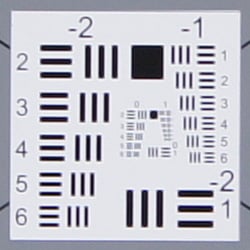
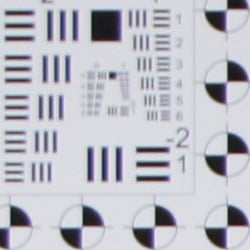

Chromatic Aberration. Chromatic aberration in the corners with the A500's 18-55mm kit lens at wide-angle (18mm) is moderate in terms of the number of pixels, but quite bright, so the effect is noticeable in some shots. At full telephoto (55mm), C.A. is also moderate in terms of pixels, but the colors in the fringes are quite muted and therefore less noticeable. Color fringing gradually reduces in brightness and width as it approaches the center of the image, where it is very low at wide-angle and telephoto.
Corner Softness. The Sony A500's 18-55mm kit lens produced some soft corners in a few shots. At full wide-angle and maximum aperture (f/3.5), all four corners were soft, with corners on the right-hand side showing strong blurring. The blurring extended quite far into the frame as well. The center of the image was very sharp with good contrast, though. At full telephoto and f/5.6, corners on the left-hand were moderately soft while corners on the right were a bit sharper. The center was slightly soft and telephoto images suffered from a loss of contrast across the frame. An average performance overall for a kit lens here. (Note that the lens was "wide-open" for these shots, and corner sharpness generally improves when a lens is "stopped-down" a couple of f-stops below full aperture.)
The Sony A500 doesn't appear to be applying any chromatic aberration in its JPEGs, as uncorrected RAW files show similar amounts.
The images above were taken from our standardized test shots. For a collection of more pictorial photos, see our Sony Alpha DSLR-A500 Photo Gallery .
Exposure
Sony A500 Image Quality
Color
Saturation & Hue Accuracy
Very good overall accuracy and saturation, with only minor shifts in hue and intensity.
 |
| In the diagram above, the squares show the original color, and the circles show the color that the camera captured. More saturated colors are located toward the periphery of the graph. Hue changes as you travel around the center. Thus, hue-accurate, highly saturated colors appear as lines radiating from the center. Click for a larger image. |
Saturation. The Sony A500 pushes strong reds, dark blues and some greens, browns and purples just a little, but actually undersaturates aqua and cyan tones slightly. Its overall color saturation (110.9% or 10.9% oversaturated) is a bit higher than the A380 and A330, but quite typical for a consumer oriented SLR. Most consumer digital cameras produce color that's more highly saturated (more intense) than found in the original subjects. This is simply because most people like their color a bit brighter than life.
Skin tones. Here, with the color balanced properly for the light source, the Alpha A500's skin tones looked just about right. There were some slight red tints in places, but overall skin tone looked natural. Where oversaturation is most problematic is on Caucasian skin tones, as it's very easy for these "memory colors" to be seen as too bright, too pink, too yellow, etc.
Hue. The Alpha 500 showed only a few small color shifts relative to the mathematically precise translation of colors in its subjects, but had overall pretty good accuracy. Most noticeable were shifts in reds toward orange, cyan toward blue, as well as some shifts in yellows, blues and purples. (The cyan to blue shift is very common among the digital cameras we test; we think it's a deliberate choice by camera engineers to produce better-looking sky colors.) Hue is "what color" the
color is.
Saturation Adjustment
The Sony A500 has a total of seven saturation settings available, three above and three below the default saturation. This covers a pretty wide range of saturation levels, about as wide a range as you're likely to find photographically relevant, apart from special effects that are arguably better achieved in software. The fine steps between settings mean you can program the camera to just the level of saturation you prefer, a feature we look for in cameras. The saturation settings did not impact contrast, so Sony did a good job here.
| Saturation Adjustment Examples | ||||
 |
 |
 |
 |
 |
| -3 | -1 | 0 | +1 | +3 |
The table above shows results with several saturation settings, see the Thumbnails index page for more (look for the files named A500OUTBSATx.JPG). Click on any thumbnail above to see the full-sized image.


Sensor
Exposure and White Balance
Indoors, incandescent lighting
Good color with Incandescent and Manual white balance settings, though warm results with Auto white balance, and cool results with 2,600 Kelvin. Slightly above average positive exposure compensation required.


Indoors, under normal incandescent lighting, the Sony Alpha A500 produced overly warm color with its Auto white balance setting. Both the Incandescent and Manual settings produced more accurate results. It was a bit of a toss-up between them, as the Manual setting was the most accurate but the Incandescent option a little warmer; we suspect most users would prefer the slight warmth of the results with the Incandescent white balance setting as being more representative of the original lighting, without the very warm cast of the Auto setting. The 2,600 Kelvin setting, which matches the temperature of our lights numerically, resulted in a slightly cool, blue cast. At +0.7 EV, the exposure compensation required was slightly above the average for this shot. The average among cameras we've tested is +0.3 EV. Our test lighting for this shot is a mixture of 60 and 100 watt household incandescent bulbs, a pretty yellow light source, but a very common one in typical home settings here in the U.S.
Outdoors, daylight
Very good results under harsh lighting, with good handling of contrast, detail, and color.

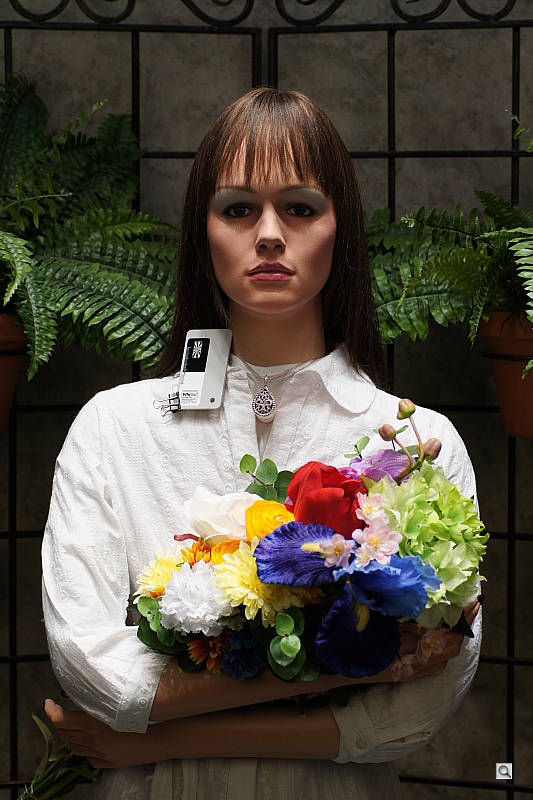
Outdoors, the Sony Alpha A500 performed well, but required slightly higher than average exposure compensation of +1.0 EV for our "sunlit" portrait shot to keep the face reasonably bright. The average among the cameras we've tested is +0.7 EV. Contrast is a little high, as you might expect under such harsh lighting, but the camera does a very good job of holding onto detail in bright highlights. Despite the apparent brightness, there are actually very few clipped highlights in the model's face and shirt, with most of the clipping occurring in the pendant and flowers. Some shadows are quite deep but contain good detail. Only a few highlights were blown in the House shot at the default exposure, and shadow detail is pretty good. Color balance is good as well, with good white balance and saturation considering the bright lighting. Finally, the camera's contrast adjustment did a very nice job of toning down the exposure without creating any strong color variations in the skin (though skin tone did change slightly - See the Contrast series under the Extremes section below). Overall, very good performance.
See full set of test images with explanations
See thumbnails of all test and gallery images
Resolution
Very high resolution, 1,700 ~ 1,800 lines of strong detail.
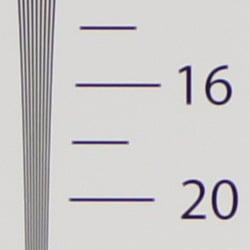


Our laboratory resolution chart revealed sharp, distinct line patterns down to about 1,800 lines per picture height in the horizontal direction, and about 1,700 in the vertical direction. Complete extinction didn't occur until just past 2,400 lines in both directions. Unusually, we weren't able to do much better with Adobe Camera Raw processed RAW files, which says that the camera is doing a pretty good job here. Use these numbers to compare with other cameras of similar resolution, or use them to see just what higher resolution can mean in terms of potential detail.
See full set of test images with explanations
See thumbnails of all test and gallery images
Sharpness & Detail
Slightly soft images, but with few signs of edge-enhancement on high-contrast subjects. Moderate noise suppression visible at base ISO.


Sharpness. The Sony A500 produced good detail, but images were slightly soft despite using the very sharp 24-70mm f/2.8 Carl Zeiss zoom, a really excellent optic. Only very minor edge enhancement artifacts are visible on high-contrast subjects such as the crop above left, so images are somewhat undersharpened at default settings. Edge enhancement creates the illusion of sharpness by enhancing colors and tones right at the edge of a rapid transition in color or tone.
Detail. The crop above right shows moderate levels noise suppression, as individual strands of hair merge together when local contrast is low, and as shadows deepen. All in all, an average performance here. Noise-suppression systems in digital cameras tend to flatten-out detail in areas of subtle contrast. The effects can often be seen in shots of human hair, where the individual strands are lost and an almost "watercolor" look appears.
RAW vs In-Camera JPEGs
As noted above, the Sony A500 produces somewhat soft camera JPEGs. More detail can be obtained from carefully processing RAW files with a good converter, without introducing additional artifacts. Take a look below, to see what we mean:

In the table above, mousing over a link at the bottom will load the corresponding crop in the area above, and clicking the link will load the full resolution image. Examples include in-camera Fine JPEG, RAW file processed through Sony's Image Data Converter SR version 3.2 software with maximum sharpening applied, and RAW file processed through Adobe Camera Raw version 5.7, then sharpened in Photoshop. For the Sony A500's images shot with sharp primes or high-end zooms, I found best results with strong but tight 400% unsharp masking with an 0.3 pixel radius. (As above, this shot of the house & trees was captured with the Sony 24-70mm f/2.8 Carl Zeiss lens, to show the camera's detail rendering when not limited by the kit lens.)
ACR renders colors somewhat differently than either the A500 or the Sony software, so the greens in the trees and blues in the sky are a bit different. However, there's no mistaking the increase in detail, regardless of changes in color or tone. The ACR conversion does show quite a bit more noise than the in-camera JPEG or Sony IDC conversion. You can always turn up the noise reduction in ACR, or apply noise reduction after the conversion.
ISO & Noise Performance
Better high ISO noise performance than previous Sony APS-C SLRs, with very good results up to ISO 800.
|
Default High ISO Noise Reduction
|
 |
 |
 |
| ISO 200 | ISO 400 | ISO 800 |
 |
 |
 |
| ISO 1,600 | ISO 3,200 | ISO 6,400 |
 |
||
| ISO 12,800 | ||
The Sony A500's images are quite clean at ISO 200, and ISO 400 is almost as clean. Some noise "grain" is noticeable at ISO 800, and there's a bit of chroma noise in the shadows, but the camera doesn't smudge away as much fine detail as previous Alpha generations, except in low-contrast reds (see below). There's stronger smudging caused by noise reduction at ISO 1,600, but a surprising amount of detail is left. At ISO 3,200, fine detail suffers from more aggressive noise reduction and there's more chroma in the shadows, but performance is still pretty good. Detail takes larger hit at ISO 6,400 and especially 12,800, with much stronger blurring of fine detail as well as blotchy chroma noise. Overall though, these are good results for its class, and the handling of noise versus detail is much better than previous Alpha models. As always, see the Print Quality section below for maximum recommended print sizes at each ISO.
A note about focus for this shot: We shoot this image at f/4, usually using one of three very sharp reference lenses (70mm Sigma f/2.8 macro for most cameras, 60mm f/2.8 Nikkor macro for Nikon bodies without a drive motor, and Olympus Zuiko 50mm f/2.0 for Four Thirds and Micro Four Thirds bodies). To insure that the hair detail we use for making critical judgements about camera noise processing and detail rendering is in sharp focus at the relatively wide aperture we're shooting at, the focus target at the center of the scene is on a movable stand. This lets us compensate for front- or back-focus by different camera bodies, even those that lack micro-focus adjustments. This does mean, though, that the focus target itself may appear soft or slightly out of focus for bodies that front- or back-focused with the reference lens. We know this; if you click to view the full-size image for one of these shots and notice that the focus target is fuzzy, you don't need to email and tell us. :-) The focus target position will have been adjusted to insure that the rest of the scene is focused properly.



Noise Reduction Oddity. We noticed (along with a few readers) a peculiar behavior for the high ISO noise reduction settings in the Sony A500 (and A550). The Normal setting smudges the red leave pattern in our Still Life target setting more than the High setting. The High setting does reduce chroma noise compared to the Normal setting though (lower crops), and we confirmed the filenames are correct. You may want to leave the A500 high ISO NR setting at High for this reason, but be aware that continuous mode burst speed may be impacted.
Extremes: Sunlit and low light tests
Very high resolution with excellent highlight and shadow detail. Good low-light performance, capable of capturing bright images in near darkness, however manual exposure was required and autofocus struggled at lower light levels.


Sunlight:
The Sony Alpha 500 handled the deliberately harsh lighting in the test above very well. Though contrast is a little high, shadow and highlight detail are both very good. The camera's contrast adjustment also did a good job of decreasing overall contrast without producing strong color variations; see the section below. The +1.0 EV exposure did the best job here, as the model's face was too dim at +0.7 EV and we felt that too many highlights were lost at +1.3 EV. Though +1.0 EV was the best exposure overall, the model's face was still a touch dark, so some may prefer the +1.3 EV exposure. These shots were captured with the Sony A500's DRO (Dynamic Range Optimizer) control set to "Off". The default "Auto" setting (see below) helped both exposure accuracy and shadow preservation on this difficult shot. Be sure to use fill flash in situations like the one shown above; it's better to shoot in the shade when possible.
Because digital cameras are more like slide film than negative film (in that they tend to have a more limited tonal range), we test them in the harshest situations to see how they handle scenes with bright highlights and dark shadows, as well as what kind of sensitivity they have in low light. The shot above is designed to mimic the very harsh, contrasty effect of direct noonday sunlight, a very tough challenge for most digital cameras. (You can read details of this test here.)
Contrast Adjustment
We really like it when a camera gives us the ability to adjust contrast and saturation to our liking. It's even better when those adjustments cover a useful range, in steps small enough to allow for precise tweaks. Just as with its saturation adjustment, the Sony A500's contrast setting meets both challenges.
| Minimum Contrast, default D-R setting | |
 |
 |
| Contrast set to lowest, +1.0 EV |
Contrast set to lowest, Auto Exposure |
At its lowest contrast setting, the A500 did a really excellent job of preserving highlight detail, maintaining natural-looking skin tones, and holding nice detail in the shadows. The A500 captures good color outdoors, though just slightly on the warm side. Overall, very good results here, especially when the contrast setting is tweaked. (This is a really tough shot; the Sony A500 does a much better than average job handling it.)
| Contrast Adjustment Examples | ||||
|
 |
 |
 |
 |
| -3 | -1 | 0 | +1 | +3 |
The series of shots above shows results with several different contrast adjustment settings, showing the minimum step size around the default, as well as both extremes. While you can see the extremes, it's hard to really evaluate contrast on small thumbnails like these, click on any thumbnail to go to the full-size image.
One very nice feature of Sony's contrast adjustment is that it has very little effect on color saturation. Contrast and saturation are actually fairly closely coupled, it's a good trick to be able to vary one with out the other changing as well. As with saturation, Sony did a good job here.
| DRO Examples | |||
 |
 |
 |
 |
| DRO Off +1.0 EV |
DRO Auto +1.0 EV |
DRO Level 1 +1.0 EV |
DRO Level 5 +1.0 EV |
 |
 |
 |
 |
| Highlight Retention | |||
 |
 |
 |
 |
| Shadow Detail / Noise (Levels adjusted equally in Photoshop on the right-hand side to show noise) |
|||
Dynamic Range Optimization is Sony's name for their dynamic range enhancement technology. DRO divides the image into small areas, analyzes the range of brightness of each area, and adjusts the camera's image processing parameters accordingly to make the best use of the available dynamic range. Auto DRO is enabled by default on the Sony A500. You can also set the level manually, from 1 ("weak") to 5 ("strong").
The above images and crops show the effects of DRO disabled, set to Auto (the default), Level 1 ("weak") and Level 5 ("strong") for our "Sunlit" Portrait shot with +1.0 EV exposure compensation. As you can from the crops, Auto DRO had only a slight effect on the highlights in this shot, with higher levels clipping just slightly more highlights. The bulk of the difference between different levels of DRO is found in the shadow and midtone areas. The stronger the level, the more boost is applied to the darker areas of the image. Along with that boost is an increase in shadow noise, though noise is not as much of an issue as we expected.
| HDR Examples | |
 |
 |
| Auto | 1 EV |
 |
 |
| 2 EV | 3 EV |
High Dynamic Range. The Sony A500's HDR mode takes two images in rapid succession, one underexposed, and one overexposed, then combines them into one high dynamic range image automatically. Highlight areas from the underexposed image and shadow areas of the overexposed image are combined in-camera to produce an image with increased dynamic range. The camera then saves the composite JPEG image. (You cannot use the function on RAW images.) The overlaid images are micro-aligned by the camera, but it can only correct for so much movement. If it can't micro-align successfully or if the scene has low contrast or if subject motion has been detected, an icon indicating HDR capture failed will appear. The user manual warns that for best results, the subject should not move or blink, so it's not really intended for portraits. There is also a manual mode where you can select the level from 1 EV ("weak") to 3 EV ("strong") in 1 EV steps. As you can see, the Auto setting produced a natural looking image with results somewhere between the 1 and 2 EV settings, maintaining highlights and boosting shadows without additional noise. In fact, shadow noise is lower since the overexposed image would have less noise in the shadows than the nominally exposed image. There may also be some blending going on, which would also average out random noise. The 3 EV setting produced a very flat looking result here, though would likely work well in strongly backlit situations.
| Face Detection | ||
 |
 |
|
| Off at 0 EV | On at 0 EV | |
Face Detection
Just like most Point & Shoot cameras these days, the Sony A500 has the ability to detect faces in Live View mode, and adjust exposure and focus accordingly. Up to eight faces can be detected at once. As you can see from the examples above, it really works, as the image with face detection enabled is much better exposed for the face, even though both images were shot without any exposure compensation.
| 1 fc 11 lux |
1/2 fc 5.5 lux |
1/4 fc 2.7 lux |
1/8 fc 1.3 lux |
1/16 fc 0.67 lux |
1/16fc No NR |
|
|---|---|---|---|---|---|---|
| ISO 200 |
 1 sec f2.8 |
 2 sec f2.8 |
 4 sec f2.8 |
 8 sec f2.8 |
 15 sec f2.8 |
 15 sec f2.8 |
| ISO 400 |
 0.5 sec f2.8 |
 1 sec f2.8 |
 2 sec f2.8 |
 4 sec f2.8 |
 8 sec f2.8 |
 8 sec f2.8 |
| ISO 800 |
 1/4 sec f2.8 |
 0.5 sec f2.8 |
 1 sec f2.8 |
 2 sec f2.8 |
 4 sec f2.8 |
 4 sec f2.8 |
| ISO 1600 |
 1/8 sec f2.8 |
 1/4 sec f2.8 |
 0.5 sec f2.8 |
 1 sec f2.8 |
 2 sec f2.8 |
 2 sec f2.8 |
| ISO 3200 |
 1/15 sec f2.8 |
 1/8 sec f2.8 |
 1/4 sec f2.8 |
 0.5 sec f2.8 |
 1 sec f2.8 |
 1 sec f2.8 |
| ISO 6400 |
 1/30 sec f2.8 |
 1/15 sec f2.8 |
 1/8 sec f2.8 |
 1/4 sec f2.8 |
 0.5 sec f2.8 |
 0.5 sec f2.8 |
| ISO 12800 |
 1/60 sec f2.8 |
 1/30 sec f2.8 |
 1/15 sec f2.8 |
 1/8 sec f2.8 |
 1/4 sec f2.8 |
 1/4 sec f2.8 |
Low light. The Sony A500 was able to capture bright images at the lowest light level with the lowest sensitivity setting (ISO 200), but required the use of manual exposure mode. The A500's auto exposure (metering) did not work well at all at lower light levels, resulting in very underexposed images. Noise is quite low up to ISO 800, and at higher ISOs noise grain is pretty fine, but chroma noise gets a little blotchy. There's no sign of any banding issues or uncorrected hot pixels. Color balance looked good with the Auto white balance setting, just slightly on the cool side.
The camera's autofocus system was able to focus on the subject down to about the 1/3 foot-candle light level unassisted. This is a rather poor performance for an SLR, though the A500 was able to focus in complete darkness with the AF assist enabled. Since the Sony A500 doesn't use contrast detection for Live View, low-light AF performance was identical in Live View mode. Keep in mind that the longer shutter speeds here demand the use of a tripod to prevent any blurring from camera movement, Sony's Super SteadyShot not withstanding. (A useful trick is to just prop the camera on a convenient surface, and use its self-timer to release the shutter. This avoids any jiggling from your finger pressing the shutter button, and can work quite well when you don't have a tripod handy.)
How bright is this? The one foot-candle light level that this test begins at roughly corresponds to the brightness of typical city street-lighting at night. Cameras performing well at that level should be able to snap good-looking photos of street-lit scenes.
NOTE: This low light test is conducted with a stationary subject, and the camera mounted on a sturdy tripod. Most digital cameras will fail miserably when faced with a moving subject in dim lighting. (For example, a child's ballet recital or a holiday pageant in a gymnasium.) Digital SLRs like the Sony A500 do much better than point & shoots, but you still shouldn't expect a quick autofocus lock with moving subjects.
Output Quality
Print Quality
Excellent 16x24-inch prints at ISO 200; ISO 800 shots are still good at 13x19 inches; and ISO 12,800 images produce usable 5x7-inch prints.
 Though the Sony A500 has the lower-resolution sensor, its 12-megapixel prints look better than the prints from the Sony A550's 14-megapixel sensor. The difference is slight, but enough that the Sony A500 turns out a sharper 16x24-inch print from its ISO 200 files.
ISO 400 shots look better at 13x19 inches, but are certainly still usable at 16x24.
ISO 800 shots still look quite good at 13x19; if you squint you can see a difference, but it's not noticeable otherwise.
ISO 1,600 shots are a little too soft at 13x19 inches, though, but look better at 11x14, with just a little softening here and there, and a lot of softness in our red swatch.
ISO 3,200 images start to look a little grainy, but we'd still call 11x14-inch prints quite usable.
ISO 6,400 files are better printed at 8x12, and have a little grain in the shadows, but otherwise color and detail look good.
ISO 12,800 shots are slightly soft but usable at 5x7, and sharpen right up at 4x6 inches.
Overall a very good performance from the Sony Alpha A500, and a slight upset over the Sony A550 at the lowest ISO settings. Color and detail are maintained quite well across the ISO range. The Sony A500 bests the A550 at ISO 200, 800, and 3,200 in print size quality.
Testing hundreds of digital cameras, we've found that you can only tell just so much about a camera's image quality by viewing its images on-screen. Ultimately, there's no substitute for printing a lot of images and examining them closely. For this reason, we now routinely print sample images from the cameras we test on our Canon Pro9000 Mark II studio printer, and on the Pixma MP610 here in the office. (See the Canon Pixma Pro9000 Mark II review for details on that model.)
The images above were taken from our standardized test shots. For a collection of more pictorial photos, see our Sony Alpha DSLR-A500 Photo Gallery .
Not sure which camera to buy? Let your eyes be the ultimate judge! Visit our Comparometer(tm) to compare images from the Sony Alpha DSLR-A500 with those from other cameras you may be considering. The proof is in the pictures, so let your own eyes decide which you like best!
Performance
Sony A500 Performance
Timing and Performance
Very good speed for a consumer digital SLR.
| Startup/Shutdown |
||
| Power on |
~0.5 second
|
Time it takes for camera to turn on and take a shot. |
| Shutdown |
~1.0 second
|
How long it takes to turn off. (Slightly slow, due to dust-removal sensor shake on shutdown.) |
| Buffer clearing time |
4 seconds *
after 50 L/F JPEGs |
Worst case buffer clearing time. -- This is the delay after a set of shots before you can remove the card. Some cameras won't shut down until the buffer is cleared. |
|
7 seconds *
after 9 RAW frames |
||
|
6 seconds *
after 3 RAW + JPEG frames |
||
| *Note: Buffer clearing times measured with a SanDisk Extreme III 8GB SDHC memory card. Slower cards will produce correspondingly slower clearing times. |
||
Startup time is about average for an SLR, but shutdown is a little slow (probably due to sensor cleaning). Buffer clearing times are pretty good for a consumer SLR.
| Mode Switching | ||
|---|---|---|
|
Play to Record, |
~0.3 second
|
Time until first shot is captured. |
|
Record to Play |
~0.8 second
|
Time to display a large/fine file immediately after capture. |
|
Display |
~0.5 second
|
Time to display a large/fine file already on the memory card. |
Mode switching is pretty fast for a consumer SLR.
| Shutter Response (Lag Time) | ||
|---|---|---|
|
Full Autofocus |
0.181 second
|
Time from fully pressing shutter button to image capture (with Sigma70mm f/2.8 prime). |
|
Full Autofocus |
0.208 second
|
Time from fully pressing shutter button to image capture (with Sigma70mm f/2.8 prime), Auto Flash enabled. |
|
Pre-focused |
0.074 second
|
Time to capture, after half-pressing and holding shutter button. |
|
Continuous AF
|
0.183 second
|
This mode usually shows no speed increase with our static subject; we have no way to measure performance with moving subjects.
|
|
Manual focus
|
0.182 second
|
For most cameras, shutter lag is less in manual focus than autofocus, but usually not as fast as when the camera is "pre-focused."
|
|
Full Autofocus
Single Area AF Quick AF Live View |
0.180 second
|
Time from fully pressing shutter button to image capture (with Sigma70mm f/2.8 prime). |
|
Full Autofocus |
0.181 second
|
Time from fully pressing shutter button to image capture (with Sigma70mm f/2.8 prime). |
Looking at the A500's ability to determine that it's properly focused when shooting the same target multiple times, its speed is faster than average for a consumer model. The A500 required about 0.18 second for full AF in any mode. Enabling the flash raised the lag to 0.208 second, but that's still pretty fast. Continuous autofocus mode lag time was 0.183 second and manual focus was only slightly faster at about 0.182 second. When prefocused, shutter lag dropped to 0.074 second, which is quite fast.
The nice thing about Sony's "Quick AF" Live View implementation is that shutter lag in Live View mode is just as fast as when using the optical viewfinder (we measured 0.180 second for Single-area full AF lag, and 0.181 second for Wide-area AF mode). This is because the second image sensor located in the A500's viewfinder housing alleviates the need for the additional mirror flips required by most other phase-detect Live View implementations. Other phase-detect systems need to drop the mirror, focus, and raise it again to before taking a shot in Live View mode, or employ a slower contrast-detect autofocus method using the main image sensor. Since the image sensor feeding the A500's live preview is located above the mirror, the mirror stays down until the final exposure, exactly as it does in optical viewfinder mode. As noted elsewhere, though, the downside of this type of Live View implementation is lower accuracy for the Quick AF Live View viewfinder display. We also noticed more variation between trials (10-12%) in "Quick AF" Live View mode versus using the optical viewfinder (4% variation).
To minimize the effect of different lens' focusing speed, we test AF-active shutter lag with the lens already set to the correct focal distance. We also use the same Sigma 70mm f/2.8 macro with every camera (on all platforms except Four Thirds/Micro Four Thirds and Nikon consumer models lacking an in-body focus motor), to further reduce variation, and because our tests showed that focus-determination time with this lens was close to the fastest, across multiple camera bodies from different manufacturers. Being an older design with a non-ultrasonic motor, it wouldn't be the fastest at slewing from one focus setting to another, but that's exactly the reason we measure focus determination speed, which is primarily a function of the camera body, vs focus adjustment speed, which is primarily a function of the lens.
| Cycle Time (shot-to-shot) | ||
|---|---|---|
|
Single Shot mode
Large Fine JPEG |
0.48 second
|
Time per shot, averaged over 50 shots. |
|
Single Shot mode |
0.47 second
|
Time per shot, averaged over 9 shots. |
|
Single Shot mode |
0.46 second
|
Time per shot, averaged over 3 shots. |
|
Early shutter |
No
(Yes with flash) |
Some cameras refuse to snap another shot if you release and press the shutter too quickly in Single Shot mode, making "No" the preferred answer. |
| Continuous Hi mode Large Fine JPEG |
0.21 second (4.88 frames per second);
5 frames total; 4 seconds to clear |
Time per shot, averaged over buffer depth of 5 shots, then slows to an average of 0.53s or 1.90 fps, with 7% variation in cycle times.
|
|
Continuous Hi mode |
0.21 second (4.85 frames per second);
6 frames total; 6 seconds to clear |
Time per shot, averaged over buffer depth of 6 shots, then slows to an average of 0.84s or 1.19 fps, with 7% variation in cycle times. |
|
Continuous Hi mode |
0.21 second (4.88 frames per second);
3 frames total; 5 seconds to clear |
Time per shot, averaged over buffer depth of 3 shots, then slows to an average of 1.36s or 0.73 fps, with 4.7% variation in cycle times. |
|
Continuous Low mode
Large Fine JPEG |
0.33 second (3.00 frames per second);
8 frames total; 4 seconds to clear |
Time per shot, averaged over buffer depth of 8 shots, then slows to an average of 0.51s or 1.95 fps, with 5% variation in cycle times.
|
|
Continuous Low mode |
0.33 second (3.07 frames per second);
8 frames total; 6 seconds to clear |
Time per shot, averaged over buffer depth of 8 shots, then slows to an average of 0.84s or 1.19 fps, with 4% variation in cycle times. |
|
Continuous Low mode |
0.34 second (2.99 frames per second);
3 frames total; 5 seconds to clear |
Time per shot, averaged over buffer depth of 3 shots, then slows to an average of 1.36s or 0.74 fps, with 4% variation in cycle times. |
| Flash recycling |
3.4 seconds
|
Flash at maximum output. |
| *Note: Buffer clearing times measured with a SanDisk Extreme III 8GB SDHC memory card. Slower cards will produce correspondingly slower clearing times. Slow cards may also limit length of bursts in continuous mode. ISO sensitivity and other settings such as DRO or NR can also affect cycle times and burst mode performance. |
||
Shot-to-shot cycle times were good for an SLR, at 0.48 second per frame for large/fine JPEGs, 0.47 second for RAW files, and 0.46 second for RAW + JPEG frames. Continuous mode speeds are also quite good for a consumer SLR, at about 4.9 frames-per-second for any quality. Unlike the Sony A550, Speed Priority mode is not available on the A500. A Continuous Low mode limits burst speed to about 3 frames per second.
Buffer depths are pretty shallow, though, with 5 shots for large/fine JPEG frames with a fast card, 6 RAW frames and 3 RAW + JPEG frames. In Continuous Low mode, buffer depths increase to 8, 8, and 3 frames respectively. The flash takes 3.4 seconds to recharge after a full-power shot, which is good.
| Download speed | ||
|---|---|---|
|
Windows Computer, USB 2.0 |
16,354 KBytes/sec
|
Typical Values: |
Connected to a computer or printer with USB 2.0, download speeds are very fast; definitely fast enough that you will likely not feel the need for a card reader.
Bottom line, the Sony Alpha 500 is faster than the average consumer SLR. Startup time is good, mode switching is good, autofocus is faster than average, cycle time is good, and burst speed is good. Buffer length is pretty limited, though, so Sony fans looking to shoot sports should consider the A550 instead, as it has more than twice the buffer size plus it has a speed priority mode capable of up to 6.7 frames per second.
Battery and Storage Capacity
Battery
Excellent battery life for a lithium-ion powered SLR.
| Operating Mode | Number of Shots |
|---|---|
|
Optical Viewfinder,
(CIPA standard) |
1,000
|
|
Live View LCD,
(CIPA standard) |
520
|
The Sony Alpha 500 uses a custom rechargeable lithium-ion battery for power, and ships with a charger. Battery life is a well above average when using the optical viewfinder, and quite good in Live View mode. Still, we recommend you pick up a spare battery and keep it freshly charged and on-hand for extended outings.
The table above shows the number of shots the camera is capable of (on either a fresh set of disposable batteries or a fully-charged rechargeable battery as appropriate), based on CIPA battery-life and/or manufacturer standard test conditions.
(Interested readers can find an English translation of the CIPA DC-002 standards document here. (180K PDF document))
Storage
The Sony Alpha A500 accepts SD/SDHC or Memory Stick Pro Duo memory cards, and no card is included with the camera.
|
Image Capacity vs Resolution/Quality 1GB SD Memory Card |
Fine | Normal |
RAW
|
RAW
+ JPEG |
|
| 4,272x 2,848 |
Images
(Avg size) |
187 5.5 MB |
260 3.9 MB |
76 13.5 MB |
54 19.0 MB |
|
Approx.
Comp. |
7:1 | 9:1 | 1.4:1 | - | |
| 3,104 x 2,072 |
Images
(Avg size) |
289 3.5 MB |
384 2.7 MB |
- | - |
|
Approx.
Comp. |
6:1 | 7:1 | - | - | |
| 2,128x 1,416 |
Images
(Avg size) |
426 2.4 MB |
539 1.9 MB |
- | - |
|
Approx.
Comp. |
4:1 | 5:1 | - | - | |
We strongly recommend buying either a large capacity SDHC, or a large capacity Memory Stick Pro Duo card, at least a 2GB card, preferably a 4-8GB one, to give yourself extra space for extended outings. (Check the shopping link above, cards are really cheap these days, so no reason to skimp.)
Viewfinder
Sony A500 Viewfinder
The Sony A500 features a digital SLR design, so the optical viewfinder offers a true, through-the-lens (TTL) display. A dioptric adjustment dial to the right of the eyepiece accommodates eyeglass wearers, letting them adjust the viewfinder optics between -2.5 to +1.0 diopters. The viewfinder eyepiece has a fairly typical eyepoint (specified at 19mm from the eyepiece, 15mm from the eyepiece frame with the dioptric adjustment set to -1 diopter). Magnification is pretty low at only 0.80x for a 50mm lens and -1 diopter of dioptric correction, but an improvement over the A380's 0.74x magnification. Coverage is specified at 95%, which is typical for non-pro SLRs.
The Sony A500's viewfinder uses a pentamirror design. The advantage of a pentamirror is it's lighter and less expensive; however an all-glass pentaprism design delivers more light to the viewfinder eyepiece, thanks to its more efficient internal reflection. A solid pentaprism isn't compatible with Sony's tilting-mirror Quick AF Live View mechanism, though.

The Sony A500's fairly extensive information display features a series of focus target marks in the center of the view that highlight briefly when the AF system is activated. The focus dots found inside AF targets on the A230, A330 and A380 are no longer present. Markers are provided for 16:9 shooting area, as well as spot metering area. They only appear when the associated feature is enabled. All markers are LCD overlays (as opposed to being etched on the focusing screen), so when the camera is shut off, none of them appear.
Camera information appears beneath the image area in a small strip, and reports the camera's major settings, such as shutter speed, aperture, flash mode, EV compensation, etc. To the far right side of the strip is the SteadyShot (anti-shake) scale, indicating the degree of stabilization whenever anti-shake mode is activated. The information readout in the viewfinder activates whenever you half-press the Shutter button, and remains active for a few seconds afterward.
 A pair of horizontal infrared sensors just below the viewfinder detect your eye as it approaches the viewfinder, and deactivates the LCD information display if you have the Auto Off w/ VF option enabled in the Custom menu. (Note: our camera picked-up the IR beam in the image at right. The beam is invisible to the naked eye.) You can also set these sensors to initiate autofocus whenever your eye is in range of the eyepiece (Eye-Start AF), which makes the A500's autofocus seem even more responsive.
Viewfinder Test Results
Coverage
Fair accuracy from the optical viewfinder, but Quick AF Live View mode was less accurate. Manual Focus Check mode was very accurate.


The Sony Alpha 500's optical viewfinder showed about 94 percent coverage accuracy with our Sigma 70mm f/2.8 prime lens, close to Sony's specification of 95 percent. The image does however appear slightly tilted and shifted relative to the imaging sensor, which we're unfortunately seeing more frequently in consumer SLRs these days. The amount of tilt and shift on the Sony A500's finder isn't as bad as many we've seen.
Quick AF Live View mode had slightly less coverage at about 92%, but was also tilted and shifted very slightly. We're used to seeing close to 100% coverage from cameras' LCDs in Live View mode, but Sony's approach of using a secondary image sensor for Live View rather than the main imager means that lower coverage and minor misalignments like this can occur. (The upside, of course, is much faster shutter response than most Live-View SLRs that use the main image sensor for the Live View viewfinder display.)
Coverage in Manual Focus Check Live View mode, which displays an image derived from the main imaging sensor, is 100%, however we found this mode to be somewhat limiting in usefulness, as it only displays for a few seconds then shuts off. It really is only meant for a quick focus check.
Live View
Sony A500 Live View
This page coming soon.
Flash
Sony A500 Flash

The Sony A500 features a built-in, pop-up flash, which operates in either Auto, Fill-Flash, Slow-sync, Rear Sync, Wireless, and Flash-off modes. To release the flash from its compartment, press the button on the left side of the pentamirror housing. Close it again by pushing the flash head back down.
The Flash mode is changed from the Function screen. In Auto flash mode (available only in the camera's Auto or Scene Selection modes), the camera automatically determines when to fire the flash based on the existing lighting, and will pop-up the flash automatically. In Fill-Flash mode, the flash fires with every exposure, regardless of lighting conditions. Slow-sync mode fires the flash for foreground fill exposure, while allowing the background to "burn in". The Rear Flash Sync mode fires the flash at the end of the shutter time, rather than the beginning. If you have moving objects in the scene with lights, as with a car, this will produce a sharp image of your subject, with a "motion trail" following behind it when shooting at slower shutter speeds. The flash is off when Flash Off mode is selected, or when the flash is down in non Auto exposure mode.
 A Flash control option in Record Menu 1 allows you to select between ADI and Pre-Flash TTL. The only difference between the two is ADI takes into account focus distance information from the lens, which can make for more accurate flash exposures, especially with highly reflective subjects. A Red-Eye Reduction option is available through the Custom 1 menu. When Red-Eye reduction is enabled, the camera will fire a few low-power flash pulses before it actually snaps the picture, to make the pupils of your subjects' eyes contract.
Flash exposure compensation can be set via the Camera 1 menu, measuring two stops lower or greater, in 1/3-stop increments. This is in addition to standard exposure compensation.
The Sony A500's built-in flash has a Guide Number (GN) of 12 meters or 39.4 feet at ISO 100. That's about average for the Consumer SLRs we've tested. Maximum sync speed is 1/160s. High Speed Sync (HSS) shooting with shutter speeds up to 1/4000s is available with Sony HVL-F58AM and HVL-F42AM external flash units.
The A500 also has a top-mounted hot shoe for attaching an external flash unit. The shoe design and contact arrangement are set up for Sony's own dedicated flash units. As is usually the case for consumer SLRs, no PC-sync terminal is provided.
The Wireless mode lets the Sony A500 work with compatible remote flash units with wireless capability, specifically the Sony HVL-F58AM and HVL-F42AM. Four separate control channels are available for wireless operation, to allow multiple photographers to work wirelessly in the same area without interfering with each other. You're limited to a single external flash unit vs the 3 groups that you can control with Sony's higher-end models, but it still opens a lot of creative possibilities, when the flash doesn't have to be attached to your camera. Operating in Wireless mode with a compatible external flash unit, the Sony A500's flash exposure compensation adjustment can adjust the intensity of the external flash remotely, once the camera and flash unit have been initially synced to each other.
Flash Test Results
Coverage and Range
Very good flash range with uneven coverage at wide-angle. Our standard shot required slightly less than average exposure compensation.


Coverage. Flash coverage was uneven at wide-angle (18mm), but much more uniform at telephoto (55mm). Uneven coverage at wide-angle isn't unusual, though.
Exposure. The Indoor test scene was bright with +0.3 EV flash exposure compensation. (Most cameras we've tested required about +0.7 EV for this scene.) The camera's Slow-Sync flash mode produced bright, even results without any flash exposure compensation, though with a stronger pinkish-orange cast from the room lighting.
| Flash Range: Wide Angle | |||||
|---|---|---|---|---|---|
| 6 ft | 7 ft | 8 ft | 9 ft | 10 ft | 11 ft |
 1/60 sec f3.5 ISO 200 |
 1/60 sec f3.5 ISO 200 |
 1/60 sec f3.5 ISO 200 |
 1/60 sec f3.5 ISO 200 |
 1/60 sec f3.5 ISO 200 |
 1/60 sec f3.5 ISO 200 |
| 12 ft | 13 ft | 14 ft | 15 ft | 16 ft | |
 1/60 sec f3.5 ISO 200 |
 1/60 sec f3.5 ISO 200 |
 1/60 sec f3.5 ISO 200 |
 1/60 sec f3.5 ISO 200 |
 1/60 sec f3.5 ISO 200 |
|
| Flash Range: Telephoto | |||||
|---|---|---|---|---|---|
| 6 ft | 7 ft | 8 ft | 9 ft | 10 ft | 11 ft |
 1/80 sec f5.6 ISO 200 |
 1/80 sec f5.6 ISO 200 |
 1/80 sec f5.6 ISO 200 |
 1/80 sec f5.6 ISO 200 |
 1/80 sec f5.6 ISO 200 |
 1/80 sec f5.6 ISO 200 |
| 12 ft | 13 ft | 14 ft | 15 ft | 16 ft | |
 1/80 sec f5.6 ISO 200 |
 1/80 sec f5.6 ISO 200 |
 1/80 sec f5.6 ISO 200 |
 1/80 sec f5.6 ISO 200 |
 1/80 sec f5.6 ISO 200 |
|
ISO 200 Range. We normally test flash range using ISO 100, but the Sony A500's minimum ISO sensitivity is 200. With the 18-55mm kit lens, flash exposure started out very bright at 6 feet at wide-angle and remained quite bright up to about 10 feet, after which brightness decreased gradually with distance. Flash images were still usable all the way out to 16 feet, though. At full telephoto, flash exposures also started out quite bright at 6 feet, peaked in brightness at 10 or 11 feet, and gradually became dimmer from there. Flash exposure was still reasonably bright at 15 feet, though. Good results here, but keep in mind results are not directly comparable to cameras that have a base ISO of 100. (ISO 200 provides roughly 1.4x the flash range as ISO 100.)
| Manufacturer-Specified Flash Range | |
|---|---|
| Wide Angle | Telephoto |
 15.9 feet ISO 200 |
 9.8 feet ISO 200 |
Manufacturer Specified Flash Test. The Sony A500's built in flash is rated with a Guide Number of 12m at ISO 100. That works out to about 15.9 feet at f/3.5 and 9.8 feet at f/5.6, the maximum apertures of the kit zoom lens at ISO 200. In the shots above, the Alpha 500 produced a slightly dim image at full wide-angle (underexposed by 0.4 EV), though results are quite bright at full telephoto (overexposed by about 0.4 EV). Our standard test method for flash range uses a fixed setting of ISO 100, to provide a fair basis of comparison between cameras. We've now also begun shooting two shots using the manufacturer-specified camera settings, at the range the company claims for the camera, to assess the validity of the specific claims.
High ISO Noise Reduction
Sony A500 High ISO Noise Reduction
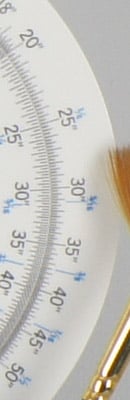
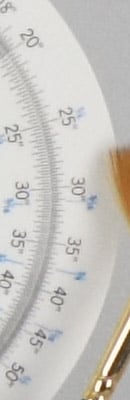
The Sony A500 offers only two high ISO noise reduction settings: Normal and High with Normal being the default. The Sony A500 user manual says high ISO noise reduction kicks in at ISO 1,600, but we've included crops starting from the base ISO of 200 since the effects of noise reduction are clearly visible at lower ISOs.
See for yourself how the noise reduction works under daylight-balanced lighting. Click on any of the crops below to see the corresponding full-sized image.
| High ISO Noise Reduction Comparison Daylight-balanced illumination |
||
|
Normal
|
High
|
I S O 2 0 0 |
 |
 |
 |
 |
 |
 |
|
Normal
|
High
|
I S O 4 0 0 |
 |
 |
 |
 |
|
 |
 |
|
|
Normal
|
High
|
|
| I S O 8 0 0 |
 |
 |
 |
 |
|
 |
 |
|
|
Normal
|
High
|
|
| I S O 1 6 0 0 |
 |
 |
 |
 |
|
 |
 |
|
|
Normal
|
High
|
|
| I S O 3 2 0 0 |
 |
 |
 |
 |
|
 |
 |
|
|
Normal
|
High
|
|
| I S O 6 4 0 0 |
 |
 |
 |
 |
|
 |
 |
Normal
|
High
|
| I S O 1 2 8 0 0 |
 |
 |
 |
 |
|
 |
 |
The above crops show the effects of the two levels of high ISO noise reduction, under our studio HMI lighting we use to simulate daylight. As mentioned elsewhere in this review, the Normal setting smudges the red leave pattern in our Still Life target setting more than the High setting at ISO 1,600 and above. The High setting does reduce chroma noise compared to the Normal setting though (lower crops), and we confirmed the filenames are correct. You may want to leave the A500 high ISO NR setting at High for this reason.
How does the Sony A500 compare to competing models? See the crops below.
| High ISO Comparison with Canon T1i, Nikon D5000 and Olympus E-620 (In-camera JPEGs, all default NR) Daylight-balanced illumination |
||||
|
Sony A500
|
Canon T1i
|
Nikon D5000
|
Olympus E-620
|
|
| I S O 8 0 0 |
|
 |
 |
 |
|
 |
 |
 |
|
|
 |
 |
 |
|
|
Sony A500
|
Canon T1i
|
Nikon D5000
|
Olympus E-620
|
|
| I S O 1 6 0 0 |
|
 |
 |
 |
|
 |
 |
 |
|
|
 |
 |
 |
|
|
Sony A500
|
Canon T1i
|
Nikon D5000
|
Olympus E-620
|
|
| I S O 3 2 0 0 |
|
 |
 |
 |
|
 |
 |
 |
|
|
 |
 |
 |
|
|
Sony A500
|
Canon T1i
|
Nikon D5000
|
Olympus E-620
|
|
| I S O 6 4 0 0 |
|
 |
 |
N/A
ISO 6400 Not Supported |
|
 |
 |
N/A
ISO 6400 Not Supported |
|
|
 |
 |
N/A
ISO 6400 Not Supported |
|
|
Sony A500
|
Canon T1i
|
Nikon D5000
|
Olympus E-620
|
|
| I S O 1 2 8 0 0 |
|
 |
N/A
ISO 12800 Not Supported |
N/A
ISO 12800 Not Supported |
|
 |
N/A
ISO 12800 Not Supported |
N/A
ISO 12800 Not Supported |
|
|
 |
N/A
ISO 12800 Not Supported |
N/A
ISO 12800 Not Supported |
|
The Sony A500 has arguably the cleanest looking images of this group, however as you can see from the crops above, its default noise reduction obliterates fine detail in areas of low contrast, such as the read-leaf fabric at ISOs above 800. The Nikon D5000 is the clear winner in terms of high ISO noise performance here, with perhaps the Sony A550 edging out the Canon T1i, though at the expense of fine detail. All of the APS-C models perform better than the Olympus E-620, a Four Thirds camera, though the Olympus is leaving more detail intact at its default noise reduction setting. See our High ISO RAW crops page to see how the sensors perform.
Imatest Results
Sony A500 Imatest Results
We routinely use Norman Koren's excellent "Imatest" analysis program for quantitative, thoroughly objective analysis of digicam test images. I highly recommend it to our technically-oriented readers, as it's far and away the best, most comprehensive analysis program I've found to date.
My comments below are just brief observations of what we see in the Imatest results. A full discussion of all the data Imatest produces is really beyond the scope of this review: Visit the Imatest web site for a full discussion of what the program measures, how it performs its computations, and how to interpret its output.
Here's some of the results produced by Imatest for the Sony A500:
sRGB Accuracy Comparison |
||||
The Sony A500 showed generally good color accuracy, with only minor oversaturation of bright reds, dark greens and deep blues, and to a lesser extent, some oranges, purples and browns. Hue accuracy was also generally good, with the typical (typical meaning significant) cyan shift we see in most cameras we test, and also a little shift in some oranges and yellows. Average saturation for the Sony A550 was 110.9% (oversaturated by 10.9%, mostly in the colors mentioned previously). Average "delta-C" color error was 5.24 after correction for saturation, which puts it near the top tier. (Delta-C is the same as the more commonly referred to delta-E, but delta-C takes into account only color differences, ignoring luminance variation.) All in all, a very good color response for this class of camera. Mouse over the links below the illustration above to compare results with similarly priced SLRs.
Adobe RGB Accuracy Comparison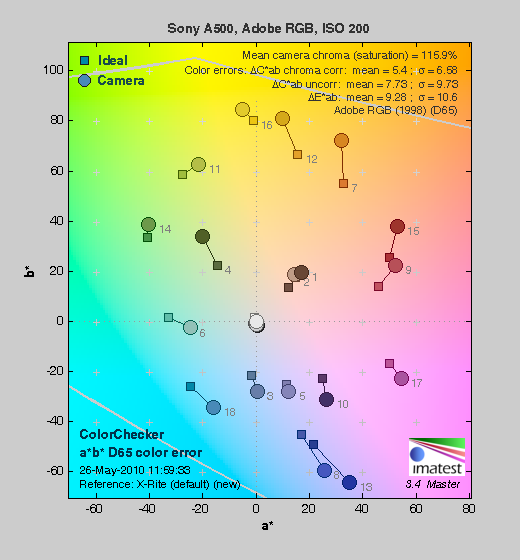 |
||||
Most SLRs dramatically oversaturate colors when shooting in Adobe RGB mode, and the Sony A550 follows suit. Average saturation was 115.9%, and average saturation-corrected hue error was 5.4 "delta-C" units, just slightly less accurate than the sRGB result. Again, mouse over the links below the illustration above to compare results with other SLRs.
Sony A500 Color Analysis

This image shows how the Sony A500 actually rendered the colors of the MacBeth chart, compared to a numerically ideal treatment. In each color swatch, the outer perimeter shows the color as actually captured by the camera, the inner square shows the numerically correct color after correcting for the luminance of the photographed chart (as determined by a second-order curve fit to the values of the gray swatches), and the small rectangle inside the inner square shows the numerically correct color, without the luminance correction. This image shows the very good hue accuracy of the Sony A500, and also a tendency to boost the brightness (luminance) of highly saturated colors. We we've observed this brightness boost in many cameras we've tested; it seems to be a way to get brighter-looking color without completely overdoing the saturation. In the neutrals, the A500 produces very slightly cool colors. Overall, the colors are impressively close to their "correct" values.
Sony A500 Noise Analysis

As always, there's more in this particular graph than we really have room to go into here. (Also note that this set of plots has also changed a few revisions back in Imatest. Some of the plots that were once shown here are now shown in other Imatest output. Since we largely focus on the Noise Spectrum plot, we only show the graphic above, which includes that plot.)
In comparing these graphs with those from competing cameras, we've found that the Noise Spectrum graph at lower right is often the most important. Cameras that manage to shift their noise spectrum to higher frequencies have much finer-grained noise structures, making their noise less visually objectionable. In the graph above, this would show up as a noise spectrum curve that remained higher on the right side, representing higher noise frequencies.
In the case of the Sony A500, we find a fairly typical response from a good APS-C sensor. The luminance noise is fairly fine-grained, with very little rise in the noise spectrum at low frequencies. If anything, the luminance noise levels at low frequencies is slightly below the average slope of the line. On the other hand, the color channels (especially the red and blue ones) have a lot of energy lumped up on the low-frequency side of the curve. This is typical for a Bayer sensor. The bottom line on the A500 is that noise is quite low at ISO 200, regardless of the frequency distribution, and not visible except when doing extreme pixel-peeping in darker tones and shadows.

Above is the same set of noise data at ISO 1,600. Here, the overall Noise Spectrum graph is shifted a fair bit toward the left-hand, lower-frequency side than it was at ISO 200, coarsening the "grain" of the image noise patterns, but there's much less difference between the color channels in this plot with chrominance tracking the luminance noise much more closely. Only at the lowest frequencies is color channel noise elevated compared to luminance noise. In the past, it's been unusual to find a greater difference between chroma and luminance noise at lower ISOs than at higher ones, although it's becoming more common. Overall noise levels here are pretty much on par with other SLRs using APS-C size sensors.
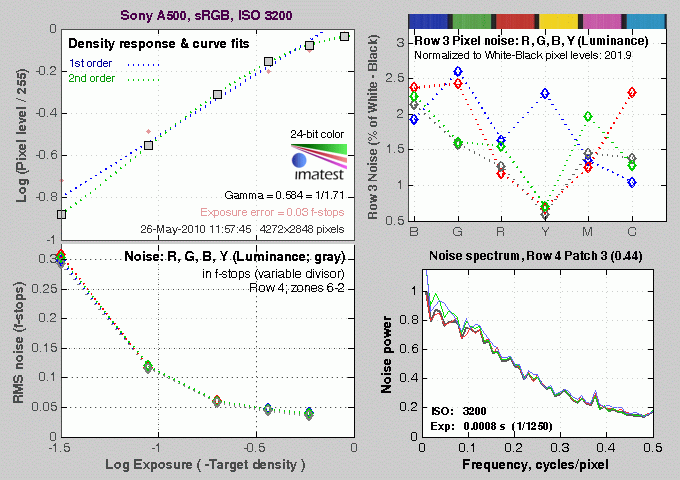
Here's the same set of noise data at ISO 3,200. Here again, the Noise Spectrum graph is shifted even more toward the left-hand side, further coarsening the "grain" of the image noise patterns further. Overall noise levels are good, though; the Sony A500 is holding its own against other SLRs in its class. Looking at the curve in the lower left, the total noise is higher than some competitors in the deepest shadows (far left side of the curve), but pretty competitive otherwise.

This chart compares the Sony A500's noise performance over a range of ISOs against that of other SLR cameras in its class. While we continue to show noise plots of this sort because readers ask for them, we each time point out that the noise magnitude is only a small part of the story, the grain pattern being much more important, not to mention what the camera does to achieve a given noise level. (Some cameras obliterate subject detail along with noise, so the camera with the lowest noise levels on MacBeth chart swatches may not necessarily produce the most appealing images.)
Here, we can see the Sony A500's luminance noise levels are lower than most of the group, except for the Sony NEX-5 and the Nikon D5000 at ISOs above 1,600. Overall, levels are very similar to its more expensive sibling, the 14-megapixel Sony A550. What's not shown, though, is that noise reduction is much better than previous generation Alphas which tended to blur away too much fine detail along with noise, thus scoring better on graphs like these. On previous models like the A380 and A350, there would be quite a dip in the curve at ISO 1,600 where strong noise reduction kicked in. We much prefer the A500's approach of preserving detail while leaving a bit more noise. The less heavy-handed noise reduction is a real step in the right direction for Sony.
Sony A500 Dynamic Range Analysis
A key parameter in a digital camera is its Dynamic Range, the range of brightness that can be faithfully recorded. At the upper end of the tonal scale, dynamic range is dictated by the point at which the RGB data "saturates" at values of 255, 255, 255. At the lower end of the tonal scale, dynamic range is determined by the point at which there ceases to be any useful difference between adjacent tonal steps. Note the use of the qualifier "useful" in there: While it's tempting to evaluate dynamic range as the maximum number of tonal steps that can be discerned at all, that measure of dynamic range has very little relevance to real-world photography. What we care about as photographers is how much detail we can pull out of the shadows before image noise becomes too objectionable. This, of course, is a very subjective matter, and will vary with the application and even the subject matter in question. (Noise will be much more visible in subjects with large areas of flat tints and subtle shading than it would in subjects with strong, highly contrasting surface texture.)
What makes most sense then, is to specify useful dynamic range in terms of the point at which image noise reaches some agreed-upon threshold. To this end, Imatest computes a number of different dynamic range measurements, based on a variety of image noise thresholds. The noise thresholds are specified in terms of f-stops of equivalent luminance variation in the final image file, and dynamic range is computed for noise thresholds of 1.0 (low image quality), 0.5 (medium image quality), 0.25 (medium-high image quality) and 0.1 (high image quality). For most photographers and most applications, the noise thresholds of 0.5 and 0.25 f-stops are probably the most relevant to the production of acceptable-quality finished images, but many noise-sensitive shooters will insist on the 0.1 f-stop limit for their most critical work.
The image below shows the test results from Imatest for an in-camera JPEG file from the Sony A500 with a nominally-exposed density step target (Stouffer 4110), and its settings such as DRO and HDR turned off.
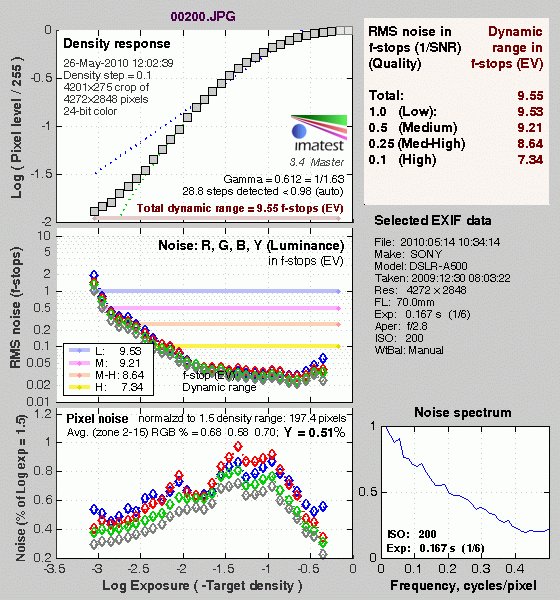
Here, we can see that the tone curve maintains excellent gradation in the highlights though the shadow end trails off much more abruptly. These results put the A500 in the middle of the pack of SLRs with APS-C sensors.
Once again, it would be easy to dismiss this performance, if it turned out that Sony's anti-noise processing was wiping out subject detail in the process: But that's not what's happening; the Sony A500 does a pretty good job of preserving subtle subject detail, far more so than previous generations of Alphas.

Processing the Sony A500's RAW (.ARW) files through Adobe Camera Raw (ACR) version 5.7 increased dynamic range by more than an f-stop at the highest quality level (8.56 f-stops) compared to the best in-camera JPEG (7.34 f-stops), while total dynamic range reported increased from 9.55 to 10.9 f-stops. These results were obtained by using ACR's automatic settings and then tweaking from there. It's worth noting here that ACR's default noise reduction settings reduced overall noise (see the plot in the lower left-hand corner) relative to the levels in the in-camera JPEG, which would tend to boost the dynamic range numbers for the High Quality threshold. Also, the extreme highlight recovery being performed by ACR here would likely produce color errors in strong highlights of natural subjects.
Dynamic Range, the bottom line:
The net result was that the Sony A500 showed good dynamic range for its class, though scores were not quite as good as its more expensive sibling, the A550.
To get some perspective, here's a summary of the Sony A500's dynamic range performance, and how it compares to other digital SLRs that we also have Imatest dynamic range data for. (Results are arranged in order of decreasing dynamic range at the "High" quality level.):
| Dynamic Range (in f-stops) vs Image Quality (At camera's base ISO) (Blue = RAW via ACR, Yellow=Camera JPEG, Green=Current Camera) |
||||
| Model | 1.0 (Low) |
0.5 (Medium) |
0.25 (Med-High) |
0.1 (High) |
| Nikon D3X (Adobe Camera Raw 5.3b) |
-- | -- | 11.1 | 9.64 |
| Nikon D3S (Adobe Camera Raw 5.6) |
-- | -- | 10.7 | 9.55 |
| Nikon D700 (Adobe Camera Raw 4.5) |
12.1 | 11.6 | 10.6 | 9.51 |
| Nikon D5000 (Adobe Camera Raw 5.4b) |
-- | 11.6 | 10.8 | 9.50 |
| Sony A900 (Adobe Camera Raw 4.6b) |
-- | 12.1 | 10.7 | 9.36 |
| Pentax K-x (Adobe Camera Raw 5.6b) |
11.5 | 11.2 | 10.7 | 9.33 |
| Nikon D90 (Adobe Camera Raw 4.6b) |
12.1 | 11.8 | 10.7 | 9.27 |
| Fujifilm S3 Pro (Adobe Camera Raw 2) |
12.1 | 11.7 | 10.7 | 9.00 |
| Sony A230 (Adobe Camera Raw 5.5) |
11.7 | 11.1 | 10.1 | 8.95 |
| Nikon D40x (Adobe Camera Raw 4.1) |
12.0 | 10.9 | 10.3 | 8.90 |
| Nikon D300S (Adobe Camera Raw 5.5) |
-- | 11.3 | 10.4 | 8.89 |
| Canon 5D Mark II (Adobe Camera Raw 5.2) |
-- | 10.8 | 10.0 | 8.89 |
| Sony A330 (Adobe Camera Raw 5.4) |
-- | -- | 10.1 | 8.86 |
| Canon EOS-1Ds Mark III (Adobe Camera Raw 4.5) |
11.5 | 10.7 | 9.96 | 8.84 |
| Nikon D3 (Adobe Camera Raw 4.5) |
11.7 | 11.0 | 10.0 | 8.75 |
| Canon EOS-1D Mark III (Adobe Camera Raw 4.5) |
11.7 | 10.7 | 9.99 | 8.73 |
| Sony A550 (Adobe Camera Raw 5.7) |
-- | -- | 10.3 | 8.72 |
| Sony A380 (Adobe Camera Raw 5.5) |
11.8 | 10.9 | 10.1 | 8.62 |
| Nikon D3000 (Adobe Camera Raw 5.5) |
-- | 10.8 | 10.1 | 8.61 |
| Sony A500 (Adobe Camera Raw 5.7) |
10.9 | 10.6 | 9.87 | 8.56 |
| Pentax K20D (Adobe Camera Raw 4.5) |
11.4 | 10.6 | 9.82 | 8.56 |
| 8.5 Stops | ||||
| Nikon D300 (Adobe Camera Raw 4.3.1) |
11.4 | 10.9 | 9.87 | 8.45 |
| Sony A200 (Adobe Camera Raw 4.3.1) |
11.6 | 10.4 | 9.82 | 8.43 |
| Nikon D60 (Adobe Camera Raw 4.4.1) |
11.6 | 10.5 | 9.74 | 8.31 |
| Nikon D40 (Adobe Camera Raw 4.1) |
11.9 | 10.9 | 9.89 | 8.30 |
| Canon EOS-1Ds Mark III (Camera JPEG) |
10.9 | 10.2 | 9.71 | 8.23 |
| Pentax K100D (Adobe Camera Raw 3.6) |
11.3 | 10.3 | 9.51 | 8.23 |
| Pentax K200D (Adobe Camera Raw 4.4.1) |
-- | 10.5 | 9.54 | 8.19 |
| Pentax K10D (Adobe Camera Raw 3.7) |
10.6 | 10.0 | 9.29 | 8.19 |
| Canon 7D (Adobe Camera Raw 5.6) |
11.2 | 10.3 | 9.52 | 8.18 |
| Sony A100 (Adobe Camera Raw 3.4) |
11.3 | 10.5 | 9.69 | 8.16 |
| Canon EOS-1Ds Mark II (Adobe Camera Raw 3) |
11.2 | 10.3 | 9.40 | 8.14 |
| Canon EOS 50D (Adobe Camera Raw 4.6) |
11.2 | 10.5 | 9.49 | 8.06 |
| Nikon D40x (Camera JPEG) |
10.8 | 10.0 | 9.42 | 8.04 |
| Olympus E-P1 (ISO 200, Adobe Camera Raw 5.5) |
11.5 | 10.4 | 9.26 | 8.04 |
| Canon Rebel XSi (Camera JPEG) (ALO on by default) |
11.3 | 10.1 | 9.34 | 8.01 |
| 8.0 Stops | ||||
| Nikon D3S (Camera JPEG) |
-- | -- | -- | 7.96 |
| Fujifilm S3 Pro (Camera JPEG) |
-- | 9.90 | 9.40 | 7.94 |
| Canon T2i (Adobe Camera Raw 5.7) |
-- | 10.0 | 9.21 | 7.94 |
| Samsung NX10 (Adobe Camera Raw 5.7 beta) |
-- | -- | 9.18 | 7.91 |
| Sony A350 (Adobe Camera Raw 4.4) |
11.6 | 10.5 | 9.61 | 7.89 |
| Canon EOS-1D Mark III (Camera JPEG) |
-- | 10.2 | 9.70 | 7.88 |
| Olympus E-P2 (Adobe Camera Raw 5.6) |
-- | 10.2 | 9.44 | 7.88 |
| Canon Rebel XS (Adobe Camera Raw 4.5) |
-- | 10.3 | 9.27 | 7.88 |
| Nikon D3 (Camera JPEG) |
-- | -- | -- | 7.87 |
| Canon Digital Rebel XTi (Adobe Camera Raw 3.6) |
10.8 | 9.88 | 9.18 | 7.84 |
| Canon EOS 5D (Adobe Camera Raw 3) |
11.0 | 10.4 | 9.21 | 7.83 |
| Nikon D90 (Camera JPEG) |
-- | -- | -- | 7.77 |
| Panasonic DMC-GH1 (Adobe Camera Raw 5.4b) |
9.88 | -- | 9.30 | 7.76 |
| Canon Rebel T1i (Adobe Camera Raw 5.4b) |
11.2 | 10.2 | 9.16 | 7.73 |
| Pentax K-7 (Adobe Camera Raw 5.4) |
10.6 | 9.93 | 9.07 | 7.73 |
| Canon EOS 40D (Adobe Camera Raw 4.2) |
11.2 | 10.1 | 9.26 | 7.72 |
| Panasonic DMC-GH1 (Camera JPEG) |
8.77 | -- | -- | 7.70 |
| Canon Rebel XSi (Adobe Camera Raw 4.4.1) |
10.6 | 9.95 | 9.10 | 7.68 |
| Canon EOS 50D (Camera JPEG) (ALO STD by default) |
-- | -- | 8.90 | 7.68 |
| Nikon D700 (Camera JPEG) |
-- | -- | 9.05 | 7.67 |
| Canon 5D Mark II (Camera JPEG) (ALO STD by default) |
10.6 | 9.68 | 8.98 | 7.66 |
| Nikon D5000 (Camera JPEG) |
-- | -- | 8.96 | 7.65 |
| Canon EOS-5D (Camera JPEG) |
10.2 | 9.68 | 8.82 | 7.65 |
| Olympus E-3 (Adobe Camera Raw 4.3) |
10.3 | 10.1 | 9.29 | 7.64 |
| Nikon D60 (Camera JPEG) |
10.5 | 9.62 | 8.89 | 7.62 |
| Nikon D200 (Adobe Camera Raw 3) |
10.6 | 9.65 | 8.96 | 7.61 |
| Sony A550 (Camera JPEG) (DRO Auto by default) |
10.5 | 9.90 | 8.87 | 7.61 |
| Sony NEX-5 (Camera JPEG) |
10.4 | 9.64 | 8.82 | 7.57 |
| Canon 7D (Camera JPEG) (ALO STD by default) |
-- | 9.70 | 8.54 | 7.54 |
| Canon T2i (Camera JPEG) |
-- | 9.44 | 8.45 | 7.53 |
| Nikon D80 (Adobe Camera Raw 3.6) |
11.1 | 10.4 | 9.42 | 7.51 |
| 7.5 Stops | ||||
| Nikon D300S (Camera JPEG) |
-- | -- | -- | 7.49 |
| Olympus E-500 (Adobe Camera Raw 3) |
10.7 | 9.97 | 8.90 | 7.46 |
| Olympus E-510 (Adobe Camera Raw 4.1) |
10.0 | 9.43 | 8.64 | 7.46 |
| Pentax K10D (Camera JPEG) |
-- | 9.49 | 8.88 | 7.44 |
| Sony NEX-3 (Camera JPEG) |
10.0 | 9.62 | 8.86 | 7.44 |
| Nikon D300 (Camera JPEG) |
-- | -- | 8.70 | 7.44 |
| Olympus E-420 (Adobe Camera Raw 4.1.1) |
10.0 | 9.61 | 8.65 | 7.44 |
| Canon Rebel T1i (Camera JPEG) (ALO=STD by default) |
11.3 | 10.1 | 9.34 | 7.43 |
| Nikon D2Xs (Adobe Camera Raw 3.6) |
10.6 | 9.90 | 8.93 | 7.42 |
| Canon EOS 40D (Camera JPEG) |
10.6 | 9.52 | 8.78 | 7.42 |
| Olympus E-PL1 (Adobe Camera Raw 5.7) |
10.4 | 9.89 | 8.76 | 7.39 |
| Nikon D3X (Camera JPEG) |
-- | -- | -- | 7.37 |
| Nikon D50 (Camera JPEG) |
10.7 | 9.93 | 8.70 | 7.36 |
| Panasonic DMC-G2 (Adobe Camera Raw 5.7) |
10.3 | 9.87 | 8.77 | 7.35 |
| Sony A500 (Camera JPEG) |
9.53 | 9.21 | 8.64 | 7.34 |
| Sony A380 (Camera JPEG) (DRO Standard by default) |
-- | 9.54 | 8.84 | 7.32 |
| Panasonic DMC-G1 (Adobe Camera Raw 5.2) |
10.7 | 9.78 | 8.70 | 7.32 |
| Nikon D3000 (Camera JPEG) |
10.2 | 9.64 | 8.69 | 7.31 |
| Sony A900 (Camera JPEG) (DRO off by default ) |
10.2 | 9.75 | 8.49 | 7.31 |
| Sony A330 (Camera JPEG) (DRO Standard by default) |
10.1 | 9.37 | 8.59 | 7.30 |
| Sony A200 (Camera JPEG) (DRO on by default) |
10.4 | 9.43 | 8.91 | 7.29 |
| Canon EOS 20D (Camera JPEG) |
10.3 | 9.66 | 8.85 | 7.29 |
| Canon EOS 30D (Camera JPEG) |
10.3 | 9.50 | 8.57 | 7.29 |
| Nikon D40 (Camera JPEG) |
10.4 | 9.80 | 8.89 | 7.28 |
| Sony A230 (Camera JPEG) (DRO Standard by default) |
10.1 | 9.51 | 8.51 | 7.26 |
| Sony A900 (Camera JPEG) (DRO on) |
10.1 | 9.76 | 8.47 | 7.26 |
| Canon Rebel XS (Camera JPEG) |
10.3 | 9.4 | 8.61 | 7.22 |
| Olympus E-520 (Adobe Camera Raw 4.5) |
11.0 | 9.46 | 8.70 | 7.20 |
| Sony A350 (Camera JPEG) (DRO on by default) |
10.3 | 9.55 | 8.85 | 7.19 |
| Pentax K-x Camera JPEG |
9.99 | 8.94 | 8.31 | 7.18 |
| Panasonic DMC-GF1 (Adobe Camera Raw 5.5) |
10.2 | 9.62 | 8.62 | 7.16 |
| Nikon D80 (Camera JPEG) |
10.1 | 9.43 | 8.48 | 7.12 |
| Canon Digital Rebel XT (Camera JPEG) |
10.3 | 9.51 | 8.61 | 7.11 |
| Nikon D200 (Camera JPEG) |
-- | 9.07 | 8.36 | 7.11 |
| Olympus E-300 (Camera JPEG) |
10.8 | 9.26 | 8.48 | 7.07 |
| Olympus E-410 (Adobe Camera Raw 4.1) |
10.2 | 9.40 | 8.24 | 7.05 |
| Olympus E-500 (Camera JPEG) |
10.0 | 9.14 | 8.16 | 7.05 |
| Canon Digital Rebel XTi (Camera JPEG) |
9.83 | 9.10 | 8.27 | 7.04 |
| Canon EOS-1Ds Mark II (Camera JPEG) |
10.3 | 9.38 | 8.60 | 7.04 |
| Panasonic DMC-G1 (Camera JPEG) |
-- | 9.33 | 8.52 | 7.03 |
| Pentax K200D (Camera JPEG) |
-- | 9.50 | 8.30 | 7.01 |
| 7.0 Stops | ||||
| Panasonic DMC-GF1 (Camera JPEG) |
-- | 9.33 | 8.44 | 6.99 |
| Canon Digital Rebel (Camera JPEG) |
10.1 | 9.11 | 8.47 | 6.97 |
| Nikon D2Xs (Camera JPEG) |
9.82 | 8.98 | 8.23 | 6.97 |
| Panasonic DMC-L10 (Adobe Camera Raw 4.2) |
10.4 | 9.34 | 8.48 | 6.91 |
| Sigma DP1 (Camera JPEG) |
-- | 8.95 | 8.13 | 6.91 |
| Pentax *istDs (Camera JPEG) |
10.2 | 10.0 | 8.87 | 6.90 |
| Sony A100 (Camera JPEG) |
10.2 | 9.24 | 8.39 | 6.89 |
| Samsung NX10 (Camera JPEG, Smart Range, ISO 200) |
10.1 | 8.99 | 8.22 | 6.78 |
| Pentax K100D (Camera JPEG) |
10.3 | 9.30 | 8.39 | 6.73 |
| Panasonic DMC-G2 (Camera JPEG) |
9.72 | 9.18 | 8.15 | 6.68 |
| Pentax K20D (Camera JPEG) |
10.2 | 9.21 | 8.09 | 6.66 |
| Pentax K-7 (Camera JPEG) |
9.59 | 8.87 | 8.03 | 6.54 |
| 6.5 Stops | ||||
| Nikon D2x (Camera JPEG) |
-- | 8.93 | 7.75 | 6.43 |
| Olympus E-3 (Camera JPEG) |
9.32 | 9.06 | 8.50 | 6.42 |
| Panasonic DMC-L10 (Camera JPEG) |
-- | 8.94 | 8.00 | 6.38 |
| Olympus E-420 (Camera JPEG) |
9.18 | 8.82 | 7.93 | 6.37 |
| 6.0 Stops | ||||
| Olympus E-410 (Camera JPEG) |
-- | -- | 7.60 | 5.99 |
| Olympus E-PL1 (Camera JPEG, Gradation = Normal) |
-- | 8.63 | 7.45 | 5.89 |
| Samsung NX10 (Camera JPEG) |
9.32 | 8.48 | 7.46 | 5.88 |
| Nikon D70s (Camera JPEG) |
9.84 | 8.69 | 7.46 | 5.85 |
| Nikon D70 (Camera JPEG) |
9.81 | 8.76 | 7.58 | 5.84 |
| Olympus E-520 (Camera JPEG) |
9.32 | 8.68 | 7.74 | 5.74 |
| Olympus E-P2 (Camera JPEG, Gradation = Normal) |
10.1 | 8.83 | 7.78 | 5.58 |
| Olympus E-P1 (Camera JPEG, Gradation = Normal) |
-- | 8.85 | 7.74 | 5.47 |
Note that this test is repeatable to within 1/3 EV according to the Imatest website, so differences of less than 0.33 can be ignored.
Sony A500 Resolution Chart Test Results

The chart above shows consolidated results from spatial frequency response measurements in both the horizontal and vertical axes. The "MTF 50" numbers tend to correlate best with visual perceptions of sharpness, so those are what we focus on here. The uncorrected resolution figures are 1,722 line widths per picture height in the horizontal direction (corresponding to the vertically-oriented edge), and 1,620 lines along the vertical axis (corresponding to the horizontally-oriented edge), for a combined average of 1,671 LW/PH. Correcting to a "standardized" sharpening with a one-pixel radius increased both horizontal and vertical numbers, resulting in an average of 1,961 LW/PH. This improvement in the numbers reflects the fact that the A500's in-camera images are technically a bit undersharpened at the default sharpness setting.
To see what's going on, refer to the plots below, which show the actual edge profiles for both horizontal and vertical edges, in both their original and corrected forms. Here, you can see that a somewhat conservative amount of in-camera sharpening is applied in both the horizontal and vertical directions (undersharpened according to Imatest's calculations by 9.54% and 13.7%, respectively). You can always turn up the sharpening in-camera, but better results can be usually be achieved by actually turning down the in-camera sharpening, then sharpening post-exposure in Adobe Photoshop or other image editing software, or by shooting RAW so that all sharpening is under your control.
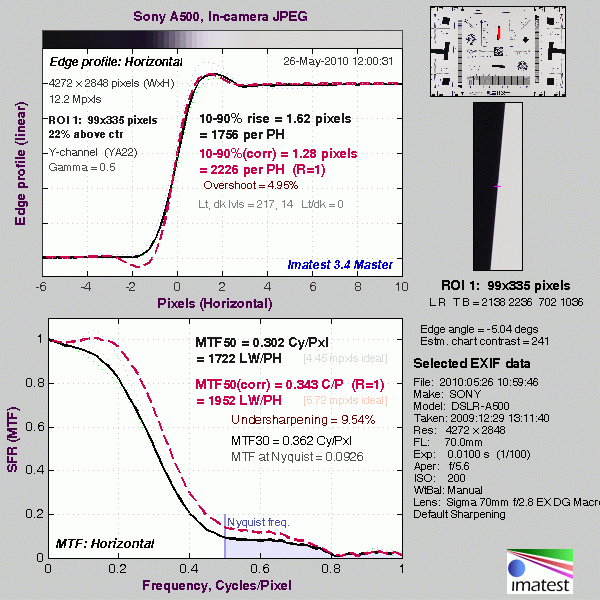
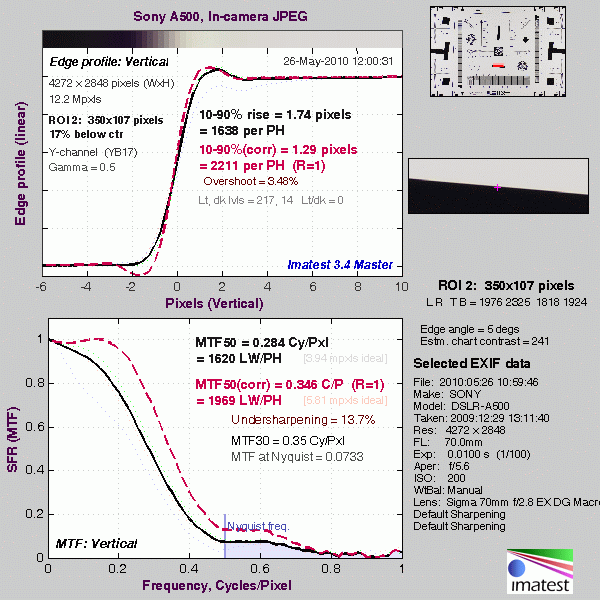
Note: We don't feature SFR-based LW/PH resolution numbers more prominently in our reviews (eg, outside the Imatest pages) because we've found that they're *very* sensitive to minor differences in in-camera image processing. Relatively small changes in the amount of in-camera sharpening can have a large effect on the resulting resolution numbers. Imatest attempts to compensate for this by adjusting to a "standard" sharpening, but this approach can't completely undo what happens inside the cameras, and so often gives inconsistent results. Sometimes the "standardized" sharpening happens to just match the shape of the edge profile with the in-camera sharpening applied, and you'll get wildly high results. At other times, it will tend to correct in the opposite direction. Unfortunately, ignoring the in-camera sharpening entirely can result in even greater discrepancies, particularly between models from different manufacturers. Turning off sharpening in the camera may or may not fully eliminate the sharpening, so simply turning off sharpening in the camera JPEGs isn't a reliable solution. It also wouldn't be the way most people shoot the cameras. We could process RAW files with no sharpening (as shown below), but then that'd only suit the people working primarily or exclusively from RAW, and would open another can of worms as to what RAW converter was used, etc, etc.
The bottom line is that numbers for resolution only take you so far. Detail handling and edge acuity are very complex issues; ones that don't easily boil down to a single number. The best approach is to simply look look at the broad array of standardized test shots we take with each camera, to the point of downloading and printing them with whatever processing you'd use if you owned the camera and shot with it. See how the differences stack up for you visually, and make your decision on that, rather than on abstract resolution numbers.
RAW Files
Sony A500 High ISO RAW Image Quality
We've recently started looking at RAW files converted with dcraw, an excellent freeware raw converter. dcraw usually offers timely support for the latest cameras, but more importantly, it does not apply any noise-reduction, sharpening or other corrections such as geometric distortion correction to the output files. (We found that Adobe Camera Raw still applies some limited noise-reduction when its NR settings are set to zero, and it also applies other corrections depending on the make and model of the camera). There will always be differences between RAW converters, in terms of the sort of demosaicing algorithms they use (the processes by which they convert the separate Red, Green, and Blue data sets to an array of full-color RGB pixels), but dcraw seems to use a fairly generic algorithm that delivers good sharpness with relatively few artifacts, and can be counted on to not apply any noise reduction if you don't want it to.
Below are crops from Sony A500 files compared to RAW files from a few competing models. All were converted with dcraw with no noise reduction or sharpening.
| High ISO RAW Image Quality Sony A500 vs Canon T1i, Nikon D5000, and Olympus E-620 RAW files converted with dcraw, no NR, no sharpening Simulated Daylight |
||||
|
|
Sony A500
|
Canon T1i
|
Nikon D5000
|
Olympus E-620
|
I
S O 8 0 0 |
 |
 |
 |
 |
 |
 |
 |
 |
|
 |
 |
 |
 |
|
|
|
Sony A500
|
Canon T1i
|
Nikon D5000
|
Olympus E-620
|
|
I
S 0 1 6 0 0 |
 |
 |
 |
 |
 |
 |
 |
 |
|
 |
 |
 |
 |
|
|
|
Sony A500
|
Canon T1i
|
Nikon D5000
|
Olympus E-620
|
I
S O 3 2 0 0 |
 |
 |
 |
 |
 |
 |
 |
 |
|
 |
 |
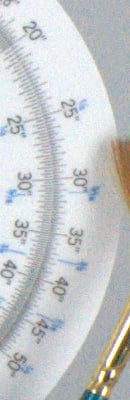 |
 |
|
|
|
Sony A500
|
Canon T1i
|
Nikon D5000
|
Olympus E-620
|
|
I
S 0 6 4 0 0 |
 |
 |
 |
N/A
ISO 6400 not supported |
 |
 |
 |
N/A
ISO 6400 not supported |
|
 |
 |
 |
N/A
ISO 6400 not supported |
Sony A500
|
Canon T1i
|
Nikon D5000
|
Olympus E-620
|
|
I
S O 1 2 8 0 0 |
 |
 |
N/A
ISO 12800 not supported |
N/A
ISO 12800 not supported |
 |
 |
N/A
ISO 12800 not supported |
N/A
ISO 12800 not supported |
|
 |
 |
N/A
ISO 12800 not supported |
N/A
ISO 12800 not supported |
|
In the above crops, we can see the Sony A500's noise performance is competitive with sensors from the other APS-C cameras in this group, and better than the smaller Four-Thirds sensor found in the Olympus E-620. Click on the crops above to load the full size images.
Press Release
Capture The Moment In Perfect Detail With New Sony Alpha Cameras
DSLRs Deliver Low-Light Performance, Exceptional Shooting Speed and In-Camera High Dynamic Range
SAN DIEGO, Aug. 27, 2009 – Sony today introduced two α DSLR cameras with a new generation of Exmor™ CMOS sensors and BIONZ™ image processors, which make it easy for active shooters to get the best shot and capture clearer images—without missing their favorite moments.
The DSLR-A550 (14.2 megapixels) and DSLR-A500 (12.3 megapixels) cameras provide excellent picture quality, particularly in low-light scenarios. A new generation of Sony® Exmor CMOS image sensors employ new low-noise processing for high-quality pictures. The BIONZ image processor has color-noise reduction that helps achieve low noise up to ISO 12800, without sacrificing fine detail.
“We are bringing performance of a higher class of cameras within the reach of a broader group of consumers,” said Mark Weir, senior technology manager of the product management unit in the Digital Imaging Division at Sony Electronics. “Not only do these cameras provide great value, but they also bring faster shooting speeds and new technologies like in-camera High Dynamic Range and new Live View features to mainstream photo enthusiasts.”
Fast Shooting Speeds With its unique sensor-processor combination, the α550 camera is the first DSLR in its class with seven frames per second shooting speed for under $1,000. Using the optical viewfinder on both models, you can shoot up to five frames per second and up to four frames per second with Quick Auto Focus Live View. This helps you capture the decisive moment when shooting fast moving subjects like in sports.
In-Camera High Dynamic Range These are Sony’s first DSLR cameras that offer an in-camera High Dynamic Range (HDR) feature for capturing highlights and shadows, which processes the image within two seconds. Unlike HDR features in other DSLR cameras, Sony’s unique positional interpolation technology can overcome slight changes in camera position and align individual shots so that a tripod is not required.
The feature handles severe backlighting and other high-contrast scenes like looking out a window into bright daylight. The in-camera auto HDR technology combines the highlight and shadow detail of two separate captures into one remarkably natural looking image.
Improved Live View Because composing shots on the LCD monitor is becoming increasingly important to DSLR users, Sony has equipped these cameras with two Live View functions and a 3-inch (measured diagonally) LCD screen that tilts 90 degrees up or down. The α500 has a 230,000 pixel Clear Photo LCD Plus™ screen, and the α550 has a 921,000 pixel Xtra Fine LCD™ display.
Sony’s Quick AF Live View uses two sensors to maintain the same focusing speed as with the optical viewfinder. While the speed of Quick AF Live View is ideal for every day shooting, Manual Focus Check Live View enables critical framing and magnification for setting precise manual focus in macro and tripod shooting. Temporary 7x and 14x zoom views enable you to focus on extremely fine detail while the 1x view shows 100 percent framing in the LCD.
The Quick Auto Focus Live View has been developed with Face Detection technology to help you get the best shot by recognizing and adjusting for faces. It is the world’s first Face Detection system to work with fast, high-precision “phase detection” Auto Focus. By tracking up to eight faces, this system can prioritize auto focus points on a face, and optimize exposure and white balance for beautiful portraits.
These are Sony’s first DSLR cameras that include Smile ShutterTM technology in Live View, which takes the shot when your subject smiles. It works with Quick Auto Focus Live View to capture spontaneous moments.
Image stabilization helps take blur-free shots by compensating for camera shake. Typical DSLR systems build image stabilization into selected lenses only. SteadyShot INSIDE™ image stabilization is built into the camera body itself. Blur will also be reduced with every A-mount lens, including macro and wide aperture standard zoom lenses, with an effect equivalent to shutter speeds faster by 2.5 to 4 stops
To make the benefits of macro photography easier and more accessible, Sony is making available at retail the DT 30mm F/2.8 (model SAL30M28) macro lens. It captures intricate close-ups, which is difficult to achieve with standard lenses and is only compatible with APS-C format DSLRs.
Memory Cards For higher capacity storage with greater connectivity and faster transfer speeds, the new DSLRs are compatible with Sony’s newest 32GB Memory Stick PRO-HG Duo™ HX media. The HX series card is designed to deliver optimal read and write speeds for a growing number of products that require high-bandwidth memory in order to capture and store large data files.
Using the HX series media, Sony α DSLR users can confidently enjoy advanced features such as continuous-shooting photography and realize higher transfer rates of large capacity files to their compatible PC (via supplied USB adapter). For example with the α550 model, approximately 1500 14-megapixel photos shot in the JPEG+RAW mode can be transferred to a compatible PC in approximately 26 minutes (HX series media sold separately).
The new cameras include dedicated slots for high-capacity Memory Stick PRO Duo™, Memory Stick PRO-HG Duo™, HX series and SD/SDHC media (all sold separately).
Pricing and Availability Pre-orders will begin on August 28, 2009 at www.sonystyle.com/retail and at selected retailers nationwide. The cameras, lens and a range of accessories will be available in October at Sony Style® retail stores (www.sonystyle.com/retail), at military base exchanges and at authorized dealers nationwide.
The α550 (model DSLR-A550) and α500 (model DSLR-A500), which come with the camera body only, will cost about $950 and $750 respectively. The α550L and α500L, which come with the camera body and 18-55 kit lens, will cost about $1050 and $850, respectively.
The SAL30M28 macro lens will be available in October for about $200.
###