


Overview
by Mike Tomkins and Shawn Barnett
Hands-on Preview: 05/17/2012
Full Review: 01/22/2013

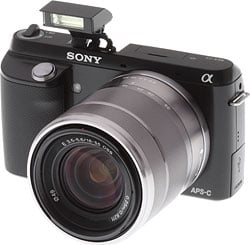
Enough remains the same on the Sony NEX-F3 that one wonders why they needed to redesign the body at all. It's now larger in all dimensions than the NEX-C3, as well as weight, and while they shored up its grip a bit so it feels more like the grip on the NEX-5N, they lowered its top surface, and therefore the shutter button as well, making it seem a little awkward if you're used to the NEX-5 or NEX-7. Measurements are 4.62 x 2.62 x 1.63 inches (117.3 x 66.6 x 41.3mm), compared to the NEX-C3's 4.31 x 2.36 x 1.29 inches (109.6 x 60 x 33mm). Weight of the NEX-F3 is 9.0 ounces (255g) body-only, where the NEX-C3 weighed only 7.9 ounces (225g).

The grip is good, with a nice diamond pattern cut in the front. It's not quite as deep or tall as I'd like. I can only get two fingers around it, leaving my pinkie to curl underneath the camera.
Just above the lens mount on either side are the stereo microphone holes, and the APS-C sensor looks relatively large in the center of the metal E-mount.

Sony clearly can't decide on a standard design for the power switch. It's found around the shutter button on the NEX-7, -3, and -C3, jutting out from front, back, or right respectively, while on the -5 and -5N it's appeared on the top right, as it does here on the NEX-F3.
In addition to the flash socket (aka Smart Accessory Terminal 2) just behind the lens mount, the NEX-F3 has a pop up flash integrated into the top deck, preferable for those who preferred not to mar their otherwise sleek cameras with the small external flashes and their clumsy thumbscrews, which Sony included with past models.

Visible from both top and back, the Flash pop-up button, Playback button, and Record button are on a rear beveled surface. Controls on the back are essentially the same as past offerings, but that LCD is unique.

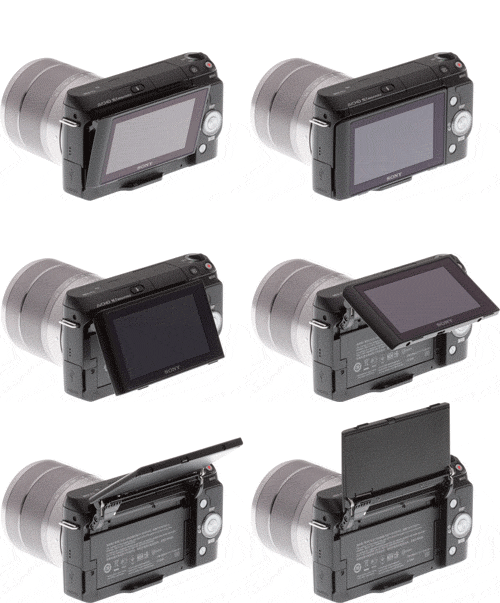
It swivels straight up to face forward, reversing the display for easy arm-length self-portraits. What it doesn't do well, though, is face down at much of an angle when viewed from the back. It's not even close to the 45-degree angle of the NEX-3. It's more like 13 degrees. You can pop up the flash, but of course you have to do it in advance; and then the flash blocks part of the LCD. It's further blocked if you have any accessories mounted in the Smart Accessory Terminal.
If you plan on shooting a self-portrait, you should also remember to at least set autofocus mode to Multi, if not switch the camera to Intelligent or Superior Auto, otherwise the camera won't know where to focus for impromptu self-portraits. It's also impossible to make any of these changes with the LCD in this position, of course, because the controls are on the back and the LCD is on the front. It seems a little nit-picky to mention it at all, but when the controls are so dependent on the LCD, the issue will come up.
The LCD swings up so naturally into forward position, it's almost hard not to do it. The hinge itself recesses deeply into the NEX-F3's body. It's a pretty neat trick. I'm not sure it's a major selling point for me, but nor is it a put-off at all.
Battery and card doors are separate, as seen on the NEX-C3. The card door's position isn't great, as it'll require you to remove the camera from a tripod before swapping cards.
Sony NEX-F3 Field Test
by Mike Tomkins

Sony's NEX-F3 compact system camera might represent the entry-level point to the NEX-series line, but when I laid my hands on it I nonetheless found its newly-designed, plastic body reassuringly solid, with little in the way of panel flex and creak. The redesigned handgrip is quite striking and rather unusual, placing the shutter button on a shelf beneath the camera's top deck. It looks a little ungainly, and I found it to be something of a mixed blessing.
On the one hand, its lesser height made it impossible for me to wrap more than two fingers around the grip, with my other fingers not-so-comfortably wrapped beneath the camera body. On the other hand, though, the vertical surface which extends above the top of the grip made the NEX-F3 quite reassuring to carry without a strap. Normally the first thing I do with a new camera is to attach a strap, as I'm always paranoid that I'll drop it. (Thank goodness, I've yet to actually do so.) I never felt the need to attach the strap with the NEX-F3, once I discovered that resting my index finger across the rear of the shutter button provided some purchase against the camera body.
The power button felt a bit clumsy initially, until I got my head around the fact that it wasn't intended to be flicked with my index finger. It quickly became second nature to nudge on or off with my thumb, but I did have to adjust my grip to move my index finger down onto the grip and away from the shutter button to do so.

Shoot from the hip. The NEX-F3's tilting display makes it easy to shoot from waist-level, low to the ground, over your head, or even self-portraits.
I'm not a big fan of self-portraits -- I see enough of myself in the mirror each morning to get me through the day -- but the updated articulation mechanism for the display which now lets you see yourself from in front of the camera is doubtless going to prove popular with the Facebook crowd. Although the popup flash strobe and Smart Accessory Terminal 2.0 both obscure the screen when in use, that's not really a problem for arm-length self-portraits, as you wouldn't want a flash anyway. For more distant, tripod-mounted self portraits, you can figure out your framing first, and then raise the flash or attach an external strobe as needed.

Cephalopod-approved. This cuttlefish seemed to be posing just for me, but I had to be quick to get the shot. Aquarium glass and a skittish subject meant flash was out of the question, but the NEX-F3's large sensor saved the day, capturing plenty of detail even under relatively dim aquarium lighting.
One tradeoff of the updated articulation mechanism is that it doesn't tilt down as far as it used to, but I never found this to be much of an issue even when shooting well over my head. And while I might not have used the articulation for self-portraits much, I did enjoy shooting with the camera at waist level quite a bit. I find side-mounted tilt/swivel mechanisms to be more useful than tilt-only designs, though, because they can help with framing portrait-orientation shots from above or below, and they also allow some extra protection for the LCD when facing inwards. And I found the display pretty easy to view even in strong daylight, in part thanks to the lack of a touch-screen, which meant I wasn't continually having to wipe away fingerprint smudges.

While I'm still not a fan of Sony's menu system, I've grown to live with it, and you will too -- probably more easily than I can, given that I spend my time using so many different cameras, making it harder for any one design to become second nature to me. Its division into six different sections still feels somewhat arbitrary, though, and makes it harder than it should be to find the settings you're looking for when you're not yet used to the camera. More frustrating is the separation between still images and movies in playback mode, something which still occasionally tricks me into thinking I've lost a shot when in fact I'm simply in the wrong playback display mode.

White balance was typically pretty good. Here it's picked up the golden hour warmth of Knoxville's historic James Park House quite nicely.
The NEX-F3's built-in popup flash is a great addition. The bundled, external strobe of the NEX-C3 did the job, but it was too easy to forget -- or simply not bother -- to bring it along with me. (I seldom use flash as I prefer available-light photography, which tend to look more natural, so it was usually down to my consciously leaving it behind.) Invariably, when I most needed it for an unexpected shot that I couldn't manage with available light, I'd find that I'd left it behind. With a popup flash, there's no such problem. It's always there, and even though it's a relatively weak strobe, it's decidedly better than nothing. I didn't use it a lot, but if I had more time with the NEX-F3 I'm sure I'd occasionally get shots I'd have otherwise missed. And of course, there's a proprietary Smart Accessory Terminal 2.0, as well, so a larger strobe is available if the built-in strobe doesn't provide enough light.
For my money, though, the big APS-C sensor of the NEX-F3 is even more useful than its built-in flash. It's not just a matter of available-light looking more natural. There are times -- such as this shot of a cuttlefish at a nearby aquarium -- that flash simply isn't an option. You may have no choice but to rely on available light because you don't want to disturb your subject, you'd have problems with reflections, or flash simply isn't allowed. The APS-C sensor of the NEX-F3 can gather more light than do smaller sensors, and that translates to better available-light photography.
Overall, I was very pleased with the images I shot with the Sony NEX-F3. For what represents a very affordable camera -- it lists for just US$600 with a kit lens -- I thought image quality was pretty good, especially the camera's high ISO capabilities. I didn't think twice about shooting at up to ISO 3,200, and occasionally bumped the sensitivity to as high as ISO 6,400. While I seldom strayed beyond that, as noise reduction starts to smear out a lot of the fine details, the higher sensitivities were still good enough for a small 5 x 7-inch print. I did rarely see some banding in shots, though, such as in the image shown further below. Definitely not frequently enough that I'd consider it an issue, and it's relatively easy to work around, but it's worth noting regardless.
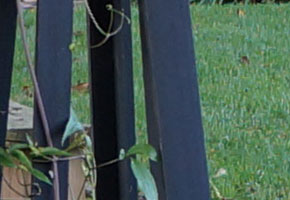
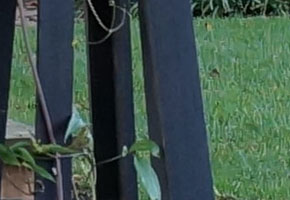
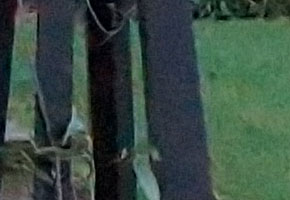
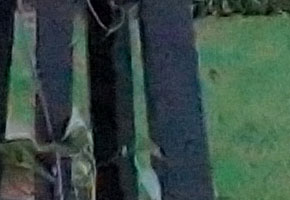
Below are 100% crops of a quick handheld ISO series, shot in a very shady garden in downtown Knoxville. You can see the full-res images in the gallery.
Sony NEX-F3 ISO sensitivity series |
|
 |
 |
ISO 200 |
ISO 400 |
 |
 |
ISO 800 |
ISO 1,600 |
 |
 |
ISO 3,200 |
ISO 6,400 |
 |
 |
ISO 12,800 |
ISO 16,000 |
As it's an entry-level camera, the typical NEX-F3 shooter will probably spend a lot of time in the Intelligent Auto, Scene or Program modes, only dropping into Priority or Manual if a particular shot proves challenging or deserves some extra attention. I shoot bracketed exposures when I'm reviewing a camera, and continuous bracketing isn't available in any except the PASM modes, so I mostly stayed in Program mode to mirror a typical user as much as possible. Thankfully, I found that the NEX-F3 nailed the exposure for most shots first time around, only occasionally needing positive exposure compensation when thrown off by strong highlights. Very few shots needed negative compensation.

Pleasing images. I found images shot with the NEX-F3 to offer pleasing color, and pretty accurate exposure. Focus was typically quite accurate as well, although here the face detection didn't quite manage to lock focus on my son's eyes.
Focus was for the most part reasonably accurate and acceptably fast, although not able to match most SLRs -- or for that matter, the best mirrorless cameras -- in terms of speed. Color was pleasing, with realistic skin tones as in the image of my son on the left, although white balance was sometimes a bit warm indoors. Considering the limitations of its kit lens, which is rather soft for quite some distance from the corners when wide open, I felt the NEX-F3's shots had good detail as well. A better lens would definitely be a worthwhile purchase for the newcomer to Sony's E-mount though; I'm certain that with better glass the NEX-F3 could really shine.
Burst shooting performance wasn't stellar, but then I wouldn't expect that, at the Sony NEX-F3's price. It wasn't necessarily that it was slow: our testing found the camera capable of shooting at about 5.5 frames per second. The problem was that the buffer was fairly shallow, at just six frames in raw+JPEG mode. After the buffer filled, burst shooting performance plunged to just 0.76 frames per second. For reviews I shoot in raw+JPEG mode so that I can provide both the original raw image and the in-camera rendering of the same scene, but that meant two sets of bracketed exposures in a row was enough to completely fill the buffer. Ordinarily, I'd shoot raw-only, and this would've netted me one extra frame and a slightly faster post-fill shooting rate of one frame per second. If you shoot in JPEG mode only, and don't bracket exposures often, this is all less of an issue, as you can manage a dozen JPEG frames before the buffer fills, and about 2.4 frames per second or so after that point. It's likely enough for a consumer photographer, trying to get pictures of subjects like pets and kids that never stay still for long, but frequent sports shooters will likely want to look elsewhere.

Occasional banding. This ISO 3,200 shot of my son at the aquarium was one of several to show horizontal banding. It wasn't frequent and cleans up reasonably well in post-processing, though, so isn't a showstopper.
I did feel it was worth shooting raw despite the lower buffer depth, incidentally, if for no other reason than that it makes those rare shots with banding rather easier to clean up. You can find three versions of the same NEX-F3 exposure in our NEX-F3 gallery to demonstrate this. They're variants of the same shot I mentioned previously with banding, but all three have been run through DxO Optics Pro, one of the more popular photographer-centric image editing packages on the market. The first image is a JPEG file with the DxO Default preset applied, but all noise processing disabled; that's the control shot to give you an idea of how the image looks after correcting for exposure, vignetting, etc. The second is the JPEG file processed with the DxO Default preset, and noise processing left switched on. It's noticeably better, but the banding is still clearly visible in the shadows. The final one shows a raw file from the NEX-F3, again processed with the Default preset, and with noise processing enabled, and while still slightly visible, the banding is much less prominent. And of course, all of these are at defaults; I'm sure you could manage better on all three with a little work.
I did experience one other slight issue when shooting still images with the NEX-F3, but it happened only once every 2-300 shots, and is easily fixed in a matter of seconds in your image editor of choice. (It's also perfectly possible that it was a fault on our particular sample of the camera body.) In the interests of full disclosure, though, I mention it nonetheless. Several times, I had issues with image orientation being detected incorrectly, with images showing in-camera and on my PC either on their side, or in one case even upside down. It wasn't a matter of the images being framed at extreme angles, as other shots in the series with absolutely identical framing were the right way up. As I said, though, it's easily fixed so I wouldn't be terribly concerned given the rarity with which the problem showed itself.
Great videos. The Sony NEX-F3 has an uncommonly rich video feature set for its price, and its Full HD videos capture lots of fine detail.
For its price, the Sony NEX-F3 has a very rich video feature set indeed, besting cameras that in other respects are significantly more sophisticated. There's fully manual exposure control before and during capture, full-time autofocus with tracking, and even support for a proprietary, external microphone accessory. Albeit that a standard microphone jack would be preferable, having the option for external audio is a great feature nonetheless, helping reduce the impact of camera handling noise intruding on your audio track. If you're looking to unleash your creative side in ways that a standard camcorder won't allow for, and your computer is up to the task of editing Full HD, AVCHD-compressed clips, the Sony NEX-F3 offers a lot for the money. I'm no videographer, but I found it enjoyable to shoot with nonetheless.
The Sony NEX-F3's in-camera battery charging is, I have to say, something of a mixed blessing. Thankfully I had access to an external charger during my time with the camera, as it shares the same battery type as another camera I've been testing simultaneously. I'm very used to in-camera charging though, as the Sony RX100 that I use as a daily shooter ships with the same USB charger. The advantage is obvious: there's no bulky charger to carry around, only a small charger that plugs into the camera body with a standard USB cable. And if you own other devices with USB charging, you can often -- although not always -- share a single charger between them all, to help you pack even lighter. (Although it's worth noting that manufacturers typically caution against doing this and recommend use only of their own bundled USB charger.) The downside is equally obvious, though: you can't charge a second battery at the same time you're out shooting with the camera. I like to leave a spare battery charging at home while I'm out and about, so that when I get home it's just a matter of swapping batteries between charger and camera, and I always have a fully-charged battery at the start of a day's shooting. To do that with the Sony NEX-F3, I'd have to buy a separate charger along with the second battery.

On the plus side, by mirrorless camera standards the NEX-F3 has fairly good battery life. I had no trouble getting through a full day's shooting with charge to spare.
There's one other slight quirk with the NEX-F3's product bundle, incidentally. The NEX-F3 ships with a lens already mounted on the camera when you first open the box, and that means there is no body cap or rear lens cap included. I personally like to travel with the camera and body separated, both because it seems less likely to be damaged in minor bumps and knocks, and because it's easier to pack a rectangular and cylindric item separately than to pack a single larger, L-shaped item. If you prefer to do the same, you'll want to buy those caps separately. And that's easy enough to do -- the caps cost only a few dollars apiece -- it's just worth doing it along with the camera kit purchase, as you'll likely save a little bit on shipping.

In all, I found the Sony NEX-F3 to be a pretty pleasant camera to shoot with. It's reasonably comfortable, delivers nice images, and has the main features I'd expect to see in an entry-level model along with quite a few -- especially in video mode -- that are welcome bonuses. It's not a camera that's likely to astound you, but few cameras are, especially at the entry-level. It turns in reassuringly good results pretty consistently, though, and so I'm happy to recommend it to the amateur looking to step up, or the more experienced DSLR shooter who wants an affordable NEX-mount body to get them started in the mirrorless world.
Sony NEX-F3 Technical Info
by Mike Tomkins
 |
 |
The Sony NEX-F3 uses the same APS-C sized Sony EXMOR APS HD CMOS image sensor seen in the simultaneously-announced Alpha SLT-A37. Given the size and pixel count, it's likely at least closely-related to that in the NEX-5N and SLT-A57 as well, although we couldn't definitively confirm this. Effective resolution is 16.1 megapixels, and the maximum image size is 4,912 x 3,264 pixels with a 3:2 aspect ratio, unchanged from the NEX-C3 despite the ever so slight increase in sensor resolution. Sensitivity ranges from ISO 200 to 16,000 equivalents. |
As you'd expect, the NEX-F3 features Sony's E lens mount, and is compatible with all Sony E-mount lenses to date. Like all NEX-series cameras -- and almost all mirrorless cameras -- the F3 body offers only contrast-detect autofocus. It can also accept Alpha-mount lenses using the LA-EA1 or EA2 adapters, and unlike the NEX-C3, supports focus micro-adjustment when using phase detect autofocus with the latter adapter. Like its more expensive NEX siblings, the F3 includes shading, aberration and distortion correction functions that are absent in the NEX-C3. |
The NEX-F3's burst shooting performance is unchanged from the NEX-C3, at a manufacturer-rated 5.5 frames per second in Continuous Hi (Speed Priority) mode, or 2.5 fps in Continuous Lo mode. That's fairly fast for a compact system camera, but trails the NEX-5N and NEX-7 significantly. Sony claims a slight improvement in burst depth from the NEX-C3, however. The NEX-F3 is rated for 18 fine JPEG, seven RAW, or six RAW+JPEG frames in a burst, although with our hard-to-compress target we could only manage 12 JPEG frames in our testing. |
The Sony F3 meters exposures using the main image sensor. It considers the scene as 1,200 separate zones, just as did the NEX-5N and NEX-7. That's a much finer-grained assessment than the 49-zone metering of the NEX-C3. There's a choice of multi-segment, center-weighted, and spot metering modes. The working range for metering is 0 to 20 EV, at ISO 100 with an f/2.8 lens. Shutter speeds on offer range from 1/4,000 to 30 seconds, plus bulb. In all respects, this is unchanged from other current NEX models. |
 |
 |
Unlike the C3, the NEX-F3 includes a built-in popup flash. Like that in the NEX-7, it deploys manually, and has a guide number of six meters at ISO 100. It now recharges in three seconds, rather than four, though, and has a wider 16mm coverage. X-sync is at 1/160 sec. The F3 doesn't support wireless flash. |
The NEX-F3 includes the latest version of Sony's proprietary Smart Accessory Terminal. Version two supports the same electronic viewfinder and microphone accessories as the NEX-5N, both of which are already available. |
 |
 |
Although it doesn't have a built-in viewfinder, the optional FDA-EV1S electronic viewfinder accessory is a good high-res substitute. This optional viewfinder is closely related to that used in Sony's flagship Alpha SLT-A77 Translucent Mirror camera, although it does have a slightly lower eyepoint. Resolution is a high 1,024 x 768 pixels (2.4 million RGB dots), and the EV1S plugs into the camera's Smart Accessory Terminal 2 port. |
The EVF accessory has a variable-angle design that tilts up to 90 degrees and offers full shooting information overlay. Sensors in the eyepiece automatically activate it when you put it you your eye, while automatically disabling the LCD monitor to save power. There's also a Finder/LCD button for manually switching displays. Note, though, that its use precludes attachment of a flash strobe, so exposures with the FDA-EV1S are of necessity limited only to the F3's built-in flash strobe. |
 |
 |
An important first for the NEX-F3 is its tiltable LCD screen. In past Sony NEX-series models, the display only tilted upwards 80°, and downwards 45°. Now it tilts upwards a full 180° for viewing from in front of the camera. There's a tradeoff, though: it now tilts downwards only a modest 13°. Also, it's partially blocked if you're using the popup flash, and the accessory terminal sits right in the middle of the LCD when raised, so will block it significantly. |
Like all current NEX-series models, the NEX-F3's LCD has a 3.0-inch diagonal, a VGA (640 x 480 pixel) resolution with three dots per pixel, and a five-step brightness adjustment with automatic function. Also worth noting is that the NEX-F3 doesn't include touch control, a feature found on the higher-end NEX-5N camera. |


The NEX-F3 includes a number of features we've seen previously on either the company's Cyber-shot compact cameras, Alpha-series Translucent Mirror cameras, or both and which are now making their NEX-series debut.
The 'Clear Image Zoom' function relies on Sony's rather clumsily-named 'By Pixel Super Resolution' algorithms to upsample images to a higher resolution than that at which they were captured. In essence, it's a form of digital zoom, interpolating data from that on hand to fill in the blanks. According to Sony, Clear Image Zoom offers better results than competing digital zoom techniques, though, because it uses pattern matching techniques to improve the quality of the guessed data. Clear Image Zoom functions in steps of 0.1x, up to a maximum of 2x zoom beyond the actual focal length of the image, and Sony claims that the image quality even at 2x Clear Image Zoom will be "nearly equivalent" to that shot with an optical zoom at the same equivalent focal length.
There's also an Auto Portrait Framing function which, again, is based on the 'By Pixel Super Resolution' tech. When enabled, saves two copies of each image you capture. The first image is untouched; the second uses a combination of face detection to locate your subject, and then crops the image based on a rule-of-thirds algorithm for what the camera feels to be a more pleasing layout. Your dominant subject will always face towards the center of the frame, and the orientation of the recropped image won't necessarily match that of the original shot. You might shoot a landscape image, for example, which the camera decides would have been better as a portrait. So... where does 'By Pixel Super Zoom' fit into the picture? The answer is that the Sony NEX-F3 will -- after finishing cropping your image to create a masterpiece -- resample the result back up to the same resolution as the original shot, thereby making it seem as if the camera has simply gone back in time and retaken the image with different framing. You can of course disable the function, but for those who find it tricky to remember and apply the rule of thirds, it could prove an interesting feature.
A related new feature cleverly takes advantage of the camera's 180-degree tilting LCD display, and the sensor that allows it to determine when to invert the display's image for viewing from in front of the camera. The Self Portrait Self-timer function automatically starts a three-second countdown timer when the LCD is flipped up in self-portrait mode, saving you the trouble of pressing the shutter button at all.
Another feature new to the NEX series is the Superior Auto mode, which has been offered in Cyber-shot models for a while now. This function automatically detects the scene type, configures the camera appropriately, and then captures anywhere from one to six shots. Multi-shot bursts are then combined in-camera, with the aim of either correcting backlit shots, or reducing noise levels.
The NEX-F3 also includes a Picture Effects function, which has 11 modes, and a total of 15 possible effects as in the NEX-5N and NEX-7. (The NEX-C3 had a pared-down version with seven modes and 11 effects). These include options like Retro Photo, Toy Camera, and HDR Painting, catering to those who prefer to do their post-processing in-camera. There are also a variety of Photo Creativity functions -- Background Defocus, Brightness, Color, Vividness, and Soft Skin Effect -- as in the NEX-C3 and NEX-5N.
Other creative functions include a High Dynamic Range mode that combines three sequential shots in-camera to yield a single image with broader dynamic range, and a Dynamic Range Optimizer function that tweaks the tone curve automatically or manually to bring out shadow detail without sacrificing highlights. There's also a choice of both 2D and 3D panorama modes that automatically capture and stitch images as you sweep the camera past your chosen scene, then save the result as a single panoramic image.
 |
 |
The NEX-F3's video capabilities fall somewhere in between those of the NEX-C3, and the NEX-5N and NEX-7, although it's closer to the latter. There's a choice of MPEG-4 and AVCHD version 1.0 compression. As with recent NEX-series models, you have access to Program, Priority, and Manual exposure for video capture, as well as picture effect functions. You can now also use digital zoom during movie recording. |
In AVCHD mode, the F3 records Full HD (1,920 x 1,080 pixels) at either 60 interlaced field, or 24 progressive-scan frames per second, with Dolby Digital AC3 audio. In MPEG-4 mode you have a choice of 1,440 x 1,080 pixel (HDV / Anamorphic HD) or 640 x 480 pixel (VGA) capture, with a fixed rate of 29.97 frames per second. |
 |
 |
Like its predecessor, the NEX-F3 caters for movie audio with both a built-in stereo microphone whose two ports surround the top of the lens mount, and support for Sony's proprietary ECM-SST1 external microphone accessory, which mounts on the Smart Accessory Terminal 2, and can provide directional audio coverage at either 90° or 120°. A built-in monaural speaker caters to movie playback, and has an eight-step adjustable volume setting. |
Other built-in connectivity options include USB 2.0 High-Speed (now with a Micro rather than Mini-B connector), and a high-definition Type-C Mini HDMI video output. Unlike the NEX-5N and NEX-7, the F3 doesn't support remote controls, whether wired or wireless. |
 |
 |
The NEX-F3 includes a single card slot on which to store images and movies. It's compatible with either the relatively commonplace Secure Digital cards (including SDHC and SDXC types), or with Sony's proprietary Memory Stick PRO Duo and PRO-HG Duo cards. |
Power comes courtesy of an NP-FW50 InfoLithium rechargeable battery pack, as in all recent NEX-series models. Although the battery is unchanged, still image battery life has improved significantly, to 470 images. (Sony is claiming this 18% improvement over the NEX-C3 gives the F3 "industry-leading" battery life.) That said, video capture battery life has fallen somewhat, likely due to the higher resolution versus the C3. Maximum recording time is 140 minutes. |
The Sony Alpha NEX-F3 digital camera went on sale in the US market from mid-June 2012. List pricing is set at around US$600, with an SEL1855 18-55mm zoom lens included in the product bundle. Body colors include silver, black, and white.
Sony NEX-F3 Image Quality
Below are crops comparing the Sony NEX-F3, Sony NEX-C3, Olympus E-PL3, Panasonic GX1, Pentax K-01, and Samsung NX200. Though we normally start with ISO 1,600 here, we thought we'd start with the base ISO to show the best each camera can do.
NOTE: These images are best quality JPEGs straight out of the camera, at default settings including noise reduction. All cameras in this comparison were shot with our very sharp reference lenses.
Sony NEX-F3 versus Sony NEX-C3 at base ISO
 |
 |
 |
 |
 |
 |
|
Sony NEX-F3 at ISO 200
|
Sony NEX-C3 at ISO 200
|
|
The first two crops don't show a lot to choose between the Sony NEX-F3 and its predecessor, although there's a bit more sharpening which gives the mosaic bottle the impression of more detail. There's a big step forwards in the third crop, though. The red and pink swatches show much more detail, with the latter in particular clearly picking up the threads in the fabric, where the NEX-C3 was only able to record some of this detail. |
|
Sony NEX-F3 versus Olympus E-PL3 at base ISO
|
 |
|
 |
|
 |
|
Sony NEX-F3 at ISO 200
|
Olympus E-PL3 at ISO 200
|
|
At base ISO, the Sony NEX-F3 bests its Micro Four Thirds rival in terms of detail, but perhaps not by as much as you might expect given their difference in resolution and sensor size. The Olympus image looks cleaner in the first crop, but has a bit more difficulty with the red fabric swatch. Sony's sharpening is also less heavy-handed, where the Olympus shows more haloes on high-contrast edges. |
|
Sony NEX-F3 versus Panasonic GX1 at base ISO
|
 |
|
 |
|
 |
|
Sony NEX-F3 at ISO 200
|
Panasonic GX1 at ISO 160
|
|
The Panasonic GX1 puts up a much more convincing fight at its base sensitivity, which is also a little lower than that of the NEX-F3. With essentially equal resolution, both cameras manage a similar level of detail, although the NEX-F3 image pops more thanks to greater sharpening. Both cameras handle the fabric swatches well, but the NEX-F3 manages to capture thread detail in the pink swatch that Panasonic's camera misses. |
|
Sony NEX-F3 versus Pentax K-01 at base ISO
|
 |
|
 |
|
 |
|
Sony NEX-F3 at ISO 200
|
Pentax K-01 at ISO 100
|
Against the Pentax K-01, the Sony NEX-F3 is placed in a fairer fight. Resolution and sensor size are near-identical, but there's still quite a difference in the crops. Sony's images show less aggressive sharpening, which doesn't give them as much "pop", but also means they're relatively less prone to haloing than the Pentax. Sony perhaps holds onto just slightly more detail that Pentax loses to its stronger sharpening, as well. And as for the fabric swatches, Sony yields more natural-looking colors, while Pentax turns the pink swatch rather closer to magenta. |
|
Sony NEX-F3 versus Samsung NX200 at base ISO
|
 |
|
 |
|
 |
|
Sony NEX-F3 at ISO 200
|
Samsung NX200 at ISO 100
|
|
And finally, we compare the NEX-F3 to the Samsung NX200, which has the same sensor size but with a higher 20-megapixel resolution, leading to the crops showing larger elements. While Samsung clearly does a good job with detail, it struggles with the red fabric swatch, and shows stronger sharpening haloes. |
|
Most digital SLRs and CSCs will produce an excellent ISO 100 shot, so we like to push them and see what they can do compared to other cameras at ISO 1,600, 3,200, and 6,400. Recent advances in sensor technology have made ISO 1,600 look a lot more like ISO 100, but there are still cameras whose quality starts to fall apart at this setting. We also choose 1,600 because we like to be able to shoot at least at this level when indoors and at night.
Sony NEX-F3 versus Sony NEX-C3 at ISO 1,600
 |
 |
 |
 |
 |
 |
|
Sony NEX-F3 at ISO 1,600
|
Sony NEX-C3 at ISO 1,600
|
|
At ISO 1,600, the NEX-F3 again shows a step forwards over the NEX-C3, although the difference in the red and pink swatches is more modest as the noise processing ramps up. There's definitely still more detail recorded, though, and a slightly higher level of sharpening that helps it "pop". |
|
Sony NEX-F3 versus Olympus E-PL3 at ISO 1,600
|
 |
|
 |
|
 |
|
Sony NEX-F3 at ISO 1,600
|
Olympus E-PL3 at ISO 1,600
|
|
The advantage of Sony's larger sensor becomes more clear as the sensitivity climbs to ISO 1,600. Where the NEX-F3 retains much of the detail in the mosaic bottle, and even some of the fine threads in the pink fabric swatch, Olympus's noise suppression largely squashes the subtler details. |
|
Sony NEX-F3 versus Panasonic GX1 at ISO 1,600
|
 |
|
 |
|
 |
|
Sony NEX-F3 at ISO 1,600
|
Panasonic GX1 at ISO 1,600
|
|
Although Panasonic's GX1 bests the Olympus PL3, the limitations of its smaller sensor still show once sensitivity is raised a bit. The NEX-F3 retains noticeably more detail and saturation in the crops above, although to our eye, Panasonic's noise reduction produces results that are less blotchy and more film-like. |
|
Sony NEX-F3 versus Pentax K-01 at ISO 1,600
|
 |
|
 |
|
 |
|
Sony NEX-F3 at ISO 1,600
|
Pentax K-01 at ISO 1,600
|
|
At ISO 1,600, both cameras are starting to provide slightly mottled results, but Sony turns out slightly cleaner images overall, and does a far better job with the fabric swatches. There's also more detail in Sony's rendering of the mosaic label, although both cameras are definitely losing some of the finer details to noise reduction. |
|
Sony NEX-F3 versus Samsung NX200 at ISO 1,600
|
 |
|
 |
|
 |
|
Sony NEX-F3 at ISO 1,600
|
Samsung NX200 at ISO 1,600
|
|
Even at ISO 1,600, Samsung's noise reduction fails to tame the chroma noise. In the process it loses its resolution edge to the Sony, whose rendering we definitely prefer here. |
|
Today's ISO 3,200 is yesterday's ISO 1,600 (well, almost), so below are the same crops at ISO 3,200.
Sony NEX-F3 versus Sony NEX-C3 at ISO 3,200
 |
 |
 |
 |
 |
 |
|
Sony NEX-F3 at ISO 3,200
|
Sony NEX-C3 at ISO 3,200
|
By ISO 3,200, the NEX-F3's performance is closer to that of its predecessor. There's more noise reduction applied by the newer camera in the first crop, but the finer details in the Mas Portell label survive better regardless. The NEX-F3's greater sharpening gives the mosaic crop an impression of more detail, but both cameras are starting to show blotches where the noise reduction wipes out fine detail. In the difficult pink and red swatches, last year's NEX-C3 turns in a slightly better performance than does the NEX-F3, with the latter losing more detail to noise reduction. |
|
Sony NEX-F3 versus Olympus E-PL3 at ISO 3,200
|
 |
|
 |
|
 |
|
Sony NEX-F3 at ISO 3,200
|
Olympus E-PL3 at ISO 3,200
|
|
By ISO 3,200, the Sony NEX-F3's larger sensor gives it a clear advantage over the Olympus. For the bright red fabric swatch in particular, the PL3 retains barely any trace of the pattern, where Sony manages to hold onto at least some detail. Even after noise processing, the PL3's image has more luma and chroma noise, and colors have started to bleed into their surroundings. |
|
Sony NEX-F3 versus Panasonic GX1 at ISO 3,200
|
 |
|
 |
|
 |
|
Sony NEX-F3 at ISO 3,200
|
Panasonic GX1 at ISO 3,200
|
|
By ISO 3,200, there's really no contest. The Panasonic GX1's images have lost most of their fine detail, and colors bleed well beyond edges into the background. Sony, by contrast, still holds onto a fair bit of detail and shows only minimal bleeding. |
|
Sony NEX-F3 versus Pentax K-01 at ISO 3,200
|
 |
|
 |
|
 |
|
Sony NEX-F3 at ISO 3,200
|
Pentax K-01 at ISO 3,200
|
|
At ISO 3,200, both cameras face a greater challenge. Pentax's noise reduction gives the splotchier results of the pair, but Sony's shows colors bleeding into the background more. Sony still has a good edge on fine detail in the mosaic image, and turns in a far better performance with the fabric swatches, where Pentax has basically lost all detail from the red swatch. |
|
Sony NEX-F3 versus Samsung NX200 at ISO 3,200
|
 |
|
 |
|
 |
|
Sony NEX-F3 at ISO 3,200
|
Samsung NX200 at ISO 3,200
|
|
By ISO 3,200, there's really no contest. Sony's image has better detail, better color, and is relatively free from the chroma noise that troubles Samsung's noise reduction. |
|
Detail: Sony NEX-F3 versus Sony NEX-C3, Olympus E-PL3, Panasonic GX1, Pentax K-01, and Samsung NX200
 |
 |
 |
 |
 |
 |
 |
 |
 |
 |
 |
 |
 |
 |
 |
 |
 |
 |
| Sony NEX-F3 ISO 200 ISO 3,200 ISO 6,400 |
Sony NEX-C3 ISO 200 ISO 3,200 ISO 6,400 |
Olympus E-PL3 ISO 200 ISO 3,200 ISO 6,400 |
Panasonic GX1 ISO 160 ISO 3,200 ISO 6,400 |
Pentax K-01 ISO 100 ISO 3,200 ISO 6,400 |
Samsung NX200 ISO 100 ISO 3,200 ISO 6,400 |
|
Detail comparison. High-contrast details are often sharper as ISO rises, so they're worth a look as well. The Sony NEX-F3 performs well up to ISO 3,200, but contrast falls a little by ISO 6,400. While it doesn't hold onto quite as much detail as the NEX-C3 and Panasonic GX1 in the final crop, it's a relatively subtle difference, most noticeable in the L of the word lager, and the red lettering above. |
|||||
Sony NEX-F3 Print Quality
 Good 20 x 30 inch prints at ISO 200; ISO 3,200 prints look good at 8 x 10 inches; and ISO 12,800 prints make a good 4 x 6.
ISO 200 images print quite well at 20 x 30 inches, with good detail and color. Detail in our red leaf swatch is a little lower than we're used to seeing, but other red elements seem fine.
ISO 400 shots also look reasonably good at 20 x 30 inches, though the red leaf swatch looks bizarrely out of focus, or out of phase with the rest of the photo. We'll call 16 x 20 good here.
ISO 800 are still surprisingly good at 16 x 20 inches. The red leaf swatch continues to look a little odd, but that's not uncommon. Though shadows are slightly mottled, image quality is still good at this size.
ISO 1600 images look OK at 16 x 20 inches, but low-contrast areas and shadows are a little too soft at this size. 13 x 19s look good at this ISO.
ISO 3,200 images decline quickly in overall quality and look better at 8 x 10.
ISO 6,400 has sufficient fine detail for 5 x 7s, but has noticeable softness in some areas and a slight loss in color fidelity.
ISO 12,800 images look pretty good at 4 x 6, with minor noise in some areas.
ISO 16,000 images also look good at 4 x 6, though all contrast is gone in our target red swatch.
Overall, the Sony NEX-F3 does quite well, producing a good 4 x 6 inch print even at its highest ISO setting. Its large 20 x 30 inch print is good, though we'd have rather seen better performance in the red leaf swatch (thread patterns in the fabric make that a very difficult target, though, so it's not unusual).
In the Box
The Sony NEX-F3 ships with the following items in the box:
- Sony NEX-F3 camera body
- E-mount 18-55mm f/3.5-5.6 kit lens (SEL1855) in US market; other markets may get different lens options
- Front lens cap
- Lens hood
- NP-FW50 rechargeable lithium-ion battery pack
- AC-UB10 USB AC charger in US market; other markets may get a different charger and perhaps an AC cord
- Mini-B USB cable
- Shoulder strap
- CD-ROM
- Instruction manuals
- Lenses and accessories guide
- Warranty card
Recommended Accessories
- Protective case
- Additional lenses
- LA-EA1 or LA-EA2 mount adaptors if you want to use Alpha-mount lenses
- Body cap
- Extra battery pack
- External battery charger if you want to charge one battery while shooting with another
- Large capacity, high-speed SDHC/SDXC memory card. 8-16GB or larger makes sense if you plan on shooting lots of HD video. Look for a speed grade of at least Class 4 for video capture.
- FDA-EV1S electronic viewfinder
- HVL-F20S external flash strobe
- ECM-SST1 external microphone
- PCK-LM10 LCD protector
Sony NEX-F3 Conclusion
| Pro: | Con: |
|---|---|
|
|
In late 2011, Sony's NEX-C3 compact system camera brought the versatility of interchangeable-lens shooting and the size advantage of a NEX-series mirrorless design into the hands of more photographers. The Sony NEX-F3 follows in the footsteps of that model, and while its new stair-stepped grip design makes it look quite different, it retains much of what we appreciated about its predecessor, while bringing some worthwhile improvements.
Key among these for consumer photographers is its new articulation mechanism for the rear-panel LCD, which now lets it flip forward for viewing from in front of the camera, as well. With the NEX-C3, self-portrait shooting was something of a lottery unless you had the camera tripod-mounted, as you couldn't be sure of your framing from in front of the camera. If you shoot a lot of self-portraits, you'll appreciate the fact that with the NEX-F3 you can frame yourself properly the first time, every time. The fact that the popup flash and accessory connector will both obscure the LCD is of little importance, as you'll largely be using the LCD for arm's-length portraits where flash would be unappealing anyway. For more distant portraits, you can prep your framing on a tripod before you raise the flash or add an accessory strobe.
The built-in, popup flash is also a great addition. With the NEX-C3, it was too easy to leave your external flash at home, then lose an unexpected shot that couldn't be achieved without a strobe. The Sony NEX-F3's built-in flash, albeit rather weak and uneven, is always there when you need it, and you can still add an external strobe if you need a more powerful flash.
These changes did come at a cost, as the NEX-F3 has grown a bit both in size and weight since its predecessor -- but not unduly so. It's still relatively compact, and much easier to carry around than a typical, bulky consumer SLR. Yet thanks to the fact it uses the same sensor size found in most DSLRs, you'll be able to achieve similarly good image quality. In fact, the limiting factor here is the NEX-F3's kit lens, which really isn't up to matching the capabilities of the camera body. If you want to get the most from the Sony F3 we'd recommend picking up a better lens, but unfortunately in the US market the camera itself isn't sold body-only, so you'll still have to buy the kit lens, regardless.
Paired with a better-performing lens, though, the Sony NEX-F3 represents a good choice for the consumer photographer. Images are pleasing, the body quite compact and lightweight, and the feature set provides a reasonable scope to learn and grow -- and not just for still image shooting, as you can also control exposure manually for videos, too. While experienced photographers may find the Sony NEX-F3 rather too simplified, and the performance in some areas -- especially for raw shooting -- to be a bit limiting, it's a great choice for an entry-level mirrorless camera, and a clear Dave's Pick.
Optics
Below are the results of our optical tests with the Sony NEX-F3 and the bundled E 18-55mm f/3.5-5.6 OSS kit lens. The test images shown on most other pages of this review were taken with very sharp references lenses, so we use this page to explore kit lens quality.
Lens Test Results
Zoom
A typical 3x zoom ratio, with average performance.


The Sony NEX-F3 is available bundled with an E 18-55mm f/3.5-5.6 OSS "kit" lens. This optically stabilized lens possesses a typical optical zoom ratio of about 3x, with a 35mm equivalent focal range of about 27-83mm. Sharpness and contrast at wide-angle are good (but not great) at f/8, and chromatic aberration isn't an issue since the camera suppresses it (see below), however some flare is visible around the building's white surfaces. Results at the 55mm setting are also fairly good at f/8 over most of the frame, though corners are soft. See below for comments on macro, geometric distortion, performance wide-open, chromatic aberration, etc.
Macro
An average sized minimum coverage area, with good detail. Flash throttled down well.


As with zoom performance, the Sony NEX-F3's macro performance will depend entirely on the lens mounted. However with the E 18-55mm kit lens set to 55mm, the NEX-F3 captured an average sized minimum area measuring 3.01 x 2.00 inches (77 x 51 millimeters). Detail is good in the center at f/8, just a touch soft, though corners and edges of the frame are much softer. (Most lenses have some softening in the corners at macro distances.) The flash did a very good job throttling down, resulting in a good exposure. The flash also had no trouble clearing the lens as there is no detectable shadow, though coverage is a little uneven with the bottom and corners of the image a little dimmer than the rest.
Geometric Distortion
Higher than average geometric distortion at wide-angle and telephoto.
| Barrel distortion at 18mm is 1.1 percent |
 |
| Pincushion distortion at 55mm is 0.5 percent |
 |
The Sony NEX-F3's E 18-55mm kit lens produced about 1.1 percent barrel distortion at wide-angle, which is higher than average and noticeable in some of its images. At the telephoto end, there's about 0.5% pincushion distortion, also higher than average but not quite as noticeable. This is the tendency for the lens to bend straight lines outward (like a barrel -- usually at wide-angle) or inward (like a pincushion -- usually at telephoto).
Note that the Sony NEX-F3 offers automatic Distortion Correction. See below for details.
Chromatic Aberration and Corner Sharpness
Low levels of C.A. (the camera suppresses it). The lens produces some pretty soft corners wide-open.
| Aperture: maximum | |
 |
 |
| 18mm@f/3.5: Lower left C.A.: Moderately low Softness: Moderate blurring |
18mm@f/3.5: Center C.A.: Very low Softness: Sharp |
 |
 |
| 55mm@f/5.6: Upper right C.A.: Very low Softness: Moderately high blurring |
55mm@f/5.6: Center C.A.: Very low Softness: Fairly sharp, but lower contrast |
Chromatic Aberration. Chromatic aberration in the corners with the NEX-F3's 18-55mm kit lens at wide-angle (18mm) is moderately low at wide-angle with just minor magenta fringing, and the center of the image shows very little C.A. The camera does a pretty good job at suppressing much of the lateral C.A. produced by the lens (see below). At full telephoto (55mm), C.A. is very low and muted.
Corner Softness. Wide-open at full wide-angle, the 18-55mm lens that came with our NEX-F3 is a little soft in all corners, with the lower left corner being the softest. Softness extends pretty far into the frame as well. The center of the image was pretty sharp, though, with very good contrast. Some minor vignetting (corner shading) is also noticeable at full wide-angle, as indicated by the darker corner crop, even with automatic vignetting correction enabled (see below). At full telephoto, all four corners are quite soft, though the center is reasonably sharp. Softness extends quite far into the frame from the left side, but not so much from the right. The lens also has lower contrast overall at full telephoto compared to wide-angle.
| Aperture: f/8 | |
 |
 |
| 18mm@f/8: Lower left C.A.: Moderately low Softness: Minor blurring |
18mm@f/8: Center C.A.: Very low Softness: Sharp |
 |
|
| 55mm@f/8: Upper right C.A.: Very low Softness: Moderate blurring |
55mm@f/8: Center C.A.: Very low Softness: Sharp |
"Stopped-down" to f/8, corner sharpness at wide-angle improved compared to wide-open at f/3.5. At full telephoto, sharpness also improved at f/8 versus wide-open at f/5.6, but corners were still noticeably soft with lower contrast.
Overall, mediocre performance, even for a kit lens.
Lens Corrections
When shooting in JPEG mode, the Sony NEX-F3 includes the ability to automatically correct for geometric distortion, chromatic aberration, and lens shading (vignetting), as images are captured. Only E-mount lenses are supported, and raw files are not corrected.
Geometric Distortion
| Barrel distortion at 18mm is 0.3 percent |
 |
| Pincushion distortion at 55mm is <0.1 percent |
 |
Above, you can see with Distortion Correction enabled (set to Auto), the kit lens shows significantly less distortion (+0.3% at wide-angle, <-0.1% at telephoto) than with it disabled (+1.1% at wide-angle, -0.5% at telephoto), though extreme edges are cropped away in the process. The default Distortion Correction setting is Off.
Chromatic Aberration
| CA Correction Auto | CA Correction Off |
 |
 |
| 18mm@f/3.5: Upper right C.A.: Moderately low |
18mm@f/3.5: Upper right C.A.: Higher and brighter |
 |
 |
| 55mm@f/5.6: Upper right C.A.: Low |
55mm@f/5.6: Upper right C.A.: Also low |
Above, you can see significantly higher lateral Chromatic Aberration at wide-angle with Chromatic Aberration Correction disabled, though the difference at telephoto is minimal because C.A. is low at telephoto to begin with. The default for this setting is Auto.
Lens Shading
 |
|
| 18mm @ f3.5 | |
| Auto | Off |
Mouse-over the links above to see the difference Lens Shading correction makes at wide-angle when wide-open at f/3.5 (the worst-case scenario for most lenses). As you can see, corners are brightened without affecting brightness at the center. The default setting is also Auto.
Sony NEX-F3 Viewfinder Accuracy
Viewfinder Test Results
Coverage
Excellent accuracy from the LCD monitor.

The Sony Alpha NEX-F3's LCD monitor showed essentially 100% coverage with our Sigma 70mm f/2.8 prime lens. This is excellent performance, though not a surprise given its image is derived from the main imaging sensor.
The images above were taken from our standardized test shots. For a collection of more pictorial photos, see our Sony Alpha NEX-F3 Photo Gallery .
Exposure
Color
Saturation & Hue Accuracy
Good overall accuracy and saturation, with mostly minor shifts in hue and intensity.
 |
|||
|
ISO Sensitivity
|
|||
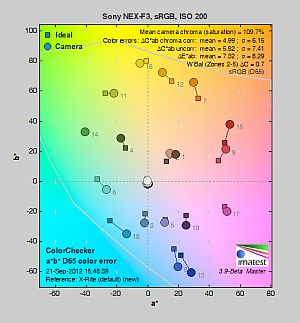
| In the diagram above, the squares show the original color, and the circles show the color that the camera captured. More saturated colors are located toward the periphery of the graph. Hue changes as you travel around the center. Thus, hue-accurate, highly saturated colors appear as lines radiating from the center. Mouse over the links to compare ISOs and click for larger versions. | |||
Saturation. Like many cameras, the Sony NEX-F3 pushes strong reds, dark blues, dark greens, purples and browns just a little, but actually undersaturates light green, yellow and cyan tones slightly. The NEX-F3's overall default color saturation is oversaturated by 9.7% at base ISO, which is about average these days, and saturation remains fairly consistent across the ISO range. You can of course tweak saturation to your liking, or choose a different color mode. Most consumer digital cameras produce color that's more highly saturated (more intense) than found in the original subjects. This is simply because most people like their color a bit brighter than life.
Skin tones. Here, the Sony NEX-F3 does fairly well, producing reasonably natural-looking Caucasian skin tones, just slightly on the warm side with darker areas nudged toward yellow and orange. Where oversaturation is most problematic is on Caucasian skin tones, as it's very easy for these "memory colors" to be seen as too bright, too pink, too yellow, etc.
Hue. The Sony NEX-F3 does push cyan toward blue, red toward orange, orange toward yellow and yellow toward green, but shifts are relatively minor. (The cyan to blue shift is very common among the digital cameras we test; we think it's a deliberate choice by camera engineers to produce better-looking sky colors.) With an average "delta-C" color error of 4.99 after correction for saturation at base ISO, overall hue accuracy is good, slightly better than average. Hue is "what color" the color is.
Saturation Adjustment
The Sony NEX-F3 has a total of seven saturation settings available, three above and three below the default saturation. This covers a pretty wide range of saturation levels. Saturation also had little effect on contrast, which is how it should work.
| Saturation Adjustment Examples | ||||
 |
 |
 |
 |
 |
| -3 | -1 | 0 | +1 | +3 |
The table above shows results with five of the seven saturation settings, including the default and the two extremes. Click on any thumbnail above, then click again to see the full-sized image.


Sensor
Exposure and White Balance
Indoors, incandescent lighting
Very warm cast with Auto, warm with Incandescent, good with Manual, and a touch cool with Kelvin white balance settings. Average exposure compensation required.


Indoors, under normal incandescent lighting, color balance is overly warm and orange with the Auto white balance setting and quite disappointing. Results with the Incandescent setting are better but still somewhat warm and orange/yellow. The Manual setting was fairly accurate, with just a slightly green bias. The 2,600 Kelvin setting which matches the color temperature of our lights resulted in a slightly cool, bluish image. The Sony NEX-F3 required +0.3 EV positive exposure compensation here, which is about average for this shot. (Our test lighting for this shot is a mixture of 60 and 100 watt household incandescent bulbs, a pretty yellow light source, but a very common one in typical home settings here in the U.S.)
Outdoors, daylight
Very good results under harsh lighting, with good handling of contrast, color, and exposure.
Outdoors, the Sony NEX-F3 performed very well. Only +0.3 EV exposure compensation was required to keep the model's face bright in our "Sunlit" Portrait shot. The average among the cameras we've tested is +0.7 EV, so the NEX-F3 performed better than average here. (Actually, with Dynamic Range Optimization enabled which is the default setting, default exposure is bright so we can't really fault the camera here.) Contrast is a little high, as you might expect under such harsh lighting, but the camera does a pretty good job of holding onto detail in both the shadows and bright highlights, even without the help of DRO. Color balance is good with Auto white balance, perhaps just a hint warm. Default exposure is quite good for our Far-field shot, with very few highlights blown, again with DRO disabled. Some very dark shadows in the leaves were lost, but the camera kept the main subject well exposed. The Far-field shot using Auto white balance has very good color, just a touch cool. Overall, a very good performance in harsh lighting, especially considering DRO was off for these shots.
See full set of test images with explanations
See thumbnails of all test and gallery images
Resolution
Very high resolution, ~ 2,100 lines of strong detail from JPEGs, up to 2,200 lines from raw files.


In-camera JPEGs of our laboratory resolution chart reveal sharp, distinct line patterns down to about 2,100 lines per picture height in both the horizontal and vertical directions. Some may argue for higher numbers, but aliasing artifacts start to interfere at this resolution. Complete extinction of the pattern doesn't occur until about 2,800 to 3,000 lines. Adobe Camera Raw was able to extract perhaps 100 lines more of resolution here from matching raw files, but the Sony NEX-F3 does a good job holding on to high contrast detail at base ISO in its JPEGs. Use these numbers to compare with other cameras of similar resolution, or use them to see just what higher resolution can mean in terms of potential detail.
See full set of test images with explanations
See thumbnails of all test and gallery images
Sharpness & Detail
Good detail, though fine detail is a little soft, with some minor edge-enhancement on high-contrast subjects. Mild to moderate noise suppression visible in the shadows and areas of low contrast.


Sharpness. The Sony NEX-F3 captures detailed images overall, though results are a touch soft at default settings, despite using the very sharp Carl Zeiss 24-70mm F/2.8 SSM lens at f/8 for the shot above left. There are some minor edge enhancement artifacts on high-contrast subjects such as the larger tree branches in the image, but they're not excessive and quite normal. Fine detail such as the smaller branches and pine needles show very little edge enhancement, but appear a touch mushy due to slightly over-zealous default noise reduction. Edge enhancement creates the illusion of sharpness by enhancing colors and tones right at the edge of a rapid transition in color or tone.
Detail. The crop above right shows fairly mild to moderate noise suppression in the darker areas of the model's hair. A number of low-contrast strands are smudged together, though higher contrast strands are still distinct. We saw similar results with fine detail in the pine needles being smudged. Still, pretty good results here considering the base ISO for this 16-megapixel APS-C sensor is 200 versus 100 for most others. Noise-suppression systems in digital cameras tend to flatten-out detail in areas of subtle contrast. The effects can often be seen in shots of human hair, where the individual strands are lost and an almost "watercolor" look appears.
Raw vs In-Camera JPEGs
As noted above, the Sony NEX-F3 produces in-camera JPEGs with good detail, though fine, low-contrast detail is a touch soft. Quite a bit more detail can often be obtained from carefully processing raw files with a good converter, as can be seen below.
 |
|||
In the table above, mousing over a link at the bottom will load the corresponding crop in the area above, and clicking on the link will load the full resolution image. Examples include (from left to right): an in-camera Fine JPEG, the matching raw file processed through Sony's Image Data Converter SR version 3.2 software at default settings, another conversion processed with IDC's sharpening turned up to +50, and finally the same raw file converted with Adobe Camera Raw, then sharpened in Photoshop using unsharp mask at 300% with radius 0.3.
As you can see, the Sony IDC version at default settings is somewhat softer than the in-camera JPEG. (Color rendering is also slightly different.) Increasing the sharpening settings gave the image a crisper look and helped extract a bit more detail, though noise reduction is still blurring fine detail. The Adobe Camera Raw conversion showed the most detail, but also revealed a bit more noise. You can always turn up the luminance noise reduction (default of zero was used here), or process the files in your favorite noise reduction program or plugin if you want cleaner images. Bottom line: as is usually the case, the Sony NEX-F3 rewards raw shooters with better detail than JPEGs when used with a good raw converter, though its base ISO of 200 puts it at a slight disadvantage in terms of noise compared to models offering lower base ISO.
ISO & Noise Performance
Very good noise versus detail performance up to ISO 1,600.
|
Default High ISO Noise Reduction
|
 |
 |
 |
| ISO 200 | ISO 400 | ISO 800 |
 |
 |
 |
| ISO 1,600 | ISO 3,200 | ISO 6,400 |
 |
||
| ISO 12,800 | ||
The Sony NEX-F3's JPEG images are quite clean at ISO 200, though as mentioned previously some very fine, mostly low-contrast detail is lost to noise reduction already at base ISO. There's also some chroma noise visible in darker areas, as well as demosaicing errors in the hair above the mannequin's forehead, though that's pretty common these days and not really something to be concerned with. ISO 400 is similar, with just a slight increase in smudging. ISO 800 is slightly softer with less chroma noise, though detail is still very good. ISO 1,600 appears progressively noisier as well as a bit softer, as you'd expect, but there's still lots of fine detail left. ISO 3,200 shows another increase in noise and noise reduction effort, though fine detail is still not too bad. Fine detail takes a larger hit at ISO 6,400 and especially at 12,800, where there's quite a bit of smudging as well as chroma noise in the form of purple and yellow blotches. Overall though, these are very good results considering the class and resolution offered. Unfortunately, Sony still doesn't offer much flexibility in noise reduction (only two levels: Normal and Low). As always, see the Print Quality section below for maximum recommended print sizes at each ISO.
A note about focus for this shot: We shoot this image at f/4, usually using one of three very sharp reference lenses (70mm Sigma f/2.8 macro for most cameras, 60mm f/2.8 Nikkor macro for Nikon bodies without a drive motor, and Olympus Zuiko 50mm f/2.0 for Four Thirds and Micro Four Thirds bodies). To insure that the hair detail we use for making critical judgements about camera noise processing and detail rendering is in sharp focus at the relatively wide aperture we're shooting at, the focus target at the center of the scene is on a movable stand. This lets us compensate for front- or back-focus by different camera bodies, even those that lack micro-focus adjustments. This does mean, though, that the focus target itself may appear soft or slightly out of focus for bodies that front- or back-focused with the reference lens. We know this; if you click to view the full-size image for one of these shots and notice that the focus target is fuzzy, you don't need to email and tell us. :-) The focus target position will have been adjusted to insure that the rest of the scene is focused properly.
Extremes: Sunlit, dynamic range and low light tests
Very high resolution with excellent highlight and shadow detail. Very good low-light performance, capable of capturing bright images in near darkness.


Sunlight. The Sony NEX-F3 handled the deliberately harsh lighting in the test above very well. We preferred the +0.3 EV exposure here, as the default exposure is a touch dim in the face while the +0.7 EV exposure blew a few too many highlights. Contrast is a little high, but shadow and highlight detail are both very good. Despite the bright appearance, relatively few highlights were blown in the model's shirt and face at +0.3 EV, though the red channel is clipped in some of the flowers as is often the case, and in specular highlights where you'd expect clipping. Even fewer highlights were clipped with DRO enabled (see below). There are virtually no lost shadows, which is also very good, though very deep shadows are posterized. However, that's not really an issue except perhaps for those trying to recover a severely underexposed image.
For best results, be sure to use fill flash in situations like the one shown above; it's better to shoot in the shade when possible. See below for results with Dynamic Range Optimization and High Dynamic Range features enabled.
Because digital cameras are more like slide film than negative film (in that they tend to have a more limited tonal range), we test them in the harshest situations to see how they handle scenes with bright highlights and dark shadows, as well as what kind of sensitivity they have in low light. The shot above is designed to mimic the very harsh, contrasty effect of direct noonday sunlight, a very tough challenge for most digital cameras. (You can read details of this test here. In actual shooting conditions, be sure to use fill flash in situations like the one shown here; it's better to shoot in open shade whenever possible.)
Dynamic Range Analysis
A key parameter in a digital camera is its Dynamic Range, the range of brightness that can be faithfully recorded. At the upper end of the tonal scale, dynamic range is dictated by the point at which the RGB data "saturates" at values of 255, 255, 255. At the lower end of the tonal scale, dynamic range is determined by the point at which there ceases to be any useful difference between adjacent tonal steps. Note the use of the qualifier "useful" in there: While it's tempting to evaluate dynamic range as the maximum number of tonal steps that can be discerned at all, that measure of dynamic range has very little relevance to real-world photography. What we care about as photographers is how much detail we can pull out of the shadows before image noise becomes too objectionable. This, of course, is a very subjective matter, and will vary with the application and even the subject matter in question. (Noise will be much more visible in subjects with large areas of flat tints and subtle shading than it would in subjects with strong, highly contrasting surface texture.)
What makes most sense then, is to specify useful dynamic range in terms of the point at which image noise reaches some agreed-upon threshold. To this end, Imatest computes a number of different dynamic range measurements, based on a variety of image noise thresholds. The noise thresholds are specified in terms of f-stops of equivalent luminance variation in the final image file, and dynamic range is computed for noise thresholds of 1.0 (low image quality), 0.5 (medium image quality), 0.25 (medium-high image quality) and 0.1 (high image quality). For most photographers and most applications, the noise thresholds of 0.5 and 0.25 f-stops are probably the most relevant to the production of acceptable-quality finished images, but many noise-sensitive shooters will insist on the 0.1 f-stop limit for their most critical work.
JPEG. The graph at right (click for a larger version) was generated using Imatest's dynamic range analysis for an in-camera Sony NEX-F3 JPEG file with a nominally-exposed density step target (Stouffer 4110). At the base ISO of 200 (the optimal ISO) with DRO and HDR settings turned off, the graph shows 10.1 f-stops of total dynamic range, with 8.13 f-stops at the "High" Quality level. Roll-off at the highlight end of the curve was gradual, and at the low end extends fairly linearly towards zero, but the steps get rather spread out, indicative of a tendency of the deepest shadows to break up into discrete levels (posterization) if you try to brighten them too much. These are are very good results, in the same ballpark as the best performers to date, such as the Nikon D7000. Compared to its predecessor the NEX-C3, the NEX-F3 scored slightly higher at the High Quality level (8.13 vs 7.84), but slightly lower in total dynamic range (10.1 vs 10.2 f-stops). Note though that this measurement has a margin of error of about 1/3 f-stop, so differences of less than 0.33 can be ignored.
Raw. The graph at right is from the same Stouffer 4110 stepchart image captured as a raw (.ARW) file, processed with Adobe Camera Raw using the Auto setting. (Slightly better results are likely possible with manually tweaking, but we weren't able to do much better.) As can be seen, the score at the highest quality actually decreased by an insignificant amount, from 8.13 to 8.03 f-stops compared to the JPEG, while total dynamic range increased significantly by almost two f-stops from 10.1 to 12. Again, these results are very good, though not quite as good as the best APS-C sensors. (The Nikon D7000 for example managed 10.1 f-stops at the highest quality level, with 12.1 f-stops total dynamic range.)
Contrast Adjustment
We really like it when a camera gives us the ability to adjust contrast and saturation to our liking. It's even better when those adjustments cover a useful range, in steps small enough to allow for precise tweaks. Just as with its saturation adjustment, the Sony NEX-F3's contrast setting meets both challenges.
|
Minimum Contrast
|
|
 |
 |
| Contrast set to lowest, 0 EV |
Contrast set to lowest, 0 EV |
At its lowest contrast setting, the NEX-F3 did a really excellent job of preserving highlight detail, maintaining natural-looking skin tones, and holding nice detail in the shadows. Overall, very good results here.
| Contrast Adjustment Examples | ||||
|
 |
 |
 |
 |
| -3 | -1 | 0 | +1 | +3 |
The table above shows five of the seven contrast setting, including the default and two extremes. It's pretty hard to evaluate small differences in contrast on small thumbnails like these, so click on any thumbnail to go to the full-size image.
One very nice feature of Sony's contrast adjustment is that it has very little effect on color saturation. Contrast and saturation are actually fairly closely coupled, it's a good trick to be able to vary one with out the other changing as well. Sony did a good job here.

Dynamic Range Optimization is Sony's name for their dynamic range enhancement technology. DRO divides the image into small areas, analyzes the range of brightness of each area, and adjusts the camera's image processing parameters accordingly to make the best use of the available dynamic range. Auto DRO is enabled by default on the Sony NEX-F3. You can also set the level manually, from 1 ("weak") to 5 ("strong"), or turn it off. As one would expect, DRO is only available for JPEG files.
The above thumbnails and histograms show the effects of the various levels of DRO on our "Sunlit" Portrait shot with no exposure compensation. Mouse over the links to load the associated thumbnail and histogram, and click on the links to visit the full resolution image. As you can see from the thumbnails and associated histograms, the Auto DRO setting did a good job boosting shadows and mid-tones without blowing additional highlights, and the five manual levels give you a good bit of control over the effect.

Above, you can see the effect of DRO settings on our Far-field shot. The default Auto setting produced a good exposure overall, despite the harsh lighting. Nice.
High Dynamic Range. The Sony NEX-F3's HDR mode takes three images in rapid succession, one nominally exposed , one underexposed, and one overexposed, then combines them into one high dynamic range JPEG automatically. Lighter areas from the underexposed image are combined in-camera with darker areas from the overexposed image to produce an image with increased dynamic range. The camera then saves a single composite image, as well as the nominally exposed image. The overlaid images are micro-aligned by the camera, but it can only correct for so much movement. If it can't micro-align successfully, an icon indicating HDR capture failed will appear. For best results, the subject should not move or blink, so it's not really intended for portraits. There is also a manual mode where you can select 1 EV ("weak") to 6 EV ("strong") difference in exposures.
Mouse over the links to load the associated thumbnail and histogram, and click on the links to visit the full resolution image. As you can see, the Auto setting did a pretty good job, very similar to the 4 EV manual setting. The higher the manual setting, the more highlights were toned-down and shadows opened up, but higher settings can produce flat and unnatural results with this scene.


Above, you can see the effect of HDR settings on our Far-field shot. Watch out for ghost images from subject movement during the capture sequence, though, as can be seen in some of the shots above.
| 1 fc 11 lux |
1/2 fc 5.5 lux |
1/4 fc 2.7 lux |
1/8 fc 1.3 lux |
1/16 fc 0.67 lux |
1/16fc No NR |
|
|---|---|---|---|---|---|---|
| ISO 200 |
 0.8 s f2.8 |
 1.6 s f2.8 |
 3.2 s f2.8 |
 6 s f2.8 |
 13 s f2.8 |
 13 s f2.8 |
| ISO 400 |
 0.4 s f2.8 |
 0.8 s f2.8 |
 1.6 s f2.8 |
 3.2 s f2.8 |
 6 s f2.8 |
 6 s f2.8 |
| ISO 800 |
 1/5 s f2.8 |
 0.4 s f2.8 |
 0.8 s f2.8 |
 1.6 s f2.8 |
 3.2 s f2.8 |
 3.2 s f2.8 |
| ISO 1600 |
 1/10 s f2.8 |
 1/5 s f2.8 |
 0.4 s f2.8 |
 0.8 s f2.8 |
 1.6 s f2.8 |
 1.6 s f2.8 |
| ISO 3200 |
 1/20 s f2.8 |
 1/10 s f2.8 |
 1/5 s f2.8 |
 0.4 s f2.8 |
 0.8 s f2.8 |
 0.8 s f2.8 |
| ISO 6400 |
 1/40 s f2.8 |
 1/20 s f2.8 |
 1/10 s f2.8 |
 1/5 s f2.8 |
 0.4 s f2.8 |
 0.4 s f2.8 |
| ISO 12800 |
 1/80 s f2.8 |
 1/40 s f2.8 |
 1/20 s f2.8 |
 1/10 s f2.8 |
 1/5 s f2.8 |
 1/5 s f2.8 |
| ISO 16000 |
 1/100 s f2.8 |
 1/50 s f2.8 |
 1/25 s f2.8 |
 1/13 s f2.8 |
 1/6 s f2.8 |
 1/6 s f2.8 |
Low Light. The Sony NEX-F3 performed well in our low light test, producing bright images down to the lowest light level we test at (1/16 fc) at all ISO settings. Noise is very well controlled up to ISO 1,600, though as expected, at higher ISOs there are moderate to high amounts of fine luminance noise and some blotchy chroma noise. Auto white balance did a very good job here, producing a fairly neutral, just slightly cool color balance at most ISOs and light levels, though there's sometimes a shift towards red at high ISOs and low light levels. Some hot pixels can be seen especially with long exposure noise reduction turned off (the right-most column) at moderately high ISOs, but nothing out of the ordinary. We didn't detect any banding issues even at the highest ISOs.
The camera's autofocus system was able to focus on the subject down to below the 1/8 foot-candle light level unassisted with an f/2.8 lens, and the NEX-F3 was able to focus in complete darkness with its built-in focus assist lamp enabled.
How bright is this? The one foot-candle light level that this test begins at roughly corresponds to the brightness of typical city street-lighting at night. Cameras performing well at that level should be able to snap good-looking photos of street-lit scenes.
NOTE: This low light test is conducted with a stationary subject, and the camera mounted on a sturdy tripod. Most digital cameras will fail miserably when faced with a moving subject in dim lighting. (For example, a child's ballet recital or a holiday pageant in a gymnasium.) Thanks to their larger sensors, compact system cameras like the Sony NEX-F3 tend to do better than point & shoots, but you still shouldn't expect a quick autofocus lock with moving subjects. (A useful trick is to just prop the camera on a convenient surface, and use its self-timer to release the shutter. This avoids any jiggling from your finger pressing the shutter button, and can work quite well when you don't have a tripod handy.)
Output Quality
Print Quality
Good 20 x 30 inch prints at ISO 200; ISO 3,200 prints look good at 8 x 10 inches; and ISO 12,800 prints make a good 4 x 6.
 ISO 200 images print quite well at 20 x 30 inches, with good detail and color. Detail in our red leaf swatch is a little lower than we're used to seeing, but other red elements seem fine.
ISO 400 shots also look reasonably good at 20 x 30 inches, though the red leaf swatch looks bizarrely out of focus, or out of phase with the rest of the photo. We'll call 16 x 20 good here.
ISO 800 are still surprisingly good at 16 x 20 inches. The red leaf swatch continues to look a little odd, but that's not uncommon. Though shadows are slightly mottled, image quality is still good at this size.
ISO 1600 images look OK at 16 x 20 inches, but low-contrast areas and shadows are a little too soft at this size. 13 x 19s look good at this ISO.
ISO 3,200 images decline quickly in overall quality and look better at 8 x 10.
ISO 6,400 has sufficient fine detail for 5 x 7s, but has noticeable softness in some areas and a slight loss in color fidelity.
ISO 12,800 images look pretty good at 4 x 6, with minor noise in some areas.
ISO 16,000 images also look good at 4 x 6, though all contrast is gone in our target red swatch.
Overall, the Sony NEX-F3 does quite well, producing a good 4 x 6 inch print even at its highest ISO setting. Its large 20 x 30 inch print is good, though we'd have rather seen better performance in the red leaf swatch (thread patterns in the fabric make that a very difficult target, though, so it's not unusual).
Testing hundreds of digital cameras, we've found that you can only tell just so much about a camera's image quality by viewing its images on-screen. Ultimately, there's no substitute for printing a lot of images and examining them closely. For this reason, we now routinely print sample images from the cameras we test on our Canon Pro9000 Mark II studio printer, and the Canon Pixma MP610 here in the office. (See the Canon Pixma Pro9000 Mark II review for details on that model.)
The images above were taken from our standardized test shots. For a collection of more pictorial photos, see our Sony Alpha NEX-F3 Photo Gallery .
Not sure which camera to buy? Let your eyes be the ultimate judge! Visit our Comparometer(tm) to compare images from the Sony Alpha NEX-F3 with those from other cameras you may be considering. The proof is in the pictures, so let your own eyes decide which you like best!
Performance
Timing and Performance
The Sony NEX-F3's performance was a mixed bagged in our tests.
| Startup/Shutdown |
||
| Power on |
~1.5 seconds
|
Time it takes to turn on and capture a shot. |
| Shutdown |
~0.2 second
|
How long it takes camera to turn off before you can remove the memory card. |
|
Buffer clearing time
|
5 seconds after 12 large/fine JPEGs*
|
Worst case buffer clearing time. -- This is the delay after a set of shots before you can remove the card.
|
|
6 seconds after 7 RAW files*
|
||
|
7 seconds after 6 RAW+ L/F JPEG files*
|
||
|
*Note: Buffer clearing times measured with a SanDisk Extreme Pro 45MB/sec UHS-1 SDHC card. Slower cards will produce correspondingly slower clearing times. Slow cards may also limit length of bursts in continuous mode. ISO sensitivity and noise reduction settings can also affect cycle times and burst mode performance.
|
||
Startup time was much slower than most SLRs, but still reasonable for a CSC. Shutdown was very fast. Buffer clearing times were pretty good with a fast card, but buffer depths weren't very deep.
| Mode Switching | ||
|---|---|---|
| Play to Record, |
~1.0 second
|
Time until first shot is captured. |
| Record to Play |
~2.2 seconds
|
Time to display a large/fine JPEG file immediately after capture. |
| Display |
~0.5 second
|
Time to display a large/fine JPEG file already on the memory card. |
Play to Record delay was okay for a CSC, but Record to Play was quite slow.
| Shutter Response (Lag Time) | ||
|---|---|---|
|
Full Autofocus,
Single-area AF mode |
0.314 second
|
Time from fully pressing shutter button to image capture, with the lens already at the proper focal distance setting. (All AF timing performed with Sony E18-55mm kit lens.)
|
|
Full Autofocus,
Multi-area AF mode |
0.311 second
|
Time from fully pressing shutter button to image capture, with the lens already at the proper focal distance setting.
|
|
Full Autofocus,
Single-area AF mode Auto Flash Enabled |
0.436 second
|
Time from fully pressing shutter button to image capture, with the lens already at the proper focal distance setting, TTL Auto flash enabled. |
|
Continuous AF |
0.360 second
|
This mode usually shows no speed increase with our static subject; we have no way to measure performance with moving subjects. |
|
Manual Focus |
0.060 second
|
For most cameras, shutter lag is less in manual focus than autofocus, but usually not as fast as when the camera is "prefocused". |
|
Prefocused |
0.021 second
|
Time to capture, after half-pressing and holding shutter button. There was about 7% variation between iterations on this particular measurement. |
The Sony NEX-F3's full-autofocus shutter lag (with the subject at a fixed distance) was about 0.31 second in both Single-area (center) and Multi-area AF modes with the 18-55mm kit lens. That's about average for a CSC these days, and a bit slower than the typical consumer SLR. With the flash enabled, the NEX-F3's full AF shutter lag increased to 0.44s, to account for the preflash metering. Shutter lag was 0.360 second in continuous mode AF. When manually focused, the Sony NEX-F3's shutter lag dropped to 0.060 second, which is very fast. The NEX-F3's prefocused shutter lag was only 0.021 second, much faster than most CSCs -- we have the F3's electronic front curtain shutter, which is enabled by default, to thank for that.
To minimize the effect of different lens' focusing speed, we test AF-active shutter lag with the lens already set to the correct focal distance. We also use the same Sigma 70mm f/2.8 macro with every camera (on all platforms except Four Thirds/Micro Four Thirds, Samsung NX, Sony E-mount, and Nikon consumer models lacking an in-body focus motor), to further reduce variation, and because our tests showed that focus-determination time with this lens was close to the fastest, across multiple camera bodies from different manufacturers. Being an older design with a non-ultrasonic motor, it wouldn't be the fastest at slewing from one focus setting to another, but that's exactly the reason we measure focus determination speed, which is primarily a function of the camera body, vs focus adjustment speed, which is primarily a function of the lens.
| Cycle Time (shot to shot) | ||
|---|---|---|
| Single Shot mode |
0.68 second
|
Time per shot, averaged over 20+ shots*. |
|
Single Shot mode |
0.91 second
|
Time per shot, averaged over 20+ shots*. |
|
Single Shot mode
RAW + LF JPEG |
1.41 second
|
Time per shot, averaged over 15 shots*. |
| Early shutter |
No
|
Some cameras don't snap another shot if you release and press the shutter too quickly in Single Shot mode, making "No" the preferred answer. |
|
Speed Priority Continuous Mode |
0.18 second (5.53 frames per second);
12 frames total; 5 seconds to clear* |
Time per shot, averaged over 12 shots, then slows to an average of about 0.43s or 2.35 fps when buffer is full. |
| Speed Priority Continuous Mode |
0.18 second (5.56 frames per second);
7 frames total; 6 seconds to clear* |
Time per shot, averaged over buffer length of 7 frames, then slows to an average of about 0.94s or 1.06 fps when buffer is full. |
|
Speed Priority Continuous Mode |
0.18 second (5.49 frames per second);
6 frames total; 7 seconds to clear* |
Time per shot, averaged over buffer length of 6 frames, then slows to 1.31s or 0.76 fps when buffer is full. |
| Flash Recycling |
2.7 seconds
|
Flash at maximum output. |
|
*Note: Buffer clearing times measured with a SanDisk Extreme Pro 45 MB/sec UHS-1 SDHC card. Slower cards will produce correspondingly slower clearing times. Slow cards may also limit length of bursts in continuous mode. ISO sensitivity and noise reduction settings can also affect cycle times and burst mode performance.
|
||
Single-shot cycle times were good for JPEGs, but a bit sluggish with RAW files, increasing from 0.60 second for large/fine JPEGs, 0.91 second for RAW and 1.14 seconds for RAW+ large/fine JPEG files. Speed Priority Continuous mode performance was good, matching Sony's spec, at about 5.5 frames per second no matter the file type and quality, though autofocus and exposure are locked at the first frame in this mode. We didn't test the F3's standard continuous mode.
Buffer depth for large/fine JPEGs was okay, at 12 frames. Note, though, that our test target for this was designed to be difficult to compress, so JPEG burst lengths should be longer with typical subjects. When shooting with RAW files, buffer depth dropped to only 7 frames, and 6 frames with RAW+JPEG. This is about par for an entry-level model, though.
The flash was able to recycle from a full discharge in 2.7 seconds, which is pretty good.
| Download Speed | ||
|---|---|---|
| Windows Computer, USB 2.0 |
12,320 KBytes/sec
|
Typical Values: |
Download speeds were very fast, quick enough that you likely won't feel the need for a separate card reader, even with large memory cards. (Note that this test was performed with a SanDisk Pro 45MB/sec UHS-1 card: Slower cards would likely show slower transfer times.)
Bottom line, the Sony NEX-F3's performance was a mixed bagged. Full autofocus is a bit slow compared to most SLRs and the latest CSCs from Olympus and Panasonic, but average for its class and on par with most digicams. Startup and single-shot cycle times with RAW files are slow, but Speed Priority Continuous mode is not bad, making the NEX-F3 suitable for general photography including some action, so long as long bursts and focus tracking aren't required.
Battery
Battery Life
Excellent battery life for a Compact System Camera.
| Operating Mode | Battery Life |
|---|---|
|
Still Capture,
(CIPA standard) |
470 shots
|
The Sony NEX-F3 uses a custom rechargeable lithium-ion battery pack for power, and comes with both a single battery and a USB charger. The battery is rated for 470 shots per charge using the CIPA standard, which includes 50% flash shots with the built-in flash. Battery life is well above average for a CSC, but as always, we recommend getting a second battery for your NEX-F3 if you plan any extended outings.
The table above shows the number of shots the camera is capable of (on a fully-charged rechargeable battery), based on CIPA battery-life and/or manufacturer standard test conditions.
(Interested readers can find an English translation of the CIPA DC-002 standards document here. (180K PDF document))
Video
Check out the links below for more sample images, videos and image quality analysis:
- Sony Alpha NEX-F3 Optics page (Crops from images shot with the camera's kit lens, if sold as a kit)
- Sony Alpha NEX-F3 Sample Images page (Index to all standard test shots, with explanations)
- Sony Alpha NEX-F3 Thumbnails page (Thumbnails of all shots, including RAWs, with EXIF data)
- Sony Alpha NEX-F3 Gallery page (Regular photos taken with the Sony Alpha NEX-F3)
High-definition video capture has become a must-have feature in this year's interchangeable-lens cameras, and essentially all the major manufacturers now provide some form of video capture in their compact system cameras. Although positioned as an affordable, consumer camera, the Sony NEX-F3 includes some more advanced features including full manual exposure control and external microphone support, along with consumer-friendly options such as full-time autofocus, and a wind noise filter. Although it does lack audio levels control, standard microphone connectivity, and the fine-grained control over framerates that are sometimes found on competing models, these features would likely be overkill for its target market.
As a consumer system camera, the Sony NEX-F3 provides a useful feature set that offers amateur and even some prosumer videographers plenty of room to grow and experiment with new techniques.
Sony NEX-F3 Basic Video Specs
- 1080i / 1080p (1,920 x 1,080) high definition video at 59.94i (interlaced) fields / second or 23.976p (progressive-scan) frames/second (50i / 25p for European versions); choice of 24Mbps or 17 Mbps bitrate
- HDV 1080i (1,440 x 1,080 rectangular pixels), 29.97 fps, 12 Mbps, HD recording (25 fps in European versions)
- VGA (640 x 480), 29.97 fps, 3Mbps standard-definition recording (25 fps in European versions)
- 1,920 x 1,080 video uses AVCHD compression (MPEG-4 AVC / H.264 w/ Dolby Digital audio) in a .MTS container; lower resolutions are MPEG-4 with AAC-LC audio in .MP4 container
- Maximum clip length is approximately 29 minutes; MPEG-4 video also stops after 2GB, but AVCHD spans new files every 2GB
- Full-time contrast-detect autofocus with tracking during video capture; manual focus also available
- Face detection and recognition available so long as digital zoom isn't in use
- Automatic, priority, or manual exposure modes
- Autofocus, AF tracking, shutter, aperture, ISO, exposure compensation, and digital zoom are all adjustable before or during video capture
- Autofocus and aperture adjustment are essentially silent
- Manual optical zoom available if supported by lens; Digital zoom is available in 0.1x steps to 4x max.
- Maximum sensitivity limited to ISO 3,200 equivalent for video capture
- SteadyShot image stabilization available if supported by lens
- Exposure mode, white balance, creative style, some picture effects, metering mode, DRO, and image stabilization can be set before movie capture begins
- Stereo audio recording via built-in microphones on top deck; proprietary external microphone available, mounts on top deck accessory terminal
- Audio recording can be disabled altogether, and wind cut filter is available
Sony NEX-F3 Video: Image Size, Frame Rate, and Encoding
The Sony NEX-F3 records at three different video resolutions, and can record high-definition movies in either AVCHD or MPEG-4 formats. Stereo audio is recorded during movie capture, encoded as Dolby Digital (AC-3) for AVCHD and AAC-LC for MPEG-4. No spec is provided for the sampling rate of the audio tracks, though video players report 16-bit, 48 kHz at 256 kbps for AVCHD and 48 kHz at 128 kbps for MPEG-4.
The table below shows the specs for various video recording options.
|
Sony NEX-F3 Video Options
|
|||
|---|---|---|---|
|
AVCHD Format (.MTS files)
|
|||
|
Menu Designation
|
Resolution
|
Frame Rate
|
Approx. Bitrate
|
|
60i / 50i 24M (FX) |
1,920 x 1,080 |
59.94i / 50i |
24 Mbps
|
60i / 50i 17M (FH) |
59.94i / 50i |
17 Mbps |
|
24p / 25p 24M (FX) |
23.976p / 25p |
24 Mbps |
|
24p / 25p 24M (FH) |
23.976p / 25p |
17 Mbps |
|
|
MPEG-4 Format (.MP4 files)
|
|||
|
Menu Designation
|
Resolution
|
Frame Rate
|
Approx. Bitrate
|
|
1440x1080 12M |
1,440 x 1,080 |
29.97p |
12 Mbps
|
|
VGA 3M |
640 x 480 |
29.97p |
3 Mbps
|
As noted above, the Sony NEX-F3 offers two video recording formats, either the HD-only AVCHD format or the less space-efficient but more computer-friendly MPEG-4. The MPEG-4 file format is a bit less efficient in its use of memory card space for a given image quality level, but is more widely supported, and seems to be a bit easier for older computers to read. AVCHD is the best choice if your primary output is going to be directly to a HD television, but MPEG-4 probably a better choice for your computer, particularly if it's more than a couple of years old.
In AVCHD mode, the pixel resolution is 1,920 x 1,080, with a choice of either 60 / 50 fields per second interlaced, or 24 / 25 frames per second progressive-scan capture, depending upon whether you have an NTSC or PAL camera. You have two choices of bit rate; either 24 Mbps, or 17Mbps.
MPEG-4 mode offers a choice of two resolutions both recorded at 30 frames/second (progressive), with data rates and compression ratios as detailed in the table above. Note that the 1,440 x 1,080 pixel mode has rectangular pixels, meaning that it plays back with a standard 16:9 aspect ratio, but with reduced resolution on the horizontal axis. This less-common format hails from HDV camcorders.
Unusually, the NEX-F3 forgoes a 1,280 x 720 pixel mode altogether, and doesn't offer a choice of frame rate (beyond that dictated by your choice of NTSC or PAL versions, anyway) at any resolution.
Sony recommends use of a Memory Stick PRO-HG Duo or PRO Duo Mark 2 card, or SD / SDHC / SDXC Class 4 rated memory cards for movie recording, to ensure that card write speed isn't a limiting factor in clip length. (Slower cards will likely still work to some degree, but with a reduction in clip length, especially in AVCHD mode at the highest bit rates; many competitors actually recommend a minimum of Class 6 SD cards.)
Daytime video from the NEX-F3 doesn't strike us as being quite as clean as that from the NEX-F3 or some other compact system cameras, but this is a relatively minor gripe. Here are some examples of video shot with our sample of the Sony NEX-F3:
|
Sony NEX-F3: Video Samples
|
|---|
Sony NEX-F3 Video-Mode Focusing
As with previous NEX-series cameras, consumer videographers will appreciate the Sony NEX-F3's live autofocus during recording. Although pros and many advanced amateurs can "pull focus" (adjust the focus manually) while filming video--and indeed may well prefer to do so, considering focus to be another means of expressing their artistic vision--it's very much a learned skill, and something few people ever manage to do really well. Without live AF, consumers for the most part are reduced to only shooting subjects at a constant distance from the camera, or to having to settle for a lot of poorly-focused video. A lot of video-capable interchangeable-lens cameras are sold to consumers these days, and while having some video capability is certainly better than none, for most consumers to make full use of a video-capable camera it really needs to be able to focus on the fly.
With the NEX series, Sony's engineers had video recording in mind from the earliest stages of development. E-mount lenses use low-mass focusing elements and high-speed stepper motors to give the rapid response required for live contrast-detect focusing during video recording. (They also employ a continuously-variable aperture mechanism, to provide stepless exposure control, another key issue for video recording.)The result is a fairly competent autofocus system that should meet the demands of most consumers, especially considering the NEX-F3's affordable pricing.
The Sony NEX-F3 allows either full-time autofocus, or manual focus. Although you can prompt an immediate autofocus operation in full-time AF mode by half-pressing the shutter button, you can't opt to focus manually but with single AF operations as needed. You can, however, adjust the autofocus area (multi, center, or flexible spot), and use autofocus tracking (unless in flexible spot mode). Interestingly, you can start and stop tracking AF during capture, although your subject must start from the center of the frame. You can also adjust the flexible spot location during capture. Additionally, the NEX-F3 provides face detection autofocus with the ability to recognize specific individuals that you've programmed into the camera, and all this functionality is available for video capture as well.
We found that the NEX-F3's tracking function worked quite well, at least in daylight shooting. The continuous AF did hunt a fair bit when shooting our standard street scene at night, though. That's perhaps because we pan the camera; it settled down pretty well once motion stopped.
Sony NEX-F3 Video Exposure Control
|
Sony NEX-F3: Aperture Control / Depth-of-Field
|
|---|
The Sony NEX-F3 lets you record movies directly from any of its still-image exposure modes, including aperture-priority, shutter-priority, and full manual exposure modes, and unlike many competitors, it does actually provide direct control over the shutter speed, aperture, ISO, and exposure compensation settings for video recording, as appropriate to the current exposure mode. Perhaps even more unusually, it also provides these controls not only before capture starts, but actually during capture. This is really cool, letting you unleash your creative side!
There are, of course, some provisos. The ISO sensitivity range is reduced to ISO 200 to 3,200 equivalents during video capture, and Auto ISO isn't available in Manual mode. The slowest available shutter speed is 1/4 second, and if a shutter speed below the video framerate is selected, this obviously has an effect on the perceived frame rate. (The actual video frame rate isn't reduced to match the shutter speed, however.) It's also worth noting that while Program Shift is available for still imaging, it isn't applicable to video capture. Also, with the built-in microphone, handling noise is clearly audible when changing any of these exposure variables, and they do cause clear shifts in image brightness if adjusted during capture. Still, the ability to quickly make adjustments to exposure settings without first having to stop video recording is pretty cool, and any unwanted portions can always be edited out of the video in post-processing, should handling noise or exposure level changes prove too objectionable. We found that the NEX-F3 did a better job of exposing our night sample videos than do a lot of competing compact system cameras.
White balance settings also carry over to video mode, as do the tone/color aspects of the camera's various scene modes.
Sony NEX-F3 Video-Mode Zoom
Of course, the Sony NEX-F3 lets you use optical zoom if an appropriate lens is mounted, but since it has yet to offer a power zoom lens for E-mount, there's usually some degree of jostling involved. (The degree will depend on the lens in use, and your skill at steadying the camera with one hand will turning the zoom ring with your other hand.) On the plus side, with a solely manual, mechanical zoom operation, you have full control over zoom speed, and the degree of operation noise is minimal indeed.
The NEX-F3 also allows use of its 4x digital zoom during capture, although as with exposure control, the lack of a rocker control means that there's some handling noise involved. The digital zoom isn't completely stepless, but operates in reasonably fine-grained 0.1x steps.
Sony NEX-F3 Movie-Mode Image Stabilization
Sony's unique among camera manufacturers, in having both body-based and lens-based image stabilization technology in their product lines. In the case of the NEX-F3, image stabilization happens in the lens, so its availability will be a function of the particular lens used. Among the company's E-mount lens lineup, all of the zoom lenses offer nearly silent lens-based IS. Among the primes, only the 50mm lens offers stabilization. Using the 18-55mm kit lens, even in extremely quiet scenes, we were unable to hear any trace of the IS system in the NEX-F3's captured sound track.
Sony NEX-F3 Video: Audio recording

External Mic. The Sony NEX-F3 can accept the same optional, external stereo mic that's shown on the NEX-5 in this image.
The Sony NEX-F3 can record audio via an internal, stereo microphone, comprised of two separate microphones located on the front panel, above the lens mount. (Although we don't have an objective way to test this, the greater separation compared to that of the stereo mic designs in some competing models seems like it may provide better stereo effect.) The NEX-F3 also provides for recording via an external stereo microphone, attached via the Smart Accessory Terminal 2.0 socket on the camera's top deck. Currently, only a proprietary Sony external mic (shown above right on the earlier NEX-5 camera body) can be connected to this jack. We still hold out hope that Sony will eventually offer an adapter for the common 3.5mm stereo phone plug standard, although they've yet to do so.
Sony's only published spec for the NEX-F3's audio recording capability simply says Dolby Digital (AC-3) for AVCHD and AAC-LC for MPEG-4, so we don't officially know the sampling rate or number of bits of A/D resolution employed, although third-party MPEG players suggest a 16-bit, 48 KHz sample rate at either 256 kbps for AVCHD clips, or 128 kbps for MPEG-4 clips. Audio recorded with the camera's internal mic sounded very clear, but we do no tests to measure frequency response or sensitivity, so can't comment quantitatively.
We noticed only a fairly subtle hiss in audio tracks recorded with the in-camera mic, even in very quiet environments, where competing models sometimes introduce a significant level of hiss. The camera's auto-gain system also did a good job of adjusting sensitivity as sound levels got louder or softer, with no evident "breathing" in transitions from high to low sound levels. As noted above, the autofocus system on the NEX-F3's lens was close to silent, and there was only a faint whirring when zooming the lens.
As with most of its competitors, the Sony NEX-F3 doesn't have any provision for manual audio level control. While we don't think this will be an issue for most potential NEX-F3 buyers, it's perhaps something of a shame given the exceptional level of control elsewhere. It is, however, possible to disable audio capture altogether, and there's also an optional Wind Cut filter function.
Sony NEX-F3 Video: Creative Options
Several of the NEX-F3's Picture Effect functions are applicable not only to still images, but also to movies. These include Toy Camera, Pop Color, Posterization, Retro Photo, Soft High-key, Partial Color, and High Contrast Monochrome. Picture Effects available for still image shooting only include Soft Focus, HDR Painting, Rich-tone Mono, and Miniature; none of these can be used for movie shooting.
Additionally, the NEX-F3's Background Defocus function, part of the Photo Creativity mode, can be used for video capture. Background Defocus can be adjusted both before and during recording. The other Photo Creativity tools--Brightness, Color, Vividness, and Picture Effect--apply only to still images, however.
Sony NEX-F3 Movie Recording/Playback User Interface
The Sony NEX-F3 makes movie recording very easy, as you can initiate it at any time, regardless of the exposure mode setting: simply press the prominent Movie Record button with the red dot at its center at rear right of the camera's top panel, and the camera will start recording video.
Normally, this is where we'd list the Movie-mode menu items, but the NEX-F3 has no separate movie menu. In fact, the only menu items exclusively related to video recording are the choice of file format (AVCHD or MP4), image size (1,920 x 1,080, 1,440 x 1,080, or 640 x 480 pixels), and frame rate / compression level (if recording at the higher resolution), as well as options to disable audio recording, and to enable the wind cut filter. (And somewhat confusingly, the latter two options are hidden in the Setup menu.)
Playback mode on the Sony NEX-F3 is--as in other recent Sony NEX-series cameras--decidedly odd. The reason is that the NEX-F3's playback is an either/or (well, either/either/or) proposition, relative to stills and videos: If you've just shot a video and press the playback button, you'll see only movies that are stored on the card; not the still images. (And for that matter, only videos recorded with the same compression type you last used.) Likewise, if you've just shot a still image, you'll only see other stills when you hit the playback button.
To switch between the still, MP4, and AVCHD playback modes, you have several options -- either drop into thumbnail view and scroll over to the left, then press the four-way controller to get the Still / Movie Select screen, or visit the Playback menu and access Still / Movie Select there, or simply grab a throwaway exposure of the type you want to view. We actually found it much more convenient to hit the Movie Record button twice (to record a brief video clip) than to navigate through the playback menu to change the playback mode.
Sony introduced this playback mode in its NEX-series SLD cameras, where it caused us some consternation until we figured out what was going on. "Where'd all my movies/stills go?" RTM, as they say, but we can only imagine the dismay many users will experience (if only until they read the manual) when they think all their vacation photos disappeared after they'd finally shot a video. Since so few people actually do read manuals, we still suspect this is the source of a lot of service calls to Sony's support centers. Perhaps even more than ever for the NEX-F3, because it doesn't come with a full manual, even as a PDF file, and the very abbreviated manual glosses over it very quickly indeed. (To get to the detailed, HTML manual, you have to open your web browser and visit the Sony Support website.)
Suffice to say, we're getting a bit tired of complaining about this design; it's unintuitive, awkward, and we find ourselves disliking it a little more with every generation of cameras that retains it. ;-)
We also still miss another playback option that's utterly commonplace on both digicams and SLDs from most manufacturers; namely the "trim" function. Whenever you record a short video clip, it's inevitable that you'll start earlier and keep recording longer than the action you're interested in. (If you don't do this, you're quite likely to miss action you're interested in.) While "padding" like this is important and necessary, we like to keep our videos concise by trimming away the extraneous material at the beginning or end of the clip after they're recorded. Many cameras support doing this in-camera these days, but the NEX-F3 does not. You could certainly import the video clips to your computer and do the trimming there, but that's awfully cumbersome. Far easier to simply trim and toss away the unwanted footage on the camera.
Rolling Shutter Artifacts
|
Sony NEX-F3: Video Samples
|
|---|
Essentially every video capable digital SLR/SLD currently on the market exhibits some level of motion-related distortion called rolling shutter artifacts. These are caused because the image data is captured and then read off the chip sequentially by rows, rather than each frame's data being captured all at once. In the case of the Sony NEX-F3, image data for the last row of a given frame is captured and read out anywhere from 1/30th to 1/60th second after the data for the top row was captured. While rolling shutter is present in NEX-F3 video, it's controlled pretty well. Not the best we've seen, by any means, but considerably better than most.
The effect on moving objects is like that of a focal plane shutter in an SLR, but more pronounced, because the video frame is read out much more slowly than the slit of a focal plane shutter moves across the sensor. For a camera that scans video frames vertically (as all do that we're aware of), rolling shutter artifacts will be most noticeable for subjects that are moving rapidly side to side, or when the camera itself is being panned horizontally. Verticals in the scene will appear tilted to the right or left, depending on the direction of camera motion. As an example, consider the case of a camera being panned from left to right, with a flagpole or other vertical object in the middle of the scene when recording for a particular frame begins: If the top of the object was centered horizontally when the first line of the video frame is acquired, by the time the last line of the frame has been captured, the bottom of the object will have shifted to somewhere left of center: As a result, the vertical object would appear to be leaning to the right.
Computer Requirements for Viewing HD Video
A typical computer these days has little trouble dealing with still images, but high-definition video can be another matter. Depending on the file format involved, it can take a pretty beefy computer to handle HD-resolution video playback without stuttering or dropping frames. The Sony NEX-F3 supports both AVCHD and MPEG-4 recording formats, but the choice is dictated for you by resolution. The AVCHD format used at the highest resolution is slightly more space-efficient on the memory card, and displays well on HD television sets, but is one of the more compute-intensive formats, and its 1,920 x 1,080 (1080p) resolution with 60 fields per second capture rate means there's a lot of data to deal with. The net result is that you'll want a recent, powerful computer to play full-res, 60i high-def video files from the NEX-F3 on your computer. For lower resolution MPEG-4 video, the requirements will be somewhat more modest. You can, of course, view your movies on an HDTV via the HDMI output.
Flash
Sony NEX-F3 Flash
Flash Test Results
Coverage and Range
Limited flash range, with narrow, uneven coverage at wide-angle. Our standard indoor portrait shot required average exposure compensation.


Coverage. Flash coverage was quite narrow and uneven at wide-angle (18mm), leaving very dark corners and a slightly darker band across the center in our flash coverage test image. Narrow coverage at wide-angle isn't unusual, though, as manufacturers look to increase range by concentrating the light. Coverage was much more uniform at telephoto (55mm).
Exposure. Our Indoor Portrait test scene was bright with +0.7 EV flash exposure compensation which is the average amount of flash exposure compensation required for this scene, though the camera's Auto white balance rendered the scene too warm here. The camera's Slow-Sync flash mode produced very bright results with no flash exposure compensation, though with a stronger orange cast from the room lighting.
| Flash Range: Wide Angle | |||||
|---|---|---|---|---|---|
| 6 ft | 7 ft | 8 ft | 9 ft | 10 ft | 11 ft |
 1/60 sec f3.5 ISO 200 |
 1/60 sec f3.5 ISO 200 |
 1/60 sec f3.5 ISO 200 |
 1/60 sec f3.5 ISO 200 |
 1/60 sec f3.5 ISO 200 |
 1/60 sec f3.5 ISO 200 |
| 12 ft | 13 ft | 14 ft | 15 ft | 16 ft | |
 1/60 sec f3.5 ISO 200 |
 1/60 sec f3.5 ISO 200 |
 1/60 sec f3.5 ISO 200 |
 1/60 sec f3.5 ISO 200 |
 1/60 sec f3.5 ISO 200 |
|
| Flash Range: Telephoto | |||||
|---|---|---|---|---|---|
| 6 ft | 7 ft | 8 ft | 9 ft | 10 ft | 11 ft |
 1/60 sec f5.6 ISO 200 |
 1/60 sec f5.6 ISO 200 |
 1/60 sec f5.6 ISO 200 |
 1/60 sec f5.6 ISO 200 |
 1/60 sec f5.6 ISO 200 |
 1/60 sec f5.6 ISO 200 |
| 12 ft | 13 ft | 14 ft | 15 ft | 16 ft | |
 1/60 sec f5.6 ISO 200 |
 1/60 sec f5.6 ISO 200 |
 1/60 sec f5.6 ISO 200 |
 1/60 sec f5.6 ISO 200 |
 1/60 sec f5.6 ISO 200 |
|
ISO 200 Range. With the 18-55mm kit lens, flash exposures started out bright at 6 feet at wide-angle and actually increased in brightness before decreasing, peaking in brightness at 8 feet. Flash shots remained fairly bright to about 11 feet, where they continued to decrease gradually as distance increased. At full telephoto, flash exposures started out very bright at 6 feet and decreased in brightness from then on, though 7 feet was still reasonably bright.
| Manufacturer-Specified Flash Range | |
|---|---|
| Wide Angle | Telephoto |
 7.9 feet ISO 200 |
 5.0 feet ISO 200 |
Manufacturer Specified Flash Test. The Sony NEX-F3's built-in flash is rated with a Guide Number of 6m or 19.77 feet at ISO 100. That works out to about 7.9 feet at f/3.5 and 5.80 feet at f/5.6 and ISO 200, the maximum apertures of the kit zoom lens. In the test shots above, the NEX-F3 performs as Sony says it will, producing bright flash exposures at the rated distances with ISO set to 200.
Our standard test method for flash range uses a fixed setting of ISO 100, to provide a fair basis of comparison between cameras. We've now also begun shooting two shots using the manufacturer-specified camera settings, at the range the company claims for the camera, to assess the validity of the specific claims.
Pricing and availability
The Sony Alpha NEX-F3 digital camera went on sale in the US market from mid-June 2012. Pricing is set at around US$600, with an SEL1855 18-55mm zoom lens included in the product bundle. Body colors include silver, black, and white.