
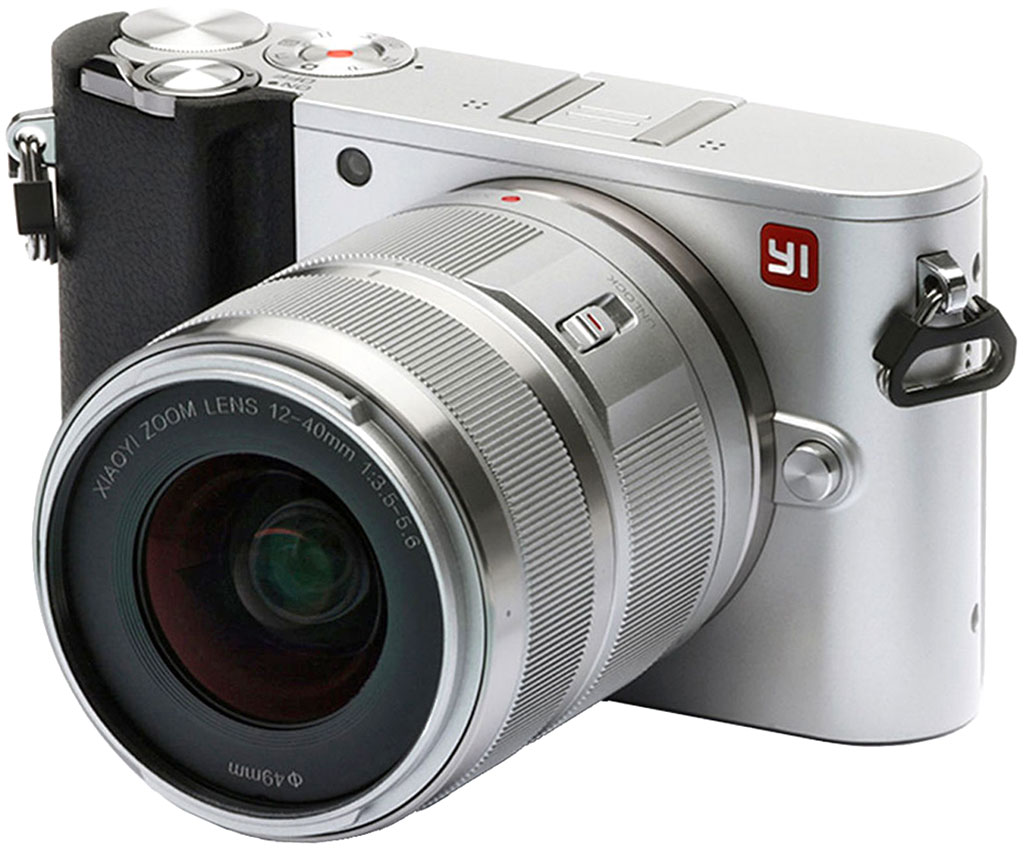
Overview

Not familiar with the YI Technology brandname? Fear not, you haven't missed anything: The Chinese company is a newcomer to the interchangeable-lens camera marketplace, and to the Micro Four Thirds mirrorless format in particular. The YI-M1 is YI Tech's first interchangeable-lens model, and offers quite a lot of camera -- including the same image sensor as in the Panasonic GX8 -- for a whole lot less money. What do we think of it? Read on and find out!
Field Test Part I
Field Test Part II
It's amazingly affordable, but are its quirks worth the money you'll save?
By Mike Tomkins | Posted: 03/28/2017

(click image above for out-of-camera JPEG.
Click here for separately-shot raw file and
Adobe Camera Raw default conversion.)
"Made in China": It's a label which often comes in for derision, but that's largely unfair. Truth be told, China is just as capable of producing a quality product as any other major manufacturing center, if not more so. We've reviewed many excellent Chinese-manufactured cameras over the years. And every day, quality products such as Apple's incredibly popular iPhone series are shipped from Chinese factories, yet nobody suggests those to be somehow subpar.
Truth be told, China's unwelcome reputation for subpar quality has more to do with companies aiming to manufacture their products at a bargain-basement pricetag than it has to do with the factories turning them out. Spend enough on getting the right design and production processes in place, and "Made in China" can be a mark of quality. Skimp and cut corners, and your product would likely have been a disappointment even were it made in a country with a better reputation like Japan, Germany or the United States. (It's just that companies choosing to build products in those countries are already paying more than they would to do so in China, and so cutting corners likely isn't in their nature.)
Speaking personally, I've never accepted the derision for the "Made in China" label. Although I'm British by descent, I was actually born and raised just across the border from Shenzhen -- China's manufacturing powerhouse -- in the then British colony of Hong Kong. I learned early on that China was just as capable of turning out excellent, cutting-edge gear as any other place, if that's what the company behind the product actually wanted to produce.
Not just "Made in China", but designed there too
But what makes the YI-M1 uusual is that it isn't just a "Made in China" product; it's also been designed there, something that's rather less common -- especially for a camera being sold globally. The YI-M1 is designed by Shenzhen-based XiaoYi (originally, XiaoMi) Technology, known overseas as YI Technology, and perhaps best-known globally for its affordable-yet-powerful smartphones, as well as the Andoid-forked MIUI operating system on which they run.

As a quick aside if you're wondering how to pronounce all of these or what they mean, "Mi" and "Yi" both rhyme with the English "bee", while "Xiao" is quite close to the first half of the English word "shower". XiaoMi translates literally as something along the lines of "Little Rice", a reference to the Buddhist principle that a single grain of rice can be as significant as a mountain. XiaoYi, meanwhile, can be roughly translated as "Little Ant", and seems to be a reference to the company's first camera product, a webcam it called the ant. The company also suggests that "Mi" and "Yi", respectively, are meant to hint at connectivity ("Mobile Internet"), the difficulties encountered in starting the company ("Mission Impossible", and its desire to go its own way with its products ("Your Innovator"). We'll take their word for that. ;-)
Its Chinese heritage gives the YI-M1 an impressive cost advantage
By both designing and building its products on the Chinese mainland, XiaoYi has been able to pare the cost of the Micro Four Thirds-format YI-M1 down to a bare minimum, while still using quality components like a Sony IMX269 image sensor.

By way of comparison, that same chip is rumored to be at the heart of the Panasonic GX8, a camera which even when purchased body-only sells for a list price of US$1,200. Of course, there are many ways in which the GX8 outperforms and outrates the YI-M1, as you can see in our comparison here. But when one considers that the YI Camera lists for just $500 including a 12-40mm, F3.5-5.6 zoom lens and is readily available at a street price of just US$350 complete with that lens... well, it's hard to argue against its affordability!
On lifting the YI-M1 out of its surprisingly handsome packaging -- it ships well-padded in molded foam inside a stylish, matte-black box with magnetic closure -- I was immediately impressed by its build. It's not quite perfectly free of panel creak or flex, but it's very close indeed to managing this despite its incredibly affordable price tag. It's also very light for an interchangeable-lens camera, but without feeling flimsy or insubstantial.

(click image above for out-of-camera JPEG.
Click here for separately-shot raw file and
Adobe Camera Raw default conversion.)
I wasn't quite such a fan of its ergonomics, though. While it's fairly handsome to look at, the YI-M1's body isn't so comfortable in-hand. I'm 6'1" tall and have admittedly larger-than-average hands, but I quickly found that there wasn't a lot of room for my fingertips between the Yi Camera's front handgrip and the barrel of the attached lens. And while the steeply-angled profile of the inside of the grip gave good purchase, its rather sharp edge pressed uncomfortably into my fingers. The rear thumbgrip was better, but despite some texturing and a lip around its edge, felt a little slippery to the touch. A rubber grip pad was called for here, although I'm sure it would have raised the price a little.
There are surprisingly few controls on the exterior of the YI-M1, especially by interchangeable-lens camera standards. And for what few there are, I had concerns with several, starting right of the bat with the power lever. It's tiny, has relatively little movement, and for the first week or so of shooting with the YI Camera, for whatever reason I found my brain wanting to move it in the wrong direction almost every single time, an issue I've never had with any other camera. I think it's because the small gap behind the lever when powered off looks like it's intended just to provide a space for your finger to nudge the control forwards, when in actual fact that tiny little gap is all that's needed since the lever only moves perhaps two or three millimeters to power the camera on or back off.
A little behind and to the right of this is a control dial with a soft click detent when turned. Defaulting to control of exposure variables in program, priority or manual exposure, this is far, far too easy to bump, something that happened to me almost immediately when I started shooting with the camera on a day trip with my son to nearby Gatlinburg, Tennessee. (You'll see that the gallery shot below has a third-stop of positive exposure compensation, but it wasn't intentional -- my accidentally bumping this dial was the reason, and I quickly learned that I had to watch like a hawk to make sure I hadn't turned it before every shot.)
Thankfully, I had no such concerns with the mode dial, which is simultaneously less exposed in a location that's less likely to be bumped, and which also has a much stronger click detent. A movie record button sits in the center of this control, and is probably the single easiest control to locate by touch. I did feel it was a bit uncomfortable to reach without adjusting my grip while shooting, though. Thankfully the other buttons and controls -- a lens release on the front, and two buttons adjacent to the bottom-right corner of the LCD monitor -- were largely fine.

Really, though, I think that the external design of the YI-M1 indicates its maker's relative inexperience. I'm sure future models will have better control feel and layout, and the controls will be easier to locate entirely by touch in low light. Certainly, for this initial model they are a little bit of a distraction from the shooting experience.
The reason for the YI-M1's paucity of physical controls can be found on its rear deck: a 3.0-inch touch-screen display. It's the only option for framing and reviewing of images, as there's no optical or electronic viewfinder provided on this model. Nor is there any articulation, meaning that you won't be able to see the display from in front of the camera. Both of those omissions are very understandable given the Yi Camera's affordable pricing and reasonably compact proportions, however.
The touch-screen also the display to serve double duty as an input device. Here, I have rather mixed feelings. In some respects, the touch-screen is quick and intuitive. For example, it's great for quickly deciding which exposure variable should be adjusted with the control dial, or for selecting a subject on which to autofocus. It's also fairly handy and intuitive for swiping between images in playback mode and then performing the same familiar pinch-zoom gesture as on your smartphone to get a close-up view of a given shot.

(Unfortunately, the camera itself isn't terribly fast to respond though, taking as much as half a second or more to catch up to your gestures. It's not slow enough to be unusable or even that tricky to use, really, but it's enough to feel like there's a disconnect between yourself and the camera, and to be mildly frustrating.)
Swiping left on the screen pulls up a selection of several picture styles from screen right, while swiping right brings in the main menu system from screen left. Or rather, it does so most of the time. Somewhat infuriatingly, for perhaps one in every 10-20 attempts, the YI-M1 fails to detect the swipe and instead adjusts my autofocus point, meaning there's another area which I have to pay attention to checking regularly, just like that easily-bumped exposure compensation dial.

(click image above for out-of-camera JPEG.
Click here for separately-shot raw file and
Adobe Camera Raw default conversion.)
The menu itself provides nine options per screen in a three-by-three array, and you swipe up or down to switch between all three menu pages. Icons showing the current setting for each item make it easy to see the camera's setup at a quick glance, but the behavior of some of the individual menu items can be rather frustrating.
For example, some menu items can be grayed out and unselectable, but there is no indication as to why, or what must be done to access them. And some functions -- for example, exposure bracketing -- last only for one series and then reset to their default, requiring at least three to five taps and swipes to reenable. If you bracket regularly as I do, it's infuriating. Resetting options like these makes sense to me when the camera is power-cycled, but not when it's currently in active use.
Equally frustrating is the fact that it is currently impossible to shoot in raw+JPEG mode. When speaking to YI's reps at the Consumer Electronics Show earlier this year, I was told that this would soon be changing courtesy of a firmware update. As of right now, that firmware still hasn't been released to the public, though, and so if you're in need of both out-of-camera JPEGs and raws shot simultaneously, you'll want to hold off on considering the YI Camera for the time being. (Incidentally, I flagged the inability to permanently set exposure bracketing with YI's reps at the same time, so here's hoping this will also be addressed in firmware eventually.)
Another weird little UI quirk is that once the YI-M1 powers off due to its sleep timer, it can't be brought back to life with a half or even full-press of the shutter button. Instead, you'll need to toggle the power lever to off and back on again, perhaps losing the shot in the process if an unanticipated opportunity reared its head. As I said earlier, some of these quirks are quite easy to understand when once considers that this is YI's first entry into the Micro Four Thirds camera market, though, and its pricetag makes it easier to overlook them. With some more firmware development to smooth the rough edges, the YI-M1 could really shine!

And it's worth bearing in mind that the YI-M1's affordable pricetag isn't just for the camera itself, either. The base bundle, currently selling for US$350 street as of this writing (March 2017) includes not only the camera, but also a 12-40mm F3.5-5.6 zoom lens. By way of comparison, the slightly more telephoto 14-42mm F3.5-5.6 lens which Olympus includes in many Micro Four Thirds kits costs US$300 by itself, even before you make it part of a camera bundle.
At the current time, YI has only one other lens on offer, the 42.5mm F1.8 prime, and it too is available in a bundle with the YI-M1 camera body. This sells at a US$100 premium over the price of the 12-40mm bundle, for a street price of US$450 currently. And if you want both lenses, you'll want to consider the third bundle option. This provides both the 12-40mm zoom and 42.5mm prime for US$550.

And from that, we can work backwards to figure that the 12-40mm zoom adds US$100 to the cost of the product bundle, while the 42.5mm prime adds US$200, leaving the body itself at just US$250 street or thereabouts. (Zounds!) However, as of this writing the body can't be purchased separately, and nor can the lenses. (And that means if you want both of YI's optics, you'll need to purchase them along with the camera body. Of course, you can use third-party Micro Four Thirds lenses from the likes of Olympus, Panasonic, Sigma and more with the YI-M1 should you desire.)
Although the YI Camera itself is fairly solidly-built given its pricing, the same can't really be said of these two lenses.Although image quality from both lenses is surprisingly decent given their cost, they're both extremely light and insubstantial in-hand, with a very plasticky feel that does not really say "quality". Both optics also have plastic mounts, and share the same 49mm filter threading.

(click image above for out-of-camera JPEG.
Click here for separately-shot raw file and
Adobe Camera Raw default conversion.)
The 12-40mm zoom offers up both zoom and focus rings, with the latter being fly-by-wire. The lens has an extending design which requires that you first rotate the zoom ring before it can be used; it won't retract unless you rotate the ring the other way while pulling back a spring-loaded locking switch. The zoom ring has a rather harsh, plastic-on-plastic feeling when rotated. The focus ring is smoother and better-damped, but still not up to the standards of typical entry-level glass from rivals in this respect.
As for the 42.5mm prime, although it appears to provide a focus ring, that's actually not the case. What is styled much like a focus ring is actually a trim piece which is fixed in place and cannot be turned. To focus, you must instead use two soft buttons which appear on the touch-screen display whenever this optic is mounted. (You can either tap to make slight adjustments, or hold for broader adjustments, although focus adjusts relatively slowly so you'll want to prepare before your subject is ready if focusing manually with this lens.) A macro / normal switch on the side can optionally be used to limit the focus range for close-up subjects.
Perhaps not surprisingly for such a low-cost camera, the YI-M1 won't win any awards for performance. Burst capture is rated at around five frames per second, a figure I'd say seems reasonably fair. However, in real-world shooting the buffer depth was a miniscule 5 or 6 JPEG frames, and as few as just four raw frames.
Nor was autofocus a whole lot better. AF adjustment from the YI Camera's contrast-detection autofocus system is decidedly on the slow side, and while it was for the most part accurate, I did see more false positives -- that is to say, the camera indicating a focus lock when it hadn't actually achieved one -- than I'd expect these days. And in low light, the YI-M1 often simply refused to lock focus at all.

The YI-M1's out-of-camera JPEG image quality is for the most part pretty reasonable, considering its cost. Exposures were usually in the ball park, and white balance too was for the most part accurate, although for trickier subjects -- especially those with a predominance of one particular color -- I found the white balance system often struggled, and could turn out images with minimal saturation and a rather sickly hue.
There's no question about it, though: If you want the best results, you'll want to be shooting in raw mode, tiny buffer size or not. Even at default settings, I found that Adobe Camera Raw consistently handled the YI's DNG raws better than the affordable little camera was able to manage with its own JPEG engine. (And for those shots where the white balance was a bit iffy, things were easier to fix in raw shooting.)

I've yet to shoot much at above ISO 6400 so far, as that's where the YI Camera's auto sensitivity function tops out. However, from what high sensitivity shooting I've tried, you'll once again get better results from Adobe Camera Raw than out-of-camera JPEGs, even at default settings. The YI-M1's own noise reduction is decidedly heavy-handed, discarding a fair few of the finer image details and yielding an overly smooth, plastic and artificial-looking result.
And that, for now, brings me to the end of this field test. Watch this space for my second and final field test, in which I'll by taking a look at high-sensitivity and low-light shooting, as well as at video capture, both day and night. Got any requests for features to test? Sound off in the comments below!

Field Test Part III
Can firmware updates fix the Yi Camera's frustrating user experience?
By Mike Tomkins | Posted: 07/31/2017
 36mm-equiv., 1/40 sec. @ f/4.4, ISO 25,600
(click image above for out-of-camera JPEG.
Click here for separately-shot raw file and
Adobe Camera Raw default conversion.)
It's been quite a while since I posted my first field test of XiaoYi's eponymously-named Yi M1, also known as the Yi Camera. The initial reason for the delay in returning with my second field test was that I was waiting on the arrival of updated firmware, which the company's booth staff had told me was on the way back at the Consumer Electronics Show in early January. And as time rolled on, other, newer cameras ended up being a higher priority for review, leaving our Yi M1 review awaiting the remainder of its writeup. I don't like to leave things half done, though, and so I'm now returning to wrap up with my second field test!
A quick recap of my first Yi Camera field test
In my first test, I noted that while the fact that it's made in China is not really that unusual these days, the Yi M1 is definitely noteworthy for the fact that it was also designed in China. But while its extremely affordable pricetag impresses -- it can be picked up new and with a zoom lens for under $300, another $50 cheaper than at the time of my last field test -- I wasn't such a fan of its ergonomics and user interface.
The Yi Camera's build is pretty solid, admittedly, and it looks reasonably attractive too. But it's uncomfortable in-hand, and I had concerns with its controls as well. (And I've continued to do so in shooting my second field test, frequently bumping the too-easily-turned exposure compensation dial by mistake, in particular.)
Nor was I a fan of the Yi M1's touch-screen display for anything other than AF point selection and playback mode, which is unfortunate since most camera functions are controlled through this screen. The design of the user interface involves far too much swiping for my liking. Nor is it helped by the fact that the camera often fails to detect swipes correctly on the first try.
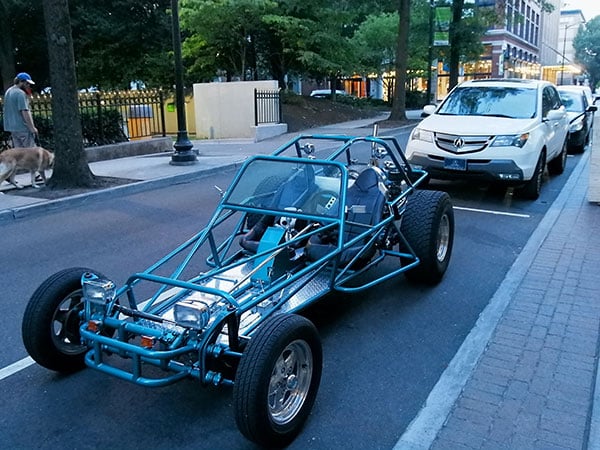
New firmware could potentially fix many of the Yi M1's shortcomings
As I noted in my first field test, many of these issues could be fixed with a firmware update, and so I'd waited ever since CES for the promised update which I was told would address one of my biggest concerns -- the lack of support for raw+JPEG capture. (Instead, the filetype is an either/or decision.) On returning to the Yi M1 for my second field test, the first thing I did was to update the firmware, and I found new releases available for both the body and lenses.
Sadly, more than six months after I was told of the planned update, raw+JPEG capture is still absent. Nor is there any fix yet for the fact that exposure bracketing has to be reenabled after every single bracketed series, but I did notice a couple of other improvements. For one thing, a half-press of the shutter button does now bring the camera back to life after the sleep timer has elapsed. Previously, I had to power-cycle the camera to get it to become responsive after entering sleep mode. (If you wait as long as the Auto Power Off, timer, though, the camera will still refuse to wake up for less than a full power-cycle.)

There's also a new Quick Menu function which provides quicker access to the focus mode, ISO sensitivity, white balance, metering mode, file format and drive mode functions. This is a nice addition, even if it doesn't go far enough in fixing the lack of a raw+JPEG mode. It's perhaps a little unintuitive that while the main and picture settings menus are accessed with horizontal swipes, yet this new quick menu is accessed with a tap on a soft button instead, but I won't quibble about that too much given that I find swiping unreliable in the first place. It's certainly nice that you can get to these frequently-accessed settings more quickly.
But I also found the new firmware to be noticeably more unstable, sometimes locking up for brief periods or failing to respond to button presses on the first try. And a couple of times, the camera locked up entirely, requiring the battery to be removed completely. (And that was doubly infuriating because in the hopes of providing a better raw vs. JPEG comparison, all of my shooting for the second field test was done with the camera tripod-mounted, meaning I had to remove it from the tripod and take my quick release plate off before I could drop the battery.)

And at this point, with no new firmware since mid-April, I am not holding out my breath that any of my concerns will be fixed any more. If you buy this camera, I would buy it in the expectation that the user experience will remain much as it is now, which is to say not great unless you're intending to leave the camera in automatic control of setup most or all of the time, and/or shoot raw files only.
In my first field test, I wrote that still image quality was fair at base sensitivity, but good if you were willing to shoot in raw format. Now that I've had a chance to shoot at all the way up to its very highest sensitivities, I can confirm that the same is even more true as the ISO speed ramps up. I'm not terribly impressed with the YI camera's noise-reduction algorithms, as they smear away much of the finer details which can be found in the raw files.

If you're willing to shoot solely in raw format and then apply your own noise reduction, you can get good results from the Yi Camera even towards the higher end of the range, but JPEG image quality falls off quickly from ISO 6400 and upwards. In this day and age, that's simply not good enough. If all you want is good quality daytime photos, after all, your smartphone can probably already do that. It's at night when a standalone camera should shine, yet it's here where the Yi M1 disappoints, turning in results which simply aren't that much better than many smartphones can manage at higher sensitivities.
And I should note that I also had some occasional issues with white balance at higher sensitivities, much like those I experienced at base sensitivity. Occasionally, shooting the same scene twice with near-identical framing could result in significantly varied color.
 |
 |
JPEG vs. raw comparison: At left is a 100% crop from an out-of-camera JPEG of the previous scene. At right is a 100% crop from the same scene just seconds later, but captured as a raw file
and processed at defaults in Adobe Camera Raw, with the exception of a quick manual tweak to noise reduction levels. I erred on the side of preserving detail here, so a little bit of chroma / luma noise remains. However, there's also clearly a good bit more detail than in the out-of-camera version.
And this is only at ISO 6400-equivalent, mind you. Things get even worse at the higher end of the scale.
|
|
Autofocus was, if anything, even more of a weak spot for the Yi M1 at higher sensitivities than it was at the lower end of the scale, where it wasn't terribly fast to begin with. For one thing, the Yi Camera would frequently indicate a focus lock when it hadn't even come close to achieving one.
(And infuriatingly, I could *easily* see on the LCD monitor that the subject had been in much better focus moments earlier, so the camera wasn't even trying to stop at the point where it saw the best contrast, a decision which would have made rather more sense than simply dumping me wherever I was when the camera gave up on focusing.)

And worse still, I noticed during repeated attempts to get even slightly-challenging scenes to focus in low light that the Yi Camera can sound its autofocus lock beep as long as a good half a second before it has even finished trying to focus, with the live view feed continuing to show focus motion long after the beep has been completed.
In other words, the focus confirmation isn't confirming anything at all, because the camera itself doesn't yet know whether it has achieved focus. To my mind, a confirmation which can't be trusted some of the time is worthless all of the time.
 |
 |
JPEG vs. raw comparison: At left is a 100% crop from an out-of-camera JPEG of the previous scene. At right is a 100% crop from the same scene just seconds later, but captured as a raw file
and processed at defaults in Adobe Camera Raw, with the exception of a quick manual tweak to noise reduction levels. I erred on the side of preserving detail here, so a little bit of chroma / luma noise remains. However, there's also clearly a good bit more detail than in the out-of-camera version.
This comparison is at ISO 25,600-equivalent, the upper range of the Yi Camera's sensitivity range
|
|
One thing I'd noticed previously but forgot to mention in my first field test is that I found myself infuriated by the Yi M1's choice of on-screen overlay fonts and colors. For example, because I kept bumping the incredibly easily-turned exposure compensation dial unintentionally, I kept wanting to check the exposure bias to be sure I hadn't done so again before another burst of shots.
Yet the thin magenta font proved to be nearly impossible to read under many shooting conditions and I'd have to reframe or hold my hand in front of the lens to try to make the text more readable. And the light gray font used for the shutter speed and aperture indications wasn't really any better.

Finally for this field test, I want to talk about video capture for a moment. Here, image quality was reasonable to fairly good, depending upon the ambient light levels. In the daytime, ultra high-def content showed plenty of detail on my 4K TV, and while for low-light videos, noise and the effects of noise reduction were more visible, the results were still pretty watchable.
Video autofocus was also more acceptable than for stills, but had a tendency to hunt noticeably around the point of focus or occasionally wander off from it altogether. (Annoyingly, it did this at the start of one of my daytime sample videos, and I didn't catch it until I was home, so I had to return and shoot it all over again.) Sound quality from the onboard mic was reasonable, which is good given that there's no option for an external microphone.
Day video, 3,840 x 2,160 pixels @ 30 frames per second
|
Day video, 2,048 x 1,536 pixels @ 30 frames per second
|
Day video, 1,920 x 1,080 pixels @ 60 frames per second
|
But there are a few sticking points for video capture, too. Firstly, there's a significant crop for 4K capture, as you can see if you compare ultra high-def output to the 1080p60 Full HD clips among my video samples, all of which were shot from the same location.
And worse still, you can't see what that crop will look like until you're already recording. There's no dedicated movie mode on the Yi M1, and nor does it provide any indication of the cropped area for 4K or 1080p video capture in its live view overlay. (2K capture uses the whole sensor area, and so is unaffected.)
Night video, 3,840 x 2,160 pixels @ 30 frames per second
|
Night video, 2,048 x 1,536 pixels @ 30 frames per second
|
Night video, 1,920 x 1,080 pixels @ 60 frames per second
|
Worst of all, it can take close more than a full second after capture commences before the correct crop is shown on screen for 4K ultra-high def content, with the live view feed zooming in visibly twice after the movie record button is pressed. (Full HD / 1080p clips zoom in only once, nearly instantly that the movie record button is pressed.) Only after that final step in the live view zoom level do you see what your framing looks like, meaning that every time you want to recompose, you have to shoot another throwaway clip to give you a way to frame. It's infuriating.
The unusual 2K mode, incidentally, has a 4:3 aspect ratio like that of the sensor itself. It's neat, but given that the world mostly uses 16:9 or 16:10 screens these days, it's of limited utility. Really, the main reason to consider shooting in it would be if you want only Full HD content, but want a little leeway to stabilize your content after the fact, although with a movie width of 2,048 pixels in 2K mode, that doesn't leave a lot of scope for stabilizing 1,920-pixel wide Full HD content. If you still use an older 4:3-aspect computer display, though, you might enjoy shooting 2K content for it.
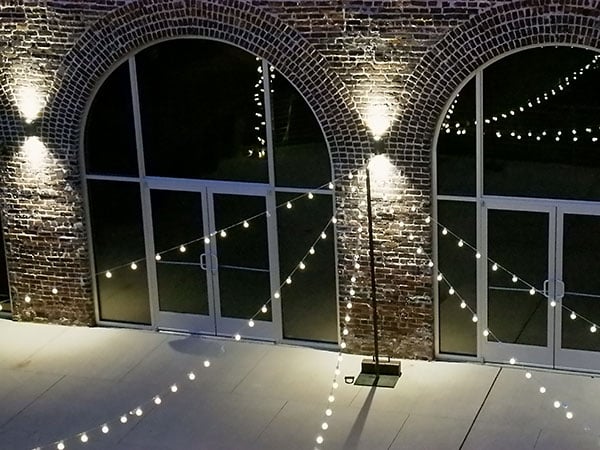
And so we come to the end of my second field test. And I have to admit, I felt an unfamiliar sense of relief when it came time to box it back up. It's too easy to forget just how great the average modern camera is these days. Just 8-10 years ago, a camera like the Yi M1 would've wowed us even at twice or three times the price, but we're living in the here and now, and today it's difficult to overlook this camera's many shortcomings, even if great results are possible with some work.
The user experience is where the Yi M1 stumbles most obviously, and honestly, I'd put that down to XiaoYi's relative inexperience in the market. This is the company's first serious attempt at a standalone camera, and it doesn't have the benefit of years of experience to fall back on. That shows itself in the Yi M1's clumsy controls and a big focus on the touch screen display, which must have felt more like familiar territory to the company's designers, given their background in smartphone design.

But even that screen disappointed me with its frequent rejection of my swipes, or misreading of swipes as taps to adjust focus. And so, too, did the Yi Camera's JPEG image quality leave me wanting, which is particularly frustrating as with a better JPEG engine and white balance capabilties, this could have been a good choice for an inexperienced photographer who wants the light-gathering advantages of a bigger sensor, but with the ease-of-use of a fully automatic point-and-shoot.
As is, I can only recommend the Yi Camera if you want to shoot solely in raw format, processing your images manually for the best results. And even then, thanks to its minimal performance and sluggish, unreliable autofocus I'd recommend the Yi M1 solely if price is your most important criterion. It's hard to argue with a Micro Four Thirds camera that can be purchased for $300 or less, new and including a zoom lens, but for this generation at least, most potential customers will want to give the Yi Camera a pass.

With all of that said, I genuinely hope XiaoYi can learn the lessons from its first camera and come back with a followup offering better JPEG image quality, and a more refined user experience with better ergonomics and UI. With the benefit of experience, the result could be quite a lot more attractive next time around -- and at this pricepoint, that would be very good news indeed.

Conclusion
by Mike Tomkins | Posted: 09/18/2017
The YI M1 is the first Chinese designed-and-made camera we've reviewed...
When I started my review of the YI M1, I really wanted to like this super-affordable, compact little camera. It's the first entirely Chinese-derived standalone camera I've reviewed, being not just manufactured but also designed by XiaoYi, a company that's built quite a reputation in the smartphone space. (You may also know them by their original name, XiaoMi, as well as by their overseas brand, YI Technology.)
And as it happens, XiaoYi's headquarters in Shenzhen is just a stone's throw from my one-time home in Hong Kong, where I was born and spent the first half of my life. With Shenzhen being almost an extension of Hong Kong on the mainland, the Yi Camera felt almost like a home team effort to me.
And I know from experience that Shenzhen can turn out some seriously impressive products. For example, DJI Technologies is now known internationally for its drones and camera stabilization rigs, but it, too, is a Shenzhen-based company. (In fact, DJI stands for "Da-Jiang Innovations".)
DJI's kit is among many Chinese designed-and-made products I've appreciated over the years, and while I'd not personally used XiaoYi's smartphones, I had found myself rather impressed by their Android-based Miui operating system, which in some respects seemed more polished than Google's own effort.
So you might say that I was rooting for the Yi Camera to do well, and hopeful that in writing the conclusion to my Yi M1 review, I'd be writing a glowing recommendation for a camera that can now be picked up for just US$300 new. (And that's with a compact, retractable 12-40mm zoom lens, too!)
And to be sure, there was plenty to recommend the YI M1 beyond its low pricetag alone, on paper at least. At its heart is a 20-megapixel, name-brand Sony Exmor IMX269 image sensor in the Four Thirds format, and it sits behind a standard Micro Four Thirds lens mount compatible with a vast array of optics. And while the kit lens feels rather cheap and insubstantial, the camera body itself is solid and creak-free, yet also compact and very light, by interchangeable-lens camera standards.
But once I took it out of its premium packaging -- and those aren't words I can ever remember having used for an entry-level camera before -- my concerns immediately began. XiaoYi's inexperience in standalone camera design showed immediately in a body that's simply not terribly comfortable in-hand. And despite an extremely minimalist control layout, the YI M1's few controls didn't wow me, with the power switch, movie record button and especially the far-too-easily bumped control dial all coming in for criticism in my first field test.
The YI M1's focus, instead of dedicated controls, on a touch-controlled interface on its LCD monitor is perhaps also indicative of XiaoYi's heritage in smartphones, rather than in standalone camera design. And I wasn't thrilled with this interface either, as its use involved far too much swiping for my liking. Unlike on the Android or iOS smartphone you likely use every day, the interface doesn't lend itself well to a camera, as it draws your attention away from your subject and can't be operated by feel, let alone if you were to wear normal gloves.
And I found that even with my bare fingertips, the YI Camera far too often mistakenly detected my swiping as taps on the touch screen instead, changing my focus point when I didn't want it to. Nor were things any better when it came time to review my images, because unlike a modern smartphone, the YI M1's interface often lagged well behind my on-screen interactions, making it feel slow and awkward to use.
Unfortunately, the YI Camera's menu system demands frequent interaction unless you like to fly on autopilot
This is made all the more frustrating by the fact that the YI M1's design often forces you into the menu system more often than you might like. For example, if you want to enable bracketed exposures, you'll have to reenable them after every single series, because the YI M1 will disable the function by itself after the last shot in each bracketed series. And there's no raw+JPEG capture mode, either, so if you want to mix up the file formats as appropriate to your shot (or simply capture both), you're left constantly switching between JPEG and raw capture through the touch screen display.
XiaoYi told us to expect these concerns to be addressed in firmware updates last spring, but many months later they haven't been. At least, other than the addition of a Quick Menu which does make it slightly easier to switch between raw and JPEG formats on the fly, but which still doesn't offer raw+JPEG capture. And nor does it do anything to make bracketed shooting easier.
Clearly, the YI M1 is a camera aimed at less experienced photographers who will mostly want to let the camera make the decisions for them, and who chose to purchase an interchangeable-lens camera more for its large-sensor image quality and the ability to change lenses, than for its creative possibilities. And the end result is that if you're not an inexperienced shooter, you constantly feel that the camera is working against you, doing its utmost to persuade you to just stop fiddling and let it take charge.
But there are two flies in the ointment if one wants to think of the YI M1 as a camera for casual snapshooters who want to stay in Auto mode most or all of the time. The first is that the YI M1's autoexposure and white balance systems just aren't as good as those of its nearest rivals. While not terrible, the Yi Camera's exposure metering just feels "good enough", and stumbles more often than we're used to.
And its white balance system occasionally delivers truly shocking results, especially in scenes with relatively few colors. More difficult subjects like these will force the user to take charge if they want a worthwhile result, and inexperienced shooters who have to rely on Auto mode likely won't want to do so.
Nor are these same beginner photographers likely to want to deal with the extra work of shooting in raw format, and yet the YI M1's in-camera JPEG processing is a decided weak spot. Shooting in JPEG mode, especially at higher sensitivities, yields subpar image quality not only compared to its rivals, but even compared to what can be derived from its own raw files if you know what you're doing and are willing to put in just a very little effort.
Good results are possible with the YI M1, but you must stop, think, and put in some effort...
All of this isn't to say that the YI M1 is necessarily a bad camera, per se. If you're willing to shoot in raw format and put in the effort to process your images manually, you can certainly get good results out of it. And when you do, these can be far better than its pricetag would suggest -- at least, so long as you're interested in stills only. (Video mode is a decided weak spot, with a strong crop in 4K mode, a clumsy user interface and weak autofocus conspiring to ruin the shooting experience.)
As was pointed out by a reader (and YI M1 owner) in our comments section after my second field test, this camera's quirks could perhaps even be seen in a positive light. With its clumsy interface and its image quality concerns, the YI M1 in a way reminds me of the experience of shooting with a film camera, back in the day. Albeit unintentionally, the YI M1 forces you to slow down and think about every single shot, and how to extract the best results from its images, despite the unnecessary obstacles it places in your way.
If you have the patience and time, that can actually prove to be fun. And you can certainly end up feeling very accomplished for the results you can derive from a camera which costs so relatively little, and yet which can accept a vast array of quality Micro Four Thirds lenses. Heck, if this shooting style works for you, then you could even put the money you saved on better ergonomics, a friendlier interface and smarter algorithms into buying an extra lens or accessory of some kind, instead.
But most photographers aren't going to want to deal with using their camera in this way, and frankly, nor did we. For the price-conscious, entry-level customer who this camera it so clearly targets, there are certainly better choices out there on which to spend your hard-earned cash. And with just a little work, you can find much better cameras than the YI M1 for not a whole lot more money.
That's especially true if you're willing to look a year or two back, and choose a camera whose remaining stock retailers want to clear from their shelves in favor of a newer model. And if you're lucky, you might even find that you can get a larger APS-C sensor and significantly better low-light capabilities for your money, too. (I'm not going to attempt to list alternatives here, though, because deals such as these tend to come and go with great frequency.)
The YI Camera is not to be recommended for most, but if you have the patience and are budget-driven, may be worth a look
At the end of the day, I can only recommend that you purchase the YI M1 in two specific circumstances. You might want one if price is absolutely the most important thing for you, and yet you absolutely need a large sensor and an interchangeable-lens design. Or you might decide to buy it if you actually see the challenging "Stop, think, then stop and think again" experience of shooting with it as a positive thing -- which indeed, some photographers may.
But for the average photographer, and especially for the entry-level customer it targets, I simply cannot recommend that you purchase the YI M1. Frankly speaking, you'd do better to defer a lens or accessory purchase, and put a bit more of your cash into buying your camera body instead. And if you can't afford to do so, I'd suggest that you look for an older (but still recent) camera instead. You'll get better photos with less fuss, and you'll enjoy the shooting experience a whole lot more.
Pros
- Good image quality to be had from raw files
- Mostly reasonably good exposure accuracy
- Reasonable burst performance for its price
- 4K video from a sub-$300 interchangeable-lens camera with kit lens
- Video image quality is pretty good for the price point
- It's cheap as chips!
- Relatively small and lightweight
- AF point selection is easy with the touch screen (but also easy to accidentally change)
- No deeply-nested menus, just a brief few pages of options
- You can get a zoom kit for under $300
- Decent image quality given the cost
- Accepts a huge selection of Micro Four Thirds lenses
- A hot shoe is provided for external strobes
Cons
- Mediocre JPEG image quality, especially at higher sensitivities
- Noise reduction could better be called detail reduction
- White balance struggles badly with challenging subjects
- Miniscule buffer depths of as few as 4-6 frames
- User interface lags well behind your interactions in playback mode
- Contrast-detection autofocus is slow compared to rivals
- Extreme crop for 4K video
- 4K framing can't be confirmed until a second or two after capture has already started
- Video autofocus is prone to hunting
- 2K video isn't much used for creating stabilized HD clips, so what's the point?
- Poor ergonomics
- Power switch is clumsy and easily bumped
- Control dial is very, very easily bumped
- Video button is poorly-positioned
- Touch-screen interface is clumsy and frustrating, often misdetects swipes as taps
- Poorly-chosen on-screen fonts and colors
- No raw+JPEG shooting
- Have to reenable bracketing after every series
- Promised firmware improvements haven't materialized
- Indicates a focus lock well before focusing even finishes
- Often claims to have locked focus in low light when it's obviously nowhere near from the LCD, without even zooming in
- Kit lenses feel cheap and insubstantial
- No focus ring on the prime lens; must use clumsy on-screen controls instead
- No flash in the product bundle
Follow Imaging-Resource.com on Twitter!