
VSCO Launches Standalone Desktop RAW Editor With More Than 200 Film-Inspired Presets

Imaging Resource is reader-supported. When you buy through links on our site, we may earn an affiliate commission. How this works.
On this page
Table of Contents
 More Than 200 Film-Inspired Presets
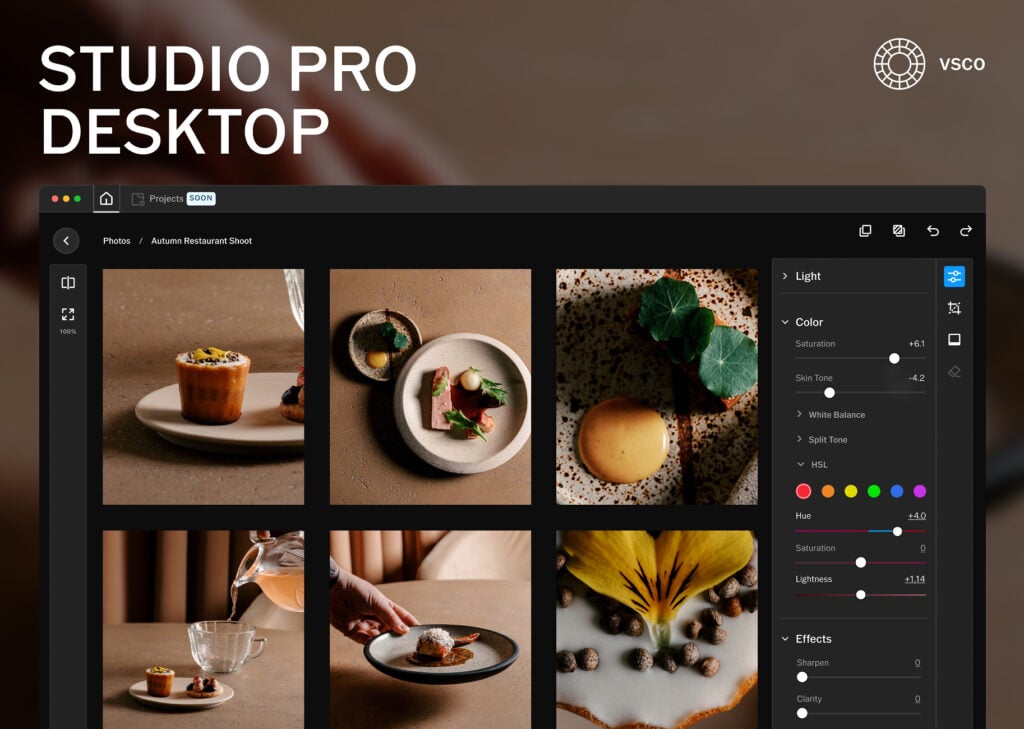
VSCO has announced its first standalone desktop photo editor, bringing its popular film-inspired presets and RAW editing tools to macOS. The new VSCO Studio Pro Desktop builds on the company’s Studio Pro for iPhone and VSCO One offerings, positioning itself as a more affordable alternative to Adobe Lightroom.
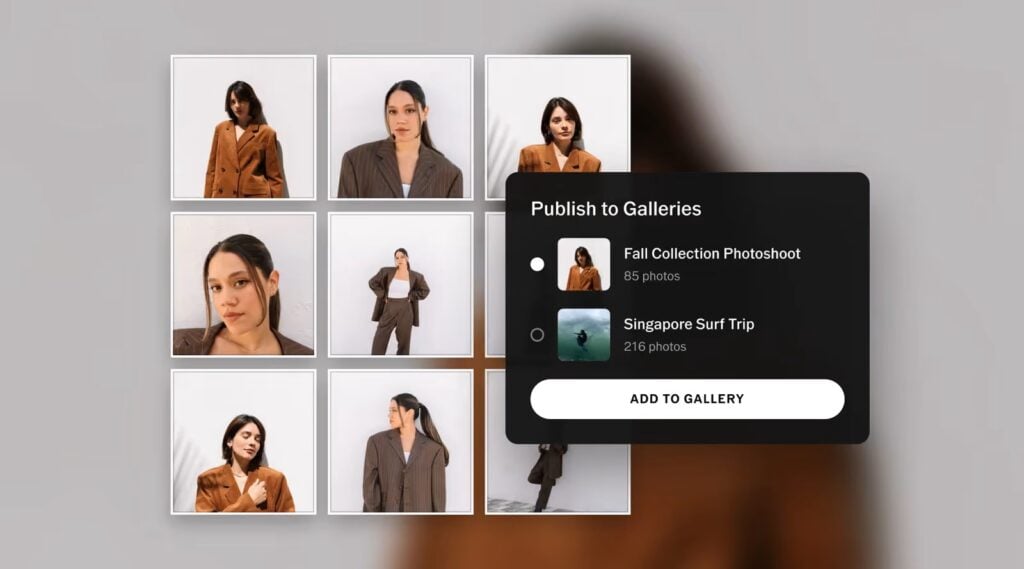
Like Lightroom, Studio Pro Desktop supports non-destructive RAW editing, allowing photographers to make adjustments without permanently altering their original files. It also includes batch editing capabilities and the ability to publish finished photographs directly to VSCO Galleries.
“Photographers deserve tools built around how they actually work,” said Eric Wittman, CEO of VSCO. “75% of VSCO Pro members have used our presets in the last six months. Now those looks live on the desktop, with one connected workflow from camera to client delivery and nothing getting in the way.”
More Than 200 Film-Inspired Presets
One of the main attractions of Studio Pro Desktop is its library of more than 200 presets. Many emulate the look of popular film stocks, including Kodak Portra, Kodachrome, Fujifilm Velvia, and Kodak Tri-X.
Users can filter the preset library to narrow down their options and speed up the editing process. Hovering over a preset also provides a preview of its appearance before applying it to an image.
The software also introduces IOE1 PRO, a new preset developed in collaboration with former VSCO employee Joe Geer. It features warm tones, subtle saturation, and a film-inspired rendering style.
Beyond presets, photographers can make conventional image adjustments, including exposure, contrast, white balance, and HSL controls. Cropping, straightening, and perspective correction tools are also included.
RAW Editing and Batch Processing
Studio Pro Desktop runs on VSCO’s new Reflex image engine, which supports real-time previews of editing adjustments. The software supports RAW files from more than 800 cameras across 20 brands.
Photographers can also apply batch adjustments to more than 500 images at once, potentially making it useful for processing large shoots and maintaining a consistent look across an entire set.
Edits are stored within the application rather than being applied directly to the original RAW files. This preserves the source images and allows photographers to revisit and revise their adjustments later.
Once editing is complete, users can publish full-resolution photographs directly to VSCO Galleries without manually exporting and uploading each image.
More Features Are Coming
VSCO says Studio Pro Desktop is still under active development, with additional features planned for future updates. The company is continuing to optimize the application, with the goal of making it the fastest option for editing RAW photographs.
The initial release focuses on core editing capabilities, preset application, and batch processing, while VSCO continues to refine the desktop experience.
Pricing and Availability
VSCO Studio Pro Desktop is available now as a free download for macOS. However, access to its full feature set requires a VSCO Pro or VSCO One membership.
VSCO Pro memberships start at $5 per month or $60 per year.
For comparison, Adobe Lightroom’s standalone subscription costs approximately $11.99 per month, while Adobe’s Photography Plan, which includes Lightroom and Photoshop, costs $19.99 per month. VSCO’s lower entry price could make Studio Pro Desktop an appealing option for photographers who primarily want RAW editing and film-inspired presets without needing Photoshop.
More in News
 NewsNikon Confirms ZR Firmware 2.00 Release Date and Major Video Updates17 Nov 2026
 NewsPanasonic Launches Lumix SHX1, Its First Cinema Camera Under the Lumix Brand17 Nov 2026
 DealsBlack Friday drone deals 2026: Early DJI discounts and more17 Nov 2026
 NewsLeica M12 Specs Leak, Suggesting 60MP Sensor and Major Design Changes16 Nov 2026
 NewsLomography Launches Affordable Half-Frame Lomo72 Film Camera for $7916 Nov 2026
 DealsB&H Photo Black Friday deals 2026: best holiday discounts16 Nov 2026