Epson's 2880dpi letter-size photo printer delivers *quality* prints, with BorderFree option, at an incredible price!
Page 3: Design, Functions & Controls
Review First Posted: 7/19/2001
MSRP $129 US
Design, Functions and Controls
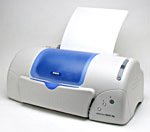
The 780 features a light tan body with a rounded front and a translucent blue dust cover that protects the printer head assembly. The basic body measures 17.7 x 9.7 x 7.2 inches (450 x 246 x 183mm) without the paper trays extended, and weighs 8.3 pounds (3.76 kg) -- making it small to average in size and surprisingly lightweight. The top-mounted paper support handles sheets up to 8.5 x 14 inches. The lower paper output tray (also blue in color) folds up against the front of the printer, flipping down when the printer is to be used.
The
dust cover lifts up to access the two printer cartridges: one Black and one
Color (cyan, magenta, yellow, light cyan, and light magenta). The cartridges
are easy to install, and when in place, are automatically calibrated by pressing
the Ink Cartridge Replacement button in the lower right corner of the printer's
front panel. The ink cartridges feed into a series of MicroPiezo print heads,
with 48 nozzles per color, and the entire assembly travels back and forth across
the paper on a small metal rod. Ink is deposited by applying pressure to the
ink chambers, forcing the ink out through the nozzles. Epson claims that this
process is more precise and consistent than competitors' thermal ink printing
process (heating the ink to force it out of the print head), and based on the
positive market response (and excellent print quality), they seem to have developed
a very successful formula. An automatic cleaning mechanism periodically initiates
a three- to five-minute cleaning, which can be repeated several times for deeper
cleaning whenever necessary, and an automatic Ink Low / Ink Out detection system
enables you to keep up with ink levels for each cartridge, simply by viewing
the Printer Driver menu.
The
top right side of the printer has an Adjust lever, which can be set to the "+"
position when you use thick paper or envelopes, to help prevent ink smearing.
The left side of the printer is clear, with no printer controls.
At the bottom of the printer's back panel are the USB connector for Macintosh
8.5.1 or later / Windows 98 / 2000 computers, and a Serial Port for Windows
95 / 98 / NT 4.0 / 2000 computers using a Parallel connector. The top paper
support slides into a plastic slot at the top of the back panel, and is large
enough to hold up to 100 sheets of standard printer paper or 10 envelopes.










 The
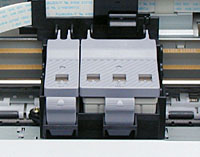
dust cover lifts up to access the two printer cartridges: one Black and one
Color (cyan, magenta, yellow, light cyan, and light magenta). The cartridges
are easy to install, and when in place, are automatically calibrated by pressing
the Ink Cartridge Replacement button in the lower right corner of the printer's
front panel. The ink cartridges feed into a series of MicroPiezo print heads,
with 48 nozzles per color, and the entire assembly travels back and forth across
the paper on a small metal rod. Ink is deposited by applying pressure to the
ink chambers, forcing the ink out through the nozzles. Epson claims that this
process is more precise and consistent than competitors' thermal ink printing
process (heating the ink to force it out of the print head), and based on the
positive market response (and excellent print quality), they seem to have developed
a very successful formula. An automatic cleaning mechanism periodically initiates
a three- to five-minute cleaning, which can be repeated several times for deeper
cleaning whenever necessary, and an automatic Ink Low / Ink Out detection system
enables you to keep up with ink levels for each cartridge, simply by viewing
the Printer Driver menu.
The
dust cover lifts up to access the two printer cartridges: one Black and one
Color (cyan, magenta, yellow, light cyan, and light magenta). The cartridges
are easy to install, and when in place, are automatically calibrated by pressing
the Ink Cartridge Replacement button in the lower right corner of the printer's
front panel. The ink cartridges feed into a series of MicroPiezo print heads,
with 48 nozzles per color, and the entire assembly travels back and forth across
the paper on a small metal rod. Ink is deposited by applying pressure to the
ink chambers, forcing the ink out through the nozzles. Epson claims that this
process is more precise and consistent than competitors' thermal ink printing
process (heating the ink to force it out of the print head), and based on the
positive market response (and excellent print quality), they seem to have developed
a very successful formula. An automatic cleaning mechanism periodically initiates
a three- to five-minute cleaning, which can be repeated several times for deeper
cleaning whenever necessary, and an automatic Ink Low / Ink Out detection system
enables you to keep up with ink levels for each cartridge, simply by viewing
the Printer Driver menu. The
top right side of the printer has an Adjust lever, which can be set to the "+"
position when you use thick paper or envelopes, to help prevent ink smearing.
The
top right side of the printer has an Adjust lever, which can be set to the "+"
position when you use thick paper or envelopes, to help prevent ink smearing.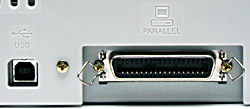 At the bottom of the printer's back panel are the USB connector for Macintosh
8.5.1 or later / Windows 98 / 2000 computers, and a Serial Port for Windows
95 / 98 / NT 4.0 / 2000 computers using a Parallel connector. The top paper
support slides into a plastic slot at the top of the back panel, and is large
enough to hold up to 100 sheets of standard printer paper or 10 envelopes.
At the bottom of the printer's back panel are the USB connector for Macintosh
8.5.1 or later / Windows 98 / 2000 computers, and a Serial Port for Windows
95 / 98 / NT 4.0 / 2000 computers using a Parallel connector. The top paper
support slides into a plastic slot at the top of the back panel, and is large
enough to hold up to 100 sheets of standard printer paper or 10 envelopes.