Nikon D70The Nikon D70 is an "entry-level" SLR loaded with features at a sub-$1,000 price.<<Reference: Datasheet :(Previous) | (Next): Print-Friendly Review Version>> D70 Sample ImagesReview First Posted: 04/14/2004 |
Digital Cameras - Nikon D70 Digital SLR Test Images
D70 Photo Gallery! D70 Photo Gallery! The images below are my standard (dare I say boring?) test photos. For a set of more pictorial photos, check out my Photo Gallery for the D70!
| I've begun including links in our reviews to a Thumber-generated index page for the test shots. The Thumber data includes a host of information on the images, including shutter speed, ISOsetting, compression setting, etc. Rather than clutter the page below with *all*that detail, we're posting the Thumber index so only those interested inthe information need wade through it! |
| Outdoor Portrait:
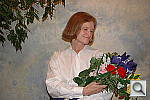
Excellent resolution and detail, with low noise. Good color, high
contrast left midtones somewhat dark though. The extreme tonal range of this image makes it a tough shot for many digicams, which is precisely why I set it up this way, and why I shoot it with no fill flash or reflector to open the shadows. The object is to hold both highlight and shadow detail without producing a "flat" picture with muddy colors, and the Nikon D70 Digital SLR did pretty well, although I had to settle for slightly dark midtones to avoid losing too much highlight detail. As noted, the shot at right was taken with a +0.3 EV exposure compensation adjustment, which resulted in slightly dark midtones. Though midtones looked better with a +0.7 EV adjustment, but the highlights were much too hot. Although the overall color balance was just slightly cool-toned, I preferred the Auto white balance setting. The Manual setting also produced good results, but the left the image a little reddish overall, while the Daylight setting resulted in a cooler color balance than that produced by the Auto option. The shot at right was also captured using the D70's "Portrait" image optimization setting, which did indeed produce particularly pleasing skin tones. - See the comparison a little further down the page for a side by side view of the results of the Portrait vs Normal settings. Skin tones here are very good, with just about the right hue and level of saturation, while the always-difficult blue flowers are rendered almost exactly right. (Just slightly darker and more purplish than in real live, but very close overall. - Many digicams have trouble with this blue, which is in reality a light navy color, with just a little purple to it.) The green foliage is also a little dark, while the red flowers are very bright and a little oversaturated. I'd rate the overall color as "very good" though, and resolution is very high, with even fine details well-defined. Shadow detail is nice as well, and noise is low. Effects Series:
"Portrait" image optimization:
|
||||||||||||||||||||||||||||||||||||||||||||||||||||||||||||||||||
| Closer Portrait: 
Excellent resolution and detail, with good midtones. Contrary to my exposure decision for the shot above, I chose a slightly overexposed shot for the main close-up image. The shot at right has a +0.7 EV exposure compensation adjustment, as the +0.3 EV shot was just a bit too dark overall. Midtone detail is good, though the highlights are still rather bright. Detail is much stronger in this close-up shot, with very good definition. (Probably more detail than Marti would care to see full screen. ;-) Details are slightly soft throughout the frame (as is generally the case with pro-level SLRs, but the image takes strong unsharp masking in Photoshop(tm) very well, bringing out loads of super-fine detail. To view the entire exposure series from zero to +1.0 EV, see files D70FACAP0.HTM
through D70FACAP3.HTM on the thumbnail index page.
|
||||||||||||||||||||||||||||||||||||||||||||||||||||||||||||||||||
| Indoor Portrait, Flash:
A really excellent job, with great color and exposure. The D70's built-in flash did an excellent job here, illuminating the
subject very well without washing out color too strongly. Even at the
default exposure setting, flash performance
is pretty good, and only slightly dim. The main image has a +0.7
EV exposure compensation adjustment, which borders on being too bright.
Color balance is good with the Auto white balance setting, although the
camera's Flash white balance option also produced
good results, albeit with a slight warm cast that some users might in
fact prefer. Color is pretty accurate for a flash exposure, with only
slight purple tints on the blue flowers in the bouquet. |
||||||||||||||||||||||||||||||||||||||||||||||||||||||||||||||||||
| Indoor Portrait, No Flash:
Excellent color with the Manual white balance setting, higher than average exposure compensation required. This shot is always a very tough test of a camera's white balance capability, given the strong, yellowish color cast of the household incandescent bulbs used for the lighting. Both the D70's Auto and Incandescent white balance settings produced warm color casts, a performance that was disappointing in a camera of the D70's otherwise sterling qualities. (No surprise that the Auto white balance sample came out very warm. - For some reason, Nikon limited the Auto WB to a range from 3,500K to 8,000K. The lower end of that range is quite a bit above the 2,500-2,800K that you'll encounter with common household incandescent lighting.) Gripes about the Auto WB option aside, the D70's Manual setting produced very nice results. The shot at right was taken with a +1.7 EV exposure compensation adjustment, which is quite a bit higher than average. (Strange, given that in most other images, the D70 tended to expose more accurately than other cameras I've tested.) Overall color is good, though the blue flowers appear quite purple (a common problem with this shot, largely due to the very warm-toned lighting). I also snapped an image with the camera's Portrait mode, which looks nearly identical, though details are a hint sharper on Marti and in the flowers. ISO Series:
|
||||||||||||||||||||||||||||||||||||||||||||||||||||||||||||||||||
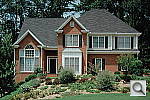
| House Shot:
Very high resolution, though details are slightly soft. Good color with the Manual white balance. The D70's Manual white balance option
again produced the best overall color here, with the most accurate white
value on the house trim. Alternatively, the Auto
setting resulted in a cool color cast, and the Daylight
setting resulted in a warm cast. Resolution is very high, with a lot of
fine detail visible in the tree limbs and front shrubbery. However, details
are slightly soft throughout the frame. (Cameras like the D70 stretch
the limits of this poster as a test target, even though the poster was
made from a 500MB scan of a 4x5 negative shot with a tack-sharp lens.)
|
||||||||||||||||||||||||||||||||||||||||||||||||||||||||||||||||||
| Far-Field Test 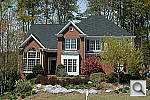
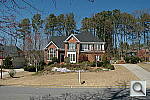
Excellent resolution and detail, with a very good dynamic range. This image is shot at infinity to test far-field lens performance. NOTE that this image cannot be directly compared to the other "house" shot, which is a poster, shot in the studio. The rendering of detail in the poster will be very different than in this shot, and color values (and even the presence or absence of leaves on the trees!) will vary in this subject as the seasons progress. In general though, you can evaluate detail in the bricks, shingles and window detail, and in the tree branches against the sky. Compression artifacts are most likely to show in the trim along the edge of the roof, in the bricks, or in the relatively "flat" areas in the windows. This is my ultimate "resolution shot," given the infinite range of detail in a natural scene like this. The D70 captures a lot of fine detail in the tree limbs above the roof and in fine foliage in front of the house, with good definition. The raw image from the camera is somewhat soft, but I personally take that as a good thing. -I've often felt that Nikon is sometimes a little heavy-handed with in-camera sharpening, resulting in artifacts that can't be removed later, thereby losing detail. In this shot, there are no sharpening artifacts to be seen, and the image takes strong unsharp masking very well, revealing loads of fine detail. (Try 175% at an 0.4 pixel radius in Photoshop(tm).) The camera picks up good detail in the bright white paint surrounding the bay window, as well as in the shadow area above the front door, evidence of the D70's excellent dynamic range. The image is also equally sharp from corner to corner, so give points to the18-70mm that I shot it with. (Although this shot ended up at f/10, so I'd be concerned if I saw much softness in the corners, stopped down that far.) Color is pretty accurate, though the red bricks and green foliage are a bit dark. Here are sample images with the Hue adjustment set to High and Low. The table below shows a standard resolution and quality series, followed by ISO, sharpness, contrast, color, saturation, and effects series. Resolution Series:
Sharpness Series:
Contrast Series:
Color Series:
Saturation Series:
"Image Optimization" Series:
|
||||||||||||||||||||||||||||||||||||||||||||||||||||||||||||||||||
|
Lens Zoom Range The "bundled" 18-70mm lens gives a good 27-105mm zoom range. I routinely shoot this series of images to show the field of view for
each camera, with the lens at full wide angle, at maximum telephoto, and
at full telephoto with the digital zoom enabled. (Like all optical-based
d-SLRs, the D70 doesn't have a digital zoom option, though.) The D70 accommodates
a wide range of Nikkor lenses, and angular coverage will obviously vary
greatly depending on the lens in use. I shot this selection with the 18-70mm
lens that comes in the kit though, as many users will end up with this
lens, and thus be interested in its coverage. Following are the results
at the maximum wide and telephoto zoom settings with the 18-70mm.
|
||||||||||||||||||||||||||||||||||||||||||||||||||||||||||||||||||
| Musicians Poster
Slightly reddish color with the Manual white balance, but great detail and resolution. This shot is often a tough test for digicams, as the abundance of blue
in the composition frequently tricks white balance systems into producing
a warm color balance. Both the D70's Auto
and Daylight settings slightly fell victim
here, and produced warm color balances. The Manual
white balance setting, on the other hand, produced a slight reddish tint,
but overall color is much closer to being accurate. The red tint affects
the models' skin tones and produces purplish tints in the blue background,
though overall results are still pretty good. The blue robe looks about
right, with only slight purple tints in the deep shadows. Resolution is
excellent, as the embroidery of the blue robe and on the red vest show
a lot of fine detail. (The original data file for this poster was only
20MB though, so cameras like the D70 are definitely capable of showing
more detail than the poster has in it.) |
||||||||||||||||||||||||||||||||||||||||||||||||||||||||||||||||||
| Macro Shot 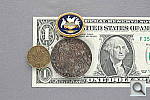
The "kit" lens offers only moderate macro capability. This is another shot I don't usually do for SLRs,
since the results will be entirely dependent on the lens you're using.
Given that so many users will be buying the "kit" version of
the D70, with the bundled 18-70mm lens, I thought it would be worthwhile
to show how it performs in the macro arena. The answer is that it's only
so-so for macro shooting, with a rather large minimum area of 3.56 x 5.35
inches (90.4 x 136 mm). This is close enough that you'll be able to shoot
typical small objects for eBay, but if you need really good macro performance,
you'll want to check out lenses like the Micro-Nikkor 105mm f/2.8. (One
of my personal favorites.) This close too, the lens ends up casting a
strong shadow when you try to shoot with the onboard flash.
(So plan on using external lighting for your closest macro shots with
the D70.) |
||||||||||||||||||||||||||||||||||||||||||||||||||||||||||||||||||
| "Davebox" Test Target
Slight underexposure at the default setting but very good color, with very good shadow detail and low noise. The D70 did an excellent job here, with very good color and a near-perfect white value with the Manual white balance setting. The Auto white balance setting here left a slight cyan cast, and the Daylight option left a yellow one, but the Manual white balance option produced a dead-perfect white value. As I found with many of my shots, the D70's default exposure setting produced a slightly dark image. - The shots at right were captured with an exposure adjustment of +0.3 EV. The slight positive exposure compensation produced a good white value, yet the camera still distinguished the subtle tonal variations of the pastel shades in the Q60 target very well. The large color blocks are very accurate, with good saturation. (I did notice slight oversaturation in the large red and blue primary color blocks, however, and the bright green block is just slightly undersaturated.) Shadow detail is excellent in the charcoal briquettes, as well as in the darker blocks of the vertical gray scales, and image noise is quite low. A very good job overall. Blooming:
Color Series:
Hue Series:
Image Optimization Preset Series:
|
||||||||||||||||||||||||||||||||||||||||||||||||||||||||||||||||||
|
Low-Light Tests Excellent low-light performance, with bright, clear images and low image noise even at the darkest light levels. As I expected, the D70 performed very well in the low-light category, capturing clear, bright, usable images down to the 1/16 foot-candle (0.67 lux) limit of my test, with good color and surprisingly low noise at all four ISO settings. Color balance was slightly warm in a few shots, but color was generally quite good. (All these were shot with Auto white balance, Manual would likely have done better. I shoot this test with the Auto setting though, as a test of how well cameras' white balance systems do at very low light levels. The D70 acquitted itself very well.) The biggest surprise here though, as how clean the images were with the optional Noise Reduction processing disabled: There was virtually no difference between the images with and without the optional Noise Reduction, and in fact the shot at the 1600 ISO level showed slightly better noise performance with the Noise Reduction turned off. It's clear though, that the Noise Reduction processing affected by the menu option is only one form of noise reduction that the camera is doing, and the primary noise processing isn't accessible to user control. Comparing the low-ISO, higher-brightness shots to those shot at the lowest light levels, it's clear that the longer exposures are a fair bit softer-looking. I'm quite confident that this isn't motion blur of any sort, as the camera was locked down on a heavy tripod, and the shutter was tripped via the self-timer. Mirror bounce would actually affect the longest exposures less (because it would die away before much of the exposure had registered), so my conclusion is that the D70 does a good bit of noise-suppression processing "behind the curtain." The camera is capable of really exceptional low-light performance, but astronomy fans and others interested in very long exposure times should note that the D70's image sharpness suffers with very long exposures, and there's no way to disable the noise-reduction processing that's responsible. The table below shows the best exposure I was able to obtain for each of a range of illumination levels. Examples with and without the optional noise-reduction processing are shown for the lowest light level only. Images in this table (like all my sample photos) are untouched, exactly as they came from the camera. (Note: If you'd like to use a light meter to check light levels for subjects you might be interested in shooting, a light level of 1 foot-candle corresponds to a normal exposure of 2 seconds at F/2.8 and ISO 100.)
|
||||||||||||||||||||||||||||||||||||||||||||||||||||||||||||||||||
|
Flash Range Test A powerful built-in flash, with good intensity all the way to the 14 foot limit of this test with the "kit" lens. Nikon rates the D70's internal flash as having a guide number of 11 meters/36 feet at ISO 100. (They use ISO 100 because so many people are accustomed to that as a benchmark, even though the D70's minimum ISO is 200.) That translates to a rating of 15.6 meters/51 feet at ISO 200, a value that agrees well with my test results using the 18-70mm "kit" lens. In the test shots below, the D70's flash illuminated the target all the way out to 14 feet, with only a slight decrease in intensity at the furthest settings, matching what you'd expect given its 51 foot guide number rating. Below is the flash range series, with distances from eight to 14 feet from the target.
|
||||||||||||||||||||||||||||||||||||||||||||||||||||||||||||||||||
|
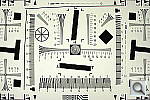
ISO-12233 (WG-18) Resolution Test
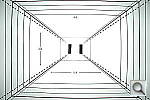
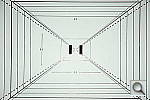
High resolution, 1,400 lines of "strong detail." With the "kit" lens, slightly higher than average barrel distortion, but low pincushion. The D70 performed nicely on the "laboratory" resolution test chart. It started showing artifacts in the test patterns at resolutions as low as 1,200 lines per picture height, in both horizontal and vertical directions. I found "strong detail" out to at least 1,400 lines horizontally, and 1,200 lines vertically. "Extinction" of the target patterns didn't occur until about 1,650 lines. When comparing images from the D70 with those from the D100 and Canon's EOS-10D and Digital Rebel, what stands out is that Nikon has obviously chosen to go with a somewhat less aggressive anti-alias filter on the D70 than they used in the D100. This produces much crisper-looking images from the D70, but also leaves the camera more prone to aliasing when you encounter repeating patterns. This is clearly visible in the res chart shots here, as well as in at least one of the gallery photos I shot with the camera. Comparing its images to those from the Canon cameras, the D70's photos tend to look just slightly crisper, but the difference is very slight, and generally only visible with some squinting. Overall, I'd rate the D70 and Canon EOS-10D and Digital Rebel as having more or less identical resolving power and image sharpness. Like any removable-lens SLR, the D70's optical distortion will depend entirely on the lens attached. For this reason, I normally don't discuss lens distortion in my SLR reviews. Given that so many D70s will be sold with the 18-70mm "kit" lens though, it's worth taking a look at how that specific lens performs on the camera. Shooting with that lens, I measured approximately 0.9 percent barrel distortion at the wide angle end of its range, but only 0.3 percent pincushion distortion. Both figures are about average for a 3.9x zoom lens, but both are also a bit higher than I'd like to see. Chromatic aberration was surprisingly low, showing only very faint coloration on either side of the target lines. (This distortion is visible as a very slight colored fringe around the objects at the edges of the field of view on the resolution target.) The images were also quite sharp from corner to corner. Overall, a very good performance for a zoom lens, the 18-70mm is a high-quality piece of optics. Resolution Series, 105mm Lens
Resolution Series, 18-70mm Lens
Sharpness Series, 18-70mm Lens
|
||||||||||||||||||||||||||||||||||||||||||||||||||||||||||||||||||
|
Viewfinder Accuracy/Flash Uniformity An accurate viewfinder, just slightly tight. The D70 is a digital SLR with a pretty accurate viewfinder. Working with the 18-70mm lens, I found that the viewfinder showed 95 percent of the final image area at wide-angle, and about 97 percent at telephoto. (It's not uncommon to find minor variations in frame coverage with different focal lengths like this, even on an SLR viewfinder.) Given that I like digital SLRs to be as close to 100 percent accuracy as possible, the D70 has just a little room for improvement here. Flash distribution was pretty uniform, even at wide angle, with just a little falloff at the corners and edges of the frame and a hot spot in the center. At telephoto, flash distribution is even more uniform. |
||||||||||||||||||||||||||||||||||||||||||||||||||||||||||||||||||
















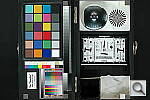
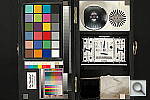
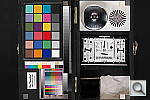


 For
those familiar with the concept of the "color wheel", which
arranges visible colors in a circle, Nikon's Hue adjustment will make
sense: It offers a range of adjustment from -9 to +9 degrees around the
color wheel. (A complete circuit of the wheel being 360 degrees.) If you
don't carry a degree-calibrated color wheel in your head, I've provided
the illustration of a color wheel at right. The dark bars show the total
shift that the full 18 degree range of adjustment offered by the D70's
hue control can produce. - As you can see, it's a fairly subtle adjustment.
Note too, that the effect on any given color will depend on where that
color is around the wheel. For red colors, a positive adjustment will
shift the red toward orange, while a negative adjustment will shift it
toward purple. For blues though, positive adjustments shift the color
toward purple, while negative adjustments shift it toward cyan. If you
look closely at the swatches in the MacBeth chart below, you'll be able
to see these shifts taking place.
For
those familiar with the concept of the "color wheel", which
arranges visible colors in a circle, Nikon's Hue adjustment will make
sense: It offers a range of adjustment from -9 to +9 degrees around the
color wheel. (A complete circuit of the wheel being 360 degrees.) If you
don't carry a degree-calibrated color wheel in your head, I've provided
the illustration of a color wheel at right. The dark bars show the total
shift that the full 18 degree range of adjustment offered by the D70's
hue control can produce. - As you can see, it's a fairly subtle adjustment.
Note too, that the effect on any given color will depend on where that
color is around the wheel. For red colors, a positive adjustment will
shift the red toward orange, while a negative adjustment will shift it
toward purple. For blues though, positive adjustments shift the color
toward purple, while negative adjustments shift it toward cyan. If you
look closely at the swatches in the MacBeth chart below, you'll be able
to see these shifts taking place.


Reader Comments! --> Visit our discussion forum for the Nikon D70!


Follow Imaging Resource: