Sony DSC-N2 Design
In a bit of a departure from the rest of the Cyber-shot line, Sony's new DSC-N2 digital camera features four rounded corners, a warm-toned brushed metal finish, and overall updated styling that's quite attractive. With literally only six controls to speak of, thanks to the LCD monitor's touch-screen technology, the Sony N2 is quite sleek. Because most of the camera settings are adjusted through the touchscreen, there's no need to clutter up the camera body with a myriad of dials, buttons, and switches -- quite a useful advance in digital camera design. Measuring 3.81 x 2.37 x 0.88 inches (97 x 61 x 23 millimeters) and weighing only 6.8 ounces (185 grams) with the battery and memory card installed, the Sony N2 is quite small and portable. There's no handgrip to speak of, so you'll want to keep the wrist strap securely fastened. Attached to the strap is a small plastic stylus, for use with the LCD's touchscreen, though a fingernail or fingertip serves the same purpose. The telescoping zoom lens retracts neatly inside the body when you power the camera off, keeping the Sony N2 pocket-friendly, perfect for travel.
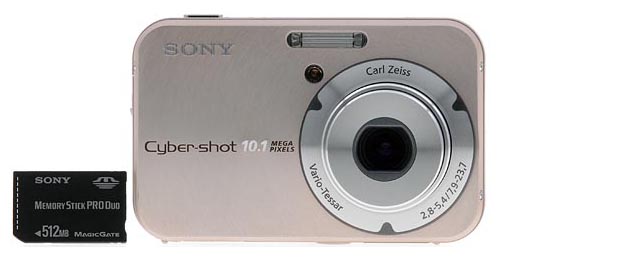
The Sony DSC-N2's front panel is quite clean and simple. A circular, brushed metal pattern radiates out from the lens barrel for a distinctive look. The 3x, 7.9-23.7mm zoom lens (equivalent to a 38-114mm zoom on a 35mm camera) dominates the camera's left side (when held from the back), with a small and very bright orange lamp on the upper right of it, to help with focusing in low-light conditions. (This lamp also blinks less brightly when the self-timer is in use, flashing faster to let you know when the camera is about to snap the picture.) Just above the lamp is the built-in flash.
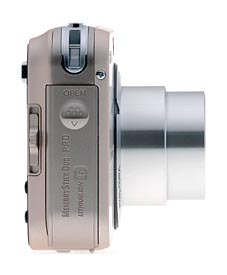
The right side of the Sony N2 (as viewed from the rear) features the shared battery and memory card compartment, covered by a hinged, plastic door that slides down before opening out and upward. Inside the compartment, the battery and Memory Stick Duo PRO slots line up side-by-side. The battery slot features a small locking switch that prevents the battery from falling out when the compartment is open, and the Memory Stick Duo PRO is unlocked simply by a quick press on the card, which then pops it out for removal. Lined up next to the compartment is a sliding Mode switch (the icons are actually on the rear panel), which controls the camera's main operating mode. Also visible on this side of the Sony N2 is the eyelet for attaching the wrist strap, which takes up the top corner.
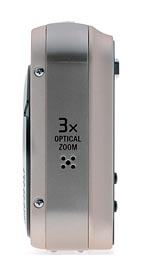
The left side of the Sony N2 holds only a small speaker for audio playback.
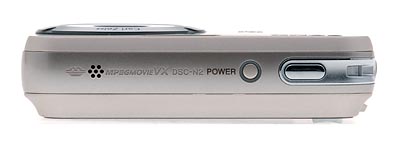
The Sony N2's top panel holds only two controls, the Power and Shutter buttons. Both are just about flush with the camera body, and the Power button has a small LED encircling it that lights when the camera is powered on. On the far left side is the camera's microphone.
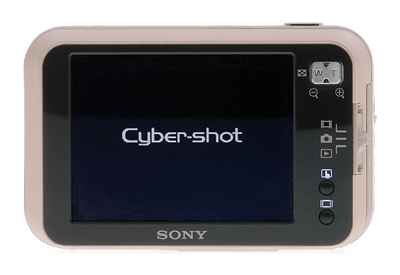
As I mentioned earlier, the Sony N2 has only six controls, three of which are located on the rear panel, in what little space is left from the large 3.0-inch LCD monitor. In the top right corner is the Zoom rocker, with the touchscreen and Display buttons down in the lower right corner. Both the touchscreen and Display buttons feature lit icons that display only when the camera is powered on. The LCD monitor is one of the Sony N2's most important control features, as its touchscreen technology provides the only method of changing camera settings. Effectively replacing multicontrollers and a host of function buttons, the LCD monitor provides access to the camera's menus and exposure options. It's an intelligent design that keeps the camera body clean and protrusion-free.
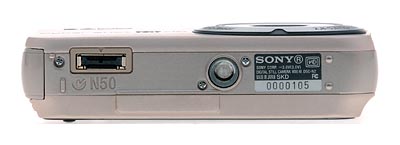
Finally, the Sony N2 has a fairly flat bottom panel, with a threaded metal tripod screw mount, and a dual-purpose connector terminal for the USB and AV multi-connector cable.
Sony DSC-N2 External Controls

Power Button: The round button on the Sony N2's top panel, this button powers the camera on, signaling the lens to extend. A thin LED light surrounds the button, and lights green when the camera is powered on.

Shutter Button: To the right of the Power button, this button sets
focus and exposure when halfway pressed, and fires the shutter when fully pressed.

Mode Switch: Vertically-oriented on the Sony N2's right side and adjacent to the rear panel, this sliding switch puts the camera into Movie, Still Record, or Playback modes.

Zoom Lever: Positioned in the top right corner of the rear panel, this
two-way rocker button controls optical zoom and, when enabled via the Setup
menu, Sony's "Smart Zoom" or Precision Zoom option.
In Playback mode, this button controls the digital enlargement of a captured
image, which can go as high as 5x. (Very handy
for checking focus or the expressions on people's faces in group shots.) Also
in Playback mode, the wide-angle end of the button activates the Index Display
mode, which displays either nine or 16 thumbnail images
on the screen at one time. (Pressing the "W" end once pulls up the
nine-image display, and a second press pulls up the 16-image display.)

Touchscreen Button: Below the icons for the Mode switch, in the lower right corner of the rear panel, this button enables the LCD's touchscreen display. Immediately displayed are the following options, with a link to the main menu, which is described further below:
- Record Mode: Offers Auto, Program, Manual, High Sensitivity, Twilight, Twilight Portrait, Soft Snap, Landscape, Beach, Snow, and Fireworks exposure modes.
- Exposure Setting: Offers adjustments for the shutter speed and aperture settings when in Manual mode.
- Focus: Sets the camera's focus mode to Multi AF, Center AF, Spot AF, Infinity, 7.0m, 3.0m, 1.0m, or 0.5m.
- Flash: Puts the flash into Forced or No Flash modes.
- Self-Timer: Offers 10 and two-second Self-timer settings, as well as an Off option.
- Macro: Turns Macro mode on or off.
- Image Size: 10M (3,468 x 2,736 pixels), 3,468 3:2 Ratio, 8M (3,264 x 2,448 pixels), 5M (2,592 x 1,944 pixels), 3M (2,048 x 1,536 pixels), 2M (1,632 x 1,224 pixels), VGA E-mail (640 x 480 pixels), and 16:9 HDTV.
- Menu: Displays the main menu for either Movie, Still Record, or Playback modes, depending on the Mode switch position. (All menus are described in the Operation section.)

Display Button: Below the Sony N2's touchscreen button, this button controls the LCD display, cycling through the image with information display, the image with information and live histogram display, and the image with limited information display (in all Record modes). In Playback mode, it cycles through the image with no information, limited information, and extended information with a histogram.
 Fujifilm GFX 50S Review
 Fujifilm X-T3 Review
 Olympus E-M5 III Review


Follow Imaging Resource