Fuji FinePix S9000By: Dave EtchellsFuji's latest bridge camera offers a larger, 9.0-megapixel SuperCCD HR imager with a high resolution electronic optical viewfinder. <<Design :(Previous) | (Next): Optics>> Page 4:ViewfinderReview First Posted: 12/14/2005 |
Viewfinder
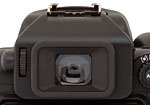 The Fujifilm S9000 offers an "electronic" optical viewfinder, essentially a smaller version of the 1.8-inch LCD monitor that's viewed through the camera's eyepiece. The 0.44-inch optical viewfinder display has the same detailed information display as the larger LCD monitor, complete with exposure information such as aperture and shutter speed, and offers higher than average resolution at 235,000 pixels. This makes it more useful for focusing, particularly in conjunction with the 2x focus-assist magnification feature. The added resolution is also welcome when it comes to reading menu items. A firm but resilient eyecup surrounds the viewfinder eyepiece, and shouldn't cause any problems for eyeglass wearers, given the S9000's fairly high eyepoint. A diopter adjustment dial on the left side of the eyepiece adjusts the focus of the display across a fairly wide range, so most eyeglass wearers should be well accommodated. An EVF/LCD button on the back panel switches the display between the viewfinder eyepiece and the larger LCD monitor.
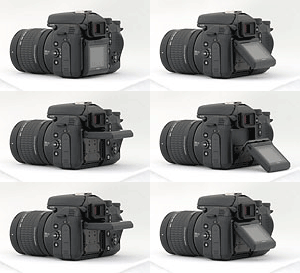 The 1.8-inch, low temperature polysilicon TFT LCD monitor comes on automatically when the camera is turned on, but goes to sleep quickly if the camera remains inactive. The LCD monitor is mounted on a rather unusual mechanism that allows it to tilt upward 90 degrees (ideal for shooting from waist level or lower) or downward 45 degrees (useful for shooting with the camera held above your head. Both mechanisms can be extended together, which results in the display pointing 45 degrees upward, projecting about two inches from the rear of the camera body. While it is certainly a lot more useful than a fixed LCD, this double--tilt mechanism lacks some of the versatility of mechanisms seen on cameras from other manufacturers. There's no way to turn the LCD inward toward the camera body for protection, nor to swivel the LCD forward for self-portraits. You're also not able to place it vertically at right-angles to the camera body, which can be useful for shooting landscapes around a corner, or shooting portrait-format shots above your head or low to the ground.
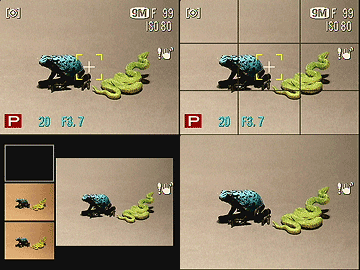
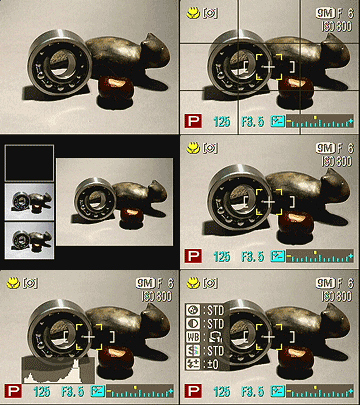 A display button at the bottom right corner of the LCD controls the level of information displayed on both viewfinders. The first press enables the information display, while the second pulls up an alignment grid that divides the image area into thirds, both horizontally and vertically. A third press of the button calls up the post-shot assist display mode, which shows the last three photographs captured alongside the current preview, helping you to take shots with similar compositions. A fourth press provides a full view of the subject area, with no text or graphic overlay.
 For a quick rundown of the exposure settings, a press of the Info button on the side of the camera reports various menu settings, as well as shows a small live histogram display.
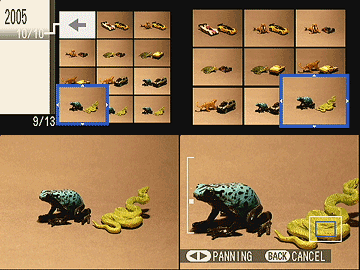 In Playback mode, the Info button optionally shows a histogram of a captured image, and reports exposure information as well, though the display reverts to normal shortly after you release the button. Also in Playback mode, the Display button enables the nine-image index display mode, and the "sorting by date" mode, where up to 12 image thumbnails from the same date are shown at once, alongside a bar on which you can select the date you wish to browse.
Activated through the Setup menu, an Image Review function automatically displays the last captured image on the LCD monitor as it's being recorded to the memory card. Images can be reviewed for 1.5 or three seconds, or until the Menu / OK or shutter buttons are pressed.
 Another useful feature on the Fujifilm S9000 is the Focus Check button (just to the right of the LCD monitor), which enlarges the central portion of the image on the LCD display 2x. This makes manual focusing quite a bit easier, as you can clearly see the finer details as they sharpen.
The Fuji S9000's electronic viewfinder system is very accurate, showing close to 100% percent of the final frame area at both wide angle and telephoto zoom settings. The LCD monitor is also very accurate, since it shows the same view, just on a larger screen. Given that I like LCD monitors to be as close to 100 percent accuracy as possible, the S9000's LCD monitor is essentially perfect in this regard.


Follow Imaging Resource: