


Overview
Casio EX-Z1000 Overview
By: Mike Pasini
Review Date: 10/20/2006
Note: The following review is an experimental review format. Let us know what you think by emailing with the Email link below.
Just when you thought the megapixel war was over, the Casio EXILIM ZOOM EX-Z1000 offers a whopping 10 megapixel resolution from a 1/1.8"-type CCD sensor, coupled to Casio's proprietary EXILIM Engine image processor. Sensitivity ranges from ISO 100 to 400 equivalent by default, with the ability to extend to ISO 800 in "Anti-Shake" mode. Casio's non-mechanical Anti-Shake increases sensitivity, and hence shutter speed, at the expense of image noise and/or reduced image detail. Finally, the camera's sensitivity maxes out at ISO 3200 equivalent in the "High Sensitivity" Best Shot mode. Certainly, at 1/1.8" the EX-Z1000's sensor is a bit larger than those in many digicams, but still significantly smaller than any DSLR sensor. Still, it offers image resolution and a maximum sensitivity that not many DSLRs exceed.
The Casio EX-Z1000 couples its sensor to an EXILIM-branded 3x optical zoom lens with a fairly standard equivalent focal length range of 38 to 114mm -- a moderate wide angle to a moderate telephoto. There's no optical viewfinder, so images are framed on the camera's LCD display -- which is larger and has higher resolution than most at 2.8 inches and 230,400 pixels. Curiously, the LCD display has a 14:9 aspect ratio -- which doesn't perfectly match up with any of the aspect ratios offered by the imager, although it is fairly close to the 3:2 mode.
Images are stored on Secure Digital or MultiMediaCards, while 8MB of built-in memory will let you try the Casio EX-Z1000 out when you open the box -- and little else. With a maximum file size of around 4.2MB, you'll probably only fit a single shot at maximum resolution / minimum compression in the built in memory -- so expect to buy a high capacity flash card along with the camera.
Power comes from an NP-40 Lithium Ion rechargeable battery which is included in the Casio EX-Z1000 bundle, and should be good for capturing 360 still images or a little over three hours of movies, or for a generous 13 hours of reviewing still images. Connectivity is via an included camera cradle, and consists of both video output (type unspecified), and USB 2.0 Full Speed connectivity -- not to be confused with the USB 2.0 High Speed offered by many cameras these days (Full Speed is only 12Mbits per second, while High Speed is capable of 480Mbits per second).
The Casio EX-Z1000 also offers a few more unusual features. A "Rapid Flash" function allows up to three shots per second, where most cameras require much longer to recharge the flash strobe; but note that the speed comes at the expense of a 50% reduction in flash range in this mode. What Casio is calling a "Zoom Continuous Shutter mode" allows the user to see both a wide-angle and cropped "telephoto" shot on screen at once, and to capture both at the same time with a single press of the shutter button. A Quick Zoom function on the Casio EX-Z1000 allows you to return the camera to a preset zoom level with a single button press. Finally, a "Revive Shot" mode is designed for taking images of faded photo prints, and attempts to restore the faded colors.
The Casio Exilim EX-Z1000 hit U.S. stores priced at $399.99 in June 2006.
In the Box
The Z1000 retail box contains:
- The EX-Z1000 digicam
- Rechargeable Lithium Ion battery NP-40
- USB cradle CA-33
- Wrist strap
- Software on CD
- USB cable
- AV cable
- Basic reference
- AC Adapter
The Basics
To start using the Casio EX-Z1000, slide the bottom cover open and pop the battery in. Add an SD card at the same time. Even though the camera includes about 8MB of internal memory, using a card means you can store a lot more shots and transfer them faster to your computer by avoiding the USB dock transfer.
To charge the battery (which can take three hours), you insert the Casio EX-Z1000 into the included cradle. An AC adapter provides power to the cradle, which also has USB and AV ports. Unlike many other cradles, this one has a couple of buttons on the front to activate Photo or USB mode.

Charging in the Dock
With a charged battery (and the wrist strap attached), basic operation is simple. Press the red Camera icon to start shooting or the green Playback icon to see what you've done. Use the Power button on top to turn the Casio EX-Z1000 off.
With the camera on, set the language, time zone, city and daylight savings time option. Select the time format and then set the time and date (they're stored with each image).
It's a good idea to format the memory card, too. That way the Casio EX-Z1000 lays the table for all the goodies it plans to set out.
You can cycle through the display options using the small Display button to the left of the two mode buttons. There's more than clutter to display, too. A live histogram and a framing grid are just two of the handier options in Record mode.
While in Record mode, the Shutter button's collar zooms the lens over its 38 to 114mm range. A press of the Shutter button takes the picture. A beep and the small green LED behind the Shutter button confirms the image is in focus.
To shoot a movie with the Casio EX-Z1000, you actually have to select Movie from the Scene menu, which Casio calls Best Shot. A Best Shot button below the navigator brings up the Scene mode options.
Getting Fancy
The Casio EX-Z1000 does a great job in the default Auto mode. But the fun of this camera is all the tricks it has up its sleeve. The settings and Scene modes aren't so much for accommodating difficult lighting as they are for special effects.
Best Shot modes

Old Photo

eBay

Wide Zoom
Interface. There are two overlapping systems in the Casio EX-Z1000. One is the screenful paging of the typical menu system. It's comprehensive and easy to use: just press the Menu button to access it and then scroll through the options with the Navigator. The other is the onscreen dock that displays nine options on the right side of the screen. It reminds me a bit of Canon's left-hand display except it doesn't require a button press to bring it up. It's always there (well, optionally).

Menu System
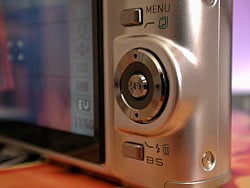
With Few Buttons
And they're quite easy to access. The Casio EX-Z1000's Down arrow takes it from the top or pressing Set resumes with the last selected option. A Left or Right arrow adjusts EV without going there.
That frees more permanent configuration options (like turning off the Autofocus assist lamp, or enabling Digital Zoom) to the Menu system.
When configuring basic behavior and adjusting shooting variables isn't quite enough, the Casio EX-Z1000 offers a wide range of Scene modes.

Easy to Grip
Except Casio calls them Best Shot, not Scene, modes. The button below the Casio EX-Z1000's Navigator accesses them one at a time. You scroll through them with the Left or Right arrow keys.
And if you don't see one you like, you can just create your own based on an image you've already recorded. In short, you save your Best Shot parameters, including Focus, EV, White Balance, Flash, ISO, Metering, Flash Intensity, Flash Assist, Filter, Sharpness, Saturation and Contrast.
Once set, the settings are reflected in the dock options so you know exactly what's going on. Another nice touch lost on most digicam manufacturers.
The usual suspect (Portrait, Scenery, Night Scene, etc.) are here but the Casio EX-Z1000 has some exotic options, too.
The High Sensitivity option sacrifices some image detail to get bright natural light shots at ISO 3200. You can not only shoot high contrast business cards, but the Casio EX-Z1000 also does "keystone correction," straightening out and cropping the image. The ID Photo option actually displays guidelines to set the subject's head and chin within to get a perfect photo every time. Restore an Old Photograph color corrects faded color prints.
Test Drive
Comparing other digicams to a Casio is like comparing a lost hub cap on the side of the highway to chrome "spinner" wheels at a stop light. Casio digicams do "different" in a style all their own. And that makes them a lot of fun -- even if they aren't for everybody.
Take megapixels, for example. Common wisdom says six megapixels is the "sweet spot" between getting great detail and avoiding noise. More megapixels means more noise, fewer gets you less detail. But Casio? Hey, let's just use a bigger sensor to minimize noise and give people a whopping 10 megapixels.
Or take the Hatfield-McCoy Agency's idea of a user interface on today's digicams. You got your buttons for sum'thin's and your menus for t'others, with a scattered screenful of text and icons to let you know what's up. Casio? Hardly any buttons with its optional always-on menu that also shows you the status of each setting.
And take that flash on a digicam. Please. If it's powerful enough to reach across the room, it takes a week to recharge. Casio? Put a powerful flash on there but give people a flash burst mode that fires it at half power so it recharges quickly.
Ever start nodding uncontrollably trying to compose a zoom shot? You can't recognize anything in the LCD at telephoto so you either look up to see the whole scene or zoom out to get oriented. Casio? Put the zoom in the wide field shot.
I popped the little Casio EX-Z1000 in its dock to charge the battery and flipped through the manual to find out how to use all these cool features. But the manual didn't know. Too bad Casio ships such a basic guide with a camera this capable. To find out how to tap into its secrets, download the 266-page PDF manual from the Casio site (http://ftp.casio.co.jp/pub/world_manual/qv/en/EXZ1000_e.pdf).
But you don't buy a digicam to read a book. You buy it to take pictures. So off I went, with a charged battery to Opera in the Park, San Francisco's annual picnic of passionate arias, dazzling divas, bone-shaking baritones, and orchestra members wearing strange head gear. The weather was overcast for much of the event and we sat way back on the hill overlooking the large crowd.

Accurate color,
blown highlights
After the concert, I wandered over to the Dahlia garden, which was in full bloom. By the time I got there, the sun had broken through the fog, too. I switched from a 3MB image size to the full 10MB size (4.3MB compressed 1:6 on disk) and later I was glad I did. At the time I was just thinking of grabbing some colorful test shots, but it turned out these test shots were printed at poster size for my review of Tabblo (http://www.tabblo.com) and the high resolution image was much appreciated as I scaled individual shots on the poster templates.

0.0 EV
Taking very close-up shots is one of the surprising joys of digital photography and I always shoot a healthy selection of macro shots when I have a camera to test. I had a little trouble focusing on my tomatoes but was surprised at the excellent results I got shooting through a 10x loupe for the Tabblo review. That was a crazy idea for a shot but the Casio EX-Z1000 pulled it off.

Macro
That's Anti Shake in action, I suppose. It provided sharp shots as slow as 1/15 second but it really preferred to boost ISO so the shutter wasn't that slow very often. That's a bit different from shooting sharp shots at 1/5 second, as you can with image stabilization.

Digital Zoom
The Best Shot or Scene modes on the Casio EX-Z1000 were the last thing I played with. Usually I think of them as gimmicks intended to reassure inexperienced photographers at the store counter; yet they go unused in the field. But Casio has some very cool tricks up its sleeve.

Business Card
Another simple but helpful example is the ID Photo Scene. The monitor displays a top headline and a chin line about a third of the way down the shot with an oval boundary between them for the face. No big deal, but when you shoot the image, it isn't saved until you position it within the targets using the arrow keys and resize it with the zoom lever. Press Set to save it as a 5 megapixel, 2560x1920 image. Very clever.
Copying old photos is another bane of the digital photographer, who usually relegates the task to their scanner. But the Casio EX-Z1000 has some copying efficiencies built into its Old Photo mode. First, it will find the border of the old photo, so you don't need to crop tightly yourself. That also means you can shoot at an angle. The Casio EX-Z1000 will straighten things out just like it does for a Business Shot. But it will also try to color correct the image, assuming it's faded. That mode also grabs a 2 megapixel, 1600x1200 image.
Conclusion
It was easy to make friends with the Casio EX-Z1000. Auto mode with its 16:9 aspect ratio made composing shots fun. The quick startup and shutdown made it convenient to use, never worrying about missing a shot because it would take too long to turn on the camera. The Casio EX-Z1000's 3x zoom was a disappointment, if only because we've been playing with longer zooms lately. But the digital zoom does compensate for that, relying on the 10 megapixel sensor to deliver enough resolution without degrading image quality.
Even with the larger sensor real estate to populate with 10 megapixel of sensor sites, the Casio EX-Z1000 did capture noisy images. But the noise resembled film grain rather than the colorless confusion of some high ISO sensors. Turn off Anti Shake if it bothers you.
In all the categories that matter, the Casio EX-Z1000 scored well. And where it didn't score well, there are convenient workarounds. Those are the kind of tradeoffs we like to see in a digicam. This is a very well-designed, capable camera, certainly worthy of a Dave's Pick.
Design
The Camera
Note: The following review is an experimental review format. Let us know what you think by emailing with the Email link below.
The front of this metal-bodied Casio EX-Z1000 has a large opening for the extending lens in the lower right corner. The lens is protected by a split lens cover and extends a full inch (and pretty quickly, too). Hard to believe there's room in that thin body for a lens that deep, but it is constructed in three parts. Above the lens and slightly to the left is the autofocus assist/self-timer lamp and just down the curve of the lens a bit more is the tiny hole for the microphone. You can store mono audio clips with images, capture sound movies, and record voice memos, too. Above the Casio EX-Z1000's mic is the small flash.
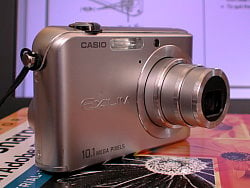
Front and Right
The wrist strap eyelet is on the right side of the Casio EX-Z1000 and swivels freely, a nice touch. There's nothing on the left side of the camera.

Top
The top of the camera has (l-r) the Display button to toggle through information display options, the Playback and Record mode buttons, the Power Button, the Shutter button ringed by the Zoom control, and a small camera status LED just rear of the Casio EX-Z1000's Zoom control.

Bottom
Underneath the Casio EX-Z1000 is (l-r) the speaker grill, a plastic tripod mount, the cradle port and the hinged battery/storage card compartment. You'll have to remove the camera from a tripod to swap batteries.

Front and Right
The back of the Casio EX-Z1000 has a few ridges in the top right corner impersonating a thumb grip. Below that is the Menu button which is mirrored on the opposite side of the Navigator and its Set button by the Best Shot or Scene mode button. Most of the real estate is taken up by the 1.5x2-3/8 inch LCD, an unusual format but well employed to display shooting options along the right side.
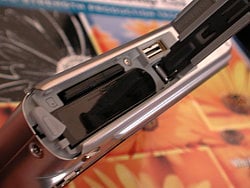
Battery Compartment
Optics
Casio EX-Z1000 Optics
Note: The following review is an experimental review format. Let us know what you think by emailing with the Email link below.
Lens
Zoom Range


The Casio EX-Z1000 zooms over the equivalent of a 38-114mm range, typical for its class. Overall performance is quite good, with good detail and sharpness at wide angle. The 4x Precision Digital zoom takes it out to 12x total, with the typical loss of resolution associated with Digital Zoom, although the Casio EX-Z1000 is smart about resizing the crop.
Macro


The Casio EX-Z1000's macro setting captures a very tiny minimum area of only 2.06 x 1.54 inches (52 x 39 millimeters). Use off-camera lighting for any macro shots with the Z1000.
Distortion


Wide Angle. The Casio EX-Z1000's 0.74% barrel distortion at wide angle is lower than average and not obvious in most images.
Telephoto. At the telephoto end, the Z1000's 0.07% barrel distortion is very low.
The images above were taken from our standardized test shots. For a collection of more pictorial photos, see our Casio EXILIM ZOOM EX-Z1000 Photo Gallery .
Exposure
Casio EX-Z1000 Exposure
Note: The following review is an experimental review format. Let us know what you think by emailing with the Email link below.
Flash
Manufacturer's Test
| Manufacturer-Specified Flash Range | |
|---|---|
| Wide Angle | Telephoto |
 11.8 feet |
 6.2 feet |
The built-in flash performs to the manufacturer's specifications, evenly illuminating the scene as close as 6.2 feet at telephoto and as far as 11.8 feet at wide angle.
To see the full set of our test images, with explanations of what to look for in them, see the Casio EXILIM Z1000 Sample Pictures page. For a complete listing of all our test and "gallery" shots, go to the Thumbnails page.
The images above were taken from our standardized test shots. For a collection of more pictorial photos, see our Casio EXILIM ZOOM EX-Z1000 Photo Gallery .
Not sure which camera to buy? Let your eyes be the ultimate judge! Visit our Comparometer(tm) to compare images from the Casio EXILIM ZOOM EX-Z1000 with those from other cameras you may be considering. The proof is in the pictures, so let your own eyes decide which you like best!
Performance
Casio EX-Z1000 Performance
Note: The following review is an experimental review format. Let us know what you think by emailing with the Email link below.
Timing and Performance
Key Factors
| DESC | SPEED | SCORE | RATING |
| Startup | 2.0 secs | Average |
 |
| Shutdown | 1.6 sec | Above Average |
 |
| Autofocus lag (combined wide angle and telephoto performance) |
0.576 sec | Above Average |
|
| Prefocus lag (half-pressed Shutter button) |
0.004 sec | Above Average |
|
| Cycle time (large/fine JPEG in Continuous mode) |
1.5 sec | Above Average |
|
| Flash cycling | 7.5 sec | Below Average |
 |
| USB speed | 886 KB/sec | Average |
|
The Casio EX-Z1000 is pretty snappy, starting up and shutting down quickly and setting focus fast, too. Its flash is powerful, so takes some time to recharge but the Z1000 offers a flash mode that recycles more quickly at the expense of power. Likewise, the slow USB transfer time is easily overcome simply by using a card reader or PCMCIA adapter.
Ratings
Our ratings range from Below Average to Average to Above Average and are awarded a star for each step. Cameras are compared only to competitors in the same class.
Feature Comparison
Sensor, Zoom, LCD, Weight
| DESC | SPEC | SCORE | RATING |
| Sensor | 10-Mp | Above Average |
|
| Optical Zoom | 3.0x | Average |
|
| LCD Size | 2.8 inches | Above Average |
|
| Weight | 169 grams | Average |
|
Note that the 3.0x zoom is buttressed by a competent 4x digital zoom. And while the weight may rate only Average, the Casio EX-Z1000 isn't a heavy camera.
Image Stabilization
The Casio EX-Z1000 doesn't offer in-camera image stabilization, but its Anti Shake mode comes close. Anti Shake takes advantage of the Casio EX-Z1000's large sensor to increase ISO sensitivity without adding an objectionable level of noise to the image. At the same time, shutter speed is just fast enough to prevent camera blur.
While not quite as effective as the two to three stop gain of image stabilization, the Casio EX-Z1000's Anti Shake works well if you don't mind its grainy appearance.
Editing Functions
The Casio EX-Z1000 has an excellent selection of image editing functions available in Playback mode, which draw on a few Best Shot mode features. The editing functions include resizing (which saves the result as a new image, retaining the original), cropping the original to a 4:3 aspect ratio, keystoning to correct perspective, color restoration to correct the faded colors of an old photo (saved as a new image, retaining the original), changing the date/time of an image, and rotating an image. Movies can be cut, too, and stills recorded from a movie frame.
Not sure which camera to buy? Let your eyes be the ultimate judge! Visit our Comparometer(tm) to compare images from the Casio EX-Z1000 with those from other cameras you may be considering. The proof is in the pictures, so let your own eyes decide which you like best!