


Overview
Olympus Pen E-PL3 Hands-on Preview
As compact system cameras get more and more compact, Olympus's offerings have seemed rather large by comparison. Clearly the company hasn't been resting, introducing three cameras in one day, two of which address the size issue. The Olympus Pen Lite E-PL3 is quite a bit smaller than its predecessor, as well as the E-P3 introduced at the same time. The new camera also finally embraces the Pen name more boldly, with the suggested shorthand being Pen Lite. The third camera announced is the Olympus Pen Mini E-PM1, which is slightly smaller than even the E-PL3, with a simplified interface that you can read about in that preview.
 Though the E-PL3 has the same 12-megapixel resolution, Olympus says they've improved high ISO performance. We'll have to wait for a shipping version to confirm, but one thing that's improved over any past Pen design is the autofocus speed, which rivals and even bests some digital SLR designs. Called FAST AF, appropriately enough, the new AF system really makes up for the slower autofocus of previous Pen cameras. Also new is the AF-assist lamp, helping the camera focus in low light, and the tilting LCD screen.
With a sleek, straightforward exterior, the Pen Lite has been compared to the company's own Olympus XZ-1 in size, and save for the thickness from the tilting LCD screen and of course the lens, it isn't far off (see comparison photos below). The more slender lens design looks more at home on the E-PL3 than it did on the E-P2, and its new knurled ring and silver color look quite nice on the silver-bodied Pen Lite.


Raised lines on the tilting LCD help when pulling it out from the body.

Zoom in and out buttons have made a return from the E-PL1 design, and the red dot marks the Movie Record button. A hard rubber beveled thumbgrip provides slightly awkward grip assistance, but it'll do. Info and Menu buttons are slightly difficult for me to press, thanks to their proximity to the LCD. If I have difficulty (something I could easily bear), others might really wail about this one. The Main Dial is also harder to turn for this reason, and the AF button (marked by the three dots on the left of the dial) is harder to depress. Just facts, not deal-breakers.
Sensor and processor. At the heart of the Olympus E-PL3 lies a new 12.3 megapixel Live MOS image sensor, whose output is handled by a TruePic VI image processor. The E-PL3's imager has a 4:3 aspect ratio, and allows capture of still images at a maximum resolution of 4,032 x 3,024 pixels. Sensitivity ranges from a base of ISO 200 equivalent to a maximum of ISO 12,800 equivalent, controlled automatically or manually in 1/3 or 1/2 EV steps. (By default, the maximum sensitivity is capped at a more modest ISO 1,600 equivalent, however.)
Two generations removed from the TruePic V chip features in earlier PEN-series models, the new TruePic VI image processor retains the Fine Detail Processing technology introduced in the E-5 digital SLR's TruePic V+ chip, and adds Real Color technology that's intended to improve rendering of emerald green, yellow, and magenta hues. TruePic VI also includes an updated version of the company's Shadow Adjustment Technology, which operates in iAuto mode or when the Auto Gradation function is enabled, and aims to restore shadow detail without adversely affecting highlights.
Another new feature of the TruePic VI processor allows it to perform noise reduction using information spanning multiple frames, which should allow reduced noise levels both for video capture, and for the live view feed used to frame and review images. TruePic VI also brings a significant improvement in operating speed, most notable in the camera's autofocus system (which we'll come to in a moment), as well as in its ability to capture Full HD video -- a first for a PEN-series camera. Shutter response time is rated by the manufacturer at less than 60 milliseconds.
Focusing. Perhaps the biggest news in the Olympus E-PL3 is to be found in its overhauled autofocusing system. It still uses contrast detection autofocusing, but Olympus has improved the speed of its system significantly, and branded it as "Frequency Acceleration Sensor Technology", or "FAST" AF for short. Olympus claims its new system offers the world's fastest autofocusing with standard zoom lenses, finally bringing contrast detection autofocus on par with phase detection in terms of speed: comparing to its own product line, Olympus suggests that the E-PL3 can focus as quickly as its prosumer Olympus E-5 digital SLR. The improvement in speed has been achieved by reducing the time taken for the autofocus system to begin operation after half-pressing the shutter button, doubling the sensor readout speed to a whopping 120 frames per second, and increasing the speed with which contrast detection routines operate. Olympus' "Movie and Still Compatible" lenses are also said to play their part in the system's speed, and third party lenses or older Olympus models are likely to operate at reduced speed, although we don't yet have any quantitative data in this area.
As well as improving autofocus speed, Olympus has also increased the total number of focus points in its system, which still has fixed point locations, even though it uses contrast detection. Where earlier PEN-series cameras offered 11-point autofocus, the Olympus E-PL3 now offers up 35 point focusing, with the points are arranged in a 7 x 5 array that covers most of the image frame, with the exception of the extreme edges. The E-PL3 also provides the ability to configure the camera to address 3x3 groups of focus points instead of individual points if preferred. Olympus further notes that it has improved autofocus tracking performance, and can now use color information and account for the locations of faces in tracking a moving subject.
Optics. Like all PEN-series cameras, the Olympus E-PL3 features a Micro Four Thirds lens mount capable of accepting quite a selection of dedicated lenses from Olympus, Panasonic, and Voigtländer. Courtesy of several adapters, it can also accept older glass including OM-series lenses, Leica's M and R-mount lenses, and lenses made for Olympus and Panasonic's full-sized Four Thirds cameras.
As noted previously, the new "FAST"-branded autofocus system derives the best benefit with Olympus' MSC lenses, and so E-PL3 owners will likely want to stick with these models for swifter, quieter autofocus. As of this writing (late June 2011), there are five MSC-branded zoom lenses on the market, covering everything from an 18mm-equivalent wide angle to a 600mm-equivalent telephoto, and prime-lovers will be happy to hear that Olympus has just announced two MSC prime lens models due to ship soon.
Performance. The big story of the Olympus E-PL3 in terms of its performance is to be found in the aforementioned autofocus system. Burst shooting performance is fairly swift too, though, being manufacturer-rated at 4.1 frames per second. Interestingly, if the E-PL3's image stabilization system is disabled, burst shooting performance increases still further to a manufacturer-rated 5.5 frames per second.
Stabilization. As with its predecessors, the Olympus E-PL3 includes a sensor-shift image stabilization system with three operating modes. In Mode 1, the E-PL3's IS system will correct for either horizontal or vertical motion. In Modes 2 and 3, the IS system will instead correct only for vertical motion, allowing horizontal panning with landscape or portrait-orientation framing respectively.
Dust reduction. Another function that's held over from past PEN-series models is Olympus' patented Supersonic Wave Filter dust reduction system. This operates by using a piezoelectric element to vibrate a filter glass overlying the sensor, shaking free dust and other particles which are then captured on an adhesive membrane beneath the imager. The system operates whenever the camera is powered on, and we've subjectively found piezoelectric systems like these to be significantly more effective than those using lower-frequency motion from a sensor shift assembly.

Display. On the rear panel of the Olympus E-PL3 is a 3.0-inch, 16:9 aspect HyperCrystal LCD mounted on an articulation mechanism, allowing it to be pointed upwards or downwards for viewing over your head, or down low to the ground. The E-PL3's LCD panel has a total resolution of 460,000 dots, equating to approximately 153,000 pixels, with each pixel comprising separate red, green and blue dots. The display has an anti-reflective coating, and provides +/- seven step control over both brightness and color adjustment.
Viewfinder. The Olympus E-PL3 includes a small accessory port just beneath and behind its flash hot shoe, a design first seen in the preceding E-P2 model which allows the camera to accept a number of accessories, including the VF-2 electronic viewfinder. We've described this device in past reviews, and it's rather a nice design. A little bulky perhaps, and its use prevents an accessory flash strobe being mounted, but it has high SVGA resolution, a 100% field of view, 1.15x magnification, and a tilt mechanism allowing viewing from overhead.
The same accessory port also accepts Olympus' EMA-1 external microphone adapter, MAL-1 Macro Arm Light, and PENPAL Bluetooth Communication Unit accessories, making upgrading from earlier models which accepted the same accessories a rather more attractive proposition.
Exposure. The Olympus E-PL3 offers a full range of exposure modes, including iAuto, Program, Aperture-priority, Shutter-priority, and Manual. There's also a Scene mode that offers no less than 25 different options: Portrait, e-Portrait, Landscape, Landscape + Portrait, Macro, Sport, Night Scene, Night + Portrait, Children, High Key, Low Key, DIS mode, Nature Macro, Candle, Sunset, Document, Panorama, Fireworks, Beach & Snow, Fisheye Converter, Wide Converter, Macro Converter, 3D, Underwater Wide, and Underwater Macro. Olympus' pre-exposure Art Filter function, described in the Creative section below, also merits its own position on the Mode dial.
The E-PL3 provides shutter speeds ranging from 60 - 1/4,000 seconds, as well as a bulb mode that can be configured to allow exposures as long as 30 minutes. Exposures are determined using a 324-area multi pattern metering system, which also provides center-weighted and 1% spot metering modes. The metering system has a working range of EV 0 to 20 (17mm f/2.8 lens, ISO 100). Exposures can be tweaked with +/- 3.0 EV of exposure compensation in 1/3, 1/2 or 1 EV steps, and an AE Hold function is available to lock a metered exposure. In addition, the E-PL3 provides a handy 2, 3, 5, or 7 frame exposure bracketing function, with a gap between frames of 0.3, 0.5, 0.7, or 1 EV (with the exception of the 7-frame mode, which is limited to a maximum of 0.7 EV steps). Unusually, the E-PL3 also allows users to fine-tune the metering system to suit their own tastes, courtesy of an additive +/-1 EV adjustment in 1/6 EV steps.

Flash. Although the Olympus E-PL3 lacks any internal flash strobe, it provides for external flash strobes courtesy of a hot shoe--but note that it is shared with the accessory port, so use of flash or accessories is an either / or proposition. The E-PL3 comes bundled with an accessory flash which has a guide number of 10 meters at ISO 200 equivalent. Flash exposures can be determined with TTL auto metering, or controlled manually at anywhere from 1/64 to full strength. The E-PL3's hot shoe is compatible with the FL-50R, FL-36R, FL-50, FL-36, FL-20, FL-14, and FL-300R strobes. Flash sync is possible between 1/60 and 1/160 second, and the E-PL3 also allows Super FP flash between 1/125 and 1/4,000 second, if supported by the attached flash. Flash exposure compensation is available within a range of +/- 3.0 EV, in 1/3, 1/2 or 1 EV steps. Finally, the E-PL3 supports four-channel wireless flash with the bundled strobe acting as a master, and off-camera flash strobes configured in up to 3 groups.
Creative. Like past PEN-series models, the Olympus E-PL3 includes a selection of pre-capture Art Filter functions, and all of these are applicable not only for still images, but also movie capture as well, although they may affect frame rate. Art Filters include Pop Art, Soft Focus, Grainy Film, Pin Hole, Diorama, and Dramatic Tone. The E-PL3 also provides a selection of Art Filter variations and enhancements, as well as post capture Art Filter Effects, including new Star Light and White Edge filters. An Art Filter Bracketing function helps users to see the effect of different filters by saving multiple copies of each individual shot, with different filters applied.
3D imaging. Olympus has included an interesting multi-shot 3D Photo mode in the E-PL3, allowing in-camera creation of 3D images in the industry-standard Multi Picture Object (.MPO) format. MPO files contain multiple JPEG still images with slightly differing perspective, and can be viewed on some 3D-capable high-def displays. To capture a 3D scene with the E-PL3, you hold down the shutter button and slowly pan across the scene, until the camera automatically takes a second image with slightly differing perspective.
Video. As you'd expect these days, the Olympus E-PL3 also provides for high definition video capture. The E-PL3 offers recording at up to 1,920 x 1,080 pixel resolution (commonly known as Full HD, or 1,080i), with a rate of 60 interlaced fields per second, and a maximum clip length of 29 minutes. Audio is included, and encoded as either AC3 Dolby Digital or uncompressed 16-bit, 48kHz Linear PCM. At Full HD resolution, videos are saved in AVCHD format with AC3 Dolby Digital audio. At 1,280 x 720 pixels (720p high definition), videos can be saved in either AVCHD or Motion JPEG AVI formats, with the latter including uncompressed 16-bit, 48kHz Linear PCM audio. Finally, 640 x 480 pixel (VGA standard definition) video is saved as Motion JPEG AVIs. Recording is initiated with a dedicated Direct HD video button.
Although the E-PL3 provides image stabilization during movie capture, this is achieved in software, and the sensor shift stabilization system is disabled throughout. Unusually, the E-PL3 allows not only Program exposure for movies, but also allows Aperture-priority, Shutter-priority, and Manual exposure, as well as use of its Art Filter functions. Shutter speeds in Shutter-priority or Manual modes are 1/30 second or less, and some Art Filter functions may adversely effect frame rate of recorded video.

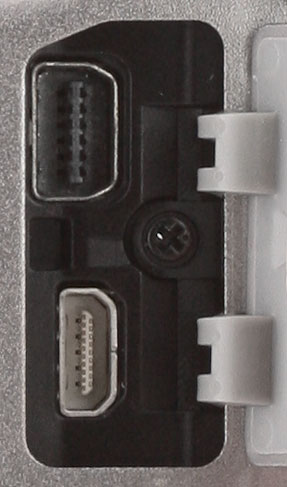
Connectivity. The Olympus E-PL3 includes USB 2.0 High Speed data connectivity, Type-C Mini HDMI high definition video output, and NTSC / PAL switchable composite standard definition video output with monaural audio. It's also compatible with Olympus' optional RM-UC1 USB remote control unit, which plugs into the combined USB/AV port. As mentioned previously, the E-PL3 allows for Bluetooth data transfer with the optional Olympus PENPAL accessory.

Storage. The E-PL3 stores images and movies on Secure Digital cards, and is compatible not only with the higher-capacity SDHC and SDXC card types, but also with higher-speed UHS-1 cards -- still a relatively rare capability as of this writing (June 2011). The E-PL3 also supports wifi-enabled Eye-Fi Secure Digital cards, for wireless transfer direct from the camera body.
Power. The Olympus E-PL3 draws power from either a proprietary BLS-1 or BLS-5 lithium ion battery pack. Expected battery life had not been disclosed at press time. Like other PEN models, no DC-input port is provided.
Bundle. The Olympus PEN E-PL3 will be sold in the US market in two different kits, differing solely in the choice of bundled kit lens. One kit will include the MSC M. Zuiko Digital ED 14-42mm II R f/3.5-5.6 zoom lens, and the other will ship with the MSC M. Zuiko Digital ED 17mm f/2.8 prime lens. Pricing and availability information had not been disclosed at press time.
Olympus E-PL3 size comparison
Olympus E-PL3 vs E-PL2


Olympus E-PL3 vs XZ-1


Olympus E-PL3 vs Sony NEX-C3


Optics
Kit Lens Test Results
Zoom
Typical zoom range for a kit lens, with very good performance.


The Olympus PEN E-PL3 is available bundled with an Olympus M.ZUIKO 14-42mm f/3.5-5.6 II R Micro Four Thirds lens. The kit lens possesses a very typical optical zoom range of 3x, and the 35mm equivalent focal range is about 28-84mm, because of the E-PL3's 2x "crop factor." Results are very good at 14mm, with strong detail and good contrast across the frame, though some chromatic aberration can be seen in the corners and edges. Results are also very good at the 42mm setting, with good sharpness and contrast, though some chromatic aberration is still visible. Overall, well above average performance here for an inexpensive kit lens. See below for comments on macro performance, geometric distortion, corner softness, etc.
Macro
An average sized minium area, with good detail. Flash exposure is dim.


As with zoom performance, the Olympus PEN E-PL3's macro performance will depend entirely on the lens in use. However, with the 14-42mm II kit lens set to 42mm, the Olympus E-PL3 captured a fairly average minimum area measuring 2.93 x 2.19 inches (74 x 56 millimeters). Sharpness is quite good over most of the frame, though corners are moderately soft. (Most lenses have some softening in the corners at macro distances.) Extreme corners show a very small amount of light falloff, though that's not unusual. The built-in flash throttled down too much at this close distance, resulting in a underexposed image.
Geometric Distortion
Low to moderate geometric distortion with the 14-42mm II kit lens in JPEGs, much higher in uncorrected raw files.
| In-Camera JPEG: Barrel distortion at 14mm is 0.8 percent |
 |
| In-Camera JPEG: Pincushion distortion at 42mm is practically nonexistent |
 |
| Uncorrected RAW: Barrel distortion at 14mm is 2.6 percent |
 |
| Uncorrected RAW: Barrel distortion at 42mm is is practically nonexistent |
 |
When shooting JPEGs, the Olympus PEN E-PL3's 14-42mm kit lens produced about 0.8 percent barrel distortion at wide-angle, which is about average but noticeable in some of its images. At the telephoto end, there is almost no visible distortion, only about two pixels. This is the tendency for the lens to bend straight lines outward (like a barrel -- usually at wide-angle) or inward (like a pincushion -- usually at telephoto).
To see how much correction is taking place in the camera, we converted raw files from the above shots with dcraw, which does not correct for distortion. As you can see, at wide-angle, barrel distortion is very high at about 2.6%, though pincushion distortion at telephoto is very low, almost nil. We expect to see high distortion at wide-angle from smaller interchangeable lenses though, so it's nothing to be concerned about unless you are using a raw converter which does not understand the embedded "opcodes" to perform distortion corrections automatically. Most raw converters these days are capable of applying distortion correction automatically, as specified by the manufacturer. (There is however going to be some loss of resolution as a result of such correction, because pixels in the corners of the frame are being "stretched" to correct for the distortion. Obviously, a lens that doesn't require such correction, and is also sharp in the corners to begin with would be preferable, but relaxing constraints on barrel and pincushion distortion likely brings other benefits in the lens design, such as cost, size and weight.)
Chromatic Aberration and Corner Sharpness
Moderate chromatic aberration at wide-angle and telephoto with the 14-42mm II kit lens. Some mild corner softening wide open.
Aperture: maximum |
|
 |
 |
| 14mm @ f/3.5: Lower left C.A.: Moderate Softness: Slightly soft |
14mm @ f/3.5: Center C.A.: Very low Softness: Sharp |
 |
 |
| 42mm @ f/5.6: Lower left C.A.: Moderate Softness: Slightly soft |
42mm @ f/5.6: Center C.A.: Very low Softness: A hint soft |
Chromatic Aberration. Chromatic aberration in the corners with the E-PL3's 14-42mm II kit lens is moderate and slightly noticeable at both wide-angle (14mm) and telephoto (42mm) when wide-open. In both cases, the color fringing gradually reduces in brightness and width as it approaches the center of the image, where it is practically nonexistent.
The Olympus E-PL3 does not appear to be reducing C.A. in its JPEGs, as uncorrected raw files have similar amounts.
Corner Softness. The Olympus E-PL3's 14-42mm kit lens produces only slightly soft corners at full wide angle, and the center is very sharp. Corners are also only slightly soft at full telephoto, though the center is not quite as sharp as wide-angle. There's also some mild vignetting (corner shading), as indicated by the darker corner crops compared to the center.
Very good performance for a kit lens here, especially considering the lens was wide-open for these shots. (Corner sharpness generally improves when a lens is "stopped-down" a couple of f-stops below full aperture. See below.)
Aperture: f/8 |
|
 |
 |
| 14mm @ f/8: Lower left C.A.: Moderate Softness: Fairly sharp |
14mm @ f/8: Center C.A.: Low Softness: Sharp |
 |
 |
| 42mm @ f/8: Lower left C.A.: Moderate Softness: Fairly sharp |
42mm @ f/8: Center C.A.: Very low Softness: Sharp |
Chromatic Aberration. With the aperture stopped down to f/8, chromatic aberration in the corners is still moderate.
Corner Softness. Corner sharpness improves at both wide-angle and telephoto when stopped-down to f/8, and sharpness improves in the center at full telephoto as well. Vignetting also improves to the point of being negligible. Again, very good performance for a kit lens.
Shading Compensation
The Olympus E-PL3 features optional Shading Compensation to reduce vignetting in JPEG images.
 |
||
| Shading Compensation: (14mm @ f/3.5) |
Off | On |
Mouse over the links above to compare thumbnails, and click on the links to load the full resolution images.
As you can see, the Olympus E-PL3's Shading Compensation reduces corner shading with the 14-42mm kit lens, so it's a useful feature at wide-angle when shooting wide-open. There's little corner shading to correct at telephoto.
Shading Compensation is off by default, not available when shooting video or when burst rate is set to SH, and is not available with all lenses. It may also produce more visible noise in the periphery at higher ISOs.
Olympus PEN E-PL3 Viewfinder
Viewfinder Test Results
Accuracy
Very good accuracy from the LCD monitor.

The Olympus PEN E-PL3's LCD monitor proved very accurate in record mode, showing just slightly over 100% coverage with our Olympus Zuiko Digital 50mm f/2.0 low distortion prime. Very good results here. Since the electronic viewfinder is optional, we didn't test its accuracy with the E-PL3, but we expect similar accuracy.
The images above were taken from our standardized test shots. For a collection of more pictorial photos, see our Olympus PEN E-PL3 Photo Gallery .
Exposure
Color
Saturation & Hue Accuracy
Accurate saturation levels with very good hue accuracy.
 |
|||
|
ISO Sensitivity
|
|||
| In the diagram above, the squares show the original color, and the circles show the color that the camera captured. More saturated colors are located toward the periphery of the graph. Hue changes as you travel around the center. Thus, hue-accurate, highly saturated colors appear as lines radiating from the center. Click for a larger image. | |||
Saturation. The Olympus PEN E-PL3 pushes reds a fair bit, but most other colors are pretty close to accurate. Default saturation is 106.2% (6.2 % oversaturated), which is lower than average. Put another way, the E-PL3 colors are more realistic than most cameras. Saturation remains stable across the ISO range, except at ISO 12,800 where it drops off noticeably. You can always adjust saturation or select a different picture mode, to adjust color to your tastes if you find default saturation a little too realistic. Most consumer digital cameras produce color that's more highly saturated (more intense) than what's found in the original subjects. This is simply because most people like their color a bit brighter than life.
Skin tones. Here, the Olympus PEN E-PL3 did well, producing fairly natural-looking Caucasian skin tones, just slightly on the pinkish side when color balance is optimized. Where oversaturation is most problematic is on Caucasian skin tones, as it's very easy for these "memory colors" to be seen as too bright, too pink, too yellow, etc.
Hue. The Olympus PEN E-PL3 did push cyan toward blue and oranges slightly toward yellow, but shifts were relatively minor to moderate. (The cyan to blue shift is very common among the digital cameras we test; we think it's a deliberate choice by camera engineers to produce better-looking sky colors.) Overall hue accuracy is quite good with a Delta-C color error after correction for saturation of only 3.9 at base ISO, which is much better than average. Hue is "what color" the color is.
Saturation Adjustment
The Olympus E-PL3 lets you adjust the image saturation, contrast, and sharpness in five steps each. As can be seen below, the saturation adjustment was quite effective, covers a useful range, and does a good job of not impacting contrast.
| Saturation Adjustment Examples | ||
 |
 |
 |
| -2 | 0 | +2 |
The table above shows results with the default as well as the two extreme saturation settings. Click on any thumbnail above, then click again to see the full-sized image.


Sensor
Exposure and White Balance
Indoors, incandescent lighting
Color casts with Auto, Incandescent and 2,600K white balance settings, but good color with Manual. Average exposure compensation required.


Indoors, under normal incandescent lighting, color balance is a touch cool with a bluish cast using the Auto white balance setting. Results with the Incandescent setting are a little warm and yellow. The Manual setting is by far the most accurate, while the 2,600 Kelvin setting is quite cool with a blue-green tint. The Olympus E-PL3 required an average amount of positive exposure compensation here, at +0.3 EV. (Our test lighting for this shot is a mixture of 60 and 100 watt household incandescent bulbs, a pretty yellow light source, but a very common one in typical home settings here in the U.S.)
Outdoors, daylight
Natural looking colors overall, though outdoor images were slightly underexposed at default exposure.
Outdoors, the Olympus E-PL3 performed reasonably well, with very good color, though exposure is a little dim at default settings. The Olympus E-PL3 required an above average amount of positive exposure compensation (+1.0 EV) to keep facial tones reasonably bright on the "Sunlit" Portrait shot. Default contrast is a bit high, though there are only a few blown highlights in the mannequin's shirt and flower, which is quite good. The Far-field shot is slightly underexposed at default settings, but has virtually no blown highlights, though there are some deep shadows that are a bit noisy.
See full set of test images with explanations
See thumbnails of all test and gallery images
Resolution
High resolution, ~1,700 lines of strong detail in JPEGs, up to about 1,900 lines from processed raw files.


In-camera JPEGs our laboratory resolution chart reveals sharp, distinct line patterns down to about 1,700 lines per picture height in both the horizontal and vertical direction before aliasing artifacts start to interfere with the pattern. Complete extinction of the pattern doesn't occur until about 2,700 to 2,800 lines, though. Adobe Camera Raw was able to extract more resolution, to about 1,900 lines in both directions, though color moire is more apparent. Use these numbers to compare with other cameras of similar resolution, or use them to see just what higher resolution can mean in terms of potential detail.
See full set of test images with explanations
See thumbnails of all test and gallery images
Sharpness & Detail
Good sharpness overall, though edge-enhancement artifacts on high-contrast subjects are visible. Mild noise suppression visible in the shadows.


Sharpness. The Olympus PEN E-PL3 captures sharp images overall, though edge enhancement artifacts are visible on high-contrast subjects such as sharpening halos around the thicker branches and pine cones in the crop above left. Still, results are pretty good as we've seen much higher default sharpening from other cameras. Edge enhancement creates the illusion of sharpness by enhancing colors and tones right at the edge of a rapid transition in color or tone.
Detail. The crop above right shows some fairly mild noise suppression artifacts in the darkest areas of the model's hair, smudging individual strands together, though quite a few strands remain visible. Overall detail is quite good for a 12-megapixel Micro Four Thirds model. Noise-suppression systems in digital cameras tend to flatten-out detail in areas of subtle contrast. The effects can often be seen in shots of human hair, where the individual strands are lost and an almost "watercolor" look appears.
Raw vs In-Camera JPEGs
As noted above, the Olympus E-PL3 produces sharp, detailed in-camera JPEGs, though with some visible sharpening artifacts at default settings. As is almost always the case, though, more detail can be obtained from carefully processing raw files than can be seen in the in-camera JPEGs. Take a look below, to see what we mean:


In the table above, mousing over a link at the bottom will load the corresponding crop in the area above, and clicking on the link will load the full resolution image. The super fine camera JPEG and Olympus [ib] conversion used default settings, while Adobe Camera Raw conversion was sharpened in Photoshop using unsharp mask of 300% with a radius of 0.3.
As you can see, the Olympus [ib] conversion resulted in an image very similar to the in-camera JPEG in terms of detail, color and contrast. The Adobe Camera Raw (version 6.6) conversion however contains fine detail superior to the camera's SuperFine JPEG or the Olympus software conversion at default settings, which is especially noticeable in the pine needles, though it does leave quite a bit more noise. Nevertheless, like previous Olympus PEN cameras, the E-PL3 rewards raw shooters with even better detail when using a good quality raw converter.
ISO & Noise Performance
Low noise and pretty good detail up to ISO 800, moderate to high noise at higher ISOs.
|
Default High ISO Noise Reduction
|
 |
 |
 |
| ISO 200 | ISO 400 | ISO 800 |
 |
 |
 |
| ISO 1,600 | ISO 3,200 | ISO 6,400 |
 |
||
| ISO 12,800 | ||
The Olympus PEN E-PL3's images are quite clean and detailed at ISO 200, the base ISO, though some minor chroma noise is already visible in the shadows. Detail is still very good at ISO 400, with just a bit more blurring and a hint more chroma noise creeping into the shadows. ISO 800 is noticeably softer with more smudging due to stronger noise reduction, but detail is still pretty good. At ISO 1,600, we see additional detail loss due to stronger smudging, as well as more obvious purple and yellow blotches in shadow areas. At ISO 3,200, noise grain is stronger, blurring fine detail even further despite the weaker luminance noise reduction. Chroma noise is better controlled at ISO 3,200 though. Noise and the effects of noise reduction are quite obvious ISO 6,400, obscuring almost all fine detail and making some shadows quite purplish while lighter tones have yellow blotching. By ISO 12,800, noise grain is the dominant feature with very little detail left, and a lot of chroma noise is present as well, with dark purple shadows and bright yellow splotches. Overall, noise performance is very similar to other recent 12-megapixel Olympus PEN models which is good, but not as good as most APS-C models. As always, see the Print Quality section below for maximum recommended print sizes at each ISO.
A note about focus for this shot: We shoot this image at f/4, using one of three very sharp reference lenses (70mm Sigma f/2.8 macro for most cameras, 60mm f/2.8 Nikkor macro for Nikon bodies without a drive motor, and Olympus Zuiko 50mm f/2.0 for Four Thirds and Micro Four Thirds bodies). To insure that the hair detail we use for making critical judgements about camera noise processing and detail rendering is in sharp focus at the relatively wide aperture we're shooting at, the focus target at the center of the scene is on a movable stand. This lets us compensate for front- or back-focus by different camera bodies, even those that lack micro-focus adjustments. This does mean, though, that the focus target itself may appear soft or slightly out of focus for bodies that front- or back-focused with the reference lens. If you click to view the full-size image for one of these shots and notice that the focus target is fuzzy, you don't need to email and tell us about it; we already know it. :-) The focus target position will simply have been adjusted to insure that the rest of the scene is focused properly.
Extremes: Sunlit, dynamic range and low light tests
High resolution with good overall detail, though somewhat limited dynamic range. Good low-light performance.


Sunlight. The Olympus PEN E-PL3 struggled a little with this difficult shot, requiring more than the average amount of exposure compensation to keep the mannequin's face reasonably bright. The E-PL3 required +1.0 EV exposure compensation, while most cameras we've tested required about +0.7 EV for this "Sunlit" Portrait shot. Dynamic range was limited, resulting in dark and somewhat noisy shadows, though few highlights where clipped in the white shirt and flowers even at +1.0 EV. Compared to compact system cameras using APS-C sensors, the E-PL3 performed below average, though performance here was about average compared to most Micro Four Thirds models.
Because digital cameras are more like slide film than negative film (in that they tend to have a more limited tonal range), we test them in the harshest situations to see how they handle scenes with bright highlights and dark shadows, as well as what kind of sensitivity they have in low light. The shot above is designed to mimic the very harsh, contrasty effect of direct noonday sunlight, a very tough challenge for most digital cameras. (You can read details of this test here. In actual shooting conditions, be sure to use fill flash in situations like the one shown here; it's better to shoot in open shade whenever possible.)
Dynamic Range Analysis
A key parameter in a digital camera is its Dynamic Range, the range of brightness that can be faithfully recorded. At the upper end of the tonal scale, dynamic range is dictated by the point at which the RGB data "saturates" at values of 255, 255, 255. At the lower end of the tonal scale, dynamic range is determined by the point at which there ceases to be any useful difference between adjacent tonal steps. Note the use of the qualifier "useful" in there: While it's tempting to evaluate dynamic range as the maximum number of tonal steps that can be discerned at all, that measure of dynamic range has very little relevance to real-world photography. What we care about as photographers is how much detail we can pull out of the shadows before image noise becomes too objectionable. This, of course, is a very subjective matter, and will vary with the application and even the subject matter in question. (Noise will be much more visible in subjects with large areas of flat tints and subtle shading than it would in subjects with strong, highly contrasting surface texture.)
What makes most sense then, is to specify useful dynamic range in terms of the point at which image noise reaches some agreed-upon threshold. To this end, Imatest computes a number of different dynamic range measurements, based on a variety of image noise thresholds. The noise thresholds are specified in terms of f-stops of equivalent luminance variation in the final image file, and dynamic range is computed for noise thresholds of 1.0 (low image quality), 0.5 (medium image quality), 0.25 (medium-high image quality) and 0.1 (high image quality). For most photographers and most applications, the noise thresholds of 0.5 and 0.25 f-stops are probably the most relevant to the production of acceptable-quality finished images, but many noise-sensitive shooters will insist on the 0.1 f-stop limit for their most critical work.
JPEG. The graph at right (click for a larger version) was generated using Imatest's dynamic range analysis for an in-camera Olympus E-PL3 JPEG file with a nominally-exposed density step target (Stouffer 4110). At the base ISO of 200 (the optimal ISO) and with default settings, the graph shows 10.4 f-stops of total dynamic range, with 7.2 f-stops at the "High" Quality level. These are average numerical results for a Micro Four Thirds sensor, though not as good as most APS-C models. Compared to the Sony NEX-C3 which uses an APS-C sensor, the E-PL3 scored quite a bit lower at the High Quality level (7.2 vs 7.84 f-stops), but scored similarly in total dynamic range (10.1 f-stops vs 10.4), though a lot of that has to do with differences in JPEG processing. Note though that this measurement has a margin of error of about 1/3 f-stop, so differences of less than 0.33 can be ignored.
Raw. The graph at right is from the same Stouffer 4110 stepchart image captured as a raw (.ORF) file, processed with Adobe Camera Raw using the Auto setting. (Slightly better results are likely possible with manually tweaking, but we weren't able to do much better.) As can be seen, the score at the highest quality level actually decreased slightly from 7.2 to 6.86 f-stops, but total dynamic range increased over a full f-stop, to 10.4 from 11.8. Again, these results are about average for a Micro Four Thirds sensor, but not as good as most APS-C sensors. (The Sony NEX-C3 for example managed 8.74 f-stops at the highest quality level, and higher-end NEX models do even better.) It's also worth noting here is that ACR's default noise reduction settings reduced overall noise somewhat (see the plot in the lower left-hand corner) relative to the levels in the in-camera JPEG, which would tend to boost the dynamic range numbers for the higher quality thresholds.
Contrast Adjustment
The camera's contrast adjustment was some help in handling the harsh lighting in our "Sunlit" Portrait and Far-field shots.
|
Minimum Contrast
|
|
 |
 |
| Contrast set to lowest, +0.7 EV |
Contrast set to lowest, Auto Exposure |
At its lowest contrast setting, the Olympus E-PL3 did a better job of revealing shadow detail, while maintaining fairly natural-looking skin tones. There were just a few blown highlights to begin with in both these shots so the decreased contrast setting left most highlights alone, but it did bring out more shadow and darker midtone detail.
| "Sunlit" Portrait Contrast Adjustment Examples | ||
|
 |
 |
| -2 | 0 | +2 |
The shots above show the results of the minimum, default and maximum contrast settings. While you can see the extremes, it's pretty hard to evaluate small differences in contrast on small thumbnails like these, click on any thumbnail to go to the full-size image. As you can see, the E-PL3's contrast setting is effective on both highlights and shadows, and didn't impact saturation much, which is a good thing.
|
Outdoor Portrait Gradation Comparison
|
|
 |
Gradation Normal (Default) Low Key Auto High Key |
 |
|
Gradation
Similar to dynamic range optimization systems from other manufacturers, the Olympus E-PL3's Gradation setting applies local contrast adjustments in an attempt to preserve shadow detail and prevent highlight clipping with the Auto setting. Above are examples of the Normal (default), Low Key, Auto, and High Key settings applied to our "Sunlit" Portrait shot with +0.7 EV exposure compensation. Mouse over the links to load the associated thumbnail and histogram, and click on the links to visit the full resolution image.
As you can see, the Low Key setting applies Gradation for making subjects darker (in the thumbnail and histogram above, you can see that the camera shifted levels to the left, darkening the image dramatically), while the High Key setting does the opposite for brighter subjects (shifting levels to the right so that lighter tones are blown, but darker ones are opened up). The Auto setting did a good job at toning down highlights and bringing up darker midtones without making the image too flat-looking or washed-out.
| Face Detection | ||
 |
 |
 |
| Off at 0 EV Aperture priority, f/8 |
On at 0 EV Aperture priority, f/8 |
Full Auto f/2 |
Face Detection
Like most Point & Shoot cameras these days (and most DSLRs in Live View mode), the Olympus E-PL3 has the ability to detect faces, and adjust exposure and focus accordingly. The E-PL3 does it automatically in iAuto mode, when a Portrait scene mode is selected, or when Face Detection AF mode is selected. As you can see from the examples above, it works well, as the image with face detection enabled is much better exposed for the face without having to use exposure compensation. The Full Auto setting worked even better by choosing a larger aperture (f/2). An excellent performance under very difficult lighting such as this.
Because digital cameras are more like slide film than negative film (in that they tend to have a more limited tonal range), we test them in the harshest situations to see how they handle scenes with bright highlights and dark shadows, as well as what kind of sensitivity they have in low light. The shot above is designed to mimic the very harsh, contrasty effect of direct noonday sunlight, a very tough challenge for most digital cameras. (You can read details of this test here.)
| 1 fc 11 lux |
1/2 fc 5.5 lux |
1/4 fc 2.7 lux |
1/8 fc 1.3 lux |
1/16 fc 0.67 lux |
1/16fc No NR |
|
|---|---|---|---|---|---|---|
| ISO 200 |
 1 s f2.8 |
 2 s f2.8 |
 4 s f2.8 |
 8 s f2.8 |
 15 s f2.8 |
 15 s f2.8 |
| ISO 400 |
 0.5 s f2.8 |
 1 s f2.8 |
 2 s f2.8 |
 4 s f2.8 |
 8 s f2.8 |
 8 s f2.8 |
| ISO 800 |
 1/4 s f2.8 |
 0.5 s f2.8 |
 1 s f2.8 |
 2 s f2.8 |
 4 s f2.8 |
 4 s f2.8 |
| ISO 1600 |
 1/8 s f2.8 |
 1/4 s f2.8 |
 0.5 s f2.8 |
 1 s f2.8 |
 2 s f2.8 |
 2 s f2.8 |
| ISO 3200 |
 1/15 s f2.8 |
 1/8 s f2.8 |
 1/4 s f2.8 |
 0.5 s f2.8 |
 1 s f2.8 |
 1 s f2.8 |
| ISO 6400 |
 1/30 s f2.8 |
 1/15 s f2.8 |
 1/8 s f2.8 |
 1/4 s f2.8 |
 0.5 s f2.8 |
 0.5 s f2.8 |
| ISO 12800 |
 1/60 s f2.8 |
 1/30 s f2.8 |
 1/15 s f2.8 |
 1/8 s f2.8 |
 1/4 s f2.8 |
 1/4 s f2.8 |
Low Light. The Olympus E-PL3 performed fairly well in low lighting, capturing bright exposures at our lowest light level at all ISOs. Noise was well controlled up to ISO 800, though chroma noise is noticeable in dark shadows already at base ISO. There are a few bright pixels visible here and there at low to moderate ISOs. (The E-PL3 does offer pixel mapping, so hot/dead pixels can be mapped out without a trip to a service center.) A lot of bright pixels (we wouldn't call them "hot") are however visible when long exposure noise reduction is turned off at lower ISOs, but they blend into the noise "grain" at ISOs above 800, where noise reduction is still active when turned "off". White balance was quite neutral using the Auto setting, just very slightly cool and magenta at most ISOs, slightly greenish at others. We didn't notice any issues with banding, though some minor heat blooming is visible, emanating from bottom right corner at higher ISOs.
The camera's autofocus system was able to focus on our subject down to just above the 1/8 foot-candle light level unassisted with the kit lens, which is pretty good for a camera using contrast-detect autofocus, and in total darkness with the aid of its focus assist lamp.
How bright is this? The one foot-candle light level that this test begins at roughly corresponds to the brightness of typical city street-lighting at night. Cameras performing well at that level should be able to snap good-looking photos of street-lit scenes.
NOTE: This low light test is conducted with a stationary subject, and the camera mounted on a sturdy tripod. Most digital cameras will fail miserably when faced with a moving subject in dim lighting. (For example, a child's ballet recital or a holiday pageant in a gymnasium.) Thanks to their phase-detect AF systems, digital SLRs tend to do much better than point & shoots, but you still shouldn't expect a quick autofocus lock with moving subjects. The E-PL3 uses contrast-detect autofocus, as is found in most point & shoot cameras, so its low-light focusing ability is less than that of most SLRs with phase-detect systems. That said, though, the larger, more sensitive pixels of the E-PL3's sensor do better under dim lighting than do the tiny pixels of most point & shoots, (A useful trick is to just prop the camera on a convenient surface, and use its self-timer to release the shutter. This avoids any jiggling from your finger pressing the shutter button, and can work quite well when you don't have a tripod handy.)
Output Quality
Print Quality
Good detail and color at 20 x 30 inches from ISO 200; ISO 1,600 images look good at 11 x 14; and even ISO 12,800 shots make a good 5 x 7.
 ISO 200 images look good printed at 20 x 30 inches, with good color and detail.
ISO 400 images are a little soft at 20 x 30, so we prefer the 16 x 20-inch prints, which look tack sharp at this size.
ISO 800 images are usable at 16 x 20, but better at 13 x 19 inches. Reds look a little soft at this size.
ISO 1,600 images have usable high-contrast detail at 13 x 19 inches, but other elements look better printed at 11 x 14.
ISO 3,200 shots look better printed at 8 x 10, though some reds at this point lose detail.
ISO 6,400 shots are usable at 8 x 10, but look better at 5 x 7 inches.
ISO 12,800 shots are surprisingly good at 5 x 7, though with some stippled chroma noise and a few pumped colors (oranges and yellows in particular). Printing at 4 x 6 tightens that up a bit, but I think most folks would be happy with 5 x 7.
Overall, the Olympus E-PL3 prints quite well, with good color and detail over the entire range. Even ISO 12,800 images have noise well under control without a lot of smearing or smudging.
Testing hundreds of digital cameras, we've found that you can only tell just so much about a camera's image quality by viewing its images on-screen. Ultimately, there's no substitute for printing a lot of images and examining them closely. For this reason, we now routinely print sample images from the cameras we test on our Canon Pro9000 Mark II studio printer, and the Canon Pixma MP610 here in the office. (See the Canon Pixma Pro9000 Mark II review for details on that model.)
The images above were taken from our standardized test shots. For a collection of more pictorial photos, see our Olympus PEN E-PL3 Photo Gallery .
Not sure which camera to buy? Let your eyes be the ultimate judge! Visit our Comparometer(tm) to compare images from the Olympus PEN E-PL3 with those from other cameras you may be considering. The proof is in the pictures, so let your own eyes decide which you like best!
Performance
Timing and Performance
Very good speed overall for a compact system camera, though sluggish startup.
| Startup/Shutdown |
||
| Power on |
~2.1 seconds
|
Time it takes to turn on and capture a shot. |
| Shutdown |
~0.9 second
|
How long it takes camera to turn off before you can remove the memory card. |
|
Buffer clearing time
|
5 seconds after 9 large/super fine JPEGs*
|
Worst case buffer clearing time. -- This is the delay after a set of shots before you can remove the card.
|
|
6 seconds after 9 RAW files*
|
||
|
11 seconds after 8 RAW+ LSF JPEG files*
|
||
|
*Note: Buffer clearing times measured with a SanDisk Extreme Pro 45MB/sec UHS-I SDHC card. Slower cards will produce correspondingly slower clearing times. Slow cards may also limit length of bursts in continuous mode. ISO sensitivity and noise reduction settings can also affect cycle times and burst mode performance.
|
||
Startup time was sluggish, even for a CSC, though shutdown was not bad. Buffer clearing time depends on the quality and number of shots, and on the speed of the memory card. With a fast 45MB/s UHS-I SDHC card, the E-PL3's buffer clearing times were good, though buffers weren't very deep.
| Mode Switching | ||
|---|---|---|
| Play to Record, |
~0.6 second
|
Time until first shot is captured.
|
| Record to Play |
~1.2 seconds
|
Time to display a large/super fine JPEG file immediately after capture.
|
| Display |
~0.6 second
|
Time to display a large/superfine JPEG file already on the memory card.
|
Mode switching was quite fast, except for Record to Play which was slow.
| Shutter Response (Lag Time) | ||
|---|---|---|
|
Full Autofocus,
Single-area AF mode |
0.241 second
|
Time from fully pressing shutter button to image capture, with the lens already at the proper focal distance setting. (All AF timing performed with the new Olympus 14-42mm II R kit lens at medium focal length.)
|
|
Full Autofocus,
Multi-area AF mode |
0.290 second
|
Time from fully pressing shutter button to image capture, with the lens already at the proper focal distance setting.
|
|
Full Autofocus,
Single-area AF mode Auto Flash Enabled |
0.433 second
|
Time from fully pressing shutter button to image capture, with the lens already at the proper focal distance setting, TTL Auto flash enabled.
|
|
Continuous AF
|
0.215 second
|
This mode usually shows no speed increase with our static subject; we have no way to measure performance with moving subjects.
|
|
Manual Focus
|
0.113 second
|
For most cameras, shutter lag is less in manual focus than autofocus, but usually not as fast as when the camera is "prefocused".
|
| Prefocused |
0.073 second
|
Time to capture, after half-pressing and holding shutter button.
|
The Olympus E-PL3's full-autofocus shutter lag in single-area AF mode (center AF position) was only 0.241 second with the 14-42mm II R kit lens. That's almost as fast as the typical SLR these days. In 35-point "All Targets" AF mode, this time increased to 0.290 second, which is still quite fast, especially for a contrast-detection system. Full autofocus shutter lag increased to 0.433 second with the flash enabled, which includes an additional delay for the preflash metering. Continuous AF mode resulted in a shutter lag of 0.215 second. When manually focused, the E-PL3's lag time was 0.133 second, which is pretty fast. The E-PL3's prefocused lag time of 0.073 second is also quite fast, though not as fast as most point and shoots.
To minimize the effect of different lens' focusing speed, we test AF-active shutter lag with the lens already set to the correct focal distance.
| Cycle Time (shot to shot) | ||
|---|---|---|
| Single Shot mode |
0.57 second
|
Time per shot, averaged over 7 shots, 4 seconds to clear*. |
|
Single Shot mode |
0.56 second
|
Time per shot, averaged over 8 shots, 5 seconds to clear*. |
|
Single Shot mode
RAW + LSF JPEG |
0.63 second
|
Time per shot, averaged over 9 shots, 10 seconds to clear*. |
| Early shutter |
No
|
Some cameras don't snap another shot if you release and press the shutter too quickly in Single Shot mode, making "No" the preferred answer. |
|
Continuous Mode |
0.19 second (5.33 frames per second);
9 frames total; 5 seconds to clear* |
Time per shot, averaged over 9 shots, then slows to an average of about 0.59s or 1.7 fps when buffer is full. |
| Continuous Mode |
0.19 second (5.33 frames per second);
9 frames total; 6 seconds to clear* |
Time per shot, averaged over buffer length of 9 frames, then slows to an average of about 0.72s or 1.4 fps when buffer is full. |
|
Continuous Mode |
0.19 second (5.34 frames per second);
8 frames total; 11 seconds to clear* |
Time per shot, averaged over buffer length of 8 frames, then slows to 1.35s or 0.74 fps when buffer is full. |
| Flash Recycling |
4.9 seconds
|
Flash at maximum output. |
|
*Note: Buffer clearing times measured with a SanDisk Extreme Pro 45MB/sec UHS-I SDHC card. Slower cards will produce correspondingly slower clearing times. Slow cards may also limit length of bursts in continuous mode. ISO sensitivity and noise reduction settings can also affect cycle times and burst mode performance.
|
||
Single-shot cycle times were quite good for a CSC, at about 0.6 seconds per shot no matter the type of file. Continuous mode was also quite good, at 5.3 frames per second in any quality mode. This roughly matches Olympus' spec of 5.5 frames per second, though we must point out that the burst speed falls to 4.1 frames per second when image stabilization is enabled according to Olympus. (We do all our lab tests on a tripod, so IS is always disabled for our measurements.) Buffer depths were good for an entry-level model, at 9 frames for large/super fine JPEGs or RAW, and 8 frames for RAW+JPEGs. Note that our test target for this was designed to be difficult to compress, so JPEG burst lengths should be longer with typical subjects.
Flash recycle time was about average with the included external flash, at 4.9 seconds after a full power discharge.
| Download Speed | ||
|---|---|---|
| Windows Computer, USB 2.0 |
6,898 KBytes/sec
|
Typical Values: |
Download speeds were not bad, quick enough that you probably won't feel the need for a separate card reader. (Note that this test was performed with a SanDisk Extreme Pro 45MB/sec UHS-I SDHC card: Slower cards would likely show slower transfer times.)
Bottom line, the Olympus E-PL3's performance is quite good for a CSC. It's a bit slower than the E-P3 in autofocus and shutter lag, but quite a bit faster in burst mode. Buffer depths were good for an entry-level model, especially given the burst rate.
Battery
Battery Life
Slightly below average battery life for a CSC.
| Operating Mode | Number of Shots |
|---|---|
|
Still Capture,
(CIPA standard) |
300
|
The Olympus E-PL3 uses a custom rechargeable lithium-ion battery pack for power, and comes with both a single battery and charger. The rated 300 shots per charge is a little below average for a compact system camera, and well below the capacity of most SLRs when using the optical viewfinder. We recommend getting a second battery for your E-PL3 if you plan any extended outings.
The table above shows the number of shots the camera is capable of (on a fully-charged rechargeable battery), based on CIPA battery-life and/or manufacturer standard test conditions.
(Interested readers can find an English translation of the CIPA DC-002 standards document here. (180K PDF document))
Flash
Olympus PEN E-PL3 Flash
Although the Olympus E-PL3 lacks any internal flash strobe, it provides for external flash strobes courtesy of a hot shoe--but note that it is shared with the accessory port, so use of flash or accessories is an either / or proposition.
The E-PL3 comes bundled with an accessory flash which has a guide number of 10 meters at ISO 200 equivalent (that works out to about 7m at ISO 100).
Flash modes include Auto, Fill-in, Red-eye Reduction, Slow Synchronization (1st curtain), Slow Synchronization (1st curtain)/Red-eye Reduction, Slow Synchronization (2nd curtain), Manual (Full, 1/2, 1/4, 1/8, 1/16, 1/32, 1/64), and Off.
The E-PL3's hot shoe is compatible with the FL-50R, FL-36R, FL-50, FL-36, FL-20, FL-14, and FL-300R strobes. Flash sync is possible between 1/60 and 1/160 second, and the E-PL3 also allows Super FP flash between 1/125 and 1/4,000 second, if supported by the attached flash. Flash exposure compensation is available within a range of +/- 3.0 EV, in 1/3, 1/2 or 1 EV steps. Finally, the E-PL3 supports four-channel wireless flash with the bundled strobe acting as a master, and off-camera flash strobes configured in up to 4 groups.
Bundled Flash Test Results
Coverage and Range
A weak flash despite being external, with somewhat narrow coverage.


Coverage and Exposure. Flash coverage was uneven at wide-angle (14mm), but much more uniform (albeit quite dim) at full telephoto (42mm). In our Indoor Portrait flash test, the Olympus E-PL3 underexposed our subject despite using an external flash, and a higher-than-average base ISO of 200. +0.7 EV flash compensation produced the brightest exposure (+1.0 EV was actually slightly dimmer), though it was still dim. The camera's Slow-Sync flash mode produced much better results at +1.0 EV aided by the slower 1/6 second shutter speed, though with a stronger orange cast from the ambient room lighting.
| Flash Range: Wide Angle | |||||
|---|---|---|---|---|---|
| 6 ft | 7 ft | 8 ft | 9 ft | 10 ft | 11 ft |
 1/60 sec f3.5 ISO 200 |
 1/60 sec f3.5 ISO 200 |
 1/60 sec f3.5 ISO 200 |
 1/60 sec f3.5 ISO 200 |
 1/60 sec f3.5 ISO 200 |
 1/60 sec f3.5 ISO 200 |
| 12 ft | 13 ft | 14 ft | 15 ft | 16 ft | |
 1/60 sec f3.5 ISO 200 |
 1/60 sec f3.5 ISO 200 |
 1/60 sec f3.5 ISO 200 |
 1/60 sec f3.5 ISO 200 |
 1/60 sec f3.5 ISO 200 |
|
| Flash Range: Telephoto | |||||
|---|---|---|---|---|---|
| 6 ft | 7 ft | 8 ft | 9 ft | 10 ft | 11 ft |
 1/60 sec f5.6 ISO 200 |
 1/60 sec f5.6 ISO 200 |
 1/60 sec f5.6 ISO 200 |
 1/60 sec f5.6 ISO 200 |
 1/60 sec f5.6 ISO 200 |
 1/60 sec f5.6 ISO 200 |
| 12 ft | 13 ft | 14 ft | 15 ft | 16 ft | |
 1/60 sec f5.6 ISO 200 |
 1/60 sec f5.6 ISO 200 |
 1/60 sec f5.6 ISO 200 |
 1/60 sec f5.6 ISO 200 |
 1/60 sec f5.6 ISO 200 |
|
ISO 200 Range. Flash exposure started out dim at 6 feet at wide-angle, then became dimmer as distance increased. At telephoto, flash exposures were even dimmer at 6 feet than they were at wide-angle, and gradually became dimmer as distance increased. Poor results here especially considering base ISO is 200 (we used to test flash range at ISO 100 if the camera supports it, but found many small cameras these days need at least ISO 200). You can always use a more powerful external flash, though.
| Manufacturer-Specified Flash Range |
|---|
| f/4.0 |
 8.2 feet ISO 200 |
Manufacturer Specified Flash Test. The Olympus PEN E-PL3's bundled flash has a Guide Number (GN) of 10 meters at ISO 200. That works out to about 8.2 feet at f/4. In the shot above, the E-PL3 did not perform as Olympus says it will, producing a dim exposure at the rated distance. Our standard test method for flash range uses a fixed setting of ISO 100 (when supported), to provide a fair basis of comparison between cameras. We've now also begun shooting two shots using the manufacturer-specified camera settings, at the range the company claims for the camera, to assess the validity of the specific claims.
Pricing and availability
Estimated street price for the Olympus E-PL3 kit bundled with either the 14-42mm II or 17mm kit lens is US$699.99, with shipments starting in September 2011. Available colors include Red, Black, Silver, and White.