


Overview
Sony Cyber-shot DSC-HX5V Overview
by Mike Pasini and Zig Weidelich
Review Date: 03/18/2010
The Sony Cyber-shot HX5V digital camera is unique for its 10.2-megapixel back-illuminated CMOS sensor, and prized for its 10x optical zoom lens in a pocketable size. The Sony HX5V's lens offers a useful 25mm wide-angle to an equally useful 250mm telephoto equivalent. The lens has a two-step aperture with an ND filter, which offers either f/3.5 or f/8.0 at wide-angle; at telephoto the maximum aperture is f/5.5, and the minimum aperture is f/13. Autofocusing is possible to just five centimeters at wide-angle, or 100 centimeters at telephoto.
The Sony HX5V can capture 4:3 aspect ratio images at up to 3,648 x 2,736 pixel resolution, 16:9 aspect ratio images at up to 3,648 x 2,056 pixels, or 60 fields-per-second video at 1080i (1,920 x 1,080 pixel) resolution or below with Dolby Digital stereo audio, using AVC HD compression. In addition, the HX5V includes an updated version of Sony's Sweep Panorama function. Now dubbed Intelligent Sweep Panorama, this now analyzes frame content when capturing and stitching images, avoiding chopping up larger moving subjects. The function allows automatic creation of 270-, 185- or 129-degree panoramas in-camera by simply sweeping the lens across the subject.
On the rear panel of the Sony HX5V is a 3.0-inch TFT Clear Photo LCD panel with 100% coverage, and a resolution of 230,400 dots. There is no optical viewfinder. The Sony HX5V has a 9-point autofocus system, and includes a face detection and recognition system, capable of detecting up to eight faces in a scene and differentiating between children and adults. This capability is used to provide a Smile Shutter function that automatically triggers the shutter when your subject is smiling, as well as both anti-blink and blink-detection features.
The Sony HX5V includes both a GPS receiver and compass built-in, allowing it to tag images with both the location and direction in which they were captured. Sony's bundled software and third-party applications such as Google Earth, which can read these tags, can then use the information to display images on a map by location. Cleverly, the GPS receiver is also used to keep the camera's internal clock accurate. The Sony HX5V also offers Sony's Optical SteadyShot image stabilization, useful for combatting blur caused by camera shake without adversely affecting image quality. This has been updated with a new Active Mode, available only when shooting video, which allows a greater range of movement for the corrective lens element so as to better correct motion from walking, etc.
As well as Intelligent Auto, Program, and Manual modes (but no Aperture or Shutter priority modes), the Sony HX5V offers a selection of fifteen scene modes, which offer an alternative method of control over the look of images. The final mode is something we've seen in Sony's Alpha digital SLRs, now making its Cyber-shot debut: the camera captures several images with varying exposure, and then automatically combines them into a single image with increased dynamic range. There's also an intelligent scene mode which can automatically select from a subset of eight scene modes as appropriate.
Images and movies can be recorded on Sony's proprietary Memory Stick Duo, PRO Duo (Mark 2 only), PRO Duo High Speed, or PRO-HG Duo cards, as well as the more common Secure Digital and Secure Digital High Capacity cards. 45MB of internal memory is also available, useful for capturing a few of the most important photos should you forget to bring a flash card along on a day trip. The Sony HX5V includes HDMI high definition and NTSC / PAL standard definition video output connectivity, as well as USB 2.0 High Speed data connectivity. Power comes courtesy of a proprietary NP-FG1 Infolithium battery pack.
The Sony HX5V digital camera is available from March 2010, priced at around US$350.
Sony HX5V User Report
by Mike Pasini
While it's hard to resist comparing the $349.99 Sony HX5V to other digicams, every attempt I've made feels like I'm slighting the HX5V.
It certainly looks like several of them. It's nearly identical, at least front the front, to the Panasonic Lumix ZS7. And at dueling distance you could easily mistake it for the Canon S90 or, if it were red, a Canon SX200.
And if you go deeper than looks, it even shares a few unusual features with digicams like the Casio FH100.
But all these similarities match just one or two features of the Sony HX5V. As Sony likes to put it, the company's strength comes from making its own lenses, sensors, and processors. The Sony HX5V combines the best of all three -- a Sony G lens, Exmor-R sensor, and Bionz processor -- to deliver a different photographic experience.
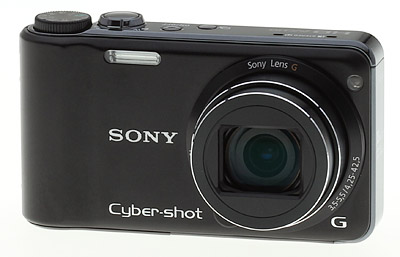
That experience isn't quite the one everybody is looking for, though. You know, the simplicity of a point-and-shoot with better quality. There's simplicity and there's quality in the Sony HX5V, but that's just the starting point. The experience itself takes you places other cameras just don't go, no matter their size.
Is it for everyone?
Sony says it designs for those niches in the market that aren't well served. You might think that means just a few people. But there are, apparently, quite a few people who are dissatisfied with the results they get from their current digicam and would love a camera that can deliver better looking pictures without requiring a few semesters at photo school.
The Sony HX5V -- with built-in GPS, 1080i HD video recording plus HDMI output, 10 fps continuous mode, special shooting modes like iSweep and Handheld Twilight modes -- will give them something to think about.
Design. Sony designed the HX5V to be pocketable. It isn't among the slimmest designs, nor is it going to fit in a credit card wallet. But it isn't much bigger. It easily fits in a shirt pocket without rearranging your collar.
That portability suggests you won't need a case for the Sony HX5V and it really does take some of the fun away using one. This is the sort of device you leave near your car keys and goes everywhere with you.
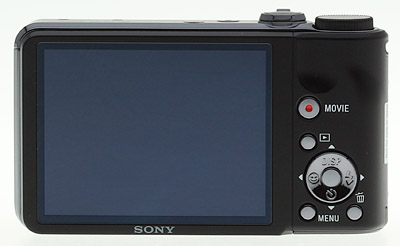
The rectangular body design is actually finished off on the right in something of a column that passes for a grip. It works well enough that I did not pine for an add-on grip like the ones Richard Franiec makes for the Panasonic LX3, Canon S90 and other small digicams. The body surface is slick metal rather than rubberized, so don't neglect to attach the wrist strap. But that's all I needed.
Like the Panasonic Lumix ZS7, the built-in flash sits right next to the grip, rather than on the corner outside the lens. Your shooting finger rests above it on the Shutter button and your middle finger sits a bit below it in the grip groove, but big hands or large fingers may obscure the flash.
There is a small bump at 7 o'clock on the lens flange but it isn't a release button. In fact, there are no filter threads or extension tube threads on the flange.
Like most digicams, the back and top panels have the controls. The sides are not used for anything but the wrist strap eyelet.

The bottom panel has Sony's proprietary connector to which you insert the octopus cable with composite video and USB connectors or the included HDMI adapter. The bottom panel also has a metal tripod socket in the corner under the lens, one speaker (although the Sony HX5V records in stereo from mics on the top panel) and the battery and card compartment at the other end.
The Sony HX5V specifications claim the camera can use either Sony's Memory Stick PRO Duo cards or SD/SDHC cards. But I was unable to fit an SD card in the card slot. The review unit (number 19) was not a production model, however. In fact, no manual was provided by Sony, so we'll have to take Sony's word that it works with both memory card standards, and agree that it's a bonus. Sony did tell us our unit was representative of production image quality.
A tour around the body is all you really need to get a clue how to use the Sony HX5V.
Controls. The top panel has a very small Power button with a green LED in the center to reveal status. It's a good bit too small for me, and because it's flush with the top panel, it's hard to find by feel. The camera turns on so quickly that turning it off to save battery life was something I did a lot. But finding the Power button was always a chore.
To the left of the Power button is the small Shutter Release mode button, which lets you select between taking a single shot or firing off a few. And by "a few" I mean up to 10 frames per second at full resolution. That's quite a bit more than most digicams this size can manage, which tend to be happy with about three fps or less.
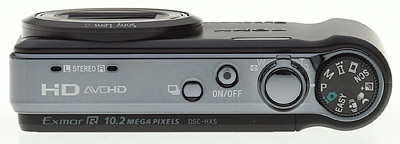
The round Mode dial is the largest thing on the top panel, sitting on top of the column that forms the camera's grip. It's just the right place for it. I found the icons a bit hard to read but when you shift the Mode dial, the LCD reports in nice large type just where you are. I did have to rely on that.
The Sony HX-5V's Shutter button is large and easily found. It not only captures stills or video but it can switch the camera to Record mode from Playback. It's ringed with a Zoom lever that I found far too jumpy to comfortably compose images. The zoom behavior is the one thing that was not up to snuff on the Sony HX5V.
The back of the Sony HX-5V has just a few buttons, which means the LCD menu system is where you have to go for finer control of exposure.
At the very bottom are the Menu and Trash buttons. Menu takes you to the Sony HX-5V's LCD menu system, of course, which you navigate with the four-way navigator above the button, confirming selections with the OK button at its center.
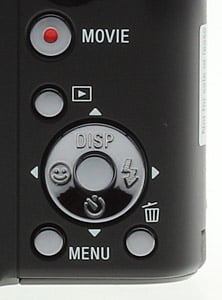
The navigator arrow buttons do double duty, handling a few camera functions: The Up arrow changes Display modes: Normal, Bright, Bright with Exposure Data, Bright with Image Only. The Right arrow steps through the Flash modes, which include Auto, Forced, Slow Synchro, and Off. The Down arrow cycles through the Self-Time modes, including Off, Ten Seconds, Two Seconds, Self-Portrait One Person, and Self-Portrait Two People. The Left arrow toggles Smile detection.
I had a recurring problem using the arrow keys to cycle through menus. The natural inclination, once a menu is displayed, is to use an Up or Down arrow to move the selection. That, however, changes the whole menu, not the option. You have to keep pressing the direction key to change options.
Above the navigator is the Playback button, which also powers the camera on. That's a good thing because when you transfer images using the octopus cable, you put the camera face down on the table -- and that's not when you want the lens to pop out. But the Playback button can't power down the camera. For that you have to use the illuminated Power button on top.
Above the Playback button is a larger round button with a red dot in the center. It's the Movie record/standby button. No need to dial in Movie mode on the Mode dial to grab a video clip. Just press the Movie button. Quite a few cameras this year include this feature and it's very handy. Without it, you can easily miss the moment.
The Clear Photo LCD is a large 3.0 inches with 230K pixels. The surface was very hard and not easily scratched. I was careful with it, but the worst thing it picked up were fingerprints. Those, however, were pretty hard to remove. I had to buff with a microfiber cloth.
The LCD image was easy to see in bright sunlight, however, a good thing since there's no other composing device on the Sony HX5V. We did, as I said, have trouble judging exposure when the screen was set to one of the Bright options.
The only problem I had with it was shooting in the dark (which, after all, is something you can do with a Sony HX5V). When using a 16:9 aspect ratio, I couldn't frame my images precisely because the non-imaging areas of the LCD were black, just like the background of my scene.
Lens. With 10 elements in 7 groups including 4 aspheric elements, the Sony G lens on the Sony HX5V is real glass.
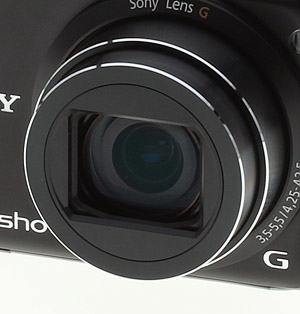
Its zoom range begins at a surprisingly useful 25mm (35mm equivalent) and extends to 250mm, about the limit of handheld focal lengths. That 10x range was simply ideal for me.
Movie mode does affect focal length, bumping it up to 30-300mm in 16:9 widescreen or 36-360mm in 4:3.
One of the absolute delights of this G lens is its automatic iAuto Macro mode. You may have noticed there was no Focus mode button on the back panel. You just don't need it. You can get as close as 0.16 foot in wide-angle or 3.28 feet in telephoto and the Sony HX5V will still find focus.
If there was one disappointment to rival the Zoom lever dysfunction, it's the available apertures on the Sony HX5V. There are just two: f/3.5 and f/8.0. A neutral density filter is also employed, but two aperture settings is precious few. In Manual mode at full telephoto only f/5.5 or f/13 were available and at wide-angle only f/3.5 and f/8.0. That may explain why there is no Aperture Priority mode on the Sony HX5V.
Image stabilization is Sony's optical SteadyShot technology. The latest version of Sony's SteadyShot image stabilization technology now compensates for a larger range of motion (like walking as you shoot). There is no menu item to disable it or pick a mode, however. That speaks to the intended audience for the camera, apparently. And frankly, that would be me. I turn it on in normal mode and leave it. Why wouldn't I want steady images?
Modes. The available shooting modes on the Sony HX5V are all accessed from the Mode dial on the top panel.
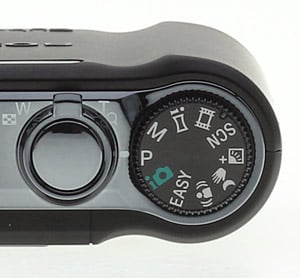
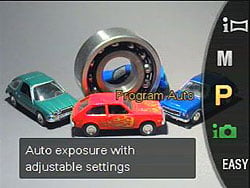
There are three main still modes: Easy, Intelligent Scene Recognition and Programmed Auto. There is one Manual mode (no Aperture Priority or Shutter Priority). There are several unusual modes including Anti Motion Blur, Handheld Twilight, Backlight Correction HDR. Then there is Scene Selection. And Movie mode. And finally iSweep Panorama mode.
Easy mode displays simple instructions on the LCD with the camera under automatic control, relying on Intelligent Scene Recognition to set the camera options. Preview mode is also simplified. Menu options use very large type and are greatly reduced. For example, only Image Size (Large or Small options) and GPS settings (On or Off) are available. Flash options are limited to Auto or Off, as well.
Intelligent Scene Recognition mode automatically detects nine different types of scenes and, within 1/30th of a second, selects the appropriate camera settings. The nine scenes include Backlight, Backlight Portrait, Twilight, Twilight Portrait, Twilight using a tripod, Portrait, Landscape, and Macro.
iSCN has two modes: Auto and Advanced. In Auto Mode, the camera takes a single shot using optimized settings. In Advanced Mode, the camera takes a photo with optimized settings and, if the lighting is difficult (either low light or back light), it immediately takes a second photo with different settings so you can choose between them.
Program Auto selects the shutter speed and aperture automatically, letting you adjust overall exposure using the EV option in the menu system.
Manual mode lets you select between the Sony HX5V's two apertures and any shutter speed from 30 seconds to 1/1,600 second. Press the OK button to change the displayed values using the arrow keys.
Anti Motion Blur captures six images in a fraction of a second at a higher shutter speed than a single exposure would call for. It then composites the six images into one, building the equivalent of a long exposure but avoiding the side effect of subject blur. And it does this without requiring a tripod, aligning the images precisely.
Handheld Twilight is, I must insist, misnamed. This is not something you'll only use at twilight. Here in the fog of San Francisco twilight is never guaranteed, but I use HHT all the time because I love shooting in low light. It's really Handheld Low Light mode.
Again the Sony HX5V captures six images (it seems to be a maximum of six, but Sony says six period) in a fraction of second as you handhold the camera. Then it composites those images into one image that is surprisingly sharp and devoid of noise.
The sharpness comes from careful alignment and the noise reduction from averaging the values of the pixels in the same location on each shot. Brilliant.
What you get are images you otherwise would never be able to capture. You can shoot in the dark (and I did). You can shoot in candlelight. You can shoot in streetlight. The only catch is that the subject itself must not be moving. Much. More about this in the Shooting section.
Backlight Correction HDR is another mode that relies on the Bionz processor to composite an image. In this case the Sony HX5V takes two shots at different exposure settings, one for highlights and one for shadows, before building one image with the best of both, extending the density range of the shot.
This is Sony's answer to the backlighting problem where your subject is in the shade of a brighter background light like a sunset or a window, a situation which normally captures a silhouette, not the person you thought you were photographing.
But it obviously has many other uses. I think of it as HDR mode. Not the stylized HDR effect Photomatix users foist upon innocent bystanders, but an actual high density range mode that extends tonality with detail beyond what Sony's Dynamic Range Optimization contains.
Scene modes include High Sensitivity, Twilight, Twilight Portrait, Soft Snap, Landscape, Beach, Snow, Fireworks, Advanced Sports Shooting, Gourmet, and Pet.

AVCHD Movie. 1920 x 1080 60i HD movie with "Active" SteadyShot. (Click to download 6.8MB MTS file.)
Movie modes. The Sony HX5V has five movie modes. For the highest quality, it offers AVCHD recording at 1920 x 1080 and 60 fields per second. There is also a 1440 x 1080 AVCHD mode which may sound like a 4:3 aspect ratio, but is actually a subsampled 16:9 mode. AVCHD captures more detail and records smoother movement while minimizing file size. But you can also record HD video in MP4 mode at 1440 x 1080, 1280 x 720 or 640 x 480, all at 30 fps.
Sony claims the Bionz processor can deliver "a superior level of image smoothness" with optical SteadyShot in "Active" Movie mode. You can walk, ride or jog as you record and the scene will be stabilized. We tried it walking down a steep trail and found the video was not as disorienting as we expected (see clip at left).
iSweep Panorama is the last option on the Mode dial but the one that's the most fun. I really needed the manual for this one because I kept goofing it up by panning too slowly. But the game is played by sweeping from one side to the other (or up and down or down and up: you use the menu system to indicate which way you're going) as the camera grabs 100 shots and stitches them together in one second.
Playback is dramatic. Press the OK button and the camera plays the image back at full height, panning just as you did when you took the shot. And if the LCD isn't big enough for you, it works the same way on your HDTV.
This version of the feature is more intelligent than the first release last year. It can detect faces and moving objects, stitching in the faces and skipping the moving subjects to avoid distortion. It can also automatically adjust capture speed for a smoother image. And the sweep can now extend to 270 degrees, another 100 degrees from the HX1. It seemed to composite better, too.
Now if I could just get the timing down right....
TransferJet. TransferJet is a new wireless transfer protocol supported by Canon, Casio, Kodak, Nikon, Olympus, Panasonic, and Samsung, all members of the TransferJet Consortium. Files are transferred wirelessly between two TransferJet devices when they are brought within an inch of each other. According to the spec, transfer speed can achieve up to 375 megabits per second and no device pairing is required, as it is with Bluetooth.
The Sony HX5V supports this new protocol (although it can be disabled in the Setup menu). But to take advantage of it, HX5V owners will need a TransferJet-capable Memory Stick for about $100. And a TransferJet-capable device to receive the files.
GPS, Compass. Yes, the Sony HX5V has a built-in GPS radio. Somewhere. In my experience with several GPS devices (reviewed elsewhere on this site), they all take a few beats to lock into the available satellites and they all have quite an appetite for battery power.

GPS. Lightroom's metadata display includes a button for GPS tags that takes you right to Google Maps.
No doubt the GPS radio in the Sony HX5V also drains the camera's battery some, but it didn't severely impact recording time, which Sony estimates at 310 images or 155 minutes. I don't know how they managed that, but hurray.
A small icon on the LCD indicates GPS is active, and when it's sufficiently synched, three bars appear next to the icon. Before it syncs, three very small lines appear before a big circle and slash, indicating "no sync." The three very small lines flash until there are three, and then the three bars appear.
Unfortunately it takes a few beats to sync and a few more to sync with more satellites (three to five minutes). There's no LED on the Sony HX5V to indicate sync, as there is on the aftermarket units I've used. If it hasn't yet synced, no GPS data is recorded, so watch that status icon if geolocating is important to you.
Another icon just left of the satellite icon, in the form of a compass, shows the camera's orientation. You do have to orient the compass in the Setup menu by waving the camera in a figure eight pattern until it beeps (which happens quickly). But a red arrow in the icon will then indicate North.
Together they give you the longitude, latitude, altitude (such as GPS can) and heading of the camera for any particular image.
It's so unobtrusive (you pay no penalty for using it) that you may be inclined to turn this GPS and compass combo on and use it all the time. But if you post your pictures publicly, think this strategy over carefully. Do you really want to reveal the location of, say, your private residence or the home of some child whose party you attended?
Lenses, Sensors, Processors. From this scattered description of the Sony HX5V, it may not be obvious how Sony's own lens, sensor and processor combine to deliver some marvelous benefits. That's especially true because some of them, like SteadyShot image stabilization and Dynamic Range Optimization, are just enabled and configured without a menu item to highlight them.
To rectify that situation lets follow a photon through the Sony HX5V to see what Sony technology does to it.


Zoom Range. 25mm to 250mm to 2x digital zoom.
The G lens is the point of entry and it's no tiny compact lens. With 10 elements in 7 groups including 4 aspheric elements, it's more of a photographic tool than the any but long zoom digicams offer. No surprise, either, because G lenses are used in Sony's dSLRs and prosumer HD camcorders, too. Optical SteadyShot image stabilization smooths the effects of camera shake.
Next, our little photon hits the Exmor-R CMOS sensor. You've been told over and over that the larger the sensor the better the light-gathering ability. That means higher ISOs with lower noise.
But the Exmor-R is a small sensor. And yet Sony measures double the light-gathering ability of similarly-sized sensors. How can that be?
A conventional sensor is a sandwich of technology. On top are small lenses that bend the light into a red, green or blue color filter. Below the filter is where all the electrical connections reside with narrow channels for the photon to pass through to the light-receiving surface on the photodiode on the bottom layer. The wiring layers, used for signal propagation, rob the photodiode of light.
On an Exmor-R sensor, the top layer is still the on-chip lens over a color filter, but the light-receiving surface and photodiode are moved above the electrical connections. Noise is reduced and nearly twice as much light gets to the photodiode.
There's more on this interesting approach (also being pursued by Casio and Fujifilm) on Sony's site.
Now things get interesting for our photon. The Exmor-R sensor passes it on to the Bionz processor. It's like being sent to a spa.
If you were in Burst mode, you can capture 10 frames a second at full resolution. If you were in iSweep Panorama mode, 100 shots are stitched together in under a second. If you were in HDR mode, two shots are composited. In Handheld Twilight and Anti Motion Blur modes, up to six images are composited. And even if you were just in Easy mode or Program Auto, Dynamic Range Optimization made sure your highlights weren't blown out and your shadows didn't muddy their detail.
Storage & Battery. In addition to the 45MB of internal memory, the Sony HX5V supports both Sony's proprietary Memory Stick PRO Duo card format and SD/SDHC cards in a hybrid card slot. This particular review unit was only able to use MS cards, however. For capturing video, Sony recommends Memory Stick PRO Duo with Mark2 logo or PRO-HG and Class 4 or higher SD/SDHC cards.
The small InfoLITHIUM G type 3.6V battery consumes about 1.1 watts. Sony rates it for 310 still images or 155 minutes. Sony lists a $39.99 AC adapter for the Sony HX5V, which connects via the multi-connector. A second battery costs $49.99.
Image Quality. Our lab shot of the Resolution target at ISO 125 shows excellent resolution running up to about 1,600 lines both horizontally and vertically.
The Still Life at ISO 125 was revealing. The colored yarns were easily distinguishable and the white yarn retained detail. The proportional scale below it was readable and sharp throughout. The dark and light napkins under the mug both held detail without the lighter one blooming. The Samuel Smith label did not hold detail in the "Pure Brewed" type, but it did hint at it. The salt and pepper shakers likewise held detail. It's not quite as good as we've been seeing from 12-megapixel sensors at even higher ISOs, so keep that in mind when considering whether the 10-megapixel Exmor sensor is delivering more than the 12-megapixel sensor on the Panasonic ZS7, for example.
The Multitarget test at ISO 125 and wide-angle showed very little softening in the corners, as well as very low geometric distortion. Chromatic aberration was also fairly low.
There seems to be some noise suppression going on (an old Sony weakness), particularly at higher ISOs, but even at the lowest. This is apart from the long exposure noise reduction tracked in the Exif header.
Shooting. Shooting with the Sony HX5V is not the same kind of fun you can have considering the focal length, ISO, aperture, and shutter speed on your dSLR. It's a different kind of photography, much like snow boarding is a different winter sport than cross country skiing.

And, in fact, in can be a little unnerving to cede as much control to the camera as the Sony HX5V takes. The tweaks you're used to making just aren't available.
So, you might wonder, what do you do with the thing?
The first thing we did was take some absurdly low light photos in Handheld Twilight mode. We had some flowers on the dining room table, dimmed the halogen lights and took a shot. The white balance was crazy, so we dove into the menu system, set the white balance by aiming at a napkin and took another HHT shot. Bingo!
That was too easy, we thought. What about doing a macro in HHT? And just to make it interesting, let's shoot a label on the minerale bottle. No way that will line up and no way we'll get any depth of field.
Oh were we wrong. So wrong. We doubled over laughing. Smart little camera. We got the picture we wanted instead of the picture we expected.
The next day, we did a series of low light shots of the dolls: the gallery shots YDSC00019 through YDSC00026. Disregard the Exif display, you'll need a program to tell the modes. Here they are: HDR, HHT, Scene High ISO, Program ISO Auto/400/800/1,600/3,200.
What can we learn from this? A few things.
That HDR shot two images at ISO 800 while HHT shot six at ISO 3,200 for one thing. Why ISO 3200? Because compositing the six shots, the Sony HX5V had no fear of ISO 3,200 noise and it was able to use a faster shutter speed of 1/10 second (SteadyShot to the rescue there, too, BTW).

Oddly enough, shooting in Scene mode at High ISO also used ISO 3,200 but at 1/8 second. I prefer the tonality of the HHT shot to the High ISO shot.
That takes us to Program Auto on the Mode dial (where we usually shoot), manually stepping through the higher ISO options. The first interesting thing to notice is that Auto is capped at ISO 400 even though at 0.6 second shutter speed we ended up with a blurry image.
ISO 800 at 0.4 second is still too slow a shutter speed but at ISO 1,600, the shutter gets into SteadyShot range at 1/10 second. That's a darker shot than the ISO 3,200 shot at 1/10 second, though.
Low light conclusion? Use HHT. It works.
Another thing that was apparent right from the start was how useful the shutter sound was for these longer exposures. You can actually hear if the shot is too long for a good handheld result and switch to another mode.

The next shot on the gallery page is a macro of an old carpenter's pencil captured at f3.5. There are two things I loved about this shot. The first is that I didn't have to switch into Macro mode. The camera did that automatically. The second is that the depth of field is unusually generous for a macro shot. It was the shot I wanted, not the one I expected again.
Five shots from the Photoshop anniversary party at the Palace of Fine Arts follow the macro shot. Three of them are of the Palace itself in the fog at night. These shots include GPS data (in case you don't know where the Palace is). They also show HHT in operation.

It's interesting to note that the Sony HX5V elected to disable DRO for these shots. And that the camera knew it was a night scene.
When I went into the theater, I tried a few settings before settling on Program Auto, ISO 800 (because Auto is capped at ISO 400) and -1.7 EV (to accommodate the stage lighting). I wasn't close to the podium. The Exif data doesn't include distance data but you can see from the focal length that I'm at the full telephoto position.
When I shot these pictures I really didn't think I was getting anything usable. I really should have been closer but I would rather have streaked the stage than sauntered up below Scott Kelby with a point-and-shoot and blocked the Knoll brothers, Jeff Schewe, Stephen Johnson, Mikkel Aaland and every other Photoshopping legend in town to take a few closer shots of the speakers.

It was only when I processed the images for the story that I marveled at how well ISO 800 stood up. The 250 pixel head shots that ended up in the story are themselves reduced, of course. But the gallery shots show the full resolution story. The shot I wanted, certainly not what I expected.
My next excursion was a visit to the Rumbolino, getting a little deferred maintenance at Daytona Motors. I turned on GPS and took a long walk, for the most part shooting in Program Auto and enjoying both the 25mm and 250mm ends of the lens.
YDSC00102 is an HDR shot, the exception, but the scene called out for it. Normally, you'd expect the sky to go white and the road above to be devoid of detail. But in this case I got what I wanted.
The walk ends with a close-up of a flower. Again, not having to worry about when to switch to Macro mode makes this kind of thing a real pleasure. One you can enjoy any time.
GPS Tags
Sony HX5V GPS tags with sample values
- GPSVersionID: 2.2.0.0
- GPSLatitudeRef: North
- GPSLongitudeRef: West
- GPSAltitudeRef: Above Sea Level
- GPSTimeStamp: 22:43:49.45
- GPSStatus: Measurement Active
- GPSMeasureMode: 3-Dimensional Measurement
- GPSSpeedRef: km/h
- GPSSpeed: 0.3
- GPSTrackRef: True North
- GPSTrack: 185.1
- GPSImgDirectionRef: Magnetic North
- GPSImgDirection: 6.25
- GPSMapDatum: WGS-84
- GPSDateStamp: 2010:02:22
- GPSDifferential: No Correction
-
- GPSAltitude: 263.7 m Above Sea Level
- GPSDateTime: 2010:02:22 22:44:10.144Z
- GPSLatitude: 37 deg 45' 16.59" N
- GPSLongitude: 122 deg 26' 46.43" W
- GPSPosition: 37 deg 45' 16.59" N, 122 deg 26' 46.43" W
plus
My next excursion was up Twin Peaks to shoot the zoom range shots. Again, GPS was active. The GPS tags and typical values reported by the camera are shown at right.
On the way up, I took a lot of macro shots. The purple flowers are backlit and my posture was unsteady, still the shot is crisp at 1/160 second. I hadn't expected that. Color on the shot of the poppy is just right, deep but not overly saturated. I did have trouble with some red flowers in the rain (which were oversaturated) but red is a problem in general.
There are the usual zoom shots, which include the 2x traditional digital zoom (500mm equivalent).

And then there is an iSweep Panorama. Two, actually. One shot using a 4:3 aspect ratio and another using 16:9. Stitching seemed better in the Sony HX5V than last year's version of Sweep Panorama. I finally figured out I could fill the panorama frame (which seems to be a fixed size no matter how you pan) by moving across the scene faster.
More close-ups and one wide-angle of a row of logs with a bike rider resting at the top of the hill, a nice shot that came together with DRO in the blink of an eye. That's something you can do with the Sony HX5V that a more involved camera would take much longer to accomplish.
I reviewed these shots on an HDTV using the included HDMI adapter. This particular HDTV has one (occupied) HDMI input, so I merely borrowed the other end of the cable, attached it to the adapter and plugged the adapter into the connector on the bottom of the Sony HX5V. Then I pressed the Playback button to turn the camera on and switched inputs on the HDTV until the HDMI connection was being read. Very simple.

Sony has a wonderful slide show presentation (in addition to a straight slide show option) with music and various styles available. I just used the arrow keys, though, to linger over my shots. They were crisp with excellent color.
But the one thing I got a thrill out of were the pano shots. Press the OK button and the shot scrolls from left to right like Ken Burns was your uncle. On an HDTV this is breathtaking.

AVCHD Movie. Optical zoom supported. (Click to download 7MB MTS file.)
Stills don't zoom well, though. It seems I wasn't getting the full resolution of the image. An Exif tag gives a clue: MPImageType is "Large Thumbnail (full HD equivalent)" -- suggesting for HD display only the thumbnails are transmitted. The Multi-Picture Format to which this tag refers is documented by CIPA.
Movies played very nicely on the big screen, too.
The final three shots in the gallery were taken on a rainy day. I didn't expose the camera to a downpour but it held up well in the elements. It isn't waterproof, but it's nice to know you can use it if you're cautious.
Sony HX5V Print Quality
 Printed results from the Sony HX5V are good, handling enlargement up to 13x19 inches at the lowest ISO settings, though with some noticeable softness due to overaggressive noise suppression at ISO 125 (the lowest setting). 11x14-inch prints look better at both 125 and 200. ISO 400 also looks good at 11x14, but with a little more softening in low contrast areas. ISO 800 shots are soft but usable at 8x10, and ISO 1,600 shots look good at 5x7 inches. ISO 3,200 produces a quite good 4x6, with good color and decent shadows. While it's an overall good performance from the Sony HX5V, it's a little disappointing when you consider the promise of its back-illuminated sensor.
Because the magic of the Sony HX5V is found in modes like Handheld Twilight, we also printed a sample of our Low Light test shots shot in that mode, adjusting levels because our HHT shots were a bit dim, and prints looked good printed up to 11x14 inches.
In the Box
The Sony HX5V retail package includes:
- Sony HX5V camera
- NP-GB1 rechargeable battery pack
- Battery charger
- Wrist strap
- Software CD-ROM
- Multi-connector AV/USB cable
- HDMI adapter
Sony HX5V Conclusion
| Pro: | Con: |
|---|---|
|
|
That's a longer list of Cons than I expected. The Con items themselves represent relatively minor issues or misplaced expectations whereas the Pro items represent real value. So don't let the list fool you.
Let the Sony HX5V fool you instead. Turn it on, compose the image and fire. Don't worry about the settings except to ask yourself if you should be in Program Auto, HDR, HHT or iSweep Panorama. And maybe 4:3 or 16:9. Then let the camera take it from there.
You'll be as surprised as I was when you get the picture you wanted instead of the one you expected. The Sony HX5V will capture what you saw, what attracted you to the scene, not what a camera sees through its tiny lens, crammed on its tiny sensor and massaged with brass knuckles by its image processor. The Sony HX5V makes few excuses.
And a camera that makes few excuses is a great traveling companion. You don't have to worry about choosing between a wide-angle zoom and a long zoom because the compact Sony HX5V starts at a very wide 25mm and stretches to a barely hand-holdable 250mm. You can get the interior of a chapel or, just as easily, that faraway castle.
And when you're in that dark little chapel, you can switch to the Sony HX5V's Handheld Twilight mode and actually get the picture. It's great for museums, too, where flash is verboten and tripods proibito. You won't need either with the Sony HX5V. There's even a Gourmet Scene mode to record your culinary adventures, too.
When we printed and compared images from the Sony HX5V and its nearest competitors (the Canon SX200 and Panasonic ZS7), the Sony came in one size smaller at the lowest ISO, producing "only" a 13x19-inch print, while the other two managed a 16x20. That's really not a big difference, though. Considering that the HX5V is a 10-megapixel sensor, it does fairly well stacked up against these two 12-megapixel sensors. There was a little more noise suppression smudging in the HX5V as well, but it didn't show up in the printed results.
Still, for a 10x zoom to output 13x19-inch prints is pretty impressive. Add in the superb usability and low light modes, there's no question that the Sony HX5V is a Dave's Pick if there ever was one.
Optics
Sony HX5V Optics
Lens
Zoom
A 10x optical zoom range, starting at a wide 25mm equivalent, with very good performance. Good results from the 2x digital zoom.


The Sony HX5V's lens offers a very useful 10x optical zoom range, equivalent to a 25-250mm zoom on a 35mm camera. Performance at full wide-angle is very good for such a compact long-zoom, with hardly any blurring or coma distortion in the corners. There's a small amount of chromatic aberration visible along the edges of the frame, but it's really quite low for the range offered by this compact lens. At full telephoto, sharpness is also very good across the frame, and chromatic aberration is also fairly well controlled. The camera's 2x digital zoom performs well. Sony sensibly offers up to only 2x digital magnification, so image quality is better than most cameras at 4x digital zoom, which really is too much to expect for a quality digital enlargement.
Macro
Smaller than average macro area, with strong detail. The Sony HX5V's flash throttled down well.


The Sony HX5V's macro setting captured a fairly small minimum area measuring 1.59 x 1.19 inches (40 x 30 millimeters). Detail is very good, but with some corner softness we often see at minimum focusing distance. Still, the amount of corner softening is lower than many cameras we've tested. (Most cameras have some softening in the corners in macro mode.) The Cyber-shot HX5V's flash did a good job throttling down, but there is a shadow in the lower-left, so exposure is somewhat uneven. You may want to use external lighting for your closest macro shots.
Geometric Distortion
Much lower than average distortion at both wide-angle and telephoto.
| Pincushion distortion at 25mm is <0.1% |
 |
| Barrel distortion at 250mm is <0.1% |
 |
The Sony HX5V's images show very little geometric distortion. At full wide-angle, there is a bit of complex "moustache-shaped" distortion, with the center and extreme edges bowed in, but it's very low at less than 0.1%. At full telephoto, instead of the usual pincushion distortion we see a bit of barrel distortion, but it's also quite low at less than 0.1%. Because of the shape and unusually low levels, we suspect lens distortion is being corrected during processing, though there is no way to confirm that since the HX5V doesn't support saving files in RAW format. Distortion is the tendency for the lens to bend straight lines outward (like a barrel -- usually at wide-angle) or inward (like a pincushion -- usually at telephoto).
Chromatic Aberration and Corner Softness
Low to moderate C.A. at wide-angle and telephoto. Slight softness in some corners of the frame.
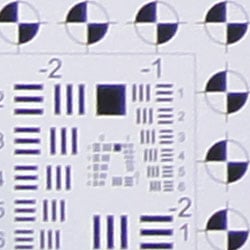
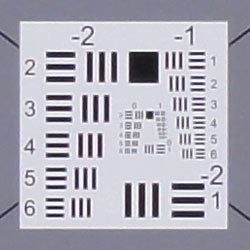
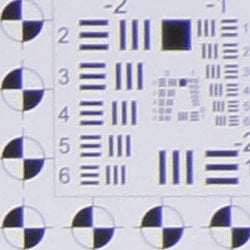
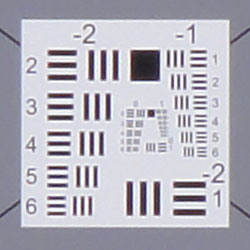
Chromatic Aberration. The Sony HX5V's 10x zoom lens exhibits relatively low to moderate chromatic aberration at wide-angle and telephoto, respectively. It's a little brighter at full telephoto, so it's slightly more noticeable than at wide-angle. The effect extends fairly deep into the frame, but the width and intensity of the fringes reduce as you move toward the center where it is very low. Chromatic aberration is a type of distortion visible as a slight colored fringe around the objects at the edges of the field of view on the resolution target.
Corner Softness. The Sony HX5V's lens produced reasonably sharp corners at both the wide-angle and telephoto ends, which is impressive given it's compact size and range. There was only a bit of softening in the corners compared to the center, and softness was pretty symmetrical. You can see quite a few sharpening artifacts in the form of halos, though. Still, overall results are quite good, especially considering the 25-250mm range.
Viewfinder
Coverage
Excellent accuracy from the LCD monitor.


The Sony HX5V's LCD monitor showed essentially 100% coverage accuracy at both wide-angle and at telephoto. Nicely done.
The images above were taken from our standardized test shots. For a collection of more pictorial photos, see our Sony Cyber-shot DSC-HX5V Photo Gallery .
Exposure
Sony HX5V Exposure
Color
Saturation & Hue Accuracy
Very good overall color and hue accuracy, with minor oversaturation of some colors.
 |
| In the diagram above, the squares show the original color, and the circles show the color that the camera captured. More saturated colors are located towards the periphery of the graph. Hue changes as you travel around the center. Thus, hue-accurate, highly saturated colors appear as lines radiating from the center. |
Saturation. The Sony HX5V produced very good saturation overall, with only minor oversaturation in reds and blues as well as some greens, browns and purples. Some other colors such as cyan and yellow were actually undersaturated by a small amount. Overall, the Sony HX5V's images appeared to have fairly realistic color that didn't look too flat or dull. Most consumer digital cameras produce color that's more highly saturated (more intense) than found in the original subjects. This is simply because most people like their color a bit brighter than life.
Skin tones. The Sony HX5V's skin tones looked fairly accurate and should be pleasing to most consumers. Where oversaturation is most problematic is on Caucasian skin tones, as it's very easy for these "memory colors" to be seen as too bright, too pink, too yellow, etc.
Hue. The Sony Cyber-shot HX5V produced a few color shifts relative to the correct mathematical translation of colors in its subjects, most visibly pushing cyan towards blue (for better-looking skies), orange toward yellow, and yellow toward green. Still, despite the shifts in red through yellow and cyan, overall hue accuracy was very good. Hue is "what color" the
color is.


Sensor
Exposure and White Balance
Indoors, incandescent lighting
Auto and Incandescent white balance settings were quite warm, but Manual was much more accurate. About average positive exposure compensation required.


Color balance indoors under incandescent lighting was quite warm with the Auto and Incandescent white balance settings. The Manual setting produced the most accurate color overall, while being just a touch cool. The Sony HX5V's exposure system handled this lighting well, producing good results with an average amount of exposure compensation, +0.3 EV. Overall color looks good, though the blue flowers look a touch purplish, probably due to the HX5V's tendency to punch up reds a little. (Many digital cameras reproduce the blue flowers here with more of a purplish tint, so the Sony HX5V actually performs a bit better than average here.) Our test lighting for this shot is a mixture of 60 and 100 watt household incandescent bulbs, a pretty yellow light source, but a very common one in typical home settings here in the U.S.
Outdoors, daylight
Excellent overall performance outdoors. Good color as well.
The Sony Cyber-shot HX5V performed very well under harsh outdoor lighting, with far fewer blown highlights or lost shadows than we're used to seeing from a compact camera. Though the shirt is quite bright, only a few highlights in it are actually clipped, as well as a few in the pendant and flowers. There are some dark shadows, but they contain pretty good detail for a digicam. Sony's default Dynamic Range Optimization no doubt has a lot to do with this excellent performance. No exposure compensation was required to keep the model's facial skin tones bright for the outdoor portrait shot (the average for this shot is +0.7 EV), so the Sony HX5V did very well here, too. The outdoor far-field house shot at the default exposure was also well exposed, again with very few blown highlights or lost shadows. Overall color is very natural looking, if a touch warm.
See full set of test images with explanations
See thumbnails of all test and gallery images
Resolution
High resolution, 1,600 ~ 1,650 lines of strong detail.
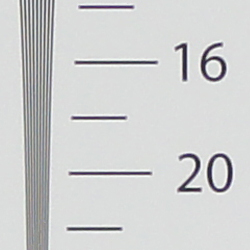
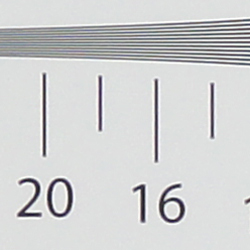
Our laboratory resolution chart revealed sharp, distinct line patterns down to about 1,650 lines per picture height in the horizontal direction, and about 1,600 lines in the vertical direction. (Some might argue for over 1,800 lines, but artifacts begin to appear at much lower resolutions.) Extinction of the pattern occurred around 2,200 to 2,300 lines in both directions. Sharpening is a little on the high side, though, leading to noticeable halos around elements of high contrast. Use these numbers to compare with other cameras of similar resolution, or use them to see just what higher resolution can mean in terms of potential detail.
See full set of test images with explanations
See thumbnails of all test and gallery images
Sharpness & Detail
Images contain good detail, but are slightly oversharpened. Moderate noise suppression even at base ISO.


Sharpness. The Sony Cyber-shot HX5V is capable of capturing good detail, though definition of fine detail suffers a bit from the effects of noise suppression. In high contrast areas, the camera produces visible edge enhancement artifacts. In the above left crop, "halos" can be seen around branches and along the edges of the white trim. Edge enhancement creates the illusion of sharpness by enhancing colors and tones right at the edge of a rapid transition in color or tone.
Detail. The crop above right shows moderately high noise suppression, with the darker and low contrast areas of hair showing limited detail. Individual strands remain visible in the moderate shadows, but quickly lose definition. Noise-suppression systems in digital cameras tend to flatten-out detail in areas of subtle contrast. The effects can often be seen in shots of human hair, where the individual strands are lost and an almost "watercolor" look appears.
ISO & Noise Performance
Effects of noise reduction already evident at base ISO, and noise suppression becomes fairly strong at the higher settings.






The Sony Cyber-shot HX5V applies a moderate amount of noise reduction even at the lowest ISOs, resulting in somewhat smeared detail in the mannequin's hair at ISO 125. ISO 200 shows a touch more noise than ISO 125, but detail is about the same. More detail is lost due to noise reduction at ISO 400, but results are about average for a compact long-zoom digicam (compare to Canon SX200 and Panasonic ZS7). At ISO 800 and above, additional detail is lost and chroma noise becomes more noticeable, especially in the shadows. At ISOs 1,600 and 3,200, chroma noise in the form of yellow blotches is quite evident, and fine detail is all but gone, smoothed away by noise reduction. On-screen crops like this tell you only part of the story with a camera, though: To see how these images held up when printing at various sizes, read the Output Quality section below.
Extremes: Sunlit and low light tests
High resolution with very good detail and dynamic range. Very good low-light performance.


Sunlight. The Sony Cyber-shot HX5V responded very well to the deliberately harsh lighting in the test above. Both highlight and shadow detail are much better than average for a compact camera. Exposure was very good too, as we preferred the image with no exposure compensation added. (Most cameras require a +0.7 EV boost in exposure to render the model's face bright enough in this harsh lighting, but the HX5V did not.) Still, you might want to consider using a fill flash in situations like the one shown above; and it's better to shoot in the shade when possible.
| Face Detection Example | |
|
 |
| Program AE, 0 EV | Full Auto, 0 EV |
The above images show the effect of the Sony HX5V's face detection in full Auto mode. The HX5V did adjust the tone curve so that the model's face and shadows are a bit brighter than with Program mode, yet highlight and shadow retention is slightly better. It's interesting that the exposure time, aperture and ISO are identical, which means the apparent increase in brightness is due to image processing alone. Very nice performance.
Because digital cameras are more like slide film than negative film (in that they tend to have a more limited tonal range), we test them in the harshest situations to see how they handle scenes with bright highlights and dark shadows, as well as what kind of sensitivity they have in low light. The shot above is designed to mimic the very harsh, contrasty effect of direct noonday sunlight, a very tough challenge for most digital cameras. (You can read details of this test here.)
| 1 foot-candle (11 lux) | |||||
|---|---|---|---|---|---|
 1 sec f3.5 ISO 125 |
 0.6 sec f3.5 ISO 200 |
 0.3 sec f3.5 ISO 400 |
 1/6 sec f3.5 ISO 800 |
 1/13 sec f3.5 ISO 1600 |
 1/25 sec f3.5 ISO 3200 |
| Special Low-Light Modes, 1 foot-candle | |
 |
 |
| Hand-Held Twilight 1/8 sec, f3.5, ISO 1000 |
Twilight Scene Mode 1 sec, f3.5, ISO 125 |
Low light. The Sony Cyber-shot HX5V performed well on the low-light tests. Though the images above are a bit dim, exposure compensation or manual exposure mode can easily address that. While the HX5V's maximum exposure time in Program Auto is only one second, and two seconds in iAuto, the camera's maximum exposure time is 30 seconds in manual exposure mode. That would allow it to easy capture bright images down to the lowest light level we normally test at, which is 1/16 foot-candle. Noise is well controlled up to ISO 800 for a compact camera. Automatic white balance looks pretty good, too. The HX5V's Hand-held Twilight mode is a feature that helps eliminate the need for a tripod in low-light conditions. It automatically takes six shots in a fraction of a second at high ISO (ISO 1,000 in the example above left), and combines them into one image, averaging out much of the noise. While Hand-held Twilight only required 1/8 second shutter speed, the Twilight scene mode (above right) required one second at ISO 125, which is too slow to hand-hold. As you can see, the Hand-held Twilight mode shot isn't nearly as noisy as you'd expect for such a high ISO in a compact camera, though we should note that these shots were taken on a tripod, while HHT mode is intended to be used handheld.
The camera's AF system was able to focus down to about the 1/2 foot-candle light level unassisted, which isn't as good as some compacts. In an unusual twist, enabling AF assist didn't help low-light autofocus in our tests. In fact, the camera required a bit more light to focus with AF assist enabled, as the assist beam seemed to overwhelm the AF system.
How bright is this? The one foot-candle light level that this test begins at roughly corresponds to the brightness of typical city street-lighting at night. Cameras performing well at that level should be able to snap good-looking photos of street-lit scenes.
NOTE: This low light test is conducted with a stationary subject, and the camera mounted on a sturdy tripod. Most digital cameras will fail miserably when faced with a moving subject in dim lighting. (For example, a child's ballet recital or a holiday pageant in a gymnasium.) For such applications, you may have better luck with a digital SLR camera, but even there, you'll likely need to set the focus manually. For information and reviews on digital SLRs, refer to our SLR review index page.
Flash
Coverage and Range
Fairly weak flash. Our standard flash shot required an increase in ISO or slower shutter speed to produce reasonably bright results.


Coverage. Flash coverage was a bit uneven at wide-angle (but not bad, given the wider-than-average 25mm equivalent focal length). Coverage is more uniform at telephoto, but the range isn't powerful enough for full telephoto in our test.
Exposure. In the Indoor test, the Sony Cyber-shot HX5V's flash underexposed our subject even with maximum flash exposure compensation boost of +1.0 EV. (The average needed for this shot is +0.7 EV). The camera's Slow-Sync flash mode produced a good exposure with only +0.3 EV boost, with the usual warm cast from the background lighting. The camera's Auto mode boosted ISO to 250, but resulted in an image that was still a bit dim.
| Flash Range: wide-angle | |||||
|---|---|---|---|---|---|
| 6 ft | 7 ft | 8 ft | 9 ft | 10 ft | 11 ft |
 1/30 sec f3.5 ISO 125 |
 1/30 sec f3.5 ISO 125 |
 1/30 sec f3.5 ISO 125 |
 1/30 sec f3.5 ISO 125 |
 1/30 sec f3.5 ISO 125 |
 1/30 sec f3.5 ISO 125 |
| 12 ft | 13 ft | 14 ft | 15 ft | 16 ft | |
 1/30 sec f3.5 ISO 125 |
 1/30 sec f3.5 ISO 125 |
 1/30 sec f3.5 ISO 125 |
 1/30 sec f3.5 ISO 125 |
 1/30 sec f3.5 ISO 125 |
|
| Flash Range: Telephoto | |||||
|---|---|---|---|---|---|
| 6 ft | 7 ft | 8 ft | 9 ft | 10 ft | 11 ft |
 1/60 sec f5.5 ISO 125 |
 1/60 sec f5.5 ISO 125 |
 1/60 sec f5.5 ISO 125 |
 1/60 sec f5.5 ISO 125 |
 1/60 sec f5.5 ISO 125 |
 1/60 sec f5.5 ISO 125 |
| 12 ft | 13 ft | 14 ft | 15 ft | 16 ft | |
 1/60 sec f5.5 ISO 125 |
 1/60 sec f5.5 ISO 125 |
 1/60 sec f5.5 ISO 125 |
 1/60 sec f5.5 ISO 125 |
 1/60 sec f5.5 ISO 125 |
|
ISO 125 Range. At wide-angle and ISO 125, flash shots started out a bit dim at 6 feet, becoming gradually dimmer from there. At telephoto, flash shots were quite dim already at 6 feet, becoming quite dark at farther distances. Unfortunately, an all too common outcome for a compact camera.
| Manufacturer-Specified Flash Range | |
|---|---|
| wide-angle | Telephoto |
 12.5 feet Auto ISO 800 |
 8.5 feet Auto ISO 800 |
Manufacturer Specified Flash Test. In both the wide-angle and telephoto shots above, the Sony HX5V's flash appears to perform to specification at the rated distances, producing bright, properly exposed images. However, the camera had to boost ISO to 800 to achieve those results in both cases. Our standard test method for flash range uses a fixed setting of ISO 100, to provide a fair basis of comparison between cameras. We've now also begun shooting two shots using the manufacturer-specified camera settings, at the range the company claims for the camera, to assess the validity of the specific claims.
Output Quality
Print Quality
Good print quality at 13x19 inches. ISO 400 images are soft but usable at 11x14, ISO 800 shots are better at 8x10.
 Printed results from the Sony HX5V are good, handling enlargement up to 13x19 inches at the lowest ISO settings, though with some noticeable softness due to overaggressive noise suppression at ISO 125 (the lowest setting). 11x14-inch prints look better at both 125 and 200. ISO 400 also looks good at 11x14, but with a little more softening in low contrast areas. ISO 800 shots are soft but usable at 8x10, and ISO 1,600 shots look good at 5x7 inches. ISO 3,200 produces a quite good 4x6, with good color and decent shadows. While it's an overall good performance from the Sony HX5V, it's a little disappointing when you consider the promise of its back-illuminated sensor.
Because the magic of the Sony HX5V is found in modes like Handheld Twilight, we also printed a sample of our Low Light test shots shot in that mode, adjusting levels because our HHT shots were a bit dim, and prints looked good printed up to 11x14 inches.
Testing hundreds of digital cameras, we've found that you can only tell just so much about a camera's image quality by viewing its images on-screen. Ultimately, there's no substitute for printing a lot of images and examining them closely. For this reason, we now routinely print sample images from the cameras we test on our Canon Pro9000 Mark II studio printer, and on the Canon Pixma MP610 here in the office. (See the Canon Pixma Pro9000 Mark II review for details on that model.)
The images above were taken from our standardized test shots. For a collection of more pictorial photos, see our Sony Cyber-shot DSC-HX5V Photo Gallery .
Not sure which camera to buy? Let your eyes be the ultimate judge! Visit our Comparometer(tm) to compare images from the Sony Cyber-shot DSC-HX5V with those from other cameras you may be considering. The proof is in the pictures, so let your own eyes decide which you like best!
Performance
Sony HX5V Performance
Timing and Performance
Fast performance overall for a compact long-zoom digicam.
| Startup/Shutdown |
||
| Power on |
2.2 seconds | Time it takes for LCD to turn on and lens to deploy and capture a picture. |
| Shutdown |
1.8 seconds | How long it takes to retract lens. |
| Buffer clearing time |
13 seconds * (after 10 frame burst of L/F JPEGs) |
Worst case buffer clearing time. -- This is the delay after a set of shots before you can remove the card. Some cameras won't retract their lenses and shut down until the buffer is cleared. |
|
*Note: Buffer clearing times measured with a Sony Memory Stick Pro Duo Mark2 2GB memory card. Slower cards will produce correspondingly longer clearing times.
|
||
Good startup and shutdown times here for a long-zoom digicam. Pretty fast buffer clearing with a fast card, too.
| Shutter Response (Lag Time) | ||
|---|---|---|
| Full Autofocus Wide |
0.30 second | Time from fully pressing shutter button to image capture, zoom lens at wide-angle position. |
| Full Autofocus Tele |
0.35 second | Time from fully pressing shutter button to image capture, zoom lens at telephoto position. |
|
Full Autofocus
Flash enabled |
0.51 second
|
Time from fully pressing shutter button to image capture, zoom lens at wide-angle position, Auto flash enabled.
|
| Prefocused |
0.010 second | Time to capture, after half-pressing and holding shutter button. |
The Sony HX5V's full AF shutter response is faster than average at wide-angle for a long zoom, at 0.30 second. At full telephoto, it's not much slower than wide-angle at 0.35 second, which is much faster than average for its class. Enabling the flash increases lag time to 0.51s due to the preflash metering involved, but that's still pretty fast. "Prefocusing" the camera by half-pressing and holding down the shutter button before the final exposure results in a lag time of only 0.010 second, which is incredibly fast.
| Cycle Time (shot to shot) | ||
|---|---|---|
|
Single Shot mode Large Fine JPEG |
1.53 seconds | Time per shot, averaged over 20 shots, 1 second to clear. |
| Early shutter |
No
|
Some cameras don't snap another shot if you release and press the shutter too quickly in Single Shot mode, making "No" the preferred answer. |
| Continuous mode |
0.10 second (10.00 frames per second); 10 frames total; 13 second to clear* |
Time per shot, averaged over buffer length or 20 shots, whichever came first. |
| Flash recycling |
6.1 seconds | Flash at maximum output. |
| *Note: Buffer clearing times measured with a Sony Memory Stick Pro Duo Mark2 2GB memory card. Slower cards will produce correspondingly slower clearing times. Slow cards may also limit length of bursts in continuous mode. ISO sensitivity also affects cycle times and burst mode performance, with higher ISOs generally increasing cycle times and reducing burst performance. |
||
Shot-to-shot cycle times are on the faster side of average, at about 1.53 seconds for large/fine JPEGs. The Sony HX5V's continuous shooting mode is much faster than average, at 10 frames-per-second for 10 large/fine frames. Excellent performance here. The flash takes 6.1 seconds to recharge after a full-power shot, which is a bit slow.
| Download Speed | ||
|---|---|---|
| Windows Computer, USB 2.0 |
9,517 KBytes/sec | Typical Values: |
Connected to a computer or printer with USB 2.0, download speeds are excellent.
Bottom line, the Sony Cyber-shot HX5V's performance is generally quite fast for a digicam, especially one with a 10x zoom. It's even fast enough for shooting some sports. Only its flash recycle time is a bit slower than average.
Battery and Storage Capacity
Battery
Average battery life for a lithium-ion design.
| Operating Mode | Battery Life |
|---|---|
|
Still Image Capture,
(CIPA standard) |
310 shots
|
| Playback | 260 minutes |
The Sony HX5V uses a custom rechargeable lithium-ion battery for power, and ships with a charger. Although battery life is about average, we recommend you pick up a spare battery and keep it freshly charged and on-hand for extended outings.
The table above shows the number of shots the camera is capable of (on a fully-charged rechargeable battery as appropriate), based on CIPA battery-life and/or manufacturer standard test conditions.
(Interested readers can find an English translation of the CIPA DC-002 standards document here. (180K PDF document))
Storage
The Sony Cyber-shot HX5V accepts Memory Stick Duo or SD/SDHC memory cards, and includes 45MB of usable built-in memory. For HD movie capture, Sony recommends using Memory Stick PRO Duo MARK2 or Memory Stick PRO-HG cards; or SD/SDHC cards that are Class 4 or higher.
| Image Capacity with 45MB Internal Memory |
Fine | |
|---|---|---|
|
3,648 x 2,736 |
Images (Avg Size) |
9 5.0 MB |
|
Approx.
Comp. |
6:1 | |
|
2,592 x 1,944 |
Images (Avg Size) |
14 3.2 MB |
|
Approx.
Comp. |
5:1 | |
|
640 x 480 |
Images (Avg Size) |
284 158 KB |
|
Approx.
Comp. |
6:1 | |
We strongly recommend buying a large capacity Memory Stick Pro DUO or SD/SDHC memory card at least a 2GB card, preferably a 4 or 8GB one, to give yourself extra space for extended outings or video. (Check the shopping link above, cards are really cheap these days, so no reason to skimp.)