


Overview
Pentax K100D Overview
The Pentax K100D, along with its sibling the K110D, are the company's first DSLR models to forgo the rather confusing "*istD" branding. Both share an identical (newly developed) body and feature set, with the exception of an anti-shake mechanism - found on the K100D, but not the K110D. Konica Minolta has used a similar CCD-shift based system for a while now, and it has offered the ability to stabilize images on almost every lens compatible with the camera body. The Shake Reduction system is said to have been developed by Pentax themselves, and to work with "almost all" existing Pentax lenses, although the company notes that "[certain] lenses may lose part of their functions".
The Pentax K100D has a sensor resolution of six megapixels, and accept lenses using the Pentax KAF lens mount. The stabilization mechanism - dubbed "Shake Reduction" - is undoubtedly the standout feature of this model. Focusing can be controlled automatically or manually, and uses a phase detection system with 11 points (nine of them cross-type) to determine focus. Images can be framed using a penta-mirror optical viewfinder, and reviewed on a 2.5" LCD display with a resolution of 210,000 pixels. A choice of program, aperture- and shutter-priority or manual exposure modes; 16-segment multi, center-weighted or spot metering; shutter speeds from 30 - 1/4000 second; user-selectable ISO sensitivity from 200 - 3200 equivalent, plus eight white balance modes including fully manual white balance let your creative juices flow. For fun snapshots, the K100D offers a range of automatic controls including eight scene modes and four Picture modes (the latter essentially being scene modes that have positions on the mode dial rather than being accessed through the LCD display). A five-mode flash strobe is also available, along with a two or twelve-second self timer.
The Pentax K100D stores images on optional Secure Digital or MultiMediaCards, in either Raw (uncompressed) or JPEG (compressed) formats. Connectivity includes both NTSC / PAL switchable video output and a USB 2.0 Hi-Speed computer link, as well as a DC input connection for powering the camera when batteries are impractical (in a photo studio, for example). Power otherwise comes from four AA or 2 CR-V3 batteries including disposable types, offering a little extra versatility when you're on the road and can't get to a power point to charge up.
Pentax K100D User Report
by Shawn Barnett
I have enjoyed my time with the Pentax *istD -- I mean K100D. Yes, it's going to take a little time for me to get used to the new/old name of the latest SLR from Pentax. I say "new" because they've finally left behind the ill-conceived *istD naming scheme that unnecessarily alienated so many. I say "old" because the K100D's name so closely matches the long-running mechanical film SLR, the K1000. Due to the similar shape of the D, you can even mistake the two.
The "new and old" theme continues with the K100D. This is actually the fifth Pentax digital SLR (or sixth, depending on where you live), so you can't exactly call the Pentax K100D an all-new camera. There was the *istD, *istDS, *istDS2, *istDL, and in some markets the *istDL2. The family resemblance is uncanny. However, the new image stabilization mode is indeed new, as is the new stainless frame. Also new is the K100D and K110D's backward compatibility with all of Pentax's old lenses.
 That's right, Pentax claims the two new SLRs will work with "any Pentax lens ever produced." That includes their old K1000 35mm K-Mount and the even older M42 x 1mm screw mount lenses (which were made by many companies: Zeiss, Leica, Mamiya, Olympus, etc.), plus the Pentax 645 and 67 medium format lenses: all can be attached via special adapters. Naturally, many of these lenses are manual focus and won't autofocus with the K100D, nor will they return information to the camera to help gauge subject distance or any of the other niceties you get with the DA-series lenses. But image stabilization will work with any lens you can snap onto this camera, and not many digital SLRs can stabilize such an old lens. [Thanks to Max for correcting me on the K1000 screw mount reference, since it used a K-mount]
There are many holdouts who are waiting for a camera that will do this very thing: work with all pre-existing lenses in the line. So this will be a popular move for a select group of Pentax glass owners.
Fit & finish. Still among the smallest digital SLRs on the market, the K100D has an excellent feel of quality and a good heft. The grip is well-sculpted, with a reasonable size for most hands, and a comfortable shape. It has more of a flat surface for your fingertips bite into, unlike the *isDL, which had a curved surface where the inside of the grip met the camera body. This curve tends to made holding the camera for long periods rather uncomfortable. The K100D's grip material is textured and feels hard at first, but press a fingernail into it, and you find a thick, soft rubbery material.

Natural action. Just a twist powers the camera on, and a further pull activates the digital depth of field preview. Also note the large, easy-to-read display and improved Av/EV button.
With the camera held confidently in the right hand, my index finger rests atop the shutter button quite naturally. I slide my finger forward a few millimeters, pull the power switch to the right and I'm ready to shoot. As I raise the camera to my eye, my left hand comfortably cups the contoured left bottom corner. My eye finds the viewfinder with no trouble; though like most cameras, I'm forced to press my glasses up against the hard rubber eyepiece for a full view of the frame. The sliding diopter adjustment atop the viewfinder does not match my prescription, but I'm pretty used to shooting with glasses.
In Manual mode, Shutter speed is adjusted with the back dial, and Aperture is adjusted with the same dial when activated while pressing the small EV/Av button set just back from the shutter button. The combination is easy to adjust with your eye to the viewfinder. The Pentax K100 also has a unique digital depth-of-field preview built into the power ring that surrounds the shutter button. Just twist the power ring further to the right and the camera quickly stops down the lens to the selected setting and captures a quick shot to reveal the depth of field on the 2.5 inch LCD display. Quick and simple. The exposure is not stored, however, but disappears into digital ether.

Excellent port cover.
The Pentax K100's body has a tight, solid feel, and all the doors seem like they'll stand up to reasonable use. Rather than a rubber door to cover the ports, which can actually be somewhat annoying to use, the Pentax K100D has a stiff plastic door that swings out toward the front. It is spring loaded and slams firmly open and shut. The SD card door works like most such doors, opening with a pull toward the back, then a swing to the right. The card pops out with a push.

The now nearly-standard SD card location.
The battery door on the K100D is locked with a small switch. You'll need to remember to turn the camera upside down before releasing the switch, because the door slides forward easily, and then it's free to swing open and dump your four AA batteries all over the place. It's worth noting here that the Pentax K100D didn't like most sets of our NiMH batteries, frequently complaining that a somewhat used set of four wasn't sufficient to continue. Not so with alkalines. A relatively new set of Energizer NiMH batteries does work fairly well, however, so I recommend a nice fresh set of NiMH batteries (or two) for the Pentax K100D.

The popup does a decent job.
Flash. The flash pops up quickly with the press of a button on the K100D, and it deploys automatically in Auto Pict mode, but only if the camera is set to Auto flash mode. That makes a lot more sense than most systems I've reviewed, where the full auto mode pops up the flash whether you like it or not. There is one instance where it would be good for the flash to pop up automatically, and that's when the AF system needs a little help, for pulsed flash is the K100D's sole AF assist lamp.
On-camera flash coverage is pretty good with the bundled 18-55mm lens, with only slight vignetting in the corners at the widest setting.

Full featured flash. Attaching the AF-540FGZ flash turned the K100D into an indoor champ. Both camera and flash are compatible with the same batteries: something to think about.
If you really want to impress yourself with what the K100 can do, however -- and overcome some of its indoor limitations, which I'll discuss later -- you'll want to consider investing in the large but versatile AF-540FGZ hot shoe-mounted flash. Folded up, it really is about as big as the Pentax K100D itself. Without going into great detail, it appears nearly as powerful as the flashes from Nikon and Canon, and its controls are more accessible, with commonly used features like first and second curtain sync and high speed sync available via a switch rather than a menu selection. You can also easily switch between a test pulse flash when pressing the Test button or a rapid pulse to serve as a modeling light. I even like how the flash attaches, with a quick, positive 120 degree turn of a large thumb-actuated lock, rather than a knurled ring that requires many turns.

Straightforward access. Almost all modes are right there for the tweaking, very easy to use with a little attention to the manual.
The AF-540FGZ's head zooms with the lenses, and turns in almost every direction. There is no lock to hold it in forward position, however; the one button on the side of the Pentax K100D merely allows the flash to tilt down for better close-up coverage. Perhaps most impressive is the massive and wide AF-assist pattern the flash throws on the scene. I imagine all eleven sensors could take advantage of that baby.

The kit lens. Good, tight build, reasonable response, and it's even handsome.
Lenses. What keeps turning my head in the Pentax lineup are its unique and well-built lenses. The 18-55mm that comes with the K100D bundle is a decent lens, but I'm more impressed with its build than its optical quality. Unlike some kit lenses, the lens on this camera is appears of decent quality. It has a non-rotating front element and while it does whine when focusing, it's still mostly demure about it. The zoom ring provides both a good gripping surface and a soft touch, and the mechanism is tight. The front focusing ring has the slightest looseness, but it's not bad. And there are markings for both zoom and focus distance on the rings, another Pentax touch I can appreciate.

Not the kit lens. But if it were, they might sell more. The kit lens is good, but this 43mm f/1.9 lens makes you feel like a photographer. Low light: excellent. Bokeh: very good.
More than any other company, Pentax seems to have worked hard to create truly innovative lens designs that deliver the advantage of digital that others have mostly only promised. I'm talking about smaller lenses that fit into tight spaces. Pentax has some gorgeous little "pancake" lenses that are so small and flat that they make the overall camera look like something's missing. What they give you, however, is an SLR that can slip into a purse or coat pocket with considerably greater ease than any other design. They also deliver excellent optical performance such that when I shoot with these cameras, except for the purpose of evaluating this kit combo, I prefer prime optics like the silver 43mm Limited Edition f/1.9. Its external focusing ring is very fast and rips to its destination with a loud but sure ring of the focusing motor. Its soft silver anodize is etched with a sans serif font that harks back to the days of a fine rangefinder. It even has a manual aperture ring. Oh baby.
As if that weren't enough, the inside of the lens hood is lined with a photon-slurping fine black felt, and the metal lens cap is lined with a fine green felt, which not only looks refined, but serves to hold the cap onto the lens hood with a gentle pressure. It's design like this that can put the sense of precision, and even love, back into photography. I love this lens.

Talk about your pancakes. This slim little f/2.8 prime will give your K100D a very slim profile, and runs under $300.
I have not yet seen a Pentax lens that feels cheap. They're all pretty small, very tight and solid, and sound like precision tools when they're attached and removed, probably due to the six springloaded contact bearings on the camera body's lens mount.
Unless you're prime-crazy like me (prime means single-focal length lenses, or non-zoom), the first lens you'll want to add to your Pentax K100D's camera bag is the 50-200mm f/4-5.6. Incorporating ED elements (extra-low dispersion glass), this short, lightweight lens again delivers on the promise of smaller lenses to match a smaller sensor. Its action is as smooth and high quality as the kit lens, and its optical performance seems good. Certainly impressive for its reasonable $250 street price. And it keeps the K100D reasonably compact. Like the other lenses in the line, the 50-200mm has a loud focus motor, but it's at least smooth and fast.
And Shake Reduction for all. Body-based stabilization--the main feature distinguishing the K100D from the K110D--means that all lenses that will fit on the K100D will benefit from this helpful technology.

Each company has had to create their own version of anti-shake, and each has its own name for its particular version. Canon's Image Stabilization (IS), Nikon's Vibration Reduction (VR), and Konica Minolta/Sony's Anti-Shake (AS) are now joined by Pentax's own Shake Reduction (SR). Nikon and Canon's are lens-based solutions, which means you have to purchase a specially-engineered lens to take advantage of the technology in each focal length range you think you need the extra help. With lens-based systems, the lens tracks the camera's motion and compensates for it by moving a special optical element inside the lens body.
Sony's solution is like Pentax's, which also tracks the camera's motion, but moves the imaging sensor inside the camera body to match. It's a little more like the catcher moving his mitt to meet the ball, rather than some elaborate mechanism that tries to redirect the ball to the mitt as it approaches the plate. Both work just fine in practice, however, despite what the baseball analogy might imply, and both have their benefits. We're of the opinion that lens-based solutions will do better with long telephoto lenses, and camera-based solutions are better for wide and mid-telephoto applications.
Nevertheless, when Pentax's SR system is used with their modern line of electronic lenses, the camera can detect what lens is attached and adjust the magnitude of compensation applied to match the focal length of the lens. When you're using an older lens, you can use the K100D's menu to tell the camera the focal length, from 8mm to 800mm.
 |
 |
SR performance. I crouched down and stood on my toes as I framed the shots above. The left shot was made at 1/25 second and f/6.3 with the Pentax 100mm f/2.8 lens. The right shot is slightly sharper, taken in the same stability-compromised position at 1/100 second and f/2.8. There is some evidence of motion blur on the left with this 250 pixel 100% crop, but it does not show in the printed results. I count this an excellent performance, especially considering the difficult stance. (Click on the images to download originals). |
|
Having used all current stabilization methods, the K100D's Shake Reduction impressed me. There were fewer blurred shots, with good performance all the way down to 1/13 second. Pentax says that its Shake Reduction Technology allows stable shots at 2.5 to 3 stops lower than with the feature switched off. Unlike Sony's solution, there is no display inside the K100D to tell you how hard the stabilizer mechanism is working based on your current motion, nor do you have the visual "floating image" feedback you get from optical image stabilizers. Instead, the camera compensates for the motion it detects when you trip the shutter.
There's a good argument that the moment of capture produces the most common and relevant source of motion blur in images, because so many people seem to mash down the shutter and shake the camera with it. It's why only some soldiers make marksman: it takes training, discipline, and a special character to learn to squeeze that trigger gently and let the shot surprise you every time. Camera companies have been trying to figure out how to help people with the moment of capture for a long time, and Pentax may have hit on the better body-based solution.
They claim that their SR system is different from others because it not only compensates for up/down/left/right/diagonal motion, but rotational motion as well.
After all, what happens when someone mashes down on the shutter release with their right finger? The camera rotates clockwise and down. It might even rotate back before the shutter closes, depending on the button masher in question and the shutter speed. A camera that can compensate for this very common motion as the shutter trips is likely to deliver more clear shots to the rank amateur, as well as compensate for the intermediate photographer's occasional excitement over capturing a promising moment. Regardless of the motion's cause, human motion is rarely linear or occurring along rigid x and y axes, so the more methods of compensation the better.
Autofocus. Our lab autofocus times are decent, but not stellar, with a full AF shutter lag of 0.182 second. But that's an average, and once it's relatively close, if the camera does not seek, this number is often faster than you'll get with real-life subjects that are at random distances. In low light, it gets worse. On the plus side, the Pentax K100D will keep trying to achieve focus. On the negative side it can take a second or two for the camera to run through its thought process and get the job done. Sometimes you can just feel the wheels spinning as the K100D tries first this setting, thinks about it, then tries another, thinks about it some more, then tries again and finally beeps confirmation. In sunlight, it's much better and feels quite a bit faster.
Also like most of the lenses for the Sony A100, the Pentax K100D's AF motor is in the camera body, not the lenses.
The new SAFOX VIII AF system has 11 focus points, nine of which are cross type, meaning they can sense both horizontal and vertical lines. Most AF systems reserve the cross type sensors for the center and outer edges.
White Balance. Admittedly, setting White balance automatically is quite a trick, but the K100D also struggles with setting white balance in low light, especially with Tungsten light sources. After an extremely great day out with the camera in daylight, I was surprised when I tried to take a low light shot of my toddler sleeping. He looked yellow. I grabbed another SLR that I'd brought along to capture some of these product shots and took the same picture. No problem. Not yellow, and his white shirt was just about right. In this case, the light wasn't Tungsten, but sunlight filtering through beige miniblinds. When I popped up the flash on the Pentax K100 and tried again, I got what you see below, much better. Later tests with Tungsten lighting, including our indoor lab shots, revealed a serious problem balancing yellow light sources. The resulting images are tough to rescue from this yellow cast.


Which brings me back to that camera-mounted flash. Give the K100D a good bounced light source and it's a dream. Attach something like a Lumiquest 80/20 bounce reflector to it, and you'll be blown away. You can also just pop up the built-in flash and get what you need, or else remember to switch to manual or Tungsten white balance before shooting indoors (what a pain). I'm hoping Pentax can fix this with software, but it seems somewhat unlikely. Be warned that though I'm very fond of the K100D, I compensate by using flash when shooting indoors, which isn't always ideal. Using the AF-540FGZ gives the best results, but it doubles the size and weight of the camera and requires more effort to find white surfaces to bounce the flash from.
 Filters. The Pentax K100D also has a very good interface for accessing the Digital Filter functions, which allow you to set things like Sepia or Black and White after capture. A new image is created with each applied filter. If you watch the animation at right, you'll see it step through quite an array of color filters as well, one a light filter, and the other a darker filter of the same tint. You use the left and right navigator buttons to choose your image, the up and down arrows to choose among your filter options, and the main dial on the back to apply optional settings, like the multi-color filters and brightness changes. The Slim filter can also make you or your relatives feel better about your camera choice when instead of adding 10 pounds, the K100D takes away 10 or 20.
Summary. As I mentioned at the beginning, the Pentax K100D was enjoyable to use. It looks great, handles well, and delivers images that exceed what I have seen from the company's other digital SLRs. The included lens is very good, and the available accessory lenses are terribly cool. Tungsten white balance, unfortunately, doesn't cut it as well as it should. Our lab test results show the same problem as my own extensive informal shooting reveals: the K100D just can't compensate for Tungsten lighting, delivering extremely yellow images. Flash does fix it, so if you're happy carrying a big bounce flash, or dealing with the specular highlights often generated by direct flash, it's not a big deal. For serious indoor photography, controlling the light is arguably the way to go, so I do recommend purchase of a hot shoe-mounted flash.
My only other bugaboo with the K100D was its often slow and indecisive AF in low light. Low light means typical room lighting indoors. I've never seen a camera play for so long to finally lock focus. Pop up the flash as AF assist, and things speed back up. Just an FYI, not a deal killer; though if you're doing a lot of toddler photography, get a flash.
The K100D's Shake Reduction works very well, and is probably worth the extra $100 if you can afford it over the K110D. Once again, in low light, you need all the help you can get. I got sharp images at 1/13 second, which really surprised me.

The Pentax K100D is priced pretty low for what you get, but I think prices will need to drop before the end-of-the-year holidays to keep ahead of some of the older cameras still on the market, like the Nikon D50 and Canon Rebel XT. Online prices have dropped quite a bit on these two cameras over the last few months. Neither offers shake reduction, though; and their prices in retail stores will probably still be higher than the Pentax K100D at the outset.
It's good to see Pentax come out swinging, offering a tight, affordable camera for consumers. For my part, I'm still rubbing my chin about the concept of the K100D with a 43mm or 40mm prime lens for daily carry in a waistpack, chucking the point-and-shoot digicam in favor of a larger sensor and higher quality optics, not to mention the ease of AA batteries. Now that this review is over, I'm going to twist that silver Pentax FA 43mm Limited lens back on and test my theory until they make me return it.
Basic Features
- 6.1-megapixel CCD
- Pentax K AF bayonet lens mount compatible with the full range of Pentax K lenses, plus M-series lenses via an adapter
- Digital SLR design with true optical viewfinder
- 2.5-inch color LCD monitor for image and menu review
- Full Manual through Automatic exposure available, including Aperture and Shutter priority and 14 preset Scene modes
- Built-in flash with five modes and an intensity adjustment
- Topside external flash hot shoe
- SD/MMC memory storage (no card included)
- JPEG and RAW file formats
- USB 2.0 computer connection
- Two CR-V3 or four AA-type batteries for power, or optional AC adapter (four AA alkaline batteries included)
- Software for Mac and PC
Special Features
- Shake Reduction technology to minimize blurring from camera movement
- Digital filter options for creative effects post-capture
- Continuous shooting mode and Auto Exposure Bracketing
- Self-timer for delayed shutter release
- Optional remote control (wired and IR)
- Shutter speeds from 1/4,000 to 30 seconds, plus a Bulb setting for long exposures
- Image Sharpness, Saturation, and Contrast adjustments
- Spot, Center-Weighted, and Multi-Metering modes
- Adjustable AF area and two AF modes
- Auto ISO setting or 200, 400, 800, 1,600, and 3,200 ISO equivalents
- White balance (color) adjustment with 10 options, including a manual setting
- Adobe RGB and sRGB color space options.
- 18 Custom Menu settings, including options for non-CPU Pentax lenses
- DPOF (Digital Print Order Format) and PictBridge printing compatibility
In the Box
The retail package contains the following items:
- Pentax K100D digital camera body with body cap
- Pentax 18-55mm lens (if purchased as a kit)
- Shoulder strap
- Four AA alkaline batteries
- Flash hot shoe and eyepiece covers
- USB cable
- Video cable
- Software CD containing Pentax Photo Browser and Laboratory software, and USB drivers.
- Manuals and registration information
Recommended Accessories
- Two sets of four rechargeable NiMH batteries. (Read my NiMH battery shootout page to see which batteries currently on the market are the best, read Dave's review of the Maha C-204W NiMH battery charger, our current favorite.)
- Large capacity SD/MMC memory card. (These days, 512MB is a good tradeoff between cost and capacity.)
Conclusion
| Pro: | Con: |
|---|---|
|
|
The Pentax K100D is a capable digital SLR, perfect for consumers interested in stepping up from a basic consumer digital camera and into a world of better image quality. It's also a smart choice for owners of Pentax film SLRs and lenses who want to go digital. With its full range of manual and preset automatic exposure modes, the Pentax K100D is suitable for the full range of experience levels, including anyone already owning a digital point-and-shoot, and it offers enough customization to keep more advanced users happy. The Pentax K100D has no trouble with exposure in low lighting, and produces only slightly high contrast under harsh lighting conditions (such as bright outdoor sunlight). Autofocus in low light is among the slowest we've seen, however. On the positive side, though the K100D more often makes a decision where other digital SLRs just give up. Color is quite good, though sometimes on the warm side, but both the built-in flash and accessory bounce flash eliminate this problem. The camera's ISO setting only goes as low as 200, but noise levels are still quite good, and prints from the Pentax K100D are very impressive even at the highest ISO levels.
We were impressed with the Pentax K100D, as well as its widening array of accessories and lenses. It's a small, well-conceived SLR design with solid image performance. Even the kit lens is good quality, and accessory lenses are worthy of serious photographic work. After all that, the Pentax K100D's in-camera Shake Reduction is a welcome bonus in this surprisingly low-priced camera. Perhaps the best news is that it works better than most other in-body anti-shake systems on the market. Despite its shortcomings, the Pentax K100D offers more bang for the buck than competing systems in this range, and the money you save on the kit leaves room to pick up an accessory flash to make indoor photography a dream. Overall, the K100D is Pentax's strongest offering to date. It's a camera I've really enjoyed, and worthy of a Dave's Pick.

Design
Pentax K100D Design
Though the Pentax K100D ranks among the smaller digital SLRs on the market, its heft and feel are still enough to be taken more seriously. The all-black body measures 5.1 x 3.6 x 2.8 inches (130 x 93 x 70 millimeters) and weighs 22.2 ounces (635 grams) with batteries, lens, and memory card installed. A shoulder strap is packaged with the camera, so you can keep it securely around your neck or on your shoulder when strolling about. The Pentax K lens mount is intended to be compatible with every Pentax K lens ever produced, and the camera features Pentax's own Shake Reduction technology to help prevent any minor blurring from camera movement in long zoom shots. Capable of handling a wide range of exposure conditions with its array of automatic and manual exposure modes, the K100D ought to please novices and advanced photographers alike, and its lens compatibility will especially pique the interest of Pentax devotees.

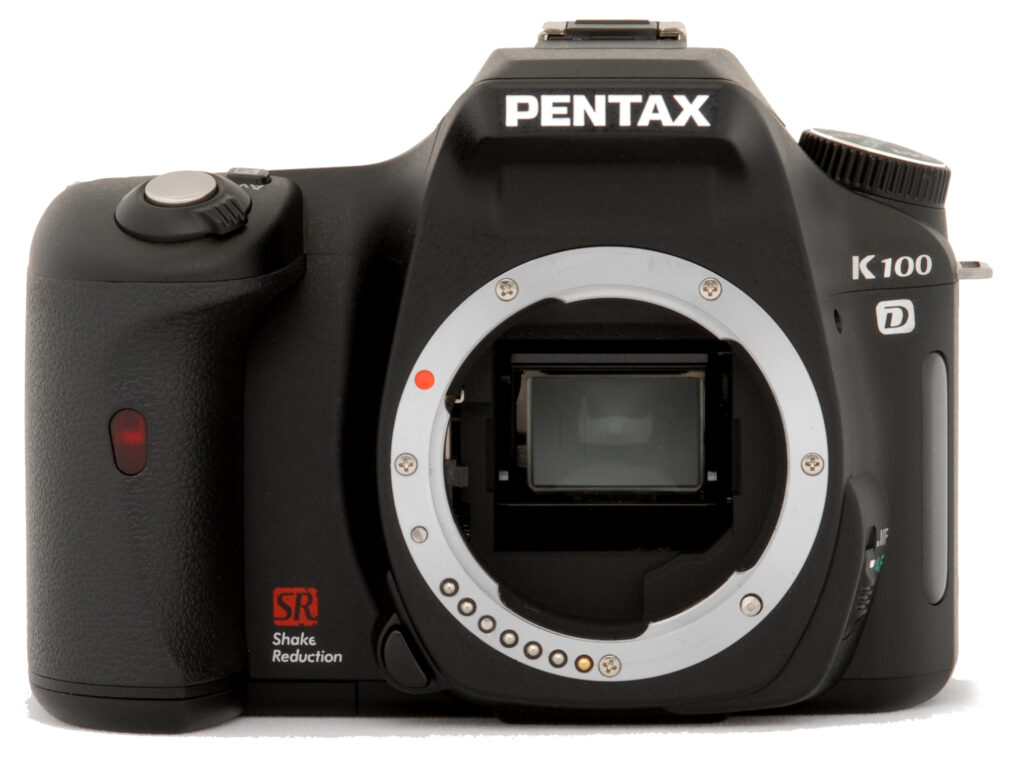
The Pentax K100D features a nice handgrip on the right side of the front panel, with a leathery texture for your fingers to cling to as they wrap around the camera. On the front of the handgrip is a small window covering the remote control receiver and self-timer lamp. The sliver metal K lens mount dominates the front panel, and a small button on its lower left side (as viewed from the front) unlocks the lens for removal.

The right side of the Pentax K100D (as viewed from the rear) features the SD/MMC memory compartment, covered by a hinged, plastic door that opens from the rear panel. Also visible on this side is one of the shoulder strap eyelets.

The left side holds a large plastic door that flips out toward the front and reveals the wired remote, Video/PC, and DC In jacks. A second strap eyelet is located at the top of the panel, just beneath the ribbed edge of the Mode dial. Also visible on this side of the Pentax K100D is the Focus switch on the bottom of the lens barrel.

The Pentax K100D's top panel includes the Shutter button and Power dial combination, along with the Exposure Compensation (Aperture) button. A small monochrome LCD status panel reports the camera settings. Center are the pop-up flash compartment and external flash hot shoe, with the camera's Mode dial on the far left. Also visible is the optical viewfinder's sliding diopter adjustment switch, behind the flash hot shoe.

The few remaining controls are located on the Pentax K100D's rear panel, along with the 2.5-inch LCD monitor and optical viewfinder eyepiece. In the top right corner are the multifunctional "E-Dial" (indicated by the index display and magnifying glass icons) and the AE Lock/Protect button, with a Four-Way Arrow pad and OK button below these. Adjacent to the lower right corner of the LCD monitor are the Function button and Shake Reduction switch, with a small LED that reports camera status. Lining the far left side of the rear panel are the Flash Up, Menu, Erase, Info, and Playback buttons.

Finally, the K100D's flat bottom holds the threaded metal tripod screw mount and the battery compartment. The battery compartment is just far enough away from the tripod mount to allow quick battery changes while working with a tripod, something I always pay attention to given the amount of in-studio shooting I do with each test camera.
Pentax K100D External Controls

Shutter Button: Placed at an angle out on the grip's leading edge, this button sets focus and exposure when halfway pressed, and fires the Pentax K100D's shutter when fully pressed.
Power Dial: Encircling the Shutter button, this dial turns the camera on and off. A third, springloaded position, indicated by a lens diaphragm icon, enables either an optical or digital preview in the LCD monitor. (Optical preview shows the depth of field through the viewfinder, and the digital preview captures a temporary image that indicates the result of aperture and shutter speed in the LCD monitor.)

Exposure Compensation/AV Button: Placed behind the Pentax K100D's Shutter button and Power dial on the top panel, this button adjusts the overall exposure compensation when pressed while turning the E-Dial. In Manual mode, pressing this button while turning the E-Dial adjusts the lens aperture setting.

Mode Dial: Located on the far left side of the camera's top panel, this ribbed dial sets the Pentax K100D's operating mode, offering Auto Picture, Portrait, Landscape, Macro, Sports, Night Portrait, No Flash, Bulb, Manual, Aperture Priority, Shutter Priority, Program, and Scene modes. (See menus and descriptions below.)

Diopter Adjustment Switch: This tiny sliding switch sits directly atop
the optical viewfinder eyepiece, and adjusts the view for eyeglass wearers from
-2.5 to +1.5 diopters.

AE Lock/Protect Button: In the top right corner of the Pentax K100D's rear panel, this button locks the exposure when pressed. (You can also set this button to lock either the shutter speed or aperture only through the Custom Functions menu.) In Playback mode, this button marks a displayed image for write protection, or removes the protection indicator.

E-Dial: To the left of the AE Lock / Protect button, this dial features markings for index display and image enlargement playback functions. In record modes, however, this dial changes the Pentax K100D's settings when turned while pressing a button. In Aperture and Shutter Priority modes, turning this dial adjusts the designated exposure variable. In Manual mode, turning the dial alone sets the shutter speed; pressing the Exposure Compensation/AV button while turning the E-Dial sets the Aperture.

Four-Way Arrow Pad and OK Button: Next to the top right corner of the
LCD monitor, this arrow pad navigates through menu items when the LCD menu is
displayed. Pressing the center OK button confirms selections. When the Function
menu is displayed in record or playback modes, the arrow keys correspond to
specific camera functions (see Function Button below). When the information
display is enabled in record mode, pressing the right arrow displays an explanation
screen detailing the current exposure mode. In Playback mode, the arrow keys
navigate through captured images on the memory card. If an image has been enlarged,
the arrow keys pan the view on the display.

Function Button: Next to the lower right corner of the LCD monitor, the
Function (Fn) button calls up the Function menu when pressed in record or playback
modes. In record mode, options are Drive Mode (up arrow), Flash Mode (down arrow),
White Balance (left arrow), and Sensitivity (right arrow). In Playback mode,
options are DPOF settings (up arrow), Digital Filter (left arrow), and Slideshow
(right arrow).

Shake Reduction Switch: To the right of the Function button, this sliding
switch turns the K100D's Shake Reduction on or off.

Flash Up Button: The first in a series of buttons lining the
left side of the rear panel, this button releases the pop-up flash from its
compartment.

Menu Button: Below the Flash Up button, this button activates the settings
menu in any camera mode. The Menu button also turns off the menu display.

Erase Button: Directly beneath the Pentax K100D's Menu button, this button calls up the erase menu when pressed while a captured image is displayed.

Info Button: Next in line below the Erase button, this button
controls the level of information displayed on the LCD monitor in both record
and playback modes.

Playback Mode: The final button in the series on the left
side of the rear panel, this button puts the camera into Playback mode and displays
the most recently captured image on the LCD monitor.

Focus Mode Switch: Located on the left side of the lens barrel
(when viewing camera from the rear), this switch puts the camera into Auto or
Manual focus modes.

Lens Release Button: Tucked beneath the Pentax K100D's lens barrel on the side closest to the handgrip, this button unlocks the lens from its mount.
Operation
Pentax K100D Operation
Operation of the Pentax K100D digital SLR is fairly straightforward, with actually only a handful of control buttons on the camera body to fiddle with. The large Mode dial on top of the camera controls the main operating modes, with options for Auto Picture, Portrait, Landscape, Macro, Sports, Night Portrait, No Flash, Bulb, Manual, Aperture Priority, Shutter Priority, Manual, and Scene modes. Several of the Pentax K100D's control buttons perform multiple functions, which saves space and time. The E-Dial for example, controls a variety of settings when turned in combination with a press of a button, and the arrow keys of the Four-Way Arrow pad access shortcuts to common camera settings as well. The Pentax K100D's LCD menu system is straightforward as well, with four main menus accessible via a tabbed interface at the top of the screen. (All menus are available in all modes.) Considering the multi-functional controls and variety of menu options, it will probably take most users a little time with the operating manual to really get the gist of things, but operation becomes intuitive after that.
Viewfinder Like most digital SLRs, the Pentax K100D has no live preview on the LCD. Instead, the camera has an optical viewfinder, where you get something better: a true live view of what you're about to shoot, with no electronic delay. 11 autofocus points are arrayed across the screen. You can pick which one you want to have the K100D use (in certain program and manual modes), or you can let the camera analyze the scene and pick what it deems best. Across the bottom of the screen, the K100D keeps you posted about its settings, including flash charge status, AF mode, Scene modes, ISO setting, Focus indicator, Shutter Speed, Aperture, EV compensation, Available images, and the AE AE Lock indicator.
 Status Display
The Pentax K100D's monochrome LCD status display appears on the camera's top deck just behind the shutter button. It displays the Shutter Speed, Aperture, Flash mode, Drive mode, AF point info, AE metering mode, Auto bracketing, White balance, Battery level, EV compensation, and the estimated number of images available.
 LCD Display
The Pentax K100D's LCD monitor is mainly for image review, though a Digital Preview option does let you verify your exposure settings before snapping a picture. Accessed by turning the Power dial to the aperture symbol, Digital Preview displays the framed image in the LCD monitor, allowing you to quickly check depth of field and approximate exposure based on the set variables. Otherwise, the K110D's LCD monitor serves as an information display in most record modes, when the Info button has been pressed (or when the Mode dial is turned). The information display reports AF mode, Mode dial setting, AE metering, flash mode, drive mode, auto bracketing, ISO, tone, quality, resolution, color space, white balance, date & time, AF point, saturation, sharpness, contrast, focal length, scene mode, and Shake Reduction status. Once in this display, pressing the right arrow key pulls up an explanation of the current exposure mode. (Pressing the left arrow returns to the information display.)
 Playback Mode Display
In Playback mode, the default image display shows the most recently captured image, with a modest information overlay present. Pressing the Info button once pulls up the Pentax K100D's detailed information display, which decreases the image to a thumbnail on the screen. All of the same information is reported here as in the detailed display in record mode, listed above. A second press of the Info button brings the image back fullscreen, with a small histogram at the bottom of the frame. Any overexposed areas in the frame also blink, if indicated in the Playback menu. You can press the up and down arrows in this mode to move the histogram up and down in the frame. Turning the E-Dial in this mode controls the index display and image enlargement options. The index display shows nine thumbnail images at a time on-screen, while the enlargement feature magnifies images as much as 12x.
Pentax K100D Modes and Menus
 Scene Modes: Marked on the Mode dial as "SCN," this mode offers a range of preset exposure modes for capturing images in specific situations. Eight Scene modes are available on the Pentax K100D, including Night Scene, Surf & Snow, Text, Sunset, Kids, Pet, Candlelight, and Museum. Night Scene uses longer shutter times to capture more available light in dark settings, and a tripod is recommended. Surf & Snow mode optimizes the camera for bright backgrounds, while maintaining color elsewhere. Text mode increases contrast for better capture of signs and documents. In Sunset mode, the camera employs a longer shutter speed while boosting color. The Kids and Pet modes both use faster shutter speeds for moving children and animals, while the Kids mode also boosts saturation for better skin tones. In Candlelight mode, the camera again uses a slightly slower shutter speed, and Museum mode is best for taking pictures in bright settings where flash photography is prohibited.
 Program Mode: This mode is marked on the Mode dial with a "P." In this mode, the Pentax K100D selects shutter speed and aperture, while you control all other exposure variables.
Shutter Priority Mode: Marked with a "Tv," this mode allows the user to control the shutter speed, from 30 seconds to 1/4,000 second.
Aperture Priority Mode: Marked with an "Av," this mode gives user control of aperture, while the camera selects the shutter speed.
Manual Mode: This mode provides complete control over the exposure, with independent settings for aperture and shutter speed. Shutter speeds range from 1/4,000 to 30 seconds.
Bulb Mode: Marked with a "B" on the Mode dial, this mode offers unlimited exposure times, holding the shutter open for as long as the Shutter button is held down (and the batteries last).
No Flash Mode: Symbolized on the Mode dial with the lightning flash symbol and a slash, this mode operates similarly to Auto Picture (explained below), and disables the flash entirely.
 Night Scene Portrait Mode: The symbol of a person with a crescent
moon marks this mode on the Mode dial. Here, the camera employs a slower shutter
speed and a synchronized flash to capture bright portraits in dark settings.
Night Scene Portrait Mode: The symbol of a person with a crescent
moon marks this mode on the Mode dial. Here, the camera employs a slower shutter
speed and a synchronized flash to capture bright portraits in dark settings.
Sports (Moving Object) Mode: An icon of a person running marks this mode on the Mode dial. The camera uses faster shutter speeds to "freeze" action on fast-paced subjects.
Macro Mode: The traditional flower macro symbol indicates this mode on the Mode dial. Though actual macro focusing distances will depend on the lens in use, this mode optimizes the camera for capturing bright color in small subjects at close range.
Landscape Mode: The familiar mountain icon marks Landscape mode, which increases the focus range for sharp pictures of sweeping vistas. Saturation is boosted for bright skies and foliage.
Portrait Mode: An icon of a person's head and shoulders symbolizes this mode, which uses a larger aperture to decrease the depth of field, thereby producing sharply focused portraits in front of slightly blurred backgrounds.
Auto Picture Mode: Indicated on the Mode dial by "AUTO PICT," this mode puts the camera in control over the exposure, automatically selecting between Portrait, Landscape, Macro, and Moving Object preset modes depending on the subject. It also controls Flash, ISO, and other settings.
Playback Mode: Playback mode is entered by pressing the Playback button on the camera's rear panel. In this mode, you can scroll through captured images, delete them, write-protect them, and set them up for printing on PictBridge-compatible printers. You can also apply digital filters for creative effects.
Record Menu

|
Record
Menu Options
|
|||
|
Top-Level
Selection |
Second-Level
|
Third-Level
|
Notes
|
|
Image Tone
|
- Bright |
"Bright" increases contrast
and sharpness
|
|
|
Recorded Pixels
|
- 6M (3,008 x 2,008) RAW
- 6M (3,008 x 2,008 )JPEG - 4M (2,400 x 1,600) - 1.5M (1,536 x 1,024) |
||
|
Quality Level
|
- RAW
- *** Best - ** Better - * Good |
||
|
Saturation
|
- Five levels from - to +
|
||
|
Sharpness
|
- Five levels from - to +
|
||
|
Contrast
|
- Five levels from - to +
|
||
|
Auto Bracket
|
- Bracketing Amount
- Shooting Images |
- Bracketing Amount: +/- 0.5, 1.0, 1.5, or 2.0 steps -Shooting Images: 0, -, +; -, 0, +; or +, 0, -. |
Bracketing Amount step size measured in either
1/2 or 1/3 step increments, as set through Custom menu
|
|
AE Metering
|
- Multi-Segment
- Center-weighted - Spot |
||
|
Swtch dst msr pt
(select focus area) |
- Auto
- Select - Center |
- "Select"
lets you manually set AF point to one of 11 points |
|
|
AF Mode
|
- AF.S (Single)
- AF.C (Continuous) |
||
|
Flash Exp. Comp.
|
- From -2.0 to +2.0
|
Either 1/2 or 1/3 step increments, as determined
through Custom menu
|
|
|
Shake Reduction
|
- Set focal length from 8 to 800
|
Only available if Shake Reduction switch is
on and lens in use does not support automatic lens information communication
|
|
Playback Menu

| Playback Menu Options | |||
|
Top-Level
Selection |
Second-Level
|
Third-Level
|
Notes
|
|
Plybk dsply mthd
|
- Display Style |
Display Style: Bright Portion: |
"Last Memory" setting displays information retained from last session "Bright Portion" blinks overexposed highlights if activated |
|
Instant Review
|
- 1 sec
- 3 sec - 5 sec - Off |
Controls length of time the most
recently captured image appears post capture
|
|
|
Preview Display
|
- Histogram
- Bright Portion |
Histogram: Bright Portion: |
Makes Histogram and Bright Portion
displays available during Image Review and Digital Preview
|
|
Digital Filter
|
- Black & White
- Sepia - Color - Soft - Slim - Brightness |
Color: Slim: |
|
|
Slideshow
|
- 3 sec
- 5 sec - 10 sec - 30 sec |
Sets interval of display for each image
|
|
Setup Menu

| Setup Menu Options | |||
|
Top-Level
Selection |
Second-Level
|
Third-Level
|
Notes
|
|
Format
|
- Format - Cancel |
"Format" erases all images, even protected ones |
|
|
Beep
|
- On
- Off |
||
|
Date Adjust
|
- Date Style
- Date - Time |
Date Style: Date: Time: |
|
|
World Time
|
- Choose destination city, set time for
home and destination
|
||
|
Language
|
- English
- French - German - Spanish - Italian - Swedish - Dutch - Russian - Korean - Chinese (traditional) - Chinese (Simplified) - Japanese |
||
|
Guide Display
|
- On
- Off |
"On" activates display guides on LCD
when the exposure mode is changed or camera is switched on
|
|
|
Brightness Level
|
- Arbitrary units from - to +
|
Adjusts overall brightness of LCD display
|
|
|
Video Out
|
- NTSC
- PAL |
||
|
Transfer Mode
|
- PC
- PictBridge - PC-F |
||
|
Auto Power Off
|
- 1 min
- 3 min - 5 min - 10 min - 30 min - Off |
Sets time before camera shuts off after inactivity
|
|
|
Folder Name
|
- Standard
- Date |
"Standard" sets file naming in form of xxxPENTX, sequentially from 100 to 999 "Date" names files xxx_MMDD |
|
|
File #
|
- Serial Number
- Reset |
"Serial Number" maintains the sequence regardless of memory card "Reset" resets numbering with each new card |
|
|
Sensor Cleaning
|
- Mirror Up
- Cancel |
"Mirror Up" locks the mirror up for
sensor cleaning
|
|
|
Reset
|
- Reset
- Cancel |
"Reset" returns all settings to defaults
|
|
Custom Menu

| Custom Menu Options | |||
|
Top-Level
Selection |
Second-Level
|
Third-Level
|
Notes
|
|
Setting
|
- On - Off |
"On" enables the Custom
menu
|
|
|
Noise Reduction
|
- On
- Off |
"On" automatically enables
Noise Reduction for slower exposures
|
|
|
Expsr Setting Steps
|
- 1 (1/2 EV)
- 2 (1/3 EV) |
||
|
ISO Corction in AUTO
|
- 1 (ISO 200-800)
- 2 (ISO 200-400) - 3 (ISO 200-1,600) - 4 (ISO 200-3,200) |
Automatically corrects the ISO range for the
Auto ISO setting
|
|
|
ISO Snstvty Wrn Dspl
|
- 1 (Off)
- 2 (ISO 400) - 3 (ISO 800) - 4 (ISO 1,600) - 5 (ISO 3,200) |
Sets the ISO point at which the camera displays
a high sensitivity warning
|
|
|
Link AF Point and AE
|
- 1 (Off)
- 2 (On) |
"On" links the AE and AF points, so
that both values are set from the same point
|
|
|
Meter Operating Time
|
- 1 (10 sec)
- 2 (3 sec) - 3 (30 sec) |
Time that exposure values are saved after metering
|
|
|
AE-L with AF locked
|
- 1 (Off)
- 2 (On) |
"On" fixes exposure with focus
|
|
|
Recordable Image No.
|
If set, switches number of recordable images
to number of continuous recordable images when Shutter button is halfway
pressed
|
||
|
OK btn when shooting
|
- 1 (Confirm Sensitivity
- 2 (Center of AF Point) - 3 (Enable AF) - 4 (Cancel AF) |
Sets the OK button to control AF, allowing temporary autofocus while using manual focus "Center of AF Point" temporarily moves the AF point to center |
|
|
AE-L bttn on M expsr
|
- 1 (Program Line)
- 2 (Tv Shift) - 3 (Av Shift) |
"Program Line" adjusts shutter speed and aperture "Tv Shift" adjusts shutter speed and locks aperture "Av Shift" adjusts aperture and locks shutter speed |
|
|
Superimpose AF Area
|
- On
- Off |
If switched on, highlights the AF point in red in the viewfinder |
|
|
AF in remote control
|
- On
- Off |
If checked, uses autofocus in remote control
mode
|
|
|
Fl with S lens used
|
- On
- Off |
If on, enables focus indicator when screw mount
lens is in use
|
|
|
Using aperture ring
|
- Permitted
- Not Permitted |
"Permitted" allows shutter to be released
even if the aperture ring of D FA, FA, F, or A lenses is not set to "A"
position, or if a lens without an "A" position is attached
|
|
|
Release when Chrging
|
- 1 (Off)
- 2 (On) |
"On" allows shutter release while
flash is charging
|
|
|
Preview Method
|
- 1 (Digital Preview)
- 2 (Optical Preview) |
"Digital Preview" displays approximate exposure on LCD monitor "Optical Preview" displays approximate depth of field in viewfinder |
|
|
Mag to Strt Zm Plybk
|
- 1 (1.2 times)
- 2 (2 times) - 3 (4 times) - 4 (8 times) - 5 (12 times) |
Sets the initial magnification of zoom playback
|
|
|
Man. WB Measurement
|
- 1 (Entire Screen)
- 2 (Spot Metering Area) |
Designates the area size that manual white balance
is determined from
|
|
|
Color Space
|
- 1 (sRGB)
- 2 (Adobe RGB) |
||
|
Reset Custom Fnction
|
- Reset
- Cancel |
"Reset" returns all Custom settings
to defaults
|
|
Optics
Pentax K100D Optics
The Pentax K100D features a Pentax K AF bayonet lens mount, and according to Pentax, is compatible with the company's entire series of K lenses. While not all functions will be available with every lens, particularly with older lenses without AF contacts, die-hard Pentax fans who already have a large collection of lenses will doubtless be pleased with the K100D's broad range of lenses. (The camera's Custom menu offers a handful of options for lenses that cannot directly communicate with the camera, such as the use of the aperture ring and display of focus indicators.)
The K100D's autofocus system uses a TTL phase-matching system (called SAFOX VIII by Pentax) with 11 available AF points spread throughout the central portion of the frame. A switch on the left side of the lens barrel (as viewed from the rear) puts the camera into auto or manual focus modes. Through the LCD menu system, you can opt for Single or Continuous AF modes as well, with the Continuous option adjusting focus constantly for moving subjects. There's also a menu option for controlling the main AF point, which offers Auto, Select, and Center options. In Auto mode, the camera automatically determines the main AF point based on the proximity of the subject, while Select lets you choose one of the 11 available points in the spread. Center simply sets the AF point to the very center of the frame. In either case, the selected AF point displays in red in the optical viewfinder, unless this option is disabled through the Custom menu. When using manual focus, you can program the OK button on the rear panel to quickly adjust autofocus, thereby giving you a starting point to manually tweak the focus.
Because the Pentax K100D hosts a wide range of lenses, including those with long zooms, the camera offers Pentax's body-based Shake Reduction technology. Shake Reduction is also useful when shooting under low lighting with a slightly slower shutter speed. According to Pentax, Shake Reduction gives you the flexibility of approximately two steps slower shutter speed without risking blurring from camera movement, though realistically, exposures longer than 1/15 second typically turn out best with a tripod or other method of camera stabilization. Shake Reduction requires some communication from the lens, particularly the focal length setting. However, for lenses that cannot communicate with the Pentax K100D, you can set the focal length from 8 to 800mm through a setting in the Record menu. The Shake Reduction switch on the rear panel enables the function, and will automatically display the Shake Reduction menu if the camera has no feedback from the lens. Note that Shake Reduction isn't recommended for tripod shooting, and will automatically disable in the self-timer modes, remote control mode, Bulb mode, and when using a wireless flash.
K100D: 18-55mm Kit Lens Optical Tests
Zoom
Good performance from the Pentax K100D's 18-55mm kit lens.


The Pentax K100D is available bundled with the Pentax SMC-DA 18-55mm f/3.5-5.6 kit lens. The K100D works with a huge array of K-mount lenses. Results are good at wide angle, with a slight softness throughout the frame. Some coma distortion and chromatic aberration in the corners, as expected. The lens shows a good deal more detail at telephoto, and is fairly contrasty. This far field performance differs slightly from what you'll see below in the Corner Softness section, where the wide angle lens is sharper in the center and corners and softer at telephoto (which is precisely why we shoot a "far" shot, because lenses are often quite different focused near compared to far).
Macro
A small macro area with good detail. Flash performs well up close.


As with zoom performance, the Pentax K100D's macro performance will depend on the lens in use. However, with the 18-55mm kit lens set to 55mm, the K100D captured a small minimum area measuring 2.58 x 1.72 inches (66 x 44 millimeters). Details are a little fuzzy throughout the frame, with some additional softness in the corners from the lens, but resolution is still good. There's a slight reddish color cast from the automatic white balance setting. The flash exposure looked pretty good, with nearly even coverage (though some slight falloff in the lower corners).
Distortion
Moderate barrel distortion, and slightly high pincushion.
This is the tendency for the lens to bend straight lines outward (like a barrel -- usually at wide angle) or inward (like a pincushion -- usually at telephoto). The Pentax K100D's 18-55mm kit lens produced about 0.72% barrel distortion at wide angle, which is actually slightly less than average among the cameras we've tested, although still noticeable in its images. At the telephoto end, the lens produced about 0.15% pincushion distortion, which is slightly more than average.
| Barrel distortion at 18mm is 0.72% |
 |
| Pincushion at 55mm is less than 0.15% |
 |
Chromatic aberration
Moderate to very low distortion with the 18-55mm kit lens.
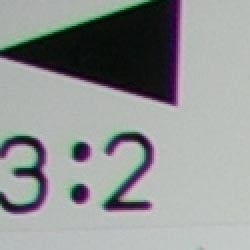
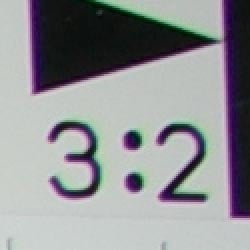
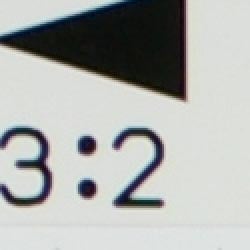
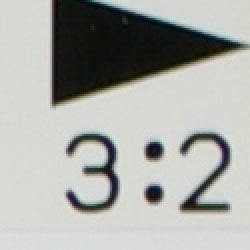
Chromatic aberration with the Pentax K100D's kit lens is moderate at the 18mm setting, though fairly bright, showing about 5-6 pixels. At 55mm, the distortion is very slight in the top left corner, and virtually invisible in the top right. (This distortion is visible as a very slight colored fringe around the objects at the edges of the field of view on the resolution target.)
Corner Sharpness
Slight softening in the corners with the 18-55mm kit lens.
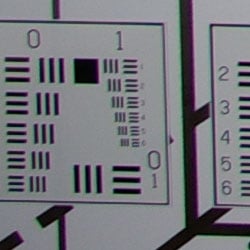
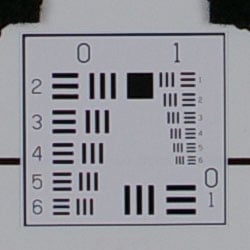
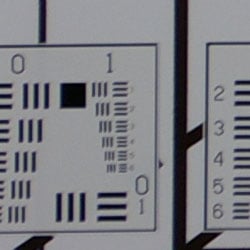
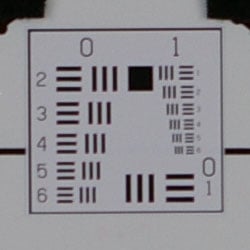
The Pentax K100D's 18-55mm kit lens produced slightly soft corners in a few shots. At wide angle, corners were a hint soft, particularly in the lower corners, compared to the center of the frame. At telephoto, corners showed stronger blurring, but the center was also a bit soft. Still, not a bad performance.
Viewfinder
Coverage
Good coverage from the optical viewfinder, but offset and tilted somewhat.


The Pentax K100D's optical viewfinder proved reasonably accurate, showing about 98% coverage at wide angle and about 97% coverage at telephoto, which is better than average for a consumer model. The resulting images were however vertically offset as well as slightly tilted, which unfortunately is quite common in inexpensive SLRs.
The images above were taken from our standardized test shots. For a collection of more pictorial photos, see our Pentax K100D Photo Gallery .
Exposure
Pentax K100D Exposure
Color
Saturation & Hue Accuracy
Slightly high saturation overall, though still pleasing results. Generally
good hue accuracy.
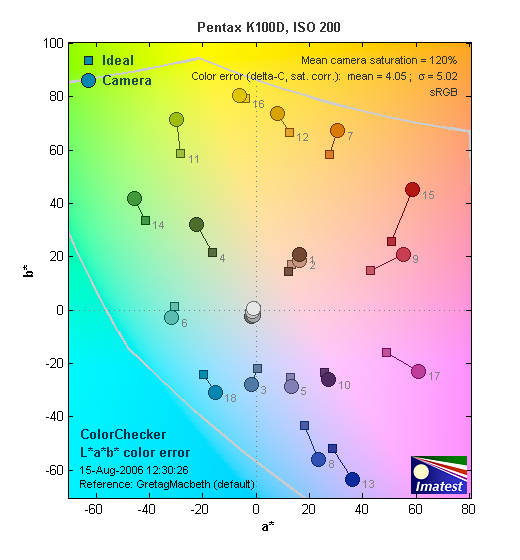 |
| In the diagram above, the squares show the original color, and the circles show the color that the camera captured. More saturated colors are located towards the periphery of the graph. Hue changes as you travel around the center. Thus, hue-accurate, highly saturated colors appear as lines radiating from the center. |
Most consumer digital cameras produce color that's more highly saturated (more intense) than found in the original subjects. This is simply because most people like their color a bit brighter than life. The Pentax K100D actually oversaturates color in a few areas, though cyans seem to be in check. Still, overall saturation was quite pleasing, and the camera does offer a five-step saturation adjustment. Where oversaturation is most problematic is on Caucasian skin tones, as it's very easy for these "memory colors" to be seen as too bright, too pink, too yellow, etc. In this case, the K100D did produce slightly warm skin tones, but many consumers prefer the "healthier" appearance of warmer skin tones.
The other important part of color rendition is hue accuracy. Hue
is "what color" the color is. The Pentax K100D often produced
a slightly warm color balance, particularly with the Auto white balance
setting. It also pushed yellow slightly toward green, and reds toward orange,
but overall results were still quite good.


Sensor
Exposure and White Balance
Indoors, incandescent lighting
Auto White Balance does not compensate for tungsten lighting at all. Good color with the Manual white balance setting, though just a hint warm. A little more positive exposure compensation required than usual.


Color balance indoors under incandescent lighting was pretty warm with the Auto white balance setting, though the Manual and Incandescent options both produced more accurate results. In the end, the Incandescent setting was just a hint too warm, though the Manual option was also on the warmer side. The Pentax K100D required a little more than the average amount of positive exposure compensation here, at +1.3 EV. Despite the slight warm cast, overall color with the Manual white balance setting is quite good, though the blue flowers appear very purple. (Many digital cameras have trouble here.) Our test lighting for this shot is a mixture of 60 and 100 watt household incandescent bulbs, a pretty yellow light source, but a very common one in typical home settings here in the U.S.
Outdoors, daylight
Bright colors overall, though a tendency toward a warm cast and high contrast under harsh lighting. About average exposure accuracy.

Outdoors, the Pentax K100D tended toward a warmer color balance, though overall color was generally pretty good. The K100D performed about average in terms of exposure, requiring the typical amount (or slightly less) of positive compensation we're accustomed to seeing among consumer digital cameras. The K100D's default contrast is a little high, producing washed-out highlights and dark shadows under the deliberately harsh lighting of our "Sunlit" portrait test shown above right. The camera's contrast setting does tame the highlights and shadows slightly, but the overall effect is a slightly dimmer image.
See full set of test images with explanations
See thumbnails of all test and gallery images
Resolution
High resolution, 1,100 ~ 1,200 lines of strong detail.
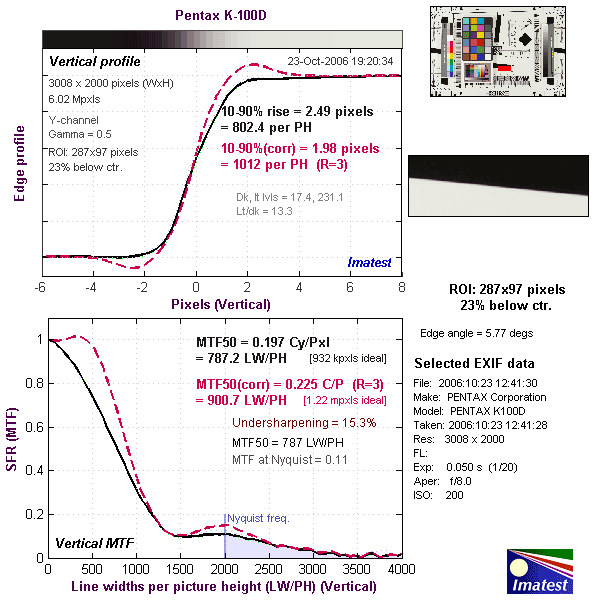
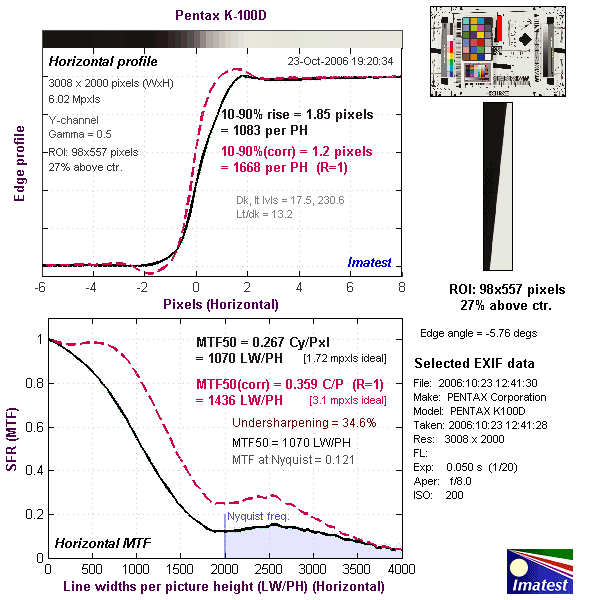
Our laboratory resolution chart revealed sharp, distinct line patterns down to about 1,200 lines per picture height horizontally, and only to about 1,100 lines vertically, again with the Pentax K100D's kit lens. Extinction occurred at around 1,700 lines. Use these numbers to compare with other cameras of similar resolution, or use them to see just what higher resolution can mean in terms of potential detail. Beware that while you might be able to make out what looks like distinct lines at numbers higher than those we've mentioned here, the camera is just doing its best to continue interpreting the lines. If you zoom in and follow them from the wider portions, you'll see the lines converge and reappear several times, so the lines you see at 1,600 and higher are really only artifacts generated by the camera's imaging system.
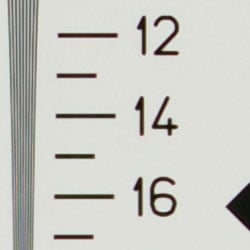
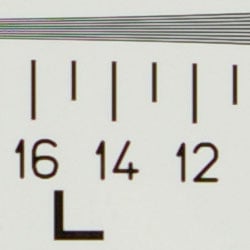
See full set of test images with explanations
See thumbnails of all test and gallery images
Sharpness & Detail
Reasonably sharp images overall, though slight edge-enhancement on high-contrast
subjects. Some noise suppression also visible in the shadows.


The Pentax K100D captures fairly sharp images overall, though some edge enhancement artifacts are visible on high-contrast subjects such as the crop above left. (Edge enhancement creates the illusion of sharpness by enhancing colors and tones right at the edge of a rapid transition in color or tone.)
Noise-suppression systems in digital cameras tend to flatten-out detail in areas of subtle contrast. The effects can often be seen in shots of human hair, where the individual strands are lost and an almost "watercolor" look appears. The crop above right shows some moderate noise suppression in the darkest areas of Marti's hair, though quite a few individual strands are visible in the lighter shadows.
ISO & Noise Performance
Low noise at the normal sensitivity settings, though a big jump in noise
with strong blurring at the highest settings.





Noise levels are quite low at the Pentax K100D's lower sensitivity settings, with only moderately high noise at the ISO 800 setting. Noise increases at the 1,600 and 3,200 settings quite a bit, with much stronger blurring, though results aren't surprising at such high sensitivity settings.
Extremes: Sunlit and low light tests
High resolution with strong overall detail, but high contrast with strong
highlights. Excellent low-light performance, capable of capturing bright
images under average city street lighting and much darker conditions.


Sunlight:
Because digital cameras are more like slide film than negative film (in that they tend to have a more limited tonal range), we test them in the harshest situations to see how they handle scenes with bright highlights and dark shadows, as well as what kind of sensitivity they have in low light. The shot above is designed to mimic the very harsh, contrasty effect of direct noonday sunlight, a very tough challenge for most digital cameras. (You can read details of this test here.)
The Pentax K100D produced high contrast with slightly washed-out highlights
and deep shadows under the harsh lighting of the test above. However, shadow
detail is pretty good, despite some noise suppression and bright-pixel image
noise. Though some areas look a little hot at +0.3 EV, I preferred it to
the image at +0.7 EV, which had too many blown highlights for my preference.
(In "real life" though, be sure to use fill flash in situations
like the one shown above; it's better to shoot in the shade when possible.)
The camera's contrast adjustment does help tame the high contrast here,
but overall results are just slightly dim.
| 1 fc 11 lux |
1/2 fc 5.5 lux |
1/4 fc 2.7 lux |
1/8 fc 1.3 lux |
1/16 fc 0.67 lux |
1/16fc No NR |
|
| ISO 200 |
 1.6 sec f3.5 |
 3 sec f3.5 |
 6 sec f3.5 |
 13 sec f3.5 |
 30 sec f3.5 |
 30 sec f3.5 |
| ISO 400 |
 1/1 sec f3.5 |
 1.6 sec f3.5 |
 3 sec f3.5 |
 6 sec f3.5 |
 15 sec f3.5 |
 15 sec f3.5 |
| ISO 800 |
 1/2 sec f3.5 |
 1/1 sec f3.5 |
 1.6 sec f3.5 |
 3 sec f3.5 |
 8 sec f3.5 |
 8 sec f3.5 |
| ISO 1600 |
 1/5 sec f3.5 |
 1/2 sec f3.5 |
 1/1 sec f3.5 |
 1.6 sec f3.5 |
 4 sec f3.5 |
 4 sec f3.5 |
| ISO 3200 |
 1/10 sec f3.5 |
 1/5 sec f3.5 |
 1/2 sec f3.5 |
 1/1 sec f3.5 |
 2 sec f3.5 |
 2 sec f3.5 |
Low light:
The Pentax K100D captured bright images down to the 1/16 foot-candle light
level (about 1/16 as bright as average city street lighting at night), at
all ISO settings. The Auto white balance setting produced a fairly strong
red color cast, which increased with the exposure time. At the camera's
lower ISO settings, the Noise Reduction option did a fairly good job of
eliminating bright pixel noise. However, at the other end, at ISO 3,200,
noise levels don't differ strongly between the two shots. Though some bright
pixels are eliminated, the overall effect of noise is about the same at
the highest settings. The camera's autofocus system was able to focus on
the subject down to well below the 1/16 foot-candle light level unassisted,
which works out well for its exposure system. Do keep in mind though, that
the very long shutter times necessary here absolutely demand the use of
a tripod or other camera support to get sharp photos. (A useful trick is
to just prop the camera on a convenient surface, and use its self-timer
to release the shutter. This avoids any jiggling from your finger pressing
the shutter button, and can work quite well when you don't have a tripod
handy.)
NOTE: This low light test is conducted with a stationary subject, and the camera mounted on a sturdy tripod. Most digital cameras will fail miserably when faced with a moving subject in dim lighting. (For example, a child's ballet recital or a holiday pageant in a gymnasium.) For such applications, you may have better luck with a digital SLR camera, but even there, you'll likely need to set the focus manually. For information and reviews on digital SLRs, refer to our SLR review index page.
Output Quality
Print Quality
Excellent print quality, great color, good 11x14 inch prints. ISO 1600 images are soft but usable at 8x10, and ISO 3200 shots are still decent at 8x10 and quite excellent at 5x7.
Testing hundreds of digital cameras, we've found that you can only tell just so much about a camera's image quality by viewing its images on-screen. Ultimately, there's no substitute for printing a lot of images and examining them closely. For this reason, we now routinely print sample images from the cameras we test on our Canon i9900 studio printer, and on the Canon iP5200 here in the office. (See the Canon i9900 review for details on that model.)
With the Pentax K100D, we were pleasantly surprised across the board. At 13x19, its prints were slightly soft, but quite good for wall or table display. At high ISO, image noise levels are held in check quite well up to the maximum of ISO 3200! We almost never say that. ISO 800 shots under daylight-balanced lighting look quite good at 11x14 and, those shot under incandescent lighting remain usable out at 8x10, where images from most cameras will start to fall apart (the very warm color balance of incandescent lighting forces the camera's already-noisy blue channel to work harder, producing higher noise.) Though they were somewhat noisy, even our severe incandescent test produced usable images up to 8x10 at ISO 1600, so long as we printed only the manual while balanced images (as we mention further up, the Auto White Balance's performance indoors with incandescent is the K100D's main shortcoming). ISO 800 images can survive the enlargement to 11x14 quite well. For a six megapixel sensor, the K100D holds its own.
The images above were taken from our standardized test shots. For a collection of more pictorial photos, see our Pentax K100D Photo Gallery .
Not sure which camera to buy? Let your eyes be the ultimate judge! Visit our Comparometer(tm) to compare images from the Pentax K100D with those from other cameras you may be considering. The proof is in the pictures, so let your own eyes decide which you like best!
Performance
Pentax K100D Performance
Timing and Performance
Good to slightly slow speed for a consumer-oriented digital SLR.
| Startup/Shutdown |
||
| Power on to first shot |
1.6 seconds |
Time it takes for
camera to boot |
| Shutdown |
0.6 seconds |
How long it takes
to turn off |
| Buffer clearing
time |
13 seconds (5 seconds buffer clearing in LF JPEG) |
Worst case buffer
clearing time. -- This is the delay after a set of shots before you
can remove the card. Some cameras won't retract their lenses and shut
down until the buffer is cleared. |
| Mode
switching |
||
| Play to Record, first shot |
0.2 seconds |
Time until first
shot is captured |
| Record to play |
3.0 seconds |
Time to display
a large/fine file immediately after capture |
| Display recorded image |
0.7 second |
Time to display
a large/fine file already on the memory card. |
| Shutter
response (Lag Time): |
||
| Full Autofocus |
0.182 second |
Time from fully pressing
shutter button to image capture |
| Prefocused |
0.149
second |
Time
to capture, after half-pressing and holding shutter button. |
| Continuous
AF |
0.148
second |
This
mode usually shows no speed increase with our static subject; we have
no way to measure performance with moving subjects |
| Manual
focus |
0.150
second |
For
most cameras, shutter lag is less in manual focus than autofocus,
but usually not as fast as when the camera is "prefocused" |
| Cycle
time (shot to shot) |
||
| Single Shot mode Large Fine JPEG |
0.53 second; 5 frames total; 5 seconds to clear |
Time per shot, averaged
over buffer length or 20 shots, whichever came first |
| Single Shot mode 640x480 JPEG |
0.51 second; 4 frames total; 4 seconds to clear |
Time per shot, averaged
over buffer length or 20 shots, whichever came first |
|
Single Shot mode
RAW |
0.51 second; 3 frames total; 13 seconds to clear |
Time per shot, averaged
over buffer length or 20 shots, whichever came first |
| Early shutter penalty? |
No |
Some cameras refuse
to snap another shot if you release and press the shutter too quickly
in Single Shot mode, making "No" the preferred answer |
| Continuous mode Large Fine JPEG |
0.38 second (2.65
frames per second); 4 frames total; 5 seconds to clear |
Time per shot, averaged
over buffer length or 20 shots, whichever came first |
| Continuous mode 640x480 JPEG |
0.38 second (2.65
frames per second); 4 frames total; 4 seconds to clear |
Time per shot, averaged
over buffer length or 20 shots, whichever came first |
| Continuous mode RAW |
0.38 second (2.65
frames per second); 3 frames total; 13 seconds to clear |
Time per shot, averaged
over buffer length or 20 shots, whichever came first |
| Flash recycling |
3.5 seconds |
Flash at maximum
output |
| Download
speed |
||
| Windows Computer,
USB 2.0 |
2,148 KBytes/sec |
Typical Values: Less than 600=USB 1.1; 600-770=USB 2.0 Low; Above 770=USB 2.0 High |
The Pentax K100D's performance was quite good overall, though start-up is just a little slow for a digital SLR at 1.6 seconds. Shutter lag is good on average, but "prefocus" times (half-pressing and holding down the Shutter button before the final exposure) is a little slower than I'd expect at 0.149 second. Shot-to-shot cycle times are very good, at about 0.53 second for large/fine JPEGs, but the camera only captures five frames at this rate, taking about five seconds to clear the buffer. Continuous-mode speed is moderate, at about 2.65 frames/second, for up to four shots in succession, regardless of resolution. The flash is quick to recycle at 3.5 seconds after a full-power shot. Connected to a computer, download speeds are exceptionally fast, so you won't feel a need for a separate card reader. Bottom line, the Pentax K100D is a little slower than the more pro-oriented digital SLRs on the market, but overall performance is good enough for most consumer purposes. The K100D is responsive enough for action shots, and its quick flash recycling time is a nice bonus as well.
Battery and Storage Capacity
Battery
Very short battery life with standard AA alkaline cells, but much better
life with CR-V3 and AA lithium cells
| Operating Mode | Number of Shots |
|---|---|
| CR-V3 lithium batteries |
630
|
| AA lithium batteries |
570
|
| AA alkaline batteries |
60
|
| AA NIMH rechargeable batteries |
300
|
The Pentax K100D uses four AA batteries for power, and a set of single-use alkaline batteries is included with the camera. Though runtimes are increased with the NiMH batteries over alkalines, the best results come from two CR-V3 lithium battery packs. I strongly recommend picking up a two sets of CR-V3's or AA NiMH rechargeable batteries and keeping them freshly charged and on-hand for extended outings. (See our battery shootout page for information on actual measured capacities of various NiMH brands and capacity markings.)
The table above shows the number of shots the camera is capable of (on either a fresh set of disposable batteries or a fully-charged rechargeable battery as appropriate), based on CIPA battery-life and/or manufacturer standard test conditions.
(Interested readers can find an English translation of the CIPA DC-002 standards document here. (180K PDF document))
Storage
The Pentax K100D accepts SD/MMC cards, though no card is included.
| Image Capacity with 256 MB Memory Card |
Fine | Normal | Basic | RAW | |
|---|---|---|---|---|---|
|
3,008 x 2,000
|
Images
|
84
|
155
|
248
|
23
|
|
File Size
|
3.0 MB
|
1.6 MB
|
1.0 MB
|
11.1 MB
|
|
|
Comp.
|
6:1
|
11:1
|
18:1
|
0.8:1
|
|
|
2,400 x 1,600
|
Images
|
117
|
207
|
336
|
-
|
|
File Size
|
2.2 MB
|
1.2 MB
|
762 KB
|
-
|
|
|
Comp.
|
5:1
|
9:1
|
15:1
|
-
|
|
|
1,536 x 1,024
|
Images
|
226
|
361
|
555
|
-
|
|
File Size
|
1.1 MB
|
709 KB
|
461 KB
|
-
|
|
|
Comp.
|
4:1
|
7:1
|
10:1
|
-
|
|
We strongly recommend buying at least a 512MB card, preferably a 1GB one, to give yourself extra space for extended outings.
Flash
Pentax K100D Flash
Flash Test Results
Coverage and Range
Good flash performance, with good coverage and intensity. Much less positive
exposure compensation required than average.


Flash coverage was slightly uneven at wide angle, with falloff in the corners of the frame. However, at telephoto, coverage is much more even. Indoors, under incandescent background lighting, the Pentax K100D's flash performed quite well at its default exposure. There's a slight orange color cast to the background from the incandescent light source, but overall color is pretty good. With the camera's Night Scene Portrait mode, results are also quite bright at the default exposure, though the longer shutter time results in a much stronger orange cast.
| Flash Range: Wide Angle | |||||
|---|---|---|---|---|---|
| 6 ft | 7 ft | 8 ft | 9 ft | 10 ft | 11 ft |
 1/30 sec f3.5 ISO 200 |
 1/30 sec f3.5 ISO 200 |
 1/30 sec f3.5 ISO 200 |
 1/30 sec f3.5 ISO 200 |
 1/30 sec f3.5 ISO 200 |
 1/30 sec f3.5 ISO 200 |
| 12 ft | 13 ft | 14 ft | 15 ft | 16 ft | |
 1/30 sec f3.5 ISO 200 |
 1/30 sec f3.5 ISO 200 |
 1/30 sec f3.5 ISO 200 |
 1/30 sec f3.5 ISO 200 |
 1/30 sec f3.5 ISO 200 |
|
| Flash Range: Telephoto | |||||
|---|---|---|---|---|---|
| 6 ft | 7 ft | 8 ft | 9 ft | 10 ft | 11 ft |
 1/80 sec f5.6 ISO 200 |
 1/80 sec f5.6 ISO 200 |
 1/80 sec f5.6 ISO 200 |
 1/80 sec f5.6 ISO 200 |
 1/80 sec f5.6 ISO 200 |
 1/80 sec f5.6 ISO 200 |
| 12 ft | 13 ft | 14 ft | 15 ft | 16 ft | |
 1/80 sec f5.6 ISO 200 |
 1/80 sec f5.6 ISO 200 |
 1/80 sec f5.6 ISO 200 |
 1/80 sec f5.6 ISO 200 |
 1/80 sec f5.6 ISO 200 |
|
The Pentax K100D's flash was bright and powerful, with excellent intensity all the way to 16 feet at wide-angle, and to 9 feet at telephoto, both at ISO 200.
|
Manufacturer-Specified Flash Range
|
| 55mm |
 9 feet at f/5.6 ISO 200 |
Our standard test method for flash range uses a fixed setting of ISO 100, to provide a fair basis of comparison between cameras. The Pentax K100D's ISO starts at ISO 200, but they claim that a guide number of 15.6 meters at ISO 200. That translates to about 9 feet at f/5.6. In the shot above, the K100D seems to perform exactly as Pentax says it will, producing good exposures at the rated distances with its ISO set to 200.
Imatest Results
Pentax K-100D Imatest Results
We routinely Norman Koren's excellent "Imatest" analysis program for quantitative, thoroughly objective analysis of digicam test images. I highly commend it to our technically-oriented readers, as it's far and away the best, most comprehensive analysis program I've found to date.
My comments below are just brief observations of what we see in the Imatest results. A full discussion of all the data Imatest produces is really beyond the scope of this review: Visit the Imatest web site for a full discussion of what the program measures, how it performs its computations, and how to interpret its output.
Here's some of the results produced by Imatest for the Pentax K-100D:
Color Accuracy
The Pentax K-100D showed really excellent hue accuracy (hue is what color the colors are), but oversaturated most colors quite a bit. (Saturation is how intense or "bright" the colors are.) Most cameras designed for consumers produce oversaturated color, simply because that's the kind of color most consumers like. The K-100D shows a very high average saturation of 120% (20% brighter than real life), but what's interesting is that the high average saturation figure is the result of most colors being a little oversaturated, rather than one or two colors being oversaturated a lot. (A lot of cameras really blast reds and blues, but leave other colors more dull looking. The overall effect on the K-100D is that its images look bright and colorful, without any one color being too blown out. - And as mentioned, its color is exceptionally hue-accurate, with an average color error (saturation corrected) of only 4.05 delta-E units. - That's close to if not the most accurate hue rendering we've seen yet in a digital camera.
Color Analysis
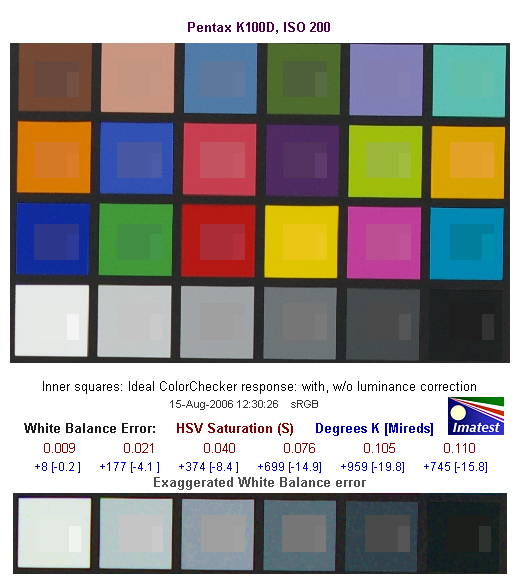
This image shows how the Pentax K-100D actually rendered the colors of the MacBeth chart, compared to a numerically ideal treatment. (Apologies for the tilt, the MacBeth chart on our Multi target had slipped slightly in these shots.) In each color swatch, the outer perimeter shows the color as actually captured by the camera, the inner square shows the color after correcting for the luminance of the photographed chart (as determined by a 2nd-order curve fit to the values of the gray swatches), and the small rectangle inside the inner square shows what the color should actually be, based on perfect rendering in the sRGB color space. This image shows the excellent hue accuracy, as well as a gamma curve that doesn't artificially boost the brightness of strong colors the way many cameras do. Very nice!
Gray Patch Tone and Noise Analysis
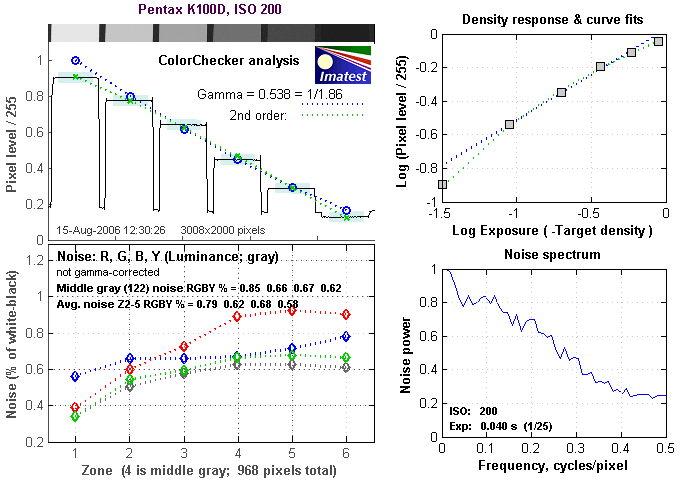
As always, there's a lot in this particular graph, a lot more than we have room to go into here. Bottom line, the Pentax K-100D's noise levels are moderate at low ISO, and the frequency spectrum (the graph at lower right) favors middle-to-high frequencies a bit, but has a large component at very low frequency. This means that the noise will tend to produce a blotchy look to the images, rather than having a fine, grain-like appearance. Fortunately, at low ISOs (ISO 200 is the lowest the K-100D goes), the noise levels are low enough that the blotchiness isn't really visible.
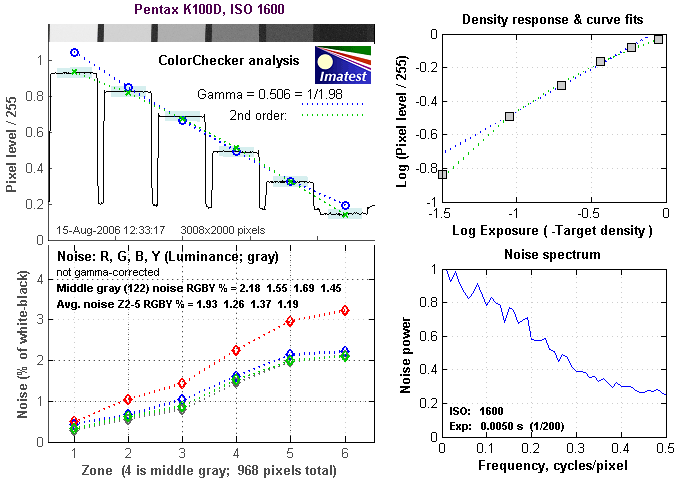
Here's the same set of noise data at ISO 1600. Here, the peak near zero frequency is gone, replaced by a relatively smooth (relative being the operative word here, most camera noise has jagged spectrum plots such as we see here) falloff as you move toward higher frequencies. The curve stays a bit higher than average in the range from 0.1 - 0.2 cycles/pixel, and is higher all the way out to 0.5 cycles/pixel. this indicates that the K-100D's image noise has plenty of high-frequency content, which contributes to the surprisingly smooth look of its ISO 1600 images.
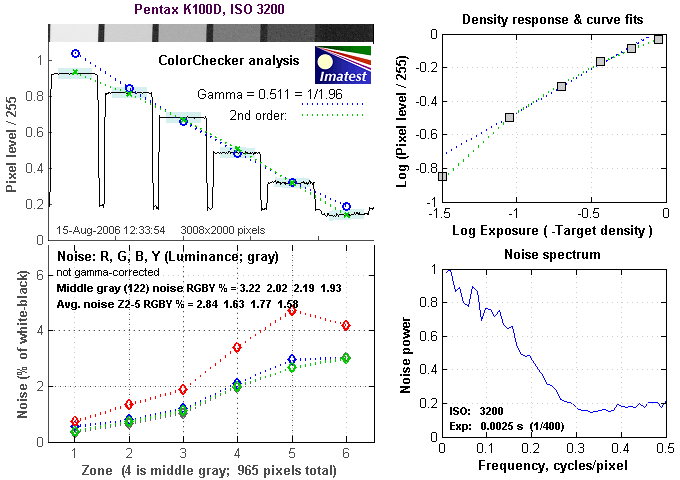
Here's the same set of noise data at ISO 3200. Here, the Noise Spectrum graph has a radically different shape, but the overall level of the noise doesn't increase too dramatically above that at ISO 1600. The spectrum plot is all lumped up on the left side of the plot, meaning that the anti-noise processing has really hammered the fine-grained components. This is easily seen in the images, which have a very soft look to them. We were surprised though, by how good the K-100D's ISO 3200 images looked when printed, even at 8x10 inch sizes. They were definitely noisy, but viewed at arm's length (as most photos on a shelf, table, or wall most commonly are), they looked surprisingly decent.
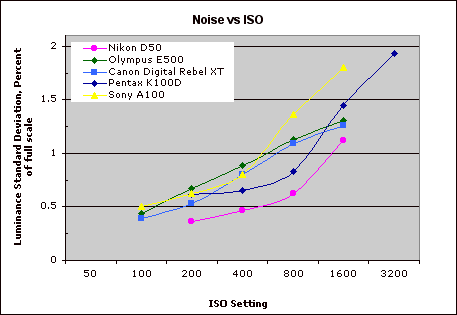
This chart compares the Pentax K-100D's noise performance over a range of ISOs against that of other cameras. While I continue to show noise plots of this sort because readers ask for them, I each time point out that the noise magnitude is only a small part of the story, the grain pattern being much more important. There's also the matter of how much subtle subject detail is traded away in pursuit of low noise figures. In the case of the Pentax K-100D, while it actually does very well in terms of both noise level and noise grain size, it does trade away some subject detail to achieve those results.
Dynamic Range Analysis
A key parameter in a digital camera is its Dynamic Range, the range of brightness that can be faithfully recorded. At the upper end of the tonal scale, dynamic range is dictated by the point at which the RGB data "saturates" at values of 255, 255, 255. At the lower end of the tonal scale, dynamic range is determined by the point at which there ceases to be any useful difference between adjacent tonal steps. Note the use of the qualifier "useful" in there: While it's tempting to evaluate dynamic range as the maximum number of tonal steps that can be discerned at all, that measure of dynamic range has very little relevance to real-world photography. What we care about as photographers is how much detail we can pull out of the shadows before image noise becomes too objectionable. This, of course, is a very subjective matter, and will vary with the application and even the subject matter in question. (Noise will be much more visible in subjects with large areas of flat tints and subtle shading than it would in subjects with strong, highly contrasting surface texture.)
What makes most sense then, is to specify useful dynamic range in terms of the point at which image noise reaches some agreed-upon threshold. To this end, Imatest computes a number of different dynamic range measurements, based on a variety of image noise thresholds. The noise thresholds are specified in terms of f-stops of equivalent luminance variation in the final image file, and dynamic range is computed for noise thresholds of 1.0 (low image quality), 0.5 (medium image quality), 0.25 (medium-high image quality) and 0.1 (high image quality). For most photographers and most applications, the noise thresholds of 0.5 and 0.25 f-stops are probably the most relevant to the production of acceptable-quality finished images, but many noise-sensitive shooters will insist on the 0.1 f-stop limit for their most critical work.
The image below shows the test results from Imatest for an in-camera JPEG file from the Pentax K-100D with a nominally-exposed density step target (Stouffer 4110), with the contrast setting at its default position.
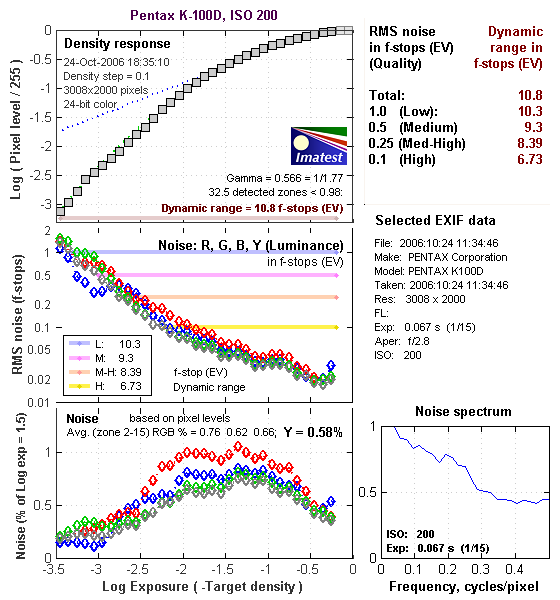
Straight from the camera, the K-100D's JPEG images have a smaller than average dynamic range if you limit yourself to the very best quality criteria, a maximum noise level of 0.1 EV. This is likely caused in part by the K-100D's minimum ISO of 200, as the resulting higher noise level makes it harder to achieve the 0.1 EV noise threshold. Dropping down to the 0.25 EV noise threshold greatly improves results though, bringing its performance more on par with the general run of DSLRs we've tested.
More significant than the absolute dynamic range is the shape of the density response curve, and how smoothly it transitions from highlight to midtone to shadow. The K-100D has a nice gradual curve at the highlight end, meaning it maintains relatively good gradation in highlight areas. At the left (shadow) end of the curve though, its more linear response means the shadows are more likely to become quantized and blocky-looking as you try to bring detail up out of them.
That's the story with JPEG files created in the camera, how about in an external RAW converter, such as Adobe Camera Raw (ACR)?
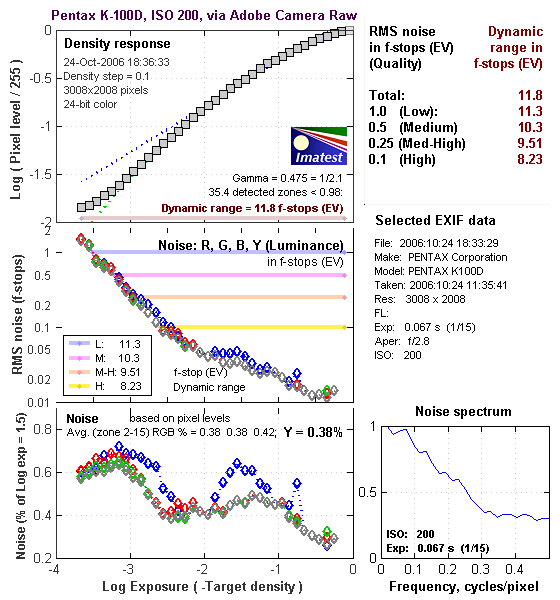
Wow! Using its automatic settings (which in my experience has generally worked best for dynamic range tests like this), ACR managed to extract a full stop and a half (!) more dynamic range at the highest quality level, and a full stop or more at all other noise threshold values. Some of this is due to ACR's excellent noise processing, and some appears to be due to the K-100D's good highlight headroom in its RAW files.
Dynamic Range, the bottom line:
So what can we conclude about the K-100D's dynamic range? I think two things: First, that the K-100D's internal JPEG output results in somewhat limited dynamic range at the highest quality level, apparently the result of its higher than average minimum ISO and the noise levels that result. The big (!) surprise is its RAW file quality, and how much tonality Adobe Camera Raw can pull out of its RAW files. Very impressive, it looks to us like the K-100D might have surprising appeal among RAW shooters looking for an inexpensive camera with great tonal range.
To get some perspective, here's a summary of the Pentax K-100D's dynamic range performance, and how it compares to other digital SLRs that we also have Imatest dynamic range data for. (Results are arranged in order of decreasing dynamic range at the "High" quality level.):
| Dynamic Range (in f-stops) vs Image Quality (At camera's minimum ISO) |
||||
| Model | 1.0 (Low) |
0.5 (Medium) |
0.25 (Med-High) |
0.1 (High) |
| Fujifilm S3 Pro (Adobe Camera Raw 2) |
12.1 | 11.7 | 10.7 | 9.0 |
| Pentax K-100D (Adobe Camera Raw 3.6) |
11.3 | 10.3 | 9.51 | 8.23 |
| Canon EOS-1Ds Mark II (Adobe Camera Raw 3) |
11.2 | 10.3 | 9.4 | 8.14 |
| Fujifilm S3 Pro | -- | 9.9 | 9.4 | 7.94 |
| Canon Digital Rebel XTi (Adobe Camera Raw 3.6) |
10.8 | 9.88 | 9.18 | 7.84 |
| Canon EOS-5D (Adobe Camera Raw 3) |
11.0 | 10.4 | 9.21 | 7.83 |
| Canon EOS-5D (Camera JPEG) |
10.2 | 9.68 | 8.82 | 7.65 |
| Nikon D200 (Adobe Camera Raw 3) |
10.6 | 9.65 | 8.96 | 7.61 |
| Nikon D80 (Adobe Camera Raw 3.6) |
11.1 | 10.4 | 9.42 | 7.51 |
| Nikon D50 | 10.7 | 9.93 | 8.70 | 7.36 |
| Canon EOS 20D | 10.3 | 9.66 | 8.85 | 7.29 |
| Nikon D80 (Camera JPEG) |
10.1 | 9.43 | 8.48 | 7.12 |
| Canon Digital Rebel XT | 10.3 | 9.51 | 8.61 | 7.11 |
| Nikon D200 (Camera JPEG) |
-- | 9.07 | 8.36 | 7.11 |
| Olympus EVOLT | 10.8 | 9.26 | 8.48 | 7.07 |
| Canon Digital Rebel XTi (Camera JPEG) |
9.83 | 9.10 | 8.27 | 7.04 |
| Canon EOS-1Ds Mark II (Camera JPEG) |
10.3 | 9.38 | 8.6 | 7.04 |
| Canon Digital Rebel | 10.1 | 9.11 | 8.47 | 6.97 |
| Pentax *istDs | 10.2 | 10 | 8.87 | 6.9 |
| Pentax K-100D (Camera JPEG) |
10.3 | 9.3 | 8.39 | 6.73 |
| Nikon D2x | -- | 8.93 | 7.75 | 6.43 |
| Nikon D70S | 9.84 | 8.69 | 7.46 | 5.85 |
| Nikon D70 | 9.81 | 8.76 | 7.58 | 5.84 |
Standard Observations:
The results shown in the table are interesting. One of the first things that struck me when I initially looked at test data for a wide range of d-SLRs, was that here again, purely analytical measurements don't necessarily correlate all that well with actual photographic experience. There's no question that the Fuji S3 Pro deserves its place atop the list, as its unique "SR" technology does indeed deliver a very obvious improvement in tonal range in the highlight portion of the tonal scale. I was surprised to see the analytical results place the Olympus EVOLT as highly as they did, given that our sense of that camera's images was that they were in fact noisier than those of many other d-SLRs that we looked at. In the other direction, I was quite surprised to see the Nikon D2x place as low on the listings as it did, given that we found that camera's shadow detail to be little short of amazing.
One thing that's going on here though, is that we tested each camera at its lowest ISO setting, which should produce best-case noise levels. This is in fact what many photographers will be most interested in, but it does perhaps place some of the Nikons at a disadvantage, as their lowest ISO setting is 200, as compared to the ISO 100 settings available on most other models.
K-100D Specifics:
Regardless of the positions of the other cameras though, the Pentax K-100D does appear to have a good dynamic range, when its images are processed from RAW files with a good RAW converter. JPEGs straight from the camera have acceptable tonal range, but only if you're willing to tolerate slightly higher noise levels than the fussiest shooters might insist on.
As I always say though, at the end of the day, I think you have to take the figures here with a grain of salt, and look at actual images with your own eyes to see what you make of each camera's tonal range and noise levels. We'll continue performing these dynamic range tests on the digital SLRs that we review, but (just as with the laboratory resolution target results), we suggest that you not rely on them exclusively for making your purchase decisions.
Resolution Chart Test Results
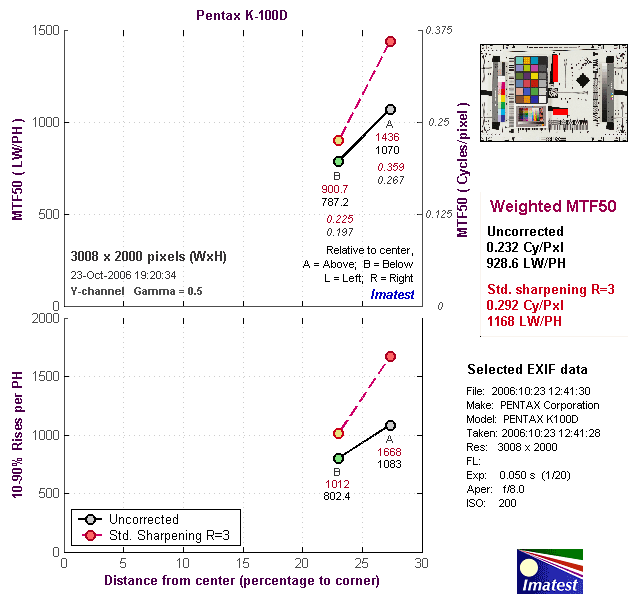
The chart above shows consolidated results from spatial frequency response measurements in both the horizontal and vertical axes. The "MTF 50" numbers tend to correlate best with visual perceptions of sharpness, so those are what I focus on here. The uncorrected resolution figures are 1070 line widths per picture height horizontally and 787 lw/ph vertically. Correcting to a "standardized" sharpening with a one-pixel radius increases this number quite a bit, to an average of 1168 lw/ph. These numbers are on the low side, even for a 6-megapixel camera. (For example, the Nikon D50 showed an uncorrected resolution of 1426 lw/ph.) The K-100D appears to have a somewhat heavy-handed anti-aliasing filter and very conservative in-camera sharpening, making its images straight from the camera a little soft.
It's important though, not to place too much weight on purely analytical results of this sort. Looking at images of "real" subjects shot with the K-100D, they show plenty of fine detail, take post-capture sharpening on the computer very well, and compete well with shots from other 6-megapixel SLRs.
To see what's going on, refer to the plots below, which show the actual edge profiles for both horizontal and vertical edges, in both their original and corrected forms. These show the very gentle slope of horizontal edges, and the much steeper slope of vertical ones.