

Overview
Pentax K-7 Overview
Reviewed by Dave Etchells, Mike Tomkins,
Shawn Barnett, and Zig Weidelich
Preview Date: 05/20/09
Full Review: 08/20/09
The Pentax K-7 incorporates all of what was great about their long-underrated line of digital SLRs with a slew of upgrades and enhancements that should make camera buyers stand up and take notice.
Indeed, the launch of the Pentax K-7 could be a defining moment for Pentax, whose camera business dates back to 1952. Announced in 2003, Pentax's early digital SLRs were advanced for their day, but were plagued by an odd naming convention that kept them out of the mainstream unjustly, until recently, when cameras like the K100D, K10D, and their successors invoked the name of the legendary K1000 film camera whose life spanned 30 years of Pentax history.
Though the Pentax K-7's predecessor, the K20D, is a capable and advanced digital SLR, the K-7 makes a quantum leap, meeting the needs of a wide range of photographers who don't even know they need what the K7 offers. The Pentax K7 also stands to earn praise from the Pentax fan base thanks to its new body design. Where the K20D was big and bulky, the K-7 is small and tight -- something many Pentaxians missed from the early days of the *ist D.
The list of enhancements in the Pentax K-7 defies our ability to neatly summarize them with a few paragraphs or phrases, so we suggest that you read the whole review to grasp the breadth of what the K-7 offers. Enhancements include a reinforced chassis and body design, a completely redesigned sensor, an improved frame rate of 5.2 frames per second, the ability to capture HD movies at 30 frames per second, and an HDMI port to match. The Pentax K-7's 77-segment metering system replaces the old 16-segment design, and a 3-inch LCD with 921,000 pixels will sincerely please long-time Pentax fans, matching the best technology in recent competing designs.
Other, more revolutionary features include an Electronic Level function, which uses the Pentax K7's unique image stabilization system to actually rotate the sensor by plus or minus one degree to keep horizon lines straight. You can even shift the sensor left, right, up, and down to fine-tune your image with the Pentax K7 mounted on a tripod with the Composition Adjustment feature, a unique use of sensor-shift image stabilization technology.
As I say, there's a lot of detail that defies easy encapsulation into a few marketing slogans, so our only concern for Pentax is that once again their excellent digital SLRs and superb-quality lenses will be missed by the masses who won't take the time to do their research into why a Pentax camera might be a good alternative. But you're here now, so let's get down to the business of telling you why you might consider the impressive new Pentax K-7.
Body-only pricing for the Pentax K-7 is set at $1,299.95, with availability starting July 2009. Be sure to check our shopping links above and at the end of each page for current prices.
Pentax K7 User Report
 by Shawn Barnett and Dave Etchells
With the introduction of the K-7, Pentax appears to be positioning itself as a leader in the rugged camera category, making a smaller camera that is better sealed against the elements, with 77 seals that deliver "weather, dust, and cold resistance." That latter point is perhaps the most unique, with no other digital SLR of this class offering a promise of durability down to 14 degrees Fahrenheit.
The Pentax K-7 is a little smaller than the K20D, and a little lighter as well. Built with a steel chassis and a magnesium alloy body, the Pentax K-7 feels tight and solid. Despite its sturdy build, the new camera's body weighs less, just 26.5 ounces (751g) with battery and card. Compared to the K20D's 28.3 ounces (802g) with battery and card, the K-7 has lost about 1.8 ounces (51g). Dimensions are 5.1 x 3.8 x 2.9 inches (129.5 x 96.5 x 73.6mm), while the K20D was 5.6 x 4.0 x 2.8 inches (142 x 102 x 70mm).

At first blush, the Pentax K-7 seems very similar to the K20D, but a closer look reveals a complete redesign. First, the grip is recut, with a nice finger slot to improve grip acquisition. The shutter button seems a little higher on the grip top as well, and just to the right is an AF illumination lamp that wasn't on the K20D, which lights green when the Pentax K7 has difficulty focusing. The IR remote sensor is a little further down on the grip. And the wide strap loops are replaced by more traditional lugs, which usually require D-rings to accommodate a strap. Pentax provides leather-like pads to minimize scratching, but it's the rattle potential that still concerns me, especially while you're recording video.

Much of the weight savings must have come from the grip, which is tighter, and the camera's design is more angular. Instead of creating the illusion of flow with all the curves you see on the K20D, the Pentax K-7's design expresses efficiency. Control placement, while similar to the K20D, is also more efficient. The EV adjustment makes more sense up here next to the status display, and the new ISO button does too, for the same reason.
In addition to the usual unusual Pentax capture modes, the Mode dial has a new icon for the Pentax K-7's Movie mode. The Status display glows a very bright green, and several of the icons on the rear Status display come very close to matching this green.

Were it not for all the controls packed tightly on the right side, I'd call this look on the Pentax K-7's back panel minimalist. No-nonsense comes to mind as a good description for the complete lack of flair in comparison to the K20D. I like it. Just give me the view, the controls I need, and a nice big LCD to see my photographs. Playback and trash make sense together. Pentax separated the AF mode switch and Four-way navigator for an easier interface, and they nested the AF button itself in the center of the switch, a logical move.


Trim: It's clear from these comparison shots that the Pentax K7 body has trimmed down noticeably from the K20D design.
The Live View button is easy to reach, yet hard to press accidentally; at least for me -- Dave found himself pressing it too often. I'm also pleased to see the rear IR remote window still on the back of the camera, where it makes more sense for just about any kind of photography when taking a shake-free photograph is the goal, rather than getting into your own shots, a decidedly more consumer use for a remote release like the one still used on the battery door.
The Pentax K-7's SD card door opens differently from the K20D, with a simple pull to the rear, instead of the more elaborate mechanical release. The remote release socket has found a new home on the right side of the Pentax K-7, just below the SD card door.
More features are on the left side of the camera, including the mechanical flash release button, the RAW toggle button, and the AF switch, but the PC Sync has moved to just below the flash release button. New components include the Microphone jack and the HDMI jack, both concealed under rubber doors. Much as we liked the plastic door on the K20D, the Pentax K-7 returns to a rubber door for the majority of its ports.
Battery. A new battery comes with the Pentax K-7, a 7.2v 1,860mAh lithium-ion battery that also has a new pin-out and a new charger: the corded D-BC90. The new battery is rated at 980 images per charge, or 740 images with 50% flash usage.
You release the battery by raising a small, flat hasp from the bottom of the camera, then turn it counter-clockwise. Inside, a gray, springloaded retention latch prevents the battery from falling free. A small protrusion lets you open the latch with a fingernail.

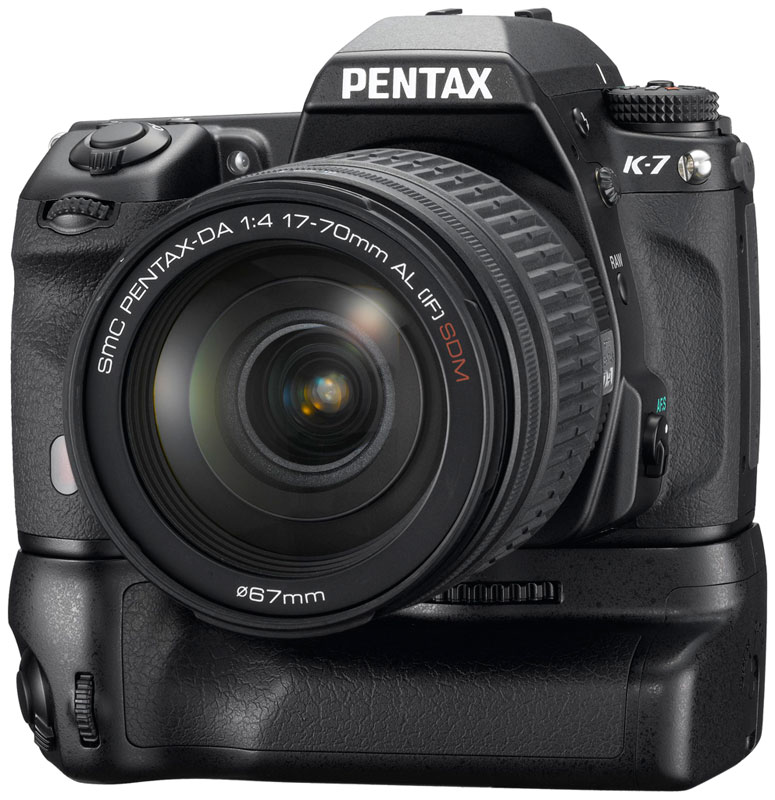
Battery grip. The D-BG4 battery grip for the Pentax K7 comes with two trays, one for six AA batteries, and one for a single D-BC90 battery. The Pentax K7's battery door is not removable, so you can leave a battery in the camera to double the battery life. While this design is nice mainly because you don't have to worry about the cumbersome tower that goes up into the battery compartments of other camera designs, you will have to remove the entire grip to change the Pentax K7's internal battery.
The D-BG4 duplicates several controls from the camera's main interface, including the shutter release, front and rear e-dials, the AE-Lock, and the AF button.

Sensor. Inside the Pentax K-7 is a brand new 14.6-megapixel CMOS image sensor manufactured by partner company Samsung, yielding images at 4,672 x 3,104 pixels or below. With dimensions of 23.4 x 15.6mm (APS-C), the Pentax K-7's sensor has a Bayer RGB filter, and is said to offer improved on-chip noise control as compared to that of the K20D. Four-channel readout coupled with a newly designed PRIME II image processor allow the Pentax K-7 to achieve 5.2 frames-per-second shooting -- the fastest of any Pentax digital SLR to date.
The Pentax K-7 can store 12-bit RAW sensor data in either Pentax's proprietary .PEF format, or Adobe's DNG (digital negative) format. Burst depth at the maximum framerate is limited to 40 JPEG compressed, 15 PEF RAW, or 14 DNG RAW files. At a reduced framerate of 3.3 fps, this increases to 17 RAW files of either format, with JPEG bursts at this speed limited only by available battery and memory card capacity.
Shake Reduction. Pentax has mounted the K-7's image sensor on a ball-bearing supported moveable platter, allowing for sensor-shift image stabilization -- which Pentax brands Shake Reduction -- compatible with all Pentax interchangeable lenses produced to date. For the first time, the sensor-shift mechanism can correct not only for horizontal and vertical motion, but also for rotation around the axis of the lens barrel (though we've reported that this was a feature of Shake Reduction back to the K100D, Pentax informs us that this was a result of a translation error back in 2006). One degree of rotational correction on either side of the central position is possible, and Pentax is claiming 2.5 to 4 stops of correction can be derived from its sensor shift system.
The drawback to Pentax's Shake Reduction technology is that you can't see its effects as you look through the optical viewfinder, as you can with Canon and Nikon's lens-based stabilization systems. But thanks to the Pentax K7's Live View mode, you can indeed see the effect on the LCD, and SR seems to be pretty solid and effective.
Dust removal. The Pentax K-7 also includes a new DR II dust removal system. Where past models relied on the sensor shift mechanism to remove dust from the sensor -- rather ineffectively according to our tests -- the K-7 now includes a piezo-ceramic element to vibrate the low-pass filter. A dust alert system can check for the presence of dust on the low-pass filter, at the user's prompting.
New shutter mechanism. A newly designed shutter unit is capable of a maximum 1/8,000 second shutter speed, and a rated lifetime of 100,000 cycles. To prevent vibration issues in long exposures, the Pentax K7 offers a mirror lockup function that also functions during continuous shooting in Live View mode. A full 5.0EV of exposure compensation is available in either 1/3 or 1/2EV steps, and the Pentax K-7 also includes a 2 and 12-second self-timer.

Prime II processor. A new processor design also graces the Pentax K7, called PRIME II. The new design allows faster image processing, again contributing to the faster frame rate, as well as the ability to record and play movies.
Lens mount. On its front panel, the Pentax K-7 features a KAF2 Lens mount, which is also compatible with KAF3, KAF, and KA mount lenses. Pentax K mount, 35mm screwmount, and 645/67 medium format lenses can also be attached, although there may be restrictions including the use of an adapter.
Metering. Automatic exposure is achieved courtesy of a new 77-segment metering sensor, which replaces the company's 16-segment metering system. Options include Matrix, Center-weighted, and Spot metering, selectable via the switch beneath the Mode dial.
Sensitivity. The combination of sensor and processor in the Pentax K-7 combine to yield sensitivity ranging from ISO 100 to 3,200 equivalents by default. This can be expanded to a maximum of ISO 6,400 if required. When shooting bulb exposures, the K-7 is limited to a maximum sensitivity of ISO 1,600 equivalent.
White balance. The K-7 offers a wide range of white balance settings: as well as Automatic and Manual modes, there are no less than ten white balance presets (Daylight, Shade, Cloudy, Daylight Color Fluorescent, Daylight White Fluorescent, Cool White Fluorescent, Warm White Fluorescent, Tungsten, Flash, and Color Temperature Enhancement). This last option is used to retain and enhance the lighting tone - for example, to enhance a sunset. Finally, three specific color temperatures can be manually stored in-camera for later recall. We're pleased to report that the Pentax K7's Auto White Balance is excellent, easily compensating for tungsten lighting, something that has eluded the entire line of Pentax digital SLRs previously.
Modes. Exposure modes in the Pentax K-7 include Green (fully automatic), Manual, Bulb, Shutter- and Aperture-priority, and a Hyper Program mode which allows shutter and aperture to be simultaneously adjusted around a predetermined Program exposure. There's also Sensitivity Priority, plus Shutter-and-Aperture Priority where the user defines both shutter speed and aperture, and the camera selects an appropriate sensitivity.

Same points, improved function. The Pentax K7 uses the same 11 AF points as its predecessor, but incorporates multiple enhancements in algorithms and speed.
11-point AF. The Pentax K-7's autofocus system is also upgraded, based around a SAFOX VIII Plus AF sensor and a secondary light color sensor. The wide 11-point AF sensor has nine central cross-type elements, and the light color sensor allows the camera to take account of the light source when determining microfocus. The autofocus algorithms have also been reworked for improved AF responsiveness, and a dedicated AF-assist lamp means that the camera's internal flash needn't be raised when focusing in poor ambient lighting conditions.
LCD. The Pentax K-7's design includes a 3.0-inch LCD display with 921,000 dots of resolution, which is essentially 640 x 480 in real-world terms. The display is an in-plane switching TFT type, which offers wide 170 degree horizontal and vertical viewing angles, and includes an anti-reflective coating. Depth-of-field preview is possible in both the optical viewfinder and on the LCD display.
Live View. Focusing in Live View mode has also been improved: the Pentax K-7 offers both contrast detection AF, and face detection capable of recognizing up to 16 individual faces in a scene. When in live view mode, the display can be magnified from two to six times if using autofocus, up to a maximum of 10x magnification in manual focus mode. Optional histogram, grid overlay, and over / underexposure highlight displays are also available in live view mode.
Viewfinder. Another area in which Pentax has upgraded the K-7 is the glass prism-type TTL optical viewfinder, which offers a 100% field of view and 0.92x magnification. Four interchangeable focusing screens are available, including a new Natural-Bright-Matte III screen, and the viewfinder offers -2.5 to +1.5 diopter adjustment to cater for eyeglass wearers.

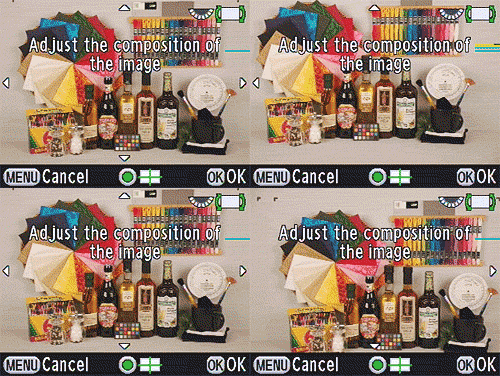
Composition correction. One of the more unusual features of the Pentax K-7 relies on its sensor-shift image stabilization mechanism. When shooting on a tripod, it is possible to fine-tune your framing by manually controlling the position and rotation of the image sensor. A total of two degrees rotation and two millimeters of horizontal or vertical adjustment (one degree and 1mm on either side of the centered position) are available.
Electronic leveling. Thanks to an internal leveling sensor, the K-7 also offers an electronic level function that actually rotates the sensor to a level position when enabled, correcting for errors of one degree in either direction. The Pentax K7 performs this unique trick whether held horizontal or vertical.
Lens distortion correction. The Pentax K-7 can correct for lens distortion and lateral chromatic aberration in-camera when using DA and DFA lenses, another feature usually found on more expensive camera models.
Time-lapse. Pentax has also included a time lapse mode in the K-7, and the camera can also shoot multiple exposures with an overlay of the previous image on the LCD to assist in alignment.
HDR. A high-dynamic-range function automatically combines three shots with differing exposures in-camera, yielding a single image with increased dynamic range. There are two modes, HDR1 and HDR2, which apply Standard and Strong amounts of compensation for different effects.
A bagful of filters built-in. Another area where Pentax helps those who want to avoid their computer is in the K-7's wide range of digital filter effects. There are six Custom Image presets -- Bright, Natural, Portrait, Landscape, Vibrant, and Muted -- each of which offers -4 to +4 steps of fine-tuning for saturation, hue, brightness, contrast, and sharpness.
A further Monochrome mode includes the same range of adjustment over brightness, contrast and sharpness, and adds -4 to +4 steps of image toning, plus the ability to specify either a green, yellow, orange, red, magenta, blue, cyan, or infrared color filter if desired. Other post-capture filters include Toy Camera, Retro, High Contrast, Extract Color, Soft Focus, Starburst, Fisheye, Monochrome, Color, Water Color, Pastel, Slim, Miniature, HDR, Base Parameter Adjust, and Custom Filter.
The Base Parameter Adjust function allows the user to specify a brightness, saturation, hue, contrast, and sharpness adjustment for a specific image. The custom filter meanwhile allows a filter to be created and saved for future use, with the user selecting from a combination of color, contrast, sharpness, shading and distortion effects.
Copyright. You can now specify a copyright holder for storage in the EXIF header of photographs via the camera's menu system, rather than setting this via an attached computer.
Flash. As well as a hot shoe and PC socket for external flash and studio lighting connection, the Pentax K-7 includes a built-in popup flash. Rated at 13 meters / ISO 100, the K-7's onboard flash offers 28mm coverage and red-eye removal capability. The K-7 has X-sync at 1/180 second, offers -2 to +1EV of flash exposure compensation, and can offer both first- and second-curtain flash.
Movie mode. Thanks again to its high-speed image processor and four-channel sensor readout, Pentax has been able to offer a high definition movie capture mode for the Pentax K-7. Movies are recorded at a full 30 frames per second with 1536 x 1024, 1280 x 720, or 640 x 416 pixel options available. Movies are stored as MotionJPEG compressed AVI files. The Pentax K-7 includes a mono microphone and a 3.5mm stereo jack through which an external microphone can be connected; Pentax is recommending the use of an external microphone for optimal sound quality.
It is possible to lock exposure during video capture if required, and unusually the Pentax K-7 offers the ability to explicitly specify the desired aperture prior to capture starting. Contrast detection autofocus is not possible during video shooting (it was on the prototype, but that feature has been dropped for production); rather the user must trigger the autofocus to operate before recording starts. Finally, the image stabilization functionality of the Pentax K-7 can be used during video capture.
For a full writeup, complete with samples and crops of the Pentax K-7's video capability, click here for the Video tab.
Storage and interface. The Pentax K-7 stores images on Secure Digital cards, including the newer Secure Digital High Capacity types. Interface options include high definition HDMI and standard definition NTSC / PAL video outputs, as well as USB 2.0 high speed data connectivity The Pentax K-7 comes bundled with Pentax Digital Camera Utility 4 software, based on Ichikawa Soft Laboratory's popular Silkypix application.
New lenses. Alongside the launch of the camera, Pentax has also announced two new lenses which bring the company's weather-resistance to a new, lower pricepoint. The SMC DA 18-55mm F3.5-5.6 AL WR has pricing of $200, while the SMC DA 50-200mm F4-5.6 ED WR is priced at $250.
Pentax K7 Image Quality
Pentax K7 versus Nikon D5000 at ISO 1,600
 |
 |
 |
 |
 |
 |
|
Pentax K7 at ISO 1,600 |
Nikon D5000 at ISO 1,600
|
|
Up against the Nikon D5000, the Pentax K7 does pretty well at ISO 1,600 with the default Medium noise reduction applied. Some detail appears soft, but these images print very well. The only major failing is the red leaf fabric, a very difficult challenge for any camera. |
|
Pentax K7 versus Canon T1i at ISO 1,600
|
 |
|
 |
|
 |
|
Pentax K7 at ISO 1,600 |
Canon T1i at ISO 1,600
|
|
Pentax K7 does well against the T1i in some of the more challenging parts of the target. Grain is a little more coarse in the shadows, but contrast seems to be better in the mosaic crop. The Pentax K-7 has more trouble with the red cloth than the T1i, but not by much. |
|
Pentax K7 versus Olympus E-P1 at ISO 1,600
|
 |
|
 |
|
 |
|
Pentax K7 at ISO 1,600 |
Olympus E-P1 at ISO 1,600
|
|
Detail is of higher contrast with the Olympus E-P1 among contrasty objects, but the K7's rendering of the fine detail in the Mosaic is better defined. Again, though, the leaf pattern challenges the K-7 more than the E-P1. |
|
Pentax K7 versus Panasonic GH1 at ISO 1,600
|
 |
|
 |
|
 |
|
Pentax K7 at ISO 1,600 |
Panasonic GH1 at ISO 1,600
|
|
The Pentax K-7's sensor renders the scene with more vibrant color, a not-uncommon outcome against the GH1. As such, I prefer the K-7's rendering of the scene. The mosaic image from the GH1 probably has more detail, but the exposure makes that harder to determine. |
|
Addendum: At the request of a reader who wanted to see some more comparably priced SLRs up against the ~$1,300 Pentax K7, I'm adding in a few more crops from the Nikon D90, D300, Canon 50D, and Nikon D700. They were left out not because they are better, as our reader thought, but because they represent the older versions of each company's respective noise suppression technology. Since each didn't do quite as well as the Canon T1i, they fell out of the running, but they may fare a little better here against the K7. He is right, though, that they should have been included for a clearer understanding, so here they are. I'll let you be the judge.
Pentax K7 versus Nikon D90 at ISO 1,600
|
 |
|
 |
|
 |
|
Pentax K7 at ISO 1,600 |
Nikon D90 at ISO 1,600
|
|
Placed here against the 12.3-megapixel Nikon D90, the Pentax cuts it close again in the first two images. The Pentax K7's slightly higher resolution makes the overall image larger, meaning there are more pixels to describe detail. Though the Nikon image of the mosaic bottle looks more "photographic" I think the K7 image would probably print better without sharpening. However, the Nikon still outdoes the K7 with the Leaf fabric (you're getting tired of reading that by now, I'm sure). |
|
Pentax K7 versus Nikon D300 at ISO 1,600
|
 |
|
 |
|
 |
|
Pentax K7 at ISO 1,600 |
Nikon D300 at ISO 1,600
|
|
The Nikon D300 does do quite well against the K7 at ISO 1,600, though it also drops contrast on the way up the scale, while the Pentax K7 works to maintain contrast and saturation as ISO rises. I'll let you be the judge of which approach you prefer. |
|
Pentax K7 versus Canon 50D at ISO 1,600
|
 |
|
 |
|
 |
|
Pentax K7 at ISO 1,600 |
Canon 50D at ISO 1,600
|
|
The Pentax K7 does pretty well against the Canon 50D, despite its slightly lower resolution. Results look very similar to the T1i, but the 50D sharpens less, and has fewer luminance artifacts than either the T1i or the K7. These grainy artifacts, without much color, actually help with printed results, for some reason. Either way, both cameras again do well at ISO 1,600, with neither really besting the other, except in that red leaf fabric. It's also interesting to note that the mosaic label more closely resembles the K7 than the D300 or 50D: it's very sharp and contrasty. |
|
Pentax K7 versus Nikon D700 at ISO 1,600
|
 |
|
 |
|
 |
|
Pentax K7 at ISO 1,600 |
Nikon D700 at ISO 1,600
|
|
Put up against the $2,700 Nikon D700, the Pentax K7 is finally bested noticeably. But again, this is a very expensive, full-frame digital SLR, one with bigger pixels. The $1,299 does well nonetheless for less than half the price. But see the detail shots in the second table below to see how comparable they are at a difficult black and white subject. |
|
Detail: Pentax K-7, Olympus E-P1, Panasonic GH1, Canon T1i, and Nikon D5000
 |
 |
 |
 |
 |
 |
 |
 |
 |
 |
|
Pentax K-7 |
Olympus E-P1
ISO 100 ISO 3,200 |
GH1
ISO 100 ISO 3,200 |
Canon T1i
ISO 100 ISO 3,200 |
Nikon D5000
ISO 100 ISO 3,200 |
|
Detail comparison. The Pentax K7's detail is pretty good at both ISO 100 and 3,200, shown above. Detail is a little soft, but not over-sharpened. Looking at the horizontal lines in the Pure Brewed letters, however, there is some chrominance error, where the lines appear with alternating colors, as opposed to clean, black lines. Though the E-P1 and T1i show more detail, both also show signs of oversharpening. While it doesn't look as solid as some of the others at ISO 3,200, this image prints very well. |
||||
Detail: Pentax K-7, Nikon D90, D300, Canon 50D, Nikon D700
|
 |
 |
 |
 |
|
 |
 |
 |
 |
|
Pentax K-7 |
Nikon D90
ISO 100 ISO 3,200 |
Nikon D300
ISO 100 ISO 3,200 |
Canon 50D
ISO 100 ISO 3,200 |
Nikon D700
ISO 100 ISO 3,200 |
|
Detail comparison. Here up against more comparably priced -- and one much higher-priced D700 -- the K7 does reasonably well. Not stellar, but neither are any but the 50D quite excellent at this challenging target; and the 50D's 15.1-megapixel image shows sharpening artifacts at ISO 100. So while none of them is perfect, none also stand out as significantly better than the others here in pixel-peeper land. All of these companies are getting quite good at maintaining detail at high ISO, though each has a different approach. |
||||
Shooting with the Pentax K-7
The Pentax K-7 is enjoyable to use, more so as I continue to shoot with it. Though it's not the first small Pentax I've shot, the K7 is easily the most refined. The grip is shorter and closer to the lens, which really helps keep the camera balanced. The K20D's grip, on the other hand, is wide, moving the center of gravity too far from the grip, which makes bringing the camera up to your left hand more of a chore.


Small mag-alloy: As a camera prepared for back-woods work, the Pentax K7 has plenty of rivals in the size category. Though it's just a little wider, the Pentax K7 fits right into the Rebel T1i/D5000 category, and its weather-sealed magnesium-alloy construction puts it at the head of the column for outdoor durability.
Most small cameras of this size are plastic. They feel hollow. The Pentax K-7 feels more like a hunk of metal, which is just how a semi-pro camera should feel. It feels a lot like a Canon Rebel XSi in size, but with greater heft in the body, making for a better balance between the lens and the body. It's actually remarkable how close the two are in size and feel, even their very presence.
Great design. So many of the K-7's features are just right for a day out shooting. While sticking to JPEGs for most shots, I reached for the RAW button when I wanted to be sure that I'd be able to post-process if the shot was one I really liked. No matter how good an LCD is, it can't tell you what your monitor and printer will ultimately tell you when you get back home, so having a quick way to turn on RAW mode for the next shot is good. A menu option allows you to turn the RAW button into a toggle between JPEG and RAW+JPEG.
I also like the Green button, now on the back of the Pentax K7. It's great when you're experimenting with settings like Program shift, because it allows you to "re-center" the exposure to the camera's default choice. In Manual mode, it also takes a quick meter reading to give you an approximate starting point to work from, rather than having to turn the front and rear dials until the scene starts to register on the EV scale. It even works when using the Composition Adjustment tool, literally re-centering the sensor behind the lens.
The EV scale on the Pentax K7's Rear Status display covers a wider range than the top deck and viewfinder displays, from -5 to +5, which is great for more creative assignments.
Bracketing options are staggering, with White Balance, Saturation, Hue, High/Low key, Contrast, and Sharpness bracketing options in addition to simple Exposure bracketing. In the Custom menu, you can set the One-Push Bracketing option, which will make the Pentax K7 shoot all three bracketed images at once, rather than requiring you to squeeze off each shot. This increases the likelihood that you'll remember to shoot all three, and that they'll all look about the same.
I also turned on the Leveling indicators, since slanted horizon lines are common in my pictures, as they are for most of us. When out shooting landscape shots, I turn on the Automatic Horizon Correction option as well, eliminating any remaining slop from my pictures. What a cool feature to include.


Finally. Above is the K20D's auto white balance shot in tungsten lighting. The second shot is the Pentax K7's handling of the same scene with the Strong AWB in Tungsten setting. This is remarkable improvement that takes away one of the biggest problems with all preceding Pentax SLRs.
Auto white balance: Check. Key to my budding relationship with the K-7 is Pentax's improved auto white balance setting. It was the first thing I tested when I placed hands on the camera while we were being briefed. First I took a shot of my white paper pad with a K20D, which turned out yellow as expected. Next I took the same shot with the Pentax K7, and the paper turned out white. It was a mixed lighting situation, with cooler window light coming in from one angle, and tungsten from overhead, but the K-7 handled it just about right, making the paper white; certainly a whole lot better than the K20D. As I've mentioned in past reviews, the K20D and its predecessors were designed with the goal of emulating film's behavior so that photographers moving from film would get the results they would expect from a roll of daylight-balanced film. The Pentax K7's auto white balance system changes all that, recognizing what an auto white balance system is supposed to do: adjust for the light source as it changes.
Another sign that Pentax has made a thoughtful change to the auto white balance system based strongly on its tungsten lighting performance is found in Custom function 12: "AWB in Tungsten Light." Here you can set whether the Pentax K7 applies the default "Subtle correction" or "Strong correction" to tungsten lighting. Guess which I've chosen.
Stealth. Perhaps most surprising is the Pentax K7's demeanor: It's not just gentlemanly, it's downright smooth. Past Pentax SLR shutter designs made some unique noises, some good, others a little much. There were lots of odd winding sounds that lasted a little too long and made the cameras sound almost broken. Not the Pentax K7. It's quieter than any digital SLR I've used. The sound has no winding or even clicking sounds. It's more like rubbing a nickel about an inch across the surface of a desk, then drawing it back quickly; or maybe an SD card. Try it. (I should note that some mechanically coupled lenses still buzz quite a bit, but that's not the K7's fault, and doesn't happen with the SDM lenses, which are whisper quiet.)
Shutter sound is not as important as mirror performance, though. The viewfinder blackout time on the Pentax K7 is among the fastest in its class. I can't time it, and I haven't heard what it's rated, but it returns the view so much faster than a K20D, or any camera that I own, that I can't help but fall a little deeper for the K7. A fast mirror return means you can keep better contact with your subject. When shooting portraits, I've found that reacquiring my subject quickly helps me better respond to changing expressions; and naturally when shooting sports, fast blackout times are critical for tracking action. The Pentax K7 excels in this respect.
Foibles. On a camera as capable as the Pentax K-7, there are bound to be some difficulties when you're out shooting, too. I tend to hold the camera by the grip and walk with it next to my leg; as I walked, I kept hearing focus confirmation beeps. Sometimes it was my thumb hitting the AF button on the back of the Pentax K-7, other times it was my finger on the actual shutter release button. I had to make some adjustments to how I held the K-7; those who use a camera strap won't have this trouble.
When you first try to explore the Pentax K-7, you can be forgiven if you get a little lost. There are a lot of options, and several buttons that have multiple purposes. That kind of complexity can make getting from the Info menu to the Filters menu a little tricky. The Filters menu is reached by pressing the right navigation button, but if you're in the Info menu, pressing that button navigates right. You have to leave the Info menu first, then move to the next menu. More troublesome is getting stuck in the Filters menu, especially if you get lost in the many adjustment settings for each filter. This happened to me while I was standing in the hot sun sweating bullets just trying to get back to the default settings. The screen was usable enough in this mode, but I'd inadvertently activated a filter I hadn't meant to, and suffered for it.
Customization. The filter mode offers a lot of control, though, with a unique web-like graphic to broaden or contract individual image elements; and as you make changes, you can use the Depth-of-field check integrated into the power switch to capture a sample image. This image remains onscreen as you make changes, which are reflected in the image. Sony's A900 offers a similar function for applying image changes to a small RAW file, but you don't have the option of saving that modified file; with the Pentax K7 you can save that file by pressing the AE-L button. It saves as a JPEG, but that's better than nothing.
Thanks to the locking mode dial, you literally must lock the Pentax K7 into any of the 11 modes; you have to press the center button to change settings. This was a nuisance at first, but now I like it. The locking button is in the center of the dial, raised enough that it's easy to press while turning the mode dial. I've had other camera mode dials turn without authorization enough that having a lock is reassuring.
I was impressed with the many bracketing options on the Pentax K7, but confess that I wouldn't use them often. I did try the HDR modes several times, but was disappointed with the results. HDR is something better applied selectively by a person working in a program like Photoshop, if you use it at all. People use the technique too often, and too dramatically, however, creating unreality, rather than overcoming the limitations of a digital camera's dynamic range. Still, the Pentax K7's HDR modes do give you a quick idea of what a more carefully processed shot could look like.
Analysis. Pentax has it right when they call the K-7 a camera with pro features at a semi-pro price. I'm tempted to warn pure amateurs away from the Pentax K7, as I did with the Nikon D300, so that they don't get lost in its wonderful tangle of fine-tuning options. But the good news is that if you lock the Pentax K7 into Green zone mode it turns off most of the options that can befuddle and just starts using Pentax's years of experience to take well-balanced photographs.
There's no question that in addition to improving the image stabilization system, Pentax also leveraged its capabilities, with the automatic horizon correction and composition adjustment features.
Small, solid, and sealed, the Pentax K7 makes a superb candidate for the outdoor photographer, occupying the space of a small Rebel, but with the ruggedness to handle both wet and cold weather like a pro. When you make the Pentax K7 your daily shooter, the interface becomes second nature, and you can focus on your photography.
In the Box
The Pentax K-7 ships with the following items in the box:
- Pentax K7 body
- Body cap
- Camera strap O-ST53
- Lithium-ion battery D-LI90
- Battery charger D-BC90
- Finder cap for ME
- AC Plug cord D-CO2
- AV cable I-AVC7
- USB cable I-USB7
- Software CD-ROM S-SW90
Pentax K7 Conclusion
| Pro: | Con: |
|---|---|
|
|
Pentax vaults to center stage with their introduction of the K-7. A few of the former shortcomings have been stripped out of the new camera, and the parts that were right -- the quality build, smart design, and image quality -- have been improved. Pentax couldn't have made a better design for Pentax fans, and it's also the right camera at the right time to attract new users to the platform.
The long list of enhanced features includes a faster frame rate; an HD movie mode; image stabilization that covers not only x and y axes, but rotational as well; electronic leveling and a composition adjustment feature, a new 77-segment metering mode; a high res 921K-pixel LCD; and a 100% coverage optical viewfinder. These are cutting-edge enhancements, many of which you can't find on other SLRs at any price range.
Build is solid and tight, yet small and light. The grip is excellent, and the small size combined with the extensively weather-sealed body makes the Pentax K7 a very good outdoor camera. Our review of the 17-70mm lens on SLRgear.com show that lens to be a particularly good companion for the Pentax K7, a lens whose sharpness is a nice complement to the 14.6-megapixel sensor.
Thoughtful touches like the IR remote sensor on the front and back of the camera make so much sense, it's a wonder others haven't adopted this feature; yet most competing semi-pro digital SLRs don't even have IR sensors built in, requiring an expensive adapter instead. The RAW button should also be adopted by all camera companies, as it's very common to want to switch into RAW mode when it matters, then revert to the more efficient JPEG format when just snapshooting.
AF speed is improved, except in low light situations. Still, unlike most other digital SLRs, the Pentax K7 will eventually find focus where others will fail. AF in Live View mode is quite a bit slower, as can be expected, in both phase-detect and contrast detect modes, but that's true of almost all digital SLRs.
Image quality is superb throughout the ISO range, really very impressive. At ISO 100 you can expect to print quality 13x19-inch prints straight from the camera; larger with just a little sharpening. The crazy part is that you can keep on printing big, 13x19-inch prints at ISO 800, only dropping to 11x14 at 1,600, with only some compromises in detail. It's a quite a leap in quality. See the Image Quality subtab under Exposure for more.
Shooting video on the Pentax K7 wasn't necessarily perfect, producing large files, and suffering from rolling shutter artifacts, but video on SLRs is far from perfect on any current digital SLR. We were impressed with the Pentax K7's video quality, which was noticeably more crisp. See the Video subtab under Operation for more.
Overall, the Pentax K-7 is a very high-quality digital SLR camera, offering a lot for its relatively low price. This is a camera you can learn and love, one that might spoil you forever from using another brand because its special features are so well thought out. We knew when we first held it and took our first pictures with it: the Pentax K7 is a Dave's Pick.

Design
Pentax K-7 Design
Roll-over the various controls and features with your mouse for a brief description. Note: Rollovers are best viewed with the latest versions Firefox, Safari, or Opera browsers, or Internet Explorer 6 or earlier.

Front View. Most of the Pentax K-7 front controls are the same as the Pentax K20D.
Pentax added a new AF assist lamp and moved the IR receiver/Self-timer lamp further down the grip.

Left View. The left of the Pentax K-7 reveals the new microphone jack for use
with an external stereo microphone when recording video, as well as an HDMI video out connector.

Right View. A wired remote socket appears below the SD/SDHC card door. Note the sculpted indentation for the middle finger on the front of the grip.

Top View. There are a few changes to the Pentax K-7's top deck control layout compared to the K20D. The exposure mode dial has a new Movie mode position. The Green button has been moved to the back panel and has been replaced by an Exposure Compensation button. An ISO button has been added next to it. You can also see the built-in microphone mounted on the pentaprism housing.

Back View. The layout of the back has changed significantly from the K20D. Buttons have been rearranged to make room for the larger 3.0-inch LCD, the Bracketing and Fn buttons have been removed, as well as the Shake Reduction switch, and a new Live View button has been added. The four-way controller is now made up of separate buttons which are also used to access specific settings screens.

Bottom View. Very similar here, just a battery door for a D-LI90 custom lithium-ion rechargeable battery pack, battery grip terminal cover for an optional D-BG4 grip, and a tripod mounting socket.
Pentax K-7 Ruggedness/Build Quality

Hardbody. Relatively few cameras in its price bracket offer a magnesium-alloy body like that of the Pentax K7.
In the hand, the Pentax K-7 feels very solid: The K20D was no pushover, but the K-7 feels more solid and rugged, despite the fact that it's roughly 50 grams (1.7 ounces) lighter than its predecessor. It doesn't quite convey the "use it to pound in the tent pegs" ruggedness of a Canon 1D series or Nikon D3 model, but for the price it's a remarkably well-built camera.

Sealed. The entire K-7 system, including the optional battery grip and two new lenses, is well-sealed against dust and moisture.
The optional D-BG4 battery grip ($229.95 list) is also well-sealed, with 43 seals, so the entire Pentax K7 system is well-equipped to handle whatever Mother Nature might care to dish out. The new ruggedness of the Pentax K7 doesn't end with just dust- and water-resistance, but also extends to temperature extremes. When it comes to temperature, most cameras will operate in temperatures as high as the humans holding them can tolerate, but cold is another story. Humans have the advantage of generating plenty of heat of their own, if they just bundle up. Cameras aren't so lucky, and cold is the enemy of battery technology. While you could certainly expect somewhat reduced battery life in such temperatures, the Pentax K-7 is rated for operation down to 14 degrees F (-10 degrees C). That's quite a bit colder than most of the competition is rated to withstand: The Canon 50D, Olympus E30, Nikon D90 and Sony A700 are all rated only to 32 degrees F. Even pro-level bodies like the Canon EOS-1D Mark III and Nikon D3 are only rated for use down to 32F.
Operation
Pentax K-7 Operation
 Like the K20D before it, operation of the Pentax K-7 digital SLR is fairly straightforward, but it's so packed with features and tuned with the experienced photographer in mind, you'll do better with the Pentax K-7 if you take time to read the manual and learn every little feature and function. The large Mode dial on top of the camera controls the main operating modes, and tells the story of the Pentax K-7's uniqueness. It has the usual Pentax prosumer SLR options for Green (Auto), Program, Sensitivity priority, Shutter priority, Aperture priority, Shutter and Aperture priority, Manual, Bulb, X-sync (flash) and User, but now includes a Movie setting. See the Modes & Menus tab for details on the various exposure modes.
Several of the Pentax K-7's control buttons perform multiple functions, which saves space and time. The e-dials for example, control a variety of settings when turned in combination with a press of a button, and the arrow keys of the Four-way arrow pad access shortcuts to common camera settings as well. The Pentax K-7's LCD menu system is straightforward, with four main menus accessible via a tabbed interface at the top of the screen. Considering the multi-functional controls and variety of menu options, it will probably take most users a little time with the manual to really get the gist of things, but operation becomes intuitive after that.
Top Panel Status Display
 The Pentax K-7's monochrome LCD status display appears on the camera's top deck just behind the shutter button. There is a backlight, which is automatically activated whenever the K-7 performs exposure metering. (It can be turned-off in a Custom menu.) The LCD panel displays the Shutter Speed, Aperture, ISO, exposure mode, battery status, EV compensation, drive mode, and the estimated number of images available, varying depending on mode and buttons active.
See the complete list below (illustration courtesy of Pentax).

1 |
Shutter Speed
|
8 |
Flash Exposure Compensation
|
|
2
|
Aperture
|
9
|
ISO Sensitivity
|
|
3
|
Multiple Exposure
|
EV Compensation Value
|
|
|
4
|
Mirror Lock-up
|
10
|
ISO/ISO Auto Indicator
|
|
5
|
EV Bar
|
11
|
Flash Mode
|
|
Electronic Level
|
12
|
Drive Mode
|
|
|
6
|
EV Compensation Indicator
|
13
|
File Format
|
|
Exposure Bracketing Indicator
|
14
|
Remaining Image Storage Capacity
|
|
|
7
|
Battery Level Indicator
|
USB Mode
|
Main LCD
 The Pentax K-7's main TFT color LCD monitor is used for status display, accessing menus, image review as well as image preview in Live View mode. This gorgeous LCD is the high resolution type found on other high-end cameras recently, with approximately 921,000 dots (640x480 RGB pixels), and also features a wide viewing angle. The LCD's brightness can be adjusted in 15 steps, and color can be adjusted in 15 steps on a 2-dimensional Green/Magenta vs Blue/Amber color grid for a total of 225 combinations. You can adjust the color while viewing a captured image in the background, useful for matching your computer monitor. You can also adjust the display color scheme, choosing from six presets, and set the text size, selecting between "Standard" and "Large" fonts.
Status Display When you turn on the Pentax K-7, or change exposure modes, the main LCD displays a status screen by default, showing the current record mode settings. The display updates in real-time while adjustments are made. Both the Status and Control Panel displays automatically flip between landscape and portrait mode displays depending on the orientation of the camera. The Status display can be disabled in Record Menu 3.
See the illustration (courtesy of Pentax) and table below for detailed information:

1 |
Exposure Mode
|
14 |
EV Bar
|
|
2
|
AE Lock
|
15 |
Flash Mode
|
|
3
|
Interval Shooting / Multiple Exposure / Extended Bracketing / Digital Filter / HDR Capture
|
16 |
Drive Mode
|
|
4
|
Shake Reduction / Horizon Correction
|
17 |
White Balance
|
|
5
|
Focus Mode
|
18 |
Custom Image
|
|
6
|
Metering Mode
|
19
|
File Format
|
|
7
|
Battery Level
|
20
|
JPEG Recorded Pixels
|
8 |
E-dial Guide (front or rear)
|
21 |
JPEG Quality
|
9 |
Shutter Speed
|
22 |
Flash Exposure Compensation
|
10 |
Aperture
|
23 |
Adjust White Balance
|
11 |
ISO / ISO Auto
|
24 |
AF Point
|
12 |
Sensitivity
|
25 |
Remaining Image Storage Capacity
|
13 |
EV Compensation / Exposure Bracketing
|
16 |
Control Panel Display When the INFO button is pressed, the Status screen changes to a Control Panel display, allowing direct access to both commonly adjusted settings and some less commonly adjusted settings without the use of the menu system. The Control Panel display with disappear automatically after 30 seconds of non-use, reverting back to the Status display above (if enabled), or a blank screen.
See the illustration below (courtesy of Pentax) for detailed callouts of the settings available in the Control Panel display.

1 |
Function Name
|
9
|
HDR Capture
|
|
2
|
Sensitivity
|
10
|
Lateral Chromatic Aberration Correction
|
|
3
|
Program Line
|
11
|
File Format
|
|
4
|
Highlight Correction
|
12
|
JPEG Recorded Pixels
|
|
5
|
Shadow Correction
|
13
|
JPEG Quality
|
|
6
|
Distortion Correction
|
14
|
Shake Reduction
|
|
7
|
Extended Bracketing
|
15
|
Date and Time
|
8 |
Digital Filter
|
16
|
Remaining Image Storage Capacity
|
Playback Mode Displays In Playback mode, the default image display shows the most recently captured image, with a modest information overlay present. Pressing the Info button once pulls up the Pentax K-7's histogram view. Pressing the up or down arrow switches between a luminance histogram and an RGB+Luminance histogram set. Any overexposed areas in the frame also blink, if the option is selected in the Playback menu. Pressing the Info button again brings up a detailed information display, which decreases the image to a thumbnail on the screen. All of the same information is reported here as in the detailed display in record mode, listed above. A third press of the Info button brings the image back fullscreen, with no information.
 Turning the e-dial in this mode controls the index display and image enlargement options. The index display can show 4, 9, 16, 36, or 81 thumbnail images at a time on-screen (the default is 9), while the enlargement feature magnifies images as much as 32x. There are also display-by-folder and display-by-shooting-date (calender) options. A handy "Compare Images" mode lets you display two images side-by-side, which can be enlarged to 32x as well.
While in playback mode, you can of course manipulate captured images. Options available are rotation, applying digital filters, resizing, cropping, and RAW development. You can even join multiple images together into a sort of index print, using a number of templates including Thumbnail, Square, Random, and Bubble. There is also a slideshow mode available.
Optics
Pentax K-7 Optics
 Lens Compatibility. The Pentax K-7 features a Pentax KAF2 bayonet lens mount, and according to Pentax, is compatible with the company's entire series of K lenses. While not all functions will be available with every lens, particularly with older lenses without AF contacts, die-hard Pentax fans who already have a large collection of lenses will doubtless be pleased with the K7's broad range of lenses. (The camera's Custom menu offers a handful of options for lenses that cannot directly communicate with the camera, such as the use of the aperture ring and display of focus indicators.) The latest DA lenses with ultrasonic motors, and FA zoom lenses with power zoom are fully supported.
The table below (courtesy of Pentax USA), details the K-7's lens compatibility with the various types of Pentax lenses.

Pentax K-7 Autofocus System
Same points, improved function. The Pentax K7 uses the same 11 AF points as its predecessor, but incorporates multiple enhancements in algorithms and speed.
Compared to the K20D, the new Pentax K-7 feels faster and more responsive in virtually every respect. One area of particular improvement is its AF system. The AF system in the K20D was called the SAFOX VIII; the new system is called the SAFOX VIII+. The main AF sensor is the same 11-point unit used in the K20D, but the AF algorithms have been considerably enhanced, and a light-color sensor has been added that improves focus accuracy under light sources with widely varying hues.
Our strong subjective impression has been that the Pentax K-7 achieves focus much more quickly in difficult situations of low light and/or low subject contrast than does the K20D. This contributed greatly to the sense of responsiveness we felt when using the Pentax K-7.
Illuminant-Color Autofocus Correction. We found the idea of illuminant-color focus adjustments particularly intriguing, but Pentax didn't have a lot of details for us on just what was being done. From the limited information we received, though, we think we've arrived at a pretty good understanding of what's involved.
It's a fundamental law of optics that light is refracted varying amounts depending on its color (wavelength). Anyone who's put a prism in the path of a beam of light and observed the resulting rainbow has experienced this firsthand. In camera optics, great pains are taken to force all the different colors of light to end up bending by the same amount, so they can come to focus at the same point. This accounts for much of the complexity of modern apochromatic lenses. In a camera's phase-detection AF system, though, there isn't room (or budget) for fancy apochromatic optics; simple prisms have to suffice to split the incoming light and divert it to the AF sensor pixels. This means that incoming reddish light won't be bent as much as bluish-tinted light would be. AF systems are adjusted to produce accurate results with daylight-balanced lighting, where all the colors are more or less equally represented. This works well in most situations, but when faced with a strongly-tinted light source, an AF system can misjudge the point of correct focus. Two commonly-encountered extremes are the very warm hue of household incandescent lighting, or the cool bluish tones of open shade outdoors. By measuring the overall tint of the ambient lighting, the AF system in the Pentax K7 can compensate for these errors, and deliver more accurate focusing under a wide range of light colors.
Dedicated AF-Assist Lamp. Previously, the K20D and other Pentax SLRs used the flash head as the AF-assist lamp in situations where the ambient light levels were too low for the AF system to operate reliably. The flash made a great AF-assist light, as it was very bright, but it required that the flash head be raised for it to work, so it wasn't available for available-light photography. The Pentax K-7 now has a dedicated AF-assist light, a small, very bright green LED located just to the right of and below the shutter button, as you look at the front of the camera. Because of its close proximity to the lens barrel, some larger lenses and those with wide lens hoods may block the light from reaching the subject, but you can generally dispense with lens hoods for available-light photography, and when we did so, we found that the AF-assist light worked fine with lenses ranging from the 15mm f/4 Limited model to the 17-70mm f/4 DA SDM. (The latter being one that required removal of its lens hood, though.) Long tele zooms might not work with it, but then the AF-assist lamp's light won't project far enough for telephoto subjects anyway.
AF Adjustment. If we've discovered anything reviewing lenses on SLRgear.com, it's that lenses and bodies don't always match. Sometimes they focus in front of the subject, sometimes they focus in back of the subject. Camera companies are starting to acknowledge this, building in adjustments to compensate for front- and back-focusing problems. The Pentax K7 has the same system as the K20D, does just that, and it doesn't just work for the body side of the equation. Sometimes it's the lenses that are out of tune too, so adjusting just the camera's AF to work well with one lens won't solve the problem with another; indeed it can make other lenses worse. The Pentax K7 allows the body to be adjusted (a default or "global" setting), and up to 20 lens types can be registered with their own AF adjustment. Adjustment range is +/-10 arbitrary steps.
 Shake Reduction. Because the Pentax K7 hosts a wide range of lenses, including those with long zooms, the camera offers Pentax's body-based Shake Reduction technology. Shake Reduction is also useful when shooting under low lighting with a slightly slower shutter speed. According to Pentax, Shake Reduction gives you the flexibility of approximately 2.5 to 4 stops slower shutter speed without risking blurring from camera movement; though realistically, exposures longer than 1/15 second typically turn out best with a tripod or other method of camera stabilization. Shake Reduction requires some communication from the lens, particularly the focal length setting. However, for lenses that cannot communicate with the Pentax K-7, you can set the focal length from 8 to 800mm through a setting in the Record menu. The Shake Reduction switch on the rear panel enables the function, and will automatically display the Shake Reduction menu if the camera has no feedback from the lens. Note that Shake Reduction isn't recommended for tripod shooting, and will automatically disable in the self-timer modes, remote control mode, Bulb mode, and when using a wireless flash. It's also not recommended when panning.
For the first time, the sensor-shift mechanism can correct not only for horizontal and vertical motion, but also for rotation around the axis of the lens barrel (though we've reported that this was a feature of Shake Reduction back to the K100D, Pentax informs us that this was a result of a translation error back in 2006). One degree of rotational correction on either side of the central position is possible.
The drawback to Pentax's Shake Reduction technology is that you can't see its effects as you look through the optical viewfinder, as you can with Canon and Nikon's lens-based stabilization systems. But thanks to the Pentax K-7's Live View mode, you can indeed see the effect on the LCD, and SR seems to be pretty solid and effective.
Dust Reduction. The Pentax K-7 also includes a new DR II dust removal system. Where past models relied on the sensor shift mechanism to remove dust from the sensor -- rather ineffectively according to our tests -- the K-7 now includes a piezo-ceramic element to vibrate the low-pass filter. There is also a Dust Alert function which makes it easy to spot dust on the sensor by taking a test shot with optimal exposure and high contrast for detecting dust visually. In addition, a special coating is applied to the sensor cover glass to reduce the chances of dust adhering to it.
Pentax K-7 Optical Test Results
Below are the results of our optical tests on the Pentax K-7. While not officially a kit lens (the K-7 is sold body-only at this point), we used the SMC Pentax-DA 17-70mm f/4 AL IF SDM lens for this section, as we think it'll be a popular combination.
Lens
Zoom
Very good performance with the Pentax 17-70mm lens.


The Pentax K-7 is usually sold body-only, but we decided to test it with the 17-70mm f/4 lens for this Optics page of the review. (Other sections of the review use our reference Sigma 70mm f/2.8 prime.) The Pentax 17-70mm lens offers a better than typical optical zoom range of ~4.1x, and is slightly wider than most kit lenses at full wide-angle, at 17mm (about 26mm equivalent). Detail and sharpness are strong across the frame full wide-angle, with low levels of coma distortion but some strong chromatic aberration in the corners. Results at full telephoto are also very good, with very little corner softness and much lower levels of chromatic aberration.
Macro
A reasonably large macro area with the 17-70mm lens, with soft detail. Flash has trouble up close.


Like zoom range, macro performance will depend entirely on the lens being used. With the Pentax 17-70mm lens, the K-7 captured a larger macro area than average, measuring 2.83 x 1.88 inches (72 x 48 millimeters). Detail was a little soft across the frame, and even softer in the extreme corners. (Most lenses have some softening in the corners at macro distances.) The K-7's flash didn't throttle down well for the macro shot, overexposing part of the frame, and the lens barrel casts a large shadow, resulting in a very uneven exposure.
Geometric Distortion
About average distortion at wide-angle, slightly higher than average at telephoto with the 17-70mm lens.
| Barrel distortion at 17mm is 0.8 percent |
 |
| Pincushion distortion at 70mm is 0.3 percent |
 |
The Pentax 17-70mm lens produced about 0.8 percent barrel distortion at wide-angle, which is about average and noticeable in some of its images. At the telephoto end, there was about 0.3% pincushion distortion which is slightly higher than average, and noticeable in some shots. Geometric Distortion is the tendency for the lens to bend straight lines outward (like a barrel -- usually at wide-angle) or inward (like a pincushion -- usually at telephoto).
| Camera JPEG, Distortion Correction Enabled | |
 |
|
The Pentax K-7 does not apply any geometric distortion correction to JPEGs by default, as uncorrected RAW files have the same amounts. There is however a menu option to turn Distortion Correction on. The image above shows wide angle with Distortion Correction enabled. The Pentax K-7 overcorrected a bit, turning 0.8 percent barrel distortion into about 0.1% pincushion at wide angle.
Chromatic Aberration
Moderately high at wide-angle, but low at telephoto with the 17-70mm lens.


Chromatic aberration is moderately high at the full wide-angle setting of the Pentax 17-70mm lens. At telephoto, chromatic aberration is much lower and hardly noticeable. (This distortion is visible as a slight colored fringe around the objects at the edges of the field of view on the resolution target.) The Pentax K-7 does not apply any chromatic aberration correction to JPEGs by default, as uncorrected RAW files have similar amounts. There is however a menu option to turn Lateral Chromatic Aberration Correction on.
| Camera JPEG, Lateral Chromatic Aberration Correction Enabled | |
 |
 |
| Wide: Very low, top left @ 100 percent |
Wide: Very low, top right @ 100 percent |
As illustrated above, the Pentax K-7 was quite effective at removing the color fringing with Lateral Chromatic Aberration Correction enabled, though if you click on the crops above, you can see it wasn't quite as effective on diagonal edges.
Corner Sharpness
Some softness in the corners of the frame with the 17-70mm lens.


The Pentax 17-70mm lens produced slightly soft corners of the frame at full wide-angle. The softness was fairly symmetrical, and didn't extend far into the frame. At telephoto, corners were also soft, with the bottom right corner being slightly softer than the rest. The center wasn't as sharp at telephoto as it was at wide-angle. Still, pretty good results, especially considering the aperture was wide-open at f/4.0. (Corner sharpness typically improves as the lens is stopped-down from maximum aperture.)
The images above were taken from our standardized test shots. For a collection of more pictorial photos, see our Pentax K-7 Photo Gallery .
Exposure
Pentax K-7 Exposure
Metering As with most SLRs, three metering methods are available on the Pentax K-7: Multi-segment, Center-Weighted, and Spot. All are accessed through the Metering mode lever below the exposure mode dial on the left side of the Pentax K7's top panel. In Multi-segment mode, the camera takes an exposure reading from 77 segments (up from 16 segments on the K20D) and chooses the best exposure based on brightness and contrast across much of the scene. The K-7 gives you the option to link the AF points to autoexposure in Multi-segment mode, via a Custom menu setting. Center-Weighted metering reads from the center of the frame, but from a fairly large area. Center-Weighted mode is automatically selected if a lens other than a DA, D FA, FA J, FA, F, or A lens is mounted, or when the lens aperture ring is set at other than "A." Spot metering simply reads the exposure from the very center of the image, so you can pinpoint the specific area of the photograph you want properly exposed. (Spot metering is very handy when you have a subject that's backlit, or that has a very different brightness, either lighter or darker, than the background.)
 An AE Lock button locks the current exposure settings whenever pressed, so you can independently lock exposure and focus. (AE Lock is useful when you want to base your exposure on an off-center subject. Point the camera at the subject, lock the exposure, then recompose your shot however you like. Your subject will be correctly exposed, regardless of what might be in the center of the frame when you finally snap the shutter.) Through the Setup menu, you can designate the function of the AE Lock button, and how it works in conjunction with the Shutter button.
In situations where exposure compensation is necessary, simply press the Exposure Compensation button and turn the e-dial (in all exposure modes except Manual) and the exposure value (EV) will display in the viewfinder and on the LCDs. EV compensation ranges from -5 to +5 EV in increments of 1/3 or 1/2 EV, or you can use the Auto Exposure Bracketing function to automatically bracket an exposure in three or five-step increments of either 1/2 or 1/3 EV steps each. AEB is handy for those times when you want to make sure you get just the right exposure for a critical subject.
 Extended Bracketing
The Pentax K-7 also features an "Extended Bracketing" feature, which allows you to take a 3-shot bracket of White Balance, Saturation, Hue, High/Low Key Adjustment, Contrast, and Sharpness. Unlike exposure bracketing, three images are saved with each shot, as all these functions are performed in post-processing, so separate exposures are not required.
White Balance White balance options include Auto (which ranges from about 4,000K to 8,000K), Daylight (5,200K), Shade (8,000K), Cloudy (6,000K), Fluorescent Daylight Color (6,500K), Fluorescent Daylight White (5000K), Fluorescent Cool White (4200K), Fluorescent WarmWhite (3,000K), Tungsten (2,850K), Flash (5,400K), Color Temperature Enhancement (CTE) which used to retain and strengthen the color tone of the light source, Manual, and Color Temperature (3 settings). Pressing the AWB (left arrow) button brings up the White Balance menu. As mentioned, the Pentax K-7 offers a Color Temperature setting, which lets you choose from a range of Kelvin temperature settings, from 2,000K to 12,000K. The front e-Dial adjusts the value by 1-step (100K or 20 Mired), while the rear e-Dial adjusts by 10-steps (1,000K or 100 Mired). The Manual option is useful for basing the white balance on a white card. You can also adjust the white balance, controlling the amount of amber, green, blue, and magenta in the color balance using a 2D grid, in any of the selected modes. This ability to "tweak" the white balance, called White Balance Fine Tuning, is very helpful when dealing with difficult light sources.
ISO Sensitivity The Pentax K-7 lets you adjust its light sensitivity, in 1, 1/2, or 1/3 EV steps, with options ranging from 100, to 3,200 ISO equivalents. An Expand Sensitivity Custom menu option allows up to ISO 6,400. An Auto ISO mode in which the camera selects an ISO appropriate to the subject's brightness is also provided. The Auto ISO system seems to adhere to the "1/focal-length for shutter speed" rule, meaning if the focal length is 100mm, the camera will attempt to select a shutter speed of 1/100s and choose a corresponding ISO speed. The default range for Auto ISO is 100 to 800, but you can set both the minimum and maximum ISO, as well as select from three parameters which determine how quickly ISO is boosted (slow, normal, and fast). Higher ISO settings are helpful when you want faster shutter speeds under normal lighting, to help freeze fast action.
Noise Reduction Of course, as with all digital cameras, the higher ISO settings produce photos with more image noise, in much the same way that higher-ISO films show more film grain. To combat this problem, the K-7 offers a High-ISONoise Reduction option through the Record menu, which reduces the amount of image noise at high ISOs. Options consist of Off, Low, Medium, and High, with a default of Medium. New for the Pentax K-7 is the ability to select at what ISO this NR kicks in. OptionsareISO200, 400, 800 (default), and 1600. A second type of Noise Reduction called Slow Shutter Speed NR subtracts a second, dark frame to remove noise and hot-pixels depending on the conditions, such as shutter speed, sensitivity, and internal temperature. Settings for that option are On (Auto), and Off.
Expanded Dynamic Range The Pentax K-7 offers Expanded Dynamic Range options, which attempt to preserve highlights and/or shadows in high-contrast situations. Unlike the K20D, which offered just a single On/Off setting, the K-7 goes further, by offering separate Highlight Correction and Shadow Correction options. Highlight Correction has On/Off settings, while Shadow Correction has three strengths (Low, Medium, and High), along with Off. When Highlight Correction is enabled, the minimum sensitivity is ISO 200.
HDR Capture The Pentax K-7 also offers High Dynamic Range option, which captures three images in quick succession, one underexposed, one properly exposed, and one overexposed, then combines them in-camera. It uses highlight detail from the underexposed image, and shadow detail from the overexposed image to produce a high dynamic range composite. There are three setting available: Off, Standard, and Strong.
Multiple Exposure The Pentax K-7's Multiple Exposure feature allows you to combine 2 to 9 images into a single image as they are being captured. An option called Auto EV Adjustment varies the exposure of each individual shot so that the combined image has the same exposure as a normally exposed individual shot.
Custom Image The Pentax K-7 offers the user the ability to modify pre-existing image profiles. The camera offers seven image style settings: Bright, Natural, Portrait, Landscape,Vibrant, Muted, and Monochrome. The following image parameters can be adjusted for each profile: Saturation (-4 to +4), Hue (-4 to +4), High/Low Key (-4 to +4), Contrast (-4 to +4), Contrast Highlight (-4 to +4), Contrast Shadow (-4 to +4), and Sharpness (-4 to +4). Saturation and Hue can only be adjusted when Monochrome is not selected. When using Monochrome, instead of Saturation and Hue, B&W Filter Effects and Toning options are provided. Filter effects consist of Green, Yellow, Orange,Red,Magenta, Blue, Cyan, and Infrared Color. Monochrome can be further modified with a Toning adjustment which allows you to dial in an amount of either selenium style processing (blues) or sepia style processing (browns). The interface allows you to take a sample image with the preview button, or shows you the last image shot, to use as a reference image; adjustments made in the interface are simulated in the sample image. Of course, you can also select between sRGB and Adobe RGBcolor spaces in another menu.
Digital Filters The Pentax K-7 offers seven canned digital filter effects, plus a Custom setting that allows you to select the amount of each effect to your liking. The seven predefined filter effects are: Toy Camera, Retro, High Contrast, Extract Color, Soft, Star Burst, and Fish-eye. Parameters for each filter can be adjusted. The Custom Filter option allows you to adjust all the parameters: High Contrast (Off, +1 to +5), Soft Focus (Off, +1 to +3), Tone Break (Off, Red, Green, Blue, Yellow), Shading Type (6 types), Shading Level (-3 to +3), Invert Color (On, Off), Distortion Type (3 types), and Distortion Level (Off, Weak, Medium, Strong). You can see examples of the filters at work using our Still Life target on our Test Shots page. In addition to these capture filters, the K-7 offers eight more in playback mode (Monochrome, Color, Water Color, Pastel, Slim, Miniature, HDR, and Base Parameter Adjust), and up to 20 filters can be combined in playback mode.
Drive Modes Like most SLRs, the Pentax K-7 offers a number of Drive Modes. Modes include Single Frame (where one image is captured when the shutter release button is pressed, even if held), Continuous Lo, Continuous Hi, Self-timer, Remote, Bracketing, and Mirror Up. According to Pentax, "Continuous Lo" records JPEGs (using quality level "***") continuously until the card is full at approximately 3.3 frames-per-second, and "Continuous Hi" mode can record up to 40 frames at about 5.2 frames-per-second. When we tested with the highest JPEG quality level ("****"), we got 3.03 frames-per-second for 33 frames, and 5.21 frames-per-second for 20 frames. (Note that our test target is difficult to compress, so buffer lengths using typical subjects are usually better.)
The Pentax K-7 also offers two Self-Timer modes for self-portraits or those occasions when you don't want to risk camera shake on a long exposure by pressing the Shutter button to trip the shutter. You can choose between a two- or 12-second countdown. The two-second countdown is useful for times when you're taking a long exposure with the camera on a tripod, and you want to minimize any camera shake from pressing the Shutter button. In this mode, the mirror is raised immediately after pressing the shutter, giving time vibrations to dampen before the exposure. The Remote Control modes offered are immediate release, 3-second delayed release, or continuous where the first press of the remote starts continuous shooting and a second press stops the burst. The Pentax K-7 has an IR receiver for wireless remotes in the front as well as in the back, which is a really nice feature. A traditional Auto Exposure Bracketing mode is also provided (in addition to the previously mentioned Extended Bracketing), where 3 or 5 frames can be taken with programmable bracket value and order. Finally, a Mirror Lock-up function is also provided to eliminate camera shake during exposure due to mirror slap. When enabled, the first Shutter button press raises the mirror, and the second takes the exposure. An option is available to enable Mirror Lockup when using a remote control.
Interval Shooting The K-7 also offers an Interval Shooting mode where the camera can take pictures by itself on a regular basis, used for time-lapse photography. The interval can be programmed between 1 second and 24 hours, the number of shots between 1 and 99, and the starting time can be immediate or at a set time.
Horizon Correction

Something entirely different. The Pentax K-7 can use its Shake Reduction system to automatically level the horizon in your photos!
As mentioned elsewhere in the review, the Pentax K-7's Shake Reduction system has the ability to correct for rotational motion. Time and experience (and possibly measurement) will tell how much difference the rotational correction capability of the Pentax K-7's SR system will make in capturing sharp images with slow shutter speeds. The ability to rotate the Pentax K-7's image sensor opens up what might be a more interesting application, though, and one that's potentially more broadly useful.
Given that the camera contains accelerometers (used for determining vertical vs horizontal orientation) that let it precisely determine the camera's position (and hence any tilt relative to an exactly horizontal or vertical position), it makes sense to combine that capability with its rotation-capable SR actuators to come up with an entirely new feature: Automatic horizon leveling, or Automatic Horizon Correction, as it's called on the Pentax K-7's menu system.
What a brilliant idea! Tilted horizons are a huge problem for amateur photographers, and even not-so-amateur ones who are in a hurry, or who are simply paying more attention to the subject at the moment of exposure than to the orientation of the camera. Trust us, paying attention to both subject and camera orientation simultaneously is harder to learn than you'd think.
One degree is more than it seems. Horizon Correction is limited to +/-1 degree, but that's a very useful amount of leveling, as can be seen here in this animation.
In the animation at right, the actual angle of the original, tilted shot was 1.3 degrees, and the camera corrected it to a tilt of just 0.3, exactly matching Pentax's spec for the +/- 1 degree correction.
Electronic Level
Even if you don't choose to use its automatic Horizon Correction function, the Pentax K7 has a useful Electronic Level feature that tells you whether your camera is level or not, in both landscape and portrait orientation. When enabled via a checkbox on Record Menu 3, the bar graph on the top-panel LCD readout that normally shows exposure compensation instead shows a row of dots indicating whether the camera is tilted or not, and in which direction. (Like a bubble level, the dots extend toward the side of the camera that's higher.) The exposure display inside the viewfinder likewise converts to a level display, but you can toggle both back and forth between exposure and level display by pressing the +/- button on the camera's top panel. Interestingly, when the Horizon Correction option is enabled, these displays don't indicate an out-of-level condition until the camera is tilted more than the +/-1 degree angle that the Horizon Correction feature can fix. Each dot on the top LCD and in the viewfinder display appear to correspond to about 1/3 degree of tilt.
In Live View mode, a little bar graph display appears in the upper right corner of the LCD screen, displaying a series of dots to indicate tilt angle. When the camera is level, a green line appears to indicate that fact. The scale of the tilt indicator on the rear LCD seems to be slightly expanded over that of the top panel readout and viewfinder displays, with each dot corresponding to 1/4 degree of tilt.


When the Horizon Correction feature is enabled, two pips appear under the bar graph on the LCD display, indicating the +/-1 degree limit that HC can compensate for. Likewise, the green line appears when the tilt is within that +/-1 degree window, and the dots on the bar graph are green. Outside the +/-1 degree range, the dots turn yellow and the green line disappears. When the dots reach the limit of their range, they flash red to indicate an out-of-range condition. The animated screenshots above show the Electronic Level display at work in Live View mode, both with and without the Horizon Correction feature enabled.
The images above were taken from our standardized test shots. For a collection of more pictorial photos, see our Pentax K-7 Photo Gallery .
Not sure which camera to buy? Let your eyes be the ultimate judge! Visit our Comparometer(tm) to compare images from the Pentax K-7 with those from other cameras you may be considering. The proof is in the pictures, so let your own eyes decide which you like best!
Performance
Pentax K-7 Performance
Timing and Performance
Very good speed for a prosumer digital SLR.
| Startup/Shutdown |
||
| Power on |
0.6 second | Time it takes for camera to turn on and take a shot. |
| Shutdown |
0.6 second | How long it takes to turn off. |
| Buffer clearing time |
15 seconds * after 20 LSF JPEGs |
Worst case buffer clearing time. -- This is the delay after a set of shots before you can remove the card. Some cameras won't shut down until the buffer is cleared. |
| 13 seconds * after 13 RAW files |
||
| 13 seconds * after 9 RAW + LSF JPEGs |
||
| *Note: Buffer clearing times measured with a SanDisk Extreme III 8GB SDHC memory card. Slower cards will produce correspondingly slower clearing times. Slow cards may also limit length of bursts in continuous mode. ISO sensitivity and other settings such as D-Range or NR can also affect cycle times and burst mode performance. |
||
The Pentax K-7's startup and shutdown times are about average for an SLR. Buffer clearing time depends on the image size and quality, burst length and how fast the card is.
| Mode Switching | ||
|---|---|---|
|
Play to Record, |
0.1 second
|
Time until first shot is captured. |
|
Record to Play |
1.6 seconds
|
Time to display a large / superfine file immediately after capture. |
|
Display |
0.2 second
|
Time to display a large/fine file already on the memory card. |
Mode switching time is good for an SLR, though switching from Record to Play was a bit on the slow side.
| Shutter Response (Lag Time) | ||
|---|---|---|
| Optical Viewfinder | ||
|
Full Autofocus, Single-Point AF (center point) |
0.093 second
|
Time from fully pressing shutter button to image capture (with Sigma 70mm f/2.8 prime). |
|
Full Autofocus,
Auto-Area AF |
0.108 second |
Time from fully pressing shutter button to image capture (with Sigma 70mm f/2.8 prime).
|
|
Full Autofocus, Single-Point AF |
0.148 second
|
Time from fully pressing shutter button to image capture, Auto Flash enabled (with Sigma 70mm f/2.8 prime). |
|
Pre-focused |
0.074 second
|
Time to capture, after half-pressing and holding shutter button. |
|
Continuous AF
|
0.075 second
|
This mode usually shows no speed increase with our static subject; we have no way to measure performance with moving subjects.
|
|
Manual focus
|
0.075 second
|
For most cameras, shutter lag is less in manual focus than autofocus, but usually not as fast as when the camera is "pre-focused."
|
| Live View Mode | ||
|
Full Autofocus, Phase-Detect AF |
1.2 seconds
|
Time from pressing the AF button and pressing shutter button to image capture (with Sigma 70mm f/2.8 prime). |
|
Full Autofocus, Contrast-Detect AF |
2.3 seconds
|
Time from pressing the AF button and pressing shutter button to image capture (with Sigma 70mm f/2.8 prime). |
|
Full Autofocus, Contrast-Detect AF |
4.8 seconds
|
Time from pressing the AF button and pressing shutter button to image capture (with Pentax 17-70mm f/4 SDM). |
|
Pre-focused |
0.405 second
|
Time to capture, after pressing and holding the AF button. |
Full autofocus shutter lag using single-point (center) AF mode is excellent, at 0.093 second with our reference Sigma 70mm f/2.8 lens. Switching to auto-area AF mode increased lag slightly to 0.108 second, but that's very fast for a prosumer model. Enabling the flash added only about 0.055s delay, which is very good. "Pre-focus" time is also quite fast, at 0.074 second (pre-focusing means half-pressing and holding down the shutter button before the final exposure). Continuous autofocus lag and Manual focus lag weren't much slower than prefocused, both at only 0.075 second.
As expected, Live View mode shutter lag was a lot slower than using the optical viewfinder. Using Phase-Detect mode, full autofocus lag averaged about 1.2 seconds with our Sigma 70mm f/2.8 reference lens. That increased to 2.3 seconds when using Contrast-Detect mode, ranging between 2.1 and 2.5 seconds. For good measure, we tried the Pentax 17-70mm f/4 lens, thinking the SDM focus motor may help, but it turned out to be even slower than the Sigma lens, at 4.8 seconds on average. It also varied much more than with the Sigma, ranging from 3.7 to 6.2 seconds. Prefocused, Live View mode shutter lag was a tolerable 0.405 second.
| Cycle Time (shot-to-shot) | ||
|---|---|---|
|
Single Shot mode
Large SuperFine JPEG |
0.24 second
|
Time per shot, averaged over 25 shots, 15 seconds to clear. |
|
Single Shot mode |
0.26 second
|
Time per shot, averaged over 13 shots, 13 seconds to clear. |
|
Single Shot mode |
0.24 second
|
Time per shot, averaged over 8 shots, 15 seconds to clear. |
|
Early shutter |
No
|
Some cameras refuse to snap another shot if you release and press the shutter too quickly in Single Shot mode, making "No" the preferred answer. |
| Continuous Lo Large SuperFine JPEG |
0.33 second (3.03 frames per second);
33 frames total; 12 seconds to clear |
Time per shot, averaged over buffer length of 33 frames. Once buffer is full, slows to an average of 0.61 second or 1.63 fps, with a lot of variation.
|
|
Continuous Hi
Large SuperFine JPEG |
0.19 second (5.21 frames per second);
20 frames total; 15 seconds to clear |
Time per shot, averaged over buffer length of 20 frames. Once buffer is full, slows to an average of 0.58 second or 1.73 fps, with a lot of variation.
|
|
Continuous Hi |
0.19 second (5.22 frames per second);
13 frames total; 13 seconds to clear |
Time per shot, averaged over buffer length of 13 frames. Once buffer is full, slows to an average of 1.12 second or 0.89 fps, with a lot of variation. |
|
Continuous Hi |
0.19 second (5.16 frames per second);
9 frames total; 13 seconds to clear |
Time per shot, averaged over buffer length of 9 frames. Once buffer is full, slows to an average of 1.76 seconds or 0.57 fps, with a lot of variation. |
| Flash recycling |
3.7 seconds
|
Flash at maximum output. |
| *Note: Buffer clearing times measured with a SanDisk Extreme III 8GB SDHC memory card. Slower cards will produce correspondingly slower clearing times. Slow cards may also limit length of bursts in continuous mode. ISO sensitivity and other settings such as D-Range or NR can also affect cycle times and burst mode performance. |
||
Shot-to-shot cycle times are very good, at about 0.25 seconds for any quality setting. Continuous speeds are also very good, at about 5.2 fps for any quality in the Continuous Hi mode. Buffer depths are quite good too, at 20 Large Superfine JPEG frames, 13 RAW and 9 RAW + LSF JPEGs. (Note that our target image for this test is difficult to compress, so you'll likely get longer bursts with more typical subjects.) The flash takes 3.7 seconds to recharge after a full-power shot, which is good considering its power.
| Download Speed | ||
|---|---|---|
|
Windows Computer, USB 2.0 |
6,251 KBytes/sec
|
Typical Values: |
Connected to a computer or printer with USB 2.0, download speeds are quite fast as well.
Bottom line, the Pentax K-7 is a very responsive camera, and faster than the K20D in most respects.
Battery and Storage Capacity
Battery
Excellent battery life for a lithium-ion design.
| Operating Mode | Number of Shots |
|---|---|
|
Lithium-ion Rechargeable Battery,
Optical Viewfinder (CIPA standard) |
740
|
|
Lithium-ion Rechargeable Battery,
Live View LCD |
Not Specified
|
The Pentax K-7 uses a custom rechargeable lithium-ion battery for power, and ships with a charger. Battery life is excellent when using the optical viewfinder, but will most certainly be much less when using the LCD in Live View mode. Although battery life is well above average, we recommend you pick up a spare battery and keep it freshly charged and on-hand for extended outings, or if you plan to use Live View or shoot video. Pentax also offers the optional D-BG4 Battery Grip for the K-7, which accepts either a second lithium-ion battery pack, or six AA batteries.
The table above shows the number of shots the camera is capable of (on either a fresh set of disposable batteries or a fully-charged rechargeable battery as appropriate), based on CIPA battery-life and/or manufacturer standard test conditions.
(Interested readers can find an English translation of the CIPA DC-002 standards document here. (180K PDF document))
Storage
The Pentax K-7 accepts SD/SDHC memory cards, and no card is included with the camera.
| Image Capacity with 1GB Memory Card |
SuperFine (****) |
Fine (***) |
Normal (**) |
Basic (*) |
RAW | |
|---|---|---|---|---|---|---|
|
4,672 x 3,104 |
Images
(Avg size) |
75
13.6MB |
120
8.5MB |
213 4.8MB |
420 2.4MB |
41
24.6MB |
|
Approx.
Compression |
3:1
|
5:1
|
9:1 | 18:1 |
0.9:1
|
|
|
3,936 x 2,624 |
Images
(Avg size) |
105
9.7MB |
168
6.1MB |
296 3.5MB |
576 1.8MB |
-
|
|
Approx.
Compression |
3:1
|
5:1
|
9:1 | 17:1 |
-
|
|
|
3,072 x 2,048 |
Images
(Avg size) |
171
6.0MB |
275
3.7MB |
478 2.1MB |
915 1.1MB |
-
|
|
Approx.
Compression |
3:1
|
5:1
|
9:1 | 17:1 |
-
|
|
|
1,728 x 1,152 |
Images
(Avg size) |
527
1.9MB |
819
1.3MB |
1,414 724KB |
2,594 395KB |
-
|
|
Approx.
Compression |
3:1
|
5:1
|
8:1 | 15:1 |
-
|
|
We strongly recommend buying either a large capacity SDHC card, at least a 2GB card, preferably a 4-8GB one, to give yourself extra space for extended outings. (Check the shopping link above, cards are really cheap these days, so no reason to skimp.)
Imaging
Pentax K-7 Image Quality
Color
Saturation & Hue Accuracy
Bright, intense colors with moderate oversaturation of strong blues, reds, and greens.
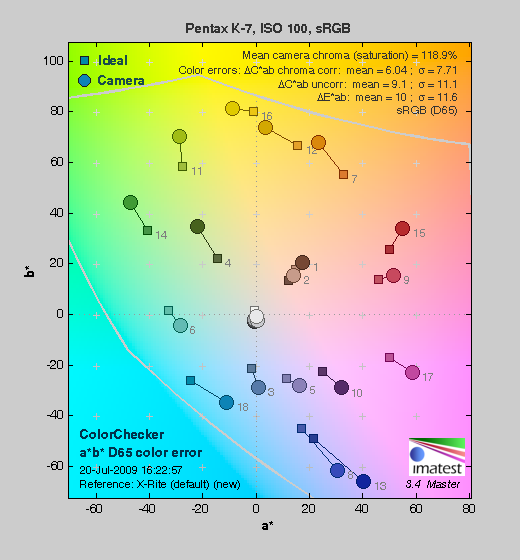 |
| In the diagram above, the squares show the original color, and the circles show the color that the camera captured. More saturated colors are located toward the periphery of the graph. Hue changes as you travel around the center. Thus, hue-accurate, highly saturated colors appear as lines radiating from the center. |
Saturation. The Pentax K7's default settings push most colors by quite a bit, especially blues, greens, and some reds. Overall, images were very bright and punchy, with color that was a little over the top for a prosumer SLR. You can, however, always turn down settings such as saturation and contrast to suit your own tastes. Most consumer digital cameras produce color that's more highly saturated (more intense) than found in the original subjects. This is simply because most people like their color a bit brighter than life.
Skin tones. Caucasian skin tones from the K-7 lean toward the warm side, but many consumers prefer the "healthier" appearance of warmer skin tones. Where oversaturation is most problematic is on Caucasian skin tones, as it's very easy for these "memory colors" to be seen as too bright, too pink, too yellow, etc.
Hue. The Pentax K7 showed a few color shifts relative to the correct mathematical translation of colors in its subjects, but had pretty good accuracy overall. Most noticeable was a shift in orange toward yellow, with some shifts in cyans, blues, and reds as well. Hue is "what color" the
color is.
Saturation Adjustment
The Pentax K-7 has a total of nine saturation settings available, four above and four below the default saturation. This covers a pretty wide range of saturation levels, about as wide a range as you're likely to find photographically relevant, apart from special effects that are arguably better achieved in software. The fine steps between settings mean you can program the camera to just the level of saturation you prefer.
| Saturation Adjustment Examples | ||||
 |
 |
 |
 |
 |
| -4 | -2 | 0 | +2 | +4 |
The table above shows results with several saturation settings. Click on any thumbnail above to see the full-sized image.


Sensor
Exposure and White Balance
Indoors, incandescent lighting
Warm results with Auto and 2,600 Kelvin, slightly cool with Incandescent, though good color with Manual white balance setting.


Indoors, under normal incandescent lighting, color balance was quite warm with the default Auto white balance setting, with a fairly strong orange cast; however, this is considerably better than Pentax SLRs used to produce which was a bright yellow/orange cast. The Pentax K-7 features a new "Automatic White Balance in Tungsten" setting in Custom menu 12. Options are "Subtle" and "Strong" correction, with the default being Subtle. The Strong setting resulted in a reduced orange cast compared to Subtle, with a slightly magenta tint. Results with the Incandescent setting were a bit on the cool side, with a slightly bluish cast. The 2,600 Kelvin setting resulted in a slightly warm cast, but wasn't too far off. The Manual setting was the most neutral and accurate. Note that there is also a new Color Temperature Enhancement (CTE) white balance mode, which strongly intensified the orange/yellow cast in our indoor test shot. The Pentax K-7 required slightly higher than average amount of positive exposure compensation for our indoor scene, at +0.7 EV. Overall color with the Manual white balance setting looks quite good, though the blue flowers appear slightly purple. (Many digital cameras reproduce these flowers with a dark, purplish tint, so the Pentax K-7 actually performs a little better than average here.) Our test lighting for this shot is a mixture of 60 and 100 watt household incandescent bulbs, a pretty yellow light source (2,600 Kelvin), but a very common one in typical home settings here in the U.S.
Outdoors, daylight
Bright colors overall, though a tendency toward a warm cast and slightly high contrast under harsh lighting.

Outdoors, the Pentax K-7 performed fairly well, requiring slightly higher than average exposure compensation of +1.0 EV for our "sunlit" portrait shot to keep the face reasonably bright. That's not bad, since the average among the cameras we tested is +0.7 EV. Contrast is a little high, as you might expect under such harsh lighting, and highlights in the model's shirt and flowers are clipped, but there's plenty of detail in the deep shadows. The highlights were blown out just a bit in the House shot, but not too badly. Color balance is good as well, though saturation is a little high. Overall, good performance here.
See full set of test images with explanations
See thumbnails of all test and gallery images
Resolution
High resolution, 1,700 ~ 1,800 lines of strong detail.


Our laboratory resolution chart revealed sharp, distinct line patterns down to about 1,800 lines per picture height in the horizontal direction, and about 1,700 in the vertical direction. Extinction didn't occur until around 2,600 to 2,800 lines. We weren't able to do much better with Adobe Camera RAW processed RAW files, though results were crisper, with fewer moire interference patterns near or above the resolution limit (see other areas of the resolution target). Use these numbers to compare with other cameras of similar resolution, or use them to see just what higher resolution can mean in terms of potential detail.
See full set of test images with explanations
See thumbnails of all test and gallery images
Sharpness & Detail
Sharp images overall, though minor edge-enhancement on high-contrast subjects. Minimal noise suppression visible.


Sharpness. The Pentax K-7 produced sharp images with good detail. Some edge enhancement artifacts are visible on high-contrast subjects such as the crop above left, but overall results are still good. Edge enhancement creates the illusion of sharpness by enhancing colors and tones right at the edge of a rapid transition in color or tone.
Detail. The crop above right shows only minimal noise suppression, as the darker areas of the model's hair show a lot of detail. Individual strands are still distinguishable even in the lighter shadows, though they begin to merge as shadows deepens. Still, it's a great performance, as most SLRs have quite a bit more trouble with the straight, red strands of hair here. Noise-suppression systems in digital cameras tend to flatten-out detail in areas of subtle contrast. The effects can often be seen in shots of human hair, where the individual strands are lost and an almost "watercolor" look appears.
RAW vs In-Camera JPEGs
As noted above, the Pentax K-7 does a pretty good job at balancing between sharpness and visible sharpening artifacts in camera JPEGs. A little more detail can be obtained from carefully processing RAW files, though, without additional artifacts. Take a look below, to see what we mean:
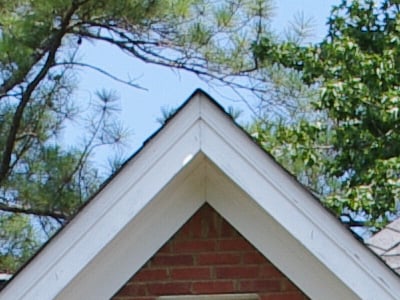
In the table above, mousing over a link at the bottom will load the corresponding crop in the area above. Examples include in-camera Super Fine JPEG, and RAW (.DNG) file processed through Adobe Camera Raw version 5.4, then sharpened in Photoshop. For the Pentax K-7's images, I found best results with strong but tight 300% unsharp masking with an 0.3 pixel radius. As you can see, the ACR conversion extracted a touch more detail than the JPEG, but the camera is doing a pretty good job at preserving fine detail in JPEGs to begin with.
ISO & Noise Performance
Low noise at the normal sensitivity settings, with very good results up to ISO 800. Higher noise at 1,600 and above.
| Noise Reduction = Medium (Default) | ||
 |
 |
 |
| ISO 100 | ISO 200 | ISO 400 |
 |
 |
 |
| ISO 800 | ISO 1,600 | ISO 3,200 |
 |
||
| ISO 6,400 | ||
The Pentax K-7 produced low noise at its lower sensitivity settings, and even at ISO 400, noise is fairly low, with little detail lost to the noise reduction. (This comes as no surprise, since the K7's default noise reduction doesn't kick in until ISO 800.) At ISO 800, noise pixels are more evident but are very fine-grained. There's some chroma noise visible in the shadows, but there's still plenty of detail overall. ISO 1,600 continues the trend, with more obvious "grain" and some blurring, but there's still quite a bit of fine detail left. At the higher settings of 3,200 and especially 6,400, noise levels are much higher, with heavy blurring and chroma noise blotches. Color balance also shifts towards green at ISO 6,400. See the Print Quality section below for recommended maximum print sizes at each ISO.
Extremes: Sunlit and low light tests
High resolution with strong overall detail, but slightly high contrast with strong highlights. Very good low-light performance, capable of capturing bright images under average city street lighting and much darker conditions.


Sunlight. The Pentax K-7 produced slightly high contrast with some washed-out highlights and deep shadows under the harsh lighting of the test above, but performed better than many SLRs in this regard. Shadow detail is pretty good, despite some minor image noise. Our outdoor target required +1.0 EV exposure compensation for a reasonably bright face, which is a little higher than average. Some may prefer the +1.3 EV exposure, but we thought too many highlights were blown, and the skin tone was washed out. Be sure to use fill flash in situations like the one shown above; it's better to shoot in the shade when possible.
Because digital cameras are more like slide film than negative film (in that they tend to have a more limited tonal range), we test them in the harshest situations to see how they handle scenes with bright highlights and dark shadows, as well as what kind of sensitivity they have in low light. The shot above is designed to mimic the very harsh, contrasty effect of direct noonday sunlight, a very tough challenge for most digital cameras. (You can read details of this test here.)
Contrast Adjustment
We really like it when a camera gives us the ability to adjust contrast and saturation to our liking. It's even better when those adjustments cover a useful range, in steps small enough to allow for precise tweaks. Just as with its saturation adjustment, the Pentax K-7's contrast setting meets both challenges, though it could have used slightly more range on the minus side.
| Minimum Contrast | |
 |
 |
| Contrast set to lowest, +1.0 EV |
Contrast set to lowest, Auto Exposure |
At its lowest contrast setting, the Pentax K-7 did an okay job of preserving highlight detail, maintaining fairly natural-looking skin tones, and holding nice detail in the shadows. There are still some blown highlights, but fewer than at default contrast. The Pentax K-7 captures natural looking color outdoors, though just slightly on the warm side. Overall, good results here, especially when the contrast setting is tweaked, though colors are a bit flat.
| Contrast Adjustment Examples | ||||
|
 |
 |
 |
 |
| -4 | -2 | 0 | +2 | +4 |
The series of shots above shows results with several different contrast adjustment settings, showing every other step, as well as the default and both extremes. While you can see the extremes, it's hard to really evaluate contrast on small thumbnails like these, click on any thumbnail to go to the full-size image. The Pentax K-7s contrast adjustment worked well, however it had quite an effect on color saturation. Contrast and saturation are actually fairly closely coupled, so this is unfortunately not unusual.
D-Range Settings
The Pentax K-7 offers three Shadow Correction levels (Low, Medium, and High) as well as one Highlight Correction setting (On/Off). As the name implies, Shadow Correction works to raise shadow detail while attempting to keep highlights and midtones as they are, and likewise, Highlight Correction attempts to reduce highlights without darkening shadows and midtones. See the images and crops below to see their effect on our high contrast "Sunlit" Portrait test shot.
| D-Range Examples Shadow Correction |
|||
 |
 |
 |
 |
| Shadow Correction Off |
Shadow Correction Low |
Shadow Correction Medium |
Shadow Correction High |
 |
 |
 |
 |
 |
 |
 |
 |
| Shadow Detail | |||
 |
 |
 |
 |
| Highlight Detail | |||
Above, we see a gradual lightening of shadows as the Shadow Correction setting is increased, but there is also a slight increase in highlight clipping. If you look closely at the shadow detail, you will notice an increase in noise as the setting is turned higher, but that's to be expected. It's interesting that the camera reports an ISO of 100 for all three settings of Shadow Correction.
| D-Range Examples Highlight Correction |
|
|
 |
| Highlight Correction Off |
Highlight Correction On |
|
 |
|
 |
| Shadow Detail | |
|
 |
| Highlight Detail | |
In the crops above, we can see that shadow levels are virtually untouched, (perhaps just slightly boosted when On), while more highlight detail is preserved with Highlight Correction On (right) than it is with it Off (left). Again, if you look closely at the shadow areas, there is an increase in noise, but this time the K-7 reports ISO 200 was used.
| Far-Field D-Range Examples | ||
 |
 |
 |
| Shadow Correction Low |
Shadow Correction Medium |
Shadow Correction High |
 |
 |
|
| Highlight Correction | D-Range Off | |
Above, we see similar results for our Far-Field House shot. Note that Shadow and Highlight Correction are independent settings found in the Record Mode 1 menu, and can both be enabled at the same time.
HDR Capture
The Pentax K-7 has a High Dynamic Range (HDR) capture mode where the camera takes three images (underexposed, normal, and overexposed) in quick succession and combines them in-camera into one image. If performed properly, this method should result in much higher dynamic range, without the additional noise penalty that comes with boosting sensitivity when using the D-Range option. (In fact, it can reduce shadow noise by combining shadows from the overexposed shot.) There are three HDR settings available: Off (default), Standard and Strong.
| High Dynamic Range Mode | ||
 |
 |
 |
| Off +0.7 EV |
Standard +0.7 EV |
Strong +0.7 EV |
As you can see from the above images, it didn't work very well for our "sunlit" portrait shot, resulting in very flat and unnatural looking images with reduced saturation. It did a good job of bringing out shadow detail, but even the lowest "Standard" setting was too strong for the highlights, turning white into grey. The Pentax K-7's HDR mode may work better with a different subject such as a landscape with a bright (normally washed-out) sky. It probably isn't designed to work with portraits anyway, as subject motion would likely be a problem.
Face Detection
The Pentax K-7 has a face-detection AF/AE option in Live View mode.
| Face Detection | |
 |
 |
| Off 0.0 EV |
On 0.0 EV |
As you can see above, it does improve the exposure over the default without using any exposure compensation, but the model's face is still very dim.
| 1 fc 11 lux |
1/2 fc 5.5 lux |
1/4 fc 2.7 lux |
1/8 fc 1.3 lux |
1/16 fc 0.67 lux |
1/16fc No NR |
|
|---|---|---|---|---|---|---|
| ISO 100 |
 2.5 sec f2.8 |
 5 sec f2.8 |
 10 sec f2.8 |
 20 sec f2.8 |
 30 sec f2.8 |
 30 sec f2.8 |
| ISO 200 |
 1.3 sec f2.8 |
 2.5 sec f2.8 |
 5 sec f2.8 |
 10 sec f2.8 |
 20 sec f2.8 |
 20 sec f2.8 |
| ISO 400 |
 0.6 sec f2.8 |
 1.3 sec f2.8 |
 2.5 sec f2.8 |
 5 sec f2.8 |
 10 sec f2.8 |
 10 sec f2.8 |
| ISO 800 |
 0.3 sec f2.8 |
 0.6 sec f2.8 |
 1.3 sec f2.8 |
 2.5 sec f2.8 |
 5 sec f2.8 |
 5 sec f2.8 |
| ISO 1600 |
 1/6 sec f2.8 |
 0.3 sec f2.8 |
 0.6 sec f2.8 |
 1.3 sec f2.8 |
 2.5 sec f2.8 |
 2.5 sec f2.8 |
| ISO 3200 |
 1/13 sec f2.8 |
 1/6 sec f2.8 |
 0.3 sec f2.8 |
 0.6 sec f2.8 |
 1.3 sec f2.8 |
 1.3 sec f2.8 |
| ISO 6400 |
 1/25 sec f2.8 |
 1/13 sec f2.8 |
 1/6 sec f2.8 |
 0.3 sec f2.8 |
 0.6 sec f2.8 |
 0.6 sec f2.8 |
Low light. The Pentax K-7 performed well on the low-light test, capturing usable images at the lowest light level with the lowest sensitivity setting (ISO 100). Low light exposure metering is very good, as can be seen by the consistent exposures and fairly regular progression of shutter speeds. Chroma noise is a little high above ISO 800, but reasonable for a subframe SLR. There are a few hot pixels at all levels and ISOs, increasing in number as light levels drop and ISOs increase. There are hints of horizontal banding at higher ISOs, but it's not really noticeable. Color balance was pretty neutral, if just slightly cool with the Auto white balance setting.
The camera's phase-detect autofocus system was able to focus on the subject down to just past the 1/8 foot-candle light level unassisted (and in complete darkness with the AF assist enabled). Surprisingly, contrast-detect autofocus during Live View mode was able to focus down past our lowest level of 1/16 foot-candle unassisted. It wasn't fast, but it kept trying until it eventually focused successfully.
Keep in mind that the longer shutter speeds here demand the use of a tripod to prevent any blurring from camera movement. (A useful trick is to just prop the camera on a convenient surface, and use its self-timer to release the shutter. This avoids any jiggling from your finger pressing the shutter button, and can work quite well when you don't have a tripod handy.)
How bright is this? The one foot-candle light level that this test begins at roughly corresponds to the brightness of typical city street-lighting at night. Cameras performing well at that level should be able to snap good-looking photos of street-lit scenes.
NOTE: This low light test is conducted with a stationary subject, and the camera mounted on a sturdy tripod. Most digital cameras will fail miserably when faced with a moving subject in dim lighting. (For example, a child's ballet recital or a holiday pageant in a gymnasium.) Digital SLRs like the Pentax K-7 do much better than point & shoots, but you still shouldn't expect a quick autofocus lock with moving subjects.
Output Quality
Print Quality
Great print quality, good color, sharp 13 x 19-inch prints.
 The Pentax K-7's printed output is really impressive, able to output usable 16 x 20-inch prints at ISO 100, straight from the camera. They're slightly soft, but really quite good; a little sharpening in a program like Photoshop could make them just fine at this size. 13x19-inch prints are sharper. ISO 200 shots print the same as 100, producing a good 16x20 or great 13x19. ISO 400 images do just fine at 16x20, and of course are better 13x19 and 11x14, but not by much. ISO 800 shots look astonishingly good at 13x19, with some chroma noise in the shadows that's not very noticeable. This gets better at 11x14. Some detail is lost at ISO 1,600, but the Pentax K-7's image is still usable at 11x14. ISO 3,200 images are better at 8x10, and ISO 6,400 images are decent at 5x7, despite the grainy shadows. A very impressive performance from the Pentax K7!
Testing hundreds of digital cameras, we've found that you can only tell just so much about a camera's image quality by viewing its images on-screen. Ultimately, there's no substitute for printing a lot of images and examining them closely. For this reason, we now routinely print sample images from the cameras we test on our Canon Pro9000 Mark II studio printer, and on the (older) Canon iP5200 here in the office. (See the Canon Pixma Pro9000 Mark II review for details on that model.)
Viewfinder
Pentax K-7 Viewfinder
 The Pentax K7's viewfinder is an optical, eye-level through-the-lens type, with the LCD monitor also able to display an image preview, in Live View mode.
Pentax says the K-7's optical viewfinder provides a coverage of about 100% and a magnification of approximately 0.92x. The K-7's dioptric correction adjustment (for eyeglass wearers) has a range from -2.5 to +1.5 diopter. The eyepoint is unspecified. The Pentax K-7's viewfinder is a pentaprism design, which is more costly but brighter than pentamirror implementations. The focusing screen is interchangeable.
The Pentax K-7's viewfinder readouts do a very good job of communicating camera status and exposure settings, showing most of the usual info such as AF points, flash status, focus mode, shutter speed, aperture, focus confirmation, ISO sensitivity, EV compensation, anti-shake status, etc. New for the Pentax K-7 versus the K20D is a multiple exposure icon, display of the metering mode, and an indication when the focus point is being adjusted. The information layout is also slightly different. See the diagram (courtesy of Pentax) below for the complete list.

1 |
AF Frame
|
11
|
ISO Sensitivity (shows card space immediately after shooting)
|
2 |
Spot Metering Area
|
12
|
AE Lock
|
3 |
AF Point
|
13
|
Move AF Point
|
4 |
Flash Status
|
14
|
Multiple Exposure
|
5 |
Manual Focus
|
15
|
Metering Mode
|
6 |
Shutter Speed
|
16
|
Shake Reduction
|
7 |
Aperture
|
17
|
Flash Exposure Compensation
|
8 |
Focus Indicator
|
18
|
EV Compensation
|
|
9
|
EV Bar
|
Exposure Bracketing
|
|
|
10
|
ISO/ISO Auto
|
19
|
File Format
|
Viewfinder Test Results
Coverage
Excellent accuracy from both the optical viewfinder and LCD.


The Pentax K-7's optical viewfinder and LCD showed about 100 percent coverage accuracy with our Sigma 70mm f/2.8 prime lens. This is excellent performance.
Live View
Pentax K-7 Live View
 Like the K20D, the Pentax K-7 has a Live View mode, for framing subjects on the LCD instead of using the optical viewfinder. Compared to the K20D, the Pentax K-7's Live View mode is much enhanced. On top of the much better LCD, the Pentax K-7 adds contrast-detect autofocus mode, face detect AF (up to 16 faces can be detected in a frame), an optional live histogram, a dedicated Live View (LV) button, detailed information overlay, as well as unique features such composition adjustment and an electronic level.
Live View mode is toggled by pressing the LV button. Pressing LV raises the mirror an initiates Live View. Pressing LV again disables it. The K-7 automatically shuts Live View off after five minutes to prevent the sensor from overheating, and won't let you resume Live View mode until the internal temperature has reached an acceptable level. This is an improvement over the K20D's three minute limit. When using autofocus, you can magnify the image 2x, 4x, or 6x by pressing the INFO button. The four-way controller can be used to move the magnified area around the frame, and the green button is used to return to the center. When manual focus is used, magnification can be up to 10x, as an aid to focusing. Options are available in the Record menu to toggle information overlay on or off, or to add a grid display and live histogram, and to blink clipped highlights or lost shadows.
The illustration below (courtesy of Pentax) shows what info is available on the Pentax K-7 in Live View mode.

1 |
Exposure Mode
|
11
|
EV Compensation
|
|
2
|
Flash Mode
|
12
|
Histogram
|
|
3
|
Drive Mode
|
13
|
AE Lock
|
|
4
|
White Balance
|
14
|
Shutter Speed
|
|
5
|
Custom Image
|
15
|
Aperture
|
|
6
|
Extended Bracketing / Multi-exposure / Interval Shooting / Digital Filter / HDR Capture
|
16
|
EV Bar
|
|
7
|
Number of shots using Multi-exposure
|
17
|
ISO Sensitivity
|
8 |
Battery Level
|
18
|
Remaining Image Storage Capacity
|
|
9
|
Electronic Level
|
19
|
Face Detection Frame
|
10 |
AF Frame
|
20
|
Main Face Detection Frame
|
Composition Adjustment
Move the sensor, not the camera Here's an unexpected consequence of a body-based IS system: You can use the IS actuators to shift the sensor for fine-tuning your composition when on a tripod!
The animation at right shows how much you can shift the image, relative to the overall frame area. It's a surprisingly large amount, more than we expected. (We haven't tried it, but this should also work like a shift-lens does for shooting tall subjects without tilting the camera -- and producing converging verticals -- although the range of motion relative to what a dedicated shift lens can achieve is relatively small.)
Of course, nothing in this world comes entirely free of compromises, so there are naturally some involved with the Pentax K7's Composition Adjustment feature as well. The extent of the issue will depend on the particular lens in use, but any lens will have poorer optical characteristics (blur, chromatic aberration, coma distortion, etc.) the closer you get to the edges of its "image circle." Tilt-Shift lenses are designed to have unusually large image circles, and many ordinary lenses do better than you might expect as you move away from the center of the frame, but keep this in mind when using the Composition Adjustment feature with a digital-specific lens. (With Pentax lenses designed for the 35mm film frame, the image circle will be so much larger than the K-7's sensor that there shouldn't be any significant loss of image quality relative to having the sensor centered.)
(As an aside, note that this same trade-off between image quality and sensor displacement also comes into play with digital-specific lenses used with a body-based shake reduction system: Shots snapped with the sensor near the limits of its excursion will show poorer image quality on the edge of the frame that's closest to the edge of the image circle. -- And conversely, image quality may actually improve somewhat on the opposite edge.)
Video
Check out the links below for more sample images, videos and image quality analysis:
- Pentax K-7 Optics page (Crops from images shot with the camera's kit lens, if sold as a kit)
- Pentax K-7 Sample Images page (Index to all standard test shots, with explanations)
- Pentax K-7 Thumbnails page (Thumbnails of all shots, including RAWs, with EXIF data)
- Pentax K-7 Gallery page (Regular photos taken with the Pentax K-7)
Pentax K7 Video Recording
In many recent SLR announcements, video capabilities have dominated the "what's new" feature list. The Pentax K-7's video capability is no less newsworthy than those of competing models, but the plethora of other new features and improvements mean there's a lot to be excited about beyond video recording.
That said, the Pentax K7's video recording introduces some capabilities we've not seen in prior SLR models from competing manufacturers, and firmly establishes Pentax's credentials as a leading-edge purveyor of video-capable SLRs.
Pentax K-7 Video: Image Size, Frame Rate, and Encoding

New video capability. The Pentax K-7 offers 3 resolution levels for video recording, all at 30fps with stereo sound (when an external mic is used; the internal mic is monaural).
The Pentax K7 records its movies as motion-JPEG (AVI) files, rather than the AVCHD format favored by some manufacturers. AVCHD is much more conservative of memory card space, but at the cost of severe loss of image quality when a lot of the image changes from one frame to the next, as is the case when panning or in closely-cropped video of a rapidly-moving subject. AVCHD is a subset of the broader H.264 video compression spec, one that places fairly heavy constraints on the recorded bitrate (hence its smaller file sizes). Cameras with sufficient processing power can use H.264 encoding at higher bitrates to avoid some of the limitations of AVCHD, but this comes with the requirement of greater processing power, for both recording and playback.
As noted, the Pentax K-7's video suffers no compression-related quality loss during panning, but the consequence is very large file sizes: A minute of HD video can very easily produce a several hundred megabyte file, depending on subject matter.
Recording is only part of the story, though: Editing and playback are the other aspects to be considered. When it comes to editing, the Pentax K7's AVI format is much easier to deal with than H.264-encoded video (including AVCHD), at least currently: The more sophisticated encoding used in the H.264 standard requires quite a bit of processor power to pull it apart and put it back together again, so frame-accurate editing of H.264 requires a fast processor and capable editing program.
When it comes to playback, it's perhaps a bit of a toss-up between the two formats: AVI plays back much better on computers with relatively modest processors, while AVCHD files can be read directly by some television sets, and played back with better quality on HDTVs through the Pentax K7's HDMI port.
Here's a list showing what to expect for file sizes with the Pentax K-7's video recording:
|
Pentax K-7 Video Options
|
|||
|---|---|---|---|
|
Motion JPEG Format (.AVI files)
|
|||
|
Menu Designation
|
Resolution and
Frame Rate |
Quality Level
|
File Size
|
|
1.6M |
1,536 x 1,024 |
High |
270 - 350 MB/minute
|
|
Medium |
270 - 340 MB/minute
|
||
|
Low |
80 - 190 MB/minute
|
||
|
0.9M |
1,280 x 720 |
High |
320 - 390 MB/minute
|
|
Medium |
53 - 195 MB/minute
|
||
|
Low |
47 - 180 MB/minute
|
||
|
0.3M |
640 x 416 |
High |
57 - 110 MB/minute
|
|
Medium |
29 - 58 MB/minute
|
||
|
Low |
29 - 58 MB/minute
|
||
|
(Measurements were made with a hard-to-compress digital noise image, and a blank white screen, to show the extremes in terms of high and low bitrate, respectively.) |
|||
The results of our tests of the K-7's frame size and compression levels were pretty interesting. We only found a significant difference between the Medium and Low quality settings at the largest frame size: At the two smaller sizes, the medium and low quality settings produced almost identical file sizes. It was also very interesting to note that the file sizes for the middle frame size ("0.9M" on the camera menu; 1,280x720 pixels, or 720p in HDTV terms) at the highest quality level were actually larger than those we found with the largest frame size.
The file-size results correspond to what we found in the K-7's video files: The best image quality seemed to be in its 0.9M (720p) mode, at the highest quality setting. Its largest video format showed noticeably more JPEG artifacts, even at the highest quality setting. With all frame sizes, we felt that recording at anything less than the highest quality setting produced too many JPEG artifacts for our tastes: Smaller file sizes are good, but only if they provide the image quality we're looking for.
Here are some examples of video from the Pentax K-7, showing typical results under daylight conditions. (Stay tuned, we hope to add more videos later.)
|
Pentax K-7 Video Samples
|
|
|---|---|
|
|
 |
 |
 |
 |
 |
| 0.9M Lowest Quality: 1,280 x 720, 30fps (47.7 MB) |
0.3M Highest Quality: 640 x 416, 30fps (24.6 MB) |

Pentax K-7 Video-Mode Focusing
When we first saw a K-7 prototype prior to its announcement, were excited to see that it supported contrast-detect autofocus during movie recording. Unfortunately, this feature didn't make it into final production models. The prototype contrast-detect AF cycle was rather slow, visible in the video, and quite audible via the built-in microphone with most lenses, but we would have welcomed it in production models all the same: The audio issue could have been solved by using an external mic (like the excellent Rode SVM, mentioned below), and for some subjects, the contrast-detect "hunting" might have been acceptable.
As it is, focusing in movie mode with the Pentax K-7 is much the same as it is with most other video-capable DSLRs: You can trigger a contrast-detect AF cycle prior to the beginning of a recording by hitting the AF button on the camera's rear panel, but there's no autofocus during recording. You can manually focus the lens during a recording, though, and the true manual operation of AF on Pentax's lenses means you can do this more or less silently, simply by being careful about turning the focus ring. (We recently tested the Olympus E-P1, which uses "fly by wire" focusing, whereby the focus ring only instructs the camera to move the lens elements rather than moving them directly via a mechanical coupling. This meant that small clicks could be heard on the audio track every time the E-P1 changed the focus setting, regardless of how slowly we turned the focus ring. With true manual operation of its lenses, the Pentax K-7 doesn't have this problem.) As is the case in Live View mode, pressing the Info button on the camera's rear panel lets you zoom in up to 6x to assist with manual focusing, but note that this is only possible before recording has started: Once the camera has begun recording, only the normal 1:1 view is available.
As we've noted in other SLR reviews, the good news with focusing for video is that you can get surprisingly good depth of field in video mode by stopping the lens down, thanks to the relatively low resolution of the video image. With a pixel resolution of only 1.6 megapixels in the Pentax K-7's highest-resolution mode or 0.9 megapixels in 720p HD mode, images that would be unacceptably blurred as 15 megapixel still shots look perfectly fine as video frames. This not only provides greater depth of field at any given aperture, but is also more forgiving of diffraction limiting at very small lens apertures. Diffraction at small apertures means you'd usually want to avoid f/16 or f/22 for still images, but again, the results generally look perfectly fine at video resolutions. Bottom line, with the K-7's lens set to f/16 or f/22 (assuming you're shooting under fairly bright conditions), you'll be surprised by how little focus adjustment is needed during a typical video recording.
Pentax K-7 Video Exposure Control

True aperture control with video! This was big news when the K-7 was announced. Since then, Canon has announced a firmware update for their 5D Mark II, which now also supports manual aperture control. And, while not strictly SLRs, the Panasonic GH1 and Olympus E-P1 both also provide aperture-priority video recording.
In common with most other video-capable SLRs, the Pentax K-7 offers the full range of white balance settings in movie mode, including four different options for fluorescent lighting, and Kelvin values ranging from 2,500 to 10,000. You can also select any of the K-7's Custom Image modes, including Bright, Natural, Default, Portrait, Landscape, Vibrant, Muted, and Monochrome. As with still-image shooting, settings for saturation, hue, high/low key adjustment and contrast can be adjusted independently for each mode. A sharpness setting is available as well, which we were slightly surprised to find actually did affect the sharpness of the video images, to a very noticeable degree. (Note that turning the sharpness up too high will make the JPEG compression artifacts much more evident, though.) All in all, the K-7 really seems to lead the field in the amount of control it gives you over the color and tonality of its video imagery.
One movie-mode exposure parameter that the Pentax K-7 unfortunately doesn't let you control is its shutter speed. The shutter speed appears to be tied to its frame rate, and regardless of the light level involved, rapid motion is always blurred to about the level you'd expect with a 1/30 second exposure time. (As noted above, the video frame rate of the K-7 is 30fps in all resolution modes.) Shutter speed control is currently very rare in video-capable interchangeable-lens cameras: As of this writing, only the Canon 5D Mark II and Panasonic GH1 offer this feature. While you can control the lens aperture on some competing SLRs by faking-out the exposure system, the Pentax K7 is the first video-capable SLR that we're aware of that lets you set the lens aperture explicitly. You can't adjust it during recording, but whatever value you set before you begin your clip is the one the camera will use. This is a great feature, one that's been sorely lacking in other video-capable SLRs. We really liked the control this gave us over the depth of field of our recorded videos, and liked knowing that the aperture was exactly what we'd set it to, not some value we hoped we'd tricked the camera into using.
Pentax K7 Video: Image Stabilization
The Pentax K-7's body-based image stabilization can be used when recording movies. Not only does this make any lens you're recording with into an IS model, but we found that the image stabilization worked exceptionally well when recording videos. We've recorded videos with other SLRs using IS lenses, but the level of stabilization we found in the Pentax K7 seemed better than what we'd seen previously. Because the Pentax K-7's IS system provides such a high degree of stabilization, there's a bit of a "floating" feeling when recording videos with IS enabled: As you move and pan the camera, the video image tends to lag a little behind your motions, "catching up" when you come to a rest. A related IS effect is that the subject can drift up or down or from side to side slightly during recording. This can be slightly disconcerting, but the upside is that your videos will be much more stable than otherwise, even holding the camera at arm's length, or when shooting with a long telephoto lens. As noted immediately below, the issue with IS noise in the audio track that we observed in the prototype samples appears to have been eliminated in production models, for all but fairly extreme camera movements.
Pentax K-7 Video: Audio recording

External Mic. This Rode SVM external stereo mic works wonderfully with the Pentax K-7: Audio is super-crisp, stereo separation is great, and it picks up no noise or vibration from the camera body thanks to its rubber suspension system.
We did find that the Pentax K-7's built-in mic does a good job of picking up ambient sound, with good sound quality and sensitivity. At the same time, it seemed to be less sensitive to sounds picked up from focus adjustment or hand movement on the body than some other cameras we've tested.
In a big bonus for serious video users, the Pentax K-7 sports a microphone jack on its left side, to which you can attach an external stereo microphone. As of this writing, relatively few video-capable SLRs offer options for external audio input. Pentax provided a Rode SVM shoe-mounted stereo mic for us to use with the K-7, and we found it to be an excellent addition. It's far from bargain priced, selling for around US$250, and does add noticeably to the bulk of the K-7, but its compliant mounting system pretty much eliminates any transmission of sound from the camera's body to the mic, and recorded sound quality was really excellent, with surprisingly good stereo separation: Listening to videos recorded with it, the sound was remarkably crisp, and we could very clearly locate sound sources spatially. If you plan to use the Pentax K-7 for any serious video recording, we strongly suggest that you invest in an external mic like the Rode SVM.
Pentax K-7 Movie Recording User Interface
The Pentax K-7's movie mode is accessed via a separate position on the camera's mode dial, rather than being initiated from within still-picture Live View mode. There's no separate control button to start/stop movie recording: Pressing the shutter button begins recording, pressing it again stops it. Some SLRs have a dedicated button to start/stop movie recording, but we find the K-7's use of the shutter button more intuitive.
Our feelings about having a separate mode for video capture depend somewhat on the rest of the camera's user interface. On some cameras, combining video capture with normal still-capture mode would increase menu complexity too much, but that wouldn't be an issue with the K-7, given its menu layout. Providing video direct from Live View mode would require the addition of one more button to the rear of the camera to control video recording, though, and the K-7's tight control layout leaves little or no room for that. Bottom line, we agree with the engineer's decision to make movie recording a separate mode-dial option on the K-7.
Setting adjustments in movie mode are made via screen 3 of the Record Menu, where the Movie option leads to a whole sub-menu. We found this a little awkward when making frequent adjustments to video settings, as the extra level of menu selection meant more button-pressing to make the changes than would have been required if they'd been available from the main shooting screen via a "quick menu," as some cameras have. That said, the more commonly accessed options for white balance and Custom Image settings were easily accessible via the 4-way control buttons on the camera's back panel.
The Pentax K-7's Record Menu options for video recording are:

| Pentax K-7 Record Mode Menu Movie Options | ||
|
Top-Level
Selection |
Second-Level
|
Notes
|
|
Recorded Pixels
|
- 1.6M [3:2] (1,536 x 1,204)
- 0.9M [16:9] (1,280 x 720) - 0.3M [3:2] (640 x 414) |
All modes record at 30fps
0.9M mode is compatible with display on an HDTV |
|
Quality Level
|
- *** (high)
- ** (medium) - * (low) |
Per our image quality analysis below, we found only the highest quality setting worth using
|
|
Sound
|
- On
- Off |
|
|
Movie Aperture Control
|
- Auto
- Fixed |
"Fixed" lets you set aperture via the rear-panel control dial
|
|
Shake Reduction
|
- On
- Off |
|
Pentax K-7 Video Quality and Artifacts
Relative to the video from other cameras we've tested, we found the Pentax K-7's video to be a bit sharper than average, and relatively free of motion-induced compression artifacts, but we also saw more JPEG artifacts in the video than we've come to expect. Here are some examples of what we found in the K-7's movie files::
|
Pentax K-7 Video Quality Samples
|
|
|---|---|
| 1.6M Mode, High Quality | 1.6M Mode, Low Quality |
 |
 |
|
We didn't find the K-7's highest-resolution video mode terribly useful. It's not a format that conforms to the HDTV spec, and even in its highest-quality mode (lowest compression), JPEG artifacts are clearly visible when played back on a computer. When the video is playing back, these appear as a distracting flickering in the image. They're obvious here in Marti's face in this frame-grab, but are less so with moving subjects during playback. Nonetheless, they can be quite distracting in static background objects, drawing attention away from your primary subject.
|
At the lowest quality setting, the 1.6M-mode video is all but unusable. The JPEG artifacts obliterate a lot of subject detail, and the flickering makes the video all but unusable. We didn't shoot a sample of 1.6M medium-quality video, but given that we didn't like the JPEG artifacts at the high-quality setting, we didn't think it was worth the time to check the medium-quality option.
|
| 0.9M Mode, High Quality | 0.9M Mode, Low Quality |
 |
 |
|
In the K-7's "0.9M" mode (720p resolution in HDTV parlance), the situation is much better. We can still see a few JPEG artifacts at the high-quality setting, but they're relatively minor, and we didn't find them distracting during movie playback. The resulting files are quite large, but the video is pretty good quality, and shows no motion-induced compression artifacts (see below).
On a positive note, the K-7's video is noticeably more crisp than that of most SLRs we've tested to date, particularly in 720p mode. |
While nowhere near as bad as in 1.6M mode, we still found the JPEG artifacts a little distracting when we dropped to the low-quality setting at 0.9M resolution. (And, as noted above, there's essentially no difference between Medium and Low quality for 0.9M movie files.) Bite the bullet, buy a big memory card and huge hard drive for use with the K-7, and you'll be happy.
|
| 0.3M Mode, High Quality | 0.3M Mode, Low Quality |
 |
 |
|
We were a little surprised to see JPEG artifacts increase again at the lowest video resolution, even at the highest quality setting. Not too distracting, but we wish there were fewer, even at the cost of larger file sizes again.
|
As before, the low quality setting for 0.3M videos really wasn't usable due to distracting artifacts. As with the 0.9M mode, there again doesn't seem to be any particular advantage to choosing the medium quality setting, as it compresses the files about as much as does the low quality option.
|
| 0.9M Mode: No Motion-Induced Compression Artifacts | |
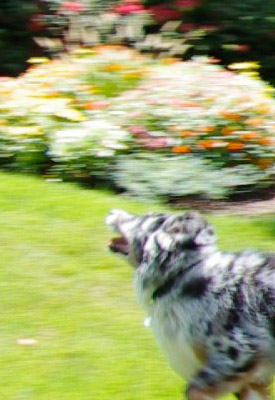 |
 |
|
As we've mentioned before, we think that the larger file sizes are a worthwhile trade-off in avoiding the motion-induced compression artifacts of the AVCHD format. Here, there's quite a bit of blurring because I'm panning so rapidly, and the K-7's shutter speed is tied to the video frame rate. It's just normal motion blur, though, with no compression artifacts from the rapid panning and subject motion.
|
Here's good proof that the blurring in the shot at left is purely a function of the panning and subject movement. In this shot, I'm still panning rapidly (so there's lots of change in the image from frame to frame), but Charlotte's floating along between strides, and my panning is tracking her pretty accurately. As a result, she and the Frisbee are pretty sharp, with good detail.
|
Rolling Shutter Artifacts
Essentially every video capable DSLR currently on the market exhibits motion-related distortions called rolling shutter artifacts. These are caused because the image data is captured and then read off the chip sequentially by rows, rather being captured all at once. In the case of the Pentax K-7, with its 30fps frame rate, this means that image data for the last row of a given frame is captured and read out about 1/30 second after the data for the top row was captured. The effect on moving objects is similar to that of a focal plane shutter in an SLR, but more pronounced, because the video frame is read out much more slowly than the slit of a focal plane shutter moves across the sensor.
For a camera that scans video frames vertically (as all do that we're aware of), rolling shutter artifacts will be most noticeable for subjects that are moving rapidly side to side, or when the camera itself is being panned horizontally. Verticals in the scene will appear tilted to the right or left, depending on the direction of camera motion. As an example, consider the case of a camera being panned from left to right, with a flagpole or other vertical object in the middle of the scene when recording for a particular frame begins: If the top of the object was centered horizontally when the first line of the video frame is acquired, by the time the last line of the frame has been captured, the bottom of the object will have shifted to somewhere left of center: As a result, the vertical object would appear to be leaning to the right.
The shots below show some screen grabs from our evaluation of the Pentax K-7's rolling shutter behavior.
|
Pentax K-7 Video - Rolling Shutter Artifact
|
|
|---|---|
 |
 |
|
Reference: Static shot
This first shot shows what the subject looks like with the camera held steady. (Anything that's off vertical here is the result of faulty camera-holding technique. :-) |
Rolling Shutter, 1.6M resolution
This shows the rolling shutter artifact (note the slanted verticals) about as bad as we could make it, without using absurd amounts of camera jiggling. (Note that the K-7's IS system was disabled for all these shots.) |
 |
 |
|
Rolling Shutter, 0.9M resolution
The K-7 showed essentially the same amount of artifacting at its lower resolution settings as it did at its highest resolution one. |
Rolling Shutter, 0.3M resolution
During playback, we found the rolling shutter artifact less visually obtrusive at lower resolutions, but close inspection of the video stream showed that that was simply a psychological effect of the lower-res images appearing smaller on-screen. |
The visual impact of rolling shutter artifacts on the Pentax K-7 seemed greater than those associated with some other 30fps video modes we've seen recently (specifically, those of the Olympus E-P1 when shooting with its IS system disabled), leading us to wonder whether some cameras actually capture and transfer each frame of video somewhat faster than the frame rate itself would indicate. (That is, while some cameras might have a 30fps frame rate, each frame might actually be acquired and read out in less than 1/30 second.) Whatever the case, while this isn't a scientific test, we felt that the K-7's movies were somewhat more subject to rolling shutter artifacts than those from some other 30fps video systems we've seen.
The upside for the K-7 relative to rolling shutter artifacts is its excellent IS system. While you can avoid the worst effects of a rolling shutter by panning slowly, even minor jiggling of the camera due to hand-holding can produce a jelly-like appearance in the video output from some models. The K-7's IS system stabilized the video well enough that we experienced no such effects when the camera wasn't being panned. If our shooting required both stationary shots and rapid panning in the same segment, though, we had to shoot with the IS system disabled to avoid clacking noise in the audio track from the internal mic. With an external mic, this was much less of an issue.
(Unfortunately, if your shooting for any given segment will involve both panning and steady camera positions, you'll generally need to shoot with the IS system disabled, to avoid clacking on the audio track and somewhat erratic framing in response to rapid camera movements.)
Computer Requirements for Viewing HD Video
A typical computer these days has little trouble dealing with still images, but high-definition video can be another matter. Depending on the file format involved, it can take a pretty beefy computer to handle HD-resolution video playback without stuttering or dropping frames. The Motion JPEG image compression used by the Pentax K-7 is one of the less compute-intensive formats, though, and its 1,280 x 720 resolution means there's a good bit less data in each frame to deal with than in videos with 1,920 x 1,080 (1080i) resolution. The net result is that you should have no problem playing video files from the K-7 on your computer, as long as it's a relatively recent and reasonably powerful model. We don't have a specific benchmark for this, but if your computer is less than 3 years or so old, it should have no problem with the K-7's video streams. (By contrast, to play AVCHD or other keyframe-encoded video formats at full 1,920 x 1,080 resolution can demand a very powerful CPU and video card, to keep up.)
That said, the Pentax K-7's video codec doesn't appear to be terribly efficient, as it produces very large file sizes at its best quality setting. (And as noted earlier, its lower quality settings introduce an unacceptable level of JPEG artifacts into the image stream, so you'll want to use the highest quality setting almost exclusively.) So, while you might be able to play its videos on an older computer, you'll almost certainly need to increase your hard drive capacity. With video files occupying 330 MB/minute, it's a good thing that terabyte hard drives are so cheap these days. (At that pace, a terabyte hard drive could hold about 50 hours of video footage. That's a lot of footage if you primarily use the K-7 for casual "video snapshots," but if you're a serious video user, it can still go by pretty quickly.)
Pentax K-7 Video Mode: The Bottom Line
Overall, the Pentax K-7's video mode is a mixture of strengths and weaknesses. On the positive side, the K-7's video imagery was noticeably more crisp-looking than that of most SLRs we've tested to date. The downside is that its JPEG compression isn't as good as that of some other cameras, producing larger file sizes with more visible JPEG artifacts than we'd like. Its rolling shutter artifacts were a bit more obtrusive than those of 30fps video modes in some competing models, but less problematic than those seen in cameras shooting at only 20 or 24 frames/second. We were excited to see live contrast-detect focusing during movie recording on the prototype samples, but that feature didn't make it into the final production version, so the K-7 runs with the pack in that regard. We found the K-7's body-based IS provided excellent stabilization during video recording, with very little impact on the audio recorded by the in-body microphone, but the strong IS also produced a "floating" feeling in videos, and sometimes made it hard to keep the subject completely stationary within the frame. A big plus for serious users is the K-7's audio input jack, which lets you connect an external stereo mic. While the built-in mic turned in a workmanlike performance, the K-7's sound quality can be superb with a high-quality external microphone.
Video in SLRs is still somewhat at the bleeding edge of technology, so no camera we've seen (yet) does it perfectly. For the average user, though, the K-7's video is certainly good enough to avoid having to lug along a digicam on trips, just for the sake of capturing video snapshots. Recording in its highest quality setting at 720p resolution, its output will be acceptable for many more serious users as well.
Flash
Pentax K-7 Flash

The Pentax K-7 features a built-in, pop-up flash, which operates in either Auto, Flash On (forced flash), Auto + Red-eye reduction, Flash On + Red-eye reduction, or Wireless mode. First and Second Curtain sync modes are available, as well as Slow-sync. The flash is not auto pop-up. To release the flash from its compartment, press the Flash button on pentaprism housing. Close it again by pushing the flash head back down.
 The Pentax K-7's built-in flash has a guide number rating of 13 meters (43 feet) at ISO 100, translating to a range of about 15 feet at ISO 100 with an f/2.8 lens. A Flash Exposure Compensation feature controls the flash exposure -2.0 to +1.0 stops in 1/2 or 1/3-stop increments. Maximum sync speed is 1/180 second, though if an external flash that supports high-speed sync is used, such as the Pentax AF540FGZ or AF360FGZ, maximum shutter speed with flash is 1/8,000 second.
In Wireless mode, the built-in flash can be used as a controller to multiple wireless slave flashes (including the Pentax AF540FGZ and/or AF360FGZ flash units). The built-in flash can be set to contribute to the exposure, or to act only as a controller. The Pentax wireless flash system offers four control channels, so up to four camera/flash setups can be used in the same area without interfering with each other. The K-7 can connect on any of the four control channels: You program it by setting a flash unit to the desired channel, attaching that flash to the camera and then half-pressing the shutter button. This sets the camera to the channel the flash was set up for. After this, the flash may be removed and used as a remote unit, controlled by the camera.
Normally, all flashes used (whether on-camera or remote) contribute equally to the exposure, however each external flash can be set to one of the following ratios: 1/1, 2/3, 1/2 or 1/3. Additionally, each flash can be adjusted to under- or overexpose in 0.5 stop increments from -3.0 stops to +1.0 stop. All of this is relative to the overall flash exposure that can be adjusted on the camera by from -2.0 stops to +1.0 stop. Alternately, the Pentax flash units offer a Contrast-Control-Sync mode (CCS for short), which drops a flash's power. Units set to CCS mode can thus be used to provide "fill" illumination. When used with the K-7, and when the K-7's internal flash is also contributing to the exposure, the external flash in CCS mode will cut its output to two-thirds, while the K-7's built-in flash will cut its exposure contribution to one-third.
The Pentax K-7 also has a top-mounted hot shoe for attaching an external flash unit. A dedicated PC-sync terminal is also provided.
Flash Test Results
Coverage and Range
Fairly powerful flash at close range, with uneven coverage at wide-angle. Lower than average exposure compensation required.


Coverage and Exposure. Flash coverage was uneven at wide-angle (17mm) with the 17-70mm lens, and also casts a shadow from the lens at the bottom. Coverage was much more uniform at telephoto (70mm), if a bit dim. In the Indoor test, the Pentax K-7's flash required a less than average +0.3 EV exposure compensation adjustment to get good results. (Most cameras we've tested required about +0.7 EV for this scene.) We did notice that increasing the flash exposure compensation above +0.3 EV had little effect. The camera's Slow-Sync flash mode produced slightly brighter and more even results with no exposure compensation, though with a stronger pinkish-orange cast from the room lighting.
ISO 100 Range. Since the 17-70mm lens is constant aperture (f/4), and the manufacturer specified range is at ISO 100 (see below), we didn't shoot our usual ISO 100 wide-angle and telephoto series.
| Manufacturer-Specified Flash Range |
|---|
| Telephoto |
 10.7 feet ISO 100 |
Manufacturer Specified Flash Test. The Pentax K7's flash is rated with a GN of 13 meters at ISO 100. That translates to 3.3 meters or 10.7 feet at f/4. In the shot above, the K-7 performs about as Pentax says it will, producing a good if slightly dim exposure at the rated distance. Our standard test method for flash range uses a fixed setting of ISO 100, to provide a fair basis of comparison between cameras. We've now also begun shooting two shots using the manufacturer-specified camera settings, at the range the company claims for the camera, to assess the validity of the specific claims.
High ISO Noise Reduction
Pentax K-7 High ISO Image Quality
The Pentax K-7 offers four high-ISO noise-reduction settings, allowing you quite a bit of flexibility in choosing how you want to make the trade-off between subject detail and noise levels. Settings available are "Off ", "Low", "Medium" (default), and "High". See for yourself how the noise reduction works under daylight lighting. Click on any of the crops below to see the corresponding full-sized image. For reference, we've include low ISOs (100-800), where no high ISO NR is applied. (The Pentax K-7 is quite unique in that it lets you program at what ISO High ISO Noise Reduction starts. Options are ISO 200, 400, 800, and 1600. The default is ISO 800, which is what we used.)
| Pentax K-7 High ISO Noise Reduction Comparison Simulated Daylight |
||||
|
Low ISOs (100 - 800)
|
||||
|
ISO 100
|
ISO 200
|
ISO 400
|
ISO 800
|
|
| I S O 1 0 0 t o 8 0 0 |
 |
 |
 |
 |
 |
 |
 |
 |
|
 |
 |
 |
 |
|
|
High ISOs (1,600 - 6,400)
|
||||
|
HINR=Off
|
HINR=Low
|
HINR=Medium
|
HINR=High
|
|
| I S O 1 6 0 0 |
 |
 |
 |
 |
 |
 |
 |
 |
|
 |
 |
 |
 |
|
|
HINR=Off
|
HINR=Low
|
HINR=Medium
|
HINR=High
|
|
| I S O 3 2 0 0 |
 |
 |
 |
 |
 |
 |
 |
 |
|
 |
 |
 |
 |
|
|
HINR=Off
|
HINR=Low
|
HINR=Medium
|
HINR=High
|
|
| I S O 6 4 0 0 |
 |
 |
 |
 |
 |
 |
 |
 |
|
 |
 |
 |
 |
|
The above crops show the effects of the four levels of High ISO Noise Reduction available on the Pentax K-7. The default setting is "Medium", but to our eyes it's a bit strong, so we're glad Pentax included "Low" and "Off" settings. Interestingly, the setting has a more subtle effect at ISO 6,400.
Imatest Results
Pentax K-7 Imatest Results
We routinely use Norman Koren's excellent "Imatest" analysis program for quantitative, thoroughly objective analysis of digicam test images. I highly recommend it to our technically-oriented readers, as it's far and away the best, most comprehensive analysis program I've found to date.
My comments below are just brief observations of what we see in the Imatest results. A full discussion of all the data Imatest produces is really beyond the scope of this review: Visit the Imatest web site for a full discussion of what the program measures, how it performs its computations, and how to interpret its output.
Here's some of the results produced by Imatest for the Pentax K-7:
| sRGB Accuracy Comparison |
||||
Like it's sibling, the Pentax K20D, the K-7 showed fairly good color accuracy, though its average default saturation is quite a bit higher than that of most competitors. Hue accuracy was good, with relatively small hue shifts occurring in many colors. Average saturation was 118.9% (18.9% oversaturated) and average "delta-C" color error was 6.04 after correction for saturation, which while not bad, isn't quite as good as some of the competition. (Delta-C is the same as the more commonly referred to delta-E, but delta-C takes into account only color differences, ignoring luminance variation.) Overall, a good (albeit vibrant) default color response for a prosumer digital SLR. Mouse over the links below the illustration above to compare results with other prosumer models.
Adobe RGB Accuracy Comparison |
||||
As is true of most SLRs, when using the Adobe RGB color space (which provides a much wider gamut, or range of colors that can be expressed), the Pentax K-7 delivers more highly saturated color. Average saturation was 126.4%, and average saturation-corrected hue error was 5.98 "delta-C" units, actually slightly more accurate than the sRGB result. Again, mouse over the links below the illustration above to compare results with other prosumer SLRs.
Pentax K-7 Color Analysis

This image shows how the Pentax K-7 actually rendered the colors of the MacBeth chart, compared to a numerically ideal treatment. In each color swatch, the outer perimeter shows the color as actually captured by the camera, the inner square shows the numerically correct color after correcting for the luminance of the photographed chart (as determined by a second-order curve fit to the values of the gray swatches), and the small rectangle inside the inner square shows the numerically correct color, without the luminance correction. This image shows the generally good hue accuracy and slightly high saturation of most colors. It also shows the tendency towards a greenish tinge in the range of yellow through orange, as well as the significant saturation boost in greens and blues.
Pentax K-7 Noise Analysis

There's a lot in this particular graph, a lot more than we have room to go into here. (This set of plots has also changed a few revisions back in Imatest. Some of the plots that were once shown here are now shown in other Imatest output. Since we largely focus on the Noise Spectrum plot, we only show the graphic above, which includes that plot.)
In comparing these graphs with those from competing cameras, we've found that the Noise Spectrum graph at lower right is the most important. Cameras that manage to shift their noise spectrum to higher frequencies have much finer-grained noise structures, making their noise less visually objectionable. In the graph above, this would show up as a noise spectrum curve that remained higher on the right side, representing higher noise frequencies.
Except for the red channel, the Pentax K-7 does an excellent job of keeping plenty of the noise energy at high frequencies. What little low-ISO image noise that's there is more fine-grained as a result. The red channel has a lot more low-frequency energy, but that seems to be fairly common these days, and is only slightly visible when inspecting shadow areas of low ISO shots very closely.
Looking at the lower-left plot in the illustration above, the K-7's overall noise levels are similar to those the K20D, just slightly higher, except in the shadows where the K-7's noise is significantly higher, both in the luminance channel and in the RGB channels.

Here's the same set of noise data at ISO 3,200. Here, the Noise Spectrum graph is shifted towards the left-hand, lower-frequency side than it was at ISO 100, though it's hard to tell because of the change in scale. (Interestingly, the red channel's noise spectrum now closely tracks the others, vs its behavior at low ISOs.) This indicates a coarsening of the "grain" of the image noise patterns by quite a bit, and indeed that's what we see when inspecting the K-7's ISO 3,200 images, though there still a lot of fine detail left intact. The red, green and blue channels are more in-line with the others, most likely the result of Pentax's default high ISO noise reduction. Looking at the lower left graph again, noise is higher than the K20D in the deepest shadows, but a bit lower at higher brightnesses.

Here's the same set of noise data at ISO 6,400. The Noise Spectrum graph is similar though more linear, but notice the noise levels are much higher. (Particularly evident in the pixel noise plot in the upper right corner of the illustration, and in the midtones and below in the graph in the lower left hand corner.)
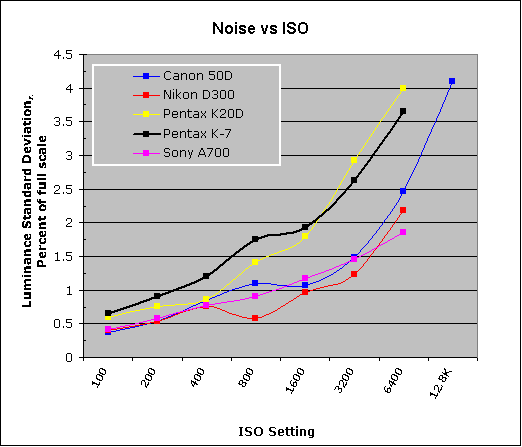
This chart compares the Pentax K-7's noise performance over a range of ISOs against that of other current prosumer models. While we continue to show noise plots of this sort because readers ask for them, we each time point out that the noise magnitude is only a small part of the story, the grain pattern being much more important. Here, we can see that the Pentax K-7's luminance noise magnitude starts out a little higher than average relative to its "competition", and stays higher than the rest up to ISO 1,600, where it's about equal to the K20D's. At ISOs 3,200 and 6,400, K-7 luminance noise levels are lower than its sibling, but much higher than the others in this group. It's interesting to note that while the Pentax K20D's High ISONR setting defaults to Off, the K-7 defaults to Medium, implying the K-7's sensor is noisier. Indeed, our dcraw converted RAW files confirm that. Do keep in mind these measurements are at default settings, so the shape or position of the curve is influenced by the settings you choose to use. Selecting a higher noise reduction setting (the Pentax K-7 has Off, Low, Medium and High options) would have certainly lowered the values in the graph above, but at the expense of fine detail.
Pentax K-7 Dynamic Range Analysis
A key parameter in a digital camera is its Dynamic Range, the range of brightness that can be faithfully recorded. At the upper end of the tonal scale, dynamic range is dictated by the point at which the RGB data "saturates" at values of 255, 255, 255. At the lower end of the tonal scale, dynamic range is determined by the point at which there ceases to be any useful difference between adjacent tonal steps. Note the use of the qualifier "useful" in there: While it's tempting to evaluate dynamic range as the maximum number of tonal steps that can be discerned at all, that measure of dynamic range has very little relevance to real-world photography. What we care about as photographers is how much detail we can pull out of the shadows before image noise becomes too objectionable. This, of course, is a very subjective matter, and will vary with the application and even the subject matter in question. (Noise will be much more visible in subjects with large areas of flat tints and subtle shading than it would in subjects with strong, highly contrasting surface texture.)
What makes most sense then, is to specify useful dynamic range in terms of the point at which image noise reaches some agreed-upon threshold. To this end, Imatest computes a number of different dynamic range measurements, based on a variety of image noise thresholds. The noise thresholds are specified in terms of f-stops of equivalent luminance variation in the final image file, and dynamic range is computed for noise thresholds of 1.0 (low image quality), 0.5 (medium image quality), 0.25 (medium-high image quality) and 0.1 (high image quality). For most photographers and most applications, the noise thresholds of 0.5 and 0.25 f-stops are probably the most relevant to the production of acceptable-quality finished images, but many noise-sensitive shooters will insist on the 0.1 f-stop limit for their most critical work.
The image below shows the test results from Imatest for an in-camera JPEG file from the Pentax K-7 with a nominally-exposed density step target (Stouffer 4110), and the K-7's settings such as Contrast and D-Range settings at their default positions.

Here, we can see that he tone curve shows pretty good gradation in the highlights and the shadows trail off nicely too. Total dynamic range is good (at 10.7 f-stops), however the score (6.54) at the highest level is a little on the low side for a modern APS-C sensor, likely due to noise in darker tones. Indeed, when deep shadows are closely observed in K-7 images, a moderate amount of noise is visible, though there is also a lot of detail present. We find this far preferable to low noise with detail obliterated by over-aggressive noise reduction.

Processing the Pentax K-7's RAW (.DNG) files through Adobe Camera Raw (ACR) version 5.4 increased dynamic range by more than a full f-stop at the highest quality level (7.73), compared to the in-camera JPEG (6.54). These results were obtained by using ACR's automatic settings, and we weren't able to do any better with manual adjustment. It's worth noting here is that ACR's default noise reduction settings reduced overall noise somewhat (see the plot in the lower left-hand corner) relative to the levels in the in-camera JPEG, which would tend to boost the dynamic range numbers for the High Quality threshold.
Dynamic Range, the bottom line:
The net result was that the Pentax K-7's JPEGs scored a bit below average in Imatest's dynamic range analysis when compared against other current APS-C sensor models. Pentax K-7 RAW files converted with ACR did better, but results were still below average for its class, and below the K20D's scores.
To get some perspective, here's a summary of the Pentax K-7's dynamic range performance, and how it compares to other digital SLRs that we also have Imatest dynamic range data for. (Results are arranged in order of decreasing dynamic range at the "High" quality level.):
| Dynamic Range (in f-stops) vs Image Quality (At camera's base ISO) (Blue = RAW via ACR, Yellow=Camera JPEG, Green=Current Camera) |
||||
| Model | 1.0 (Low) |
0.5 (Medium) |
0.25 (Med-High) |
0.1 (High) |
| Nikon D3X (Adobe Camera Raw 5.3b) |
-- | -- | 11.1 | 9.64 |
| Nikon D700 (Adobe Camera Raw 4.5) |
12.1 | 11.6 | 10.6 | 9.51 |
| Nikon D5000 (Adobe Camera Raw 5.4b) |
-- | 11.6 | 10.8 | 9.50 |
| Sony A900 (Adobe Camera Raw 4.6b) |
-- | 12.1 | 10.7 | 9.36 |
| Nikon D90 (Adobe Camera Raw 4.6b) |
12.1 | 11.8 | 10.7 | 9.27 |
| Fujifilm S3 Pro (Adobe Camera Raw 2) |
12.1 | 11.7 | 10.7 | 9.00 |
| Nikon D40x (Adobe Camera Raw 4.1) |
12.0 | 10.9 | 10.3 | 8.90 |
| Canon 5D Mark II (Adobe Camera Raw 5.2) |
-- | 10.8 | 10.0 | 8.89 |
| Canon EOS-1Ds Mark III (Adobe Camera Raw 4.5) |
11.5 | 10.7 | 9.96 | 8.84 |
| Nikon D3 (Adobe Camera Raw 4.5) |
11.7 | 11.0 | 10.0 | 8.75 |
| Canon EOS-1D Mark III (Adobe Camera Raw 4.5) |
11.7 | 10.7 | 9.99 | 8.73 |
| Pentax K20D (Adobe Camera Raw 4.5) |
11.4 | 10.6 | 9.82 | 8.56 |
| 8.5 Stops | ||||
| Nikon D300 (Adobe Camera Raw 4.3.1) |
11.4 | 10.9 | 9.87 | 8.45 |
| Sony A200 (Adobe Camera Raw 4.3.1) |
11.6 | 10.4 | 9.82 | 8.43 |
| Nikon D60 (Adobe Camera Raw 4.4.1) |
11.6 | 10.5 | 9.74 | 8.31 |
| Nikon D40 (Adobe Camera Raw 4.1) |
11.9 | 10.9 | 9.89 | 8.30 |
| Canon EOS-1Ds Mark III (Camera JPEG) |
10.9 | 10.2 | 9.71 | 8.23 |
| Pentax K100D (Adobe Camera Raw 3.6) |
11.3 | 10.3 | 9.51 | 8.23 |
| Pentax K200D (Adobe Camera Raw 4.4.1) |
-- | 10.5 | 9.54 | 8.19 |
| Pentax K10D (Adobe Camera Raw 3.7) |
10.6 | 10.0 | 9.29 | 8.19 |
| Sony A100 (Adobe Camera Raw 3.4) |
11.3 | 10.5 | 9.69 | 8.16 |
| Canon EOS-1Ds Mark II (Adobe Camera Raw 3) |
11.2 | 10.3 | 9.40 | 8.14 |
| Canon EOS 50D (Adobe Camera Raw 4.6) |
11.2 | 10.5 | 9.49 | 8.06 |
| Nikon D40x (Camera JPEG) |
10.8 | 10.0 | 9.42 | 8.04 |
| Canon Rebel XSi (Camera JPEG) (ALO on by default) |
11.3 | 10.1 | 9.34 | 8.01 |
| 8.0 Stops | ||||
| Fujifilm S3 Pro (Camera JPEG) |
-- | 9.90 | 9.40 | 7.94 |
| Nikon D3X (Camera JPEG) Advanced D-Lighting=Low) |
-- | -- | -- | 7.91 |
| Sony A350 (Adobe Camera Raw 4.4) |
11.6 | 10.5 | 9.61 | 7.89 |
| Canon EOS-1D Mark III (Camera JPEG) |
-- | 10.2 | 9.70 | 7.88 |
| Canon Rebel XS (Adobe Camera Raw 4.5) |
-- | 10.3 | 9.27 | 7.88 |
| Nikon D3 (Camera JPEG) |
-- | -- | -- | 7.87 |
| Canon Digital Rebel XTi (Adobe Camera Raw 3.6) |
10.8 | 9.88 | 9.18 | 7.84 |
| Canon EOS 5D (Adobe Camera Raw 3) |
11.0 | 10.4 | 9.21 | 7.83 |
| Canon EOS 50D (Camera JPEG) (ALO Off ) |
-- | 9.64 | 9.17 | 7.83 |
| Nikon D90 (Camera JPEG) |
-- | -- | -- | 7.77 |
| Panasonic DMC-GH1 (Adobe Camera Raw 5.4b) |
9.88 | -- | 9.30 | 7.76 |
| Panasonic DMC-GH1 (Camera JPEG iExposure=Standard) |
8.76 | -- | -- | 7.76 |
| Nikon D5000 (Camera JPEG), (Advanced D-Lighting=Low ) |
-- | -- | 9.28 | 7.75 |
| Pentax K-7 (Adobe Camera Raw 5.4) |
10.6 | 9.93 | 9.07 | 7.73 |
| Canon EOS 40D (Adobe Camera Raw 4.2) |
11.2 | 10.1 | 9.26 | 7.72 |
| Canon Rebel XSi (Adobe Camera Raw 4.4.1) |
10.6 | 9.95 | 9.10 | 7.68 |
| Canon EOS 50D (Camera JPEG) (ALO STD by default) |
-- | -- | 8.90 | 7.68 |
| Nikon D700 (Camera JPEG) |
-- | -- | 9.05 | 7.67 |
| Canon 5D Mark II (Camera JPEG) (ALO STD) |
10.6 | 9.68 | 8.98 | 7.66 |
| Nikon D5000 (Camera JPEG), (Advanced D-Lighting=Off) |
-- | -- | 8.96 | 7.65 |
| Canon EOS-5D (Camera JPEG) |
10.2 | 9.68 | 8.82 | 7.65 |
| Olympus E-3 (Adobe Camera Raw 4.3) |
10.3 | 10.1 | 9.29 | 7.64 |
| Canon 5D Mark II (Camera JPEG) (ALO Off) |
-- | 9.67 | 8.96 | 7.62 |
| Nikon D60 (Camera JPEG) |
10.5 | 9.62 | 8.89 | 7.62 |
| Nikon D200 (Adobe Camera Raw 3) |
10.6 | 9.65 | 8.96 | 7.61 |
| Nikon D80 (Adobe Camera Raw 3.6) |
11.1 | 10.4 | 9.42 | 7.51 |
| 7.5 Stops | ||||
| Olympus E-500 (Adobe Camera Raw 3) |
10.7 | 9.97 | 8.90 | 7.46 |
| Olympus E-510 (Adobe Camera Raw 4.1) |
10.0 | 9.43 | 8.64 | 7.46 |
| Pentax K10D (Camera JPEG) |
-- | 9.49 | 8.88 | 7.44 |
| Nikon D300 (Camera JPEG) |
-- | -- | 8.70 | 7.44 |
| Olympus E-420 (Adobe Camera Raw 4.1.1) |
10.0 | 9.61 | 8.65 | 7.44 |
| Canon Rebel T1i (Camera JPEG) (ALO=STD by default) |
11.3 | 10.1 | 9.34 | 7.43 |
| Nikon D2Xs (Adobe Camera Raw 3.6) |
10.6 | 9.90 | 8.93 | 7.42 |
| Canon EOS 40D (Camera JPEG) |
10.6 | 9.52 | 8.78 | 7.42 |
| Nikon D3X (Camera JPEG) (Advanced D-Lighting=Off) |
-- | -- | -- | 7.37 |
| Nikon D50 (Camera JPEG) |
10.7 | 9.93 | 8.70 | 7.36 |
| Panasonic DMC-G1 (Adobe Camera Raw 5.2) |
10.7 | 9.78 | 8.70 | 7.32 |
| Sony A900 (Camera JPEG) (DRO off by default ) |
10.2 | 9.75 | 8.49 | 7.31 |
| Sony A200 (Camera JPEG) (DRO on by default) |
10.4 | 9.43 | 8.91 | 7.29 |
| Canon EOS 20D (Camera JPEG) |
10.3 | 9.66 | 8.85 | 7.29 |
| Canon EOS 30D (Camera JPEG) |
10.3 | 9.50 | 8.57 | 7.29 |
| Nikon D40 (Camera JPEG) |
10.4 | 9.80 | 8.89 | 7.28 |
| Sony A900 (Camera JPEG) (DRO on) |
10.1 | 9.76 | 8.47 | 7.26 |
| Canon Rebel XS (Camera JPEG) |
10.3 | 9.4 | 8.61 | 7.22 |
| Olympus E-520 (Adobe Camera Raw 4.5) |
11.0 | 9.46 | 8.70 | 7.20 |
| Sony A350 (Camera JPEG) (DRO on by default) |
10.3 | 9.55 | 8.85 | 7.19 |
| Nikon D80 (Camera JPEG) |
10.1 | 9.43 | 8.48 | 7.12 |
| Canon Digital Rebel XT (Camera JPEG) |
10.3 | 9.51 | 8.61 | 7.11 |
| Nikon D200 (Camera JPEG) |
-- | 9.07 | 8.36 | 7.11 |
| Panasonic DMC-G1 (Camera JPEG, iExposure = Low) |
-- | 9.29 | 8.50 | 7.09 |
| Panasonic DMC-G1 (Camera JPEG, iExposure = Standard) |
-- | 9.30 | 8.54 | 7.07 |
| Olympus E-300 (Camera JPEG) |
10.8 | 9.26 | 8.48 | 7.07 |
| Olympus E-410 (Adobe Camera Raw 4.1) |
10.2 | 9.40 | 8.24 | 7.05 |
| Olympus E-500 (Camera JPEG) |
10.0 | 9.14 | 8.16 | 7.05 |
| Canon Digital Rebel XTi (Camera JPEG) |
9.83 | 9.10 | 8.27 | 7.04 |
| Canon EOS-1Ds Mark II (Camera JPEG) |
10.3 | 9.38 | 8.60 | 7.04 |
| Panasonic DMC-G1 (Camera JPEG, iExposure = High) |
10.3 | 9.23 | 8.54 | 7.04 |
| Panasonic DMC-G1 (Camera JPEG, iExposure = Off) |
-- | 9.33 | 8.52 | 7.03 |
| Pentax K200D (Camera JPEG) |
-- | 9.50 | 8.30 | 7.01 |
| 7.0 Stops | ||||
| Canon Digital Rebel (Camera JPEG) |
10.1 | 9.11 | 8.47 | 6.97 |
| Nikon D2Xs (Camera JPEG) |
9.82 | 8.98 | 8.23 | 6.97 |
| Panasonic DMC-L10 (Adobe Camera Raw 4.2) |
10.4 | 9.34 | 8.48 | 6.91 |
| Sigma DP1 (Camera JPEG) |
-- | 8.95 | 8.13 | 6.91 |
| Pentax *istDs (Camera JPEG) |
10.2 | 10.0 | 8.87 | 6.90 |
| Sony A100 (Camera JPEG) |
10.2 | 9.24 | 8.39 | 6.89 |
| Pentax K100D (Camera JPEG) |
10.3 | 9.30 | 8.39 | 6.73 |
| Pentax K20D (Camera JPEG) |
10.2 | 9.21 | 8.09 | 6.66 |
| Pentax K-7 (Camera JPEG) |
9.59 | 8.87 | 8.03 | 6.54 |
| 6.5 Stops | ||||
| Nikon D2x (Camera JPEG) |
-- | 8.93 | 7.75 | 6.43 |
| Olympus E-3 (Camera JPEG) |
9.32 | 9.06 | 8.50 | 6.42 |
| Panasonic DMC-L10 (Camera JPEG) |
-- | 8.94 | 8.00 | 6.38 |
| Olympus E-420 (Camera JPEG) |
9.18 | 8.82 | 7.93 | 6.37 |
| 6.0 Stops | ||||
| Olympus E-410 (Camera JPEG) |
-- | -- | 7.60 | 5.99 |
| Nikon D70s (Camera JPEG) |
9.84 | 8.69 | 7.46 | 5.85 |
| Nikon D70 (Camera JPEG) |
9.81 | 8.76 | 7.58 | 5.84 |
| Olympus E-520 (Camera JPEG) |
9.32 | 8.68 | 7.74 | 5.74 |
| Olympus E-P1 (Camera JPEG Gradation = Normal) |
-- | 8.85 | 7.74 | 5.47 |
| < 5.0 Stops | ||||
| Olympus E-510 (Camera JPEG) |
7.70 | 7.16 | 5.87 | 3.55 |
The results shown in the table are interesting. One of the first things that struck me when I (Dave) initially looked at test data for a wide range of DSLRs, was that here again, purely analytical measurements don't necessarily correlate all that well with actual photographic experience. There's no question that the Fuji S3 Pro once deserved its place atop the list, as its unique "SR" technology did indeed deliver a very obvious improvement in tonal range in the highlight portion of the tonal scale relative to competing models of its day. (Amazing that it's now surpassed by even consumer-level models using today's technology.) I was also surprised to see the analytical results place the original Olympus E-300 as highly as they did, given that our sense of that camera's images was that they were in fact noisier than those of many other DSLRs that we looked at. In the other direction, I was quite surprised to see the Nikon D2x place as low on the listings as it did, given that we found that camera's shadow detail to be little short of amazing.
One thing that's going on here though, is that we test each camera at its base ISO setting, which should produce best-case noise levels. This is in fact what many photographers will be most interested in, but it does perhaps place some of the Nikons (like the D40) at a disadvantage, as their lowest ISO setting is 200, as compared to the ISO 100 settings available on most other models.
When it comes to the Pentax K-7, as noted above, its low scores for camera JPEGs reflect Pentax' decision to leave more image noise in its files at default settings, so as to not have to trade away as much subject detail. There's quite a bit of subject detail visible in the shadows of the K-7's images, but its dynamic range rankings in Imatest are brought down by the noise that's also present. We're finding that we personally prefer this approach to cameras that smudge away subtle subject detail just to achieve lower noise levels in areas of flat tint.
Pentax K-7 Resolution Chart Test Results

The chart above shows consolidated results from spatial frequency response measurements in both the horizontal and vertical axes. The "MTF 50" numbers tend to correlate best with visual perceptions of sharpness, so those are what we focus on here. The uncorrected resolution figures are 1,606 line widths per picture height in the horizontal direction (corresponding to the vertically-oriented edge), and 1,486 lines along the vertical axis (corresponding to the horizontally-oriented edge), for a combined average of only 1,546 LW/PH. Correcting to a "standardized" sharpening with a one-pixel radius increased the resolution score by quite a bit, resulting in a much higher average of 2,545 LW/PH. The corrected numbers put the K-7 pretty much on par with its competitors.
To see what's going on, refer to the plots below, which show the actual edge profiles for both horizontal and vertical edges, in both their original and corrected forms. Here, you can see that very little if any in-camera sharpening is applied in the horizontal direction (undersharpened by 20.6 %), as well as in the vertical direction (22.8 % undersharpened), explaining why standardized sharpening increased the MTF 50 numbers so much.
As with the K20D, we found these results a little paradoxical, given that we definitely saw sharpening artifacts in most of our "real world" images. (The far-field shot and the Still Life, in particular.) In-camera sharpening appears to vary depending on the density level of structures in its images. At very high and low densities (the black and white areas on the resolution target), it applies almost no sharpening at all. For densities away from the extremes of the tonal scale (the branches against the sky in our far-field shot and some of the details on the bottle labels in the Still Life shot), more sharpening is applied, resulting in slight halos around contrasting objects.
Overall (as is almost always the case), you'll extract the most detail from the Pentax K-7's images by careful processing of its DNG RAW files.


RAW Files
Pentax K-7 RAW Image Quality
We've recently started looking at RAW files converted with dcraw, an excellent freeware raw converter. dcraw usually offers timely support for the latest cameras, but more importantly, it does not apply any noise-reduction, sharpening or other corrections such as geometric distortion correction to the output files. (We found that Adobe Camera Raw still applies some limited noise-reduction when its NR settings are set to zero, and it also applies other corrections depending on the make and model of the camera). There will always be differences between RAW converters, in terms of the sort of de-mosaicing algorithms they use (the processes by which they convert the separate Red, Green, and Blue data sets to an array of full-color RGB pixels), but dcraw seems to use a fairly generic algorithm that delivers good sharpness with relatively few artifacts, and can be counted on to not apply any noise reduction if you don't want it to. (That said, looking at the ISO 6,400 and above examples below, it's clear that dcraw's de-mosaicing approach does have some tendency to produce rectilinear artifacts in response to high noise levels.)
Below are crops from Pentax K-7 RAW files compared to RAW files from other prosumer SLRs, converted with dcraw.
| Pentax K-7 vs Pentax K20D, Canon EOS 50D, and Nikon D300 RAW (via dcraw), no Noise Reduction, no Sharpening Simulated Daylight |
||||
|
|
Pentax
K-7 |
Pentax
K20D |
Canon
EOS 50D |
Nikon
D300 |
| I S O 1 0 0 |
 |
 |
 |
 |
 |
 |
 |
 |
|
 |
 |
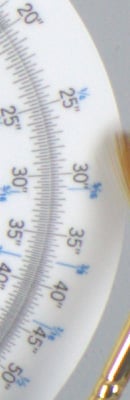 |
 |
|
| I S O 2 0 0 |
 |
 |
 |
 |
 |
 |
 |
 |
|
 |
 |
 |
 |
|
| I S O 4 0 0 |
 |
 |
 |
 |
 |
 |
 |
 |
|
 |
 |
 |
 |
|
| I S O 8 0 0 |
 |
 |
 |
 |
 |
 |
 |
 |
|
 |
 |
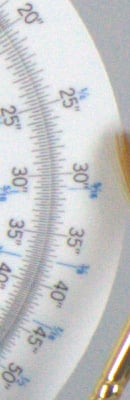 |
 |
|
| I S O 1 6 0 0 |
 |
 |
 |
 |
 |
 |
 |
 |
|
 |
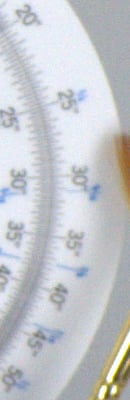 |
 |
 |
|
| I S O 3 2 0 0 |
 |
 |
 |
 |
 |
 |
 |
 |
|
 |
 |
 |
 |
|
| I S O 6 4 0 0 |
 |
 |
 |
 |
 |
 |
 |
 |
|
 |
 |
 |
 |
|
| I S O 1 2 8 0 0 |
N/A,
ISO 12,800 not supported. |
N/A,
ISO 12,800 not supported. |
 |
N/A,
ISO 12,800 not supported. |
 |
||||
 |
||||
|
|
Pentax
K-7 |
Pentax
K20D |
Canon
EOS 50D |
Nikon
D300 |
The crops above compare the Pentax K-7 RAW noise performance to that of its sibling, the K20D, as well as to other popular prosumer models, the Canon EOS 50D and Nikon D300. All cameras were equipped with our Sigma 70mm f/2.8 EX DG Macro reference lenses, stopped down to f/8 for maximum sharpness. (We've replaced our Pentax mount version with one that doesn't have the softness our previous copy had in the right-hand side. That's why the scale crop from the K20D is a bit soft compared to the others, as it used the older lens.)
Out of the four, the 14.6-megapixel Pentax K20D has a slight edge over the others in terms on noise. The Canon EOS 50D appears to be the noisiest, but that's no surprise, since it has the smallest photosites of the group (15.1 megapixels and a slightly smaller sensor). The 14.6-megapixel Pentax K-7 appears to be only slightly noisier than the Nikon D300, which is actually very good performance, considering the 12.3-megapixel Nikon D300 has larger photosites.
Shooting Modes
Pentax K-7 Modes and Menus
Capture Modes
Green mode: Full automatic mode. Camera sets shutter speed and aperture. AE lock, EV compensation, auto bracket, multiple exposure, and flash compensation cannot be set in Green mode.
Program mode (P): Called Hyper-program, Pentax K-7 selects shutter speed and aperture, while you control all other exposure variables. You can use the front and rear e-dial to shift exposure, controlling the shutter speed specifically with the front e-dial, and aperture with the rear, or press the Green button on the top deck to return to the Program mode's default choice. The Pentax K-7 also allows you to select, via a custom menu, the program line the camera uses, which tells the camera to prioritize for higher shutter speeds, shallow or deep depth-of-field, MTF (best aperture setting for image quality), or use the default, normal program line.
Sensitivity Priority mode (Sv): In this unique mode you set the ISO by pressing the shutter button halfway, then turning the Rear e-dial. The camera picks the Aperture and Shutter value accordingly.
Shutter Priority mode (Tv): Marked with a "Tv," for Time value, this mode allows the user to control the shutter speed, from 30 seconds to 1/8,000 second.
Aperture Priority mode (Av): Marked with an "Av," this mode gives user control of aperture, while the camera selects the shutter speed.
Shutter and Aperture Priority mode (TAv): Another unique mode, opposite of Sv above: The camera adjusts the ISO sensitivity to meet the requirements of your Aperture and Shutter settings.
Manual mode (M): Dubbed Hyper-manual mode, this setting provides complete control over the exposure, with independent settings for aperture and shutter speed. Shutter speeds range from 1/8,000 to 30 seconds.
Bulb mode (B): Marked with a "B" on the Mode dial, this mode offers unlimited exposure times, holding the shutter open for as long as the Shutter button is held down (and the batteries last).
Flash X-sync mode (X): Sets shutter speed to 1/180 second, for use with manual strobes.
User mode (USER): This mode lets the user quickly recall a set of favorite settings including exposure mode, flash mode, EV compensation, exposure bracketing, drive mode, flash exposure compensation, sensitivity, auto sensitivity range, white balance, file format, JPEG size and quality, image tone, saturation, sharpness, and contrast.
Movie mode: This mode allows the user to record videos with sound. Resolution options consist of 1536x1024 (3:2 aspect ratio), 1280x720 (16:9) or 640x416 (3:2) pixels, all at 30 frames-per-second with monaural sound. There are three quality (compression ratio) options available, and you can choose to have the aperture fixed, or under automatic control. See the Video tab for more details as well as sample videos.
Playback Mode
 Playback mode is entered by pressing the Playback button on the camera's rear panel. In this mode, you can scroll through captured images, delete them, write-protect them, and set them up for printing on PictBridge-compatible printers. You can also apply digital filters for creative effects.
Pentax K-7 Menu Details
Below are Pentax K-7 menu options and their descriptions. Pressing the Menu button provides access to the camera's full menu system.
Record Menu:

|
Record Menu Options
|
|||
|
Top-Level
Selection |
Second-Level
|
Third-Level
|
Notes
|
|
File Format
|
- JPEG
- RAW - RAW + JPEG |
|
|
|
JPEG Recorded Pixels
|
- 14M (4672 x 3104)
- 10M (3963 x 2624) - 6M (3072 x 2048) - 2M (1728 x 1152) |
|
|
|
JPEG Quality
|
- **** Premium
- *** Best - ** Better - * Good |
|
|
|
ISO AUTO Setting
|
- Low Limit (100-3,200)
- High Limit (200-3,200) |
|
Sets the lower and upper limits for Auto ISO
|
|
- Parameters
|
- Slow
- Standard - Fast |
Slow increases the sensitivity as little as possible; Fast does the opposite
|
|
|
Dynamic Range Setting
|
- Highlight Correction
|
- Off
- On |
Preserves highlights
|
|
- Shadow Correction
|
- Off
- Low - Medium - High |
Boosts shadows
|
|
|
Lens Correction
|
- Distortion Correction
|
- Off
- On |
Works with only Pentax DA, DA L or D FA lenses
|
|
- Lateral Chromatic Aberration Adjustment
|
- Off
- On |
Works with only Pentax DA, DA L or D FA lenses
|
|
|
Program Line
|
- Auto
- Normal - Hi-speed Priority - DOF Priority (deep depth-of-field) - DOF Priority (shallow depth-of-field) - MTF Priority |
|
Hi Speed sets Program mode to bias toward high shutter speeds; Depth sets the Program mode to bias toward larger (shallow) or smaller (deep) apertures; MTF selects for best apertures for the attached lens (most effective with DA, D, D FA, FA, and FA J lenses)
|
|
Extended Bracket
|
- Off
- White Balance - Saturation - Hue - High/Low Key Adj - Contrast - Sharpness |
- Bracketing amount
|
Bracketing amounts vary depending on type selected
|
|
HDR Capture
|
- Off
- Standard - Strong |
|
Captures 3 frames and combines them into 1 HDR image
|
|
Digital Filter
|
- Off
- Toy Camera - Retro - High Contrast - Extract Color - Soft - Star Burst - Fish-eye - Custom Filter |
|
Selects which digital filter to apply in capture mode (additional filters can be applied and combined in playback mode)
|
|
Multi-exposure
|
- Number of Shots
|
- 2 to 9
|
Number of exposure to combine into one
|
|
- Auto EV Adjust
|
- Off
- On |
Adjusts exposure of each shot so that combined image is properly exposed
|
|
|
Interval Shooting
|
- Interval
|
- 1s to 24 hrs
|
Timelapse photography settings
|
|
- Number of Shots
|
- 1 to 99 shots
|
||
|
- Start
|
- Now
- Set Time |
||
|
Composition Adjust
|
- Start Adjustment
- Cancel |
|
Allows user to adjust X and Y position of image as well as rotation, using the shake reduction mechanism. Useful on a tripod
|
|
Movie
|
- Recorded Pixels
|
- 1.6M (1536x1024)
- 0.9M (1280x72) - 0.3M (640x416 ) |
Sets movie recording parameters
|
|
- Quality Level
|
- ***
- ** - * |
||
|
- Sound
|
- On
- Off |
||
|
- Movie Aperture Control
|
- Auto
- Fixed |
||
|
- Shake Reduction
|
- On
- Off |
||
|
Live View
|
- Info Overlay
|
- On
- Off |
Sets Live View parameters
|
|
- Show Grid
|
- On
- Off |
||
|
- Histogram
|
- On
- Off |
||
|
- Bright/Dark Areas
|
- On
- Off |
||
|
- Autofocus Mode
|
- Face Detect
- Contrast Detect - Phase Detect |
||
|
Status Screen
|
- On
- Off |
|
When Off, status screen remains blank
|
|
Digital Preview
|
- Off (optical)
|
|
Selects type of preview when power switch moved to preview position (DOF preview using optical viewfinder, or digital using LCD)
|
|
- On
|
- Histogram: On/Off
- Bright/Dark Area: On/Off |
||
|
Instant Review
|
- On
|
- Display Time: 1, 3, or 5 seconds
- Histogram On/Off - Bright/Dark area: On/Off |
Controls length of time the most recently captured image appears post capture, and whether a histogram and high/low exposure flashes
|
| - Off | |||
|
Electronic Level Display
|
- On
- Off |
|
Displays bar graph indicating if camera is level in viewfinder and on LCD
|
|
Automatic Horizon Correction
|
- On
- Off |
|
Automatically corrects for camera tilt
|
|
Color Space
|
- sRGB
- Adobe RGB |
|
|
|
RAW File Format
|
- PEF
- DNG |
|
|
|
RAW button
|
- Cancel each time (on/off)
- JPEG to RAW+ - RAW to RAW+ - RAW+ to RAW+ |
|
Defines the function of the RAW button
|
|
Memory
|
- Flash mode
- Drive mode - White Balance - Sensitivity - EV Compensation - Flash Exp. Comp. - Extended Bracketing - HDR Capture - Digital Filter - Playback Display - File No. |
|
Allows you to select what settings are saved when you turn the camera off. All are selected by default
|
|
USER
|
- Save
- Check Saved USER Settings - Reset USER Settings |
|
Saves current settings as settings for USER on Mode dial
|
|
Shake Reduction
|
- On
- Off |
|
|
|
Input Focal Length
|
- Set focal length from 8 to 800
|
|
Only available if Shake Reduction switch is on and lens in use does not support automatic lens information communication
|
Playback Menu:

| Playback Menu Options | |||
|
Top-Level
Selection |
Second-Level
|
Third-Level
|
Notes
|
|
Slideshow
|
- Interval
|
- 3 sec
- 5 sec - 10 sec - 30 sec |
Sets slideshow interval and screen fade
|
|
- Screen Effect
|
- Off
- Fade - Wipe - Stripe |
||
|
- Repeat Playback
|
- Off
- On |
||
|
Playback Display Method
|
- Bright/Dark area
|
- Off
- On |
Over/underexposed areas flash on playback
|
|
- Quick Zoom
|
- Off
- 2x - 4x - 8x - 16x - 32x |
Sets initial magnification when enlarging images
|
|
|
Delete All Images
|
- Delete All
- Leave All |
|
|
Setup Menu:

| Setup Menu Options | |||
|
Top-Level
Selection |
Second-Level
|
Third-Level
|
Notes
|
|
Language
|
- English
- French - German - Spanish - Swedish - Dutch - Italian - Russian - Portuguese - Danish - Finnish - Greek - Polish - Czech - Hungarian - Turkish - Japanese - Korean - Chinese (Traditional) - Chinese (Simplified) |
||
|
Date Adjustment
|
- Date Style
|
- mm/dd/yy
- dd/mm/yy - yy/mm/dd - 12h - 24h |
|
|
- Date
|
- Set date
|
||
|
- Time
|
- Set time
|
||
|
World Time
|
- Choose destination city, set time for home and destination
|
|
|
|
Text Size
|
- Std.
- Large |
|
Selects menu system text size
|
|
Guide Display
|
- 3 sec
- 10 sec - 30 sec - Off |
Activates display guides on LCD when the exposure mode is changed or camera is switched on for set amount of time
|
|
|
Beep
|
- In-focus
- AE-L - RAW - Self-timer - Remote Control |
- All options: check/uncheck
|
Sets whether the camera beeps or not by category
|
|
Brightness Level
|
- 15 arbitrary units from -7 to +7
|
Adjusts overall brightness of LCD display
|
|
|
LCD Color Tuning
|
- 2D grid with Blue/Amber axis, Green/Magenta axis
|
|
Adjust the LCD color in 15 levels for each direction
|
|
Video Out
|
- NTSC
- PAL |
|
Selects composite video signal
|
|
HDMI Out
|
- Auto
- 1080i - 720p - 480p |
|
Selects HDMI video signal
|
|
USB Connection
|
- MSC
- PTP |
|
Selects USB mode (Mass Storage Class or Picture Transfer Protocol)
|
|
Folder Name
|
- Date
- PENTX |
"Date" names files xxx_MMDD
"PENTX" sets file naming in form of xxxPENTX, sequentially from 100 to 999 |
|
|
File Name
|
- sRGB
- Adobe RGB - Change - Reset File Name |
|
You can define a 4 character prefix for sRGB JPEGs, and a 3 character prefix for Adobe RGB JPEGs
|
|
Copyright Information
|
- Embed Copyright Data
|
- Off
- On |
Embeds name and copyright strings into EXIF
|
|
- Photographer
|
- Enter alphanumeric string
|
||
|
- Copyright Holder
|
- Enter alphanumeric string
|
||
|
Auto Power Off
|
- 1 min
- 3 min - 5 min - 10 min - 30 min - Off |
|
Sets time before camera shuts off after inactivity
|
|
Select battery
|
- Auto Select
- Body First - Grip First |
|
Sets which battery is used first when two are present
|
|
Reset
|
- Reset
- Cancel |
"Reset" returns all settings to defaults
|
|
|
Pixel Mapping
|
- Pixel Mapping
- Cancel |
|
For remapping bad pixels
|
|
Dust Alert
|
- Press the shutter release button
|
|
For taking a high contrast image to detect dust on the sensor
|
|
Dust Removal
|
- Dust Removal
- Start-up Action |
|
First option shakes the sensor when you press OK from this menu, Start-up action shakes sensor on startup
|
|
Sensor Cleaning
|
- Mirror Up
- Cancel |
|
"Mirror Up" locks the mirror up for sensor cleaning
|
|
Format
|
- Format
- Cancel |
|
"Format" erases all images, even protected ones |
Custom Menu:

| Custom Menu Options | |||
|
Top-Level
Selection |
Second-Level
|
Third-Level
|
Notes
|
|
1. EV Steps
|
- 1: 1/3 EV
- 2: 1/2 EV |
|
|
|
2. Sensitivity Steps
|
- 1: 1 EV Step
- 2: As EV Steps |
|
"As EV Steps" adjusts ISO based on what variable is set in the previous Custom menu item (EV Steps)
|
|
3. Expanded Sensitivity
|
- 1: Off
- 2: On |
|
Allows the ISO range to expand to 100 - 6,400
|
|
4. Meter Operating Time
|
- 1: 10 sec
- 2: 3 sec - 3: 30 sec |
|
Time that exposure values are saved after metering
|
|
5. AE-L with AF locked
|
- 1: Off
- 2: On |
|
"On" fixes exposure with focus
|
|
6. Link AF Point and AE
|
- 1: Off
- 2: On |
|
"On" links the AE and AF points, so that both values are set from the same point
|
|
7. One-Push Bracketing
|
- 1: Off
- 2: On |
|
"Off" requires the shutter button to be pressed for each image in the bracketing sequence
|
|
8. Auto Bracketing order
|
- 1: 0 - +
- 2: - 0 + - 3: + 0 - - 4: 0 + - |
|
Sets shooting order for bracketed exposures
|
|
9. Auto EV Compensation
|
- 1: Off
- 2: On |
|
Automatically overrides exposure when proper exposure is not set
|
|
10. WB when using Flash
|
- 1: AWB
- 2: Unchanged - 3: Flash |
|
When flash is used, white balance can be auto, stay as measured, or switch to Flash white balance
|
|
11. WB Adjustable Range
|
- 1: Auto Adjustment
- 2: Fixed |
|
Auto Adjustment automatically performs fine tuning of selected WB
|
|
12. Auto White Balance under Tungsten Light
|
- 1: Subtle Correction
- 2: Strong Correction |
|
Adjusts strength of automatic WB correction in tungsten light
|
|
13. AF Button Function
|
- 1: Enable AF
- 2: Cancel AF |
|
Option 2 turns off AF button function
|
|
14. AF with Shutter Button Half Pressed
|
- 1: On
- 2: Off |
|
Option 2 disables Shutter release AF
|
|
15. Superimpose AF Area
|
- 1: On
- 2: Off |
|
If switched on, highlights the AF point in red in the viewfinder |
|
16. AF with Remote Control
|
- 1: Off
- 2: On |
|
If on, uses autofocus in remote control mode
|
|
17. Remote Control in Bulb
|
- 1: Mode1
- 2: Mode2 |
Mode 1 is push to start, push again to stop; Mode 2 is push and hold
|
|
|
18. Slow Shutter Speed Noise Reduction
|
- 1: On
- 2: Off |
|
Sets whether Noise Reduction is applied when shooting at low shutter speeds (This takes longer between exposures because it has to capture a dark frame after the main exposure)
|
|
19. High-ISO Noise Reduction
|
- 1: Medium
- 2: Low - 3: High - 4: Off |
|
Sets level of NR used for high ISOs
|
|
20. High-ISO NR Start Level
|
- 1: ISO 800
- 2: ISO 200 - 3: ISO 400 - 4: ISO 1,600 |
|
Sets at what sensitivity Hi-ISO NR is activated
|
|
21. Color Temperature Steps
|
- 1: Kelvin
- 2: Mired |
|
Color temp can be set in steps of 100 Kelvin or 20 Mired
|
|
22. e-dial in Program
|
- 1: Front=Shutter, Rear=Aperture
- 2: Front=Aperture, Rear=Shutter - 3: Front=EV, Rear=P Shift - 4: Front=P Shift, Rear=EV - 5: Front=disabled, Rear=disabled |
|
Sets functions of e-dial in Program mode
|
|
23. e-dial in Sv mode
|
- 1: Front=disabled, Rear=ISO
- 2: Front=P Shift, Rear=ISO - 3: Front=ISO, Rear=P Shift |
|
Sets functions of e-dial in Sensor priority mode
|
|
24. e-dial in Tv mode
|
- 1: Front=Shutter, Rear=disabled
- 2: Front=Shutter, Rear=EV - 3: Front=EV, Rear=Shutter - 4: Front=Shutter, Rear=ISO - 5: Front=ISO, Rear=Shutter |
|
Sets functions of e-dial in Shutter priority mode
|
|
25. e-dial in Av mode
|
- 1: Front=disabled, Rear=Aperture
- 2: Front=EV, Rear=Aperture - 3: Front=Aperture, Rear=EV - 4: Front=ISO, Rear=Aperture - 5: Front=Aperture, Rear=ISO |
|
Sets functions of e-dial in Aperture priority mode
|
|
26. e-dial in TAv & M
|
- 1: Front=Shutter, Rear=Aperture
- 2: Front=Aperture, Rear=Shutter |
|
Sets functions of e-dial in TAv and Manual modes
|
|
27. e-dial in B & X
|
- 1: Front=disabled, Rear=Aperture
- 2: Front=Aperture, Rear=disabled - 3: Front=ISO, Rear=disabled - 4: Front=Aperture, Rear=ISO |
|
Sets functions of e-dial in Bulb and X-sync modes
|
|
28. Green Button in TAv & Manual
|
- 1: Program line
- 2: Tv Shift - 3: Av Shift - 4: Off |
|
Sets function of Green Button in TAv and Manual modes
|
|
29. LCD Panel Illumination
|
- 1: On
- 2: Off |
|
Default value illuminates LCD panel when exposure metering; option 2 disables this
|
|
30. Shutter Release when Charging
|
- 1: Off
- 2: On |
|
"On" allows shutter release while flash is charging
|
|
31. Flash in Wireless Mode
|
- 1: On
- 2: Off |
|
"On" fires built-in flash as master in wireless mode
|
|
32. AF Assist Light
|
- 1: On
- 2: Off |
|
"On" enables new AF assist lamp
|
|
33. Saving Rotation Info
|
- 1: On
- 2: Off |
|
Embeds rotation tags in image files when "On"
|
|
34. Auto Image Rotation
|
- 1: On
- 2: Off |
|
Turns auto-rotation on or off
|
|
35. Catch-in Focus
|
- 1: Off
- 2: On |
|
The shutter is released automatically when subject comes into focus at a set position
|
|
36. AF Adjustment
|
- 1: Off
|
|
Autofocus can be fine-tuned +/- 10 steps to all lenses, or up to 20 lens types
|
|
- 2: On (adjust)
|
- Apply All
- Apply One |
||
|
37. Using Aperture Ring
|
- 1: Prohibited
- 2: Permitted |
|
Setting one prevents image capture when the aperture ring isn't set to A
|
|
Reset Custom Function
|
- Reset
- Cancel |
|
Resets all Custom Functions to default
|
Comparison
Pentax K-7 Feature Comparison
The chart below compares the K-7 with other current Pentax cameras. What we've done below is presented something of a hybrid comparison between these three models. A red cell means that a given camera performs below the other two, a green cell means that it performs better than the other two, and a yellow cell means it falls between the other two. In cases where two cameras share a superior capability, both cells will be colored green.
| Pentax K-7 vs other current Pentax SLRs | ||||
|
Manufacturer
|
Pentax
|
Pentax
|
Pentax
|
|
|
Model
|
K-7
|
K20D
|
K2000
|
|
| Imaging System |
Sensor Manufacturer
|
Samsung
|
Samsung
|
Sony
|
|
Sensor Type
|
CMOS
|
CMOS
|
CCD
|
|
|
Color Filter Array
|
RGB
|
RGB
|
RGB
|
|
|
Total Megapixels
|
15.07
|
15.1
|
10.75
|
|
|
Effective Megapixels
|
14.6
|
14.6
|
10.2
|
|
|
Effective Sensor Size (mm)
|
23.4 x 15.6
|
23.4 x 15.6
|
23.5 x 15.7
|
|
|
Focal Length Multiplier (approx.)
|
1.5x
|
1.5x
|
1.5x
|
|
|
Image Processor
|
PRIME II
|
PRIME
|
PRIME
|
|
| Viewfinder |
Type
|
Eye-level
pentaprism |
Eye-level
pentaprism |
Eye-level
pentamirror |
|
Coverage
|
100%
|
95%
|
96%
|
|
|
Magnification (-1 diopter with 50mm lens at infinity)
|
0.92x
|
0.95x
|
0.85x
|
|
|
Eyepoint (mm)
|
?
|
?
|
?
|
|
|
Dioptric Adjustment Range (diopters)
|
-2.5 to +1.5
|
-2.5 to +1.5
|
-2.5 to +1.5
|
|
|
Focusing Screen
|
Natural-Bright-Matte III focusing screen; interchangeable
|
Natural-Bright-Matte II focusing screen; interchangeable
|
Natural-Bright-Matte II focusing screen, fixed
|
|
|
Viewfinder
Info Display |
AF frames, spot metering area, anti-shake indicator, flash status, shutter speed, aperture, focus indicator, manual focus indicator, AF point move indicator, EV bar, EV compensation indicator, bracketing indicator, flash exposure compensation indicator, AE lock, Auto ISO, available images, ISO sensitivity, EV compensation value, metering mode, multiple exposure, file format
|
AF frames, spot metering area, anti-shake indicator, flash status, shutter speed, aperture, focus indicator, manual focus indicator, EV bar, EV compensation indicator, bracketing indicator, flash exposure compensation indicator, AE lock, Auto ISO, available images, ISO sensitivity, EV compensation value, file format
|
AF frames, spot metering area, anti-shake indicator, flash status, shutter speed, aperture, focus indicator, manual focus indicator, EV compensation indicator, AE lock, available images, ISO sensitivity, EV compensation value, picture mode
|
|
|
Depth of Field Preview
|
Optical & Digital: enabled with depth-of-field preview position on power dial
|
Optical & Digital: enabled with depth-of-field preview position on power dial
|
Digital Only: Can be assigned to Help button
|
|
| Recording System |
Recording Media / Quantity / Slot Type
|
Secure Digital card
(SDHC compatible) |
Secure Digital card
(SDHC compatible) |
Secure Digital card
(SDHC compatible) |
|
Compatible File System
|
FAT 16 / FAT 32
|
FAT 16 / FAT 32
|
FAT 16 / FAT 32
|
|
|
Recording Formats
|
RAW (PEF or DNG), JPEG
|
RAW (PEF or DNG), JPEG
|
RAW (PEF or DNG), JPEG
|
|
|
Maximum Resolution
|
4672 x 3104
|
4672 x 3104
|
3872 x 2592
|
|
|
Reduced Resolutions (JPEG only)
|
3936 x 2624
3072 x 2048 1728 x 1152 |
3872 x 2592
3008 x 2000 1824 x 1216 |
3008 x 2000
1824 x 1216 |
|
|
RAW + JPEG Recording
|
Yes
|
Yes
|
Yes
|
|
| Color
Space & White Balance |
User-Selectable Color Space
|
Yes
sRGB + Adobe RGB |
Yes
sRGB + Adobe RGB |
Yes
sRGB + Adobe RGB |
|
Processing Parameters
(Contrast, Sharpness, Saturation, Color Tone) / # of Increments |
4 steps each for saturation, hue/toning, high/low key, contrast, and sharpness; 8 for brightness
Custom Image: Bright, Natural, Portrait, Landscape, Vibrant, Muted, Monochrome |
4 steps each for saturation, hue/toning, contrast, and sharpness
Custom Image: Bright, Natural, Portrait, Landscape, Vibrant, Monochrome |
±4 steps each for saturation, hue/toning, contrast, and sharpness
Custom Image: Bright, Natural, Portrait, Landscape, Vibrant, Monochrome |
|
|
WB settings
|
14 (Daylight, Shade, Cloudy, Fluorescent (D, N, W, L), Tungsten, Flash, Color Temperature (3 setting), CTE, Manual)
|
10 (Daylight, Shade, Cloudy, Fluorescent (W, D, N), Tungsten, Flash, Color Temperature (3 settings), Manual)
|
8 (Daylight, Shade, Cloudy, Tungsten light, Fluorescent light, Flash, Manual, Auto)
|
|
|
Manual Color Temperature Setting Range
|
Yes, 2,000-12,000K in 20 mired or 100K steps
|
Yes, 2,000-12,000K in 20 mired or 100K steps
|
Not available
|
|
|
WB Adjustment Range
|
7 steps Blue to Amber and 7 steps Magenta to Green, in 1-step increments
|
7 steps Blue to Amber and 7 steps Magenta to Green, in 1-step increments
|
±7 steps Blue to Amber and ±7 steps Magenta to Green, in 1-step increments
|
|
| Autofocus System |
Type
|
TTL phase detection by SAFOX VIII+ autofocus module
|
TTL phase detection by SAFOX VIII autofocus module
|
TTL phase detection by SAFOX autofocus module
|
|
# of Focusing Points (Focusing Point Type)
|
11 points, (9 cross-type, 2 single-axis)
|
11 points, (9 cross-type, 2 single-axis)
|
5 points, (1 cross-type, 4 single-axis)
|
|
|
Superimposed
Focus Point Display
|
Yes
|
Yes
|
No
|
|
|
AF Working Range
|
EV -1 ~ 18 (ISO 100)
|
EV -1 ~ 18 (ISO 100)
|
EV -1 ~ 18 (ISO 100)
|
|
|
AF-assist Beam
|
Yes, dedicated AFAssist lamp
|
Yes, stroboscopic flash. Only available when flash is enabled.
|
Yes, stroboscopic flash. Only available when flash is enabled.
|
|
|
One-shot AF
|
Available in
Single Shot AF mode |
Available in
Single Shot AF mode |
Available in
Single Shot AF mode |
|
|
AI Servo (Tracking) AF
|
Available in Continuous AF Mode
|
Available in Continuous AF Mode
|
Available in Continuous AF Mode
|
|
|
AI Focus AF
|
Predictive focus control (with moving subjects in Continuous AF modes)
|
Predictive focus control (with moving subjects in Continuous AF modes)
|
Predictive focus control (with moving subjects in Continuous AF modes)
|
|
| Exposure Control |
Shooting Modes
|
11 - Auto, Program, Shutter Priority, Sensitivity Priority, Aperture Priority, Shutter & Aperture Priority, Manual, Bulb, Flash (X), User, Movie
|
10 - Auto, User, Program, Shutter Priority, Sensitivity Priority, Aperture Priority, Shutter & Aperture Priority, Manual, Bulb, Flash
|
24 - Auto Picture, Picture (Portrait, Landscape, Macro, Action, Night Scene Portrait, Standard Flash Off), Scene (Night Scene, Surf & Snow, Food, Sunset, Kids, Pet, Candlelight, Museum, Stage Lighting [2M JPG], Night Snap [2M JPG]), Program, Sensitivity Priority, Shutter Priority, Aperture Priority, Manual, Bulb
|
|
Metering Zones
|
77
|
16
|
16
|
|
|
Metering Modes
|
Multi-segment,
center-weighted, spot |
Multi-segment,
center-weighted, spot |
Multi-segment,
center-weighted, spot |
|
|
Metering System Working Range
|
EV 0 ~ 21
(ISO 100, f/1.4 lens) |
EV 0 ~ 21
(ISO 100, f/1.4 lens) |
EV 0 ~ 21
(ISO 100, f/1.4 lens) |
|
|
ISO Range / Extended
|
100 ~ 3200 / 6400
|
100 ~ 3200 / 6400
|
100 ~ 3200
|
|
|
Exposure Compensation
|
+/- 5 EV
in 1/2 EV or 1/3 EV increments |
+/- 3 EV in 1/2 EV increments or +/- 2 EV in 1/3 EV increments
|
+/- 3 EV in 1/2 EV increments or +/- 2 EV in 1/3 EV increments
|
|
|
Automatic Exposure Bracketing
|
3 or 5 shots, +/-2.0 EV (in 1/2 or 1/3 EV steps)
|
3 or 5 shots, +/-2.0 EV (in 1/2 or 1/3 EV steps)
|
3 shots, (in 1/2 or 1/3 EV steps)
|
|
|
Extended Bracket
|
Yes,
White Balance, Saturation, Hue, High/Low Key Adj, Contrast, Sharpness |
Yes,
White Balance, Saturation, Hue, Contrast, Sharpness |
Not Available
|
|
|
Expanded
D-Range |
Yes,
Highlight Correction: On, Off, Shadow: High, Medium, Low, Off |
Yes,
On, Off |
Yes,
On, Off |
|
|
HDRCapture
|
Yes,
Standard, Strong |
Not Available
|
Not Available
|
|
|
Digital Filters
|
Yes,
8 preset, plus 1 custom |
Yes,
9 preset |
Yes,
12 preset, plus 1 custom |
|
| Shutter
Speeds, Frame Rate, Shutter Lag |
Shutter Type
|
Electronically controlled vertical-run focal plane shutter
|
Electronically controlled vertical-run focal plane shutter
|
Electronically controlled vertical-run focal plane shutter
|
|
Shutter Speed Range
|
1/8000 ~ 30 sec.,
bulb |
1/4000 ~ 30 sec.,
bulb |
1/4000 ~ 30 sec.,
bulb |
|
|
Maximum Frames Per Second / Buffer depth
|
5.21 fps /
20 large/superfine JPEG frames |
2.75 fps /
>20 large/superfine JPEG frames |
2.92 fps /
6 large/superfine JPEG frames |
|
|
Shutter lag, full AF (sec.)
|
0.093
|
0.174
|
0.125
|
|
|
Shutter lag, prefocus (sec.)
|
0.074
|
0.089
|
0.105
|
|
|
Startup time (sec.)
|
0.6
|
0.4
|
0.4
|
|
| Flash |
Built-in Flash / Guide Number at ISO 100.
|
Yes (13 meters / 43 feet)
|
Yes (13 meters / 43 feet)
|
Yes (11 meters / 36 feet)
|
|
Max flash x-sync speed. (sec.)
|
1/180
|
1/180
|
1/180
|
|
|
Flash Exposure Compensation
|
-2 to +1 EV, 1/2 or 1/3 EV steps
|
-2 to +1 EV, 1/2 or 1/3 EV steps
|
-2 to +1 EV, 1/2 or 1/3 EV steps
|
|
|
Slow-sync Flash
|
Yes
|
Yes
|
Yes
|
|
|
Wireless Support
|
Yes
|
Yes
|
Yes
|
|
|
PC Sync Terminal
|
Yes
|
Yes
|
Hot shoe only
|
|
| Playback System |
LCD Size / Pixel Count
|
3.0 in LCD / 921,600 dots
|
2.7 in LCD / 230,600 dots
|
2.7 in LCD / 230,600 dots
|
|
Enlarged Playback / Scroll
|
1.2 - 32x / Yes
|
1.2 - 32x / Yes
|
1.2 - 16x / Yes
|
|
|
LCD Monitor Brightness Adjustment Range
|
15 steps
|
15 steps
|
15 steps
|
|
|
LCD Monitor Color Adjustment Range
|
225 steps
(15 steps each on G-M and B-A axis) |
225 steps
(15 steps each on G-M and B-A axis) |
225 steps
(15 steps each on G-M and B-A axis) |
|
|
Automatic Rotation for Vertical Shots
|
Yes
|
Yes
|
No ?
|
|
| Other Features |
Computer Connection
|
USB 2.0 High-Speed, PTP-compliant
|
USB 2.0 High-Speed, PTP-compliant
|
USB 2.0 High-Speed, PTP-compliant
|
|
Direct Printing (PictBridge-compliant printers)
|
No
|
Yes
|
Yes
|
|
|
Menu Languages
|
20 (English, French, German, Spanish, Portuguese, Italian, Dutch, Danish, Swedish, Finnish, Polish, Czech, Hungarian, Turkish, Greek, Russian, Korean, Traditional/Simplified Chinese, Japanese)
|
19 (English, French, German, Spanish, Portuguese, Italian, Dutch, Danish, Swedish, Finnish, Polish, Czech, Hungarian, Turkish, Russian, Korean, Traditional/Simplified Chinese, Japanese)
|
20 (English, French, German, Spanish, Portuguese, Italian, Dutch, Danish, Swedish, Finnish, Polish, Czech, Hungarian, Turkish, Greek, Russian, Korean, Traditional/Simplified Chinese, Japanese)
|
|
|
Camera Default Reset
|
Yes
|
Yes
|
Yes
|
|
|
Custom Functions (Quantity)
|
Yes (37)
|
Yes (36)
|
Yes (21)
|
|
|
Remote Control
|
Optional wireless
or wired |
Optional wireless
or wired |
Optional wireless
|
|
|
Info LCD Panel / Illumination
|
Yes / Yes
|
Yes / Yes
|
No / N/A
|
|
|
Eye-start AF
|
Not Available
|
Not Available
|
Not Available
|
|
|
Ultrasonic CCD dust-removal function
|
Yes
|
Yes
|
Yes
|
|
|
Anti-Shake
(CCD shift) |
Yes, improved
|
Yes
|
Yes
|
|
|
Live View
|
Yes
|
Yes
|
Not Available
|
|
|
Live View Focusing
|
Phase-detect, Contrast-detect, Face-Detect, Manual
|
Phase-detect, Manual
|
N/A
|
|
|
Multiple Exposure
|
Yes (2-9 shots)
|
Yes (2-9 shots)
|
Not Available
|
|
|
Time-Lapse
|
Yes (up to 99 shots)
|
Yes (up to 99 shots)
|
Not Available
|
|
|
Electronic Level
|
Yes
|
Not Available
|
Not Available
|
|
|
Composition Adjust
|
Yes
|
Not Available
|
Not Available
|
|
|
Movie Recording
|
Yes,
1536 x 1024 @ 30fps 1280 x 720 @ 30fps 640 x 417 @ 30fps |
Not Available
|
Not Available
|
|
|
External Mic Jack
|
Yes,
stereo |
Not Available
|
Not Available
|
|
|
HDMI Output
|
Yes
|
Not Available
|
Not Available
|
|
| Body Structure |
Body Cover/Chassis
|
Magnesium Alloy / Stainless Steel Chassis
|
Plastic / Stainless Steel Chassis
|
Plastic / Stainless Steel Chassis
|
|
Dust and Weather Resistant
|
Yes
|
Yes
|
No
|
|
| Power System |
Battery Compatibility
|
D-LI90 Lithium-ion
Optional battery grip D-BG4 |
D-LI50 Lithium Ion
Optional battery grip D-BG2 |
4 x AA
(Lithium, Alkaline, NiMH) |
|
Rated Shooting Capacity at 20C/68F
|
CIPA standard:
740 |
CIPA standard:
530 |
CIPA standard:
640 (2700mAh NiMH) |
|
| Dimensions & Weight |
Dimensions (WxHxD, mm)
|
130.5 x 96.5 x 72.5
|
141.5 x 101 x 70
|
122.5 x 91.5 x 67.5
|
|
Weight (body only)
|
670 g / 22.9 oz.
|
715 g / 25.2 oz.
|
525 g / 18.5 oz.
|
|
| Operational Environment |
Operating Temperature Range
|
-10 ~ 40C / 14 ~ 104F
|
0 ~ 40C / 32 ~ 104F
|
0 ~ 40°C / 32 ~ 104°F
|
|
Operating Humidity Range
|
Not stated
|
Not stated
|
Not stated
|
|
| Kit Lens |
Focal length/aperture
|
N/A
|
N/A
|
18-55mm |
| Lens Compatibility |
Lens Mount / Compatibility
|
Pentax KAF2 mount compatible with Pentax KAF3, KAF2, KAF, and KA (K mount, 35mm screwmount, 645/67 med format lenses usable w/ adapter and/or restrictions); SDM function - Yes; Power zoom function: Yes
|
Pentax KAF2 mount compatible with Pentax KAF3, KAF2, KAF, and KA (K mount, 35mm screwmount, 645/67 med format lenses usable w/ adapter and/or restrictions); SDM function - Yes; Power zoom function - Yes
|
Pentax KAF mount compatible with Pentax KAF3, KAF2, KAF, and KA (K mount, 35mm screwmount, 645/67 med format lenses usable w/ adapter and/or restrictions); SDM function - Yes; Power zoom function - No
|
Press Release
Pentax Introduces Advanced Pentax K-7 Digital SLR
New Camera Boasts Variety of Technological Firsts and Major Improvements
Over Previous K Series Cameras
GOLDEN, CO. (May 20, 2009)…PENTAX Imaging Company announced today the launch of the PENTAX K-7 digital SLR camera. This latest PENTAX K series camera is designed for advanced photographers seeking high-end design and features without the cost of a professional DSLR system. The PENTAX K-7 features a rugged, yet compact new body design, a new 14.6 megapixel CMOS sensor rebuilt from the ground up, and advanced features such as HD Movie Capture and new, unique-to-PENTAX camera controls. Compatible with every PENTAX lens ever made, the high-end K-7 features an abundance of long-anticipated new and improved features that are exclusive to the camera and combine to make it a tremendous photography tool.
“The K-7 will appeal to many current PENTAX SLR photographers who have been asking for more advanced features, but in a smaller, solid, comfortable-to-hold body,” said Ned Bunnell, president, PENTAX Imaging Company. “We also believe the combination of the K-7’s smaller, high quality construction coupled with the growing line-up of our Limited compact prime lenses will appeal to serious shooters who currently don’t own or previously hadn’t considered adding a PENTAX to their camera bag.”
The most significant features of the PENTAX K-7 that have never been offered before in any K series digital camera, and in some cases any camera, include:
A compact, magnesium alloy body that is one of the smallest in the advanced photo enthusiast category to reduce bulk and allow users to travel light while maintaining durability and build quality (seven percent smaller than the K20D and up to 25 percent smaller than other cameras in the same class).
A new 14.6 megapixel CMOS sensor rebuilt from the ground up to minimize noise, adds four channel output for fast image capture, and the ability to capture HD quality movies. It is the ideal combination of resolution and file size, allowing very large (poster size and larger) prints and cropping flexibility.
A new 77-segment metering system quickly and accurately determines exposure for even the most complex and dynamic lighting situations.
HD Movie capture features adjustable quality and resolution settings, aperture control, as well as mechanical Shake Reduction, and an external microphone terminal for recording stereo sound.* The K-7 will capture video at the default standard of 1280x720 resolution with a 16:9 aspect ratio (equivalent to 720p), 1536x1024 resolution with a 3:2 aspect ratio, or 640x416 resolution with a 3:2 aspect ratio (equivalent to VGA quality), all shot at 30 frames per second.
An HDMI port with selectable output resolution (1080i, 720p, 480p, and auto) offers high resolution playback of images and video on modern high definition TV’s.
A Dedicated AF-assist lamp further improves autofocus response and accuracy in low light conditions.
An Electronic Level function ensures that images have truly level horizons to minimize post-capture editing.
An innovative in-camera Lens Correction function that electronically adjusts for Distortion and Lateral Chromatic Aberrations to maximize image quality with DA series lenses.
A dedicated Mirror Lock-up function eliminates image blur due to mirror movement during long exposures.
A High Dynamic Range (HDR) image capture mode captures three images then combines them in camera to widen the exposure gamut to bring out detail in all exposure areas of images.
A composition adjustment feature in Live View allows minor shifts in the framing and composition of images using the Shake Reduction mechanism without having to physically move the camera. This feature is ideal for tripod use.
A programmable embedded copyright function preserves artistic integrity and image ownership during capture via a keypad that may record ownership in metatag data.
*Due to the compact size of the K-7 camera and the in-body Shake Reduction mechanism, a camera mounted microphone is a highly recommended accessory for optimal audio quality when capturing video.
A variety of K series camera features that are significantly improved in the PENTAX K-7 include:
A striking 3 inch LCD with 921,000 dot resolution is perfect for detailed image or movie capture and review using the Live View function.
A weather, dust and cold resistant (to 14° F or -10° C) body makes the K-7 the perfect camera for use in any environment, inside the studio or when travelling in any weather.
Fast 5.2 frame-per-second shooting with a new PRIME II Image processing engine, which features fast circuitry and 4 channel output that is ideal for sporting events or any fast action situation.
A top shutter speed of 1/8000 sec freezes even the fastest action in well lit settings.
Live View mode, now with contrast AF, Face Detection, and optional histogram, grid, and bright/dark area display, allows you to quickly compose your images without having your eye against the viewfinder.
A 100 percent field-of-view viewfinder (92X magnification) and bright focusing screen are ideal for accurate image composition and accurate focus.
The PENTAX 11-point autofocus system features improved focus algorithms over previous generation K series DSLR cameras, providing faster, more responsive AF.
The PENTAX-original Shake Reduction system now compensates for rotational sensor movement improving the sharpness of your images at the moment of capture.
The K-7’s Dust Reduction system, improved over previous K series cameras, features a piezo-ceramic vibration action to the sensor’s low-pass filter for dust-fee image capture.
A new high capacity battery features extended battery life, ideal for travel photography or video work.
Advanced image capture settings, digital filters, and aspect ratio provide outstanding flexibility and creativity while minimizing the need for computer image manipulation.
Custom Image modes with advanced parameter settings including new Key adjustment allow users to customize the processing mode to suit personal creative style.
Other K series innovations featured on the PENTAX K-7 include:
Multiple exposure settings, including Green, Program, Sv, Tv, Av, TAv, M, Bulb, X-sync, and USER modes, provide extensive creative control over the exposure for photographers of all experience levels.
Advanced white balance settings include highly customizable white balance fine tuning, color temperature adjustment, and post image capture manual white balance selection for perfect pictures in even the most difficult lighting.
Dynamic Range setting with adjustable shadow correction brings out hidden or lost details in both highlights and shadows for even the highest-contrast, dynamic lighting.
Dedicated PC socket for studio flash offers convenience for the studio photographer without adding hot shoe adapters.
Advanced capture options include multi-exposure and interval shooting for creative special effects and time-lapse photography.
Along with the body, PENTAX announced a D-BG4 battery grip for exclusive use with the PENTAX K-7. This battery grip may be used in combination with the camera’s rechargeable lithium-ion battery to double camera’s battery life. The D-BG4 also accepts 6 AA batteries in a alternate battery tray for added freedom when shooting in the field. With a vertical shutter-release button, e-dials, AE-lock and a new focus button, the grip features the same weather-resistance, dustproof and coldproof construction as the PENTAX K-7.
PENTAX also announced two weather-resistant lens models developed specifically for PENTAX digital SLRs. The smc DA 18-55mm F3.5-5.6 AL WR and the smc DA 50-200mm F4-5.6 ED WR kit lenses feature weather-resistant seals to handle damp, inclement conditions. Complementing K series camera bodies, both lenses blend versatility with affordability, giving the casual photographer a broader canvas without having to carry a multitude of lenses.
The PENTAX K-7 body only will ship in July 2009 for $1,299.95 USD. The PENTAX D-BG4 battery grip also will ship in July 2009 for $229.95. The newest weather-resistant lenses will be priced at $199.95 for the DA 18-55mm and $249.95 for the DA 50-200mm. These products also will ship in July 2009.
Every PENTAX K-7 purchased includes an exclusive coupon for up to 15 percent savings on a variety of PENTAX products. More information about all of these products is available at: http://www.pentaximaging.com/. Images are available here: http://www.pentaximaging.com/press/pressfiles.html. Professional photographers interested in equipment loans may learn more about the PENTAX Pro Program by calling 1-800-877-0155.
PENTAX Imaging Company is an innovative leader in the production of a variety of digital cameras including weather resistant digital SLRs and compact, waterproof cameras, as well as lenses, flash units, binoculars, scopes, and eyepieces. For almost 90 years, PENTAX has developed durable, reliable products that meet the needs of consumers and businesses. With headquarters in Golden, Colorado, PENTAX Imaging Company is a division of PENTAX of America, Inc.
# # #