


Overview
Sony DSC-N2 Overview
by Stephanie Boozer
and Shawn Barnett
Review Date: 10/11/2006
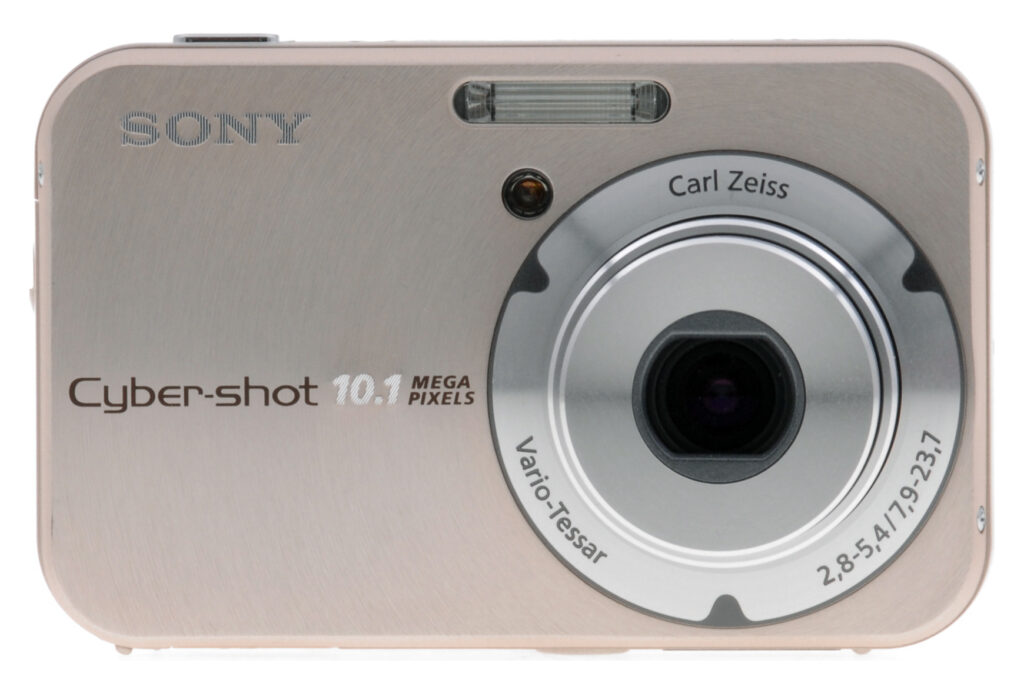
The Sony Cyber-shot DSC-N2 is an upgrade of the existing DSC-N1 model. The Sony N2 derives its higher ten megapixel resolution from a 1/1.7" CCD imager, rather than the eight megapixel 1/1.8" imager used in the previous camera. This is coupled with the same popup Carl Zeiss Vario-Tessar zoom lens, which offers a 3x optical zoom range equivalent to 38-114mm on a 35mm camera. Also retained for the Sony DSC-N2 is is the N1's whopping 3.0" LCD display - ideal for showing off photos immediately that they're captured, or using the camera itself as a portable photo album. Given the size of the display, there's little room for buttons on the rear of the Sony N-series cameras, so the company opted for a touch screen on the display, useable either with a fingertip, or with an included stylus.
As with the DSC-N1, Sony has taken advantage of the LCD in the Sony N2 to let the camera function as a digital photo "wallet" of sorts. As you capture each image, it is saved twice. One copy is saved at your chosen resolution on the camera's flash card, or in 26MB of memory reserved for image storage. The other copy is stored at VGA resolution in a further 26MB of memory that is reserved for a photo album. The user can then select favorite photos from the album for protection, or delete images they don't like. As you continue to capture images and eventually the 26MB of album space (enough for 500 VGA images) runs out, the oldest non-protected image is automatically discarded whenever a newer photo is captured. This simple method should ensure that owners of the Cybershot N2 always have a good selection of photos on-hand to show off, with a minimum of fuss.
Also retained in the Sony N2 is a slideshow mode with a range of transitions including pans, zooms, wipes, and fades, all selected automatically by the camera, and accompanied by music stored in the camera. The user can replace the music with their own selections using the accompanying software, which will transcode the user's personal music to MPEG1 format to replace the existing four background music selections that are built into the camera. 6MB of memory is reserved for the music to be stored in. As with the T50 model it is announced alongside, the Sony N2 adds a "normal" slideshow mode to the N1's functionality, however.
The Sony N2 draws power from an InfoLithium NP-BG1 battery, with the useful ability to give an indication of remaining battery life in minutes. It includes both video and USB connectivity, offers some manual control over images (including both Aperture- and Shutter-priority modes), and also provides a selection of eight scene modes to offer an easier way for beginners to get the results they're looking for. Other changes from the N1 include a slightly stronger "smart zoom" mode, a minimum shutter speed of 1/2000 second, tweaks to the shutter speeds at which noise reduction is applied, and slightly reduced burst capture rate / depth. As with the T50, the Sony N2 also includes Sony's Picture Motion Browser v1.1 software package.
Sony DSC-N2 User Report
Sony's newest Cyber-shot, the DSC-N2, is quite a departure in interface design for digital cameras. In this day of Blackberries and Treos, a stylus and touchscreen aren't really that revolutionary in themselves. We use touchscreens everywhere: at the ATM, ticketing kiosks, even when we vote. But the last place I thought about using touch-screen technology was on a digital camera. (But I still carry a paper date-book, if that says anything.) So when I pulled the Sony N2 out of the box, I was thrilled to see its minimal controls and maximized LCD screen. Now granted, Sony has been using touchscreens on their video cameras for a while, so it's a natural to put one on a digital still camera. The use of the touchscreen on the Sony N2 and N1 is genius, as it greatly simplifies the interface and keeps the camera body nice and clean. With most of the controls accessed through that bright 3.0-inch color LCD display, there's really no need for a mess of buttons cluttering up the camera body.
The Sony N2 is quite attractive, with a brushed metal finish on the front panel and a super sleek body that isn't trapped by a myriad of buttons, dials, and switches. Dominating the rear panel is the huge 3.0-inch LCD monitor, with only three tiny control buttons lining its right side. Those with larger hands may find the Sony N2 a little difficult to keep a good grip on, but the camera fit my own hand well. You'll definitely want to keep the wrist strap on when you're shooting, though, as the camera's smooth surface can be a bit slippery at times. The included stylus is attached to the wrist strap, so it's always at the ready for making changes via the LCD interface, but I found a fingernail or fingertip just as useful.
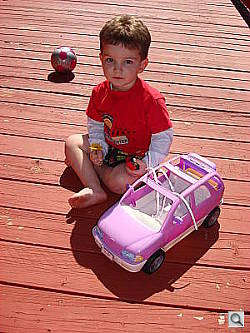
Though strongly backlit, fill flash preserved this shot; it will require some adjustment to fully recover the shadows, but the detail is there.
What's interesting about the DSC-N2's touchscreen is its Paint function, found in the camera's Playback menu. Paint mode offers a mini image editing interface, with options for painting lines, stamping, cloning, and rotating. While any serious retouching is better left to a more complete software package and a larger display, it is fun to be able to alter images in the camera and then print them directly to a PictBridge device. However, take note, the Sony N2 automatically saves any altered file at 640 x 480 pixels, which is really only best for printing snapshots and sending as email attachments. I don't know if the Paint utility will be useful for serious photographers, but some consumers may get a kick out of imprinting graphics on a photograph, or circling an area of interest with the paintbrush tool.
A small quibble with the touchscreen interface is that the large semi-translucent buttons overlay large portions of the image. You can remove the buttons by pressing the Touchscreen button, but then you lose your ability to change to another image. So you end up having to press the physical Touchscren button a lot to properly show off your images in their full splendor; better might have been to have a lighter, more translucent button for image playback mode than the rather than such bold and dark buttons.
Aside from the LCD menu, the most useful touchscreen function is using your fingertip to indicate the AF point in Spot AF mode. I found this useful in dealing with off center subjects, as I could literally tell the Sony N2 exactly where to focus.

Getting a little closer allowed the fill flash to compensate for the strong reflected light from the deck. Overall, the N2 performed well for child photography outdoors.
Another bonus to the Sony N2 is its Manual exposure mode. You can manually adjust the shutter speed and lens aperture, with a maximum shutter time of 30 seconds available in Manual mode, perfect for low-light shooting. While the Sony N2 does offer a full range of automatic and preset Scene modes for novices and amateurs, it's nice to have the option for manual control when you want it. ISO speeds go up as high as 1,600, though image noise is really quite high and obtrusive at the 800 and 1,600 equivalents. The maximum 30-second exposure time serves the camera well in low light and near darkness, as we were able to capture very bright images at the lowest light levels we test at (much darker than average city street lighting at night). Though noise becomes a factor, particularly with the higher ISO settings, the Sony N2 can still capture quite usable images under very dim lighting, though you'll definitely need a tripod or some other form of stabilization to get the best results.
An advanced slideshow function lets you build multimedia presentations out of your photos, complete with MP3 music accompaniment, as well as sophisticated wipes, fades, and even "Ken Burns" effects, where the camera pans and zooms across a picture.
Equipped with a 10-megapixel CCD, the Sony N2 captures image resolutions as high as 3,468 x 2,736, which is quite large. With a suggested retail price of $449.95, this is a lot of resolution for the money (plus a host of unique, fun features to boot). The Sony N2 is quite versatile, offering image contrast and sharpness adjustments, as well as color modes and useful tools like bracketing and Multi-Burst shooting. Overall, I'd say the Sony N2 is another good bet from Sony. It's easy to operate, dextrous in a multitude of exposure conditions, and is pretty to look at. The Sony N2 captures good-looking images with good color and exposure, and though image noise can sometimes be a factor at the higher ISO settings, the Sony N2 is flexible in its exposure capabilities. All in all, a good value for the money.Basic Features
- 10.1-megapixel CCD
- 3x zoom lens (equivalent to a 38-114mm lens on a 35mm camera)
- Max 3.4-17x digital Smart Zoom (depending on selected resolution) plus 2x Precision Digital zoom.
- 3.0-inch color LCD monitor, with touchscreen capability
- Automatic, Program, and Manual exposure modes, plus eight Scene modes
- Built-in flash with five modes and an intensity adjustment
- 25MB internal memory
- Sony Memory Stick Duo storage (no card included), compatible with Memory Stick Pro Duo
- USB 2.0 computer connection
- Single Li-Ion rechargeable battery and charger included
- Software for Mac and PC
Special Features
- Beach, Fireworks, High Sensitivity, Landscape, Snow, Soft Snap, Twilight, and Twilight Portrait preset modes
- Paint option in Playback mode offers in-camera editing/cleanup tools
- Movie recording mode (with sound)
- Burst, Multi-Burst, and Auto Exposure Bracketing shooting modes
- Email modes
- Shutter speeds from 1/2,000 to 1/8 second in Auto mode, 1/2,000 to one second in Program mode; and 1/1,000 to 30 seconds in Manual mode.
- Aperture range from f/2.8 to f/16, depending on zoom position
- Image Sharpness and Contrast adjustments, plus Image Color options
- Self-timer for delayed shutter release
- Macro (close-up) lens adjustment
- Spot, Center-Weighted, and Multi-Metering modes
- Adjustable AF area (Center, Spot, or Multi-Point options)
- Single and Monitor (continuous) AF modes, plus five fixed focus settings
- Auto ISO setting or 100, 200, 400, 800 and 1,600 ISO equivalents
- White balance (color) adjustment with six options
- DPOF (Digital Print Order Format) and PictBridge printing compatibility
In the Box
The retail package contains the following items:
- Sony DSC-N2 camera
- Wrist strap
- One Li-Ion rechargeable battery pack, a case, and charger
- USB cable
- AV cable
- Software CD containing Picture Package (ver. 1.6 for Windows), Pixela ImageMixer VCD2 (for Mac), a PC-based tutorial and USB drivers.
- Quick-guide manuals and registration information
Recommended Accessories
- Extra battery pack.
- Large capacity Memory Stick PRO Duo MemoryStick PRO versions can handle high-res movie data and give faster download times. They should be used for all current Sony cameras. These days, 512MB is a good tradeoff between cost and capacity, but if you plan to capture many movie clips, 1GB should be a minimum.
Conclusion
| Pro: | Con: |
|---|---|
|
|
Again making waves in the digital camera marketplace, Sony innovates with the Cyber-shot DSC-N2. The camera's touch-screen technology allows for a clean body style (perfect for pockets) while enabling a much simpler user interface. Touch controls not only extend to the Sony N2's main menu functions, but also let you alter images in-camera with the Paint tool, and pinpoint focus exactly where you want it as you shoot, all with a simple touch of the screen. Add to this the Sony N2's 10-megapixel CCD, available manual exposure control, and host of creative tools, and you have an extremely capable camera that takes great pictures in a wide range of situations. Though the higher ISO settings do produce quite a bit of image noise, the Sony N2 is still quite capable of capturing useable images under very bright or dark conditions. At an MSRP of $449.95, the DSC-N2 offers a lot in its small package, and it's a clear Dave's Pick.
Design
Sony DSC-N2 Design
In a bit of a departure from the rest of the Cyber-shot line, Sony's new DSC-N2 digital camera features four rounded corners, a warm-toned brushed metal finish, and overall updated styling that's quite attractive. With literally only six controls to speak of, thanks to the LCD monitor's touch-screen technology, the Sony N2 is quite sleek. Because most of the camera settings are adjusted through the touchscreen, there's no need to clutter up the camera body with a myriad of dials, buttons, and switches -- quite a useful advance in digital camera design. Measuring 3.81 x 2.37 x 0.88 inches (97 x 61 x 23 millimeters) and weighing only 6.8 ounces (185 grams) with the battery and memory card installed, the Sony N2 is quite small and portable. There's no handgrip to speak of, so you'll want to keep the wrist strap securely fastened. Attached to the strap is a small plastic stylus, for use with the LCD's touchscreen, though a fingernail or fingertip serves the same purpose. The telescoping zoom lens retracts neatly inside the body when you power the camera off, keeping the Sony N2 pocket-friendly, perfect for travel.

The Sony DSC-N2's front panel is quite clean and simple. A circular, brushed metal pattern radiates out from the lens barrel for a distinctive look. The 3x, 7.9-23.7mm zoom lens (equivalent to a 38-114mm zoom on a 35mm camera) dominates the camera's left side (when held from the back), with a small and very bright orange lamp on the upper right of it, to help with focusing in low-light conditions. (This lamp also blinks less brightly when the self-timer is in use, flashing faster to let you know when the camera is about to snap the picture.) Just above the lamp is the built-in flash.

The right side of the Sony N2 (as viewed from the rear) features the shared battery and memory card compartment, covered by a hinged, plastic door that slides down before opening out and upward. Inside the compartment, the battery and Memory Stick Duo PRO slots line up side-by-side. The battery slot features a small locking switch that prevents the battery from falling out when the compartment is open, and the Memory Stick Duo PRO is unlocked simply by a quick press on the card, which then pops it out for removal. Lined up next to the compartment is a sliding Mode switch (the icons are actually on the rear panel), which controls the camera's main operating mode. Also visible on this side of the Sony N2 is the eyelet for attaching the wrist strap, which takes up the top corner.

The left side of the Sony N2 holds only a small speaker for audio playback.

The Sony N2's top panel holds only two controls, the Power and Shutter buttons. Both are just about flush with the camera body, and the Power button has a small LED encircling it that lights when the camera is powered on. On the far left side is the camera's microphone.

As I mentioned earlier, the Sony N2 has only six controls, three of which are located on the rear panel, in what little space is left from the large 3.0-inch LCD monitor. In the top right corner is the Zoom rocker, with the touchscreen and Display buttons down in the lower right corner. Both the touchscreen and Display buttons feature lit icons that display only when the camera is powered on. The LCD monitor is one of the Sony N2's most important control features, as its touchscreen technology provides the only method of changing camera settings. Effectively replacing multicontrollers and a host of function buttons, the LCD monitor provides access to the camera's menus and exposure options. It's an intelligent design that keeps the camera body clean and protrusion-free.

Finally, the Sony N2 has a fairly flat bottom panel, with a threaded metal tripod screw mount, and a dual-purpose connector terminal for the USB and AV multi-connector cable.
Sony DSC-N2 External Controls

Power Button: The round button on the Sony N2's top panel, this button powers the camera on, signaling the lens to extend. A thin LED light surrounds the button, and lights green when the camera is powered on.

Shutter Button: To the right of the Power button, this button sets
focus and exposure when halfway pressed, and fires the shutter when fully pressed.

Mode Switch: Vertically-oriented on the Sony N2's right side and adjacent to the rear panel, this sliding switch puts the camera into Movie, Still Record, or Playback modes.

Zoom Lever: Positioned in the top right corner of the rear panel, this
two-way rocker button controls optical zoom and, when enabled via the Setup
menu, Sony's "Smart Zoom" or Precision Zoom option.
In Playback mode, this button controls the digital enlargement of a captured
image, which can go as high as 5x. (Very handy
for checking focus or the expressions on people's faces in group shots.) Also
in Playback mode, the wide-angle end of the button activates the Index Display
mode, which displays either nine or 16 thumbnail images
on the screen at one time. (Pressing the "W" end once pulls up the
nine-image display, and a second press pulls up the 16-image display.)

Touchscreen Button: Below the icons for the Mode switch, in the lower right corner of the rear panel, this button enables the LCD's touchscreen display. Immediately displayed are the following options, with a link to the main menu, which is described further below:
- Record Mode: Offers Auto, Program, Manual, High Sensitivity, Twilight, Twilight Portrait, Soft Snap, Landscape, Beach, Snow, and Fireworks exposure modes.
- Exposure Setting: Offers adjustments for the shutter speed and aperture settings when in Manual mode.
- Focus: Sets the camera's focus mode to Multi AF, Center AF, Spot AF, Infinity, 7.0m, 3.0m, 1.0m, or 0.5m.
- Flash: Puts the flash into Forced or No Flash modes.
- Self-Timer: Offers 10 and two-second Self-timer settings, as well as an Off option.
- Macro: Turns Macro mode on or off.
- Image Size: 10M (3,468 x 2,736 pixels), 3,468 3:2 Ratio, 8M (3,264 x 2,448 pixels), 5M (2,592 x 1,944 pixels), 3M (2,048 x 1,536 pixels), 2M (1,632 x 1,224 pixels), VGA E-mail (640 x 480 pixels), and 16:9 HDTV.
- Menu: Displays the main menu for either Movie, Still Record, or Playback modes, depending on the Mode switch position. (All menus are described in the Operation section.)

Display Button: Below the Sony N2's touchscreen button, this button controls the LCD display, cycling through the image with information display, the image with information and live histogram display, and the image with limited information display (in all Record modes). In Playback mode, it cycles through the image with no information, limited information, and extended information with a histogram.
Operation
Sony DSC-N2 Operation
With its touchscreen technology and sparse physical controls, the Sony DSC-N2 is a breeze to operate. A sliding Mode switch on the side of the camera puts it into Movie, Still Record, or Playback modes, and the rest of the camera functions (aside from zoom) are controlled through the LCD display. The stylus makes navigating the LCD display quite simple, but a fingertip or fingernail does the job just as well. Though some users may need some adjustment time to get accustomed to the touchscreen display, most should feel comfortable in less than half an hour.
Record Mode Display
 In record mode, the LCD monitor displays the subject with a fair amount of information, indicating approximate battery life remaining (graphically), flash mode, focus mode, AF area mode setting, any currently-selected exposure compensation setting, ISO setting, the current size/quality setting, number of images that can be stored on the remaining Memory Stick space at the current size/quality, aperture and shutter speed, and if the AF assist lamp is activated. Pressing the Sony N2's Display button adds a small histogram to the lower left corner. A third press eliminates the histogram, and whittles the information display down to the AF area, flash mode, exposure settings, EV compensation, AF assist lamp, and focus mode.
Playback Mode Display
 In Playback mode, the default image display shows the most recently captured image, with a modest information overlay present. Pressing the Sony N2's Display button once adds the exposure information and a small histogram to the overlay, pressing it again removes the information and histogram overlays entirely. Pressing the wide-angle side of the zoom lever takes you to a display showing images on the Memory Stick in groups of nine small thumbnails. You can navigate a blue arrow cursor over these thumbnails by using the arrow keys displayed onscreen. Pressing the telephoto side of the zoom lever will bring the currently-selected image up full-screen. Pressing the telephoto side of the Sony N2's zoom lever when viewing an image full-size on the LCD screen will zoom in on the image, up to a maximum magnification of 5x. Again, blue arrow "keys" display onscreen to navigate through the view.
Sony DSC-N2 Modes and Menus
Still Record Mode: Indicated on the Mode switch by a camera icon, this mode sets up the Sony N2 to record still images. A selection of exposure modes are available through the Record menu, including Auto, Program, and Manual, plus eight preset Scene modes: High Sensitivity, Twilight, Twilight Portrait, Beach, Landscape, Soft Snap, Snow, and Fireworks. High Sensitivity mode raises the camera's ISO setting to 1,600, while enabling a noise reduction setting to reduce the effect of image noise. Both Twilight modes capture images in low light, although the Twilight Portrait mode automatically enables the Red-Eye Reduction flash mode, combining it with a slower shutter speed to let ambient lighting brighten the background as well. Because the Sony N2 employs a slower shutter speed in both Twilight modes, a tripod is highly recommended to prevent blurring from camera movement. The Beach and Snow modes optimize the camera for bright situations and prevents color loss from overexposure. Landscape mode sets the focus at infinity and uses a smaller lens aperture to capture sharp details both near and far away. Fireworks mode attempts to preserve color when photographing fireworks or other colorful lights at night. Finally, Soft Snap mode is best for portraits, enhancing skin tones and keeping focus slightly soft for more flattering portraits.
The Auto mode puts essentially all of the exposure controls and options (except
zoom, image size, macro and flash modes) under automatic control, while Program
mode puts only aperture and shutter speed under automatic control. In Manual
mode, all options are available to the user, including aperture and shutter
speed. The Manual mode shutter speed range increases, extending to a maximum
of 30 seconds.
Playback Mode: Playback mode is noted on the Mode switch with the traditional Playback symbol (a right arrow enclosed within a rectangle outline). In this mode, you can scroll through captured images, delete them, write-protect them, and set them up for printing on PictBridge-compatible printers. You can also copy, resize, and rotate images. A fun tool in Playback mode is the Paint menu option, which turns the LCD screen into a canvas for doctoring up images. You can use the included stylus (or even a fingernail) as a paint brush, and the Sony N2 offers a few tools for drawing lines, painting, adding small graphics, and cloning images in-camera. Once you've altered the image, you can save the new image as a separate file, or cancel the whole thing and start over. There's even a screen calibration tool in the Setup menu to help you get the LCD screen as true to print as possible.
Movie Mode: A filmstrip icon marks this mode on the Sony N2's Mode switch. In Movie mode, you can record moving images and sound, for as long as the Memory Stick Duo or internal memory has space. Resolution and quality choices are 640 x 480 Fine (30 fps), 640 x 480 Normal (17 fps), or Video Mail 160 x 112 (8 fps). While recording, a timer appears in the LCD monitor to let you know how many minutes and/or seconds are remaining on the Memory Stick, and how long you've been recording, so you'll have some idea of how much time you have left. Recording in 640 x 480 Fine (30 fps) mode is only available with a Memory Stick Duo PRO card. Unfortunately, optical zoom is not supported in movie mode.
The Sony N2 offers a Burst mode separate from the movie mode and selected via the touchscreen menu, which captures series of images for as long as the Shutter button is held down. Frame rates and the maximum number of images depends on the image quality and resolution settings, as well as the amount of available memory space. The N2's Burst mode is actually a bit slow, however, as I clocked it at about 0.8 frames per second in large/fine mode, for only three frames. In VGA mode, the frame rate speeds up only a little, to 1.02 frames per second, for 15 frames. A Multi-Burst mode captures files much faster, though at a much smaller resolution, but it's much more useful for very active subjects. You can choose a frame rate interval (1/7.5, 1/15, or 1/30 second) through the Record menu, and the camera captures 16 small images at this rate. The Sony N2 also offers an Auto Exposure Bracketing mode, which captures a series of images at different exposures in case you're not sure which exposure is best.
Record Menu:

| Record Menu Options | |||
| Top-Level Selection |
Second-Level | Third-Level | Notes |
Color Mode |
- Normal - Sepia - Black & White |
||
Metering Mode |
- Multi - Center - Spot |
||
|
White Balance
|
- Auto
- Daylight - Cloudy - Fluorescent - Incandescent - Flash |
||
|
ISO
|
- Auto
- 100 - 200 - 400 - 800 - 1,600 |
||
|
Picture Quality
|
- Fine
- Standard |
||
|
Record Mode
|
- Normal
- Burst - Exposure Bracketing - Multi Burst |
||
|
Bracket Step
|
- +/- 1.0 EV
- +/- 0.7 EV - +/- 0.3 EV |
Only available if Exposure Bracketing mode enabled
|
|
|
Interval
|
- 1/30
- 1/15 - 1/7.5 |
Only available if MultiBurst mode is selected
|
|
|
Flash Level
|
- High
- Normal - Low |
Controls the intensity of the flash
|
|
|
Contrast
|
- High
- Normal - Low |
||
|
Sharpness
|
- High
- Normal - Low |
||
|
Setup
|
Accesses the main Setup menus
|
||
Playback Menu:

| Playback Menu Options | |||
| Top-Level Selection |
Second-Level | Third-Level | Notes |
|
Album
|
|
Menu:
- Exit Album - Slide Show - Delete - Volume - Protect - Rotate |
Displays the available digital albums
|
|
Slide Show
|
- Effects
- Music - Image Folder - Repeat - Start |
Effects:
- Simple - Nostalgic - Stylish - Active - Normal Music: Folder: Repeat: |
You can download music from a computer
to use with slide shows, or stick with the camera's default options
|
|
Paint
|
Displays image with paint tools
for use with included stylus. Options to save or delete altered image as
well.
|
||
|
Delete
|
- Delete
- Exit |
||
|
Volume
|
- Eight levels from - to +
|
Adjusts playback volume for slide shows and
movies
|
|
|
Folder
|
- Select Folder
|
Selects folder for image playback
|
|
|
Protect
|
- Protect
- Exit |
Marks file for write protection, or removes
protection
|
|
|
DPOF
|
- DPOF
- Exit |
Marks file for printing on a DPOF device, or
removes print mark
|
|
|
Print
|
- OK
- Cancel |
Enables direct printing to a PictBridge device
|
|
|
Resize
|
- 10M
- 8M - 5M - 3M - 2M - VGA |
Resizes selected image
|
|
|
Rotate
|
- OK
- Cancel |
Rotates images in 90-degree increments, either
clockwise or counterclockwise
|
|
|
Divide
|
For editing movie clips, lets you divide a section
and save it separately
|
||
|
Setup
|
Displays the Setup menus
|
||
Setup Mode, Camera 1:

| Camera 1 Menu Options | |||
| Top-Level Selection |
Second-Level | Third-Level | Notes |
|
AF Mode
|
- Single
- Monitor |
Single adjusts focus with Shutter
button, Monitor acts like Continuous AF, but holds focus with a half press
of Shutter button
|
|
|
Digital Zoom
|
- Smart
- Precision - Off |
Enables either of the digital zoom
modes, or disables all digital zoom
|
|
|
Red-Eye Reduction
|
- On
- Off |
Activates the Red-Eye Reduction
preflash to prevent Red-Eye. If enabled, fires the preflash in all flash
modes.
|
|
|
AF Illuminator
|
- Auto
- Off |
Auto puts the camera in charge of when the AF
assist is needed
|
|
Setup Menu, Camera 2:

| Camera 2 Menu Options | |||
| Top-Level Selection |
Second-Level | Third-Level | Notes |
|
Auto Review
|
- On
- Off |
If on, the review displays the most recently
captured image for a few seconds on the LCD monitor
|
|
Setup Menu, Memory Stick:

| Memory Stick Menu Options | |||
| Top-Level Selection |
Second-Level | Third-Level | Notes |
|
Format
|
- OK
- Cancel |
Erases all images from the internal
memory or memory card, even write-protected files
|
|
|
Create REC Folder
|
- OK
- Cancel |
Creates a new folder for storing
images
|
|
|
Change REC Folder
|
- OK
- Cancel |
Selects which folder images should
be recorded to
|
|
|
Copy
|
- Internal Memory
- Album |
For copying files between the internal memory
and the memory card
|
|
Setup Menu, Album:

| Album Menu Options | |||
| Top-Level Selection |
Second-Level | Third-Level | Notes |
|
Write in Album
|
- On
- Off |
Sets camera to write photos to the album as they are shot
|
|
|
Format
|
- OK
- Cancel |
Erases all album information, even
files that are write protected
|
|
|
Check Album
|
- Exit
|
Verifies that album data is ok
|
|
Setup Menu, Setup 1:

| Setup 1 Menu Options | |||
| Top-Level Selection |
Second-Level | Third-Level | Notes |
|
Download Music
|
- Exit
|
Downloads music for slide show
playback
|
|
|
Format Music
|
- OK
- Cancel |
Erases music files
|
|
Setup Menu, Setup 2:

| Setup 2 Menu Options | |||
| Top-Level Selection |
Second-Level | Third-Level | Notes |
|
LCD Backlight
|
- Bright
- Normal |
Adjusts the brightness of the
LCD display
|
|
|
Beep
|
- Shutter
- On - Off |
Turns the camera's beep sounds on
or off, or sets a sound only for the shutter release
|
|
|
Language
|
- English
- Simplified Chinese - Traditional Chinese - Spanish - French - Italian |
||
|
Initialize
|
- OK
- Cancel |
Resets the camera's settings to default
|
|
Setup Menu, Setup 3:

| Setup 3 Menu Options | |||
| Top-Level Selection |
Second-Level | Third-Level | Notes |
|
File Number
|
- Series
- Reset |
Series continues numbering regardless
of memory card. Reset starts over with each new memory card
|
|
|
USB Connect
|
- PictBridge
- PTP - Mass Storage - Auto |
||
|
Video Out |
- NTSC
- PAL |
||
|
Clock Set
|
- Date Style
- Date and Time Set |
Date Style adjusts the format of the date and
time display
|
|
Setup Menu, Setup 4:

| Setup 4 Menu Options | |||
| Top-Level Selection |
Second-Level | Third-Level | Notes |
|
Calibration
|
- Cancel
|
Appears to calibrate the appearance
of the LCD monitor, presumably so that changes made in Paint mode are
as accurate as possible when compared to the printed version
|
|
|
Housing
|
- On
- Off |
Indicates whether an underwater
housing is in use
|
|
Optics
Sony DSC-N2 Optics
The Sony Cyber-shot DSC-N2 features a 38-114mm equivalent (3x) lens, which is a common zoom range among consumer-level digital cameras. The camera's autofocus system determines focus from a five-point spread in a large area at the center of the frame, but you can manually set the main AF point to the center position through the LCD menu, or opt for Spot AF. In Spot AF mode, you can actually touch the portion of the screen you want the camera to focus on, and set that as the main AF point. You can also manually select one of five fixed focus settings through the same menu option. Through the Setup menu, you can opt for Single or Monitor AF modes, the Monitor option acting like a Continuous AF mode and continuously adjusting the focus until the Shutter button is halfway pressed. The Sony N2's Macro mode performs well, and focuses as close as 2.4 inches (6 centimeters). In autofocus mode, a green circle appears solid in the LCD menu (it flashes while focus is uncertain), and the selected AF area brackets appear in green as well. The camera also gives an audible chime, so you know focus is locked.
In addition to the 3x optical zoom, the Sony N2 also sports Sony's trademark Precision Digital Zoom and Smart Zoom technologies. Precision Digital Zoom enlarges as much as 2x, while Smart Zoom extends to a maximum of 17x. With Smart Zoom, the amount of digital enlargement available depends on the image resolution setting. At the 8.0-megapixel resolution, only 3.4x is available. The full 17x enlargement is only an option at the VGA resolution setting.
Lens
Zoom
A typical 3x optical zoom range, though good lens performance. Precision
Digital Zoom also performs well.
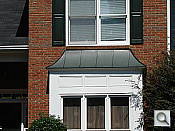
The Sony Cyber-shot DSC-N2 optical zoom covers the equivalent of a 38-114mm range, fairly typical among digital cameras of its class. Results were quite good at wide angle, though some corner softness and coma distortion were present. Sony's Precision Digital Zoom did a great job of holding onto fine detail, much better than we're accustomed to seeing with digital zooms. Though some fine detail is compromised, results on the whole are much better than average.
Macro
A tiny macro area with strong detail and high resolution. Flash exposure
was very uneven up close.
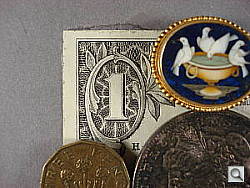
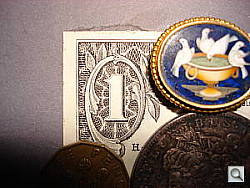
The Sony N2's macro setting performed well, capturing a small minimum area of 2.28 x 1.80 inches (58 x 46 millimeters). Detail and resolution were both good, though some lens distortion creates strong softening in the corners of the frame. (Most cameras have some softening in the corners in macro mode.) The flash produced a very uneven exposure here, partially blocked by the lens with a slight overexposure in the top of the frame, though it was comparitively well-controlled. Still, plan on using external lighting for your closest macro shots with the Sony N2.
Distortion
Moderate barrel distortion, as well as some minor pincushion.
This is the tendency for the lens to bend straight lines outward (like a barrel -- usually at wide angle) or inward (like a pincushion -- usually at telephoto). The Sony N2's 0.8% barrel distortion at wide angle is about average among the cameras we've tested, although still uncomfortably high to my eyes. At the telephoto end, I found about 0.2% pincushion distortion, which is fairly low but noticeable.
| Barrel distortion at 38mm is 0.8% |
 |
| Pincushion at 114mm is 0.2% |
 |
Chromatic aberration
Moderate to high effect on images at edges.
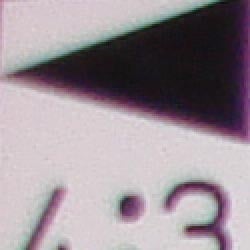



Chromatic aberration is moderate at both wide angle and telephoto on the Sony N2. At telephoto, the distortion is still a bit high, though pixels are a little less bright. (This distortion is visible as a slight colored fringe around the objects at the edges of the field of view on the resolution target.) The effect is pretty noticeable in several of our test shots.
Corner Sharpness
Significant softening in the corners at wide angle, though corners remain
fairly sharp at telephoto.
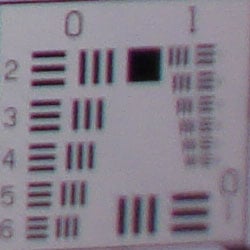
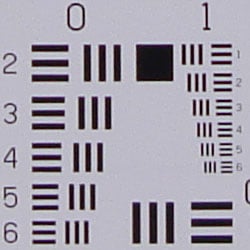
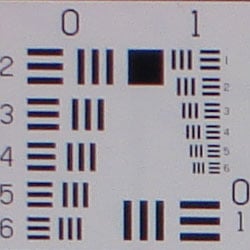
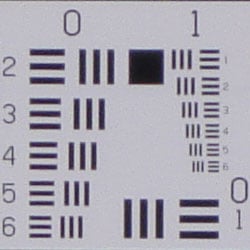
The Sony N2 produced quite soft corners at its full wide angle setting, with the strongest blurring in the lower right corner. At telephoto, all four corners were fairly sharp, though the center of the frame was slightly softer.
Viewfinder
Coverage
Excellent accuracy with LCD monitor.
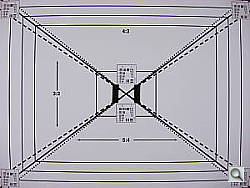
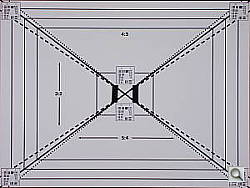
The Sony N2's LCD monitor showed about 103% frame accuracy at wide angle, and about 99% at telephoto, which is quite good. (Though wide angle framing is actually a bit loose, just slightly cutting out the furthest target lines.)
The images above were taken from our standardized test shots. For a collection of more pictorial photos, see our Sony Cyber-shot DSC-N2 Photo Gallery .
Exposure
Sony DSC-N2 Exposure
Color
Saturation & Hue Accuracy
Good overall color, though a tendency toward a slight warm cast. Some
oversaturation in the strong reds and blues, but generally good accuracy.
 |
| In the diagram above, the squares show the original color, and the circles show the color that the camera captured. More saturated colors are located towards the periphery of the graph. Hue changes as you travel around the center. Thus, hue-accurate, highly saturated colors appear as lines radiating from the center. |
Most consumer digital cameras produce color that's more highly saturated (more intense) than found in the original subjects. This is simply because most people like their color a bit brighter than life. The Sony DSC-N2 does oversaturate the strong red and blue tones a little, but results are still quite pleasing. Where oversaturation is most problematic is on Caucasian skin tones, as it's very easy for these "memory colors" to be seen as too bright, too pink, too yellow, etc. Here, the Sony N2 did render skin tones a bit on the warm, orange side in most cases, but warmer skin tones are definitely more natural-looking than cooler or magenta tones.
The other important part of color rendition is hue accuracy. Hue is "what color" the color is. Though the Sony N2 often produced a slightly warm color balance, and pushed reds toward orange slightly (and cyan toward blue, for that matter), overall results appeared accurate and natural.



Sensor
Exposure and White Balance
Indoors, incandescent lighting
Warm color balances with both white balance settings. However, much
less positive exposure compensation required than average.


Color balance indoors under incandescent lighting was warm with both the Auto and Incandescent white balance settings, though the Incandescent option produced more of a yellow tint that was more pleasing overall. The Sony N2 required less positive exposure compensation than we're accustomed to seeing here, at +0.7 EV in Auto White balance, and only +0.3 EV under Incandescent. The warmer color balance results in darker colors in the flower bouquet, and the blue flowers are quite dark indeed. (Many digital cameras have trouble here, often producing a dark, purplish tint in the blue flowers, but this is far darker than normal.) Our test lighting for this shot is a mixture of 60 and 100 watt household incandescent bulbs, a pretty yellow light source, but a very common one in typical home settings here in the U.S.
Outdoors, daylight
Nearly accurate color overall, though a tendency toward a warm cast
and high contrast under harsh lighting. About average exposure accuracy.

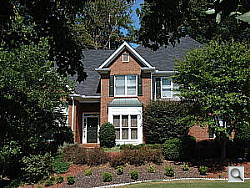
Outdoors, the Sony DSC-N2 tended toward a warmer color balance, though overall color was generally pretty good (if slightly dark in the greens and blues). The Sony N2's exposure system performed about average, and sometimes a little better, usually requiring the same or slightly less positive exposure compensation than we're accustomed to seeing on consumer digital cameras. The Sony N2's default contrast is a little high, producing washed-out highlights and dark shadows under the deliberately harsh lighting of our "Sunlit" portrait test shown above right. The low contrast option does help with harsh lighting like this, but it also produces more striking tonal gradations in Caucasian skin tones, rendering some tones almost grey. Thus, the sample of the "Sunlit" portrait test shown above was shot with the default contrast setting.
See full set of test images with explanations
See thumbnails of all test and gallery images
Resolution
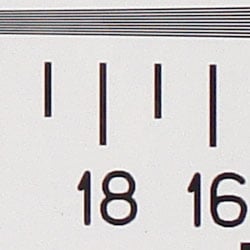
Very high resolution, 1,600 lines of strong detail.
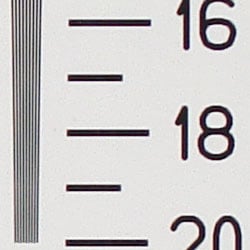
Our laboratory resolution chart revealed sharp, distinct line patterns from the Sony N2, down to about 1,600 lines per picture height, with extinction not occurring until past 2,000. Use these numbers to compare with other cameras of similar resolution, or use them to see just what higher resolution can mean in terms of potential detail. Beware that while you might be able to make out what look like distinct lines at numbers higher than those we've mentioned here, the camera is just doing its best to continue interpreting the lines.
See full set of test images with explanations
See thumbnails of all test and gallery images
Sharpness & Detail
Reasonably sharp images overall, though slight edge-enhancement on high-contrast
subjects. Noise suppression limits detail in the shadows.


The Sony N2 captures fairly sharp images overall, though I noticed a small amount of visible edge enhancement artifacts on high-contrast subjects such as the crop above left. (Edge enhancement creates the illusion of sharpness by enhancing colors and tones right at the edge of a rapid transition in color or tone.)
Noise-suppression systems in digital cameras tend to flatten-out detail in areas of subtle contrast. The effects can often be seen in shots of human hair, where the individual strands are lost and an almost "watercolor" look appears. The crop above right shows this, as well as some residual image noise, with darker areas of Marti's hair showing only limited detail.
ISO & Noise Performance
Low to moderate noise at the normal sensitivity settings, though a big
jump in noise with very bright pixels and strong blurring at the higher
settings.





Noise levels are low to moderate at the Sony N2's lower sensitivity settings, with higher noise at ISO 400 (as you'd expect). At ISOs 800 and 1,600, however, noise levels increase dramatically, with a stronger pattern and stronger blurring, so that the image at 1,600 is really unusable.
Extremes: Sunlit and low light tests
High resolution with strong overall detail, but high contrast and limited
shadow detail. Very good low-light performance, capable of capturing bright
images under average city street lighting and to the darkest conditions
we test at.


Sunlight:
Because digital cameras are more like slide film than negative film (in that they tend to have a more limited tonal range), we test them in the harshest situations to see how they handle scenes with bright highlights and dark shadows, as well as what kind of sensitivity they have in low light. The shot above is designed to mimic the very harsh, contrasty effect of direct noonday sunlight, a very tough challenge for most digital cameras. (You can read details of this test here.)
The Sony N2 produced high contrast with washed-out highlights and deep shadows under the harsh lighting of the test above. Noise suppression is visible in the shadows, as well as some residual image noise, resulting in the loss of fine detail. Though some areas look a little dark at +0.7 EV, I preferred it to the image at +1.0 EV, which had too many blown highlights for my preference. (In "real life" though, be sure to use fill flash in situations like the one shown above; it's better to shoot in the shade when possible.)
| 1 fc 11 lux |
1/2 fc 5.5 lux |
1/4 fc 2.7 lux |
1/8 fc 1.3 lux |
1/16 fc 0.67 lux |
|
| ISO 100 |
 2.5 sec f2.8 |
 5 sec f2.8 |
 10 sec f2.8 |
 20 sec f2.8 |
 30 sec f2.8 |
| ISO 200 |
 1.3 sec f2.8 |
 2.5 sec f2.8 |
 5 sec f2.8 |
 10 sec f2.8 |
 20 sec f2.8 |
| ISO 400 |
 1/1 sec f2.8 |
 1.3 sec f2.8 |
 2.5 sec f2.8 |
 5 sec f2.8 |
 10 sec f2.8 |
| ISO 800 |
 1/3 sec f2.8 |
 1/1 sec f2.8 |
 1.3 sec f2.8 |
 2.5 sec f2.8 |
 5 sec f2.8 |
| ISO 1600 |
 1/6 sec f2.8 |
 1/3 sec f2.8 |
 1/1 sec f2.8 |
 1.3 sec f2.8 |
 2.5 sec f2.8 |
Low light:
The Sony N2 captured bright images down to the 1/16 foot-candle light level (about 1/16 as bright as average city street lighting at night). Color balance looks good with the Auto white balance setting, without any strong color casts. The camera's autofocus system was able to focus on the subject down to the 1/8 foot-candle light level unassisted, which almost accommodates its exposure system. Do keep in mind here, that the very long shutter times necessary here absolutely demand the use of a tripod or other camera support to get sharp photos. (A useful trick is to just prop the camera on a convenient surface, and use its self-timer to release the shutter. This avoids any jiggling from your finger pressing the shutter button, and can work quite well when you don't have a tripod handy.)
NOTE: This low light test is conducted with a stationary subject, and the camera mounted on a sturdy tripod. Most digital cameras will fail miserably when faced with a moving subject in dim lighting. (For example, a child's ballet recital or a holiday pageant in a gymnasium.) For such applications, you may have better luck with a digital SLR camera, but even there, you'll likely need to set the focus manually. For information and reviews on digital SLRs, refer to our SLR review index page.
Flash
Coverage and Range
Pretty good exposures at the default exposure setting, though slightly
dim in the Normal flash mode. Slightly limited flash range.
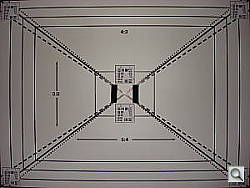
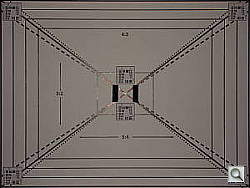


Flash coverage was uneven at wide angle, and still a hint uneven at the telephoto setting. Indoors, under incandescent background lighting, the Sony N2's flash underexposed our subject just a little at its default setting, requiring the High intensity setting to get bright results. (Some users may prefer the slightly dim image at the default setting, but I felt the overall exposure just a little too dim.) The camera's Slow-Sync flash mode performed very well at the normal intensity setting, with more even coverage. However, the longer exposure time resulted in a stronger orange color cast.
| Flash Range: Wide Angle | |||||
|---|---|---|---|---|---|
| 6 ft | 7 ft | 8 ft | 9 ft | 10 ft | 11 ft |
 1/40 sec f2.8 ISO 100 |
 1/40 sec f2.8 ISO 100 |
 1/40 sec f2.8 ISO 100 |
 1/40 sec f2.8 ISO 100 |
 1/40 sec f2.8 ISO 100 |
 1/40 sec f2.8 ISO 100 |
| 12 ft | 13 ft | 14 ft | 15 ft | 16 ft | |
 1/40 sec f2.8 ISO 100 |
 1/40 sec f2.8 ISO 100 |
 1/40 sec f2.8 ISO 100 |
 1/40 sec f2.8 ISO 100 |
 1/40 sec f2.8 ISO 100 |
|
| Flash Range: Telephoto | |||||
|---|---|---|---|---|---|
| 6 ft | 7 ft | 8 ft | 9 ft | 10 ft | 11 ft |
 1/50 sec f5.4 ISO 100 |
 1/50 sec f5.4 ISO 100 |
 1/50 sec f5.4 ISO 100 |
 1/50 sec f5.4 ISO 100 |
 1/50 sec f5.4 ISO 100 |
 1/50 sec f5.4 ISO 100 |
| 12 ft | 13 ft | 14 ft | 15 ft | 16 ft | |
 1/50 sec f5.4 ISO 100 |
 1/50 sec f5.4 ISO 100 |
 1/50 sec f5.4 ISO 100 |
 1/50 sec f5.4 ISO 100 |
 1/50 sec f5.4 ISO 100 |
|
The DSC-N2's flash remained fairly bright to about eight feet at the wide angle setting, becoming a bit dim at 14 feet. At telephoto, flash power was a little low at eight feet, and gradually decreased in intensity from there.
Output Quality
Print Quality
Good print quality, great color, good 11x14 inch prints. ISO 400 images are soft but usable at 8x10, ISO 1600 shots are marginal at 5x7, good at 4x6.
Testing hundreds of digital cameras, we've found that you can only tell just so much about a camera's image quality by viewing its images on-screen. Ultimately, there's no substitute for printing a lot of images and examining them closely. For this reason, we now routinely print sample images from the cameras we test on our Canon i9900 studio printer, and on the Canon iP5200 here in the office. (See the Canon i9900 review for details on that model.)
With the Sony N2, we found that it had enough resolution to make good looking 13x19 inch prints. At high ISO, image noise levels are held in check up to ISO 400, but the jump to ISO 800 gets rougher, though still usable at 8x10. ISO 1600 shots under daylight-balanced lighting look okay at 5x7 inches, those shot under incandescent lighting are really only usable as 4x6 inch snapshots. (The very warm color balance of incandescent lighting forces the camera's already-noisy blue channel to work harder, producing higher noise.)
The images above were taken from our standardized test shots. For a collection of more pictorial photos, see our Sony Cyber-shot DSC-N2 Photo Gallery .
Not sure which camera to buy? Let your eyes be the ultimate judge! Visit our Comparometer(tm) to compare images from the Sony Cyber-shot DSC-N2 with those from other cameras you may be considering. The proof is in the pictures, so let your own eyes decide which you like best!
Performance
Sony DSC-N2 Performance
Timing and Performance
Very good to average speed for a consumer camera.
| Startup/Shutdown |
||
| Power on to first shot |
1.8 seconds |
Time it takes for
LCD to turn on and lens to deploy |
| Shutdown |
2.0 seconds |
How long it takes
to retract lens |
| Buffer clearing
time |
4 seconds (in Burst LF JPEG) |
Worst case buffer
clearing time. -- This is the delay after a set of shots before you
can remove the card. Some cameras won't retract their lenses and shut
down until the buffer is cleared. |
| Mode
switching |
||
| Play to Record, first shot |
0.2 seconds |
Time until first
shot is captured |
| Record to play |
3.9 seconds |
Time to display
a large/fine file immediately after capture |
| Display recorded image |
1.2 second |
Time to display
a large/fine file already on the memory card. |
| Shutter
response (Lag Time): |
||
| Full Autofocus
Wide |
0.29 second |
Time from fully
pressing shutter button to image capture, zoom lens at wide angle
position. |
| Full Autofocus
Tele |
0.69 second |
Time from fully
pressing shutter button to image capture, zoom lens at telephoto position. |
| Prefocused |
0.012
second |
Time
to capture, after half-pressing and holding shutter button. |
| Continuous
AF |
0.28
second |
This
mode usually shows no speed increase with our static subject; we have
no way to measure performance with moving subjects |
| Manual
focus |
0.21
second |
For
most cameras, shutter lag is less in manual focus than autofocus,
but usually not as fast as when the camera is "prefocused" |
| Cycle
time (shot to shot) |
||
| Single Shot mode Large Fine JPEG |
1.67 seconds |
Time per shot, averaged
over 20 shots |
| Single Shot mode 640x480 JPEG |
1.50 seconds |
Time per shot, averaged
over 20 shots |
| Early shutter penalty? |
No |
Some cameras refuse
to snap another shot if you release and press the shutter too quickly
in Single Shot mode, making "No" the preferred answer |
|
Continuous mode Large Fine JPEG |
1.17 second (0.85
frames per second); 3 frames total; 4 seconds to clear |
Time per shot, averaged
over buffer length or 20 shots, whichever came first |
| Continuous mode 640x480 JPEG |
0.98 second (1.02
frames per second); 1 second to clear |
Time per shot, averaged
over buffer length or 20 shots, whichever came first |
| Flash recycling |
4 seconds |
Flash at maximum
output |
| Download
speed |
||
| Windows Computer,
USB 2.0 |
2247 KBytes/sec |
Typical Values: Less than 600=USB 1.1; 600-770=USB 2.0 Low; 771-4000=USB 2.0 High |
The Sony N2's performance ranges from quite good to a little slow, depending on what it is you're trying to do. Startup time is fast enough at 1.8 second, and shutter lag is very good at both wide angle and telephoto lens settings. "Prefocusing" times (half-pressing and holding down the shutter button before the final exposure) are blazingly fast, with a shutter delay of only 0.012 second. Shot-to-shot cycle times are a little better than average, at about 1.67 seconds for large/fine JPEGs, and the camera captures frames continuously at this rate. Continuous-mode speed is on the slower side, at less than one frame/second, for up to three shots in succession. For small JPEGs (640 x 480 pixels), the rate speeds up only a little to 1.02 frames per second, though the camera captures frames continuously at this rate. That said, the Sony N2 does offer a Multi-Burst mode as well, which captures at a much faster frame rate, though at a smaller resolution. Flash recycling time is pretty fast, at only four seconds. Connected to a computer, download speeds are exceptionally fast, so you won't feel a need for a separate card reader. Bottom line, the Sony N2 is responsive enough for most family photo opportunities, but its standard continuous shooting mode is a bit slow for sporting events or catching children.
Battery and Storage Capacity
Battery
Excellent battery life.
| Operating Mode | Number of Shots |
|---|---|
| LiIon rechargeable battery, LCD on | 300 |
The Sony N2 uses a single rechargeable LiIon battery pack for power, and a battery and a charger are included with the camera. I strongly recommend picking up a spare battery and keeping it freshly charged and on-hand for extended outings.
The table above shows the number of shots the camera is capable of (on either a fresh set of disposable batteries or a fully-charged rechargeable battery as appropriate), based on CIPA battery-life and/or manufacturer standard test conditions.
(Interested readers can find an English translation of the CIPA DC-002 standards document here. (180K PDF document))
Storage
The Sony N2 accepts Memory Stick Duo cards, though no card is included; 25MB RAM is built into the camera.
| Image Capacity with 25MB Internal Memory |
Fine | Normal | |
|---|---|---|---|
| 3,468 x 2,736 | Images | 5 | 10 |
| File Size | 5.2 MB | 2.6 MB | |
| 3,264 x 2,448 | Images | 6 | 12 |
| File Size | 4.0 MB | 2.2 MB | |
| 2,592 x 1,944 | Images | 10 | 19 |
| File Size | 2.6 MB | 1.4 MB | |
| 2,048 x 1,536 | Images | 16 | 29 |
| File Size | 1.6 MB | 906 KB | |
| 1,632 x 1,224 | Images | 26 | 49 |
| File Size | 1.0 MB | 537 KB | |
| 640 x 480 | Images | 158 | 396 |
| File Size | 168 KB | 67 KB | |
We strongly recommend buying at least a 512MB card for the Sony N2, preferably a 1GB one, to give yourself extra space for extended outings.