




Overview
Samsung NX10 Overview
Reviewed by Shawn Barnett and Zig Weidelich
Overview by Mike Tomkins
Review Date: 04/26/2010
The Samsung NX10 is a 14.6-megapixel digital camera with interchangeable lenses, designed to deliver SLR-like image quality, but still function more like a traditional digicam. As such, there is no optical viewfinder, and the SLR's big, noisy mirror box has been removed, allowing for a smaller camera overall.
On the plus side, this change means a significant saving in weight and size -- especially the thickness -- of the camera body, and can mean smaller and lighter lenses as well. Samsung's NX10 uses a Live View display, which is more familiar to digital camera users. This Live View display can be viewed either on a 3.0-inch AMOLED display on the Samsung NX10's rear panel, or a 921,000 dot electronic viewfinder of unspecified size. The Samsung NX10 includes a sensor to detect when the photographer's eye is against the viewfinder, and automatically enables / disables either display when the other is being used, saving power.
Focusing is also performed on data streamed from the image sensor, with the company saying that the Samsung NX10's contrast detection autofocus is "one of the fastest ... in its class on the market." AF speed is achieved courtesy of a newly developed DRIMe II Pro image processing engine, which also allows for 720p high definition video recording at thirty frames per second, using H.264 compression in an .MP4 container. The image sensor itself is a 14.6 megapixel APS-C CMOS type that yields a maximum resolution of 4,592 x 3,056 pixels. Samsung has not described the chip in detail, but it seems likely to be related to the Samsung-developed 14.6 megapixel APS-C CMOS imager in Pentax's K-7 digital SLR. (We compare the two below, so you can judge for yourself.)
ISO sensitivity for the Samsung NX10 ranges from a low of 100 to a high of 3,200. The image sensor is one of the most important differentiators from Micro Four Thirds. Olympus and Panasonic's format is based around the same 4/3" type image sensor as the regular Four Thirds system, with a diagonal of 22.5mm. By contrast, the Samsung NX system uses a significantly larger image sensor with a diagonal of 28.1mm. Read on to see if this gave Samsung's design an advantage in terms of ISO sensitivity and noise levels.
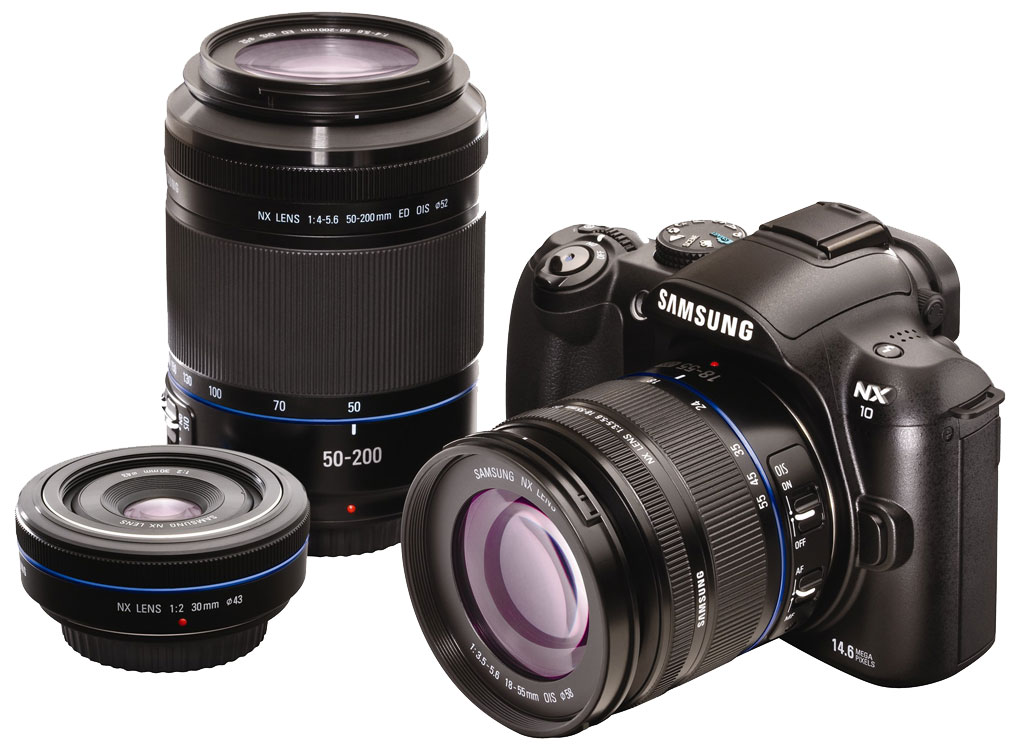
Samsung has foregone in-body image stabilization for the NX10, instead adopting the more traditional lens-based system -- which means only lenses that include the function will offer stabilization. Lenses currently available for the Samsung NX mount include both 18-55mm f/3.5-5.6 and 50-200mm f/4-5.6 optically stabilized zooms and an unstabilized 30mm f/2.0 pancake. As you'd expect of an interchangeable lens camera, the Samsung NX10 also includes a dust reduction system, with the system adopted by Samsung using supersonic vibrations to combat dust. The Samsung NX10 includes both a built-in popup flash and external hot shoe, as well as high-definition HDMI video output which includes AnyNet+ functionality (Samsung's name for Consumer Electronics Control, which provides for remote control of certain functions via the video cable from an attached display's remote).
The Samsung NX10 began shipping April 2010, priced at US$699.99 with the NX 18-55mm OISkit lens.
Samsung NX10 User Report
by Shawn Barnett
 The third entrant into the Single-lens Direct-view (SLD) category of small, interchangeable lens digital cameras comes to the party with a fairly complete set of optics, and an excellent design aesthetic, both inside and out. The Samsung NX10's 14.6-megapixel sensor puts it ahead of its current SLD rivals in the megapixel department, and a 3-inch AMOLED display puts it ahead in the acronym department. Overall design is elegant and well-thought-out.
With the 18-55mm kit lens, the Samsung NX10 weighs 21.5 ounces (1.3 pounds, 610g) with card and battery, and without the lens it weighs 14.5 ounces (0.9 pounds, 411g). For comparison, with the 30mm pancake lens -- as pictured at right -- the Samsung NX10 weighs 17.4 ounces (1.09 pounds, 493g) with card and battery, while the E-P1 with its 17mm pancake lens weighs 16.01 ounces (1.0 pound, 454g) with card and battery.
Look and feel. The Samsung NX10 manages to look like an SLR, like the Panasonic G1, without being quite as large. While the G1 has a larger grip, the NX10's grip is small, yet still functional. Because it's smaller, it cuts a more narrow profile, much like its other rival, the flatter Olympus E-P1. The Samsung NX10 still has a viewfinder hump, but that's not as tall overall as the E-P2 is with either of its optional optical viewfinders. As such, the Samsung NX10 splits the difference between its two SLD rivals.

The Samsung NX10's body is dense and hefty, with a rock-solid feel. The finish is also very good, with a refined texture. What the grip lacks in depth, it makes up for with width: just enough for the pads of your fingertips to find a comfortable home as you press the camera into your palm. Your thumb, likewise, finds a perfect home on the rear, where a textured rubber grip sits to assist your hold on the camera. It's all just right for the size and weight of the camera. With the 30mm lens mounted, the weight is set a little to the left of center, but that's understandable, and really helps push the camera snugly into your palm. Mount a heavier lens, and the effect increases; you shouldn't shoot one of these one-handed too often anyway, so it's not a problem.
The shutter button has a nice forward cant to it, resting as it does out on an overhang that protrudes further than the grip itself. Just right of that is an AF-assist lamp that glows a very bright green and projects quite a long distance. Straight below that is the Depth-of-field preview button, a nice touch. And of course the lens release button appears right of the lens, where it is on most SLRs. Three small holes appear beneath the NX10 logo for the microphone. There is no external mic jack, which limits the NX10's usefulness for movie making.

From the top, you see the flash popup button with seven holes for the speaker. The flash doesn't pop up very high, but exposure is well-controlled. The hot shoe has a slide-in plastic cover. The NX10's Mode dial has just the right balance of tension and slack that it is more likely to either stay put or quickly click to the next setting, rather than resting in-between. The Power switch that surrounds the shutter button is difficult to activate, but is less likely to activate accidentally. I like the Control dial and use it often when in semi-auto modes. The last two controls are odd. The green dot button works the same as it did on the Samsung and Pentax SLRs, recentering most settings, including Program shift or EV setting. Think of it as a quick way of getting back to zero without a lot of fuss. The button behind it controls Drive mode. Both buttons also zoom in and out, as the blue icons indicate. It's a little unusual at first, but it's pretty obvious zooming in on the image with the front, and out with the back.

The Menu button is rather lonely high and left of the viewfinder, but that's also easy to learn too. The diopter correction wheel is big and burly, easily accommodating my -3 vision, but the dial's still tough to turn. The rest of the controls are right of the OLED, and manage to stay out of the way of your thumb when you're holding the Samsung NX10, but remain within easy reach.
Hitting the OK button in most capture modes brings up the AF option box. From here you can zoom in the AF-area box up to 3x, and move the AF box around the screen. It's pretty quick to dial in a change and get back to shooting, so kudos to Samsung.

Menus. Kudos, too, for the well-designed Menu and Function menu. The main menu (shown to the right)is very much like everyone else's menu. Following the leadership of some other recent designs, you move up and down each menu page with the up and down arrows, and move between tabs at any time with the left and right arrows. No matter where you are on each list vertically, you can always go to the next menu page; and the Samsung NX10 has the courtesy to remember which vertical item you had selected last.

The Function menu (left) is a list of icons that pop up along the bottom of the screen, items you're likely to change more often: Photo Size, Quality, AF Area, Flash, Color Space, Smart Range, and OIS (Optical Image Stabilization). The main adjustment takes place in the center of the screen, with the appearance of the dial portholes on old cameras.

Doors. Left and right of the Samsung NX10 are doors. The right door slides to the rear and opens outward to reveal the SD card slot. SD cards slide in with the label facing toward the front of the camera, somewhat awkwardly.

On the left is a large plastic door that opens via a small thumb notch to reveal a DC-in port, a miniHDMI-out port, a remote control socket, and a dual USB/AVI port.
LCD? Here's where we normally talk about the Liquid Crystal Display on most cameras, but instead the Samsung NX10 has an Active-Matrix Organic Light Emitting Diode (AMOLED) display. Samsung claims that the 640x480 display refreshes 3,000 times faster than an LCD, and has a 1,000:1 dynamic contrast ratio. To be sure, it's a beautiful display, but it's also about comparable in sunlight to Olympus's own HyperCrystal LCD technology. There's also a strange softness that's hard to quantify. While text appears sharp on this bright display, images from the sensor always seem a little soft, especially when compared to the 640x480 displays on the Canon T2i and Nikon D90, which are the definition of crisp. Likewise, the VGA EVF (electronic viewfinder) is not as sharp as it should be.
Worse, the live image is drawn just like the video image, which means it suffers from pronounced, almost nauseating, Jello-effect. Even the slightest left-to-right movements are wonky, sometimes bending straight vertical lines more than once as you frame an image. More on this later.

Flash. The Samsung NX10 flash exposure system works better than the Olympus E-PL1, throttling back well for near portraits, while the E-PL1 tends to blow out faces even further out. The Samsung NX10's flash range is excellent, good from about six feet to 12 feet in our standard ISO 100 testing, but it also continued to look reasonably good out to 16 feet at wide-angle. At telephoto, though, with the 18-55mm kit lens, the flash was slightly dim at six feet and got dimmer, yet it really wasn't a bad performer at all, especially considering its size.
Samsung currently offers two flash units for the NX10, the SEF 42A and the SEF 20A. The SEF 42A is a larger unit that has a guide number of 42, covers a range of 28-105mm, includes an AF illuminator, and uses 4 AA batteries, retailing for around $299. The SEF 20A is smaller, has a guide number of 20, uses two AA batteries, and retails for $149 -- if you can find it. The pinout on the hot shoe seems different enough that I don't think Pentax flashes will work with the Samsung NX10.

Lenses. As of this writing in early 2010, the Samsung NX10 has three lens options, including the 18-55mm f/3.5-5.6 OIS, the 50-200mm f/4-5.6 OIS, and the 30mm f/2 pancake lens. Combined, the two zooms cover a range from 27.7-308mm equivalent, or about 11x. The 30mm is very close to the Samsung NX10 sensor's diagonal measurement of 28.1mm, making it a relatively "normal lens," equivalent to a 46mm lens on a 35mm camera. For most purposes, I prefer this small, flat lens, but I also enjoyed using the zooms.
Sensor. One advantage the Samsung NX10 has over some of its rivals is its slightly larger sensor. It uses essentially the same size sensor used in most APS-C SLRs, like the Nikon D5000 and Canon T2i. It's actually slightly smaller than the former, and a little bigger than the latter. Judging by noise at higher ISO settings, it seems Samsung spent some of the advantage of a larger sensor on greater resolution, as Panasonic and Olympus's sensors appear sharper overall at high ISO. Nevertheless, the NX10's CMOS sensor turns out good quality images. We think its likely the same sensor that we've already seen in the Pentax K7.
Metering. Metering options are standard: spot, center-weighted, and matrix. Overall the Samsung NX10 did fine in most situations. In the lab, the "meter was reasonably accurate and consistent throughout the Low-light shots."

Exposure modes. The Samsung NX10 has a small mode dial with fewer settings than average, though more than its SLD rivals. Full Manual, Program, and semi-auto modes are present, as are Night, Portrait, and Landscape Scene modes. The nine additional Scene modes are available on the SCENE setting, and Movie mode also has its place on the dial. Smart Auto, the final setting, analyses the scene and selects from among 16 scenarios; more than the actual Scene modes available.
"Beauty Shot" is a special Scene mode that retouches faces to adjust tone and eliminate blemishes; a mode I would never use, since I'd rather do more careful work in Photoshop.
Movie mode. Able to record up to 1,280 x 720 at 30 frames-per-second, the Samsung NX10 produces decent movies, but the Jello-effect is particularly pronounced, exactly as it appears onscreen. It's a shame, but the lack of an external microphone jack will likely deter anyone looking to make quality movies with the Samsung NX10. Home movies will probably be fine, so long as you pan slowly. Audio can be set to on or off, but it's always monaural.
Other movie size options include 640x480 and 320x240, all of them 30 fps. Encoding is MP4 (H.264).
HDMI and Anynet+. Stills and video can be output to a TV via standard RCA jacks, or via the built-in miniHDMI port. Anynet+ is Samsung's version of CEC, which allows you to remote-control the NX10 via your TV remote.
Storage and battery. The Samsung NX10 uses SD and SDHC cards, with a capacity of up to 8GB "guaranteed," according to the manual. So that means it might not support higher capacity SDHC cards. Odd.

The Samsung NX10 comes with one BP1310 1,300mAh, 7.4V lithium-ion battery, which is expected to deliver about 200 minutes of Playback or 400 shots. You can get up to 130 minutes of video with a full charge. In use, I found the battery life to be good enough for a day out with the family with medium use. A day at a big amusement park, though, would require at least two batteries.
Manual. Although its one of the nicer looking manuals in recent memory, it's fairly short, and poorly written in places. The translation from Korean to English didn't go too well, let's say. It looks like a machine translation. About Smart Auto mode, it says, "Align your subject in the frame. If the camera sets a desired shot composition, it detects the scene automatically and shows the corresponding mode icon on the display." How can the camera set a desired shot composition? Perhaps they meant "sees your" desired shot composition. While I eventually understand their meaning, it's awkward, often requiring a re-read.
Comparisons. Size is a big advantage to SLDs like the Samsung NX10 over most competing SLRs. While most inexpensive SLRs are about as wide as SLDs, the Olympus and Samsung designs, and the Panasonic GF1 cut out a lot of the depth and height quotient, allowing for easier storage and a noticeably smaller profile when used with pancake lenses. Mounting the kit lens, though, erases much of the advantage, especially since the Samsung NX10 has an EVF built in. But let's let a few photographs tell the story.
Samsung NX10 vs Olympus E-PL1


Samsung NX10 vs Rebel T2i


Samsung NX10 vs Panasonic G2


Shooting with the Samsung NX10
Using the Samsung NX10 was as good an experience as I expected. Like others in this class, focus is not lighting fast, but good for most contrast-detect digicams, and generally faster than contrast-detect SLRs. The camera's build is great, and it's small enough to fit in a very small camera bag or even a large cargo pocket.
I've steeped myself in the world of Micro Four Thirds, using the cameras almost daily for a year, so I was very interested to see how the Samsung would do. Overall, I'd say they're quite similar in terms of function and form. Even the lenses are of similar sizes, including the telephoto lenses. The Samsung 50-200mm lens is almost identical in size to the Panasonic 45-200mm, for example.
The Samsung NX10's controls are just right. The only odd set of controls is the zoom buttons on the top deck, but they're easy to learn. While the Olympus Pens are designed to be retro or minimalist, and the G-series are rather utilitarian in appearance, the Samsung NX10 feels far more organic, with smooth curves and tight tolerances. My fingers naturally rest where they belong, and all the controls are within easy sight for quick adjustment. As I hold it, it's really astonishing that they made the camera so small, yet it still fits my hands so comfortably. In the ergonomics department, Samsung wins hands down. I'm still surprised that the grip is so small yet so useful, but its relative width and texture easily offset its lack of depth.

Action is not easy to capture with the Samsung NX10 or any of its mirrorless cousins. Despite many minutes trying, this is the one clear, well-framed shot I got.
Samsung's menu system is pretty straightforward, much better than we've seen in other Samsung cameras. Though everything about the Record interface and Function menu is a little different from other cameras I've used, I still feel right at home. The interface is obvious and easy to navigate. The Menu is very much like Canon's latest SLR interface, one that's evolved quite a bit over the last 10 years, so that's no trouble at all to use or learn.
What the NX10 and its other mirrorless cousins lack is an easy way to follow action. While trying to track my son running around a water fountain park, I was frustrated not only by his weaving in and out of other park patrons, but by the NX10's inability to help me keep the telephoto lens trained on him as he traversed the grounds. An SLR's optical viewfinder shows you what's happening each time the mirror goes down, but the mirrorless camera is busy showing you what it captured, so you don't get a view that helps you track a subject and frame the next shot. In the Samsung NX10's burst mode, you can crank off up to 30 images per second, but they're only 1.4 megapixels in size. That would make tracking better, but I prefer the higher-resolution image.

HD video sample. This video shows what 720p video looks like, but also illustrates the dramatic Jello-effect that is present even as you compose images. (Click to download 11.4MB MP4 file.)
Jello. One aspect that bothers me while using the Samsung NX10 is the "Jello-effect" that appears onscreen when composing images. It doesn't just affect videos, but the actual live view from the sensor. Rapid shaky movements create a very wobbly appearance onscreen, with straight lines appearing not just angled, but wavy. This is mostly noticeable as I fine-tune a composition, because I'm paying careful attention to the screen and making very minor adjustments. I have never seen a camera behave like this, not a digicam, and not an SLR. It's more noticeable, too, when there are vertical lines in an image, but even faces can appear distorted, as if you're looking through waves of water passing over glass.
EVF. When shooting in a large, well-lit stadium, I found the EVF to be particularly difficult to use. First, the eyepoint is rather low, meaning it's hard to get my eye in there with glasses so I can see the whole frame. And oddly, though you'd think the EVF would be a better place to compose images in good light, the EVF seemed dimmer than the rear AMOLED. Perhaps that's due to the AMOLED's greater overall brightness (I'm assuming the EVF uses an LCD rather than an OLED). You can however turn up the brightness of both displays (but not independently). The Samsung NX10 uses an infrared eye sensor just below the EVF to automatically switch between the two displays. This feature is not selectable.

Verifying focus was difficult despite the wide aperture. Auto white balance also rendered people either yellow or greenish depending on their skin tone.
I also found it difficult to discern focus when shooting up into a crowd of people, a situation where the difference is usually pretty obvious. Though the Samsung NX10's autofocus was usually right about which subject it picked, I'm used to getting a much clearer picture through an SLR viewfinder with a long lens. If you're familiar with how poor SLR viewfinders can be, you can imagine my frustration with the EVF on the NX10. It really wasn't better on the AMOLED, because it also appears mysteriously soft. As I mentioned, text pops, but colors and subtle detail from the sensor has a very soft edge to it, especially when you're trying to discern between slightly soft and sharp detail.
DOF preview button. I'm really glad Samsung included a Depth-of-field preview button in a fairly standard location (the front, lower right of the lens mount). It's not something I use often, but is handy to have when I need it. Note that just like SLRs with an optical viewfinder and ground glass focusing screen, darker areas of the image will blacken at smaller apertures, obscuring the level of blur and sharpness you're trying to observe.

White balance. Here's a better example of the poor auto white balance indoors.
White balance. As was the case on older Pentax models, the major problem I had with images was inconsistent Auto White Balance performance. Shooting in the stadium, I came out with some good, some quite yellow shots, while all my daylight shots were spot on. Pentax cameras were originally designed to make incandescent light look like it would look if you brought daylight-balanced film into an indoor scene. Some of that may have survived here, though I think the stadium shots might have been thrown off by the vibrant orange color of the chairs. I've tried to recover the shot by re-balancing each of the colors (RGB), but what I get always looks unnatural. I suggest shooting in RAW if you're having trouble getting the camera to balance, so you can tweak white balance later, or else manually pick a white balance setting.
On balance, I found my time with the Samsung NX10 satisfying. It was comfortable to use, has a good complement of lenses, is easy to bring along, focuses quickly enough, and is easy to adjust.
Samsung NX10 Image Quality
No camera is without its issues, and the Samsung NX10 has a few, brought out by some of our laboratory shots. But there's nothing, apart what I've mentioned, that marred my own shots with the camera, so consider that as well. All the NX10 shots below were taken with the 30mm prime lens, the sharpest lens currently available for the new NX platform, while the other cameras used the best lens we could find for the camera in question.
First is my usual series of ISO 1,600 shots, which is a point at which a camera truly proves its mettle.
Samsung NX10 versus Pentax K7 at ISO 1,600
 |
 |
 |
 |
 |
 |
|
Samsung NX10 at ISO 1,600 |
Pentax K7 at ISO 1,600
|
|
While we suspect that the Samsung NX10 sensor is the same as the Samsung sensor in the Pentax K7, the shots above suggest that the processor and algorithm differ somewhat in their rendering at ISO 1,600. There's chroma noise in the shadows in the NX10 shot, and almost none in the K7's image. The Mosaic image also looks different, with the K7 looking preferable. Hard to say which is better in the red leaf shot. The NX10 leaves more noise in the shot, while the K7 tries to eliminate it. The poor rendering of both are quite common, though.
|
|
Samsung NX10 versus E-P1 at ISO 1,600
|
 |
|
 |
|
 |
|
Samsung NX10 at ISO 1,600 |
Olympus E-P1 at ISO 1,600
|
|
One of Samsung's clear rivals is the Olympus E-P1, which seems to do better, rendering a more realistic rendering of the mosaic shot in particular, even if it's peppered with a bit more chroma noise. The shape of the oil bottle in the top shot seems more real, but the E-P1's rendering of the Mas Portel label (top) is affected by edge enhancement, though. The E-P1 also does a little better with the red leaf fabric. Still, they're pretty close.
|
|
Samsung NX10 versus Panasonic G2 at ISO 1,600
|
 |
|
 |
|
 |
|
Samsung NX10 at ISO 1,600 |
Panasonic G2 at ISO 1,600
|
|
There's a pretty dramatic difference between the color rendering and exposure in the NX10 and G2 images, but it's still clear that the Samsung NX10 retains more noise at ISO 1,600 than does the Panasonic G2. I'm bothered by the odd green color cast I see in the border around the black mosaic image, which is not correct. It's likely due to how most Panasonic sensors handle yellows and oranges, making them green or brown. The G2 also really stomps on color saturation to fight chroma noise, while the NX10 does less to kill chroma noise and ends up with brighter color. The red swatch is almost a wash here, again hard to judge thanks to the difference in exposure. |
|
Samsung NX10 versus Canon T1i at ISO 1,600
|
 |
|
 |
|
 |
|
Samsung NX10 at ISO 1,600 |
Canon T1i at ISO 1,600
|
|
Here we have a 14.6-megapixel sensor going up against a 15.1-megapixel sensor, a more even match. The NX10's shadow noise shows up dramatically next to the extremely clean gray background from the T1i. In the mosaic image, the Samsung NX10's rendering is flat, but sharper than the Canon image. It's not clear if the Canon image is slightly out of focus or if it's the same noise suppression that creates the smooth gray background at work softening the fine detail of the mosaic pattern. Finally, in the leaf pattern, the T1i does a better, if impressionistic rendering of the leaves in the fabric, but drops the detail that the Samsung captures in the pinkish-purple fabric beneath. |
|
Samsung NX10 versus Nikon D5000 at ISO 1,600
|
 |
|
 |
|
 |
|
Samsung NX10 at ISO 1,600 |
Nikon D5000 at ISO 1,600
|
|
The Samsung NX10 out-resolves the Nikon D5000, but the 12-megapixel D5000 renders the image in a more well-rounded way. It looks better in all three crops, albeit a little smaller. Though there's still some chroma noise in the shadows from the Nikon, it's accompanied by less luminance noise and looks appropriately gray rather than gold. The mosaic image is more true to color and appearance, and the red swatch gives you a better idea of what this leaf fabric looks like (though it's still softer than it could be). Lower resolutions are more likely to give you lower noise at the same sensor size, so it's not a surprise. Nikon's anti-noise processing is the best we've seen, too. |
|
Detail: Samsung NX10 vs Pentax K7, Olympus E-P1, Panasonic G2, Canon T1i, and Nikon D5000
 |
 |
 |
 |
 |
 |
 |
 |
 |
 |
 |
 |
|
Samsung NX10 |
Pentax K7
ISO 100 ISO 3,200 |
Olympus E-P1
ISO 100 ISO 3,200 |
Panasonic G2
ISO 100 ISO 3,200 |
Canon T1i
ISO 100 ISO 3,200 |
Nikon D5000 ISO 100 ISO 3,200 |
|
Detail comparison. An ISO 1,600 comparison is only so helpful. A camera's ISO 100 performance is also of value, especially when it comes to fine detail, so I've pitted the same set of cameras against each other in the high-contrast detail department. At ISO 100, the NX10, E-P1, and T1i stand out as sharper than the others, but there are also quite strong sharpening halos around the black areas. The better test to me is whether the horizontal lines in the word Lager are showing clearly or just appear as gray. The NX10 holds up fairly well, but probably due to the higher angle and distortion from the 30mm lens, the overall image is smaller, so it's hard to tell whether the NX10 would have rendered those lines as well as the G2. At ISO 3,200, it's clear that the NX10, EP1, and G2 start to desaturate colors, especially reds, to eliminate noise. The NX10 also blurs all the lines in the letters, while the K7, E-P1, G2, and T1i maintain some sense of them. So ultimately, you can't expect quite the performance from the NX10 at ISO 3,200 as you can from the competition, but it's pretty close. In all the crops we've looked at, the Samsung NX10's JPEG processing is pretty aggressive at smoothing noise, creating a more illustration-like image, especially around the edges. Remember, though, that this is at 100 percent onscreen, at a size and resolution you're never likely to use, at least not until we get wall-sized displays. A camera's resolution is better judged by its printed output. For that, see below. Also consider that this test is not independent of lens quality, focus errors, and other variables, so again take this mostly as a comparison of what each camera was able to do with the best standardized optics we can muster. The Samsung NX10 used its very sharp 30mm f/2 lens. The Olympus E-P1 and Panasonic G2 used the rather excellent Olympus Digital Zuiko 50mm f/2 Macro lens. The Nikon and Canon used our laboratory-standard Sigma 70mm f/2.8 EX DG Macro lenses, which are very sharp. |
|||||
Optical quality. We were really impressed with the optical quality of the 18-55mm and 30mm lenses. Both had very sharp corners, even the zooms. If there was slight softening, it was tough to determine whether wide-angle or telephoto was worse than the other. The 30mm showed some softness too, but again it was quite impressive. There was more vignetting than anything else, with the corners appearing darker than the center.
As for chromatic aberration (C.A.), there was so little we were surprised. It turns out the camera is correcting for CA in software, for when we converted the RAW files from the kit lens at 18mm with Adobe Camera RAW we found C.A., where the JPEGs showed virtually none. With the 30mm lens, though, there was almost no C.A. in the RAWs at all.
Dead pixels. We also noticed quite a few hot or dead pixels at ISO100 that weren't properly substituted in areas close to a high contrast transition such as in the text of a bottle label, or along the edges of the color patches in the above crops.


They aren't as apparent at higher ISOs, being obscured by noise. This is reminiscent of the "Phantom Pixel" issue we saw with earlier generation Pentax SLRs. This shouldn't be an issue for most prints, but it is something to be aware of. Unfortunately, the Samsung NX10 does not offer built-in hot/dead pixel remapping, at least not user controllable via a menu option. In JPEGs printed at 16x20, though, only the spots in the letter "b" are obvious, and only if you really look.
Noise reduction. The Samsung NX10's default noise reduction can be a little heavy-handed depending on the subject, even at base ISO. To make matters worse there are no NRadjustments offered, except at ISO 3,200.


The above crops compare an in-camera JPEG to a dcraw-converted RAWfile. Both shots were taken at ISO100, and the converted RAW has no noise reduction applied. Notice how the leaf pattern has a lot more detail in the converted RAW file. A lot of digital cameras struggle with reproducing fine detail in the red fabric's leaf pattern at higher ISOs, but we were a little surprised to see this happening to this extent in a camera with an APS-Csensor at the base ISO.
Print Quality. Printing JPEG images from the Samsung NX10 tells a pretty positive story.
ISO 100 images look smooth and buttery at 16x20. Not obnoxiously sharp, not jaggy, but quite nice. This is also the only size where the dead pixels we noted earlier seem to appear, and only if you're looking closely.
ISO 200 shots also look good at this size, very little difference is detectable.
ISO 400 shots look a little better at 13x19 inches, with only the dreaded red leaf swatch looking a little softer. Some chroma noise also starts to appear in the shadows.
ISO 800 images also look good at 13x19 inches, with very little loss of detail, and only slightly more chroma noise in the shadows.
ISO 1,600 images are a bit too noisy for 13x19, though, requiring a reduction to 11x14 inches. Chroma noise is still noticeable, but becomes less so at 8x10.
ISO 3,200 shots are surprisingly usable at 8x10, though certain types of detail come out looking a little flat in places, more like a Normal Rockwell painting than a photograph. Reduce the print size to 5x7, and that impression goes away, surprisingly.
Overall, the Samsung NX10's images print very well, reducing the impact of some of the issues we've mentioned, including the dead pixels. Those shooting in RAW might want to watch out for those, however, as they tend to take on a strong color.
In the Box
The Samsung NX10 ships with the following items in the box:
- Samsung NX10 body
- 18-55mm lens (if purchased as a kit)
- Body cap
- Lens caps
- Hot-shoe cover
- Eye-cup
- Lithium-ion battery
- Battery charger
- USB cable
- Shoulder strap
- CD-ROM
- Quick Start manual
- Warranty card
Samsung NX10 Conclusion
| Pro: | Con: |
|---|---|
|
|
Samsung came out swinging with its very tight NX10, a Single-Lens Direct-view, interchangeable-lens digital camera with an APS-C sensor. The Samsung NX10 is built very well, with a tight frame, good looks, and a great fit in the hand. It also shoots pretty easily, with all the controls where you want them, and fairly snappy shutter response.
The main problems I encountered shooting were difficulty focusing on the AMOLED and also through the EVF, and I often came away dissatisfied with the white balance performance, which was too warm indoors and too cold outdoors. Optical performance was impressive, though, and all three lenses were worthy of consideration, making a very small, quite capable kit for the family photographer.
Video was just okay, with the Jello-effect remaining fairly noticeable in my movies. I think the NX10 would serve just fine for most family events, though.
Looking more deeply at our lab images, we found dead pixels, and an over-aggressive noise suppression system that tended to attack low-contrast detail, especially among reds. High ISO performance, while good, was not quite as good as the Samsung NX10's competition. Excellent printed performance redeemed the Samsung NX10 in many ways, with even the dead pixels hardly affecting prints as large as 16x20 inches. Unfortunately for enthusiasts looking at the Samsung NX10, those same dead pixels appear brighter and more colorful in RAW files, so while shooting raw eliminates the low-ISO noise suppression and Auto white balance problems, it can magnify the dead pixel issue.
I can't help feeling pretty positive about the Samsung NX10, though, because only the white balance problem affected my images, a problem easily remedied either by shooting RAW or setting white balance manually. The optics were great, the form and function were great, and the Samsung NX10 was fast and fun to shoot. Enthusiasts should take note of the noise suppression and dead pixel issues, but consumer photographers should feel just fine about the Samsung NX10, with its excellent optics and easy demeanor; just watch the white balance.

Exposure
Samsung NX10 Image Quality
Color
Saturation & Hue Accuracy
Bright, intense colors, but with pretty good hue accuracy overall.
 |
| In the diagram above, the squares show the original color, and the circles show the color that the camera captured. More saturated colors are located toward the periphery of the graph. Hue changes as you travel around the center. Thus, hue-accurate, highly saturated colors appear as lines radiating from the center. |
Skin tones. Here, when adjusted for the correct white balance, the Samsung NX10 did well, producing natural-looking skin tones which were just slightly on the pinkish side conveying a healthy looking glow. Where oversaturation is most problematic is on Caucasian skin tones, as it's very easy for these "memory colors" to be seen as too bright, too pink, too yellow, etc.
Hue. The Samsung NX10 did push cyan toward blue, dark red toward orange, orange toward yellow and yellow toward green, but shifts were relatively minor to moderate. With an average "delta-C" color error of only 5.79 after correction for saturation, overall hue accuracy was pretty good. Hue is "what color" the color is.
Picture Wizard
The Samsung NX10 offers nine preset "Picture Wizard" options, plus three custom options. You can adjust contrast, saturation, sharpness and color tone for any of the settings.
| Picture Wizard Options | |||
 |
|||
Mouse over the links above to see the effect of the presets on our Still Life target. You can click on a link to load the full resolution image.
Saturation Adjustment
Samsung NX10 lets you adjust image saturation (as well as contrast and sharpness) in nine steps. As can be seen below, the saturation adjustment was quite effective and covers a useful range, but it does impact contrast somewhat. This is not uncommon though, as it's pretty tricky not to impact contrast when adjusting saturation so much.
| Saturation Adjustment Examples | ||||
 |
 |
 |
 |
 |
| -4 | -2 | 0 | +2 | +4 |
The table above shows results with every other saturation setting, including the default and the two extremes. Click on any thumbnail above, then click again to see the full-sized image.


Sensor
Exposure and White Balance
Indoors, incandescent lighting
Very warm cast with Auto, but good color with the Incandescent and Manual settings. Average amount of positive exposure compensation required.


Indoors, under normal incandescent lighting, color balance was very warm with the Auto white balance setting. Results with the Incandescent setting were quite good; very similar to the Manual setting which was the most accurate. The Manual WB setting was just a touch cool, though. The 2,600 Kelvin setting which matches the color temperature of our lights resulted in an image with a greenish tint to it. The Samsung NX10 required an average amount of positive exposure compensation here, at +0.3 EV. Overall color looks good, though the blue flowers look slightly purplish, probably due to the NX10's tendency to punch up reds a little. ((Many digital cameras reproduce the blue flowers here with more of a purplish tint, so the Samsung NX10 performs about average here.) Our test lighting for this shot is a mixture of 60 and 100 watt household incandescent bulbs, a pretty yellow light source, but a very common one in typical home settings here in the U.S.)
Outdoors, daylight
Vibrant colors overall, though with a tendency toward a cool cast and slightly high contrast under harsh lighting. Better than average exposure accuracy.

Outdoors, the Samsung NX10 tended toward a cooler color balance when set to Auto white balance. We preferred the Manual white balance version for our "Sunlit" Portrait test, as the Auto version was a touch cool, with a slight magenta cast to it. The NX10 required + 0.3 EV exposure compensation to keep facial tones reasonably bright on the model. The average for this shot is +0.7 EV, so that's pretty good. Using +0.3 EV left the model's face a little dark, but there were still a few blown highlights in her shirt, pendant and flowers. The NX10 did a pretty good job with the Far-field House shot, clipping just a few highlights at default exposure. Color balance was also a bit on the cool side, though. Default contrast is on the high side, but fortunately, there's Smart Range and a contrast adjustment to help compensate. Overall, good results here, but see the Extremes section below.
See full set of test images with explanations
See thumbnails of all test and gallery images
Resolution
Very high resolution, 1,800 to 2,000 lines of strong detail.


In camera JPEGs our laboratory resolution chart revealed sharp, distinct line patterns down to about 1,800 lines per picture height in the horizontal direction, and about 2,000 lines per picture height in the vertical direction. Complete extinction of the pattern didn't occur until about 2,600 to 2,800 lines. We were able to extract a bit more resolution in the horizontal direction (about 2,000 lines) by processing the NX10's SRW files using Adobe Camera Raw 5.7 beta. Use these numbers to compare with other cameras of similar resolution, or use them to see just what higher resolution can mean in terms of potential detail.
See full set of test images with explanations
See thumbnails of all test and gallery images
Sharpness & Detail
Pretty good sharpness overall, though fine detail is a bit soft and there are minor edge-enhancement artifacts on some high-contrast subjects. Moderate noise suppression visible in the shadows.


Sharpness. The Samsung NX10 captures fairly sharp images overall, though some edge enhancement artifacts are visible on high-contrast subjects such as the thicker branches, roof and trim in the crop above left. (Most noticeable on edges of white trim against the brick; note the light halo there.) Fine detail such as the smaller branches and twigs show very little edge enhancement, but they also appear a little soft. The NX10 offers 9 levels of sharpening though, so you can always tweak JPEG output to your taste. Edge enhancement creates the illusion of sharpness by enhancing colors and tones right at the edge of a rapid transition in color or tone.
Detail. The crop above right shows some moderate noise suppression artifacts in the darkest areas of the model's hair, smudging individual strands together, though quite a few strands are visible. Overall, results are still pretty good here but not quite as good as some APS-C sensors. Noise-suppression systems in digital cameras tend to flatten-out detail in areas of subtle contrast. The effects can often be seen in shots of human hair, where the individual strands are lost and an almost "watercolor" look appears.
RAW vs In-Camera JPEGs
As noted above, the Samsung NX10 produces fairly sharp in-camera JPEGs, though fine detail can be a little soft. As is almost always the case, more detail can be obtained from carefully processing RAW files than can be seen in the in-camera JPEGs. The Samsung NX10's JPEGs are not bad straight from the camera, but as is almost always the case more detail is visible after processing in a good RAW converter. Take a look below, to see what we mean:
 |
|||
In the table above, mousing over a link at the bottom will load the corresponding crop in the area above, and clicking on the link will load the full resolution image.
As you can see, the Samsung Raw Converter 3 conversion at the defaults resulted in an image that is quite a bit softer than the in-camera JPEG. (Normally, manufacturer provided converters produce results very similar to in-camera JPEGs at default settings, but Samsung Raw Converter 3 is a rebadged version of SilkyPix, so it probably doesn't implement the same image processing algorithms as the camera.) The bundled RAW converter has quite a few features and presets, but we found the best results by using the defaults in the editor itself, and then applying unsharp masking of 250% with a radius of 0.3 when generating the output JPEG. (There's no interactive preview doing it that way, but it produces very good results.) The Adobe Camera Raw conversion also contains more fine detail than the camera JPEG, though color rendering and contrast is a bit different. The ACR version also shows a bit more noise. We used ACR 5.7 beta since the previous version did not support the NX10, so conversion results may improve with future versions of Adobe Camera Raw. (The released version of ACR 5.7 also doesn't list the Samsung NX10 as officially supported.)
ISO & Noise Performance
Low to moderate noise with good detail up to ISO 800, high noise at higher ISOs.
|
Default High ISO Noise Reduction
|
 |
 |
 |
| ISO 100 | ISO 200 | ISO 400 |
 |
 |
 |
| ISO 800 | ISO 1,600 | ISO 3,200 |
The Samsung NX10's images are quite clean at ISO 100, and ISO 200 is almost as clean. There is however some noticeable detail loss due to noise reduction in areas of very low contrast already at ISO 100, such as certain areas of the green fabric in the model's jacket. We start to see some noise "grain" ISO 400, but fine detail is still pretty good, with just a hint of chroma noise creeping into the shadows. The grain structure is more noticeable at ISO 800, but the camera doesn't smudge as much detail away as some others at this ISO, giving the image more of a film grain look. ISO 1,600, there is a noticeable increase in chroma noise, but the grain is still fairly tight, leaving some fine detail intact. At ISO 3,200, fine detail takes a bigger hit with the noise grain obscuring much of it, giving it a stippled appearance. There's actually less chroma noise at ISO 3,200 due to default high ISO noise reduction, though color balance and saturation suffers a bit. Overall, good results considering the size of the camera, but noise is higher than APS-C benchmarks such as the Nikon D90 and Pentax K-x. Unfortunately, the Samsung NX10 offers very little control over noise reduction -- just On/Off at ISO 3,200, with the default being On. As always, see the Print Quality section below for maximum recommended print sizes at each ISO.
A note about focus for this shot: We usually shoot this image at f/4, using one of three very sharp reference lenses (70mm Sigma f/2.8 macro for most cameras, 60mm f/2.8 Nikkor macro for Nikon bodies without a drive motor, Olympus Zuiko 50mm f/2.0 for Four Thirds and Micro Four Thirds bodies). Unfortunately, Samsung doesn't have an NX prime lens with sufficient focal length for this shot, so we had to use the kit 18-55mm lens here. Luckily, it's pretty sharp at telephoto. To insure that the hair detail we use for making critical judgements about camera noise processing and detail rendering is in sharp focus at the relatively wide aperture we're shooting at, the focus target at the center of the scene is on a movable stand. This lets us compensate for front- or back-focus by different camera bodies, even those that lack micro-focus adjustments. This does mean, though, that the focus target itself may appear soft or slightly out of focus for bodies that front- or back-focused with the reference lens. If you click to view the full-size image for one of these shots and notice that the focus target is fuzzy, you don't need to email and tell us about it; we already know it. :-) The focus target position will simply have been adjusted to insure that the rest of the scene is focused properly.
As mentioned above, the Samsung NX10's default noise reduction can be a little heavy-handed depending on the subject, even at base ISO. To make matters worse there are no NR adjustments offered, except at ISO 3,200. We didn't take RAW shots of our Indoor Portrait scene above, but we have some from our Still Life target below. Also look for our RAW crops page once the full review is posted.
The above crops compare an in-camera JPEG to a dcraw converted RAW file. Both shots were taken at ISO 100, and the converted RAW has no noise reduction applied. Notice how the leaf pattern has a lot more detail in the converted RAW file. A lot of digital cameras struggle with reproducing fine detail in the red fabric's leaf pattern at higher ISOs, but we were a little surprised to see this happening to this extent in a camera with an APS-C sensor at the base ISO.
We also noticed quite a few hot or dead pixels at ISO 100 that weren't properly substituted in areas close to a high contrast transition such as in the text of a bottle label, or along the edges of the color patches in the above crops. They aren't as apparent at higher ISOs, being obscured by noise. This is reminiscent of the "Phantom Pixel" issue we saw with earlier generation Pentax SLRs. This shouldn't be an issue for most prints, but it is something to be aware of. Unfortunately, the Samsung NX10 does not offer built-in hot/dead pixel remapping, at least not user controllable via a menu option.
Extremes: Sunlit and low light tests
High resolution with good overall detail, but somewhat high default contrast. Good low-light performance.


Sunlight. The Samsung NX10 struggled a bit with the deliberately harsh lighting of this test, as do a lot of cameras. Some strong highlights were clipped in the white shirt, flowers and pendant, but not as many as most consumer cameras. Shadow detail is pretty good, albeit a bit noisy. We preferred the +0.7 EV exposure overall, because the exposure of the skin tone in the face was better than +0.3 EV, without blowing out nearly as many highlights as with +1.0 EV. +0.5 EV would have probably been ideal. Depending on the photographer, you could lean one way or the other. Advanced users will want to shoot darker, to hold highlight detail. For those NX10 owners that are going to want to just print an image, the +1.0 image would probably produce the best-looking print with little or no tweaking. The bottom line though, is that the NX10 struggled in harsh lighting, producing ether a slightly dim face with good highlight retention in the shirt, or an overexposed face with a lot of blown highlights.
Because digital cameras are more like slide film than negative film (in that they tend to have a more limited tonal range), we test them in the harshest situations to see how they handle scenes with bright highlights and dark shadows, as well as what kind of sensitivity they have in low light. The shot above is designed to mimic the very harsh, contrasty effect of direct noonday sunlight, a very tough challenge for most digital cameras. (You can read details of this test here. In actual shooting conditions, be sure to use fill flash in situations like the one shown here; it's better to shoot in open shade whenever possible.)
Contrast Adjustment
As mentioned previously, the camera's contrast adjustment wasn't much help in taming blown highlights in this harsh lighting.
|
Minimum Contrast
|
|
 |
 |
| Contrast set to lowest, Auto Exposure |
Contrast set to lowest, Auto Exposure |
At its lowest contrast setting, the Samsung NX10 didn't do much better at preserving highlight detail. (It may look like it helped in the Sunlit Portrait shot above, but the better highlight retention is because of the lower exposure used in our Contrast series than the image we picked for best exposure of the face. You can see what we mean by looking at the Far-field House shot on the right, which still has about the same amount of highlights clipped as the default contrast.) However, at the lowest contrast setting midtones and shadows were boosted quite a bit.
| Contrast Adjustment Examples | ||||
|
 |
 |
 |
 |
| -4 | -2 | 0 | +2 | +4 |
The table above shows results with every other contrast setting, including the default and two extremes. It's pretty hard to evaluate small differences in contrast on small thumbnails like these, click on any thumbnail to go to the full-size image. It's nice that Samsung offers such a wide range of settings, but as mentioned previously, the NX10's contrast adjustment helps very little with strong highlights here, working mostly in the midtones and shadows. There is also some impact on saturation too, most noticeable in the facial tones and flowers.
| Outdoor Portrait Smart Range Example | ||
 |
 |
|
| Off, ISO 100, 0 EV | On, ISO 200, 0 EV | |
 |
 |
|
| Highlights | ||
 |
 |
|
| Shadows (Levels adjusted equally in Photoshop to show noise) |
||
Smart Range is Samsung's name for their dynamic range enhancement technology. It works similar to Canon's Highlight Tone Priority, preserving highlights at the expense of noisier shadows. The above shots aren't the best examples because very few highlights were blown at 0 EV to begin with. (See below for a better example.) However, we can see some of the brighter highlights have been tamed with it enabled. Smart Range doesn't seem to affect levels in the shadows much, but because it uses ISO 200 there is more noise visible. The NX10 attempts to compensate by applying stronger noise reduction than it usually does at ISO 200, which leads to additional loss of detail and some blotchiness in the shadows.
| Far Field Smart Range Example | ||
 |
 |
|
| Off, ISO 100, 0 EV | On, ISO 200, 0 EV | |
 |
 |
|
| Highlights | ||
 |
 |
|
| Shadows | ||
This is a better example of Smart Range at work, because more highlights were clipped in our Far Field House shot at the default exposure than our Outdoor Portrait shot. Here we can clearly see better highlight retention in the white trim with it enabled, though shadows are still quite dark with less detail because of the higher ISO and increased noise reduction. (Notice the loss of detail in the grout lines, lamp, etc.)
| Face Detection | ||
|
 |
|
| Off at 0 EV | On at 0 EV | |
Face Detection
Like most Point & Shoot cameras these days (and some DSLRs in Live View mode), the Samsung NX10 has the ability to detect faces, and adjust exposure and focus accordingly. The NX10 does it automatically in Portrait and Beauty Shot scene modes, or when Face Detection AF mode is selected. As you can see from the examples above, it really works, as the image with face detection enabled is much better exposed for the face without having to use exposure compensation. While the face is just slightly overexposed, the exposure is much better than when no exposure compensation was used. A very good performance under very difficult lighting such as this.
Because digital cameras are more like slide film than negative film (in that they tend to have a more limited tonal range), we test them in the harshest situations to see how they handle scenes with bright highlights and dark shadows, as well as what kind of sensitivity they have in low light. The shot above is designed to mimic the very harsh, contrasty effect of direct noonday sunlight, a very tough challenge for most digital cameras. (You can read details of this test here.)
| 1 fc 11 lux |
1/2 fc 5.5 lux |
1/4 fc 2.7 lux |
1/8 fc 1.3 lux |
1/16 fc 0.67 lux |
1/16fc No NR |
|
|---|---|---|---|---|---|---|
| ISO 100 |
 1 sec f2.8 |
 2 sec f2.8 |
 4 sec f2.8 |
 8 sec f2.8 |
 15 sec f2.8 |
 15 sec f2.8 |
| ISO 200 |
 0.5 sec f2.8 |
 1 sec f2.8 |
 2 sec f2.8 |
 4 sec f2.8 |
 8 sec f2.8 |
 8 sec f2.8 |
| ISO 400 |
 1/4 sec f2.8 |
 0.5 sec f2.8 |
 1 sec f2.8 |
 2 sec f2.8 |
 4 sec f2.8 |
 4 sec f2.8 |
| ISO 800 |
 1/8 sec f2.8 |
 1/4 sec f2.8 |
 0.5 sec f2.8 |
 1 sec f2.8 |
 2 sec f2.8 |
 2 sec f2.8 |
| ISO 1600 |
 1/15 sec f2.8 |
 1/8 sec f2.8 |
 1/4 sec f2.8 |
 0.5 sec f2.8 |
 1 sec f2.8 |
 1 sec f2.8 |
| ISO 3200 |
 1/30 sec f2.8 |
 1/15 sec f2.8 |
 1/8 sec f2.8 |
 1/4 sec f2.8 |
 0.5 sec f2.8 |
 0.5 sec f2.8 |
Low light. The Samsung NX10 performed fairly well in our low light test. Exposure metering worked well in low light, producing bright images down to the lowest light level we test at (1/16 fc) at all ISO settings, though we did notice a slight change in brightness as light levels changed. Noise is well controlled up to ISO 400, though at higher ISOs there are moderate amounts of fine luminance noise and blotchy chroma noise. Auto white balance did a good job here, producing fairly neutral color balance, though there's a greenish tint to images in the upper left hand corner at higher ISOs. There is just a hint of some horizontal banding at very high ISOs, but that's not uncommon these days.
The camera's autofocus system was able to focus on the subject down to between the 1/4 and 1/8 foot-candle light level unassisted with the 18-55mm kit lens. That isn't as good as most digital SLRs, but good for a camera using contrast-detect autofocus. The NX10 was able to focus in complete darkness with its built-in focus assist lamp enabled.
How bright is this? The one foot-candle light level that this test begins at roughly corresponds to the brightness of typical city street-lighting at night. Cameras performing well at that level should be able to snap good-looking photos of street-lit scenes.
NOTE: This low light test is conducted with a stationary subject, and the camera mounted on a sturdy tripod. Most digital cameras will fail miserably when faced with a moving subject in dim lighting. (For example, a child's ballet recital or a holiday pageant in a gymnasium.) Thanks to their phase-detect AF systems, digital SLRs tend to do much better than point & shoots, but you still shouldn't expect a quick autofocus lock with moving subjects. The NX10 uses contrast-detect autofocus, as is found in most point & shoot cameras, so its low-light focusing ability is less than that of most SLRs with phase-detect systems. That said, though, the larger, more sensitive pixels of the NX10's sensor do better under dim lighting than do the tiny pixels of most point & shoots, (A useful trick is to just prop the camera on a convenient surface, and use its self-timer to release the shutter. This avoids any jiggling from your finger pressing the shutter button, and can work quite well when you don't have a tripod handy.)
Output Quality
Print Quality
 Printing JPEG images from the Samsung NX10 tells a pretty positive story.
ISO 100 images look smooth and buttery at 16x20. Not obnoxiously sharp, not jaggy, but quite nice. This is also the only size where the dead pixels we noted earlier seem to appear, and only if you're looking closely.
ISO 200 shots also look good at this size, very little difference is detectable.
ISO 400 shots look a little better at 13x19 inches, with only the dreaded red leaf swatch looking a little softer. Some chroma noise also starts to appear in the shadows.
ISO 800 images also look good at 13x19 inches, with very little loss of detail, and only slightly more chroma noise in the shadows.
ISO 1,600 images are a bit too noisy for 13x19, though, requiring a reduction to 11x14 inches. Chroma noise is still noticeable, but becomes less so at 8x10.
ISO 3,200 shots are surprisingly usable at 8x10, though certain types of detail come out looking a little flat in places, more like a Normal Rockwell painting than a photograph. Reduce the print size to 5x7, and that impression goes away, surprisingly.
Overall, the Samsung NX10's images print very well, reducing the impact of some of the issues we've mentioned, including the dead pixels. Those shooting in RAW might want to watch out for those, however, as they tend to take on a strong color.
Testing hundreds of digital cameras, we've found that you can only tell just so much about a camera's image quality by viewing its images on-screen. Ultimately, there's no substitute for printing a lot of images and examining them closely. For this reason, we now routinely print sample images from the cameras we test on our Canon Pro9000 Mark II studio printer, and the Canon Pixma MP610 here in the office. (See the Canon Pixma Pro9000 Mark II review for details on that model.)
The images above were taken from our standardized test shots. For a collection of more pictorial photos, see our Samsung NX10 Photo Gallery .
Not sure which camera to buy? Let your eyes be the ultimate judge! Visit our Comparometer(tm) to compare images from the Samsung NX10 with those from other cameras you may be considering. The proof is in the pictures, so let your own eyes decide which you like best!
Performance
Samsung NX10 Performance
Timing and Performance
The Samsung NX10 is generally slower than average compared to most consumer SLRs but faster than some other SLDs.
| Startup/Shutdown |
||
| Power on |
1.1 seconds
|
Time it takes to turn on and capture a shot. (Without sensor cleaning.) |
| Shutdown |
1.4 seconds
|
How long it takes camera to turn off before you can remove the memory card. |
|
Buffer clearing time
|
6 seconds after 13 large/superfine JPEGs*
|
Worst case buffer clearing time. -- This is the delay after a set of shots before you can remove the card.
|
|
12 seconds after 3 RAW files*
|
||
|
13 seconds after 3 RAW+ LSF JPEG files*
|
||
|
*Note: Buffer clearing times measured with a SanDisk Extreme III 30MB/sec 8GB SDHC card. Slower cards will produce correspondingly slower clearing times. Slow cards may also limit length of bursts in continuous mode. ISO sensitivity and noise reduction settings can also affect cycle times and burst mode performance.
|
||
Startup and shut-down times are slower than those for most SLRs, but good for an SLD. Sensor cleaning can be enabled on start-up. The default is off, which is what we tested with.
| Mode Switching | ||
|---|---|---|
| Play to Record, |
1.1 seconds
|
Time until first shot is captured. |
| Record to Play |
2.0 seconds
|
Time to display a large/superfine JPEG file immediately after capture. |
| Display |
0.5 second
|
Time to display a large/superfine JPEG file already on the memory card. |
Mode switching pretty good for its class, except Record to Play which is sluggish.
| Shutter Response (Lag Time) | ||
|---|---|---|
|
Full Autofocus,
Single-area AF mode Wide Angle |
0.424 second
|
Time from fully pressing shutter button to image capture, with the lens already at the proper focal distance setting. (Timed with Samsung 18-55mm kit lens at 18mm.)
|
|
Full Autofocus,
Single-area AF mode Telephoto |
0.388 second
|
Time from fully pressing shutter button to image capture, with the lens already at the proper focal distance setting. (Timed with Samsung 18-55mm kit lens at 55mm.) |
|
Full Autofocus,
Multi-area AF mode |
0.408 second
|
Time from fully pressing shutter button to image capture, with the lens already at the proper focal distance setting. (Timed with Samsung 18-55mm kit lens. This measurement done at an intermediate focal length.)
|
|
Full Autofocus,
Single-area AF mode Wide Angle Auto Flash Enabled |
0.508 second
|
Time from fully pressing shutter button to image capture, with the lens already at the proper focal distance setting, TTL Auto flash enabled. (Timed with Samsung 18-55mm kit lens at 18mm.) |
| Prefocused |
0.119 second
|
Time to capture, after half-pressing and holding shutter button. There was about 7% variation between iterations on this particular measurement. |
|
Continuous AF |
0.405 second
|
This mode usually shows no speed increase with our static subject; we have no way to measure performance with moving subjects. |
|
Manual Focus |
0.122 second
|
For most cameras, shutter lag is less in manual focus than autofocus, but usually not as fast as when the camera is "prefocused". |
The Samsung NX10 showed full-autofocus shutter lag (with the subject at a fixed distance) that ranged from 0.424 second at wide angle to 0.388 second at full telephoto when using the 18-55mm kit lens in Single-area AF mode. The size of the focus area made little difference (switching from largest to smallest only resulted in 0.2% difference in speed). Oddly, turning AF Priority off also didn't have much effect on timing.
While slower than most SLRs using an optical viewfinder, this is pretty fast for contrast-detection with such as large sensor. The Samsung NX10's AF speeds are just a bit slower than the Panasonic GH1, the current SLD AF speed champ. The GH1 managed 0.321 to 0.336 second with its 14-140mm kit lens.
With the flash enabled, the NX10's full AF shutter lag increased to 0.508s, but that's not much of an increase for preflash metering. Shutter lag was 0.405 second in continuous mode AF, though your subject may not be in focus in this mode. When manually focused, the Samsung NX10's lag time dropped to 0.122 second, which is reasonably fast and very similar to the GH1's 0.118s. The NX10's prefocused lag time was similar, at 0.119 second, which is slower than the GH1's 0.084 second.
To minimize the effect of different lens' focusing speed, we test AF-active shutter lag with the lens already set to the correct focal distance. We also use the same Sigma 70mm f/2.8 macro with every camera (on all platforms except Four Thirds/Micro Four Thirds, Samsung NX, and Nikon consumer models lacking an in-body focus motor), to further reduce variation, and because our tests showed that focus-determination time with this lens was close to the fastest, across multiple camera bodies from different manufacturers. Being an older design with a non-ultrasonic motor, it wouldn't be the fastest at slewing from one focus setting to another, but that's exactly the reason we measure focus determination speed, which is primarily a function of the camera body, vs focus adjustment speed, which is primarily a function of the lens.
| Cycle Time (shot to shot) | ||
|---|---|---|
| Single Shot mode |
0.93 second
|
Time per shot, averaged over 20 shots, 2 seconds to clear*. |
|
Single Shot mode |
1.07 seconds
|
Time per shot, averaged over 4 shots, 12 seconds to clear*. |
|
Single Shot mode
RAW + LSF JPEG |
1.24 seconds
|
Time per shot, averaged over 4 shots, 13 seconds to clear*. |
| Early shutter |
No
|
Some cameras don't snap another shot if you release and press the shutter too quickly in Single Shot mode, making "No" the preferred answer. |
|
Continuous Mode |
0.33 second (2.99 frames per second);
13 frames total; 6 seconds to clear* |
Time per shot, averaged over 13 shots, then slows to an average of about 0.66s or 1.52 fps when buffer is full. |
| Continuous Mode |
0.34 second (2.99 frames per second);
3 frames total; 12 seconds to clear* |
Time per shot, averaged over buffer length of 3 frames, then slows to an average of about 3.12s or 0.32 fps when buffer is full. |
|
Continuous Mode |
0.34 second (2.99 frames per second);
3 frames total; 13 seconds to clear* |
Time per shot, averaged over buffer length of 3 frames, then slows to 3.64s or 0.27 fps when buffer is full. |
|
Burst Mode
1.4MP JPEG |
0.03 second (29.9 frames per second); 30 frames total; 8 seconds to clear* |
Time per shot, averaged over buffer length of 30 frames.
|
| Flash Recycling |
4.1 seconds
|
Flash at maximum output. |
|
*Note: Buffer clearing times measured with a SanDisk Extreme III 30 MB/sec 8GB SDHC card. Slower cards will produce correspondingly slower clearing times. Slow cards may also limit length of bursts in continuous mode. ISO sensitivity and noise reduction settings can also affect cycle times and burst mode performance.
|
||
Single-shot cycle times are a bit on the slow side, ranging from 0.93 second for large/superfine JPEGs to 1.24 seconds for RAW + LSF JPEG. Continuous mode at full resolution is about average for its class, at 2.99 frames-per-second in any quality. Buffer depth for JPEGs is pretty good at 13 large/superfine frames, but RAW buffer depth is only 3 frames, likely because the 14-megapixel RAW files are so large (~28MB). Note that our test target for this was designed to be difficult to compress, so JPEG burst lengths may be longer with simpler subjects. The flash recycle time of 4.1 seconds is about average, which is good considering how powerful the flash is.
| Download Speed | ||
|---|---|---|
| Windows Computer, USB 2.0 |
5,556 KBytes/sec
|
Typical Values: |
Download speeds were fast, quick enough that you probably won't feel the need for a separate card reader, even with large memory cards. (Note that this test was performed with a SanDisk Extreme III 30 MB/sec SD card: Slower cards would likely show slower transfer times.)
Bottom line, the Samsung NX10 performance is pretty good for an SLD overall. Full autofocus is a bit slow compared to most SLRs, but pretty good for an SLD and on par with most digicams. Cycle times are a bit sluggish, but better than most digicams. Burst speed is about average, and buffer depths are good when shooting JPEGs, but those large 14-megapixel RAW files really limit buffer space when shooting RAW mode.
Battery and Storage Capacity
Battery
Seemingly good battery life for an SLD camera.
| Operating Mode | Battery Life |
|---|---|
|
Still Capture,
(Samsung standard) |
400 shots
|
|
Video Capture,
(Samsung standard) |
130 minutes
|
The Samsung NX10 uses a custom rechargeable lithium-ion battery pack for power, and comes with both a single battery and charger. Samsung rates battery life at 400 shots per charge, but we don't know if this is comparable to the CIPA standard most other companies use. Battery life seems pretty good for an SLD, but we do recommend getting a second battery for your NX10 if you plan any extended outings.
The table above shows the number of shots the camera is capable of (on a fully-charged rechargeable battery), based on CIPA battery-life and/or manufacturer standard test conditions.
(Interested readers can find an English translation of the CIPA DC-002 standards document here. (180K PDF document))
Storage
The Samsung NX10 accepts SD/SDHC memory cards, and does not ship with a card.
| Image Capacity with 1GB Memory Card |
Super Fine |
Fine | Normal | RAW | RAW + SF JPEG |
|
|---|---|---|---|---|---|---|
|
4,592 x 3,056 |
Images (Avg Size) |
142
7.2 MB |
278
3.7 MB |
408
2.5 MB |
35
29.3 MB |
28
36.6 MB |
|
Approx.
Comp. |
6:1
|
11:1
|
17:1
|
0.7:1
|
-
|
|
|
3,872 x 2,592 |
Images (Avg Size) |
197
5.2 MB |
382
2.7 MB |
724 1.4 MB |
-
|
-
|
|
Approx.
Comp. |
6:1
|
11:1
|
21:1
|
-
|
-
|
|
|
3,008 x 2,000 |
Images (Avg Size) |
322
3.2 MB |
615
1.7 MB |
1,128 908 KB |
-
|
-
|
|
Approx.
Comp. |
6:1
|
11:1
|
20:1
|
-
|
-
|
|
|
1,920 x 1,280 |
Images (Avg Size) |
738
1.4 MB |
1,334
768 KB |
2,238 458 KB |
-
|
-
|
|
Approx.
Comp. |
5:1
|
10:1
|
16:1
|
-
|
-
|
|
We strongly recommend buying a large capacity SD/SDHC memory card at least a 2GB card, preferably a 4 or 8GB one, to give yourself extra space for extended outings, or when shooting RAW or video files. (Check the shopping link above, memory cards are really cheap these days, so no reason to skimp.)
Flash
Samsung NX10 Flash
Flash Test Results
Coverage and Range
A reasonably powerful flash given the camera's size, with somewhat narrow coverage. Our standard flash shots required an average amount of exposure compensation.


Coverage and Exposure. Flash coverage was moderately uneven at wide-angle (18mm), but much more uniform at telephoto (55mm). In the Indoor test, the Samsung NX10's flash underexposed our subject at the default setting, requiring +0.7 EV flash exposure compensation adjustment, which is average among the cameras we tested for this shot. The camera's Slow-Sync flash mode produced good results without any flash exposure compensation, though with a strong pink-orange cast from the ambient room lighting.
| Flash Range: Wide Angle | |||||
|---|---|---|---|---|---|
| 6 ft | 7 ft | 8 ft | 9 ft | 10 ft | 11 ft |
 1/40 sec f3.5 ISO 100 |
 1/40 sec f3.5 ISO 100 |
 1/40 sec f3.5 ISO 100 |
 1/40 sec f3.5 ISO 100 |
 1/40 sec f3.5 ISO 100 |
 1/40 sec f3.5 ISO 100 |
| 12 ft | 13 ft | 14 ft | 15 ft | 16 ft | |
 1/40 sec f3.5 ISO 100 |
 1/40 sec f3.5 ISO 100 |
 1/40 sec f3.5 ISO 100 |
 1/40 sec f3.5 ISO 100 |
 1/40 sec f3.5 ISO 100 |
|
| Flash Range: Telephoto | |||||
|---|---|---|---|---|---|
| 6 ft | 7 ft | 8 ft | 9 ft | 10 ft | 11 ft |
 1/45 sec f5.6 ISO 100 |
 1/45 sec f5.6 ISO 100 |
 1/45 sec f5.6 ISO 100 |
 1/45 sec f5.6 ISO 100 |
 1/45 sec f5.6 ISO 100 |
 1/45 sec f5.6 ISO 100 |
| 12 ft | 13 ft | 14 ft | 15 ft | 16 ft | |
 1/45 sec f5.6 ISO 100 |
 1/45 sec f5.6 ISO 100 |
 1/45 sec f5.6 ISO 100 |
 1/45 sec f5.6 ISO 100 |
 1/45 sec f5.6 ISO 100 |
|
ISO 100 Range. Flash exposure started out bright at 6 feet at wide angle and actually became brighter up to about 9 feet, where it started to decrease gradually as distance increased. Images were still usable all the way out to 16 feet, though. At telephoto, flash exposures started out slightly dim at 6 feet, and gradually became dimmer as distance increased. Flash images at full telephoto would likely be acceptable up to about 9 feet. Very good results for a relatively small camera here.
| Manufacturer-Specified Flash Range | |
|---|---|
| Wide Angle | Telephoto |
 10.3 feet ISO 100 |
 6.4 feet ISO 100 |
Manufacturer Specified Flash Test. The Samsung NX10's built-in flash has a Guide Number (GN) of 11 meters at ISO 100. That works out to about 10.3 feet at f/3.5 and 6.4 feet at f/5.6, the maximum aperture of the kit zoom lens at wide angle and telephoto respectively. At wide angle, the NX10 performed as Samsung says it will, producing a bright exposure (actually, slightly overexposed by about 1/3 EV) at the rated distance. At telephoto, the exposure was just a touch dim, underexposed by about 1/5 EV. Our standard test method for flash range uses a fixed setting of ISO 100, to provide a fair basis of comparison between cameras. We've now also begun shooting two shots using the manufacturer-specified camera settings, at the range the company claims for the camera, to assess the validity of the specific claims.
High ISO Noise Reduction
Samsung NX10 High ISO Noise Reduction
As mentioned in other sections of the review, the Samsung NX10 applies noise reduction at all ISOs to its JPEGs, and it doesn't offer control over the amount except at ISO 3,200. We've noticed the noise reduction impacts fine detail in areas of low contrast even at the base ISO, so we've included crops starting from ISO 100. We've also included crops from dcraw converted DNG files, to show how much NR is going on even with the cameras's "Off" setting.
See for yourself how the noise reduction works under both daylight and tungsten-balanced lighting. Click on any of the crops below to see the corresponding full-sized image.
| Noise Reduction Comparison Daylight-balanced illumination | |||
|
On (Default)
|
Off
|
RAW (no NR)
|
|
| I S O 1 0 0 |
 |
 |
 |
 |
 |
 |
|
 |
 |
 |
|
|
On (Default)
|
Off
|
RAW (no NR)
|
|
| I S O 2 0 0 |
 |
 |
 |
 |
 |
 |
|
 |
 |
 |
|
|
On (Default)
|
Off
|
RAW (no NR)
|
|
| I S O 4 0 0 |
 |
 |
 |
 |
 |
 |
|
 |
 |
 |
|
|
On (Default)
|
Off
|
RAW (no NR)
|
|
| I S O 8 0 0 |
 |
 |
 |
 |
 |
 |
|
 |
 |
 |
|
|
On (Default)
|
Off
|
RAW (no NR)
|
|
| I S O 1 6 0 0 |
 |
 |
 |
 |
 |
 |
|
 |
 |
 |
|
|
On (default)
|
Off
|
RAW (no NR)
|
|
| I S O 3 2 0 0 |
 |
 |
 |
 |
 |
 |
|
 |
 |
 |
|
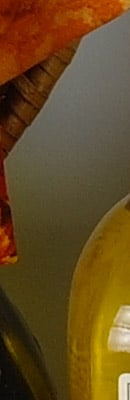
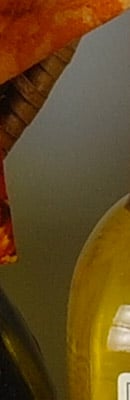
The above crops show the effects of the two levels of high ISO noise reduction, under our studio HMI lighting we use to simulate daylight. As you can, the NR settings have no effect until ISO 3,200, just as Samsung's documents say. Looking at the red fabric, you can clearly see that the "Off" setting is still performing quite a bit of noise reduction which reduces detail in areas of low contrast, even at ISO 100. At ISO 3,200, we can see a slight reduction in luminance noise, and a larger reduction in chrominance noise with the "On" setting versus "Off".
How does the Samsung NX10 compare with competing models? See the following table which compares at the default Noise Reduction setting.
| High ISO Comparison with Nikon D5000, Olympus E-PL1 and Panasonic GF1 (All default NR) Daylight-balanced illumination |
||||
|
Samsung NX10
|
Nikon D5000
|
Olympus E-PL1
|
Panasonic GF1
|
|
| I S O 1 0 0 |
|
 |
 |
 |
|
 |
 |
 |
|
|
 |
 |
 |
|
|
Samsung NX10
|
Nikon D5000
|
Olympus E-PL1
|
Panasonic GF1
|
|
| I S O 2 0 0 |
|
 |
 |
 |
|
 |
 |
 |
|
|
 |
 |
 |
|
|
Samsung NX10
|
Nikon D5000
|
Olympus E-PL1
|
Panasonic GF1
|
|
| I S O 4 0 0 |
|
 |
 |
 |
|
 |
 |
 |
|
|
 |
 |
 |
|
|
Samsung NX10
|
Nikon D5000
|
Olympus E-PL1
|
Panasonic GF1
|
|
| I S O 8 0 0 |
|
 |
 |
 |
|
 |
 |
 |
|
|
 |
 |
 |
|
|
Samsung NX10
|
Nikon D5000
|
Olympus E-PL1
|
Panasonic GF1
|
|
| I S O 1 6 0 0 |
|
 |
 |
 |
|
 |
 |
 |
|
|
 |
 |
 |
|
|
Samsung NX10
|
Nikon D5000
|
Olympus E-PL1
|
Panasonic GF1
|
|
| I S O 3 2 0 0 |
|
 |
 |
 |
|
 |
 |
 |
|
|
 |
 |
 |
|
|
Samsung NX10
|
Nikon D5000
|
Olympus E-PL1
|
Panasonic GF1
|
|
| I S O 6 4 0 0 |
N/A
ISO 6400 not supported |
 |
N/A
ISO 6400 not supported |
N/A
ISO 6400 not supported |
|
N/A
ISO 6400 not supported |
 |
N/A
ISO 6400 not supported |
N/A
ISO 6400 not supported |
|
|
N/A
ISO 6400 not supported |
 |
N/A
ISO 6400 not supported |
N/A
ISO 6400 not supported |
|
Here, we can see the NX10's image quality is competitive with the others in the group up to ISO 400. However, the amount of detail being lost in the red fabric is really apparent. The Olympus E-PL1 also struggles a bit with this at low ISOs, but not to the extend the NX10 does. The Panasonic GF1 delivers the most detail in the red fabric, up to ISO 800. At ISO 1,600, the NX10's performance is similar to the GF1, both of which are behind the other two. The Nikon D5000 is the clear winner here at higher ISOs, which is no surprise given its larger photosites.
Imatest Results
Samsung NX10 Imatest Results
We routinely use Norman Koren's excellent "Imatest" analysis program for quantitative, thoroughly objective analysis of digicam test images. I highly recommend it to our technically-oriented readers, as it's far and away the best, most comprehensive analysis program I've found to date.
Our comments below are just brief observations of what we see in the Imatest results. A full discussion of all the data Imatest produces is really beyond the scope of this review: Visit the Imatest web site for a full discussion of what the program measures, how it performs its computations, and how to interpret its output.
Here's some of the results produced by Imatest for the Samsung NX10:
| sRGB Accuracy Comparison |
||||||
The Samsung showed good color accuracy, though default saturation levels are on the high side. Hue accuracy was good, with small to moderate hue shifts in reds, oranges, yellows and some aquas and purples. The larger shift in cyan are very common among the cameras we test; we think they're an effort to produce sky colors that look better on monitors and in print. Average "delta-C" color error was 5.79 after correction for saturation, which is good. (Delta-C is the same as the more commonly referred to delta-E, but delta-C takes into account only color differences, ignoring luminance variation.) Average saturation was 117.8% (oversaturated by only 17.8%), with most colors being mildly to moderately oversaturated. The NX10 undersaturates aqua and cyan a bit. All in all, a vibrant but fairly accurate color response for this class of camera. Mouse over the links below the illustration above to compare results with other recent consumer SLR and SLD cameras.
Adobe RGB Accuracy Comparison |
||||||
Here, unlike most SLDs and SLRs, when using the Adobe RGB color space (which provides a much wider gamut, or range of colors that can be expressed), the Samsung NX10 delivers undersaturated color. Average saturation was much lower at 89.54%, with an average saturation-corrected hue error of 6.69 "delta-C" units, less accurate than the sRGB result. Again, mouse over the links below the illustration above to compare results with the same group of potential competitors.
Samsung NX10 Color Analysis
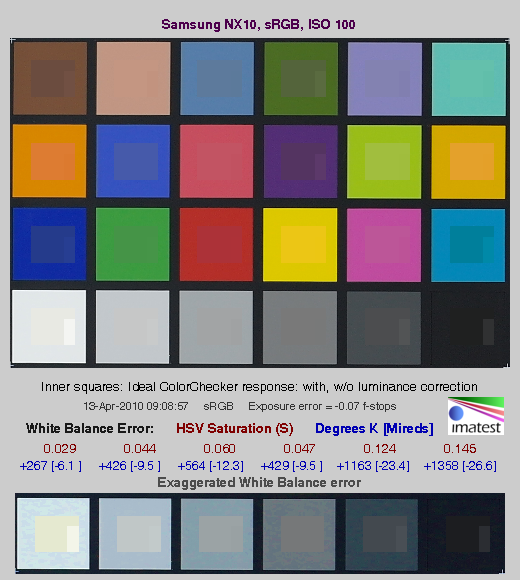
This image shows how the Samsung NX10 actually rendered the colors of the MacBeth chart, compared to a numerically ideal treatment. In each color swatch, the outer perimeter shows the color as actually captured by the camera, the inner square shows the numerically correct color after correcting for the luminance of the photographed chart (as determined by a second-order curve fit to the values of the gray swatches), and the small rectangle inside the inner square shows the numerically correct color, without the luminance correction. This image shows the generally good hue accuracy and high saturation. Here, you can see a slight greenish tinge in the bright yellow and orange swatches, something you can also see in the yellow yarn in our Still Life images. This seems to be a common occurrence these days, with Olympus and Panasonic cameras also showing similar shifts in these colors.
The bottom row of the chart shows exaggerated white balance errors, revealing that the camera produced a slightly blue/green color balance when using Custom white balance, with a WhiBal card as the reference. This would explain some of the slight color shifts above.
Samsung NX10 Noise Analysis

There's a lot in this particular graph, a lot more than we really have room to go into here. (This set of plots has also changed a few revisions back in Imatest. Some of the plots that were once shown here are now shown in other Imatest output. Since we largely focus on the Noise Spectrum plot, we only show the graphic above, which includes that plot.)
In comparing these graphs with those from competing cameras, we've found that the Noise Spectrum graph at lower right is the most important. Cameras that manage to shift their noise spectrum to higher frequencies have much finer-grained noise structures, making their noise less visually objectionable. In the graph above, this would show up as a noise spectrum curve that remained higher on the right side, representing higher noise frequencies.
The Samsung NX10 does a pretty good job of keeping a lot of the luminance noise energy (indicated by the black line) up at high frequencies. What little low-ISO luminance image noise that's there is fairly fine-grained as a result. Chroma noise at low spatial frequencies is higher than luminance noise, especially in the red channel, but this is not unusual, and the amount of low frequency chroma noise in the NX10's low-ISO images is on par or better than competing models.
Looking at the lower-left plot in the illustration above, the NX10's component noise levels are fairly evenly matched except for the red channel, which has higher levels at most exposure levels. RGBY RMS noise levels overall are somewhat higher than most other APS-C sensor cameras, though lower or similar to most Four-Thirds.
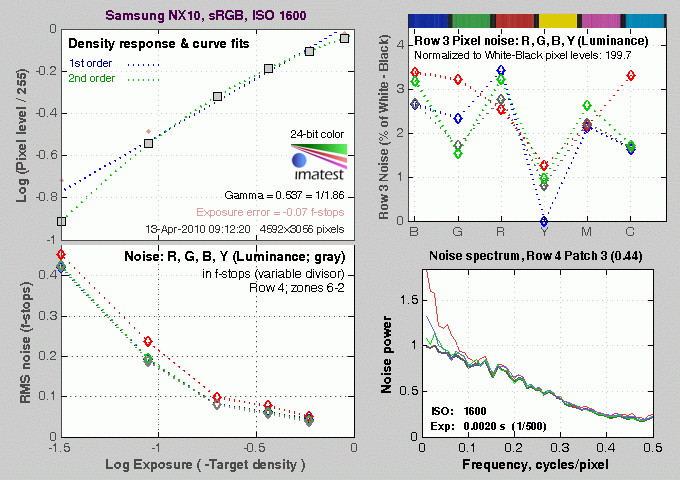
Above is the same set of noise data at ISO 1,600. Here, the Noise Spectrum graph is shifted toward the left-hand, lower-frequency side than it was at ISO 100, coarsening the "grain" of the image noise patterns quite a bit. The red and blue channels still exhibit a bit more noise at the low end of the frequency spectrum, but track luminance noise very closely at all but the lowest frequencies. Looking at the lower left graph again, RMS noise is a much higher than at ISO 100, as you'd expect.

Here's the same set of noise data at ISO 3,200. Here again, the Noise Spectrum graph is shifted even more toward the left-hand side, coarsening the "grain" of the image noise patterns further. Looking at the top-right plot, noise levels are lower than at ISO 1,600, a result of the camera's strong default high ISO noise reduction being applied. The additional noise reduction has also aligned the RGBY channels in the RMS noise plot at the lower left.

This chart compares the Samsung NX10's noise performance over a range of ISOs against that of other recent SLD models with smaller, Four-Thirds sensors. While we continue to show noise plots of this sort because readers ask for them, we each time point out that the noise magnitude is only a small part of the story, the grain pattern being much more important. Here, we can see that the Samsung's luminance noise magnitude graph shows significantly lower noise levels than the others up to ISO 800, where it is just a bit lower than average. At ISO 1,600, luminance noise is somewhat higher than the average in this group, but then falls to much lower than average at ISO 3,200, where the NX10's strong default high ISO noise reduction kicks in. The Samsung NX10 only offers one high ISO noise reduction option, which is On or Off at ISO 3,200. You cannot control the strength of noise reduction at any other ISO. The Off setting still applies NR at ISO 3,200, just not as strong as the On setting. The above data was collected using the default, On setting.
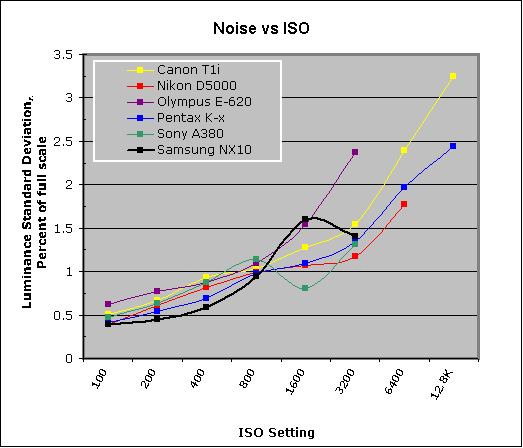
This chart compares the Samsung NX10's noise performance over a range of ISOs against that of other recent consumer SLRs. Here, we can see similar result in that the Samsung's luminance noise magnitude graph shows significantly lower noise levels than the others up to ISO 800, where it is just a bit lower than average. This is in part due to fairly strong default noise reduction. At ISO 1,600, luminance noise is the highest in this group, but then falls to about average at ISO 3,200, where the NX10's stronger default high ISO noise reduction kicks in.
Samsung NX10 Dynamic Range Analysis
A key parameter in a digital camera is its Dynamic Range, the range of brightness that can be faithfully recorded. At the upper end of the tonal scale, dynamic range is dictated by the point at which the RGB data "saturates" at values of 255, 255, 255. At the lower end of the tonal scale, dynamic range is determined by the point at which there ceases to be any useful difference between adjacent tonal steps. Note the use of the qualifier "useful" in there: While it's tempting to evaluate dynamic range as the maximum number of tonal steps that can be discerned at all, that measure of dynamic range has very little relevance to real-world photography. What we care about as photographers is how much detail we can pull out of the shadows before image noise becomes too objectionable. This, of course, is a very subjective matter, and will vary with the application and even the subject matter in question. (Noise will be much more visible in subjects with large areas of flat tints and subtle shading than it would in subjects with strong, highly contrasting surface texture.)
What makes most sense then, is to specify useful dynamic range in terms of the point at which image noise reaches some agreed-upon threshold. To this end, Imatest computes a number of different dynamic range measurements, based on a variety of image noise thresholds. The noise thresholds are specified in terms of f-stops of equivalent luminance variation in the final image file, and dynamic range is computed for noise thresholds of 1.0 (low image quality), 0.5 (medium image quality), 0.25 (medium-high image quality) and 0.1 (high image quality). For most photographers and most applications, the noise thresholds of 0.5 and 0.25 f-stops are probably the most relevant to the production of acceptable-quality finished images, but many noise-sensitive shooters will insist on the 0.1 f-stop limit for their most critical work.
The images below show the test results from Imatest for an in-camera JPEG file from the Samsung NX10 with a nominally-exposed density step target (Stouffer 4110), and the NX10's settings such as Contrast and Smart Range (Off) at their default positions.
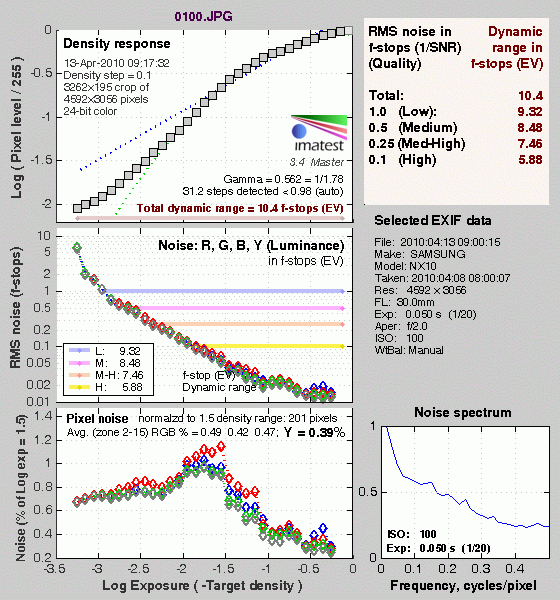
Here, we can see that he tone curve shows pretty nice gradation in the highlights and the shadows. Total dynamic range was good at 10.4 f-stops, however the score at the highest level was quite low for an APS-C sensor, at only 5.88 f-stops.

Enabling the Samsung NX10's Smart Range feature increased total dynamic range slightly, from 10.4 to 10.7 f-stops, but dramatically increased scores at the higher quality levels. The score at the highest level increased almost a full stop, from 5.88 f-stops to 6.78 f-stops. This is despite the increase to ISO 200 (as required by Smart Range). The increase at the higher quality levels is likely due to the stronger noise reduction the NX10 applies to darker regions when Smart Range is enabled.

The illustrations above show the results from Adobe Camera Raw 5.7 beta, with Auto settings (slightly better results are likely possible with manually tweaking, but we weren't able to do better). As can be seen, the score at the highest quality level is much better than the camera JPEG at 7.91 vs 5.88 f-stops without Smart Range, about a 2 f-stop improvement. Compared to Smart Range, the score at the highest quality increased by about 1.1 f-stop. Total dynamic range actually decreased somewhat from 10.4 f-stops without Smart Range and 10.7 with, to 10.1 f-stops. It bears noting though, that extreme manipulation of RAW files to extend dynamic range can introduce severe color shifts in the resulting files: This dramatically increased dynamic range may only be really usable when converting the images to black and white. (As is the case with most cameras.) Also worth noting is that ACR's default noise reduction settings reduced the pixel noise (see the plot in the lower left-hand corner) a bit relative to the levels in the in-camera JPEG, which tends to shift scores towards the high quality category. Keep in mind we used a beta version of Adobe Camera Raw, as previous released versions did not support the Samsung NX10. This means that NX10 RAW conversion quality may improve with the released version, which could impact Imatest scores.
Dynamic Range, the bottom line:
The Samsung NX10's JPEG Imatest dynamic range scores performed rather poorly at the default settings. Enabling Smart Range was a big help, but the NX10 still scored below average for an APS-C sensor, and Smart Range does cause a decrease in detail in shadows, due to higher noise reduction. Dynamic range scores from ACR converted NX10 RAW files did much better than the JPEGs, but still scored a bit below average for a recent APS-C sensor.
To get some perspective, here's a summary of the Samsung NX10's dynamic range performance, and how it compares to other digital SLRs that we also have Imatest dynamic range data for. (Results are arranged in order of decreasing dynamic range at the "High" quality level.):
| Dynamic Range (in f-stops) vs Image Quality (At camera's base ISO) (Blue = RAW via ACR, Yellow=Camera JPEG, Green=Current Camera) |
||||
| Model | 1.0 (Low) |
0.5 (Medium) |
0.25 (Med-High) |
0.1 (High) |
| Nikon D3X (Adobe Camera Raw 5.3b) |
-- | -- | 11.1 | 9.64 |
| Nikon D3S (Adobe Camera Raw 5.6) |
-- | -- | 10.7 | 9.55 |
| Nikon D700 (Adobe Camera Raw 4.5) |
12.1 | 11.6 | 10.6 | 9.51 |
| Nikon D5000 (Adobe Camera Raw 5.4b) |
-- | 11.6 | 10.8 | 9.50 |
| Sony A900 (Adobe Camera Raw 4.6b) |
-- | 12.1 | 10.7 | 9.36 |
| Pentax K-x (Adobe Camera Raw 5.6b) |
11.5 | 11.2 | 10.7 | 9.33 |
| Nikon D90 (Adobe Camera Raw 4.6b) |
12.1 | 11.8 | 10.7 | 9.27 |
| Fujifilm S3 Pro (Adobe Camera Raw 2) |
12.1 | 11.7 | 10.7 | 9.00 |
| Sony A230 (Adobe Camera Raw 5.5) |
11.7 | 11.1 | 10.1 | 8.95 |
| Nikon D40x (Adobe Camera Raw 4.1) |
12.0 | 10.9 | 10.3 | 8.90 |
| Nikon D300S (Adobe Camera Raw 5.5) |
-- | 11.3 | 10.4 | 8.89 |
| Canon 5D Mark II (Adobe Camera Raw 5.2) |
-- | 10.8 | 10.0 | 8.89 |
| Sony A330 (Adobe Camera Raw 5.4) |
-- | -- | 10.1 | 8.86 |
| Canon EOS-1Ds Mark III (Adobe Camera Raw 4.5) |
11.5 | 10.7 | 9.96 | 8.84 |
| Nikon D3 (Adobe Camera Raw 4.5) |
11.7 | 11.0 | 10.0 | 8.75 |
| Canon EOS-1D Mark III (Adobe Camera Raw 4.5) |
11.7 | 10.7 | 9.99 | 8.73 |
| Sony A380 (Adobe Camera Raw 5.5) |
11.8 | 10.9 | 10.1 | 8.62 |
| Nikon D3000 (Adobe Camera Raw 5.5) |
-- | 10.8 | 10.1 | 8.61 |
| Pentax K20D (Adobe Camera Raw 4.5) |
11.4 | 10.6 | 9.82 | 8.56 |
| 8.5 Stops | ||||
| Nikon D300 (Adobe Camera Raw 4.3.1) |
11.4 | 10.9 | 9.87 | 8.45 |
| Sony A200 (Adobe Camera Raw 4.3.1) |
11.6 | 10.4 | 9.82 | 8.43 |
| Nikon D60 (Adobe Camera Raw 4.4.1) |
11.6 | 10.5 | 9.74 | 8.31 |
| Nikon D40 (Adobe Camera Raw 4.1) |
11.9 | 10.9 | 9.89 | 8.30 |
| Canon EOS-1Ds Mark III (Camera JPEG) |
10.9 | 10.2 | 9.71 | 8.23 |
| Pentax K100D (Adobe Camera Raw 3.6) |
11.3 | 10.3 | 9.51 | 8.23 |
| Pentax K200D (Adobe Camera Raw 4.4.1) |
-- | 10.5 | 9.54 | 8.19 |
| Pentax K10D (Adobe Camera Raw 3.7) |
10.6 | 10.0 | 9.29 | 8.19 |
| Canon 7D (Adobe Camera Raw 5.6) |
11.2 | 10.3 | 9.52 | 8.18 |
| Sony A100 (Adobe Camera Raw 3.4) |
11.3 | 10.5 | 9.69 | 8.16 |
| Canon EOS-1Ds Mark II (Adobe Camera Raw 3) |
11.2 | 10.3 | 9.40 | 8.14 |
| Canon EOS 50D (Adobe Camera Raw 4.6) |
11.2 | 10.5 | 9.49 | 8.06 |
| Nikon D40x (Camera JPEG) |
10.8 | 10.0 | 9.42 | 8.04 |
| Olympus E-P1 (ISO 200, Adobe Camera Raw 5.5) |
11.5 | 10.4 | 9.26 | 8.04 |
| Canon Rebel XSi (Camera JPEG) (ALO on by default) |
11.3 | 10.1 | 9.34 | 8.01 |
| 8.0 Stops | ||||
| Nikon D3S (Camera JPEG) |
-- | -- | -- | 7.96 |
| Fujifilm S3 Pro (Camera JPEG) |
-- | 9.90 | 9.40 | 7.94 |
| Samsung NX10 (Adobe Camera Raw 5.7 beta) |
-- | -- | 9.18 | 7.91 |
| Sony A350 (Adobe Camera Raw 4.4) |
11.6 | 10.5 | 9.61 | 7.89 |
| Canon EOS-1D Mark III (Camera JPEG) |
-- | 10.2 | 9.70 | 7.88 |
| Olympus E-P2 (Adobe Camera Raw 5.6) |
-- | 10.2 | 9.44 | 7.88 |
| Canon Rebel XS (Adobe Camera Raw 4.5) |
-- | 10.3 | 9.27 | 7.88 |
| Nikon D3 (Camera JPEG) |
-- | -- | -- | 7.87 |
| Canon Digital Rebel XTi (Adobe Camera Raw 3.6) |
10.8 | 9.88 | 9.18 | 7.84 |
| Canon EOS 5D (Adobe Camera Raw 3) |
11.0 | 10.4 | 9.21 | 7.83 |
| Nikon D90 (Camera JPEG) |
-- | -- | -- | 7.77 |
| Panasonic DMC-GH1 (Adobe Camera Raw 5.4b) |
9.88 | -- | 9.30 | 7.76 |
| Canon Rebel T1i (Adobe Camera Raw 5.4b) |
11.2 | 10.2 | 9.16 | 7.73 |
| Pentax K-7 (Adobe Camera Raw 5.4) |
10.6 | 9.93 | 9.07 | 7.73 |
| Canon EOS 40D (Adobe Camera Raw 4.2) |
11.2 | 10.1 | 9.26 | 7.72 |
| Panasonic DMC-GH1 (Camera JPEG) |
8.77 | -- | -- | 7.70 |
| Canon Rebel XSi (Adobe Camera Raw 4.4.1) |
10.6 | 9.95 | 9.10 | 7.68 |
| Canon EOS 50D (Camera JPEG) (ALO STD by default) |
-- | -- | 8.90 | 7.68 |
| Nikon D700 (Camera JPEG) |
-- | -- | 9.05 | 7.67 |
| Canon 5D Mark II (Camera JPEG) (ALO STD by default) |
10.6 | 9.68 | 8.98 | 7.66 |
| Nikon D5000 (Camera JPEG) |
-- | -- | 8.96 | 7.65 |
| Canon EOS-5D (Camera JPEG) |
10.2 | 9.68 | 8.82 | 7.65 |
| Olympus E-3 (Adobe Camera Raw 4.3) |
10.3 | 10.1 | 9.29 | 7.64 |
| Nikon D60 (Camera JPEG) |
10.5 | 9.62 | 8.89 | 7.62 |
| Nikon D200 (Adobe Camera Raw 3) |
10.6 | 9.65 | 8.96 | 7.61 |
| Canon 7D (Camera JPEG) (ALO STD by default) |
-- | 9.70 | 8.54 | 7.54 |
| Nikon D80 (Adobe Camera Raw 3.6) |
11.1 | 10.4 | 9.42 | 7.51 |
| 7.5 Stops | ||||
| Nikon D300S (Camera JPEG) |
-- | -- | -- | 7.49 |
| Olympus E-500 (Adobe Camera Raw 3) |
10.7 | 9.97 | 8.90 | 7.46 |
| Olympus E-510 (Adobe Camera Raw 4.1) |
10.0 | 9.43 | 8.64 | 7.46 |
| Pentax K10D (Camera JPEG) |
-- | 9.49 | 8.88 | 7.44 |
| Nikon D300 (Camera JPEG) |
-- | -- | 8.70 | 7.44 |
| Olympus E-420 (Adobe Camera Raw 4.1.1) |
10.0 | 9.61 | 8.65 | 7.44 |
| Canon Rebel T1i (Camera JPEG) (ALO=STD by default) |
11.3 | 10.1 | 9.34 | 7.43 |
| Nikon D2Xs (Adobe Camera Raw 3.6) |
10.6 | 9.90 | 8.93 | 7.42 |
| Canon EOS 40D (Camera JPEG) |
10.6 | 9.52 | 8.78 | 7.42 |
| Nikon D3X (Camera JPEG) |
-- | -- | -- | 7.37 |
| Nikon D50 (Camera JPEG) |
10.7 | 9.93 | 8.70 | 7.36 |
| Sony A380 (Camera JPEG) (DRO Standard by default) |
-- | 9.54 | 8.84 | 7.32 |
| Panasonic DMC-G1 (Adobe Camera Raw 5.2) |
10.7 | 9.78 | 8.70 | 7.32 |
| Nikon D3000 (Camera JPEG) |
10.2 | 9.64 | 8.69 | 7.31 |
| Sony A900 (Camera JPEG) (DRO off by default ) |
10.2 | 9.75 | 8.49 | 7.31 |
| Sony A330 (Camera JPEG) (DRO Standardby default) |
10.1 | 9.37 | 8.59 | 7.30 |
| Sony A200 (Camera JPEG) (DRO on by default) |
10.4 | 9.43 | 8.91 | 7.29 |
| Canon EOS 20D (Camera JPEG) |
10.3 | 9.66 | 8.85 | 7.29 |
| Canon EOS 30D (Camera JPEG) |
10.3 | 9.50 | 8.57 | 7.29 |
| Nikon D40 (Camera JPEG) |
10.4 | 9.80 | 8.89 | 7.28 |
| Sony A230 (Camera JPEG) (DRO Standard by default) |
10.1 | 9.51 | 8.51 | 7.26 |
| Sony A900 (Camera JPEG) (DRO on) |
10.1 | 9.76 | 8.47 | 7.26 |
| Canon Rebel XS (Camera JPEG) |
10.3 | 9.4 | 8.61 | 7.22 |
| Olympus E-520 (Adobe Camera Raw 4.5) |
11.0 | 9.46 | 8.70 | 7.20 |
| Sony A350 (Camera JPEG) (DRO on by default) |
10.3 | 9.55 | 8.85 | 7.19 |
| Pentax K-x Camera JPEG |
9.99 | 8.94 | 8.31 | 7.18 |
| Panasonic DMC-GF1 (Adobe Camera Raw 5.5) |
10.2 | 9.62 | 8.62 | 7.16 |
| Nikon D80 (Camera JPEG) |
10.1 | 9.43 | 8.48 | 7.12 |
| Canon Digital Rebel XT (Camera JPEG) |
10.3 | 9.51 | 8.61 | 7.11 |
| Nikon D200 (Camera JPEG) |
-- | 9.07 | 8.36 | 7.11 |
| Olympus E-300 (Camera JPEG) |
10.8 | 9.26 | 8.48 | 7.07 |
| Olympus E-410 (Adobe Camera Raw 4.1) |
10.2 | 9.40 | 8.24 | 7.05 |
| Olympus E-500 (Camera JPEG) |
10.0 | 9.14 | 8.16 | 7.05 |
| Canon Digital Rebel XTi (Camera JPEG) |
9.83 | 9.10 | 8.27 | 7.04 |
| Canon EOS-1Ds Mark II (Camera JPEG) |
10.3 | 9.38 | 8.60 | 7.04 |
| Panasonic DMC-G1 (Camera JPEG) |
-- | 9.33 | 8.52 | 7.03 |
| Pentax K200D (Camera JPEG) |
-- | 9.50 | 8.30 | 7.01 |
| 7.0 Stops | ||||
| Panasonic DMC-GF1 (Camera JPEG) |
-- | 9.33 | 8.44 | 6.99 |
| Canon Digital Rebel (Camera JPEG) |
10.1 | 9.11 | 8.47 | 6.97 |
| Nikon D2Xs (Camera JPEG) |
9.82 | 8.98 | 8.23 | 6.97 |
| Panasonic DMC-L10 (Adobe Camera Raw 4.2) |
10.4 | 9.34 | 8.48 | 6.91 |
| Sigma DP1 (Camera JPEG) |
-- | 8.95 | 8.13 | 6.91 |
| Pentax *istDs (Camera JPEG) |
10.2 | 10.0 | 8.87 | 6.90 |
| Sony A100 (Camera JPEG) |
10.2 | 9.24 | 8.39 | 6.89 |
| Samsung NX10 (Camera JPEG, Smart Range, ISO 200) |
10.1 | 8.99 | 8.22 | 6.78 |
| Pentax K100D (Camera JPEG) |
10.3 | 9.30 | 8.39 | 6.73 |
| Pentax K20D (Camera JPEG) |
10.2 | 9.21 | 8.09 | 6.66 |
| Pentax K-7 (Camera JPEG) |
9.59 | 8.87 | 8.03 | 6.54 |
| 6.5 Stops | ||||
| Nikon D2x (Camera JPEG) |
-- | 8.93 | 7.75 | 6.43 |
| Olympus E-3 (Camera JPEG) |
9.32 | 9.06 | 8.50 | 6.42 |
| Panasonic DMC-L10 (Camera JPEG) |
-- | 8.94 | 8.00 | 6.38 |
| Olympus E-420 (Camera JPEG) |
9.18 | 8.82 | 7.93 | 6.37 |
| 6.0 Stops | ||||
| Olympus E-410 (Camera JPEG) |
-- | -- | 7.60 | 5.99 |
| Samsung NX10 (Camera JPEG) |
9.32 | 8.48 | 7.46 | 5.88 |
| Nikon D70s (Camera JPEG) |
9.84 | 8.69 | 7.46 | 5.85 |
| Nikon D70 (Camera JPEG) |
9.81 | 8.76 | 7.58 | 5.84 |
| Olympus E-520 (Camera JPEG) |
9.32 | 8.68 | 7.74 | 5.74 |
| Olympus E-P2 (Camera JPEG, Gradation = Normal) |
10.1 | 8.83 | 7.78 | 5.58 |
| Olympus E-P1 (Camera JPEG, Gradation = Normal) |
-- | 8.85 | 7.74 | 5.47 |
Note that this test is repeatable to within 1/3 EV according to the Imatest website, so differences of less than 0.33 can be ignored.
When it comes to the Samsung NX10, as noted above, its low scores for camera JPEGs reflect Samsung's decision to leave more image noise in its files, so as to not have to trade away as much subject detail. We're finding that we prefer this approach to cameras that smudge away subtle subject detail just to achieve lower noise levels in areas of flat tint. On the other hand, the improvement when Smart Range was enabled is partially due to the increased noise reduction in the shadows, something we'd rather not see. We encourage readers to look at our actual test images (particularly the OUTB and FAR shots, which really challenge a camera's dynamic range), rather than making their decision solely on the basis of the numbers in the chart above.
Samsung NX10 Resolution Chart Test Results

The chart above shows consolidated results from spatial frequency response measurements in both the horizontal and vertical axes. The "MTF 50" numbers tend to correlate best with visual perceptions of sharpness, so those are what we focus on here. The uncorrected resolution figures are 2,328 line widths per picture height in the horizontal direction (corresponding to the vertically-oriented edge), and 2,298 lines along the vertical axis (corresponding to the horizontally-oriented edge), for a combined average of 2,313 LW/PH.. Correcting to a "standardized" sharpening with a one-pixel radius reduced the resolution score by quite a bit, resulting in a lower average of 1,693 LW/PH, which is surprisingly low for a 14-megapixel sensors. Imatest clearly had difficulty "undoing" the default sharpening applied to arrive at a valid standardized number. See explanation for this at the bottom of this page.
To see what's going on, refer to the plots below, which show the actual edge profiles for both horizontal and vertical edges, in both their original and corrected forms. Here, you can see that a very high amount of in-camera sharpening is applied in the horizontal direction (oversharpened by only 18.1 %), as well as in the vertical direction (18.2 % oversharpened), explaining why standardized sharpening reduced the the MTF 50 numbers by so much.

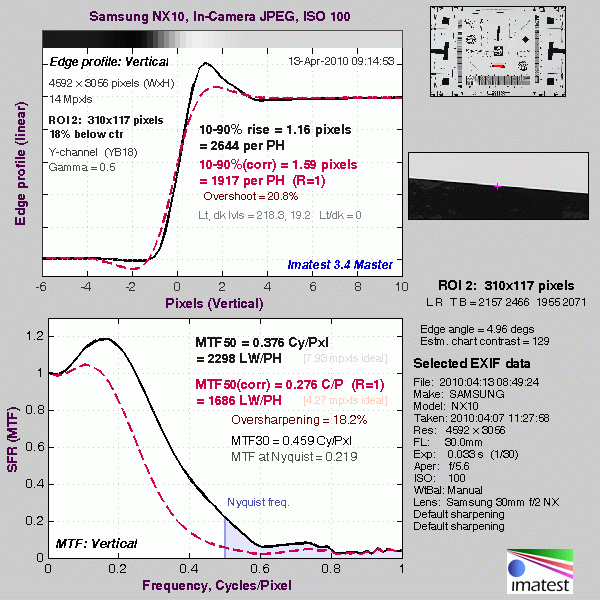
Note: We don't feature SFR-based LW/PH resolution numbers more prominently in our reviews (eg, outside the Imatest pages) because we've found that they're *very* sensitive to minor differences in in-camera image processing. Relatively small changes in the amount of in-camera sharpening can have a large effect on the resulting resolution numbers. Imatest attempts to compensate for this by adjusting to a "standard" sharpening, but this approach can't completely undo what happens inside the cameras, and so often gives inconsistent results. Sometimes the "standardized" sharpening happens to just match the shape of the edge profile with the in-camera sharpening applied, and you'll get wildly high results. At other times, it will tend to correct in the opposite direction. Unfortunately, ignoring the in-camera sharpening entirely can result in even greater discrepancies, particularly between models from different manufacturers. Turning off sharpening in the camera may or may not fully eliminate the sharpening, so simply turning off sharpening in the camera JPEGs isn't a reliable solution. It also wouldn't be the way most people shoot the cameras. We could process RAW files with no sharpening (as shown below), but then that'd only suit the people working primarily or exclusively from RAW, and would open another can of worms as to what RAW converter was used, etc, etc.
The bottom line is that numbers for resolution only take you so far. Detail handling and edge acuity are very complex issues; ones that don't easily boil down to a single number. The best approach is to simply look look at the broad array of standardized test shots we take with each camera, to the point of downloading and printing them with whatever processing you'd use if you owned the camera and shot with it. See how the differences stack up for you visually, and make your decision on that, rather than on abstract resolution numbers.
Since the standardized results for the camera JPEGs were so poor because of the high default in-camera sharpening, we went ahead and analyzed a dcraw converted RAW file that had no sharpening applied. As expected, we were able to get a much higher standardized numbers of 2,670 LW/PH in both directions:

As always, careful processing of RAW files in a good third-party RAW conversion program will yield a good bit more fine detail than can be seen in the in-camera JPEGs, regardless of in-camera sharpening.
RAW Files
Samsung NX10 RAW Image Quality
We've recently started looking at RAW files converted with dcraw, an excellent freeware raw converter. dcraw usually offers timely support for the latest cameras, but more importantly, it does not apply any noise-reduction, sharpening or other corrections such as geometric distortion correction to the output files. (We found that Adobe Camera Raw still applies some limited noise-reduction when its NR settings are set to zero, and it also applies other corrections depending on the make and model of the camera). There will always be differences between RAW converters, in terms of the sort of demosaicing algorithms they use (the processes by which they convert the separate Red, Green, and Blue data sets to an array of full-color RGB pixels), but dcraw seems to use a fairly generic algorithm that delivers good sharpness with relatively few artifacts, and can be counted on to not apply any noise reduction if you don't want it to.
Below are crops of Samsung NX10 RAW files compared to RAW files from other current SLDs, the Olympus E-PL1 and Panasonic GF1, converted with dcraw.
| Samsung NX10 vs Olympus E-PL1 and Panasonic GF1 RAW Comparison RAW files converted with dcraw, no NR, no sharpening Simulated Daylight |
|||
|
Samsung NX10
|
Olympus E-PL1
|
Panasonic GF1
|
|
|
I
S 0 1 0 0 |
|
 |
 |
|
 |
 |
|
|
 |
 |
|
|
Samsung NX10
|
Olympus E-PL1
|
Panasonic GF1
|
I
S O 2 0 0 |
|
 |
 |
|
 |
 |
|
|
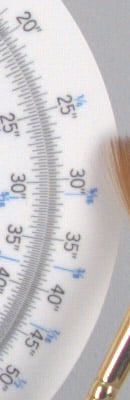 |
 |
|
|
Samsung NX10
|
Olympus E-PL1
|
Panasonic GF1
|
|
|
I
S 0 4 0 0 |
|
 |
 |
|
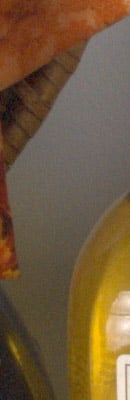 |
 |
|
|
 |
 |
|
|
Samsung NX10
|
Olympus E-PL1
|
Panasonic GF1
|
I
S O 8 0 0 |
|
 |
 |
|
 |
 |
|
|
 |
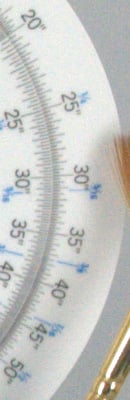 |
|
|
Samsung NX10
|
Olympus E-PL1
|
Panasonic GF1
|
|
|
I
S 0 1 6 0 0 |
|
 |
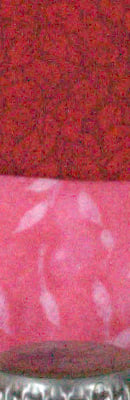 |
|
 |
 |
|
|
 |
 |
|
|
Samsung NX10
|
Olympus E-PL1
|
Panasonic GF1
|
I
S O 3 2 0 0 |
|
 |
 |
|
 |
 |
|
|
 |
 |
|
At lower ISOs, the Samsung NX10's RAW file compare nicely to the others in terms of noise. The Panasonic GF1 is the noisiest of the group at all ISOs, but the E-PL1 is pretty similar below ISO 800. At ISO 800 we can see the NX10 is a bit noisier than the Olympus E-PL1. At ISO 1,600 the NX10 is similar to the E-PL1. At the NX10's top ISO of 3,200, the NX10 is perhaps a touch noisier than the E-PL1.
Let's see how the Samsung NX10 compares to SLRs with APS-C models at higher ISOs. Afterall, it was the promise of better high ISO performance with the use of an APS-C sized sensor that makes the NX10 unique among SLDs at this point in time.
| Samsung NX10 vs Canon T1i, Nikon D5000, and Pentax K-x High ISO RAW Comparison RAW files converted with dcraw, no NR, no sharpening Simulated Daylight |
||||
|
Samsung NX10
|
Canon T1i
|
Nikon D5000
|
Pentax K-x
|
I
S O 8 0 0 |
|
 |
 |
 |
|
 |
 |
 |
|
|
 |
 |
 |
|
|
Samsung NX10
|
Canon T1i
|
Nikon D5000
|
Pentax K-x
|
|
|
I
S 0 1 6 0 0 |
|
 |
 |
 |
|
 |
 |
 |
|
|
 |
 |
 |
|
|
Samsung NX10
|
Canon T1i
|
Nikon D5000
|
Pentax K-x
|
I
S O 3 2 0 0 |
|
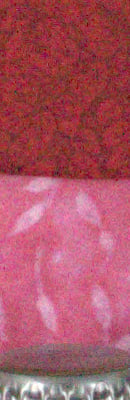 |
 |
 |
|
 |
 |
 |
|
|
 |
 |
 |
|
|
Samsung NX10
|
Canon T1i
|
Nikon D5000
|
Pentax K-x
|
|
|
I
S 0 6 4 0 0 |
N/A
ISO 6400 not supported |
 |
 |
 |
|
N/A
ISO 6400 not supported |
 |
 |
 |
|
|
N/A
ISO 6400 not supported |
 |
 |
 |
|
|
|
Samsing NX10
|
Canon T1i
|
Nikon D5000
|
Pentax K-x
|
|
I
S 0 1 2 8 0 0 |
N/A
ISO 12800 not supported |
 |
N/A
ISO 12800 not supported |
 |
|
N/A
ISO 12800 not supported |
 |
N/A
ISO 12800 not supported |
 |
|
|
N/A
ISO 12800 not supported |
 |
N/A
ISO 12800 not supported |
 |
|
Here, we can see the Samsung NX10 is the noisiest of the group. At ISO 800 it competes fairly well, though the red leaf fabric shows quite a bit more noise compared to the others. At ISO 1,600 noise is similar to the Canon (which is the closest in terms of megapixel count), though the T1i still edges it out. At ISO 3,200 the Samsung NX10's noise seems to take a larger step than the others. To our eyes, it looks like it is almost a full stop noisier than the Canon T1i and Nikon D5000, and much noisier than Pentax K-x.
Comparison
We've assembled a full comparison of all SLD-style cameras on the market, as of May, 2010. It's too wide to fit our standard review pages, so click on the link below to open it in a separate window.
Imaging Resource SLD Features Comparison 2010Press Release
Samsung Unveils The Next Generation Of Camera - The NX10
The Samsung NX10’s Innovative Technology Provides ‘Best in Class’ Features with a Large APS-C Size Sensor, Bright AMOLED Screen and Fast Auto Focus to Give Users Ultimate Performance
Ridgefield Park, NJ (January 4, 2010) - Samsung Electronics America, Inc., a market leader and award-winning innovator in consumer electronics, today announced the Samsung NX10 – an innovative digital camera that provides users with optimum image quality in a sleek, compact body. Delivering creativity without compromise, users can now be as creative as they want on the move, without having to compromise perfect images. The NX10 will be on display during the 2010 International Consumer Electronics Show, January 7-10, in the Samsung booth #11026 in the Central Hall of the Las Vegas Convention Center.
The NX10 incorporates a fast and decisive auto focus (AF), 14.6 MP APS-C size CMOS sensor and unique, large 3.0” AMOLED screen, allowing users to easily view their images, even in bright sunlight. Users can also record in HD movie to create the full story. Available in two colors, Noble Blackand Titan Silver, the Samsung NX10 is small, light and ergonomically designed to ensure maximum portability for everyday use.
The Samsung NX10 ensures users never miss a moment, with one of the fastest AF in its class on the market. The company’s latest innovation, the new DRIMe II Pro engine and advanced AF algorithm, also provide ultra fast AF speed with the higher precision of contrast AF.
The Samsung NX10 has the heart of a DSLR embedded inside the compact frame of a digital camera, successfully integrating the APS-C size CMOS sensor with a mirrorless interchangeable lens, for a sleek, lightweight camera that users can easily take with them everywhere they go.
Consumers are not just limited to taking shots but can also tell their own stories in video format with HD movie recording (H.264 codec).
Samsung continues to extend the usage of AMOLED screens across many products, using a large 3.0” AMOLED screen in Samsung NX10. AMOLED provides easier viewing even in bright sunshine and at acute viewing angles, meaning users no longer need to shield their screen with their hand. The category leading screen also provides 10,000 times faster response rate than conventional LCDs, has a far lower power consumption and higher contrast ratio – 10,000:1 vs. 500:1.
“The new Samsung NX10 marks the start of the next generation of cameras,” said Mr. SJ Park, CEO of Samsung Digital Imaging Company. “We know from our detailed research over several years that what consumers want from their cameras is evolving, which we’ve reflected in the development of the Samsung NX10. With specialist equipment open to everyone and no longer restricted solely to the professional, more and more people want to capture something creative and tell a story through their camera – but they also want something compact that they can carry around with them all day. The large sensor and the ultra fast auto focus give consumers the quality they demand as well as the compactness they want in one exceptional package.”
Mr. Park continued: “Samsung has always been quick to implement cutting edge technology and no more so when it comes to quality of images. For the first time in the market, Samsung has successfully integrated an APS-C size sensor into a compact body by eliminating the mirror box, meaning that our users can now be as creative as they want to be on the move without having to compromise on image quality.”
The Samsung NX10 also contains a range of intelligent features to put professional quality images within reach of the amateur photographer. The Samsung NX10 includes in-depth manual controls and also a Smart Auto function which automatically detects the surrounding environment of the shot and selects the best shooting mode. Its Smart Range feature also enables the user to vividly express both bright areas and dark areas in the same frame, and the Supersonic Dust Reduction system keeps those dust particles clear of the image sensor that can often impair an image. It even senses when the user brings the camera close to their face to look through the viewfinder, and puts the AMOLED screen on standby to conserve power.
Specifications
|
Samsung NX10 | |
|
Colors |
Noble Black and Titan Silver |
|
Image Sensor |
14.6M APS-C CMOS |
|
Mount |
Samsung NX Mount |
|
Display |
3.0” AM OLED (VGA) |
|
View Finder |
Electronic viewfinder |
|
Movie |
720p HD (MP4. H.264) |
|
Size & Weight |
|
|
ISO |
100 - 3200 |
|
Flash |
Built-in Pop-up Flash |
|
OIS |
Lens Shift |
|
Dust reduction |
Supersonic Type |
|
Special Features |
|
|
Availability |
Spring 2010 |
Samsung Electronics America’s CES press releases, video content and product images are available at www.samsung.com/newsroom.
About Samsung Electronics America, Inc.
Headquartered in Ridgefield Park, NJ, Samsung Electronics America, Inc. (SEA), a wholly owned subsidiary of Samsung Electronics Co., Ltd., markets a broad range of award-winning, digital consumer electronics and home appliance products, including HDTVs, home theater systems, MP3 players, digital imaging products, refrigerators and washing machines. A recognized innovation leader in consumer electronics design and technology, Samsung is the HDTV market leader in the U.S. Please visit www.samsung.com for more information.
# # #