


Overview

With a look more reminiscent of the S95, the Canon S110 deletes the grip of last year's popular predecessor, the S100, while adding relatively little to the rest of the camera. But there's one major new feature that proves the Canon PowerShot S110 is more than just refinement: Built-in WiFi. It makes perfect sense for Canon to add WiFi to the most pocketable of its enthusiast digital cameras. You can share still images and videos to a limited selection of social networking sites from the S110 through the Canon iMAGE GATEWAY. Or you can transfer them to your iOS and Android smartphones and tablets with the free Canon CameraWindow app. The Canon S110 can also transfer images directly to a WiFi-compatible printer within range, providing you with near-instant, tangible copies of your captured moments.

This isn't the first time Canon has added WiFi connectivity to one of its digital cameras, and we found previous incarnations of the feature almost unusable. While the S110's can now connect to computers, phones, and tablets wirelessly, and transfer images directly to social networks, doing so is still not as simple as it should be -- particularly in terms of initial setup. And sadly, another feature had to make way for Wi-Fi: Canon removed the built-in GPS from the S110, instead using the camera's wireless radio to pull GPS data from a smartphone or tablet. It's a clumsy solution: you need to remember to have the remote device record GPS data before you start shooting, if you want to be able to geotag your photos later.
What's (mostly) the same. As mentioned up front, the cameras are very similar: The dimensions are nearly identical, with the S110 measuring in at 3.9 x 2.3 x 1.1 inches, and both cameras weighing about 7 ounces.

The Canon S110 employs a 12.1-megapixel. 1/1.7-inch CMOS sensor and DIGIC 5 processor, much the same on-the-surface specs as the S100. However, Canon describes the sensor as newly designed with greater sensitivity. Indeed, the ISO range now extends from 80 to 12,800 (compared to the max ISO 6,400 of the S100), which ostensibly adds some low-light flexibility.
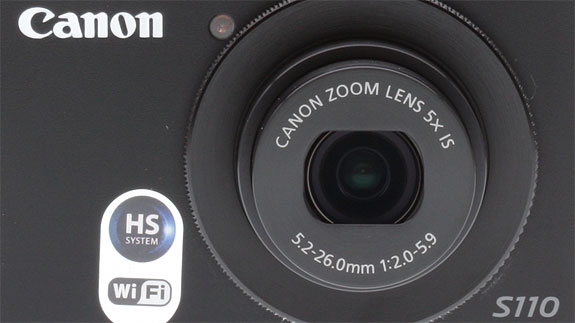
Meanwhile, the Canon S110's lens seems to be the same as the S100: a 5x optical zoom with 24-120mm equivalent range at apertures of f/2.0-5.9. Also, both cameras uses Canon's Intelligent IS system for limiting shake and reducing blur from action and poorly lit scenes, with one of six stabilization modes deployed depending on the shooting conditions.
Full HD video remains a strong point of the S-series, with 1080p recordable at 24 frames per second, and 720p at 30 fps. The Canon S110 also comes with built-in stereo microphones, optical zoom while recording, and playback on a bigger screen via HDMI output. Speaking of output, the Canon S110 allows for RAW+JPEG shooting just like its predecessor.

What's new. Still, there's plenty that's exciting about the Canon S110. Canon says it developed new technology for the PowerShot S110's AF system that improves AF times and reduces shutter lag, an aspect that really needed improvement in the S95 and S100. Also, the S110's High-Speed Burst HQ mode can now shoot continuous shots up to 10 frames per second at 12.1-megapixels, a slight increase from the 9.6 fps of the S100 in the same mode.
The Canon S110 also gets a 3-inch LCD that now includes a capacitive touch screen, including Canon's Touch Shutter feature. Canon thinks the touchscreen makes camera menu navigation, image playback and viewing more simple and intuitive, and although the menu system isn't terribly conducive to touch navigation, in other respects we agree.

Connectivity. Connectivity options include both a USB 2.0 High Speed data connection, and the ability to output video to a TV or other display. Here, you have two choices: both a Mini-HDMI (Type C) connection for high-definition displays, and a standard-definition composite video output including audio via the combined USB/AV port. The HDMI connection supports the Consumer Electronics Control standard, letting you switch between photos and control some playback features from your TV remote. The SD output offers both NTSC and PAL operating modes. And of course, there's the previously-mentioned 2.4 GHz 802.11 b/g/n Wi-Fi wireless networking connectivity.
Power and storage. An optional AC adapter kit is used to supply mains power to the S110, and connects to the camera via a cable plugged into a dummy battery; a small flap in the battery compartment door provides ingress for the cable.
When you're not using the AC adapter kit, power comes from a proprietary NB-5L lithium-ion battery pack, rated as good for 200 shots on a charge to CIPA testing standards. Images and movies are stored on Secure Digital cards, including the higher-capacity SDHC and SDXC types.
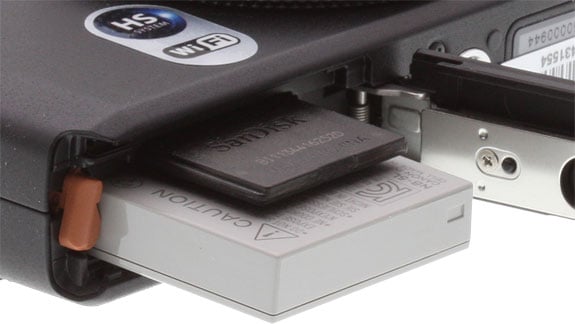
Initially priced at US$450 -- a $20 increase over the S100 -- the Canon S110 now lists for a more reasonable US$400. It comes in black and white models, and became available from October 2012.
Canon S110 Field Test
by Mike Tomkins

I'm a big fan of enthusiast-friendly cameras that pack a lot of features into a compact package, and so I've been looking forward to reviewing the Canon PowerShot S110 since it was announced late last year.
Ergonomics. On its arrival, I was pleased to reconfirm that although the body has been subtly restyled, it retained essentially the same user interface as its predecessor, and merely supplemented it with the new touch screen LCD monitor. Too many manufacturers, on adding a touch screen, take it as an excuse to strip the camera body of physical controls, and while on a consumer-oriented camera that can be a good thing, it's less so from an enthusiast point of view. Experienced photographers like physical controls because their use becomes second nature. We needn't take our attention away from the subject to make quick adjustments to camera setup, something that's not possible on a touch interface thanks to the lack of tactile feedback.
The S110, then, clears the first hurdle for me. The smart, twin-dial interface from the S100 is still here, and the front dial is still as customizable as ever. And now that I've spent a while with Sony's competing RX100, I've learned to really appreciate the firm detents of the S100's dial. They make clear that you've changed a setting, unlike the RX100's free-spinning dial. Sure, both are fly-by-wire controls, but you feel more closely connected to the camera when the dial provides both aural and tactile feedback. It also makes it harder to accidentally change setup. Both front and Mode dials on the S110 are very unlikely to be changed by mistake.
Fixing what's not broken. The biggest change to the Canon S110's body is the removal of the handgrip, and while I don't really understand why the change was made -- it doesn't really make the camera any smaller or more pocket-friendly -- I'm not really that worried about it. As we noted in our S100 review, that camera's grip wasn't much more than ornamental anyway, and if you really value something to wrap your fingers around, third-party accessory grips are readily available. And I find that so long as I have a wrist-strap on the camera, I don't really feel the need for a grip at all.
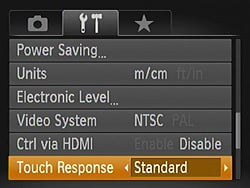
Feather-touch and sorcery might be better names for Canon's two Touch Response options. The high setting seems almost to anticipate your touch before it happens.
Touch screen. The new touch screen display is a nice addition, making focus a breeze. It's a capacitive touch screen, like those you'd find on high-end smartphones, and it is very sensitive. Especially so when set to high sensitivity mode, where it seems almost to work by magic. I'm convinced it was capable of detecting my touches a fraction of a millimeter before my fingertip actually hit the screen! It makes focus point selection on the S110 a very simple matter indeed, and a nice detail is that once you've touched to indicate where to focus, the front dial briefly switches from your configured function to a focus area adjustment mode, so you can quickly adjust the area to match your chosen subject.
Touch shutter is available too, if you're a fan of that feature; I'm not. (I prefer to decouple focus from shutter operation.) And Canon has shown some insight into the impact smartphones have had on the way we think about touch screens, by including the very same gestures you'd find on your phone in playback mode -- swiping between images, and pinching to zoom in and out. Adding these functions might seem obvious, really, but we continue to be surprised by the number of cameras that ignore the new touchscreen reality, and force clumsier touch paradigms or even use of physical controls in playback mode. By mimicking the smartphone, Canon's playback interface is immediately intuitive.
And the touch screen interface occasionally makes a night-and-day difference in other areas, too. For example, when configuring Wi-Fi or setting up copyright details, it's relatively quick to enter information with the on-screen touch keyboard. Text entry on a non-touch camera is much more painful.
A lot of touch screens bring with them an unintended side-effect: a display covered in fingerprint smudges, which can be particularly bothersome as it's typically the only way to see your subject. The Canon S110 wasn't the worst we've seen in this respect, but it wasn't the best either. On the plus side, if you keep it wiped clean and crank the brightness up, it's reasonably easy to see outdoors. Under bright sunlight, you're going to need to shield it with your hand for a reasonable view, but that's true of the vast majority of compact camera displays.
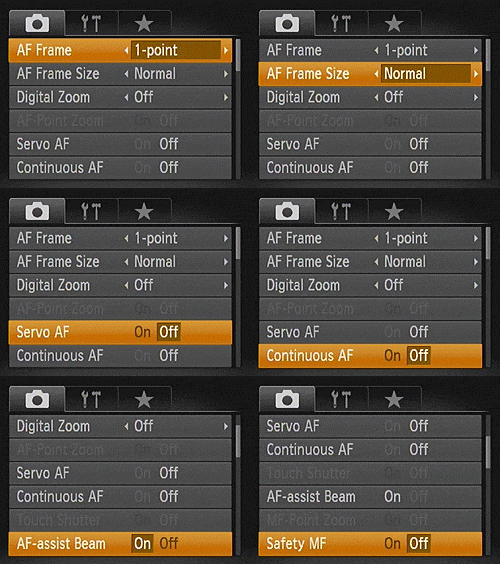
The S110's array of focusing options is generous, to say the least -- especially for a compact camera.
Enthusiast-friendly. In other areas, too, the Canon S110 packs in a lot of features that I really appreciated in my time with the camera. Fans of manual focusing will feel right at home. Not only can you focus manually, with a focus point zoom function to help you nail the precise point of focus -- you can also bracket your exposures with a slight variation in focus point. That's very helpful indeed if you're not quite confident of your ability to hit the mark, your subject's not quite static, or there's not enough contrast to be sure of the focus point.
With a function Canon calls Safety MF, you can also focus manually to get the camera in the ballpark, and then let it fine-tune the focus point so as to achieve a camera-detected AF lock. It's an interesting belt-and-suspenders approach that's the polar opposite of the function offered by some interchangeable-lens cameras, where the camera itself tries to focus first, and then you fine-tune the result. I must admit I didn't find myself using the function though, simply because on the occasions I wanted to focus manually, the other focusing tools were already sufficient to get me to the point of focus. By compact camera standards, the Canon S110 is an exceptionally easy camera with which to focus.

Image quality was pleasing, but sluggish Raw+JPEG burst performance led me to seek more static subjects like this one; I too-often missed shots of pets and kids waiting for the camera.
And the enthusiast-friendly features didn't stop there. The obligatory choice of either raw or raw+JPEG modes was present and accounted for. I spent almost all of my time in the latter position, and whilst it was somewhat sluggish in terms of cycle time, it was at least consistent. With a fast card I found I could keep shooting around one frame per second for as long as I liked. For street and travel shooting, that was plenty. For sports or even just chasing my hyperactive four year old son around the house, though, I'd want something faster. JPEG shooters will find things somewhat better, as the S10's High-Speed Burst HQ mode allows an impressive 10 frames per second at full resolution, but this does come with a downside: focus, exposure, and white balance are all locked from the first frame, and you can only save JPEG files in this mode. You're also limited to just a burst depth of just ten frames, although it would be difficult to manage a longer burst anyway, given that the LCD screen remains blank during the burst, preventing you from tracking your subject's motion accurately.
Other handy -- and relatively rare, on a compact -- options included the ability to control noise reduction strength, and the speed at which ISO sensitivity ramps up. That, at least, was something that could help out with less predictable and faster-moving subjects, letting me trade off noise levels and detail to avoid a blurred subject. And the Canon S110 has a single-axis level, which I did find quite handy for ensuring level horizons. Better still, it's possible to calibrate the level, so if it drifts over time you can fix the problem. (It seemed perfectly accurate out of the box, however.) And as I've mentioned previously, you can also set copyright info in-camera, which I do on all my personal shots.
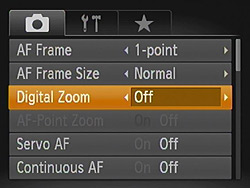
Why are zoom options jammed in between autofocus options? Beats me; I sometimes think Canon's menus are simply arranged in random order.
Clumsy menus. I've mentioned that I was quite a fan of the touch interface on the S110, but I wasn't so fond of Canon's main menu system. It's slow and clunky to navigate, with only six options on-screen at any one time, and just three tabs to organize all of the available options. Beneath these tabs, there's no real attempt at categorization; instead you're presented with a wall of settings options in what seems to be random order. The ability to use touch to navigate and jump to a particular option more quickly is handy, but I'd like to see a better-organized menu with more options on-screen at any one time. (There's easily room for another couple of tabs to help with organization.)
Thankfully, the Function menu groups the most commonly-used options, and it saved me having to visit the main menu very often. Some of its icons are perhaps a little obscure, but it's much better and quicker to use than is the main menu.

Gone is proper GPS support, replaced with a radio for Wi-Fi wireless networking. This was probably my least-favorite change in the S110.
Piggyback location. Beyond its new touch screen, the most significant difference between the Canon S110 and its predecessor is the removal of its built-in GPS receiver, in favor of in-camera Wi-Fi. This, more than anything else, was a change that displeased me. I've grown to really like geotagging as a way of organizing my photos, but I'm just a little bit too OCD for manual tagging. The S110 doesn't require me to go quite that far, but it's not a whole lot better. With no in-camera GPS capabilities, it's reliant on your cellphone's GPS receiver, and there are several significant drawbacks to that approach.
First of all, geotagging with the Canon S110 now requires forethought. You have to consciously think to start your phone recording a location log before you start shooting each day. Forget to do so, and any shots from before the log was started will need to be location-tagged manually, if at all. Secondly, depending upon your phone GPS can be a fairly big power drain -- and unless you feel like switching it on and off before each short burst of shots, you'll need to leave it enabled for the entire duration of your shoot. That means it is wasting the limited battery life of your phone the whole time, instead of shortening the camera's battery life slightly whenever it's switched on. And then, of course, there's the fact that you have to take the time to location-tag images at the end of your shoot, although the app will at least remind you to do so. And if you tag the wrong image by mistake, it's equally easy to strip the tags back off. (All this is true on Android, at least; I don't use an iOS device myself, and so couldn't test the equivalent iOS app.)

A case of give and take. All of this wouldn't be a huge problem, if the removal of GPS connectivity meant that I'd gained a more desirable feature, but for my money the Canon S110's Wi-Fi connectivity isn't that feature. I find that I shoot two kinds of photos: those I care about deeply enough to use a quality camera, and throwaway snapshots. For the shots I care about, I want the best results possible -- which is why I'm using a dedicated camera in the first place. That typically means I want to run them through Lightroom for a quick tweak before sharing them, though, so the in-camera Wi-Fi isn't likely to be used for them. They'll be shared from my home internet connection, once I'm satisfied with the results.
It's the throwaway snapshots that go straight to social networking sites, but for these I really don't care that my smartphone's image quality isn't as good as a standalone camera. If it's good enough to make out what the subject is, it'll do -- and my smartphone already fits the bill there. In fact, it ends up being preferable, because I don't leave Wi-Fi enabled on my phone all the time -- it's too much of a power hog for that. If I have to take the phone out of my pocket to enable Wi-Fi, I might just as well shoot the picture with the phone too.
So from my point of view, a great feature (GPS) has been removed to accommodate one that I don't find terribly useful (Wi-Fi). And in the process, all of the power consumption has been offloaded from the device I switch off between shots (my camera, with its removable battery) and placed onto the always-on device (my phone, which has a non-removable battery.) Run that battery down, and I lose communications altogether, a risk I'm typically not willing to take. Personally, I'd rather Canon had kept the GPS, and perhaps supplemented it with the less power-hungry Bluetooth, something that I'm happy to leave running all day.
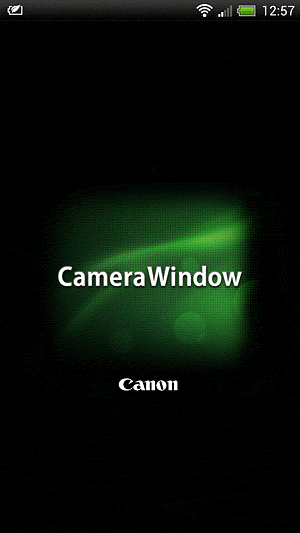
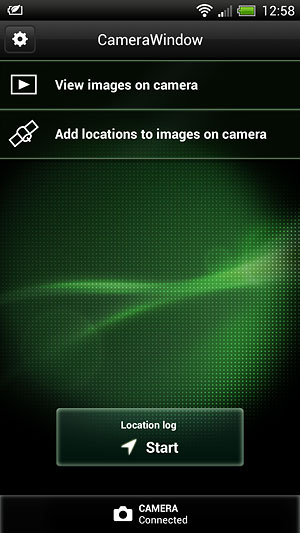
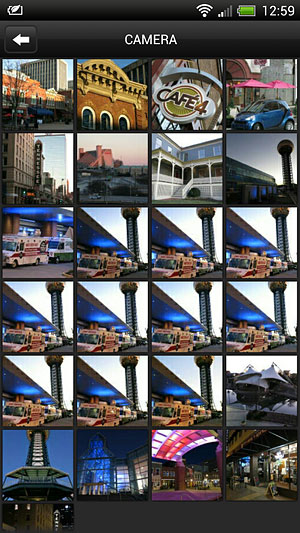



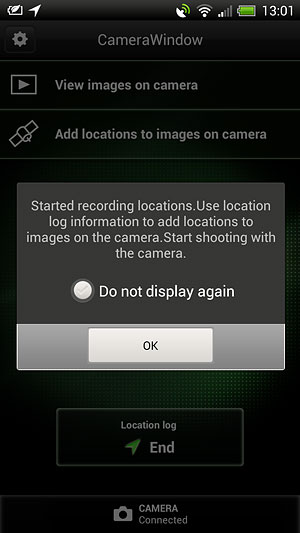
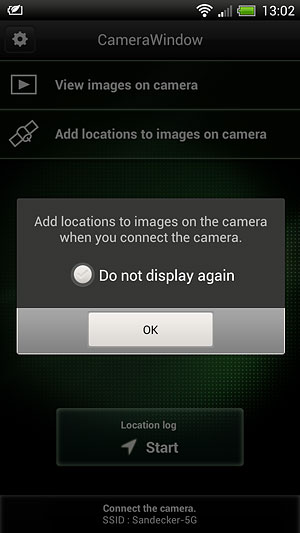
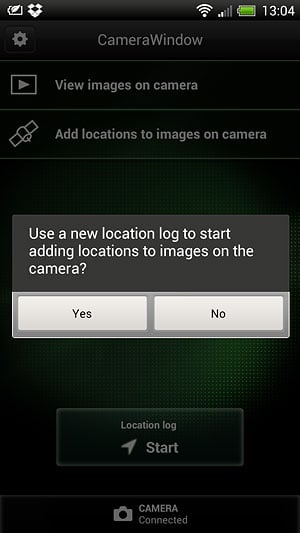
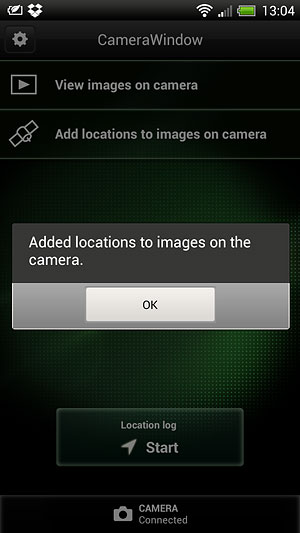


Wireless networking. Be that as it may, I'm the kind of person that can't resist fiddling around with technology, given half a chance. I was keen to see if the S110's Wi-Fi connectivity was, finally, user-friendly; Canon's struggled a bit with this in the past. Unfortunately, I'd have to say that the answer is no: It's telling that the user manual devotes around fifty pages to explaining the feature. Canon has simply tried to pack in too many Wi-Fi features, some of which will be of little use to the majority of S110 owners, such as the ability to transfer pictures directly between multiple cameras. In all, you have a choice of connecting to another Canon camera with native Wi-Fi support (except the SD430), a phone or tablet, a computer, a printer, or various web services.
My initial confusion came when I tried to figure out where to configure Wi-Fi: you must first be in playback mode before you can access the Wi-Fi features of the camera. Another frustration was the need to connect the camera to a computer to configure upload to web services such as Facebook or Twitter, rather than simply having you enter your login credentials using the handy touch screen keyboard. And the final nail in the coffin is that, even after you've jumped through the hoops, your images aren't actually uploaded to the chosen service. Instead, Canon uploads a smaller copy to the social networking site, and accompanies this with a link to the full image on Canon Image Gateway, forcing your friends outside of their comfort zone onto Canon's site if they want to see the full image.

Noise, for a compact, was fairly well-controlled. I was happy to use up to ISO 800 ordinarily, and ISO 1,600 in a pinch. There's an ISO series in the gallery.
That's true, at least, if you're uploading those images via a PC. Send them through your smartphone and there's no such limitation -- because there's no handholding whatsoever. The smartphone app simply provides a way for you to transfer images to your phone, and once there you can do as you like with them. That means you can share the full-res images using your phone's own features or your chosen third-party software, just as you would with any image shot on the phone itself.
I found this far preferable to dealing with Canon Image Gateway, but the app itself was clunky. (Note, again, that this is for the Android app, as I didn't have a chance to try its iOS equivalent.) Initially, it lets you view only low-resolution, strongly-compressed thumbnails of each image, and to download each image at a reduced size of just 1,600 x 1,200 pixels. You can make a choice of three different sizes to transfer, including full-resolution, but this is confusingly achieved from the camera's screen instead of your phone. (Essentially, you push the images from the camera, rather than pulling them from the phone).
This juggling of devices makes little sense; you've already picked your phone up to launch the app, so why force you to operate two devices at once? Overall, the app could be much friendlier -- open it without Wi-Fi enabled, for example, and it just bombs out with a "no camera" message, rather than helping guide you to the Wi-Fi setup function of your phone as many apps do. And of course, since you're connected via Wi-Fi, you can't immediately share photos from the phone via Wi-Fi, only via your (likely expensive) mobile data plan. To share on social networks via Wi-Fi from the phone, you'll first need to download all the images you want, then disconnect from the camera and reconnect to your Wi-Fi network, instead. Had Canon used Bluetooth, this would've been more seamless; if a bit slower.

It's all about the images. Of course, you don't have to use Wi-Fi just because it's there; it's just a shame that it's replaced what would seem to be a far more valuable feature. For the enthusiasts at which the Canon S110 is aimed, image quality will be of far greater performance than either Wi-Fi or GPS, though, and here the S110 turns in a much better performance.
Images showed good detail, and had attractive colors that were more accurate than you'd get from most compacts. Exposure was typically well-metered, and autofocus -- while not the fastest around -- was accurate even in fairly low light. We did feel that high ISO performance (and image quality in general) was actually a slight step backwards from the S100. Even so, it was well above that of the typical compacts.
The after-dark walkabout camera. If you're willing to limit yourself to wide-angle shooting, the S110 lets you shoot handheld without flash long after sunset, under typical city street lighting. Of course, that's due in large part to its bright maximum aperture of f/2.0 at wide angle; zoom in and this quickly falls to f/5.9, so you really do need to leave the zoom rocker alone once the sun goes down, unless you're shooting with flash or under bright artificial lighting. That was a compromise I was happy to make, though. I'm not a big fan of unnatural-looking on-camera flash exposures, and it felt very freeing to carry a camera as compact as the Canon S110, yet still get good shots after dark. And there's definitely something to be said for the S110's portability, even compared to other enthusiast compacts. It often traveled with me when I'd have left most other cameras at home -- and that meant it was there when I really needed it.
Approx. focal length (eq.) |
24mm |
28mm |
36mm |
48mm |
67mm |
89mm |
106mm |
120mm |
Maximum aperture |
f/2.0 |
f/2.5 |
f/3.2 |
f/3.5 |
f/4.5 |
f/5.0 |
f/5.6 |
f/5.9 |
Minimum aperture |
f/8 at all focal lengths | |||||||
Consumers also welcome. Even if you're not an enthusiast, and you'll likely shoot in Auto or Program mode all of the time, you'll still benefit from these attributes, too -- and you'll find that the S110 caters to you in other ways. There's a healthy selection of tools and digital filter functions, for example, that let you tweak your shots for creative effect in-camera, although some do work better than others, and a couple feel quite dated. Disappointingly, HDR mode is essentially unusable handheld; even doing my very best to keep the camera steady, I never managed a single handheld HDR shot in conditions where I'd actually need HDR, without ghosting, blurring, or both. It may work fine on a tripod, but that rather defeats the point of carrying such a compact camera in the first place.

Almost an hour after sunset, the S110 still turned in usable handheld shots with only city street lighting to help. Note the detail in the brickwork of the Tennessee Theatre building.
And the panorama function feels like a throwback to a decade ago. In an era where most cameras will handle everything right down to tripping the shutter for you after the first shot, leaving you only to sweep the lens across your subject, the Canon S110 provides no such hand-holding. Not only must you align each shot and trip the shutter manually (with a partial overlap of the previous shot shown to help you get it right); the S110 also won't attempt to stitch the resulting panorama in-camera, leaving that job to your PC. Of course, enthusiasts would likely want to do the stitching themselves, but that's no reason for Canon not to offer the option to stitch in-camera, something that's available in far less expensive cameras.
For enthusiasts, though, it's easy to overlook such shortcomings thanks to the Canon S110's image quality, it's customizable interface, and the profusion of enthusiast-friendly features like PASM shooting, the array of manual focusing options, and the handy controls over sensitivity and noise. The ability to shoot Full HD movies with stereo audio -- and again, to do so handheld after dark, if you stick near wide-angle -- is icing on the cake.
|
Canon S110: Video Samples
|
|---|
Daytime video showing zoom range and stabilization. 1,920 x 1,080, 24 frames per second, stabilized Download Original |
Handheld night video with stabilization enabled, shot while walking. 1,920 x 1,080, 24 frames per second, stabilized Download Original |
After spending a few weeks with the Canon S110, I really wasn't too keen to give it back, and that for me is the mark of a good camera. Would I have found it easier to let go, had you offered me a Canon S100 in its stead? Probably, and if Wi-Fi isn't a big selling point for you, I'd recommend searching out the earlier model as well. But if you can't get your hands on an S100, something that will prove increasingly difficult over time, the Canon S110 still offers plenty to keep the enthusiast photographer happy.
Canon S110 Lens Quality
For more detailed lens test results, click on the Optics tab.


Zoom: The Canon PowerShot S110's lens covers a 24-120mm range, with up to an additional 4x digital zoom. Overall performance is good at full wide angle, though corners are soft and some coma distortion is visible. At full telephoto, sharpness is more consistent throughout the frame, though details are slightly soft.




Sharpness: The wide-angle end of the Canon PowerShot S110's zoom
shows fairly strong blurring in the corners of the frame compared to what we see at center (particularly in the top corners), though blurring doesn't extend very far into the image area. At telephoto, performance is much better, with only a small amount of blurring in the corners.


Geometric Distortion: There is slightly high barrel distortion
at wide-angle (1.1%), and a small amount of barrel distortion at telephoto (less than 0.1%). Results are good at telephoto, but we'd like to see a little less barrel distortion at full wide angle.


Chromatic Aberration: Chromatic aberration is low at both wide-angle and telephoto zoom settings. No doubt the PowerShot S110's processor is hard at work here.


Macro: The Canon PowerShot S110's Macro mode captured pretty good sharpness and detail throughout most of the frame, though corners are soft (a common limitation among consumer digital cameras in macro mode). Minimum coverage area is slightly smaller than average at 1.73 x 1.30 inches (44 x 33mm). The camera's flash is partially blocked by the lens at this range, which results in a harshly-divided exposure with extreme shadow and highlight. Thus, external lighting will be best for images this close.
Canon S110 Viewfinder Accuracy


Viewfinder Accuracy: The Canon PowerShot S110's LCD monitor showed a hair under 100% coverage at wide angle, and slightly more than 100% at telephoto. Results at both settings are very good.
Canon S110 Image Quality
For more detailed image quality test results, click on the Exposure tab.

Color: The Canon PowerShot S110 produces saturation levels a little more true-to-life that most, with only very slight increases in saturation of bright reds, greens, some purples and blues. (Bright yellows, orange and cyans are actually slightly undersaturated.) In terms of hue, the PowerShot S110 pushes orange toward yellow, yellow toward green, and cyan toward blue, however overall hue accuracy is better than most. Skin tones look fairly natural overall, though with a slight nudge toward pink. Overall, the Canon S100 produces less vibrant color than most digicams at default settings, but with very good hue accuracy.


Incandescent: Manual white balance handled our incandescent lighting
best overall, with the most natural color. Auto produced nearly accurate results as well, though with a slight green-yellow tint. Incandescent resulted in a very strong pink cast.


Resolution: Our laboratory resolution chart revealed sharp, distinct line patterns down to about 1,900 lines per picture height horizontally and to about 1,900 lines vertically. Extinction occurred between 2,400 and 2,600 lines.


Flash: Our manufacturer-specified testing (shown at right) shows that the Canon PowerShot S110 performs to Canon's specifications (23 feet at wide angle and 7.5 feet at telephoto). However, in both cases, the camera increased ISO to 640 to do it.
Auto flash produced bright results in our indoor portrait scene, retaining
only a hint of the ambient light despite the slower shutter speed of 1/25 second at ISO 320. The PowerShot S110's image stabilization should
help with slower shutter speeds, but any movement (of camera or subject)
could be problematic at this shutter speed. Shot taken at ~5 feet (~1.5m) on a stable tripod.









ISO: Noise and Detail: Detail and noise performance is pretty good at the PowerShot S110's lower ISO settings, though small effects of noise suppression are visible even at ISO 80. By ISO 400, stronger evidence of chroma (color) noise and smudging become more noticeable in the shadows, but ISO 800 is where the most noticeable effects appear.
From ISO 1,600 on up. blurring and luminance noise grain become increasingly pronounced while fine detail only dissipates. See Printed results below for more on how this affects prints.
 Printed:
ISO 80 and 100 are usable at 13 x 19 but show some obvious softness, with crisp detail more easily achieved at 11 x 14. ISO 800 produces a nice 5 x 7 inch print.
ISO 80/100 look quite good at 11 x 14 inches, 13 x 19s are soft but acceptable, fine for wall display.
ISO 200 looks good at 11 x 14, albeit with some softness in the reds.
ISO 400 looks nice at 8 x 10; is a bit too soft at 11 x 14 but fine for wall display.
ISO 800 yields a crisp 5 x 7 print; 8 x 10s show a lot of softening from noise processing, although they might be OK for wall display.
ISO 1,600 prints are usable at 5 x 7 and crisp at 4 x 6.
ISO 3,200 produces a usable 4 x 6, if just a bit washed out and flat in some areas.
ISO 6,400 and 12,800 are not usable at 4 x 6 for anything other than a special fx impressionist treatment.
In comparison to its predecessor, the Canon S100, the S110 boasts an upgraded sensor but our tests show a slight decrease in print quality across the board. Where the S100 produces a nice, crisp print at 13 x 19 at base ISO, the S110 is soft at 13 x 19 and, while maybe acceptable for wall display, we feel more comfortable recommending it for use at 11 x 14 for ISO 80 up to 200. The lower overall image quality across the ISO range compared to its predecessor is a little disappointing. See the table below to compare print sizes to other enthusiast compacts.
| Print size vs ISO speed | ||||||
|---|---|---|---|---|---|---|
| 12800 | Unusable | Unusable | Unusable | |||
| 6400 | Unusable | Unusable | Unusable | Unusable | Unusable | Unusable |
| 3200 | 4x6 | 5x7 | 4x6 | 4x6 | Unusable | Unusable |
| 1600 | 4x6 | 5x7 | 5x7 | 5x7 | 5x7 | 4x6 |
| 800 | 5x7 | 8x10 | 8x10 | 8x10 | 8x10 | 5x7 |
| 400 | 8x10 | 11x14 | 11x14 | 11x14 | 11x14 | 8x10 |
| 200 | 11x14 | 13x19 | 13x19 | 13x19 | 13x19 | 11x14 |
| 100 | 11x14 | 13x19 | 16x20 | 16x20 | 13x19 | 13x19 |
| ISO | S110 | S100 | G15 | P7700 | LX7 | EX2F |
Canon S110 Performance
For more detailed performance test results, click on the Performance tab.
Startup Time: The Canon PowerShot S110 takes about 2.3 seconds to power on and take a shot. That's about average for a compact.
Shutter Lag: Full autofocus shutter lag is on the slower side at 0.48 second at wide angle, and about 0.53 second at telephoto. Prefocused shutter lag is 0.078 second. Also on the slower side, but still fairly quick.
Cycle Time: Cycle times are slow as well, with the S110 capturing a large JPEG every 2.2 seconds, every 2.8 seconds for RAW files, and 3.0 seconds for RAW+JPEG. Standard continuous mode captures JPEG frames continuously at 1.82 frames per second, slower but still okay. HQ Burst mode however captures 10 full-resolution JPEG frames in one second, quite fast.
Flash Recycle: The Canon PowerShot S110's flash recycles in about 5.3 seconds after a full-power discharge, which is good.
Low Light AF: The camera's AF system was able to focus down to almost the 1/16 foot-candle light level without AF assist enabled, which is very good, and the camera was able to focus in complete darkness with the AF assist lamp enabled.
USB Transfer Speed: Connected to a computer or printer with USB 2.0, the PowerShot S110's download speeds are pretty fast. We measured 8,950 KBytes/sec.
Battery Life: The S110's battery life has a CIPA rating of 200 shots per charge, which is below average.
In the Box
The retail package contains the following items:
- PowerShot S110
- WS-DC11 wrist strap
- CB-2LX battery charger (CB-2LXE in some markets)
- NB-5L lithium-ion rechargeable battery pack with cover
- IFC-400PCU USB cable
- Digital Camera Solution Disk software CD-ROM
- Getting Started guide
- Warranty card
Recommended Accessories
- Extra battery pack for extended outings
- Large capacity SDHC/SDXC memory card. These days, 8GB is a good tradeoff between cost and capacity, but if you plan to capture many movie clips, you may want larger. Speed Class 6 or higher is recommended for HD video.
- Camera case
Canon S110 Conclusion
| Pro: | Con: |
|---|---|
|
|
With the PowerShot S110, Canon revisits the excellent and easily-recommended S100, tweaking the design to allow wireless photo sharing. It's the fourth iteration of a series that has always performed admirably, offering enthusiast-friendly features in a pocket-friendly body. Our time with the Canon S110 has left us feeling slightly conflicted, though -- perhaps because its predecessors have set the bar so high.
On the one hand, there's still a lot to love. The Canon S110's customizable, twin-dial interface is a joy for an experienced photographer, and many of its features -- raw file support, comprehensive manual focusing options, and control over noise reduction and the speed at which Auto ISO sensitivity ramps up -- were clearly added with enthusiasts in mind. Among its new features, the S110's touch screen display is a particularly welcome addition that makes it a breeze to select your subject. And if you're a social creature, the S110's Wi-Fi connectivity can make it simpler to get your photos online without a visit to your computer, although it is still far more clumsy and complex than should be the case.
On the other hand, though, Canon has had to remove another feature that's arguably more valuable -- the built-in GPS receiver -- to make way for that new Wi-Fi radio. Sure, you can still piggyback off the GPS receiver in your smartphone to geotag your photos after the fact, but that approach has a couple of drawbacks. The Canon S110's geotagging process is now less seamless than before, and it requires you to enable track log recording on your phone before you start shooting. The battery-sapping GPS receiver in your phone must then remain active until your shooting session is over, draining the battery of what -- for most of us -- is the more critical device. (And often, one that features a non-removable battery.) You can, of course, stop recording the track log between shots, but that's hardly convenient. So for many, the new geotagging functionality will go unused.
In other respects, too, the Canon S110 doesn't entirely satisfy. Its battery life is still below average for a compact camera, and while its array of focusing options are generous, its autofocus performance still leaves something to be desired. Burst shooting performance, too, is relatively sedate unless you're willing to stick to JPEG mode, lock all exposure variables from the first frame, and shoot completely blind. And although Canon promised improved sensitivity from the PowerShot S110's newly-designed sensor, our tests actually showed a very slight reduction in high ISO performance.
But then, as we've said, we're perhaps holding the Canon S110 to a standard set too high by its forebears. The fact of the matter is that as pocket-friendly cameras go, it's still very enjoyable to shoot with, and yields better pictures than most. That's especially true in low light, thanks to a fairly bright lens at wide angle; this is a camera you can use handheld without flash under city street lights. Were it not for the cameras in whose footsteps it treads, we're certain our reaction to the Canon S110 would have been much more enthusiastic.
If you're dead-set on getting good-quality pictures and immediately sharing them on social networks, the Canon PowerShot S110 is without question a better option than its predecessor. But if Wi-Fi isn't your thing, you might be better served to seek out a Canon S100. With that camera now discontinued, though, getting your hands on one will become ever more challenging. And if you can live without the geotagging support -- the main omission in the newer model -- the Canon S110 still offers a lot more camera than the typical compact. And that, really, is what's important. As a pocket-friendly enthusiast camera, the Canon S110 is still easy to recommend, and clearly worthy of a Dave's Pick.
Optics
Lens
Zoom
A wider-than-average 5x optical zoom lens, with decent performance.
The Canon PowerShot S110's lens covers the equivalent focal range of about 24-120mm on a 35mm camera. The lens is pretty fast (f/2.0) at full wide angle, but maximum aperture drops off rather quickly to f/5.9 as you zoom to full telephoto. The following table reflects maximum aperture versus approximate equivalent focal length as reported by the camera:
|
Focal length (eq.)
|
24mm
|
28mm
|
36mm
|
48mm
|
67mm
|
89mm
|
106mm
|
120mm
|
|
Max. aperture
|
f/2.0
|
f/2.5
|
f/3.2
|
f/3.5
|
f/4.5
|
f/5.0
|
f/5.6
|
f/5.9
|
|
Min. aperture
|
f/8 at all focal lengths | |||||||
Details are good but a little soft in the center of the frame at full wide angle (24mm eq.) and f/5.6, with some blurring and coma distortion in the extreme corners, though very little chromatic aberration is visible. Some flare is also evident around the bright white elements of this shot, though this image is a little overexposed which can exacerbate flare. At medium focal length (~50mm eq.), overall sharpness is slightly better, though extreme corners are still soft. Flare isn't as noticeable, though the exposure wasn't as bright as the wide-angle shot, so there aren't as many strong highlights. Results at full telephoto are similar with some minor corner softening, though the image is still a touch soft overall. Flare isn't as evident, and again, chromatic aberration is negligible. The Canon S110 also offers up to 4x digital zoom, though with the expected loss of fine detail that comes with digital magnification.
Macro
A slightly smaller than average macro area, with very good detail and resolution. Flash had some difficulty throttling down, and is partially blocked by lens.
The Canon PowerShot S110's macro setting captured a slightly smaller than average area of 1.73 x 1.30 inches (44 x 33 millimeters). Detail and sharpness are both pretty good across most of the frame, though there's some softening in the extreme corners from field curvature of the lens. (Most cameras have some softening in the corners in macro mode. What we see here is better than average.) The Canon S110's flash has some difficulty throttling down at this distance, causing overexposure where the flash wasn't blocked by the lens. The overexposure plus the shadow from the lens resulted in a very unevenly lit image. Plan on using external lighting for the closest macro shots with the S110.
Geometric Distortion
Higher than average barrel distortion at wide angle in JPEGs; very high at wide angle in Raw files. Low distortion at telephoto.
| In-camera JPEG |
| Barrel distortion at 24mm eq. is 1.1% |
 |
| Barrel distortion at 120mm eq. is less than 0.1% |
 |
JPEG: The Canon S110's 1.1% barrel distortion at wide angle is higher than average and quite noticeable in some shots. At the telephoto end, the S110's less than 0.1% barrel distortion is a little unusual as we'd normally expect to see pincushion distortion at telephoto. The amount is quite low, though, at around 0.05%, which is barely noticeable. This is the tendency for the lens to bend straight lines outward (like a barrel -- usually at wide angle) or inward (like a pincushion -- usually at telephoto).
| Uncorrected Raw |
| Barrel distortion at 24mm eq. is 4.6% |
 |
| Barrel distortion at 120mm eq. is less than 0.1% |
 |
Raw. When converting raw files using dcraw (which doesn't apply any distortion correction), barrel distortion at wide angle is much higher, at about 4.6%. Distortion at full telephoto is about the same as the in-camera JPEG, so no correction was performed by the camera at the telephoto end. Canon's bundled Digital Photo Professional software automatically reduces geometric distortion (as does Adobe Camera Raw), producing distortion results very similar to in-camera JPEGs.
We expect high distortion at wide angle for smaller lenses though, so it's nothing to be overly concerned about unless you are using a raw converter which does not understand the embedded "opcodes" to perform distortion corrections automatically. There is however going to be some loss of resolution as well as possible interpolation artifacts as a result of such strong correction, because pixels in the corners of the frame are being "stretched" to correct for the distortion. Obviously, a lens that doesn't require such correction and is also sharp in the corners to begin with would be preferable, but relaxing constraints on distortion brings other benefits in the lens design, such as a compact, lower cost design.
Chromatic Aberration and Corner Softness
CA is low at wide angle, and even lower at telephoto. Moderate blurring in the corners of the frame at wide angle, but very good corner sharpness at full telephoto.
|
Aperture: Maximum
|
|
 |
 |
| Wide (f/2.0): Upper left CA: Low Softness: Soft |
Wide (f/2.0): Center CA: Very low Softness: Very sharp |
 |
 |
| Tele (f/5.9): Upper left CA: Low Softness: Fairly sharp |
Tele: (f/5.9): Center CA: Very low Softness: Sharp |
Chromatic Aberration. Chromatic aberration is low to very low at both wide angle and full telephoto, because the Canon S110's DIGIC 5 processor removes most of it. See below of examples of uncorrected C.A. Chromatic aberration is a type of distortion visible as a slight colored fringe around the objects at the edges of the field of view on the resolution target.
Corner Softness. The Canon S110's lens produces soft corners at full wide angle when wide open. Blurring is a little stronger in the top corners, but softness doesn't extend very far into the frame, and the center is quite sharp. Some of the blurring is due to the geometric distortion and CA correction taking place at wide angle, and you can see some interpolation artifacts in the corners at wide angle as well. All four corners at full telephoto are fairly sharp, as is the center.
Vignetting. Some very minor vignetting is noticeable at wide angle and telephoto at maximum aperture, as can be seen from the dimmer corner crops.
|
Aperture: f/5.6 - f/5.9
|
|
 |
 |
| Wide (f/5.6): Upper left CA: Low Softness: Moderately soft |
Wide (f/5.6): Center CA: Very low Softness: Very sharp |
 |
 |
| Tele (f/5.9): Upper left CA: Low Softness: Fairly sharp |
Tele: (f/5.9): Center CA: Very low Softness: Sharp |
Stopped-down to f/5.6 at wide angle, corner sharpness improved but is still soft. At the telephoto end, maximum aperture is already quite small at f/5.9, and stopping down would start to lead to some diffraction related softness, so we didn't stop down any further. As you can see, vignetting also improved at wide angle.
CA Correction. Below are crops comparing in-camera JPEGs versus raw files converted with dcraw which doesn't correct for CA:
| In-Camera JPEG | Uncorrected Raw |
 |
 |
| Wide (f/5.6): Bottom left CA: Low |
Wide (f/5.6): Bottom left CA: Very high and bright |
 |
 |
| Tele (f/5.9): Bottom left CA: Very low |
Tele (f/5.9): Bottom left CA: Moderate |
As you can see, CA is very high and bright at wide angle and moderate at telephoto in uncorrected raw files (crops on the right), so the S110's DIGIC 5 processor is doing a great job at suppressing most of the CA in JPEGs.
Overall, we'd say this is decent performance for a lens of its class, though corners are soft and distortion a little high at wide angle.
Viewfinder
Coverage
Very good accuracy from the LCD monitor.
The Canon PowerShot S110's LCD monitor showed just under 100% coverage at wide angle, and just over 100% at telephoto. Very good results here.
The images above were taken from our standardized test shots. For a collection of more pictorial photos, see our Canon PowerShot S110 Photo Gallery .
Exposure
Color
Saturation & Hue Accuracy
Less vibrant color than most, but very good hue accuracy.
|
| In the diagram above, the squares show the original color, and the circles show the color that the camera captured. More saturated colors are located towards the periphery of the graph. Hue changes as you travel around the center. Thus, hue-accurate, highly saturated colors appear as lines radiating from the center. |
Saturation. The Canon S110 produced fairly accurate saturation levels, with only minor oversaturation in reds and blues. Some colors such as bright yellow, orange, aqua and cyan were actually undersaturated by a small amount. Average saturation was 105.7%, or only 5.7% oversaturated, which is lower than the approximately 10% we usually see. Overall, the Canon S110's images appear less vivid than most cameras produce, but you can always adjust saturation to your liking. Most consumer digital cameras produce color that's more highly saturated (more intense) than found in the original subjects. This is simply because most people like their color a bit brighter than life.
Skin tones. Here, when using Auto white balance in simulated daylight, the Canon S110 does reasonably well, producing fairly natural-looking skin tones, with just a hint of pink. Where oversaturation is most problematic is on Caucasian skin tones, as it's very easy for these "memory colors" to be seen as too bright, too pink, too yellow, etc.
Hue. The Canon PowerShot S110 produced a few color shifts relative to the correct mathematical translation of colors in its subjects, most visibly pushing cyan toward blue (probably for better-looking skies), red toward orange, and yellow toward green. Unfortunately, the yellow toward green shift along with a reduction in saturation makes yellows look a little dingy in our Still Life shots. Still, mean "delta-C" color error after correcting for saturation was very good at only 4.1; much better than average. Hue is "what color" the
color is.


Sensor
Exposure and White Balance
Indoors, incandescent lighting
Slight yellow/green cast with Auto white balance, though much better than average. Antidesiccant setting is quite pink, but Manual is very good. Slightly better than average exposure accuracy.
Color balance indoors under incandescent lighting has a slight yellow/green cast with the Auto white balance setting, but is pretty good. The Canon S110 does better here than the majority of digital cameras we test. The Incandescent white balance option resulted in a fairly strong pinkish cast. The Manual white balance setting produced accurate though slightly muted color. The PowerShot S110's exposure system handled this lighting well, producing good results with with no exposure compensation. (The average for this shot is + 0.3 EV.), though the Manual white balance exposure is a little brighter than the others. Our test lighting for this shot is a mixture of 60 and 100 watt household incandescent bulbs, a pretty yellow light source, but a very common one in typical home settings here in the U.S.
Outdoors, daylight
Realistic-looking color, but high default contrast and limited dynamic range.
The Canon PowerShot S110 performed reasonably well under harsh outdoor lighting for its class, though default contrast is quite high and dynamic range limited. Slightly above average exposure compensation of +1.0 EV was needed to keep the model's facial skin tones bright, resulting in quite a few blown highlights in her shirt and flowers. Most cameras require about +0.7 EV. On the other hand, overall exposure is good in the outdoor far-field shot at the default exposure, with a few clipped highlights but very few lost shadows, and shadows hold onto a fair amount of detail.. Color outdoors is good with Auto white balance, though a touch muted.
See full set of test images with explanations
See thumbnails of all test and gallery images
Resolution
High resolution, about 1,900 lines of strong detail from in-camera JPEGs, up to 2,100 lines from converted Raw files.


Our laboratory resolution chart reveal sharp, distinct line patterns down to about 1,900 lines per picture height in the horizontal direction, and about 1,900 lines in the vertical directions, in best quality JPEGs straight out of the camera. (Some might argue for over 1,900 lines, but artifacts such as moiré patterns begin to appear at much lower resolutions.) Extinction of the pattern occurred between 2,400 and 2,600 lines. Adobe Camera Raw 7.3 was able to extract significantly more resolution (about 2,100 lines per picture height), but also showed more color moiré and didn't do as well as the camera at reducing the visibility of defective pixels. Use these numbers to compare with other cameras of similar resolution, or use them to see just what higher resolution can mean in terms of potential detail.
See full set of test images with explanations
See thumbnails of all test and gallery images
Sharpness & Detail
Fairly sharp, detailed images overall, with only minor edge-enhancement on high-contrast subjects. Noise suppression limits definition in low contrast areas, though better than average results here.


Sharpness. The Canon PowerShot S110 captures very good detail and fairly sharp JPEG images at default settings. Only slight enhancement artifacts are visible on high-contrast subjects such as the crop above left.. Very good results here. Edge enhancement creates the illusion of sharpness by enhancing colors and tones right at the edge of a rapid transition in color or tone.
Detail. The crop above right shows moderate levels of noise suppression, as the low contrast areas of hair show less distinct detail with individual strands smudged together. Performance here is actually better than average for a compact digicam, though. Noise-suppression systems in digital cameras tend to flatten-out detail in areas of subtle contrast. The effects can often be seen in shots of human hair, where the individual strands are lost and an almost "watercolor" look appears.
Raw vs In-camera JPEGs
As noted above the Canon S110 produces fairly sharp, detailed in-camera JPEGs. With a good raw converter, more detail can be extracted, though. See below:

In the table above, mousing over a link at the bottom will load the corresponding crop in the area above, and clicking twice will open the full resolution image.
The image linked on the left is a crop from an in-camera Fine JPEG taken with default settings. The image in the center is a Raw file processed using Canon's included Digital Photo Professional software, using default settings. The right-most image was converted with Adobe Camera Raw 7.2 then sharpened in Photoshop with an unsharp mask of 500% and radius 0.3. As you can see, Canon's Digital Photo Professional software wasn't really able to extract more detail than the in-camera JPEG, though local contrast is higher. The ACR converted image reveals more fine detail than both the other images, but at the cost of showing more noise. Still, shooting raw and using a good quality raw converter gives you control over the detail versus noise tradeoff as well as other benefits such as highlight recovery, exposure adjustment, white balance, output format, etc.
ISO & Noise Performance
Good high ISO performance for a compact, but no improvement over the S100.
 |
 |
 |
| ISO 80 | ISO 100 | ISO 200 |
 |
 |
 |
ISO 400 | ISO 800 |
ISO 1,600
|
 |
 |
 |
ISO 3,200 | ISO 6,400 | ISO 12,800 |
The PowerShot S110 produces low to moderate noise at the lower sensitivity settings, though the effects of noise reduction such as smudging and loss of fine detail can already be seen even at the lowest ISO. Fine detail is good up to ISO 200, though. At ISO 400, noise is still quite reasonable and a lot of fine detail remains intact, but additional smudging is evident as well as chroma noise in the shadows. Fine detail really starts to take a big hit at ISO 800, and chroma noise is more evident not just in the shadows, but in midtones as well. ISO 1,600 is softer from more aggressive noise reduction, as one would expect. At ISO 3,200 and above, luminance noise becomes much more visible, along with stronger chroma noise in the form of yellow and purple blotching, especially at ISO 12,800.
Overall handling of detail versus noise is better than the typical compact camera, but we didn't see any improvement over its predecessor. In fact, we'd say the S100's image quality is slightly better at all ISOs. To see how these images held up to printing at various sizes, read the Output Quality section below.
Extremes: Sunlit and low light tests
High resolution with good detail, though high default contrast doesn't make the best of the limited dynamic range. Fairly good low-light performance, capable of getting bright images in near darkness at some ISOs.


Sunlight. The Canon PowerShot S110 struggled a bit under the deliberately harsh lighting in the test above. To keep facial tones bright +1.0 EV compensation was require, but that led to a lot of washed-out highlights. Detail is pretty good in the shadows, though. Some may prefer the +0.7 EV setting for its reduced highlight clipping, but we found the face a bit too dim. Consider using fill flash in situations like the one shown above; and it's better to shoot in the shade when possible.
|
Outdoor Portrait Dynamic Range Correction (+0.7 EV)
|
|
|
|
i-Contrast Setting: DRC Off (Default) DRC 200% DRC 400% DRC Auto |
 |
|
As part of the S110's Intelligent Contrast (i-Contrast) feature, the camera has "Dynamic Range Correction" to tame highlights, and "Shadow Correct" to bring out more shadow detail.
Above are examples of our "Sunlit" Portrait scene shot with the S110's three available DR correction settings. Mouse over the links about right to compare, and click on the links to get to the full-resolution images. As you can see that highlights are toned-down with the DR 200% and DR 400% settings, but results with DR Auto are very similar to it being set to Off, with just a small boost to the shadows.
Note that Dynamic Range Correction may boost ISO depending on your current setting, so more noise and/or stronger NR may be visible with it enabled. (In our samples above, DR 200% used ISO 160 and DR 400% used ISO 320, while DR Auto left ISO at 80.)
| Face Detection Examples | ||
 |
 |
 |
| Aperture Priority 0 EV |
Portrait Mode 0 EV |
Smart Auto 0 EV |
The table above shows results with the default exposure using Aperture Priority AE, as well as Portrait mode and Smart Auto. As you can see, the S110's Portrait and Smart Auto modes both improved exposure automatically compared to the default exposure in Aperture Priority mode, going from very underexposed to usable images. Portrait mode increased ISO to 320 while keeping the same aperture (f/5.6), while Smart Auto boosted ISO to even higher to 500. Overall, we preferred the Smart Auto mode image because while it appears brighter, it actually has fewer blown highlights than Portrait mode.
Because digital cameras are more like slide film than negative film (in that they tend to have a more limited tonal range), we test them in the harshest situations to see how they handle scenes with bright highlights and dark shadows, as well as what kind of sensitivity they have in low light. The shot above is designed to mimic the very harsh, contrasty effect of direct noonday sunlight, a very tough challenge for most digital cameras. (You can read details of this test here.)
| 1 fc 11 lux |
1/2 fc 5.5 lux |
1/4 fc 2.7 lux |
1/8 fc 1.3 lux |
1/16 fc 0.67 lux |
1/16fc No NR |
|
|---|---|---|---|---|---|---|
| ISO 80 |
 1.6 s f2.0 |
 3.2 s f2.0 |
 6 s f2.0 |
 13 s f2.0 |
 15 s f2.0 |
 15 s f2.0 |
| ISO 200 |
 0.6 s f2.0 |
|||||
| ISO 400 |
 0.3 s f2.0 |
 0.6 s f2.0 |
||||
| ISO 800 |
 1/6 s f2.0 |
 0.3 s f2.0 |
 0.6 s f2.0 |
|||
| ISO 1600 |
 1/13 s f2.0 |
 1/6 s f2.0 |
 0.3 s f2.0 |
 0.6 s f2.0 |
||
| ISO 3200 |
 1/25 s f2.0 |
 1/13 s f2.0 |
 1/6 s f2.0 |
 0.3 s f2.0 |
 0.6 s f2.0 |
 0.6 s f2.0 |
| ISO 6400 |
 1/50 s f2.0 |
 1/25 s f2.0 |
 1/13 s f2.0 |
 1/6 s f2.0 |
 0.3 s f2.0 |
 0.3 s f2.0 |
| ISO 12800 |
 1/101 s f2.0 |
 1/50 s f2.0 |
 1/25 s f2.0 |
 1/13 s f2.0 |
 1/6 s f2.0 |
 1/6 s f2.0 |
Low Light. The Canon PowerShot S110 did fairly well overall in our low-light tests, thanks in part to its fast lens at wide angle, though shutter speed limitations prevented us from capturing a full matrix of low light images here. The S110's longest shutter speed is 15 seconds which resulted in a somewhat dim image at our lowest light level of 1/16 foot-candle at ISO 80, and shutter speeds longer than 0.6 seconds are not supported at ISOs other than 80 (which is why there is no ISO 100 row in the table above). Noise is well controlled to ISO 400, and color balance looks good though slightly cool with the Auto white balance setting.
The camera's AF system was able to focus unassisted to just above the 1/16 foot-candle light level in our tests, which is very good, no doubt thanks to its relatively bright lens. And the S110 was able to focus in complete darkness with the aid of its AF assist lamp.
How bright is this? The one foot-candle light level that this test begins at roughly corresponds to the brightness of typical city street-lighting at night. Cameras performing well at that level should be able to snap good-looking photos of street-lit scenes.
NOTE: This low light test is conducted with a stationary subject, and the camera mounted on a sturdy tripod. Most digital cameras will fail miserably when faced with a moving subject in dim lighting. (For example, a child's ballet recital or a holiday pageant in a gymnasium.) For such applications, you may have better luck with a digital SLR camera, but even there, you'll likely need to set the focus manually. For information and reviews on digital SLRs, refer to our SLR review index page.
Flash
Coverage and Range
Very good flash range at wide angle for its size, but with very uneven coverage. Bright exposure from Auto flash mode in our indoor portrait test shot.


Coverage and Exposure. Flash coverage was quite uneven at wide angle, leaving corners quite dark. Our flash coverage image at full telephoto is very dim, but more evenly exposed. Auto flash mode produced a slightly bright exposure our indoor flash portrait test, selecting ISO 320. The S110 used a fairly slow shutter speed of 1/25 second however, which could still lead to some issues with subject motion blur.
| Flash Range: Wide Angle | |||||
|---|---|---|---|---|---|
| 6 ft | 7 ft | 8 ft | 9 ft | 10 ft | 11 ft |
 1/64 sec f2.0 ISO 200 |
 1/64 sec f2.0 ISO 200 |
 1/64 sec f2.0 ISO 200 |
 1/64 sec f2.0 ISO 200 |
 1/64 sec f2.0 ISO 200 |
 1/64 sec f2.0 ISO 200 |
| 12 ft | 13 ft | 14 ft | 15 ft | 16 ft | |
 1/64 sec f2.0 ISO 200 |
 1/64 sec f2.0 ISO 200 |
 1/64 sec f2.0 ISO 200 |
 1/64 sec f2.0 ISO 200 |
 1/64 sec f2.0 ISO 200 |
|
| Flash Range: Telephoto | |||||
|---|---|---|---|---|---|
| 6 ft | 7 ft | 8 ft | 9 ft | 10 ft | 11 ft |
 1/64 sec f5.9 ISO 200 |
 1/64 sec f5.9 ISO 200 |
 1/64 sec f5.9 ISO 200 |
 1/64 sec f5.9 ISO 200 |
 1/64 sec f5.9 ISO 200 |
 1/64 sec f5.9 ISO 200 |
| 12 ft | 13 ft | 14 ft | 15 ft | 16 ft | |
 1/64 sec f5.9 ISO 200 |
 1/64 sec f5.9 ISO 200 |
 1/64 sec f5.9 ISO 200 |
 1/64 sec f5.9 ISO 200 |
 1/64 sec f5.9 ISO 200 |
|
ISO 200 Range. At wide angle and ISO 200, flash shots were bright to about 13 feet (thanks to the S110's bright f/2.0 lens), decreasing in brightness rapidly from that point on. At full telephoto, flash shots started out quite dim at 6 feet, and got darker from there.
| Manufacturer-Specified Flash Range | |
|---|---|
| Wide Angle | Telephoto |
|
23.0 feet Auto ISO 640 |
7.5 feet Auto ISO 640 |
Manufacturer Specified Flash Test. Canon rates the PowerShot S110's flash range at 7 meters / 23 feet at wide-angle and 2.3 meters / 7.5 feet at telephoto, when using Auto ISO. In the shots above, the PowerShot S110's flash performs to Canon's specifications, producing very bright images at wide angle and full telephoto, though the camera boosted ISO to 640 in both cases.
Our standard test method for flash range uses a fixed setting of ISO 100, to provide a fair basis of comparison between cameras. We now also shoot two shots using the manufacturer-specified camera settings, at the range the company claims for the camera, to assess the validity of the specific claims.
Output Quality
 Print Quality: ISO 80 and 100 are usable at 13 x 19 but show some obvious softness, with crisp detail more easily achieved at 11 x 14. ISO 800 produces a nice 5 x 7 inch print.
ISO 80/100 look quite good at 11 x 14 inches, 13 x 19s are soft but acceptable, fine for wall display.
ISO 200 looks good at 11 x 14, albeit with some softness in the reds.
ISO 400 looks nice at 8 x 10; is a bit too soft at 11 x 14 but fine for wall display.
ISO 800 yields a crisp 5 x 7 print; 8 x 10s show a lot of softening from noise processing, although they might be OK for wall display.
ISO 1,600 prints are usable at 5 x 7 and crisp at 4 x 6.
ISO 3,200 produces a usable 4 x 6, if just a bit washed out and flat in some areas.
ISO 6,400 and 12,800 are not usable at 4 x 6 for anything other than a special fx impressionist treatment.
In comparison to its predecessor, the Canon S100, the S110 boasts an upgraded sensor but our tests show a slight decrease in print quality across the board. Where the S100 produces a nice, crisp print at 13 x 19 at base ISO, the S110 is soft at 13 x 19 and, while maybe acceptable for wall display, we feel more comfortable recommending it for use at 11 x 14 for ISO 80 up to 200. The lower overall image quality across the ISO range compared to its predecessor is a little disappointing.
Testing hundreds of digital cameras, we've found that you can only tell just so much about a camera's image quality by viewing its images on-screen. Ultimately, there's no substitute for printing a lot of images and examining them closely. For this reason, we now routinely print sample images from the cameras we test on our Canon Pro9000 Mark II studio printer, and on the Canon Pixma MP610 here in the office. (See the Canon Pixma Pro9000 Mark II review for details on that model.)
The images above were taken from our standardized test shots. For a collection of more pictorial photos, see our Canon PowerShot S110 Photo Gallery .
Not sure which camera to buy? Let your eyes be the ultimate judge! Visit our Comparometer(tm) to compare images from the Canon PowerShot S110 with those from other cameras you may be considering. The proof is in the pictures, so let your own eyes decide which you like best!
Performance
Timing and Performance
Some performance improvements over the S100, but still no speed demon.
| Startup/Shutdown |
||
| Power on |
~2.3 seconds
|
Time it takes for LCD to turn on and lens to deploy and capture a picture. |
| Shutdown |
~2.0 seconds
|
How long it takes to retract lens. |
| Buffer clearing time |
1 second
(after 20 L/F JPEGs)* 2 seconds (after 20 Raw files)* 5 seconds (after 10 L/F JPEGs in HQ burst mode)* |
Worst case buffer clearing time. -- This is the delay after a set of shots before you can remove the card. Some cameras won't retract their lenses and shut down until the buffer is cleared. |
|
*Note: Buffer clearing times measured with a SanDisk Extreme Pro 95MB/s UHS-I SDHC memory card. Slower cards may produce correspondingly slower clearing times.
|
||
About average startup and shutdown times here for a compact camera, similar to the S100. Buffer clearing is pretty speedy with a fast card.
| Mode Switching | ||
|---|---|---|
| Play to Record, |
1.5 seconds
|
Time until first shot is captured. |
| Record to Play |
3.1 seconds
|
Time to display a large/fine JPEG file immediately after capture. |
| Display |
1.6 seconds
|
Time to display a large/fine JPEG file already on the memory card. |
Mode switching performance is a little sluggish, particularly Record to Play.
| Shutter Response (Lag Time) | ||
|---|---|---|
| Full Autofocus Wide |
0.484 second
|
Time from fully pressing shutter button to image capture, zoom lens at wide angle position. |
| Full Autofocus Tele |
0.528 second
|
Time from fully pressing shutter button to image capture, zoom lens at telephoto position. |
|
Full Autofocus
Flash enabled |
0.667 second
|
Time to capture while forcing flash to fire, zoom lens at wide angle position.
|
|
Continuous AF
|
0.498 second
|
This mode usually shows no speed increase with our static subject; we have no way to measure performance with moving subjects.
|
|
Manual Focus
|
0.326 second
|
For most cameras, shutter lag is less in manual focus than autofocus, but usually not as fast as when the camera is "prefocused".
|
| Prefocused |
0.078 second
|
Time to capture, after half-pressing and holding shutter button. |
Full autofocus shutter response in the default AF mode is a bit slower than average at both wide angle and full telephoto, at 0.48 and 0.53 second respectively. However, these results are a bit faster than its predecessor, the S100, which tested at 0.57 second. Enabling the flash increases lag quite a bit to 0.67 second, due to the preflash metering involved. Continuous AF shutter lag is about 0.50s while manual focus improves to 0.33s. "Prefocusing" the camera by half-pressing and holding down the shutter button before the final exposure results in a lag time of 0.078 second. That's pretty quick, but a touch slow for a digicam, and slightly slower than the S100's 0.071 second lag.
| Cycle Time (shot to shot) | ||
|---|---|---|
| Single Shot mode Large Fine JPEG |
2.15 seconds
|
Time per shot, averaged over 20 shots, 2 seconds to clear.* |
| Single Shot mode |
2.78 seconds
|
Time per shot, averaged over 20 shots, 3 seconds to clear.* |
|
Single Shot mode |
2.96 seconds
|
Time per shot, averaged over 20 shots, 3 seconds to clear.* |
| Early shutter |
No
|
Some cameras don't snap another shot if you release and press the shutter too quickly in Single Shot mode, making "No" the preferred answer. |
| Continuous mode |
0.55 second (1.82 frames per second);
20+ frames total; 1 second to clear* |
Time per shot, averaged over 20 shots, with no signs of slowing. |
| Continuous mode |
0.95 second (1.06 frames per second);
20+ frames total; 2 seconds to clear* |
Time per shot, averaged over 20 shots, with no signs of slowing. |
|
Continuous mode |
1.06 second (0.94 frames per second);
20+ frames total; 2 seconds to clear* |
Time per shot, averaged over 20 shots, with no signs of slowing. |
|
HQ Burst mode |
0.10 second (10.0 frames per second);
10 frames total; 5 seconds to clear* |
Time per shot, averaged over buffer size of 10 shots. |
| Flash recycling |
5.3 seconds
|
Flash at maximum output. |
| *Note: Buffer clearing times measured with a SanDisk Extreme Pro 95MB/s UHS-I SDHC memory card. Slower cards will produce correspondingly slower clearing times. Slow cards may also limit length of bursts in continuous mode. ISO sensitivity also affects cycle times and burst mode performance, with higher ISOs generally increasing cycle times and reducing burst performance. |
||
Shot-to-shot cycle times are sluggish, at 2.2 seconds for large/fine JPEGs, 2.8 seconds for RAW, and 3.0 seconds for RAW + L/F JPEGs. These results are only a sight improvement over the S100 which ranged from 2.3 to 3.1 seconds.
The PowerShot S110's standard Continuous mode is actually a bit slower than the S100's, and slow for its class. The S110 captured large/fine JPEGs at 1.82 frames per second (versus 2.35 fps for the S100), though the S110 seems to be able to capture frames continuously at this rate. The burst rate dropped to 1.06 frames per second when capturing RAW files (1.29 fps for the S100), but again with apparently no buffer limit. RAW + L/F JPEG mode is even slower, at 1.06 fps (1.1 fps for the S100). The S110's High-Speed HQ Burst mode is quite fast, though, capturing 10 full-resolution JPEGs in one second. Note that RAW capture is not supported in High-Speed HQ Burst mode.
The S110's flash took 5.3 seconds to recharge after a full-power discharge; not bad, and quite a bit faster than the S100's 7.5 seconds.
| Download Speed | ||
|---|---|---|
| Windows Computer, USB 2.0 |
8,950 KBytes/sec*
|
Typical Values: |
Connected to a computer or printer with USB 2.0, download speeds are fast. Note that we used fast 95MB/s UHS-I SDHC card, so slower cards may result in slower download speeds.
Bottom line, the Canon PowerShot S110's timing performance is mixed. Timing was generally similar to the S100 which was no speed demon, with minor improvements in some cases, along with some slower numbers as well.
Battery Life
Battery
Below average battery life for a lithium-ion design.
| Operating Mode | Number of Shots |
|---|---|
|
Lithium-ion Rechargeable Battery,
(CIPA standard) |
200
|
The Canon PowerShot S110 uses a custom rechargeable lithium-ion battery for power, and ships with a charger. Battery life is pretty short (same as the S100's), so we recommend you pick up a spare battery and keep it freshly charged and on-hand for extended outings.
The table above shows the number of shots the camera is capable of (on a fully-charged rechargeable battery as appropriate), based on CIPA battery-life and/or manufacturer standard test conditions.
(Interested readers can find an English translation of the CIPA DC-002 standards document here. (180K PDF document))
Pricing and availability
The Canon PowerShot S110 became available in the US market from October 2012. Two body colors are available: either black, or white. Initial list pricing was set at approximately US$450, an increase of US$20 over that of its predecessor, but Canon has since reduced the S110's MSRP to US$399.99, US$30 less than the S100.