


Overview
Last edited: 12/21/2016
---
UPDATE: 12/21/2016:
The Fuji X-Pro1 has been replaced by the Fuji X-Pro2, which offers a number of significant upgrades, including a new higher-resolution sensor with on-chip phase detection autofocus pixels, a broader sensitivity range, faster burst shooting with a deeper buffer, dual flash card slots for more storage, and built-in Wi-Fi wireless networking to help get your photos online quickly. For all the details, read our Fuji X-Pro2 review, or to see how the original Fuji X-Pro1 stacks up against the new X-Pro2, check out our side-by-side comparison here: Fuji X-Pro1 vs. Fuji X-Pro2.
---

Fuji took a bold leap into the compact system camera world with the debut of the Fujifilm X-Pro1. Building on the heritage of the FinePix X100, this large-sensor, fixed-lens digital camera's development was first revealed way back in 2010 at the Photokina tradeshow in Germany. Although fraught with more than a few teething problems, the X100 generated a huge amount of interest despite its lack of an interchangeable lens, and that bodes well for the company with its first true compact system camera offering.
In fact, the Fujifilm X-Pro1 sheds most of the idiosyncrasies of the X100, as the company apparently learned quite a few lessons from their debut model. The result is a camera that serves better as an SLR replacement, so long as you're not in love with the idea of zoom lenses.
Though it has a reasonable heft, the Fujifilm X-Pro1 concentrates its weight in the camera body, with the lenses weighing less than most despite their metal construction. Body only, the X-Pro1 weighs 16.01 ounces (454g), just barely over a pound. Add the 35mm lens and the combination is 23.07 ounces (654g, 1.44 pounds). Not bad at all.

The most unusual element to the X-Pro1 is the little lever that hangs down from where you'd usually find a mechanical self-timer on an old camera. In this case, it's the Viewfinder Selector. Toggle it once to switch between electronic and optical viewfinders. When looking through the optical viewfinder, pulling and holding the lever for two seconds changes the optical zoom ratio, sliding a wide-angle lens in or out depending on the lens you have mounted.
Above that, the AF illumination lamp is flanked by left and right stereo microphones. The Focus mode selector switch is lower right of the lens mount, and the Optical viewfinder window is above that. In the center is the bayonet lens mount and APS-C sensor.

The pleasantly simple top includes a hot shoe, a locking Shutter speed dial, the Shutter release button ringed by the Power switch, the Exposure compensation dial, and a Function button. Note that the Shutter release button is also threaded for a cable release.

Its big, bright optical viewfinder is pretty prominent in the upper left corner, with a soft rubber offset surrounding it to protect glasses. To the right of that is the infrared proximity sensor. The View Mode button to the right of that selects between the LCD, the OVF/EVF, and the third option, Eye Sensor, lets the proximity sensor make the choice for you. The read/write lamp is just right of that, often explaining clearly why you can't do anything for several seconds after capturing a burst of images.
The Command dial is used to navigate menus, view the most recent picture, and select options in the Quick menu. Pressing the dial down zooms in on the focus area to help when manual focusing, and zooms in on the active focus point in Playback mode. The rest of the buttons are pretty easily understood by their labels. AE brings up the metering options, and the AF button sets the autofocus options. Q brings up the Quick menu.
Aside from the EV and aperture rings turning a bit too easily, the rest of the controls are quite well placed and serve to make controlling the camera straightforward.
Sensor. The Fujifilm X-Pro1 is based around a newly developed, APS-C sized, 16.3 megapixel CMOS image sensor with a unique color filter array which, says Fuji, is intended to better emulate film by having a less regular pattern than the Bayer filter typical of most sensors. On Bayer-patterned sensors, the array's pattern repeats in 2x2 grid, whereas the new array in the X-Pro1's X-Trans branded sensor repeats on a 6x6 grid.

The new pattern of the X-Trans sensor is intended to reduce the incidence of moiré patterning, and--showing its confidence in the design--Fuji hasn't included an optical low-pass filter in the X-Pro1. Most Bayer-patterned cameras do include an optical low-pass filter, which blurs the image just slightly, reducing resolution but also reducing the chance that moiré rears its head. By forgoing the low-pass filter, the X-Pro1 should be able to offer better per-pixel detail. Another advantage touted for the new color filter array is the presence of red and blue pixels in every horizontal line of the array, where Bayer-filtered cameras have either color only in alternating rows, potentially leading to false colors.
Maximum image resolution is 4,896 x 3,264 pixels, with a native 3:2 aspect ratio. Both 16:9 and 1:1 aspect ratio options are also available.
Processor. Alongside the Fujifilm X-Trans CMOS sensor is a new generation image processor, designed to handle the greater workload of turning data from a 6x6 array back into a color image. Dubbed "EXR Processor Pro," the new image processor allows a maximum burst-shooting rate of six frames per second at full resolution. By default, ISO sensitivity ranges 200 to 6,400 equivalents, with sensitivities between 400 and 3,200 equivalents available under automatic control. It's possible to extend the sensitivity range to ISO 100 equivalent at the bottom end, and to as high as ISO 25,600 equivalent at the top end.

Optics. On the front panel of the Fujifilm X-Pro1 is a brand-new lens mount, adding yet another option to the wide array of lens mounts used by compact system cameras. The new Fujifilm X mount has a ten-pin electronic contact for communication between body and lens, and a flange back distance of 17.7mm, besting that of Sony's E-mount, which until now had the shortest flange back distance for an APS-C camera by just 0.3mm.
At launch, Fuji is offering three lens models for the X-mount, all of them primes, and all carrying Fujinon XF branding. All three lenses have metal barrels, milled metal lens hoods, rounded apertures, fly-by-wire 1/3 step aperture rings, fly-by-wire manual focus rings, and all-glass elements.
The Fujinon XF18mm F2 R lens is the lightest and smallest X-mount lens of the trio by a significant margin, and also offers the closest focusing distance, at just 18 centimeters. It also has the shortest back focus distance by a significant margin, at just 11mm from the sensor plane. The design features eight elements in seven groups, with two aspheric lenses, and the aperture range is f/2 to f/16. 35mm-equivalent focal length for this lens is 27mm, and it accepts 52mm filters.

The brightest lens available for the X-mount, meanwhile, is the Fujinon XF35mm F1.4 R, with an aperture range of f/1.4 to f/16. Size and weight fall midway between the other lenses, and with eight elements in six groups including one aspheric, this model has the least complex optical formula. 35mm-equivalent focal length is 53mm, and minimum focusing distance is 28cm, and again, it's threaded for 52mm filters.
Finally, the most far-reaching lens available for the X-mount is the XF60mm F2.4 R Macro, with a 35mm-equivalent focal length of 91mm. As the name would suggest, it also offers the best macro performance of the trio, with a magnification ratio of 1:2 (0.5x). With 10 elements in eight groups, including both an aspheric and an ED lens element, this lens has the most complex optical formula of the trio, and is also the largest and heaviest of the group. (That's not to say it is overly large or heavy, mind you -- it's still only a few percent larger than Sony's 50mm f/1.8 lens, for example, and just a handful of grams heavier.)
No zoom lenses are available for the X-mount yet, though the official XF-lens roadmap released on June 25, 2012 includes an 18-55mm F2.8-4 OIS (optical image stabilized) standard zoom later this year, as well a 55-200mm F3.5-4.8 OIS telephoto zoom, and a 10-24mm F4 OIS super wide zoom in the middle of 2013. Another four unstabilized primes are in the works as well: a 14mm F2.8 super wide available in the fall of 2012, plus a 23mm F1.4, a 27mm F2.8 pancake, and a 56mm F1.4 portrait lens in early 2013. Fujifilm has also announced an M-mount adapter which began shipping June 2012, and third-party adapters for various mounts are already available online.

Viewfinder. The Fuji X-Pro1 has a development of the hybrid optical/electronic viewfinder which debuted on the X100 fixed-lens camera, with one change aimed at accommodating the interchangeable-lens design of the newer camera. As with that of its predecessor, the viewfinder combines both an all-glass, reverse Galilean finder with 90% coverage and a 0.47-inch LCD electronic viewfinder with high 1,440,000 dot resolution (equating to 800 x 600 pixels, with separate RGB dots per pixel). The pairing operates in two modes -- either as a standard (albeit high-resolution) electronic viewfinder, or as an optical viewfinder with bright frame indication provided by the EVF LCD. The bright frame indication approximates the boundaries of the image as framed, and attempts to take account of and correct for parallax error; anything outside the bright frame is likely outside of the image area. It's a design that we both admired and found somewhat troublesome in the X100, in about equal measure. (It's very clever, but has issues with bright sunlight drowning out the LCD's backlight, as well as the significant shift in brightness when switching between a real-world and electronic view. The estimated bright lines are far from accurate, as well.)

For the Fuji X-Pro1, the design has been changed to allow two different magnification levels, depending upon which lens you have mounted. With the 18mm lens attached, the viewfinder has 0.37x magnification, while for the 35mm and 60mm lenses, a magnification of 0.6x is used. (By way of comparison, the original X100 had 0.5x magnification for its 23mm lens.) Since there's only one magnification level for the 35mm and 60mm lenses, the viewfinder also varies its bright frame indication to show an approximation of the image area for whichever lens is currently mounted.)
Eye point of the X-Pro 1's viewfinder is 14mm, and it includes a sensor to detect when the camera is raised to your eye, allowing the LCD panel and EVF to be switched automatically.
Display. On the rear panel of the Fuji X-Pro1 is a 3.0-inch RGBW LCD display. Compared to standard RGB displays, RGBW types offer either lower power consumption for an equivalent brightness, or the ability to ramp up brightness beyond what's typically possible with a standard LCD panel. Total resolution of the X-Pro1's display is 1,230,000 dots, with each pixel comprised of separate red, green, blue, and white dots. This approximately equates to a VGA (640 x 480) pixel array. Coverage is manufacturer-rated at approximately 100%.

Exposure. As you'd expect, the Fuji X-Pro1 offers a choice of Program (with shift), Aperture- or Shutter-priority, and fully Manual shooting modes, and forgoes modern niceties such as scene modes. Metering modes include 256-zone multiple, spot, and average, and +/-2.0 EV of exposure compensation is available in 1/3 EV steps via a dedicated EV dial.
Shutter speeds range from 1/4,000 to 1/4 second controlled automatically, or as long as 30 seconds under manual control, and a bulb position is available. The X-Pro1 has a focal plane shutter, and will allow bulb exposures as long as 60 minutes.
Aperture is controlled via an aperture ring on the lens. There's an "A" for Auto setting on both the aperture ring and shutter speed dial. Setting the aperture ring to A allows the camera to adjust aperture, while A on the shutter speed dial means the camera is in control of shutter speed. This gives access to all PASM exposure modes.
White balance modes include Automatic, Custom, Kelvin, and seven presets, and interestingly, one of these is an Underwater preset. Although the list of accessories for the X-Pro1 doesn't yet include an underwater housing, this does seem to suggest that one will eventually arrive.
A self-timer function is available, with both two and ten-second options.

Flash. Not surprisingly for a camera aimed at enthusiasts, the X-Pro1 forgoes a built-in flash strobe, in favor of a standard hot shoe for external strobes. There's also a sync terminal at the base of the camera's left side, suitable for attaching studio strobes and the like, without needing to resort to a shoe-mount adapter. X-sync is 1/180 second, about typical for a compact system camera these days.
Available flash modes include Auto, Forced Flash, Suppressed Flash, Slow Synchro, Rear-curtain Synchro, either with or without red-eye reduction.
As well as the existing Fujifilm EF-42 and EF-20 flash strobes, the X-Pro1 also supports a new, retro-styled EF-X20 strobe. It includes a top-mounted dial for configuring flash output, under either automatic or manual control.
Creative. The X-Pro1 includes quite a selection of interesting creative functions. As you might expect for a company with a history in film production, there is a selection of ten film simulation modes that aim to replicate the look of popular Fuji film formulations of days gone by, such as Provia, Astia, and Velvia, as well as of combinations such as black-and-white film with different color filters applied.
There's also a user-adjustable dynamic range setting, with 100%, 200%, or 400% positions, or the camera can select these on the fly. Dynamic range can also be bracketed, as can film simulation, exposure, and ISO sensitivity.
Additionally, there's a multiple exposure function, a user-selectable color space, and controls over saturation, sharpness and gradation of images.

Panorama. Among the various functions of the X-Pro1, there are a couple that don't quite gel with the camera's retro styling, although they're sure to be useful, so we're glad to see they made the cut. The first is a Motion Panorama function, which operates much like sweep panorama on certain competing cameras: simply pan across a scene while holding the shutter button, and the X-Pro1 will automatically capture and stitch either a horizontal or vertical panorama, at one of four resolutions: 7,680 x 1,440, or 5,120 x 1,440 pixels for horizontal, and 2,160 x 7,680 or 2,160 x 5,120 pixels for vertical.
Video. The other feature that's pretty-much a must on a modern system camera is high-definition video capture. As is usual, the X-Pro1 is limited to a clip length of 29 minutes to avoid a European tax on camcorders. Videos are saved in .MOV format with H.264 compression, and include stereo sound. The X-Pro1 can record at either Full HD (1,920 x 1,080 pixel) or HD (1,280 x 720 pixel) resolution, at a rate of 24p frames per second. You can set the aperture, white balance, film simulation, exposure compensation and focus mode before recording. There's no external microphone connectivity.
Dust reduction. The X-Pro1, like any interchangeable-lens camera, must deal with the effects of dust which enters the camera body during lens changes, and may settle over the image sensor. To contend with this, Fujifilm has adopted an ultrasonic vibration system, which vibrates a cover glass over the image sensor, since the camera lacks an optical low-pass filter.

Storage. The Fujifilm X-Pro1 stores its images and movies on Secure Digital cards, including both the higher-capacity SDHC and SDXC types, and includes support for the higher-speed UHS-I types. Fujifilm recommends at least Speed Class 4 for HD movie capture. Images can be stored in either EXIF Version 2.3-compliant JPEG or proprietary Fujifilm .RAF RAW formats, or in both formats simultaneously. As with most interchangeable lens cameras, there's no internal memory for image storage.

Power. Power for the X-Pro1 comes from a proprietary NP-W126 lithium-ion rechargeable battery. Both the battery and a BC-W126 charger are included in the product bundle. Fujifilm lists battery life in the region of 300 frames to CIPA testing standards. There's a Power Save mode that can increase that to 350 shots on a charge, and Fujifilm claims up to 1,000 shots when using the optical viewfinder. Fujifilm currently has no plans for an AC adapter for the X-Pro1, though the battery compartment has a channel for a dummy battery cable, so we may see one offered in the future.
Connectivity. The X-Pro1 includes both USB 2.0 High-Speed data connectivity for getting images and videos onto a computer or storage device, and an HDMI mini connector for viewing them on an attached high-definition display. No provision is made for standard-def displays.
Fujifilm X-Pro1 Field Test
by Shawn Barnett

Continuous. The Fujifilm X-Pro1's six-frames-per second is a useful frame rate for action, and doesn't make quite as much noise as the average mirror-slapping SLR.
When shooting with last year's X100, I quickly discovered why so many were enamored of the camera, so I wasn't quite as surprised to find myself really enjoying the Fujifilm X-Pro1 as I took it out for a half-day of shooting around Atlanta. But the real surprise came at my desk: The X-Pro1's images were stunning. Extremely clean detail. None of the usual artifacts I've learned to accept after years of shooting and analyzing digital images. Fujifilm has often introduced new sensor technology that they said would change everything, but so often the resulting image quality failed to impress. But the X-Pro1's X-Trans sensor array really does seem to have something, optimizing the 16-megapixel sensor in a way we didn't expect.
I'm getting ahead of myself, though. We'll get to image quality soon enough, but I wanted to make it clear that the Fujifilm X-Pro1's strongest point is its image quality. And that is saying something.

Film modes. Monochrome mode has a classic look.
My first impressions of the X-Pro 1 were mixed. The lenses are light weight, the aperture rings are loose, the focusing ring is electronic rather than manual, and the overall camera feel is less substantial than I was expecting. I recently reviewed the Leica M9, which is about the same size, but much heavier. As I began to shoot with the X-Pro1, though, most of those issues fell by the way. What I liked was the rangefinder-like design, its simple controls, and the Fujifilm X-Pro1's reliance on prime lenses.
Dials. Three dials make up the main exposure interface on the Fujifilm X-Pro1: The lens's Aperture ring, the Shutter speed dial, and the EV adjustment dial. As I already mentioned, the aperture rings on all three lenses are a bit too lose for my taste, and they don't lock on the Auto setting. Settings change while you carry the camera, which usually isn't helpful. The Shutter speed dial does lock on Auto, however, releasing with a press on the button in the center of the dial; thereafter it turns freely. It's also firmer than the other two dials, which I prefer. The EV dial, on the other hand, too often turns while in a camera bag or just while you're holding the camera between shots. The Standard viewfinder display shows a small match-needle display that will let you know you have the dial set, but it's off to the left and you have to pay attention. I more often found the dial was adjusted when my images started coming out dark.
I learned to quickly check the aperture ring, the shutter speed, and the EV dial after any pause in my shooting, just to be sure. Because they're dials, it's easy to do, which is the good news.

Detail. I was surprised to see the antenna and wires so clearly in this shot, made with the 60mm lens.
Buttons and switches. I'm more pleased with the rest of the controls, with a few exceptions. Only the Macro button gave me trouble, so we'll start there. It not only calls up the Macro adjustment, but a second press switches in to Macro mode, which changes the optical viewfinder to EVF mode, among other things. Its position makes it easy to press accidentally.
One switch worth mentioning is the Focus mode selector switch on the front. Nikon and Sony/Minolta shooters will be accustomed to this kind of control, but others may not be looking for such a control on the front of the camera. I found it set to an unexpected position once or twice, but it was because I'd set it and forgot about it. Be careful to look at it as you set it, though, as it's easy to turn too far to Manual focus mode when you want Continuous.
The Function button can be programmed via the Shooting menu for multiple exposure, depth-of-field preview, self-timer, ISO sensitivity, image size, image quality, dynamic range, film simulation, white balance, AF mode, movie recording, RAW/JPEG toggle, or to bring up the Custom Settings menu which has three banks. The Fn Button menu can also be displayed by pressing and holding the Function button.

Quick Menu. I applaud the X-Pro1's simple, straightforward Quick menu. All the boxes are the same size and work the same too.
Until I discovered the Quick Menu button, I primarily used the Drive mode button. It brings up a quick menu that offers most of the interesting modes available on the Fujifilm X-Pro1. After that, the AF button allows you to quickly change your chosen AF point, and even adjust its size with the rear dial. Easy access to greater precision: tough to discount that.
The Quick menu button offers access to the rest of the important adjustments. At first, navigation isn't obvious. It really is simple, though. The four arrows move between items on the grid, and the Rear dial adjusts each item. It's quick and handy for adjusting settings like ISO, film-simulation type, and Aspect ratio.

The Main menu is accessed with the center navigation button. It brings up a left-tabbed menu system that is straightforward and well organized. Scrolling down moves through all the red-tabbed Shooting menu items, and reaching the bottom of the fifth menu brings you back to the top. To get to the three Set-up menus, just arrow left to select the tabs and scroll down. This menu follows the same rule, returning to the top at the bottom of the third menu. Once you get this, you know how to navigate the menu, and the simple, block letter design and simple descriptions will guide you to the rest of the way.


Three primes. 18mm, 35mm, and 60mm lenses cover 27mm, 53mm, and 90mm equivalent focal lengths.
Lenses. As I said, they're light, but in the end that turns out to be good. It's what they do with light that makes all the difference, and according to our SLRgear testing and our lab results, the three lenses are quite good. They also focus quickly and are built very well. I even like the lens hoods, which are small, short, metal, and in the case of the two wide-angle lenses, semi-rectangular, which reduces their nuisance factor. A large, visible number is also printed on one side, indicating the focal length of the lens, so I mount them with this facing up so I can see at a glance what's mounted. The two wide angle lens hoods come with an additional rectangular rubber cap, a good solution, since getting the lens cap on and off inside these rectangular hoods is not easy.
Because I didn't attach a camera strap to the X-Pro1, I had a little more trouble than usual changing lenses. Further complicating matters is all three lenses have large aperture and focus rings, which means it's harder to find an area to grip the lenses and twist them off, particularly if you're not shooting with aperture set to Auto. If you grip the lenses from the back, as close as possible to the camera body, the bezel there is stationary. In general, I recommend a camera strap, particularly with a camera that will require more lens changes (provided you buy more than one lens, that is).
It's also noteworthy that though the lenses focus pretty quietly, the aperture of the lenses clicks constantly as it adjusts to compensate for differing light levels. This happens regardless whether you're using the optical viewfinder, the electronic viewfinder, or the LCD. I attribute the X-Pro1's low battery life primarily to this constant activity, as I got only about four hours out shooting with the camera on before the battery went completely dead. I've since switched the camera off between shots and got much better battery life. (Update: we have confirmed that firmware update v1.01 effectively addresses the iris chatter issue.)
Viewfinder. Most of the real fun in shooting the Fujifilm X-Pro1 is found in the unique optical viewfinder. I split my time about evenly between this and the LCD at first, but defaulted more to the LCD as the time wore on. Despite the X-Pro1's valiant attempts to resize and shift the bright-line indicator in the Hybrid Multi Viewfinder to compensate for parallax, the captured image usually included considerably more of the scene than I expected.
I love that you can duplicate all of the features available on the LCD, including the leveling feature, histogram, and grid in the optical overlay view; you can also pick and choose which enhancements appear in either view. Having an optical view with a heads-up display LCD overlay is a surreal experience. I would love to see an SLR manufacturer emulate such a display.

Window washers. I had to do some walking to frame this like I wanted with the 60mm prime. The workers are remarkably clear in this image.
Problems I had with the OVF include the "failure to shift" accurately, making the bright-line indicators untrustworthy. The LCD overlay on occasion didn't light up in bright conditions on occasion, and when that happened, it slowly faded in over a few seconds. The small lens hoods still got in the way of much of the viewfinder frame, making the lower right corner a constant mystery. I also have a tendency to touch the front viewfinder lens element when I pick up the camera with my left hand, but that's more of a handling issue. I also quickly forgot that I was shooting in black and white mode a time or two, capturing images I'd have rather had as color. Shooting in RAW takes care of that, of course, but has the overhead of increased write times.
Framing images with the 60mm lens is a little funny, because though the Hybrid Multi Viewfinder has two optical angles that serve the 18mm and 35mm lenses, when you attach the 60, the bright line framing indicator is so small it looks more like an AF point. Its then that you really do better framing with the LCD for a better look at focus and finer framing.
It's also important to note that there's no diopter correction, and the Hybrid Multi Viewfinder's eyepoint isn't very high, requiring me to press my glasses in to my eye socket and peer around to see all the available elements of the display.

Study. There are two other shots in the gallery that show my daughter standing at the edge of this curb getting ready to jump, but this is my favorite image as she flings herself almost out of the frame.
LCD. Outdoors in bright sunlight, the X-Pro1's LCD is very good with good color and contrast, and its crisp, high-resolution display makes checking focus easy. I'm fond of the translucent histogram and simple, straightforward leveling feature. Shooting with the LCD became my preferred mode of framing images with the X-Pro1, mostly because our gallery images generally go in full frame, as shot, with no cropping or enhancement. It's part of the demonstration of the camera's capabilities. And put simply, I wanted to capture images that were framed the way I wanted, not leaving it to the whim of the X-Pro1's questionable guesses as to how the image will be framed.
Autofocus. Autofocus was pretty good, but I stuck with the manual AF point selection option, as the X-Pro1's multi-point AF tended to religiously choose the closest object, rather than reshuffling the mix with each half-press of the shutter button like most P&S AF systems do. It's really easy to move your AF point around the 49-point grid (25-point grid with the OVF). Just press the AF button and use the four arrows to move the AF point around. Turning the Command dial also resizes the AF point for finer focus.

Selecting. I loved taking my time and selecting the right lens for the subject. The 18mm was just right for this. In retrospect, though, a switch to Velvia might have looked better.
Manual focus. The Fuji X-Pro1 allows you to focus manually using either the viewfinder or the LCD. The lens is fly-by-wire, which is less than ideal, but it still works surprisingly well, and you can reverse the direction of rotation if you like. When looking through the optical viewfinder with the Focus switch set to M, just press the rear Command dial on the back panel. The optical view is then replaced by the electronic viewfinder, which is zoomed in on the center focus point. From there you turn the lens ring and the lens motor steps along, focusing a little at a time. It's not smooth by any means, but it works better than we thought it would, and the scale in the viewfinder gives you an analog approximation of the subject distance and the depth of field at the given aperture setting.
You use the same procedure to manual focus via the LCD, by the way, and the available tools are the same, including the focusing scale.

Full HD. 1,920 x 1,080 24p movie. Click image to download 22.7MB MOV file.
Movies. Shooting movies was pretty straightforward too. Just press the Drive button and scroll up, which takes you to Movie mode at the bottom of the list (I love menus that wrap, don't you?). Movies can be recorded in full Auto mode, or in Aperture priority mode, and you can use the full gamut of available film modes, including the various black and white modes.
Video quality is spotty, depending on the light levels. Rolling shutter is also a pretty significant issue if you move the camera rapidly, especially when panning. Since there's no image stabilization built into the Fujifilm X-Pro1, handholding the camera for video is not really recommended, as you can see from my shaky daylight videos.
Visit our Fujifilm X-Pro1 Video page for more details and sample movie clips.
Motion Panorama. Capturing a Motion Panorama is relatively painless as well. Again in the Drive menu, just select Motion Panorama and follow the onscreen instructions. Pressing the right arrow on the four-way allows you to choose a panning direction, and pressing the left arrow lets you choose between medium (M) and wide-angle (L) panoramas.

I shot this first panorama with the 18mm lens in vertical mode to get more of the trees.

This is shot the same way, but with a wider sweep.
Tripod. As I made the night shots, I realized too late that I'd forgotten to format the memory card before I started shooting. That left little space for videos and RAW images. It was then that I discovered an unfortunate flaw in the X-Pro1: to change cards or the battery, you have to remove the quick-release plate from the camera to open the card door, because the tripod socket is only two millimeters from the door. This may be the worst design choice on the otherwise excellent Fujifilm X-Pro1.
 |
||
Film bracketing mode automatically saves three files of your choosing. Default is Provia, Velvia, and Astia, as seen here. (Mouse over the links to compare.)
Film modes. Even in this digital age, Fujifilm insists of referring to film types. I guess when a company decides to embed the word into their name, it makes sense to keep it going. Their film types emulate several popular Fujifilm brands of old, like Provia, Velvia, and Astia color reversal films. The X-Pro1 also offers color negative film simulations the company calls "Pro Neg. Hi" which is recommended for outdoor portraits and "Pro Neg. Std" optimized for studio portraits, as well as Monochrome, Monochrome + Ye Filter, Monochrome + R Filter, Monochrome + G Filter, and Sepia. These also apply to videos, as I mentioned.

Lens flare. It's not as dramatic as it was on the X100, but still present. Note the multiple disks of light radiating out toward the upper left (XF18mm lens at f/2.0).
Flare? As we reported in the X100 review, we found a bit of odd flare when shooting outdoors. The conditions weren't exactly the same, so it's hard to say if it would have been more dramatic or less. The unusual multiple expanding circles make me suspect it's light bouncing back and forth between the lens and front sensor glass. It was most obvious with the 18mm lens, but also occurred with the 35mm. It varies considerably with the light source.
Video overview. I shot a little 3-minute video to go over a few of the features I've mentioned, some of the things that are better shown in a video. Let us know what you think of it, as we'd like to do more in the future whenever possible.
As I say in the video, I was pretty pleased with the Fujifilm X-Pro1. I think it's a worthy camera for anyone wanting SLR quality in a unique format. Each lens is worth its price, too, and I felt pretty confident that I wasn't compromising image quality for the sake of being different. They're high quality lenses feeding light to a high quality sensor, as you'll see below in our image quality and print quality analysis.
Fuji X-Pro1 Image Quality
The crops below compare the Fuji X-Pro1 to the Fuji X100, a couple of enthusiast SLRs (Canon 7D and Nikon D7000), and a couple of Compact System Cameras (Panasonic GX1 and Sony NEX-5N).
Most decent cameras produce very good results at base ISO, but the X-Pro1 is interesting enough we wanted to show how it did at ISO 200 compared to similar cameras at their base ISO. We also like to see what they can do at ISO 1,600 and 3,200, and finally we'll compare high-contrast detail at ISO 100, 3,200, and 6,400.
Note that these images are best quality JPEGs straight out of the camera, at default settings including noise reduction. Each camera was shot with one of our very sharp reference prime lenses. We used the excellent XF 35mm f/1.4 R lens for the Fuji X-Pro1.
Fuji X-Pro1 versus Fuji X100 at Base ISO
 |
 |
 |
 |
 |
 |
|
Fuji X-Pro1 at ISO 200
|
Fuji X100 at ISO 200
|
|
Though the X100 is 12-megapixels, it looks very similar to the Fujifilm X-Pro1. The X-Pro1 gets more resolution on the elements, of course, and it also gets the pink swatch closer to its real color. |
|
Fuji X-Pro1 versus Canon 7D at Base ISO
|
 |
|
 |
|
 |
|
Fuji X-Pro1 at ISO 200
|
Canon 7D at ISO 100 |
|
Compared to the 18-megapixel Canon 7D, high-content elements are sharper from the X-Pro1, the shadow detail seems smoother, and even the mosaic image is sharper. Note also the very mild sharpening halos compared to the Canon's. The red leaf swatch is a little faded from the X-Pro1, but still not bad. Neither camera renders the leaves perfectly, but the Canon's rendering is closer to correct. |
|
Fuji X-Pro1 versus Nikon D7000 at Base ISO
|
 |
|
 |
|
 |
|
Fuji X-Pro1 at ISO 200
|
Nikon D7000 at ISO 100
|
|
Again, the X-Pro1 is more crisp than the Nikon D7000. The D7000's treatment of the red leaf swatch is a bit dark, while the X-Pro1 is a little too light. |
|
Fuji X-Pro1 versus Panasonic GX1 at Base ISO
|
 |
|
 |
|
 |
|
Fuji X-Pro1 at ISO 200
|
Panasonic GX1 at ISO 160
|
|
Crisper again from the X-Pro1 versus the GX1. Note, though, that the GX1 finds threads in the pink swatch, while the X-Pro1 misses them. The GX1 has a slightly different aspect ratio, though, so elements appear a little larger. I prefer the X-Pro1's color, though, as it lacks the green cast we still find in the GX1's images. |
|
Fuji X-Pro1 versus Sony NEX-5N at Base ISO
|
 |
|
 |
|
 |
|
Fuji X-Pro1 at ISO 200
|
Sony NEX-5N at ISO 100
|
|
The Sony NEX-5N is the X-Pro1's clearest rival at base ISO, though it too renders the image a bit darker in almost all elements. The X-Pro1 looks crisper, but doesn't retain quite as much detail in the lighter mosaic tiles, and the red leaf swatch also isn't quite as good. |
|
How images look at 1,600 is also of importance.
Fuji X-Pro1 versus Fuji X100 at ISO 1,600
 |
 |
 |
 |
 |
 |
|
Fuji X-Pro1 at ISO 1,600
|
Fuji X100 at ISO 1,600
|
|
Again, the resemblance to the X100 is uncanny, despite the shift to the new filter layout. It's almost a lower resolution version of the X-Pro1. |
|
Fuji X-Pro1 versus Canon 7D at ISO 1,600
|
 |
|
 |
|
 |
|
Fuji X-Pro1 at ISO 1,600
|
Canon 7D at ISO 1,600 |
|
While the Canon 60D looks a little better than the 7D, we thought it important to show these two similarly priced cameras side-by-side, given our inclusion of the lower-cost D7000 below. As you can see, the X-Pro1's detail is noticeably better at 1,600, in the bottle, in the mosaic image, and the shadows are better. The red leaf swatch still has shapes recognizable as leaves, while the 7D's version is anything but. |
|
Fuji X-Pro1 versus Nikon D7000 at ISO 1,600
|
 |
|
 |
|
 |
|
Fuji X-Pro1 at ISO 1,600
|
Nikon D7000 at ISO 1,600
|
|
Shadow noise, detail, and red detail is even better than the Nikon D7000, which is surprising considering how highly we value the D7000. The red swatch is lighter than it should be, but it retains more detail. |
|
Fuji X-Pro1 versus Panasonic GX1 at ISO 1,600
|
 |
|
 |
|
 |
|
Fuji X-Pro1 at ISO 1,600
|
Panasonic GX1 at ISO 1,600
|
|
Thanks to its smaller sensor, the GX1 doesn't compare well with the X-Pro1 as ISO rises. Detail, sharpness and color are all better on the X-Pro1. |
|
Fuji X-Pro1 versus Sony NEX-5N at ISO 1,600
|
 |
|
 |
|
 |
|
Fuji X-Pro1 at ISO 1,600
|
Sony NEX-5N at ISO 1,600
|
|
Sony's more aggressive processing makes onscreen images look quite a bit more garish, with a heavily processed look. Some areas appear oversharpened, while others seem oversoftened. The most extreme example is the pink swatch below the red leaf swatch. The X-Pro1's images are more natural looking onscreen by comparison. |
|
Today's ISO 3,200 is yesterday's ISO 1,600 (well, almost), so below are the same crops at ISO 3,200.
Fuji X-Pro1 versus Fuji X100 at ISO 3,200
 |
 |
 |
 |
 |
 |
|
Fuji X-Pro1 at ISO 3,200
|
Fuji X100 at ISO 3,200
|
|
Another example of the apple falling not far from the tree. |
|
Fuji X-Pro1 versus Canon 7D at ISO 3,200
|
 |
|
 |
|
 |
|
Fuji X-Pro1 at ISO 3,200
|
Canon 7D at ISO 3,200 |
|
The X-Pro1 does very well by comparison to the 7D at ISO 3,200. It has better color, less luminance noise, and less noise suppression softness. |
|
Fuji X-Pro1 versus Nikon D7000 at ISO 3,200
|
 |
|
 |
|
 |
|
Fuji X-Pro1 at ISO 3,200
|
Nikon D7000 at ISO 3,200
|
|
While the D7000 remains comparable to the X-Pro1 in many areas, it's not quite as sharp in high-contrast areas, and both luminance and chroma noise are larger and more noticeable. |
|
Fuji X-Pro1 versus Panasonic GX1 at ISO 3,200
|
 |
|
 |
|
 |
|
Fuji X-Pro1 at ISO 3,200
|
Panasonic GX1 at ISO 3,200
|
|
The X-Pro1 continues to outshine the GX1 in these crops at ISO 3,200. |
|
Fuji X-Pro1 versus Sony NEX-5N at ISO 3,200
|
 |
|
 |
|
 |
|
Fuji X-Pro1 at ISO 3,200
|
Sony NEX-5N at ISO 3,200
|
|
Thanks to a more aggressive sharpening, the Sony seems to push ahead at ISO 3,200, but there's actually better detail from the X-Pro1. |
|
Detail: Fuji X-Pro1 vs. X100, Canon 7D, Nikon D7000, Panasonic GX1, and Sony NEX-5N
 |
 |
 |
 |
 |
 |
 |
 |
 |
 |
 |
 |
 |
 |
 |
 |
 |
 |
| Fuji X-Pro1 ISO 200 ISO 3,200 ISO 6,400 |
Fuji X100 ISO 200 ISO 3,200 ISO 6,400 |
Canon 7D ISO 100 ISO 3,200 ISO 6,400 |
Nikon D7000 ISO 100 ISO 3,200 ISO 6,400 |
Panasonic GX1 ISO 160 ISO 3,200 ISO 6,400 |
Sony NEX-5N ISO 100 ISO 3,200 ISO 6,400 |
| Detail comparison. High-contrast details are often sharper as ISO rises, so they're worth a look as well. The X-Pro1 nearly outshines all of the competition, while using less sharpening. Its lack of a low-pass filter is the likely cause. At ISO 6,400 it outresolves the NEX-5N, and does it with less sharpening. Very impressive. | |||||
Fujifilm X-Pro1 Print Quality
Print quality from the Fujifilm X-Pro1 is impressive, even as ISO rises.
 ISO 100 shots are excellent at 24 x 36 inches, though this is technically an extended ISO setting. Our troublesome red swatch is only slightly soft, but not bad by any means.
ISO 200 shots also look great at 24 x 36 inches.
ISO 400 shots are still stunning at 20 x 30 inches. It's pretty surprising how nice they look.
ISO 800 images look somewhat similar to the lower ISOs at 20 x 30 inches, but with a hint of luminance noise in the shadows. We'll call 16 x 20s good here.
ISO 1,600 images show a little more luminance noise at 16 x 20 inches, but are still quite good.
ISO 3,200 shots are still usable at 13 x 19, but enough noise and noise suppression appear that we prefer the 11 x 14-inch print size.
ISO 6,400 shots show more noise in the shadows, and noise suppression starts to encroach on solid colors when printed at 11 x 14. 8 x 10 inch prints look good.
ISO 12,800 images are usable at 8 x 10 inches, with good high-contrast detail, but the red leaf swatch is nearly featureless (a common outcome). We prefer the 5 x 7-inch print.
ISO 25,600 prints are usable at 5 x 7 inches, but the grainy shadows and powdery color looks better when printed at 4 x 6 inches.
Overall, the Fujifilm X-Pro1 with its stellar X-Trans sensor does incredibly well in the print department. From terrific 24 x 36 inch prints at low ISOs, to even producing a good 4 x 6 at 25,600, you can expect very nice print quality from the X-Pro1.
In the Box
The Fuji X-Pro1 ships with the following items in the box:
- Fujifilm X-Pro1 body
- Li-ion battery NP-W126
- Battery charger BC-W126
- Shoulder strap
- USB cable
- Body cap
- Metal strap clip
- Protective cover
- Clip attaching tool
- CD-ROM (Viewer software, RAW File Converter)
- Owner's manual
Recommended Accessories
- All three XF lenses (they're all excellent)
- Protector filter(s)
- Extra battery pack
- EF-X20, EF-20, or EF-42 flash unit
- HG-XPro1 hand grip
- Protective case
- Large capacity, high-speed SDHC/SDXC memory card. 8-16 GB or larger makes sense if you plan on shooting lots of HD video or RAW. Look for a speed grade of at least Class 4 for video capture.
Fuji X-Pro1 Conclusion
| Pro: | Con: |
|---|---|
|
|
Shooting with the Fujifilm X-Pro1 is really a kick. It took me back to the days when all I had were prime lenses, and my senses were tuned to the world around me such that I could anticipate which lens I needed before the action happened, and swiftly reach into my bag for the right lens. Naturally, though, I occasionally watched helplessly as moments passed with the wrong lens mounted, being since spoiled by the zoom. Five police officers on Segways snuck up on me when I had just mounted the 60mm lens, while the 18mm would have been perfect to capture them all with their near-identical inquisitive expressions. It's a pitfall of shooting only primes, but the rewards are worthwhile.
Though it only has a simple grip, its relative thickness makes holding the Fujifilm X-Pro1 feel natural. Its analog controls are a joy to use. If they're a little wayward now and then, a quick glance at the top of the camera tells the story quickly enough, a strategy I recommend.
The rest of the Fujifilm X-Pro1's controls are refreshingly simple as well. Even the few special modes, like the bracketing options, are tailor-made for enthusiast photographers, yet not tiresome or overly complex. The X-Pro1 leaves the impression that its goal isn't to dazzle with special features, but to serve.
Fujifilm left the dazzling to the sensor and processor that turns out such clean images. Detail is particularly sharp, but in a realistic way, not in the oversharpened fashion we normally see. Some subtle detail appears a bit soft at lower ISOs, but performance stays consistent as ISO rises up to ISO 1,600. Other SLRs have similarly impressive results, but with most you'll find more obvious sharpening halos. It seems Fujifilm's 6x6 X-Trans filter array really does have some special sauce.
One thing is clear: The Fujifilm X-Pro 1 doesn't give quite the same experience as an SLR, nor does it match other compact system cameras in size or features, as it's not quite as compact. It's really better compared to its only major competition, the Leica M-series cameras. With that in mind, the Fujifilm X-Pro1 is a comparative bargain, though you do give up the real manual focus for electronic manual focus, as well as the buttery-smooth bokeh. But optical quality is still pretty high. Compared to an SLR, the X-Pro1 has a faster live-view mode than most, but again that manual focus issue lives on. Add that enthusiast SLRs at this price point generally have faster AF systems and fairly accurate optical viewfinders, and some of the advantage of the X-Pro1 goes away.
Still, there's no question the Fujifilm X-Pro1 is an excellent camera in its own right. It's a different way of shooting, for sure. While we were disappointed with the X100 for its many bugs and idiosyncrasies, Fujifilm successfully moved away from most of that with the X-Pro1, producing a surprisingly excellent digital camera system that we recommend very highly to anyone who enjoys photography enough to try something new. We think Fujifilm's going to have a hard time keeping up with demand. The Fujifilm X-Pro1 is an absolute Dave's Pick.
Optics
The Fujifilm X-Pro1 isn't normally sold bundled with a lens, but we decided to test the Fujinon XF 35mm f/1.4 as a "kit" lens here. The same lens was also used for all our lab test shots elsewhere in this review.
35mm Prime Lens
Prime Lens
Excellent performance from the XF 35mm f/1.4 lens.

The Fuji X-Pro1's APS-C sensor has a crop factor of about 1.5x, giving the XF 35mm f/1.4 lens a 35mm equivalent focal length of about 53mm. Sharpness and contrast are excellent across the frame at f/8, with no signs of coma distortion in the corners and negligible chromatic aberration. A hint of flare is detectable around very bright objects, but it's really quite low at f/8. Excellent results here.
Macro
The Fuji X-Pro1 with XF 35mm lens captured a larger-than-average minium area, with good detail.

The X-Pro1 with XF 35mm lens captured a larger-than-average minimum area compared to most "kit" lenses, measuring 5.21 x 3.47 inches (132 x 88 millimeters) at its closest focus distance. Sharpness is quite good in the center, just a hint soft, and corners are slightly softer. (Most lenses have some softening in the corners at macro distances, but the XF 35mm lens did better than average here.) You'll likely want to invest in the XF 60mm f/2.4 Macro lens for any serious close-up photography, as the 35mm's maximum reproduction ratio is pretty low as you can see. (0.17x or 1:5.9 according to Fujifilm.)
Geometric Distortion
Very low distortion from the XF 35mm f/1.4 lens
| Barrel distortion is just over 0.1 percent |
 |
The Fujinon XF 35mm f/1.4 lens produced just over 0.1 percent barrel distortion, which is very low and difficult to detect in most shots. We're not sure if the camera is applying any geometric distortion correction to its JPEGs, as the X-Pro1's RAW files are not supported by third-party RAW converters at the time of writing. This is the tendency for the lens to bend straight lines outward (like a barrel -- usually at wide-angle) or inward (like a pincushion -- usually at telephoto). A very good performance here.
Chromatic Aberration and Corner Softness
Very low chromatic aberration in JPEGs. Soft corners wide-open at f/1.4 as expected, but very good corner sharpness stopped-down to f/8.
|
In-Camera JPEG
|
|
 |
 |
|
f/1.4: Upper left
C.A.: Very low Softness: Soft |
f/1.4: Center
C.A.: Very low Softness: Very sharp |
 |
 |
|
f/8.0: Upper left
C.A.: Very low Softness: Sharp |
f/8.0: Center
C.A.: Very low Softness: Very sharp |
Chromatic Aberration. Chromatic aberration in the corners of JPEGs is very low and dull, and hardly noticeable. In the center, it was practically nonexistent. (This distortion is visible as a slight colored fringe around the objects at the edges of the field of view on the resolution target.) We suspect the X-Pro1's image processor is suppressing C.A., but we can't be sure since the usual third-party RAW converters we use don't support the X-Pro1's RAW files at time of writing, and the bundled converter may suppress C.A. automatically.
Corner Softness and Vignetting. The Fuji XF 35mm lens produced soft corners wide-open at f/1.4, though that's to be expected for such as fast (bright) lens. While corners are quite soft, it's partially due to a loss of contrast, as some pretty fine detail can still be made out in the targets. Any C.A. suppression the camera may be performing can cause high-contrast edges to become less defined in the corners, while corner shading also reduces overall contrast, contributing to the appearance of softness. The center of the image however is quite sharp and contrasty, which is remarkable at f/1.4. At f/8, corners are only slightly softer than the center, which is very sharp. Very good performance here. As mentioned above, some fairly minor corner shading ("Vignetting") is visible in JPEGs wide-open, as indicated by the dimmer corner crops. At f/8, vignetting is very low. We're not sure if the camera is doing any corner shading correction either.
Overall, though, an excellent lens. And fast, too.
Viewfinder Test Results
Accuracy
Very good accuracy from the electronic viewfinder and LCD monitor, though the hybrid optical viewfinder isn't accurate.


The Fuji X-Pro1's electronic viewfinder and LCD proved quite accurate, both showing just under 100% coverage. The hybrid optical viewfinder's framing guides showed very poor coverage at just under 86%. It also had a substantial offset in both the horizontal and vertical directions (parallax error), and was sightly tilted. When the shutter button is half-pressed and the camera focuses, the framing lines shift in response to subject distance. Although alignment improved considerably, it was still offset somewhat horizontally and tilted. Coverage remained poor at about 86% with the shutter button half-pressed. That's much below average compared to SLR optical viewfinders which typically offer 95% coverage or better, and not as good as the 93% coverage the Fuji X100 managed.
The images above were taken from our standardized test shots. For a collection of more pictorial photos, see our Fujifilm X-Pro1 Photo Gallery .
Exposure
Color
Saturation & Hue Accuracy
Very good color with excellent hue accuracy.
 |
||||
|
ISO Sensitivity
|
||||
| 1600 | ||||
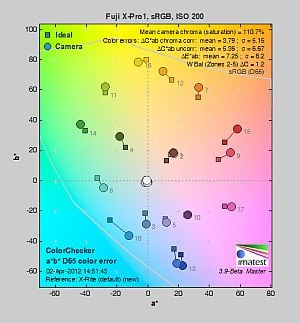
| In the diagram above, the squares show the original color, and the circles show the color that the camera captured. More saturated colors are located toward the periphery of the graph. Hue changes as you travel around the center. Thus, hue-accurate, highly saturated colors appear as lines radiating from the center. Mouse over the links to see results across the ISO range, and click on the links for larger images. | ||||
Saturation. The Fuji X-Pro1 produces images with fairly bright, pleasing color using standard, default settings. The camera pushes most colors by a small amount, red by a moderate amount, but undersaturates aquas and cyans by just a bit. Default saturation at ISO 200 is 110.7% (10.7% oversaturated), which is about average these days. You can of course tweak saturation and/or select a different film simulation mode. Mean saturation remained at about 110-111% up to ISO 1,600, but fell-off at higher ISOs, ending up at 97% at maximum ISO. Most consumer digital cameras produce color that's more highly saturated (more intense) than found in the original subjects. This is simply because most people like their color a bit brighter than life.
Skin tones. The Fuji X-Pro1 rendered Caucasian skin tones that were a touch on the pinkish side when white balance was adjusted to match the light source, because of the moderate push in reds. Still, results were quite pleasing, with a healthy look. (Here, too, the X-Pro1's saturation and/or film mode adjustments may come into play for some users, letting them tweak the color on skin tones, if they find the default rendering a bit too saturated for their personal tastes.) Where oversaturation is most problematic is on Caucasian skin tones, as it's very easy for these "memory colors" to be seen as too bright, too pink, too yellow, etc.
Hue. The Fuji X-Pro1 showed only a few small color shifts relative to the mathematically precise translation of colors in its subjects, and had excellent hue accuracy overall. Most noticeable were shifts in cyan toward blue, orange toward yellow, as well as some smaller shifts in yellow, green and purple. (The cyan to blue shift is very common among the digital cameras we test; we think it's a deliberate choice by camera engineers to produce better-looking sky colors.) Average "delta-C" color error after correction for saturation was only 3.79, which is excellent, one of the better CSC scores to date. Hue is "what color" the
color is.
Saturation Adjustment
The Fuji X-Pro1 has a total of five saturation settings available ("Low", "Medium Low", "Mid", "Medium High" and "High"), which the user manual simply calls "Color." That's not as many steps as most cameras, and as you can see the steps are pretty fine, making the effect very subtle except for reds. It had no effect on contrast, which is good.
| Saturation Adjustment Examples | ||
 |
 |
 |
| Low | Mid | High |
The table above shows results with several saturation settings including the default and both limits. Click on any thumbnail above to see the full-sized image.


Sensor
Exposure and White Balance
Indoors, incandescent lighting
Auto and Incandescent white balance were quite warm, but very good results with the Manual and 2,600K settings. No exposure compensation required.


Indoors, under typical incandescent lighting, color balance was quite warm using the Auto setting, with a fairly strong reddish cast. Results with the Incandescent white balance setting were also warm, with a yellow/orange cast, but Incandescent kept more of the mood of the lighting than the Auto setting. The Manual white balance setting was quite accurate and neutral, and the 2,600 Kelvin temperature setting produced similar results. The Fuji X-Pro1 required no exposure compensation here, while most cameras need about +0.3 EV for this scene. Our test lighting for this shot is a mixture of 60 and 100 watt household incandescent bulbs, a pretty yellow light source, but a very common one in typical home settings here in the U.S.
Outdoors, daylight
Very good color though slightly cool outdoors. Excellent exposure accuracy.

Outdoors, the Fuji X-Pro1 produced good color at default settings, just slightly on the cool side, so we preferred Manual white balance for our "Sunlit" Portrait shot. The Fuji X-Pro1 required no exposure compensation adjustment to produce fairly bright facial tones on the mannequin. Despite the bright appearance, there was only minor clipping of highlights in the white shirt, though specific channels were clipped in the flowers as is usually the case. Shadows contain very good detail, with low levels of noise. Most cameras require about +0.7 EV to produce a bright face in this shot, so the X-Pro1 did better than average here. Skin tones are pleasing, with a healthy-looking pinkish cast that's not too overdone. The Fuji X-Pro1 also did a great job exposing our Far-field shot, producing very few clipped highlights or lost shadows. Again, color was just a touch cool with the Auto white balance setting. See the Extremes: Sunlit section below to see how the X-Pro1's Highlight/Shadow Tone and D-Range settings deal with harsh lighting like this.
See full set of test images with explanations
See thumbnails of all test and gallery images
Resolution
Very high resolution, ~2,300 lines of strong detail from JPEGs, about the same from RAW.


Our laboratory resolution chart revealed sharp, distinct line patterns down to about 2,300 lines per picture height in the horizontal direction, and about 2,300 lines per picture height in the vertical direction as well. (Some may argue for higher, but lines start to merge at about 2,300 lines.) Complete extinction of the pattern didn't occur before the 4,000 line limit of our chart in both directions. Fuji's bundled Raw File Converter EX (based on SilkyPix) wasn't able to extract any more resolution from this high-contrast target, and it generated noticeable color moiré which was a bit of a surprise. The Fuji X-Pro1 on the other hand did an excellent job suppressing color moiré in its JPEG output here. Use these numbers to compare with other cameras of similar resolution, or use them to see just what higher resolution can mean in terms of potential detail.
See full set of test images with explanations
See thumbnails of all test and gallery images
Sharpness & Detail
Very good detail and sharpness overall, with only minor edge-enhancement artifacts appearing around some high-contrast subjects. Mild noise suppression is visible in the shadows at base ISO.


Sharpness. The Fuji X-Pro1 captures sharp, detailed images, though some minor edge enhancement artifacts are visible on high-contrast subjects such as the thicker branches and pine cones in the above left crop. Fine detail such as the smaller branches and pine needles however show very little edge enhancement. Excellent results here. Edge enhancement creates the illusion of sharpness by enhancing colors and tones right at the edge of a rapid transition in color or tone.
Detail. The crop above right shows low levels of luminance noise suppression, as the darker areas of the model's hair still show a pretty good amount of detail. Some individual strands do merge together when local contrast is low and as shadows deepen, but performance here is very good. The Fuji X-Pro1 does a great job at keeping chrominance noise low as well. Noise-suppression systems in digital cameras tend to flatten-out detail in areas of subtle contrast. The effects can often be seen in shots of human hair, where the individual strands are lost and an almost "watercolor" look appears.
 |
|
Demosaicing. As mentioned elsewhere in this review, the Fuji X-Pro1 doesn't use the standard Bayer 2x2 color filter pattern. The X-Pro1's 6x6 pattern is designed to reduce the occurrence of color moiré, which means a resolution-robbing low-pass (anti-alias) filter is not required. As you can see from the crops at right (magnified 2X) comparing the X-Pro1 to the Sony NEX-5N at ISO 200, the Fuji does a better job a avoiding color moiré and has better per-pixel sharpness. You can however see that the X-Pro1 struggles a bit with rendering the fine italic text, leaving what look to be small gaps and extra strokes in the letters, and some rough edges as well. Still, you have to look very closely to spot these errors and overall, the increased per-pixel sharpness and reduced color moiré really are worth the tradeoffs in our opinion.
RAW vs In-Camera JPEGs
As noted above, the Fuji X-Pro1 produces sharp JPEG images with very good detail at default settings. Let's see if we can extract more fine detail from RAW files without introducing additional sharpening artifacts:


In the table above, mousing over a link at the bottom will load the corresponding crop in the area above, and clicking on the link will load the full resolution image. Examples include (from left to right): an in-camera Fine JPEG at default settings, the matching RAW file processed through Fuji's Raw File Converter EX software (which is based on SilkyPix) at default settings, and another processed with RFC's in-application sharpening turned down to a minimum but sharpened in Photoshop using unsharp mask of 250% with radius 0.3 pixels.
As you can see, the Fuji Raw File Converter EX version at default settings is somewhat softer than the in-camera JPEG. (Color rendering is also slightly different which is not usually the case for bundled software but not a surprise since RFC is based on third-party software.) Increasing the sharpness helped a bit, but the resulting image doesn't really show much additional fine detail, so the camera is doing a pretty good job. We suspect Adobe Camera Raw will do better, but Adobe hasn't added support for the X-Pro1's RAF files at the time of writing.
ISO & Noise Performance
Excellent high ISO performance, with strong detail to ISO 3,200.
|
Default High ISO Noise Reduction
|
 |
 |
 |
| ISO 100 | ISO 200 | ISO 400 |
 |
 |
 |
| ISO 800 | ISO 1,600 | ISO 3,200 |
 |
 |
 |
| ISO 6,400 | ISO 12,800 | ISO 25,600 |
The Fuji X-Pro1's images are very clean and detailed up to ISO 800. Luminance noise "grain" is quite fine and tight, and there is very little sign of chrominance noise. At ISO 1,600, noise reduction efforts are little stronger as you'd expect, but fine detail is still very good. ISO 3,200 shows increased noise and blurring, but detail is still pretty good. At ISO 6,400, luminance noise is more obvious but it's still fairly fine-grained, and chrominance noise is well controlled. At ISO 12,800, there's a larger reduction in image quality compared to previous ISO steps, with more visible grain, blurring, noise reduction artifacts, and blotchy but fairly subtle chroma noise in the shadows. Fine detail at ISO 25,600 is pretty soft with lots of luminance noise, and chrominance noise in the shadows and midtones is much higher. Still, noise performance in JPEGs is excellent, probably the best we've seen from a 16-megapixel APS-C sensor, at least at higher ISOs.
We're pixel-peeping to the extreme here though, which isn't always representative of what you see in prints. As always, see the Print Quality section below for maximum recommended print sizes at each ISO.
Extremes: Sunlit, dynamic range and low light tests
Very high resolution with very good overall detail. Very good highlight retention and shadow detail. Excellent low-light performance.


Sunlight.
As mention previously, the Fuji X-Pro1 performed very well with the deliberately harsh lighting of this test; much better than average in terms of exposure. We preferred the default exposure overall, because exposures at higher exposure compensations were too bright with too many clipped highlights. While a few highlights were blown in the model's shirt and flowers at 0 EV (default exposure), the amount of clipping wasn't as high as many cameras we have tested. Shadow detail is very good, with low levels of noise except in the very deepest shadows. The Fuji X-Pro1 performed quite well here.
Because digital cameras are more like slide film than negative film (in that they tend to have a more limited tonal range), we test them in the harshest situations to see how they handle scenes with bright highlights and dark shadows, as well as what kind of sensitivity they have in low light. The shot above is designed to mimic the very harsh, contrasty effect of direct noonday sunlight, a very tough challenge for most digital cameras. (You can read details of this test here.)
Contrast Adjustment
The Fuji X-Pro1 does not offer a traditional contrast adjustment. Instead, it offers Shadow and Highlight Tone settings, which let you adjust contrast in highlights and shadows independently. There are five settings each: "Soft", "Medium Soft", "Standard" (default), "Medium Hard", and "Hard."
|
"Sunlit" Portrait Highlight and Shadow Tone Comparison
|
|
|
|
Highlight and Shadow Tone Settings: Highlight: Soft Highlight: Standard Highlight: Hard Shadow: Soft Shadow: Standard Shadow: Hard |
 |
|
Shadow and Highlight Tone. Above you can see the effects of three of the five settings for Highlight and Shadow Tone control on our high contrast "Sunlit" Portrait shot. Mouse over the links to load the associated thumbnail and histogram, and click on the links to visit the full resolution image. Note how the Highlight settings mainly affect the brighter portions of the image, while the Shadow settings impact the darker areas. Both settings can be used simultaneously, giving more flexibility than a single contrast setting.
| Far-field Highlight and Shadow Tone Comparison | ||
 |
||
Above, you can see the effect of the same Highlight and Shadow Tone settings on our Far-field shot.
|
"Sunlit" Portrait D-Range Comparison
|
|||
 |
 Histogram |
||
 Highlight Retention |
|||

Shadow Noise (levels boosted) |
|||
| D-Range Setting: | |||
| DR 100% (default) (ISO 200) |
DR 200% (ISO 400) |
DR 400% (ISO 800) |
DR Auto (ISO 200) |
D-Range is Fuji's name for their dynamic range enhancement technology. D-Range designed to preserve hot highlights, by exposing for highlights and then boosting mid-tones and shadows. There are three levels: DR100 100% (default), DR200 200%, DR400 400%, as well as an Auto mode. Mouse over the links above to load the corresponding thumbnail image, histogram, highlight and shadow crop. Click on the links to get to the full resolution images.
As you can see the images above, the Fuji X-Pro1's manual D-Range settings were very effective at retaining clipped highlights in our "Sunlit" Portrait shot, though the Auto setting did little. As they say, though, there's no free lunch: if you look closely at the full resolution images or the crops, you'll see that improved highlight retention comes at a cost of increased noise in the shadows. This is because the camera raises minimum ISO to 400 and 800 for DR 200% and 400% respectively. Still, even with the DR 400% setting (ISO 800), noise from the Fuji X-Pro1's sensor is low enough that it shouldn't be an issue for most applications. (Note that the shadow crops above have had levels adjusted in Photoshop significantly to reveal the increase in shadow noise.)
Above, you can see how the various D-Range settings affect our Far-field shot.
Face Detection
The Fuji X-Pro1 does not offer a face detection AF or AE mode which is a little odd for a camera that uses only contrast-detection AF, though we don't know if the camera employs either automatically.
Dynamic Range
A key parameter in a digital camera is its Dynamic Range, the range of brightness that can be faithfully recorded. At the upper end of the tonal scale, dynamic range is dictated by the point at which the RGB data "saturates" at values of 255, 255, 255. At the lower end of the tonal scale, dynamic range is determined by the point at which there ceases to be any useful difference between adjacent tonal steps. Note the use of the qualifier "useful" in there: While it's tempting to evaluate dynamic range as the maximum number of tonal steps that can be discerned at all, that measure of dynamic range has very little relevance to real-world photography. What we care about as photographers is how much detail we can pull out of the shadows before image noise becomes too objectionable. This, of course, is a very subjective matter, and will vary with the application and even the subject matter in question. (Noise will be much more visible in subjects with large areas of flat tints and subtle shading than it would in subjects with strong, highly contrasting surface texture.)
What makes most sense then, is to specify useful dynamic range in terms of the point at which image noise reaches some agreed-upon threshold. To this end, Imatest computes a number of different dynamic range measurements, based on a variety of image noise thresholds. The noise thresholds are specified in terms of f-stops of equivalent luminance variation in the final image file, and dynamic range is computed for noise thresholds of 1.0 (low image quality), 0.5 (medium image quality), 0.25 (medium-high image quality) and 0.1 (high image quality). For most photographers and most applications, the noise thresholds of 0.5 and 0.25 f-stops are probably the most relevant to the production of acceptable-quality finished images, but many noise-sensitive shooters will insist on the 0.1 f-stop limit for their most critical work.
 JPEG. The graph at right (click for a larger version) was generated using Imatest's dynamic range analysis for a Fuji X-Pro1 in-camera JPEG file with a nominally-exposed density step target (Stouffer 4110). At default settings and normal base ISO (200), the graph shows 11.5 f-stops of total dynamic range, with 7.89 f-stops of dynamic range at the High Quality level. Both Total and High Quality dynamic range scores are very good, close to the best JPEG output we've tested to date.
RAW. We normally use Adobe Camera Raw conversions when evaluating dynamic range in RAW files. There's little point to using the bundled converter which is based on SilkyPix, as results wouldn't be comparable to ACR. We hope to come back and add RAW dynamic range results after Adobe adds support for the X-Pro1's RAF files, though that may be quite a while since the Fuji uses a non-standard color filter array.
| 1 fc 11 lux |
1/2 fc 5.5 lux |
1/4 fc 2.7 lux |
1/8 fc 1.3 lux |
1/16 fc 0.67 lux |
1/16fc No NR |
|
|---|---|---|---|---|---|---|
| ISO 100 |
 2 s f2.8 |
 4 s f2.8 |
 8 s f2.8 |
 15 s f2.8 |
 30 s f2.8 |
 30 s f2.8 |
| ISO 200 |
 1 s f2.8 |
 2 s f2.8 |
 4 s f2.8 |
 8 s f2.8 |
 15 s f2.8 |
 15 s f2.8 |
| ISO 400 |
 0.5 s f2.8 |
 1 s f2.8 |
 2 s f2.8 |
 4 s f2.8 |
 8 s f2.8 |
 8 s f2.8 |
| ISO 800 |
 1/4 s f2.8 |
 0.5 s f2.8 |
 1 s f2.8 |
 2 s f2.8 |
 4 s f2.8 |
 4 s f2.8 |
| ISO 1600 |
 1/8 s f2.8 |
 1/4 s f2.8 |
 0.5 s f2.8 |
 1 s f2.8 |
 2 s f2.8 |
 2 s f2.8 |
| ISO 3200 |
 1/15 s f2.8 |
 1/8 s f2.8 |
 1/4 s f2.8 |
 0.5 s f2.8 |
 1 s f2.8 |
 1 s f2.8 |
| ISO 6400 |
 1/30 s f2.8 |
 1/15 s f2.8 |
 1/8 s f2.8 |
 1/4 s f2.8 |
 0.5 s f2.8 |
 0.5 s f2.8 |
| ISO 12800 |
 1/60 s f2.8 |
 1/30 s f2.8 |
 1/15 s f2.8 |
 1/8 s f2.8 |
 1/4 s f2.8 |
 1/4 s f2.8 |
| ISO 25600 |
 1/125 s f2.8 |
 1/60 s f2.8 |
 1/30 s f2.8 |
 1/15 s f2.8 |
 1/8 s f2.8 |
 1/8 s f2.8 |
Low Light. The Fuji X-Pro1 was able to capture bright images at the lowest light level with the lowest sensitivity setting (ISO 100), but like many cameras, the X-Pro1's auto exposure (metering) did not work well at lower light levels, requiring the use of manual exposure. Color balance looked quite good with the Auto white balance setting, just a touch cool at higher light levels, and a bit warm at lower. Noise is quite low up to ISO 3,200, and at higher ISOs noise grain is tight so detail remains very good, though chroma noise gets a little blotchy at the highest ISOs. We didn't notice any banding issues, nor where there any uncorrected hot pixels except with NR was turned off where you'd expect to see some (though there were very few).
The camera's contrast-detect autofocus system was able to focus on the subject down to below the 1/16 foot-candle light level unassisted, thanks in part to a really fast (bright) lens. Ironically, with the AF assist lamp enabled, the Fuji X-Pro1 was only able to focus down to about the 1/8 foot-candle level in our test because the AF lamp was actually too bright, overwhelming the autofocus system. This of course will depend a lot on subject distance, brightness and contrast, so you may find you need to enable or disable AF assist depending on the situation. Keep in mind that the longer shutter speeds here demand the use of a tripod to prevent any blurring from camera movement. (A useful trick is to just prop the camera on a convenient surface, and use its self-timer to release the shutter. This avoids any jiggling from your finger pressing the shutter button, and can work quite well when you don't have a tripod handy.)
How bright is this? The one foot-candle light level that this test begins at roughly corresponds to the brightness of typical city street-lighting at night. Cameras performing well at that level should be able to snap good-looking photos of street-lit scenes.
NOTE: This low light test is conducted with a stationary subject, and the camera mounted on a sturdy tripod. Most digital cameras will fail miserably when faced with a moving subject in dim lighting. (For example, a child's ballet recital or a holiday pageant in a gymnasium.) The Fuji X-Pro1 uses contrast-detect autofocus, as is found in most point & shoot cameras, so its low-light focusing ability is less than that of some SLRs with phase-detect systems. That said, though, the larger, more sensitive pixels of the X-Pro1's sensor do better under dim lighting than do the tiny pixels of most point & shoots, (A useful trick is to just prop the camera on a convenient surface, and use its self-timer to release the shutter. This avoids any jiggling from your finger pressing the shutter button, and can work quite well when you don't have a tripod handy.)
Output Quality
Print Quality
Print quality from the Fujifilm X-Pro1 is impressive, even as ISO rises.
 ISO 100 shots are excellent at 24 x 36 inches, though this is technically an extended ISO setting. Our troublesome red swatch is only slightly soft, but not bad by any means.
ISO 200 shots also look great at 24 x 36 inches.
ISO 400 shots are still stunning at 20 x 30 inches. It's pretty surprising how nice they look.
ISO 800 images look somewhat similar to the lower ISOs at 20 x 30 inches, but with a hint of luminance noise in the shadows. We'll call 16 x 20s good here.
ISO 1,600 images show a little more luminance noise at 16 x 20 inches, but are still quite good.
ISO 3,200 shots are still usable at 13 x 19, but enough noise and noise suppression appear that we prefer the 11 x 14-inch print size.
ISO 6,400 shots show more noise in the shadows, and noise suppression starts to encroach on solid colors when printed at 11 x 14. 8 x 10 inch prints look good.
ISO 12,800 images are usable at 8 x 10 inches, with good high-contrast detail, but the red leaf swatch is nearly featureless (a common outcome). We prefer the 5 x 7-inch print.
ISO 25,600 prints are usable at 5 x 7 inches, but the grainy shadows and powdery color looks better when printed at 4 x 6 inches.
Overall, the Fujifilm X-Pro1 with its stellar X-Trans sensor does incredibly well in the print department. From terrific 24 x 36 inch prints at low ISOs, to even producing a good 4 x 6 at 25,600, you can expect very nice print quality from the X-Pro1.
Testing hundreds of digital cameras, we've found that you can only tell just so much about a camera's image quality by viewing its images on-screen. Ultimately, there's no substitute for printing a lot of images and examining them closely. For this reason, we now routinely print sample images from the cameras we test on our Canon Pro9000 Mark II studio printer, and the Canon Pixma MP610 here in the office. (See the Canon Pixma Pro9000 Mark II review for details on that model.)
The images above were taken from our standardized test shots. For a collection of more pictorial photos, see our Fujifilm X-Pro1 Photo Gallery .
Not sure which camera to buy? Let your eyes be the ultimate judge! Visit our Comparometer(tm) to compare images from the Fujifilm X-Pro1 with those from other cameras you may be considering. The proof is in the pictures, so let your own eyes decide which you like best!
Performance
Timing and Performance
Mixed performance from the Fuji X-Pro1.
| Startup/Shutdown |
||
|
Power on |
~1.3 seconds
|
Time it takes to turn on and capture a shot. |
|
Shutdown |
~1.1 seconds
|
How long it takes camera to turn off before you can remove the memory card. |
|
Buffer clearing time |
13 seconds after 18
Large/Fine JPEGs* |
Worst case buffer clearing time. -- This is the delay after a set of shots before you can remove the card. |
|
33 seconds after 14
RAW files* |
||
|
37 seconds after 13
RAW+ L/F JPEG files* |
||
|
*Note: Buffer clearing times measured with a SanDisk Extreme Pro 45MB/sec 8GB SDHC card. Slower cards will produce correspondingly slower clearing times. Slow cards may also limit length of bursts in continuous mode. ISO sensitivity and noise reduction settings can also affect cycle times and burst mode performance.
|
||
Startup and shutdown time were quite slow at default settings compared to most SLRs, but reasonable for a CSC. The X-Pro1 has an optional Quick Start mode that can cut startup time in half according to Fuji, however we didn't test that mode. Buffer clearing times were very slow with a 45MB/s UHS-1 card, so you'll definitely want to get the fastest card you can afford.
| Mode Switching | ||
|---|---|---|
| Play to Record, |
~1.8 seconds
|
Time until first shot is captured. |
| Record to Play |
~4.2 seconds
|
Time to display a large/fine file immediately after capture. |
| Display |
~0.7 second
|
Time to display a large/fine file already on the memory card. |
Mode switching was also slow, especially record to play. Luke noted that the X-Pro1 would not got directly from startup to record, nor play to record. There's always a delay and a second shutter press needed.
| Shutter Response (Lag Time) | ||
|---|---|---|
|
Full Autofocus, |
0.369 second
|
Time from fully pressing shutter button to image capture, with the lens already at the proper focal distance setting. (All timing performed with the Fujinon XF 35mm f/1.4 R lens.) |
|
Full Autofocus, |
0.626 second
|
Time from fully pressing shutter button to image capture, with the lens already at the proper focal distance setting. |
| Continuous AF |
0.367 second
|
This mode usually shows no speed increase with our static subject; we have no way to measure performance with moving subjects. |
| Manual Focus |
0.176 second
|
For most cameras, shutter lag is less in manual focus than autofocus, but usually not as fast as when the camera is "prefocused". |
|
Prefocused |
0.053 second
|
Time to capture, after half-pressing and holding shutter button. |
The Fuji X-Pro1's autofocus speed was slightly below average for compact system camera these days. The Fuji X-Pro1 produced full-autofocus shutter lag (with the subject at a fixed distance) that ranged from 0.369 second using Area AF mode (center), to 0.626 second using Multi AF mode in our tests. Manual focus shutter lag was pretty fast, though, at 0.176 second. Prefocused shutter lag was quite fast, at only 0.053 second. This is much faster than most SLRs and faster than most CSCs as well, though not as fast as models with an electronic first curtain option.
To minimize the effect of different lens' focusing speed, we test AF-active shutter lag with the lens already set to the correct focal distance.
| Cycle Time (shot to shot) | ||
|---|---|---|
|
Single Shot mode |
0.77 second
|
Time per shot, averaged over 20 shots with no signs of slowing, 8 seconds to clear*. |
|
Single Shot mode |
0.77 second
|
Time per shot, averaged over 14 shots, 33 seconds to clear*. |
|
Single Shot mode |
0.75 second
|
Time per shot, averaged over 13 shots, 37 seconds to clear*. |
|
Early shutter |
Yes
|
Some cameras don't snap another shot if you release and press the shutter too quickly in Single Shot mode, making "No" the preferred answer. |
|
Continuous 6 fps |
0.19 second (5.25 frames per second);
18 frames total; 13 seconds to clear* |
Time per shot, averaged over buffer length of 18 frames. Then slows to 0.69s or 1.45 fps after buffer is full. |
|
Continuous 6 fps |
0.19 second (5.38 frames per second);
11 frames total; 26 seconds to clear* |
Time per shot, averaged over buffer length of 11 frames. Then slows to 1.93s or 0.52 fps after buffer is full. |
|
Continuous 6 fps |
0.18 second (5.42 frames per second);
10 frames total; 33 seconds to clear* |
Time per shot, averaged over buffer length of 10 frames. Then slows to 2.46s or 0.41 fps after buffer is full. |
|
Flash Recycling |
N/A
|
Flash at maximum output. |
|
*Note: Buffer clearing times measured with a SanDisk Extreme Pro 45MB/sec 8GB SDHC card. Slower cards will produce correspondingly slower clearing times. Slow cards may also limit length of bursts in continuous mode. ISO sensitivity and noise reduction settings can also affect cycle times and burst mode performance.
|
||
Single-shot cycle times are slightly faster than average for a CSC. We measured 0.77 second when shooting large/fine JPEGs or RAW files, and 0.75 second for RAW+JPEG files.
"Continuous 6 fps" mode speeds are good, ranging from 5.25 to 5.42 frames per second depending on the file type, though that's a bit below Fuji's 6 fps spec and slower than some other recent CSCs. The Fuji X-Pro1 also offers a "Continuous 3 fps" mode, but we didn't test that mode.
Full resolution buffer depths are good for JPEGs, at 18 frames with our difficult to compress target. You'll likely do better with typical subjects. When shooting RAW files, buffer depth dropped to 11 frames, and 10 frames with RAW+JPEG. Buffer clearing is very slow with our 45MB/s UHS-I card, at up to 33 seconds after 10 RAW+JPEG frames. Faster cards are however available.
| Download Speed | ||
|---|---|---|
| Windows Computer, USB 2.0 |
8,879 KBytes/sec
|
Typical Values: |
Download speeds were reasonably fast, quick enough that you probably won't feel the need for a separate card reader. (Note that this test was performed with a SanDisk Extreme Pro 45MB/sec SD card: Slower cards would likely show slower transfer times.)
Bottom line, the Fuji X-Pro1's performance was a mixed bag during our testing. Startup time and mode switching were sluggish, while autofocus speed was slightly below average these days. Prefocused shutter lag however was good, as were single-shot cycle times. Burst mode speeds were good, but buffer depths just so-so with RAW files. Buffer clearing was quite slow, so invest in a very fast card.
Battery
Battery Life
Below average battery life for a compact system camera at default settings, but you can conserve a lot of power by using the optical viewfinder.
| Operating Mode | Battery Life |
|---|---|
|
Still Capture,
(CIPA standard) |
300 shots
|
|
Still Capture,
(Fuji standard, optical viewfinder) |
Up to 1,000 shots
|
The Fuji X-Pro1 uses a custom rechargeable lithium-ion battery pack for power, and comes with both a single battery and charger. The CIPA-rated 300 shots per charge is below the capacity of most Compact System Cameras these days. (Fuji does not state which viewfinder was used to obtain that rating, but they claim up to 1,000 shots are possible with the optical viewfinder, according to their own testing methodology.) The X-Pro1 has a Power Save mode that improves battery life slightly (up to 350 shots), but Quick Start mode can reduce battery life substantially (down to 150 shots). Kudos to Fuji for allowing the user to tweak startup performance versus power consumption. As usual, though, we recommend getting a second battery for your X-Pro1 if you plan any extended outings.
The table above shows the number of shots the camera is capable of (on a fully-charged rechargeable battery), based on CIPA battery-life and/or manufacturer standard test conditions.
(Interested readers can find an English translation of the CIPA DC-002 standards document here. (180K PDF document))
Video
Check out the links below for more sample images, videos and image quality analysis:
- Fujifilm X-Pro1 Optics page (Crops from images shot with the camera's kit lens, if sold as a kit)
- Fujifilm X-Pro1 Sample Images page (Index to all standard test shots, with explanations)
- Fujifilm X-Pro1 Thumbnails page (Thumbnails of all shots, including RAWs, with EXIF data)
- Fujifilm X-Pro1 Gallery page (Regular photos taken with the Fujifilm X-Pro1)
High-definition video capture is pretty much de rigeur in this year's interchangeable-lens cameras, and essentially all the major manufacturers now provide some form of video capture in their compact system cameras. So, too, does the Fujifilm X-Pro1, although its feature-set is rather limited compared to many competitors at its price point. The result is that video feels a little tacked on; it clearly wasn't a primary focus of the design. With that said, we have to be fair: just a couple of years ago, the X-Pro1's video capabilities would've been impressive indeed. It's just a mark of how far the market has come that what so recently would have impressed now feels somewhat dated.
First, the good points: The X-Pro1 offers Full HD recording with stereo audio, and provides for both automatic and manual focus adjustment before and during video capture. You can change the focus mode, aperture, exposure compensation, white balance, and film simulation mode before capture starts, but not during recording. Thanks to its unique hybrid viewfinder, you have a choice of framing videos either on the LCD display, or with the camera to your eye.
So, what's missing? Well, there's no external microphone connectivity, nor any manual control over audio levels, or a wind cut filter function. The X-Pro1 also doesn't offer fully manual exposure control, nor can you adjust the shutter speed or ISO sensitivity for video capture; both are selected automatically. The frame rate cannot be changed, either; it's fixed regardless of resolution. Nor are there any standard-def modes offered, for when you just want a quick throwaway clip with minimal file size. These features are all fairly common at or below this price point. Also, X-mount lenses are all fly-by-wire, and unlike some from rivals, they're not optimized for silent autofocus drive. Additionally, the X-Pro1 doesn't have dedicated movie capture controls, so you must switch drive modes to get from still to movie capture, or vice versa.
Admittedly, we're perhaps being a little hard on the X-Pro1. Although it has enthusiast-level pricing that puts it on par with cameras offering more capable video capture, it doesn't necessarily compete with them directly. Instead, it offers a fairly unique proposition, and one that's more aimed at the still photographer than the videographer. The bottom line is that Fujifilm's X-Pro1 offers a somewhat limited video feature set, but likely enough to suffice for the target customer.
Fujifilm X-Pro1 Basic Video Specs
- Full HD 1,920 x 1,080 pixels (1080p) or HD 1,280 x 720 pixels (720p) at 24 frames per second, in H.264 MOV format
- Unique hybrid viewfinder automatically switches to electronic viewfinder mode for video capture, so you can frame on LCD or viewfinder
- Autofocus functions during movie recording, manual focus also available but fly-by-wire control means there's still focus motor drive noise
- Program or Aperture-priority exposure, set before recording starts
- Exposure compensation, white balance, and film simulation mode adjustments are available, all set before recording starts
- Stereo audio recording via built-in microphones, but with very little separation between channels
Fujifilm X-Pro1 Video: Image Size, Frame Rate, and Encoding
The Fujifilm X-Pro1 records at just two different video resolutions: either 1,920 x 1,080 pixels (aka Full HD / 1080p), or 1,280 x 720 pixels (aka 720p), with a fixed capture rate of 24 frames per second. No standard-definition modes are offered. The X-Pro1 records movies in H.264 format with stereo PCM audio, using an MOV container. No spec is provided for the sampling rate, though video players report 16-bit, 48 kHz, 768Kbps stereo audio, regardless of resolution.
The table below shows the specs for various video recording options.
|
Fujifilm X-Pro1 Video Options
|
||
|---|---|---|
|
High Profile MPEG-4 AVC/H.264 Format (.MOV files)
|
||
|
Resolution |
Frame Rate
|
Average Bit Rate
|
1,920 x 1,080 |
24 fps (progressive) |
12.6 Mbps
|
1,280 x 720 |
24 fps (progressive) |
8.4 Mbps |
As noted above, the Fujifilm X-Pro1 offers only one video recording format: MPEG-4 AVC/H.264. Compared to the older Motion JPEG formats still used in a few cameras, the X-Pro1's MPEG-4 file format is rather more efficient in its use of memory card space for a given image quality level, but seems to be a bit harder for older computers to read. Continuous movie recording is limited to 29 minutes, regardless of resolution. Fujifilm recommends use of at least a Class 4 Secure Digital card to avoid issues with write speeds during video capture.
Here are some examples of video shot with our sample of the Fujifilm X-Pro1:
|
Fujifilm X-Pro1: Video Samples
|
|---|
Fujifilm X-Pro1 Video-Mode Focusing
Consumer videographers and some enthusiasts will find the Fujifilm X-Pro1's ability to provide live autofocus during recording very useful indeed. Although pros and many advanced amateurs can "pull focus" (adjust the focus manually) while filming video, and indeed may well prefer to do so, considering focus to be another means of expressing their artistic vision, it's very much a learned skill, and something few people ever manage to do really well. Without live AF, consumers for the most part are reduced to only shooting subjects at a constant distance from the camera, or to having to settle for a lot of poorly-focused video. A lot of video-capable interchangeable-lens cameras are sold to consumers these days, and while having some video capability is certainly better than none, for most consumers to make full use of a video-capable camera it really needs to be able to focus on the fly.
It's great news, then, that the X-Pro1 offers autofocus during video capture, if desired. With that said, it's not the fastest contrast detection system we've seen, and there is some noticeable hunting around the point of focus. Also, although its X-mount is a ground-up design, Fujifilm's engineers don't seem to have particularly had video recording in mind during development. While some lenses for competing new mounts offer essentially silent focus adjustment, there is clear autofocus drive noise from X-mount lenses, and Fujifilm cautions in the user manual that this may be recorded on the audio track. Since X-mount lenses are fly-by-wire, you can't entirely avoid this noise by focusing manually, either. (Although you can adjust focus more slowly, to try and spread the noise out over a longer period, reducing its prominence somewhat.)
Fujifilm X-Pro1 Video Exposure Control
|
Fujifilm X-Pro1: Aperture Control / Depth-of-Field
|
|---|
|
Aperture-priority, f/1.4 |
Aperture-priority, f/16 |
Although many cameras these days offer separate controls for video capture, and allow movie recording from any exposure mode, the X-Pro1 bucks the trend. Instead, video capture is a separate drive mode, accessed by pressing the Drive button on the rear panel. Hence, it takes a moment to switch between still and video capture, or vice versa, making it less simple to grab a spontaneous, unexpected movie. You can program the Function button to directly access movie mode, but you still need to press the shutter button to begin recording.
Two choices of exposure mode are available, and they must be selected before capture starts: either Program, or Aperture-priority. It isn't possible to control shutter speed or ISO sensitivity for videos shot on the X-Pro1. Exposure compensation is available, but must be set before capture starts. Although the camera can adjust the exposure level to account for changes in scene brightness during capture, the videographer cannot intervene to change the compensation bias without stopping first recording.
As well as these variables, you can also adjust the white balance, and access what Fuji refers to as Film Simulation modes before capture commences. These aim to recreate the look of various Fuji film formulations from days gone by, as well as combinations such as black-and-white film with different color filters applied.
Fujifilm X-Pro1 Video: Audio recording
The Fujifilm X-Pro1 can record audio via an internal, stereo microphone, comprised of two separate microphones located on the top of the front panel, flanking the AF assist lamp. (Although we don't have an objective way to test this, the minimal separation compared to that of the stereo mic designs in some competing models seems like it may provide a lesser stereo effect.)
Fujifilm's only published spec for the X-Pro1's audio recording capability simply says "stereo", so we don't officially know the specification employed, although third-party players report 16-bit, 48 kHz, 768 kbps PCM stereo audio. Audio recorded with the camera's internal mic sounded quite clear, but although we do no tests to measure frequency response or sensitivity, we did feel that the X-Pro1's audio lacked presence. We also noticed that there was significant hiss in audio tracks recorded in quiet environments, perhaps a little worse than we've heard on competing models.
The camera's auto-gain system appears to do a good job of adjusting sensitivity as sound levels got louder or softer, with no evident "breathing" in transitions from high to low sound levels.
The X-Pro1 lacks external microphone connectivity, and unusually, doesn't even offer the ability to disable audio capture. Of course, it's a simple matter to strip the audio in post-processing.
Fujifilm X-Pro1 Movie Recording/Playback User Interface
The Fujifilm X-Pro1 makes movie recording simple, once you set the Drive mode to the Movie position: Simply press the shutter button on the X-Pro1's top panel, and the camera will start recording video.
Normally, this is where we'd list the Movie-mode menu items, but the X-Pro1 has no separate movie menu. In fact, the only menu item exclusively related to video recording is the choice of movie resolution (1,920 x 1,080, or 1,280 x 720 pixels), set using the Movie Mode option in the Shooting Mode menu.
Rolling Shutter Artifacts ("Jello Effect")
|
Fujifilm X-Pro1: Rolling Shutter Artifacts
|
|---|
Essentially every video capable digital SLR/CSC currently on the market exhibits some level of motion-related distortion called rolling shutter artifacts. These are caused because the image data is captured and then read off the chip sequentially by rows, rather than each frame's data being captured all at once. In the case of the Fujifilm X-Pro1, this means that image data for the last row of a given frame is captured and read out around 1/24th second after the data for the top row was captured. The effect on moving objects is like that of a focal plane shutter in an SLR, but more pronounced, because the video frame is read out much more slowly than the slit of a focal plane shutter moves across the sensor.
For a camera that scans video frames vertically (as all do that we're aware of), rolling shutter artifacts will be most noticeable for subjects that are moving rapidly side to side, or when the camera itself is being panned horizontally. Verticals in the scene will appear tilted to the right or left, depending on the direction of camera motion. As an example, consider the case of a camera being panned from left to right, with a flagpole or other vertical object in the middle of the scene when recording for a particular frame begins: If the top of the object was centered horizontally when the first line of the video frame is acquired, by the time the last line of the frame has been captured, the bottom of the object will have shifted to somewhere left of center: As a result, the vertical object would appear to be leaning to the right.
Computer Requirements for Viewing HD Video
A typical computer these days has little trouble dealing with still images, but high-definition video can be another matter. Depending on the file format involved, it can take a pretty beefy computer to handle HD-resolution video playback without stuttering or dropping frames. The MPEG-4 AVC / H.264 image compression used by the Fujifilm X-Pro1 is one of the more compute-intensive formats, and its maximum resolution of 1,920 x 1,080 pixels means there's a LOT of data in each frame to deal with. The net result is that you'll want a fairly recent computer to play the X-Pro1's Full HD video files, and a pretty powerful machine for Full HD video editing.
You can of course view your movies on a high definition TV via the HDMI output (cable optional). If you're still on a standard-def TV, though, you're out of luck, as the X-Pro1 doesn't offer any form of standard-def video output connectivity.
Pricing and availability
The Fujifilm X-Pro1 and the first three XF lenses went on sale in April 2012. Suggested retail price for the body is US$1,699.95. The XF 18mm f/2.0 and XF 35mm f/1.4 are both priced at US$599.95, while the XF 60mm f/2.4 macro is priced a little higher at US$649.95.