


Overview
Overview and Tech Info by Mike Tomkins
Posted 02/20/2013
Field Test by William Brawley
Posted 06/25/2013

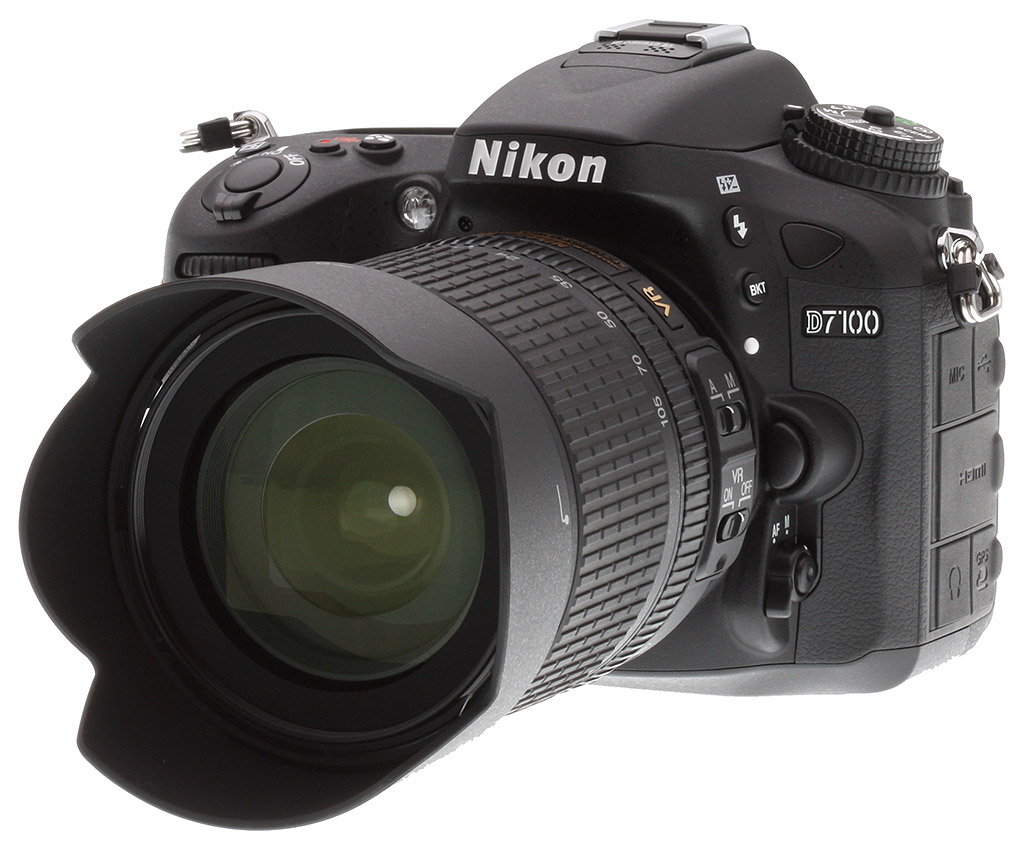
The Nikon D7100 is the manufacturer's new flagship APS-C (or in Nikon parlance, "DX") DSLR and sports several evolutionary upgrades over its predecessor, the D7000. These include increased sensor resolution to 24.1-megapixels, more image detail thanks to removal of the optical low-pass filter, a new 51-point autofocus system, a larger LCD display and much more.
Back in late 2010, Nikon debuted the D7000, an enthusiast DSLR that turned out to be very popular among enthusiast photographers the world over. Although it was in some ways an evolution of the earlier D90, there was enough differentiation to consider the Nikon D7000 to be the start of a new model line, and indeed the D90 has continued to sell alongside it right up to the present day.
With the Nikon D7100, that new model line is continued with a brand-new camera that shares much of the D7000's DNA, but with improvements throughout. Some of these draw features that debuted in Nikon's professional cameras, others borrowed from consumer models, and a couple of the most interesting developed uniquely for this camera. Among the key changes is a new, higher-resolution image sensor which looks to be related to the one used in the mid-level Nikon D5200; both share the same 24.1-megapixel resolution. Importantly, though, the D7100 lacks an optical low-pass filter, and so should yield better per-pixel detail than the D7000 and D5200. As in the D5200, it is paired with an EXPEED 3 image processor, which debuted in the pro-oriented Nikon D4. There's also a new 51-point autofocus system, based around a Multi-CAM 3500DX AF sensor as seen previously in the Nikon D300 and D300S. Other tweaks include a larger LCD display with white subpixels for extra brightness, a new OLED display inside the optical viewfinder, and improved movie capture feature set with stereo internal mic, headphone jack, and support for 1080p30 and 720p60 recording.
Walkaround. At first glance, though, the two cameras look pretty similar. Place the Nikon D7100 and D7000 side by side, and it doesn't take long to pick up on subtle adjustments around the newer camera's body. The most important feature of that body is retained, though: It's still weather-sealed to the same standard as the D300S and D7000. Like the latter, it bears magnesium-alloy panels top and rear, while the front, bottom, and sides are crafted from polycarbonate plastic. Overall, body width and height have increased by a tenth of an inch or so (2-4mm), while depth is reduced by under a tenth of an inch (1mm). Body-only weight has fallen by half an ounce (15g).

Looking at the front of the D7100, the first change you'll notice are softer, more flowing lines than in the previous camera. The handgrip has been re-profiled, and its leatherette wrap now stops short of the front control dial, while the red accent sits snug in between leatherette and metal. The front infrared remote control receiver is now a rounded-off triangle rather than an oval, and the three-hole microphone port has vanished altogether. (More on that in a moment.) The basic layout is otherwise unchanged from this angle, however.

Jump to the top deck, and the changes are a little more significant. Most notably, you see the newly-located microphone, which is now stereo and sits in front of the flash hot shoe. From this angle, you also see that there's an extra Effects mode on the Mode dial, and that the Movie record button has been shoehorned in between the combined Shutter button / Power lever, and the Metering mode button, much like on the D600. The mode dial now also has a center lock release button, also like the D600.

The most significant differences are to be found on the back and left sides, however. (The right side of the camera, incidentally, is essentially unchanged.) There are more controls on the rear of the camera, with an extra, configurable i-button added at the bottom of the button stack that lines the left side of the LCD panel. The Quality / Zoom In and ISO / Zoom Out buttons have also switched places with each other, a change that may take a little while for upgrading D7000 owners to get used to.
Moving across to the other side of the LCD panel -- which is slightly larger and now fills its cover glass without any black borders -- the leatherette trim piece on the right of the rear surface is much larger, spanning most of the vertical height of the camera. The D7000's six-hole speaker grille that sat between the AE-L / AF-L button and rear control dial has been replaced by a five-hole grille adjacent to the Info button, at the bottom right corner of the LCD panel. The separate Focus Selector lock lever of the D7000 is also gone, with its replacement now encircling the Multi-selector. Beneath this is a Live View button surrounded by a Still / Movie lever, as seen in the D600 and D800. (The D7000 had a Live View lever instead, with a Video button at its center.) Finally, the rear-panel infrared remote receiver moves near the bottom right corner of the rear panel, and the card access lamp sits between Multi-selector and Live View button.

On the left side of the Nikon D7100 body, the D7000's two connector compartment covers have been supplemented by a third, and the layout of the connectors underneath differs significantly. The top flap covers the stereo microphone and USB ports. Beneath the middle flap is a Type-C mini HDMI connector, which sits alone -- there's no longer any standard-definition video output connectivity in the D7100. The bottom flap covers a new addition, the stereo headset jack, along with an accessory terminal for GPS, wired remote controls, etc.
Shooting with the Nikon D7100
by William Brawley

The Nikon D7000, announced back in September 2010, was a huge success for Nikon, earning rave reviews from the press and users alike. So it seems that the D7100 has some big shoes to fill now that it replaces both the D7000 and the D300S to be Nikon's flagship APS-C camera. Nikon seems to be aiming this camera at advanced enthusiasts and semi-pros looking at a camera for high-resolution images -- as well as high-speed shooting with precision autofocus. As someone who's had experience photographing challenging subjects such as sports, air shows and wildlife, I was very excited to get my hands on this camera.
Now, I must admit that I've been a dedicated Canon shooter for the past five years after switching from Nikon in the burgeoning days of HD-DSLR video. My very first DSLR was a Nikon D80, which I found to be a pretty fantastic camera, but it didn't do video, so I eventually made the switch to the "other side" so to speak. It was fun to pick up a Nikon camera again.
 |
The lack of an optical low pass filter on the D7100's imaging sensor lets it capture more fine detail, albeit at the risk of incurring moiré. However, in most real-world shooting applications we didn't see any significant examples of moiré patterns showing up in our photos. (Unless we really pushed it; see further below for an example of unmistakable moiré on a patterned fabric.) |
Overall, I had a great experience shooting with this camera, although I wish I could have spent more time with some long Nikon telephoto lenses shooting sports or wildlife to really push some of the features of this camera to the limit. The 18-105mm f/3.5-5.6G VR kit lens made it a bit difficult to test the camera in this way. Overall, Nikon did a lot of things well with this camera, improving upon many of the already-great specs of the D7000. Nevertheless, I did find a few issues with both ergonomics and shooting capabilities that would make me hesitate if I were in the market to buy this camera myself.
Hand grip. The D7100's contoured hand grip is comfy and makes for a secure hold.
In the hand. One thing I love about most DSLRs is their size and weight. This might sound odd given today's tendency to have cameras that continue to get smaller and lighter -- and I'm not saying I want the heaviest camera all the time -- but I feel there's a nice balance between size, weight and comfort. For instance, I sometimes forgo a shoulder strap with my DSLRs, and I like the extra heft and contoured grip of a DSLR. I always know that there's a camera in my hands, and I'm less likely to drop it (so far, I've never dropped one of my cameras... knock on wood). The same can't be said for smaller compacts, which are usually flat and rectangular and can be awkward to hold.
Therefore, my immediate reaction upon holding the Nikon D7100 for the first time focused on the handgrip. From owning a Canon 7D, I am used to a nice, comfortable handgrip, and the D7100's is just as impressive. Hand holding the D7100 is very nice, and the materials and the ergonomics of the handgrip make the camera feel very secure. Also, there's a small indentation on the interior of the handgrip for your fingertips, and it provides for just a little bit of extra security and comfort. I wish my 7D had that! I compared the feel of the camera with the D7000, and the D7100 feels a bit more contoured and more comfortable to hold, with the handgrip filling more of my hand.
Although the specs of the D7100 indicate that it is only about 10% smaller than the 7D, I found that the difference was definitely noticeable. The D7100 feels smaller and my hands are closer together, but not overly so that someone with larger hands will feel cramped and uncomfortable. I did notice that my hands touched when gripping the camera and placing my left hand under the lens. If you do have very large hands, you might run into a situation where your knuckles rub up against the lens barrel. This probably won't be a problem with most DX or small prime lenses, but I noticed this with large-diameter lenses such as the new Nikon 80-400mm. I didn't notice any issue with the included 18-105mm f/3.5-5.6G VR kit lens, however.
Build quality. Not surprisingly, the D7100 has excellent build quality. Even with a combination of magnesium and polycarbonate plastic comprising the body rather than a single metal frame like the 7D, the D7100 still feels like one solid, quality machine. At the same time, the body and the lens together are fairly lightweight, and I highly doubt carrying this combo around on my shoulder or in my hands all day would be too tiring. Plus, the camera and kit lens altogether are pretty compact and can fit nicely into a small shoulder bag.

As for the 18-105mm kit lens, despite having a barrel completely made of plastic, it still felt pretty solid with smooth zoom action. The focusing ring, however, did feel a bit cheap. I found the autofocus to be decently fast and quiet, and the healthy range of focal lengths and the addition of Nikon's Vibration Reduction system make it a near-perfect all-around lens for its class. The VR system in this lens was near-silent, and is a nice feature to have at the longer focal lengths.
Now, as a Canon user I knew there would be things about the Nikon D7100 that would trip me up, and one of the big differences between Nikon and Canon cameras is the way you zoom and mount lenses. On a Canon camera, a clockwise turn zooms most, if not all, brands of lenses to the wider angle, whereas it's the opposite for Nikon. Similarly, lenses mount in a different manner between Canon and Nikon. With Canon, you mount a lens by aligning the dots at the top of the mount and rotate clockwise to lock it in. With Nikon, on the other hand, you align the lens mount dots at the 2 o'clock position and then rotate counterclockwise to lock the lens on the body. These are not major issues whatsoever with either camera, however it does take some getting used to since my motor memory kicks in after years of zooming and mounting lenses from another brand.

Camera operation. The first thing I do when I'm handed a new camera is ignore the instruction manual, dive right in and see how quickly I can get a basic understanding of the controls and functions simply by playing with it. Seeing as the D7100 is a DSLR, which has been my camera style of choice for many years, I was up and running with the Nikon in no time. I did have to resort to the manual for the more nitty gritty details, but for the most part the D7100 is a straightforward DSLR and very easy to use.
I liked the button and control layout of the D7100 in general, but there was one big issue I'll get to a bit further in. Compared to the D7000, there are only a few minor changes with the button layout on the back of the camera. If you are upgrading from the D7000, the learning curve regarding the controls should be a piece of cake.
Nikon moved the Video mode recording button up top near the shutter button, rather than in the center of the Live View switch, as it was on the D7000. Live View switch now toggles Live View from photo to movie mode, which is very similar to the Live View mode switch that Canon introduced on the 7D. Like many DSLRs, most of the day-to-day shooting functions are available at your fingertips without forcing you to dive into a convoluted menu system. This leaves you more time for shooting rather than fiddling.
I stumbled with the controls at first simply due to my unfamiliarity with Nikon DSLRs, but I quickly adjusted. On my 5D Mark II and 7D, there are buttons down the left side of the LCDs just like the D7100. But not surprisingly, the functions don't match up between brands. I found that I would hit a button expecting one result purely based on motor memory, only to quickly realize I needed to press a completely different button on the D7100.
 |
Notice how the viewfinder eyecup of the Canon 7D (right) juts out from the back of the camera whereas the way it's practically flush against the back of the camera on the Nikon D7100 (left). Because of this, and my left eye dominance, I found that my thumb hit my forehead when pressing the AE-L/AF-L button on the D7100, which was distracting and uncomfortable. |
An OVF eyepiece issue. Like I hinted at earlier, there was one big issue I found in terms of comfort and usability that I feel is a combination of button layout, eyepiece placement and ocular dominance (meaning which eye you use to look through the viewfinder). First, I noticed that the D7100's eyepiece is almost flush with the back of the camera. In comparison, my Canon cameras' eyepieces jut out about a quarter of an inch from the back of the body. Second, I like to use back-button focusing, which separates AF function from shutter button. Some cameras feature a dedicated "AF-ON" button for just this purpose, but the D7100 does not. However, you can customize the "AE-L/AF-L" button for this functionality very easily.

Button ergonomics. The D7100 (top) doesn't feature a separate "AF-ON" button like the 7D (button).
Everything was good to go, or so I thought. I am left eye dominant, which means I use my left eye to look through the viewfinder. Given that the D7100 body is slightly smaller and that the eyepiece is flush with the back of the camera, I found myself pressing my thumb against the center of my forehead every time I placed my thumb on the unnecessarily large and protruding AE-L-/AF-L button to activate autofocus. I found this a bit distracting and uncomfortable. I quickly disabled back-button focusing and went back to shooting with the default button layout.
I don't know if I would consider this a deal-breaker if I was considering buying this camera myself -- as this would seem to be such a minor issue -- but I noticed it right off the bat when I picked up the camera. It's definitely strange and frustrating, and something I don't experience at all with my Canons. Nikon could have simply made the AE-L-/AF-L button not jut out so much or made the eye cup protrude a bit more, and the problem would likely have been solved. I played with a Nikon D4 briefly, and noticed that this issue was non-existent thanks to a dedicated AF-ON button.
Mode dial. A feature I found to be very handy on the Nikon D7100 was the dual-leveled Mode Dial. Like most DSLRs, the main mode dial has the standard array of Program, Aperture Priority, Shutter Priority and Manual modes, as well as various scene and auto modes and a couple of customizable user settings. On the second level, below the main mode dial, there's quick access to Single shot, Continuous Shooting (both Low Speed and High Speed) and Self-Timer release modes. There is also a helpful Quiet Shutter-Release mode, which makes shooting in quieter locations supposedly less obtrusive by leaving the mirror up until the shutter button is released. Using this mode, I found there's definitely a difference in the shutter sound, but it's only a slight decrease in volume.
Lastly, there is a Mirror Lockup setting on the lower dial. This is handy for long exposure shots, HDR, macro photography or any other tripod-related shooting to help reduce camera vibrations from the mirror slapping up when taking a picture. In Canon DSLRs, the mirror lockup setting is buried in the menu system, and while I personally don't use mirror lockup at lot, I found this to be a nice feature to have at your fingertips.
Both of the D7100's Mode Dials are now locking, as opposed to just the lower level Release Mode Dial as on the D7000. A number of camera manufacturers are doing this nowadays, and I really like this feature as it prevents you from accidentally bumping the dial and switching modes by mistake.
Displays. I love the top LCD panel for viewing exposure settings and other information. It's one of the things I really enjoy about a larger-bodied DSLR as opposed to DSLRs such as the D5200 or Canon's Rebel series. It's so useful, and not to mention more battery friendly, than having the big 3.2" rear LCD on all the time.
Speaking of the rear LCD, when I do use for it tasks like reviewing photos or shooting video, it's a pleasure to use. The screen is bright and the colors look great, even in bright sunlight.
I am a fan of nice, large optical viewfinders, and the D7100 doesn't disappoint. I had no problems getting a nice full view of the image area thanks to the approximately 100% coverage. The exposure settings along the bottom edge were bright and easy to read. Compared to the Nikon D5200's 95% viewfinder coverage, the D7100 feels noticeable larger.
Autofocus controls. Something that threw me for a loop when I was handed the camera was how to change autofocus modes from Single-Point AF to Continuous AF. I looked everywhere, top of the camera, back of the camera, all of the buttons, in the numerous menus. Nothing. I saw the Autofocus-Manual Focus toggle switch, but didn't realize there was actually a button on that switch until I looked at the instruction manual.
I can't understand why Nikon would put the AF mode button down there. There's a nice plot of space between the Metering and Exposure Compensation buttons on top of the camera. Surely an often-used function such as AF mode would warrant a front-and-center placement for its control. However, this is something that experienced Nikon shooters probably wouldn't have a problem with.

Built-in flash. I tend to shoot the vast majority of my photos without flash, however there are times when having a built-in flash is very useful, particularly when you don't want to carry around a big external flash unit. The D7100's popup flash is small and opens with a quiet click, and allowed me to add just a bit of fill light (see the pink flower photo further down in the review) when I needed it. Another very handy feature is the D7100's ability to wirelessly control external Nikon Speedlight flashes using the built-in popup flash. Having this capability gives you a whole new range of creative lighting options, all without having to carry a bunch of extra gear.
Wireless capabilities. The review unit I received did not come with Nikon's WU-1a Wireless Mobile Adapter, so I couldn't test it out for myself. That said, we've tested the WU-1a system before on other Nikon models, and it works well in allowing you to send photos and video quickly over to a paired smartphone or tablet using the Nikon Wireless Mobile Utility app for iOS and Android devices (a free download). You can also use the WU-1a and the app for remote shooting. The D7100 is also Eye-Fi card compatible, letting you transmit photos and video to a computer wirelessly if you're using an Eye-Fi card for file storage.

Shooting with the camera. I took the Nikon D7100 out for a variety of shooting sessions for some nature photography, landscapes and bit of architectural photography. The big new features that Nikon is touting for this camera are the 51 autofocus points, up from 39 on the D7000, a 1.3x crop mode and a lack of an optical low-pass filter for high-detail photos, which is similar to the D800E.
The 51 AF points make customizing the composition of your shot very easy. You have a huge swath of the frame filled with AF points allowing you to finely determine where you want to focus. If you enable the 1.3x crop mode, even more of the frame area is filled with AF points, with the middle three rows reaching all the way out to the edges of the frame!
Although I typically shoot using the center AF point and use the focus-and-recompose method for composition, this doesn't work for every situation, and having the flexibility of an extremely high number of AF points ensures you can get autofocus exactly where you want it.

The D7100 also features a 3D Tracking AF mode which uses all 51 AF points and automatically changes the AF point as the camera tracks the subject if it moves around in the frame. This mode utilizes color information, brightness and distance information to help achieve focus and track the subject. However, I found this AF mode a bit finicky, particular with very small subjects like a bird up in a tree. Nikon warns that subjects like this, as well as those whose colors blend in with the background, can make 3D Tracking less effective. I have to say it was pretty cool to watch the AF point move in real-time across the viewfinder following your subject, and I found this AF mode to work really well for subjects that were large in the frame and had good color contrast with the background.
There are also a variety of dynamic AF modes in Continuous AF mode utilizing clusters of 9, 21 or all 51 AF points, allowing you to fine-tune how the Nikon D7100 assists with autofocus for moving subjects. For sports photography, I would use 9-point Dynamic AF or 21-point Dynamic AF, as I am pretty good at keeping the AF point on a running football player, for example. But I'm not perfect, and the 9-point and 21-point modes use the cluster of AF points surrounding the focus point in case the subject moves out from behind my selected AF point (but still within the array of 9 or 21 AF points). For smaller or more erratically-moving subjects like birds in flight, the 51-point mode utilizes the whole frame of AF points to help assist with autofocus.
At first, I was a bit confused about the difference between the D7100's 51-point Dynamic Area AF versus its 3D Tracking AF, as both modes let you choose the AF point manually and then track moving subjects using all 51 AF points. The difference is that 3D tracking, rather than using the AF sensor to track focus, utilizes Nikon's 3D Color Matrix Metering II sensor to recognize what your subject is and track it throughout the frame.
Overall, I found the AF performance of the Nikon D7100 with the 18-105mm kit lens to be fairly fast and accurate, although it's not the fastest lens to focus. Nothing really stood out to me in terms of problems achieving focus, and the AF system was very quiet, as was the VR system.
1.3x crop mode. Currently a Nikon exclusive to the D7100, the new 1.3x crop mode allows you to get even more reach with the DSLR, without too much of a sacrifice in image quality. A similar function is found in Nikon's full-frame cameras, which offer a DX Crop mode that narrow the image area to a 1.5x crop for a tighter field of view (and an increased frames per second shooting since the resulting images are smaller in size). But now on the D7100, you can reduce the image area down further than its ~1.5x standard crop to give you an effective ~2x crop compared to a full-frame camera. With the included kit lens, the 105mm normally gives you an equivalent field of view to a 158mm lens on a full-frame camera. With the 1.3x crop enabled, you now have the field of view of a 210mm lens!

I found the crop feature handy for a couple obvious reasons, most notably being able to zoom out further with. Although the 18-105mm kit lens was still too short for serious wildlife photography, I can see this being very beneficial when photographing far away wildlife with a long telephoto lens. The 24-megapixel sensor provides more than enough resolution to still pull out high quality images with the crop mode. With 1.3x crop mode, images are reduced to 15.36 megapixels.

Another benefit to the crop mode is that it saves space on your memory card with the subsequent reduction in image size. While the D7100 is pretty awesome to have dual SD card slots, if you're shooting at high frames per second for long periods of time, you'll fill your memory card(s) up in no time, particularly if you're shooting RAW or RAW+JPEG.
For single-shot photography, the Nikon D7100 does a wonderful job. The bright viewfinder makes it very easy to compose shots, and camera information displayed in the viewfinder is easy to read. When in 1.3x crop mode, the camera displays an inset frame guide to indicate the smaller size image. I found this both helpful and harmful. It's nice in that it not only helps you with composition, but it also serves as a reminder that 1.3x crop mode is activated. When I was first learning the camera, I was switching back and forth from regular DX mode to 1.3x mode, and there were a few times that I'd go to take a photo that didn't need the extra cropping, only to be reminded that I still had 1.3x mode enabled.
The downside I found is that the rest of the frame is still in view, meaning you still see the full DX-sized view through the viewfinder. And perhaps this is something you get used to as you use the camera more, but I found that I would instinctively compose shots with the full viewfinder and cutting parts of my subject off. This is not really a big deal, but it's something to be aware of, and it does help with tracking moving subjects.
Speed and buffer size. Speaking of frames per second, Nikon touts the D7100's ability to shoot up to 6 frames per second at full JPEG resolution. However, I was disappointed to find the D7100's buffer to be pretty shallow, really crippling the camera's high-speed capabilities.
In my in-the-field usage I could only manage about 5 full-resolution 14-bit RAW images in a burst before the buffer filled -- which falls in line with our lab testing -- but that was under the best of conditions. I'm talking ISO 100, daylight, with all forms of in-camera image correction such as Active D-Lighting, distortion control and high ISO noise reduction disabled. Most of the time, I was still only managing about 3 to 4 RAW images before the buffer would fill up. (At first, I thought it was simply because I was using slower memory cards, combined with shooting RAW+JPEG, but after switching to faster memory cards, as well as just shooting RAW, I realized it indeed did seem to be the buffer that was getting in the way.)
When I switched to JPEG only (or lower quality 12-bit RAW), I got more frames in the burst at the full 6 frames per second before the buffer filled. Alternatively, if I shot using the 1.3x crop mode, then the burst speed for RAW images did increase to a more robust 6 to 7 frames per second.
Personally, for my shooting style, I always shoot RAW. I never shoot JPEG. So, if I was looking for a camera for sports or action photography and I wanted to shoot at the highest quality image possible, the D7100 and its shallow buffer would probably be crossed off my list.
 |
The D7100 coupled with the kit lens produced nice images with great colors. While the kit lens has issues with distortion of some form at all focal lengths (you can see slight barrel distortion even at 45mm), it's easily correctable in many image editing software programs, or you can enable the D7100's Auto Distortion Control feature. |
Creative effects and filters. The Nikon D7100, like its sibling camera D5200, also features a handful of creative effects and exposure control settings. I'll be honest, I'm not one to use these kinds of feature very often, if at all. I like to shoot in RAW and post-process on the computer. The D7100 has a dedicated Effects mode on the main Mode dial. Switch over to that mode and use the rear thumb dial, and you can scroll through the following common effects: Night Vision, Color Sketch, Miniature Effect, Selective Color, Silhouette, High Key and Low Key.
The D7100 has the same Active D-Lighting and built-in HDR modes as the D5200 (see our Nikon D5200 review for some examples with the various effects and scene modes). I did shoot a few samples with the HDR mode, and was initially disappointed that it doesn't work in RAW mode -- only with JPEGs -- though I guess that's fairly typical for most in-camera HDR processing. Looking at the resulting shots at the various HDR effect intensity levels, I found that I couldn't tell much difference between a normal non-HDR shot compared to an HDR one. It was only until I cranked up the HDR effect to HIGH or HIGH+ that I began to see something happening. Sadly, the results were disappointing. The only really noticeable effect was a strange darkening of the sky with an unattractive haloing around the areas where the trees met the sky.

Image Quality. Given that the lens you use with an interchangeable lens camera impacts the image pretty significantly, it can be difficult to give a blanket assessment of everyday shooting on a DSLR's image quality. Having said that, I found the image quality of the D7100 to be excellent and the included kit lens to be decently sharp -- although as, you'd expect, it wasn't as sharp as higher-end glass or even an affordable prime. I tend to be a pixel peeper, and I get excited when I have tack-sharp images.
I felt the 18-105mm kit lens had a pretty good amount of resolving power, and with the 24 megapixel resolution of the D7100, images held a lot of fine details. I spent some time one afternoon photographing a group of ducks and geese by a local lake, and when magnifying in 100% on a RAW image, there was an impressive amount of fine details in the birds' feathers. The JPEG images take a hit in the fine detail quality since they are compressed image files, but I still felt that they kept a lot of detail, too.

Most of the shots I took were in bright sunny conditions, and I felt that colors looked natural and realistic. The dynamic range was pretty wide with highlights properly exposed while still keeping details in the shadows. Playing around with some RAW images in Adobe Lightroom 4, I was easily able to pull back minor blown highlights and lift crushed shadow detail without introducing too much noise.

As for noise, the D7100 fared really well with low-light shots. I took a couple test shots in a poorly lit kitchen at ISO 6400, and while there was a heavy amount of grain, there was hardly any color noise. Lightroom did a good job with noise reduction, and if I was shooting high school football, for example, in a poorly light stadium, I can see the D7100 doing well with high ISO shots. In general, if you can nail a proper exposure (or expose to the right just a bit), high ISO photos on the D7100 look very good.


Color moiré. The D7100 can show significant moiré with certain subjects, though we didn't run into it as often as expected.
The lack of an optical low-pass filter and its higher resolution sensor nudges the Nikon D7100 past the D7000 in terms of image quality, but not as much as I thought it would. With no low pass filter, I was curious to see if moiré and other aliasing artifacts would be an issue. As I mentioned earlier, I didn't notice any significant real-world shooting problems with moiré. That was, until I looked closely for artifacts within some patterned fabrics.
I used a desk chair in the office that has a densely patterned fabric, and shot it at ISO 100 with the kit lens at 18mm and f/8 where it's quite sharp, to see what would happen. Unsurprisingly, the Nikon D7100's image showed a pretty obvious moiré interference pattern (see 100% crop at right).
Like I mentioned, though, I didn't notice this in the normal, everyday outdoor shooting I did -- not even on architectural patterns or bricks -- but potential buyers of this camera should be aware of this issue.
Video. The D7100 expands upon the D7000's video capabilities with the addition of a 30p frame rate (25p for PAL shooter) at the 1920x1080 resolution. Engage 1.3x crop mode, and 60i is available (50i for PAL). Both cameras offer 1080p 24 frames per second video. The D7100 also has 720p 60 frames per second (50p for PAL) video.
Overall, the D7100's video image quality is very nice. Full 1080p video is quite sharp and the colors look great. Moiré patterns seemed very well controlled, which surprised me considering the camera's lack of an optical low-pass filter. I shot a quick test video against the notorious desk chair (the same used in the still moiré test above), and I only saw very faint "wavy lines" of moiré patterns at certain focal lengths or a certain distance away.
Continuous AF Sample Video 1,920 x 1,080, H.264, Progressive, 30 fps, High Download Original (71.1MB MOV) |
One of the really interesting features for the D7100's video mode is the optional full-time autofocus while recording. I was excited to try this, as it would be my first time experiencing video autofocusing in a DSLR, as opposed to a mirrorless interchangeable lens camera. Sure enough, it worked -- sort of. I found the video AF (called AF-F in the camera) to be fairly slow, and when refocusing to a new subject, the AF did a strange back-and-forth shuffle as it tried to decide if the subject behind the AF point was in focus.
Like other Nikon consumer and prosumer DSLRs, the D7100 has another quirk when it comes to video recording: you can't change the aperture while in movie mode. Indeed, if you are in Movie Live View mode, the aperture dial does nothing in Aperture-priority or Manual exposure mode. This is actually an improvement over prior models which led you to believe you could change the aperture on the fly, when in fact the actual lens aperture didn't change. (You can change the aperture just fine in still image Live View mode, though a new aperture setting does not take effect until the exposure is taken.) You can adjust the shutter speed both before and during movie recording in Manual mode, though. (Note: A firmware fix may be needed for 24p mode, depending on which firmware version shipped with the camera.)
As a Canon shooter, I found not being able to change the aperture during recording extremely odd and frustrating. I've shot my fair share of DSLR video, and in my experience, you don't change the shutter speed while recording, although I can see need to adjust it before recording. Aperture, on the other hand, seems like something that you would want to change quite a bit, and the D7100 makes you leave Live View mode altogether to adjust this setting. (Unless using a manual aperture lens.) This behavior is also seen on the D7000, but not on a Nikon D4, for instance.
On the plus side, the D7100 also features a built-in stereo microphone and a headphone jack for monitoring audio in Movie mode, which many users will like. (The audio level is adjustable before recording.)
Summary. The Nikon D7100 is an excellent DSLR that sits in a sweet spot in Nikon's lineup, as it combines a lot of professional-level features but at a respectable price point. With pro features such as dual memory card slots, dust- and moisture-resistant body construction, 51 autofocus points and a built-in 1.3x crop mode, the D7100 is a great choice for a current Nikon shooter ready to upgrade their camera -- definitely from, say a D3100 or D5100 -- or for an enthusiast photographer looking to jump into the DSLR camp.
It's unfortunately a tougher decision for those thinking about trading in their D7000. The bump up in resolution, the lack of a low-pass filter, the improved AF and the other bells and whistles would be nice to have, but the D7000 holds its own in many ways. The D7100 is an evolutionary, not revolutionary, upgrade from the D7000.
Otherwise, I only have a few minor nitpicks with the ergonomics and the issue with its small buffer size, and overall I think the Nikon D7100 is a very powerful, state-of-the-art camera that produces excellent images and is fun and easy to use.
Nikon D7100 Technical Info
by Mike Tomkins

Sensor. The Nikon D7100 digital SLR is based around an APS-C sized CMOS image sensor. (That's DX-format in Nikon parlance.) Effective resolution is 24.1-megapixels, and total resolution is 24.71-megapixels. Both figures are identical to those of the chip used in the D5200, a fairly strong indication that they're at least closely related. (And another hint in that direction is Nikon's description of the chip as "new" in its marketing materials for the D7100, rather than "newly-developed".) The sensor, which a teardown of the D5200 showed to be manufactured by Toshiba, offers a pretty big step forward in terms of sensor resolution since the Sony chip used in the D7000, which had an effective resolution of 16.2-megapixels.
There is at least one very important difference in the D7100's image sensor as compared to that in the D5200, however. Or more precisely, a significant difference in the way it's packaged. The D5200 -- as do most DSLRs -- overlaid its sensor with what's called an optical low-pass filter. What that does is to subtly, intentionally blur incoming light rays. This trades off a little fine pixel detail, but in the process reduces the incidence of jaggies and moiré / aliasing patterns. The Nikon D7100, says its manufacturer, offers enough resolution and technologies that combat these issues that it doesn't feel an optical low-pass filter to be necessary any more. So, while the D7100 does seem to share the same overall imaging pipeline as the D5200, it yields slightly better per-pixel sharpness than that camera.
To combat the effects of dust on the image sensor, Nikon has included its sensor cleaning function, which uses piezoelectric vibration at four different frequencies to shake dust from the sensor cover glass, just as done in the D7000.

Processor. Output from the updated image sensor is handled by Nikon's proprietary EXPEED 3 image processor, which was first seen in the pro-oriented D4, before arriving in the consumer-friendly D3200 and D5200. In the Nikon D7100, this combination provides six frames-per-second full-resolution burst shooting. Although that's unchanged from the speed provided by the D7000's EXPEED 2 CPU, it's nonetheless impressive, given that each shot contains almost 50% more pixel data. This can be boosted still further by cropping in-camera to 15.4-megapixel resolution, to a maximum of seven frames per second. Startup time is 0.13 seconds, and the shutter release lag is rated at 0.052 seconds to CIPA testing standards. Of course, these are all manufacturer ratings so they differ somewhat from our test results, but our shutter lag result of 0.054 seconds is very close!
Sensitivity. Despite its greatly-increased resolution, the D7100's sensitivity still ranges from ISO 100 to 6400 equivalents, and the upper end of the range is expandable to ISO 25,600 equivalent. That's exactly the same range offered by the Nikon D7000.
Auto ISO is smarter than the D7000's, as it's now able to take the current focal length into account for CPU lenses, to automatically determine the appropriate minimum shutter speed. You can of course still manually specify a minimum shutter speed, but the new Auto shutter speed setting is a welcome improvement when working with zoom lenses.

Optics. The Nikon D7100 provides a Nikon F-mount with autofocus coupling and contacts. That means it will autofocus with older "screw-drive" AF lenses, as well as with AF-S lenses that have their own focusing motor. The D7100's viewfinder also includes an electronic rangefinder indicator to determine focus status and even adjustment direction to assist manual focusing.
The Nikon D7100's lens mount includes an AI aperture ring connector, a little metal vane located just outside the lens mount flange (at about 1 o'clock), that interfaces with old AI Nikkor manual focus lenses. This engages with the aperture ring on AI-style Nikkor lenses, and lets the D7100 support aperture-priority metering mode and provide manual-exposure metering with them.
So, as you'd expect, the D7100 is compatible with almost every F-mount lens made since 1977, although some lens types will have a few limitations.
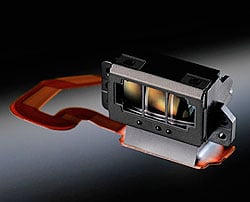
Autofocus. The D7100's autofocus system is based around a physical sensor we've seen a couple of times before. The Multi-CAM 3500DX phase detection autofocus sensor debuted in 2007's Nikon D300, and reappeared in 2009's D300S. It features an array of 51 autofocus points, with 45 of these in a 9 x 5 grid, spanned on each side by a column of three points. The center-most three columns of five points are all cross-types, sensitive to detail on both horizontal and vertical axes. That's a third more AF points than were offered by the D7000, incidentally; it had a total of 39 points, of which nine were cross types. As in the D7000, the Nikon D7100's autofocus sensor works in concert with the 3D Color Matrix Metering II sensor, allowing better focus tracking since this color information allows subjects to be better identified.
Although the sensor itself is the same as in the D300 and D300S, the overall AF module must be different though. Nikon says the D7100 AF system has an improved working range of -2 to +19 EV (ISO 100, 20°C/68°F), where the earlier cameras were limited to -1 to +19 EV. Also, one single point at the very center of the sensor can now operate all the way down to f/8, which is great news for teleconverter fans. The D7000, too, was limited to a -1 to +19 EV working range, incidentally, and so the D7100 betters its predecessor in low-light autofocus performance as well.

As in the D7000, you can opt to shoot either in focus-priority (the shutter won't release until a lock is achieved), or release-priority (the shutter releases as soon as possible, irrespective of focus lock). The Nikon D4's handy Focus Release mode -- which used focus priority for the first frame and then release priority for subsequent frames -- is not available in the D7100.
Of course, Autofocus Fine Tuning is still available, allowing you to compensate for lenses that front- or back-focus.
Contrast-detection autofocus, says Nikon, has also been improved in the D7100. Compared to its predecessor, the new model should focus faster and more accurately both in Live View and Movie modes. Sadly, there's no peaking display, something that can be incredibly handy when focusing manually in Live View on rival cameras.

Viewfinder. The Nikon D7100's optical viewfinder is very similar to that in the D7000, but with one key difference. Where the earlier camera placed an LCD panel in the viewfinder's optical path to provide indications and the on-demand grid display, the D7100 replaces this with an Organic LED display. This not only has better contrast -- Nikon says it also reduces energy consumption and improves responsiveness in low temperatures. And for better visibility, the settings information at the bottom of the display is now shown in white text on a black background.
Just like the D7000's viewfinder, that in the Nikon D7100 has 0.94x magnification, a 19.5mm eyepoint (-1.0m-1), and a ~100% rated coverage. The diopter adjustment range is rather narrower, though, at -2 to +1m-1. (The D7000 allowed a -3 to +1m-1 correction.)

LCD monitor. Beneath the optical viewfinder, the Nikon D7100 sports a new LCD panel that is larger, should be easier to see under harsh light, and is said to reduce power consumption versus a standard RGB LCD as well. The increase in size isn't dramatic, but it's worthwhile.

With a 3.2-inch diagonal and the same 4:3 aspect ratio, the new display has approximately 14% greater surface area than the 3.0-inch panel in the D7000. Its pixel resolution is unchanged, at 640 x 480 (307,200 pixels), but the dot count increases by a third, to 1,228,800 dots. That's because an extra white subpixel has been added alongside the existing red, green, and blue subpixels that make up each pixel. The white subpixel allows a brighter display overall, part of the reason for the greater visibility under harsh outdoor light. It also allows lower power consumption when you don't need the full display brightness, because for a given brightness level, the power-hungry LCD backlight can be turned down further than on a standard RGB display.
Nikon says the new display has a 1000:1 contrast ratio, and provides 72% NTSC coverage, or approximately 100% sRGB coverage. Further helping with glare under harsh ambient light, the LCD now has a gapless design that replaces the air between the LCD panel and the cover glass with resin that has approximately the same refractive index as the cover glass does. That reduces the reflections that cause glare, and means a more visible display with better contrast.

Metering. As we mentioned previously, the D7100 supports Nikon's 3D Color Matrix Metering II system, as did the D7000 before it. The system relies on a color metering sensor with a resolution of 2,016 pixels. The metering sensor ties into not only autofocus, but also the D7100's Scene Recognition System, and so helps optimize focus, exposure, flash control, and white balance variables.
As well as Matrix metering, the Nikon D7100 provides center weighted and spot modes. Just as in the D7000, working range for the metering system is from 0 to 20 EV for matrix and center-weighted metering, or 2 to 20 EV for spot metering (ISO 100, f/1.4 lens, 68°F / 20°C).

Exposure. The Nikon D7100's exposure mode options include Auto, Program, Aperture-priority, Shutter-priority, Manual, Flash Off, and Scene, as well as two User modes, and an Effects mode. Scene mode choices include portrait, landscape, child, sports, close-up, night portrait, night landscape, party/indoor, beach/snow, sunset, dusk/dawn, pet portrait, candlelight, blossom, autumn colors, and food. The silhouette, high key and low key options -- all Scene modes in the D7000 -- now move to the Effects mode, where they're joined by night vision, color sketch, miniature effect, and selective color. (And they apply both to stills and movies.) The two User positions are used to store and quickly recall camera setups for later use.

Just as in the D7000, available shutter speeds range from 1/8,000 to 30 seconds in 1/3 or 1/2EV steps, plus a bulb position for longer exposures. The Nikon D7100's shutter mechanism still has a rated lifetime of some 150,000 cycles. The shutter mechanism itself does differ, though. To support the higher-speed 7 fps crop mode we mentioned previously, the drive mechanism has been uprated.
Exposure compensation is available within a +/-5.0 EV range, in 1/3 or 1/2 EV steps. The Nikon D7100 also offers two or three frame exposure bracketing, with a step size between exposures of 1/3, 1/2, 2/3, or 1EV.
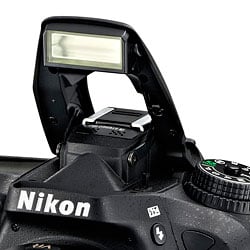
Flash. Of course, the Nikon D7100 still includes both a built-in, automatic-popup flash strobe, and an ISO 518 intelligent hot shoe for external strobes. Just like its predecessor, there's no built-in PC sync connector. Flash X-sync is at 1/250 second, but can be increased to 1/320 second at the expense of flash range.
The built-in flash is unchanged from that in the D7000, with 16mm coverage, and a guide number of 12 meters / 39 feet at ISO 100, 68°F / 20°C. It pops up automatically only in Auto and Scene modes; for other modes it deploys manually as requested. -3 to +1 EV of flash exposure compensation is available, and the Nikon D7100 also offers two to five frame flash exposure bracketing, with a step size between exposures of 1/3, 1/2, 2/3, 1, 2, or 3 EV. (That's both a larger range and step size than provided by the D7000.)
Creative Lighting System. The Nikon D7100 retains in-camera support for Nikon's Creative Lighting System and Advanced Wireless Lighting with the built-in strobe, and with compatible external strobes, as well as Auto FP high-speed sync and modeling illumination support for all Creative Lighting System-compatible strobes except the SB-400.

1.3x crop mode. As we alluded to previously, the Nikon D7100 includes a 1.3x crop function, something new to Nikon's DX-format SLR line. This functions similarly to the crop mode in the company's FX-format cameras, in that it increases the effective focal length by simply discarding data from the periphery of the image sensor, and yielding a lower-resolution image. The 1.3x crop mode works in addition to the 1.5x crop of the DX-format sensor, so when the crop mode is enabled, the 35mm-equivalent focal length is effectively double that marked on your lens. The bundled 18-105mm lens, for example, ordinarily has a field of view similar to a 27-158mm lens on a 35mm full-frame camera. Enable crop mode, and that becomes the equivalent of a 36-210mm lens, albeit with an attendant loss in resolution.
You could achieve the same thing by simply cropping the image in post-processing, but you'd forgo the space savings of the smaller images, as well as the improvement in burst speed and buffer depth. The latter can be dramatic: at full resolution, according to Nikon the D7100 can shoot just eight 14-bit raw or 33 JPEG fine frames in a burst. (We measured lower buffer numbers in the lab.) Enable the crop, and that jumps to 14 raw or 73 JPEG frames.

The crop mode, then, becomes an attractive proposition in two areas. The first is when you need the maximum possible burst-shooting frame rate and depth, and are willing to sacrifice on the wide-angle possibilities of your lens to achieve it. Enabling the crop gives you an extra one frame per second (7 fps max.), and a potentially massive increase in buffer depth along with it. The second is when your lens doesn't provide enough telephoto reach, and you know you'll be cropping the image anyway. (In which case, cropping in-camera saves storage space, improves your burst rate, and lets you decide on your final framing at capture time.)
As an added bonus, with the crop mode enabled, the autofocus array covers essentially the entire horizontal width of the image frame. That means you can track subjects around most of the frame, with only the a narrow strip at the top and bottom of the frame outside the area covered by AF sensors. And crop mode applies not only to stills, but also movies.

Creative. Of course, the D7100 includes the by-now typical features you'd expect on a modern Nikon DSLR: a multi-shot HDR function, Nikon's optional Active D-Lighting function (Auto or four strength presets), which tweaks the tone curve for more balanced exposures, and its Picture Controls function. The latter applies to both stills and movies, and offers six presets -- Standard, Neutral, Vivid, Monochrome, Portrait, Landscape -- plus the ability for the user to customize these and port settings between camera bodies. And then there are the effect functions we already mentioned, located right on the Mode dial and available for both stills and movies.
Spot white balance. Another unusual function of the Nikon D7100 is its spot white balance function. As you might expect, this operates similarly to spot metering, but for white balance. It's important to note that it's available only for live view shooting. By selecting your desired white balance point on the camera's display, you can set a custom white balance off a known neutral subject (or, if you're aiming to intentionally skew white balance for effect, off a subject of your chosen hue). The subject needn't fill most of the frame, as is typical for manual white balance measurement.

Movie. The Nikon D7000 featured high-def movie capture at up to 1080p resolution, but the D7100 goes several steps better. It offers Full HD movies too, but at a faster rate of up to 30 frames per second, instead of its predecessor's 24 fps. Drop the resolution to 720p, and you'll shoot at up to 60 fps, where the D7000 could manage only 30 fps. Enable the 1.3x crop mode, and you can manage an interlaced 1080i60 rate from 60 fps sensor data, as well.
Of course, there's still full-time contrast detection autofocus with face recognitions and tracking capability, and it has been improved in terms of speed and accuracy from that in the D7000. Single autofocus and manual focus are also possible. The Nikon D7100 also retains a dedicated Movie button, although as noted it's now better-located on the top deck, within quick reach of your index finger. As noted previously, creative effects and picture controls are all available for movie capture, too.
There's still an external mic jack, should you want to isolate your audio from autofocus drive noise. And movies shot without an external mic still include stereo audio, thanks to the new top-panel mic that replaced the D7000's front-panel mono mic. Better still, you can now monitor audio during capture, thanks to a stereo headphone jack, and you can quickly access mic levels to make adjustments within a 20-step range using the i-button.
Movies are saved with MPEG-4 AVC / H.264 compression and are limited to a maximum length of 29 minutes, 59 seconds. (Or, depending on the quality setting, a shorter limit of 20 minutes.) Once saved, you can edit movies in-camera, setting start and end points, and extracting frames as still images.

One function of the Nikon D7100's movie mode is particularly unusual: the ability to save 16:9 aspect still images as raw files. Note, though, that this applies only before video capture starts. Once video recording is underway, it must be stopped before you can capture a raw still.
Connectivity. As noted previously, the Nikon D7100 includes USB 2.0, Type-C Mini HDMI, microphone, headphone, and GPS / wired remote / wireless connectivity. The HDMI port allows for a simultaneous live view display, and supports uncompressed Full HD output for capture with an external device. It also supports the Consumer Electronics Control standard, for remote control of playback functions from an attached high-def TV's remote. The accessory port, meanwhile, is compatible with the GP-1 and GP-1A GPS receivers, and the MC-DC2 remote cord.

Wireless. If that's not enough, you can also opt for wireless or wired networking connectivity via external accessories. The Nikon D7100 supports the company's WU-1a wireless mobile adapter, with a 49-foot range, and able to transfer to or provide for remote control from Android and iOS devices with a free app. You can also use the Nikon UT-1 communications unit, with allows transfer to PCs or via FTP over an Ethernet network, as well as remote camera control.
The D7100 is also compatible with Nikon's affordable WR-R10 and WR-T10 radio remotes, which have a range of about 197 feet. Or you can control the camera from a really long way away -- up to 394 feet, or more if you daisy chain remotes -- using the new 2.4 GHz WR-1 transceiver. The latter also allows for all sorts of multi-camera configs using a variety of channels and groups, trigger delays, and so forth. It even lets you change some camera settings remotely.

Storage. The Nikon D7100 stores images on dual Secure Digital card slots, as did its predecessor. There's an important change, though. They're still compatible with the higher-capacity SDHC / SDXC cards, and the higher-speed UHS-I cards, but the latter have the potential for much greater speed. That's because the UHS-I mode supports a clock frequency of 198 MHz, versus just 81 MHz in the D7000. That allows a maximum transmission speed of 99 MB/second, versus the D7000's 40.5 MB/second. You'll need a UHS104-compatible card to support this speed, though. Oh, and Wi-Fi capable Eye-Fi cards are still supported, too.

Power. The D7100 draws its power from the same EN-EL15 lithium-ion rechargeable battery pack as did the D7000, but its battery life is rather more abbreviated. That's doubtless due to a combination of the extra processing power onboard, the extra resolution of the images (and power taken to process and store them), and the more sophisticated autofocus and other systems. The net loss is kept to a minimum with changes like the more efficient viewfinder overlay, and the new RGBW LCD panel, but there's only so much they can do. Battery life is still fairly generous, at 950 shots, but it lags the D7000 by about 100 shots (or 9.5%).
You can supplement battery life with a new portrait / battery grip, the Nikon MB-D15. This accepts either one EN-EL15 or six AA batteries, and supplements the pack mounted in-camera. (You can choose which will be drained first -- the internal pack, or the external batteries.) And external power is catered for with an EH-5b AC Adapter coupled to an EP-5B Power Connector.
Price and availability. The Nikon D7100 went on sale in the U.S. market starting in March 2013. It's available both body-only and in a kit with an AF-S DX NIKKOR 18-105mm f/3.5-5.6 VR lens. Retail pricing for the body-only variant is around US$1,200, unchanged from that of the D7000 at launch. With-lens pricing, though, is around US$1,500.
Nikon D7100 Image Quality Comparison
Below are crops comparing the Nikon D7100 to the Nikon D7000, Canon 7D, Nikon D600, Pentax K-5 IIs and Sony A77.
Note that these images are best quality JPEGs straight out of the camera, at default settings including noise reduction. Each camera was shot with one of our very sharp reference prime lenses.
Nikon D7100 versus Nikon D7000 at ISO 100
 |
 |
 |
 |
 |
 |
Nikon D7100 at ISO 100 |
Nikon D7000 at ISO 100 |
It's probably the comparison test most photographers want to see: the D7100 vs. its predecessor, the D7000. At base ISO, the D7100 is clearly the winner, pulling off more fine details in all three images, particularly with the mosaic and fabric swatches. |
|
Nikon D7100 versus Canon 7D at ISO 100
|
 |
|
 |
|
 |
Nikon D7100 at ISO 100 |
Canon 7D at ISO 100 |
The Canon 7D, a direct (if a bit long in the tooth) prosumer APS-C DSLR competitor, is no match for the D7100. The Nikon resolves much more fine detail, which is clearly evident in the mosaic and fabric images. |
|
Nikon D7100 versus Nikon D600 at ISO 100
|
 |
|
 |
|
 |
Nikon D7100 at ISO 100 |
Nikon D600 at ISO 100 |
The D7100 holds its own against its full-frame big brother, the D600. While the D600 appears to do slightly better in the mosaic image, the D7100 has a bit more shadow detail in the first image and does a bit better on the pink fabric swatch. |
|
Nikon D7100 versus Pentax K-5 IIs at ISO 100
|
 |
|
 |
|
 |
Nikon D7100 at ISO 100 |
Pentax K-5 IIs at ISO 100 |
The K-5 IIs is another APS-C camera without a low-pass filter, and overall it does a better job producing fine details as seen in the mosaic and red fabric. However, the D7100 produces a more accurate and less saturated pink color in the fabric. |
|
Nikon D7100 versus Sony A77 at ISO 100
|
 |
|
 |
|
 |
Nikon D7100 at ISO 100 |
Sony A77 at ISO 100 |
Again, the Nikon produces more details in the three comparison crops than the Sony A77, although the mosaic images look pretty close. As expected, the D7100 produces much more detail in the fabric swatch. |
|
Most digital SLRs and CSCs will produce an excellent ISO 100 shot, so we like to push them and see what they can do compared to other cameras at ISO 1600, 3200, and 6400. Recent advances in sensor technology have made ISO 1600 look a lot more like ISO 100, but there are still cameras whose quality starts to fall apart at this setting. We also choose 1600 because we like to be able to shoot at least at this level when indoors and at night.
Nikon D7100 versus Nikon D7000 at ISO 1600
 |
 |
 |
 |
 |
 |
Nikon D7100 at ISO 1600 |
Nikon D7000 at ISO 1600 |
At ISO 1600, the D7100 and its predecessor look pretty closely matched. There seems to be a bit more noise in the bottle image from the D7100, but the other two crops are fairly similar in terms of detail level. |
|
Nikon D7100 versus Canon 7D at ISO 1600
|
 |
|
 |
|
 |
Nikon D7100 at ISO 1600 |
Canon 7D at ISO 1600 |
The Nikon is again the clear winner versus the Canon, particularly in the mosaic and fabric crop images. There's still a recognizable leaf pattern in the D7100 fabric crop whereas in the Canon image, it's quite mushy. |
|
Nikon D7100 versus Nikon D600 at ISO 1600
|
 |
|
 |
|
 |
Nikon D7100 at ISO 1600 |
Nikon D600 at ISO 1600 |
Compared to the full-frame D600, the D7100 doesn't do too badly, however the D600 has the edge overall by producing more fine details in the mosaic and fabric swatch, as well as less noise in the bottle image. |
|
Nikon D7100 versus Pentax K-5 IIs at ISO 1600
|
 |
|
 |
|
 |
Nikon D7100 at ISO 1600 |
Pentax K-5 IIs at ISO 1600 |
In a surprise twist compared to the base ISO comparison, the D7100 wins in the fabric swatch image. However the K-5 IIs still produces more detail and less noise in the mosaic and bottle images. |
|
Nikon D7100 versus Sony A77 at ISO 1600
|
 |
|
 |
|
 |
Nikon D7100 at ISO 1600 |
Sony A77 at ISO 1600 |
The D7100 is the clear winner in this comparison with the Sony A77, producing more fine detail in all three images, particularly in the mosaic and fabric crops. |
|
Today's ISO 3200 is yesterday's ISO 1600 (well, almost), so below are the same crops at ISO 3200.
Nikon D7100 versus Nikon D7000 at ISO 3200
 |
 |
 |
 |
 |
 |
Nikon D7100 at ISO 3200 |
Nikon D7000 at ISO 3200 |
Again, the D7100 and the D7000 are pretty evenly matched at ISO 3200. There seems to be a bit more color noise in the D7000 bottle image, but there is a bit more grain from the D7100's. The D7100 appears to produce an ever-so-slightly better leaf pattern in the red fabric area. |
|
Nikon D7100 versus Canon 7D at ISO 3200
|
 |
|
 |
|
 |
Nikon D7100 at ISO 3200 |
Canon 7D at ISO 3200 |
The D7100 again trumps the 7D, most notably in the fabric swatch comparison. |
|
Nikon D7100 versus Nikon D600 at ISO 3200
|
 |
|
 |
|
 |
Nikon D7100 at ISO 3200 |
Nikon D600 at ISO 3200 |
|
The full-frame D600 shows its advantage in high ISOs by producing better images in all three comparisons. The mosaic and fabric crops from the D600 are noticeably more detailed.
|
|
Nikon D7100 versus Pentax K-5 IIs at ISO 3200
|
 |
|
 |
|
 |
Nikon D7100 at ISO 3200 |
Pentax K-5 IIs at ISO 3200 |
|
Similar to the ISO 1600 comparison, the Pentax does better in the bottle and mosaic images, but struggles to produce almost any detail in red fabric area of the third image.
|
|
Nikon D7100 versus Sony A77 at ISO 3200
|
 |
|
 |
|
 |
Nikon D7100 at ISO 3200 |
Sony A77 at ISO 3200 |
The D7100 has a bit more color noise in the bottle image than the Sony A77, but produces more detail in both the mosaic and fabric images. |
|
Detail: Nikon D7100 versus Nikon D7000, Canon 7D, Nikon D600, Pentax K-5 IIs and Sony A77.
 |
 |
 |
 |
 |
 |
 |
 |
 |
 |
 |
 |
 |
 |
 |
 |
 |
 |
| Nikon D7100 ISO 100 ISO 3200 ISO 6400 |
Nikon D7000 ISO 100 ISO 3200 ISO 6400 |
Canon 7D ISO 100 ISO 3200 ISO 6400 |
Nikon D600 ISO 100 ISO 3200 ISO 6400 |
Pentax K-5 IIs ISO 100 ISO 3200 ISO 6400 |
Sony A77 ISO 100 ISO 3200 ISO 6400 |
| Detail comparison. High-contrast details are often sharper as ISO rises, so they're worth a look as well. At ISO 100, the D7100 does really well, comparing similarly to the more expensive, full-frame D600. And compared to the D7000, the higher resolution and lack of an optical low-pass filter on the D7100 helps it pull out more detail. As ISO rises, the D7100 surpasses other APS-C cameras easily and compares pretty closely with the D600. Against the K-5 IIs, which also lacks an anti-aliasing filter, the D7100 does a better job overall with detail even though the K-5 IIs bested it in some of the earlier comparisons. | |||||
Nikon D7100 Print Quality Analysis
 The Nikon D7100 produces very nice 36 x 48 inch prints at ISO 100/200; makes a good 20 x 30 inch print at ISO 800 and a usable 5 x 7 at ISO 12,800.
ISO 100/200 images excellent with very fine details and bright, accurate colors up to 36 x 48 inches. Size down to 30 x 40 inches, and the prints look outstanding, while all the way up to 40 x 60 inches, prints are quite suitable for wall display.
ISO 400 allow for great prints up to 24 x 36 inches, while 30 x 40 inch prints are suitable for wall display.
ISO 800 images look good at 20 x 30 inches. There is some noise, but you only really notice it in the shadow areas, and even then, the grain is reminiscent of film grain and not present over the entire image. 24 x 36 inch prints are suitable for wall display.
ISO 1600 makes a good 13 x 19 inch print with plenty of fine detail. At 16 x 20, the image is a little too soft in finely detailed areas. Noise becomes quite noticeable in the shadows (although still appearing more like film grain), but noise in the highlights and midrange areas are very low. If the image was of a brightly-lit scene or exposed to the right, noise would be virtually unnoticeable.
ISO 3200 prints start to show a fair amount of noise, but it still produces a nice 11 x 14 inch print. As before, shadow noise is apparent, but otherwise the image looks great and fine details are still noticeable.
ISO 6400 makes a decent 8 x 10, but noise and a reduction in fine detail is taking its toll on the image quality, preventing us from calling anything larger acceptable. We were amazed by how well the D7100 handles the red fabric in our test shot even at this high ISO.
ISO 12,800 images are fairly heavy on noise at larger sizes, but can still produce a decent 5 x 7 inch print. Colors still look good, but fine detail, such as in the red fabric and mosaic area, is almost nonexistent.
ISO 25,600 images were difficult to call as there was quite a bit of noise and low detail, but colors were still acceptable in 4 x 6 inch prints. While we can't call a 4 x 6 acceptable at this ISO, it would certain do in a pinch for less critical applications.
The Nikon D7100's 24.1 megapixel APS-C sensor -- which also lacks an optical low-pass filter -- produces excellent results for very large prints at low ISO levels, all the way up to wall-mountable 40 x 60 inch prints at ISO 100 and 200. However, the DSLR is capable of images that retain wonderful colors and fine details even as the ISO increases. Like its sibling camera, the D5200, the D7100 was a difficult model to grade because its results in some areas exceeded our expectations. At higher ISO levels between 1600 and 12,800, we were on the fence many times on which way to call an acceptable size. Even at ISO 25,600 it was difficult. That's because the D7100 retained a great amount of fine detail at high ISOs, though we saw noticeable noise grain in the shadow areas. Even still, the noise on these high ISO prints reminded us of film grain and users might like the way this noise looks on such prints.
In the Box
The Nikon D7100 ships with the following items in the box:
- D7100 Camera Body
- AF-S DX NIKKOR 18-105mm f/3.5-5.6G ED VR lens (if in a kit)
- EN-EL15 Rechargeable Li-ion Battery
- MH-25 Quick Charger
- UC-E6 USB Cable
- AN-DC1 Strap
- DK-5 Eyepiece Cap
- DK-23 Rubber Eyecup
- BF-1B Body Cap
- BS-1 Accessory Shoe Cap
- Nikon ViewNX 2 CD-ROM
Recommended Accessories
- Extra battery pack (EN-EL15) for extended outings
- Large capacity SDHC/SDXC memory card. These days, 16GB is a good tradeoff between cost and capacity for a consumer DSLR, but if you plan to capture HD movie clips or shoot in RAW format, look for larger cards with Class 6 or faster ratings.
- Additional lenses, including a longer zoom for more telephoto reach and fast primes for landscapes and portraits
- SB-910, SB-700 or SB-400 Speedlight accessory flash
- Wireless Remote ML-L3 infrared remote
- Wireless Remote Controllers WR-1/WR-R10 (transceiver)/WRT10 (transmitter)
- Wireless Mobile Adapter WU-1a for connecting the D7100 to smart devices and sharing images wirelessly
- EP-5A Power Supply Connector and EH-5b AC Adapter for studio shooting
- MB-D15 Multi Battery Power Pack (grip)
- GP-1 GPS unit for geotagging
- Stereo microphone ME-1 to improve audio capture during video recording
- Camera bag
Nikon D7100 Conclusion
| Pro: | Cons: |
|---|---|
|
|
The Nikon D7100 is the company's new flagship APS-C DSLR that occupies a sweet spot in Nikon's lineup by providing a ton of advanced photographic capabilities at a reasonably affordable price point. It's a perfect model for photographers who are becoming more serious about their craft and want to step up from their consumer-oriented DSLRs. Compared to its predecessor -- the much beloved D7000 -- the D7100 offers a big jump in image resolution to 24 megapixels and delivers even more fine pixel-level details by removing the optical low-pass filter.
Some may consider this a blessing and a curse, as removing the OLPF not only gives you that extra boost in details, but also increases the risk of capturing more moiré pattern and false color artifacts in your shots. However, in real-world shooting, we didn't find significant moiré issues until we really started hunting for them in earnest, and even then we only found them when photographing fabrics with strong, distinct patterns.
Overall, the D7100 turned out fantastic images that were indeed more detailed and impressive than those from its predecessor, and even rivaled the output of a full-frame DSLR like Nikon's D600 at lower ISOs. And despite cramming more megapixels onto an APS-C-type sensor, the D7100 still performed great in low-light, high-ISO shooting, with a near-optimal balance of detail and noise suppression.
For shooters looking to photograph lots of moving subjects, the D7100's upgraded AF system features a pro-worthy array of 51-AF points that provides fairly fast and customizable AF tracking for a variety of shooting scenarios. (It's not the fastest prosumer DSLR we've tested -- that honor probably belongs to the Canon 70D, check out our D7100 vs 70D comparison for more -- but it's acceptable.) Additionally, the 51 AF points combined with the built-in 1.3x crop mode provides AF-point coverage for almost the entire frame.
Speaking of the 1.3x crop mode, it equals about 2x the reach of a 35mm camera, adding a little oomph to a just-too-short lens without sacrificing much resolution. We can see enthusiast sport and nature/wildlife photographers really enjoying the D7100 -- just be aware of the shallow buffer when capturing RAW images in continuous mode. It fills up quickly and can slow down high-speed shooting performance.
The Nikon D7100's movie capabilities get a big boost with additional frames rates, a built-in stereo microphone, a headphone jack, and uncompressed HDMI streaming. Such upgrades over the D7000 should make any photographer considering shooting video give a look at the D7100 -- although there are still some quirks to Movie mode such as no real-time aperture control that would make us weigh our options.
More compact than a pro model, the D7100 still boasts a solid, weather-sealed design with comfortable ergonomics that both consumers and enthusiasts will love. It's a lightweight and comfortable DSLR that features a wonderful, secure handgrip that makes it easy to carry with you all day long. The controls and button layout are easy to use and thoughtfully laid out, and overall it's a joy to shoot with.
The D7100 takes the well-respected D7000 and makes it even better. It's a no-brainer choice for those looking to step up from more consumer-oriented DSLRs. As for those considering upgrading from their D7000s, it's a more difficult choice. If you need a higher resolution image, more AF points and expanded HD video capabilities, then you should strongly consider this evolutionary upgrade. But be aware that though the D7000 is somewhat long in the tooth, it still holds up pretty well against the new breed of DSLRs. That said, no matter who's considering the D7100, we think it's a great camera geared for serious, almost pro-level photography and deserves a Dave's Pick.
Follow Imaging-Resource.com on Twitter!
Optics
Kit Lens Test Results
Zoom
Good performance with the 18-105mm VR kit lens.


The Nikon D7100 is available with a Nikkor AF-S DX 18-105mm f/3.5-5.6G ED VR (Vibration Reduction) lens, which has a better-than-average zoom ratio of about 5.8x for a kit lens. Sharpness was very good across most of the frame at full wide angle in our Far-field shot, though there's some blurring in the extreme corners and a hint of flare. There were low levels of coma distortion in the leaves at the corners, and chromatic aberration wasn't an issue because most of it is removed by the D7100's image processor (see below). Performance at 34mm was likewise quite good with only a touch of blurring in the corners. Results at full telephoto were better than average showing good detail near the center of the frame, though the periphery was a bit soft and not as contrasty. Again, chromatic aberration was well suppressed. (These shots were both taken at f/8. See below for how the lens performs at maximum aperture.) Overall, a good performance for a kit lens, and the built-in Vibration Reduction (Nikon's term for optical image stabilization) will come in handy for hand-held shots in low light.
Macro
A larger-than-average macro area, with soft detail overall. Flash throttles down well.


The Nikon D7100 captured a larger-than-average macro area with the standard 18-105mm kit lens, measuring 4.29 x 2.86 inches (109 x 73 millimeters). Detail was somewhat soft, and there was strong blurring in the corners. (Most lenses have some softening in the corners at macro distances.) Some vignetting is noticeable in the extreme corners as well. The Nikon D7100's flash throttled down for the macro area well, producing a good exposure.
Geometric Distortion
High levels of geometric distortion at wide angle and telephoto ends with the 18-105mm kit lens.
| Barrel distortion is 1.1 percent at 18mm |
 |
| Pincushion distortion is 0.7% at 105mm |
 |
The Nikon D7100's 18-105mm kit lens produced about 1.1 percent barrel distortion at wide angle, which is higher than average and noticeable in some of its images. At the telephoto end, pincushion distortion was 0.7%, also higher than average and noticeable in some images. This is the tendency for the lens to bend straight lines outward (like a barrel -- usually at wide-angle) or inward (like a pincushion -- usually at telephoto).
Auto Distortion Control
Low geometric distortion when Auto Distortion Control is enabled.
| Barrel distortion is 0.5 percent at 18mm |
 |
| Pincushion distortion is 0.1 percent at 105mm |
 |
The Nikon D7100 offers an Auto Distortion Control feature to reduce geometric distortion automatically with most recent Nikkor lenses. As you can see it worked reasonably well with the 18-105mm lens, reducing barrel at wide angle and pincushion distortion at telephoto significantly, though some of the image was cropped away in the process. Since this option is database driven, it's only available for Nikkor D and G-type lenses with certain optics such as Fisheye and Perspective Control lenses excepted. Auto Distortion Control is Off by default.
You can also apply Auto or Manual Distortion Control to JPEGs after the fact, in the Retouch menu. Manual mode works with images from any lens.
Chromatic Aberration and Corner Sharpness
Very low to moderately low C.A. in JPEGs, much higher in uncorrected RAW files. Some corners are soft at wide angle and telephoto with the kit lens.
| Maximum Aperture | |
 |
 |
| Wide, f/3.5: Upper right C.A.: Moderately low Softness: Slightly soft |
Wide, f/3.5: Center C.A.: Very low Softness: Fairly sharp |
 |
 |
| Tele, f/5.6: Upper left C.A.: Low Softness: Slightly soft |
Tele, f/5.6: Center C.A.: Very low Softness: A touch soft |
Chromatic Aberration. Chromatic aberration was moderately low at the full wide angle setting of the 18-105mm VR kit lens, suppressed by the D7100's image processor. (See below for crops from uncorrected RAW files.) At telephoto, chromatic aberration was even lower and hardly detectable. (This distortion is visible as a slight colored fringe around the objects at the edges of the field of view on the resolution target.)
Corner Sharpness. The Nikon D7100's 18-105mm VR kit lens produced slightly soft corners at full wide angle when wide-open, but performance here is actually pretty good. The top corners were slightly softer than the bottom, and some of the softness likely stems from C.A. suppression. Softness didn't extend very far in the frames, though, and the center was fairly sharp. At full telephoto, all four corners were also somewhat soft, with the upper left being the softest, but the lens is softer overall at telephoto than at wide angle.
Corner Shading. There's some moderate corner shading ("vignetting") at both ends of the zoom when wide-open, as indicated by the darker corner crops.
| f/8 Aperture | |
 |
 |
| Wide, f/8: Upper right C.A.: Moderately low Softness: Minor blurring |
Wide, f/8: Center C.A.: Very low Softness: Sharp |
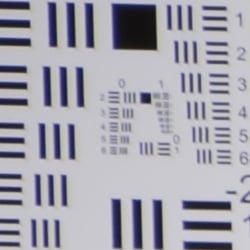 |
 |
| Tele, f/8: Upper left C.A.: Low Softness: Slightly soft |
Tele, f/8: Center C.A.: Very low Softness: A touch soft |
f/8. Stopped-down to an aperture of f/8, corner performance did improve at wide angle, while sharpness in the center also improved slightly. Corners were still a bit soft at telephoto, however, as was the center. Vignetting was negligible.
Uncorrected RAW
Much higher levels of C.A. at wide angle and telephoto from uncorrected RAW files.
| In-camera JPEG | Uncorrected RAW |
 |
 |
| Wide: Upper left C.A.: Low |
Wide: Upper left C.A.: High |
 |
 |
| Tele: Upper left C.A.: Low |
Tele: Upper left C.A.: Fairly low |
As you can see from the crops above comparing camera JPEGs (left) to uncorrected RAW files (taken at f/8), levels of lateral chromatic aberration are much higher in uncorrected RAW files, particularly at wide angle. The D7100's processor is doing a good job at suppressing lateral chromatic aberration in JPEGs.
Nikon D7100 Viewfinder
Viewfinder Test Results
Coverage
Very good accuracy from both the optical viewfinder and LCD monitor.


The Nikon D7100's optical viewfinder showed just over 99 percent coverage with our reference Sigma 70mm f/2.8 macro lens, which is quite good. In Live View mode, the Nikon D7100's LCD monitor showed closer to 100% coverage.
The images above were taken from our standardized test shots. For a collection of more pictorial photos, see our Nikon D7100 Photo Gallery .
Exposure
Color
Saturation & Hue Accuracy
Realistic saturation levels and good hue accuracy.
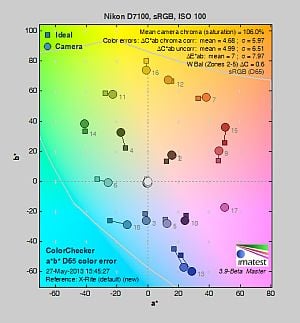 |
||
|
ISO Sensitivity
|
||
| 25600 | ||
| In the diagram above, the squares show the original color, and the circles show the color that the camera captured. More saturated colors are located toward the periphery of the graph. Hue changes as you travel around the center. Thus, hue-accurate, highly saturated colors appear as lines radiating from the center. Mouse over the links to compare ISOs, and click on them for larger images. | ||
Saturation. The Nikon D7100 pushes dark greens and blues by a moderate amount, but slightly undersaturates bright yellow, light green, and some cyans. Reds are also pushed a bit, but not as much as by most cameras. Overall saturation levels are good and remain fairly stable, climbing slightly as ISO increases. Mean saturation is 106% at base ISO, or 6% oversaturated. The average for consumer DSLRs is about 10% oversaturated, but 6% is closer to accurate, and it's easy to customize saturation to match your personal preference. Most consumer digital cameras produce color that's more highly saturated (more intense) than found in the original subjects. This is simply because most people like their color a bit brighter than life.
Skin tones. The Nikon D7100's Caucasian skin tones looked just about right when using Auto white balance in simulated daylight, while Manual white balance produced an overly pinkish cast. A very good job with Auto white balance. Where oversaturation is most problematic is on Caucasian skin tones, as it's very easy for these "memory colors" to be seen as too bright, too pink, too yellow, etc.
Hue. The Nikon D7100 did shift cyan toward blue, red toward orange, and light green toward yellow, but shifts were relatively minor. (The cyan to blue shift is very common among the digital cameras we test; we think it's a deliberate choice by camera engineers to produce better-looking sky colors.) With an average "delta-C" color error at base ISO of 4.68 after correction for saturation, overall hue accuracy was a bit better than average. Hue is "what color" the
color is.
Saturation Adjustment
The Nikon D7100 has a total of seven saturation levels available, three above and three below the default saturation, plus an Auto setting. This covers a pretty wide range of saturation levels, about as wide a range as you're likely to find photographically relevant, apart from special effects that are arguably better achieved in software. The fine steps between settings mean it's easy to program the camera to just the level of saturation you prefer. Saturation also doesn't impact contrast, which is ideal but not always the case.
| Saturation Adjustment Examples | ||||
 |
 |
 |
 |
 |
| -3 | -1 | 0 | +1 | +3 |
The table above shows results with several saturation settings, see the Thumbnails index page for more (look for the files named D7100OUTBSATx.JPG). Click on any thumbnail above to see the full-sized image.


Sensor
Exposure and White Balance
Indoors, incandescent lighting
Good color with the Manual and 2,600 Kelvin white balance settings, but overly-warm results with Auto and Incandescent. Negative exposure compensation required.


Indoors, under normal incandescent lighting, color balance was very warm and reddish with the Auto white balance setting. (We'd say unacceptably so, though unfortunately this is common.) The Incandescent setting was also too warm, this time with a yellowish cast. The Manual setting produced the most accurate results, if just a touch cool, and the 2,600 Kelvin setting which should match our lets wasn't far off. The Nikon D7100 required negative exposure compensation here (-0.3 EV) while the average compensation needed for this shot is +0.3 EV. Our test lighting for this shot is a mixture of 60 and 100 watt household incandescent bulbs, a pretty yellow light source, but a very common one in typical home settings here in the U.S.
Outdoors, daylight
Excellent results under harsh lighting, with very good handling of color and contrast, but the D7100 tends to overexpose a bit.
Outdoors, the Nikon D7100 performed well in terms of color and contrast, but it tended to overexpose a bit. The D7100 required only +0.3 EV of exposure compensation to keep the mannequin's face bright, while most cameras need about +0.7 EV. The camera did a very good job of holding onto detail in the highlights and deep shadows. We preferred skintones from the Auto white balance setting as they weren't overly pink as with Manual white balance. The Nikon D7100 slightly overexposed our far-field scene producing an image that was a bit too bright overall, but it still managed to avoid blowing most highlights. Color outdoors was generally quite pleasing.
See full set of test images with explanations
See thumbnails of all test and gallery images
Resolution
Very high resolution, ~2,600 to ~2,700 lines of strong detail from JPEGs, ~2,800 from ACR processed RAW files.


Our laboratory resolution chart revealed sharp, distinct line patterns down to about 2,600 lines per picture height in the horizontal direction and about 2,700 in the vertical direction. Extinction of the pattern didn't occur until around 3,600 lines in both directions. We were impressed that the D7100 did a pretty good job at suppressing color moire, as we expected to see much more from a camera without an anti-alias (optical low pass) filter.
We were able to do a bit better with NEF files processed through Adobe Camera Raw, with the horizontal and vertiical directions showing about 2,800 lines before aliasing artifacts started interfering with the pattern, while complete extinction of the pattern was extended up to the 4,000 line limit of our chart. As usual, color moire was more evident in the converted RAW files. Use these numbers to compare with other cameras of similar resolution, or use them to see just what higher resolution can mean in terms of potential detail.
See full set of test images with explanations
See thumbnails of all test and gallery images
Sharpness & Detail
Sharp images but with excellent detail. Very minor edge-enhancement artifacts visible on high-contrast subjects. Moderate noise suppression visible at base ISO.


Sharpness. The Nikon D7100 produced very sharp, detailed images overall when coupled with a sharp lens such as the Nikon 35mm f/1.8G prime used in the above left crop Some very minor edge enhancement artifacts are visible on high-contrast subjects such as the halos around the branches in the crop above left, but overall sharpness is excellent, thanks to the lack of an AA filter. Edge enhancement creates the illusion of sharpness by enhancing colors and tones right at the edge of a rapid transition in color or tone.
Detail. The crop above right shows some mild to moderate noise suppression, as the darker and lower-contrast areas of the model's hair show significant smudging where individual strands of hair merge. Still, a pretty good performance here for a 24-megapixel APS-C sensor. Noise-suppression systems in digital cameras tend to flatten-out detail in areas of subtle contrast. The effects can often be seen in shots of human hair, where the individual strands are lost and an almost "watercolor" look appears.
Raw vs In-Camera JPEGs
As noted above, the Nikon D7100 delivers very detailed JPEGs that are quite sharp when taken with a sharp lens. Even better detail can often be obtained from carefully processing RAW files, without additional sharpening artifacts. Take a look below, to see what we mean:



In the table above, mousing over a link at the bottom will load the corresponding crop in the area above. Examples include in-camera Fine JPEG, and a raw file processed through Nikon's ViewNX 2 software using default settings, and the same raw file processed with Adobe Camera Raw 7.4, then sharpened in Photoshop. We found that fairly light sharpening of 250% unsharp mask and a radius of 0.3 pixels worked well for the Nikon D7100's NEF files.
As you can see, results from a raw file converted with Nikon's ViewNX 2 software are very similar to the in-camera JPEG, and the software wasn't really able to extract more detail. Adobe Camera Raw was able to extract quite a bit more fine detail in the pine needles, but as expected, it also shows slightly higher noise levels as well as some moderate chromatic aberration (we did not attempt to correct it) that the camera suppresses in its JPEGs. Bottom line: When coupled with a sharp lens and good raw converter, the Nikon D7100 rewards raw shooters with astounding detail.
ISO & Noise Performance
Excellent detail versus noise handling up to ISO 1,600.
| High ISO Noise Reduction = Normal (Default) | ||
 |
 |
 |
| ISO 100 | ISO 200 | ISO 400 |
 |
 |
 |
| ISO 800 | ISO 1,600 | ISO 3,200 |
 |
 |
 |
| ISO 6,400 | ISO 12,800 | ISO 25,600 |
Noise levels are fairly low at ISOs 100 through 800, though some detail is lost to noise reduction and an increase in very fine noise "grain" can be seen as ISO increases. Some minor chroma noise is also visible in the darker shadows, even at base ISO, though it's not objectionable. At ISO 1,600 noise levels increase with a touch more blurring in the fine details and more visible grain, but detail is still quite good. ISOs 3,200 and 6,400 show larger steps in both luma and chroma noise and shadows begin to show noticeable color blotching. At ISO 12,800, luma noise is quite high and shadows take on a yellow tint. At the highest ISO, noise is very high with strong yellow and purple blotching in shadows and midtones.
Still, very good noise performance considering the 24-megapixel resolution, but it's no surprise that noise is higher at the pixel level than its 16-megapixel siblings. See our Print Quality analysis section below for recommended print sizes at each ISO.
A note about focus for this shot: We shoot this image at f/4, usually using one of three very sharp reference lenses (70mm Sigma f/2.8 macro for most cameras, 60mm f/2.8 Nikkor macro for Nikon bodies without a drive motor, and Olympus Zuiko 50mm f/2.0 for Four Thirds and Micro Four Thirds bodies). To insure that the hair detail we use for making critical judgements about camera noise processing and detail rendering is in sharp focus at the relatively wide aperture we're shooting at, the focus target at the center of the scene is on a movable stand. This lets us compensate for front- or back-focus by different camera bodies, even those that lack micro-focus adjustments. This does mean, though, that the focus target itself may appear soft or slightly out of focus for bodies that front- or back-focused with the reference lens. We know this; if you click to view the full-size image for one of these shots and notice that the focus target is fuzzy, you don't need to email and tell us. :-) The focus target position will have been adjusted to insure that the rest of the scene is focused properly.
Extremes: Sunlit, dynamic range, and low light tests
Very good detail in both highlights and shadows, very high resolution and good overall exposure. Very good low-light performance, capable of capturing bright images in near darkness.


Sunlight:
The Nikon D7100 handled the deliberately harsh lighting in the test above very well. Though contrast is a little high, shadow and highlight detail are both very good. The +0.3 EV exposure was best here, producing a bright face without blowing out many highlights. Despite the bright appearance, there are actually very few clipped highlights in the mannequins's white shirt. Some shadows are pretty dark, but remained fairly clean. The camera's contrast adjustment also did a good job of decreasing overall contrast without also affecting color saturation. (See below.) Still, be sure to use fill flash in situations like the one shown above; it's better to shoot in the shade when possible.
Because digital cameras are more like slide film than negative film (in that they tend to have a more limited tonal range), we test them in the harshest situations to see how they handle scenes with bright highlights and dark shadows, as well as what kind of sensitivity they have in low light. The shot above is designed to mimic the very harsh, contrasty effect of direct noonday sunlight, a very tough challenge for most digital cameras. (You can read details of this test here.)
Dynamic Range Analysis
A key parameter in a digital camera is its Dynamic Range, the range of brightness that can be faithfully recorded. At the upper end of the tonal scale, dynamic range is dictated by the point at which the RGB data "saturates" at values of 255, 255, 255. At the lower end of the tonal scale, dynamic range is determined by the point at which there ceases to be any useful difference between adjacent tonal steps. Note the use of the qualifier "useful" in there: While it's tempting to evaluate dynamic range as the maximum number of tonal steps that can be discerned at all, that measure of dynamic range has very little relevance to real-world photography. What we care about as photographers is how much detail we can pull out of the shadows before image noise becomes too objectionable. This, of course, is a very subjective matter, and will vary with the application and even the subject matter in question. (Noise will be much more visible in subjects with large areas of flat tints and subtle shading than it would in subjects with strong, highly contrasting surface texture.)
What makes most sense then, is to specify useful dynamic range in terms of the point at which image noise reaches some agreed-upon threshold. To this end, Imatest computes a number of different dynamic range measurements, based on a variety of image noise thresholds. The noise thresholds are specified in terms of f-stops of equivalent luminance variation in the final image file, and dynamic range is computed for noise thresholds of 1.0 (low image quality), 0.5 (medium image quality), 0.25 (medium-high image quality) and 0.1 (high image quality). For most photographers and most applications, the noise thresholds of 0.5 and 0.25 f-stops are probably the most relevant to the production of acceptable-quality finished images, but many noise-sensitive shooters will insist on the 0.1 f-stop limit for their most critical work.
JPEG. The graph at right (click for a larger version) was generated using Imatest's dynamic range analysis for an in-camera Nikon D7100 JPEG file with a nominally-exposed density step target (Stouffer 4110). At the base ISO of 100 (the optimal ISO), with Active D-Lighting set to Off and default Contrast setting, the graph shows 12.4 f-stops of total dynamic range, with 8.41 f-stops at the "High" Quality level. These are very good results for an APS-C model, especially a high-resolution model like the 24-megapixel D7100, with its smaller photosites. In comparison, the 16-megapixel D7000 scored 7.97 at the highest quality level. Note though that this measurement has a margin of error of about 1/3 f-stop, so differences of less than 0.33 can be ignored.
RAW. The graph at right is from the same Stouffer 4110 stepchart image captured as a raw (.NEF) file, processed with Adobe Camera Raw using the Auto setting and tweaking from there. As can be seen, the score at the highest quality level increased 1.69 f-stops from 8.41 to 10.1 f-stops, while total dynamic range increased 0.7 f-stops to 13.1. Again, these results are remarkable, matching the D7000's 10.1 f-stops at the highest quality level, despite the smaller photosites. It's worth noting here is that ACR's default noise reduction settings reduced overall noise somewhat (see the plot in the lower left-hand corner) relative to the levels in the in-camera JPEG, which would tend to boost the dynamic range numbers for the higher quality thresholds.
Contrast Adjustment
We really like it when a camera gives us the ability to adjust contrast and saturation to our liking. It's even better when those adjustments cover a useful range, in steps small enough to allow for precise tweaks. Just as with its saturation adjustment, the Nikon D7100's contrast setting offers seven levels, plus an Auto setting.
| Minimum Contrast | |
 |
 |
| Contrast set to lowest, +0.3 EV |
Contrast set to lowest, 0 EV |
At its lowest contrast setting, the D7100 did a very good job of preserving highlight detail and bringing out shadow detail. Highlight retention was improved, but the contrast setting had a larger impact on opening up the shadows, though the yellow push we've seen in the shadows of these shot is more apparent. The lower contrast setting opened-up shadows in our far-field shot as well, without making the image too flat looking. Overall, very good results here.
| Contrast Adjustment Examples | ||||
|
 |
 |
 |
 |
| -3 | -1 | 0 | +1 | +3 |
The series of shots above shows results with several different contrast adjustment settings, showing the minimum step size around the default, as well as both extremes. While you can see the extremes, it's hard to really evaluate contrast on small thumbnails like these, click on any thumbnail to go to the full-size image.
Nikon's contrast adjustment is that it has very little effect on saturation. Contrast and saturation are actually fairly closely coupled, it's a good trick to be able to vary one with out the other changing as well. As usual, Nikon did a very good job here.
Active D-Lighting
Active D-Lighting attempts to preserve detail in both highlights and shadows in high-contrast situations, while maintaining moderate levels of contrast. The series of shots below show the effect of the various Active D-Lighting settings available on the Nikon D7100 on our high-contrast "Sunlit" Portrait scene. Note that Active D-Lighting is different from the touch-up menu's D-Lighting, as it is performed during image capture instead of after. (It does affect only JPEG images though, Nikon very properly doesn't apply tonal adjustments like this to RAW file data. NEF files, however, are tagged so that Nikon software can automatically apply the effect when converted.)
|
"Sunlit" Portrait Active D-Lighting (+0.3 EV)
|
|
 |
ADL Settings: Off (Default) Auto Low Normal High Extra High |
 |
|
Mouse over the links to see how the various levels of Active D-Lighting affects our "Sunlit" Portrait shot at default exposure. Click on a link to get to the full-res image. (Active D-Lighting's effect can be a little subtle in shots like those above, so we decided to use a mouse-over to better show how each setting compares to Off.)
When Active D-Lighting is enabled, the camera usually for the highlights in an attempt to preserve them, then adjusts the tone curve to bring the midtones and shadows back up to produce an image that doesn't look underexposed. Here, we can see Active D-Lighting performed as expected, with higher settings toning down more highlights, while all settings boost shadows.
See below for how Active D-Lighting worked on our Far-field shot.
| Far-field Active D-Lighting (0 EV) | ||
 |
||
Here are the results with our Far-field shot. The D7100's Active D-Lighting worked well here, too. As you can see, Active D-Lighting brought up shadow detail while holding on to more of the highlights. The Auto setting did a pretty good job here.
HDR Mode
The D7100 is only the third Nikon DSLR offering an in-camera high-dynamic-range imaging function (the D5100 and D5200 were the first), something we've seen in a number of DSLRs from competing manufacturers. When enabled, the D7100 captures two images with one push of the shutter button, one underexposed and one overexposed and combines them in-camera to produce a high-dynamic-range JPEG. (RAW format is not supported). We don't believe the Nikon D7100 performs any micro-alignment of the two images even though the user manual warns of possible cropping. If it is, it can only correct for very small amounts of camera movement between shots, and so Nikon recommends the use of a tripod. Obviously moving subjects should also be avoided.
|
"Sunlit" Portrait HDR (+0.3 EV)
|
|
|
|
HDR Settings: Off (Default) Low Normal High Extra High Auto |
|
|
Unlike the Nikon D5100 which allowed you to set the exposure differential between the two images from 1, 2 or 3 EV, and also adjust the amount of "smoothing" that is applied to the boundaries between the two images with selections of Low, Medium and High, the D7100 takes a simpler approach offering just four strengths in addition to Auto. Mouse over the links above to see how various levels of HDR affects our "Sunlit" Portrait shot and click on a link to get to the full-res image. Again, because of the underexposure issue, these aren't very good examples, but you can still see higher levels make quite a difference to the overall exposure by opening up shadow detail but they can lead to artificial looking shadows around bright objects or halos and glowing around dark ones. Colors can also be adversely affected in HDR mode, such as a drop in saturation. Still, it's a useful feature for capturing static scenes with dynamic range that exceeds the sensor for those not willing to use manual HDR techniques (bracketing exposure and then combining images while post-processing).
| Far-field HDR (0 EV) | ||
|
|
||
Here are the same HDR settings with our Far-field shot. Again, some settings do a good job of taming hot highlights while bringing up some of the shadows and deeper midtones. You can also see ghosting in the tree branches and leaves from movement between the exposures caused by wind, as well the uneven and artificial-looking exposure when using higher settings.
| Face Detection | ||
|
 |
 |
| Off Aperture-priority 0 EV |
Portrait Auto mode 0 EV |
Live View with Face-priority AF 0 EV |
Here, we can see the effect of the Nikon D7100's full Auto mode which selected Portrait Scene mode, as well as face detection enabled in Live View mode. As you can see from the shots above, the Portrait Scene mode made an improvement to exposure versus Aperture-priority at f/8 at 1/60s, reducing overall contrast and lightening shadows, though noise is a bit higher as it boosted ISO sensitivity to 400. Portrait mode also selected a wider aperture of f/5.6 for better subject isolation, and a faster shutter speed of 1/500s to avoid subject motion blur. In Live View using Aperture-priority, Face-priority AF mode made only a small difference by using a slightly slower shutter speed of 1/50s.
| 1 fc 11 lux |
1/2 fc 5.5 lux |
1/4 fc 2.7 lux |
1/8 fc 1.3 lux |
1/16 fc 0.67 lux |
1/16fc No NR |
|
|---|---|---|---|---|---|---|
| ISO 100 |
 2 s f2.8 |
 4 s f2.8 |
 8 s f2.8 |
 15 s f2.8 |
 30 s f2.8 |
 30 s f2.8 |
| ISO 200 |
 1 s f2.8 |
 2 s f2.8 |
 4 s f2.8 |
 8 s f2.8 |
 15 s f2.8 |
 15 s f2.8 |
| ISO 400 |
 0.5 s f2.8 |
 1 s f2.8 |
 2 s f2.8 |
 4 s f2.8 |
 8 s f2.8 |
 8 s f2.8 |
| ISO 800 |
 1/4 s f2.8 |
 0.5 s f2.8 |
 1 s f2.8 |
 2 s f2.8 |
 4 s f2.8 |
 4 s f2.8 |
| ISO 1600 |
 1/8 s f2.8 |
 1/4 s f2.8 |
 0.5 s f2.8 |
 1 s f2.8 |
 2 s f2.8 |
 2 s f2.8 |
| ISO 3200 |
 1/15 s f2.8 |
 1/8 s f2.8 |
 1/4 s f2.8 |
 0.5 s f2.8 |
 1 s f2.8 |
 1 s f2.8 |
| ISO 6400 |
 1/30 s f2.8 |
 1/15 s f2.8 |
 1/8 s f2.8 |
 1/4 s f2.8 |
 0.5 s f2.8 |
 0.5 s f2.8 |
| ISO 12800 |
 1/60 s f2.8 |
 1/30 s f2.8 |
 1/15 s f2.8 |
 1/8 s f2.8 |
 1/4 s f2.8 |
 1/4 s f2.8 |
| ISO 25600 |
 1/125 s f2.8 |
 1/60 s f2.8 |
 1/30 s f2.8 |
 1/15 s f2.8 |
 1/8 s f2.8 |
 1/8 s f2.8 |
Low Light. The Nikon D7100 performed well on the low-light test, capturing usable images at the lowest light level (1/16 foot-candle) with the lowest sensitivity setting (ISO 100). As you'd expect, noise increases as ISO goes up and light levels go down, but remains well controlled and fine-grained to ISOs as high as 3,200. We did not detect any significant issues with hot pixels other than a few of them when long exposure NR is turned off, but that's to be expected. Some minor banding could be seen at higher ISOs and lower light levels (particularly with long exposure noise reduction turned off), as well as some heat blooming emanating from the bottom edge for longer exposures, but that's not unusual.
Color balance was good with the Auto white balance setting, just slightly cool, though there's a strong shift towards magenta at lower light levels, particularly at lower ISOs.
The camera's phase-detection autofocus system was able to focus on the subject down to below the 1/16 foot-candle light level unassisted with an f/2.8 lens, which is quite good. The Nikon D7100 was however able to autofocus in complete darkness with the AF assist enabled. In Live View mode the camera's contrast-detect autofocus struggled a bit, as it was only able to focus down to just above 1/2 foot-candle level.
Keep in mind that the longer shutter speeds here demand the use of a tripod to prevent any blurring from camera movement. (A useful trick is to just prop the camera on a convenient surface, and use its self-timer to release the shutter. This avoids any jiggling from your finger pressing the shutter button, and can work quite well when you don't have a tripod handy.)
How bright is this? The one foot-candle light level that this test begins at roughly corresponds to the brightness of typical city street-lighting at night. Cameras performing well at that level should be able to snap good-looking photos of street-lit scenes.
NOTE: This low light test is conducted with a stationary subject, and the camera mounted on a sturdy tripod. Most digital cameras will fail miserably when faced with a moving subject in dim lighting. (For example, a child's ballet recital or a holiday pageant in a gymnasium.) Digital SLRs like the Nikon D7100 do much better than point & shoots, but you still shouldn't expect a quick autofocus lock with moving subjects.
Output Quality
Print Quality
Very nice 36 x 48 inch prints at ISO 100/200; makes a good 20 x 30 inch print at ISO 800 and a usable 5 x 7 at ISO 12,800.
 ISO 100/200 images are excellent with very fine details and bright, accurate colors up to 36 x 48 inches. Size down to 30 x 40 inches, and the prints look outstanding, while all the way up to 40 x 60 inches, and prints are quite suitable for wall display.
ISO 400 allow for great prints up to 24 x 36 inches, while 30 x 40 inch prints are suitable for wall display.
ISO 800 images look good at 20 x 30 inches. There is some noise, but you only really notice it in the shadow areas, and even then, the grain is reminiscent of film grain and not present over the entire image. 24 x 36 inch prints are suitable for wall display.
ISO 1600 makes a good 13 x 19 inch print with plenty of fine detail. At 16 x 20, the image is a little too soft in finely detailed areas. Noise becomes quite noticeable in the shadows (although still appearing more like film grain), but noise in the highlights and midrange areas are very low. If the image was of a brightly-lit scene or exposed to the right, noise would be virtually unnoticeable.
ISO 3200 prints start to show a fair amount of noise, but it still produces a nice 11 x 14 inch print. As before, shadow noise is apparent, but otherwise the image looks great and fine details are still noticeable.
ISO 6400 makes a decent 8 x 10, but noise and a reduction in fine detail is taking its toll on the image quality, preventing us from calling anything larger acceptable. We were amazed by how well the D7100 handles the red fabric in our test shot even at this high ISO.
ISO 12,800 images are fairly heavy on noise at larger sizes, but can still produce a decent 5 x 7 inch print. Colors still look good, but fine detail, such as in the red fabric and mosaic area, is almost nonexistent.
ISO 25,600 images were difficult to call as there was quite a bit of noise and low detail, but colors were still acceptable in 4 x 6 inch prints. While we can't call a 4 x 6 acceptable at this ISO, it would certain do in a pinch for less critical applications.
The Nikon D7100's 24.1-megapixel APS-C sensor that also lacks an optical low-pass filter produces excellent results for very large prints at low ISO levels, all the way up to wall-mountable 40 x 60 inch prints at ISO 100 and 200. Additionally, this camera is capable of images that retain wonderful colors and fine details even as the ISO increases. Like its sibling camera the D5200, this was a difficult camera to grade because its results in some areas exceeded expectations. At the higher ISO levels between 1600 and 12,800, we were on the fence many times for which way to go in calling an acceptable size. Even at ISO 25,600, it was difficult to call. The D7100 retained a great amount of fine detail at high ISOs, but we saw noticeable noise grain in the shadow areas at higher ISOs. Even still, the noise on these high ISO prints reminded us of film grain and users might like the way noise looks on higher ISO prints for certain instances. Overall, the D7100, Nikon's latest entry into the "DSLRs without optical low-pass filters" category, produces stellar low-ISO prints at very large sizes with incredible levels of detail for an APS-C sensor, yet it still does a fantastic job with prints at higher ISO levels.
Testing hundreds of digital cameras, we've found that you can only tell just so much about a camera's image quality by viewing its images on-screen. Ultimately, there's no substitute for printing a lot of images and examining them closely. For this reason, we now routinely print sample images from the cameras we test on our Canon Pro9000 Mark II studio printer, and on the Canon Pixma MP610 here in the office. (See the Canon Pixma Pro9000 Mark II review for details on that model.)
The images above were taken from our standardized test shots. For a collection of more pictorial photos, see our Nikon D7100 Photo Gallery .
Not sure which camera to buy? Let your eyes be the ultimate judge! Visit our Comparometer(tm) to compare images from the Nikon D7100 with those from other cameras you may be considering. The proof is in the pictures, so let your own eyes decide which you like best!
Performance
Updated 07/24/2013 with 1.3x Crop mode burst performance timing.
Timing and Performance
Mixed performance for a prosumer DSLR.
| Startup/Shutdown | ||
|---|---|---|
|
Power on |
~0.3 second
|
Time it takes for camera to turn on and take a shot. |
|
Shutdown |
~1.3 seconds
|
How long it takes to turn off. |
|
Buffer clearing time |
2 seconds *
after 12 L/F JPEGs |
Worst case buffer clearing time. -- This is the delay after a set of shots before you can remove the card. Some cameras won't shut down until the buffer is cleared. |
|
2 seconds *
after 5 RAW frames |
||
|
5 seconds *
after 5 RAW + L/F JPEG frames |
||
| *Note: Buffer clearing times measured with a SanDisk Extreme Pro 95MB/s UHS-I SDHC memory card. Slower cards will produce correspondingly slower clearing times. |
||
The Nikon D7100's startup time was fast, though shutdown was slow due to sensor cleaning. Buffer clearing times were good with a fast card, especially considering the 24-megapixel files, though buffer depths were shallow.
| Mode Switching | ||
|---|---|---|
|
Play to Record, |
~0.3 second
|
Time until first shot is captured. |
|
Record to Play |
~0.8 second
|
Time to display a large/fine file immediately after capture. |
|
Display |
~0.3 second
|
Time to display a large/fine file already on the memory card. |
Mode switching was pretty fast.
| Shutter Response (Lag Time), Optical Viewfinder | ||
|---|---|---|
|
Full Autofocus |
0.251 second
|
Time from fully pressing shutter button to image capture. (All AF timing measured with Nikkor 18-105mm kit lens.) |
|
Full Autofocus |
0.297 second
|
Time from fully pressing shutter button to image capture, Auto Flash enabled. |
|
Full Autofocus |
0.522 second
|
Time from fully pressing shutter button to image capture. |
|
Continuous AF |
0.055 second
|
This mode usually shows no speed increase with our static subject; we have no way to measure performance with moving subjects. |
|
Manual focus |
0.055 second
|
For most cameras, shutter lag is less in manual focus than autofocus, but usually not as fast as when the camera is "pre-focused." |
|
Pre-focused |
0.054 second
|
Time to capture, after half-pressing and holding shutter button. |
| Shutter Response (Lag Time), Live View mode | ||
|
Full Autofocus |
1.935 seconds
|
Time from fully pressing shutter button to image capture. |
|
Full Autofocus |
1.823 seconds
|
Time from fully pressing shutter button to image capture. |
|
Pre-focused |
0.248 second
|
Time to capture, after half-pressing and holding shutter button. |
The Nikon D7100's full autofocus shutter lag when shooting the same target multiple times was a little slower than average for a prosumer DSLR. The D7100 required about 0.25 second for full AF using the center focus point. Enabling the flash raised shutter lag to about 0.3 second, with very little delay was added for the metering preflash. Shutter lag increased to about 0.52 second in the D7100's 51-point Auto-area AF mode. Continuous autofocus shutter lag was only 0.055 second and Manual focus shutter lag was the same at 0.055 second, which is very fast. When prefocused, shutter lag dropped a bit to 0.054 second which is also quite fast for a DSLR.
Full autofocus was much slower in Live View mode, as expected. The Nikon D7100 only offers contrast-detect AF in Live View, which took a leisurely 1.94 seconds to focus in our tests in single-servo (AF-S) mode. (How fast the lens can adjust focus makes a big difference here.) Switching to full-time AF mode (AF-F), shutter lag reduced slightly to 1.82 seconds, which is still quite slow. Prefocused shutter lag was about 0.25 second in Live View mode, which is pretty good for Live View mode.
To minimize the effect of different lens' focusing speed, we test AF-active shutter lag with the lens already set to the correct focal distance. We also use the same Sigma 70mm f/2.8 macro with most interchangeable lens cameras (on all platforms except NX, Four Thirds/Micro Four Thirds and Nikon models lacking an in-body focus motor), to further reduce variation, and because our tests showed that focus-determination time with this lens was close to the fastest, across multiple camera bodies from different manufacturers. Being an older design with a non-ultrasonic motor, it wouldn't be the fastest at slewing from one focus setting to another, but that's exactly the reason we measure focus determination speed, which is primarily a function of the camera body, vs focus adjustment speed, which is primarily a function of the lens.
| Cycle Time (shot-to-shot) | ||
|---|---|---|
|
Single Shot mode |
0.54 second
|
Time per shot, averaged over 20 shots, 1 second to clear. |
|
Single Shot mode |
0.53 second
|
Time per shot, averaged over 20 shots, 2 seconds to clear. |
|
Single Shot mode |
0.52 second
|
Time per shot, averaged over 5 shots, 5 seconds to clear. |
|
Early shutter |
No
(Yes with Flash) |
Some cameras refuse to snap another shot if you release and press the shutter too quickly in Single Shot mode, making "No" the preferred answer. |
| Continuous H mode |
0.17 second (5.85 frames per second);
12 frames total; 2 seconds to clear |
Time per shot, averaged over 12 frame buffer. Slows to an average of 0.28 seconds (3.53 fps) when buffer is full. |
|
Continuous H mode |
0.19 second (5.26 frames per second);
5 frames total; 2 seconds to clear |
Time per shot, averaged over 5 frame buffer. Slows to an average of 0.49 seconds (2.05 fps) when buffer is full. |
|
Continuous H mode |
0.20 second (4.92 frames per second);
5 frames total; 5 seconds to clear |
Time per shot, averaged over 5 frame buffer. Slows to an average of 1.13 seconds (0.89 fps) when buffer is full. |
|
1.3x Crop mode |
0.14 second (7.07 frames per second);
23 frames total; 3 seconds to clear |
Time per shot, averaged over 23 frame buffer. Slows to an average of 0.21 seconds (4.71 fps) when buffer is full. |
|
1.3x Crop mode |
0.17 second (6.03 frames per second);
8 frames total; 3 seconds to clear |
Time per shot, averaged over 8 frame buffer. Slows to an average of 0.31 seconds (3.27 fps) when buffer is full. |
|
Flash recycling |
4.0 seconds
|
Flash at maximum output. |
| *Note: Buffer clearing times measured with a SanDisk Extreme Pro 95MB/s UHS-I SDHC memory card. Slower cards will produce correspondingly slower clearing times. Slow cards may also limit length of bursts in continuous mode. ISO sensitivity and other settings such as Active D-Lighting or NR can also affect cycle times and burst mode performance. |
||
Shot-to-shot cycle times were about average, at 0.54 second for Large/Fine JPEGs, 0.53 second for RAW files, and 0.52 second for RAW + L/F JPEG frames. There were no signs of slowing after 20 L/F JPEGs or RAW files, though the D7100 slowed after only 5 RAW + L/F JPEG frames.
Continuous H mode speeds were good for the class and resolution, ranging from 4.9 for RAW+L/F JPEGs to almost 5.9 frames per second for L/F JPEGs. The D7100's 1.3x Crop mode managed just over 7 fps for 15.4-megapixel Fine JPEGs, and just over 6 fps for 14-bit RAW files.
Buffer depth in full-resolution continuous mode was fair with JPEGs at 12 L/F JPEG frames, though with RAW files, buffer depths were shallow for a prosumer model at 5 RAW frames and 5 RAW+L/F JPEG frames. 1.3x Crop mode had significantly deeper buffers at 23 JPEGs and 8 14-bit RAW files.
Note that all JPEG timing was performed with Optimal Quality files and buffer depths/clearing times would likely improve with Size Priority (not tested). Although we didn't test other RAW mode options (12-bit and lossy compressed), Nikon claims you can expect full-resolution buffer sizes to increase by 1 frame switching to 12-bits, and 2 frames switching to lossy compressed.
The built-in flash took 4 seconds to recharge after a full-power shot, which is a touch slow for an SLR.
| Download speed | ||
|---|---|---|
|
Windows Computer, USB 2.0 |
15,953 KBytes/sec
|
Typical Values: |
Connected to a computer or printer with USB 2.0, download speeds were very fast.
Bottom line, the Nikon D7100's performance ranged from below average to quite good in our tests. Startup was fast, as were mode switching, manual and prefocused shutter lag, and continuous mode performance. Autofocus speed however was slightly slower than average, and full-resolution buffer depths were shallow for a prosumer model, particularly with RAW files.
Battery
Battery Life
Very good battery life when using optical viewfinder.
| Operating Mode | Number of Shots |
|---|---|
|
Optical Viewfinder,
(CIPA standard) |
950
|
The Nikon D7100 uses a custom rechargeable lithium-ion battery for power, and ships with a charger. Battery life when using the optical viewfinder is well above average. Nikon does not specify battery life for Live View mode, but it will certainly be a lot lower. Although battery live is quite good, we still recommend you pick up a spare battery and keep it freshly charged and on-hand for extended outings, or when using Live View a lot.
The table above shows the number of shots the camera is capable of (on either a fresh set of disposable batteries or a fully-charged rechargeable battery as appropriate), based on CIPA battery-life and/or manufacturer standard test conditions.
(Interested readers can find an English translation of the CIPA DC-002 standards document here. (180K PDF document))
Video
Check out the links below for more sample images, videos and image quality analysis:
-
Nikon D7100 Optics page
(Crops from images shot with the camera’s kit lens, if sold as a kit) -
Nikon D7100 Sample Images page
(Index to all standard test shots, with explanations) -
Nikon D7100 Thumbnails page
(Thumbnails of all shots, including RAWs, with EXIF data) -
Nikon D7100 Gallery page
(Regular photos taken with the Nikon D7100)
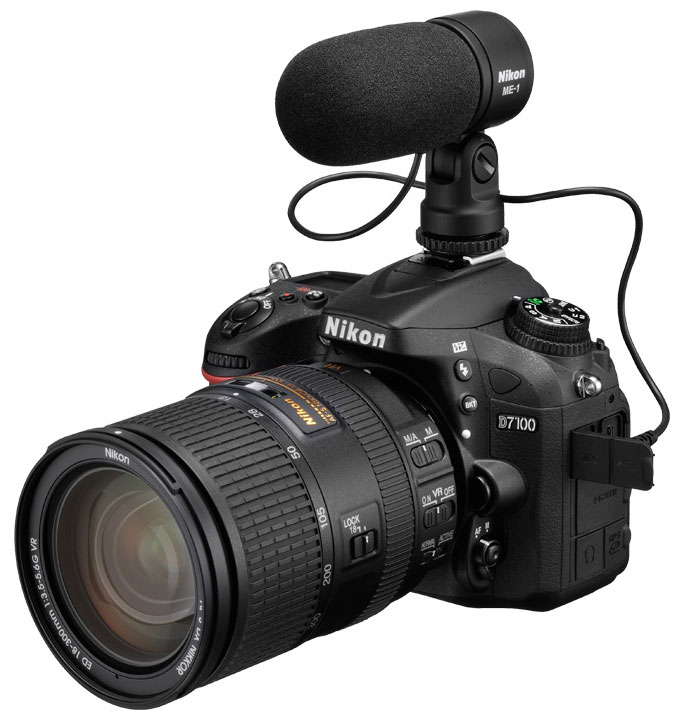
Most DSLRs nowadays offer some form of HD video recording, and the Nikon D7100 is no exception. The Nikon D7100 serves as Nikon’s flagship enthusiast-level APS-C camera, and as such, features a healthy array of HD video recording capabilities (and interestingly, — perhaps a sign of the times — no standard-definition video recording resolution), featuring full-time autofocus, manual exposure controls, manual audio recording levels, an external microphone jack, and a headphone jack. The D7100 offers an interesting feature that many advanced and professional users yearn for with video-capable interchangeable lens cameras: Clean, uncompressed HDMI output. The D7100 provides a full 1,920 x 1,080 resolution live view signal via HDMI allowing for monitoring video with an external HD monitor or better yet, recording uncompressed video data to an external storage device.
Here’s the full rundown of the D7100’s video capabilities, along with our usual selection of sample videos.
Nikon D7100 Basic Video Specs
- 1,920 x 1,080 (Full HD / 1080p) at 60i (59.94 fields/second), 50i, 30p (29.97 fps), 25p, 24p (23.976 fps)
- 1,280 x 720 (720p) at 60p (59.94 fps), 50p
- No Standard Definition recording resolution
- Choice of two compression levels; High or Normal quality
- TTL (through the lens) matrix metering using the main image sensor
- MOV file format, with H.264/MPEG-4 Advanced Video Coding (AVC) encoding
- Linear PCM stereo audio recording
- Uncompressed, clean HDMI output at 1,920 x 1,080 resolution for monitoring video on external HD monitor or recording uncompressed video data directly to an external storage device for higher quality footage
- Autofocus can be triggered during movie recording by half-pressing the shutter button, or continuous AF (AF-F) can be enabled
- Manual focus also available in movie mode
- Aperture can be controlled in Aperture-priority or Manual exposure modes, but only before recording begins*
- Shutter speed and ISOÂ can be controlled in Manual exposure mode
- EV adjustment (exposure compensation) can be selected prior to or during recording
- 1.3x crop mode increases the apparent focal length of the lens by ~30% compared to APS-C (~2x compared to full frame)
- Built-in stereo microphone, sensitivity adjustable
- External stereo microphone jack
- Stereo headphone jack for monitoring audio
- Still image can be captured while in video recording mode, but doing so stops the recording
- Flicker-reduction mode for both 60Hz and 50Hz light sources
- Movies can be “trimmed” in-camera, selecting just the portion you want and saving it as a new file
- Single frames can be selected from movie files and saved as separate JPEG files
- Video duration limited to 20 minutes maximum in High quality; 29 minutes 59 seconds at normal quality
- File size restricted to 4 GB maximum
- Class 6 or faster SD memory cards recommended
- Can select which card slot is destination for movies
*Note: Due to the design of the aperture mechanism in the D7100 and other non-pro Nikon DSLR bodies (i.e. “pro” meaning D800, D4), when in Movie Live View, the aperture can only be changed while Live View is disabled.
Nikon D7100 Video: Image size, frame rate, and file format
The Nikon D7100 offers two different video resolutions, five frame rates, and two quality settings in combinations as shown below:
|
Nikon D7100 Video Options
|
|||
|---|---|---|---|
|
MOV files, H.264/MPEG-4 encoding
|
|||
|
Resolution
|
Aspect Ratio
|
Frame Rate
|
Quality
|
|
1,920 x 1,080 |
16:9 |
60i / 50i * |
High/Normal
24/12 Mbps |
|
1,920 x 1,080 |
16:9 |
30p |
|
|
1,920 x 1,080 |
16:9 |
24p / 25p |
|
|
1,280 x 720 |
16:9 |
60p / 50p |
|
*60i/50i recording mode is only available when using the 1.3x crop mode image area.
Crop Mode. The D7100’s 1.3x crop mode can be used in video mode, and is required to enable 60i/50i frame rates.
Most of the D7100’s video modes are progressive scan, meaning that every video line is scanned, one after the other, for every frame. Compared to interlaced scanning, progressive scan video is generally better for viewing videos on a computer screen. (Interlaced works fine for HD TVs, but some computer video players that de-interlace poorly will produce bad tearing of moving objects.) The D7100 does feature a 1,920 x 1,080 resolution with a 60i or 50i interlaced scan video format, but it is only available when the D7100’s new 1.3x Crop Mode is enabled.
The D7100 expands on the frame rate options of its predecessor, the D7000, now offering 60p/50p frame rates in 1,280 x 720 mode, as well as the aforementioned 60i/50i frame rates available in 1.3x crop mode, but it loses the VGA 640 x 424 standard definition recording resolution. The new formats are great for capturing smooth-looking action, but won’t be as good in low-light situations, because the camera can’t use a shutter speed slower than 1/60 second. The faster frame rate will help those looking to record fast action and then edit and display at a slower frame rate for a slow-motion motion look. Sadly, the D7100 like many competing video-capable DSLRs, does not offer 60p video at the 1080p resolution that some mirrorless models offer.
The inclusion of the 24p mode has pretty much become a standard feature for video-capable interchangeable lens cameras. This is the de facto standard frame rate for cinema, and the 24p frame rate gives videos the “film look and feel” that many filmmakers and video shooters want. It can be tricky to shoot in 24p however, as the lower frame rate can look choppy, particularly when shooting with fast shutter speeds or when panning quickly.
Note that the Nikon D7100 has no separate PAL or NTSC video timing modes, perhaps as a consequence of its HD-only recording: Both traditionally NTSC (60/30/24 fps) and PAL (50/25 fps) frame rates are available via the movie settings menu at all times. The D7100 also doesn’t offer a composite video output, only providing a Mini (Type-C)Â HDMIÂ output.
The Nikon D7100 saves its video files in the MOV format, using MPEG-4 encoding, following the Advanced Video Coding standard, with bitrate options of 24 Mbps for High quality and 12 Mbps for Normal quality. Pretty much any computer or editing program made within the last 5 years should be able to play its files with little problem, although the full 1,920 x 1,080 resolution files may strain older systems.
The D7100 also includes a highly sought-after feature that makes the D7100 quite a professional-level video camera: uncompressed, clean HDMI output. This feature is not found on many video-capable still cameras, and is typically seen on high-end video and cinema cameras. This feature allows for a full 1,920 x 1,080 live view video signal without all the graphical overlays typically shown on the rear LCD — hence the term “clean HDMI” — to be displayed on an HD monitor (great for directors, DPs, etc., to get a larger view of the scene) or for use with an external video capture device, while simultaneously recording to the memory card. This lets users capture and record a much higher quality HD video feed, making post production much easier with video files that are more flexible for editing, color correction and grading. Note that the user manual warns that for 1080 60i/50i and 720 60p/50p video modes, the camera’s LCD monitor will be disabled when the HDMIÂ output is active.
Nikon D7100 Video: Image Quality
The Nikon D7100 produces high-quality HD video, with good detail, modest motion artifacts, and pleasing, accurate color. In our daytime videos, under bright sunlight, colors were accurate and the contrast was pretty well-controlled. The shadow areas weren’t crushed down to black, so we could still see lots of detail in the shadow. Also moiré artifacts were very well-controlled in the 1080p resolution videos, even in the usual problem areas of our test videos like roofing shingles, asphalt and window blinds. At 720p resolution, moiré was more noticeable in areas like roofing shingles (see our rolling shutter video below for an example), but overall it wasn’t severe.
The D7100 also did really well in our night video shots. Shooting at ISO 3200, image noise was low and the resulting image still had good dynamic range. Shadow detail was present and fine details were still visible.
Below you can see our standard array of sample videos for the D7100:
Nikon D7100 Video: Focusing
Beginner video shooters (and plenty of advanced users alike) will welcome the addition of full-time autofocus. Unlike some earlier DSLRs with video recording features, the D7100, as with the D7000 before it, has the ability to autofocus during recording, however, depending on the lens used, the focus motor noise may be picked up by the internal stereo microphone. With the kit lens, it’s very audible in the sound track, so it’s probably best not to select continuous AF when using it, or plan on using an external mic. Other Nikon lenses with silent focus motors would likely be better. Users also have the option to manually focus.
- Single-shot or full-time servo AF (AF-F) for continuous AF during recording
- By default, the D7100 doesn’t AF during recording, but you can always trigger an AF cycle by half-pressing the shutter button
- AF area mode options:
- Face-priority AF
- Wide-area AF
- Normal-area AF
- Subject-tracking AF (Half-press shutter button to AF before recording or use servo AF with AF-F mode, then hit OK button with subject centered in little green square. The square will follow the subject around the frame, maintaining focus on it.)
- Manual focus is also available during movie recording
- The magnified focus-assist display is available prior to starting recording, but not during
Nikon D7100 Video: Exposure Control
Like many advanced DSLR cameras with video recording features, the D7100 offers users a full range of manual exposure settings depending on the shooting mode used, as well as simple auto-exposure settings for quick point-and-shoot video recording.
- Defaults to fully automatic exposure, but exposure compensation adjustment is available in P, S and A modes.
- Auto-ISO limit in still capture mode doesn’t appear to apply to video recording.
- Aperture can be set in Aperture-priority or Manual exposure mode.
- Desired aperture must be set before entering movie live view mode; the aperture dial does nothing in Aperture-priority or Manual exposure mode.
- In Manual exposure mode, shutter speed and ISO can be set in addition to aperture.
- You can change shutter speed either before or during recording, but changing it during will produce very loud clicks in the audio track, as you rotate the control dial.
- Available shutter speeds range from 1/8,000s down to 1/60s for 60p, and down to 1/30s for 30p and 1/25s for 24p.
- Sensitivity can be set from ISO 100 to 25,600, however ISO can only be changed before recording begins.
- Full range of Picture Control settings apply to movie recording. (Standard, Neutral, Vivid, Monochrome, Portrait, and Landscape, and adjustments for contrast, brightness, saturation, and hue for each of the main settings.)
- Creative Effects are also available during video recording, but some severely reduce the frame rate of the video being recorded, though Miniature Effect works well.
- AE (auto-exposure) lock is supported in video mode.
- Matrix metering is always used for video recording, regardless of metering mode selected.
Nikon D7100 Video: Audio Recording
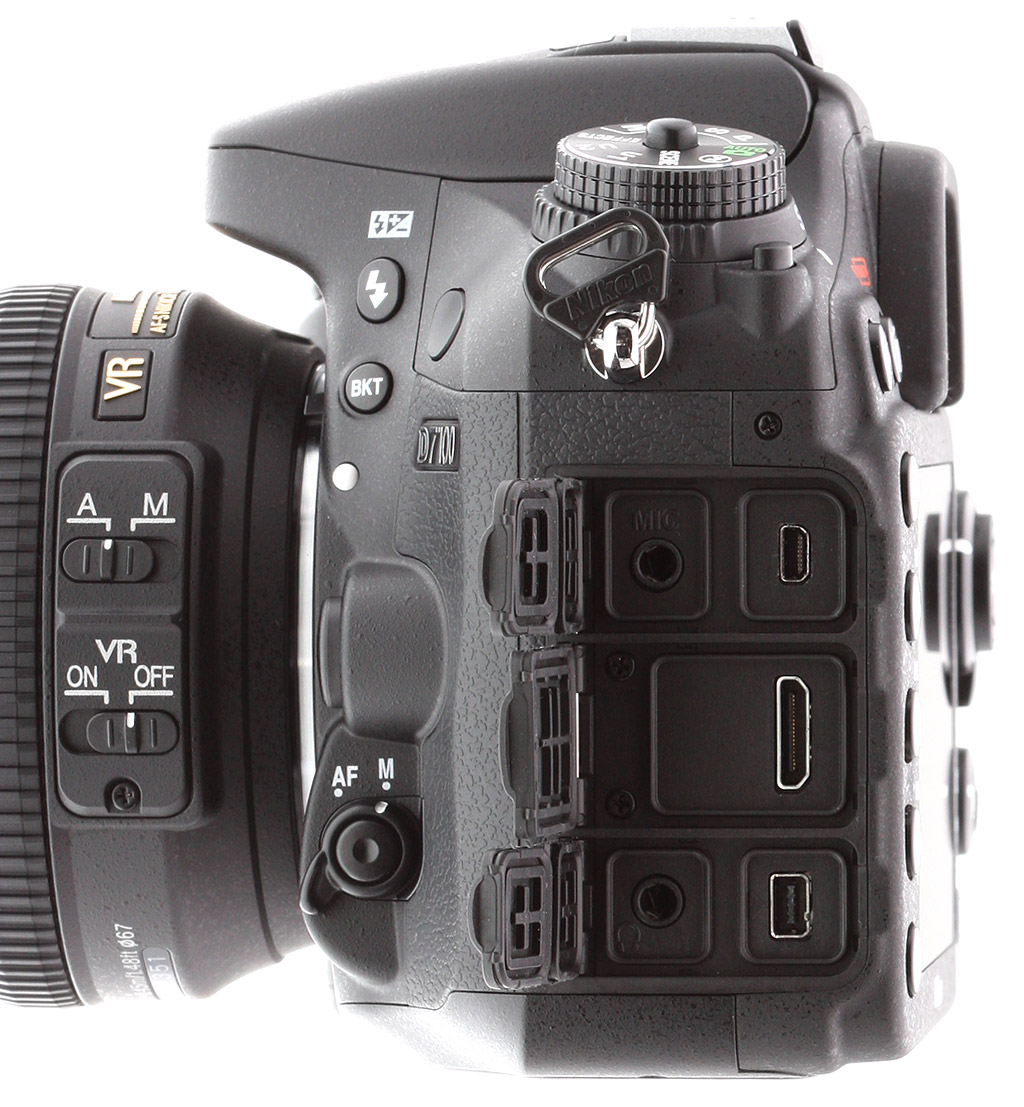
The D7100 features fairly advanced audio recording capabilities including the ability to use a standard external microphone via the 3.5mm stereo mic jack, as well as manual audio level controls and an audio meter on screen that is displayed both before and during recording. Unlike the D5200 and D7000, the D7100 now also includes a 3.5mm stereo headphone jack for monitoring audio, which has been a much sought-after feature for many advanced video shooters. While the D7100 does include a built-in stereo microphone (located right in front of the hot shoe), the use of an external mic is highly recommended for critical audio when using autofocus, as we noticed quite a significant amount of autofocus noise on the sound track when using the built-in stereo mic. Also, handling noises and button noises from adjusting exposure are easily picked up with the built-in mic.
Nikon offers a nice-looking external stereo microphone, the ME-1, with a design claimed to significantly reduce autofocus noise. We haven’t tested this mic yet, but given that it specifically claims to reduce AF noise, it sounds like a good bet.
- Internal stereo microphone
- Defaults to automatic level control
- Manual level control available via Movie Settings menu, with 20 levels available
- VU (audio level) meter display also available via Movie Settings
- 3.5mm external stereo microphone jack
- Audio can be turned off entirely
- 3.5mm stereo headphone jack for monitoring audio during recording
Nikon D7100 Video: Rolling Shutter Artifacts (“Jello effect”)
Pretty much every DSLR on the market distorts moving objects, or the entire scene, if the camera is being panned. The technical term for this is “rolling shutter artifacts,” but many users simply call it the “Jello effect,” because the image can jiggle and sway like Jello as the camera is moved. This occurs because the image is captured and read out line by line, so the bottom of an object may no longer be underneath the top of it by the time the camera gets around to capturing that part of the frame.
Rolling shutter artifacts can be very annoying if they’re severe, and difficult to fix in post-production, but as noted, all digital SLRs show them to some extent, and it’s simply a matter of taking precautions when filming. Thankfully, in the case of the D7100, this camera does a very good job of controlling rolling shutter effects. If you pan back and forth quickly, rolling shutter effect is still present, but pretty well controlled compared to other cameras we’ve tested. As we’ve seen with other cameras we’ve tested, shooting at 720p resolution and 60 frames/second greatly reduces rolling shutter artifacts.
There are plug-ins out there to fix rolling shutter when editing your footage on the computer, but software correction is not a surefire solution. It’s simply something that you must keep in mind when moving the camera while recording video. If you just pan slowly while filming, you’re not likely to notice it much at all.
Flash
Nikon D7100 Flash
Flash Test Results
Coverage and Range
Decent flash range but narrow coverage at wide angle. Our standard shots required an average amount of exposure compensation.


Coverage and Exposure. Flash coverage was rather uneven at wide angle (18mm), with very dark corners. Coverage at telephoto (105mm) was much better, but still somewhat uneven. (Some of the corner shading is due to the lens itself, though.) There was also a slight magenta tint near the center of the image. For our Indoor Portrait scene test, the Nikon D7100's flash required +0.7 EV exposure compensation adjustment to get bright results in normal Auto flash mode with a 1/60 second shutter speed at ISO 200, which is about average for the DSLRs we've tested. The camera's Slow-Sync flash mode at 1/13 second produced bright results without any compensation, though with a stronger pinkish-orange cast from the room lighting.
| Flash Range: Wide Angle | |||||
|---|---|---|---|---|---|
| 6 ft | 7 ft | 8 ft | 9 ft | 10 ft | 11 ft |
 1/60 sec f3.5 ISO 200 |
 1/60 sec f3.5 ISO 200 |
 1/60 sec f3.5 ISO 200 |
 1/60 sec f3.5 ISO 200 |
 1/60 sec f3.5 ISO 200 |
 1/60 sec f3.5 ISO 200 |
| 12 ft | 13 ft | 14 ft | 15 ft | 16 ft | |
 1/60 sec f3.5 ISO 200 |
 1/60 sec f3.5 ISO 200 |
 1/60 sec f3.5 ISO 200 |
 1/60 sec f3.5 ISO 200 |
 1/60 sec f3.5 ISO 200 |
|
| Flash Range: Telephoto | |||||
|---|---|---|---|---|---|
| 6 ft | 7 ft | 8 ft | 9 ft | 10 ft | 11 ft |
 1/60 sec f5.6 ISO 200 |
 1/60 sec f5.6 ISO 200 |
 1/60 sec f5.6 ISO 200 |
 1/60 sec f5.6 ISO 200 |
 1/60 sec f5.6 ISO 200 |
 1/60 sec f5.6 ISO 200 |
| 12 ft | 13 ft | 14 ft | 15 ft | 16 ft | |
 1/60 sec f5.6 ISO 200 |
 1/60 sec f5.6 ISO 200 |
 1/60 sec f5.6 ISO 200 |
 1/60 sec f5.6 ISO 200 |
 1/60 sec f5.6 ISO 200 |
|
ISO 200 Range. With the kit lens at wide angle, the Nikon D7100's flash exposures started out bright at 6 feet, and brightness remained good out to 12 feet before dropping off rapidly. At the telephoto end, flash intensity started out a bit dim at 6 feet but remained consistent to 8 feet, then dropped off from there. We'll call the range 8 feet at full telephoto.
| Manufacturer-Specified Flash Range | |
|---|---|
| Wide Angle | Telephoto |
 15.8 feet ISO 200 |
 9.8 feet ISO 200 |
Manufacturer Specified Flash Test. The Nikon D7100's flash guide number is 12 meters in Auto iTTL mode at ISO 100. At ISO 200, that translates to about 15.8 feet at f/3.5 and about 9.8 feet at f/5.6, the maximum apertures of the kit lens at full wide angle and telephoto respectively. In the shots above, the D7100 appears to underperform by a small amount relative to Nikon's specification, producing slightly dim exposures at the rated distances. The flash target was underexposed compared to the ideal exposure by almost a full stop at wide angle, and almost 1/2 f-stop at telephoto. Our standard test method for flash range uses a fixed setting of ISO 200, to provide a fair basis of comparison between cameras. We've now also begun shooting two shots using the manufacturer-specified camera settings, at the range the company claims for the camera, to assess the validity of the specific claims.
High ISO Noise Reduction
Nikon D7100 High ISO Noise Reduction
The Nikon D7100's four noise-reduction settings ("High, "Normal", "Low" and "Off") provide good flexibility in choosing how you want to make the trade-off between subject detail and noise levels. The Nikon D7100 user manual doesn't say when High ISO NR kicks in, so we've included crops from the base ISO in the tables below. The manual does however say that the "Off" setting still applies NR at ISO 1250 and higher, though at a lower strength than the "Low" setting.
See for yourself how the Nikon D7100's "Normal", "Low" and "Off" High ISO NR settings compare to RAW without noise reduction under daylight-balanced lighting. (Note that these RAW images also have no sharpening applied, so they're a little softer than camera JPEGs at low ISOs.) Click on any of the crops below to see the corresponding full-sized image.
| High ISO Noise Reduction Comparison Daylight-balanced illumination |
||||
|
"Normal"
|
"Low"
|
"Off"
|
RAW (no NR)
|
|
|
I
S O 1 0 0 |
 |
 |
 |
 |
 |
 |
 |
 |
|
 |
 |
 |
 |
|
|
"Normal"
|
"Low"
|
"Off"
|
RAW (no NR)
|
|
|
I
S O 2 0 0 |
 |
 |
 |
 |
 |
 |
 |
 |
|
 |
 |
 |
 |
|
|
"Normal"
|
"Low"
|
"Off"
|
RAW (no NR)
|
|
|
I
S O 4 0 0 |
 |
 |
 |
 |
 |
 |
 |
 |
|
 |
 |
 |
 |
|
|
"Normal"
|
"Low"
|
"Off"
|
RAW (no NR)
|
|
|
I
S O 8 0 0 |
 |
 |
 |
 |
 |
 |
 |
 |
|
 |
 |
 |
 |
|
|
"Normal"
|
"Low"
|
"Off"
|
RAW (no NR)
|
|
|
I
S O 1 6 0 0 |
 |
 |
 |
 |
 |
 |
 |
 |
|
 |
 |
 |
 |
|
|
"Normal"
|
"Low"
|
"Off"
|
RAW (no NR)
|
|
|
I
S O 3 2 0 0 |
 |
 |
 |
 |
 |
 |
 |
 |
|
 |
 |
 |
 |
|
|
"Normal"
|
"Low"
|
"Off"
|
RAW (no NR)
|
|
|
I
S O 6 4 0 0 |
 |
 |
 |
 |
 |
 |
 |
 |
|
 |
 |
 |
 |
|
|
"Normal"
|
"Low"
|
"Off"
|
RAW (no NR)
|
|
|
I
S O 1 2 8 0 0 |
 |
 |
 |
 |
 |
 |
 |
 |
|
 |
 |
 |
 |
|
|
"Normal"
|
"Low"
|
"Off"
|
RAW (no NR)
|
|
|
I
S O 2 5 6 0 0 |
 |
 |
 |
 |
 |
 |
 |
 |
|
 |
 |
 |
 |
|
The Nikon D7100's "Normal" High ISO NR setting provides a good tradeoff between noise and detail at lower ISOs to our eye, but we'd probably shoot with lower settings at higher ISOs and reduce noise ourselves in post-processing (or just shoot RAW). It's interesting that the camera does such a good job with the subtle contrast in the red-leaf swatch at low ISOs that it looks better than the ACR converted RAW file, though the pleasing rendering of that fabric has been trademark of Nikons for years. It's also interesting that the camera sometimes produces a yellow cast with certain noise reduction settings at some higher ISOs (all shots here were taken with manual white balance), while the converted RAW files are more consistent in terms of color balance. We saw something similar with the Nikon D5200 as well, only it was more dramatic.
Pricing and availability
The Nikon D7100 started shipping in the U.S. in March 2013. It's available both body-only and in a kit with the AF-S DX NIKKOR 18-105mm f/3.5-5.6 VR lens. Retail pricing for the body-only is around US$1,200, similar to cost of the D7000 at launch. In the 18-105mm kit, it costs around US$1,500.