


Overview

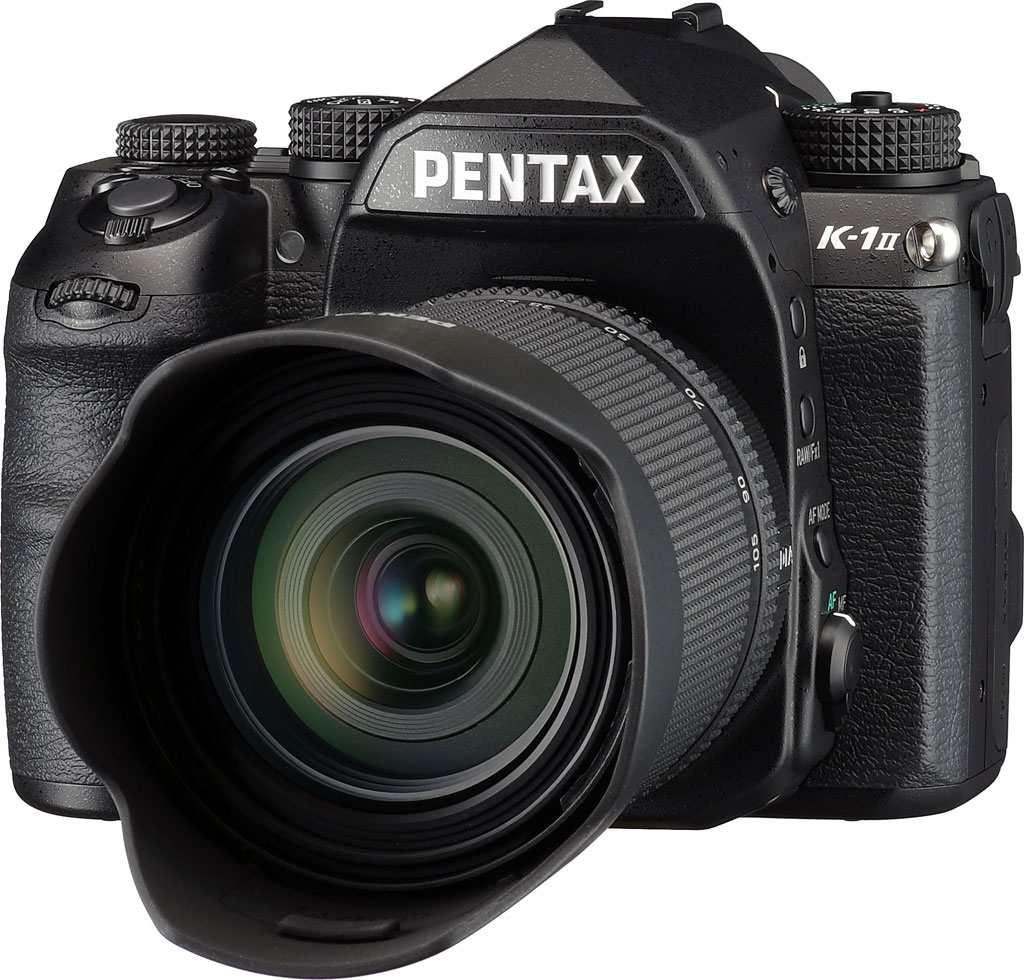
At the start of 2016, Ricoh finally answered calls from Pentaxians for a full-frame DSLR with the arrival of the Pentax K-1. We were seriously impressed by the weatherproof, 36-megapixel K-1, which paired great ergonomics with a lengthy laundry list of features, some of them completely unique.
The first full-frame Pentax with an accelerator unit, as seen previously in the sub-frame K-70 and KP
Two years down the line, the K-1 received a followup in the form of the Pentax K-1 II. If you're familiar with the earlier camera, you already know most of what you need to about its successor, as the two are near-identical in most ways. There are changes in just a few key areas.
So what's new? Well, most importantly the Pentax K-1 II now features the same accelerator unit which made its debut in 2016's Pentax K-70, and was also sighted in the 2017 model year Pentax KP. So what, exactly, does this new unit do? Ricoh has played its cards pretty close to its chest, but we understand that it's being used to assist the main PRIME IV-branded processor with denoising, thereby freeing it up to expend more processing power on other image quality-related tasks.
A two-stop increase in high ISO sensitivity
The Pentax K-1 II's performance is basically unchanged from that of its predecessor. Full-resolution, full-frame burst capture is still limited to a maximum of 4.4 frames per second, while the 15-megapixel APS-C crop mode has slowed ever so fractionally from 6.5 to 6.4 fps. (The K-1 II managed slightly higher numbers in our Performance lab tests.)

But while burst capture speed is unchanged, the K-1 II's maximum ISO sensitivity soars a full two stops beyond what the K-1 could manage. Just as did the sub-frame Pentax KP before it, the K-1 II offers everything from a minimum of ISO 100 to a maximum of ISO 819,200, but it does so with a much larger full-frame sensor. Read our image quality and print quality analyses for the full story on this.
Miracle of miracles, a hand-holdable version of Pixel Shift Resolution!!
As well as that two-stop expansion of its sensitivity range, the K-1 II further improves upon the Pixel Shift Resolution function mode which made its debut in the sub-frame Pentax K-3 II, and was further refined in the original K-1. Pixel Shift Resolution is used to increase per-pixel sharpness, and to combat false color and moiré artifacts as well, by capturing four images of the same scene in quick succession while fractionally adjusting the sensor-shift mechanism in between frames.
In the original K-3 II, the function worked only with completely static subjects and a tripod-mounted camera, making it more useful in a studio setting or for landscapes, and less so for other real-world subjects. The original K-1 improved upon this by adding the ability to compensate for moving subjects within an otherwise static scene, but still couldn't handle camera motion.

Now, the K-1 II adds a feature which promises to greatly improve upon the versatility of Pixel Shift Resolution, answering the cries of Pentaxians ever since the original K-3 II. The K-1 II now allows Pixel Shift Resolution to be used handheld, an improvement which we'd imagine required a significant development effort.
This new feature makes Pixel Shift Resolution a noticeably more useful tool in a much broader range of situations. You're still going to want to use it for predominantly static scenes, as moving subjects can't benefit from the technique in the first place, but being able to shoot those scenes without having to carry around a tripod makes this a much more useful tool in the real world.
All of the K-1's firmware updates are rolled into the K-1 II, of course
And that's essentially it for the new features. The Pentax K-1 II is otherwise very much like the original (and very impressive) K-1 in most other respects, at least if the K-1 has been upgraded to current firmware. (The K-1 II ships with KAF4 lens support, night vision LCD mode, electronic shutter function and a choice of two or three-shot AA filter bracketing functions out of the box, where these features were added to the earlier K-1 via firmware updates post-launch.)

Packing an extra battery will be more important than ever
But there's one area in which the K-1 II does trail its predecessor somewhat, likely thanks to the added power draw from the accelerator unit discussed previously. The original K-1's battery life was already modest by DSLR standards, and the K-1 II is even more so, with around a 12% reduction in battery life when measured according to CIPA testing standards. Battery life is now said to be around 670 still frames (down from 760 in the K-1), and around 340 minutes of playback (down from 390).
Ricoh has also switched away from using the optionally-available K-AC132 AC adapter kit (which is also compatible with the sub-frame K-3 series cameras) to provide mains power for studio shooting. Instead, it now offers the same, optional K-AC167 kit as used with the Pentax KP.
The K-1 II will also be available as an in-place upgrade for your existing K-1
If you're a K-1 owner, you're probably feeling a touch of jealousy at this new model. There's probably not enough to justify the expense of replacing your camera with the newer model unless your pockets are deep, but at the same time, a two-stop improvement in high ISO performance and a hand-holdable Pixel Shift Resolution mode aren't to be sniffed at.

Well, there is was great news, if so! [Edit 06/2019: The program described below has now ended, but we're leaving mention of it in our review for historical purposes.] Ricoh has shown impressive commitment to its customers by announcing a paid upgrade program which will allow K-1 owners to have their cameras converted to K-1 II spec. You had to act quickly if you wanted to take advantage of the offer, as it was only valid from May 21 to September 30, 2018 in the North American market.
Pricing was set at US$550 or CA$690, and while that might sound like a lot, it's worth bearing in mind that replacing the entire camera body would cost almost four times as much. Techs at Precision Camera (in the USA) or Sun Camera (in Canada), working on Ricoh's behalf, had to replace the main circuit board to gift these new features to a K-1 body. (They also swapped the SR logo for a K-1 II logo, so it should be immediately obvious which cameras have the upgrade if you are buying second-hand today.)
Swapping circuit boards like this is a rather labor-intensive task, requiring your camera to be partially dismantled, reconfigured, put back together and tested, one at a time. Given that fact, a $550 upgrade cost struck us as eminently reasonable.

Read our original K-1 review for much more insight on the closely-related K-1 II
In other respects including its body, sensor, PRIME IV processor, viewfinder, displays, connectivity and storage options, the K-1 II is basically the same camera as the K-1, so once you've finished reading this review, we'd strongly recommend also taking a look over our existing Pentax K-1 review, as most of it is also applicable to this camera.
Just want to know all of the features of the K-1 II, old and new? Read our Technical Info report here!
In the Box
The Pentax K-1 II retail box ships with the following items:
- Pentax K-1 Mark II camera body
- Body cap K II
- D-LI90 lithium-ion rechargeable battery pack
- D-BC90 battery charger
- AC plug cord
- Hot shoe cover FK
- Eyepiece cup FT
- Shoulder strap O-ST162
- Finder cap ME
- PC socket cap
- Instruction manual
- Software CD-ROM S-SW171
Optics
The Pentax K-1 II is usually sold body-only, so we have no "kit" lens test results to share.
Below are our K-1 II viewfinder accuracy test results.
Viewfinder Test Results
Coverage
Excellent accuracy from both the optical viewfinder and LCD.


The Pentax K-1 II's optical viewfinder and LCD in live view mode both exhibited essentially 100% coverage in our tests. Excellent performance here.
The images above were taken from our standardized test shots. For a collection of more pictorial photos, see our Pentax K-1 II Photo Gallery .
Exposure
Color
Saturation & Hue Accuracy
Vibrant default saturation with, with slightly below average hue accuracy.
 |
|||
| In the diagram above, the squares show the original color, and the circles show the color that the camera captured. More saturated colors are located toward the periphery of the graph. Hue changes as you travel around the center. Thus, hue-accurate, highly saturated colors appear as lines radiating from the center. Click the image for a larger version. |
Saturation. The Pentax K-1 II's default image tone setting of "Bright" pushes most colors by quite a bit at base ISO, especially blues, dark greens and purples. Mean saturation at ISO 100 is 118.3% or 18.3% oversaturated. That's about 8% higher than most other brands at default settings. Overall, colors are very bright and punchy, a trait we've come to expect from Pentax. You can of course always select a different image tone preset and/or turn down saturation and contrast settings to suit your own tastes. Most consumer digital cameras produce color that's more highly saturated (more intense) than found in the original subjects. This is simply because most people like their color a bit brighter than life.
Skin tones. Caucasian skin tones from the K-1 II were pleasing using Manual (Custom) white balance in our test shots, however Auto white balance produced an overly pinkish appearance. Good results here. Note that the K-1 II also has a dedicated Skin Tone setting, which can improve skin tones or soften the entire image to make skin irregularities less visible. Where oversaturation is most problematic is on Caucasian skin tones, as it's very easy for these "memory colors" to be seen as too bright, too pink, too yellow, etc.
Hue. The Pentax K-1 II's mean "delta-C" color error of 6.02 after correction for saturation at ISO 100 is a bit below average for a DSLR these days (smaller numbers are better). Most noticeable were moderate shifts in orange toward yellow and cyan toward blue, with smaller shifts in some reds, yellows, and greens. (The cyan to blue shift is very common among the digital cameras we test; we think it's a deliberate choice by camera engineers to produce better-looking sky colors.) Hue is "what color" the color is.


Sensor
Exposure and White Balance
Indoors, incandescent lighting
Very warm results with Auto white balance, but good color with Incandescent and Manual white balance settings. Average exposure compensation required.


The Pentax K-1 II's Auto white balance setting had a difficult time with the household incandescent bulbs used in this shot, producing a very warm image with a strong orange tint when using the default "Strong" Correction option (a "Subtle" Correction setting is also available, which would produce even warmer results). The Multi Auto WB option fared better, but the image is still too warm. Results with the Incandescent setting are actually pretty good, though, just slightly on the warm side. The Manual (Custom) setting produced pretty accurate color balance, though just a touch cool with a slightly green tint. Note that a Kelvin setting is available, as well as Color Temperature Enhancement (CTE) white balance option which exaggerates the temperature of ambient light. The Pentax K-1 II required +0.3 EV exposure compensation for a good exposure, which is about average for this shot. Our test lighting for this shot is a mixture of 60 and 100 watt household incandescent bulbs, a pretty yellow light source, but a very common one in typical home settings here in the U.S.
Outdoors, daylight
Bright colors with high contrast; very good exposure accuracy.
The Pentax K-1 II produced a very good overall exposure without the need for exposure compensation for our "Sunlit" Portrait shot, yielding a good balance between highlights and shadows. This is much better than average in terms of exposure accuracy, however default contrast is quite high, leading to significant highlight clipping. We preferred Manual (Custom) white balance for our Portrait shot as Auto white balance produced overly pinkish skin tones, however Daylight white balance also performed well.
Native Resolution
~3,350 lines of strong detail from JPEGs, a little higher from ACR converted RAW files.



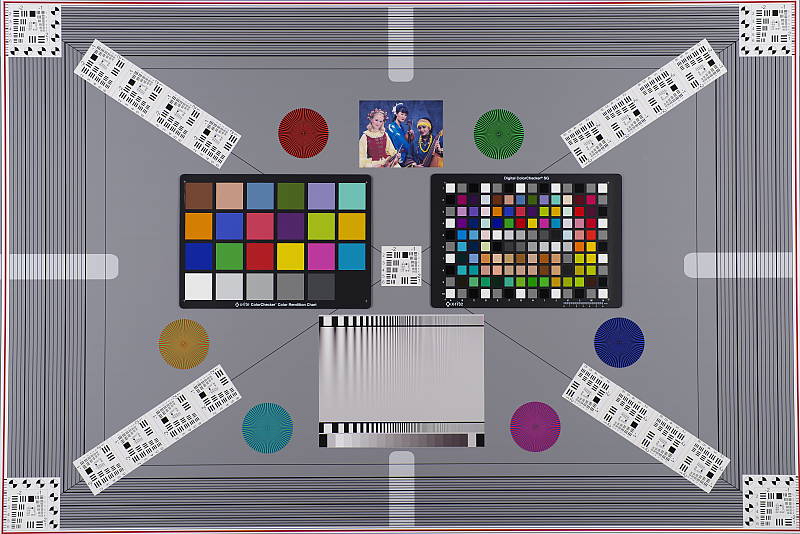
Our laboratory resolution chart reveals fairly distinct line patterns up to about 3,350 lines per picture height in the horizontal direction, and to about 3,350 lpph in the vertical direction in a best quality JPEG before lines begin to merge, though individual lines are somewhat faint and some aliasing can be seen as early as 2,200 lpph. Complete extinction of the pattern didn't occur before the 4,000 line limit of our chart in both directions. An Adobe Camera Raw conversion yielded slightly higher numbers, with individual lines that were more crisp and distinct. The ACR processed RAW image does however show a lot more color moiré, as they often do. (Note that AA Simulation was set to its default of Off, for maximum resolution.) Use these numbers to compare with other cameras of similar resolution, or use them to see just what higher resolution can mean in terms of potential detail.
Pixel Shift Resolution Mode
~3,450 lines of strong detail from JPEGs, about the same from converted RAW files.


The Pentax K-1 II's Pixel Shift Resolution mode (IS Off) yielded slightly higher resolution from in-camera JPEGs at about 3,450 lines both horizontally and vertically but with much crisper lines, however there were still aliasing artifacts in the form of luminance moiré patterns starting as early as 2,300 lines. Adobe Camera Raw wasn't really able to produce higher results, and interestingly, it still contained more false colors near the limits of resolution than the in-camera JPEG.
A black and white target doesn't tell the whole story, though, so click here for comparisons of single-shot to the two main Pixel Shift modes using our Still Life target at various ISOs. And see our Field Test III for real-world hand-held samples and comparisons.
Sharpness & Detail
Fairly sharp images with very good detail, though with visible edge-enhancement along high-contrast edges. Minor noise suppression visible at base ISO.


Sharpness. The Pentax K-1 II produces fairly sharp images at default settings. Edge enhancement artifacts are however visible on high-contrast subjects such as the sharpening haloes around the lettering and border in our Mas Portell bottle label above left, though we've seen far worse. Overall crispness is not bad, but JPEG images can look a touch soft at default settings. Edge enhancement creates the illusion of sharpness by enhancing color and tonal differences right at the edge of a rapid transition in color or tone.
Detail. The crop above right shows only minor detail loss due to noise suppression. Individual strands are still distinguishable even in the lighter shadows, though they begin to merge as shadows deepen, and in places where the tone and color of adjacent strands is very close. Still, very good performance here, with remarkably low chroma noise.
Some individual strands of hair do show aliasing artifacts in the form of "jaggies", however the K-1 II's selectable AA filter should help prevent those from occurring when enabled (AA Filter Simulation was disabled by default here for maximum resolution). Noise-suppression systems in digital cameras tend to flatten-out detail in areas of subtle contrast. The effects can often be seen in shots of human hair, where the individual strands are lost and an almost "watercolor" look appears.
Anti-aliasing Filter Simulator
The Pentax K-1 II's anti-shake actuator can oscillate the sensor assembly microscopically in either a linear (Type 1) or circular (Type 2) motion during exposure, simulating the effects of an anti-aliasing (or optical low-pass) filter. To see the effect on image sharpness and aliasing artifacts, roll over the links in the table below to compare settings:
As you can see above, AA Filter Simulation Type 1 blurs fine detail slightly, while Type 2 offers a slightly stronger effect, which should go a long way to reduce aliasing artifacts and moiré as can be seen, Note that the AA Filter Simulator is not available in burst mode or during Bulb or HDR capture, and the full effect cannot be achieved at shutter speeds faster than 1/1000s. Pentax has provided two AA Filter bracketing modes (Off and Type 2, or Off, Type 1 and Type 2), in case you're not sure which setting to use for a given subject matter, or want to selectively merge different exposures to reduce aliasing in specific areas in post.
RAW vs In-Camera JPEGs
As noted above, the Pentax K-1 II does a pretty good job at capturing lots of fine detail in its JPEGs, but more detail can often be obtained from carefully processing RAW files, while at the same time reducing sharpening artifacts. Take a look below, to see what we mean:
| Base ISO (100) | |
 |
 |
 |
 |
 |
 |
|
Camera JPEG, defaults
|
RAW via Adobe Camera Raw
|
In the table above, we compare an in-camera JPEG taken at base ISO using default noise reduction and sharpening (on the left) to the matching RAW file converted with Adobe Camera Raw via DNG Converter 11.2 using default noise reduction with some moderate but tight unsharp masking applied in Photoshop (150%, radius of 0.3 pixels, and a threshold of 0).
As is usually the case, Adobe Camera Raw delivers finer detail than the camera's default processing, and its default noise reduction does a little better with our difficult red-leaf swatch, resolving a little more of the fine thread pattern. ACR also did a better job with color, rendering the pink fabric closer to reality instead of the more magenta tint from the camera. Adobe Camera Raw also produced finer detail in the mosaic, but left behind a bit more noise, as seen in flatter areas. Overall, though, the Pentax K-1 II does a good job with its JPEGs at base ISO, but as is usually the case you can extract slightly more detail (with more accurate color and fewer sharpening artifacts) with a good RAW converter.
ISO & Noise Performance
Very good high ISO performance for its class.
| Noise Reduction = Auto (Default) | ||
 |
 |
 |
| ISO 100 | ISO 200 | ISO 400 |
 |
 |
 |
| ISO 800 | ISO 1600 | ISO 3200 |
 |
 |
 |
| ISO 6400 | ISO 12,800 | ISO 25,600 |
 |
 |
 |
| ISO 51,200 | ISO 102,400 | ISO 204,800 |
 |
 |
|
| ISO 409,600 | ISO 819,200 | |
The Pentax K-1 II's images are very clean and detailed from ISO 100 through 800, though there is noticeable softening in the red channel already within this range. Detail is still very good at ISOs 1600 and 3200, with a tight film-like noise "grain", low chroma noise, and very little fine detail lost to noise reduction (except in reds). ISO 6400 shows noticeably stronger luma noise but it's still fine-grained, leaving quite a bit of fine detail left. Chroma noise is still quite low, but it starts to show in the shadows. Image quality takes a larger step down at ISO 12,800, with fine detail becoming noticeably softer because of the higher noise, and chroma noise becoming visible in darker midtones. Image Quality at ISO 25,600 is not bad for such a high sensitivity, but at ISO 51,200 and above it falls off rather quickly, with much stronger luminance noise, very soft details due to strong noise reduction, as well as blotchy chroma noise. Noise becomes very obtrusive at ISOs above 102,400, and there some visible fixed pattern noise (horizontal banding) as well.
Overall, high ISO noise performance is very good for a high-res full-frame camera, though not as good as some competing models, at least in JPEGs. Noise levels do appear lower than its predecessor, but unfortunately at the expense of a slight reduction in fine detail as well as some subtle denoising artifacts. And we wonder why Pentax bothered including higher ISO settings than the original K-1, given how noisy they are.
Of course, the impact of noise and detail loss are highly dependent on the size the photos are printed at, and pixel-peeping on-screen has surprisingly little relationship to how the images look when printed: See the Print Quality section below for recommended maximum print sizes at each ISO.
Extremes: Sunlit, dynamic range, and low light tests
High default contrast results in mediocre dynamic range in JPEGs. Excellent low-light performance, capable of capturing bright images in near darkness.


Sunlight:
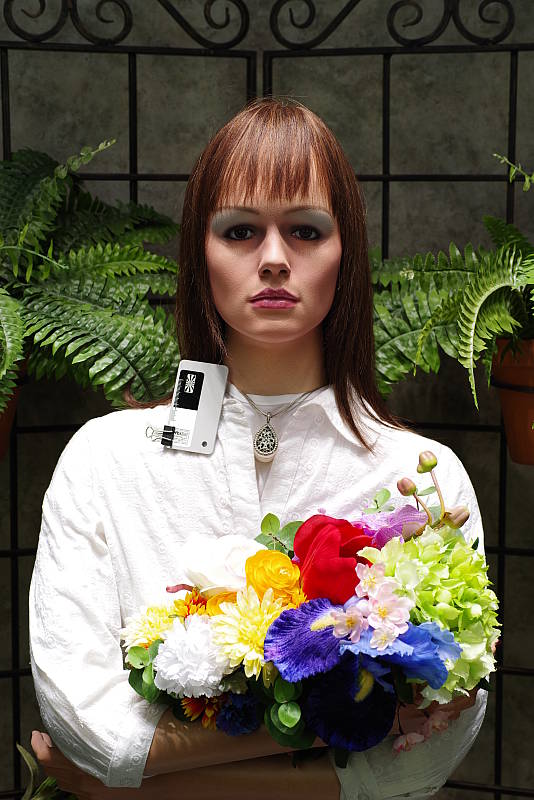
The Pentax K-1 II struggled with harsh lighting in the above test. Default contrast is quite high, and as a result, quite a few highlights were blown in the mannequin's white shirt and in some of the flowers, even at default (0 EV) exposure. Shadow detail is however very good, with low noise levels even in the deepest shadows. Note that these shots were captured with the Pentax K-1 II's D-Range control set to "Off."
As expected, we were easily able to recover virtually all blown highlights from the matching DNG file, indicating the dynamic range available in K-1 II RAW files is excellent.
Because digital cameras are more like slide film than negative film (in that they tend to have a more limited tonal range), we test them in the harshest situations to see how they handle scenes with bright highlights and dark shadows, as well as what kind of sensitivity they have in low light. The shot above is designed to mimic the very harsh, contrasty effect of direct noonday sunlight, a very tough challenge for most digital cameras. (You can read details of this test here. In actual shooting conditions, be sure to use fill flash in situations like the one shown here; it's better to shoot in open shade whenever possible.)
D-Range Settings
The Pentax K-1 II offers four Shadow Correction levels (Auto, Low, Medium and High, plus Off) as well as two Highlight Correction levels (Auto and On, plus Off). As the name implies, Shadow Correction works to raise shadow levels while attempting to keep highlights and midtones as they are, and inversely, Highlight Correction attempts to reduce highlights without darkening shadows and midtones. Both can be used simultaneously.
|
D-Range Examples
|
|||
 |
|||
Mouse over the links to see how the various settings for D-Range affects our high-contrast Far-field shot, and click on a link to get to the full-res image. (The effect can be a little subtle in shots like those above, so we used a mouse-over to better show how each setting compares.)
Shadow Correction. Above, we can see a progressive lightening of shadows and midtones as the Shadow Correction setting is increased, while highlights are pretty much untouched. And in this case, the Auto setting produced results very similar to the manual Low setting. If you look closely at the shadow detail, you will notice an increase in noise as the setting is turned higher, but that's to be expected and noise levels are still quite low from the K-1 II.
Highlight Correction. Highlight Correction also worked as expected, with On and Auto producing virtually identical results here (compare Highlight On or Highlight Auto to D-Range Off), toning down highlights to preserve them while boosting shadows and midtones for an improved overall exposure. (Despite the brighter images, fewer highlights are blown with Highlight Correction active.) Note that Highlight Correction is not available at ISOs below 200, so these were shot at ISO 200.
HDR Capture
The Pentax K-1 II has a High Dynamic Range (HDR) capture mode where the camera takes three images (underexposed, normal, and overexposed) in quick succession and combines them in-camera into one image. If performed properly, this method should result in much higher dynamic range, without the additional noise penalty that comes with boosting sensitivity or lightening shadows. (In fact, it can reduce shadow noise by combining shadows from the overexposed shot.)
There are five HDR settings available: Auto, Advanced (which applies Clarity Enhancement as well), and HDR 1/2/3 providing three blend settings. Each setting has three possible exposure ranges (±1 EV, ±2 EV (default), and ±3 EV). There's also an optional Auto Align feature for use when shooting without a tripod, which is enabled by default on the K-1 II.
|
HDR Examples
|
||
 |
||
| HDR ADV |
HDR Auto |
|
Mouse-over the links above to compare thumbnails, and click on them to access full-resolution versions.
The Auto setting worked reasonably well on our "Sunlit"Portrait shot, reducing highlights and bringing out shadow detail while maintaining a natural, non-HDR look. HDR 1 mode produced a relatively realistic image though with an obvious HDR-ish look, HDR 2 produced a stronger effect with oversaturated colors, HDR 3 resulted in a very unnatural, almost cartoonish image and HDR Advanced was way over the top with strong shadows and haloing. However, keep in mind the K-1 II's HDR mode provides a decent amount of adjustments to tweak the resulting image more to your tastes.
As with most HDR systems there can be slight crop with Auto Align active as you can see above, and watch out for ghosting that can occur when images contain movement between exposures.
Dynamic Range Analysis (RAW mode)
While we once performed our own dynamic range measurements based on in-camera JPEGs as well as converted RAW images (when the camera was supported by Adobe Camera Raw), we've switched to using DxO Labs' results from their DxOMark website. As technology advanced, the dynamic range of modern high-end cameras in some cases exceeded the range of the Stouffer T4110 density scale that we used for our own measurements. DxO's approach based on RAW data before demosaicing is also more revealing, because it measures the fundamental dynamic range of the sensor, irrespective of whatever processing is applied to JPEGs, or to RAW data by off-the-shelf conversion software.
In the following, we use DxO's "Print" dynamic range results, which are scaled based on camera resolution. As the name suggests, this scaling corresponds to the situation in which you print at a given size, regardless of how many megapixels the camera might have. (In other words, if you've decided to make a 13x19 inch print, that's the size you're printing, whether the camera's resolution is 16 or 300 megapixels.) Also note that DxO Labs uses a signal-to-noise (SNR) threshold of 1 when defining the lower boundary of acceptable luminance noise in their dynamic range measurements, which corresponds to the "Low Quality" threshold of the Imatest software we used to use for this measurement.
Unfortunately, DxOMark has not yet tested the K-1 II. We'll come back and fill in this section if/when they do. In the meantime, Photons to Photos reports that the K-1 II's dynamic range is very similar to that of the K-1 below about ISO 640 (which was rated at 14.6 EV at base ISO by DxOMark). At higher ISOs, dynamic range tested significantly higher than its predecessor, although that's likely because the K-1 II applies some noise reduction to its raw data, which the K-1 did not.
LL AF:
The Pentax K-1 II's phase-detection autofocus system was able to focus on our legacy low-contrast AF target down to about -4.6 EV using an f/2.8 lens with its AF assist light turned off, which is excellent, easily beating Pentax's -3 EV spec. Interestingly, with our newer high-contrast AF target, it wasn't able to focus any lower in our tests. In Live View mode, the K-1 II was able to focus down to only -0.8 EV on our low-contrast AF target, but down to -4.1 EV on our high-contrast target, which is quite good.
How bright is this? The one foot-candle light level that this test begins at roughly corresponds to the brightness of typical city street-lighting at night. Cameras performing well at that level should be able to snap good-looking photos of street-lit scenes.
NOTE: This low light test is conducted with a stationary subject, and the camera mounted on a sturdy tripod. Most digital cameras will fail miserably when faced with a moving subject in dim lighting. (For example, a child's ballet recital or a holiday pageant in a gymnasium.) Digital SLRs like the Pentax K-1 II do much better than point & shoots, but you still shouldn't expect a quick autofocus lock with moving subjects.
Output Quality
Print Quality
Excellent 30 x 40 inch prints and larger up to ISO 400; a good 20 x 30 inch print at ISO 1600; a great 8 x 10 inch print at ISO 12,800.
 ISO 100/200 printed images are stunning at 30 x 40 inches and larger, as large as the available resolution allows you to print at your intended viewing distance. Images exude rich, deep colors as well as nice fine detail and have a very three-dimensional pop to them. As with many Pentax cameras over the years, the pink fabric swatch of our test target is rendered a lot more magenta than it appears in reality, but that's just a typical Pentax quirk at default JPEG settings. Otherwise, the printed images here at the low ISOs are simply superb.
ISO 400 prints are also quite nice at 30 x 40 inches, with almost no trace of the sensitivity having doubled. Fine detail still abounds at this size, with virtually no noise apparent, and only a mild softening apparent in the red channel upon close inspection.
ISO 800 produces a 24 x 36 inch print that is quite good for this ISO and sensor size. Fine detail is still plentiful, with very little in the way of discernible noise at normal viewing distance. Most all contrast detail is now lost in our tricky red-leaf fabric swatch, but that's fairly normal for most cameras by this ISO, though perhaps more pronounced in this camera than some recent full-frame models. The 30 x 40 inch prints here can most certainly be used for wall display and less critical applications as well.
ISO 1600 yields a 20 x 30 inch print that still has a nice amount of "pop" for this ISO, retaining full color and much fine detail, with only minor apparent noise in flatter areas of our test target. Other than nothing much left in terms of detail in our troublesome red-leaf fabric swatch, it's quite a good print overall and deserves our "good" seal, though for your most critical printing applications here a reduction to 16 x 20 will tighten up any minor issues.
ISO 3200 delivers a 16 x 20 inch print similar to the 20 x 30 inch print above, with only similar minor issues. Printing anything larger here is not advisable, as there is simply too much in the way of noise in some areas to be considered usable. Otherwise, fine detail is still quite good, as is full color representation.
ISO 6400 prints a 13 x 19 that is quite close to passing our good rating and is considered fine for less critical applications. For solid prints at this ISO we recommend 11 x 14 inches and smaller, which still retain a reasonable amount of fine detail and full colors without becoming overly noisy.
ISO 12,800 turns in a surprisingly good 11 x 14 inch print for this ISO, and almost passes our good grade. Your mileage may vary depending on the subject, and you might be able to get away with it, but for all important printing here we recommend the 8 x 10's, which is still a nice size for such a high gain and exhibiting a tolerable amount of minor noise.
ISO 25,600 delivers a 5 x 7 inch print that is definitely in the "good" zone. Color representation here is actually pretty amazing, especially considering the often "scorched" look we see at this ISO from some models. There is a trace of minor but acceptable noise at this size.
ISO 51,200 prints a 4 x 6 that is quite close to good but not quite there. You can likely get away with it for casual use or family snapshots as needed, but otherwise we don't recommend cranking the gain this high on the K-1 Mark II.
ISO 102,400 and higher are not usable for printing purposes and are not advised.
The Pentax K-1 Mark II delivers a solid performance in the print quality department, turning in stunning images at and near base ISO, and continuing to deliver large images up to ISO 3200. We find the images to be pleasing and three dimensional for viewing, and the camera delivers in image quality as we'd expect from a good full-frame camera, though not as good as some leading competitors. Somewhat surprisingly the Mark II does not exceed any print sizes as compared to the original Mark I, despite its lower high ISO noise levels. However, it doesn't require a reduction to any sizes either, so that's a good thing. And with careful processing of RAW files or when employing Pixel Shift Resolution mode, you'll certainly be able to produce even larger prints.
The images above were taken from our standardized test shots. For a collection of more pictorial photos, see our Pentax K-1 II Photo Gallery .
Not sure which camera to buy? Let your eyes be the ultimate judge! Visit our Comparometer(tm) to compare images from the Pentax K-1 II with those from other cameras you may be considering. The proof is in the pictures, so let your own eyes decide which you like best!
Performance
Timing and Performance
Mixed performance for a full-frame DSLR, about the same as its predecessor's.
| Startup/Play to Record | ||
|---|---|---|
| Power on |
~1.4 seconds
|
Time it takes for camera to turn on and take a shot. |
|
Play to Record, |
~0.4 second
|
Time until first shot is captured. |
The Pentax K-1 II's startup time was a little slow for a DSLR, but switching from Play to Record and taking a shot was quite fast. Both times tested just slightly slower than the K-1.
| Shutter Response (Lag Time), Optical Viewfinder | ||
|---|---|---|
|
Full Autofocus |
0.100 second
|
Time from fully pressing shutter button to image capture. (All AF timing measured with Pentax 55mm f/1.4 SDM lens). |
|
Full Autofocus |
N/A
|
Time from fully pressing shutter button to image capture, Auto Flash enabled. |
|
Manual focus |
0.087 second
|
For most cameras, shutter lag is less in manual focus than autofocus, but usually not as fast as when the camera is "pre-focused." |
|
Prefocused |
0.086 second
|
Time to capture, after half-pressing and holding shutter button. |
| Shutter Response (Lag Time), Live View mode Mechanical Shutter / Electronic Shutter |
||
|
Prefocused |
0.328 / 0.670
second |
Time to capture, after half-pressing and holding shutter button. |
The Pentax K-1 II's full autofocus AF-S mode shutter lag when shooting the same target multiple times was quite fast for a pro-level DSLR. The K-1 II required only 0.1 second for full AF using the Pentax 55mm f/1.4 SDM lens. That's just a bit slower than the K-1's 0.090 second result, but still quite fast. Manual focus shutter lag was just a touch faster at 0.087 second, the same as the K-1. When prefocused, shutter lag dropped only slightly to 0.086 second, which is a little slower than average for a pro DSLR and also the same as the K-1.
The Pentax K-1 II's prefocused shutter lag time in Live View mode was 0.328 second, noticeably slower than when using the optical viewfinder, and a little slower than the K-1's 0.247 second result. We also tested prefocused shutter lag with the K-1 II's new LV Electronic Shutter mode (only available in Live View mode), and it roughly doubled the lag compared to using the mechanical shutter. Note that we no longer test full AF lag in Live View mode for DSLRs, because the lens used makes such a huge difference that comparing is pointless. We'll try to comment on real-world Live View AF performance in our our field reports.
To minimize the effect of different lens' focusing speed, we test AF-active shutter lag with the lens already set to the correct focal distance.
| Cycle Time (shot-to-shot) | ||
|---|---|---|
|
Single Shot mode |
0.40 second
|
Average time per shot. |
|
Single Shot mode |
0.38 second
|
Average time per shot. |
|
Early shutter |
Yes
|
Some cameras refuse to snap another shot if you release and press the shutter too quickly in Single Shot mode, making "No" the preferred answer. |
| Continuous H |
0.22 second
(4.55 fps); 77 frames total; 29 seconds to clear |
Time per shot, averaged over 77 frame buffer. Slows to an average of 0.28 second or 3.54 fps when buffer is full with a lot of variation. |
|
Continuous H |
0.22 second
(4.57 fps); 17 frames total; 27 seconds to clear |
Time per shot, averaged over 17 frame buffer. Slows to an average of 1.34 second or 0.75 fps when buffer is full. |
|
Continuous H |
0.22 second
(4.56 fps); 13 frames total; 32 seconds to clear |
Time per shot, averaged over 13 frame buffer. Slows to an average of 2.10 seconds or 0.48 fps when buffer is full. |
|
APS-C crop mode |
0.15 second
(6.84 fps); 167 frames total; 29 seconds to clear |
Time per shot, averaged over 167 frame buffer. Slows to an average of 0.33 second or 3.06 fps when buffer is full. |
|
APS-C crop mode |
0.15 second
(6.56 fps); 60 frames total; 35 seconds to clear |
Time per shot, averaged over 60 frame buffer. Slows to an average of 0.85 second or 1.17 fps when buffer is full with a lot of variation. |
|
APS-C crop mode |
0.15 second
(6.76 fps); 37 frames total; 42 seconds to clear |
Time per shot, averaged over 37 frame buffer. Slows to an average of 1.13 seconds or 0.89 fps when buffer is full with a lot of variation |
| Flash recycling |
N/A
|
Flash at maximum output. |
| *Note: Buffer clearing times measured with a 64GB Lexar Pro 2000x UHS-II SDXC card. Slower cards will produce correspondingly slower clearing times. Slow cards may also limit length of bursts in continuous mode. ISO sensitivity and noise reduction settings can also affect cycle times and burst mode performance. |
||
Shot-to-shot cycle time in single-shot mode was quite fast, at about 0.4 second. Note that we no longer test just RAW files in single-shot mode, as it's usually somewhere in between JPEG and RAW+JPEG cycle time.
Continuous H mode speed tested a little faster than Pentax's 4.4 frames per second spec, measured at 4.6 fps no matter the file type. That's very similar to the K-1 but just a little below average for a full-frame DSLR, though. The K-1 II also offers Continuous M and L modes rated at 3.0 and 0.7 fps respectively. The K-1 Mark II's APS-C mode is rated at 6.4 fps, but again the camera tested slightly faster, ranging between about 6.6 and 6.8 fps in the lab.
Buffer depth in Continuous H mode was excellent when shooting just JPEGs at 77 Large Best Quality JPEG frames, exceeding Pentax's 70 frame spec and slightly exceeding the K-1's 74 frames. When shooting RAW files, buffer depths were much lower at 17 DNG RAW frames and 13 DNG RAW+JPEG frames before the camera slowed down, the same as the K-1. Buffer depths were deeper when shooting 15.3-megapixel files in APS-C Crop mode, ranging from 167 JPEGs to 37 RAW+JPEG frames.
Buffer clearing was quite slow, ranging from 27 seconds to 42 seconds depending on mode and file type, however the camera does let you make settings changes while the buffer is clearing. (Note that while the Pentax K-1 Mark II is not UHS-II compliant, we've found that our 2000x Lexar Pro UHS-II card is just as fast if not a bit faster in UHS-I mode than our older 95MB/s SanDisk Extreme Pro UHS-I card which we tested the K-1 with.)
Bottom line, the Pentax K-1 II's performance was mixed in our tests and very similar to its predecessor's, ranging from very fast autofocus and single-shot cycle times to sluggish startup, mediocre full-res burst speeds and slow buffer clearing.
Battery
Battery Life
Below average battery life.
| Operating Mode | Number of Shots |
|---|---|
|
Optical Viewfinder,
(CIPA standard) |
670
|
|
Live View LCD,
(CIPA standard) |
Unknown
|
The Pentax K-1 II uses the same custom rechargeable D-LI90 lithium-ion battery pack as the K-1, and ships with a dedicated charger. CIPA-rated 670 shot battery life when using the optical viewfinder is about 12% lower than the 760 shot rating for the K-1, likely due to the K-1 II's added "Accelerator Unit." That's well below average for a full-frame DSLR, especially when you consider the K-1 II has no built-in flash which is normally fired every other shot during CIPA battery-life testing. Pentax does not specify battery life in Live View mode, but it will certainly be a lot lower. We strongly recommend you pick up a spare battery and keep it freshly charged and on-hand for extended outings, and consider purchasing the optional D-BG6 portrait grip which doubles battery life with a second D-LI90 battery installed.
The table above shows the number of shots the camera is capable of (on either a fresh set of disposable batteries or a fully-charged rechargeable battery as appropriate), based on CIPA battery-life and/or manufacturer standard test conditions.
(Interested readers can find an English translation of the CIPA DC-002 standards document here. (180K PDF document))
Image Quality
Below are crops from our laboratory Still Life target comparing the Pentax K-1 Mark II's single-shot image quality to its predecessor's, as well as to a number of full-frame cameras: the Canon EOS R (which can be considered a proxy for the 5D Mark IV DSLR as well), the Nikon D810, the Nikon D850 and the Sony A7R Mark III.
We've also included some comparisons of the K-1 II's single-shot mode to the two Pixel Shift Resolution modes, as well as between the standard and new Dynamic PSR modes.
NOTE: These images are from best quality JPEGs straight out of the camera, at default settings including noise reduction and using the camera's actual base ISO (not extended ISO settings). All cameras in this comparison were shot with our very sharp reference lenses. Clicking any crop will take you to a carrier page where you can click once again to access the full resolution image as delivered straight from the camera. For those interested in working with the RAW files involved: click these links to visit each camera's respective sample image thumbnail page: Pentax K-1, Pentax K-1 II, Canon EOS R, Nikon D810, Nikon D850 and Sony A7R III -- links to the RAW files appear beneath those for the JPEG images, wherever we have them. And remember, you can always go to our world-renowned Comparometer to compare the Pentax K-1 II to any camera we've ever tested!
Pentax K-1 II vs Pentax K-1 at Base ISO
 |  |
 |  |
 |  |
Pentax K-1 II at ISO 100 | Pentax K-1 at ISO 100 |
Here at base ISO, we can see that the K-1 II's image quality is very similar to that of its predecessor's, apart from some minor differences in manual (custom) white balance which led to slightly warmer colors from the newer camera. Noise levels appear pretty much identical at ISO 100, but it'll be interesting to see how they compare at higher ISOs. Although the K-1 appears to produce slightly higher contrast in the red-leaf swatch, that's mostly due to some fading in that fabric over time. | |
Pentax K-1 II vs Canon EOS R at Base ISO
|  |
|  |
|  |
Pentax K-1 II at ISO 100 | Canon EOS R at ISO 100 |
The 36.4-megapixel Pentax K-1 II is able to capture a bit more detail than the 30.3-megapixel Canon EOS R here at base ISO. However the Canon offers higher contrast, better clarity and more accurate colors if slightly cooler color balance. The EOS R's sharpening haloes are a bit more obvious, though. Both cameras show some aliasing artifacts and moiré patterns, but keep in mind the K-1 II has an adjustable AA filter simulation (turned off for these), but the EOS R's OLPF is fixed. | |
Pentax K-1 II vs Nikon D810 at Base ISO
|  |
|  |
|  |
Pentax K-1 II at ISO 100 | Nikon D810 at ISO 64 |
Although the Nikon D810 has been replaced by the D850 (see below), we decided to include it here because it shares the same 36.4-megaixel resolution and maybe even a related sensor. As such, both cameras capture very similar levels of detail, but Nikon's processing produces a crisper-looking image. Contrast is noticeably higher from the D810, especially in our red-leaf swatch, as is aliasing in the form of moiré patterns, though fainter patterns can still be seen from the K-1 II (however as mentioned the Pentax has the option of enabling AA filter simulation which the Nikon does not). Colors are more natural and accurate from the Nikon. | |
Pentax K-1 II vs Nikon D850 at Base ISO
|  |
|  |
|  |
Pentax K-1 II at ISO 100 | Nikon D850 at ISO 64 |
As expected, the 45.7-megapixel Nikon D850 captures noticeably more detail than the 36.4-megapixel K-1 II. The D850 image is also crisper and more contrasty, though sharpening haloes are a little more obvious. Interestingly, noise appears a little higher from the Pentax, but keep in mind the Nikon's lower base ISO. Colors are more accurate and natural from the Nikon as well, and the default tone curve is more pleasing as well. Again, both cameras are OLPF-less and thus both show some aliasing artifacts, but the D850 does not offer AA filter simulation like the K-1 II does. | |
Pentax K-1 II vs Sony A7R III at Base ISO
|  |
|  |
|  |
Pentax K-1 II at ISO 100 | Sony A7R III at ISO 100 |
The 42.4-megapixel Sony A7R III is also able to capture more detail than the 36.4-megapixel Pentax K-1 II here at base ISO, while at the same time producing a much crisper image with fewer sharpening artifacts, higher contrast, and more accurate color in the pink fabric. Both show some aliasing artifacts here because of their OLPF-less sensors, but the Pentax has its unique AA filter simulation turned off for maximum sharpness, while the Sony doesn't offer that feature. | |
Pentax K-1 II vs Pentax K-1 at ISO 1600
 |  |
 |  |
 |  |
Pentax K-1 II at ISO 1600 | Pentax K-1 at ISO 1600 |
Here at ISO 1600, we do see lower noise levels from the K-1 II in flatter areas, however there appears to be a very slight softening of fine detail as well. A difference in noise appears in raw files as well, indicating it's likely the result of the K-1 II's added "accelerator unit" which we believe performs some noise reduction on raw data which can't be disabled. Although the impact to fine detail appears very slight, applying noise reduction to raw data is something we'd rather not see, or at least have control over. | |
Pentax K-1 II vs Canon EOS R at ISO 1600
|  |
|  |
|  |
Pentax K-1 II at ISO 1600 | Canon EOS R at ISO 1600 |
The K-1 II still manages to resolve a bit more detail than the EOS R here at ISO 1600, however the Canon produces a slightly crisper, more contrasty image. Noise levels appear slightly higher from the Pentax, yet it really struggles to reproduce most of the fine detail in our tricky red-leaf swatch. | |
Pentax K-1 II vs Nikon D810 at ISO 1600
|  |
|  |
|  |
Pentax K-1 II at ISO 1600 | Nikon D810 at ISO 1600 |
Noise levels appear a touch higher from the D810 here at ISO 1600, but the Nikon produces a much crisper image, though sharpening haloes are more evident. As you can see, the D810 retains a lot more detail in the red-leaf and pink fabrics, though moiré patterns are also more visible. | |
Pentax K-1 II vs Nikon D850 at ISO 1600
|  |
|  |
|  |
Pentax K-1 II at ISO 1600 | Nikon D850 at ISO 1600 |
The Nikon D850 continues to produce a crisper, more detailed image here at ISO 1600. Noise appears a little higher from the Nikon in flatter areas, however the "grain" pattern is finer and tighter from the D850. Again, the Pentax really struggles with our tricky red-leaf swatch already here at ISO 1600, blurring away almost all of the pattern, while the Nikon does a much better job at retaining detail though again, with more visible moiré patterns. | |
Pentax K-1 II vs Sony A7R III at ISO 1600
|  |
|  |
|  |
Pentax K-1 II at ISO 1600 | Sony A7R III at ISO 1600 |
The Sony A7R III continues to produce a crisper, more detailed image than the K-1 II here at ISO 1600, with better contrast and color too. The Sony also does much better in our troublesome red-leaf fabric while the Pentax smears most of the detail away. However the A7R III produces some unwanted artifacts in the form of a less natural noise "grain" pattern in flatter areas, as well as very dark or black individual or small groups of pixels in the red-leaf fabric, which results in a "peppered" effect. | |
Pentax K-1 II vs Pentax K-1 at ISO 3200
 |  |
 |  |
 |  |
Pentax K-1 II at ISO 3200 | Pentax K-1 at ISO 3200 |
Again, we see lower noise levels from the K-1 Mark II than from the Mark I here at ISO 3200, but at the cost of a slight reduction in fine detail. Some of the difference here in JPEGs can be mitigated by reducing high ISO noise reduction without a significant noise penalty, though, as the matching raw files don't show as much of a difference in fine detail as the in-camera JPEGs at default settings. However, a reduction in raw noise is visible, along with some minor noise reduction artifacts. Perhaps Pentax should have dialed-back default JPEG noise reduction a bit to help offset the impact of denoising raw data performed by the "accelerator", instead increasing max ISO by two stops which are too noisy for most purposes anyway. | |
Pentax K-1 II vs Canon EOS R at ISO 3200
|  |
|  |
|  |
Pentax K-1 II at ISO 3200 | Canon EOS R at ISO 3200 |
The K-1 II is no longer able to resolve more detail than the EOS R here at ISO 3200. Luminance noise is higher from the Pentax, contrast is lower, and pretty much all detail has been flattened out in the red-leaf fabric. | |
Pentax K-1 II vs Nikon D810 at ISO 3200
|  |
|  |
|  |
Pentax K-1 II at ISO 3200 | Nikon D810 at ISO 3200 |
The D810 appears to produce a sharper image with slightly higher noise levels than the K-1 II at ISO 3200, which does lead to more noticeable noise reduction artifacts from the Nikon in our mosaic crop. The D810 continues to produce much better renditions of the red-leaf and pink fabrics. Contrast is also somewhat higher from the Nikon, but sharpening haloes are more visible. Colors are more pleasing as well, giving the Nikon the overall edge here. | |
Pentax K-1 II vs Nikon D850 at ISO 3200
|  |
|  |
|  |
Pentax K-1 II at ISO 3200 | Nikon D850 at ISO 3200 |
The D850 easily comes out ahead of the K-1 II here at ISO 3200, with a crisper, more detailed image with better color. Noise is still a bit higher than the Pentax, though. | |
Pentax K-1 II vs Sony A7R III at ISO 3200
|  |
|  |
|  |
Pentax K-1 II at ISO 3200 | Sony A7R III at ISO 3200 |
The higher-resolution Sony A7R III continues to capture more detail here at ISO 3200, while producing a much crisper image with more accurate colors, however noise reduction artifacts are more visible making its noise "grain" look less like film than the K-1 II's. The Sony does much better in the red-leaf and pink fabrics where the Pentax has almost entirely flattened all detail in the reds. | |
Pentax K-1 II vs. Pentax K-1, Canon EOS R, Nikon D810, Nikon D850, Sony A7R III
 |  |  |  |  |  |
 |  |  |  |  |  |
 |  |  |  |  |  |
| Pentax K-1 II ISO 100 ISO 3200 ISO 6400 | Pentax K-1 ISO 100 ISO 3200 ISO 6400 | Canon EOS R ISO 100 ISO 3200 ISO 6400 | Nikon D810 ISO 64 ISO 3200 ISO 6400 | Nikon D850 ISO 64 ISO 3200 ISO 6400 | Sony A7R III ISO 100 ISO 3200 ISO 6400 |
| Detail comparison. High-contrast detail is also important, pushing the camera in different ways, so we like to look at it, too. The two Pentax siblings perform very similarly apart from minor differences in exposure and white balance, however the older Pentax K-1 image appears slightly sharper at higher ISOs. The K-1 II generally performs well against the EOS R. The Canon's base ISO image is sharper, but it contains much stronger sharpening haloes. The Nikon D810 is on par in terms of detail, but is sharper and more contrasty across ISOs. The higher-res Nikon D850 and Sony A7R III both outperform the Pentax models in detail, sharpness and contrast. | |||||
Pentax K-1 II Pixel Shift Resolution Modes
Below we compare single-shot mode to the standard Pixel Shift Resolution mode at various ISOs.
Pentax K-1 II Single-shot vs Standard Pixel Shift (without IS)
|  |
|  |
|  |
Single-shot, ISO 100 |
Standard Pixel Shift, ISO 100 |
|  |
|  |
|  |
Single-shot, ISO 1600 |
Standard Pixel Shift, ISO 1600 |
|  |
|  |
|  |
Single-shot, ISO 3200 |
Standard Pixel Shift, ISO 3200 |
 |  |
 |  |
 |  |
Single-shot, ISO 6400 |
Standard Pixel Shift, ISO 6400 |
As you can see above, the standard Pixel Shift mode (IS Off) images on the right capture a lot more fine detail with far fewer aliasing artifacts compared to single-shot mode, though they can appear noisier with individual pixels appearing slightly brighter or dimmer than the average brightness of neighboring pixels at low ISOs. Noise is also much more finely grained in PSR mode, but unfortunately PSR mode does little to improve detail in our tricky red-leaf swatch at higher ISOs. | |
Below we compare single-shot mode to the K-1 II's new Dynamic Pixel Shift resolution mode at various ISOs.
Pentax K-1 II Single-shot vs Dynamic Pixel Shift (with IS)
|  |
|  |
|  |
Single-shot, ISO 100 |
Dynamic Pixel Shift, ISO 100 |
|  |
|  |
|  |
Single-shot, ISO 1600 |
Dynamic Pixel Shift, ISO 1600 |
|  |
|  |
|  |
Single-shot, ISO 3200 |
Dynamic Pixel Shift, ISO 3200 |
|  |
|  |
|  |
Single-shot, ISO 6400 |
Dynamic Pixel Shift , ISO 6400 |
The K-1 II features a new Dynamic or "handheld" Pixel Shift Resolution mode which uses the camera's IBIS system to also provide image stabilization allowing the camera to be handheld. As you can see above, it offers a slight improvement over the single-shot mode with better detail and a finer-grained noise pattern, but it's not nearly as detailed as the standard PSR mode. Note that these images were all taken on a sturdy tripod in the lab, so results when handheld may differ. See our Field Test Part III for real-world handheld samples and comparisons. | |
And finally we compare the two Pixel Shift modes directly below:
Pentax K-1 II: Standard Pixel Shift vs Dynamic Pixel Shift
| |
| |
| |
Standard Pixel Shift, ISO 100 |
Dynamic Pixel Shift, ISO 100 |
| |
| |
| |
|
Standard Pixel Shift, ISO 1600
|
Dynamic Pixel Shift, ISO 1600
|
| |
| |
| |
|
Standard Pixel Shift, ISO 3200
|
Dynamic Pixel Shift, ISO 3200
|
| |
| |
| |
|
Standard Pixel Shift, ISO 6400
|
Dynamic Pixel Shift, ISO 6400
|
Above we compare the two main PSR modes. As you can see, the images captured with Dynamic Pixel Shift mode (above right) are not nearly as detailed as the standard PSR mode and they also appear noisier. However, they still contain better detail than single-shot images in most areas, but we found they tend to be more prone to image fusion artifacts such as stepped or toothed edges. This could be because Dynamic Pixel Shift mode uses the mechanical shutter, while the standard mode uses an electronic shutter and thus there are fewer vibrations to contend with. That's not to say the standard PSR mode can't still generate similar artifacts, though, as it's still sensitive to other vibrations. Again, be aware that these images were taken on a sturdy tripod in the lab, so results when handheld may differ. See Field Test Part III for a comparison of the PSR modes including with motion compensation enabled in real-world situations. | |
Pentax K-1 II Print Quality Analysis (Single-shot)
Excellent 30 x 40 inch prints and larger up to ISO 400; a good 20 x 30 inch print at ISO 1600; a great 8 x 10 inch print at ISO 12,800.
ISO 100/200 printed images are stunning at 30 x 40 inches and larger, as large as the available resolution allows you to print at your intended viewing distance. Images exude rich, deep colors as well as nice fine detail and have a very three-dimensional pop to them. As with many Pentax cameras over the years, the pink fabric swatch of our test target is rendered a lot more magenta than it appears in reality, but that's just a typical Pentax quirk at default JPEG settings. Otherwise, the printed images here at the low ISOs are simply superb.
ISO 400 prints are also quite nice at 30 x 40 inches, with almost no trace of the sensitivity having doubled. Fine detail still abounds at this size, with virtually no noise apparent, and only a mild softening apparent in the red channel upon close inspection.
ISO 800 produces a 24 x 36 inch print that is quite good for this ISO and sensor size. Fine detail is still plentiful, with very little in the way of discernible noise at normal viewing distance. Most all contrast detail is now lost in our tricky red-leaf fabric swatch, but that's fairly normal for most cameras by this ISO, though perhaps more pronounced in this camera than some recent full-frame models. The 30 x 40 inch prints here can most certainly be used for wall display and less critical applications as well.
ISO 1600 yields a 20 x 30 inch print that still has a nice amount of "pop" for this ISO, retaining full color and much fine detail, with only minor apparent noise in flatter areas of our test target. Other than nothing much left in terms of detail in our troublesome red-leaf fabric swatch, it's quite a good print overall and deserves our "good" seal, though for your most critical printing applications here a reduction to 16 x 20 will tighten up any minor issues.
ISO 3200 delivers a 16 x 20 inch print similar to the 20 x 30 inch print above, with only similar minor issues. Printing anything larger here is not advisable, as there is simply too much in the way of noise in some areas to be considered usable. Otherwise, fine detail is still quite good, as is full color representation.
ISO 6400 prints a 13 x 19 that is quite close to passing our good rating and is considered fine for less critical applications. For solid prints at this ISO we recommend 11 x 14 inches and smaller, which still retain a reasonable amount of fine detail and full colors without becoming overly noisy.
ISO 12,800 turns in a surprisingly good 11 x 14 inch print for this ISO, and almost passes our good grade. Your mileage may vary depending on the subject, and you might be able to get away with it, but for all important printing here we recommend the 8 x 10's, which is still a nice size for such a high gain and exhibiting a tolerable amount of minor noise.
ISO 25,600 delivers a 5 x 7 inch print that is definitely in the "good" zone. Color representation here is actually pretty amazing, especially considering the often "scorched" look we see at this ISO from some models. There is a trace of minor but acceptable noise at this size.
ISO 51,200 prints a 4 x 6 that is quite close to good but not quite there. You can likely get away with it for casual use or family snapshots as needed, but otherwise we don't recommend cranking the gain this high on the K-1 Mark II.
ISO 102,400 and higher are not usable for printing purposes and are not advised.
The Pentax K-1 Mark II delivers a solid performance in the print quality department, turning in stunning images at and near base ISO, and continuing to deliver large images up to ISO 3200. We find the images to be pleasing and three dimensional for viewing, and the camera delivers in image quality as we'd expect from a good full-frame camera, though not as good as some leading competitors. Somewhat surprisingly the Mark II does not exceed any print sizes as compared to the original Mark I, despite its lower high ISO noise levels. However, it doesn't require a reduction to any sizes either, so that's a good thing. And with careful processing of RAW files or when employing Pixel Shift Resolution mode, you'll certainly be able to produce even larger prints.
Field Test Part I
Field Test Part II
Return of the king: Ricoh's full-frame flagship is back and better than ever!
By Mike Tomkins | Posted: 09/11/2018

When Pentax launched its now-dormant Q-series mirrorless line in mid-2011 -- and as a then-relatively new Pentax shooter myself -- I learned an interesting little piece of trivia about the company's long-running K-mount.
I knew that the bayonet design which Pentaxians know and love dates back to 1975, when Asahi Pentax (as the company was then known) replaced its earlier screwmount design for the K2, KX and KM film cameras. What I didn't know was that the new bayonet's initialism was a play on the logo for Asahi Pentax, as the brand was then known. The logo included a crown, and the letter K stood for "king". (The subsequent Q-mount, of course, was the "queen".)
For a couple of years now, the K-mount throne has been occupied by the very capable Pentax K-1, a full-frame camera which answered years of pleas from Pentaxians for just such a product. But late last spring, Ricoh -- for some years now the owner of the Pentax brand and its legacy -- announced a new ascension to its full-frame throne, as the K-1 stepped aside to make way for the brand-new Pentax K-1 II.
An old friend returns with some new features and a cool proposition.
The newer camera is very closely related to the earlier model, with only a couple of notable changes. And while those changes are well worth having, some Pentaxians and reviewers alike seemed confused by (or dismissive of) the new model because of its similarity to its predecessor. But this camera isn't aimed at K-1 owners, or at least not directly so -- more on that in a moment -- and so I think it's a little unfair to give the K-1 II short shrift.

After all, the K-1 was itself an award-winning camera, and the K-1 II brings further improvements to the table at roughly the same pricepoint its predecessor occupied. Potential buyers get more camera for the same money: What's not to like? And in an industry first which I can't applaud loudly enough, these new features are also available to K-1 owners courtesy of a paid upgrade program which essentially turns your camera into a K-1 II. Ricoh even extends a six-month warranty to the upgraded camera, and adds a "II" logo in place of the "SR" logo to indicate that the change has taken place.
(As an aside, this also means that secondhand buyers down the road can easily distinguish between upgraded K-1s and factory-fresh K-1 IIs, since the latter retain their SR logo and instead have the "II" as part of the screen-printed model name.)

Significantly improved noise performance and a hand-holdable high-res mode!
So what's changed in the K-1 II, whether factory-sealed or newly-upgraded? Most importantly, Ricoh has promised a two-stop improvement in noise levels, meaning an even broader, more useful sensitivity range. There's also a new, hand-holdable version of the Pixel Shift Resolution function first introduced back with the sub-frame K-3 II in 2015.

Now that I've had a little while to shoot with the Pentax K-1 II, it's time to get the ball rolling on my review. And because of the available upgrade program for K-1 owners, as well as the relatively minimal nature of the K-1 II update, I'm going to be doing things a little differently to normal.
For this first field test, I want to put aside the new features for a moment and focus on taking a second look at the overall design and what it's like to shoot with, as well as anything further that's occurred to me since my K-1 review went live a couple of years back.

I'm also planning two further field tests, although I'm not currently certain in which order they'll arrive. One field test will look at the uprated, handheld-capable Pixel Shift Resolution mode, and also provide some side-by-side examples shot with the K-1 and K-1 II using identical settings and lenses, with the goal of helping K-1 owners decide whether to splash out on the upgrade program while they still can. (The program is currently slated to end in just a few weeks, on September 30, 2018 now over.)
The other field test will look at night shooting and movie capture, both areas where I'm expecting to see a big step forwards on the image quality front thanks to the improved high ISO noise levels.
But enough preamble. Let's get right down to the nitty gritty in my real-world Pentax K-1 II field test!
Side-by-side with the APS-C flagship K-3 II
As I mentioned at the outset, I've been a Pentax shooter myself for close to a decade now. I first made the leap to the K-mount with the launch of the Pentax K-7, way back in 2009, and have long loved the superb body design of Pentax's sub-frame flagships, which has remained relatively intact through four or five generations now. (Precisely how many depends upon whether you consider the K-3 and K-3 II to be variations on the same camera, or separate generations since they launched a year apart.)
As an owner, over the years, of the K-7, K-5 and K-3 II, I'm intimately familiar with that body design now, and I'd wager that so are most of the Pentaxians at whom the K-1 II is aimed. With that in mind, it would seem to make sense to start off with a side-by-side comparison of the full-frame flagship K-1 II alongside its APS-C flagship sibling, the K-3 II, which as of the current moment is still available in the US market, although it has now been discontinued globally.
 |
|
The Pentax K-1 II (left)
is noticeably larger than the K-3 II
(right), especially with their optional portrait / battery grips installed, but its not unduly so.
(And if you're a DSLR shooter in this mirrorless world, you're probably not so worried about size, anyway.)
|
Just as beautifully (and solidly) crafted as ever!
The K-3 II was already a beautifully-crafted camera, but the K-1 II manages to feel even more solid in-hand, with not even the slightest hint of panel flex or creak anywhere. The only noise on moving and handling the camera comes from the controls you're using, from the sensor mechanism shifting if the camera isn't powered up, and from the little metal D-rings with which Pentax secures its shoulder straps.
And also like the K-3 II, the Pentax K-1 II is comprehensively weather-sealed, as is its optionally available portrait grip. I've not shot much with the K-1 II in the rain thus far, but I've done so extensively with past sub-frame flagships -- even in direct, fairly heavy rain a few times -- and have never had the slightest of issues. Do note, though, that you'll want to be using weather-sealed accessories, too. As a brand which caters to fans of the great outdoors, you'll find not only weather-sealed lenses, but also two all-weather flash strobes and a waterproof remote. When it comes to the degree of weather-sealing for lenses, Star-badged is best, then AW-badged, and finally WR-badged gives the lowest level of protection
 |
|
When seen from above, the difference in the two cameras' size isn't so noticeable. The K-1 II (left) adds a Smart Function Dial and Set dial on the top deck, allowing quicker control of a third exposure variable. The K-3 II (right) instead provides a much more generously-proportioned top-deck LCD info display.
|
Noticeably larger than recent APS-C flagships, but not unduly so
Since I had grips available for both cameras, I mounted both to give a good idea of the size differences between both models. At 6'1" tall, I have larger than average hands but find both cameras equally comfortable with or without the grips mounted. I do prefer shooting with the grips attached most of the time, though, both for greater battery life and because I like having easily-accessed portrait shooting controls. Of course, if you like to shoot light, the difference in size between the two cameras will be lessened a little. As you can see in the comparison above, the K-1 II is certainly noticeably larger than its APS-C sibling, but the difference isn't as significant as you might expect.

Look at the top-down shots above, and you'll see that in terms of their width and depth, there's really not a lot to choose between the two cameras. That's logical, since they both share the same full-frame mirror box even though the K-3 II uses a smaller APS-C sensor size. The mirror box largely determines the depth of the camera body, while the mount and handgrip are largely responsible for its width, and they're all much the same on both cameras.
A relatively shallow learning curve for APS-C flagship owners
There are a few user interface differences to come to grips with, but they're all relatively quick and simple to get used to. The primary controls -- the mode dial, power and focus mode switches, and front and rear dials are all identically positioned. So, too, are the shutter, AF mode, raw/Fx, exposure compensation, ISO, metering, AF, AE Lock and green buttons. (The latter, for the non-Pentaxians amongst us, is used to instantly return the camera to its default metered exposure after using the Program shift function to bias the exposure towards a brighter aperture or a slower shutter speed.) And the four-way controller array is near-identical too, complete with the adjacent Info and Menu buttons.
The biggest changes from the K-3 II are to be found on the top deck, where there's a new Smart Function dial which, in concert with an adjacent "set" dial can be used to quickly change various options such as burst speed, bracketing mode, shake reduction, sensor crop mode and more which are usually hidden in menus or behind multiple button presses.
The Smart Function dial saves time, but sometimes duplicates efforts
I quite like the Smart Function dial, although I don't think all of its options are well-chosen, and I'd like to see some customizability. The ISO position in particular makes little sense to me, because there's already an ISO button on the top deck which is comfortably within reach of your index finger. It's easier to hold this down and then spin the rear dial than it is to reach up to turn the Set dial. And the latter has a much stiffer click detent, too, making it unlikely that you'd want to adjust the ISO using it while keeping your finger over the shutter button anyway, as it's just not comfortable to do so without accidentally tripping the shutter.

Together, the new controls take up quite a bit of space on the camera's right shoulder, and so the LCD info display is of necessity relatively anemic compared to that on the K-3 II; there's just not space left for a larger one. It does still hit the high points, however, and it's really nice that you can now manually control its backlight, so as not to disturb night vision and to draw attention to yourself less in low-light shooting.
The lunar lander returns, as rugged as ever
On the rear, the Pentax K-1 II's articulated LCD panel is still mounted on an unusual articulation mechanism which allows it to be pulled rearwards about three-quarters of an inch (2cm) from the camera body, extending four lunar lander-like struts beneath it as it does so. These struts allow the screen to be tilted upwards, downwards or sideways, with +/-35 degrees of side-to-side adjustment and +/-44 degrees of vertical tilt adjustment available. On top of this, you can flip up a secondary hinge behind the LCD panel, allowing it to be pointed upwards 90 degrees for shooting from the waist. You can even rotate the whole screen assembly around 15-20 degrees in either direction.
 |
|
The size difference is more noticeable once again when looking from the rear of the two cameras. As you can see, though, the control layout is very similar indeed, with differences mostly in the positioning of live view / movie related controls. The articulated screen of the K-1 II (left) is significantly more versatile than the fixed-position screen of the K-3 II (right).
|
Good daylight LCD visibility, especially with Outdoor View modes
In photos of the camera -- especially with it powered off -- the screen itself looks a good bit larger than the unarticulated panel on the K-3 II. The display itself is no larger, though; it just has rather chunky bezels, especially at the bottom. And that's no bad thing, as it gives you something to grip when adjusting that screen angle without smudging the screen with your fingerprints.

Speaking of which, although the K-1 II's screen is quite easily smudged (and could, to my mind, use a better oleophobic coating of some kind), the backlight is strong enough to shine through the smudges even under bright sunlight. That's especially true if you crank up the brightness to the maximum with the Outdoor View settings.
Shooting APS-C alongside full-frame can lead to playback button confusion
I'm a little mystified as to why Ricoh decided to move the Playback button from its traditional location at top left of the rear deck, which is where all of the company's sub-frame flagships since the original K-7 placed it. This is probably the most jarring change since earlier models, and although I'm mostly used to it now, it does occasionally cause a brief moment of confusion when switching back and forth between shooting a K-1 II and K-3 II body. The playback button has jumped across the LCD panel to sit above the four-way controller, right where the K-3 II placed its live view mode switch.
The separate live view / movie record button that the K-3 II tucked to the right of its viewfinder has now replaced the playback button at top left, taking over a location that I personally preferred for the playback button as I found it quicker to locate by touch when quickly chimping between shots. The live view mode switch that sat in the playback button's new location, meanwhile, has jumped to the top deck and now sits beneath the new Smart Function dial.
The lock button is a great addition that could be even better
And there are two last exterior changes of particular note. A lock button has been added, which allows you to prevent use of camera controls to avoid accidental changes to configuration. It sits somewhat near where the GPS button was located on the K-3 II, just beneath the left side of the pentaprism hump. (The GPS button on the K-1 II sits on the opposite side of the viewfinder.)
Curiously, the new lock button allows you to either lock the front/rear dials, plus the exposure compensation, ISO, green or AE-Lock buttons, or the viewfinder point selection, four way controller, OK and menu buttons, selected through a custom function, but you can't have it lock both types at once.
 |
|
The Pentax K-1 II really begs to be paired with premium glass. Of course, making the most of its abilities with better lenses likely means still more added heft beyond that of the body itself. Since it only needs cover an APS-C sensor size and isn't as bright either, the HD PENTAX-DA 16-85mmF3.5-5.6ED DC WR lens shown mounted on the K-3 II (right) is significantly smaller and lighter than the HD PENTAX-D FA 24-70mmF2.8ED SDM WR on the K-1 II (left), despite its broader zoom range.
|
A future firmware opportunity in waiting, perhaps?
I'd like to see Ricoh expand this in a firmware update to allow locking of all controls, perhaps with the exception of the shutter button in case of an unexpected photo opportunity. It's a nice, quick way to ensure things don't get changed by mistake if you've got the camera swinging on a strap, need to loan it to someone else momentarily, and so on. And it's equally quick to disable, more so than waiting on the camera to power back up after being powered off to prevent control changes.
Full-frame means larger lenses too, not just bodies
Of course, it's important to note that it's not just the body size that varies for full-frame. Typically, full-frame specific lenses will also tend to be a bit larger and heavier than their APS-C specific equivalents, even when they're still using what's historically a full-frame mount. Not the size difference you'd expect to see between mirrorless and DSLR lenses, necessarily, but noticeable. And a camera this good really begs to be paired with bright, quality glass, which again means more size and weight.
 |
|
The difference in size of these two lenses is more obvious from this angle. The 24-70mm on the K-1 II (left) is about 0.6 inches shorter and 0.4 inches less thick
than
the 16-85mm on the K-3 II (right). It's the weight difference that really stands out, though, with the K-1 II's constant-aperture, full-frame zoom tipping the scales at
around 60% heavier than the variable-aperture, sub-frame lens. But believe me, it's worth it to extract the most from the full-frame Pentax flagship!
|
To give you an idea of what you can expect in this respect, I've included a couple of shots above with the closest comparison I could find between the full-frame and sub-frame lenses I had to hand.

A quick full-frame vs. APS-C lens comparison
On the K-1 II, I mounted the full-frame HD PENTAX-D FA 24-70mmF2.8ED SDM WR lens. On the K-3 II, I chose the sub-frame HD PENTAX-DA 16-85mmF3.5-5.6ED DC WR lens, which provides a 35mm-equivalent focal range of 24-128mm. The former is a constant-aperture zoom with a bright f/2.8 maximum aperture, where the latter has a variable aperture that starts off at a fairly bright f/3.5 at wide-angle, but falls to f/5.6 at wide-angle.
Neither of these are Star-badged lenses, but they're both solidly built, weather-sealed and equipped with HD coatings. And both offer pretty decent image quality for their class, too. Yet despite offering almost 1.8 times the zoom range, the sub-frame optic's smaller image circle and its narrower, variable maximum aperture mean that it's a good half an inch shorter and slimmer, and weighs a little under two-thirds as much.
That modest size increase is more than worth it for the full-frame image quality
And if the full-frame optic had the same 24-128mm focal range but retained its own bright, fixed aperture and full-frame image circle, that difference would have been much more significant. At the end of the day, though, that's the price you have to pay if you want the image quality and aesthetic of full-frame, and can't make do with sub-frame instead.
And I have to say, while the Pentax K-1 II is a good bit heftier than the K-3 II, I was more than happy to live with that difference for the results it was able to give me. As we'll see in a second, I continue to find myself very pleased with the K-1 II's image quality thus far. For this field test, I'm focusing on shooting in good light, of course. We'll come back to low-light and night shooting in a subsequent field test, as I mentioned earlier.

Great daytime image quality and bucketloads of detail
Towards the lower end of the sensitivity range, the Pentax K-1 II offers really great image quality. Exposures are packed with detail, and noise is very well-controlled and film-like all the way up to ISO 3200, and even ISO 6400 was very usable indeed. I've not shot enough beyond that point to render further judgement on noise levels, but am very satisfied on that front thus far.
Exposures are metered very accurately, with only a relatively small fraction of my shots needing any exposure compensation. (For those few which did need a touch of compensation, it was under conditions which would prove challenging to most any camera's metering system -- predominantly very dark or light scenes.) And the K-1 II yields great color, too, with accurate daytime white balance and pleasing results which -- albeit a tad oversaturated, as Pentax cameras tend to at default settings -- are very true to life.

This isn't really a sports shooter, but it will work in a pinch
Obviously, with a manufacturer-claimed burst rate of 4.4 frames per second, the K-1 II isn't a camera which is aimed at sports shooters. Within Ricoh's Pentax ecosystem, the company's 8.3-frames per second sub-frame K-3 II is currently the most sports-oriented model. It's discontinued in some markets, though, leaving the 7.0 fps Pentax KP as the swiftest alternative. However, the K-1 II can *almost* match the KP for performance if you switch it to its APS-C crop mode, with a manufacturer-claimed 6.4 fps. (Our own in-house testing found that the K-1 II bettered its manufacturer claims by about 0.1-0.2 fps both for full-res and APS-C shooting, incidentally.)
Although I didn't shoot sports specifically, I did give this APS-C crop mode a bit of a workout shooting images of my son getting some exercise at the nearby Fountain City Park, just to get an idea of its performance. Not surprisingly, it didn't turn in as many keepers from the shoot as my K-3 II would've done, capturing about 1.6 frames fewer every second and occasionally losing focus to foreground or background instead of my subject, it still turned in a pretty decent performance, all things considered. If sports is your main focus, you'll want to seek out a K-3 II or perhaps consider another brand, but if you want an all-rounder with the ability to shoot some occasional light sports, the K-1 II should be more than up to the task.

Autofocus coverage isn't the most generous, but the viewfinder's a joy
One thing to note, though, is that the K-1 II's autofocus points don't cover as much of the image area as they do in the K-3 II. For tracking autofocus in particular, that can be a bit of a pain, as it's easier to slip off your subject and lose your tracking. (That's likely what happened with the misfocused frames of my son on the jungle gym, as I was shooting with a longer tele to get rid of background distractions and stay out of the way myself, but that made it quite tricky to keep an active, moving subject beneath the AF area at all times.
One area where the K-1 II definitely bests the K-3 II in turn, though, is in the viewfinder department. That on the K-1 II is a joy to use; it's significantly roomier than the K-3 II's finder, and far more capable. For one thing, it has an on-demand viewfinder overlay which means that you can enable or disable the grid overlay using the Smart Function Dial or through the menu system. With the K-3 II, changing the grid display in the physical viewfinder is a bit of a chore, requiring you to swap the physical focusing screens.

On-demand overlays let you dispose of viewfinder clutter
And it's not just the grid display which is optional. The K-1 II's viewfinder also allows you to separately enable or disable the autofocus and spot metering frames, as well as the locations of autofocus points which have achieved a focus lock. And when you enable or disable the APS-C crop mode, a bold line is overlaid in the viewfinder indicating the outer limits of the APS-C image frame. You can still see what's beyond that area, though, as the remainder of the full-frame image area is not entirely blacked out.
I'd love to see an option to black out everything beyond the APS-C image frame in a future model, to help focus on the active image area better, but for some subjects it can be handy to be able to see them shortly before they enter the frame. But with that slight quibble aside, I really love the K-1 II's viewfinder and its handy ability to get rid of all the clutter until you actually need it.

Power consumption has risen, but a second battery pack should suffice
One last point I want to address quickly is that of battery life. Here, the Pentax K-1 II looks to be at a significant disadvantage compared both to its predecessor and the K-3 II, according to Ricoh's official, CIPA-compliant battery life figures. Where the K-1 was rated as good for 760 frames on a charge, and the K-3 II for 720 frames, the Pentax K-1 II is said to manage just 670 frames on a charge.
None of these three cameras feature flash strobes, and while all three support Pentax's historic power zoom lenses to some degree, they won't have been tested that way. (The company no longer makes power zoom lenses, and even if it did, the CIPA testing standards wouldn't require them to be tested for battery life.) So these figures should be pretty valid for comparison between the three cameras.

CIPA's outdated battery testing standard just isn't relevant here
So battery life is certainly reduced from the previous models, both sub-frame and full-frame. There's no question about that, and the reduction is likely a side-effect of power draw from the new accelerator unit which Ricoh has introduced in the K-1 II. But is this a concern in the real world? I'd have to say no, and here's why. The now 15-year old CIPA testing standards (which you can read for yourself here) are woefully out of date, and just don't come close to reflecting how DSLR cameras are typically used in the field. For one thing, the standard dictates that frames are captured one at a time, at 30-second intervals. For another, it requires the camera to be power-cycled after every 10th frame.
And as if that wasn't already plenty, the standard also requires that the LCD monitor remain active at its factory-default brightness throughout the process. (The standard actually states that it must be in live view mode unless the results are specifically flagged as having been shot through the optical finder, but I'm pretty certain manufacturers are no longer abiding by that requirement any more.) For my money, the CIPA standard should be read these days as an absolute worst-case scenario. With a DSLR in real-world use, you should expect to blow these figures out of the water, just as I did. You'll want to pack a second battery pack, especially if you plan on chimping a lot or using live view regularly, but that should suffice 90% of the time. (And the battery packs are small enough that you can slip a couple of spares in a bag or pocket, completely unnoticed until you need them.)

Watch this space for more to come soon!
And that, for now, is where we're going to wrap things up for this field test. Watch this space for Part 2, coming soon with a look at the new handheld-capable Pixel Shift Resolution mode, as well as a side-by-side comparison against the original Pentax K-1. Part 3 will follow with more information on low-light and long-exposure shooting, as well as video capture. Got any features you want to see tested, or questions you need answered? Sound off in the comments below!
In the meantime, I'm going to end this field test with something I'd normally avoid -- an edited image. Typically, I share images straight out of the camera because that's what I'm reviewing. My Photoshop skills aren't what you're here for, after all. But for this last shot of a red-tailed hawk that I spotted in the trees over a downtown cemetery, I've cropped in significantly.
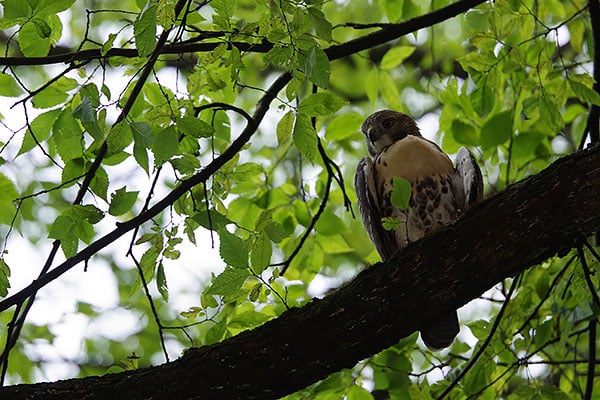
I only managed this one frame before the hawk departed, and even though I had the 70-200mm f/2.8 lens mounted and zoomed in all the way, the relatively tiny hawk was lost in the trees. He flew off right as I was switching the camera to APS-C crop mode for a second shot, but honestly even at 300mm-equivalent he'd still have been tiny. I was rather pleased with his watchful pose, though, so I cropped down much further, taking advantage of the K-1 II's high 36.4-megapixel resolution to get a nicer composition. My cropped shot above is still around 6.5 megapixels -- enough for a smallish print -- and would be somewhere around a 470mm-equivalent focal length.
And that's all for this field test. Continue the story now with part two of my field test!
Field Test Part III
A second look at one of our favorite cameras of 2018
By Mike Tomkins | Posted: 01/07/2019

It's been a little longer than planned since my first field test of the Pentax K-1 II, as life's been something of a rollercoaster for your humble editor of late, and I'm only just now digging my way out of a backlog. That's been entirely down to me, though, (sorry!) and isn't a knock on the camera itself in any respect.
It's official: The K-1 II is an award-winner, too
In fact, we've been impressed enough with the Pentax K-1 II that we recently named it a Camera of Distinction in the Best Professional Camera category of our 2018 Camera of the Year awards. So believe me when I say that, when I've managed to get out and shoot with it, I've continued to greatly enjoy the experience of using this camera. (For still images, at least; it's not really aimed at videographers as we'll discuss in a moment.)
When I filed my first field test, I'd intended to follow up with two more. The second would look at the newly-overhauled Pixel Shift Resolution System II (which adds handholdability to the resolution-boosting multi-shot function's capabilities), and would also make a side-by-side comparison with the original K-1, both for Pixel Shift Resolution capture and for single-shot stills across the sensitivity range. Then the third field test was to focus on low-light and long-exposure shooting, plus video capture.
In the end, though, I managed to get everything else I've needed shot first, so I'm going to flip that order on its head. (And since the awesome upgrade program which allowed the K-1 to be converted to a fully-fledged K-1 II for a modest fee has now reached its end, I'm also going to move some of the K-1 vs. K-1 II comparison to this field test, saving just the Pixel Shift Resolution discussion for the final field test.)

A side-by-side sensitivity shootout with the original K-1
With that housekeeping out of the way, let's get right down to my second field test! Since the bulk of my shooting this time around was to be in low light or at night, it makes sense to calibrate our expectations quickly with a side-by-side against the original K-1. I headed to downtown Knoxville, Tennessee to gather some comparison shots against the earlier model.

Below, you'll find both an overall view of the scene I shot with both cameras, and a series of 1:1 crops from the same area of the image with each camera at one-stop increments across their respective sensitivity ranges. (The area I selected for the crops is outlined in yellow in the overall view.)
Sensitivity comparison: Pentax K-1 (left) vs. K-1 II (right) |
|
 |
|
The full scene: I shot this same image across the sensitivity range with the Pentax K-1 and K-1 II. Below, you'll find a series of 1:1 crops from both cameras at equivalent sensitivities
across their available ranges. (The K-1 II can capture at a bit higher sensitivity than can the K-1.) The crops were taken from the area of each image that's bounded by a yellow box in the full scene above. |
|
 |
 |
ISO 100: At base sensitivity, the Pentax K-1 (left) and K-1 II (right) both deliver very similar results. I did my best to focus both cameras at the same distance in live view mode, but the K-1 is just slightly more front-focused regardless, so bear that in mind when comparing the finer details. It's the noise levels we're really most interested in, and at base sensitivity they're essentially identical. |
|
 |
 |
ISO 200: Things are much the same again as we move up a stop from base, with little difference of note between the two cameras beyond the slight difference in focus distances of the two shots. |
|
 |
 |
ISO 400: A similar result once again from both cameras. |
|
 |
 |
ISO 800: The image is now slightly less crisp than at base sensitivity, but only when viewed 1:1. There's no noise to speak of yet. |
|
 |
 |
ISO 1600: The first hint of noise is just starting to show through when viewed 1:1, but it's subtle. By the way, ignore the changes in brightness of the column in the foreground; it proved impossible to find anywhere downtown where the light levels didn't change with regularity. And while the leaves look softer in the K-1 II's crop here, note the 1/15th second shutter speed required for the exposure. It's likely they just moved a little from a momentary breeze during exposure. |
|
 |
 |
ISO 3200: For the first time, the Pentax K-1 II (right) looks to have a very slight edge over the K-1 in terms of fine noise levels. The difference is only going to be noticeable viewed 1:1 or at large print sizes, but it's there. |
|
 |
 |
ISO 6400: A slightly more noticeable edge for the K-1 II (right) in noise levels, but again it's a close-run thing. |
|
 |
 |
ISO 12,800: There's now a pretty clear edge for the K-1 II (right), with both lower noise levels and a finer-grained, more film-like texture to the noise. It still requires a large print size or viewing near 1:1 to notice, but if you shoot a lot at higher sensitivities, then it's certainly a worthwhile improvement. |
|
 |
 |
ISO 25,600: We've unfortunately lost the street lamp which illuminated the bench, but the edge for the K-1 II (right) remains. |
|
 |
 |
ISO 51,200: Both cameras have lost most of the finer details by this point, but the result from the K-1 II (right) is much cleaner. |
|
 |
 |
ISO 102,400: Things are really getting to be very noisy here when viewed 1:1. The result from the K-1 II is again noticeably cleaner, but noise levels and the effects of noise reduction will limit print sizes somewhat. |
|
 |
 |
ISO 204,800: This was the maximum sensitivity on the original K-1 (left), and frankly wasn't terribly usable on that camera. It's still very noisy viewed 1:1 on the K-1 II, and yields a somewhat mottled-looking overall image with muted colors, but I could still see it being useful for smaller prints, and it's more than sufficient to allow easy handheld shooting in low light, especially with a bright lens. |
|
N/A |
 |
ISO 409,600: The Pentax K-1 didn't offer this sensitivity, and while the K-1 II does, I don't personally find it terribly useful. Noise levels are pretty extreme, and even viewing at relatively small sizes image quality suffers. It's not that much more so than was ISO 204,800 on the earlier camera though, which is pretty cool given that this was available as an upgrade for the earlier camera too. |
|
N/A |
 |
ISO 819,200: This is the highest sensitivity for the the Pentax K-1 II, and noise runs rampant. I wouldn't use it myself, but it's there if you want that option yourself for artistic reasons.
|
|
There's a definite improvement, but you'll need to dial up the ISO to see it
And with that, I knew to expect only minimal if any differences at sensitivities below ISO 6400, with a significant improvement coming only at ISO 12,800 or higher. With that knowledge under my belt, I shot with the K-1 II around downtown from sunset clear through the end of the blue hour and into full darkness, almost exclusively shooting handheld.
You'll find the results of that shoot throughout most of this field test, or at least as much of it as I could reasonably fit in. Take a look in the gallery section of this review for all of my gallery images from throughout my time with the K-1 II, and spanning its entire sensitivity range under a variety of conditions.

It's harder than you'd think to find subjects which need such high ISOs
What also quickly became apparent to me, though, was that it's not actually that easy to find subjects requiring sensitivities as high as ISO 12,800 and above under typical city street lighting. In fact, the only relatively interesting subjects I could find around downtown which required my sensitivity to range so high were on Knoxville's Art Alley, a narrow back alley that's a bit grimy, but is jam-packed with bold, colorful and extremely eye-catching graffiti artworks. (And as of my most recent visit, a couple of metal sculptures, too.)

With the exception of that one alley and a few ISO sensitivity ramps I shot elsewhere around town for my own use, I just couldn't meaningfully take advantage of the higher sensitivities. I could already reliably get a hand-holdable shutter speed at lower sensitivities anyway, thanks to the K-1 II's light-hungry full-frame image sensor and the bright, quality lenses it begs to be paired with.
If you were using less-bright consumer-grade glass then yes, you might find yourself wanting access to higher sensitivities while street shooting after dark, but consumer-grade lenses just aren't going to take advantage of the image quality this camera can potentially provide.
Good image quality at all but the very highest sensitivities you'll seldom use
But while finding dark enough subjects was tough elsewhere, in the intentionally rather dimly-lit Art Alley, I was able to coax the K-1 II all the way up to ISO 102,400 without having to stop down or choose a faster shutter speed. In doing so, it made graffiti shots captured almost in the dark appear as if they were taken in the daytime.
I have to say, I found myself very impressed with the results. Shots as high as ISO 51,200 were very usable indeed, and even at ISO 102,400 a reasonable level of detail remained for smaller print sizes. Beyond that point, noise levels were very high, but then I couldn't really find any meaningful street-shooting subject that would require such a high sensitivity in the first place.

Attractive photos with great color, especially at ISO 6400 or below
And if I stuck to ISO 6400 or below, which honestly was pretty easy to do even shooting handheld well into the blue hour, image quality was not just good but great. What little noise there was had a fine, tight, pattern reminiscent of film grain, and boatloads of fine detail survived the noise reduction process. That was also true of the earlier K-1, of course; the K-1 II only shows a very slight improvement over its predecessor at or below ISO 6400.

White balance was pretty decent even at very high sensitivities and when presented with a complex mixture of different light sources. (Just about every camera I've tried struggles at least a bit to yield entirely pleasing color in Art Alley at night.) Contrast levels remained pretty decent to ISO 102,400 as well. And just as I found with the earlier K-1, the K-1 II's low-light autofocus chops were pretty decent as well, with quick and confident AF locks consistently achievable in low-light for all but very low-contrast subjects.
Incidentally, the rugged, optional handgrip is well worth the money
One other quick thing I wanted to mention quickly, as I suddenly realized it wasn't covered in my previous K-1 review while making my ISO sensitivity comparisons with that model. When I first reviewed the original K-1, the optional portrait / battery grip accessory wasn't available to me. While I've been shooting with the K-1 II, though, I've had access to the grip the entire time.
I've found that much as with its equivalents for the sub-frame K-3 series cameras, I really rather like it and find myself shooting with it attached most of the time. Sure, it adds a fair bit of heft and bulk to the body, but were I primarily worried about size and weight I'd be looking for a full-frame mirrorless camera instead.
The grip's portrait controls don't quite match those for landscape, sadly
The grip itself is weather-sealed to the same standard as the K-1 II body, and it makes the camera significantly more comfortable even just for landscape-orientation shooting in my (admittedly, larger than average) hands. It also adds a second grip and set of controls for portrait-orientation shooting, and while I do find it mildly frustrating that the control layouts for the two don't entirely match, I've long since become used to those inconsistencies which were also found on the equivalent grip for the sub-frame K-3 series flagships and their predecessors.

The grip is often available for free in a bundle with the camera body, so many of you will actually be able to score one for free. If you don't, though, I highly recommend picking one up anyway. (It lists for US$250, but is frequently available for US$200 or perhaps a little less.)
Enough of stills, what about the videos?
All of this brings us to the end of my look at the K-1 II's low-light and high ISO still imaging performance. One last area remains for discussion before I wrap things up for this field test, however. And unfortunately, all of this is going to sound pretty familiar to K-1 owners.

The Pentax K-1 II is rather outdated and outgunned by the competition when it comes to video. As we've learned in past discussions with the company, brand owner Ricoh just doesn't see video as a terribly compelling feature for its target customers. That leaves us in a situation where the K-1 II is noticeably lacking on the video front, just from a quick glance at the specifications.
In fact, I'm just going to give you the tl;dr version right now: Yes, you can shoot reasonably good-quality video with the K-1 II if you only need the occasional Full HD clip and don't need autofocus, but if video's a significant concern for you then you'll want another brand's camera alongside (or in place of) the K-1 II. Now, let's take a look at some video shot with it.
Download Original Daytime video, 1,920 x 1,080 pixels @ 59.94 interlaced fields per second |
Download Original Daytime video, 1,920 x 1,080 pixels @ 30 frames per second |
Download Original Daytime video, 1,920 x 1,080 pixels @ 24 frames per second |
As you can see above, there's a choice of three capture rates at Full HD resolution, which is still the highest that's offered by the Pentax. That was already a disappointment when the original K-1 launched in early 2016. It's doubly so in 2019, when every single major competitor -- that's Canon, Fuji, Leica, Nikon, Olympus, Panasonic and Sony -- offers a 4K-capable interchangeable-lens camera at its flagship level, and sometimes even in more affordable models too.
The highest 60 fps capture rate is still interlaced, too, which both reduces resolution and introduces unsightly artifacts. If you want the highest-quality footage possible, you'll need to limit yourself to shooting 1080p footage at either 24 or 29.97 frames per second.
Download Original Night video, 1,920 x 1,080 pixels @ 59.94 interlaced fields per second |
Download Original Night video, 1,920 x 1,080 pixels @ 30 frames per second |
Download Original Night video, 1,920 x 1,080 pixels @ 24 frames per second |
As you can see above, the 1080i60 interlaced capture rate is especially prone to moire and false color artifacts in areas of repeating fine detail like brick walls. It can be really unsightly, but dropping the frame rate to 30p and foregoing interlacing resolves the problem.
Much as in the daytime, night footage shot at 24 or 30p capture rates with the K-1 II has reasonably good quality by Full HD standards, but pales in comparison to the 4K footage everyone else is offering. With the best will in the world, there's just no way that a 2.1-megapixel image is going to rival an 8.3-megapixel one.
Download Original Single autofocus video, 1,920 x 1,080 pixels @ 59.94 interlaced fields per second |
Download Original Single autofocus video, 1,920 x 1,080 pixels @ 30 frames per second |
Download Original Single autofocus video, 1,920 x 1,080 pixels @ 24 frames per second |
Just as disappointing if not more so is the lack of full-time autofocus capability. Even though Pentax was the first to demo autofocus in a DSLR with the original pre-production K-7 way back in 2009, a decade later the company still offers only a slow and easily-confused single-servo AF function during video capture in the K-1 II.
Realistically, you'll want to pull focus manually or try to avoid focus changes during capture when shooting video with this camera. The single-servo function is useful only if you have the time and patience to edit focus transitions out of your footage in post, rather than stopping and restarting capture for every use of single AF. (And honestly, just focusing manually will likely still prove easier.)
Download Original Stabilized video, 1,920 x 1,080 pixels @ 59.94 interlaced fields per second |
Download Original Unstabilized video, 1,920 x 1,080 pixels @ 59.94 interlaced fields per second |
Although the K-1 II features a built-in sensor-shift stabilization system, it's effectively disabled in video capture mode, being locked in its central position throughout recording. Instead, Ricoh continues to rely on software-based shake reduction that, while it can be somewhat helpful with modest amounts of motion like reasonably careful, steady footsteps, can also introduce unsightly jello / distortion effects of its own into your footage.
In other respects, the Pentax K-1 II's video-capture capabilities are reasonable, but not stellar. There's no clean HDMI output for external recorders, and nor do you get much control over encoding compared to more modern cameras. But you can shoot under manual or automatic exposure control, and can use focus peaking to help you get your manual focus adjustments in the ballpark prior to capture. You can also connect an external microphone and headphones if you wish, as well as being able to manually control audio levels. But checking these boxes off doesn't really help too much when you're stuck with sub-30 fps Full HD video when rivals offer higher frame rates, 4K capture and full-time AF.

But as we've said, none of this is a surprise. Ricoh just doesn't place the importance on video capture that its rivals do, and so it isn't putting the development dollars that they are in this area, reserving them instead for features it sees as being more appealing to Pentaxians. And as a stills shooter alone, I continue to find this to be a really great DSLR.
My final field test, available here, includes a closer look at Pixel Shift Resolution on the Pentax K-1 II, how it can improve the resolution of your (mostly static) subjects, and also how the new hand-holdable variant of the mode operates in the real world. Continue the story now in part three of my field test!
Field Test Part IV
Pixel Shift Resolution can give photos a noticeable detail boost, even when used handheld!
By Mike Tomkins | Posted: 06/18/2019

Click thumbnail for JPEG, or here for raw file
As we work to tie off the final loose ends on our Pentax K-1 II review, I wanted to revisit the field tests for one more outing, this time taking a more in-depth look at the Pixel Shift Resolution functionality. If you're not already familiar with the feature, you may want to revisit our sub-frame Pentax K-3 II review briefly (and specifically, our article entitled Exploring the K-3 II's "Pixel Shift Resolution"), as this Pentax exclusive made its debut in that camera back in mid-2015.
A brief recap of Pixel Shift Resolution
But in a nutshell, the technique works by capturing four frames in the shortest time possible -- which varies depending upon whether an electronic or mechanical shutter is being used -- and microscopically adjusting the position of the image sensor between frames. In the process, the amount of light gathered is quadrupled, because instead of 2/3 of the incoming light being lost to a Bayer color filter array, every pixel location is now full-color sensitive, with data having been captured in red, green (twice) and blue.
Combined with an antialiasing filter-free design and a quality lens, this technique allows for extremely impressive per-pixel image quality and much better resistance to false color and color moire effects than a single shot. But there have until recently been some important gotchas due to the multi-shot nature of the technique. (And it still may not prove appropriate if there's a significant amount of motion.)
Moving subjects have to be accounted for and cannot have their resolution boosted, since their location varies between frames and so the precise readout of full-color info at each pixel can't take place. Camera motion is also a big issue for similar reasons, and again has to be taken into account by the technique. Flash exposure isn't possible, as the flash would have to be fired too rapidly for it to be used. And finally, until now an electronic shutter has had to be used, regardless of which type of Pixel Shift Resolution you're using.
The K-1 added support for subject motion, and now the K-1 II adds handheld capture
The K-1 II's predecessor, the Pentax K-1, largely resolved the issue with moving subjects by detecting and accounting for them, essentially automating a manual process I'd suggested in my K-3 II review. Moving subjects would be rendered using info only from one image frame captured during the Pixel Shift Resolution process, while static areas of the scene would receive the benefit of the other three frames.
And now, the followup K-1 II aims to resolve the issue of camera motion with the addition of a handheld variant of Pixel Shift Resolution, which also uses a mechanical rather than an electronic shutter which can, under some light sources, cause banding. In-camera, the new Pixel Shift Resolution variant doesn't have its own name per se, being indicated simply by the name Pixel Shift Resolution, and then an icon which it took me just a little while to figure out was intended to show a camera being held by its handgrip.
(I do think Ricoh needs to come up with a better way to indicate the function,but once you're familiar with what it is, it's easy enough to remember, I suppose. The existing tripod-based modes, incidentally, have icons that are similar, but with the in-hand camera replaced by the letters MC -- for motion correction -- either grayed out or not to indicate availability of the function.)
Time for a real-world Pixel Shift Resolution shootout
To see how its updated Pixel Shift Resolution function handles real-world shooting, I headed towards nearby downtown Knoxville, Tennessee, equipped with the camera itself, a reasonably sturdy tripod and a choice of three different lenses -- the HD PENTAX-D FA 15-30mm F2.8ED SDM WR, HD PENTAX-D FA 24-70mm F2.8ED SDM WR and HD PENTAX-D FA* 50mm F1.4 SDM AW. (Although as it happened, none of my shots with the latter made it into this article.
And before I go any further, I should note that all of the images in each group were captured with identical camera settings and autofocus distance, other than the fact that for the tripod-mounted shots I used a two-second self-timer, which I disabled for the handheld shots. I focused either automatically or manually for the first exposure in each series, then switched to manual focus for the rest of the shots in that series. For the handheld shot, I did my best to hold the camera in the same place that I'd had it for the tripod-mounted shots, being very careful not to touch the focus or zoom rings.
In all cases, the camera was set to MTF priority to yield the optimum lens aperture, and to ensure that shutter speeds wouldn't drop to low, the ISO sensitivity was also set to ramp up the ISO sensitivity faster than by default, to ensure shutter speeds would be sufficiently swift that blur from camera shake would be a non-issue, no matter the subject I was shooting. For the shots I selected in this field test, the automatically-selected sensitivity was ISO 200, and the shutter speed for the handheld shots ranged from 1/250th to 1/800th second. I also enabled raw+JPEG capture with a DNG file format, but otherwise left settings at their defaults.
Scene 1: Knoxville Arts District
The first group of shots I want to discuss in this article were also, as it happens, the first batch I took on this shoot. They weren't the first I captured in testing Pixel Shift Resolution, however. I'd already been out several times previously, gaining some early shots for my own information.
Much as I did then, on this final shoot I found that while handheld Pixel Shift Resolution shots could often better a standard, single exposure for detail, it wasn't always a given. Perhaps a quarter to a third of the time, I'd end up with a similarly-sharp result shooting handheld to that I'd previously captured in single-shot mode. (And just rarely, the single-shot exposure would actually seem a smidgen sharper, though never significantly so.)
For critical subjects -- and I'd imagine that's most of them, if you're taking the time to try and increase resolution in the first place -- it'd therefore probably be prudent to shoot both a standard and Pixel Shift Resolution version if you're planning on shooting handheld.




The shot (and crops) above are a nice example of this. Looking at the four crops above, it's pretty clear that there's little difference between the single-shot and handheld Pixel Shift Resolution shot in terms of detail-gathering performance. The fine details in the tripod-mounted Pixel Shift Resolution crops show noticeably more detail, although they do also show a little artifacting in the flags and the more subtle-moving signs, even in the motion-compensated crop.
From perusing the whole image, though, I think that if anything the handheld Pixel Shift Resolution image is just a smidgen less sharp than the single-shot capture here. Initially I thought the building at the top left of the image showed more detail in the Pixel Shift version, but I think that's just down to the front of the building being brighter in the single-shot capture due to the clouds passing overhead. (You can see a little of what I mean in the next group of crops.)


Here again, the tripod-mounted crops clearly show more detail than the single-shot or handheld ones. The handheld Pixel Shift Resolution crop does look sharper than the single-shot crop at first glance, but I think that's down to the more contrasty illumination of the building in the final shot. (You can see the clouds have moved significantly in the short time between exposures, as the window reflections have changed from white to blue.)


One place where the handheld Pixel Shift Resolution mode definitely bested the tripod-mounted modes was in its ability to handle moving subjects. I already mentioned the slight artifacting noticeable in the first set of crops, but it's much more so in the wind-blown trees and walking pedestrian here. And again, while the tripod-mounted shot with motion compensation enabled is a significant improvement over that in the uncompensated one, the handheld Pixel Shift Resolution shot is the only multi-shot capture not to show some artifacting in the moving subjects.
Scene 2: Old Knox County Courthouse and monuments
While my first set of shots above didn't show an image quality advantage for handheld Pixel Shift Resolution, more often than not the function came through for me as it did in the image and crops below.


Looking at the quartet of crops above, the handheld Pixel Shift Resolution crop definitely looks a bit sharper than the single-frame capture. (And this time, I don't think it's caused by the differences in light from both clouds and foliage casting shadows on the historic monuments outside of the old Knox County courthouse building.) But again, it's pretty clear that the tripod-mounted Pixel Shift Resolution shots are another step above in terms of detail.



Switching to a different monument that's not so greatly affected by shadows from the nearby trees, we again see a little bit crisper of a result in the handheld Pixel Shift Resolution image, and an even better result in the tripod-mounted ones.



And the same is also true of the crops above of text further down the same monument, even if there are some differences in the ambient light level. It's perhaps a subtle improvement for handheld Pixel Shift Resolution overall for this image, but a noticeable one nevertheless.
Scene 3: Regal Cinemas headquarters and One Riverwalk
For those of you who're not convinced yet, however, this third series should take you there. It's a pity that the subject itself is a bit bland, as it more-clearly showed what handheld Pixel Shift Resolution is capable of than any other in this series. Ah well, such is life.


Just a glance at the fine detail in the red and tan bricks on the front of Knoxville's new One Riverwalk apartment complex is enough to tell you that handheld Pixel Shift Resolution is working here. Sure, the tripod-mounted shots are even crisper, especially in the window blinds, but the difference between these and the handheld shot is less significant than that between the handheld and single-shot captures.


Also noticeable is that all three Pixel Shift Resolution crops show significantly less color moire in the window blinds, compared to the quite strong diagonal stripes of color across the blinds in the single-shot capture. Improved resistance to false color and moiré is one of the selling points for the earlier Pixel Shift Resolution modes. And while the handheld mode doesn't have the same alignment accuracy of the tripod-mounted version, it certainly seems to have helped out nevertheless.
One slightly curious thing, though, is that the tripod-mounted shots show a little bit of artifacting on and around the One Riverwalk sign, and in the front of the building around the windows. That's also true in the crops of Knoxville's famous JFG coffee sign below, and I can only hypothesize that perhaps with it being a rather breezy day, there was just sufficient vibration in my tripod to cause issues.


Be that as it may, though, the handheld Pixel Shift Resolution image had no such issues, and turned out the best result of the group overall. You can certainly see more fine detail in the light bulbs which illuminate the JFG sign at night, here.
Scene 4: Three Rivers Rambler at Volunteer Landing


Finally, I moved on to Knoxville's Volunteer Landing for one more set of exposures. And again, handheld Pixel Shift Resolution performed pretty well, yielding a slight but noticeable increase in detail while avoiding the artifacting of the tripod-mounted shots. And while the motion compensated crop again does much better than its uncompensated equivalent, it still misses some of the finer artifacting in the foliage.


That artifacting, incidentally, can show its head in unexpected places, too. When you look at trees swaying on a breezy day, it's pretty obvious that they're going to cause problems for a multi-shot capture technique like Pixel Shift Resolution. It's less immediately obvious that those same moving trees are going to cause issues in what at first glance would seem to be unrelated areas of the image, like the train above, though.
But look closely in the windows and the side of the train in the tripod-mounted crops above, and there's clearly just a little of the same artifacting going on here too. The reason: They're reflecting the trees, and when the trees sway, so to do their reflections, whether you as the photographer are conscious of that or not.


The same is also true of motion in shadows, as you can see in the final set of crops above. While the fence and lamp post are both crisper in the Pixel Shift Resolution images, there's significant artifacting in the uncompensated, tripod-mounted shot, and a little bit remains even in the motion compensated version. But once again, the handheld variant is unaffected.
Final thoughts on Pixel Shift Resolution and its handheld update
Going into this field test, I wanted to know how Ricoh's updated Pixel Shift Resolution mode would perform, and especially how usable its new handheld variant would be in real-world shooting. And now I'm done with my shooting and analysis, I have to say that the answer is "pretty well". It's not a magic bullet that will work all of the time, but in the right circumstances it is definitely capable of yielding a significantly sharper image on a per-pixel level than you can get from a single exposure. (And sometimes, it comes surprisingly close to matching even the invariably more precise tripod-mounted variants of Pixel Shift Resolution.)
And while it never quite equals the tripod-mounted Pixel Shift Resolution capabilities, the new handheld mode has proven to be far more resistant to issues with subject motion throughout my testing. Add in a greater resistance to false color and moiré and I think this is a mode that's definitely worth using if you're shooting relatively static subjects with lots of fine detail or repeating patterns. (Think both landscapes and cityscapes, in particular.)
I do recommend always shooting a backup single-shot exposure, but if you're, say, backpacking the Appalachian Trail and wanting to pack light, it's rather nice to be able to leave your tripod at home and still get really crisp results for just a little extra added effort. Kudos to Ricoh's engineers for figuring out how to bring to market a feature that, just a few short years ago, seemed unlikely to be possible any time soon!
Technical Info
by Mike Tomkins | Posted: 02/22/2018
An all-weather body with excellent ergonomics
The Pentax K-1 II retains the same weather-sealed, magnesium-alloy body which debuted with the original K-1. It's comprehensively weatherproofed, with a total of 87 seals protecting seams, compartments and controls alike from ingress of dust or moisture. And if you purchase the optional portrait / battery grip, this has a further 47 seals. Of course, you'll also need to be using a weather-sealed lens for proper protection.
To choose a weather-sealed lens, look for either the AW or WR designation on a full-frame or sub-frame optic / rear converter, or the DA* designation indicating a premium sub-frame optic. (All of the latter are weather-sealed, but note that the same is not true of FA*-badged lenses.) Continuing the weather-sealed system, the Pentax AF360FGZ II and AF540FGZ II flash strobes are also weather-sealed, as is the O-RC1 remote control.
As well as dust and water-resistance, the K-1 II is also freezeproof, able to operate in temperatures as low as 14°F (-10°C).
36-megapixel full-frame and 15-megapixel sub-frame capture
At the heart of the K-1 II is a 36.4-megapixel full-frame CMOS image sensor with a Bayer RGBG color filter array. Dimensions are 35.9 x 24mm, total resolution is 36.77 megapixels, and the pixel pitch is 4.9 microns. Maximum image size is 7,360 x 4,912 pixels, except when operating in the APS-C crop mode, when resolution tops out at 4,800 x 3,200 pixels (or in other words, 15.3 megapixels).
As with other Pentax DSLRs since the K-3, the K-1 II doesn't include an optical low-pass filter. It does, however, feature an on-demand mechanical antialiasing function. More on that in a moment. (Or read Dave Etchells' "Geek's Guide to On-Demand Low-Pass Filtering" from our Pentax K-3 review for the full story; the feature is little changed from that camera, although it does now offer a choice of two or three-frame AA Filter Simulator bracketing function, as was added to the K-1 in a firmware update.)
The PRIME IV processor meets a new Accelerator Unit
Like its predecessor, the K-1 II is based around Ricoh's PRIME IV processor. (That's a contraction of "Pentax Real IMage Engine", if you're curious.)
But where the K-1's processor operated alone, the PRIME IV chip in the K-1 II is now aided by what Ricoh is calling an "Accelerator Unit". This featured previously in the sub-frame Pentax K-70 and KP cameras, and is making its full-frame debut in the K-1 II. Pentax hasn't disclosed this unit's precise function at this time, but we understand that it does a significant amount of the noise reduction processing, freeing up the main processor for other image quality-related tasks.
Two extra stops of sensitivity at the top end
The original K-1 had an overall sensitivity range of ISO 100 to 204,800. The K-1 II, though, provides an extra two stops of sensitivity at the top end, for an upper limit of ISO 819,200. However, we'd suggest checking out our second field test, as well as the results of our comprehensive image and print quality testing in the lab, before you get too excited about this feature. The entire range is available without needing to enable ISO expansion, and step sizes of 1/3, 1/2, or 1EV are available.
There's also an Auto ISO sensitivity function, whose upper limit can be manually selected. And as in past cameras, you can configure the K-1 II to raise sensitivity more or less quickly than the default.
Moderate performance but with a generous buffer
With a larger, higher-resolution sensor than its sub-frame siblings, the Pentax K-1 II understandably trails them in terms of burst-shooting performance, just as did its predecessor. With a manufacturer rating of 4.4 frames per second -- just slightly conservative, as our lab testing was closer to 4.6 fps -- it also trails competitors like the Nikon D810, Canon EOS 5DS R and Sony Alpha A7R II, all of which are manufacturer-rated at five fps.
However, it's worth noting that all three are also significantly more expensive cameras. A fairer comparison would be to the Sony A7R, which has similar resolution and is only fractionally more affordable -- and here the toss-up falls in Ricoh's favor. Sony rates the A7R for around four fps, making the K-1 II about 10-15% faster than its nearest rival.
Of course, one should also note that all of this relates to full-sensor capture. If you apply an APS-C sensor crop, the K-1 II is capable of shooting at around 6.6 to 6.8 frames per second according to our lab testing. Again, that's just a little better than the manufacturer rating.
Although it won't knock your socks off for performance, the buffer depth is pretty generous in either full-frame or APS-C modes. The full-resolution mode can capture around 77 JPEG or 17 raw frames in a burst, while the APS-C mode will allow up to 167 JPEG or 60 raw frames in a burst, per our own in-house testing.
Shoot at lower speeds too, if you want
There are also two reduced-speed burst shooting rates available, although the rate for the minimum-speed option differs depending on crop mode. The intermediate rate provides three fps regardless of crop mode setting, while the lowest rate should manage around one full-frame image every 1.4 seconds, or one APS-C frame per second.
Either option should prove handy for situations where you don't need the full burst rate, but you're still shooting faster than you'd want to by rapidly pressing the shutter button. (Although we'd still like to see the ability to manually dial in your own chosen burst speed for reduced-rate capture.)
As you'd expect, the lower-speed burst modes have even greater burst depths, although we don't test these in-house. For full-frame shooting, Ricoh claims a depth of 100 JPEG or 20 raw images at three fps, or 100 raw / JPEG images at 0.7 fps. Crop to APS-C, and the company predicts a depth of 100 JPEG or 70 raw images at three fps, or 100 raw / JPEG images at one frame per second.
(By comparison to our own figures at higher resolutions, it's clear that you'll actually get more than 100 frames in the above scenarios, incidentally, and that Ricoh simply doesn't supply a precise value if more than 100 frames are possible.)
Banish blur from camera shake with five-axis, five-stop Shake Reduction
Like the K-1 before it, the K-1 II includes in-body image stabilization. It's a more sophisticated system than that in the APS-C flagship K-3 series cameras, if you're considering a step up from sub-frame, though. Where those models were limited to three-axis Shake Reduction and had a maximum correction of around 4.5 stops to CIPA testing standards, the K-1 II offers up five-axis stabilization and a five-stop corrective range, just as did its predecessor.
Wondering what the five different correction axes are? Wonder no more: The K-1 II can correct for vertical and horizontal translational motion (that is, straight side-to-side and up-or-down motion), as well as for side-to-side roll, front-to-back yaw, and rotation around the central axis of the lens.
As in the Pentax K-1 and K-3 II, the K-1 II also includes a panning detection function. This determines that you're panning to follow a moving subject, and then automatically ceases its attempt to stabilize motion on that axis but still stabilizes the other axes.
Game changer: Pixel Shift Resolution now works handheld, too!
In early 2016, Pentax had big news for still-life shooters and anybody else with static subjects when it launched its brand-new Pixel Shift Resolution function in the K-3 II. The K-1 updated it with a motion compensation function which detected and corrected for moving subjects within an overall static scene, making it quite a bit more useful. Now, the Pentax K-1 II revolutionizes the function with support for handheld shooting!
Curious how Pixel Shift Resolution works? We covered it in quite some detail on our news page at the time, and while it now supports both handheld shooting and moving subjects within the scene, the fundamentals are unchanged. Hence, our K-3 II article remains relevant for the technical types among us. For the rest, we'll give you the nutshell overview first, before returning to what's new.
How Pixel Shift Resolution differs from its Olympus, Panasonic and Sony rivals
Pixel Shift Resolution has some similarities to -- and some key differences from -- the High Res Mode first introduced by Olympus in the OM-D E-M5 II compact system camera, the Pixel Shift function introduced recently in the Sony A7R III, and the even more recent high-res mode of the Panasonic G9. Like all of those systems, Ricoh's Pixel Shift Resolution mode combines multiple sequential images with very slight adjustments of the image sensor position to create a single output image of higher quality.
One place where Pentax and Sony's approach differs from that of Olympus and Panasonic is that they take four shots with full-pixel steps instead of eight shots with half-pixel steps. Another is that when recording JPEGs, Pentax outputs each image at the sensor resolution, rather than at a significantly higher resolution as do Olympus and Panasonic.
(Sony, meanwhile, can't create a pixel-shifted JPEG in-camera at all, recording only as four separate raw images which must be combined on a computer, using either the free Imaging Edge (Remote) or (Viewer) apps for 64-bit Windows or Mac OS.If you can relate to the "What's a computer" kid in Apple's rather divisive TV ad, well... you're out of luck with Sony's implementation until such time as you learn the answer to your question, we suppose. ;)
Ricoh's technique is bested in some respects, but offers important advantages too
The downside for Ricoh and Sony's techniques overall is that there's likely more scope to improve detail using Olympus' methodology. And compared to Olympus and Sony, another disadvantage of Ricoh's technique is that you can't use flash with Pixel Shift Resolution mode. (Sony allows flash sync at 1/13 second, while Olympus allows sync at 1/30 or 1/60 second, depending on the camera model.)
But there are a couple of important upsides for Ricoh's stratagem, too. For one thing, file sizes can be much smaller the way Ricoh is doing things, saving you card space and reducing the time you have to wait for images to be written to the flash card. With fewer shots and less data to handle, there's less time and processing power expended if you choose to write JPEGs in-camera.
And compared to Sony, which mandates a minimum of one full second between exposures to allow vibrations to dissipate, the capture process is far faster, too.
Pixel Shift Resolution can make a very obvious improvement in per-pixel sharpness
While the output resolution is no different to that of a standard, single-shot image, there's little question that by getting full color information at every pixel, Ricoh can still significantly improve detail. You only need to look at images from the Foveon X3 sensor-based cameras from Sigma, which actually record full color at every pixel in a single shot, to see that. Or, for that matter, Pixel Shift Resolution images shot with the earlier Pentax K-1, which can be exquisitely detailed.
Nor is it just improved detail and a reduced incidence of moiré, false color and jaggies that makes the Pixel Shift Resolution function worthwhile. It also reduces image noise and yields a finer-grained noise structure, since the additive exposures for each pixel can be used to average out luminance noise, and the remaining noise isn't interpolated outwards to surrounding pixels.
Camera / subject motion can be corrected, but PSR is still for mostly static scenes
When it originally debuted in the K-3 II, Pixel Shift Resolution only worked for completely static, tripod-mounted images shot with an electronic shutter.
The Pentax K-1 further refined this, detecting image areas that showed subject motion between frames, and then simply skipping the Pixel Shift Resolution processing for these image areas. Since they contain moving subjects, these areas aren't likely to benefit noticeably from increased color resolution anyway, but the Pixel Shift Resolution technique can still be applied elsewhere to improve fine details in static image areas.
And now, the Pentax K-1 II debuts support for handheld capture, even when using Pixel Shift Resolution mode. This simply can't be overstated: It revolutionizes multi-shot, resolution-boosting image capture. Pixel Shift Resolution still makes sense only for predominantly static subjects, of course, or there's no scope for improving image quality. But with the overhauled Pixel Shift function you no longer need lug around a bulky, reasonably sturdy tripod to take at least some advantage of the effect. Now, you can travel light and shoot Pixel Shift Resolution-enhanced imagery with tack-sharp details from locations where previously, it would have been difficult or impossible. You will still need a tripod to get the absolute most detail, however.
The K-1 II is rare among full-frame cameras in offering optional low-pass filtering
When Ricoh launched the K-3 back in 2013, it debuted a revolutionary new way of combating moiré, false color, and jaggies when needed, yet maximizing sharpness the rest of the time. Instead of the resolution-robbing optical low pass filter used by some cameras, Ricoh achieved the same thing with a very fine motion of the image stabilization system during exposure.
For those who want to know the nuts and bolts, the Anti-Aliasing Filter Simulator function is explained in detail by IR publisher Dave Etchells in our "Geek's Guide to On-Demand Low-Pass Filtering", part of our Pentax K-3 review. If you're already familiar with the system, which has since appeared in several Pentax SLRs, you know almost everything you need to about how it works in the K-1 II. The only thing we'd add in terms of functionality is that you can now bracket the AA Filter Simulator function, with the camera shooting your choice of either two or three frames with different AA Filter Simulator settings.
Only Sony has a better system, and it's not available in an interchangeable-lens camera
We should also note that since our review of the K-3 was written, a competing technology has appeared on the scene, so Ricoh's function is no longer unique in its capabilities, even if the manner in which the effect is achieved differs wildly. Out of the two methods, Sony's Optical Variable Low-Pass filter is clearly the superior method, as it's a real low-pass filter rather than an artificial one, and so not subject to some limitations of the artificial method.
Sony's fixed-lens RX1R Mark II uses liquid crystal technology with conventional low-pass filter elements to permit low-pass filtration to be turned on or off completely, or to be set somewhere in between the two states. Since it's achieved in hardware, it doesn't have the limitations of Ricoh's system, which reaches its limits at exposures of 1/1,000 second or faster. Beyond that point, you'll find that the strength of the AA filter simulator effect is diminished regardless of your settings. Also, Ricoh's system won't work with flash exposures, because the brief moment of illumination from your strobe isn't long enough for the required motion to take place. If you want to take advantage of the AA Filter Simulator to avoid artifacts in the studio, you'll need to use hot lights or available light.
Still, even in the face of what's potentially a better rival -- albeit not one available yet in an interchangeable-lens camera -- the importance of Ricoh's system for your photography can't be overstated. It places control back in your hands for most shooting situations, letting you decide what's most important for you on any given shot: maximum image detail, or resistance to objectionable artifacts.
Compatible with decades of full-frame and sub-frame Pentax lenses for film or digital
The Pentax K-1 II's KAF2 lens mount is a variant of the K-mount that has been used in the preceding full-frame K-1, all sub-frame Pentax digital SLRs to date, the K-01 mirrorless camera and the company's many 35mm film SLRs.
But where all Pentax DSLRs except the preceding K-1 and the medium-format 645-series are limited to using the centermost area of the image circle for full-frame optics, the K-1 II allows you to use your full-frame lenses as their designers intended. (And with the K-1 now discontinued, the K-1 II is in fact your only full-frame choice for the K-mount, unless you're willing to take the not-insignificant risk of buying secondhand.)
Compatible with decades of full-frame and sub-frame Pentax lenses for film or digital
In all as of this writing in mid-2019, there are 13 different full-frame lenses currently available from Pentax, with the most recently-shipped being the HD PENTAX-D FA* 50mm F1.4 SDM AW. Two more, the tentatively-named D FA * 85mmF1.4 and D FA 70-200mmF4, are set for 2019 or later. Three other unnamed optics are set to follow: An ultra-wide angle prime, a large-aperture wide-angle prime and a telephoto zoom. And you can also use decades worth of great glass made for the Pentax K-mount, too, all but the oldest of it without any significant restrictions. (Only the very oldest lenses from the latter half of the 1970s or lenses adapted from other mounts come with any troublesome strings attached to their use.)
And of course, you can also switch to APS-C mode if you can live with 15.3-megapixel resolution, where you'll find a faster burst capture rate and support for the many sub-frame optics released since Pentax made the jump to digital with the clumsily-named *ist D almost 15 years ago. Interestingly, a fair few optics billed as being made for sub-frame cameras over the years can nevertheless provide a sufficiently large image circle to shoot on full-frame, albeit with an increased likelihood of image defects towards the edges and especially in the corners of the frame.
Among these, three currently-available DA-series (ie. sub-frame) lenses not only have sufficiently large image circles that they can fully cover a full-frame image sensor, but are also compatible with some lens correction functionality outside of the APS-C image area. (This includes diffraction and chromatic aberration correction; we're not sure if it includes further corrections.) But it should be noted that Ricoh doesn't guarantee the quality outside of the APS-C image area, and given that these are all long teles -- the 200mm F2.8, 300mm F4 and 560mm F5.6 -- you'd probably do better to just shoot with a wider lens in the first place.
When shooting with a sub-frame lens, the Pentax K-1 II can detect this and automatically apply the requisite APS-C crop. Alternatively, you can make the choice to switch between full-frame and sub-frame operation yourself.
Top-notch dust removal as you'd expect from a Pentax flagship camera
If you regularly change lenses -- or use consumer-grade glass that sucks air in and blows it back out every time you rack the focus or zoom -- you can expect dust to get inside your camera sooner or later. (Most likely, sooner.)
Ricoh has retained the same DR II dust removal system used in its other flagship models since the K-7 for the new K-1 II . It uses a piezoelectric element that vibrates at higher frequencies than a sensor shift system can, and in our experience systems like these typically do a better job of shaking free dust that's stuck to the sensor's protective cover glass.
To help you decide when a more detailed cleaning is needed, the K-1 II also retains its predecessors' dust alert function, which helps you to locate stubborn dust particles on the sensor for manual cleaning.
Automatic correction of common optical defects
Also like other recent Pentax DSLRs, the K-1 II includes lens correction functionality. This can correct for lens distortion, lateral chromatic aberration, vignetting and diffraction in-camera when using DA and DFA lenses, as well as with certain FA lenses.
Metering
The K-1 II features an 86,000 pixel RGB CCD metering sensor. It has a wide working range of -3 to 20 EV with a 50mm f/1.4 lens at ISO 100. Metering modes on offer include Multi-segment, Center-weighted and Spot, and an exposure lock function is available, accessed with the AE-L button at the top right corner of the camera.
You can also specify up to +/-5EV of exposure compensation, or bracket two, three or five exposures with up to 2EV between exposures. For either compensation or bracketing, you can specify your adjustment in 1/3 or 1/2 EV steps.
And since the metering sensor is based around a color-filtered chip, it can also recognize color information, allowing it to help out with subject identification too.
The same 33-point SAFOX 12 autofocus system as in the K-1
The K-1 II retains the same 33-point autofocus sensor which debuted in the preceding K-1. Dubbed SAFOX 12, it has much the same arrangement as the earlier SAFOX 11 design, but places an additional three AF points on either side of the main array, just inside the two linear AF points at the leftmost and rightmost ends of the array.
The 25 central points in a 5x5 array are all cross-types, sensitive to detail in both the horizontal and vertical axes. The remaining eight points, located towards the far left and right of the array, are linear points sensitive on just one axis. The centermost sensor as well as the points directly above and below it are precision points, capable of focusing with an f/2.8 aperture. These same points also have a working range of -3 to +18EV.
All of the same autofocus functions and options, too
Autofocus mode choices include AF-S (single-servo), AF-C (continuous-servo), and automatic selection (AF-A). You can also switch from the default 33-point auto selection, with provision for Spot, Select, Small / Medium / Large expanded area or zone-select modes. For single-servo autofocus, Select allows only a single point to be chosen, rather than the fixed center point of Spot AF. Zone Select is similar, but allows a nine-point area to be selected, with the camera making the final determination of which points to use. Finally, Expanded Area works only in continuous-servo mode, and allows you to select a 3x3 array, a 5x5 array, or the entire AF array. Focus starts from the center point, but will be tracked anywhere within your selected array.
As in the K-3 cameras, Ricoh has included an autofocus hold setting for use in tracking, which will let you control how quickly the camera will react to a radical change in detected subject distance, such as you might get when shooting through a fence, or if somebody walked between camera and subject. You have four options: either the change will be near-instant with Hold AF Status set to off, or you can choose one of three durations (Low, Medium or High) after which the change in focus will be made.
You can also define whether a focus lock or a full shutter button press should be of greater importance to the Pentax K-1. In single-servo mode, you can choose focus priority to have the camera wait to trip the shutter until a focus lock is achieved, or shutter priority to take it as soon as you full press the shutter button. In continuous or AF-A modes, you can opt for focus priority, or frame rate priority (which takes another photo as soon as the shutter has recycled and there is available buffer space to do so).
No hybrid or phase-detect AF in live view, just regular contrast-detect AF or manual focusing
Of course, all of the above applies only when focusing using the dedicated AF sensor, which can only happen when the reflex mirror is lowered. In live view or movie modes, the Pentax K-1 II instead switches solely to contrast-detection autofocus, which provides both face detection and tracking capabilities. You can focus manually as well, just as you'd expect, and if you do so in live view mode there's a focus peaking display to help you ascertain the exact point of focus.
No built-in flash, but great support for external strobes
As you'd probably expect on a camera aimed at enthusiast or professional use, the K-1 II lacks a built-in flash strobe. Many -- perhaps even most -- potential K-1 owners will see this as a good thing, since popup strobes represent a potential point of failure. If you're the type to rely on your popup strobe, though, you'll want to retrain yourself to bring a separate flash. Although with that said, the extremely wide sensitivity range of the K-1 II should go some way to preventing the need for a flash in the first place.
If you're a fan of off-camera wireless flash, the absence of the built-in strobe also means that you'll need an extra external strobe, since there's no longer a built-in strobe with which for the camera body to communicate with off-camera strobes. (Of course, you could also use a wired tether between camera and strobe, using the K-1 II's sync connector or a hot-shoe mounted cable.)
Speaking of which, the standard hot shoe on the top deck also includes both support for a locking pin, and intelligent connections that allow for Pentax's P-TTL flash metering system. And the aforementioned PC sync socket is protected by a small, screw-in cap, although it isn't attached to the camera body, so you'll want to ensure it's snug so as not to lose it. Still, it's nice to have the terminal at all -- many competitors force you to buy a hot shoe to PC terminal adapter, if you want to hook up your studio strobes.
Love the outdoors and traveling? Put your shots on the map with the K-1 II's geotagging support
Like the Pentax K-3 II and K-1 before it, the K-1 II features a built-in GPS receiver, electronic compass and three-axis orientation sensor. Together, these allow it to geotag your images with their capture location, the direction the camera was pointing, and the extremely accurate time provided by the GPS satellites.
The K-1 II can also record track logs in the KML format used by Google Earth, logging your location at intervals of 5, 10, 15, 30 or 60 seconds, with a duration of up to 9 hours at the minimum interval or 18 hours with a 10-second interval. (Bear in mind, though, that if you take advantage of the full duration, you won't have any battery life left over for shooting photos, which rather defeats the purpose of having the camera in the first place!) Regardless of the interval set, the maximum logging time is 24 hours.
Of course, we live in a world where there are now multiple competing standard for satellite positioning systems, and so when one refers to GPS, it isn't immediately clear which systems the device is compatible with. For the K-1 II, it's compatible with the United States government's GPS system, but not other systems such as Russia's GLONASS, China's Beidou, Europe's Galileo or India's IRNSS. That doesn't mean it can't get a fix in these regions, though, as GPS has pretty-much global coverage -- it just means that it can't take advantage of the extra satellites from the rival systems to gain a faster, more accurate fix.
What it can do, though, is to improve the quality of its positioning using a number of augmentations to the GPS system. These include the US Federal Aviation Administration's WAAS in North America, the European Union's EGNOS inside Western Europe, India's GAGAN within the Indian subcontinent, and both the MSAS and proposed QZSS systems within Japan. In other regions, the K-1 II will fall back to relying solely on the base GPS system for its location information.
AstroTracer freezes the night sky for longer exposures without star trails
Nor is that all. If you've ever tried to shoot an image of the night sky to reveal the details invisible to the naked eye, you'll appreciate another clever capability of the Pentax K-1 II. By combining information from the GPS receiver, compass, orientation sensors and lens, the K-1 II can determine how quickly stars will be moving across the night sky, and in which direction. It can then use the Shake Reduction system to counteract their motion, allowing for much longer exposures than would normally be possible without causing star trails to form.
The result is that you can get better results as an astrophotographer, without the need for any accessory beyond a good, sturdy tripod. The actual exposure time you'll be able to achieve will depend on the focal length of the lens you're using, and of course you won't be able to include foreground subjects without blurring them instead, but this function -- dubbed AstroTracer -- really is unique. And with their larger, more sensitive full-frame sensor and higher resolution, it shows even more potential on the K-1 II and its predecessor than it did on the sub-frame K-3 II.
A really bright, roomy DSLR viewfinder gives you a great connection to your subjects
Ricoh debuted a new pentaprism viewfinder in the Pentax K-1, and it's retained in the followup camera too, still sporting an accurate manufacturer-rated 100% coverage. In place of the LED focus point indication used in sub-frame models, it features an illuminated LCD overlay providing a customizable grid display, an indication of the crop area if applicable, and a dual-axis level gauge display.
Magnification is 0.7x (50mm f/1.4 lens at infinity), and the eyepoint is 20.6mm from the eyepiece frame, or 21.7mm from the viewfinder lens. The viewfinder comes with a Natural Bright-Matte III type focusing screen, and this is not interchangeable. The dioptric adjustment range of -3.5 to +1.2m-1 is even broader than that provided in the company's flagship APS-C cameras.
The Lunar Lander articulation mechanism is back for a second generation!
The Pentax K-1 II's rear-panel LCD monitor also debuted in the previous K-1 model, and still has probably the most unusual articulation mechanism we've seen to date, dubbed "Cross-Tilt". (We've often described it as reminiscent of NASA's lunar lander modules from the Apollo missions!)
The monitor itself sits atop four struts which allow it not only to be angled to face up, down, left or right, but even swiveled somewhat. These struts provide for +/-35 degrees of side-to-side adjustment, and +/-44 degrees of vertical tilt. Once they reach their maximum extent, a secondary hinge allows the screen tilt to continue upwards to the 90-degree position for waist-level or low-to-the-ground shots. It's a bit tricky to describe, but certainly provides a much wider range of motion than competing designs.
Of course, it can't be angled forwards for selfie shooting, but that's hardly a major use case for a full-frame camera. The one obvious downside compared to a more traditional tilt/swivel mechanism, though, is that the display can't be closed facing inwards for added protection.
The display itself has a 3.2-inch diagonal, a 3:2 aspect ratio, and a total dot count of around 1,037k dots. And helping combat glare and low contrast, it has a gapless design. Further assisting with visibility is a new outdoor view setting which boosts brightness with two-step control. You can also dim the LCD significantly and even enable a red channel-only Night Vision LCD Display mode for night shooting, to help protect your night vision. Additional controls let you tweak brightness, saturation and color.
A modestly-sized top-deck LCD
For quick at-a-glance checks of basic setup, battery life and shots remaining, there's still a monochrome info display on the top deck. Just as in the K-1, it's significantly smaller and contains less information than that on the earlier K-series sub-frame flagships. That decluttering helps to free up room for some of the new top-deck controls, but the display still hits all of the high points. For nighttime viewing, it has an amber backlight which illuminates when you press the dedicated lamp button on the top of the camera.
On-demand body lighting is still an unbelievably clever idea
That's not the only function of the lamp button, though. It also activates another unique feature the K-1 II inherited from its predecessor. On the outside of the body are an array of lights, but unlike those on the entry-level Pentax K-S1, these are no mere fashion accent. Instead, they illuminate the camera body to help make it easier to see what you're doing when fiddling with controls, changing lenses and so forth after dark.
One such LED sits beneath the pentaprism assembly on the front of the camera, providing illumination for the lens mount. Four more can be found on the rear of the LCD monitor, and light up the rear-panel controls once the display is tipped or pulled outwards from the camera body. Further LEDs cast some light on the K-1 II's flash card slots and cable connectors.
If you want, you can adjust the brightness of the LEDs or disable them altogether, as well. It's a really nice detail which makes it much easier to handle the K-1 II at night. Hindsight is 20/20, but we can't help wondering why nobody thought of this before Ricoh.
More exposure modes than you can shake a selfie stick at
The K-1 II offers a healthy selection of exposure modes. As well as Automatic, Program (with program shift), Shutter priority (Tv), Aperture priority (Av), Manual, and Bulb, there are a couple of Pentax exclusives: Sensitivity priority (Sv), and Shutter-and-Aperture priority (TAv). In these latter two modes, you can either dial in a sensitivity and let the camera select aperture and shutter speed, or dial in the aperture and shutter speed, then let the camera select the sensitivity. There's also a Flash X-Sync mode, which locks the shutter speed at 1/200 second, just a little faster than the 1/180 second typical of Pentax DSLRs.
There are also five separate User modes (U1 thru U5), allowing you to quickly recall settings groups you'd saved for particular shooting situations. And you can opt for various program lines when using automatic or semi-automatic exposure. As well as the default program line, you can bias the camera in favor of higher shutter speeds, a shallow or deep depth of field, or towards the MTF sweet spot of the lens.
Finally, the Auto mode has a Real-Time Scene Analysis system which, as in the K-1, improves results when shooting in the Auto Select custom image mode.
All of the same drive modes as in the K-1
Drive mode options in the K-1 II include continuous (high, medium, or low), self-timer (two or 12 second), remote control (instant, three second, or continuous), bracketing, mirror lockup, HDR, interval, interval composite and multiple exposure. (More on these last few in the creative section below.) The bracketing mode allows 2, 3, or 5 shots with up to 2EV between exposures.
A swift 1/8,000-second physical shutter with a long 300,000-cycle lifetime
The Pentax K-1 II's shutter speed range is unchanged from that of other recent flagships, and the shutter mechanism itself is carried over from the K-1 specifically. It has a rated lifetime of 300,000 cycles, 50% higher than that of Pentax's APS-C flagships. Available shutter speeds range from 1/8,000 to 30 seconds in 1/3 or 1/2 EV steps, plus bulb.
There's also an electronic shutter function, accessible only in live view mode. However, its shutter speed range is identical to that for the mechanical shutter, so it doesn't provide for any shorter exposure time than is available ordinarily.
Comprehensive white balance options like all Pentax flagships
The K-1 II's white balance system offers a wide range of options, including an interesting Multi Auto WB mode which aims to neutralize color casts from multiple different light sources in the same scene. As well as Automatic and Manual modes, the K-1 II provides nine white balance presets (Daylight, Shade, Cloudy, Daylight Color Fluorescent, Daylight White Fluorescent, Cool White Fluorescent, Warm White Fluorescent, Tungsten, and Color Temperature Enhancement). This last option is used to retain and enhance the lighting tone - for example, to enhance a sunset.
White balance can also be measured from a neutral target, or a specific color temperature can be dialed in manually, using either Kelvin or Mired values. Three custom white balance values of each type can be stored in-camera. And finally, you can adjust white balance within a +/- 7-step range on both amber-blue and green-magenta axes.
The Pentax K-1 II is comprehensively equipped to unlock your creativity
The K-1 II has a healthy selection of creative options. We've already briefly mentioned a couple: HDR mode and multiple-exposure shooting.
HDR mode captures multiple images, then microaligns them in camera and blends them to create a single image with greater dynamic range. You have a choice of automatic blending, or one of three effect strengths. These range from fairly natural to a bolder, crunchier feel. (And since the images are microaligned, the mode can be used handheld.) And unusually, the HDR mode even allows you to output a raw image, although much third-party software is unlikely to recognize that there are multiple shots in the file. (But you can split the HDR raw into three non-HDR raws using Ricoh's Silkypix-based bundled software, allowing you to tweak the results in your own HDR app.)
Multiple exposure mode also allows you to save your result as a single raw image merged from multiple exposures. There are three methods of merging the source images: additive, average or bright mode. The first two are self-explanatory, while the third takes the brightest pixel at any given location in the source images, and uses that in the final image. You can merge up to 2,000 frames, allowing for some pretty cool effects.
There's also a time-lapse function, which allows shots at 2-second to 24-hour intervals. Again, you can capture as many as 2,000 shots in a series.
Custom image modes include Auto Select, Bright, Natural, Portrait, Landscape, Vibrant, Radiant, Muted, Flat, Bleach Bypass, Reversal Film, Monochrome and Cross Processing. (Both Auto Select and Flat were new additions for the previous K-1.) Digital filters include Extract Color, Replace Color, Toy Camera, Retro, High Contrast, Shading, Invert Color, Unicolor Bold and Bold Monochrome.
And of course, there's the Pixel Shift Resolution function which we covered previously.
Tag your artworks with copyright information as they're captured
Like the flagship models which precede it, the K-1 II can optionally embed copyright data into its raw and JPEG image files. You can enter both a photographer and copyright holder name from the camera body, and the headers of images will be tagged with both. It's not a permanent tag, and so you can't rely on it to protect your images from copyright theft, but it does make it so that you can easily identify who shot a particular image in your library.
The K-1 II doesn't just show if your horizon's level, it makes it so
The K-1 II features a dual-axis level gauge function. This detects both side-to-side roll, and front-to-back pitch. Both of these are displayed in the viewfinder and on the rear LCD. Ricoh goes a step further than most DSLRs, which simply show the degree of side-to-side roll, though. The K-1 II can automatically correct for up to two degrees of roll in either direction if Shake Reduction is disabled, or one degree if it's enabled. If you're driven to distraction by tilted horizons, it's a great feature to have.
Make fine adjustments to composition without touching your tripod
Horizon correction takes advantage of Pentax's sensor-shift system, and so to does composition correction. This is handy when you're shooting on a tripod, and want to make very slight adjustments to composition. You can move the sensor left, right, up, or down, and rotate it by up to a couple of degrees, fine-tuning your composition to perfection.
No 4K, but otherwise reasonably capable video capture
The K-1 II's Movie mode isn't as comprehensive as that of some rivals, but does hit the high points, making it reasonably suitable to grabbing short clips to accompany your stills. Standard movies are stored using MPEG-4 AVC / H.264 compression in a .MOV container, while interval movies, which we'll come to in a second, are shot with Motion JPEG compression.
The Pentax K-1 II captures movies at up to Full HD (1,920 x 1,080 pixel; 1080p/i) resolutions, with a selection of frame rates include interlaced 60i / 50i or progressive-scan 30p / 25p / 24p at Full HD resolution. At the lower 720p resolution, you'll find a choice of progressive scan 60p / 50p rates.
Movies can be shot with Program, Aperture-priority, Shutter-priority or fully Manual exposure. Sound comes courtesy of a built-in, stereo microphone by default, or you can connect an off-camera microphone courtesy of a standard 3.5mm stereo mic port. There's also a 3.5mm stereo headphone port, which means that you can monitor audio levels before and during capture. And the K-1 II provides levels display before and during capture, completely with a peak hold function, and separate display of left / right channels.
The K-1 II also allows autofocus during movie capture. It's not the fastest and it only provides single operation, rather than full-time autofocus. Still, it means you don't have to pull focus manually or set your shoot up so as to keep your subject within depth of field.
There's still a 25-minute / 4GB clip length limit in the Pentax K-1 II, and so if you need to have longer continuous shooting, you'll need to look for another solution. Sadly, there's also no clean HDMI output, so recording externally isn't an option. And nor is 4K video capture possible, with one exception.
We mentioned that the Pentax K-1 II supports interval movie capture. This works much as it did in earlier flagships, and it can shoot at up to 4K resolution (3,840 x 2,160 pixels). If your clips are lengthy, you can expect some seriously colossal file sizes -- around 3GB per minute -- at this resolution, thanks to the Motion JPEG / AVI compression. That said, the ability to shoot ultra high-def time-lapse video is nevertheless pretty cool.
Share images to your smartphone with built-in Wi-Fi
Helpfully if you want to get your photos online or into your client's hands as quickly as possible, the K-1 II includes in-camera Wi-Fi wireless networking connectivity. Through a free "Image Sync" app for both Android and iOS smartphones and tablets, the K-1 can be controlled remotely, complete with a live view feed and the ability to adjust variables such as shutter speed, aperture and ISO sensitivity. It's a much more integrated solution than in past Pentax flagships, which at best have offered compatibility with Eye-Fi cards for image transfer, or with Pentax-branded Flucards for image transfer and remote control.
Still no USB 3.0, but all the other connectivity you could hope for
In almost all respects, the Pentax K-1 and K-1 II are significant upgrades over the crop-sensored K-3 and K-3 II. In one respect, though, they rather curiously trail both cameras. Where the earlier K-3 and K-3 II sported USB 3.0 SuperSpeed data connectivity, the K-1 reverted back to the far more common -- but rather slower -- USB 2.0 High Speed, and the K-1 II sticks with it. If you prefer to swap your SD card to another devices instead of transferring data through a cable, then you'll not even notice the change. If you appreciated the higher transfer rates possible with the K-3 siblings, though, it might be time to invest in a fast card reader and change your habits.
Acknowledging that standard-def is now a thing of the past for most of us, the K-1 II offers only a high-definition Type-D Micro HDMI output. We've already mentioned much of the K-1 II's remaining connectivity, which includes 3.5mm stereo mic and headset jacks, an intelligent hot shoe, cable switch terminal, PC sync terminal, front and rear infrared receivers, and a connector for the optionally-available D-BG6 portrait / battery grip.
There's also an 8.3V DC input, which works with the same K-AC167 AC adapter as used by the Pentax KP, and not the K-AC132 AC adapter kit with which the earlier K-1 was compatible..
Dual card slots, but no UHS-II support
Storage is catered for with dual SD card slots. These are compatible with both the higher-capacity SDHC and SDXC cards, as well as the higher-speed UHS-I cards, the latter up to the maximum bus speed of 104MB/second. Sadly, there's still no support for higher-speed UHS-II cards.
An already-modest battery life declines a little further
The Pentax K-1 II retains the same D-LI90 battery as all of Pentax's other flagship models since the K-7. The combination of battery and K-1 II body is rated as good for 670 shots on a charge, or 340 minutes of playback. That's around 12% lower than the already-modest battery life of the previous K-1, unfortunately, a change that Ricoh attributes to added power draw from the new accelerator unit. (In other words, shorter battery life is the price you pay for better high ISO image quality and a higher maximum sensitivity.).
Note that when comparing with other models, you'll need to account for the lack of a flash strobe in the K-1 II. (The standard CIPA test uses the flash for every other shot if the camera has one, increasing power consumption.)
Battery grip
Add on the optional D-BG6 portrait / battery grip, and you'll be able to put a second battery pack in the camera for double the battery life. (You'll also be able to use six standard AA batteries in the grip if you can't get to a charger, and a spare flash card can be stored in one of the two battery inserts that are supplied with it.)
Conclusion
A minor -- but worthwhile -- update to an already-great camera!
By Mike Tomkins | Posted: 06/24/2019
It's been a few years now since I reviewed the Pentax K-1, Ricoh's first offering in the full-frame digital camera market. Almost exactly two years after that camera first launched, the company has followed up with the K-1 II, a camera which truth be told is more of a refinement than it is a successor. Aimed at photographers who're new to Pentax full-frame -- at least, in the digital era -- rather than at existing K-1 shooters, the K-1 II should be judged more against the competition than against its predecessor.
The K-1 II shares basically everything that made the K-1 a great camera
And what a camera the original K-1 was, which is great news for would-be K-1 II owners since they're so closely-related. As I said in my review of that camera -- which you should definitely read after you finish this conclusion, because it shares so much with the K-1 II -- the K-1 is a no-brainer choice for Pentaxians who want to enjoy the advantages of full-frame.
The K-1 and K-1 II have both been priced affordably, and have an extremely solid and high-quality build. They also share an amazingly rugged, articulated LCD monitor and a superbly bright, roomy viewfinder with on-demand information overlays when you need them, and a clutter-free view when you don't.
Great image quality and decent performance for its class
Image quality is great, and while the K-1 II and its predecessor are by no means sports shooters, per se, they offer enough performance for most other shooting situations they'll likely face. And if you can live with an APS-C crop, performance edges even closer to sub-frame flagships like the now-discontinued K-3 and K-3 II.
Autofocus, too, is swift, confident and accurate, even in low-light conditions, although autofocus point coverage is rather modest when shooting full-frame. (All 33 autofocus points lie well within the APS-C image frame, and none even come close to the edges of the larger full-frame shooting area.)
Mostly great controls, but the Smart dial and Lock button could still be improved
And like the K-1 before it, the Pentax K-1 II is also absolutely jam-packed with dedicated (or in some cases, customizable) external controls, which really helps keep you out of the menu system once you've familiarized yourself with the layout. Most controls are very well-positioned and easy to use, and I really only have quibbles with a couple of them.
Ricoh's unique Smart Function dial is one of these. While I find it's great at surfacing more exposure variables for quick adjustments, I still think some of its options could have been better-chosen, and that it might be better as a user-customizable control instead.
I also find that while I really like the lock button, which makes it very quick and easy to prevent accidental settings changes, I am still not a fan of the way in which it functions. As-is, it allows you either to disable either the front and rear dials plus several exposure-related buttons, or buttons related to the menu system and focus point selection, but not both. A third option to disable all but the shutter button and to enable / disable locking would really be welcome.
Like its predecessor, still no UHS-II, USB 3.0 or built-in flash support
The K-1 II also shares a few other minor shortcomings of its predecessor, which isn't surprising given that in most respects, the hardware is identical. For example, it still lacks support for the high-speed UHS-II standard, meaning that its dual SD card slots are slower than need be, and buffer clearing times are therefore longer than typical these days. Although with that said, buffer depths are pretty good, and you'll not likely be kept waiting too often in the real world. (And as we've already noted, this isn't really a camera aimed at sports shooters.)
Other features which some may miss if switching from the earlier APS-C flagships, the K-3 and K-3 II, are their much faster USB 3.0 connectivity, as well as the K-3's popup flash strobe.
Outdoor view and on-demand lighting are still great features
But there are more than enough goodies elsewhere to make up for these occasional shortcomings, and there are a couple in particular which we've found to be gems. The outdoor view button might seem like a tiny thing, but it can prove a lifesaver on sunny days when you find you can't see the screen well enough. And equally, when shooting at night you can use it to really dim the screen backlight, then turn everything red with the night vision LCD mode to protect your night vision.
And even cooler still is the on-demand lighting system, which debuted with the earlier K-1. I found myself using this regularly to help me see the lens mount when changing lenses at night, in particular. The flash card compartment light was also handy at night, even if I needed to change cards far less frequently than lenses.
It was nice to have the lights beneath the articulated LCD panel, which are used to cast light on the rear-panel buttons, too, even though I am a long-time Pentaxian who's pretty familiar with the control layout of recent models by now. Newcomers who're still getting used to the layout will certainly appreciate these lights even more than I already did.
Battery life is a weakness that's not such a big deal in the real world
Knowing as I did that it was so closely-related to the K-1, my only real area of concern going into this review was for battery life. I knew that while in every other way that this camera would equal or better its predecessor, its battery life was rated significantly lower by Ricoh than was the K-1. This is almost certainly down to the need to power the extra accelerator unit, but it's a bit of a shame given that the K-1 itself already had below-average battery life.
On the plus side, spare batteries are fairly small and at least reasonably affordable, so it's easy enough to just pack one or two extras. Use the accessory portrait / battery grip, and you can even put two in the camera at once to get excellent battery life. And while, yes, I did burn through batteries a bit faster on the K-1 II than on the K-1, in the real world I found myself getting far more shots than the CIPA ratings predicted, and honestly never felt limited by the battery life. I think it's more a case of the CIPA ratings standard being outdated than of battery life being an issue, honestly.
Noise levels are improved at the bottom end, but the highest ISOs aren't meaningful
So the K-1 II is a great camera, because it's nearly identical to an already-great camera. That much we've established. But how do the improvements in the K-1 II compare to the original K-1? The answer is going to depend somewhat upon your usage and goals.
We'll get this out of the way right, first of all: No, the much higher upper sensitivity limit of the K-1 II is not really a meaningful improvement. Although noise levels were visibly lower at the highest sensitivities -- predominantly due to more noise reduction -- we still found that nothing above ISO 51,200-equivalent yielded print-worthy results, just as in the K-1.
But while the improvements in noise handling weren't noticeable in prints, we did notice some improvements in the K-1 II's noise levels (and noise reduction performance) at the lower end of the scale, both in the lab and the real world. If you shoot much in the region of, say, ISO 800 to 6,400 or thereabouts, you'll appreciate that edge, even if it's only slight.
Pixel Shift Resolution is still great on a tripod, and now usable handheld too
The other main advantage for the K-1 II is in its newly hand-holdable Pixel Shift Resolution function. And now that I've had an opportunity to test it both in the lab and the real world, I have to say that I'm rather impressed with how well it manages, even if I'd still recommend using a tripod whenever possible.
Clearly, the best results for Pixel Shift Resolution are still to be found when you're using the original variant with a reasonably sturdy tripod. But even shooting handheld, I found that Pixel Shift Resolution can come fairly close to matching its tripod-mounted equivalent, with a little practice.
While handheld Pixel Shift Resolution would sometimes fail to improve upon single-shot detail, it also rarely delivered a worse result than did a single-shot capture. (And for the less active subjects it's intended to capture, chances are that you have time to grab a separate single-shot exposure too, just to be on the safe side.)
Not an upgrade for K-1 owners, but highly recommended for Pentax full-frame newbies
So yes, I think Ricoh has made some worthwhile and noticeable improvements in the K-1 II, even if they're not enough to justify upgrading if you already own a K-1. (For the cost, though, they were certainly worth taking part in the company's unique and laudable upgrade program, while it was still available.)
But really, K-1 owners were never the target for the K-1 II, even if Ricoh did them a solid by allowing them to upgrade. The K-1 II has always been about enticing new users to a full-frame Pentax camera, whether they're existing Pentaxians shooting sub-frame DSLRs or film cameras, or they're considering the leap from another brand.
In an increasingly mirrorless world, if you're a fan of shooting through a bright, clear optical viewfinder instead of an electronic one, we highly recommend taking a close look at the Pentax K-1 II. No company has committed to SLRs quite as has Pentax brand-owner Ricoh, and in many respects the K-1 II stands unrivaled in its class. It's a clear Dave's Pick, and an extremely enjoyable, capable camera that will really make the most of your lenses.
Pros
- Pretty compact for a full-frame DSLR
- Excellent ergonomics with comfortable handling
- Smart Function Dial is very intuitive (although it does duplicate some functions already available with existing controls)
- Lock button prevents accidental changes (but needs an "all functions" option)
- Superb build quality with not a hint of flex or panel creak
- Comprehensive dust/weather-sealing and coldproofing, including for optional portrait grip
- Provides the low-light, wide-angle and shallow DOF advantages of full-frame, but works with (and automatically crops for) sub-frame lenses too
- Sub-frame crop can be disabled, if your chosen optic has a large-enough image circle or you're willing to live with potential IQ issues towards the corners
- Bright, roomy and accurate viewfinder with numerous helpful on-demand overlays
- Rugged LCD articulation mechanism allows tilting in every direction, and even rotating a little
- Clever on-demand lighting not just for top-deck status LCD, but also for lens mount, rear panel controls, card compartment and some connectors
- Outdoor View setting makes it quick and easy to boost LCD brightness
- In-camera five-axis image stabilization with panning detection
- In-camera GPS, compass and three-axis orientation sensor for geolocation
- In-camera Wi-Fi wireless networking
- In-camera AstroTracer to freeze star trails
- Dual card slots
- Shares the same battery as the company's APS-C flagships
- Great image quality, especially from raw files
- Very good high ISO performance
- Lower high ISO noise levels than its predecessor (but see related Con)
- Excellent dynamic range in raw files
- On-demand AA filtering / bracketing lets you decide how to trade off per-pixel sharpness vs. aliasing artifacts
- Outstanding image quality from standard tripod-mounted Pixel Shift Resolution mode
- New Dynamic (handheld) Pixel Shift Resolution mode can improve image quality over single-shot mode (but can't match tripod equivalent)
- Built-in HDR mode
- Very quick autofocus when using the optical viewfinder
- Able to autofocus in very low light, easily exceeding Pentax's -3.0 EV spec
- Fast single-shot cycle times
- Generous full-res JPEG buffer depth (77 frames)
- Fair buffer depths with DNG and DNG+JPEG (17 and 13 frames respectively)
- APS-C crop burst mode at ~6.7 fps with deep buffers
- Can combine external flash and GPS in a single shot, unlike APS-C models that rely on the hotshoe-mounted GPS accessory
- Optional handgrip is comfortable, doubles battery life, and is a worthwhile addon
Cons
- Quite heavy compared to Pentax's APS-C DSLRs (but not unduly so)
- LCD monitor is too easily-smudged
- LCD articulation mechanism only provides a 90-degree tilt upwards, not downwards or sideways
- Top-deck status LCD is small and less informative than those on APS-C Pentax flagships
- No USB 3 connectivity
- Viewfinder illumination is rather weak
- No built-in flash (which also means you need an extra strobe for wireless flash control)
- Relatively low resolution when shooting in APS-C crop mode (but the same is true of rivals)
- New top ISOs aren't really usable in the real world
- NR performed on raw data at higher ISOs (which can't be disabled) leads to slight detail loss and can produce subtle artifacts
- JPEG high ISO noise reduction too aggressive in red channel, even when minimized
- JPEGs can look a bit soft at default settings
- Default JPEG contrast is high, leading to easily blown highlights, but D-Range feature helps
- Default JPEG colors are vibrant, but could be more accurate
- Warm Auto white balance indoors
- Motion compensation function for Pixel Shift Resolution struggles with more subtle motion like foliage, water ripples, etc.
- Sluggish power-up
- Slow buffer clearing (and no UHS-II support)
- Modest full-res burst speed (4.6 fps)
- Below-average battery life for a prosumer DSLR, and worse than for the K-1
- No 4K video capture
- No high framerate video at Full HD resolution
- No clean HDMI output